1
Table of Contents
Introduction . . . . . . . . . . . . . . . . . . . 5 Special Features . . . . . . . . . . . . . . 71
Features . . . . . . . . . . . . . . . . . . . . . . . . . . . 6
Safety and Care Information . . . . . . . . . . 7
What’s in the Box? . . . . . . . . . . . . . . . . . . . 9
Starmate 5 Functions . . . . . . . . . . . . . . . 10
Remote Control Functions . . . . . . . . . . . . 11
PowerConnect Vehicle Dock . . . . . . . . . 12
Remote Control Battery Installation . . . 13
Vehicle Installation . . . . . . . . . . . . 15
Step 1: Choose a Location for Your
Radio . . . . . . . . . . . . . . . . . . . . . . . . . . . .
Step 2: Install the Vent or Dash Mount
Step 3: Mount the Magnetic Mount
Antenna . . . . . . . . . . . . . . . . . . . . . . . . .
Step 4: Route the Magnetic Mount
Antenna Cable . . . . . . . . . . . . . . . . . . . .
Step 5: Connect the Magnetic Mount
Antenna and PowerConnect Power
Adapter . . . . . . . . . . . . . . . . . . . . . . . . . .
Step 6: Connect the Audio . . . . . . . . . . .
16
18
22
29
41
42
Activation . . . . . . . . . . . . . . . . . . . . 55
Using Your Starmate 5 . . . . . . . . 59
The Main Display . . . . . . . . . . . . . . . . . . .
My Channels . . . . . . . . . . . . . . . . . . . . . . .
Navigation Basics . . . . . . . . . . . . . . . . . .
Listening to Satellite Radio . . . . . . . . . .
FM Presets . . . . . . . . . . . . . . . . . . . . . . . .
60
61
62
65
70
Pause & Replay . . . . . . . . . . . . . . . . . . . . 72
S-Seek™ . . . . . . . . . . . . . . . . . . . . . . . . . . . 74
Parental Control . . . . . . . . . . . . . . . . . . . . 81
Where Else Can You Use Your
Starmate 5? . . . . . . . . . . . . . . . . . 85
Configuring Your Starmate 5 . . . 85
Sirius ID . . . . . . . . . . . . . . . . . . . . . . . . . . . 87
Find Available FM Channels in Your
Area . . . . . . . . . . . . . . . . . . . . . . . . . . . . 89
FM Transmitter . . . . . . . . . . . . . . . . . . . . . 92
Set and Select an FM Channel . . . . . . . . 93
Jump Settings . . . . . . . . . . . . . . . . . . . . . 95
Display Options . . . . . . . . . . . . . . . . . . . . 97
Memory Options . . . . . . . . . . . . . . . . . . . . 98
Audio Level . . . . . . . . . . . . . . . . . . . . . . . 100
Confirmation Tone . . . . . . . . . . . . . . . . . . 101
Time Based Features . . . . . . . . . . . . . . . 102
Signal Indicator . . . . . . . . . . . . . . . . . . . 109
Factory Default . . . . . . . . . . . . . . . . . . . . 110
Troubleshooting . . . . . . . . . . . . . . . 111
Product Specifications . . . . . . . . . 115
Patent Information . . . . . . . . . . . . . . . . . 118
Environmental Information . . . . . . . . . . 118
Owner’s Record . . . . . . . . . . . . . . . . . . . . 121
3
4
Introduction
5
Introduction
Features
Congratulations, on your purchase of the Starmate 5!
The Starmate 5 has these exciting features to enhance your overall experience:
• Easy to read, wide-screen display: View artist name, song title, and channel
information on an easy to read, wide-screen display.
• Improved audio connection options: Use either the included Aux In Cable,
or the new PowerConnect FM Transmitter to listen to the audio through
your vehicle’s stereo system.
• Pause and Replay: Pause, rewind and replay up to 44 minutes of live radio.
• S-Seek™ Alert: Don’t miss your favorite artists, songs and sports team/
driver when they’re on live radio.
• A La Carte programming capability: Make individual channel selection.
• Real-time program guide: Find out what else is playing on other channels
without having to change the channel you are on.
• One-Touch Jump™: Directly access traffic and weather of the 20 most
congested cities, or access a favorite channel.
• Favorite channel presets: Save and enjoy fast access to up to 30 of your
favorite channels.
• FM preset button: Store and quickly access FM channels that give you the
best audio reception when using PowerConnect.
• Parental controls: Easily lock and unlock channels with mature content.
Please read the entire User Guide before using your Starmate 5!
6
Safety and Care Information
IMPORTANT! Always read and understand all the instructions to avoid
injury to yourself and/or damage to your device. SIRIUS XM Radio Inc.
disclaims all responsibility for damage from data loss due to breakdown,
repair, or other causes.
• Do not expose to extreme temperatures (above 140°F or below -4°F,
or above 60°C or below -20°C).
• Do not expose to moisture. Do not use device near or in water. Do not
touch the device with wet hands.
• Do not let any foreign matter spill into device.
• Do not store in dusty areas.
• Do not expose to chemicals such as benzene and thinners. Do not use
liquid or aerosol cleaners. Clean with a soft damp cloth only.
• Do not expose to direct sunlight for a prolonged period of time, and do
not expose to fire, flame, or other heat sources.
• Do not try to disassemble and/or repair device yourself.
• Do not drop your device or subject it to severe impact.
• Do not place heavy objects on device.
• Do not subject device to excessive pressure.
• If the LCD screen is damaged, do not touch the liquid crystal fluid.
7
Introduction
WARNING!
• Opening the case may result in electric shock.
• If the liquid crystal fluid comes in contact with your skin, wipe the skin area
with a cloth and then wash the skin thoroughly with soap and running water.
If the liquid crystal fluid comes into contact with your eyes, flush the eyes
with clean water for at least 15 minutes and seek medical care. If the liquid
crystal fluid is ingested, flush your mouth thoroughly with water. Drink large
quantities of water, and induce vomiting. Seek medical care.
• Make sure that you insert the PowerConnect Power Adapter all the way into
the vehicle’s cigarette lighter or power adapter socket.
• If you are using PowerConnect as your audio connection option, it is
advisable not to insert a multi-outlet adapter into the same vehicle
cigarette lighter or power adapter socket to simultaneously power other
devices. Some multi-outlet adapters can prevent the PowerConnect feature
from working properly.
• When using this product, it is always important to keep your eyes on the road
and hands on the wheel. Not doing so could result in personal injury, death, and/
or damage to your device, accessories, and/or to your vehicle or other property.
• Vehicle installation and radio configuration functions should not be
performed while driving. Park your vehicle in a safe location before
beginning installation.
• This product contains chemicals known to the State of California to cause
cancer and birth defects or other reproductive harm.
Your device should be placed in your vehicle where it will not interfere with the
function of safety features, e.g., deployment of airbags. Failure to correctly place
device may result in injury to you or others, if the unit becomes detached during
an accident and/or obstructs the deployment of an airbag.
8
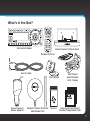
What’s in the Box?
Starmate 5 Radio
PowerConnect Vehicle Dock
Remote Control
Aux In Cable
Dash Mount
PowerConnect
Power Adapter
Magnetic Mount Antenna
and Rubber Tail
Screws
Vent Mount
and Extended
Vent Clamps
Antenna & Dash Mount
Alcohol Preparation Pads
9
Introduction
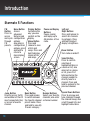
Starmate 5 Functions
FM
Button
Press to
access
and cycle
through
FM
presets.
Menu Button
Access
advanced
features and
configuration
options;
also when in
configuration
options, press
and hold to
return to
main display
screen.
Jump Button
Directly access traffic
and weather of the 20
most congested cities;
or access a favorite
channel.
10
Display Button
Customize the
way you view
content on the
display.
Memo Button
Press and
release to save
artists and
songs. Press and
hold to display
stored artists
and songs.
Band Button
Press and release
to switch between
the favorite channel
preset banks. Press
and hold to view My
Presets category.
Pause and Replay
Buttons
Pause, rewind,
and replay up to
44 minutes of live
radio.
Left and
Right Buttons
Press and release to
search for channels
by category. Press
and hold to adjust
display’s brightness.
Power Button
Turn radio on and off.
Select Button
Press to confirm
selection of
highlighted items in
a menu or list; also
when not in a menu
or list, press first
before entering the
channel number, to
directly tune to a
channel. Press and
hold to go back to the
previous channel.
Number Buttons
Select your favorite
channels; also enter
a channel number.
Up and Down Buttons
Press to preview and
tune channels through
the channel lineup; also
scroll through lists and
highlight menu items.
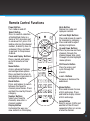
Remote Control Functions
Power Button
Turn radio on and off.
Select Button
Press to confirm selection
of highlighted items in a
menu or list; also when not
in a menu or list, press first
before entering the channel
number, to directly tune to
a channel. Press and hold
to go back to the previous
channel.
Pause and Replay Buttons
Pause, rewind, and replay
up to 44 minutes of live
radio.
Menu Button
Access advanced features
and configuration options.
Press and hold to return to
main display screen when in
configuration options.
Band Button
Press and release to switch
between the favorite
channel preset banks. Press
and hold to view My Presets
category.
Number Buttons
Select your favorite
channels; also enter a
channel number.
Display Button
Customize the way you
view content on the display.
Mute Button
Silence live radio and
replayed content.
Left and Right Buttons
Press and release to search
for channels by category.
Press and hold to adjust
display’s brightness.
Up and Down Buttons
Press to preview and tune
channels through the
channel lineup; also scroll
through lists and highlight
menu options.
FM Presets Button
Press to access and
cycle through FM
presets.
+ and – Buttons
Increase or decrease the
audio level.
Memo Button
Press and release to save
artists and songs. Press
and hold to display stored
artists and songs.
Jump Button
Directly access traffic and
weather of the 20 most
congested cities; or access
a favorite channel.
11
Introduction
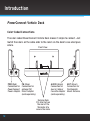
PowerConnect Vehicle Dock
Color-Coded Connections
The color-coded PowerConnect Vehicle Dock makes it simple to connect. Just
match the colors on the cable ends to the colors on the dock to see what goes
where.
Front View
PWR
FM
PWR (Red)
Connection for
PowerConnect
Power Adapter.
AUDIO
FM (Blue)
Connection for
optional FM
Direct Adapter
(sold separately).
AUDIO (Green)
Connection for
Aux In Cable or
Cassette Adapter
(sold separately).
Docking Rails
Fits into slots on
the rear of the
Starmate 5 to
secure the radio.
12
ANT
ANT (Silver)
Connection for
the Magnetic
Mount Antenna.
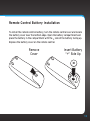
Remote Control Battery Installation
To install the remote control battery, turn the remote control over and locate
the battery cover near the bottom edge. Open the battery compartment and
place the battery in the compartment with the + side of the battery facing up.
Replace the battery cover on the remote control.
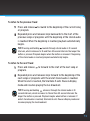
Remove
Cover
Insert Battery
“+” Side Up
13
14
Vehicle Installation
15
Vehicle Installation
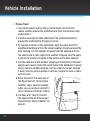
Step 1: Choose a Location for Your Radio
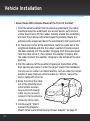
When installing the Starmate 5 in your vehicle, choose a location where it will not
block your vision, interfere with the controls, or obstruct any air bags. The location
should be easily accessible and provide good visibility of the display, and should
not be located where it will be in direct sunlight, which will affect the visibility of
the display screen.
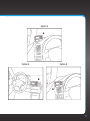
Several examples of the Starmate 5 mounted in a vehicle are shown: A is the on
dash method using the Dash Mount, and B is the vent clip method using the Vent
Mount.
Option 1
Option 2
A.
A.
16
Option 3
A.
jump
Option 4
Option 5
B.
B.
17
Vehicle Installation
Step 2: Install the Vent or Dash Mount
Depending on your situation, you can either choose to use the Dash Mount or the
Vent Mount.
Installing the Dash Mount:
CAUTION! The adhesive used on the Dash Mount may be difficult to remove. Do not
install this mount on leather surfaces (contact your vehicle dealer if you are unsure
about your dash surface), and make sure the air temperature is at
least 60°F (15°C) during installation. If it’s not at least 60°F, turn on
the heater in your vehicle to bring the temperature up to 60°F.
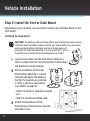
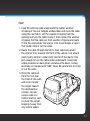
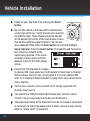
1
Locate a flat surface for the Dash Mount. Make sure
there is ample room for the PowerConnect Vehicle Dock
and Starmate 5 when installed.
2 Set the orientation of the Dash
Mount before adhering it. Loosen
the knob and adjust the adhesive
foot for the location you selected
in “Step 1: Choose a Location for
Your Radio” on page 16:
I
•Option 1 & Option 3 should be oriented
as I.
•Option 2 should be oriented as II.
3 Attach the Dash Mount to the
PowerConnect Vehicle Dock using the
provided screws.
18
II
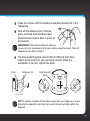
4 Clean the surface with the alcohol preparation pad and let it dry
thoroughly.
5 Peel off the adhesive liner. Position,
press, and hold the Dash Mount and
PowerConnect Vehicle Dock in place for
30 seconds.
IMPORTANT! Allow the Dash Mount adhesive
to cure (dry) for a minimum of 2-4 hours before using the mount. The best
adhesion occurs after 24 hours.
6 The dock mounting plate can be tilted in different directions.
Adjust as necessary for your particular vehicle. When the
orientation is correct, tighten the knob.
Knob
Adhesive Foot
Dock Mounting
Plate
TIP! To remove, carefully lift the adhesive pad with your fingers or a spoon.
Warming the pad with a hair dryer for several minutes will help soften the
adhesive.
19
Vehicle Installation
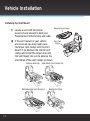
Installing the Vent Mount:
1
Locate a vent with horizontal
louvers sturdy enough to hold your
PowerConnect Vehicle Dock and radio.
2 If the vent louvers in your vehicle
are recessed, you may need to use
the longer vent clamps with the Vent
Mount. If so, Remove the shorter vent
clamps and install the longer ones into
the Vent Mount. Be sure to observe the
orientation of the vent clamps as shown.
Remove End Cap
Short Vent
Clamps
Slide Short Vent Clamps Out
Slide Extended Vent Clamps In
20
Extended Vent Clamps
Replace End Cap
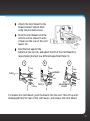
3 Attach the Vent Mount to the
PowerConnect Vehicle Dock
using the provided screws.
4 Push the Vent Mount onto the
vehicle vent as shown (1) until
it hooks on the rear of the vent
louver (2).
5 Rest the foot against the
bottom of the vent (2), and adjust the tilt of the Vent Mount by
repositioning the foot to a different adjustment hole (3).
1
2
3
Dash
Dash
Dash
HOOKED
PUSH
Vent
Vent
Louver
FOOT
Vent
TILT
ADJUSTMENT
HOLES
To remove the Vent Mount, push the mount into the vent. Then lift up until
disengaged from the rear of the vent louver, and remove the Vent Mount.
21
Vehicle Installation
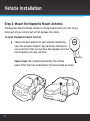
Step 3: Mount the Magnetic Mount Antenna
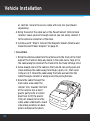
The Magnetic Mount Antenna contains a strong magnet which will stick to any
metal part of your vehicle, but will not damage the vehicle.
To install the Magnetic Mount Antenna:
1
Choose the best location for your antenna considering
your own personal situation. Pay particular attention to
any accessories that you may have like luggage racks and
how frequently you may use them.
Sedan/Coupe: We recommend mounting the antenna
above either the front windshield or the back window as shown.
Magnet
22
SUV: We recommend mounting the antenna at the rear of the roof
as shown.
Convertible: We recommend mounting the antenna at the leading
edge of the trunk as shown.
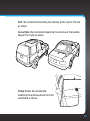
Pickup Truck: We recommend
mounting the antenna above the front
windshield as shown.
23
Vehicle Installation
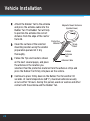
2 Attach the Rubber Tail to the antenna
and press the antenna cable into the
Rubber Tail. The Rubber Tail will help
to position the antenna the correct
distance from the edge of the roof or
trunk lid.
Protective
Material
3 Clean the surface of the selected
mounting location using the alcohol
preparation pad and let it dry
thoroughly.
Magnetic Mount Antenna
(Upside-Down)
Strain
Relief
Rubber
Antenna
Tail
4 Follow the Tips and Cautions shown
Antenna Cable
on the next several pages, and place
the antenna in the location you
selected. Peel the protective material from the adhesive strips and
press the Rubber Tail firmly into place on the vehicle.
5 Continue to press firmly down on the Rubber Tail for another 30
seconds. At room temperature (68° F), maximum adhesion usually
occurs within 72 hours. During this period, avoid car washes and other
contact with the antenna and the Rubber Tail.
24
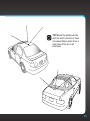
TIP! Mount the antenna on the
roof (for most vehicles) or trunk
(for convertibles) where it has a
clear view of the sky in all
directions.
25
Vehicle Installation
3”
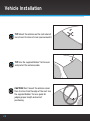
TIP! Mount the antenna on the roof where it
has at least 3 inches of clear space around it.
TIP! Use the supplied Rubber Tail to cover
and protect the antenna cable.
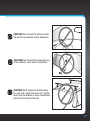
CAUTION! Don’t mount the antenna closer
than 3 inches from the edge of the roof. Use
the supplied Rubber Tail as a guide for
judging proper length and correct
positioning.
26
CAUTION! Don’t mount the antenna inside
the vehicle, for example, on the dashboard.
CAUTION! Don’t mount the antenna on any
of the vehicle’s front, back or side pillars.
CAUTION! Don’t mount the antenna close
to a roof rack. Adjust the rack so it’s further
away from the antenna or move the antenna
closer to the center of the roof.
27
Vehicle Installation
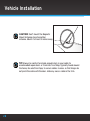
CAUTION! Don’t mount the Magnetic
Mount Antenna close to another
antenna. Mount it at least 3 inches away.
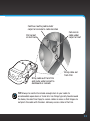
TIP! Always be careful to include enough slack in your cable to
accommodate open doors or trunk lids. Use things typically found around
the home, like electrical tape, to secure cables in areas so that hinges do
not pinch the cable with the door. Hide any excess cable in the trim.
28
Step 4: Route the Magnetic Mount Antenna Cable
Before you begin routing the antenna cable, read these general instructions
for how to route and hide the antenna cable. Then route your antenna cable
according to the instructions which follow for your specific type of vehicle.
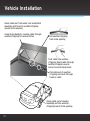
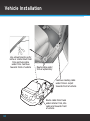
Use a blunt plastic putty knife, a credit card,
a plastic knife, or a similar blunt tool to lift the
rubber window moulding
Tuck the cable under the
moulding around the window
Feed cable under
rubber moulding
around window
29
Vehicle Installation
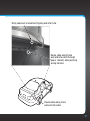
Route cable out from under rear windshield
moulding and tuck into weatherstripping
around trunk opening
Avoid sharp bends by running cable through
weatherstripping for several inches
Pull weatherstripping
from trunk opening
Tuck cable into weatherstripping. Route cable through
weatherstripping several
inches to avoid sharp bends
Pull cable out of weatherstripping and route through
trunk to cabin
Route cable out of window
moulding and into weatherstripping around trunk opening
30
Bring cable out of weatherstripping and into trunk
Route cable along trunk
wall and into cabin through
gap or conduit, along existing
wiring harness
Route cable along trunk
wall and into cabin
31
Vehicle Installation
Use a blunt plastic putty
knife or similar blunt tool
trim and tuck cable
under trim. Continue
towards front of vehicle
Route cable under
trim or upholstery
Continue routing cable
under trim or carpet
towards front of vehicle
Route cable from trunk
under interior trim, into
cabin and towards front
of vehicle
32
Continue routing cable under
carpet or console to radio location
Pull carpet
or mat back
Coil excess
cable under
carpet or mat
Bring cable out
from trim
Bring cable out from trim
and route under carpet to
dashboard or console
TIP! Always be careful to include enough slack in your cable to
accommodate open doors or trunk lids. Use things typically found around
the home, like electrical tape, to secure cables in areas so that hinges do
not pinch the cable with the door. Hide any excess cable in the trim.
33
Vehicle Installation
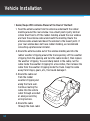
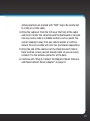
•Sedan/Coupe With Antenna Placed at the Rear of the Roof:
1. Feed the antenna cable from the antenna underneath the rubber
molding around the rear window. Use a blunt plastic putty knife or
similar blunt tool to lift the rubber molding around the rear window
and tuck the antenna cable underneath the molding. Route the
antenna cable around and down the window to the lowest point. If
your rear window does not have rubber molding, we recommend
consulting a professional installer.
2.Route the antenna cable out of the window molding and into the
rubber weather stripping around the trunk opening. Lift the weather
stripping from the opening and tuck the cable inside it, then replace
the weather stripping. To avoid sharp bends in the cable, run the
cable inside the weather stripping for a few inches, then remove the
cable from the weather stripping inside the trunk. Keep the cable
away from hinges, gears, etc., that could damage it.
3.Route the cable out
from the rubber
weather stripping and
along the trunk wall.
Continue routing the
cable into the vehicle
cabin through a conduit
or along an existing
wiring harness.
4.Route the cable
through the main cabin
34
area under the interior trim, towards the front of the vehicle.
Use a blunt plastic putty knife or similar blunt tool to lift the
plastic trim just enough to tuck the cable under underneath.
Avoid side airbag locations on back pillars and above the doors.
Airbag locations are marked with “SRS” logos. Be careful not
to crimp or cut the cable.
5.Bring the cable out from the trim near the front of the cabin
and route it under the carpet toward the dashboard or console.
Coil any excess cable in a hidden location, such as under the
carpet, keeping it away from any vehicle pedals or controls.
Secure the excess cable with wire ties (purchased separately).
6.Bring the end of the cable out at the PowerConnect Vehicle
Dock location. Leave yourself enough cable so you can easily
connect it to the antenna connector of the dock.
7.Continue with “Step 5: Connect the Magnetic Mount Antenna
and PowerConnect Power Adapter” on page 41.
35
Vehicle Installation
•Sedan/Coupe With Antenna Placed at the Front of the Roof:
1. Feed the antenna cable from the antenna underneath the rubber
molding around the windshield. Use a blunt plastic putty knife or
similar blunt tool to lift the rubber molding around the windshield
and tuck the antenna cable underneath the molding. Route the
antenna cable around and down the windshield to the lowest point.
2.At the lowest corner of the windshield, route the cable out of the
windshield molding and into the rubber weather stripping around
the door opening. Lift the weather stripping from the opening and
tuck the cable inside it, then replace the weather stripping. Run
the cable inside of the weather stripping to the bottom of the door
opening.
3.Pull the cable out of the weather stripping at the bottom of the
door opening and route it under the carpet toward the dashboard.
Coil any excess cable in a hidden location, such as under the carpet,
keeping it away from any vehicle pedals or controls. Secure the
excess cable with wire ties.
4.Bring the end of the cable
out at the PowerConnect
Vehicle Dock location.
Leave yourself enough
cable so you can easily
connect it to the antenna
connector of the dock.
5.Continue with “Step 5:
Connect the Magnetic
Mount Antenna and PowerConnect Power Adapter” on page 41.
36
•SUV:
1. Feed the antenna cable underneath the rubber weather
stripping of the rear tailgate window/door and route the cable
along the rear hatch. Lift the weather stripping from the
opening and tuck the cable inside it, then replace the weather
stripping. Pull the cable out from weather stripping and route
it into the cabin under the interior trim. Avoid hinges or gears
that could crimp or cut the cable.
2.Route the cable through the SUV’s main cabin area under
the interior trim, towards the front of the vehicle. Use a blunt
plastic putty knife or similar blunt tool to lift the plastic trim
just enough to tuck the cable under underneath. Avoid side
airbag locations on back pillars and above the doors. Airbag
locations are marked with “SRS” logos. Be careful not to crimp
or cut the cable.
3.Bring the cable out
from the trim near
the front of the cabin
and route it under
the carpet toward
the dashboard or
console. Coil any
excess cable in a
hidden location, such
as under the carpet,
keeping it away from
any vehicle pedals
37
Vehicle Installation
or controls. Secure the excess cable with wire ties (purchased
separately).
4.Bring the end of the cable out at the PowerConnect Vehicle Dock
location. Leave yourself enough cable so you can easily connect it
to the antenna connector of the dock.
5.Continue with “Step 5: Connect the Magnetic Mount Antenna and
PowerConnect Power Adapter” on page 41.
•Convertible:
1. Bring the antenna cable from the antenna into the trunk at the front
edge of the trunk lid. Keep any bends in the cable loose. Tape or tie
the cable along the inside of the trunk lid to the trunk lid hinge strut.
2.Allow enough slack in the cable so the trunk lid can easily open and
close and keep the cable away from hinges, gears, etc., that could
crimp or cut it. Route the cable along the trunk wall and into the
cabin through a conduit or along an existing wiring harness.
3.Route the cable through the
main cabin area under the
interior trim, towards the front
of the vehicle. Use a blunt
plastic putty knife or similar
blunt tool to lift the plastic
trim just enough to tuck the
cable under underneath. Avoid
side airbag locations on back
pillars and above the doors.
38
Airbag locations are marked with “SRS” logos. Be careful not
to crimp or cut the cable.
4.Bring the cable out from the trim near the front of the cabin
and route it under the carpet toward the dashboard or console.
Coil any excess cable in a hidden location, such as under the
carpet, keeping it away from any vehicle pedals or controls.
Secure the excess cable with wire ties (purchased separately).
5.Bring the end of the cable out at the PowerConnect Vehicle
Dock location. Leave yourself enough cable so you can easily
connect it to the antenna connector of the dock.
6.Continue with “Step 5: Connect the Magnetic Mount Antenna
and PowerConnect Power Adapter” on page 41.
39
Vehicle Installation
•Pickup Truck:
1. Use a blunt plastic putty knife or similar blunt tool to lift the
rubber molding around the windshield and tuck the antenna cable
underneath it.
2.Continue tucking the cable underneath the windshield molding
around the windshield to the lowest corner.
3.At the lowest corner of the windshield, route the cable out of the
windshield molding and into the rubber weather stripping around the
door opening. Lift the weather stripping from the opening and tuck
the cable inside it, then replace the weather stripping. Run the cable
inside of the weather stripping to the bottom of the door opening.
4.Pull the cable out of the weather stripping at the bottom of the door
opening and route it under the carpet toward the dashboard. Coil any
excess cable in a hidden location, such as under the carpet, keeping
it away from any vehicle pedals or controls. Secure the excess cable
with wire ties.
5.Bring the end of the cable out at
the PowerConnect Vehicle Dock
location. Leave yourself enough
cable so you can easily connect it
to the antenna connector of dock.
6.Continue with “Step 5: Connect
the Magnetic Mount Antenna and
PowerConnect Power Adapter” on
page 41.
40
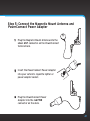
Step 5: Connect the Magnetic Mount Antenna and
PowerConnect Power Adapter
1
Plug the Magnetic Mount Antenna into the
silver ANT connector on the PowerConnect
Vehicle Dock.
AUDIO
ANT
2 Insert the PowerConnect Power Adapter
into your vehicle’s cigarette lighter or
power adapter socket.
PWR
FM
3 Plug the PowerConnect Power
Adapter into the red PWR
connector on the dock.
41
Vehicle Installation
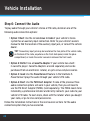
Step 6: Connect the Audio
To play audio through your vehicle’s stereo or FM radio, decide on one of the
following audio connection options:
• Option 1: Best: Use the included Aux In Cable if your vehicle’s stereo
system has an auxiliary input connection. Refer to your vehicle’s owners
manual to find the location of the auxiliary input jack, or consult the vehicle
dealer.
TIP! The auxiliary input jack may be located on the face plate of the vehicle radio,
on the back of the radio, anywhere on the front dash panel, inside the glove
compartment, or inside the center console in between the front seats.
• Option 2: Better: Use a Cassette Adapter if your vehicle has a builtin cassette player. Cassette Adapters are sold separately and can be
purchased from an electronics retailer, or go to sirius.com/accessories.
• Option 3: Good: Use the PowerConnect feature in the Starmate 5.
PowerConnect plays the audio through your vehicle’s FM radio.
• Option 4: Best: Use the FM Direct Adapter. If none of the previous three
audio connection options will work in your vehicle, then you will need to
use the FM Direct Adapter (FMDA) (sold separately). The FMDA needs to be
installed by a professional installer and directly connects your radio to your
vehicle’s FM radio. To learn more, check with the retailer where you bought
your radio, or go to sirius.com/accessories.
Follow the installation instructions in the next several sections for the audio
connection option that you have selected.
42
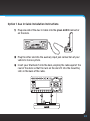
Option 1: Aux In Cable Installation Instructions
1
Plug one end of the Aux In Cable into the green AUDIO connector
on the dock.
AUDIO
ANT
2 Plug the other end into the auxiliary input jack connection of your
vehicle’s stereo system.
3 Insert your Starmate 5 into the dock, aligning the radio against the
rear of the dock so that the rails on the dock fit into the mounting
slots in the back of the radio.
43
Vehicle Installation
4 Power on your Starmate 5 by pressing the Power
button.
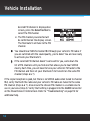
5 Be sure the vehicle is outside and the antenna has
a clear view of the sky. Verify that you are receiving
the SIRIUS signal. There should at least be one bar
on the bottom left corner of the main display screen
that denotes antenna signal strength. You can also
press menu and then press the Down button to scroll and highlight
Signal Indicator. Press the Select button. The Satellite and Terrestrial
bars show the strength of the
signal being received. If the signal
reception is good, press and hold
menu to return to the main display
screen.
6 Ensure that the Starmate 5 is tuned
to channel 184. Upon power up, the Starmate 5 should tune to channel
184 by default, when it’s not yet activated. If it’s not on channel 184,
refer to “Listening to Satellite Radio” on page 65 to learn about how to
tune a channel.
7 Turn on your vehicle’s stereo system. Set it to play input from the
auxiliary input source.
8 You should hear SIRIUS channel 184 through your vehicle’s stereo
system. You are now ready to activate your Starmate 5.
9 The audio level output of the Starmate 5 can be increased or decreased
as necessary to match the audio levels of other sources in your vehicle.
Refer to “Audio Level” on page 100.
44
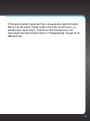
If the signal reception is good, but there is no audio when tuned to channel
184, be sure the vehicle’s stereo system is set to the correct source, i.e.,
auxiliary input source (step 7). Also be sure that the audio level is set
high enough to be heard (step 9). Refer to “Troubleshooting” on page 112 for
additional help.
45
Vehicle Installation
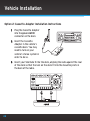
Option 2: Cassette Adapter Installation Instructions
1
Plug the Cassette Adapter
into the green AUDIO
connector on the dock.
2 Insert the Cassette
Adapter in the vehicle’s
cassette deck. You may
need to turn on your
vehicle’s stereo system in
order to do so.
AUDIO
ANT
3 Insert your Starmate 5 into the dock, aligning the radio against the rear
of the dock so that the rails on the dock fit into the mounting slots in
the back of the radio.
46
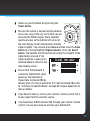
4 Power on your Starmate 5 by pressing the
Power button.
5 Be sure the vehicle is outside and the antenna
has a clear view of the sky. Verify that you are
receiving the SIRIUS signal. There should at
least be one bar on the bottom left corner of
the main display screen that denotes antenna
signal strength. You can also press menu and then press the Down
button to scroll and highlight Signal Indicator. Press the Select
button. The Satellite and Terrestrial bars show the strength of the
signal being received. If the
signal reception is good, press
and hold menu to return to the
main display screen.
6 Ensure that the Starmate 5
is tuned to channel 184. Upon
power up, the Starmate 5
should tune to channel 184 by
default, when it’s not yet activated. If it’s not on channel 184, refer
to “Listening to Satellite Radio” on page 65 to learn about how to
tune a channel.
7 If you haven’t done so, turn on your vehicle’s stereo system. Set it
to play input from the cassette source.
8 You should hear SIRIUS channel 184 through your vehicle’s stereo
system. You are now ready to activate your Starmate 5.
47
Vehicle Installation
9 The audio level output of the Starmate 5 can be increased or decreased
as necessary to match the audio levels of other sources in your vehicle.
Refer to “Audio Level” on page 100.
If the signal reception is good, but there is no audio when tuned to channel 184, be
sure the vehicle’s stereo system is set to the correct source, i.e., cassette source
(step 7). Also be sure that the audio level is set high enough to be heard (step 9).
Refer to “Troubleshooting” on page 112 for additional help.
48
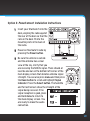
Option 3: PowerConnect Installation Instructions
1
Insert your Starmate 5 into the
dock, aligning the radio against
the rear of the dock so that the
rails on the dock fit into the
mounting slots in the back of
the radio.
2 Power on Starmate 5 radio by
pressing the Power button.
3 Be sure the vehicle is outside
and the antenna has a clear
view of the sky. Verify that you
are receiving the SIRIUS signal. There should at
least be one bar on the bottom left corner of the
main display screen that denotes antenna signal
strength. You can also press menu and then press
the Down button to scroll and highlight Signal
Indicator. Press the Select button. The Satellite
and Terrestrial bars show the strength of the
signal being received. If the
signal reception is good, press
and hold menu to return to
the main display screen. You
are ready to make the audio
connection.
49
Vehicle Installation
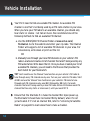
4 You’ll first need to find an available FM channel. An available FM
channel is one that’s not being used by an FM radio station in your area.
When you tune your FM radio to an available channel, you should only
hear static or silence – not talk or music. We recommend one of the
following methods to find an available FM channel:
a.Use the SIRIUS|XM FM Channel Finder at www.sirius.com/
fmchannel. Go to the website and enter your zip code. The Channel
Finder will suggest a list of available FM channels in your area. For
convenience, write down or print out the list.
OR
b.Manually tune through your local FM channels on your vehicle’s FM
radio. Locate and create a list of channels that aren’t being used by any
FM radio station. Write down the list. Once you have created your list of
available FM channels, you will need to find the one that provides the
best match for your Starmate 5.
TIP! You’ll need to use the ‘Manual’ tune function on your vehicle’s FM radio to
tune through every FM channel one-by-one. Turn on your vehicle’s FM radio. Start
at 88.1 and use the ‘Manual’ tune function on your vehicle’s FM radio to tune
through each FM channel one-by-one (88.1 followed by 88.3 etc.) to locate
channels that aren’t being used by a local FM radio station. Write down each FM
channel that has only static or silence on it, until you reach 107.9.
5 Ensure that the Starmate 5 is tuned to channel 184. Upon power up,
the Starmate 5 should tune to channel 184 by default, when it’s not
yet activated. If it’s not on channel 184, refer to “Listening to Satellite
Radio” on page 65 to learn about how to tune a channel.
50
6 Pick the first FM channel on your list from step 4. Turn on your
vehicle’s FM radio (if you have not already done so) and tune it to this
FM channel.
90.1
MATCH FM CHANNELS
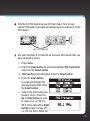
7 Set your Starmate 5 to transmit on the same FM channel that you
have selected in step 4:
i. Press menu.
ii. Press the Down button to scroll and highlight FM Transmitter
and press the Select button.
iii. FM Presets will be highlighted. Press the Select button.
iv. Press the Down button
to scroll and highlight the
storage location FM2. Press
the Select button.
v. Tune to the FM channel you
found in step 3. Press the
Up or Down button to tune
in steps of .2, i.e., 99.3 to
99.5. Press the Left or Right
button to tune in steps of 1,
i.e., 99.3 to 100.3. When the
51
Vehicle Installation
desired FM channel is displayed on
screen, press the Select button to
select the FM channel.
vi. The FM channel you selected will
be confirmed on the display screen.
The Starmate 5 will tune to the FM
channel.
8 You should hear SIRIUS channel 184 through your vehicle’s FM radio. If
you are satisfied with the sound quality, you’re done! You are now ready
to activate your Starmate 5.
9 If the selected FM channel doesn’t work well for you, work down the
list of FM channels until you find one that allows you to hear SIRIUS
clearly. Each time, you will need to tune your vehicle’s FM radio to the
FM channel and then set your Starmate 5 to transmit on the same FM
channel (steps 6 & 7).
If the signal reception is good, but there is no SIRIUS audio when tuned to channel
184, verify that both the radio and your vehicle’s FM radio are tuned to the same
FM channel (steps 6 & 7). Also ensure the chosen FM channel is a suitable one to
use in your area (step 4). Verify that nothing is plugged into the AUDIO connector
on the PowerConnect Vehicle Dock. Refer to “Troubleshooting” on page 112 for
additional help.
52
Option 4: FM Direct Adapter (FMDA) Installation
The FMDA needs to be installed by a professional installer. Professional
installation can help improve your radio’s reception and significantly reduce
the visibility of wires. To learn more, check with the retailer where you bought
your radio, or go to sirius.com/accessories.
53
54
Activation
55
Activation
Before you can enjoy Commercial-Free Music, plus Sports, News, Talk &
Entertainment, you need to activate your Starmate 5:
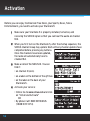
1
Make sure your Starmate 5 is properly installed, turned on, and
receiving the SIRIUS signal so that you can hear the audio on channel
184.
2 When you first turn on the Starmate 5, after the startup sequence, the
SIRIUS channel lineup may update. Wait until any channel updates have
completed before pressing any buttons.
Once the channels have been updated,
the radio will automatically tune to
channel 184.
3 Make a note of the SIRIUS ID. You can
find it:
•on channel 0 (zero)
•on a label on the bottom of the gift box
•on the label on the back of your
Starmate 5.
4 Activate your service:
56
•Online: Go to www.sirius.com and click
on “Install and Activate”
OR
•By phone: Call 1-888-539-SIRIUS
(1-888-539-7474)
5 When your service is activated, your Starmate 5 will display
an alert message. To continue, press any button. Thereafter, if
you press the Up or Down button you can scroll and tune other
channels. Activation usually takes less than 5 minutes, but
sometimes may take longer. We recommend that your radio remain
on until activated.
57
58
Using Your Starmate 5
59
Using Your Starmate 5
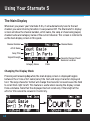
The Main Display
Whenever you power your Starmate 5 On, it will automatically tune to the last
channel you were listening to before it was powered Off. The Starmate 5’s display
screen will show the channel number, artist name, the song or show being played,
channel name and category name of the current channel. This screen is referred to
as the main display screen in this guide.
Channel Number
Channel Name
Artist Name
Song Title
Signal Strength
Favorate Channel Preset
Bank and Location
Category Name
Clock
Changing the Display Mode
Pressing and releasing disp while the main display screen is displayed toggles
between the 2-line artist name/song title text and large character displayed
text. The large character format will change the character size and cause the field
to scroll from right to left. This feature is useful when viewing the display screen
from a distance. Note that the displayed text will scroll only if the length of the
artist or title cannot be viewed in its entirety.
60
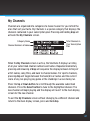
My Channels
Channels are organized into categories to make it easier for you to find the
ones that suit your taste. My Channels is a special category that displays the
channels contained in your subscription plan. Pressing and holding disp will
activate the My Channels screen.
Category Name
Channel Numbers & Names
Total Channels in
Your Subscription
Plan
When the My Channels screen is active, the Starmate 5 displays a listing
of all your subscribed channel numbers and names. Repeated momentary
pressing and releasing of disp will sequence the display between listings of
artist names, song titles, and back to channel names. For sports channels,
pressing disp will toggle between the team/driver names and the current
score of any live play-by-play game or the standings in a race being run.
Press the Up or Down button to scroll through the available subscribed
channels. Press the Select button to tune to the highlighted channel. The
new channel will begin playing and the display will revert to the main display
screen for the new channel.
To exit the My Channels screen without changing to a different channel and
return to the main display screen, press and hold disp.
61
Using Your Starmate 5
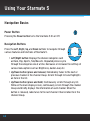
Navigation Basics
Power Button
Pressing the Power button turns the Starmate 5 On or Off.
Navigation Buttons
Press the Left, Right, Up, and Down buttons to navigate through
various features and functions of Starmate 5.
• Left/Right button: Displays the channel categories such
as Rock, Pop, Sports, Talk/New etc. Repeated presses cycle
through the categories one at a time. Decreases or increases the settings of
various menu options such as Brightness, Audio Level, etc.
• Up/Down button (press and release): Immediately tunes to the next or
previous channel in the channel lineup. Scrolls through lists and highlights
an item in the list.
• Up/Down button (press and hold): Continuously scrolls through any list.
While on the main display screen, continuously scrolls through the channel
lineup and briefly displays the information of each channel. When the
button is released, radio tunes to the last channel it had scrolled to in the
channel lineup.
62
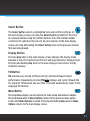
Select Button
The Select button selects a highlighted item and confirms settings. At
the main display screen, pressing the Select button prompts for the entry
of a channel number using the number buttons. Once the channel number
is entered, the radio directly tunes to the new channel. At the main display
screen, pressing and holding the Select button tunes to the previous channel
that was being played.
Display Button
Pressing disp while in the main display screen changes the display mode
between 2-line artist name/song title text and large character displayed text.
Pressing and holding disp while in the main display screen enters the My
Channels category.
FM Button
FM provides easy tuning of FM presets for optimized PowerConnect
performance. Repeatedly pressing FM
displays and cycles through the
list of preset FM channels one at a time. The radio automatically tunes to the
displayed FM channel.
Menu Button
Pressing menu displays various options to make setup and feature changes.
Pressing menu when in Menu Options returns to the previous menu option
screen until Menu Options is exited. Pressing and holding menu when in Menu
Options returns to the main display screen.
63
Using Your Starmate 5
Jump Button
Depending on how it is configured, pressing jump either tunes to the
channel broadcasting traffic and weather conditions of a selected city,
from a list of the 20 most congested cities, or tunes to a favorite channel. Pressing
it again returns it to the original channel.
Number Buttons
Each number button stores a favorite channel in its button
location and provides one touch access to it afterward. Number buttons also
directly tune to a channel when the channel number is entered after pressing the
Select button while in the main display screen.
Memo Button
Pressing and releasing memo saves artist names and song titles. Up to 30 artist/
song title combinations plus one sports team/car can be stored in memory.
Pressing and holding memo enters the recall mode, displaying the stored artist/
song titles.
Pause and Replay Buttons
Replays approximately 44 minutes of live radio. plays/pauses,
fast-forwards through temporarily stored content.
rewinds, and
Band Button
Pressing and releasing band switches between the favorite channel preset
banks A, B, and C. Each bank holds 10 favorite channel presets for a total of 30.
Pressing and holding band switches to the My Presets category, where artists
and songs playing on each stored favorite channel preset can be viewed.
64
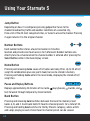
Listening to Satellite Radio
Tune a channel:
1
Press and release the Up or Down button to immediately tune to
the next or previous channel.
2 Press and hold the Up or Down button to speed scroll through the
channels. Release to tune to channel which is displayed.
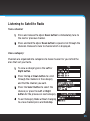
View a category:
Channels are organized into categories to make it easier for you to find the
ones that suit your taste.
1
To view a category press the Left or
Right button.
2 Press the Up or Down button to scroll
through the channels in the category
and find the channel you want.
3 Press the Select button to select the
channel, or press the Left or Right
button for the previous or next category.
4 To exit Category Mode without changing
to a new channel press and hold disp.
65
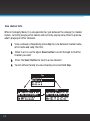
View channel lists:
While in Category Mode, it is also possible to cycle between the category’s channel
names, currently playing artist names and currently playing song titles to preview
what’s playing on other channels.
1
View a category. Repeatedly press disp to cycle between channel name,
artist name and song title lists.
2
While in a list, use the Up or Down button to scroll through to find the
channel you want.
3
Press the Select button to tune to a new channel.
4 To exit without tuning to a new channel, press and hold disp.
66
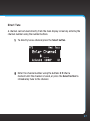
Direct Tune
A channel can be tuned directly from the main display screen by entering the
channel number using the number buttons.
1
To directly tune a channel press the Select button.
2 Enter the channel number using the buttons 0-9. Wait a
moment until the channel is tuned, or press the Select button to
immediately tune to the channel.
67
Using Your Starmate 5
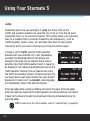
Jump
Depending upon how you configure it, jump will either tune to the
traffic and weather channel of a selected city, from a list of the 20 most
congested cities, or to a desired channel. This button allows you to quickly
tune to a channel that is accessed frequently and temporarily, such as
traffic/weather, sports, news, etc. and then tune back to the original
channel to which you were listening by pressing the button again.
If Jump is set to Traffic, and the traffic/weather
broadcast of your selected city is not immediately
available, the Band indicator on the display will
change to the jump icon to indicate that a jump is
pending. Once the traffic/weather report is ready to
be broadcast, the radio will automatically tune to the
traffic/weather channel. Since a channel may carry
the traffic and weather reports of more than one city,
you may have to wait a few minutes for your desired
broadcast. If Jump is set to JumpSet, pressing jump
will immediately tune to the desired channel.
Pressing jump while a jump is pending will cancel the jump. Pressing jump
after the radio has tuned to the traffic/weather or desired channel, will return
it back to the channel to which you had been listening immediately prior to
pressing jump.
TIP! To select a city for traffic/weather, refer to “Jump Settings” on page 95.
68
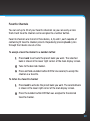
Favorite Channels
You can set up to 30 of your favorite channels so you can easily access
them. Each favorite channel can be assigned to a number button.
Favorite channels are stored in three banks, A, B, and C, each capable of
containing 10 favorite channel presets. Repeatedly pressing band cycles
through the 3 banks one at a time.
To assign a favorite channel to a number button:
1
Press band to activate the preset bank you want. The selected
bank is shown in the lower right corner of the main display screen.
2 Tune to the desired channel.
3 Press and hold a number button 0-9 for one second, to assign the
channel as a favorite.
To listen to a favorite channel:
1
Press band to activate the preset bank you want. The selected bank
is shown in the lower right corner of the main display screen.
2 Press the number button 0-9 that was assigned to the desired
favorite channel.
69
Using Your Starmate 5
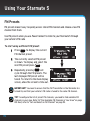
FM Presets
FM presets make it easy to quickly access stored FM channels and choose a new FM
channel from them.
Use FM presets when you use PowerConnect to listen to your Starmate 5 through
your vehicle’s FM radio
To start using a different FM preset:
1
Press
to display the current
FM channel preset.
2 The currently selected FM preset
is shown. To display and select the
next FM preset press
.
3 Repeatedly pressing
will
cycle through the FM presets. The
last displayed FM preset will be
tuned. To return to the main display
screen, allow the screen to time out.
IMPORTANT! You need to ensure that the FM Transmitter in the Starmate 5 is
turned On, and that your vehicle’s FM radio is tuned to the same FM channel.
TIP! To configure the list of preset FM channels, you need to find available FM
channels in your area. Refer to”Find Available FM Channels in Your Area” on page
89. Next, refer to “Set and Select an FM Channel” on page 93.
70
Special Features
71
Special Features
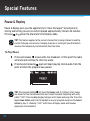
Pause & Replay
Pause & Replay gives you the opportunity to “hear that again” by temporarily
storing and letting you access content played approximately the last 44 minutes.
or places the Starmate 5 into Replay mode.
Pressing
TIP! This feature applies to the current channel that is being listened to and the
current listening session only. Changing channels or turning off your Starmate 5
removes the temporarily stored content from the radio.
To Play/Pause:
1
Press and release
to pause the live broadcast. At this point the radio
will mute and continue to store live audio.
2 Pressing and releasing again will begin playing stored audio from the
point at which the program was paused.
TIP! Pressing and holding
will show the Replay List. A listing of artist names
are shown for the stored audio from most recent to oldest, beginning with entry
called “Live”. Pressing disp toggles between artist name and song title. Press the
Up or Down button and scroll to highlight a song or program and press the Select
button to play it. Choosing “Live” exits Pause & Replay mode and resumes
playing the live broadcast.
72
To listen to the previous track:
1
Press and release
or program.
to rewind to the beginning of the current song
2 Repeated press and releases skips backwards to the start of the
previous songs or programs until the beginning of the stored audio
is reached. When the beginning is reached, playback automatically
begins.
TIP! Pressing and holding
rewinds through stored audio in 10 second
intervals, which increases to 15 and then 30 second intervals the longer the
button is pressed. Playback begins when the button is released. If beginning
of the stored audio is reached, playback automatically begins.
To listen to the next track:
1
Press and release
program.
to forward to the start of the next song or
2 Repeated press and releases skips forward to the beginning of the
next songs or programs until the end of stored audio is reached.
When the end is reached, the Starmate 5 exits Pause & Replay
mode and resumes playing the live broadcast.
TIP! Pressing and holding
advances through the stored audio in 10
second intervals, which increases to 15 and then 30 second intervals the
longer the button is pressed. Playback begins when button is released. If
end of stored audio is reached, Starmate 5 exits Pause & Replay mode and
resumes playing the live broadcast.
73
Special Features
S-Seek™
S-Seek™ tracks and finds a combination of up to 30 of your favorite artists and
songs, plus one sports team/car whenever they’re being played on any channel.
It continuously searches all the channels and alerts you when a match to a saved
choice is being played. When a sports team/car is stored in memory, at the time
the Starmate 5 is initially powered on, you will be alerted if the team/car is
playing/racing in a game/race that is being broadcast. Also, while listening to your
Starmate 5, you will be alerted should the team/car begin to play a game or begin
a race.
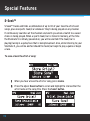
To save a favorite artist or song:
1
When you hear a favorite artist or song, press memo.
2 Press the Up or Down button to scroll and highlight to store either the
artist name or the song title. Press the Select button.
74
3 When an artist or song on your S-Seek™ list plays on any channel,
you’ll hear an alert tone and see a message that informs you about
the artist/song and the channel the song is being played on. To
switch to that channel, press the Select button.
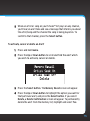
To activate, cancel or delete an Alert:
1
Press and hold memo.
2 Press the Up or Down button to scroll and find the alert which
you wish to activate, cancel or delete.
3 Press the Select button. The Memory Recall screen will appear.
4 Press the Up or Down button to highlight the option you want for
that particular alert, and press the Select button. If you select
Delete, a Delete Confirmation screen will appear. To permanently
delete the alert from the memory list, highlight and select Yes.
75
Special Features
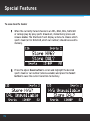
To save favorite teams:
1
When the currently-tuned channel is an NFL, NBA, NHL, NASCAR
or college play-by-play sports broadcast, momentarily press and
release memo. The Starmate 5 will display a menu to choose which
sports team (or for NASCAR, which car number) should be saved to
memory.
2 Press the Up or Down button to scroll and highlight the desired
sports team or car number (when available) and press the Select
button to save the current selection to memory.
76
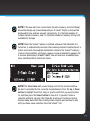
NOTE! If the new alert was successfully stored in memory, an Artist/Song/
Game Stored pop-up screen followed by an X Used/Y Empty screen will be
displayed for one and two seconds respectively. X is the total number of
listings stored in memory, and Y is the total number of memory listings still
available for storage.
NOTE! When the S-Seek™ option is enabled, whenever the Starmate 5 is
turned on, it automatically searches the incoming channels to determine if a
match exists with the program information stored in the S-Seek™ memory.
If one or more matches are found, a pop-up screen momentarily appears for
2 seconds and displays S-Seek™ Alert. You will also hear an audible beep
tone, indicating that a match was found.
NOTE! The Sirius Seek List screen display a list of the current matches.
No alert is provided for the currently-tuned channel. Press the Up or Down
button to highlight the artist, song, or sports event that you wish to listen
to, and then press the Select button to tune to it. If you don’t make a
selection within 10 seconds, the Starmate 5 will revert to the last active
display mode. Note that the currently-tuned channel will continue to play
until you make a new selection from the S-Seek™ list.
77
Special Features
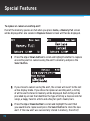
To replace or cancel an existing alert:
If all of the memory spaces are full when you press memo, a Memory Full screen
will be displayed for one second. A Replace–Cancel screen will then be displayed.
1
Press the Up or Down button to scroll and highlight whether to replace
an existing alert or cancel saving the alert to memory and press the
Select button.
2 If you chose to cancel saving the alert, the screen will revert to the last
active display mode. If you chose to replace an existing alert, a listing
of all the alerts stored in memory will be displayed. Each listing will be
preceded by an icon that identifies the type of listing: a musical note for
songs, a happy face for artists and a flag for sports teams/cars.
3 Press the Up or Down button to scroll and highlight the alert that
you would like to replace and press the Select button to store the new
alert. If the new alert was successfully stored in memory, the Artist/
78
Song/Game Stored pop-up screen followed by the X Used/Y
Empty screen will be displayed for one and two seconds
respectively. The Starmate 5 will then revert to the last
active display mode.
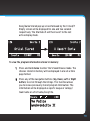
To view the program information stored in memory:
1
Press and hold memo to enter the S-Seek Browse mode. The
choices stored in memory will be displayed in one-at-a-time
page format.
2 Press any of the navigation buttons (Up, Down, Left or Right
button) to scroll through the listings. This function allows
you to review previously stored program information. The
information will be displayed as sports league or college/
team name or artist name/song title.
79
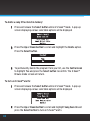
To delete a song title stored in memory:
1
Press and release the Select button while in S-Seek™ mode. A pop-up
screen displaying various selectable options will be displayed.
2 Press the Up or Down button to scroll and highlight the Delete option.
Press the Select button.
3 To permanently delete the program from your list, use the Control knob
to highlight Yes and press the Select button to confirm. The S-Seek™
Browse mode screen will return.
To turn on S-Seek™ alerts:
1
Press and release the Select button while in S-Seek™ mode. A pop-up
screen displaying various selectable options will be displayed.
2 Press the Up or Down button to scroll and highlight Song Seek On and
press the Select button to turn on S-Seek™ alerts.
80
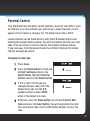
Parental Control
Your Starmate 5 has the ability to lock channels you do not want others (such
as children) to access without your permission. Locked channels will not
appear in the channel or category list. The default lock code is 0000.
Locked channels can be tuned directly using the 0-9 number buttons and
entering the locked channel number. You will be prompted to enter your lock
code. If the lock code is correctly entered, the channel will begin playing.
If you tune away from the locked channel to a different channel, the locked
channel will again be locked.
Changing the lock code:
1
Press menu.
2 Press the Down button to scroll and
highlight Settings and press the
Select button. Highlight Parental
Control and press the Select button.
3 If this is the first time you are
changing the lock code, enter the
default lock code. Use the 0–9
number buttons to enter 0000,
which is the default lock code.
4 Otherwise, press the Down button to scroll and highlight Edit
Code and press the Select button. You will be prompted to enter
the existing lock code. Use the 0-9 number buttons to enter the
code.
81
Special Features
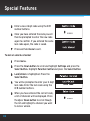
5 Enter a new 4 digit code using the 0–9
number buttons.
6 Once you have entered the code you will
then be prompted to enter the new code
again to confirm. If you entered the same
lock code again, the code is saved.
7 Press and hold menu to exit.
To lock or unlock a channel:
1
Press menu.
2 Press the Down button to scroll and highlight Settings and press the
Select button. Highlight Parental Control and press the Select button.
3 Lock/Unlock is highlighted. Press the
Select button.
4 You will be prompted to enter your 4 digit
lock code. Enter the lock code using the
0–9 number buttons.
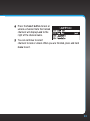
5 When you have entered the correct code,
a list of channels will be displayed. Press
the Up or Down button to scroll though
the list and highlight a channel you want
to lock or unlock.
82
6 Press the Select button to lock or
unlock a channel. Note that locked
channels will display Lock to the
right of the channel name.
7 You can continue to select
channels to lock or unlock. When you are finished, press and hold
menu to exit.
83
84
Where Else Can You Use Your Starmate 5?
85
Where Else Can You Use Your Starmate 5?
SIRIUS|XM offers a variety of accessories that allow you to adapt your Starmate
5 Radio to your lifestyle and enhance your listening experience. With these
accessories, you can effortlessly take your Satellite Radio listening experience
from your vehicle to your home or office or on the go — all with a single
subscription.
• In the Home, Office, etc. – With a Home Kit, you can play your Starmate 5
over an existing home, office, or other stereo system.
• In Other Vehicles – With a Vehicle Kit, you can enjoy your Starmate 5 in
more than one vehicle.
• In Almost Any Location You Like – With a desktop or portable Sound
System you have the freedom to listen to your Starmate 5 where and when
you want, from your kitchen or den, to the office, to outside on the deck, or
at a picnic.
For more information on SIRIUS accessories or to purchase an accessory, please
visit your local retailer or www.sirius.com/accessories.
86
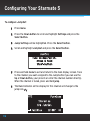
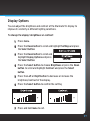
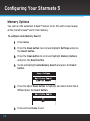
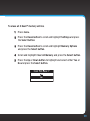
Configuring Your Starmate 5
87
Configuring Your Starmate 5
Sirius ID
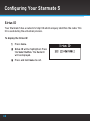
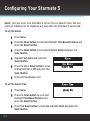
Your Starmate 5 has a numeric 12-digit ID which uniquely identifies the radio. This
ID is used during the activation process.
To display the Sirius ID:
1
Press menu.
2 Sirius ID will be highlighted. Press
the Select button. The Radio ID
will be displayed.
3 Press and hold menu to exit.
88
Find Available FM Channels in Your Area
Before attempting any of the procedures below, you should park your
vehicle in a safe location. Do not attempt to set up your FM channels or any
Starmate 5 function while driving.
PowerConnect allows you to listen to SIRIUS audio through your vehicle’s FM
radio. You will first need to find an available FM channel, which is a channel
that is not being used by an FM radio station in your area. When you tune
your FM radio to an available channel, you should only hear static or silence
– not talk or music.
Once you have found an available channel, you need to tune the Starmate
5’s built-in transmitter to the same channel to receive SIRIUS sound through
your vehicle’s radio.
We recommend one of the following methods to find an available FM channel:
1
Use the SIRIUS|XM FM Channel Finder
Use the SIRIUS|XM FM Channel Finder at www.sirius.com/
fmchannel. Go to the website and enter your zip code. The
Channel Finder will suggest a list of available FM channels in your
area. For convenience, write down or print out the list.
Tune the Starmate 5 to a favorite SIRIUS channel (or to channel
184, if it’s not yet activated). Turn on your vehicle’s FM radio.
Pick the first FM channel on your Channel Finder list and tune
the FM radio to that channel. If you do not hear a local FM station
broadcast, then tune the Starmate 5 to the same FM channel.
89
Configuring Your Starmate 5
(Refer to “Set and Select an FM Channel” on page 93.) You should hear
the SIRIUS channel through your vehicle’s radio. If you are satisfied
with the sound quality, you’re done! If this FM channel doesn’t work well
for you, work down the list until you find an FM channel that allows you
to hear SIRIUS clearly.
OR
2 Manually tune through your local FM channels
90
Manually tune through your local FM channels on your vehicle’s FM
radio. Turn on your vehicle’s FM radio. Start at 88.1 and use the ‘Manual’
tune function on your vehicle’s FM radio to tune through each FM
channel one-by-one (88.1 followed by 88.3 etc.) to locate channels
that aren’t being used by a local FM radio station. Write down each FM
channel that has only static or silence on it, until you reach 107.9. Once
you have created your list of available FM channels, you will need to find
the one that provides the best match for Starmate 5.
Tune the Starmate 5 to a favorite SIRIUS channel (or to channel 184, if
it’s not yet activated). Pick the first FM channel on your list and tune
the FM radio to that channel. Then tune the Starmate 5 to the same
FM channel. (Refer to “Set and Select an FM Channel” on page 93.) You
should hear the SIRIUS channel through your vehicle’s radio. If you are
satisfied with the sound quality, you’re done! If this FM channel doesn’t
work well for you, work down the list until you find an FM channel that
allows you to hear SIRIUS clearly.
NOTE! You may find an FM channel with static or silence that does not work
with the Starmate 5. It is possible that some type of inaudible interference
is present that prevents reception of the Starmate 5 broadcast. Your only
options are to use another FM channel or a different audio connection
method.
TIP! If you regularly drive from one location to another, such as your daily
commute, you may need to use different FM channels along your route for
best performance. If this is the case, we recommend saving the best FM
channels as presets on your FM radio and Starmate 5. Then you simply
select and match the best channel for the area you are in.
TIP! It will be much more difficult to find available FM channels in large
cities than in most suburban or rural locations. A direct audio connection
using the Aux In Cable, Cassette Adapter, or professional installation is your
best solution if you drive in or near large metropolitan areas.
NOTE! The SIRIUS|XM FM Channel Finder relies on data from the Federal
Communications Commission. The data may not reflect the latest stations in
your area. In addition, local geography and weather conditions can impact
reception, so your results may be different from the list.
NOTE! The performance of FM radios are different, based on manufacturer
and vehicle style. Some may not work well with the type of FM transmitter
used by the Starmate 5. This is why we recommend a direct audio
connection using the Aux In Cable or Cassette Adapter if they can be used in
your vehicle. Professional installation can also resolve almost any
performance issue.
91
Configuring Your Starmate 5
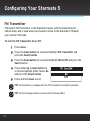
FM Transmitter
The built-in FM Transmitter in the Starmate 5 works with the PowerConnect
Vehicle Dock, and is used when you choose to listen to the Starmate 5 through
your vehicle’s FM radio.
To turn the FM Transmitter On or Off:
1
Press menu.
2 Press the Down button to scroll and highlight FM Transmitter and
press the Select button.
3 Press the Down button to scroll and highlight FM On/Off and press the
Select button.
4 Press either Up or Down button to
scroll and highlight either Yes or No
and press the Select button.
5 Press and hold menu to exit.
TIP! The Starmate 5 is shipped with the FM Transmitter turned On by default.
TIP! The FM1 storage location is preset with FM channel 88.1.
92
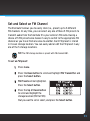
Set and Select an FM Channel
The Starmate 5 allows you to easily store (i.e., preset) up to 5 different
FM channels. At any time, you can select any one of these 5 FM presets to
transmit audio from the Starmate 5 to your vehicle’s FM radio. Having a
choice of 5 FM presets also makes it easy to switch to the appropriate FM
channel as you travel from one area to another. Each FM preset is stored
in its own storage location. You can easily add or edit the FM preset in any
one of the 5 storage locations.
TIP! The FM1 storage location is preset with FM channel 88.1.
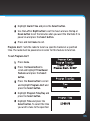
To set an FM preset:
1
Press menu.
2 Press the Down button to scroll and highlight FM Transmitter and
press the Select button.
3 FM Presets will be highlighted.
Press the Select button.
4 Press the Up or Down button
to scroll and highlight the
storage location (FM1 to FM5)
that you want to set or select, and press the Select button.
93
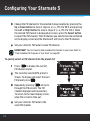
Configuring Your Starmate 5
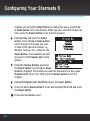
5 Change the FM channel for the selected storage location by pressing the
Up or Down button to tune in steps of .2, i.e., 99.3 to 99.5, and pressing
the Left or Right button to tune in steps of 1, i.e., 99.3 to 100.3. When
the desired FM channel is displayed on screen, press the Select button
to select the FM channel. The FM channel you selected will be confirmed
on the display screen and the Starmate 5 will tune to the FM channel.
6 Set your vehicle’s FM radio to same FM channel.
IMPORTANT! You first need to find available FM channels in your area. Refer to
”Find Available FM Channels in Your Area” on page 89.
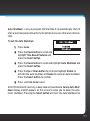
To quickly select an FM channel from the preset list:
1
Press
to display the current
FM channel preset.
2 The currently selected FM preset is
shown. To display and select the next
FM preset press
.
3 Repeatedly pressing
will cycle
through the FM presets. The FM
channel displayed will be selected.
To return to the main display screen,
allow the screen to time out.
4 Set your vehicle’s FM radio to the
same FM channel.
94
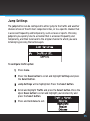
Jump Settings
The jump button can be configured to either jump to the traffic and weather
channel of one of the 20 most congested cities, or to a specific channel that
is accessed frequently and temporarily, such as news or sports. Pressing
jump lets you quickly tune to a channel that is accessed frequently and
temporarily, and then tune back to the original channel to which you were
listening by pressing the button again.
To configure traffic option:
1
Press menu.
2 Press the Down button to scroll and highlight Settings and press
the Select button.
3 Jump Settings will be highlighted. Press the Select button.
4 Scroll and highlight Traffic and press the Select button. Press the
Up or Down button to scroll and highlight your desired city and
press the Select button.
5 Press and hold menu to exit.
95
Configuring Your Starmate 5
To configure JumpSet:
1
Press menu.
2 Press the Down button to scroll and highlight Settings and press the
Select button.
3 Jump Settings will be highlighted. Press the Select button.
4 Scroll and highlight JumpSet and press the Select button.
5 Press and hold menu to exit and return to the main display screen. Tune
to the channel you want assigned to the Jump button (you can use the
Up or Down button, your presets or enter the channel number directly).
When the channel is tuned, press and hold jump.
6 The Band indicator on the display for this channel will change to the
jump icon
.
96
Display Options
You can adjust the brightness and contrast of the Starmate 5’s display to
improve its visibility in different lighting conditions.
To change the display’s brightness or contrast:
1
Press menu.
2 Press the Down button to scroll and highlight Settings and press
the Select button.
3 Press the Down button to scroll and
highlight Display Options and press
the Select button.
4 Press the Select button to choose Brightness or press the Down
button to scroll and highlight Contrast and press the Select
button.
5 Press the Left or Right button to decrease or increase the
brightness/contrast of the display.
6 Press the Select button to confirm the setting.
7 Press and hold menu to exit.
97
Configuring Your Starmate 5
Memory Options
You can turn the automatic S-Seek™ feature On or Off, and to clear (erase)
all the stored S-Seek™ alerts from memory.
To configure Auto Memory Search:
1
Press menu.
2 Press the Down button to scroll and highlight Settings and press
the Select button.
3 Press the Down button to scroll and highlight Memory Options
and press the Select button.
4 Scroll and highlight Auto Memory Search and press the Select
button.
5 Press the Up or Down button to highlight and select either On or
Off and press the Select button.
6 Press and hold menu to exit.
98
To erase all S-Seek™ memory entries.
1
Press menu.
2 Press the Down button to scroll and highlight Settings and press
the Select button.
3 Press the Down button to scroll and highlight Memory Options
and press the Select button.
4 Scroll and highlight Clear All Memory and press the Select button.
5 Press the Up or Down button to highlight and select either Yes or
No and press the Select button.
99
Configuring Your Starmate 5
Audio Level
The audio level of the Starmate 5 can be adjusted when an audio connection is
made between the dock and the vehicle’s stereo system. Audio level is used to
adjust the Starmate 5’s volume level to match the volume of other audio sources
you may use, such as a CD player, other FM stations, or an MP3 player.
Do not use the audio level as a volume control. Use the volume control on your
vehicle stereo instead.
To adjust the audio level:
1
Press menu.
2 Press the Down button to scroll and highlight Settings and press the
Select button.
3 Press the Down button to scroll and
highlight Audio Level and press the
Select button.
4 Press the Left or Right button to
decrease or increase the audio level.
5 Press the Select button to confirm the new audio level setting.
6 Press and hold menu to exit.
Note! Using the + / - buttons on the remote control will adjust the audio level.
100
Confirmation Tone
The Starmate 5 will sound an audio alert tone when you power it On or Off, as
well as when a S-Seek™ alert or other alerts are activated.
To set confirmation tone:
1
Press menu.
2 Press the Down button to scroll and highlight Settings and press
the Select button.
3 Press the Down button to scroll and highlight Confirmation Tone
and press the Select button.
4 Press the Up or Down button to scroll and highlight On or Off.
5 Press the Select button to confirm the new setting.
6 Press and hold menu to exit.
101
Configuring Your Starmate 5
Time Based Features
Clock - Sets the clock format, time zone, and daylight savings time function.
To set the Clock Format:
1
Press menu.
2 Press the Down button to scroll and highlight Time Based Features
and press the Select button.
3 Highlight Clock and press the
Select button.
4 Highlight Format and press the
Select button.
5 Press the Up or Down button to
select the time in either 12-hour
(default) or 24-hour format and
press the Select button.
6 Press and hold menu to exit.
To set the Time Zone:
1
Press menu.
2 Press the Down button to scroll and highlight Time Based Features and
press the Select button.
3 Highlight Clock and press the Select button.
102
4 Press the Down button to highlight
Time Zone and press the Select
button.
5 Press the Up or Down button to
select your time zone from the list
of the available time zones and
press the Select button.
6 Press and hold menu to exit.
To set Daylight Savings Time:
1
Press menu.
2 Press the Down button to scroll and
highlight Time Based Features and
press the Select button.
3 Highlight Clock and press the Select button.
4 Press the Down button to highlight Daylight Savings Time and
press the Select button.
5 Select DST Observed if your area observes Daylight Savings Time;
select DST Not Observed if your area does not and press the
Select button.
6 Press and hold menu to exit.
103
Configuring Your Starmate 5
Alarm - lets you to set your Starmate 5 to turn On at a specific time. The last
selected channel prior to shutdown will play when the Starmate 5 powers On.
To set the Alarm:
1
Press menu.
2 Press the Down button to scroll and highlight Time Based Features and
press the Select button.
3 Press the Down button to scroll and highlight Alarm and press the
Select button.
4 Highlight Set Alarm and press the
Select button.
5 Press the Up or Down button to scroll
and highlight On or Off and press the
Select button.
6 Press and hold menu to exit.
To set the Alarm Time:
1
Press menu.
2 Press the Down button to scroll and
highlight Time Based Features and
press the Select button.
3 Press the Down button to scroll and highlight Alarm and press the
Select button.
104
4 Highlight Alarm Time and press the Select button.
5 Use the Left or Right button to set the hours and use the Up or
Down button to set the minutes when you want the Starmate 5 to
power on and press the Select button.
6 Press and hold menu to exit.
Program Alert - Sets the radio to tune to a specific channel at a specified
time. The radio must be powered on in order for this feature to function.
To set Program Alert:
1
Press menu.
2 Press the Down button to
scroll and highlight Time Based
Features and press the Select
button.
3 Press the Down button to scroll
and highlight Program Alert and
press the Select button.
4 Highlight Program Time/Day and
press the Select button.
5 Highlight Time and press the
Select button. To select the time
you wish to tune to the specified
105
Configuring Your Starmate 5
channel, use the Left or Right button to change the hours, and the Up
or Down button to set the minutes. When you have selected the desired
time, press the Select button to set the time and exit.
6 Highlight Day and press the Select
button. Using the Up or Down button,
select the day of the week you wish
to tune to the selected channel, i.e.,
Monday, Tuesday, etc., and press the
Select button. Press menu to go back
one level to the Program Alert menu
options.
7 Highlight Channel Number and press
the Select button. Use the Up or Down
button to highlight the channel you want the Starmate 5 to play when
Program Alert turns it On, then press the Select button to set the
channel.
8 Highlight Program Alert On/Off and press the Select button.
9 Press the Up or Down button to scroll and highlight On or Off and press
the Select button.
10 Press and hold menu to exit.
106
Auto Shutdown - Lets you program the Starmate 5 to automatically shut off
after a one-hour period of inactivity (no button presses or other user intervention).
To set the Auto Shutdown:
1
Press menu.
2 Press the Down button to scroll and
highlight Time Based Features and
press the Select button.
3 Press the Down button to scroll and highlight Auto Shutdown and
press the Select button.
4 Press the Up or Down button to scroll and highlight Enable to
activate the auto shutdown or Disable to cancel an auto shutdown.
Press the Select button to confirm.
5 Press and hold menu to exit.
After 59 minutes of inactivity, a beep tone will sound and a Cancel Auto Shutdown display prompt appears on the screen to allow you to delay the automatic shutdown. Pressing the Select button will reset the Auto Shutdown for
107
Configuring Your Starmate 5
another 1-hour period.
Sleep Mode - Sets the radio to turn off after a designated period of time.
To set Sleep Mode:
1
Press menu.
2 Press the Down button to scroll and
highlight Time Based Features and
press the Select button.
3 Press the Down button to scroll and
highlight Sleep Mode and press the Select button.
4 Use the Up or Down button to highlight and select the amount of
time you want the Starmate 5 to remain on before it shuts off. Press
the Select button to confirm.
5 Press menu to exit.
108
Signal Indicator
For best reception, your Magnetic Mount Antenna should have an
unobstructed view of the SIRIUS satellites. In large cities, terrestrial
transmitters (ground repeaters) help increase the signal coverage.
Your Starmate 5 can display the received strength of the satellite and
terrestrial signals being received.
To display the signal strength:
1
Press menu.
2 Press the Down button to scroll and highlight Signal Indicator and
press the Select button.
3 The Satellite and Terrestrial
bars show the strength of the
signal being received.
4 Reposition the antenna if you
are having trouble getting a
signal. Be sure your vehicle is
outside with an unobstructed view of the sky.
5 Press and hold menu to exit.
109
Configuring Your Starmate 5
Factory Default
You can clear all of your personal settings, such as favorite channels, and return
the radio to its original out-of-the-box settings.
To restore the Starmate 5 to the factory defaults:
NOTE! Restoring defaults permanently
removes all personal settings.
1
Press menu.
2 Press the Down button to scroll and
highlight Factory Default and press the Select button.
3 Press the Up button to scroll and highlight Yes and press the Select
button.
4 A warning screen will be displayed. If you are certain that you want
to reset your Starmate 5 to the factory defaults, press the Up button
to scroll and highlight Yes and press the Select button. Otherwise,
highlight No and press the Select button.
5 The radio will display Restoring, and will be restored to the factory
settings.
6 Press and hold menu to exit.
110
Troubleshooting
111
Troubleshooting
Starmate 5 has been designed and built to be trouble-free but if you experience a
problem, try this:
• Check that all connections are firm and secure.
• Make sure the vehicle power socket is clean and free of corrosion.
• Make sure you have connected the Starmate 5 as described in this User
Guide. Verify that the PowerConnect Power Adapter is plugged into the
vehicle’s cigarette lighter or power adapter socket, and that the LED on
the PowerConnect Power Adapter is lit (on). If not, your vehicle may need
to be running to provide power to the socket.
112
If you see this on the screen:
Try this:
Acquiring Signal
•Make sure that the vehicle is outdoors with a
clear view of the sky.
•Make sure the Magnetic Mount Antenna is
mounted outside of the vehicle.
•Move your Magnetic Mount Antenna away from
any obstructed area. For example, if you are
parked in an underground garage, you should
receive a signal after leaving the garage.
Antenna Not Detected
•Make sure that the antenna cable is firmly and
securely plugged into the PowerConnect Vehicle
Dock. Make sure the cable is not bent or broken.
•If the message persists, most likely the Magnetic
Mount Antenna cable has been damaged. Replace
the antenna.
If you see this on the screen:
Try this:
Invalid Channel
•You have attempted to tune to a channel that
you have not subscribed to, or does not exist.
Select a channel to which you have subscribed.
Firmware Updating
•Your Starmate 5 is being updated over the air
with the latest software. Wait until the update
is done.
If this happens:
Try this:
You do not receive all the SIRIUS
channels to which you have
subscribed
•Ensure that you have followed the proper
activation process. Refer to “Activation” on
page 56.
•Call 1-888-539-7474 for further assistance.
No audio when using the Aux In
Cable or Cassette Adapter
•Check all cables between your Starmate 5 and
your vehicle’s stereo system for a firm and
secure connection.
•Ensure you have selected the proper input source
on your vehicle’s stereo system.
No audio when using
PowerConnect or FMDA
•Check that your Starmate 5 and your vehicle’s
FM radio are tuned to the same FM channel.
Audio sounds too soft
•Raise the volume of your stereo system or
increase the audio level of your Starmate 5 until
the sound quality improves. Refer to “Audio
Level” on page 100.
113
Troubleshooting
114
If this happens:
Try this:
Audio fades or has static when
listening
•Check all cables for a firm and secure
connection.
•If you are using PowerConnect to listen via your
vehicle’s FM radio, and the problem persists,
it most likely is interference from another
commercial or broadcast FM station. You will
need to find an unused or available FM channel
in your area. Refer to “Find Available FM
Channels in Your Area” on page 89.
•If you are using PowerConnect, and you cannot
solve the audio problem, try connecting the
audio using the Aux In Cable or a Cassette
Adapter. (Refer to page 43 and page 46.) If you
cannot use those solutions, consider using an
FM Direct Adapter. (Refer to page 53.)
No song title or artist name is
displayed
•The information may not be available or updates
may be in progress.
Starmate 5 turns off
unexpectedly
•If Auto Shutdown is set, Starmate 5 will
automatically turn off after a one-hour period
of inactivity (no user intervention). Set Auto
Shutdown to Off.
•If Sleep Mode is set, Starmate 5 will
automatically turn off after the selected period
of time. Set Sleep Mode to Off.
Product Specifications
115
Product Specifications
System
Power Requirements:
Operating Temperature:
Audio Output:
9-16 V DC, 500 mA (max)
-4°F to +140°F (-20°C to +60°C)
1.0 Vrms (max)
Starmate 5 Radio
Dimensions: Weight:
4.9 in (width) x 1.9 in (height) x 0.6 in (depth)
124 mm (width) x 49mm (height) x 16 mm (depth)
2.5 oz (71 g)
Remote Control
Dimensions: Weight:
Battery:
1.6 in (width) x 4.1 in (height) x 0.7 in (depth)
41 mm (width) x 105 mm (height) x 18 mm (depth)
1.3 oz (37 g)
CR2032 (3 V)
PowerConnect Vehicle Dock
Dimensions:
Weight:
Audio Connector:
Antenna Connector:
4.0 in (width) x 2.0 in (height) x 1.1 in (depth)
102 mm (width) x 52 mm (height) x 28 mm (depth)
1.3 oz (37 g)
1/8 in (3.5 mm) female
SMB male
PowerConnect Power Adapter
Dimensions:
Weight:
Input / Output:
Cable Length:
3.7 in (width) x 1.7 in (height) x 1.3 in (depth)
94 mm (width) x 43 mm (height) x 34 mm (depth)
2.4 oz (69 g)
9-16 V DC / 5 V DC, 1.5 A
4 ft 7 in (1.4 m)
116
Vehicle Antenna
Type:
Connector:
Cable Length:
SIRIUS Magnetic Mount
SMB female, right angle
21 ft (6.4 m)
Aux In Cable
Connectors:
Cable Length:
1/8 in (3.5 mm) stereo male to 1/8 in (3.5 mm)
stereo male
4 ft (1.2 m)
117
Patent and Environmental Information
Patent Information
It is prohibited to, and you agree that you will not, copy, decompile,
disassemble, reverse engineer, hack, manipulate, or otherwise access and/or
make available any technology incorporated in this product. The music, talk,
news, entertainment, data, and other content on the Services are protected
by copyright and other intellectual property laws and all ownership rights
remain with the respective content and data service providers. You are
prohibited from any export of the content and/or data (or derivative thereof
) except in compliance with applicable export laws, rules and regulations. The
user of this or any other software contained in a SIRIUS|XM radio is explicitly
prohibited from attempting to copy, decompile, reverse engineer, hack,
manipulate or disassemble the object code, or in any other way convert the
object code into human-readable form.
Environmental Information
Follow local guidelines for waste disposal when discarding packaging and
electronic appliances.
Perchlorate Material - special handling may apply. See www.dtsc.ca.gov/
hazardouswaste/perchlorate (Applicable to California, U.S.A.)
118
FCC Statement
The user is cautioned that changes or modifications not expressly approved by SIRIUS
XM Radio Inc. can void the user’s authority to operate this device.
This device complies with Part 15 of the FCC Rules. Operation is subject to the following
two conditions:
1. This device may not cause harmful interference.
2. This device must accept any interference received, including
interference that may cause undesired operation.
This equipment has been tested and found to comply with the limits for a Class B digital
device, pursuant to Part 15 of the FCC Rules. These limits are designed to provide
reasonable protection against harmful interference in a residential installation.
This equipment generates, uses, and can radiate radio frequency energy and, if not
installed and used in accordance with the installation instructions, may cause harmful
interference to radio communications. However, there is no guarantee that interference
will not occur in a particular installation. If this equipment does cause harmful
interference to radio or television reception, which can be determined by turning the
equipment off and on, the user is encouraged to try to correct the interference by one
or more of the following measures:
• Reorient or relocate the receiving antenna of the affected receiver.
• Increase the separation between the SIRIUS|XM equipment and the affected
receiver.
• Connect the SIRIUS|XM equipment into an outlet on a circuit different from that
to which the affected receiver is connected.
• Consult the dealer or an experienced radio/TV technician for help.
WARNING! The FCC and FAA have not certified this Satellite Radio Receiver for use in
any aircraft (neither portable nor permanent installation). Therefore, SIRIUS|XM Radio
Inc. cannot support this type of application or installation.
119
Copyrights and Trademarks
©2010 SIRIUS XM Radio Inc. SIRIUS, XM and all related marks and logos are trademarks
of SIRIUS XM Radio Inc. and its subsidiaries. All other marks and logos are the property of
their respective owners. All rights reserved. Visit sirius.com/siriuslineup for updates. All
programming/channel lineup/SIRIUS service subject to change or preemption. Hardware,
subscription and activation fee required. Other fees and taxes will apply. Month-to-month
subscriptions must be activated via telephone. Hardware and subscription sold separately.
Subscription governed by SIRIUS Terms & Conditions, which can be found at sirius.com/
serviceterms. Prices and programming are subject to change. SIRIUS|XM Radio U.S. service
only available in the 48 contiguous United States and the District of Columbia.
120
Owners Record
Owner’s Record
The model number is located below and the SIRIUS ID is located on the label
on the back of the Starmate 5.
Record the SIRIUS ID in the space provided below. Refer to these numbers
whenever you call your dealer regarding this product.
Model Number: ST5
SIRIUS ID:___________________________
121
122
sirius.com
SIRIUS XM Radio Inc.
1221 Avenue of the Americas
New York, NY 10020
1.888.539.7474
© 2010 SIRIUS XM Radio Inc.
SDST5UG 031110a