1
FCC STATEMENT
FCC declaration of conformity
Responsible party:
Gateway Companies, Inc.
610 Gateway Drive, North Sioux City, SD 57049
(605) 232-2000 Fax: (605) 232-2023
This device complies with Part 15 of the FCC Rules. Operation is subject to the following two
conditions:
1. This device may not cause harmful interference, and
2. This device must accept any interference received, including interference that may cause
undesired operation
Note:
This equipment has been tested and found to comply with the limits for Class B digital
devices, pursuant to Part 15 of the FCC rules. These limits are designed to provide
reasonable protection against harmful interference in a residential installation. This
equipment generates, uses and can radiate radio frequency energy and, if not installed and
used in accordance with the instructions, may cause harmful interference to radio
communications. However,there is no guarantee that interference will not occur in a
particular installation.If this equipment does cause harmful interference to radio or television
reception, which can be determined by turning the equipment off and on, the user is
encouraged to try to correct the interference by one or more of the following measures:
1
Reorient or relocate the receiving antenna.
Increase the separation between the equipment and receiver.
Connect the equipment into an outlet on a circuit different from that to which the receiver
is connected.
Consult the dealer or an experienced radio/TV technician for help.
Use cables and power supplies of equivalent performance to what was shipped with the unit
must be used.
Do not make any changes or modifications to the equipment unless otherwise
specified in the manual. If such changes or modifications should be made,
you could be required to stop operation of the equipment.
Canada
Industry Canada (IC)
Unintentional emitter per ICES-003/NMB-003
This digital apparatus does not exceed the Class B limits for radio noise emissions from
digital apparatus as set out in the radio interference regulations of Industry Canada.
Le présent appareil numérique n’émet pas de bruits radioélectriques dépassant les limites
applicables aux appareils numériques de Classe B prescrites dans le réglement sur le
brouillage radioélectrique édicté par Industrie Canada.
2
TRADEMARK INFORMATION
©2003 Gateway, Inc. All rights reserved. Gateway, Gateway Country, the Gateway stylized logo,
and the black-and-white spot design are trademarks or registered trademarks of Gateway,
Inc. in the United States and other countries. All other brands and product names are trademarks
or registered trademarks of their respective companies.
Microsoft® and Windows® are U.S. registered trademarks of Microsoft Corporation.
Pentium® is a registered trademark of Intel Corporation.
Macintosh is a trademark of Apple Computer, Inc.
SDTM is a trademark.
PhotoSuite, PhotoVista are trademarks.
Other names and products may be trademarks or registered trademarks of their respective
owners.
READ THIS FIRST
Please start by reading the important messages below first.
1. The bundled driver, software, design, specifications and user's manual that were packaged
with the camera are subject to change without notice.
2. For driver updates, refer to our website or contact Gateway.
3. Gateway is not liable whatsoever for any compensation arising from errors in descriptions
in this user's manual.
4. To contact Gateway Tech Support please visit the www.gateway.com/support website for online
and chat support or call 1-888-737-6949 Monday-Friday 7am to 9pm (Central Time).
3
WARNINGS
Do not use the camera if it is emitting smoke, unusual odor or noise, becoming unusually
hot to be touched, or if it is in any other abnormal state. Operating the camera in any of these
circumstances may cause a fire or an electrical shock. Stop using the camera immediately,
turn the camera off, and then disconnect the power source (batteries or AC power adapter).
(If you are using the AC power adapter from the AC power outlet after you have disconnected
the camera.) After checking that smoke is no longer being emitted, contact your dealer or
authorized service facility for repairs.Never attempt to repair this camera by yourself, as this
is dangerous.
Do not use the camera if any foreign objects have entered the camera. Turn the camera off,
remove the batteries, and then disconnect the power source (batteries or an AC power
adapter.) (If you are using the AC power adapter, unplug the adapter from the AC power
outlet after you have disconnected the camera.) Later on contact your dealer or autorized
service facility. Do not continue to use the camera as this may cause a fire or an electrical
shock.
Do not place the camera in any unstable locations such as on a wobbly table or slopping
surface where the camera may fall or tip over and cause damage.
4
If the camera has been dropped or if the camera case has been damaged, turn the camera
off, and then disconnect the power source (batteries or AC power adapter.) (If you are using
the AC power adapter, unplug the adapter form the AC power outlet after you have
disconnected the camera.) Then contact to your dealer or authorized service facility. Do not
continue to use the camera as this may cause a fire or an electrical shock.
Do not expose the camera to moisture and avoid water gets into the camera. Take particular
care when using the camera under extreme weather conditions, such as rain or snow, or
when operating the camera at the beach or near water. Water in the camera may cause a
fire or an electrical shock.
Do not touch the power plug during a thunderstorm if you are using the AC power adapter.
This may cause an electrical shock.
Do not attempt to modify the camera. This may cause a fire or an electrical shock.
Do not remove the camera casing. This may cause an electrical shock. Internal inspection,
maintenance and repairs should only be carried out by our authorized service facility.
Do not touch the power plug during a thunderstorm if you are using the AC power adapter.
This may cause an electrical shock.
5
CAUTIONS
Do not place the camera in damp or dusty locations. This may cause a fire or an electrical
shock.
Do not place the camera in a location affected by oil fumes or steam, such as near a
cooking stove or humidifier. This may cause a fire or an electrical shock.
Do not cover or wrap the camera or the AC power adapter with a cloth or quilt. This may
cause heat to build up, distort the case and cause a fire. Always use the camera and its
accessories in well-ventilated locations.
Handle the camera carefully and do not bump the camera into any hard object. Handling the
camera roughly may cause a malfunction.
Do not move the camera while it is switched on. (If you are using the AC power adapter,
unplug the adapter from the AC power outlet after you have switched off the camera.)
Ensure that any connector cords or cables to other devices are disconnected before moving
the camera. Failure to do so may damage the cords or cables and cause a fire or an
electrical shock.
6
When leaving the camera unused for long periods, such as during a vacation, always
unplug the camera from the power source (batteries or AC power adapter) for safety. (If you
are using the AC power adapter, unplug the adapter from the AC power outlet after you have
disconnected the camera.) Failure to do so could result in a fire.
Do not use batteries other than those specified for use with the camera. The use of unsuitable
batteries may result in the batteries splitting or leaking and causing a fire, injury, or soiling
of the battery compartment.
When installing batteries into the camera, check the polarity markings on the battery (- and
+) to ensure that you insert the battery correctly. Incorrect battery polarity may result in the
batteries splitting or leaking and causing a fire, injury, or soiling of the battery compartment.
Remove the batteries if the camera will not be used for an extended period of time. The
batteries may leak and cause a fire, injury or soiling of the battery compartment. If the
batteries leak, clean and wipe the battery compartment carefully and install new batteries.
Wash your hands carefully if you touch the battery fluid.
7
CONTENTS
INTRODUCTION ...................................................................................................... 12
Overview .......................................................................................................... 12
Package Contents ........................................................................................... 13
GETTING TO KNOW YOUR CAMERA .................................................................... 14
Front View ...................................................................................................... 14
Rear View ....................................................................................................... 15
Mode Dial ........................................................................................................ 16
LED Indicators ................................................................................................. 17
LCD Monitor Information .................................................................................. 18
GETTING STARTED ............................................................................................... 21
Installing the Batteries .................................................................................... 21
Using the AC Power Adapter (optional accessory) ........................................... 22
Loading an SD Memory Card (optional accessory) ........................................... 23
Attaching the Camera Strap ............................................................................. 24
Attaching the Lens Strap...............................................................................24
8
Choosing the Language ................................................................................... 25
Setting the Date and the Time ......................................................................... 25
Setting the Image Resolution and Quality ........................................................ 26
TAKING PHOTOGRAPHS ...................................................................................... 28
Basic Setting .................................................................................................. 28
Using the Viewfinder .......................................................................................... 28
Using the LCD Monitor ....................................................................................... 29
Using the Zoom Functions ................................................................................ 30
Using the Self-Timer .......................................................................................... 31
Using the Flash .................................................................................................. 32
Photography in a Variety of Modes .................................................................. 34
Selecting Manual Mode ...................................................................................... 35
Selecting Auto Mode ........................................................................................... 36
Selecting Macro Mode ........................................................................................ 37
Selecting Portrait Mode ...................................................................................... 38
Selecting Landscape Mode ................................................................................ 39
Selecting Night Scene Mode .............................................................................. 40
Selecting Sports Mode ....................................................................................... 41
9
PLAYBACK MODE ................................................................................................. 42
Viewing Images ............................................................................................... 43
Zoom Playback ............................................................................................... 44
Displaying Thumbnail Images .......................................................................... 45
Slide Show Display ......................................................................................... 46
Setting DPOF .................................................................................................. 47
Deleting Images/Video Clips ........................................................................... 48
To Delete One Image/Video Clip At A Time ........................................................ 48
To Delete All Images/Video Clips At A Time ...................................................... 49
Formatting an SD Card or Internal Memory....................................................50
MOVIE MODE ........................................................................................................ 51
Recording Video Clips ..................................................................................... 51
Viewing Video Clips ........................................................................................ 52
TRANSFERRING RECORDED IMAGES/VIDEO CLIPS TO YOUR COMPUTER ....... 53
Step 1: Connecting the Camera to Your Computer .......................................... 54
Step 2: Downloading Images/Video Clips ........................................................ 55
10
For Computers Running Windows .................................................................... 55
INSTALLING PHOTOSUITE .................................................................................... 56
INSTALLING PHOTOVISTA ..................................................................................... 57
MENU OPTIONS ..................................................................................................... 58
The Capture Menu ........................................................................................... 58
The Playback Menu ........................................................................................ 65
The Setup Menu .............................................................................................. 66
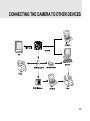
CONNECTING THE CAMERA TO OTHER DEVICES ............................................... 69
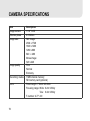
CAMERA SPECIFICATIONS ................................................................................. 70
11
INTRODUCTION
Overview
Your new digital camera delivers high quality, 2304 x 1728 resolution images using a 4.0
Megapixels CCD sensor. Using either the optical viewfinder or the 1.6" TFT color image LCD
monitor, you can compose images and then examine them in detail. An auto-flash sensor
automatically detects the shooting (lighting) conditions and determines whether the flash
should be used. This feature helps ensure that your images turn out right.
In addition to still images, you can record short videos using the movie function. Images you
have taken can be downloaded to your computer using the USB cable. You can enhance and
retouch your images on your computer by using the provided editing software, or image
editing software you may already own. You may share your images with your friends via
e-mail, in a report, or on a website.
DPOF functionality allows you to print your images on a DPOF compatible printer by simply
inserting the memory card.
12
Package Contents
Carefully unpack your kit box and ensure that you have the following items. In the event that any
item is missing or if you find any mismatch or damage, promptly contact Gateway.
Digital Camera
USB Cable
User's Manual
Video Cable
Lens Strap
Camera Strap
Software CD-ROM
2 x AA Alkaline Batteries
13
GETTING TO KNOW YOUR CAMERA
Front View
14
1.
2.
3.
4.
5.
6.
Mode dial
Shutter button
Camera strap
A/V OUT (Audio/Video Out) terminal
USB digital terminal
DC-in connector
7. Power switch
8. Flash
9. Viewfinder window
10. Lens
11. Self-timer LED
Rear View
1. Viewfinder
2. LED indicator
6. T Zoom in button ( p.30)
Digital zoom button
W Zoom out button
3. LCD monitor ( p.29)
4.
Delete button
5. Tripod socket
7.
Thumbnail button
Playback button
8.
9.
Menu button
Battery/SD card cover
1.
2.
3.
4.
5.
Arrow button (Up)
Flash button
Arrow button (Right)
Arrow button (Down)
Self-timer button
Arrow button (Left)
OK OK button
15
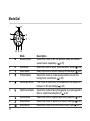
Mode Dial
1.
M
2.
3.
4.
A
Mode
Manual Mode
Auto Mode
Macro Mode
Portrait Mode
5.
Landscape Mode
6.
Night Scene Mode
7.
8.
9.
Sports Mode
Setup Mode
Movie Mode
16
Description
Select this mode to set the aperture value and shutter
speed values separately. ( p.35)
Select this mode to a just "point-and-shoot" action.( p.36)
Select this mode to shoot a close-up of the subject.( p.37)
Select this mode to make people stand out with the
background out-of-focus.( p.38)
This mode is used when the distance to the subject is
between 0.4m and infinity.( p.39)
Select this mode to take photographs of people against a
dark or night-time background.( p.40)
Select this mode to capture fast-moving subjects.( p.41)
Select this mode to adjust the camera settings.( p.66)
Select this mode to record video (movie) clips.( p.51)
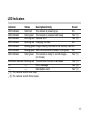
LED Indicators
Indicator
LED indicator
LED indicator
LED indicator
LED indicator
LED indicator
LED indicator
LED indicator
Status
Solid red
Solid green
Blinking red
Blinking red
Blinking green
Blinking green
Solid green
Description/Activity
The camera is powering up
The camera is powered and ready
Camera error
Charging the flash
Image is being recorded to the memory card
USB communication/transfer in progress
The camera is ready to record images
(or movies)
Self-timer indicator Blinking red The self-timer function is activated
------Error message
------Valid button event
(1) The camera sounds one beep.
(3) The camera sounds three beeps.
Sound
No
Yes *(1)
Yes *(3)
No
No
No
Yes *(1)
Yes *(1)
Yes *(3)
Yes *(1)
17
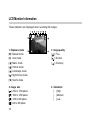
LCD Monitor Information
These indicators are displayed when recording still images:
1. Exposure mode
[M] Manual mode
[A] Auto mode
[
[
[
[
[
]
]
]
]
]
Macro mode
Portrait mode
Landscape mode
Night Scene mode
Sports mode
2. Image size
[ ] 2304 x 1728 pixels
[ ] 1600 x 1200 pixels
[ ] 1280 x 960 pixels
[ ] 640 x 480 pixels
18
3. Image quality
[ ] Fine
[
] Normal
[
] Economy
4. Saturation
[ ] High
[ ] Medium
[ ] Low
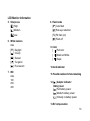
LCD Monitor Information
5. Sharpness
[ ] High
[ ] Medium
[ ] Low
6. White balance
Auto
[
[
[
] Daylight
] Cloudy
] Sunset
[
[
] Tungsten
] Fluorescent
7. ISO
Auto
100
200
400
8. Flash mode
[ ] Auto flash
[ ] Red-eye reduction
[ ] Fill flash (on)
[ ] Flash off
9. Color
[
] Full color
[
] Black and White
] Sepia
[
10.Card indicator
11.Possible number of shots remaining
12.[ ] Adapter indicator
Battery level
[ ] Full battery power
[ ] Medium battery power
[ ] Virtually no battery power
13.EV compensation
19
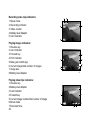
Recording video clips indicators:
1. Movie mode
2. Recording indicator
3. Video counter
4. Battery level/ Adapter
5. Card indicator.
Playing images indicators:
1. Reverse key
2. Card indicator
3. Forward key
4. Print indicator
5.Date (year.month.day)
6. Current image/total number of images
7.Image size
8.Battery level/ Adapter
Playing video clips indicators:
1. Reverse key
2.Battery level/ Adapter
3.Card indicator
4.Forward key
5.Current image number/total number of image
6.Movie mode
7.Recorded time
20
8
3
4
1
2
5
7
6
GETTING STARTED
You can use either 2 AA size batteries (Alkaline or Ni-MH) or a 3.0V/2.5A (available separately
as part of the Gateway DC-M42 Accessory Kit) to power the camera. Battery power is convenient
for capturing images or recording video clips while an AC power adapter is useful when
transferring images to your computer.
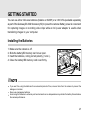
Installing the Batteries
1. Make sure the camera is off.
2. Slide the battery/SD memory card cover open.
3. Insert the batteries, noting correct polarity (+ and -).
4. Close the battery/SD memory card cover firmly.
If you won't be using the batteries for an extended period of time, remove them from the camera to prevent the
leakage or corrosion.
Never use manganese batteries.
Avoid using the batteries in extremely cold environments as low temperatures may shorten the battery life and reduce
the camera performance.
21
Using the AC Power Adapter (optional accessory)
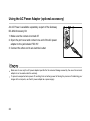
An AC Power is available separately as part of the Gateway
DC-M42 Accessory Kit.
1. Make sure the camera is turned off.
2. Open the port cover and connect one end of the AC power
adapter to the jack labeled "DC IN".
3. Connect the other end to an electrical outlet.
Make sure to use only the AC power adapter specified for the camera. Damage caused by the use of an incorrect
adapter is not covered under the warranty.
To prevent unexpected auto power off resulting from no battery power left during the process of transferring your
images to the computer, use the AC power adapter as a power supply.
22
Loading an SD Memory Card (optional accessory)
The camera comes with 11MB of internal memory, allowing you to store images and video
clips in the camera. However, you can expand the memory capacity by using the SD memory
card so that you can store additional images and video clips.
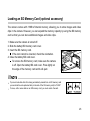
1. Make sure the camera is turned off.
2. Slide the battery/SD memory card cover.
3. Insert the SD memory card.
If the card cannot be inserted, check the orientation.
4. Close the battery/SD card cover.
To remove the SD memory card, make sure the camera
is off. Open the battery/SD card cover. Press lightly on
the edge of the memory card and it will eject.
To prevent valuable data from being accidentally erased from an SD memory card
you can slide the write-protected tab (on the side of the SD memory card) to "LOCK".
To save, edit or erase data on an SD memory card, you must unlock the card.
23
Attaching the Camera Strap
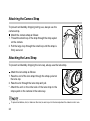
To prevent accidentally dropping during use, always use the
camera strap.
Attach the camera strap as follows:
1. Thread the small loop of the strap through the strap eyelet
on the camera.
2. Pull the large loop through the small loop until the strap is
firmly secured.
Attaching the Lens Strap
To prevent accidentally dropping the lens cap, always use the lens strap.
Attach the lens strap as follows:
1. Pass the end of the lens strap through the strap eyelet on
the lens cap.
2. Pass the end through the lens strap and pull.
* Attach the end on the other side of the lens strap to the
strap eyelet on the camera in the same way.
To prevent scratches, dust, or stains on the lens, be sure to put on the lens cap when the camera is not in use.
24
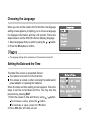
Choosing the Language
When you turn on the camera for the first time, the language
setting screen appears, prompting you to choose a language
for displayed information and the LCD monitor. Follow the
steps below to set the OSD (On-Screen Display) language.
1. Select a language that you prefer by using the / button.
2. Press the OK button to confirm.
The language setting will be retained even if the camera is turned off.
Setting the Date and the Time
The Date/Time screen is presented if/when:
The camera is turned on for the first time.
The camera is turned on after removing the batteries/AC
power adapter or replacing the batteries.
When the date and time setting screen appears, follow the
steps to set the correct date and time. You may skip this
procedure by pressing EXIT.
1. Enter the values of date and time by using / button.
To incraese a value, press the
button.
To decrease a value, press the
button.
2. Press OK after all fields are set.
25
Setting the Image Resolution and Quality
Resolution and quality settings determine the pixel size (dimension), image file size, and
compression ratio for your image. These settings affect the number of images that can be
stored in the internal memory, or on an SD memory card.
Higher resolution and higher quality images offer the best photographic results but take up
more memory space. High resolution/quality settings are recommended for printed output
and situations requiring the finest detail. Lower resolution/quality images take up less memory
space and may be quite suitable for sharing images via e-mail, in a report, or on a web page.
To change the image resolution or image quality, perform the steps below:
1. Slide the POWER switch and power on the camera.
2. Set the mode dial base on the desired scenery (Manual,
Auto, Macro, Portrait, Landscape, Night Scene or Sports).
button on the rear side of the camera.
3. Press the
4. Select Image size or Image quality by using the / button.
5. Press / to set the image size or image quality you
prefer.
6. Press OK button to confirm.
26
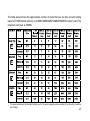
The table below shows the approximate number of shots that you can take at each setting
based on 11MB internal memory or an 8MB/16MB/32MB/128MB/256MB SD memory card.The
maximum card size is 256MB.
The above data shows the standard testing results. The actual capacity varies according to the shooting conditions
and settings.
27
TAKING PHOTOGRAPHS
Basic Setting
Your camera is equipped with both an optical viewfinder and a 1.6" full color TFT LCD monitor
to compose images. Taking images by using the optical viewfinder will conserve more battery
power. If your batteries' level is in low condition, it is recommended to compose images by
using the viewfinder. The LCD monitor can help you accurately compose the pictures and
examine all the details, but using it may also consume more battery power. However, always
use the LCD monitor for MACRO shots to avoid define parallax effects (the apparent
displacement or the difference in apparent direction of an object as seen from two differen
points not on a straight line with the object).
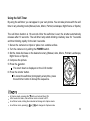
Using the Viewfinder
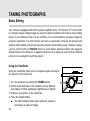
Using the viewfinder helps you to compose images and adjust
the subject in the crisp focus.
1. Turn the camera on by sliding the POWER switch.
2. Set the mode dial base on the desired scenery (Manual,
Auto, Macro, Portrait, Landscape, Night Scene or Sports).
3. Compose your picture in the viewfinder.
4. Press the shutter button.
The LED indicator blinks green while the camera is
processing a captured image.
28
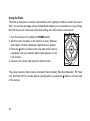
Using the LCD Monitor
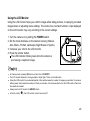
Using the LCD monitor helps you confirm images while taking pictures, to replaying recorded
images/video or adjusting menu settings. The mode icons, text and numbers clips displayed
on the LCD monitor may vary according to the current settings.
1. Turn the camera on by sliding the POWER switch.
2. Set the mode dial base on the desired scenery (Manual,
Auto, Macro, Portrait, Landscape, Night Scene or Sports).
3. Compose your shot in the LCD monitor.
4. Press the shutter button.
The LED indicator blinks green while the camera is
processing a captured image.
In Capture mode, pressing OK button will turn the LCD ON/OFF.
The LCD monitor darkens in strong sunlight or bright light. This is not a malfunction.
Using the LCD monitor for an extended period of time will decrease the number of images you can take. To conserve
battery power and increase the number of shots you can take, it is recommended to turn the LCD monitor off and use
the viewfinder instead.
Always use the LCD monitor for MACRO shots.
In Movie mode [
] ,the LCD monitor cannot be turned off.
29
Using the Zoom Functions
Zoom photography allows you to capture telephoto and wide-angle shots.By using the digital
zoom, images can appear closer by pressing the (T) telephoto button or farther. Or appears
smaller away by pressing the (W) wide-angle button.
To capture a digitally zoomed image, perform the following steps:
1. Turn the camera on by sliding the POWER switch.
2. Set the mode dial base on the desired scenery (Manual,
Auto, Macro, Portrait, Landscape, Night Scene or Sports).
3. Press T button to activate the zoom function.
Digital zoom's range is from 1.25x to 4x (within 11
stages: 1.25x, 1.5x, 1.67x, 1.75x, 2x, 2.25x, 2.5x, 3x, 3.33x,
3.5x and 4x).
To exit the digital zoom, press continuously the W button
and return to the optical zoom status.
4. Press the shutter button to capture a "zoomed" image.
You can only set the digital zoom at the resolution of 2304 x 1728 pixels; digital zoom is not available at the resolution
of 1600 x 1200 pixels, 1280 x 960 pixels or 640 x 480 pixels.
In Capture mode,zoom key is always active to zoom the lens between wide-angle and telephoto shots.
Digital zoom cannot be used in Movie mode [
].
30
Using the Self-Timer
By using the self-timer you can appear in your own photos. You can take pictures with the selftimer in any shooting mode (Manual, Auto, Macro, Portrait, Landscape, Night Scene or Sports).
The self-timer duration is 10 seconds. After the self-timer is set, the shutter automatically
releases after 10 seconds. The self-timer lamp starts blinking relatively slow for 7 seconds
and then blinking rapidly for the last 3 seconds.
1. Secure the camera to a tripod or place it on a stable surface.
2. Turn the camera on by sliding the POWER switch.
3. Set the mode dial base on the desired scenery (Manual, Auto, Macro, Portrait, Landscape,
Night Scene or Sports).
4. Compose the picture.
5. Press the button.
The count down is displayed on the LCD monitor.
6. Press the shutter button.
To cancel the self-timer photography at any time, press
the self-timer button to disrupt the sequence.
In Capture mode, pressing the
button will set self-timer ON.
After one shot is taken, the self-timer mode is turned to OFF.
In self-timer mode, rotating the mode dial will change into Capture mode.
In self-timer mode, pressing [
] or[
] will change into Capture mode.
31
Using the Flash
The flash is designed to function automatically when lighting conditions warrant the use of
flash. You can take an image using a suitable flash mode to your circumstances. If you change
the flash mode, the camera will retain that setting even if the camera is turned off.
1. Turn the camera on by sliding the POWER switch.
2. Set the mode dial base on the desired scenery (Manual,
Auto, Macro, Portrait, Landscape, Night Scene or Sports).
3. Press the button (located on the rear side of the camera)
repeatedly until your desired flash mode appears on the
LCD monitor.
4. Compose the picture and press the shutter button.
The camera has four flash modes: Automatic Flash (default), Red-Eye Reduction, Fill Flash
(on), and Flash Off. The modes appear cyclically when you press the button on the rear side
of the camera.
32
The table below helps you choose the appropriate flash mode:
[
Flash Mode
] Auto Flash
[
] Red-Eye Reduction
[
[
]
Fill Flash (on)
] Flash Off
In Macro mode [
Description
The flash fires automatically according to the ambient lighting
conditions. Select this mode for general photography.
The flash emits a precursor-flash before the main flash fires.
This causes the pupil in the human eye to constrict, reducing
the red-eye phenomenon. Select this mode when taking
images of people and animals in low-light conditions.
The flash will always fire regardless of the surrounding
brightness. Select this mode for recording images with high
contrast (backlighting ) and deep shadows.
The flash will not fire. Select this mode when taking images in
a place where flash photography is prohibited, or when the
distance to the subject is beyond the effective range of the
flash.
], flash photography is fixed to Flash Off.
In Night Scene mode [
], flash photography is fixed to Fill Flash (on).
33
Photography in a Variety of Modes
Your digital camera offers you choices of seven "scenes", which include Manual mode, Auto
mode, Macro mode, Portrait mode, Landscape mode, Night Scene mode and Sports mode. In
these modes, your camera setting can automatically be optimized for the selected subject's
type, sparing you the requisites of settings adjustment one-by-one.
Scene Mode
Description
[ M ] Manual Mode
This mode lets you adjust individual camera settings.
[ A ] Auto Mode
This mode lets the camera decide the best settings for you.
[ ] Macro Mode
This mode is used to shoot a close-up of the subject, such as
flowers or insects.
[ ] Portrait Mode
This mode is used to make the main subject in focus while the
background details are out-of-focus.
[ ] Landscape Mode
This mode is used to enhance color, saturation shown in
sky-scapes, mountains, forests and other landscape scenery, or
to take portraits that feature a landmark in the background.
[ ] Night Scene Mode
This mode is used to capture human subjects against a dusk or
night-time background.
This mode is used to capture the fast moving subjects.
[ ] Sports Mode
In Capture mode, pressing the OK button will set the LCD monitor On/Off.
34
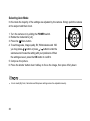
Selecting Manual Mode
You can capture images by manually adjusting conditions such as image quality, image size,
saturation, sharpness, white balance, ISO speed, flash mode and EV compensation.
1. Turn the camera on by sliding the POWER switch.
2. Rotate the mode dial to [M].
Menu button.
3. Press the
4. To set Image size, Image quality, EV, White balance, ISO,
Color, Saturation and Sharpness you may press / button
or press
/
button to enter the submenu and choose
the setting with your preference. When the settings are set,
press the OK button to confirm.
5. Compose the picture.
6. Press the shutter button down halfway to focus the image,
then press it fully down.
35
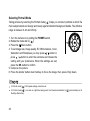
Selecting Auto Mode
In this mode the majority of the settings are adjusted by the camera. Simply point the camera
at the subject and then shoot.
1. Turn the camera on by sliding the POWER switch.
2. Rotate the mode dial to [ A ].
Menu button.
3. Press the
4. To set Image size, Image quality, EV, White balance and ISO
you may press / button or press / button to enter the
submenu and choose the setting with your preference. When
the settings are set, press the OK button to confirm.
5. Compose the picture.
6. Press the shutter button down halfway to focus the image, then press it fully down
In Auto mode [A], Color, Saturation and Sharpness settings cannot be adjusted manually.
36
Selecting Macro Mode
Use the macro mode to capture a close-up of the subject, such as flowers or insects. The
effective range is between 0.2m and 0.7m.
1. Turn the camera on by sliding the POWER switch.
2. Rotate the mode dial to [ ].
Menu button.
3. Press the
4. To set Image size, Image quality, EV, White balance, Color,
Saturation and Sharpness you may press / button or
/
button to enter the submenu and choose the
press
setting with your preference. When the settings are set,
press the OK button to confirm.
5. Compose the picture.
6. Press the shutter button down halfway to focus the image, then press it fully down.
When shooting a close-up in Macro mode [
], use the image LCD monitor to compose your shot, avoiding the offcenter parallax phenomenon.
After a macro shot is taken DO NOT FORGET to reset the lens to the normal status.
In Macro mode [
], the internal flash cannot be used.
In Macro mode [
], ISO speed settings cannot be set.
37
Selecting Portrait Mode
Taking pictures by selecting the Portrait mode [
] helps you construct portraits in which the
main subject stands out sharply and clearly against indistinct background details. The effective
range is between 0.4m and infinity.
1. Turn the camera on by sliding the POWER switch.
].
2. Rotate the mode dial to [
Menu button.
3. Press the
4. To set Image size, Image quality, EV, White balance, Color,
Saturation and Sharpness you may press / button or
press
/
button to enter the submenu and choose the
setting with your preference. When the settings are set,
press the OK button to confirm.
5. Compose the picture.
6. Press the shutter button down halfway to focus the image, then press it fully down.
In Portrait mode [
], ISO speed settings cannot be set.
In Portrait mode [
], in a dusk or night-time background, the Flash mode defaults to [
Red-Eye Reduction).
38
](automatically set to
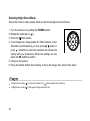
Selecting Landscape Mode
Taking pictures by selecting the Landscape mode [
] helps you capture vivid and expansive
] is
pictures with the enhancement of image's color and saturation. The Landscape mode [
used when the distance to the subject is between 0.4m and infinity.
1. Turn the camera on by sliding the POWER switch.
].
2. Rotate the mode dial to [
3. Press the
Menu button.
4. To set Image size, Image quality, EV, White balance, Color,
Saturation and Sharpness you may press / button or
press
/
button to enter the submenu and choose the
setting with your preference. When the settings are set,
press the OK button to confirm.
5. Compose the picture.
6. Press the shutter button down halfway to focus the image, then press it fully down.
In Landscape mode [
], ISO speed cannot be set and Flash mode defaults to [
] Flash Off
39
Selecting Night Scene Mode
Select this mode to make people stand out with the background out-of-focus.
1. Turn the camera on by sliding the POWER switch.
2. Rotate the mode dial to [ ] .
Menu button.
3. Press the
4. To set Image size, Image quality, EV, White balance, Color,
Saturation and Sharpness you may press / button or
/
button to enter the submenu and choose the
press
setting with your preference. When the settings are set,
press the OK button to confirm.
5. Compose the picture.
6. Press the shutter button down halfway to focus the image, then press it fully down.
In Night Scene mode [
In Night Scene mode [
40
], Flash mode defaults to [ ](automatically set to flash on).
], ISO speed settings cannot be set.
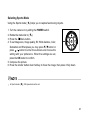
Selecting Sports Mode
Using the Sports mode [
] helps you to capture fast-moving objects.
1. Turn the camera on by sliding the POWER switch.
2. Rotate the mode dial to [ ].
Menu button.
3. Press the
4. To set Image size, Image quality, EV, White balance, Color,
Saturation and Sharpness you may press / button or
/ button to enter the submenu and choose the
press
setting with your preference. When the settings are set,
press the OK button to confirm.
5. Compose the picture.
6. Press the shutter button down halfway to focus the image, then press it fully down.
In Sports mode [
], ISO speed cannot be set.
41
PLAYBACK MODE
In
playback mode, you can view, magnify, delete images, play video clips, or run a slide
show. Playback mode also provides a thumbnail image display, allowing you to quickly scan
for the image you want.
In Playback mode, pressing the
Playback button or rotating the mode dial will change into Capture mode.
In Playback mode, pressing the shutter button will change into Capture mode and automatically take the current
image.
42
Viewing Images
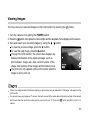
You may view your recorded images on the LCD monitor by pressing the
button.
1. Turn the camera on by sliding the POWER switch.
button, then press the menu button and the playback menu displays on the screen.
2. Press the
/ button.
3. View and select your recorded images by using the
To view the previous image, press the
button.
To view the next image, press the button.
Through the LCD monitor, the screen also displays the
detailed information of the captured image, such as
print indicator, image size, date, current number of the
image, total number of the images and the battery level.
The print icon only appears on the LCD monitor when the
image is set to print out.
If there is no image stored in the internal memory or the memory card, an indication of “No image ” will appear on the
LCD monitor.
You can also view your images on TV screen. Connect one end of the video cable to the video out jack of the camera
and connect the other end to the video input of your input of your TV. Press the
button and then turn on TV or
camera.
43
Zoom Playback
While reviewing your images, you may enlarge a selected portion of an image. This
magnification allows you to view fine details.
1. Turn the camera on by sliding the POWER switch.
2. Press the
button.
3. View and select your recorded images by using the /
button.
4. To zoomed the image press the [T] button.
Digital zoom in the playback mode can magnify up to 6x.
5. To return to the regular display from 6x status, keep pressing
the [W] button and will change into thumbnail images.
When you zoom the maximum portion of the top side, buttom side, left side or right side, the
on the LCD monitor will automatically disappeared.
44
/
/
/
indicated
Displaying Thumbnail Images
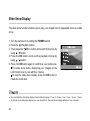
This function allows you to view nine thumbnail images on the LCD monitor simultaneously
so that you can quickly scan for a particular image.
1. Turn the camera on by sliding the POWER switch.
2. Press the button
and then the
button.
Nine thumbnail images appear on the LCD monitor
(assuming there are nine or more recorded images in
the memory).
To view a full-size image, press [T] the telephoto or OK
button after the image selection by using the / / /
button.
While displaying thumbnail images, pressing the
While displaying thumbnail images, by pressing the
ready to take next shot.
delete button the current chosen image will be deleted.
playback button, the screen will change to Capture mode and
45
Slide Show Display
The slide show function enables you to play your images back in sequential order as a slide
show.
1. Turn the camera on by sliding the POWER switch.
2. Press the
Playback button.
Menu button and select Slide show by
3. Then press the
using / button.
4. Press the OK button and to set the playback interval by
using / button.
5. Press the OK button again to confirm as your preference.
The slide show starts, displaying your images on the
LCD monitor one by one with the interval.
To stop the slide show display, press the OK button or
rotate the mode dial.
You can adjust the slide show display interval within the range of 1 sec. to 10 sec. (1 sec. / 3 sec. / 6 sec. / 10 sec.)
To not set on the slide show display you may choose Exit. The slide show display defaults to1 sec. intervals.
46
Setting DPOF
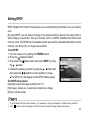
DPOF (Digital Print Order Format) allows you to embed printing information on your memory
card.
By using DPOF, you can select an image to be printed and then specify how many prints or
which image you would like. Take your memory card to a DPOF enabled printer that accept
memory cards. The DPOF/card-compatible printer will read the embedded information on the
memory card and print your images as specified.
To set DPOF:
1. Turn the camera on by sliding the POWER switch.
2. Press the
Playback button.
Menu button and select DPOF by using
3. Then press the
the / button.
4. Choose the option you prefer by using the / button and
then press the / button to select quantity or image.
The DPOF icon will appear on the DPOF-setting image.
The DPOF menu options:
[Quantity]: select the image quantity from 0~9
[Set image]: allows you to select your preferrence image
[Exit]: to exit the screen .
To print images from the internal memory, it is necessary to copy your images to the SD memory card first.
The [
] print icon will also display on the LCD monitor to indicate images selected for printing.
47
Deleting Images/Video Clips
To delete one image or video clip at a time, use the
button on the rear side of the camera.
To delete all images or video clips at once, use the Delete option in the Playback menu.
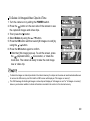
To Delete One Image/Video Clip At A Time
1. Turn the camera on by sliding the POWER switch.
button on the rear side of the camera to see
2. Press the
the captured images and video clips.
3. Select the unwanted image/video clip by using the / button
and then press the
button.
4. Continue the deletion if necessary.
If all images are deleted, [No image] will pop up.
5. To exit this screen, rotate the mode dial.
48
To Delete All Images/Video Clips At A Time
1. Turn the camera on by sliding the POWER switch.
2. Press the
button on the rear side of the camera to see
the captured images and video clips.
button.
3. Then press the
4. Select Delete by using the / button.
5. Press the OK button and then select [All images on card] by
using the / button.
6. Press the OK button again to confirm.
After that, [No image] pops up. To exit the screen, press
the
playback button,
menu button, or rotate the
mode dial. The camera is ready to take the next image
now or video clip.
To delete the images or video clips stored in the internal memory, the steps are the same as mentioned above.Be sure
to remove the SD memory card first and the OSD screen will display as "All images on memory".
The OSD message for deleting all images or video clips will display as “All images on card “or “All images on memory”
base on your decision whether to delete information recorded in the card or in the internal memory.
49
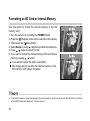
Formatting an SD Card or Internal Memory
Use this option to format the internal memory or the SD
memory card.
1. Turn the camera on by sliding the POWER switch.
2. Press the
Playback button on the rear side of the camera.
Menu button.
3. Then press the
4. Select Delete by using / button and enter the submenu.
5. Press / button to select Format.
6. If you want to format the internal memory/ SD card choose
[Yes] by pressing / button.
If you want to cancel the action, select [No].
[No image] will pop up after the internal memory or the
SD memory card is been formatted.
To format the images or video clips stored in the intrenal memory, be sure to remove the SD card memory card first
and the OSD screen will display as "Format memory?".
50
MOVIE MODE
Recording Video Clips
The movie mode allows you to record video clips at a resolution of 320 x 240 pixels.
1. Turn the camera on by sliding the POWER switch.
button.
2. Press the
The recording movie time, REC icon, the card indicator
and the battery level will all display on the LCD monitor.
3. You can start recording the video clip simply by pressing
button.
the
To stop the recording, press the
button again.
It is not possible to zoom in or zoom out while in the Movie mode [ ].
In movie mode, image size, image quality and self-timer’s functions cannot be set or activated.
In movie mode, the flash mode is automatically set to OFF.
51
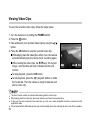
Viewing Video Clips
To view the recorded video clips, follow the steps below.
1. Turn the camera on by sliding the POWER switch.
button.
2. Press the
3. View and select your recorded video clips by using the /
button.
4. Press the OK button to view the recorded video clip.
While playing back the video clips, within 2 sec. the camera
will automatically play the whole movie recording again.
While viewing the video clips, the / keys, the current
image, recorded time will also indicated on the LCD
monitor.
To stop playback, press the OK button.
To exit playback, press the
playback button or rotate
the mode dial. Then the camera is ready to take the next
shot or video clip.
The zoom function cannot be activated while playing back the video clips.
When playing back the video clips, the screen will also count down the recorded time.
To play out the voice recorded in the video clips, you can use a video-compatible television connected via the
supplied AV cable.
PC connected with the USB cable can also play out the recorded voice in the video clip. Be sure to turn ON your speaker.
52
TRANSFERRING RECORDED IMAGES/VIDEO CLIPS
TO YOUR COMPUTER
You can share recorded images/ video clips with your family or friends via e-mail or post them
on the Web. Before doing those things, you need to connect the camera to your computer by
using the USB cable and then transfer the images/video clips.
To transfer images/video clips from the camera to your computer, follow the steps below:
Step 1: Connecting the Camera to Your Computer
Step 2: Downloading Images/Video Clips
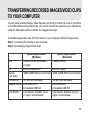
CPU
OS
Memory
Free Space
on Hard Disk
Required Devices
Color Monitor
System Requirements
System Requirements
(Windows)
(Macintosh)
Pentium 166 MHz processor
PowerPC G3/G4
or higher
Windows Me/2000/XP
OS 8.6 or higher
32MB (64MB RAM recommended) 32MB (64MB RAM recommended)
128 MB hard disk space
A CD-ROM Drive,
An Available USB Port
Color Monitor (800x600, 24-bit
or higher recommended)
128 MB hard disk space
A CD-ROM Drive,
An Available USB Port
Color Monitor (800x600, 24-bit or
higher recommended)
53
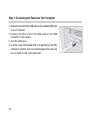
Step 1: Connecting the Camera to Your Computer
1. Connect one end of the USB cable to an available USB port
on your computer.
2. Connect the other end of the USB cable to the USB
connector on the camera.
3. Turn the camera on.
4. Look for a new "Removable Disk" icon appearing in the "My
Computer" window. Your recorded images/video clips will
be in a folder on this "removable disk".
54
Step 2: Downloading Images/Video Clips
When the camera is turned on and connected to your computer, it is considered to be a disk
drive, just like a floppy disk or CD. You can download (transfer) images by copying them from
the "removable disk" ("untitled" disk on a Macintosh) to your computer hard drive.
For Computers Running Windows
Open the "removable disk" by double clicking on it. Double click on the folder contains your
recorded images/video clips. Select the images/video clips that you prefer and then choose
"Copy" from the "Edit" menu. After that, open the destination location and choose "Paste" from
the "Edit" menu.
It is recommended that you use the AC power adapter as a power supply for the camera while transferring your
images/video clips from the camera to your computer to avoid the camera maybe cut off unexpectedly when the
batteries run out.
Memory card users may prefer to use a memory card reader (highly recommended).
55
INSTALLING PHOTOSUITE
PhotoSuite is a user-friendly image-editing program. With PhotoSuite, you can easily retouch,
compose and organize your images. It contains a variety of templates, such as photo frames,
birthday cards, calendars, and more.
To Install PhotoSuite
1. Insert the CD-ROM packaged with the camera into the
CD-ROM drive. The welcome screen appears.
2. Click "Install PhotoSuite". Follow the on-screen
instructions to complete the installation.
For information on how to use PhotoSuite to edit and retouch your recorded images, please refer to its online help.
For Windows 2000/XP users, make sure to install and use the PhotoSuite while logged in as a user with an Administrator
account.
56
INSTALLING PHOTOVISTA
PhotoVista is an easy-to-use program that lets you create spectacular 3600 panoramic images
in a snap. When you view these panoramas, you get the experience of being totally immersed
in a realistic environment. PhotoVista's powerful engine quickly and automatically stitches
images together, and its intuitive interface will let even a novice get great results in minutes.
To Install PhotoVista:
1. Insert the CD-ROM packaged with the camera into the
CD-ROM drive. The welcome screen appears.
2. Click "Install PhotoVista". Follow the on-screen
instructions to complete the installation.
For information on how to use PhotoVista to create spectacular 3600 panoramic images, please refer to its online help.
For Windows 2000/XP users, make sure to install and use the PhotoVista while logged in as a user with an Administrator
account.
For Windows XP users which OS version does not include Service Pack 1 or higher, make be sure to link to http:java.
sun.com/getjava/download.html first and download the Java Virtual Machine. For more detail information about Java,
please refer to its on-line help at http://java.sun.com/getjava/help.html. After java software installation, you can start
to install iSee Media Photovista Panorama.Hereunder is iSee Media Photovista Panorama System Requirements and
Recommendations:
* Windows 2000*, Windows ME*, Windows XP* (Service Pack 1 or higher)
57
MENU OPTIONS
The Capture Menu
In the Capture menu, you can determine the conditions you would like to choose such as
image size, image quality, EV compensation, white balance, ISO, color, saturation and
sharpness.
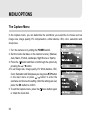
1. Turn the camera on by sliding the POWER switch.
2. Set the mode dial base on the desired scenery (Manual,
Auto, Macro, Portrait, Landscape, Night Scene or Sports).
3. Press the
button and then scroll through the options by
button.
pressing the /
4.To set Image size, Image quality, EV, White balance, ISO,
Color, Saturation and Sharpness you may press / button
/ button to enter the
in the main menu or press
submenu and choose the setting. After the settings are set,
press the OK button to confirm.
menu button again
5. To exit the Capture menu, press the
or rotate the mode dial.
58
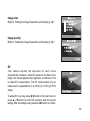
Image size
Refer to “Setting the Image Resolution and Quality (p. 26).”
Image quality
Refer to “Setting the Image Resolution and Quality (p. 26).”
EV
Your camera adjusts the exposure for each scene
automatically. However, when the subject is too dark or too
bright, the camera adjusts the brightness or darkness. This
is called EV compensation. The EV compensation of your
camera can be adjusted from [-2.0 EV] to [+2.0 EV] (0.5 EV
steps).
To adjust EV, you may press / button in the main menu or
/
button to enter the submenu and choose the
press
setting. After the setting is set, press the OK button to confirm.
59
Effective Subjects and Set Values
Positive (+) Compensation
Copying of printed text (black characters on white paper)
Backlit portraits
Very bright scenes (such as snowfields) and highly reflective subjects
Shots made up predominantly of sky
Negative (-) Compensation
Spot lighted subjects, particularly against dark backgrounds
Imaging of printed text (white characters on black paper)
Scenes with low reflectivity, such as shots of green or dark foliage
60
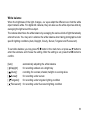
White balance
When the brightness of the light changes, our eyes adapt the difference so that the white
object remains white. For digital still cameras, they can also see the white object as white by
averaging the light around the subject.
The camera determines the white balance by averaging the various kinds of light that actually
enters the lens. You may set in advance the white balance when taking photographs under
specific lighting conditions (Auto, Daylight, Cloudy, Sunset, Tungsten and Fluorescent).
To set white balance you may press / button in the main menu or press
/ button to
enter the submenu and choose the setting. After the setting is set, press the OK button to
confirm.
[Auto]:
[ Daylight]:
[ Cloudy]:
[
Sunset]:
[
[
automatically adjusting the white balance
for recording outdoors on a bright day
recording for overcast, shaded, twilight or evening skies
for recording under sunset.
Tungsten]:
for recording under tungsten lighting condition
Fluorescent]: for recording under fluorescent lighting condition
61
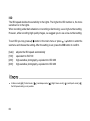
ISO
The ISO speed decides the sensitivity to the lights. The higher the ISO number is, the more
sensitive it is to the lights.
When recording under dark situations or recording a fast moving, use a high-number setting.
However, while recording high quality images, we suggest you to use a low-number setting.
To set ISO you may press / button in the main menu or press
/
button to enter the
submenu and choose the setting. After the setting is set, press the OK button to confirm.
[Auto]:
[100]:
[200]:
[400]:
adjusts the ISO speed automatically
equivalent to ISO 100
high-sensitive photography, equivalent to ISO 200
high-sensitive photography, equivalent to ISO 400
In Macro mode [ ], Portrait mode [
the ISO speed setting is not possible.
62
], Landscape mode [
], Night Scene mode [
] and Sports mode [
],
Color
To capture an image, the camera offers three types of color
(Full color/ Black & White/ Sepia) for you to match as your
wish. Your images will demonstrate different impression by
choosing different types of color.
To set Color (Full color/ Black & White/ Sepia) you may press
/ button in the main menu or press / button to enter
the submenu and choose the setting. After the settings is set,
press the OK button to confirm.
The color setting is not possible in Auto mode [A].
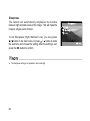
Saturation
To capture an image, the camera offers you three different
degrees of color (High/ Medium/ Low) for you to match as your
wish. Your images will give a different impression by choosing
these different degrees of color. This is called Saturation.
To set Saturation (High/ Medium/ Low) you may press
/ button in the main menu or press / button to enter
the submenu and choose the setting. After the settings is set,
press the OK button to confirm.
The saturation setting is not possible in Auto mode [A].
63
Sharpness
The camera will automatically emphasize the borders
between light and dark areas of the image. This will make the
image's edges seem sharper.
To set Sharpness (High/ Medium/ Low) you may press
/ button in the main menu or press / button to enter
the submenu and choose the setting. After the setting is set,
press the OK button to confirm.
The sharpness setting is not possible in Auto mode [A].
64
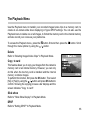
The Playback Menu
Use the Playback menu to transfer your recorded images/video clips to a memory card, to
create an on-camera slide show displaying or figure DPOF settings. You can also use the
Playback menu to delete one or all images, to format the memory card or the internal memory
and also record your voices as your preference.
To access the Playback menu, press the
button first and then press the
through the menu options by using the / button.
button. Scroll
Delete
Refer to "Deleting Images/Video Clips" in Playback Mode.
Copy to card
This feature allows you to copy your images from the camera's
memory card or an internal memory. However, you can only
do this when the memory card is installed and the internal
memory contains images.
To perform this function, first press the OK button. Then select
[No] or [Yes] by using the / button and press OK button to
confirm. Showing the copying process a bar displays and the
screen indicates "Copy to card".
Slide show
Refer to "Slide Show Display" in Playback Mode.
DPOF
Refer to "Setting DPOF" in Playback Mode.
65
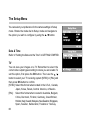
The Setup Menu
You can select your preference for the camera settings in Setup
mode. Rotate the mode dial to Setup mode and navigate to
the option you wish to configure by using the / button.
Date & Time
Refer to "Setting the Date and the Time" in GETTING STARTED.
TV
You can view your images on a TV. Remember to select the
correct video output type according to where you are located. To
set this option, first press the OK button. Then use the
/
button to select your TV receiving system [NTSC] or [PAL] and
then press OK button to confirm.
[NTSC]: Select this format when located in the U.S.A., Canada,
Japan, Korea, Taiwan, Central America, or Mexico.
[PAL]: Select this format when located in Australia, Belgium,
China, Denmark, Finland, Germany, Great Britain,
Holland, Italy, Kuwait, Malaysia, New Zealand, Singapore,
Spain, Sweden, Switzerland, Thailand or Norway.
66
Beeper
The camera makes a sound (beep) each time you press the
camera button if this function is enabled. Press the OK button.
Then select beeper [Louder], [Soft] or [Off] by using the /
button and then OK button to confirm.
Beeper
The camera defaults to [Off].
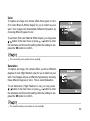
Language
This option allows you to select the language for the menus
and the texts displayed on the LCD monitor. To set the
language, refer to the section "Choosing the Language".
The camera defaults to
.
67
Power off time
If the camera remains unused for a certain period of time while the camera is powered on, the
camera will switch to an "idle" mode, and eventually turn itself off to conserve the power.
Inactivity period
(Batteries)
60 seconds
3 minutes
Inactivity period
(AC Power Adapter)
60 seconds
30 minutes
Camera Status
Stay idle
Shut off
If the camera is idle, re-activate the camera by pressing any button or rotate the mode dial. If
the camera has powered-off then you must turn the camera on again by sliding the POWER
switch. To change the power saving interval when the camera is charging with batteries,
press / button in the main menu or press / button to enter the submenu and choose
the setting. After the setting is set, press the OK button to confirm.
[3 min], [5 min], [10 min], [30 min], [Off]
The camera defaults to [3 min].
Set to default
If you wish to restore all camera settings to their original status,
select this option and then press the OK button. Then select
[ No] or [Yes] by using the / button and then OK button to
confirm.
68
CONNECTING THE CAMERA TO OTHER DEVICES
69
CAMERA SPECIFICATIONS
Item
Image sensor
Effective pixels
Image size
Image quality
Recording media
Lens
70
Description
1/1.8" CCD
4.0 Million
Still Image:
2304 x 1728
1600 x 1200
1280 x 960
640 x 480
Movie image:
320 x 240
Fine
Normal
Economy
11MB internal memory;
SD memory card (optional)
Focal length: 7.8mm~23.4mm
Focusing range: Wide: 0.2m~infinity
Tele: 0.4m~infinity
F-number: 2.77~4.9
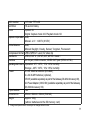
LCD monitor
Self-timer
Zoom
1.6" color TFT LCD
10-second delay
Optical: 3X
Digital: Capture mode: 4X/ Playback mode: 6X
Exposure compensation Auto;
Manual: -2.0 ~ +2.0 EV (0.5 EV)
White Balance
Auto;
Manual: Daylight, Cloudy, Sunset, Tungsten, Fluorescent
Compressed format JPEG, MPEG 1 Level I for video clip
Standards
JPEG, EXIF 2.1, DPOF, DCF, MPEG 1 Level I
Interface
DC IN jack, USB connector, VIDEO OUT jack (NTSC or PAL)
Operating environment Operation: 00C ~400C, 15% ~90% humidity
Storage: -200C ~600C, 10% ~95% humidity
Power
2 x AA Alkaline batteries (included),
2 x AA Ni-MH batteries (optional),
CR-V3 (available separately as part of the Gateway DC-M42 Accessory Kit),
AC Power Adapter (3.0V/2.5A) (available separately as part of the Gateway
DC-M42 Accessory Kit).
Tripod socket
Yes
Dimensions
95mm x 64mm x 36mm (WxHxD)
Weight
Approx. 180g
(without batteries and the SD memory card)
Design and specifications are subject to change without notice.
71