1
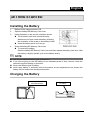
English GETTING STARTED Installing the Battery 1. 2. 3. 4. Make sure the camera power is off. Open the battery/SD Memory Card cover. Insert the battery in the correct orientation shown. Tilt the battery lock lever toward the strap attachment and then insert the battery following the orientation of the arrow on the battery’s label. Insert the battery as far as it can go. Close the battery/SD Memory Card cover. To remove the battery: Open the battery/SD Memory Card cover and then release the battery lock lever. After the battery is slightly ejected, pull out the battery slowly. NOTE Use only the specified battery type (Lithium Ion). If you are not going to use the battery for an extended period of time, remove it from the camera to prevent leakage or corrosion. Never use different type of battery. Avoid using battery in extremely cold environments as low temperatures can shorten the battery life and reduce the camera performance. Charging the Battery LED INDICATION AC INPUT -14-