1
Start / stop by magnet
The function must be enabled from the PC before. If only switching OFF by magnet is enabled,
it is of course necessary to switch ON the logger from the computer.
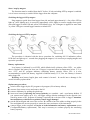
Switching the logger ON by magnet
Plug magnet to guide slots from logger front side and wait approximately 1 s for yellow LED to
light up. After lighting up it is necessary immediately (till it lights) to remove magnet from guide
slots and logger switches ON and yellow LED blinks every 10s. If magnet is applied for more than
3s yellow LED goes out and logger remains switched OFF.
Switching the logger OFF by magnet
The procedure is identical with the above procedure for switching ON. If indication yellow
LED does not light up to 1 second after plugging the magnet, it is necessary to unplug magnet and
repeat the procedure.
Battery replacement
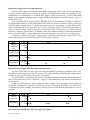
Low battery is indicated by red LED, which blinks itself (without yellow LED – see tables
above). Replace the battery for new one. If logger is operated often in temperature below -5°C or
over +35°C and PC program indicates remaining battery capacity below 25% it is also
recommended to replace the battery. Applied is Lithium battery 3.6 V, size AA. Battery is located
under logger lid.
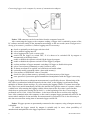
Warning: near battery fragile glass reed contact is located – be careful not to damage it. Be
careful in battery replacement!
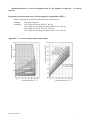
Replacement procedure:
switch off the logger by the PC program or by magnet (if low battery allows)
unscrew four corner screws and remove the lid
remove old battery by pulling the glued tape
insert new battery respecting the correct polarity (see symbols + and – near battery holder). If
you connect new battery up to 30 s, all logger settings remain unchanged. In the opposite case
check by means of PC program all settings, especially the real time clock in logger. Attention,
inserted battery with incorrect polarity causes logger damage!
put the lid back again and screw four screws. Be careful to have the rubber sealing properly in the
slot and tighten the screws properly to ensure the water resistance of the instrument.
connect logger to the computer and write to it the information on battery replacement (menu
Configuration/Battery replacement). This step is necessary to evaluate properly the remaining
battery capacity.
6
IE-LOG-R3120-06