1
Installation and Wiring
Installation and Wiring
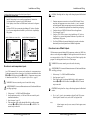
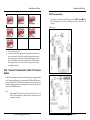
Directions to Wire Direct PC Connection for firmware update
Like all microprocessor based instruments, it may be necessary to upload firmware
revisions to IOEM/REM instruments. Download new firmware using the Firmware
Updater utility in AquaManager. A serial RS232 connection is necessary to run the
Flash Programmer utility.
WARNING: Disconnect external power to the unit before wiring.
AVERTISSEMENT : déconnectez l’alimentation externe de l’unité avant
d’effectuer un câblage quelconque.
1.
Perform steps 1- 6 of IOEM and REM installation as required for the
application;
2. Open front panel - page 32;
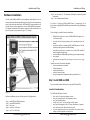
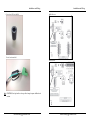
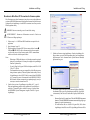
3. With front panel open connect RS232 direct connect cable to location E
IOEM and F REM. RS232 cable is disconnected after firmware update,
so with wiring removed, after firmware update, RS232 communication
cable does not interfer with front panel closure.
Notes:
-- When using a USB-Serial Adapter, verify that the port number assigned
during driver installation is the same port configured at AquaManager
Firmware Updater utility.
-- Use only a Tripp-Lite Keyspan USB-Serial Adapter, model USA-19HS
YSI p/n 773 (64-bit).
-- The instrument firmware may get corrupted if any of the following occurs
during a firmware update: a) Firmware Updater window utility is closed,
b) AquaManager is closed c) RS232 cable is removed from IOEM/REM
or PC com port, d) power is disconnected from IOEM/REM. If IOEM/
REM firmware becomes corrupt and is not updated properly, it may be
necessary to return the instrument to YSI.
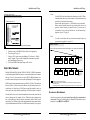
4. Confirm latest version of AquaManager is installed on PC - page 81.
When an AquaManager patch has been installed and if new firmware is
available, a “Firmware Update is Available” message is displayed when
the IOEM/REM Systems Management expanded window is open at
AquaManager.
IOEM/REM Safey and Installation Guide
60
5.
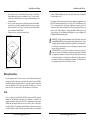
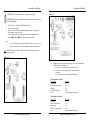
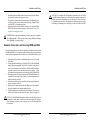
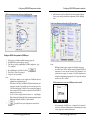
Upload new firmware using AquaManager. From the AquaManager Explorer window, access the Flash Programmer utility from AquaManager
pull down menu: Tools→ Instrument tools→Update Firmware. Firmware
updater window opens.
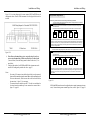
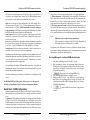
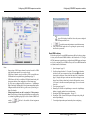
At Firmware Updater window File>Load Firmware Database default database firmware folder opens. Select latest firmware .mdb file to be uploaded
to instrument(s). Once selected, Database file is displayed at File window.
Notes:
-- Firmware Database file contains latest 5X00 and IOEM/REM instrument
firmware. 5X00 and IOEM/REM instruments automatically upload proper
firmware for specific instrument type;
-- YSI .mdb firmware files are located in Program Files (folder where
AquaManager is installed on user PC)>AquaManager>Firmware folder.
6.
IOEM/REM Safey and Installation Guide
61