1
SETUP &
MANAGE
COMMUNICATION
LINKS
C HAPTER
9
In This Chapter
Establish the Communications Link . . . . . . . . . . . . . . .9-2
Setup a Serial Link . . . . . . . . . . . . . . . . . . . . . . . . . . . .9-2
Setup an Ethernet Link . . . . . . . . . . . . . . . . . . . . . . . . .9-7
Setup a Modem Link . . . . . . . . . . . . . . . . . . . . . . . . . .9-14
Comm Link Options . . . . . . . . . . . . . . . . . . . . . . . . . . .9-22
Going Online . . . . . . . . . . . . . . . . . . . . . . . . . . . . . . . .9-24
Chapter 9: Setup & Manage Communication Links
Establish the Communications Link
1
In order to download a program to the PLC a communications link
must be established. If your PLC is connected to your computer by
a serial connection or USB-to-Serial converter, DirectSOFT 6
should be able to auto-configure your communications link for you. If
you are using an Ethernet link or if for some reason your serial link
does not auto-configure, you can follow the steps below to manually
configure a communications link to your PLC.
2
3
D
NOTE: For tips on troubleshooting a communications link, see Appendix B
5
a Serial Link
6 Setup
Connect the programming cable from the serial port of the PC to the
serial port of the PLC (see Appendix A for selecting the proper cable
7
for your PLC). If your PLC has a RUN\TERM\STOP switch, place it
in the TERM position. The Link Wizard can automatically determine
8
the majority of communication settings for the PLCs.
9
1
11
2
13
4
A
B
C
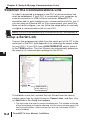
To establish a new link, activate the Link Wizard from the launch
D
Right click to
select Add Link.
window menu tree, by right-clicking on Comm Links, and then click
on Add Link in the dialog that appears.
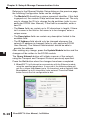
1. The next step is to select a communications port. The window at the top
of the facing page will appear showing a list of communication ports. For
serial communication, select the port you will use (commonly COM1)
and click Next.
9-2
DirectSOFT 6 User Manual, 1st Edition
Chapter 9: Setup & Manage Communication Links
NOTE: The COMM ports shown in the window below are those which
DirectSOFT 6 will attempt to use. Simply because a COMM port is shown
in the list does not mean the port actually exists on the PC. Open
Windows Control Panel and verify that a port exists in Device Manager.
NOTE: The comm port on your PC may have to be enabled (example,
COM5). See Appendix B, DS600.ini File
2. The next window will show a list of PLC Families. Select the PLC
family by clicking on the appropriate choice. If you are unsure of the
PLC family but know which communications protocol to use, select
“Not Sure”. If you are using a DirectLOGIC compatible PLC, the Link
Wizard will try and detect the PLC type automatically. Click Next when
you are finished.
DirectSOFT 6 User Manual, 1st Edition
1
2
3
D
5
6
7
8
9
0
1
2
3
4
A
B
C
D
9-3
Chapter 9: Setup & Manage Communication Links
1
2
3
D
5
6
7
8
9
1
11
2
13
4
A
B
C
D
9-4
3. Now, to choose the protocol and node address. In this step, you will see
a choice of either DirectNET or K-Sequence. Assuming you have
selected the DirectLOGIC PLC family (not the DL305), the default, KSequence, will be highlighted. The K-Sequence protocol allows you to
perform write operations to individual discrete I/O points and control
relays. DirectNET protocol cannot write to individual bit locations. (See
Appendix A for a list of protocols available for DirectLOGIC and
compatible PLCs).
If your PLC has been configured with a node address other than 1, enter
that address now. Click Next when finished.
4. The Link Wizard will attempt to establish a communication link with the
PLC using the node address and protocol you have selected. It will try
the combination of 9600 Baud, and Odd Parity. If this combination is
unsuccessful, an ‘auto-baud’ sequence will be used to try and determine
the correct baud rate and parity combination. If these attempts are
unsuccessful, the dialogs shown at the top of the facing page will be
displayed. You can click on the Link Editor button, and manually
attempt to adjust the port configuration. See Appendix B for further help.
DirectSOFT 6 User Manual, 1st Edition
Chapter 9: Setup & Manage Communication Links
1
5. If the Link Wizard is successful in communicating with the PLC, the
following window will prompt you to enter a unique link name, and a
description of the link if desired. The description field allows 32
characters. Enter the name for the link and description then click
Finish to return to the DSLaunch window.
DirectSOFT 6 User Manual, 1st Edition
2
3
D
5
6
7
8
9
0
1
2
3
4
A
B
C
D
9-5
Chapter 9: Setup & Manage Communication Links
Link Status
1
2
3
D
5
6
7
8
9
1
11
2
13
4
A
B
C
D
9-6
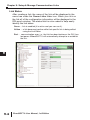
After creating a link, the name of the link will be displayed in the
menu tree under the Comm Links folder icon. When you click on
the link all of the configuration information will be displayed in the
DSLaunch window. The status field is color-coded to help easily
identify the link status.
Green Ҁ link is enabled (it is active and you can use it).
Yellow Ҁ a link becomes inactive while that specific link is being edited
using the Link Editor.
Red Ҁ communication error, i.e., the link has been broken or the PLC has
lost power. DirectSOFT 6 will automatically attempt to re-establish
the link.
DirectSOFT 6 User Manual, 1st Edition
Chapter 9: Setup & Manage Communication Links
Setup an Ethernet Link
The Ethernet link is setup using an Ethernet Communications
Module (ECOM) installed in the PLC. The DirectSOFT 6 Link
Wizard is used to setup the link. The Link Wizard will automatically
determine the majority of the communication settings. It will search
for any existing connections and try to establish the link. If a link is
not present or a new link is to be established, the Link Wizard will
need to be activated. The following steps will guide you through
the link setup.
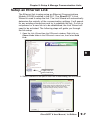
1. Open the Link Wizard from the DSLaunch window. Right click on
Comm Links folder in the DSLaunch menu tree, then select Add
Link.
Right click to
select Add Link.
2. Select Ethernet as the port in the Link Wizard dialog, the click Next.
DirectSOFT 6 User Manual, 1st Edition
1
2
3
D
5
6
7
8
9
0
1
2
3
4
A
B
C
D
9-7
Chapter 9: Setup & Manage Communication Links
1
2
3
D
5
6
7
8
9
1
11
2
13
4
A
B
C
D
9-8
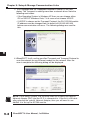
3. The Transport and the Transport Protocol is chosen in the next
dialog. The Transport is nothing more than a network driver. Note the
following restrictions:
• If the Operating System is Windows XP then you can choose either
IPX or UDP/IP. Windows Vista, 7 & 8 users must choose UPD/IP.
• If UDP/IP is chosen as the Transport Protocol, the PLC ECOM module
IP address must be changed from its default of 255.255.255.255
before communication will occur. The following dialogs are used for
this.
4. DirectSOFT 6 will use the specified Transport and Transport Protocol to
scan the network for any Ethernet module on the network. After the
scan is complete the following dialog will be displayed.
NOTE: If the dialog is blank, use the drop down list to select the specific
Network Adapter (NIC) that the PLC is connected to. If the list is still blank
after selecting the specific Network Adapter, then you will need to use
NetEdit 3 to set up the ECOM module.
DirectSOFT 6 User Manual, 1st Edition
Chapter 9: Setup & Manage Communication Links
If the ECOM module has been setup using NetEdit 3, the Link
Wizard dialog will display the information as shown in the sections
named Module List and Address Mode.
The Module List will display the Ethernet modules that are found
on the network, sorted by their Ethernet address. The Ethernet
addresses displayed are unique 12 digit addresses assigned to
the Ethernet module at the factory. The ECOM module will have a
label with the assigned address printed on it. When a device
address is selected in the Module List, the current configuration for
the selected device is displayed in all fields of the dialog.
The Address Mode section displays the module information that
was setup using NetEdit 3. There are three module identifiers
shown: Module Id, Name, IP address and Ethernet address. Any
one of these identifiers can be chosen so the DirectSOFT 6 can
locate the Ethernet module on the network.
NOTE: It is important to have a unique identifier for the Address Mode on
the network.
If for some reason you want to change the module’s configuration,
press the Setup button to make the adjustments. The following
dialog will appear.
The configuration for the module selected in the Devices field will
appear. The fields that are not grayed out can be changed. Be
cautious not to duplicate any of the information when making
changes.
DirectSOFT 6 User Manual, 1st Edition
1
2
3
D
5
6
7
8
9
0
1
2
3
4
A
B
C
D
9-9
Chapter 9: Setup & Manage Communication Links
1
2
3
D
5
6
7
8
9
1
11
2
13
4
A
B
C
D
9-10
Refering to the Ethernet Module Setup dialog on the previous page,
the following Configuration fields can be changed:
• The Module ID should be a unique numerical identifier. If this field
is grayed-out, the module ID dip switches have been set. The only
way to change the ID is to change the dip switches (refer to your
particular ECOM User Manual). If the field is accessible, enter a
new ID.
• The Name field can contain up to 32 characters in length. If there
isn’t a name in the field or the name is to be changed, enter a
unique name.
• The Description field can contain any description limited to the
available field.
• The IP Address field should only be changed whenever the
network IP address is changed (refer to your particular ECOM
User Manual). The Network Administrator should be able to
provide the address.
After making any change, press the Update Module button and the
changes will be written to the ECOM module.
The Query Network button will initiate a rescan of the network
using the Transport and Transport Protocol previously specified.
Press the Exit button when the changes have been completed.
5. DirectSOFT 6 will attempt to communicate with the Ethernet module
using the specified parameters. If successful, the following dialog will
ask for a unique Link Name (up to 16 characters) and an optional Link
Description (up to 32 characters) to be entered. Press the Finish
button to save the link configuration to disk.
DirectSOFT 6 User Manual, 1st Edition
Chapter 9: Setup & Manage Communication Links
6. The successfully created link will be listed with all other links in the
DSLaunch menu tree in the Comm Links folder.
1
2
3
D
5
6
7
8
9
0
1
2
3
4
A
B
C
D
DirectSOFT 6 User Manual, 1st Edition
9-11
Chapter 9: Setup & Manage Communication Links
NetEdit3 Troubleshooting Tips
1
2
3
D
5
6
7
8
9
1
11
2
13
4
A
B
C
D
9-12
As mentioned previously, when using the Hx-ECOM(xxx) module
you will need to configure the IP address using NetEdit3. The
module comes preconfigured to use DHCP, otherwise it defaults to
address 0.0.0.0 and subnet 0.0.0.0.
If NetEdit3 doesn't see the ECOM module when you press "Scan
Network", check the following:
1) Verify Link Good LEDs are illuminated on module and connecting
devices like hubs or unmanaged switches.
2) Turn OFF any WiFi devices or other ethernet devices.
3) Firewalls need to be turned OFF for initial connection (see Windows
Help). Also, turn OFF any antivirus or other protection software that can
interfere with ethernet communication.
4) Try to PING the ECOM module to establish basic connection (see
Windows Help, or search for resources on internet if not familiar with
these steps).
5) You may need to disable any other network adapters besides the one
physically connected to the ECOM or network the ECOM is on. If you
get "Transport Protocol error", try the instructions in this link:
http://hosteng.com/FAQFiles/ECOM.htm#FAQ0024
Go to Step 4, Item C. The latest version of NetEdit has the ability to
select the specific network adapter, by going to the main Menu, select
"Network", then "Adapter" and specifying which installed adapter you
want to use ( it also lists the IP addresses of the adapters). We strongly
suggest you download the latest version of NetEdit here:
http://hosteng.com/SW-Products/NetEdit3.zip
6) If you have a network administrator, you may need to check with them
to verify the configuration of the local network.
7) If you have Windows XP or earlier, and you still can't make a
connection, you should consider trying the IPX protocol. Click the IPX
button in NetEdit3. If you get the 10047 error, you need to install the
NWLink/IPX protocol to your computer ethernet card. See Windows
Help for this procedure, or try this link
http://hosteng.com/FAQFiles/ECOM.htm#FAQ0043
If you can't connect to an existing/unknown ECOM100 in a network, and
the card is likely newer than 2007, by powering-down and putting
dipswitch 6 ON, then powering up, the IP address will be reset to all 0's,
and should become visible to NetEdit3. You must power down and turn
this dip back OFF for card to be able to operate properly.
http://hosteng.com/FAQFiles/ECOM.htm#FAQ0085
DirectSOFT 6 User Manual, 1st Edition
Chapter 9: Setup & Manage Communication Links
Other potential issues with ECOM modules:
- All ECOM modules need dipswitch 7 ON for IBoxes and DataWorx
communications.
1
- ECOM modules can not be located in slot 0 of a 205 system.
If you are trying ModbusTCP client(master) comms with an
ECOM100, look at this link for the steps to follow:
http://hosteng.com/FAQFiles/ECOM.htm#FAQ0050
(note that if the ECOM100 is the slave, these steps are not
required).
When you have established a link to the ECOM and NetEdit can
identify it, note the F and B columns. An asterisk in a column
means that the firmware/booter is not the latest version (this likely
won't hinder your operation, some firmware fixes are for very rare
issues.) You can go to File>Live Update ( if you have an active
internet connection - remember, as part of the connection you may
have had to disable your internet - you can click Live Update to
get the latest firmware/booter versions).
DirectSOFT 6 User Manual, 1st Edition
2
3
D
5
6
7
8
9
0
1
2
3
4
A
B
C
D
9-13
Chapter 9: Setup & Manage Communication Links
1
Setup a Modem Link
2
3
D
5
6
7
8
9
1
11
2
13
4
A
B
C
D
Establishing modem links have changed from the standard serial
link. DirectSOFT 6 uses Telephony Application Programming
Interface (TAPI) for modem configurations. The TAPI protocol allows
applications to control modems or other telephony devices for
operations such as dialing, answering or disconnecting a
connection. With the TAPI protocol, all of the modem support is
centralized by the Windows operating system.
By using TAPI, the Windows modem setup utilities will be used to
configure the modem. Configuring the modem in this manner should
simplify the setup process and allow the selection of the most
recent drivers for the modem being used.
NOTE: If the AutomationDirect MDM-TEL serial modem is being used, refer
to the ADC MDM-TEL Modem setup folder on the DirectSOFT 6 cd that
came with this manual before trying to establish a link through the modem
setup.
Modem Setup
9-14
The first series of examples were performed in Windows 2000 and
will illustrate how to configure a modem connected to your PC. The
examples may differ depending on the Windows operating system
being used.
1. Install the modem if not already installed. Refer to the modem’s
documentation for installation information. If the modem is to be used
for other devices, it will need to be installed a second time.
2.Once the modem has been successfully installed, the properties will
need to be edited. In the Windows Start field, select Settings > Control
Panel.
DirectSOFT 6 User Manual, 1st Edition
Chapter 9: Setup & Manage Communication Links
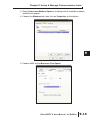
3. Select Phone and Modem Options. A dialog with all available modems
installed will appear.
4. Choose the Modems tab, then click on Properties at the bottom.
5. Choose 9600 as the Maximum Port Speed.
DirectSOFT 6 User Manual, 1st Edition
1
2
3
D
5
6
7
8
9
0
1
2
3
4
A
B
C
D
9-15
Chapter 9: Setup & Manage Communication Links
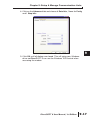
6. Select the Advanced tab and click on Change Default Preferences.
1
2
3
D
5
6
7
8
9
1
11
2
13
4
A
B
C
D
9-16
7. Make Port speed 9600 and choose None for Flow Control.
DirectSOFT 6 User Manual, 1st Edition
Chapter 9: Setup & Manage Communication Links
8. Click on the Advanced tab and choose 8 Data bits., None for Parity
and 1 Stop bits.
9. Click OK until all dialogs are closed. This will setup your Windows
driver so DirectSOFT 6 can use the Windows TAPI control when
accessing the modem.
DirectSOFT 6 User Manual, 1st Edition
1
2
3
D
5
6
7
8
9
0
1
2
3
4
A
B
C
D
9-17
Chapter 9: Setup & Manage Communication Links
Configuring the Link
1
2
3
D
5
6
7
8
9
1
11
2
13
4
A
B
C
D
9-18
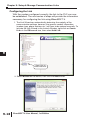
With the modem configured correctly, the link to the PLC can now
be established. The next series of steps will provide the information
necessary for configuring the link using DirectSOFT 6.
1. The Link Wizard can automatically determine the majority of the
communication settings, however, the specific modem information
(modem type, phone number, etc.) will have to be entered manually. To
activate the Link Wizard in the Launch Window, right click on Comm
Links in the DSLaunch tree, then select Add Link.
Right click to
select Add Link.
2. Select Modem as the device, then click the Next button.
DirectSOFT 6 User Manual, 1st Edition
Chapter 9: Setup & Manage Communication Links
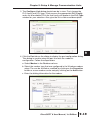
3. The Configure Link dialog should now be in view. First, choose the
PLC family and CPU type. Click once on the appropriate PLC Family
and a list of available CPUs for that family will appear in the PLC Type
window for your selection. Also, give the link a name and description.
1
2
3
D
5
6
7
8
9
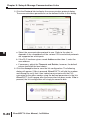
4. Click the Port tab on the dialog to display the port configuration dialog.
0
This dialog is used to setup the port to match the modem’s
configuration. Follow the steps below:
1
a. Select Modem in the Devices column.
b. Select the modem type that was configured in the Windows modem
2
setup. The can be verified or modified by clicking on the Properties
button or a new modem can be setup by clicking on the Add button.
3
c. Enter the dialing information for the modem.
4
A
B
C
D
DirectSOFT 6 User Manual, 1st Edition
9-19
Chapter 9: Setup & Manage Communication Links
1
2
3
D
5
6
7
8
9
1
11
2
13
4
A
B
C
D
9-20
5. Click the Protocol tab to display the communication protocol dialog.
The communications parameters can be defined further in this dialog.
a. Select the communication protocol to use. Refer to the chart in
Appendix A for a breakdown of the various CPUs and which protocols
are supported on which ports.
b. If the PLC has been given a node Address other than 1, enter the
new address.
c. If necessary, adjust the Timeouts and Retries, however, the default
values should be the best choice.
6. Click the Accept button to save the link configuration. The following
dialog will appear. If Yes is pressed, DirectSOFT 6 will dial the modem
and attempt to verify that it can indeed communicate with the PLC
connected to the other modem using the defined parameters in the link.
DirectSOFT 6 will hangup after the connection has been made. If No is
pressed, the link configuration will simply be saved to disk.
DirectSOFT 6 User Manual, 1st Edition
Chapter 9: Setup & Manage Communication Links
7. After the link has been successfully setup, the newly configured Modem
link will be listed on the DSLaunch tree under Comm Links in the
DSLaunch window. The DSLaunch window will display all the
information for the link whenever the link is selected.
DirectSOFT 6 User Manual, 1st Edition
1
2
3
D
5
6
7
8
9
0
1
2
3
4
A
B
C
D
9-21
Chapter 9: Setup & Manage Communication Links
1
Comm Link Options
2
3
D
5
6
7
8
9
1
11
2
13
4
A
B
C
D
9-22
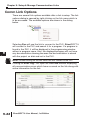
There are several link options available after a link is setup. The link
options dialog is opened by right-clicking on the link name which is
to be accessed. The available options are shown in the dialog
below.
Selecting Run will use the link to connect to the PLC. DirectSOFT 6
will connect to the PLC and search it for a program. If a program is
found in the PLC, it will be displayed in the programming window
without a program name. Also, the displayed program will not have
any documentation showing because the documentation is stored
with the project on disk and not in the PLC.
NOTE: Double-clicking on the link name will also connect to the PLC.
Clicking on Error Log... will open the Link Info window displaying
all communication errors which have occurred on the link along with
active information for the link.
DirectSOFT 6 User Manual, 1st Edition
Chapter 9: Setup & Manage Communication Links
Clicking on Edit Link... will open the Configure Link dialog which
was used whenever the link was setup. Click on the link to be
edited, make the necessary changes then press the Accept
button.
There may be a time when it becomes necessary to delete a
Comm Link. To delete a link, click Delete Link... and the Delete
Link dialog will open, like the one below, showing the link name
and description to verify that the link is not used any longer. To
delete the link, click on Delete!.
DirectSOFT 6 User Manual, 1st Edition
1
2
3
D
5
6
7
8
9
0
1
2
3
4
A
B
C
D
9-23
Chapter 9: Setup & Manage Communication Links
1
Going Online
2
3
D
5
6
7
8
9
1
11
2
13
4
A
B
C
D
Once the program has been edited and the communications link
has been setup, it is time to go online with the PLC and load the
program.
Connect the PLC
With the Ladder View displayed in the Programming window, either
press the Connect button on the PLC toolbar (if it is displayed) or
use PLC > Connect from the Menu bar. Select the communications
link from the Select Link dialog, then select Use Disk from the
Online/Offline Differences dialog (refer to pages 2-22 to 2-24).
This will load the program into the PLC. The PLC will be in the
Program Mode after DirectSOFT 6 completes the download. Press
the PLC Mode button on the Online toolbar and click on Run in the
PLC Modes dialog to place the PLC online.
To disconnect from the PLC, simply press the Disconnect button on
the PLC toolbar or use PLC > Disconnect from the Menu bar.
Select Yes when asked Are you sure?, then you will be free to
shut down.
Use the Project Folder
Once a project has been saved to disk, the project name will appear
on the menu tree in the Project Folder. To open the project,
double-click on its name. When the programming window is
displayed, you can go online following the process just discussed.
Use the Link
9-24
You can also connect to the PLC by using the communications link.
Make sure that a cable is connected to the PLC, then select the link
name from the menu tree and double-click on it. If there is a
program in the PLC, it will be displayed in the Programming window
when it appears. Notice that the name of the program is UNTITLED
[Ladder View]. The PLC does not store the program name or other
documentation in its memory. All of the program documentation is
stored on disk in the PC.
DirectSOFT 6 User Manual, 1st Edition