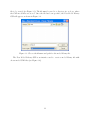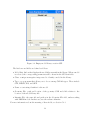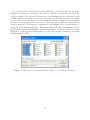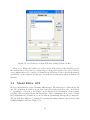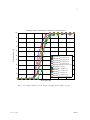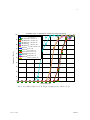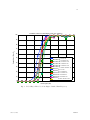
1
Appendix A J.H. Dixon, LADAR Simulator User Manual. 1 LADAR Simulator User Manual Jason H. Dixon Email: jdixon [at] ece [dot] gatech [dot] edu Version 0.7 January 16, 2007 c Copyright !2006 Jason H. Dixon This program is free software; you can redistribute it and/or modify it under the terms of the GNU General Public License as published by the Free Software Foundation; either version 2 of the License, or (at your option) any later version. This program is distributed in the hope that it will be useful, but WITHOUT ANY WARRANTY; without even the implied warranty of MERCHANTABILITY or FITNESS FOR A PARTICULAR PURPOSE. See the GNU General Public License for more details. A copy of the GNU General Public License has been included with this program in the file gpl.txt It can viewed by visiting the website http://www.gnu.org/copyleft/gpl.html and obtained by writing to the Free Software Foundation, Inc., 51 Franklin Street, Fifth Floor, Boston, MA 02110-1301, USA. This software includes other software and files that are subject to different copyright registrictions: c • gl.h is from the Mesa 3-D graphics library, Copyright !1999-2001 Brian Paul All Rights Reserved. It is subject to the MIT Licesne. The official MESA 3-D website is http://www.mesa3d.org/ c • glext.h and glu.h are Copyright !1991-2000 Silicon Graphics, Inc. and are subject to the SGI Free Software License B, Version 1.1. See http://oss.sgi.com/projects/ FreeB/ c • The 3D Studio File Format Library is Copyright !1996-2001 J.E. Hoffmann ALL Rights Reserved. It is subject to the GNU Lesser General Public License. The official website is http://lib3ds.sourceforge.net/ Contents 1 Getting Started 1.1 System Requirements . . . . . . . . . . . . . . . . . . . . . . . . . . . . . . . 1.2 Installation . . . . . . . . . . . . . . . . . . . . . . . . . . . . . . . . . . . . 1.3 Files and Folders . . . . . . . . . . . . . . . . . . . . . . . . . . . . . . . . . 1 1 1 2 2 Scene Creation Overview 2.1 Parts of a Scene . . . . . . . . . . . . . . . . . . . . . . . . . . . . . . . . . . 2.2 Setting the View . . . . . . . . . . . . . . . . . . . . . . . . . . . . . . . . . 2.3 Adding Targets . . . . . . . . . . . . . . . . . . . . . . . . . . . . . . . . . . 3 3 4 4 3 Graphical User Interfaces 3.1 Main LADAR Simulator GUI 3.2 View Settings GUI . . . . . . 3.3 New Model Library GUI . . . 3.4 Model Editor GUI . . . . . . 3.5 Ground Plane GUI . . . . . . . . . . . . . . . . . . . . . . . . . . . . . . . . . . . . . . . . . . . . . . . . . . . . . . . . . . . . . . . . . . . . . . . . . . . . . . . . . . . . . . . . . . . . . . . . . . . . . . . . . . . . . . . . . . . . . . . . . . . . . . . . . . . . . . . . 4 Library Interface 5 File and Structure Formats 5.1 Configurations . . . . . . . . . . . 5.1.1 Configuration Structure . 5.1.2 Target Structure . . . . . 5.1.3 View Settings Structure . 5.1.4 Configuration File Format 5.2 Model Libraries . . . . . . . . . . 5.2.1 Model Library Structure . 5.2.2 Model Structure . . . . . . 5.2.3 Model Library File Format 5.3 Data Sets . . . . . . . . . . . . . 5.3.1 Range Imagery . . . . . . 5.3.2 Point Clouds . . . . . . . 5.3.3 Depth Buffer . . . . . . . 6 6 8 10 14 18 19 . . . . . . . . . . . . . . . . . . . . . . . . . . 2 . . . . . . . . . . . . . . . . . . . . . . . . . . . . . . . . . . . . . . . . . . . . . . . . . . . . . . . . . . . . . . . . . . . . . . . . . . . . . . . . . . . . . . . . . . . . . . . . . . . . . . . . . . . . . . . . . . . . . . . . . . . . . . . . . . . . . . . . . . . . . . . . . . . . . . . . . . . . . . . . . . . . . . . . . . . . . . . . . . . . . . . . . . . . . . . . . . . . . . . . . . . . . . . . . . . . . . . . . . . . . . . . . . . . . . . . . . . . . . . . . . . . . . . . . . . . . . . . . . . . . . . . . . . . . . . . . . . . . . . . . . . . . . 21 21 21 21 22 23 23 23 23 25 27 27 27 28 Abstract This document describes a simulation tool used to created synthetic range imagery and three-dimensional point cloud datasets within MATLAB. Created scenes consist of multiple faceted models at user-specified coordinates, orientation angles, and sizes. The tool consists of a graphical user interface (GUI) and a simple library interface. The GUI aids scene creation by facilitating object placement, specifying the ground plane, defining the viewing perspective, and adjusting model parameters. The library interface allows the use of the scene generation code to write MATLAB scripts that create and analyze customized data sets. The tool currently supports faceted models in PRISM, 3D Studio, stereolithography, and Princeton Shape Benchmark object file formats. Chapter 1 Getting Started 1.1 System Requirements System requirements for running the LADAR Simulator are: • MATLAB Version 7.0 or above with the LCC compiler • Installed OpenGL libraries • Operating System: Windows XP, Mac OS X1 There is no recommended requirement for RAM, CPU speed, or hard disk space, except for what is required for MATLAB. Please keep in mind that rendering three-dimensional graphics is a resource intensive process. The software has been tested on 2.0 GHz Pentium 4 system with 512MB of RAM, producing satisfactory results. 1.2 Installation Follow these steps to set up the LADAR Simulator: 1. Extract the contents of the archive ladar simulator.zip. 2. Move the folder named ladar simulator to a desired location. 3. Start MATLAB and navigate to that same ladar simulator directory. 4. The MATLAB compiler needs to be set to LCC. Run the command mex -setup. MATLAB will ask you if you want to locate installed compilers. Type y and press the Enter key. One of the resulting choices should begin with Lcc C followed by a version number and directory. Type in the number corresponding to that choice and press the Enter key. MATLAB will ask you to verify your choice. GUI layouts may not look right or be fully functional in MATLAB 7.0 for Mac. This issue was resolved with version 7.3 R2006b. 1 1 5. In the MATLAB prompt, run the command install ladar sim. This will compile the relevant C files and add the folder to the MATLAB path. You are now ready to start using the LADAR Simulator. It can be run from any working directory you choose. To uninstall the LADAR Simulator, simply remove the directory from the MATLAB path and delete the folder. If you do not wish to install the LADAR Simulator, you may choose to run all GUIs and programs from within the ladar simulator folder itself, but you must first run the command make ladar sim to compile the necessary source files. 1.3 Files and Folders All files are located in the folder ladar simulator. This folder contains the MATLAB functions/scripts and C files for creating simulated range scenes and point clouds. Other files in the directory include • sample models.ml - model library of simple models There are a number of sub folders containing example files: • config - scene configurations • models - simple faceted models • scenes - range images and point clouds The rest of the folders contain program-related libraries. 2 Chapter 2 Scene Creation Overview This chapter provides a high-level overview of the simulator and using it to define and render scenery. 2.1 Parts of a Scene The LADAR Simulator tools allow users to create synthetic LADAR data sets (range images and point clouds) from predefined, three-dimensional scenes. The tool starts by setting up a three-dimensional world view of a particular scene in a space with axes x, y, and z. x and y represent coordinates along the ground, or any plane at some given height (as in the standard three-dimensional coordinate system used in computer graphics). The z-coordinate represents the height at particular x and y values. If we consider the ground, then all z values will be zero. A viewing sensor is usually positioned at some point above the z = 0 plane, pointing at some predefined point in the world. The position of the sensor may be defined in rectangular x, y, and z coordinates, or in terms of range, azimuth, and elevation spherical coordinates based on the “look at” point. A flat, rectangular ground plane of any desired size can be placed at the coordinates where z = 0 to give the appearance that objects in the scene are resting on a surface. The units of the world coordinates are not explicitly set and may represent anything. For example, let us say that you want to view a tank from 50 meters away, but the faceted model of the tank is defined in millimeters with dimensions 6367 × 3122 × 2943. Specifying 50 as the range will result in an appearance that may be interpreted in two different ways: (1) the tank is 6367mm ×3122mm ×2943mm and the sensor is 55mm away, or (2) the tank is 6367m ×3122m ×2943m and the sensor is 50m away. Without scaling the values, the distance from the target and the dimensions of the tank are considered to be the same units. To have all objects in the scene drawn appropriately, the units of the tank must be converted to meters by scaling by 1/1000, or the units for the sensor’s range from the target must be specified in millimeters. 3 2.2 Setting the View The viewing area and resolution of the resulting imagery are set via the field of view and data dimension parameters. Field of view is defined in the horizontal and vertical directions, relative to the position of the sensor, in units of degrees. In essence, the sensor scans +fov/2 and -fov/2 in both directions. The number of pixels in the image is determined by the data dimension parameters (think of this parameter as the angular sampling that is occurring as the sensor scans over the field of view angles). Square images are created by setting the two field of view angles to the same value while rectangular images result from one field of view angle being larger than the other, regardless of the pixel dimensions. The sensor’s position can be specified in world or spherical coordinates. To use world coordinates, simply set the [x, y, z] parameter vector. For spherical, set the [ρ, θ, φ] coordinates, representing range, azimuth, and elevation. An illustration of the view and coordinate system can be seen in Figure 2.1. Range is taken to be the distance between the sensor and the “look at” coordinate, also specified as a [x, y, z] parameter vector. The minimum and maximum viewable ranges must also be set using the appropriate parameters. When viewing point clouds, the data dimension and field of view angles are used to defined the scene from which the points will be extracted. (a) (b) Figure 2.1: A Standard (a) and overhead (b) view of a scene’s layout. The sensor location is represented by the white circle. 2.3 Adding Targets Scenes may contain any number of objects in a variety of positions and orientations. These objects may be referred to as “targets” throughout this document. Target geometries are 4 obtained by reading in CAD model descriptions. The CAD model formats that this software supports are PRISM, Stereolithography, 3D Studio, and Princeton Shape Benchmark. Targets are placed at specified (x, y, z) coordinates and rotated by some angle around the three axes. Targets may be rescaled if the units used to define the target’s CAD model are undesirable. 5 Chapter 3 Graphical User Interfaces This chapter reviews the different graphical user interfaces (GUIs) used in the LADAR Simulator. 3.1 Main LADAR Simulator GUI To run the LADAR Simulator GUI, type ladar sim in the MATLAB prompt. The GUI will prompt the user for a configuration file to load. This file contains information for setting up a scene. An example configuration file can be found in ladar simulator/ config/sample.config. If you wish to load default configuration settings, just press the Cancel button in the dialog box. Next, another dialog box will appear. This box asks the user to load a model library file. This file contains structural information about the models referenced in the configuration file. If a configuration file was selected, a predetermined model filename will be chosen and the user must locate that file. If no configuration file was selected, the user is free to specify any available model library file. The default model library file is ladar simulator/sample.ml. If no model libraries are available, the user may create one by pressing the Cancel button and using the Model Library Creation GUI. For instructions on how to use this GUI, see Section 3.3. For the LADAR Simulator GUI to run, a model library must be selected or created. Once the model library has been chosen, the LADAR Simulator GUI will appear (see Figure 3.1). The GUI contains all components necessary to create a scene. The axes on the right side of the window displays the rendered configuration or point cloud. The type of scene is selected from three possible choices using the pop-up menu below the scene axes: Full Range, Point Cloud, Depth Buffer. For a detailed description of these scene types, see Section 5.3. By default, the color mapping used for two-dimensional data sets is determined automatically by the minimum and maximum values in the scene. This can be overridden by marking the Colormap check box and selecting the minimum and maximum values values for color map scaling. The user can add or remove a ground plane to the scene by selecting the Ground Plane check box. The dimensions of the ground plane can be defined by pressing 6 the adjacent Options button. For details about setting up a ground plane, see section 3.5. Gaussian distributed noise of a chosen variance may be added to the scene by selecting the Noise check box. The noise is centered on the range values (or coordinates in the case of point cloud data). Figure 3.1: Main LADAR Simulator GUI window. The Target List listbox shows targets that have been added to the current configuration. The text fields below the list box are used to set target parameters. Targets may be added, removed, or updated by pressing the corresponding buttons next to the Target List list box. Targets may also be added with the mouse by left-clicking on the desired location in the scene. When you select an item in the listbox, the corresponding target parameters will appear in the text fields. Users may also update existing targets by pressing the Enter key after changing one of the text field values. Scene configurations may be loaded from configuration files by pressing the Load button. The Save button will save a configuration to a file. The adjustable target parameters are as follows: 7 • Position: the location of the target in the scene. x and y are ground coordinates, while z is the coordinate above or below the ground plane. In most situations, z will be set to zero. • Rotation Angle: an angle rotation in degrees starting from the positive x-axis and moving counter clockwise. • Rotation Axis: axis about which to perform rotations. To perform rotations about z-axis, this should be set to [0, 0, 1]. • Scale: stretches or shrinks a target by multiplying the scale by the coordinates used to define the target. From within the main LADAR Simulator GUI, other GUIs may be launched. To change the viewing perspective and associated parameters, press the View Settings button (see Section 3.2). To adjust CAD model parameters, press the Model Editor button (see Section 3.4). To create new model libraries, press the New Model Library button (see Section 3.3). To change the current model library, press the Change Models button. To save range images or point clouds, users can use the corresponding button and radio toggles. When saving data sets, it’s best to remember the format used because it will be necessary information for correctly reloading datasets. By default, data is saved in the native machine format, column major, with the upper left corner of the image set as the origin. 3.2 View Settings GUI The View Settings GUI facilitates the adjustment of scene viewing parameters (see Figure 3.2). The text fields of the GUI are as follows: • Field of View: two fields representing the vertical and horizontal scanning angles used to determine the viewing area. The angles are interpreted as + or - fov/2 from the current “look at” position in either direction. • Position (cartesian): [x, y, z] coordinates representing the sensor location. When the cartesian coordinates are changed, the spherical coordinates are adjusted automatically. • Position (spherical): [ρ, θ, φ] coordinates representing the range, azimuth, and elevation from the “look at” point in the scene. When the spherical coordinates are changed, the cartesian coordinates are adjusted automatically. • Look At: cartesian coordinates representing the point to which the sensor is pointing. When the “look at” point is changed, the spherical coordinates are adjusted automatically. It is assumed that changing the “look at” point does not reflect a change to the sensor position. 8 • Min/Max Range: two fields representing the placement of the clipping planes relative to the sensor location. Targets or part of the ground plane placed beyond these range limits will not appear in the rendered scene. Pixel values in range images that represent scene elements beyond the range limits will be clipped to the minimum and maximum range values. • Dimensions: two fields representing the vertical and horizontal (number of rows versus number of columns) pixels in range images. For point clouds, these fields represent the number of samples used to extract point cloud information (in the event that all samples are valid points, then the product of these two fields is the number of points in the point cloud). When combined with the field of view angles, these fields can be thought of as the angular scanning sampling in the vertical and horizontal directions. • Up Vector: supplies the rendering system with a vector orientation for up. In most cases, these may be set to [0, 0, 1], representing the positive z-axis as the up direction. If the camera is pointed straight down, then a new up direction must be chosen so that the vector has a projection along the xy-plane. 9 Figure 3.2: View settings GUI window. When changing fields, the GUI will perform a general validity check for the most recently used parameter and revert to the original value if the current value is found to be invalid. Pressing the Reload button will reset to the GUI to its original state after it was first launched. Pressing the OK button will save the view settings, close the View Settings GUI, and redraw the scene using the new settings. Pressing the Apply button will save the current view settings and redraw the scene. Pressing the Cancel button will close the View Settings GUI and discard all changes since the last time the Apply button was pressed. Pressing the Enter/Return key after editing a text field simulates pressing the Apply button. 3.3 New Model Library GUI The LADAR Simulator GUI allows users to create their own model library files consisting of references to CAD models in supported model file formats and a set of adjustable parameters. When the “New Model Library” button in LADAR Simulator GUI window is pressed, a dialog box will appear that allows the user to select the name and path of the model library 10 file to be created (see Figure 3.3). The file must be saved to a directory in, or above, where the CAD model files are stored. Once the file has been specified, the New Model Library GUI will appear, as shown in Figure 3.4. Figure 3.3: Choose the filename and path for the model library file. The New Model Library GUI is an interface used to create a model library file with chosen model CAD files (see Figure 3.4). 11 Figure 3.4: Empty model library creation GUI. The listboxes and fields are defined as follows: • Model List: listbox that displays the model files currently in the library. When a model is selected, the corresponding parameters will be shown in the GUI text fields. • Class: a unique nonnegative integer used to identify a model in the library. • Type: a pop-up menu that allows you to choose among CAD file types. These include STL, PRISM, 3DS, and OFF. • Name: a text string identifier for the model • Geometry File: path and location of the geometry CAD model file relative to the location of the model library file. • Intensity File: the same file and path as in the Geometry File field, unless working with PRISM models. In that case, use the radiance filename. For more information about the meaning of these fields, see Section 5.2.3. 12 To add model files to the library, press the Add button. A file dialog like the one shown in Figure 3.5 will appear. Navigate to the subfolder with the geometry files and select the one(s) you wish to add to the model library. Once you click Open, the Model List listbox will populate with the chosen models and you can see the corresponding text fields by clicking on a model in the list (see Figure 3.6). By default, the classes are numbered sequentially in the same order in which the files were selected. The types are determined by the extension of the geometry file. The names are determined by the filename. Any of the fields may be changed from the their default values. The Remove button will remove the currently selected model from the library. When finished, press the Done button and the model library creation GUI will close, the new model library will be loaded, and you will be returned to the main LADAR Simulator GUI. Figure 3.5: Dialog box for selecting CAD model files to add to the model library. 13 Figure 3.6: Model library creation GUI after adding CAD model files. Please note: When a model file is read, all geometry files referenced therein will be loaded into main memory. If you have too many large geometry files referenced in a model library, your computer may not be capable of loading the model library. Please consider the memory capabilities of your computer, and the size of your model geometry files, when creating model libraries. 3.4 Model Editor GUI Model geometry files are created in many different ways. The units used to define the models and the orientation in which a model rests can vary greatly from file to file. In addition to organizing a collection of model files, model libraries hold information about resizing, rescaling, and reorienting the models themselves. These adjustments allow you to redefine the default units and orientation of a model without permanently altering the geometry file. The Model Editor GUI can be launched by pressing the Model Editor button in the main LADAR Simulator GUI (see Figure 3.7). 14 Figure 3.7: GUI for changing model library parameters. The GUI has three windows, where each window faces the origin from one of the three coordinate axes. The GUI attempts to automatically adjust the viewing distance in each window so that the model is completely visible. If a different view is desired, you can change the value underneath the window. This value represents the distance between the camera and the origin along the specified axis. To “zoom in” on the object in the window, simply decrease the magnitude of this value. To “zoom out,” increase the magnitude of this value. The Model pop-up menu allows you to choose the model to be adjusted. The Translation text fields are used to define a default movement to occur in each direction before an object 15 is placed in a scene. Typically, model files are defined in such a way that the origin is considered to be one of the bottom corners of the object. It may be convenient to place the origin on the bottom center of the model so that if a target is placed at [0, 0, 0], then the target will straddle the center point. Using the same units as the geometry file, you can specify desired translations along the x, y, or z axes. An example is shown in Figure 3.8. (a) (b) Figure 3.8: Images showing a tank before (a) and after (b) a translation adjustment along the z−axis. After the adjustment, tanks placed in a scene will not be halfway in the ground plane. The Rotation text fields are used to define a default rotation to occur before an object is placed in a scene. Sometimes model files are defined in such a way that leaves them in an unnatural orientation when used in a scene. For example, a car model may be sitting on its bumper by default. These text fields allow you to define a rotation along any of the axes that will occur before a model is placed. In the case of the car, you can define a rotation that places the car on its wheels. The rotations are specified in the angle-axis notation, where you specify a rotation angle and the vector form of an axis about which to rotate. The Rotation Axis Adjustment text fields allow you to adjust the position of a model before a rotation occurs. By default, rotations occur on an axis that in the center of the model’s bounding box. For symmetric models, this works out well. When there are features that take away from this symmetry, such as an extra long gun extending from a tank, it may be desirable to adjust the axis about which the rotation occurs. In the case of the long gun, the center of the bounding box may be closer to the front of the tank and a rotation would appear awkward. An example of this effect is shown in Figure 3.9. 16 (a) (b) Figure 3.9: Images showing how adjusting the rotation axis affects the final rotation. Both images show two T62 tanks, one at the default orientation and another at the same location but rotated by 90 deg. There is no rotation axis adjustment in (a) so the rotation axis is further from the center of the tank body. This gives the rotated tank the appearance that it was displaced slightly. In image (b), the rotation axis is moved so that it is in the center of the tank body. This results in a rotation as we would intuitively think about one. The Native Dimensions field shows the extent of the current model along the x − y − z axes. Think of this as the dimensions of the bounding box along each of these axes. The values in this field are determined by the native geometries of the model file, meaning that they are the same as in defined in the CAD model geometry file. The Model Dimensions text field shows how the extents change after applying the value in the Scale Factor field. The scaling can also be adjusted by entering a new value directly in the x, y, or z Model Dimensions field. For example, a model’s native dimensions are defined in a such a way that you have a vehicle that is 5000 units long in the x-direction, and you know that the vehicle is supposed to me 4 meters long in that direction, then you can type 4 into the x field. All other Model Dimensions will adjust accordingly, as will the scale factor. The camera positions in the three windows will also be adjusted to provide the same view of the object after they have been resized. Note that when adjusting the Translation or Rotation Axis Adjustment fields, the units are in the native model units and not the scaled ones. When using the Model Editor GUI, some trial and error is usually involved in order to obtain desired model adjustments. 17 3.5 Ground Plane GUI The Ground Plane GUI provides users access to the geometric description of the ground plane (see Figure 3.10). The ground plane is a flat, rectangular surface. A corner is defined by setting the [x, y, z] coordinates of the “Origin” field. The lengths in the x and y directions are specified using the next two text fields. If negative values are supplied in these fields, then the ground plane extends along the axes in the negative direction. An arbitrary intensity value is specified in the last text field. The value itself is arbitrary and may be set to any positive integer. Figure 3.10: GUI for changing ground plane settings. When changing fields, the GUI will perform a general validity check for the most recently used parameter and revert to the original value if the current value is found to be invalid. Pressing the Reload button will reset to the GUI to its original state after it was first launched. Pressing the OK button will save the ground plane settings, close the Ground Plane GUI, and redraw the scene using the new ground plane. Pressing the Apply button will save the current ground plane settings and redraw the scene. Pressing the Cancel button will close the Ground Plane GUI and discard all changes since the last time the Apply button was pressed. Pressing the Enter/Return key after editing a text field simulates pressing the Apply button. 18 Chapter 4 Library Interface The functions used to read in models, create/manipulate scene configurations, and draw/display scenes are all available to call directly from a user-defined MATLAB script or function. This capability was included to allow users to run their own simulations using synthetic data generated on-the-fly. Some of the functions and their descriptions are described here: • Loading and Saving Files – load configuration - Load configuration file into structures – load data - Retrieve image or point cloud from data file – load model library - Read model library file into a structure – save configuration - Save configuration to a text files – save data - Save a range image or point cloud to a data file – save model library - Save model library structure to a text file • Manipulating Configuration Structures – add target - Add target with given parameters to configuration – new config - Create an empty configuration structure – remove target - Removes a target from a configuration – set ground param - Update the ground plane in a configuration – set target param - Update a single target in a configuration • Manipulating View Structures – new view settings - Create a view settings structure – set view param - Update a view setting parameter • Working with Scene Data 19 – add noise - Adds noise to range imagery or point cloud data – display data - Display a scene in a given figure or axes • Scene Creation – render scene - Create a range image or point cloud data set Customized simulations typically start out with loading a model library and a configuration file (use load model library and load configuration). If no configuration file is available, then a configuration is created from scratch with the new config function with some ground plane information. Targets are added with the add target function. The view is created and modified with the new view settings and set view param functions respectively, and so on. The ladar simulator folder contains a subfolder called scripts with an example simulation file named make multiview ptc.m. It creates a single point cloud from multiple views of the same scene, consisting of an object positioned in the middle of a ground plane. The sensor takes frames at 120 deg increments and merges the point clouds from the individual frames into a single point cloud. It then saves the point cloud and configuration structure to files using the save data and save configuration functions, respectively. Each range image is displayed along the way, as was well as the final point cloud, using the display data function. This script may be used as a guide for creating other customized simulations. 20 Chapter 5 File and Structure Formats Although the GUIs and library interfaces should be sufficient for most users, it may be desirable for users to directly manipulate the configuration files, model libraries, or the various structures. This chapter includes descriptions of these formats. If the tools provided for manipulating the structures and files are sufficient for your needs, then this chapter may be skipped. When manipulating the structures directly, it is important to remember data types. By default, MATLAB stores everything as a double precision floating point value. Since these structures are passed to C functions that utilize external libraries, many of the fields in these structures are not double precision floating point. Therefore, it is important to use the appropriate data type when assigning values to the structure fields referenced in this chapter. 5.1 Configurations The configuration file and structure format includes fields for organizing different components of a scene. These components include target parameters, view settings, and the ground plane description. All arrays are stored row-wise. 5.1.1 Configuration Structure The configuration structure description is shown in Table 5.1. It holds information on the targets and the ground plane in the scene. 5.1.2 Target Structure The target structure description is shown in Table 5.2. The class field holds a nonnegative integer that identifies a unique model in the corresponding model library. The position field represents the target’s [x, y, z] coordinate position. The orientation is stored in angle-axis notation, so that rotations occur by rotating the target θ degrees along the [x, y, z] axis. In 21 Table 5.1: Configuration structure fields. Field Name Data Type Description numTargets uint32 scalar Number of targets in the scene targets structure array Array of target structures -1 = Do not include a ground plane 0 = Use default ground plane useGround int32 scalar 1 = Use customized ground plane defined in the configuration structure groundIntensity uint32 scalar ground intensity (any nonnegative integer) groundOrigin double array Three-element [x, y, z] array representing the origin of the ground plane groundXLength double scalar Length of the ground plane in the positive-x direction groundYLength double scalar Length of the ground plane in the positive-y direction most cases, rotations will occur about the z-axis, so the [x, y, z] portion of this field should be set to [0, 0, 1]. In the future, more intuitive rotations, like Euler angles, will be supported. The scale field scales the dimensions of the current target by a total value of s. It then scales the corresponding dimensions (as defined in the CAD model) by an additional x, y, or z in each of those directions. By default, this array should be set to [1, 1, 1, 1] for no additional scaling. The visible field is either set to zero or one and controls the visibility of the target in the configuration (for visible targets, leave this set to one). The library function that manipulates the target structure is set target param. Field Name class position orientation scale visible 5.1.3 Table Data Type uint32 scalar single array single array single array uint32 scalar 5.2: Target structure fields. Description Unique target class ID Three-element array of target [x, y, z] coordinates Four-element array of target [θ, x, y, z] orientation Four-element array of target [s, x, y, z] scale 0 or 1 specifying whether to render a target View Settings Structure The view settings are stored in a separate structure with parameters defined in Table 5.3. The library functions that manipulate the view structure are new view settings and set view param. 22 Field Name vfov hfov position lookAt upv clipping dataDim 5.1.4 Table Data Type double scalar double scalar double array double array double scalar double array 5.3: View settings structure fields. Description Vertical field of view Horizontal field of view Three-element array of sensor [x, y, z] coordinates Three-element array of “look at” [x, y, z] coordinates Three-element array representing the up direction Two-element array consisting of the minimum and maximum ranges uint32 array Row x Column dimension of the result image in pixels, (the vertical and horizontal sampling) Configuration File Format Figure 5.1 shows the structure of a configuration file. Configuration files can be loaded and saved with the load configuration and save configuration functions, respectively. 5.2 Model Libraries Model libraries are a collection of model geometries and associated parameters for rendering. It is important to note that it is best not to have model libraries that contain too many highly detailed models because all model information is stored in main memory. If a user were to create a model library with 20 models and each model file was larger than 20 megabytes when loaded, then MATLAB would need over 400 megabytes of memory to store the model library (at bare minimum). Keep your system’s memory requirements in mind when creating model libraries. 5.2.1 Model Library Structure Model library structures never need to be manipulated directly, so this section may be skipped if desired. The Model Editor and New Model Library GUIs are currently the only means by which model libraries may be changed. Model library structures contain two fields: numModels and models. numModels is a field of type uin32 that stores the number of models in the library structure. models is an array of model structures, defined in Section 5.2.2. 5.2.2 Model Structure Model structures never need to be manipulated directly, so this section may be skipped if desired. 23 model_library <filename> v_field_of_view <degrees> h_field_of_view <degrees> camera_position <x position> <y position> <z position> object_position <x position> <y position> <z position> up_vector <x position> <y position> <z position> clip_distance <min range> <max range> data_dims <vertical pixels> <horizontal pixels> number_of_targets <nonnegative integer> target 1 class_of_target <nonnegative integer ID> position <x position> <y position> <z position> orientation <degrees> <x axis> <y axis> <z axis> scale <global value> <x position> <y position> <z position> ... target <final target number> class_of_target <nonnegative integer ID> position <x position> <y position> <z position> orientation <degrees> <x axis> <y axis> <z axis> scale <global value> <x position> <y position> <z position> use_ground <-1, 0 or 1> intensity <nonnegative integer> origin <x position> <y position> <z position> x_length <value> y_length <value> Figure 5.1: Configuration file format. 24 The fields of a model structure are defined in Table 5.4. Section 5.2.3 goes into more detail about the purpose of some of these fields. In the case of gFile and rFile, these will most likely be the same unless the CAD model is defined in the PRISM format. For CAD models that have no intensity information, the relevant fields are populated with arbitrary values when the models are first read from the files. Field Name class type name translate Table 5.4: Model Data Type uint32 scalar char array char array single array rotate rotateAdjust scale gFile rFile vertexTable vertexTableLength facetIndexLists facetIndexListSizes numberOfFacets intensityRegion maxVertex minVertex intensityList intensityListLength 5.2.3 structure fields and descriptions. Description numerical identifier for the model text description of the model type text identifier for the model three-element (x, y, z) translation from the model’s origin single array four-element (θ, x, y, z) default model rotation single array three-element (x, y, z) translation of the model rotation axis single scalar global scaling of model units char array file and path of geometry file char array file and path of radiance file (if available), or gFile single matrix N × 3 matrix of model vertices uint32 N as used in vertexTable cell array M × 1 array of uint32 arrays of indices into vertexTable uint32 array M × 1 array containing the sizes of each array in facetIndexLists uint32 scalar the M as referenced above (number of facets in model) uint32 array the intensity index of each facet single array three-element (x, y, z) for the largest bounding box coordinate single array three-element (x, y, z) for the smallest bounding box coordinate uint32 array K × 1 array of intensity (or arbitrary) values uint32 scalar K as referenced above (number of intensities) Model Library File Format The model library file format is designed to keep a record of CAD models common to a certain scene and the adjustable parameters for each of those models. To load or save model library files, use the load model library or save model library functions, respectively. The first line in the file contains the term number of models followed by a single space and an integer 25 representing the number of models in the file. Each model is listed on consecutive lines and the model parameters on a single line are separated by a single space. The parameters are as follows: 1. A unique nonnegative integer model identifier (in the configuration structure/file, this integer is the same as the class). 2. Type of CAD model (STL for ASCII or binary stereolithography files, 3DS for binary 3D studio files, PRISM for files in the Prism file format from Thermoanalytics, and OFF for Princeton shape benchmark files). 3. Relative path (starting from the location of the model library file) and filename of the CAD model 4. A repeat the previous path and filename for non-Prism files. For Prism files, this field contains the corresponding radiance file. 5. The number 0 (not used, but left in for code legacy purposes). 6. A unique text string ID for the model. This will be displayed in the pop-up menus of the GUIs that allow that users to switch model types when creating a scene. 7. An array of three numbers in the form [x,y,z] (including the brackets and commas). This represents a coordinate translation from the model’s origin as defined in the units that the model was created in. By default, this field is set to [0,0,0]. When changed, this field allows users to define another point in the model space as the origin. As an example, imagine rendering a model at the point [0, 0, 0] in the scene coordinates. In many instances, this has the effect of rendering a lower corner of the model at that point. If the user would like for all models to be centered at the point of placement, then one could adjust the x and y parameters of this vector to first translate the model by these coordinates. 8. An array of four numbers in the form [θ,x,y,z] (including the brackets and commas). Similar to the previous field, this one represents a default rotation to take place for rendering a model. By default, this can be set to [0,0,1,0]. 9. An array of three numbers in the form [x,y,z], including the brackets and commas. This represents a translation to take place before a rotation occurs. By default, this may be set to [0,0,0]. 10. A scalar value that represents a scaling of the coordinates in the model file. By default, this may be set to 1. For an example model library file, see Figure 5.2. 26 number_of_models 3 0 OFF mod/shape1.off mod/shape1.off 0 shape1 [0,0,0] [0,0,0,0] [0,0,0] 1 1 OFF mod/shape2.off mod/shape2.off 0 shape2 [0,0,0] [0,0,0,0] [0,0,0] 1 2 OFF mod/shape3.off mod/shape3.off 0 shape3 [0,0,0] [0,0,0,0] [0,0,0] 1 Figure 5.2: Example of a model library file. 5.3 Data Sets The LADAR Simulator can create data sets in two forms: range images and point clouds. Data sets can be saved or loaded with the functions save data and load data, respectively. Data is displayed in MATLAB with the function display data. 5.3.1 Range Imagery Range images are rectangular grids where each element represents the range from the sensor to world coordinate captured by that element. In MATLAB, these images are stored in matrix form. See Figure 5.3 for a typical range image. Figure 5.3: A typical range image. 5.3.2 Point Clouds Point clouds are created by taking the two-dimensional points in a range image and converting them to their corresponding three-dimensional coordinates. The resulting point cloud consisting of L points is constructed as a 3 × L matrix. If an image is rendered with a N × M data dimension, then there will be at most N M coordinates in the resulting point 27 cloud. The number of coordinates L is less than N M when there is sky present in the scene, when a ground plane is not rendered, or when pixels are set at the minimum or maximum range values. A typical point cloud is shown in Figure 5.4. It is worth noting that if you desire to create a single point cloud from multiple views, this can be easily accomplished by appending the new point clouds to the previous ones. For example, if you have a 3 × 15000 point cloud and a 3 × 20000 point cloud from two different views of the same scene, they can be combined into a single 3 × 35000 point cloud. !3 2.5 !2 2 !1 1.5 0 1 1 0.5 2 0 3 !1 4 0 1 5 Figure 5.4: A typical point cloud. 5.3.3 Depth Buffer If desired, the user can also create images that consist of the raw values pulled from the OpenGL depth buffering system after rendering the scene. This type of image is similar to the range image in that each pixel represents some notion of range, but the values will be arbitrary double precision floating point values. This tends to be useful for visualizing data sets since depth is treated linearly without converting to true range value. The effect of this is that the default colormap will not obscure certain image features if the minimum and maximum ranges are set too far apart. Rendering is also faster since there is no conversion to range values, allowing the GUIs to be more responsive to changes and simulations to run faster. It is beneficial to work in this mode when setting up a scene. Figure 5.5 shows a side-by-side comparison of a range image and a depth buffer image with larger then necessary minimum and maximum range difference. 28 (a) (b) Figure 5.5: Comparison of a range image and depth buffer image when minimum and maximum ranges are set at 0.1 and 100, respectively. 29 Appendix B J.A. Dixon and A.D. Lanterman, “Toward Practical Pattern-Theoretic ATR Algorithms for Infrared Imagery,” Automatic Target Recognition XVI, SPIE Vol. 6234, Ed: F.A. Sadjadi, April 2006, pp. 212–220. 1 Jason H. Dixon and Aaron D. Lanterman Center for Signal and Image Processing School of Electrical and Computer Engineering Georgia Institute of Technology, Atlanta, GA 30332, USA ABSTRACT Techniques for automatic target recognition (ATR) in forward-looking infrared (FLIR) data based on Grenander’s pattern theory are revisited. The goal of this work is to unify two techniques: one for multi-target detection and recognition of pose and target type, and another for structured inference of forward-looking infrared (FLIR) thermal states of complex objects. The multi-target detection/recognition task is accomplished through a Metropolis-Hastings jump-diffusion process that iteratively samples a Bayesian posterior distribution representing the desired parameters of interest in the FLIR imagery. The inference of the targets’ thermal states is accomplished through an expansion in terms of “eigentanks” derived from a principle component analysis over target surfaces. These two techniques help capture much of the variability inherent in FLIR data. Coupled with future work on rapid detection and penalization strategies to reduce false alarms, we strive for a unified technique for FLIR ATR following the pattern-theoretic philosophy that may be implemented for practical applications. Keywords: automatic target recognition, ATR, infrared, FLIR, pattern theory 1. INTRODUCTION The problem of detecting and classifying objects of interest in images has been extensively studied, producing many viable techniques. Many ATR systems that are in use today tend to divide the process of recognition into separate stages. These include target detection, feature extraction, clutter rejection, classification, and possibly other stages, depending on the nature of the algorithm. Infrared imagery is challenging because, in addition to geometric variability, we must also deal with the thermal variability related to target heat signatures changing under different operational and environmental conditions. This is analogous to the challenges posed by varying illumination in visual-band imagery. In the mid-1990s, an effort was initiated at Washington University in St. Louis to develop pattern-theoretic algorithms for ATR in infrared imagery. The fruits of that work included a process for detecting and classifying multi-target scenes consisting of known target types, estimating the thermal signature characteristics of targets of interest, and ideas for the inference of targets of unknown type (or shape, depending on how you view the problem). Most of these techniques remained disjoint and were never fused into a unified ATR framework. In this work, we seek to unify two of these methods: multi-target detection/recognition and thermal state estimation. 1.1. Pattern theory Ulf Grenander’s work in pattern theory is the motivating force behind our framework for automatic target recognition.1, 2 While most computer vision and object recognition techniques focus on the separate stages of recognition (feature extraction, segmentation, classification, etc), the pattern-theoretic framework seeks to unify these separate concepts into a single process such that all steps are performed jointly. The detection/recognition process is performed directly on the data itself, in the hopes that the information loss that may arise from traditional preprocessing schemes may be avoided. In following the pattern theory philosophy, we must first define the elements within a FLIR image. The patterns that we are interested in are built from templates. These templates may undergo transformations Tel: 404-385-2548. Fax: 404-894-8363. E-mail: [email protected], [email protected] such as translations, rotations, changes of scale, or any other action that can be represented mathematically. To determine the transformations present in the imagery acquired from the FLIR sensor, we must be able to synthetically create similar imagery; thus the tasks of pattern synthesis and pattern recognition are linked in this framework. Continuing with this pattern-theoretic terminology, we will refer the objects of interest within the imagery as “generators”. A “configuration” will denote the set of generators that make up the scene. 1.2. Representation of complex scenes In this study, the set of generators in a scene configuration will consist of an unknown number of vehicles. This is the image seen by the FLIR sensor. Each generator will contain knowledge about the object it represents, which in this case includes position, orientation, type, and thermal profile. A single generator g representing a ground-based target in the set of generators G will be part of the configuration space C 1 = !2 × [0, 2π) × A × α which defines a ground-based position and orientation, a generator class representing the type of target (e.g. N A={M2,M60,T62,. . . }), and a set of thermal parameters α. A scene with N targets lives !∞in a space C . Since the number of targets is not known in advance, the full parameter space is a union C = N =0 CN . 2. FLIR STATISTICS Our analysis of FLIR data sets for ATR purposes is based on a Bayesian framework. We start with a likelihood function that models FLIR sensor statistics, and use it to compare scenes synthesized from hypothesized configurations with the collected data. The likelihood is combined with prior information to form a Bayesian posterior distribution. We consider uniform priors over position and orientation. In practice, we implicitly introduce the prior information that two targets may not occupy the same space by not considering such scenes. 2.1. Gaussian likelihood model Our earlier FLIR ATR studies assumed a likelihood function based on Poisson statistics.3 The FLIR sensor was taken to be a CCD detector producing Poisson distributed data with means proportional to the radiant intensities of the objects in the sensor’s field of view. Using such a model assumes the sensor is calibrated to give specific photon counts. While this is often true in astronomical imaging, it is usually not the case for operational FLIR sensors. Hence, we switch to a Gaussian model similar to the one discussed by Koskal et al.4 This model assumes the measured temperature is related to the true temperature of the objects present in the scene by Gaussian distributed noise consisting of a combination of thermal noise and shot noise. We treat the temperature measurements at each pixel to be independent of all other pixels, so the loglikelihood function becomes % "# $ (d(n) − µ(n))2 LIR (d|µ) = , (1) − log 2π(N E∆T )2 − 2(N E∆T )2 n where µ is an ideal noiseless image, d is the measured data, and N E∆T is the FLIR’s noise-equivalent temperature difference. The summation is computed over all pixels n in a given data image. In this study, we are only concerned with how the loglikelihood changes with different scene configurations, so we can ignore terms that do not depend on µ and simply reduce the loglikelihood function per pixel to the squared error between the measured data and a hypothetical uncorrupted image µ. 2.2. Gibbs posterior distribution Given an estimated configuration state c, the likelihood and the prior combine to form a Gibbs posterior distribution of the form π(c|d) ∝ exp[H(c|d)], (2) where H(c|d) = L(d|c) + P (c) is the logposterior created by summing the loglikelihood L(d|c) and the logprior P (c). L(d|c) = LIR [d|render(c)] where render(c) is the process of obtaining an uncorrupted image µ from a scene configuration c through perspective projection and obscuration. This distribution will represent how closely related the hypothesized configuration is to the data image. This distribution is sampled by a type of reversible jump Markov chain Monte Carlo routine called a jump-diffusion process, described in Section 4. 3. REPRESENTING VARIABILITY IN INFRARED IMAGERY 3.1. Eigentanks We approach the modeling of the thermal variations of targets from the mindset of empirical statistics and construct prior distributions on the radiant intensities of target facets.5–8 By simulating a large number of radiance measurements, taken while varying environmental and internal heating parameters over reasonable ranges, we generate a population of radiance profiles to which we apply principal component analysis. For simulating radiances, we employ the PRISM software originally developed by the Keweenaw Research Center at Michigan Technological University.∗ Assuming a Gaussian model, the first few eigenvectors - here called “eigentanks” - provide a parsimonious representation of the covariance.† Suppose the surface of the CAD model of the tank is divided into I regions, with the intensity assumed constant across each region, and that we are employing J basis functions. Let Ai denote the & surface area of region i and λi represent the intensity of region i. We employ representations of the form λi = j αj Φij + mi , where mi is the mean of region i, Φij is eigentank j at region i, and γj is the eigenvalue associated with eigentank j. The αj ’s are expansion coefficients. To generate the eigentank models, we first synthesize a large database of N radiance maps, written as a I×1 DB T vectors λDB (n) = [λDB for n = 1, . . . , N . The radiance maps are simulated under 1 (n), . . . , λI (n)] ∈ !+ a wide range of conditions, both meteorological (solar irradiance, wind speed, relative humidity, etc.) and operational (vehicle speed, engine speed, gun fired or not, etc.) to yield a wide variety of sample thermal states. & DB (n) and covariance We compute the empirical mean m = N1 N n=1 λ K= L 1 " DB [λ (n) − m][λDB (n) − m]T . N n=1 We seek the eigenvalues γi and the eigentanks Φij that satisfy " γj Φij = Kil Φlj Al . (3) (4) l Notice the weighting by the surface measure. Writing the A’s as a diagonal matrix A and the eigentanks as Φj = [Φ1j , . . . , ΦIj ]T ∈ !I×1 , we can express (4) as γj Φj = KAΦj . The eigentanks Φj and eigenvalues γj can be readily found via standard numerical routines. 3.2. Logposterior for rigid targets This discussion will follow the derivation found in Lanterman et al.8 but will employ our Gaussian data likelihood instead of a Poisson likelihood. Consider a collected data set d. Let Ni denote the number of pixels in region i, & as seen by the detector, and Di = k∈Ri d(k) be the sum of data pixels in region i. Conditioned on the αj ’s, d(k) ∼ Gaussian(λi , (N E∆T )2 ) for k ∈ Ri . In accordance with the principal component analysis discussed in the preceding section, a Gaussian prior is placed on the α’s, with variances given by the eigenvalues found from the analysis. Dropping terms independent of α, the logposterior for the pixels on target in terms of the expansion coefficients is " " (λi − d(k))2 " α2j H(α|D) ≈ − − (5) 2(N E∆T )2 2γj i j k∈Ri = = " " λ2 − 2λi d(k) + d2 (k) " α2j i − − 2(N E∆T )2 2γj j i k∈Ri & & " Ni λ2i − 2λi k∈R d(k) + k∈R d2 (k) " α2j i i − . − 2 2(N E∆T ) 2γj j i (6) (7) ∗ PRISM was sold and maintained by ThermoAnalytics, Inc., P.O. Box 66, Calumet, MI 49913, web: www.thermoanalytics.com. It has been replaced by the MuSES infrared signature prediction software † The PRISM databases and resulting principle component models employed in the experiments discussed here were created by Dr. Matthew Cooper.5–7 Incorporating λi = the form & j αj Φij + mi and taking the derivative with respect to each αj , we obtain equations of ∂ H(α|D) ∂αj = = − ∂ ∂ " 2Ni λi ∂α λi − 2 ∂α λi j j − " Ni (& αk Φik + mi )Φij − Φij Di αj k − (N E∆T )2 γj i & k∈Ri 2(N E∆T )2 i To maximize the logposterior, we must satisfy these J necessary conditions: " Ni (& αk Φik + mi )Φij − Φij Di k − − (N E∆T )2 i " Ni Φij mi − Φij Di " " Ni Φik Φij − − − αk 2 (N E∆T ) (N E∆T )2 i i k − " k αk " i [Ni Φik Φij ] − " i d(k) Φij [Ni mi − Di ] − − αj γj (8) (9) αj γj = 0, ∀j (10) αj γj = 0, ∀j (11) (N E∆T )2 αj γj = 0, ∀j. (12) Fortunately these are linear equations, conveniently expressed in matrix form: (N E∆T )2 & & & 2 ··· α1 γ1 i Ni ΦiJ Φi1 i Ni Φi1 i Φi1 (Di − Ni mi ) . .. .. .. .. . = + diag . (13) . . . . . & & & 2 2 (N E∆T ) ··· αJ i Ni ΦJJ i Ni Φi1 ΦiJ i ΦiJ (Di − Ni mi ) γJ For a given target pose, these equations allow us to compute approximate MAP estimates for the αj ’s in closed form, which we denote as α̂j . Note that α̂j changes with different poses, as the MAP estimate adjusts to best match the data under the constraint of the eigentank model. For a multiple target scene, we perform a similar calculation for each target. 4. INFERENCE BY METROPOLIS-HASTINGS JUMP-DIFFUSIONS The full posterior distribution represented by (2) quantifies the relationship between the data and all possible hypothesized scenes, and is thus a function of several pose, type, and thermal state parameters with a dimension that changes with the number of targets in the hypothesized scene. As shown in the previous section, we can easily estimate the thermal state parameters given a particular pose. To estimate the parameters of interest, we need a way to sample from this posterior distribution that can also adjust the number of targets, since we do not know this information in advance. We follow the jump-diffusion framework presented by Lanterman et al.,3 Miller et al.,9 and Srivastava et al.10 The algorithm is designed around a reversible jump Markov process that accounts for the continuous and discrete aspects of the ATR problem. The discrete components are handled by “jumping” from one inference task to another, deciding whether to add a target, remove a target, or changing a target’s type. These choices will henceforth be called “birth”, “death”, and “metamorph”, respectively. The continuous aspects, namely the inference of the pose parameters, are refined via a diffusion process. The decision process used when determining whether or not to accept a jump involves random sampling and Metropolis-Hastings acceptance/rejection. For birth and metamorph jumps, a representative set of candidate locations and orientation angles are chosen, respectively. For death jumps, candidates are chosen by removing a single target from the hypothesized configuration. The posterior probabilities are computed at each of these candidates and one candidate is randomly chosen with a probability proportional to its posterior probability. In practice, one candidate posterior probability typically “swamps” the others so it often appears as though the candidate with maximum probability is automatically chosen. The Metropolis-Hastings algorithm accepts the chosen candidate with probability 4 3 π(cprop )r(cprop , corig ) ,1 , (14) β(corig , cprop ) = min π(corig )r(corig , cprop ) where cprop is the proposed state of the configuration while corig is the current state. The functions r(cprop , corig ) and r(corig , cprop ) are the transition probabilities; see Lanterman et al.3 for details. The function π(c) is the probability of being in state c, which in this case is derived from the logposterior H(c|d) for that state. The choice of which type of jump to perform is determined probabilistically by a prior distribution based on the number of hypothesized targets in the configuration. As typical with continuous-time Markov processes, the time between jumps is exponentially distributed. During these intervals between jumps, the diffusion process takes over and perturbs the continuous pose parameters by small amounts to better align the hypothesized targets with the data. Diffusions are accomplished using the Langevin stochastic differential equation: √ dCN (τ ) = ∇CN H[CN (τ )|d]dτ + 2dWN (15) where WN is a Wiener process and H[CN (τ )|d] is the logposterior associated with the configuration parameter vector CN , which contains the configuration parameters for N targets of fixed classes. The time index τ refers to a unit of time within the diffusion interval. Once (15) is discretized, it can simply be thought of as a discrete time index such that a finite number of diffusions will occur between jumps, and that number is an exponential random variable. For a more detailed analysis of theory behind jump-diffusions in general, please refer to the aforementioned works by Lanterman et al.,3 Miller et al.,9 and Srivastava et al.10 5. IMPLEMENTATION This analysis was performed on an Apple Macintosh G4 computer running MATLAB 7. Objects were rendered from faceted tank models using the OpenGL three-dimensional graphics application programming interface (API). OpenGL performs the transformation (x̃, ỹ, z̃) → (x̃/z̃, ỹ/z̃), taking a three-dimensional hypothesized scene and turning it into a two-dimensional image through perspective projection and obscuration. Our example configurations consist of a combination of M60 and T62 faceted tank models placed over an infrared background image. The background image was included to give a sense of what a true infrared scene would look like, but no effort was made to relate the viewing parameters of the background to the viewing parameters of the rendered images. The rendered image was corrupted by Gaussian noise and bad pixels. Targets are assumed to be resting on a ground plane with unknown position (x, y)‡ , unknown orientation angle θ, unknown type a ∈ A = (M60, T62), and unknown thermal state represented by the expansion coefficients for each eigentank [αi , · · · , αJ ]T . To determine the Ni and Di terms required when computing the expansion coefficients, we used a “paint by numbers” technique.8 Each target in a configuration is rendered with a set of increasing, yet disjoint, region numbers so that each intensity region is colored by a different number. One can easily compute the Ni by counting the pixels of a common region number and Di by summing the corresponding data pixels. After computing the expansion coefficients, the inferred intensities can be used to color in the image of region numbers. We consider the background to be of constant intensity equal to the average background intensity of the data. This final image is considered the hypothesized true scene and is compared to the data set through the loglikelihood function. The Gibbs-form posterior distribution is explored by sampling the space of possible configurations with respect to the parameters of interest, which involves rendering hypothesized scenes during any birth, death, or metamorph move. In determining the acceptance probability for any move, we obtained good results by assuming that the forward and reverse transition probabilities are equal and simply comparing the proposal and original posterior probabilities of the hypothesized configuration scenes. For a more intuitive sense of the implementation of the jump-diffusion process, see Figure 1. The derivative needed in solving the Langevin SDE (15) was computed with a finite difference approximation: H(. . . , cp + δ, . . . |d) − H(. . . , cp − δ, . . . |d) ∂H(c|d) ≈ ∂cp 2δ (16) where cp is an element of the configuration c, δ is some small deviation of the parameter cp , and the ellipses indicate the remaining parameters are held fixed. ‡ We use tildes earlier to indicate that the coordinate system is transformed according to the camera position and orientation. Exponential Wait Time Over? No Diffuse Yes Accept/Reject Hypothesis with MetropolisHastings End Yes Data Matches Hypothesis? Start No Original State Choose Birth, Death, or Metamorph by Prior on Number of Targets Metamorph Death Birth Determine Proposal Configuration State Probabilistically Sample Candidate Orientation Angles Remove Individual Targets Sample Candidate Locations On Ground Plane Compute Likelihoods and Posterior Probabilities Estimate Expansion Coefficients and Compute Thermal Intensities Render Hypothesis Scenes at Candidate States Proposed State No Jump = Birth? Yes Figure 1. Simple block diagram for implementing the jump-diffusion process for ATR in infrared data. 6. RESULTS 6.1. Jump-diffusion experiments Results from a jump-diffusion simulation are shown in Figure 2. Figure 2(a) shows the initial FLIR dataset used in this simulation which consists of four tanks. The top-most and bottom-most tanks are both M60s and the remaining two are T62s. Each was initialized with a different position, orientation, and thermal state. We assume the camera viewing parameters are known. The algorithm begins by searching over the configuration space for the best set of parameters for a single new target. In the subsequent images, the white tanks represent the estimated configuration at that point in the simulation. Figure 2(b) shows that the first tank located is the M60 that is positioned closest to the FLIR sensor. Since this tank has the greatest number of pixels on target, it makes sense that the algorithm would choose that position for a tank to achieve the greatest gain in likelihood. The next few images shown in Figures 2(c)-2(e) show how the algorithm subsequently detects and places new targets over the existing targets in the data set. Between the birth, death, and metamorph moves, the algorithm diffuses over the existing targets in an attempt to refine their pose parameters. The estimated thermal emission profiles of the hypothesized targets change as the diffusions take place due to the adjustments of pose changing the overlap with the corresponding target in the data image. Figures 2(f) and 2(g) are interesting because they demonstrate the flexibility of the jump-diffusion process. A metamorph move occurs before the rightmost T62 fully diffuses over the T62 in the data set, and the best orientation angle turns out to be in the opposite direction (the estimated tank no longer points away from the FLIR sensor as shown in the data). Once the diffusion allows the estimated T62 to noticeably cover the T62 in the data image, another metamorph move brings it into the appropriate alignment, as shown in Figure 2(g). The final estimate is shown in Figure 2(h). All of the targets are aligned with the corresponding targets in the data image. The estimated thermal emissive profiles also match those found in the data. (a) (b) (c) (d) (e) (f) (g) (h) Figure 2. Screen captures from iterations of a jump-diffusion process for FLIR ATR. 6.2. Phantom targets With the incorporation of the inference of target thermal signatures in a given configuration, our jump-diffusion algorithm suffers from a potential increase in false alarms when initially detecting targets. This can be attributed to the amount variability that our current eigentank model is capable of capturing, which includes thermal states that are generally not attainable by actual targets. If we are rendering a target model over a segment of the data image that contains a target of the same type, and if pose parameters match up correctly, then the inferred thermal states will also match the true values since intensity regions will overlap properly. If any of these conditions are not met, then the computation of the expansion coefficients will either include matching the hypothesized target’s intensity regions with the wrong regions of targets in the data or matching intensity regions with background. If the background includes clutter that contains thermal characteristics similar to those of known targets, then algorithm may choose a thermal profile that blends into the background. If this happens during a birth move in the jump-diffusion process, a “phantom target” can appear in the hypothesized scene. Since the likelihoods tend to increase with the existence of these phantom targets, it becomes more difficult for the jump-diffusion algorithm to remove them later on through a death movement. An example of this can be seen in Figure 3. Here, we simply computed expansion coefficients at four different positions over an infrared image that contained no targets. The purpose was to see which facets of the resulting targets had thermal characteristics similar to the background data. As seen in the image, some target features appear as they would on a typical data set while other features blend into the background to the point where the tank almost disappears. Figure 3. Tanks with radiance profiles derived from background emissions. 7. CONCLUSIONS AND FUTURE AREAS OF RESEARCH We have discussed the unification of two pattern-theoretic concepts in the realm of ATR for infrared data. Combining the jump-diffusion ATR algorithm with thermal state estimation, we can perform ATR tasks with data sets having a great deal of variability. One can visualize the usefulness of estimating the thermal characteristics of a target of interest. Knowing these values and the corresponding radiance regions can allow ATR systems to predict the state of the target of interest (i.e. if it is moving, if it has just fired, etc.). There are, however, a number of challenges to resolve before this ATR procedure can be viewed as practical. These include how the algorithm detects new targets, the need for stopping conditions so the algorithm knows when to terminate, a better method of determining the Langevin SDE (15) numerically, and a likelihood penalization strategy to avoid detecting a target over background information. Even though targets can be found over time via our current birth strategy, if the viewing grid is sampled finely enough, this process does not make intelligent use of the available information. Guessing locations to search and then rendering fully detailed CAD models at those locations is computationally expensive and does not guarantee that all targets will be detected. The algorithm must also deal with partial false alarms, which occur when a new target only partially overlaps with one that exists in the data set. In theory, the diffusion process should account for these situations, but in practice it can sometimes have difficultly when refining the pose parameters. A few potential rapid detection schemes were investigated by Lanterman et al.11 In practice, we must add a criterion to determine when the algorithm has “converged.” Assuming that the data can be represented by a hidden set of configuration parameters, there is nothing to tell the algorithm that the current set of estimated configuration parameters are close to these hidden ones. Two more issues arise when computing the Langevin SDE during a diffusion: the choice of stepsizes for the derivative computation and the choice of stepsizes for the diffusions themselves. In the previously discussed experiments, both of these were determined empirically through a trial-and-error approach that yielded the best adjustments to the configuration parameters. In practice, these need to be determined in an automated fashion because they depend on the types of targets in the scene and the scene’s viewing parameters. We consider alternative algorithms that facilitate local parameter search via Metropolis-Hastings or Gibbs style sampling in a small region around the current parameter estimate. Using these schemes, we can adjust the configuration parameters so that they adjust the targets by individual pixel values, leading to faster convergence rates. With the additional variability that we can now model with the eigentank expansion incorporated into the jump-diffusion process, there is a need to restrict that variability to actual target types. As shown in Section 6.2, matching a target against a portion of background with similar thermal signatures becomes even more likely. In the future, we plan to examine different types of penalties12 that can be used with the likelihood function to reduce these false alarms. Finally, it should be noted that these algorithms have not been tested with real infrared data. Before we can do so, we need to solve the problem of calibration between our models and real infrared images. ACKNOWLEDGMENTS This work was sponsored by the Air Force Office of Scientific Research (AFOSR) grant F49620-03-1-0340 . REFERENCES 1. U. Grenander and M. I. Miller, “Representations of knowledge in complex systems,” Journal of the Royal Statistical Society. Series B (Methodological) 56(4), pp. 549–603, 1994. 2. U. Grenander, Elements of Pattern Theory, Johns Hopkins University Press, Baltimore, MD, 1996. 3. A. D. Lanterman, M. I. Miller, and D. L. Snyder, “General Metropolis-Hastings jump diffusions for automatic target recognition in infrared scenes,” Optical Engineering 36(4), pp. 1123–37, 1997. 4. A. E. Koksal, J. H. Shapiro, and M. I. Miller, “Performance analysis for ground-based target orientation estimation: FLIR/LADAR sensor fusion,” Conference Record of the Thirty-Third Asilomar Conference on Signals, Systems, and Computers vol.2, pp. 1240–4, (Pacific Grove, CA), 1999. 5. M. L. Cooper, A. D. Lanterman, S. Joshi, and M. I. Miller, “Representing the variation of thermodynamic state via principle component analysis,” in Proc. of the Third Workshop on Conventional Weapon ATR, pp. 479–490, U.S. Army Missile Command, 1996. 6. M. L. Cooper, U. Grenander, M. I. Miller, and A. Srivastava, “Accommodating geometric and thermodynamic variability for forward-looking infrared sensors,” in Algorithms for Snythetic Aperture Radar IV, E. Zelnio, ed., SPIE Proc. 3070, pp. 162–172, (Orlando, FL), 1997. 7. M. L. Cooper and M. I. Miller, “Information measures for object recognition,” in Algorithms for Synthetic Aperture Radar Imagery V, E. Zelnio, ed., SPIE Proc. 3370, pp. 637–645, SPIE, (Orlando, FL), 1998. 8. A. D. Lanterman, “Bayesian inference of thermodynamic state incorporating Schwarz-Rissanen complexity for infrared target recognition,” Optical Engineering 39(5), pp. 1282–1292, 2000. 9. M. I. Miller, U. Grenander, J. A. O’Sullivan, and D. L. Snyder, “Automatic target recognition organized via jump-diffusion algorithms,” IEEE Transactions on Image Processing 6(1), pp. 157–74, 1997. 10. A. Srivastava, U. Grenander, G. R. Jensen, and M. I. Miller, “Jump-diffusion Markov processes on orthogonal groups for object pose estimation,” Journal of Statistical Planning and Inference 103(1-2), pp. 15–37, 2002. 11. A. D. Lanterman, M. I. Miller, and D. L. Snyder, “Representations of shape for structural inference in infrared scenes,” in Automatic Object Recognition VII, F. A. Sadjadi, ed., Proc. SPIE 3069, pp. 257–268, (Orlando, FL), 1997. 12. A. D. Lanterman, “Schwarz, Wallace, and Rissanen: Intertwining themes in theories of model order estimation,” International Statistical Review Vol. 69(No. 2), pp. 185–212, 2001. Appendix C J.A. Dixon and A.D. Lanterman, “Information-Theoretic Bounds on Target Recognition erformance from Laser Radar Data,” Automatic Target Recognition XVI, SPIE Vol. 6234, Ed: F.A. Sadjadi, April 2006, pp. 394–403. 1 Jason H. Dixon and Aaron D. Lanterman Center for Signal and Image Processing School of Electrical and Computer Engineering Georgia Institute of Technology, Atlanta, GA 30332, USA ABSTRACT Laser radar systems historically offer rich data sets for automatic target recognition (ATR). ATR algorithm development for laser radar has focused on achieving real-time performance with current hardware. Our work addresses the issue of understanding how much information can be obtain from the data, independent of any particular algorithm. We present Cramer-Rao lower bounds on target pose estimation based on a statistical model for laser radar data. Specifically, we employ a model based on the underlying physics of a coherentdetection laser radar. Most ATR algorithms for laser radar data are designed to be invariant with respect to position and orientation. Our information-theoretic perspective illustrates that even algorithms that do not explicitly involve the estimation of such nuisance parameters are still affected by them. Keywords: automatic target recognition, ATR, Cramer-Rao bounds, laser radar, information theory 1. INTRODUCTION As the number of target recognition algorithms increases, so does the need for accurate ways to compare the performance of one algorithm with another. Without a measure for performance, users of target recognition systems will have no way of identifying the superiority of one algorithm compared to another, or determining if the sensor in use needs to be improved to achieve better target recognition results. It is also useful to know if there is a fundamental limit on the ability to estimate a target’s parameter of interest from data from a sensor. In this study, we consider targets imaged through laser radars. By reformulating the target recognition problem as a deterministic parameter estimation problem, we can apply the Cramer-Rao lower bound (CRLB) to determine this measure of performance and these fundamental limits. A number of studies have used information-theoretic bounds for the purposes of performance estimation or the accuracy in estimating parameters of interest. One such study, performed by Koskal et al.,1 used performance bounds to determine pose estimation accuracy from forward-looking infrared (FLIR) and laser radar (LADAR). In these experiments, Cramer-Rao bounds were compared to Hilbert-Schmidt bounds on the mean squared error of estimating orientation as a function of noise.2 In a study performed by Jain et al., a number of informationtheoretic tools were used to determine bounds on target detection performance in images with noise and clutter.3 The bounds noted in that study included Kullback-Leibler and Chernoff distances. The study considered the cases without nuisance parameters and with the nuisance parameter of orientation. Our work focuses on standard deviation bounds on estimating pose parameters, although most ATR algorithms consider them to be nuisance parameters. We are considering the pose parameters directly because of their importance in aim point selection or other scenarios where it is important to identify specific points on a target. We investigate how the bounds change as we vary the distance, position, and orientation of the targets. A similar study using CRLBs was performed by Gerwe et al.4, 5 to determine bounds on orientation when viewing satellites from ground-based optical sensors. All imagery required in our CRLB study is synthetic by nature, so we are not bound to using one specific collection of laser radar data sets. We can generate scenes with any viewing parameters and any combination of targets. This allows us to see how the CRLBs change as the scene parameters change. Tel: 404-385-2548. Fax: 404-894-8363. E-mail: [email protected], [email protected] This paper begins with a discussion of our LADAR statistical model in Section 1.1. We then consider the CRLB and its derivation for our LADAR signal model in Section 1.2. Next, we proceed into the implementation and the experimental discussion in Sections 1.3 and 2 respectively. Then, we discuss some of the results and what information we gain from performing this CRLB analysis in Sections 3 - 3.4. Finally, we will conclude and offer some suggestions for future work in this area in Section 4. 1.1. LADAR statistical model For LADAR images, we employ a coherent-detection likelihood function that incorporates single-pixel noise statistics developed by Shapiro and Green6, 7 and used in a multi-target ATR study for LADAR data.8 If d is an image of measured range values and µ is an image of uncorrupted “true” range values, then the loglikelihood function is given by " $ 2 ! 1 P rA (n) − {d(n) − µ(n)} LLR (d; µ) = log [1 − P rA (n)] # + , (1) exp 2σ 2 (n) Ramb 2πσ 2 (n) n where σ(n) is the local range accuracy for pixel n given by Rres σ(n) = # , CNR(n) (2) and P rA (n) is the probability of anomalous measurement for pixel y given by P rA (n) = log(N ) − N1 + 0.557 . CNR(n) (3) Ramb is the range ambiguity interval and N is the number of range resolution bins given by N= Ramb . Rres (4) Rres is the range resolution, and CNR is the carrier-to-noise ratio taken to be CNR(n) = e−2αµ(n) ηPT ρAR &opt &het 2 , hνBπ µ (n) (5) where α is the atmospheric extinction coefficient, &opt is the receiver’s optical efficiency, &het is the receiver’s heterodyne efficiency, η is the detector’s quantum efficiency, hν is the photon energy, ρ is the target reflectivity, B is the IF filter bandwidth, PT is the peak transmitting power, and AR is the receiver’s aperture area. We will only consider the case with no anomalous measurements (i.e., P rA = 0) so the last term drops out of the loglikelihood function. It can now be reduced to LLR (d; µ) = ! n % & [d(n) − µ(n)]2 1 . − log 2πσ 2 (n) − 2 2σ 2 (n) (6) 1.2. Derivation of the Cramer-Rao bound The matrix Cramer-Rao bound for a vector of unbiased estimators is defined as the inverse of the Fisher information matrix (FIM) for that estimator vector, where each element of the FIM is defined as )( )* '( ∂ ∂ log p(D; Θ) log p(D; Θ) , (7) Fij (Θ) = E ∂Θi ∂Θj where p(d; Θ) is the data loglikelihood, which is a function of the target parameters Θ = [x, y, θ]T . We use D in (7) to indicate that we would “plug in” a random variable for d. The coordinates x and y denote the target location on the ground plane, which is assumed to be flat, and θ is the orientation angle with respect to the axis that points out of the ground plane. We treat the loglikelihood as a complicated, nonlinear function of Θ that can be observed through the uncorrupted range image µ. It is best to think of µ(n) as µ(n; Θ) = render(Θ) at pixel n in the resulting two-dimensional image created through obscuration and perspective projection of the three-dimensional scene consisting of a target with parameter vector Θ. To derive the Cramer-Rao lower bound, we begin by determining the derivative of the loglikelihood function with respect to the parameter vector Θ. To make the calculation simpler, we will compute σ 2 (n) for a given Θ, and approximate it as being constant with respect to small changes in Θ. With this approximation, the first term in (6) may be dropped, and the derivative can now be computed as follows: ∂ LLR (D; µ) = ∂Θi = ∂ ! −2[D(n) − µ(n; Θ)] ∂Θ µ(n; Θ) i n 2σ 2 (n) ∂ ! −[D(n) − µ(n; Θ)] ∂Θ µ(n; Θ) i n σ 2 (n) . (8) (9) Our sensor model treats the data scene D(n) as a Gaussian random variable with a mean given by the uncorrupted range µ(n; Θ) and variance σ 2 (n) for pixel n. Therefore, E[D(n)] = µ(n; Θ). Using this relationship, the FIM becomes -. , + , ∂ ∂ ! −[D(ñ) − µ(ñ; Θ)] ∂Θ ! −[D(n) − µ(n; Θ)] ∂Θ µ(ñ; Θ) µ(n; Θ) j i (10) Fij (Θ) = E σ 2 (n) σ 2 (ñ) n ñ + . ! ! ( D(n) − µ(n; Θ) ) ( D(ñ) − µ(ñ; Θ) ) ∂ ∂ = E µ(n; Θ) µ(ñ; Θ) (11) σ 2 (n) σ 2 (ñ) ∂Θi ∂Θj n ñ ! ! E [(D(n) − µ(n; Θ)) (D(ñ) − µ(ñ; Θ))] ∂ ∂ = µ(n; Θ) µ(ñ; Θ). (12) 2 2 σ (n)σ (ñ) ∂Θi ∂Θj n ñ The expectation in this last equation appears in the form of a covariance between the random variables D(n) and D(ñ). We assume that pixels in the LADAR image are independent, so the covariance is zero when n "= ñ. Therefore, each element in the FIM can be reduced to Fij = ! n ∂ ∂ ∂Θi µ(n; Θ) ∂Θj µ(n; Θ) . σ 2 (n) (13) Taking the inverse of this matrix leaves us with a “lower bound” on the covariance matrix for the parameters of interest. By saying that the covariance matrix is “bounded” by the inverse FIM, we mean that Cov(Θ) ≥ F(Θ)−1 (i.e., the matrix Cov(Θ) − F(Θ)−1 is nonnegative definite). This implies that the diagonal elements of the covariance matrix are greater than or equal to the diagonal elements of the inverse FIM. The diagonal elements of the inverse FIM are known as the Cramer-Rao lower bounds for the corresponding variances in the covariance matrix. A number of studies have noted that Cramer-Rao lower bounds are, theoretically, only defined for flat Euclidean spaces. The study performed by Gerwe et al.4 notes that, in practice, CRLBs can be applied to curved spaces if the bound is relatively small compared to the possible range of values in the space. Since we are concerned with orientation angles of targets, we only have to consider cases where the angle bound is much less than 180 degrees. Note that the maximum error one can have in orientation is 180 degrees. Another benefit of using Cramer-Rao lower bounds in this manner is that we can adapt them for any type of sensor assuming that the sensor likelihood function between the uncorrupted data values and the measured data values is known. Sensor fusion is naturally incorporated by simply adding the loglikelihoods of the individual sensors. 1.3. Implementation This analysis was performed on an Apple Macintosh G4 computer running MATLAB 7. Objects were rendered from faceted tank models∗ using the OpenGL three-dimensional graphics application programming interface ∗ The models were provided by Dr. Al Curran of the Keeweenaw Research Center, Michigan Technological University. They were designed for the infrared simulation code PRISM, but suffice well for our laser radar study. (API). Using OpenGL, we perform the transformation (x̃, ỹ, z̃) → (x̃/z̃, ỹ/z̃), taking a three-dimensional scene and turning it into a two-dimensional image through perspective projection. We simulated ideal LADAR data sets by exploiting the depth buffering system employed by OpenGL. The first step is to read the values that OpenGL stores in its depth buffer. Next, these values and the (x# , y # )† two-dimensional pixel coordinates for the corresponding points in the image can used to undo the perspective projection and obtain the original (x̃, ỹ, z̃) vectors of three-dimensional world coordinates for the scene. The uncorrupted range values are determined by computing the distance from the camera location to those particular coordinates, producing a range image To compute the derivatives necessary for determining the CRLBs, a finite difference approximation is employed. Remembering that µ is a complicated, nonlinear function of the parameter vector Θ obtained from render(Θ), we can apply the following equation: ∂render(Θ) render(. . . , Θi + δ, . . .) − render(. . . , Θi − δ, . . .) ∂µ = ≈ ∂Θi ∂Θi 2δ (14) where δ is some small deviation of the parameter Θi , which is a component of Θ, and the ellipses indicate that the remaining parameters are held fixed. The derivative provides us with a representation of how the image changes with small changes of the pose parameters. This technique was originally used to compute derivatives of forward looking infrared (FLIR) loglikelihood functions as part of a diffusion process in an ATR study in Ref. 9. 2. EXPERIMENTS For the experiments that follow, we assume the laser radar parameters found in Table 1, which were taken from the coherent-detection forward-looking laser radar discussed by Bounds.10 We assume the laser radar points toward a single M60 tank with a vertical field of view of 12 mrad. The tank parameter space Θ has variables x, y, and θ, where x and y are horizontal and depth coordinates on the ground, while θ is an angular orientation in degrees, all referenced to some known initial position and orientation. The size of the image obtained from the laser radar is assumed to be 125 x 60 pixels. Images of the tank viewed from the maximum and minimum ranges studied are shown in Figure 1. Parameter Optical Efficiency, &opt Heterodyne Efficiency, &het Detector Quantum Efficiency, η Receiver Aperture Dimension, DR Atmospheric Extinction Coefficient, α Average Transmitted Power, Ps IF Filter Bandwidth, B Photon Energy, hν Range Resolution, Rres Target Reflectivity, ρ Value 0.5 0.5 0.25 13 cm 1 dB/km 5W 80 MHz 1.87 × 10⁻²⁰ J 6m 0.25 Table 1. Parameter values for the coherent-detection LADAR statistical model. In the first experiment, we estimated CRLBs for the orientation, horizontal position, and depth position for a target of interest while varying the distance from the laser radar sensor to the target. Each data set was assumed to have a single target sitting on a ground plane with a fixed horizontal position centered on the line of sight of the LADAR sensor. When computing the Cramer-Rao lower bounds, we considered the cases where the parameters are coupled (parameters are estimated jointly) or decoupled (each parameter is estimated individually assuming the other parameters are known). To present bounds for the x and y parameters, we compute the CRLB for † Warning: tildes are used to indicate the three-dimensional world coordinates used when rendering scenes in OpenGL while primes indicate image pixel coordinates. (a) (b) Figure 1. Views of the M60 tank at (a) a position close to the laser radar sensor and (b) a position far from the laser radar sensor. a set of equally-spaced angles through a full 360 degree rotation, and present the average of the CRLBs. One could also present similar results for specific rotations of interest. In the second experiment, we fix the laser radar sensor and the target at a single location. Bounds on the pose parameters are computed at each orientation angle at fixed intervals between 0 and 360 degrees to determine how our estimation ability changes as we view the target from different angles. This experiment only considers the location closest to the LADAR. 3. RESULTS In the following sections we present charts showing how the bounds on the standard deviation of pose parameters change with orientation angle or distance from target. We note that the absolute values of these bounds are not as significant as the relative trends. The LADAR model that we employ does not account for all possible sources of noise and image corruption, so the bounds are much lower than one would expect them to be in practice. 3.1. CRLBs versus range from LADAR The Cramer-Rao lower bounds on pose estimation as a function of range from the target of interest behave as one would expect: bounds tend to increase as range increases. This can be attributed to the decrease in target information provided by the sensor (i.e., fewer pixels on target), because as the sensor moves further away the target becomes smaller within the limits of the field of view. The equations for the LADAR statistics also tell us that the local range accuracy increases with range, thus increasing the CRLB even further. This result is consistent for all parameters, as can be seen in Figure 2. Figure 2(d) shows the number of target pixels present in the image at the given ranges from the LADAR. For larger range values, the curve is not monotonically increasing since small dips appear sporadically along the curve. This may be due to a number of factors, including limitations of the rendering process. Within a small range interval, it is possible that different features of the object being viewed will appear on the final image, and the pixels containing these features may contain different amounts of information. A more theoretical analysis of spatial resolution and sampling may be necessary to determine the exact cause. These non-monotonic qualities of the CRLB curve may also be related to derivative approximations that were necessary when computing the Fisher information matrix. It is clear that the bounds may change when adjusting the derivative stepsizes, but the overall effect of those changes is not entirely clear at present. Some of these issues also arise in work by Gerwe et al.5 3.2. CRLBs versus orientation angle The results of this experiment can be seen in Figure 3. When estimating the bounds on x-position and angle orientation, we see that the CRLBs vary with changes to these parameters, although the variation is difficult to intuitively explain. When estimating y-position, we see noticeable peaks around 90 degrees and 270 degrees. In those instances, the M60 is either pointing toward the LADAR sensor or away from it. This may suggest Coupled Uncoupled 0.1 0.08 0.06 0.04 0.02 0 0 500 1000 1500 Distance from Target (meters) 2000 Avg Std Dev Bound on Y!Position (meters) Avg Std Dev Bound on X!Position (meters) Bound on X!Position Estimation 0.12 Bound on Y!Position Estimation 0.18 0.14 0.12 0.1 0.08 0.06 0.04 0.02 0 0 (a) Bound on Angle Estimation 2000 Number of Pixels on Target Vs. Distance 4000 Coupled Uncoupled Number of Pixels 3500 1.4 3000 1.2 Pixels on Target Avg Std Dev Bound on Angle (degrees) 500 1000 1500 Distance from Target (meters) (b) 1.8 1.6 Coupled Uncoupled 0.16 1 0.8 0.6 2500 2000 1500 0.4 1000 0.2 500 0 0 500 1000 1500 Distance from Target (meters) (c) 2000 0 0 500 1000 1500 Distance from Target (meters) 2000 (d) Figure 2. Cramer-Rao lower bounds on estimating (a) x-position, (b) y-position, and (c) orientation angle for a single M60 tank with respect to distance between the LADAR sensor and the tank, and (d) pixels on target versus distance when the M60 is at an orientation angle of 0 degrees (pointing to the right). that the decrease in visible tank surface area makes it more difficult to estimate the target’s depth parameter. Considering that ATR algorithms are typically designed to be invariant to pose, these results suggest that they are indeed affected by it to some degree. It is interesting to note how the bound changes if parameters are coupled or decoupled. We see, as expected, that the bounds are higher when the parameters must be jointly estimated. In some cases, the bounds are extremely close, as seen with the bounds on y-position and angle estimation in Figures 3(b) and 3(c), respectively. In the case of estimating x-position in Figure 3(a), there are many noticeable gains if the other parameters are known ahead of time. Of course, this will rarely be the case in practice. x 10 Bound on X!Position Estimation !3 Coupled Uncoupled 8.5 8 7.5 7 6.5 6 0 100 200 300 Orientation Angle (degrees) Std Dev Bound on Y!Position (meters) Std Dev Bound on X!Position (meters) !4 9 1.8 x 10 1.6 1.5 1.4 1.3 1.2 1.1 (a) 100 200 300 Orientation Angle (degrees) 400 (b) Pixels on Target Vs. Orientation Bound on Angle Estimation 3800 0.016 Number of Pixels Coupled Uncoupled 0.015 3600 3400 Pixels on Target Std Dev Bound on Angle (degrees) Coupled Uncoupled 1.7 1 0 400 Bound on Y!Position Estimation 0.014 0.013 0.012 3200 3000 2800 2600 0.011 0.01 0 2400 100 200 300 Orientation Angle (degrees) (c) 400 2200 0 100 200 300 Orientation Angle (in degrees) 400 (d) Figure 3. Cramer-Rao bounds on estimating (a) x-position, (b) y-position, and (c) orientation angle for a single M60 tank with respect to the current orientation angle of the tank. Figure (d) shows how the number of pixels on target changes with orientation angle. 3.3. Image resolution effects The employed LADAR model acquires range imagery with a resolution of 125×60 pixels. It is interesting to note how the bounds are affected by changes to image resolution. We repeated the experiment defined in the previous section, where we determined the bound on y-position estimation with respect to orientation angle, except this time, we used an image resolution of 500×240 pixels. Sample images from this study are shown in Figure 4. Plots from the experiment can be seen in Figure 5. The general trends in both plots remain unchanged since there are still strong peaks at the orientation angles where the target is facing directly towards or away from the LADAR sensor. The values of the standard deviations, however, differ by an order of magnitude greater than three. Another major difference between the charts can be seen in the ripples in the CRLB curve for the lower resolution images. (a) (b) Figure 4. Images of M60 tanks at different resolutions. Image (a) is 125×60 pixels and image (b) is 500×240 pixels. x 10 Bound on Y!Position Estimation !4 x 10 Coupled Uncoupled 1.7 1.6 1.5 1.4 1.3 1.2 1.1 1 0 100 200 300 Orientation Angle (degrees) (a) 400 Std Dev Bound on Y!Position (meters) Std Dev Bound on Y!Position (meters) !3 1.8 Bound on Y!Position Estimation 4.4 Coupled Uncoupled 4.2 4 3.8 3.6 3.4 3.2 3 2.8 2.6 0 100 200 300 Orientation Angle (degrees) 400 (b) Figure 5. Cramer-Rao bounds on estimating y-position for a single M60 tank with respect to the current orientation angle of the tank. Graph (a) was computed using a resolution of 125×60 pixels and graph (b) was computed using a resolution of 500×240 pixels. 3.4. Choosing derivative stepsizes One significant problem encountered in this study is the choice of stepsize for the derivatives used to compute the Fisher information matrix. The computation of these derivatives is tricky in that there is no clear analytic means to do so. The plots shown in Figure 6 provide an illustrative example. The stepsizes chosen for the CRLB computations in 6(b) are one quarter the size of those chosen for the computations in 6(a). One noteworthy difference is seen in the absolute magnitudes of the bounds themselves. The bounds computed using the smaller derivative stepsizes are, on average, slightly lower than those computed with the larger derivative stepsizes. A second difference between the two plots is seen in the subtle difference between the coupled and uncoupled curves, specifically that the bounds computed with the larger stepsizes appear to have larger “gaps” between the curves. Intuitively, it makes sense that the smaller stepsizes should offer the more precise derivative computation, but given the nature of the rendering process and the discretization of resulting images, this may not be so. Further study is needed to determine if ideal stepsizes can be chosen if a better approximation than the first difference may be found. x 10 !4 Bound on Y!Position Estimation Coupled Uncoupled 1.7 1.6 1.5 1.4 1.3 1.2 1.1 1 0 100 200 300 Orientation Angle (degrees) 400 Std Dev Bound on Y!Position (meters) Std Dev Bound on Y!Position (meters) !3 1.8 11 x 10 Bound on Y!Position Estimation Coupled Uncoupled 10 9 8 7 6 5 0 (a) 100 200 300 Orientation Angle (degrees) 400 (b) Figure 6. Cramer-Rao bounds on estimating y-position for a single M60 tank with respect to the current orientation angle of the tank. Graph (a) was computed using a derivative stepsize four times the size of that used for the computations in graph (b). 4. CONCLUSION This paper presented preliminary results on quantifying fundamental limits on target pose estimation performance for laser radar imagery. We considered Cramer-Rao lower bounds on the variance of unbiased estimators of pose parameters of interest. We have shown that the ability to estimate pose parameters appears to depend heavily on true pose in that different features can be seen from the laser radar when viewing targets from different positions and orientations. A good feature of this procedure is that it can be performed for any type of sensor as long as the sensor/data likelihood function is known and the CRLB can be derived. A more theoretical analysis on computing the numerical derivatives needed by the Fisher information matrix, artifacts introduced when rendering laser radar imagery, and the effects caused by the finite spatial resolution of the images may be necessary to make this technique more practical. Ideally, an ATR system designer should be able to input sensor parameters and target modes and determine the bounds on the standard deviation of parameter estimators. The CRLBs can give target recognition algorithm developers a goal to shoot for. If performance is already near the bound, then there may be little point in spending more resources to further improving the algorithm. In particular, if the performance does not match the needs of the user, the bounds may tell us that further effort on algorithm development will be wasted; a better - namely, a more informative - sensor is needed. If the performance matches the needs of the user, but is not near the bound, then that suggests that similar performance might be achieved using a more sophisticated algorithm in conjunction with a less expensive sensor. Such trade-offs are important to analyze, particularly since the cost of computing hardware tends to follow Moore’s law, while the cost of sensors remains relatively fixed. This paper has solely considered the bounds on estimating pose parameters assuming the target type is known. Our future work will also consider bounds on the performance of target recognition algorithms. One important result arising from the work of Grenander, Miller, and Srivastava11 is that recognition performance is inherently linked to the ability to estimate nuisance parameters such as the orientation and location of a target. Even if a particular algorithm is designed to be invariant to pose and does not explicitly estimate pose parameters, the issue percolates under the surface, affecting how well the algorithm can perform. ACKNOWLEDGMENTS This work was sponsored by the Air Force Office of Scientific Research (AFOSR) grant F49620-03-1-0340 . REFERENCES 1. A. E. Koksal, J. H. Shapiro, and M. I. Miller, “Performance analysis for ground-based target orientation estimation: FLIR/LADAR sensor fusion,” Conference Record of the Thirty-Third Asilomar Conference on Signals, Systems, and Computers vol.2, pp. 1240–4, (Pacific Grove, CA), 1999. 2. U. Grenander, M. I. Miller, and A. Srivastava, “Hilbert-Schmidt lower bounds for estimators on matrix lie groups for ATR,” IEEE Transactions on Pattern Analysis and Machine Intelligence 20(8), pp. 790–802, 1998. 3. A. Jain, P. Moulin, M. I. Miller, and K. Ramchandran, “Information-theoretic bounds on target recognition performance based on degraded image data,” IEEE Transactions on Pattern Analysis and Machine Intelligence 24(9), pp. 1153–66, 2002. 4. D. R. Gerwe, J. L. Hill, and P. S. Idell, “Cramer-Rao analysis of orientation estimation: Influence of target model uncertainties,” Journal of the Optical Society of America A: Optics and Image Science, and Vision 20(5), pp. 817–826, 2003. 5. D. R. Gerwe and P. S. Idell, “Cramer-Rao analysis of orientation estimation: Viewing geometry influences on the information conveyed by target features,” Journal of the Optical Society of America A: Optics and Image Science, and Vision 20(5), pp. 797–816, 2003. 6. J. Green, T. J. and J. H. Shapiro, “Maximum-likelihood laser radar range profiling with the expectationmaximization algorithm,” Optical Engineering 31(11), pp. 2343–54, 1992. 7. J. Green, T. J. and J. H. Shapiro, “Detecting objects in three-dimensional laser radar range images,” Optical Engineering 33(3), pp. 865–74, 1994. 8. A. D. Lanterman, “Jump-diffusion algorithm for multiple target recognition using laser radar range data,” Optical Engineering 40(8), pp. 1724–1728, 2001. 9. A. D. Lanterman, M. I. Miller, and D. L. Snyder, “General Metropolis-Hastings jump diffusions for automatic target recognition in infrared scenes,” Optical Engineering 36(4), pp. 1123–37, 1997. 10. J. K. Bounds, “The infrared airborne radar sensor suite,” Tech. Rep. RLE Technical Report No. 610, Massachusetts Institute of Technology, December 1996. 11. U. Grenander, A. Srivastava, and M. I. Miller, “Asymptotic performance analysis of Bayesian target recognition,” IEEE Transactions on Information Theory 46(4), pp. 1658–65, 2000. Appendix D L.M. Ehrman and A.D. Lanterman, “Chernoff-Based Prediction of ATR Performance from Rician Radar Data, with Application to Passive Radar,” Optical Engineering, letter of acceptance subject to minor revision received Feb. 2, 2006; revision submitted Feb. 2007. 1 Chernoff-Based Prediction of ATR Performance from Rician Radar Data, with Application to Passive Radar Lisa M. Ehrman and Aaron D. Lanterman Center for Signal and Image Processing School of Electrical and Computer Engineering Georgia Institute of Technology Atlanta, GA 30332, USA Telephone: 770-528-7079, 404-385-2548 1 I. Abstract This paper develops a method for quickly assessing the performance of an ATR algorithm without using computationally-expensive Monte Carlo trials. To do so, it exploits the relationship between the probability of error in a binary hypothesis test under the Bayesian framework to the Chernoff information. Since it has been demonstrated in prior work that the RCS profiles being used to identify the targets are well-modeled as Rician, we begin by deriving a closed-form approximation for the Chernoff information between two Rician densities. This leads to an approximation for the probability of error in the ATR algorithm that is a function of the number of measurements available. We conclude the paper with an application that would be particularly cumbersome to accomplish via Monte Carlo trials, but that can be quickly addressed using the Chernoff information approach. This application evaluates the length of time that an aircraft must be tracked before the probability of error in the ATR algorithm drops below a desired threshold. II. RCS-Based Target Identification A. Past Approaches to ATR The literature surrounding the recognition of fast-moving fixed-wing aircraft is typically divided into two schools of thought. On one side of the debate are researchers who propose the creation of target images to accomplish identification. Advocates of this approach suggest everything from two-dimensional inverse synthetic aperture radar (ISAR) images to a sequence of one-dimensional range profiles [1]. The alternate approach bypasses the creation of images and attempts recognition directly on the data. Herman [2], [3] takes this second approach to automatic target recognition (ATR), using data obtained from a passive radar system. Although ATR has been a subject of much research, Herman’s application of passive radar was innovative. Unlike traditional radar systems, passive radar systems bypass the need for dedicated transmitters by exploiting “illuminators of opportunity” such as commercial television and FM radio signals. In doing so, they are able to reap a number of benefits. Most notably, the fact that passive radar systems do not emit energy renders them covert. An additional benefit is that the illuminators of opportunity often operate at June 11, 2006 DRAFT 2 much lower frequencies than their traditional counterparts. It has long been proposed that low-frequency signals are well-suited for ATR [4], [5], [6]. Several passive radar systems have been developed in recent years, with Lockheed Martins’ Silent Sentry and John Sahr’s Manastash Ridge Radar [7], [8] serving as notable examples. B. Coupling Passive Radar RCS-Based Target Recognition with a Coordinated Flight Model The goal of this research is to enhance existing passive radar systems, which are already capable of detecting and tracking aircraft, with target recognition capabilities. In particular, the proposed approach to target recognition, which falls into the second school of thought on ATR, uses the covertly obtained RCS from a passive radar source as the primary parameter for identification. More precisely, target recognition is conducted by comparing the covertly collected RCS of the aircraft under track to the simulated RCS of a variety of aircraft comprising the target library. To make the simulated RCS as accurate as possible, the received signal model accounts for aircraft position and orientation, propagation losses, and antenna gain patterns. A coordinated flight model uses the target state vector produced by the passive radar tracker to approximate aircraft orientation. Coupling the aircraft orientation and state with the known antenna locations renders computation of the incident and observed azimuth and elevation angles possible. The Fast Illinois Solver Code (FISC) simulates the RCS of potential target classes as a function of these angles. Thus, the approximated incident and observed angles allow the appropriate RCS to be extracted from a database of FISC results. Using this process, the RCS of each aircraft in the target class is simulated as though each is executing the same maneuver as the target detected by the system. Two additional scaling processes are required to transform the RCS into a power profile simulating the signal arriving at the receiver. First, the RCS is scaled by the Advanced Refractive Effects Prediction System (AREPS) code to account for propagation losses that occur as functions of altitude and range. Then, the Numerical Electromagnetic Code (NEC2) computes the antenna gain pattern, further scaling the RCS. A Rician likelihood model compares the scaled RCS of the illuminated aircraft with those of the potential targets, resulting in identification. The result is an algorithm for covertly identifying aircraft with a low-cost passive radar system. June 11, 2006 DRAFT 3 III. Assessing the Performance of the ATR Algorithm Via the Chernoff Information Prior work [9], [10], [11] has shown that the proposed ATR algorithm has merit. However, to more fully test the algorithm against aircraft in a variety of locations executing a variety of maneuvers, a staggering number of Monte Carlo trials are required. To combat this dilemma, a more efficient approach for assessing the ATR algorithm’s capabilities is desired. This paper describes one such approach. Under the Bayesian framework, the probability of error in a binary hypothesis testing problem can be approximated as a function of the Chernoff information between two densities. In the case of this ATR algorithm, the densities representing the magnitude of the RCS of two aircraft being compared are best modeled as Rician. For this reason, Section III-B derives a closed-form approximation for the Chernoff information between two Rician densities. Section IV then compares the ATR performance predicted by the Chernoff information approach with that obtained using Monte Carlo trials. Having shown that the two approaches provide similar results, Section V then uses the Chernoff information to determine how long an aircraft must be tracked in order for the probability of error in the ATR algorithm to drop below a desired threshold. This application demonstrates the advantage of using the Chernoff information to approximate the performance of the ATR algorithm. Since the Chernoff information is a function of the number of measurements collected, its application to this problem is quite natural. Monte Carlo trials, in contrast, would make for a particularly cumbersome approach to the problem. A. Approximating the Probability of Error Via the Chernoff Information It is widely known that the probability of error in a binary hypothesis test, conducted in the Bayesian framework, can be approximated in terms of the Chernoff information [12]. In particular, the probability of error is approximated with PE ≈ e−C(p(x),q(x)) , (1) where C (p(x), q(x)) is the Chernoff information. The Chernoff information between two densities, p(x) and q(x) is typically found using June 11, 2006 DRAFT 4 C (p(x), q(x)) = −min0≤λ≤1 {µ(λ)} , (2) where µ(λ) is given by µ(λ) = ln !" λ 1−λ q(x) p(x) # dx . x (3) To approximate the probability of error in the proposed ATR algorithm between two aircraft, p(x) and q(x) are set to the Rician densities [3] 2) $ xs % p x −(x2 +s p 2 2σ p(x) = 2 e I0 2 σ σ and q(x) = 2) $ xs % q x −(x2 +s q 2σ 2 e I , 0 2 2 σ σ (4) (5) where I0 is the zeroth-order modified Bessel function of the first kind. Note that x is the magnitude of the covertly collected RCS of the aircraft being tracked, sp and sq are the magnitudes of the simulated RCS for both aircraft, and σ 2 is the noise power. Substituting [4] and [5] into [3] results in µ(λ) = ln &" 0 ∞ ! ) 2) ' xs (#λ ! x −(x2 +s2p ) ' xs (#1−λ q x −(x2 +s q p dx . e 2σ2 I0 e 2σ2 I0 σ2 σ2 σ2 σ2 (6) Rearranging [6] results in λ 1 0 xs 2) x ' xs ( ∞ p e I0 σ2q x −(x2 +s p σ2 2 2σ µ(λ) = ln dx , e I 0 −(x2 +s2 2 0 xsp 1 σ 2 p) σ x 0 2 e 2σ I0 σ2 σ2 " −(x2 +s2 q) 2σ 2 (7) which is further reduced to µ(λ) = ln " June 11, 2006 0 ∞ e 2 λ(s2 p −sq ) 2σ 2 x e σ2 −(x2 +s2 p) 2σ 2 7 8 ' xs ( I 0 xsq 1 λ 0 σ2 p 0 p 1 dx . I0 2 σ I0 xs σ2 (8) DRAFT 5 B. Deriving a Closed-Form Approximation for the Chernoff Information The presence of Bessel functions in [8] render computation of an analytical solution quite difficult. However, this can be accomplished by applying the Laplace Method to the integral. The first exponential term is not a function of x, so it is pulled outside the integral. Applying the Laplace Method to essentially just rewrites the remaining terms from [8] in eln() form, or 9 λ(s2 −s2 ) " p q µ(λ) = ln e 2σ2 ∞ ln( e x σ2 )− (x2 +s2 p) −(λ−1)ln 2σ 2 0 This is equivalent to ! µ(λ) = ln e where 2 λ(s2 p −sq ) 2σ 2 " 0 : xs p +λln[I0 ( 2q )] [I0 ( xs )] 2 σ σ dx . ∞ h(x,λ) e # dx , $ ' xs (% $ ' xs (% ' x ( (x2 + s2 ) p q p − (λ − 1)ln I0 + λln I0 . h(x, λ) = ln 2 − 2 2 2 σ 2σ σ σ Thus, µ(λ) reduces to (9) (10) (11) ; < λ(s2p − s2q ) 1 −2π µ(λ) ≈ + h(x̂, λ) + ln , (12) 2σ 2 2 h$$ (x̂, λ) where x̂ is the value of x found by setting the derivative of h(x, λ) equal to zero. To make the math tractable, the (zeroth order and first order) Bessel functions are approximated as I0 (y) ≈ exp(y) and I1 (y) ≈ exp(y). This works best if the Bessel function arguments are large, as is likely to be the case in practice. This approximation results in two solutions. However, it is trivial to show that, given the limits of integration of the Rician density, the only valid solution is 1 1= 2 2 1 x̂ = λ(sq − sp ) + sp + λ (sq + s2p − 2sp sq ) + 2λsp sq − 2λs2p + s2p + 4σ 2 . 2 2 2 (13) The second derivative of h(x, λ) is given by 1 1 h$$ (x, λ) = − 2 − 2 − σ x June 11, 2006 ; λs2q σ4 <7 0 xsq 1 8 0 q 1 8 ; 2 < 7 0 xsq 1 λs + I I12 xs I 2 0 σ2 2 2 q 0σ 1 + 0 xsq 1 σ .... 2 xsq 4 2σ I0 σ 2 I0 σ 2 (14) DRAFT 6 ... − ; (λ − 1)s2p σ4 <7 0 p 18 ; 0 p 18 < 7 0 xsp 1 (λ − 1)s2p I12 xs I0 σ2 + I2 xs 2 2 σ 0 1 + 0 xsp 1 σ . 2 xsp 4 2σ I0 σ 2 I0 σ 2 (15) Thus, the probability of error in a binary Bayesian hypothesis test is approximated by −min0≤λ≤1 PE ≈ e ! 2 λ(s2 p −sq ) +h(x̂,λ)+ 21 ln 2σ 2 ' −2π h## (x̂,λ) (# . (16) IV. Comparison of Chernoff Information Predictions with Monte Carlo Results To demonstrate that the Chernoff information can be used to approximate the probability of error of the ATR algorithm with a reasonable degree of success, its predictions for the probability of error are compared to those obtained through Monte Carlo trials. Three trajectories are used in the comparison. The first two trajectories involve aircraft flying in straight-and-level paths with velocities of 200 m/s and altitudes of 8000 m. In the first straight-and-level trajectory, the aircraft fly directly away from the receiver, while in the second, they fly broadside to it. Because a much broader range of aspect angles are visible to the receiver in the second flight path, the probability of error is expected to be lower than in the first. Finally, the third trajectory is a constant-altitude banked turn in which the aircraft velocity is 100 m/s and the altitude is 8000 m. To thoroughly compare the probability of error predicted using Chernoff information and that computed using Monte Carlo trials, each is computed for a number of noise figures 1 . In particular, the simulations are conducted with the noise figure varying from 30 to 100 dB in increments of 5 dB. Note that this extends to noise figures much larger than would ever be expected in a real system, simply so that the breaking point of the algorithm is visible. Prior work demonstrates that the maximum noise figure ever anticipated in the proposed system is 45 dB. Figure VII shows the probability of error obtained using the first straight-and-level flight path, as a function of the noise figure, computed by both approaches. Two points are worth making. First, both methods agree that the probability of error is near zero 1 The noise figure is a unitless quantity that increases proportionately to the noise power. It should not be confused with SNR. For more information, see the papers listed in the bibliography by Ehrman and Lanterman. June 11, 2006 DRAFT 7 until the noise figure reaches 50 dB. This noise level is higher than the maximum noise level anticipated in any real system; thus, the algorithm is expected to perform very well at realistic noise levels. Second, the results obtained using the Chernoff information corroborate those obtained using Monte Carlo trials. Although there is slight disagreement during the transition period, with noise figures between 50 and 60 dB, the results obtained using the Chernoff information generally agree with those obtained from Monte Carlo trials. Figure 2 shows the probability of error curves for the second straight-and-level trajectory. Although the algorithm’s performance has improved, now that a wider range of aspects are presented to the receiver, the results obtained using the Chernoff information still corroborate those obtained using Monte Carlo trials. The trend continues using the banked-turn trajectory, whose probability of error curves are given in Figure 3. V. Using the Chernoff Information to Efficiently Analyze Performance of an ATR Algorithm Section IV demonstrates that the approximation of the algorithm’s performance using the Chernoff information is very similar to that which is obtained using Monte Carlo trials. As such, the Chernoff information approach can confidently be used to address questions that would be cumbersome to address via Monte Carlo trials. For example, a useful piece of information is the length of time that the aircraft must be tracked in order to identify it with a desired probability of error. The number of Monte Carlo trials required to address this question is staggering, as a complete set of trials would be required for each period of time tested. However, this problem is easily addressed using the Chernoff information. Figures 4 and 5 show the probability of error as a function of the length of time that the target is tracked, using noise figures of 40 and 45 dB, for the first straight-and-level trajectory. Similar results are given in Figures 6 through 9 for the second straight-and-level trajectory and the banked-turn trajectory, respectively. Several points are worth stating. Consider the first straight-and-level trajectory. Whether the noise figure is 40 or 45 dB, the most difficult comparisons for the ATR algorithm are the between the F-15 and T-38, and the Falcon-20 and Falcon-100. This corroborates fairly well with the results presented in Figure VII, and makes intuitive sense, since the June 11, 2006 DRAFT 8 F-15 and T-38 are both fighter-style aircraft while the Falcon-20 and Falcon-100 are both commercial. Another noteworthy point is that the probability of a correct identification when considering the Falcon-20 and Falcon-100 never exceeds 70% if the noise figure is 45 dB and the maximum time spent collecting data is 50 seconds. This is largely attributed to the scenario. Since the aircraft fly directly away from the receiver, the range of aspects presented to the receiver is very narrow. Better performance is expected using the second straight-and-level maneuver, in which the aircraft fly broadside to the receiver. This is indeed the case. Using the second straight-and-level trajectory with a noise figure of 40 dB, the ATR algorithm can correctly distinguish between all pairs of aircraft with a probability of error below 5% within 12 seconds, instead of nearly 50. Similarly, when the noise figure increases to 45 dB, the algorithm correctly identify all pairs of aircraft within 14 seconds. When using the first straight-and-level maneuver, the algorithm was never able to reach this level of certainty. Clearly, the ATR algorithm’s performance improves as a broader range of aspect angles are presented to the receiver. The ATR algorithm performs even better against aircraft executing the banked turn maneuver. This is probably caused by the same trend just described. The more aspects of the aircraft presented to the receiver, the better the ATR algorithm performs. Using the second straight-and-level maneuver, it takes 12-14 seconds, (for noise figures of 40-45 dB), for enough aspects to be presented to the receiver that the probability of error drops below 5%. Since aircraft are constantly presenting new aspects to the receiver when executing the banked turn maneuver, the probability of error decreases even more rapidly, with the exception of the Falcon-20 and Falcon-100 pair. In this case, the aircraft look very similar to each other at the aspects angles initially presented to the receiver. VI. Conclusions Through the development of the closed-form approximation of the Chernoff information between two Rician densities, and its application to the probability of error in a binary hypothesis testing problem under the Bayesian framework, this paper develops a means for rapidly assessing the performance of a covert target recognition algorithm. Monte Carlo trials have already suggested that the ATR algorithm will be successful at the anticipated noise levels. The new approach for assessing the algorithm’s performance allows it to be June 11, 2006 DRAFT 9 more thoroughly tested. Evaluating the ATR algorithm using real (rather than simulated) data is reserved for future work. June 11, 2006 DRAFT 10 References [1] S. Jacobs and J. O’Sullivan, “Automatic target recognition using sequences of high resolution radar rangeprofiles,” IEEE Trans. on Aerospace and Electronic Systems 36(2), pp. 364–382, 2000. [2] S. Herman, A Particle Filtering Approach to Joint Passive Radar Tracking and Target Classification, Doctoral Dissertation, Department of Electrical and Computer Engineering, Univ. of Illinois at Urbana-Champaign, Urbana, IL, 2002. [3] S. Herman and P. Moulin, “A particle filtering approach to joint radar tracking and automatic target recog- [4] Y. Lin and A. Ksienski, “Identification of complex geomtrical shapes by means of low-frequency radar returns,” nition,” in Proc. IEEE Aerospace Conference, (Big Sky, Montana), March 10-15 2002. The Radio and Electronic Engineer 46, pp. 472–486, Oct. 1976. [5] H. Lin and A. Ksienski, “Optimum frequencies for aircraft classification,” IEEE Trans. on Aerospace and [6] J. Chen and E. Walton, “Comparison of two target classification techniques,” IEEE Trans. on Aerospace and Electronic Systems 17, pp. 656–665, Sept. 1981. Electronic Systems 22, pp. 15–21, Jan. 1986. [7] J. Sahr and F. Lind, “The Manastash ridge radar: A passive bistatic radar for upper atmospheric radio [8] J. Sahr and F. Lind, “Passive radio remote sensing of the atmosphere using transmitters of opportunity,” science,” Radio Science , pp. 2345–2358, Nov.-Dec. 1997. Radio Science , pp. 4–7, March 1998. [9] L. Ehrman and A. Lanterman, “Automated target recogntion using passive radar and coordinated flight models,” in Automatic Target Recognition XIII, SPIE Proc. 5094, (Orlando, FL), April 2003. [10] L. Ehrman and A. Lanterman, “Target identification using modeled radar cross sections and a coordinated flight model,” in Proceedings from the Third Multi-National Conference on Passive and Covert Radar, (Seattle, WA), October 2003. [11] L. Ehrman and A. Lanterman, “A robust algorithm for automated target recognition using passive radar,” in Proceedings from the IEEE Southeastern Symposium on System Theory, (Atlanta, GA), March 2004. [12] T. M. Cover and J. A. Thomas, Elements of Information Theory, John Wiley & Sons, Inc., 1991. June 11, 2006 DRAFT 11 VII. Biographies Lisa M. Ehrman received a B.S. in electrical engineering from the University of Dayton in May of 2000. She worked for the following two years for MacAulay Brown, Inc. supporting the Suite of Integrated Infrared Countermeasures (SIIRCM) program lead by the United States Army. Her main role was in the Test and Evaluation group, but she also supported the Modeling and Simulation side of the program. In pursuit of a research-oriented career, Lisa left MacAulay Brown in 2002 and began attending the Georgia Institute of Technology. She received her M.S. in electrical and computer engineering in May 2004, and her Ph.D. in electrical and computer engineering in December 2005. Her Ph.D. dissertation focused on automatic target recognition via passive radar and an EKF for estimating aircraft orientation. She has been a full-time research engineer at the Georgia Tech Research Institute (GTRI) since May 2004. Her work at GTRI has included comparing and developing tracking algoirthms for ballistic missile defense, feature-assisted tracking, tracking unresolved separating targets using monopulse radar, and the development of launch point estimation and impact point prediction algorithms for small ballistic targets. Aaron D. Lanterman is an Assistant Professor of Electrical and Computer ¿Engineering at the Georgia Institute of Technology, which he joined in the fall of 2001. In 2004, he was chosen to hold the Demetrius T. Paris Professorship, a special chaired position for the development of young faculty. He finished a triple major consisting of a B.A. in Music, B.S. in Computer Science, and B.S. in Electrical Engineering at Washington University in St. Louis in 1993. He stayed on for graduate school, receiving an M.S. (1995) and D.Sc. (1998) in Electrical Engineering. His graduate work focused on target recognition for infrared imagery as part of the multi-university U.S. Army Center for Imaging Science. After graduation, he joined the Coordinated Science Laboratory at the University of Illinois at Urbana-Champaign as a postdoctoral research associate and then as a visiting assi stant professor, where he managed a large project on covert radar systems exploiting illuminators of opportunity such as television and FM radio signals. His other research interests include target tracking, image reconstruction, and music synthesis. In 2006, he received the Richard M. Bass Outstanding Teacher Award, as voted on by the senior class of the School of Electrical and Computer Engineering at Georgia Tech. June 11, 2006 DRAFT 12 Probability of Error Vs. Noise Figure: Straight!and!Level Trajectory #1 100 90 80 Probability of Error, PE 70 60 MC Runs: PE, F!15,T!38 MC Runs: P E, F!15,Falcon!20 MC Runs: PE, F!15,Falcon!100 MC Runs: P E, T!38,Falcon!20 MC Runs: P E, T!38,Falcon!100 MC Runs: P E, Falcon!20,Falcon!100 Bound: P E, F!15,T!38 Bound: PE, F!15,Falcon!20 Bound: P E, F!15,Falcon!100 Bound: PE, T!38,Falcon!20 Bound: P E, T!38,Falcon!100 Bound: PE, Falcon!20,Falcon!100 50 40 30 20 10 0 30 40 50 60 70 Noise Figure (dB) 80 90 100 Fig. 1. Probability of Error Vs. Noise Figure: Straight-and-Level Trajectory #1 June 11, 2006 DRAFT 13 Probability of Error Vs. Noise Figure: Straight!and!Level Trajectory #2 100 MC Runs: PE, F!15,T!38 MC Runs: PE, F!15,Falcon!20 MC Runs: PE, F!15,Falcon!100 MC Runs: P E, T!38,Falcon!20 MC Runs: P E, T!38,Falcon!100 MC Runs: PE, Falcon!20,Falcon!100 Bound: P E, F!15,T!38 Bound: PE, F!15,Falcon!20 Bound: P E, F!15,Falcon!100 Bound: PE, T!38,Falcon!20 Bound: PE, T!38,Falcon!100 Bound: PE, Falcon!20,Falcon!100 90 80 Probability of Error, PE 70 60 50 40 30 20 10 0 30 40 50 60 70 Noise Figure (dB) 80 90 100 Fig. 2. Probability of Error Vs. Noise Figure: Straight-and-Level Trajectory #2 June 11, 2006 DRAFT 14 Probability of Error Vs. Noise Figure: Bank Turn Trajectory 100 90 80 Probability of Error, PE 70 60 MC Runs: PE, F!15,T!38 MC Runs: PE, F!15,Falcon!20 MC Runs: PE, F!15,Falcon!100 MC Runs: PE, T!38,Falcon!20 MC Runs: P E, T!38,Falcon!100 MC Runs: PE, Falcon!20,Falcon!100 Bound: P E, F!15,T!38 Bound: PE, F!15,Falcon!20 Bound: PE, F!15,Falcon!100 Bound: PE, T!38,Falcon!20 Bound: PE, T!38,Falcon!100 Bound: PE, Falcon!20,Falcon!100 50 40 30 20 10 0 30 40 50 60 70 Noise Figure (dB) 80 90 100 Fig. 3. Probability of Error Vs. Noise Figure: Banked Turn Trajectory June 11, 2006 DRAFT 15 Probability of Error Vs. Length of Collection Time: Straight!and!Level Trajectory #1 100 P E, F!15,T!38 P E, F!15,Falcon!20 P E, F!15,Falcon!100 P E, T!38,Falcon!20 PE, T!38,Falcon!100 PE, Falcon!20,Falcon!100 90 80 Probability of Error (%) 70 60 50 40 30 20 10 0 5 10 15 20 25 30 35 40 45 50 Length of Collection Time (s) Fig. 4. Probability of Error Vs. Time: Straight-and-Level Trajectory #1, Noise Figure = 40 dB June 11, 2006 DRAFT 16 Probability of Error Vs. Length of Collection Time: Straight!and!Level Trajectory #1 100 P E, F!15,T!38 P E, F!15,Falcon!20 P E, F!15,Falcon!100 P E, T!38,Falcon!20 PE, T!38,Falcon!100 PE, Falcon!20,Falcon!100 90 80 Probability of Error (%) 70 60 50 40 30 20 10 0 5 10 15 20 25 30 35 40 45 50 Length of Collection Time (s) Fig. 5. Probability of Error Vs. Time: Straight-and-Level Trajectory #1, Noise Figure = 45 dB June 11, 2006 DRAFT 17 Probability of Error Vs. Length of Collection Time: Straight!and!Level Trajectory #2 100 PE, F!15,T!38 PE, F!15,Falcon!20 PE, F!15,Falcon!100 P E, T!38,Falcon!20 P E, T!38,Falcon!100 PE, Falcon!20,Falcon!100 90 80 Probability of Error (%) 70 60 50 40 30 20 10 0 2 4 6 8 10 12 14 Length of Collection Time (s) Fig. 6. Probability of Error Vs. Time: Straight-and-Level Trajectory #2, Noise Figure = 40 dB June 11, 2006 DRAFT 18 Probability of Error Vs. Length of Collection Time: Straight!and!Level Trajectory #2 100 P E, F!15,T!38 P E, F!15,Falcon!20 P E, F!15,Falcon!100 P E, T!38,Falcon!20 PE, T!38,Falcon!100 PE, Falcon!20,Falcon!100 90 80 Probability of Error (%) 70 60 50 40 30 20 10 0 2 4 6 8 10 12 14 16 18 20 Length of Collection Time (s) Fig. 7. Probability of Error Vs. Time: Straight-and-Level Trajectory #2, Noise Figure = 45 dB June 11, 2006 DRAFT 19 Probability of Error Vs. Length of Collection Time: Bank Turn Trajectory 100 P E, F!15,T!38 P E, F!15,Falcon!20 P E, F!15,Falcon!100 P E, T!38,Falcon!20 PE, T!38,Falcon!100 PE, Falcon!20,Falcon!100 90 80 Probability of Error (%) 70 60 50 40 30 20 10 0 5 10 15 20 25 Length of Collection Time (s) Fig. 8. Probability of Error Vs. Time: Banked Turn Trajectory, Noise Figure = 40 dB June 11, 2006 DRAFT 20 Probability of Error Vs. Length of Collection Time: Bank!Turn Trajectory 100 P E, F!15,T!38 P E, F!15,Falcon!20 P E, F!15,Falcon!100 P E, T!38,Falcon!20 PE, T!38,Falcon!100 PE, Falcon!20,Falcon!100 90 80 Probability of Error (%) 70 60 50 40 30 20 10 0 5 10 15 20 25 30 35 40 Length of Collection Time (s) Fig. 9. Probability of Error Vs. Time: Banked Turn Trajectory, Noise Figure = 45 dB June 11, 2006 DRAFT Appendix E L.M. Ehrman and A.D. Lanterman, “A Laplace Approximation of the KullbackLeibler Distance Between Ricean Distributions,” IEEE Trans. on Information Theory, to be submitted. 1 1 A Laplace Approximation of the Kullback-Leibler Distance between Ricean Distributions Lisa M. Ehrman, Member, IEEE and A.D. Lanterman, Member, IEEE Abstract— An approximation of the Kullback-Leibler distance between Ricean distributions is derived using Laplace’s method. It is found to be more accurate than a simple Gaussian approximation. is D(p"q) Keywords— relative entropy, Stein’s lemma I. Introduction The approximations presented in Sections I-B and I-C are suggested as a means of evaluating the integrals in (3). The Rician density may be expressed as p(x) = ' % ∞ ( # xs $) s2q − s2p p p(x) ln I0 + dx = 2 2σ 2 σ 0 % ∞ ( # xs $) q p(x) ln I0 dx. (3) − 2 σ 0 & ! 2 " # $ x x + s2 xs − I0 exp , σ2 2σ 2 σ2 (1) The Ricean density, which reduces to a Rayleigh density if b = 0, arises in a number of engineering problems, from fading multipath channels in communications to modeling the radar cross section of aircraft observed with low-frequency radar [1], [2], [3]. The Kullback-Leibler distance, also called the relative entropy, is a natural information-theoretic discrepancy measure between two distributions. For instance, Stein’s lemma [5] uses relative entropy to describes asymptotic behavior in detection problems. Computing the relative entropy between two Rician distributions involves some intractible integrals. This correspondence presents closed-form approximations to the relative entropy between Ricean distributions [3], [7]. B. A Gaussian Approximation for the Relative Entropy Between Rician Densities The relative entropy between two Gaussian distributions, p(x) and q(x), is given by [4] ! " + 1 vp 1 * D (p(x)||q(x)) = ln + 2 vp2 + (µp − µq )2 − , (4) vq 2vq 2 where p(x) is a Gaussian density with mean µp and variance vp , and q(x), µq , and vq are defined similarly. The mean of a Rician random variable X is given by , $ # 2 s2 E[X] = πσ2 exp − 4σ × 2 $ $ # $ $) # # (# s2 s2 s2 s2 I0 4σ + 2σ I1 4σ , (5) 1 + 2σ 2 2 2 2 and its variance is Var[X] = s2 + 2σ 2 − E2 [X]. A. Derivation of the Relative Entropy Between Two Rician Densities We will consider two Rician densities, p(x) and q(x), that have the same σ 2 parameters, but differing s parameters, which will be denoted as sp and sq . The relative entropy between two densities is given by D (p(x)||q(x)) = % 0 ∞ p(x) ln ! p(x) q(x) " dx, (2) Substituting (1) into (2) reveals that the relative entropy between two Rician densities with the same σ 2 parameter This work was supported by the NATO Consultation, Command, and Control Agency (NC3A), the U.S. Air Force Office of Scientific Research (grant F49620-03-1-0340), and start-up funds from the School of Electrical and Computer Engineering at the Georgia Institute of Technology. L.M. Ehrman is with the Georgia Tech Research Institute (e-mail: [email protected]). A.D. Lanterman is with the School of Electrical and Computer Engineering, Georgia Institute of Technology, Mail Code 0250, Atlanta, GA 30332 (e-mail: [email protected]). (6) If the Gaussian means and variances in (4) are set to match the Rician means and variances given in (5) and (6), then (4) approximates the relative entropy between two Rician distributions. C. A Laplace Approximation for the Relative Entropy Between Two Rician Densities Our proposed closed-form approximation uses Laplace’s method [6] to evaluate the integrals in (3). Begin with the second integral. To apply Laplace’s method, we first write % ∞ 2 2) # xs $ ( # xs $) p x −(x +s p q 2σ 2 I ln I0 dx, (7) e 0 σ2 σ2 σ2 0 as % ∞ exp[hpq (x)]dx, (8) 0 where hpq is defined as ln - ( # xs $). ( # xs $) # x $ x2 + s2 q p p − + ln ln I0 . + ln I0 2 2 2 σ 2σ σ σ2 (9) 2 Taking the Taylor Series expansion of hpq (x) around the value of x that maximizes hpq (x), x̂, results in 1 hpq (x) ≈ hpq (x̂) + h""pq (x̂)(x − x̂)2 . 2 (10) Thus, (8) is approximated by exp[hpq (x̂)] % ∞ 0 0 h""pq (x̂)(x − x̂)2 dx. exp 2 / (11) Taking an additional approximation of changing the lower limit in the integral from 0 to inf ty, (11) may be rearranged into a form containing the integral of a Gaussian density over its , full range, which lets us approximate (11 as exp[hpq (x̂)] −2π/h""pq (x̂). This provides a closedform approximation of the third integral in (3). Similarly, the second integral in (3) may be approximated as , exp[hpp (x̂)] −2π/h""pp (x̂), where the definition of hpp follow naturally from the definition of hpq ; simply substitute sp for sq in the last term of (9). Our Laplace approximation for the relative entropy between Rician distributions is then given by D(p(x)"|q(x)) = 1 1 s2q − s2p −2π −2π + exp[hpp (x̂)] − exp[hpq (x̂)] . 2σ 2 h""pp (x̂) h""pq (x̂) (12) All that remains to finish this closed-form approximation is to find expressions for x̂ and h""pq (x̂). The first derivative of hpq (x) is straightforwardly implemented expression ' & # s $2 I 2 2 xsp 3 1 −1 2 p 1 "" σ 2 xs 3 − 2+ hpq (x) = x2 σ σ2 I02 σ2p ' & # s $2 I 2 xsp 3 + I 2 xsp 3 2 σ2 0 σ2 p 2 xs 3 + 2 σ I0 σ2p ' & 2 xs 3 # s $2 I12 σ2q q * 2 xs 3+ 2 xs 3 − 2 σ I02 σ2q ln2 I0 σ2q & ' 2 xs 3 # s $2 I12 σ2q q 2 xs 3 * 2 xs 3+ − 2 σ I02 σ2q ln I0 σ2q & 2 xs 3 2 xs 3 ' # s $2 I0 σ2q + I2 σ2q q 2 xs 3 * 2 xs 3+ . (16) + 2 σ I02 σ2q ln I0 σ2q for the second derivative. In summary, the closed-form approximation of the relative entropy is obtained by substituting (15) and (16) into (12). II. Comparisons To compare the Gaussian approximation with the Laplace approximation, the sq parameter is swept over a range of values while the sp and σ 2 parameters are held constant. Figure 1 shows the resulting relative entropy and approximate probability of a Type II error, βp#q ≈ exp[−D(p"q)], as suggested by Stein’s lemma, when sp = 10, σ 2 = 4, and sq is swept from 0 to 20. The approximation derived using the Laplace method produces results that are nearly identical to the numerically approximated results. The Gaussian approximation is not as accurate as the Laplace approximation for the smaller values of sq . The difference becomes even more apparent if we reduce sp to 5 and sweep sq from 0 to 10, as shown in Figure 2. Relative Entropy for sp = 10.00, sq = [ 0.05: 0.05:20.00], t = [ 0.00: 0.50:100.00], sigma2 = 4.0 D(p||q) Normal Approx to D(p||q) Closed!Form Solution for D(p||q) # s $ I 2 xsp 1 x 1 σ2 p 2 xs 3 = − + x σ2 σ2 I0 σ2p 4 5 2 xs 3 #s $ I1 σ2q q 2 xs 3 * 2 xs 3+ . (13) + 2 σ I0 σ2q ln I0 σ2q Setting this equal to zero and using the approximation Ip (z) ≈ z results in 10 5 0 2 4 6 8 10 s 12 14 16 18 20 q Probability of misidentifying q(x) as p(x): s = 10.00, s = [ 0.05: 0.05:20.00], t = [ 0.00: 0.50:100.00], sigma2 = 4.0 p q 1 ! Normal Approx to ! Closed!Form Solution for ! 0.8 0.6 ! h"pq (x) 30 D(p||q) 15 / 0.4 0.2 2 x sp − + 2 = 0, x σ2 σ 0 (14) , $ 1# sp + s2p + 8σ 2 . 2 4 6 8 10 sq 12 14 16 18 20 Fig. 1. sp = 10, σ 2 = 4, and sq sweeps from 0 to 20: top: D(p!q), bottom: βp||q which yields a feasible solution x̂ ≈ 2 (15) Taking the derivative of (13) produces the unweildy but References [1] L.M. Ehrman and A.D. Lanterman,“Automated Target Recogntion using Passive Radar and Coordinated Flight Models,” in Automatic Target Recognition XIII, SPIE Proc. 5094, Ed: F.A. Sadjadi, Orlando, FL, April 2003, pp. 196-207. 3 Relative Entropy for sp = 5.00, sq = [ 0.05: 0.05:10.00], t = [ 0.00: 0.50:100.00], sigma2 = 4.0 3 D(p||q) Normal Approx to D(p||q) Closed!Form Solution for D(p||q) D(p||q) 2.5 2 1.5 1 0.5 0 1 2 3 4 5 s 6 7 8 9 10 q Probability of misidentifying q(x) as p(x): s = 5.00, s = [ 0.05: 0.05:10.00], t = [ 0.00: 0.50:100.00], sigma2 = 4.0 p q 1 ! Normal Approx to ! Closed!Form Solution for ! 0.8 ! 0.6 0.4 0.2 0 1 2 3 4 5 s 6 7 8 9 10 q Fig. 2. sp = 5, σ 2 = 4, and sq sweeps from 0 to 10: top: D(p||q), bottom: βp||q [2] L.M. Ehrman and A.D. Lanterman, “A Robust Algorithm for Automated Target Recognition using Passive Radar,” in Proc. IEEE Southeastern Symposium on System Theory, Atlanta, GA, March 2004, pp. 102-106. [3] L.M. Ehrman, An Algorithm for Automatic Target Recognition Using Passive Radar and an EKF for Estimating Aircraft Orientation. Atlanta, GA, PhD Dissertation, School of Electrical and Computer Engineering, Georgia Institute of Technology, Fall 2005. [4] S. Kullback, Information Theory and Statistics. John Wiley & Sons, 1959. [5] T.M. Cover and J.A. Thomas, Elements of Information Theory. John Wiley & Sons, 1991. [6] N. DeBruijn, Asymptotic Methods in Analysis. Dover Publications, Inc., 1981. [7] L.M. Ehrman and A.D. Lanterman, “Assessing the Performance of a Covert Automatic Target Recognition Algorithm,” in Automatic Target Recognition XV, SPIE Proc. 5807, Ed: F.A. Sadjadi, Orlando, FL, April 2005, pp. 77-78.