1
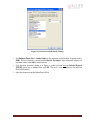
Figure 10. Network card advanced settings.
o Set Maximum Frame Size or Jumbo Frames to the maximum possible value. A typical value is
9000. If the list contains a property called Receive Descriptors, then change this value to its
maximum value. Select OK to save properties.
o From the main properties dialog as in Figure 9, make sure that only the Internet Protocol
(TCP/IP) check box is selected then click OK. The card is now optimized for use with the
Prosilica GC camera.
o Open the viewer and set the PacketSize to 8228.
GC1020 Technical Manual
Page 17