1
Maintenance and Troubleshooting
Routine Maintenance & Cleaning
No maintenance other than periodic external cleaning is required of the operator. MEDTOX recommends
using isopropyl alcohol wipes to clean the outside of the MEDTOXScan® Reader and the device drawer. Do
not immerse the reader in water or other liquids. If service or maintenance is required, the MEDTOXScan®
Reader should be sent to the manufacturer.
The MEDTOXScan® Reader has been designed to provide you with reliable and worry-free service. If for
any reason, you have a problem with your equipment, please call MEDTOX Technical Support at 1-800832-3244.
Troubleshooting
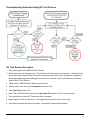
Use the QC Test devices provided with the MEDTOXScan® Reader to detect errors associated with the
MEDTOXScan® Reader and a contaminated color contact imaging sensor (CIS), and to verify that the CIS
cleaning procedure using the MEDTOXScan® Cleaning Cassette effectively removed any contamination
(dirt, dust or sample).
The QC Test Devices function as an optical performance system check for the MEDTOXScan® Reader
only, not for the PROFILE®-V MEDTOXScan® Drugs of Abuse Test System, and are not intended to replace
the need for the external controls. The QC Test Devices have been designed to simulate the end points
that are generated in the PROFILE®-V MEDTOXScan® Test Device when external positive and negative QC
controls are run. The QC Test Devices consist of artificial control lines and test lines (negative) or artificial
control lines and no test lines (positive) printed on a membrane and placed in the PROFILE®-V
MEDTOXScan® plastic housing. The QC Test Devices are not intended to evaluate all components of the
test system from specimen preparation through generation of results. They are intended to function as a
troubleshooting device to determine that the MEDTOXScan® Reader is functioning correctly. You should
run the QC Test devices (1) if you suspect the MEDTOXScan® Reader is not functioning properly, or (2) if
you suspect the CIS is dirty, or (3) if the MEDTOXScan® Reader has been dropped or damaged. Refer to
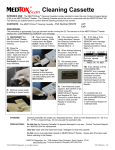
the Cleaning Cassette Procedure for details on the cleaning procedure. Contact MEDTOX Technical
Support if you need any additional help at 1-800-832-3244.
27