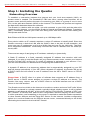
1
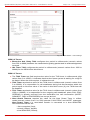
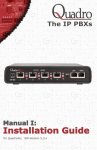
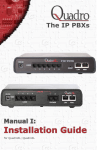
QuadroM32x/8L/26x/12Li/26xi Manual I: Installation Guide
Copyright and Trademarks
Copyright © 2003-2014 Epygi Technologies, Ltd. All Rights Reserved. Quadro is a registered trademark of Epygi Technologies, Ltd. Microsoft, Windows, and the Windows logo are registered trademarks of Microsoft Corporation. All other
trademarks and brand names are the property of their respective proprietors.
Limited Warranty
Epygi Technologies, Ltd. (‘Epygi’) warrants to the original end-user purchaser every Quadro to be free from physical defects in material and workmanship under normal use for a period of one (1) year from the date of purchase (proof of purchase required) or two (2) years from the date of purchase (proof of purchase required) for products purchased in the
European Union (EU). If Epygi receives notice of such defects, Epygi will, at its discretion, either repair or replace products that prove to be defective.
This warranty shall not apply to defects caused by (i) failure to follow Epygi’s installation, operation or maintenance instructions; (ii) external power sources such as a power line, telephone line, or connected equipment; (iii) products that
have been serviced or modified by a party other than Epygi or an authorized Epygi service center; (iv) products that have
had their original manufacturer’s serial numbers altered, defaced, or deleted; (v) damage due to lightning, fire, flood, or
other acts of God.
In no event shall Epygi’s liability exceed the price paid for the product from direct, indirect, special, incidental, or consequential damages resulting from the use of the product, its accompanying software, or its documentation. Epygi offers no
refunds for its products. Epygi makes no warranty or representation, expressed, implied, or statutory, with respect to its
products or the contents or use of this documentation and all accompanying software, and specifically disclaims its quality, performance, merchantability, or fitness for any particular purpose.
Return Policy
If the product proves to be defective during this warranty period, call Epygi Customer Support at (972) 692-1166 to obtain
a Return Material Authorization (RMA) Number. Registered users also may access Epygi’s Technical Support
(www.epygi.com; ‘Support’) to send their RMA request. For Brazil representatives, call (21) 2518-3161 or contact via Web
(www.saga.com.br). Please have your proof of purchase on hand when contacting us. When returning a product, mark
the Return Authorization Number clearly on the outside of the package and include your original proof of purchase. Return
requests cannot be processed without proof of purchase. Customers are responsible for shipping and handling charges
when shipping to Epygi.
Epygi or its service center will use commercially reasonable efforts to ship a replacement product within ten (10) working
days after receipt of the returned product. Actual delivery times may vary depending on customer location.
Epygi reserves the right to revise or update its products, pricing, software, or documentation without obligation to notify
any individual or entity. Please direct all inquiries to:
Epygi Technologies, Ltd., Two Legacy Town Center, 1400 Preston Road, Suite 300, Plano, Texas 75093
Representative in Brazil - Saga Sistemas e Computadores SA, Av. Rio Branco, 18 - 8 andar, Rio de Janeiro 20090-001
Notice to Users
This Installation Guide, in whole or in part, may not be reproduced, translated, or reduced to any machine-readable form
without prior written approval.
Epygi provides no warranty with regard to this Installation Guide or other information contained herein and hereby expressly disclaims any implied warranties of merchantability or fitness for any particular purpose in regard to this manual or
other such information. In no event shall Epygi be liable for any incidental, consequential, or special damages, whether
based on tort, contract, or otherwise, arising out of or in connection with this manual or other information contained herein
or the use thereof.
Administrative Council for Terminal Attachments (ACTA) Customer Information
This equipment complies with Part 68 of the FCC rules and the requirements adopted by the ACTA. On the back of this
equipment is a label that contains, among other information, a product identifier in the format US:AAAEQ###TXXXX,
made out to HX7OT00BHX70100. If requested, this number must be provided to the telephone company.
Any plug or jack that is used to connect this equipment to the premises wiring and telephone network must comply with
the applicable FCC Part 68 rules and requirements adopted by the ATCA.
The Ringer Equivalence Number is an indicator of the maximum number of devices allowed for connection to a telephone
interface. The termination on an interface may consist of any combination of devices subject only to the requirements that
the sum of the RENs of all the devices does not exceed five. Excessive RENs on a telephone line may result in the devices not ringing in response to an incoming line. The REN for this product is part of the product identifier that has the
format US:AAAEQ###TXXX, made out to HX7OT00BHX70100. The digits represented by ### are the REN without a decimal point (in this case 00B is a REN of 0.0B.)
If the Quadro causes harm to the telephone network, the telephone company will notify you in advance that a temporary
discontinuance of service may be required. But if advance notice isn’t practical, the telephone company will notify the customer as soon as possible. Also, you will be advised of your right to file a complaint with the FCC if you believe it is necessary.
The telephone company may make changes in its facilities, equipment, operations or procedures that could affect the operation of the equipment. If this happens, the telephone company will provide advance notice for you to make the necessary modifications to maintain uninterrupted service.
Connection to a party line service is subject to state tariffs. Contact the state public utility commission, public service
commission or the corporation commission for information.
If your home has specially wired alarm equipment connected to the telephone line, ensure the installation of the Quadro
does not disable your alarm equipment. If you have any questions about what will disable alarm equipment, consult your
telephone company or a qualified installer.
QuadroM32x/8L/26x/12Li/26xi; (SW Version 5.3.x)
QuadroM32x/8L/26x/12Li/26xi Manual I: Installation Guide
Electrical Safety Advisory
To reduce the risk of damaging power surges, we recommend you install an AC surge arrestor in the AC outlet from which
the Quadro is powered.
Industry Canada Statement
This product meets the applicable Industry Canada technical specifications.
Safety Information
Before using the Quadro, please review and ensure the following safety instructions are adhered to:
•
•
•
•
•
•
•
•
•
To prevent fire or shock hazard, do not expose your Quadro to rain or moisture.
To avoid electrical shock, do not open the Quadro. Refer servicing to qualified personnel only.
Never install wiring during a lightning storm.
Never install telephone jacks in wet locations unless the jack is specified for wet locations.
Never touch uninsulated telephone wire or terminals unless the telephone line has been disconnected at the network interface.
Use caution when installing or modifying cable or telephone lines.
Avoid using your Quadro during an electrical storm.
Do not use your Quadro or telephone to report a gas leak in the vicinity of the leak.
An electrical outlet should be as close as possible to the unit and easily accessible.
Emergency Services
The Quadro SIP Service is intended to function as a secondary telephone service. This service is made available through
the Internet and therefore is dependent upon a constant source of electricity and network availability. If a power outage
occurs, the Quadro SIP Service automatically will be disabled. User understands in the event of a power or network outage, the Quadro SIP Service will not support 911 emergency services, and further, such services only will be available via
the user's regular telephone line that is not connected to the Quadro. User further acknowledges that any interruption in
the supply or delivery of electricity or network availability is beyond Epygi's control and Epygi shall have no responsibility
for losses arising from such interruption.
QuadroM32x/8L/26x/12Li/26xi; (SW Version 5.3.x)
QuadroM32x/8L/26x/12Li/26xi Manual I: Installation Guide
Table of Contents
Manual I: Installation Guide
About This Installation Guide ....................................................... 6
Requirements ........................................................................... 7
Hardware Overview ................................................................... 8
The Connectors Panel of QuadroM32x/8L/26x/12Li/26xi ............................. 8
QuadroM32x/8L/26x/12Li/26xi’s Front Panel LEDs ................................... 12
Step 1: Installing the Quadro .................................................... 14
Networking Overview ........................................................................... 14
LAN/WAN Connection Options ............................................................... 15
Connecting the Hardware ..................................................................... 20
Step 2: Configuring the Quadro ................................................. 26
Step 2.1: Logging in to Quadro ............................................................. 27
Step 2.2: System Configuration Wizard .................................................. 28
System Configuration ...................................................................................28
DHCP Settings for the LAN Interface ................................................................29
Regional Settings .........................................................................................29
Emergency and PSTN Access Code Settings ......................................................30
Finishing the System Configuration Wizard .......................................................31
Step 2.3: Internet Configuration Wizard ................................................. 33
Uplink Configuration .....................................................................................34
WAN IP Configuration ...................................................................................35
PPP/PPTP Configuration .................................................................................36
WAN Interface Configuration ..........................................................................37
DNS Settings ..............................................................................................37
Finishing the Internet Configuration Wizard ......................................................38
Step 2-A: Using IP Lines ........................................................... 39
Supported SIP Phones .......................................................................... 42
Step 2-B: Using Receptionist ..................................................... 44
Step 2-C: Using ISDN Lines....................................................... 45
Step 2-D: Configuring the E1/T1 Settings .................................... 51
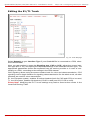
Editing the E1/T1 Trunk ................................................................................52
Signaling Type CCS ......................................................................................53
Signaling Type CAS ......................................................................................59
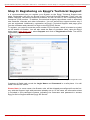
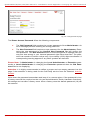
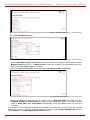
Step 3: Registering on Epygi’s Technical Support .......................... 67
Appendix: Changing the Admin Password .................................... 68
Appendix: Configuring NAT Traversal .......................................... 70
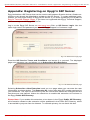
Appendix: Registering on Epygi’s SIP Server ................................ 72
Appendix: Checking the Connections .......................................... 77
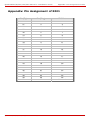
Appendix: Pin Assignment of ISDN ............................................. 79
QuadroM32x/8L/26x/12Li/26xi; (SW Version 5.3.x)
QuadroM32x/8L/26x/12Li/26xi Manual I: Installation Guide
Appendix: Pin Assignment of E1/T1 ............................................ 80
Appendix: Pin Assignment of RJ21.............................................. 81
Manual II: see Administrator's Guide
This guide describes in detail the menus available for administrators only. Furthermore, it includes all the system’s default values at a glance.
Manual III: see Extension User's Guide
This guide describes in detail the menus available for extension users. Furthermore, it includes all the call codes at a glance.
QuadroM32x/8L/26x/12Li/26xi; (SW Version 5.3.x)
QuadroM32x/8L/26x/12Li/26xi Manual I: Installation Guide
About This Installation Guide
About This Installation Guide
This Installation Guide explains the installation of the QuadroM IP PBX. It gives step-bystep instructions to provision the QuadroM and configure the phone extensions. After successfully configuring the Quadro, a user will be able to make SIP and local PBX calls, as
well as calls to the PSTN and access the Internet from devices connected to the LAN.
• QuadroM8L
offers 8 phone line (FXO), 2 phone extensions (FXS), 1 Ethernet WAN
port and 1 Ehernet LAN port
• QuadroM26x offers 8 phone line (FXO), 26 phone extensions (FXS), 1 Ethernet WAN
port and 1 Ehernet LAN port
• QuadroM12Li
supports 6 phone line (ISDN), 2 phone extensions (FXS), 1 Ethernet
WAN port and 1 Ethernet LAN port
• QuadroM26xi supports 6
phone line (ISDN), 26 phone extensions (FXS), 1 Ethernet
WAN port and 1 Ethernet LAN port
• QuadroM32x
offers one phone line (E1/T1), 2 phone extensions (FXS), 1 Ethernet
WAN port, 1 Ethernet LAN port and 1 ETH port.
This Installation Guide does not provide advanced configuration information. For these features, refer to the Administrator's and Extension User's Guides.
Step 1: Installing the Quadro explains the connection of cables and devices to the Quadro.
Step 2: Configuring the Quadro describes the configuration steps necessary to integrate
the Quadro into your network environment.
Step 2-A: Using IP Lines explains how to configure IP lines on the QuadroM IP PBX and
to connect IP phones.
Step 2-B: Using Receptionist refers to the document describing Receptionist’s configuration on the Quadro.
Step 2-C: Using ISDN Lines explains how to configure ISDN trunks and to define a default outgoing MSN.
Step 2-D: Configuring the E1/T1 Settings describes the basic E1/T1 settings.
Step 3: Registering on Epygi’s Technical Support shows you how to access the Epygi
Technical Support Center and the Epygi SIP Server.
Appendix: Changing the Admin Password explains how to change the default administrator password.
Appendix: Configuring NAT Traversal explains configuration of the Quadro if it is placed
behind a NAT enabled router.
Appendix: Registering on Epygi’s SIP Server explains how to register on Epygi's powerful
SIP server.
Appendix: Checking the Connections gives hints on solving common problems.
QuadroM32x/8L/26x/12Li/26xi; (SW Version 5.3.x)
6
QuadroM32x/8L/26x/12Li/26xi Manual I: Installation Guide
Requirements
Requirements
•
•
•
•
•
•
•
•
•
•
One 120/240 VAC power outlet in close proximity to the Quadro.
One RJ45 Ethernet 10/100 broadband Internet connection.
For QuadroM32x one E1/T1 cable to connect the Quadro with the CO or PBX.
At least one off-the-shelf analog phone with an RJ11 telephone cable.
For QuadroM26x/26xi RJ21 connector (F) with cable and distributed panel.
At least one IP phone with CAT5 cable with RJ45 connector.
One CAT 5 Ethernet cable with RJ45 connector to connect to the Quadro’s LAN port.
One PC with a 10/100 Mbps Ethernet card or adapter installed.
TCP/IP network protocol installed on each PC.
Internet Explorer, Netscape Navigator, Mozilla Firefox or Opera browser is recommended.
Please Note: The QuadroM32x/8L/26x IP PBX is shipped with one RJ11 cable and one
straight RJ45 CAT 5 cable. The QuadroM12Li/26xi IP PBX is shipped with one straight
RJ45 CAT 5 cable. If the LAN connector of the Quadro connects to a hub or switch, a crossover cable may be required.
Other cables are added according to the different connectivity requirements of the QuadroM IP PBX types.
QuadroM32x/8L/26x/12Li/26xi; (SW Version 5.3.x)
7
QuadroM32x/8L/26x/12Li/26xi Manual I: Installation Guide
Hardware Overview
Hardware Overview
The Connectors Panel of QuadroM32x/8L/26x/12Li/26xi
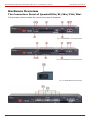
The illustration below includes the connector’s panel of QuadroM.
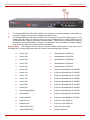
Fig. I-1: QuadroM8L’s Connectors Panel
Fig. I-2: QuadroM26x's Connectors Panel
Fig. I-3: QuadroM Back Power Panel
Fig. I-4: QuadroM12Li's Connectors Panel
QuadroM32x/8L/26x/12Li/26xi; (SW Version 5.3.x)
8
QuadroM32x/8L/26x/12Li/26xi Manual I: Installation Guide
Hardware Overview
Fig. I-5: QuadroM32x's Connectors Panel
1
For QuadroM8L/26x/12Li/26xi AUDIO IN connector connects Quadro to the radio or
any other audio resource to be used for the hold music.
2
For QuadroM8L/26x/12Li/26xi AUDIO OUT connector is used for Paging service. The
Paging Group service is used to page a group of extensions by forcing extensions to
go off-hook and opening one-way communication. The service is particularly used for
announcements addressed to a group of extensions. Service allows to page multiple
extensions by dialing the Paging Group extension.
Please Note: The Paging Group service requires called extensions to use one of the
following SIP or analog phones which are able to automatically go off-hook:
•
snom 190
•
Grandstream GXP2120
•
snom 200
•
Grandstream GXP2124
•
snom 220
•
Grandstream GXP2200
•
snom 300
•
Grandstream GXV3140
•
snom 320
•
Grandstream GXV3175
•
snom 360
•
Polycom SoundPoint IP 300SIP
•
snom 370
•
Polycom SoundPoint IP 330SIP
•
snom 710
•
Polycom SoundPoint IP 331SIP
•
snom 720
•
Polycom SoundPoint IP 335SIP
•
snom 760
•
Polycom SoundPoint IP 450SIP
•
snom 820
•
Polycom SoundPoint IP 501SIP
•
snom 870
•
Polycom SoundPoint IP 550SIP
•
snom MeetingPoint
•
Polycom SoundPoint IP 601SIP
•
Aastra 480i
•
Polycom SoundPoint IP 650SIP
•
Aastra 480iCT
•
Polycom SoundStation IP 6000
•
Aastra 9112i
•
Polycom VVX 300/310
•
Aastra 9133i
•
Polycom VVX 400/410
•
Aastra 9143i(33i)
•
Polycom VVX 1500
•
Aastra 9480i(35i)
•
Linksys SPA921
QuadroM32x/8L/26x/12Li/26xi; (SW Version 5.3.x)
9
QuadroM32x/8L/26x/12Li/26xi Manual I: Installation Guide
Hardware Overview
•
Aastra 9480iCT
•
Linksys SPA922
•
Aastra 6751i
•
Linksys SPA941
•
Aastra 6753i
•
Linksys SPA942
•
Aastra 6755i
•
Linksys SPA2002
•
Aastra 6757i
•
Linksys SPAPAP2T
•
Aastra 6757iCT
•
Yealink SIP-T20P
•
Aastra 6730i
•
Yealink SIP-T22P
•
Aastra 6731i
•
Yealink SIP-T26P
•
Aastra 6735i
•
Yealink SIP-T28P
•
Aastra 6737i
•
Yealink SIP-T32G
•
Aastra 6739i
•
Yealink SIP-T38G
•
Aastra 480e (analog phone)
•
Yealink SIP-T46G
•
Thomson ST2030S
•
AudioCodes 310HD
•
Grandstream BT200
•
Grandstream GXP1400
•
•
•
Grandstream GXP1405
•
Panasonic KX-UT123
•
Grandstream GXP1450
•
Panasonic KX-TGP550T04
•
Grandstream GXP2000
•
Alcatel Temporis IP200
•
Grandstream GXP2100
•
Alcatel Temporis IP600
•
Grandstream GXP2110
•
Alcatel Temporis IP800
AudioCodes 320HD
Panasonic KX-UT136
Attention: Call paging will not work if the called extension is in call.
3
The Reset button may be used in two ways: (1) to initiate a normal reset or (2) to carry out a factory reset. A normal reset is executed by pressing the Reset button with a
paper clip for an instant. Pressing the reset button and holding it down for seven
seconds or more will execute a factory reset. This will restore the factory defaults and
clear all settings including the IP address and the administration password you entered.
Please Note: A Factory Reset forces the default LAN IP address of 172.30.0.1 and default
admin password of 19.
4
LINE sockets to connect the Quadro to the PSTN network using standard analog
phone service. These are FXO (Foreign Exchange Office) analog ports.
5
PHONE sockets with RJ11 connectors enable connectivity of regular analog telephones. These are FXS (Foreign Exchange Station) analog ports.
In the event of a power failure, PHONE 1 is connected to LINE 8, allowing the phone to
send/receive phone calls directly to the PSTN network. PHONE 1 is powered by the PSTN.
Attention: Only LINE 1 is connected to PHONE 8 during a power failure. The other LINE
and PHONE ports are not connected together.
QuadroM32x/8L/26x/12Li/26xi; (SW Version 5.3.x)
10
QuadroM32x/8L/26x/12Li/26xi Manual I: Installation Guide
Hardware Overview
6
LAN RJ45 socket to attach to the IP phones in the Quadro’s Local Area Network
(LAN) via an Ethernet CAT 5 cable. For connecting multiple IP phones, a switch is
used.
7
WAN RJ45 socket to attach the Internet Uplink (WAN) via an Ethernet CAT 5 cable.
8
The CF socket enables connectivity of Compact Flash memory providing expansion
for additional voice mails and record data.
Attention: Power down the Quadro before inserting/removing the Compact Flash memory
card.
9
The TELCO (50-pin connector) socket with RJ21 M connector enables up to 24 additional analog LINEs (3-26) support. This is an FXS analog ports expansion.
10
Power supply socket to connect a power cable.
11
ISDN sockets to connect the Quadro to the ISDN network termination units to use
PSTN services. A straight Ethernet CAT 5 cable can be used with an RJ45 connector
according to the ISDN Pin assignment, see Appendix: Pin Assignment of ISDN.
12 The NT/TE switches are used to control the QuadroM12Li/26xi device on the S/T
Bus. If the QuadroM12Li/26xi is connected to the beginning or end of the S/T Bus or
if there is only one ISDN unit connected to the S/T Bus, then this switch should be
toggled to the NT (Network Terminator) position. Otherwise, if the QuadroM12Li/26xi
is connected in the middle of the S/T Bus, the switch should be toggled to the TE
(Terminal Endpoint) position.
S/T Bus is a full-duplex interface. It consists of two groups (one for transmit and the
other one for receive) of two-wire interface and might support multiple devices (up to
8 devices can be attached to the S/T Bus). Both ends of each of the two-wire interfaces should be terminated (100ohm resistance is present at both ends of each twowire interface).
Please Note: If the trunks on the QuadroM12Li/26xi have incorrect NT/TE position, they
may not function properly, including connection establishment permanent failure.
13 RJ-45 socket to attach the E1/T1 trunk. See Appendix: Pin Assignment of E1/T1.
14 ETH RJ45 socket to attach the PC in the Quadro’s Local Area Network (LAN). If a
PC is connected directly to this socket, a straight Ethernet CAT 5 cable is used.
QuadroM32x/8L/26x/12Li/26xi; (SW Version 5.3.x)
11
QuadroM32x/8L/26x/12Li/26xi Manual I: Installation Guide
Hardware Overview
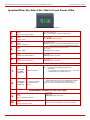
QuadroM32x/8L/26x/12Li/26xi’s Front Panel LEDs
Fig. I-6: QuadroM32x's Front Panel LEDs
1.
POWER
green
Status of the Power Supply
on: power supply ok
off: no power supply or device is still booting
2.
Busy
green
Status of CPU
off: no power
on or blinking: normal activity
3.
Info
yellow
System information
on: device is booting
off: no information
blinking: an event occurred; details specified in the System Event section of the Management interface
4.
Fault
red
System status
on either an error or the device is booting
off: no error
blinking: system unusable
5.
WAN
green
Status of the WAN interface
on: link ok
off: no link
flickering: traffic on the link
6.
LAN
green
Status of the LAN interface
on: link ok
off: no link
flickering: traffic on the link
QuadroM12Li/26xi’s Additional Front Panel LEDs
on:
off:
7.
Green LED
for ISDN
Trunks 1-6
8.
Orange LED
for ISDN
Trunks 1-6
ISDN Link Status
Power Source Status
on ISDN Network
Mode
ISDN link is UP, Frame Synchronization is OK
-
In passive mode ISDN link status is not
informative.
In non passive mode ISDN link is not
or ISDN trunks are stopped from GUI
connected
on: Power Source checkbox is selected from GUI on
Network Mode and some type of ISDN devices(ISDN
Phones, etc.) can receive power from Quadro
off: Power Source checkbox is not selected from GUI
QuadroM32x’s Additional Front Panel LEDs
9.
10.
ETH
green
Status of the ETH interface
E1/T1
green
Status of the E1/T1 trunk
QuadroM32x/8L/26x/12Li/26xi; (SW Version 5.3.x)
on: link ok
off: no link
flickering: traffic on the link
on: frame synchronization is ok
off: frame synchronization is not ok or link is down
12
QuadroM32x/8L/26x/12Li/26xi Manual I: Installation Guide
Hardware Overview
LED indication during a firmware update
A firmware update is indicated by the red (Fault) and yellow (Info) LEDs. Both will blink simultaneously for about two minutes while the firmware is being updated. The Quadro will
then reboot automatically showing the boot LED sequence.
LED indication during a boot sequence
A boot sequence is indicated as follows: The red Fault LED will glow for a few seconds,
then the yellow Info LED will glow for another four or five minutes while the green Busy
LED is blinking. Once the Info LED is off, the boot sequence has been completed successfully.
LED indication during emergency firmware upload
The red Fault LED and the yellow Busy LEDs will stop blinking alternately and start blinking in parallel. This shows that Quadro has accepted the emergency firmware and is loading it. After a few seconds, Quadro will boot, indicated as follows: The red Fault LED will
glow for a few seconds, then the yellow Info LED will glow for another few seconds while
the green Busy LED is jittering. When the yellow Info LED extinguishes, the boot sequence has been completed successfully.
QuadroM32x/8L/26x/12Li/26xi; (SW Version 5.3.x)
13
QuadroM32x/8L/26x/12Li/26xi Manual I: Installation Guide
Step 1: Installing the Quadro
Step 1: Installing the Quadro
Networking Overview
To establish a connection between the Internet and your local area network (LAN), an
access router is needed. The QuadroM IP PBX can serve, among other functions, as an
access router and will perform the task of connecting your LAN, or a group of one or more
PCs, to the wide area network (WAN) or the Internet. The Quadro will process and regulate
the data traffic between these two networks.
The Quadro is a device with two sides: one side connects to your LAN, and the other side
connects to the Internet, or to the WAN. Quadro’s firewall and Network Address Translation
(NAT) functionality protects your LAN from being seen from the Internet side making the
LAN private and secure.
Both Ethernet WAN and LAN ports transmit up to 100 Mbps traffic.
Every device within an IP network requires a unique IP address to identify itself. Since the
Quadro connects to both the LAN and the WAN, it has to be part of both networks, and
must have two IP addresses: one for the WAN side and one for the LAN side. The Quadro’s integrated firewall/NAT functionality will hide the LAN IP address from the WAN (Internet) side.
There are two ways of assigning an IP address: statically or dynamically.
A Static IP address is a fixed, manually assigned IP address that remains valid until
changed. If you plan to use the Quadro as your Internet access router, contact your Internet
Service Provider (ISP) to find out if a static IP address is assigned to your account. If so,
you will need this static IP address when configuring the Quadro device.
A dynamic IP address is a temporary address that is automatically assigned by your ISP
and will change periodically. If your ISP offers a dynamic IP address, the Quadro will act as
a DHCP client and will receive a new IP address from the ISP’s DHCP server or PPPoE
feature.
Please Note: A DHCP client is a piece of software that requests an IP address from a
DHCP server. A DHCP server assigns on request a unique IP address to a device. The
Quadro, like many routers, acts as a DHCP client on its WAN interface and as a DHCP
server on its LAN interface.
The Quadro must be visible to the Internet to be able to receive and send VoIP calls. When
the Quadro is placed in a private network, typically behind existing routers, it will by default
attempt to pass through the NAT of this router with its STUN (Simple Traversal of UDP over
NAT) feature. STUN will work without user configuration with the majority of basic routers.
In some scenarios, port forwarding on the router is required to make the Quadro accessible
to other Quadro devices and the Epygi SIP Server on the Internet. Another configuration
option is to use the Quadro as the Internet access router, connected directly to the WAN,
eliminating the traverse to the local NAT firewall.
QuadroM32x/8L/26x/12Li/26xi; (SW Version 5.3.x)
14
QuadroM32x/8L/26x/12Li/26xi Manual I: Installation Guide
Step 1: Installing the Quadro
LAN/WAN Connection Options
•
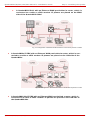
A QuadroM32x IP PBX with an Ethernet WAN port behind a router, which is connected to a cable or xDSL modem. IP phones are placed on the WAN side of the
QuadroM32x.
Fig. I-7: Configuration: QuadroM32x behind a router with IP phones on WAN
•
A QuadroM8L/26x IP PBX with an Ethernet WAN port behind a router, which is
connected to a cable or xDSL modem. IP phones are placed on the WAN side of
the QuadroM8L/26x.
Fig. I-8: Configuration: QuadroM8L/26x behind a router with IP phones on WAN
In this and the following configuration, the IP router typically acts as a DHCP server for the
LAN and assigns the IP addresses to the PCs and other devices. The Quadro can be connected through its WAN port directly to one of the router's LAN ports and will get an IP address from the router. By default, the Quadro acts as a DHCP client on the WAN port. The
IP phones are placed on the WAN side of the QuadroM8L/26x, connected to the company
LAN.
The Admin PC can be connected to the Quadro LAN or WAN port to access the Web Management of the Quadro.
Please Note: Since Quadro uses STUN by default, it will work with most basic routers without any further configuration.
QuadroM32x/8L/26x/12Li/26xi; (SW Version 5.3.x)
15
QuadroM32x/8L/26x/12Li/26xi Manual I: Installation Guide
•
Step 1: Installing the Quadro
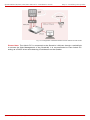
A QuadroM12Li/26xi with an Ethernet WAN port behind a router, which is
connected to a cable or xDSL modem. IP phones are placed on the WAN
side of the QuadroM12Li/26xi.
Fig. I-9: Configuration: QuadroM12Li/26xi behind a router with IP phones on WAN
•
A QuadroM32x IP PBX with an Ethernet WAN port behind a router, which is connected to a cable or xDSL modem. IP phones are placed on the LAN side of the
QuadroM32x.
Fig. I-10: Configuration: QuadroM32x behind a router with IP phones on LAN
•
A QuadroM8L/26x IP PBX with an Ethernet WAN port behind a router, which is
connected to a cable or xDSL modem. IP phones are placed on the LAN side of
the QuadroM8L/26x.
QuadroM32x/8L/26x/12Li/26xi; (SW Version 5.3.x)
16
QuadroM32x/8L/26x/12Li/26xi Manual I: Installation Guide
Step 1: Installing the Quadro
Fig. I-11: Configuration: QuadroM8L/26x behind a router with IP phones on LAN
This configuration is identical to the previous configuration, with the difference that IP
phones are connected to the LAN port of the QuadroM. The QuadroM can be configured as
a DHCP server to provide the network parameters to the devices on its LAN.
•
A QuadroM12Li/26xi with an Ethernet WAN port behind a router, which is connected to a cable or xDSL modem. IP phones are placed on the LAN side of the
QuadroM12Li/26xi.
Fig. I-12: Configuration: QuadroM12Li/26xi behind a router with IP phones on LAN
QuadroM32x/8L/26x/12Li/26xi; (SW Version 5.3.x)
17
QuadroM32x/8L/26x/12Li/26xi Manual I: Installation Guide
•
Step 1: Installing the Quadro
A QuadroM32x IP PBX used as an Internet Access Router, connected directly to the Internet.
Fig. I-13: Configuration: QuadroM32x used as Internet Access Router
The Admin PC is connected to the Quadro ETH port or WAN port to access the Web Management of the Quadro.
•
A QuadroM8L/26x IP PBX used as an Internet Access Router, connected directly to the Internet.
Fig. I-14: Configuration: QuadroM8L/26x used as Internet Access Router
•
A QuadroM12Li/26xi used as an Internet Access Router, connected directly
to the Internet.
QuadroM32x/8L/26x/12Li/26xi; (SW Version 5.3.x)
18
QuadroM32x/8L/26x/12Li/26xi Manual I: Installation Guide
Step 1: Installing the Quadro
Fig. I-15: Configuration: QuadroM12Li/26xi used as Internet Access Router
Please Note: The Admin PC is connected to the Quadro’s LAN port through a switch/hub
to access the Web Management of the QuadroM. It is recommended to have Admin PC
acting as a DHCP client and obtaining IP address from the Quadro.
QuadroM32x/8L/26x/12Li/26xi; (SW Version 5.3.x)
19
QuadroM32x/8L/26x/12Li/26xi Manual I: Installation Guide
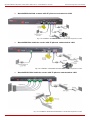
Connecting the Hardware
Connecting the Hardware
•
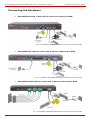
QuadroM32x behind a router with IP phones connected to WAN
Fig. I-16: Installation: QuadroM32x behind a router with IP phones on WAN
•
QuadroM8L/26x behind a router with IP phones connected to WAN
Fig. I-17: Installation: QuadroM8L/26x behind a router with IP phones on WAN
•
QuadroM12Li/26xi behind a router with IP phones connected to WAN
Fig. I-18: Installation: QuadroM12Li/26xi behind a router with IP phones on WAN
QuadroM32x/8L/26x/12Li/26xi; (SW Version 5.3.x)
20
QuadroM32x/8L/26x/12Li/26xi Manual I: Installation Guide
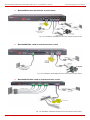
•
Connecting the Hardware
QuadroM32x behind a router with IP phones connected to LAN
Fig. I-19: Installation: QuadroM32x behind a router with IP phones on LAN
•
QuadroM8L/26x behind a router with IP phones connected to LAN
Fig. I-20: Installation: QuadroM8L/26x behind a router with IP phones on LAN
•
QuadroM12Li/26xi behind a router with IP phones connected to LAN
Fig. I-21: Installation: QuadroM12Li/26xi behind a router with IP phones on LAN
QuadroM32x/8L/26x/12Li/26xi; (SW Version 5.3.x)
21
QuadroM32x/8L/26x/12Li/26xi Manual I: Installation Guide
•
Connecting the Hardware
QuadroM32x used as Internet access router
Fig. I-22: Installation: QuadroM32x used as an Internet Access Router
•
QuadroM8L/26x used as Internet access router
Fig. I-23: Installation: QuadroM8L/26x used as an Internet Access Router
•
QuadroM12Li/26xi used as Internet access router
Fig. I-24: Installation: QuadroM12Li/26xi used as an Internet Access Router
QuadroM32x/8L/26x/12Li/26xi; (SW Version 5.3.x)
22
QuadroM32x/8L/26x/12Li/26xi Manual I: Installation Guide
•
Connecting the Hardware
QuadroM26x additional analog lines connections
Fig. I-25: Installation: QuadroM26x connected via RJ21 connectors
•
QuadroM26xi additional analog lines connections
Fig. I-26: Installation: QuadroM26xi connected via RJ21 connectors
OR a multi-cable (RJ21 – RJ11) connection can be applied instead.
QuadroM32x/8L/26x/12Li/26xi; (SW Version 5.3.x)
23
QuadroM32x/8L/26x/12Li/26xi Manual I: Installation Guide
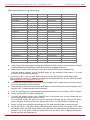
Connecting the Hardware
Wires are presented in the table below:
•
•
•
•
•
•
•
•
•
•
•
Color
Pin (Tip)
Pin (Ring)
Color
FXS Port
White/Blue
26
1
Blue/White
3
White/Orange
27
2
Orange/White
4
White/Green
28
3
Green/White
5
White/Brown
29
4
Brown/White
6
White/Slate
30
5
Slate/White
7
Red/Blue
31
6
Blue/Red
8
Red/Orange
32
7
Orange/Red
9
Red/Green
33
8
Green/Red
10
Red/Brown
34
9
Brown/Red
11
Red/Slate
35
10
Slate/Red
12
Black/Blue
36
11
Blue/Black
13
Black/Orange
37
12
Orange/Black
14
Black/Green
38
13
Green/Black
15
Black/Brown
39
14
Brown/Black
16
Black/Slate
40
15
Slate/Black
17
Yellow/Blue
41
16
Blue/Yellow
18
Yellow/Orange
42
17
Orange/Yellow
19
Yellow/Green
43
18
Green/Yellow
20
Yellow/Brown
44
19
Brown/Yellow
21
Yellow/Slate
45
20
Slate/Yellow
22
Violet/Blue
46
21
Blue/Violet
23
Violet/Orange
47
22
Orange/Violet
24
Violet/Green
48
23
Green/Violet
25
Violet/Brown
49
24
Brown/Violet
26
Violet/Slate
50
25
Slate/Violet
Not Used
Verify the product package contents are complete. Refer to the contents sheet included
in the packaging to determine if all the items were shipped in the box.
Before you connect the hardware, make sure that all devices are powered off.
Connect analog phones to the PHONE ports on the Quadro’s rear panel. You may
connect up to two analog phones.
Connect the E1/T1 port to your PBX or the trunk from the PSTN Central Office Only
after configuring the E1/T1 settings according to the specifications of your PSTN provider
(see Appendix: Pin Assignment of E1/T1).
Connect the Ethernet port on your PC via a straight CAT 5 cable with an RJ45 connector to the LAN socket of the Quadro.
Connect the IP phones to the switch and attach it to the LAN socket of the Quadro via a
straight CAT 5 cable with an RJ45 connector.
Connect the WAN port of the Quadro to the Internet service via a cable or DSL modem.
Power up the DSL or Cable modem first.
Connect the power cable to the POWER port on the back side of your QuadroM and
plug the power plug into the power outlet.
The red LED (Fault) will glow for several seconds followed by the yellow LED (Info),
which will glow for several minutes. When Info LED is off, the Quadro is operational.
Power up any hub or switch followed by any PC and other devices on the LAN side.
Check the LEDs: The green Busy LED must glow continuously. The green ETH, LAN
and WAN LEDs will blink when cables are connected to these ports and all devices are
powered up. If the green LAN and WAN LEDs do not blink, verify cabling and ensure
that all devices are powered up.
QuadroM32x/8L/26x/12Li/26xi; (SW Version 5.3.x)
24
QuadroM32x/8L/26x/12Li/26xi Manual I: Installation Guide
Connecting the Hardware
Please Note: CAT 5 cables can be faulty without any visual indication. The LAN and
WAN LEDs verify that the Ethernet connection is established between the end points. If
these LEDs are not illuminated, there is a connection problem between the Quadro and
the other device.
QuadroM32x/8L/26x/12Li/26xi; (SW Version 5.3.x)
25
QuadroM32x/8L/26x/12Li/26xi Manual I: Installation Guide
Step 2: Configuring the Quadro
Step 2: Configuring the Quadro
Verify functionality of both IP and PSTN calls:
•
•
PSTN telephony: If the Quadro is connected to the PSTN network via the
E1/T1, FXO or ISDN interface, verify the functionality of PSTN calls:
o
Make an outbound PSTN call by dialing 9 + PSTN number.
o
Arrange to receive an incoming call. The incoming PSTN calls will be
routed to the Auto Attendant by default, and the caller has to enter a
valid extension number, e.g., 101, followed by the # sign to reach a
phone connected to the first PHONE port of the Quadro.
IP telephony: Dial 899# and you will hear a voice message that confirms you
have successfully established an IP call. If this call is not successful, go to Appendix: Checking the Connections for troubleshooting.
You may customize the following settings by logging in to the Quadro’s Web Management
(see Step 2.1):
•
•
•
•
Bandwidth - to regulate the number of calls allowed by the Quadro to avoid
degradation in low bandwidth conditions.
Time/Date - to ensure the correct time and time zone are used for call records.
Regional Settings - if your Quadro is located outside the United States, it is
important to properly configure your line connections to the PSTN in your location.
Firewall - if your Quadro is connected behind a router with its own firewall service running, disable the firewall to make Quadro accessible for management
purposes.
QuadroM32x/8L/26x/12Li/26xi; (SW Version 5.3.x)
26
QuadroM32x/8L/26x/12Li/26xi Manual I: Installation Guide
Step 2: Configuring the Quadro
Step 2.1: Logging in to Quadro
•
•
•
Start a browser (MS Internet Explorer, Netscape, Opera, Mozilla Firefox, etc.)
on a PC connected to the QuadroM via the LAN or WAN interface.
Since Firewall is disabled on the QuadroM by default, you may connect the
Web GUI either from WAN or LAN side of the Quadro. To connect the Quadro’s
Web GUI from the WAN side, enter http://Quadro_WAN_IP (IP address assigned by the company’s DHCP server) in the address field of your browser. If
the PC is connected to the Quadro’s LAN side, enter http://172.30.0.1 (Quadro’s default LAN IP address) in the address field of your browser.
The Login page of the Quadro will be displayed (see Fig. I-27).
Fig. I-27: Login page
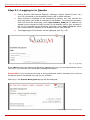
Enter admin as the Username and 19 as the password to log in as the administrator. Once
you log in, you will enter into the Quadro Management Menu.
Please Note: If you consecutively enter a wrong password and/or username for five times
the device will be unavailable for login for five minutes.
After log in, the Quadro Management page will be displayed.
Fig. I-28: QuadroM Management page
QuadroM32x/8L/26x/12Li/26xi; (SW Version 5.3.x)
27
QuadroM32x/8L/26x/12Li/26xi Manual I: Installation Guide
Step 2: Configuring the Quadro
Step 2.2: System Configuration Wizard
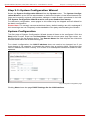
Select the System Configuration Wizard from the System menu. The System Configuration Wizard is a tool for the administrator to define the Quadro's Local Area Network settings and to specify regional configuration settings to make Quadro operational in its LAN.
The System Configuration Wizard must be run upon Quadro first startup.
For the basic configuration, some pages in this wizard may be skipped and left default for
the basic configuration.
Please Note: It is strongly recommended that factory default settings are left unchanged if
their meanings are not completely understandable to the party administrating the Quadro.
System Configuration
The first page of System Configuration Wizard shows all items to be configured. Click the
Next button to start. Enter into the Host Name field the unique name (top right corner, under Epygi logo) for the Quadro device. The Domain Name text field requires the LAN side
domain name which the Quadro belongs to.
For a basic configuration, the LAN IP address does not need to be changed, but if you
must change it (for example, to integrate the device into an existing LAN), record the new
LAN IP address and have it handy. You’ll need it for subsequent access to Quadro’s management.
Fig. I-29: System Configuration page
Clicking Next shows the page DHCP Settings for the LAN Interface.
QuadroM32x/8L/26x/12Li/26xi; (SW Version 5.3.x)
28
QuadroM32x/8L/26x/12Li/26xi Manual I: Installation Guide
Step 2: Configuring the Quadro
DHCP Settings for the LAN Interface
If the DHCP server is enabled, the Quadro will automatically assign dynamic IP addresses
to the stations connected to its LAN port.
If you didn’t change the default LAN IP address of the Quadro, you also may leave the default values for the IP Address Range. Make sure your connected LAN devices belong to
the same network as the LAN port of your Quadro.
Please Note: Make sure there is only one DHCP server on the LAN, otherwise, unpredictable network behavior can occur.
Fig. I-30: DHCP Settings for the LAN Interface page
Click on Next to display the Regional Settings page.
Regional Settings
If your Quadro is located outside of the United States, it is important to properly configure
your line connections to the PSTN in your location.
Fig. I-31: Regional Settings page
Proper configuration of Regional Settings is important for the functionality of the voice
subsystem. The Regional Settings determine the proper telephony parameters on the
LINE and PHONE ports of the Quadro for the specified country. Select the country where
the Quadro is located. If you do not find your country in the list, pick the closest in your
timezone.
QuadroM32x/8L/26x/12Li/26xi; (SW Version 5.3.x)
29
QuadroM32x/8L/26x/12Li/26xi Manual I: Installation Guide
Step 2: Configuring the Quadro
The Quadro obtains the correct time automatically over the Internet from a time server. If
you are not located in the US/Central standard time zone, you will need to change the
Timezone to your region.
Click on Next to display the Emergency and PSTN Access Code Settings page.
Emergency and PSTN Access Code Settings
Fig. I-32: Emergency and PSTN Access Code Settings page
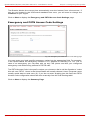
You may enter your local specific emergency codes into the appropriate field. For example,
in the United States the emergency number is 911, whereas in Germany it is 112, 110. In
case of an emergency you can then pick up any FXS phone and dial your configured
emergency code without any prefixes for PSTN calls.
The PSTN Access Code is the prefix number you choose to dial to tell the Quadro to “make
this call over PSTN”. Users in the United States will usually choose 9 here. European users
usually would want to enter zero (0). If you do not enter anything into this field, the PSTN
Access Code configuration should be done manually from the Call Routing table.
Click on Next to display the Summary Page.
QuadroM32x/8L/26x/12Li/26xi; (SW Version 5.3.x)
30
QuadroM32x/8L/26x/12Li/26xi Manual I: Installation Guide
Step 2: Configuring the Quadro
Finishing the System Configuration Wizard
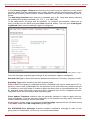
Fig. I-33: System Configuration Wizard finishing page
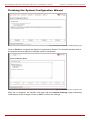
Click on Finish to complete the System Configuration Wizard. The Quadro will then stop internal functions and apply the changes made in the Wizard.
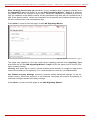
Fig. I-34: Wizard Execution Progress page
After this is complete, the Quadro will reply with the Confirm Settings page requesting
confirmation of the changes. Press on OK to confirm the settings.
QuadroM32x/8L/26x/12Li/26xi; (SW Version 5.3.x)
31
QuadroM32x/8L/26x/12Li/26xi Manual I: Installation Guide
Step 2: Configuring the Quadro
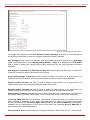
Fig. I-35: Confirm Settings page
Please Note: You must confirm the settings within 20 minutes. Otherwise the device will
revert back to the previous configuration and reboot.
Please Note: If you do not use DHCP for your LAN and you have changed your LAN settings, make sure that the IP address of the PC connected to Quadro is still within the specified IP address range, otherwise your PC may not establish a connection to Quadro.
If you changed the network configuration of the LAN, restart your LAN connection to receive a new IP address from the new network. Then you can access the Web Management
of the Quadro on the new IP address you’ve assigned to the Quadro.
QuadroM32x/8L/26x/12Li/26xi; (SW Version 5.3.x)
32
QuadroM32x/8L/26x/12Li/26xi Manual I: Installation Guide
Step 2: Configuring the Quadro
Step 2.3: Internet Configuration Wizard
Open the Internet Configuration Wizard by selecting the corresponding menu item on the
System menu. The Internet Configuration Wizard is a tool for the administrator to configure the WAN settings and to adjust Quadro's connectivity in the global network. It must be
run if Quadro is desired to be connected to the Internet.
The page Getting Started will be displayed:
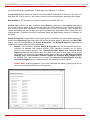
Fig. I-36: Internet Configuration Wizard
This first page of the Internet Configuration Wizard is for informational purposes only and
lists the items to be configured, Click on the Next button for the Uplink Configuration
page.
Before configuring the WAN port to the Internet, you need to get the following information
from your internet service provider:
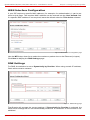
• Bandwidth - how much is available upstream and downstream?
• WAN IP Configuration - is DHCP supported? If yes, no more information is needed.
If DHCP is not supported, the following data is needed: the WAN IP address, the
subnet mask, the IP address of the standard gateway and the IP address of the Domain Name Server (DNS).
• MAC address - needed when the ISP requires a specific MAC address for the WAN.
Additionally, for Point-to-Point Protocol over Ethernet (PPPoE) WAN interface, you need to
get the following information from your internet service provider:
• PPP Configuration - does your ISP use a dynamic or fixed WAN IP address? If the
WAN IP address is dynamic, no more information is needed. If the WAN IP address
is fixed, you will have to enter it.
• Authentication - does your ISP require authentication? If
authentication is required,
information about the corresponding method (PAP, CHAP or MSCHAP) is needed including the username and password of the PPPoE account.
This information will be needed to be inserted in the Internet Configuration Wizard.
QuadroM32x/8L/26x/12Li/26xi; (SW Version 5.3.x)
33
QuadroM32x/8L/26x/12Li/26xi Manual I: Installation Guide
Step 2: Configuring the Quadro
Uplink Configuration
Select the desired WAN Interface Protocol and enter the WAN Interface Bandwidth to assure the quality of IP calls.
Fig. I-37: Uplink Configuration
If the available bandwidth is used to the point where the quality of an additional IP call
would suffer, then new IP calls are rejected.
The bandwidth provided by your ISP must be specified for both Upstream and Downstream fields. The default entry in both fields is 100000, the maximum bandwidth of the
100 MB uplink module. For basic DSL and cable modem service in the United States, typical values are 300 for Upstream and 1500 for Downstream.
The Min Data Rate text field is used to specify the amount of bandwidth reserved for data
applications. The value entered here needs to be smaller that the value specified for Upstream Bandwidth.
Specify the WAN Interface Protocol by choosing between available WAN interface protocols: PPPoE (Point to Point over Ethernet), PPTP (Point to Point Tunneling Protocol) and
Ethernet. Use Ethernet for DHCP or static IP.
For Ethernet, clicking Next will display the WAN IP Configuration page. If PPPoE is the
selected WAN Interface Protocol, the next page will be PPP/PPTP Configuration. For PPTP
WAN Interface Protocol, PPP/PPTP Configuration page will follow the WAN IP Configuration.
QuadroM32x/8L/26x/12Li/26xi; (SW Version 5.3.x)
34
QuadroM32x/8L/26x/12Li/26xi Manual I: Installation Guide
Step 2: Configuring the Quadro
WAN IP Configuration
Your Internet Service Provider (ISP) should provide this information.
•
•
Assign automatically via DHCP - The parameters are set automatically by the ISP.
This is common with cable modem and DSL service.
Assign Manually requires the administrator to enter the external IP Address, the corresponding Subnet Mask, and the IP address of the Standard Gateway. This is
common when you have a static IP address with your ISP.
Fig. I-38: WAN IP Configuration page
Click on Next to display the WAN Interface Configuration page.
QuadroM32x/8L/26x/12Li/26xi; (SW Version 5.3.x)
35
QuadroM32x/8L/26x/12Li/26xi Manual I: Installation Guide
Step 2: Configuring the Quadro
PPP/PPTP Configuration
Enter the IP address of the PPTP server into the PPTP Server text field.
Choose the encryption for the traffic over the PPTP interface from the Encryption drop
down list.
Authentication Settings require the Username and the Password used for the authentication on the ISP server.
Dial Behavior radio buttons:
•
•
Dial Manually - if this radio button is activated, a button will be displayed in the main
management window that serves to switch the Internet connection on/off. When accessing the Internet, every station of the connected LAN has to connect to Quadro
first.
Always connected - Quadro stays in the always connected mode. This will allow Quadro always remain online in the network.
The IP Address Assignment field is used to specify the external IP address given to the
Quadro. Usually it is a dynamic address but in some cases you may be given a static IP
address.
Fig. I-39: PPP/PPTP Configuration page
If your ISP assigns a dynamic IP address, activate the Dynamic IP Address radio button,
otherwise activate the Fixed IP Address radio button and enter the IP address you were
assigned by your ISP.
Keep Connection alive checkbox enables keeping the connection alive by sending control
packets dedicated for the link state verification.
Click the Next button to display the WAN Interface Configuration page.
QuadroM32x/8L/26x/12Li/26xi; (SW Version 5.3.x)
36
QuadroM32x/8L/26x/12Li/26xi Manual I: Installation Guide
Step 2: Configuring the Quadro
WAN Interface Configuration
If your ISP requires a specific MAC address, (for example, for authentication), it can be entered on this page. The required MAC address can be entered into the User defined field.
If a specific MAC address is not required, leave the default selection This device selected.
Fig. I-40: WAN Interface Configuration page
Use the MTU drop down list to select the maximum packet size on the Ethernet (in bytes).
Click Next to display the DNS Settings page.
DNS Settings
For DNS, the selection is set to Dynamically by Provider. When using a static IP address,
fixed values must be entered.
Fig. I-41: DNS Settings page
The Quadro will suggest the correct settings. If Dynamically by Provider is selected, the
DNS server settings will be set automatically whenever a connection to the Internet is established.
QuadroM32x/8L/26x/12Li/26xi; (SW Version 5.3.x)
37
QuadroM32x/8L/26x/12Li/26xi Manual I: Installation Guide
Step 2: Configuring the Quadro
If Fixed Nameserver Address is selected, manually enter the IP addresses provided by
your ISP for the name server and the alternative name server.
Clicking Next shows the summary page of the Internet Configuration Wizard.
Finishing the Internet Configuration Wizard
Fig. I-42: Internet Configuration Wizard Summary page
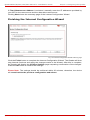
Click the Finish button to complete the Internet Configuration Wizard. The Quadro will then
stop internal functions and apply the changes made in the Wizard. After this is complete,
the Quadro will display the Confirm Settings page requesting confirmation of the changes.
Press the OK button to confirm the settings.
Please Note: The settings should be confirmed within 20 minutes; otherwise, the device
will revert back to the previous configuration and reboot.
QuadroM32x/8L/26x/12Li/26xi; (SW Version 5.3.x)
38
QuadroM32x/8L/26x/12Li/26xi Manual I: Installation Guide
Step 2: Configuring the Quadro
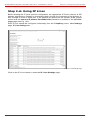
Step 2-A: Using IP Lines
Before starting the IP Lines specific configuration, the appropriate IP Phone (the list of SIP
phones supported by Quadro is presented below) should be connected to the Quadro either through its LAN or WAN port. If the phones are placed on the Quadro WAN, please
ensure that the Connect IP phones from WAN side checkbox is enabled on the Line Settings page (see Fig. I-43).
Each IP line should be configured individually from the Telephony menu, Line Settings
page, IP Line Settings tab.
Fig. I-43: Line Settings page
Click on the IP Line number to enter the IP Lines Settings page.
QuadroM32x/8L/26x/12Li/26xi; (SW Version 5.3.x)
39
QuadroM32x/8L/26x/12Li/26xi Manual I: Installation Guide
Step 2: Configuring the Quadro
Fig. I-44: IP Line Settings page
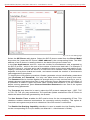
Select the SIP Phone radio button. Select the SIP IP phone model from the Phone Model
drop down list. Insert the SIP Phone’s MAC address in the corresponding fields. The MAC
address of an IP phone is usually printed on the back of the phone’s base unit.
In the Line Appearances text box, enter the number for simultaneous calls supported by
the SIP IP phone – which is the sum of the number of active and held calls. For example, if
this field is set to 1, only one active call is possible to have on the phone and making or accepting a second call while the other is on hold will not be allowed. Note, that this number
depends on the phone brand and model, and cannot exceed the number of simultaneous
calls supported by the phone.
To simplify the configuration procedure, Quadro generates unique identification parameters
(see Username and Password). You may use either these values or specify new ones.
The Password field is checked against its strength and you may see how strong is your inserted password right below that field. A well protected, strong password has a minimum of
8 characters of letters in upper and lower case, symbols and numbers. If you are unable to
define a strong password, press Choose Generated Password to use one of the system
defined strong passwords.
The Transport drop down list is used to select the SIP protocol transport layer - UDP, TCP
or TLS. For TLS you may activate the TLS certificate update mechanism from IP Phone to
obtain the latest certificate generated by the Quadro.
The Use Session Timer enables the SIP session timer for the corresponding IP line. This
checkbox enables advanced mechanisms for connection activity checking. This option allows both user agents and proxies to determine if the SIP session is still active.
The Enable Hot Desking Capability checkbox is used to enable the Hot Desking feature
on the corresponding IP line (for details, see Manual II – Administrator’s Guide).
QuadroM32x/8L/26x/12Li/26xi; (SW Version 5.3.x)
40
QuadroM32x/8L/26x/12Li/26xi Manual I: Installation Guide
Step 2: Configuring the Quadro
The Hot Desking Automatic Logout section is used to configure Hot Desking functionality
expiration on the corresponding IP line. This may be useful when someone who logged in
to the public phone with the extension attached to this line forgot to log out after using it.
With this option enabled, once the expiration time arrives, the extension will automatically
log out from the public phone.
The following options are available:
•
•
•
Never – the extension will never expire and will remain logged in to the public
phone.
After the defined period of time – requires the period after which the extension
will automatically log out from the public phone.
At the certain moment – requires the moment (hour and minute) when the extension will automatically log out from the public phone.
Press Save to apply the settings for the IP line.
Reset the SIP Phone. After restart, the appropriate configuration will be automatically
downloaded from the Quadro to the SIP Phone.
Please Note: For automatic configuration, some SIP phones may require additional actions
to follow the restart. For example, by default the IP Dialog SIP Tone II is in a non-autoprovisioning mode, so it should be manually enabled on the phone. Refer to the user’s manual of the corresponding SIP phone for instructions on performing a factory reset or reboot
on any of the supported phones, what additional configurations are required for a specific
SIP phone, and how to manipulate with the GUI.
You may also find the detailed installation instructions of the Epygi’s supported IP Phones
in the “Configuring Epygi Supported IP Phones” document published on Epygi’s Web
portal.
To make sure the line configuration works properly, do the following:
•
•
•
Go to System – Status - IP Line Registration Status to see if IP Line registration is successful.
Dial *74 to get the line information.
Make outgoing and accept incoming calls.
QuadroM32x/8L/26x/12Li/26xi; (SW Version 5.3.x)
41
QuadroM32x/8L/26x/12Li/26xi Manual I: Installation Guide
Step 2: Configuring the Quadro
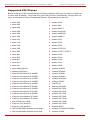
Supported SIP Phones
Below is the list of SIP phones that are officially supported by Epygi and can be configured
to work with QuadroM using both Plug and Play and the automatically configuration options, as well as the full set of advanced features, like paging and intercom:
•
•
•
•
•
•
•
•
•
•
•
•
•
•
•
•
•
•
•
•
•
•
•
•
•
•
•
•
•
•
•
•
•
•
snom 190
snom 200
snom 220
snom 300
snom 320
snom 360
snom 370
snom 710
snom 720
snom 760
snom 820
snom 821
snom 870
snom M3
snom PA1
snom m9
snom MeetingPoint
IpDialog SipTone II
Polycom SoundPoint IP 300SIP
Polycom SoundPoint IP 330SIP*
Polycom SoundPoint IP 331SIP*
Polycom SoundPoint IP 335SIP*
Polycom SoundPoint IP 450SIP*
Polycom SoundPoint IP 501SIP
Polycom SoundPoint IP 550SIP*
Polycom SoundPoint IP 601SIP
Polycom SoundPoint IP 650SIP*
Polycom SoundStation IP 5000*
Polycom SoundStation IP 6000*
POLYCOM VVX 1500*
Polycom VVX 300/310*
Polycom VVX 400/410*
POLYCOM KIRK wireless server 6000
POLYCOM KIRK wireless server 300
QuadroM32x/8L/26x/12Li/26xi; (SW Version 5.3.x)
•
•
•
•
•
•
•
•
•
•
•
•
•
•
•
•
•
•
•
•
•
•
•
•
•
•
•
•
•
•
•
•
•
•
Aastra 9133i
Aastra 480i
Aastra 480iCT
Aastra 9143i(33i)
Aastra 9480i(35i)
Aastra 9480iCT
Aastra 6751i
Aastra 6753i
Aastra 6755i
Aastra 6757i(57i)
Aastra 6757iCT (57iCT)
Aastra 6730i
Aastra 6731i
Aastra 6735i
Aastra 6737i
Aastra 6739i
Linksys SPA921
Linksys SPA922
Linksys SPA941
Linksys SPA942
Linksys SPA2002
Linksys PAP2T
Fanvil C62
Akuvox SP-R53P
Yealink SIP-T20P
Yealink SIP-T22P
Yealink SIP-T26P
Yealink SIP-T28P
Yealink SIP-T32G
Yealink SIP-T38G
Yealink SIP-T46G
Yealink W52P
Yealink VP-2009/VP-2009P
Yealink VP530
42
QuadroM32x/8L/26x/12Li/26xi Manual I: Installation Guide
•
•
•
•
•
•
•
•
•
•
•
•
•
•
•
•
•
•
•
SIPUra SPA 841
Swissvoice IP 10S
Thomson ST2030S
Grandstream BT100
Grandstream BT200
Grandstream GXP1400
Grandstream GXP1405
Grandstream GXP1450
Grandstream GXP2000
Grandstream GXP2100
Grandstream GXP2110
Grandstream GXP2120
Grandstream GXP2124
Grandstream GXP2200
Grandstream GXV3140
Grandstream GXV3175
Grandstream HT286
Grandstream HT386
Aastra 9112i
•
•
•
•
•
•
•
•
•
•
•
•
•
•
•
•
•
•
•
Step 2: Configuring the Quadro
Yealink W52P
Aastra MBU400
Telematrix IP550 Spectrum Plus
Telematrix IP 3300
Telematrix IP9600 MWD5
AudioCodes 310HD
AudioCodes 320HD
Panasonic KX-UT136
Panasonic KX-UT123
Panasonic KX-TGP550T04
Alcatel Temporis IP200
Alcatel Temporis IP600
Alcatel Temporis IP800
CISCO 7960
CISCO SPA525G2
CISCO SPA303
CISCO SPA501G
CISCO SPA509G
Berkshire (ATL) 5000
To use Plug and Play (PnP) option for IP phones, connect them to LAN/WAN for the Quadro and power up. If the phone is in default settings then it will automatically select a free
IP line and attach to an extension. If not, reset the phone to factory defaults manually.
Please Note: To use PnP the appropriate option should be selected in the IP line settings.
Please Note: In the model’s list the Polycom phones with (*) sign are also presented as
Polycom-xx-Pre-3.3.0 due to backward incompatibility of UCSoftware 3.1.1 configuration.
It is recommended to use Pre-3.3.0 models with Application SIP software 3.2.2.0477.
QuadroM32x/8L/26x/12Li/26xi; (SW Version 5.3.x)
43
QuadroM32x/8L/26x/12Li/26xi Manual I: Installation Guide
Step 2-B: Using Receptionist
Step 2-B: Using Receptionist
If you wish to use the Receptionist’s features, the Receptionist should be set up on the Quadro. The Quadro’s basic configuration should be done in the same way as described in
the Step 2.
The Receptionist related setup, with detailed instructions on how to configure the Quadro
and the attached IP Phones, is described in the “Receptionist Setup on Quadro” document, which you can find at the Epygi’s Web portal.
QuadroM32x/8L/26x/12Li/26xi; (SW Version 5.3.x)
44
QuadroM32x/8L/26x/12Li/26xi Manual I: Installation Guide
Step 2-C: Using ISDN Lines
Step 2-C: Using ISDN Lines
The basic configuration procedure for QuadroM IP PBXs that use ISDN lines is exactly the
same as described in Step 2.
As some ISDN providers require an outgoing MSN to be defined, go to the Telephony
menu and open the ISDN Settings page.
The number of available ISDN trunks is dependent on the type of your Quadro. QuadroM26xi and QuadroM12Li have six ISDN trunks.
Fig. I-45: ISDN Trunk Settings page
Before starting the ISDN Trunk configuration, please consult with your ISDN provider administrator to receive instructions for which settings are necessary to be configured.
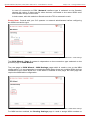
Run the ISDN Wizard for each ISDN trunk to make sure that all settings are proper. To
access ISDN Wizard, push the appropriate trunk number in the ISDN Trunk Settings table.
The ISDN Wizard – ISDN Settings allows you to choose the interface type and the connection type of the selected trunk(s).
The Interface Type drop down list allows you to select between the User and the Network
interfaces. If the ISDN port of the Quadro is connected to the CO then User interface type
should be selected. If the ISDN port of the Quadro is connected to the PBX then Network
interface type should be selected (in that case Quadro acts as a CO for that PBX).
The Connection Type manipulation radio button group allows you to choose the connection type for the selected trunk(s):
•
•
PTP (Point to Point)
In case of connection to the CO (User interface type is selected on Quadro) choose
this option if only Quadro is connected to the ISDN trunk from CO (no other ISDN devices are connected to the particular ISDN trunk from CO besides the Quadro).
In case of connection to the PBX (Network interface type is selected on Quadro)
choose this option if only the PBX is connected to the ISDN trunk from the Quadro (no
other ISDN devices are connected to the particular ISDN trunk from the Quadro).
In both cases, with this selection, Quadro sets the TEI to manually mode assigning the
default value of 0. If needed, that value can be changed later in the Advanced Settings page of ISDN Wizard.
PTMP (Point to Multi Point)
In case of connection to the CO (User interface type is selected on the Quadro)
choose this option if there can be other devices connected to the same ISDN trunk
from CO except the Quadro.
QuadroM32x/8L/26x/12Li/26xi; (SW Version 5.3.x)
45
QuadroM32x/8L/26x/12Li/26xi Manual I: Installation Guide
Step 2-C: Using ISDN Lines
In case of connection to PBX (Network interface type is selected on the Quadro)
choose this option if there can be other devices connected to the same ISDN trunk
from Quadro except for the PBX.
In both cases, with this selection Quadro sets the TEI to automatic mode.
Please Note: Consult with your CO operator or network administrator before configuring
the ISDN connection type.
Fig. I-46: ISDN Wizard – ISDN Settings
The ISDN Wizard - Page 2 content is dependent on the connection type selected on the
previous page of ISDN Wizard:
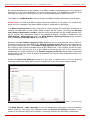
The next page is ISDN Wizard – MSN Settings page which is used to turn on the MSN
configuration. It is recommended to enable the MSN when there are multiple ISDN devices
connected to the same ISDN bus. If the MSN is enabled on this page, the next page will
require the MSN table configuration.
Fig. I-47: ISDN Wizard – ISDN PRMP Settings
For MSN service enabled, the Routing Settings page is used to assign MSN numbers to
QuadroM32x/8L/26x/12Li/26xi; (SW Version 5.3.x)
46
QuadroM32x/8L/26x/12Li/26xi Manual I: Installation Guide
Step 2-C: Using ISDN Lines
the certain destinations on the Quadro. The MSN number can be assigned to the Quadro’s
extensions, to the Auto Attendant, or to the routing agent. The destination selected from
this page will ring upon incoming call to the corresponding MSN number comes in.
The fields in the MSN Number column require the MSN numbers allocated to the Quadro.
Please Note: At least one MSN number should be defined in this page. The system displays an error message if the same MSN number is used twice in this page.
The Route Incoming Call to drop-down lists is used to select the destination where the incoming call addressed to the certain MSN number will be routed. Choosing the Routing
with inbound destination number selection will automatically use the initially dialed number to connect the destination without any additional dialing. If MSN is disabled on the
ISDN Wizard - MSN Settings page, the ISDN Wizard - Routing Settings page contains
only one Route Incoming Call to drop-down list.
Selecting the Use Default outgoing Caller ID allows you to overwrite the source caller information with the one specified in the Default outgoing Caller ID field when placing outgoing calls toward the CO. The Default outgoing Caller ID field requires the caller ID for
the outgoing calls from the Quadro through the ISDN trunk. That number should be registered at the CO and can be one of the MSNs provided by the CO. If this checkbox is
enabled but no value is defined in the Default outgoing Caller ID, empty caller information
will be sent to the CO. If this checkbox is disabled, the source caller information will be forwarded to the CO.
Select the Advanced Settings checkbox if you wish to adjust trunk L2 and L3 Settings
manually, otherwise leave this checkbox unselected to use the system default values.
Fig. I-48: ISDN Wizard – Routing Settings
The ISDN Wizard – L2&L3 Settings is used for advanced configuration only and contains
L2&L3 Settings. This page only appears when the Advanced Settings checkbox is selected on the previous page of the wizard. This page contains the following components:
QuadroM32x/8L/26x/12Li/26xi; (SW Version 5.3.x)
47
QuadroM32x/8L/26x/12Li/26xi Manual I: Installation Guide
Step 2-C: Using ISDN Lines
Fig. I-49: ISDN Wizard – L2&L3 Settings
ISDN L2 Timers:
•
•
Excessive Ack. Delay T200 configures the period in milliseconds (numeric values
from 500 to 9999) between the transmitted signaling packet and its acknowledgement
received.
Idle Timer T203 configures the period in milliseconds (numeric values from 1000 to
99999) for the ISDN client idle timeout.
ISDN L3 Timers:
•
•
•
•
The T302 Timer text field requires the value for the T302 timer in milliseconds (digit
values from 0 to 15000). It indicates that the time frame system is waiting for a digit to
be dialed. When the timer expires, it initiates the call.
T309 Timer requires the value for the T309 timer in milliseconds (numeric values from
0 to 90000). It is responsible for call steadiness during link disconnection within the
period equal to this timer value. If the value in this field is zero (0), the T309 timer will
be disabled.
T310 Timer requires the value for the T310 timer in milliseconds (numeric values from
1000 to 120000). It is responsible for the outgoing call steadiness when CALL PROCEEDING is already received from the destination but call confirmation (ALERT,
CONNECT, DISC or PROGRESS) has not yet arrived.
Alert Guard Timeout requires the value for the Alert Guard Timer in milliseconds (numeric values from 0 to 500) between CALL PROC and ALERT messages.
Alert Guard Timer it is used when Quadro is connected to a slow ISDN-PBX.
Recommended values are:
- fast connection (0ms);
- normal (150ms), default;
- slow ISDN-PBX (350ms);
QuadroM32x/8L/26x/12Li/26xi; (SW Version 5.3.x)
48
QuadroM32x/8L/26x/12Li/26xi Manual I: Installation Guide
Step 2-C: Using ISDN Lines
- very slow ISDN-PBX (500ms).
The Coding Type drop down list allows you to select between a-law and mu-law coding
types.
The Switch Type is another configuration parameter that depends on the Service Provider.
The Passive Mode checkbox is used to leave the ISDN Layer1 connection in the Slave
mode. When this checkbox is selected, Layer1 remains idle when calls are not available.
When this checkbox is not selected, Quadro keeps its Layer1 always active. This checkbox
enables the Enable TEI Remove Procedure and Permanent TEI Value checkboxes. With
the Enable TEI Remove Procedure checkbox is selected, the trunk will lose the assigned
TEI when entering into passive mode on the Layer 2. With the Permanent TEI Value
checkbox is selected, the trunk will keep the assigned TEI when entering into passive mode
on the Layer 2 or when Quadro detected ISDN link DOWN signal from carrier.
Channel Selection is used to select between the Preferred and Exclusive B channel selection methods. For Preferred channel selection, the CO answers to the call request by
the first available timeslot. With the Exclusive channel selection, the CO should feedback
only by the timeslot asked in the call request.
The Bearer Establishment Procedure drop down list allows selecting the session initiation method on the B channel. One of the following options can be selected for the transmission path completion prior to receipt of a call acceptance indication:
•
•
•
on channel negotiation at the destination interface
on progress indication with in-band information
on call acceptance
The Calling Party Type of Number drop down list allows you to select the type identifying
the origin of call.
The Called Party Type of Number drop down list allows you to select the type identifying
the subaddress of the called party of the call.
The Called Party Numbering Plan and Calling Party Numbering Plan drop down lists
correspondingly indicate the numbering plan of the called party's and calling party's number.
The Incoming Called Digits Size text field indicates the number of received digits (in a
range from 0 to 255) required to establish a call. When this field has a “0” value, the system
uses either the timeout defined in the T302 field or the Sending Complete Information
element messages to establish a call. Independent on the value in this field, Sending
Complete Information element and the pound sign always result in call establishment.
When Generate Progress Tone to PSTN/PBX checkbox is selected, Quadro generates
ring tones to callers during ISDN call dialing. This feature is mainly applicable to 2-stage dialing mode.
The Generate Progress tone on IP checkbox selection will generate the progress tone to
IP.
Enable CLIR Service checkbox selection enables Calling Line Identification Restriction
(CLIR) service which displays the incoming caller ID only if Presentation Indication is allowed on the remote side. Otherwise, if CLIR service is disabled, caller ID will be unconditionally displayed.
When the Alternative Disconnection Mode checkbox is not selected, Quadro will disconnect the call as soon as the disconnect message has been received from the peer. When
the checkbox is selected, Quadro’s user may hear a busy tone when peer has been disconnected.
QuadroM32x/8L/26x/12Li/26xi; (SW Version 5.3.x)
49
QuadroM32x/8L/26x/12Li/26xi Manual I: Installation Guide
Step 2-C: Using ISDN Lines
P-Asserted-Identity:
The Disable P-Asserted-Identity radio button disables the P-Asserted-Identity feature for
both incoming and outgoing calls.
The Override CLID with P-Asserted-Identity radio button selection enables SIP PAsserted-Identity support. For the calls from SIP to ISDN if Invite SIP message contains a
P-Asserted-Identity, then the CallerID on ISDN is sent with the original Caller ID, which
comes from the identity field. SIP user agent should check for the existence of the PAsserted-Identity, then the P-Preferred-Identity, then the Remote-Party-ID to fill the identity
field.
For the calls from ISDN to SIP with restricted Caller ID, the SIP Invite message contains PAsserted-Identity field with the value from the Caller ID on ISDN. The SIP From field contains “anonymous”.
The Use Redirecting Number Info Element with P-Asserted-Identity radio button
selection
enables
full
support
of
the
SIP
P-Asserted-Identity.
For the calls from SIP to ISDN, if the SIP Invite message contains a P-Asserted-Identity or
a P-Preferred-Identity or a Remote-Party-ID, then the CallerID on ISDN contains the number from the user name field and the Redirecting Number IE contains the original number
from the identity field. SIP user agent should check for the existence of the P-AssertedIdentity, then the P-Preferred-Identity, then the Remote-Party-ID to fill the identity field.
For the calls from ISDN to SIP with Caller ID, the SIP Invite message contains P-AssertedIdentity field with the original number value from the Redirecting Number IE on ISDN. The
SIP From field contains the value from the user name.
When the Send Calling Party Subaddress checkbox is selected, Quadro will send the extension number as subaddress and the value defined in the Default outgoing Caller ID
field as caller ID on the outgoing call. When this checkbox is disabled, no subaddress information will be sent and the caller ID will be defined according to the selection of the Use
Default Outgoing Caller ID checkbox (see above). Caller ID information, along with the
Subaddress, can be displayed on the phone display depending on the phone and PBX settings and capabilities.
When the Ignore Empty Channel Identification in CALL PROCEEDING Msg. option is
selected, Quadro will ignore the empty ISDN L3 Channel Identification information element
in CALL PROCEEDING message and will not response with STATUS message.
When this checkbox is disabled, Quadro will response with STATUS message on empty
Channel Identification information element.
The B1 Channel and B2 Channel checkboxes enables/disables timeslots for voice transfer. Disabling the timeslot will prevent both incoming and outgoing calls.
QuadroM32x/8L/26x/12Li/26xi; (SW Version 5.3.x)
50
QuadroM32x/8L/26x/12Li/26xi Manual I: Installation Guide
Step 2-D: Configuring the E1/T1 Settings
Step 2-D: Configuring the E1/T1 Settings
The QuadroM32x has one E1/T1 trunk available.
The QuadroM32x can be connected to a PBX or to the PSTN via E1/T1 lines, using E1/T1
CAS/CCS signaling. The QuadroM32x may be connected to act as a User (default mode) if
connected to directly to the PSTN or as a Network if connected to a PBX.
Further, you are required to enter the E1/T1 settings your PSTN provider requires regarding framing, clocking, signaling used and so on. All these settings must be entered on the
management page Trunk Settings that is displayed when you select E1/T1 Settings from
the Telephony menu:
Fig. I-50: E1/T1 Trunk Settings page
The Trunk Settings page is used to configure the E1/T1 trunk and timeslots settings. The
table lists the available E1/T1 trunks of Quadro and their settings (Trunk name, E1/T1
mode, interface and signaling type). Clicking on the trunk will open its Signaling Settings
page (Trunk CAS Signaling Settings or the Trunk CCS Signaling Settings page depending
on the selected signaling type). Selecting the corresponding trunk's checkbox and pressing
Edit will open the Trunk - Edit Entry page. The E1/T1 Stats link is displayed for every active Quadro trunk and leads to the page where the E1/T1 trunk and the traffic statistics can
be viewed.
QuadroM32x/8L/26x/12Li/26xi; (SW Version 5.3.x)
51
QuadroM32x/8L/26x/12Li/26xi Manual I: Installation Guide
Step 2-D: Configuring the E1/T1 Settings
Editing the E1/T1 Trunk
Fig. I-51: Trunk Edit page
Select Network as your Interface Type if your QuadroM32x is connected to a PBX, otherwise choose User.
Next, you are required to enter the Signaling type (CAS or CCS), adjust the correct interface type (E1 or T1), and specify the requested settings of the selected interface type. The
appropriate parameters should be requested from the service provider or in case of connecting to a PBX - according to the settings in the PBX manual.
CAS signaling allows using the same timeslot both for voice and data transmission. CCS
signaling uses a single timeslot for signaling data transmission for the whole trunk, all other
timeslots are used for voice transmission.
E1, the European system, enables 30 active timeslots (both for CAS and CCS) to be used;
T1, the US system, enables 24 timeslots (if CAS is used) and 23 (if CCS is used).
Please Note: Modifying the E1/T1 trunk settings may lead to some broken routes in the
Local Call Routing Table.
QuadroM32x/8L/26x/12Li/26xi; (SW Version 5.3.x)
52
QuadroM32x/8L/26x/12Li/26xi Manual I: Installation Guide
Step 2-D: Configuring the E1/T1 Settings
Signaling Type CCS
Fig. I-52: Trunk T1 Signaling Type CCS page
If you selected CCS as your Signaling Type, using the Trunk link will take you to the page
shown above. Here you can specify the signaling settings in more detail. Further, this page
allows selection of the timeslots for signaling data and voice.
The Non Automat checkbox switches to non-automatic Terminal Endpoint Identifier (TEI)
searching and enables the TEI Address text field that requires a TEI number (digit values
from 0 to 63) for connection establishment between CO and E1/T1 client. In automatic
mode, an E1/T1 connection will be established on the first available TEI, while in nonautomatic mode a specific TEI may be reserved for the connection. In this case both call
partners need to specify the same TEI in their settings.
In the Network Mode (PBX connected) you need to specify the same TEI address on both
sides (Quadro and PBX), if the Non Automat mode is selected. If the Automat mode is selected the user on the PBX side may set any mode related to TEI assignment in the PBX
configuration.
QuadroM32x/8L/26x/12Li/26xi; (SW Version 5.3.x)
53
QuadroM32x/8L/26x/12Li/26xi Manual I: Installation Guide
Step 2-D: Configuring the E1/T1 Settings
In the User Mode (CO/PSTN connected) the TEI assignment depends on the CO/PSTN
settings. So you have to enter the values you've got from your PSTN provider.
The SAPI Value text field requires an additional Service Access Point Identifier (SAPI) value (digit values from 1 to 62) that is used to support additional interface between ISDN
Layer 2 and Layer 3. Leaving this field empty (default value), only Call Control and Layer 2
management procedures will be activated.
The Alternative Disconnection Mode checkbox should not selected, if Quadro ought to
disconnect the call as soon as disconnect message has been received from the peer, otherwise, when checkbox is selected, Quadro’s user may hear a busy tone when peer has
been disconnected.
In the ISDN L2 Timers area the Excessive Ack. Delay T200 text field configures the period in milliseconds (digit values from 500 to 9999) between transmitted signaling packet
and its acknowledgement received. The Idle Timer T203 text field configures the period in
milliseconds (digit values from 1000 to 99999) for E1/T1 client idle timeout. The Service
Provider provides these settings.
In the ISDN L3 Timers area, the T302 Timer text field requires the value for the T302 timer
in milliseconds (digit values from 0 to 15000) and indicates the time frame system is waiting
for a digit to be dialed and when timer expires, it initiates the call. The timer is not applicable for DMS-100 switch types. The T309 Timer text field requires the value for the T309 timer in milliseconds (digit values from 0 to 90000) responsible for call steadiness during link
disconnection within the period equal to this timer value. If the value in this field is 0, the
T309 timer will be disabled. The T310 Timer text field requires the value for the T310 timer
in milliseconds (digit values from 1000 to 120000) responsible for the outgoing call steadiness when CALL PROCEEDING is already received from the destination but call confirmation (ALERT, CONNECT, DISC or PROGRESS) is not yet arrived. The No Answer Disconnect Timer text field is only available in Network mode and requires the value for the
No Answer Disconnect Timer (digit values from 0 to 200000). This timer is used in certain
types of PBXs. The value 0 indicates that the timer is disabled. When time expires, Quadro
will play a busy tone towards the PBX if the call has been disconnected by the peer.
The D Channel Timeslot For Transmit/Receive drop down list in offers all available timeslots to be selected for signaling data transmit/receive.
The link B Channels leads to the Signaling Type CCS - B Channel Settings page (see
below) where available timeslots may be enabled or disabled for the voice transfer. The
Force Update option can be optionally used to apply new settings immediately. This will
force the timeslot(s) to be restarted and any active connection on the selected timeslot(s)
will be interrupted. The Restart option can be used to bring timeslot(s) to the initial idle
state on the both sides. Note, that when applying one of these options, any active traffic on
the timeslot(s) will be terminated. Edit will display another page, where the signaling settings for the selected timeslots may be specified in detail.
Bearer Establishment Procedure allows you to select the session initiation method on the
B channels. One of the following possibilities of the transmission path completion prior to
receipt of a call acceptance indication can be selected:
•
on channel negotiation at the destination interface;
•
on progress indication with in-band information;
•
on call acceptance.
Called Party Type of Number and Calling Party Type of Number fields indicate correspondingly the type of the called party’s and of the calling party’s number.
Called Party Numbering Plan and Calling Party Numbering Plan drop down lists indicates correspondingly the numbering plan of the called party's and calling party's number.
The Route Incoming Call to drop down list contains Attendant, routing agent with two
kinds of call routing possibilities, and all extensions of Quadro and allows selecting the desQuadroM32x/8L/26x/12Li/26xi; (SW Version 5.3.x)
54
QuadroM32x/8L/26x/12Li/26xi Manual I: Installation Guide
Step 2-D: Configuring the E1/T1 Settings
tination where incoming calls will be routed to. Choosing Routing will request the caller to
pass the authentication (if enabled) and will invite him to dial the destination number to
connect the user within the Quadro Network. Choosing Routing with inbound destination
number will request the authentication (if enabled) and then will automatically use the initially dialed number to connect the destination without any additional dialing.
Attention: When Quadro acts in the Network mode with the Attendant as a destination to
route the incoming calls to, digit forwarding should be disabled on the private PBX side
otherwise incoming digits may be mistaken as a special calling codes on the Quadro’s Attendant.
The value for Switch Type depends on the CO when acting in the User mode and the private PBX capabilities when acting in the Network mode.
Attention: A timeslot can be used either for voice or signaling data transfer. The configuration prevents the selection of a timeslot from the B channel list if it has already been selected from the D Channel receive/transmit drop down list.
The Generate Progress Tone to PSTN/PBX drop-down list contains the options for sending progress (ring-back) tone to callers from the PSTN/PBX. The following options are
available in the list:
•
•
•
None configures the system to send ALERT messages without the Progress Indicator
information element (IE).
Unconditional configures the system to send ALERT/PROGRESS messages with the
Progress Indicator IE. With this option, the system will send its own progress tone.
Conditional configures the system to send ALERT/PROGRESS messages with
Progress Indicator IE. With this option, the system will send its own progress tone only
if there is no early media (180/183 with SDP) from the called party.
Incoming Called Digits Size indicates the number of received digits (in a range from 0 to
255) required to establish a call. When field has 0 value, the system uses either the timeout
defined in the T302 field or the Sending Complete Information Element messages to establish a call. Independent from the value in this field, Sending Complete Information
Element and pound sign always cause call establishment.
DID Service:
•
•
Disable DID service disables the DID service.
Enable DID service enables the DID service. The CCS DID Service button leads to
the Trunk CCS DID Service page where CCS DID number(s) may be configured.
The CCS DID Service page is used for mapping a group of DID numbers to the certain
destinations on the Quadro.
To begin managing DID numbers, you must do the following:
In the Start DID Number and End DID Number text fields enter a range of DID numbers.
The Start DID Number field must indicate a shorter number than the End DID number
field. Otherwise the following error message appears: "End DID number should be greater
than Start DID number."
Select the destination from the Incoming/Outgoing Call To/From drop-down list where
the incoming/outgoing call addressed to the certain DID numbers range will be routed.
The DID number can be assigned to the Quadro’s extensions, to the Auto Attendant, or to
the routing agent.
QuadroM32x/8L/26x/12Li/26xi; (SW Version 5.3.x)
55
QuadroM32x/8L/26x/12Li/26xi Manual I: Installation Guide
Step 2-D: Configuring the E1/T1 Settings
Choosing the Routing with inbound destination number selection will automatically use
the initially dialed number to connect the destination without any additional dialing.
The following functional buttons are available on this page:
•
•
•
Add is used to add the range of DID numbers. Once the DID numbers have been
added, you will see the extensions and their assigned DID numbers in the table below.
For example, if you have inserted 1000 in the Start DID number text field and 1003 in
the End DID number text field, then DID numbers 1000 1001, 1002 and 1003 will be
added to the table.
Delete is used to delete the DID numbers from the table with the selected range in the
Start DID Number and End DID Number fields.
Delete All is used to delete all DID numbers from the table at once.
Fig. I-53: Trunk 1 CCS DID Service page
Please Note: You can add DID numbers of up to 20 digits long and up to 500 DID numbers
can be specified.
To assign DID numbers to a consecutive extensions, choose an extension from the Incoming/Outgoing Call To/From drop-down list and select the Generate from Selected Extension Number checkbox. This will automatically assign DID numbers to a consecutive
extensions starting from the selected extension.
Modify the fields in the table you wish to update and click the Save button.
Selecting the Use Default outgoing Caller ID allows you to overwrite the source caller information with the one specified in the Default outgoing Caller ID field when placing outgoing calls toward the CO, if the default caller ID does not match one(s) listed in the Incoming/Outgoing Call To/From field.
QuadroM32x/8L/26x/12Li/26xi; (SW Version 5.3.x)
56
QuadroM32x/8L/26x/12Li/26xi Manual I: Installation Guide
Step 2-D: Configuring the E1/T1 Settings
The Default outgoing Caller ID field requires the caller ID for the outgoing calls from the
Quadro through the E1/T1 trunk. If this checkbox is enabled but no value is defined in the
Default outgoing Caller ID, empty caller information will be sent to the CO. If this checkbox is disabled and the default caller ID does not match one(s) listed in the Incoming/Outgoing Call To/From field, source caller information will be forwarded to the CO.
The Generate Progress tone on IP checkbox selection will generate the progress tone to
IP (H.323 or SIP).
If the Send ALERT Message on Call Ringing checkbox is selected, the system will send
ALERT messages to callers from the PSTN/PBX on call ringing. If not, the system will send
a PROGRESS message on receiving early media from the called party if the Generate
Progress Tone to PSTN/PBX setting is not set to None.
Selecting the Enable CLIR Service checkbox enables the Calling Line Identification Restriction (CLIR) service which displays the incoming caller ID only if Presentation Indication
is allowed on the remote side. Otherwise, if the CLIR service is disabled, the caller ID will
be unconditionally displayed.
When the Enable Connect Acknowledge Option checkbox is selected, Quadro will stop
the T303 and T310 timers upon receiving the CONNECT message, will send a CONNECT
ACKNOWLEDGE message to the remote side and enter the active state. When this checkbox is not selected, Quadro will stop the T303 and T310 timers upon receiving the CONNECT message and will enter the active state without sending the CONNECT ACKNOWLEDGE message to the remote side.
P-Asserted-Identity:
The Disable P-Asserted-Identity radio button disables the P-Asserted-Identity feature for
both incoming and outgoing calls.
The Override CLID with P-Asserted-Identity radio button selection enables the SIP PAsserted-Identity support.
For the calls from SIP to E1/T1 if the Invite SIP message contains a P-Asserted-Identity or
a P-Preferred-Identity or a Remote-Party-ID, then the CallerID on E1/T1 is sent with the
original Caller ID which comes from the identity field. SIP user agent should check for the
existence of the P-Asserted-Identity, then the P-Preferred-Identity, then the Remote-PartyID to fill the identity field.
For the calls from E1/T1 to SIP with restricted Caller ID, the SIP Invite message contains PAsserted-Identity field with the value from the Caller ID on E1/T1. The SIP From field contains anonymous.
The Use Redirecting Number Info Element with P-Asserted-Identity radio button selection enables full support of the SIP P-Asserted-Identity.
For the calls from SIP to E1/T1, if the SIP Invite message contains a P-Asserted-Identity or
a P-Preferred-Identity or a Remote-Party-ID, then the CallerID on E1/T1 contains the number from the user name field and the Redirecting Number IE contains the original number
from the identity field. SIP user agent should check for the existence of the P-AssertedIdentity, then the P-Preferred-Identity, then the Remote-Party-ID to fill the identity field.
For the calls from E1/T1 to SIP with Caller ID, the SIP Invite message contains P-AssertedIdentity field with the original number value from the Redirecting Number IE on E1/T1. The
SIP From field contains the value from the user name.
QuadroM32x/8L/26x/12Li/26xi; (SW Version 5.3.x)
57
QuadroM32x/8L/26x/12Li/26xi Manual I: Installation Guide
Step 2-D: Configuring the E1/T1 Settings
Fig. I-54: Trunk T1 Signaling Type CCS - B-Channels page
Channel Selection drop down list is used to select between the Preferred and Exclusive
B channel selection methods. For Preferred channel selection, the CO answers to the call
request by the first available timeslot, while for Exclusive channel selection CO should
feedback only by the timeslot used for the call request.
Channel Selection Ordering drop down list is used to choose the B channels selection
(Ascending or Descending). When Ascending selection is configured, B channels will be
defined starting from B1 to B23/B30. For Descending selection, B channels will be defined
from B23/30 to B1. If your CO/PBX has Ascending B channels selection configured, it is
recommended to use Descending B channels selection and vice versa.
Please Note: A timeslot can be used either for voice or data transfer. The system prevents
selecting a timeslot from the B channel list if it has already been selected from the D Channel receive/transmit drop down list.
Edit will display the first page of the CAS signaling Wizard page (see below), which contains 3 checkboxes:
•
•
•
Enable Timeslot – used to enable/disable the selected timeslot(s);
Force Update Timeslot – used to apply new settings immediately by restarting
the timeslot(s);
Enable Echo Cancellation – used to enable/disable the echo cancellation feature on the selected timeslot(s).
QuadroM32x/8L/26x/12Li/26xi; (SW Version 5.3.x)
58
QuadroM32x/8L/26x/12Li/26xi Manual I: Installation Guide
Step 2-D: Configuring the E1/T1 Settings
Fig. I-55: Trunk T1 Signaling Type CCS - B-Channels Edit page
Signaling Type CAS
Fig. I-56: Trunk T1 Signaling Type CAS page
If you selected CAS as your Signaling Type on the Trunk Settings - Edit Entry page, you
will get the page shown above using the Trunk link.
The Incoming Interdigit Service link leads to the page where the dial plan for incoming
E1/T1 calls from CO/PBX to the Quadro can be configured. The Incoming Interdigit Service is used to configure E1/T1 dial plan for the incoming calls from CO/PBX to the Quadro. This service allows you to speed up the call establishment procedure by detecting the
prefix. The calls will be speed up by the timeout defined in the Incoming Digits Timeout
text field (see below). Consult with your CO before making changes in the E1/T1 dial plan.
QuadroM32x/8L/26x/12Li/26xi; (SW Version 5.3.x)
59
QuadroM32x/8L/26x/12Li/26xi Manual I: Installation Guide
Step 2-D: Configuring the E1/T1 Settings
In the Incoming Digits Timeout text field the time period may be specified, during which
incoming digits from the destination party calling Quadro will be collected before being applied as an incoming called number. Values between 0 and 20000 (in milliseconds) are required.
The Signaling Standard drop down list is available only in E1 mode and allows selecting
the connection signaling standard (ITU, ITU_T_2 or MELCAS).
In the table below, the page lists all timeslots. To configure the timeslots, select one or
more records from the table and press Edit functional button. This will open CAS Signaling Wizard where timeslot settings might be configured.
Fig. I-57: CAS Signaling Wizard - Page 1
From the first page, signaling type settings of the timeslot(s) might be configured:
Allowed Call Type is used to select the allowed call directions: incoming, outgoing or both.
Signaling Type allows selecting the CAS signaling type.
Please Note: R2 signaling (compelled and non-compelled) can only be used with an E1 interface in User mode. Independent on the selection in this drop down list, Quadro with the
T1 interface in the CAS mode is unable to detect the busy tone on the destination side. For
E1 interface in the CAS mode, busy tone will be detected only for R2 compelled and noncompelled (both with and without ANI) signaling types.
Force Update Timeslots checkbox can be optionally selected in order to apply new settings immediately. This will force the timeslot(s) to be restarted and any active connection
on the selected timeslot(s) will be interrupted.
Please Note: Quadro does not support the Forward Digit selected on the CO when acting
in the User mode with CAS Loop Start signaling type.
Get PSTN/PBX Error Message checkbox enables notification message in case of outgoing calls to unreachable, incorrect or non existent destination.
QuadroM32x/8L/26x/12Li/26xi; (SW Version 5.3.x)
60
QuadroM32x/8L/26x/12Li/26xi Manual I: Installation Guide
Step 2-D: Configuring the E1/T1 Settings
When Generate Progress Tone to PSTN/PBX checkbox is selected, Quadro generates
ring tones to incoming callers during E1/T1 call dialing. This feature is mainly applicable to
2-stage dialing mode.
Enable Echo Cancellation checkbox enables the echo cancellation mechanism on the selected timeslot(s).
When Alternative Disconnection Mode checkbox is selected, the Quadro will play a busy
tone towards the PBX/CO if the call has been failed. After 60 second timeout, the Quadro
will disconnect the call from PBX/CO and will stop playing the busy tone.
Voice Establishment Procedure manipulation radio buttons group is used to select a method of voice establishment on the trunk.
•
•
•
On call acceptance – with this selection, voice will be established after call is
being accepted.
On channel selection - with this selection, call will be accepted during channel
selection. This selection is not allowed for R2 signaling.
On call ringing - with this selection, voice will be established after call is being
ringing. Selection enables Generate Progress Tone to IP checkbox which is
used to enable the progress tone generation upon voice establishment.
Press Next to move to the second page of the CAS Signaling Wizard:
Fig. I-58: CAS Signaling Wizard - Page 2
CAS Signaling Wizard - Page 2 appears if the Signaling Type on the previous page is
set to any of the E&M types or to R2 DTMF. From this page of the CAS Signaling Wizard,
DID (Direct Inward Dialing) Service might be enabled on the timeslot(s).
In User mode, the Quadro cannot route incoming calls from the E1/T1 trunk to extensions if
the timeslot in the trunk does not have DID service enabled. Incoming call routing takes
place according to the received caller ID. If the DID service is enabled on some timeslot(s),
an incoming call on these timeslots may be routed to the specified extension, the Attendant, or the routing client (depending on the configuration).
Please Note: The timeslot with DID service enabled cannot be used for outgoing calls.
In Network mode DID service does not limit the Quadro functionality but a timeslot with
QuadroM32x/8L/26x/12Li/26xi; (SW Version 5.3.x)
61
QuadroM32x/8L/26x/12Li/26xi Manual I: Installation Guide
Step 2-D: Configuring the E1/T1 Settings
enabled DID service cannot be used for incoming calls.
Please Note: The CO/private PBX must support the DID service, if it is to be configured on
the QuadroM32x.
Press Next to move to the third page of the CAS Signaling Wizard:
Fig. I-59: CAS Signaling Wizard - Page 3
From this page, the destination for incoming calls to be routed to can be selected and other
routing settings might be configured.
Route Incoming Call to drop down appears when Both incoming and outgoing calls or
Incoming calls only is selected from the Allowed Call Type list and allows selecting the
destination where incoming calls should be routed. The list contains all extensions of the
Quadro, Attendant and Routing agent. Choosing the Routing with inbound destination
number selection will automatically use the initially dialed number to connect the destination without any additional dialing.
When DID service is enabled (in User mode only), incoming calls can be only routed to the
Routing agent with simple Routing and Routing with inbound destination number call
routing possibilities.
Attention: When Quadro acts in the Network mode with the Attendant as a destination to
route the incoming calls, digit forwarding should be disabled on the PBX side. Otherwise,
incoming digits may be mistaken as special calling codes on the Quadro’s Attendant.
Cut Through checkbox is available when signaling selected from the Signaling Type drop
down list on the CAS Signaling Wizard – Page 2 is different from R2 (all types) and is
used to reconnect the call (terminated by some reason, e.g. user error, network problems,
etc.) by going on-hook and off-hook again even if the call partner is off-hook and not involved in the call.
Automat Ringing Down checkbox is available when signaling selected from the Signaling
Type drop down list on the CAS Signaling Wizard – Page 2 is different from R2 (all types)
and allows an E1/T1 device connected to the Quadro to establish a hot-line call (automatic
call without any digits dialed).
QuadroM32x/8L/26x/12Li/26xi; (SW Version 5.3.x)
62
QuadroM32x/8L/26x/12Li/26xi Manual I: Installation Guide
Step 2-D: Configuring the E1/T1 Settings
Pass Through Pound Sign (#) checkbox is only available when signaling selected from
the Signaling Type drop down list on the CAS Signaling Wizard – Page 2 is different
from E&M FGD or R2 (except for R2-DTMF). When this checkbox is selected, the pound
sign (#) detected in the dialed number will be passed through and will be considered as a
part of the dialed number. When this checkbox is not selected, the detected pound sign (#)
will be considered as a call acceleration digit.
Press Next to move to the forth page of the CAS Signaling Wizard:
Fig. I-60: CAS Signaling Wizard - page 4
This page only appears in E1 User mode when signaling selected from Signaling Type
drop down list on the CAS Signaling Wizard – Page 2 is R2 (all types) and is used to configure country settings.
Country drop down list is used to set the location where Quadro is located to support the
correct functionality of R2 signaling. For countries absent in this list, use ITU selection.
Use Default Country Settings checkbox restores default advanced settings for the selected country. When this checkbox is not selected, next page will provide a possibility to
manually configure advanced country settings.
Press Next to move to the fifth page of the CAS Signaling Wizard:
QuadroM32x/8L/26x/12Li/26xi; (SW Version 5.3.x)
63
QuadroM32x/8L/26x/12Li/26xi Manual I: Installation Guide
Step 2-D: Configuring the E1/T1 Settings
Fig. I-61: CAS Signaling Wizard - page 5
This page only appears when Use Default Country Settings checkbox is not selected on
the previous page and is used to configure advanced country settings.
ANI Category drop down list appears only when R2 signaling selected from Signaling
Type drop down list on the CAS Signaling Wizard – Page 2 is different from R2 DTMF
and is used to select the calling party priority depending on the call originator’s location
specifics.
ANI Request Transmit and ANI Request Receive drop down lists allow you to select the
Caller ID request R2 tones for transmit and receive.
Seize Acknowledge Timeout text field is used to define a timeout (in a range from 2 to
2000 milliseconds) between incoming seize signal and the corresponding feedback.
Answer Guard Timeout text field is used to define a wait timeout (in a range from 0 to
1000 milliseconds) Group-B Answer Signal and Line Answer.
Release Guard Timeout text field is used to define an idle timeout (in a range from 0 to
10000 milliseconds) between the disconnect signal receipt and call disconnection.
Dialing Delay Timeout text field is used to define a timeout (in a range from 0 to 2000 milliseconds) before injecting dialed digits. Timeout specially refers to R2 DTMF signaling.
Incoming DNIS Size text field indicates the number of received digits (in a range from 0 to
255) required to establish a call. When this field has a “0” value, the system uses either
timeout, defined in the Incoming digits timeout field or the End of Address messages to
establish a call. Independent on the value in this field, the message End of Address always causes the call establishment.
Usused A:B:C:D text fields require to configure unused C and D bits of E1/T1 CAS signalQuadroM32x/8L/26x/12Li/26xi; (SW Version 5.3.x)
64
QuadroM32x/8L/26x/12Li/26xi Manual I: Installation Guide
Step 2-D: Configuring the E1/T1 Settings
ing (A and B bits are predefined). Fields may have either 0 or 1 values.
Invert A:B:C:D text fields are used to invert the ABCD status bits in time-slot 16 before TX
and after RX. If bit is set to 1, the router inverts it before transmission and after the receipt.
End of DNIS (I-15) checkbox is used to enable End of DNIS service.
Collect Call checkbox is only available when Brazil is selected in the Country drop down
list on the previous page of the wizard and when the PBX attached to the Quadro supports
this feature. When this checkbox is selected and in case of incoming calls, always the
called destination will pay for the call. Option is particularly applicable when calling from the
mobile phone. Checkbox should be selected when the appropriate feature is enabled on
the PBX.
Group B Support manipulation radio button group is present only when R2 signaling selected from Signaling Type drop down list on the previous page is different from R2 DTMF
and is used to enable/disable the Group B Support. The Group B Support manipulation
radio button group offers following selections:
•
Enable – this selection enables Group B Support both for answer and busy recognitions of transmit and receive signals. This selection requires you to define
transmit and receive signals. The Transmit Answer Signal and Transmit Busy
Signal parameters are defined from the drop down lists on this page. When transmit signals are selected, press Next on this page to access the R2 Receive Signal
Settings page where Receive Answer Signal and Receive Busy Signal should
be defined. Use the checkboxes to select the Receive Answer Signal and Receive Busy Signal values. Multiple values are allowed for each signal.
Please Note: Warning appears if you have selected the same signal type both for
receive answer and receive busy recognitions.
Fig. I-62: CAS Signaling Wizard - Receive Signal Settings page
QuadroM32x/8L/26x/12Li/26xi; (SW Version 5.3.x)
65
QuadroM32x/8L/26x/12Li/26xi Manual I: Installation Guide
•
•
Step 2-D: Configuring the E1/T1 Settings
Partial Enable – selection partially enables Group B Support with for answer recognition only. This selection requires you to define transmit and receive signals. The
Transmit Answer Signal parameter is defined from the drop down list on this
page. When transmit signal is selected, press Next on this page to access the R2
Receive Signal Settings page where Receive Answer Signal should be defined.
Use the checkboxes to select the Receive Answer Signal value. Multiple values
are allowed for each signal.
Disable – selection disables Group B Support and requires defining the Answer
Signal parameter.
QuadroM32x/8L/26x/12Li/26xi; (SW Version 5.3.x)
66
QuadroM32x/8L/26x/12Li/26xi Manual I: Installation Guide Step 3: RegisteringonEpygi’sTechnicalSupport
Step 3: Registering on Epygi’s Technical Support
It is recommended that you register your Quadro on the Epygi Technical Support web
page. Registration will give you access to the Technical Support Database. There, you can
submit requests concerning technical problems as well as refer to the Frequently Asked
Questions (FAQ) section. In addition, the technical support page allows users to download
new firmware, manuals and other information. You can access the support section only if
you are registered. Additionally, registration at Epygi’s Technical Support web page gives
you the username and password to login to the Epygi SIP Server.
To register, you need to know the serial number of your Quadro, which is located on a label
on the bottom of Quadro. You will also need the date of purchase. Next, open the Epygi
home page (www.epygi.com), select Support and click on Registration Form. The online
registration page will appear:
Fig. I-63: Registration form
Complete all fields and record the Login Name and Password in a safe place. You will
need it for the SIP server.
Please Note: In some cases, the Quadro units will be shipped preconfigured from the factory with the Support login and password already set up. In this case, an information sheet
is included in the packaged contents indicating the username and password to access
Epygi’s Online Support and the Epygi SIP Server.
QuadroM32x/8L/26x/12Li/26xi; (SW Version 5.3.x)
67
QuadroM32x/8L/26x/12Li/26xi Manual I: Installation Guide Appendix: Changing the Admin Password
Appendix: Changing the Admin Password
For security reasons, it is recommended that you change the default admin password. The
username of the administrator (admin) cannot be changed.
To change the administrator password, go to the System menu, User Rights Management.
Fig. I-64: User Right Management page
Choose admin from the list and press the Change Password functional button from the
User Right Management page toolbar.
For Administrator account the page contains two parts - one for GUI Access Password,
the other one for Phone Access Password.
Fig. I-65: Change Password page
The GUI Access Password offers the following components:
•
•
The Old Password field requires the current password of the Administrator. An
error message prevents entering the wrong password.
The New Password field requires a new password for the Administrator. Reentering the new password in the Confirm New Password field will confirm the
new password. The New Password field is checked against its strength and you
may see how strong is your inserted password right below that field. Up to twenty
(0-20) digits and symbols are allowed.
QuadroM32x/8L/26x/12Li/26xi; (SW Version 5.3.x)
68
QuadroM32x/8L/26x/12Li/26xi Manual I: Installation Guide Appendix: Changing the Admin Password
Fig. I-66: Change Password page
The Phone Access Password offers the following components:
•
•
The Old Password field requires the current password of the Administrator. An
error message prevents entering the wrong password.
The New Password field requires a new password for the Administrator. Reentering the new password in the Confirm New Password field will confirm the
new password. The New Password field is checked against its strength and you
may see how strong is your inserted password right below that field. The password can consist of numeric values only. Up to twenty (0-20) digits are allowed. A
corresponding warning appears if any other symbols are inserted.
Please Note: If Administrator is changing the Local Administrator or Extension passwords or Local Administrator is changing the Extension password then the Old Password field is not displaying.
Attention: It is highly recommended to define a proper and non-empty password on this
page if the extension is being used for the Call Relay service from the Quadro's Auto Attendant.
Write down the password somewhere and keep it in a secure place. If the password is lost,
a factory reset will be required on the unit (see Administrator's Guide, Hardware Overview).
All settings are lost after a factory reset. After a factory reset the default password (19) will
be restored.
QuadroM32x/8L/26x/12Li/26xi; (SW Version 5.3.x)
69
QuadroM32x/8L/26x/12Li/26xi Manual I: Installation Guide
Appendix: Configuring NAT Traversal
Appendix: Configuring NAT Traversal
NAT or Network Address Translation is a common feature used to expand the use of connected PCs and other networked devices without having to use multiple global Internet
public IP addresses. Most ISP’s will assign one public IP address to each customer that is
connected to the Internet. The customer can use a router to provide NAT capability and
create a private network of PCs and other devices not visible from the Internet. This
method offers security and also eliminates the need to assign global Internet public IP addresses to each device on the LAN.
The Quadro initiates and receives SIP calls from the Internet (or the network connected to
the WAN port). To receive SIP calls, the Quadro must be able to receive packets from the
SIP server or any other device that is trying to make an incoming call. If the Quadro is
placed behind a router with NAT, like most basic routers on the market today, the Quadro
will not be able to receive calls. To resolve this issue, either STUN must be enabled on the
Quadro or SIP NAT traversal must be set up in the router and in the Quadro to route the incoming calls properly.
Please Note: NAT traversal only works with Internet connections that have static IP addresses. Verify from your provider that this is the case for your Internet connection. Some
ISPs provide dynamic IP addresses that may change from time to time, and are not appropriate for SIP NAT traversal.
Please Note: If you have more than one router in series between the Quadro and the Internet, the same port forwarding setup must be configured on each router.
NAT Traversal Setup
• Install the Quadro behind the router. If the Quadro is configured with its factory default
settings, it is already configured for DHCP and will obtain an IP address automatically
from the router.
• Connect a PC to the Quadro LAN port and power it up.
• Verify the Quadro can connect to the Internet by opening a browser window and browsing to a familiar WEB site. If the Quadro cannot reach the Internet, verify the LAN/WAN
LEDs and the cabling. Verify the Quadro is set up for DHCP on the WAN and that the
router has the DHCP server enabled for the devices behind it.
• Find the address of the router and log into the router. Refer to the router’s user manual
on how to open the router configuration.
• Set up port forwarding on the router to forward UDP ports 5060, 6000-6099 to the IP
address assigned to the Quadro. You can see the IP address of the Quadro in the System menu under Status, submenu Network Status. The IP address will be listed as
the WAN IP address. Your router also may indicate the IP address assigned to the
Quadro.
• Find out the public Internet address (WAN IP address) of the router. To do so, open a
browser and go to www.whatismyip.com. The site will return your public Internet IP address. Record this IP address.
• From the Telephony menu of the Quadro Management go to the NAT Traversal Settings page, go to General Settings and set the enable NAT Traversal for SIP radio
buttons selection to Force. Save the selection.
QuadroM32x/8L/26x/12Li/26xi; (SW Version 5.3.x)
70
QuadroM32x/8L/26x/12Li/26xi Manual I: Installation Guide
Appendix: Configuring NAT Traversal
Fig. I-67: NAT Traversal Settings – General Settings
Go to SIP Parameters page.
Fig. I-68: NAT Traversal Settings - SIP Parameters
Select Use Manual NAT Traversal and enter the WAN IP address of the router into the
Mapped Host text field. For Mapped Port, enter the router's corresponding port number, in this case 5060. Save the entries.
• Go to the RTP Parameters page and select Use Manual NAT Traversal.
Fig. I-69: NAT Traversal Settings - RTP Parameters
• Enter
the WAN IP address of the router into the Mapped Host text field. Set the
Mapped RTP/RTCP Port Range according to the values specified on the router, in this
case to 6000 (Min) and 6199 (Max), respectively. Click the Save button to save the
contents.
The Quadro will activate the settings and register the extensions on the Epygi SIP Server
after a few minutes. You can verify the settings from the main Quadro Management menu
under Status in the SIP Registration Status section.
QuadroM32x/8L/26x/12Li/26xi; (SW Version 5.3.x)
71
QuadroM32x/8L/26x/12Li/26xi Manual I: Installation Guide Appendix: Registering on Epygi’s SIP Server
Appendix: Registering on Epygi’s SIP Server
Epygi maintains a SIP Server that can be used to call between Quadro devices. Quadro extensions may already be defaulted to register to the SIP Server. To create additional registrations you may login directly to Epygi’s SIP Server if you have registered your Quadro at
Epygi’s Technical Support Center. If you have not registered with Epygi Technical Support,
you cannot login to the Epygi SIP Server.
Log in to the Epygi SIP Server at www.epygi.com.Click on SIP Server Login. Use the
same login name and password you used for Epygi Support for Customer Login.
Fig. I-70: SIP Services Login page
Read the SIP Service Terms and Conditions and accept it to proceed. The displayed
page now welcomes you and allows you to Subscribe a New Extension.
Fig. I-71: SIP Services Welcome page
Selecting Subscribe a New Extension leads you to a page where you can enter the user
information as shown below. The Extension Nr. is the eight-digit SIP number assigned to
your extension. The first five are fixed by the SIP Server and cannot be changed and the
last three are user defined. Notice the check box to enable this extension to be shown in
the Epygi Public SIP Directory.
Please Note: If you enable this extension to be shown in the Epygi Public SIP Directory,
all information related to this extension will be published in the Public SIP Directory, which
is accessible by anyone from the Internet. To maintain privacy, do not check this box.
QuadroM32x/8L/26x/12Li/26xi; (SW Version 5.3.x)
72
QuadroM32x/8L/26x/12Li/26xi Manual I: Installation Guide Appendix: Registering on Epygi’s SIP Server
Fig. I-72: SIP Services Add New Extension page
The Authentication password validates the entry and must match the password entered
on the Quadro later. Make sure to record the name, Authentication Password and SIP extension number for entry into the Quadro later.
Save will store the entered information and conclude the basic SIP registration. The following page then will be displayed:
Fig. I-73: SIP Services Your Extension page
This table shows unreg. in the Stat. column. This entry will change to reg. when the required settings in the Quadro are complete and the Quadro successfully registers on the
SIP Server.
Repeat this for all four extensions on the Quadro and the Auto Attendant.
QuadroM32x/8L/26x/12Li/26xi; (SW Version 5.3.x)
73
QuadroM32x/8L/26x/12Li/26xi Manual I: Installation Guide
Configuring Quadro Extensions
Configuring Quadro Extensions
Once the SIP server has the created extensions with the user information, create these extensions in the Quadro devices. Once they are entered in the Quadro, they will be registered and can then be used.
Login to the Quadro and go to Extensions Management.
Fig. I-74: Extensions Management page
Select the first extension to change by clicking the appropriate checkbox and press Edit
functional button. The Extensions Management – Edit Entry page will be displayed.
Go to the General Settings page and adjust the Display Name as needed.
Fig. I-75: Extensions Management - Edit Entry – General Settings page
Go to the SIP Settings page to enter the SIP Registration Settings you received from the
Epygi SIP server.
QuadroM32x/8L/26x/12Li/26xi; (SW Version 5.3.x)
74
QuadroM32x/8L/26x/12Li/26xi Manual I: Installation Guide
Configuring Quadro Extensions
Fig. I-76: Extensions Management - Edit Entry – SIP Settings page
•
•
•
•
•
•
Enter the SIP registration number displayed in the column Ext# into the text field Registration User Name.
In the Password field, enter the password you specified when registering at the SIP
server and confirm it in the field below.
In Registration SIP Server, the selected SIP server address must be entered. If you
use the Epygi SIP server, you may enter sip.epygi.com.
Most SIP server providers, including Epygi, use port 5060 as the Registration SIP
Port. You may leave the default entry as is.
Select Registration on SIP Server if you want to establish and receive IP calls.
Click the Save button to activate the settings.
Other settings of the extension might be also modified from Extensions Management –
Edit Entry page (refer to the Manual II - Administrator’s Guide).
Your settings will be verified, then after a few seconds the Extensions Management page
is updated with the changes as shown in the below example, Fig. I-77.
Fig. I-77: Extensions Management page
QuadroM32x/8L/26x/12Li/26xi; (SW Version 5.3.x)
75
QuadroM32x/8L/26x/12Li/26xi Manual I: Installation Guide
Configuring Quadro Extensions
If you go back to Epygi’s SIP Server, you will find the value reg. for this number in the column Stat. Reg. This indicates that the Quadro has successfully registered the new number.
If this does not happen after a few minutes, again verify the SIP Number and passwords.
QuadroM32x/8L/26x/12Li/26xi; (SW Version 5.3.x)
76
QuadroM32x/8L/26x/12Li/26xi Manual I: Installation Guide
Appendix: Checking the Connections
Appendix: Checking the Connections
If the system doesn’t seem to be working properly, even when all the cables are connected
properly, it may be helpful to Start Network Diagnostics: The WAN link, IP configuration,
gateway, DNS server, and STUN-NAT will all be checked.
To start diagnostics, open the System's menu item Diagnostics and click Start Network
Diagnostics.
Fig. I-78: System Diagnostics - Network Diagnostics page
If the test passes, the output of the system may look as follows:
Basic Tests:
Checking for physical link:
WAN link ok
Checking IP configuration:
dynamically via DHCP Client
DHCP Client is running
Checking internet connectivity (ICMP ping):
Gateway:
reached
Primary nameserver:
reached
Secondary nameserver: not configured
www.epygi.com:
reached
STUN Network Address Translation (NAT) Check:
External visibible address: 212.126.210.179
Detected NAT type
: Restricted cone
Performing MTU Discovery:
preparing system
Sending UDP Datagram of size 1500
got answer
clean up
Largest usable MTU size is: 1500 Bytes
Test successful.
Depending on where the test is failing, the diagnostic can give some advice on how to
solve the problem. See the example below of a failed test:
Basic Tests:
Checking for physical link:
QuadroM32x/8L/26x/12Li/26xi; (SW Version 5.3.x)
no WAN link
77
QuadroM32x/8L/26x/12Li/26xi Manual I: Installation Guide
Appendix: Checking the Connections
Please check the physical connection of the WAN interface. Cable not
plugged or broken?
Test failed.
If diagnostics are successful, but you are still unable to place a call to 899# then check the
SIP registration status.
Open the SIP Registration Status page using the Quadro management System menu item
Status. Besides the SIP registration information for the auto attendant and each connected
extension, the Detected Connection Type is shown. If Quadro is placed behind a NAT
router and the STUN is enabled, the detected connection type and the IP address of this
router's WAN port are displayed.
Fig. I-79: SIP Registration Status page
Quadro cannot work behind your router if Detected Connection Type is one of the following:
•
•
•
•
Unknown connection - unexpected error
Symmetric NAT
Symmetric Firewall
Blocked UDP
If you get one of the above mentioned Detected Connection Types, either connect the Quadro in front of the router, or configure NAT traversal manually as explained in Appendix:
Configuring NAT Traversal.
If you are unable to resolve your problems, please send us a technical support request on
the Support section of http://www.epygi.com/. Please prepare a system log file and attach it to your request.
To download the system logs, open the System Diagnostics page System menu item Diagnostics and click Download System Logs.
QuadroM32x/8L/26x/12Li/26xi; (SW Version 5.3.x)
78
QuadroM32x/8L/26x/12Li/26xi Manual I: Installation Guide
Appendix: Pin Assignment of ISDN
Appendix: Pin Assignment of ISDN
Pin
Signal
1
N.C.
2
N.C.
3
SSR1
4
SSX1
5
SSX2
6
SSR2
7
N.C.
8
N.C.
Fig. I-80: Pin Assignment of ISDN in User mode
Pin
Signal
1
N.C.
2
N.C.
3
SSX1
4
SSR1
5
SSR2
6
SSX2
7
N.C.
8
N.C.
Fig. I-81: Pin Assignment of ISDN in Network mode
QuadroM32x/8L/26x/12Li/26xi; (SW Version 5.3.x)
79
QuadroM32x/8L/26x/12Li/26xi Manual I: Installation Guide
Appendix: Pin Assignment of E1/T1
Appendix: Pin Assignment of E1/T1
Pin
Signal
1
RXRING
2
RXTIP
3
N.C.
4
TXRING
5
TXTIP
6
N.C.
7
N.C.
8
N.C.
Fig. I-82: Pin Assignment of E1/T1
QuadroM32x/8L/26x/12Li/26xi; (SW Version 5.3.x)
80
QuadroM32x/8L/26x/12Li/26xi Manual I: Installation Guide
Appendix: Pin Assignment of RJ21
Appendix: Pin Assignment of RJ21
Pin (Tip)
Pin (Ring)
FXS Port
26
1
3
27
2
4
28
3
5
29
4
6
30
5
7
31
6
8
32
7
9
33
8
10
34
35
9
10
11
12
36
11
13
37
12
14
38
13
15
39
40
14
15
16
17
41
16
18
42
17
19
43
18
20
44
45
19
20
21
22
46
21
23
47
22
24
48
49
23
24
25
26
50
25
Not Used
QuadroM32x/8L/26x/12Li/26xi; (SW Version 5.3.x)
81
QuadroM32x/8L/26x/12Li/26xi Manual I: Installation Guide
THIS DOCUMENT IS PROVIDED TO YOU FOR INFORMATIONAL PURPOSES ONLY.
The information furnished in this document, believed by Epygi Technologies to be accurate
as of the date of publication, is subject to change without notice. Epygi Technologies assumes no responsibility for any errors or omissions in this document and shall have no obligation to you as a result of having made this document available to you or based upon the
information it contains.
Epygi is a registered trademark of Epygi Technologies, Ltd. All other products and services
are the registered trademarks of their respective holders.
QuadroM32x/8L/26x/12Li/26xi; (SW Version 5.3.x)
82
QuadroM32x/8L/26x/12Li/26xi Manual I: Installation Guide
Appendix: Checking the Connections
Copyright 2003 - 2014
Epygi Technologies, Ltd.
All rights reserved
QuadroM32x/8L/26x/12Li/26xi; (SW Version 5.3.x)
83