1
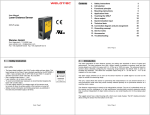
User Manual Laser distance sensor series OWLE Welotec GmbH • Zum Hagenbach 7 • 48366 Laer • [email protected] • www.welotec.com Manual_OWLE _EN 1/20 English 1 General notes................................................................................................................................ 3 2 Functional principle ..................................................................................................................... 4 3 Mounting instructions.................................................................................................................. 4 4 Application hints .......................................................................................................................... 9 5 Teaching the OWLE ......................................................................................................................11 6 Technical data ...............................................................................................................................17 7 Connection diagram and pin assignment..................................................................................18 8 Grounding concept ......................................................................................................................18 9 Service notes ................................................................................................................................19 10 Accessories ..................................................................................................................................19 11 Troubleshooting ...........................................................................................................................19 Welotec GmbH • Zum Hagenbach 7 • 48366 Laer • [email protected] • www.welotec.com Manual_OWLE _EN 2/20 1 General notes Rules for proper usage Set-up Installation This product is a precision device which has been designed for the detection of objects and parts. It generates and provides measured values issued as electrical signals for following systems. Unless this product has not been specifically marked it may not be used in hazardous areas. Installation, mounting and adjustment of this product may only be executed by skilled employees. Only mounting devices and accessories specifically provided for this product may be used for installation. Unused outputs may not be connected. Unused strands of hardwired sensors must be isolated. Do not exceed the maximum permissible bending radius of the cable. Before connecting the product electrically the system must be powered down. Where screened cables are mandatory, they have to be used in order to assure EMI protection. When assembling connectors and screened cables at customer site the screen of the cable must be linked to the connector housing via a large contact area. Laser safety • The laser diode installed in the OWLE emits visible red laser lights. This laser belongs to the Class 2 laser standard specified by the IEC 60825-1 • Max. average output power < 1 mW • Laser radiation, do not stare into beam • To avoid uncontrolled laser exposure we recommended stopping the beam with a matte object. • For laser safety reasons, the voltage supply of the sensors must be turned off when the whole system or the machine is turned off. • Safety concept information and limiting parameters as published in the sales documentation apply at all times. Welotec GmbH • Zum Hagenbach 7 • 48366 Laer • [email protected] • www.welotec.com Manual_OWLE _EN 3/20 2 Functional principle The distance measured is based on the triangulation principle. The emitted laser beam falls on the object as a small light spot and will be reflected diffusely. The position of the received light spot on the receiver (a diode line) defines the receiving angle. This angle corresponds to the distance and is the base for the internal calculations. A distance change close to the sensor effects a large change in angle; the same distance change at the end of the measuring range has a much smaller effect to the angle. This non-linearity feature is linearized by the microcontroller. The analog output signal is linear to the distance. Diode line with receiving light spot Object close to sensor Object far away The sensor adapts automatically to different object colors by varying the emitting laser intensity and optimizing the exposure time. The result is a sensor that is nearly independent on different reflections (different colors, shiny surfaces, dark objects). The sensor reaches its highest accuracy if the object reflects diffusely. 3 Mounting instructions • • • • For a proper mounting, the mounting surface has to be flat. Be aware of the max. tightening torque. In case of EMC, the sensor has to be grounded and a shielded cable has to be used. The 90° rotating connecter allows wiring the senso r from the bottom side or from the rear. The max. accuracy will be reached >15 minutes after power on. Welotec GmbH • Zum Hagenbach 7 • 48366 Laer • [email protected] • www.welotec.com Manual_OWLE _EN 4/20 Steps / edges: When measuring right next to steps / edges, it is important that the receiving beam is not covered by the steps / edges. This also applies to depth measurements of holes or valleys. Mounting above shiny surfaces: On shiny surfaces, it is important that no direct reflection can get to the receiving optics. The reflection could blind the sensor and produce poor results. To prevent this, the sensor may be slightly tilted. The direct reflection can be seen on a white piece of paper when held in front of the receiver. 10 -15° Mounting above round, shiny surfaces: Welotec GmbH • Zum Hagenbach 7 • 48366 Laer • [email protected] • www.welotec.com Manual_OWLE _EN 5/20 Shiny objects with a constant structure Especially shiny objects with a constant structure (lathed or scuffed objects, extruded aluminum profiles, etc.) could have a negative effect on the measuring result. Objects with color edges in the same direction: When color edges are orientated in the right direction, the effect to the measuring result will be minor. If the color edges are in the wrong direction, the effect will depend on the reflectivity of the different colors. Profile measurement: For profile measurements, the sensor axes should be perpendicular to the moving direction. Welotec GmbH • Zum Hagenbach 7 • 48366 Laer • [email protected] • www.welotec.com Manual_OWLE _EN 6/20 Ambient light: Be careful that no strong light source faces the receiving field. Several sensors without mutual optical interferences: Several sensors, when mounted next to the other, can affect each other. When mounting a sensor, be aware that no laser spot from another sensor is in the receiving field. When mounted side by side (as shown in the picture in the middle), sensing distances up to 600 mm can be achieved.. Messbereich Messbereich Gegenseitige Beeinflussung If it is not possible to mount the sensors the correct way, use the sync input and choose the asynchronous function. Welotec GmbH • Zum Hagenbach 7 • 48366 Laer • [email protected] • www.welotec.com Manual_OWLE _EN 7/20 3.1 Measuring field OWLE Size and position of the clear area, see below No disturbing objects in this area Measuring range Laser beam +/ - 7 mm around the optical axis max. laser beam diameter (see data sheet) No disturbing objects in this area OWLE 5007 AE S1 / OWLE 5007 AA S1 OWLE 5013 AE S1 / OWLE 5013 AA S1 clear area clear area 17 mm 17 mm 10 mm 10 mm 3 mm 3 mm 0/0 0/0 15 mm 13 mm 35 mm 50 mm diameter 10 mm OWLE 5030 AE S1 / OWLE 5030 AA S1 35 mm 50 mm diameter 10 mm OWLE 5060 AE S1 / OWLE 5060 AA S1 clear area clear area 17 mm 17 mm 10 mm 10 mm 3 mm 3 mm 0/0 0/0 10 mm 35 mm 50 mm diameter 10 mm 12 mm 35 mm 50 mm diameter 10 mm Welotec GmbH • Zum Hagenbach 7 • 48366 Laer • [email protected] • www.welotec.com Manual_OWLE _EN 8/20 4 Application hints To reach the maximum accuracy of OWLE series laser distance sensors, keep an eye on the following points: Measuring on rough surfaces All laser distance sensors are adjusted and linearized on a reference object. The object is a white ceramic sheet with an absolutely flat surface. Many objects have a surface structure that is within the resolution of the sensor or rougher. In such a case, the sensor with its small laser spot measures the distance including the structure in contrast to a slide gauge that measures an average. For such applications, we recommend to use a laser distance sensor with a laser line (OWLF). Flat surface OWLE distance max. min. Slide gauge Rough surface ! What can you do if you have color edges? Often objects have several color edges on the surface. for example: text ! pictures ! grooves ! rust ! marble! Measure with Laser Sensors In the field, you have no guarantee that the spot is not falling on just a color edge that can cause a measuring fault. Also, when the object moves, you may get an incorrect signal for each color edge (it appears that the signal is unstable or has spikes) In such cases, we suggest to move the object (or sensor), take several measurement values and calculate the average. The quantity of measurement values depends on the structure, the moving speed and the accuracy you desire. Other possible solutions: use a sensor with the laser line (OWLF) contact Welotec GmbH Welotec GmbH • Zum Hagenbach 7 • 48366 Laer • [email protected] • www.welotec.com Manual_OWLE _EN 9/20 What can you do if you have transparent, semi-transparent and highly reflective objects? The measuring principle desires an object that reflects the light diffusely. Semi-transparent, transparent and highly reflective objects do not have this feature. • When measuring on semi-transparent objects, the light enters the object and so the measured distance is larger than the actual distance is. • Light will pass through a transparent object so a measuring signal is not available. • A highly reflective object only has a direct reflection and it is not possible to work with it. For such an application, ask the Welotec sales staff. to measure these objects, it is only possible if you place a diffuse reflecting surface on the object (sticker, etc.) ! Semi transparent objects: the light enters the object. the measured distance is larger than the real distance Transparent objects: The light passes the object without a diffuse reflection. No measurement is possible Highly reflective objects: Only direct reflection No measurements possible Welotec GmbH • Zum Hagenbach 7 • 48366 Laer • [email protected] • www.welotec.com Manual_OWLE _EN 10/20 5 Teaching the OWLE Every sensor is delivered with the factory setup (max. measuring range). The teach-in feature was designed to choose a smaller range within the nominal measuring range for optimizing the resolution and linearity. Output current, voltage and alarm output adapt to the new range. Two positions must be taught. • • • • • • • The first teach-in position aligns with 0 V (or 4 mA), the second position aligns with 10 V (or 20 mA) These teach-in positions are always just at the border of the new range (inside the measuring range) The sensor may be taught more than 10,000 times in its lifetime The sensor can always be reset to the factory settings The sensor may be taught with the teach button or via the external teach input During the teach-in process, the red LED provides a feedback The red LED on the back side of the sensor indicates “run” mode if an object is within the measuring range. Attention: Within 5 minutes after power on, the sensor can be taught via the button or the teach-in wire. After 5 minutes, the teach-in button will be locked preventing accidental adjustment. The teach-in wire is active all the time. Example of a taught measuring range: Analog out 10V / 20 mA Example of a taught output curve Standard output curve 0V / 4mA LED 30 mm 130 mm Example of a reverse taught measuring range: Analog out 10V / 20mA Example of a reversed output curve Standard output curve 0V / 4mA LED 30 mm 130 mm Welotec GmbH • Zum Hagenbach 7 • 48366 Laer • [email protected] • www.welotec.com Manual_OWLE _EN 11/20 OWLE 5007 AE S1, OWLE 5007 AA S1 Typical resolution: Sr = taught measuring range Typical linearity error: Sr = taught measuring range OWLE 5013 AE S1, OWLE 5013 AA S1 Typical resolution: Sr = taught measuring range Typical linearity error: Sr = taught measuring range Welotec GmbH • Zum Hagenbach 7 • 48366 Laer • [email protected] • www.welotec.com Manual_OWLE _EN 12/20 OWLE 5030 AE S1, OWLE 5030 AA S1 Typical resolution: Sr = taught measuring range Typical linearity error: Sr = taught measuring range OWLE 5060 AE S1, OWLE 5060 AA S1 Typical resolution: Sr = taught measuring range Typical linearity error: Sr = taught measuring range Welotec GmbH • Zum Hagenbach 7 • 48366 Laer • [email protected] • www.welotec.com Manual_OWLE _EN 13/20 5.1 How to teach a new range using the teach button Teaching a new measuring range: Within 5 minutes after power-up, the button may be used to teach a new range. After finishing a teach procedure, the 5 minutes starts again. After the 5 minutes, the sensor does not respond to pressing the button. Seven steps to teaching a new measuring range: 1. 2. 3. 4. Press (and hold) the button. The red LED will turn on, if the sensor can be taught. Hold down the button for 5 more sec. The LED will start to blink. Release the button. Place a target at the first new position of the measuring range. This is the position that will later produce 0 V (or 4 mA). 5. Briefly press the button again. The LED will stop blinking and will stay on for about 3 sec to indicate that the first position has been stored. Then the LED will blink again. 6. Now place the target at the second position (the other end of the new range), which will produce 10 V (or 20 mA). 7. Briefly press the button again. The LED will stop blinking and will stay on for about 3 sec to indicate that the second position has been stored. The LED will then turn off and blink once more. Now the sensor is ready to measure. The new, smaller operating range is now set. The red LED now indicates whether an object is within the new range (LED OFF) or not (LED ON) If one of the new borders of the range was outside the standard range or the two positions were too close to each other, then the new settings are not valid. The sensor will respond with an extended blinking at the end of the teach procedure. The previous settings are still valid and the new settings are lost. Timing of the teach procedure t1 t2 t3 t4 red LED t6 If teaching was successful, the LED will be on t6 If the teaching was not possible, the LED will flash Welotec GmbH • Zum Hagenbach 7 • 48366 Laer • [email protected] • www.welotec.com Manual_OWLE _EN 14/20 5.2 How to reset the factory settings using the teach button Within 5 minutes after power up, the button may be used to reset the sensor back to the factory settings. After finishing a teach procedure, the 5 minutes starts again. After the 5 minutes, the sensor does not respond to the button. 1. Push the button. The red LED will turn on, if the sensor can be taught. 2. Hold down the button further 5 sec. The LED will start to blink. DO NOT RELEASE the button now. Wait another 10 sec until the LED is ON without blinking. Factory settings have been restored to the sensor. 3. Release the button. Until button has been released (t13) t12 t1 Red LED 5.3 How to teach a new range using the external teach input Teaching the sensor via the external teach input is equivalent to the teaching procedure via the button. There is no 5 min. time limit. The sensor may be taught at any time. 12-28 V Teach wire t7 t8 t9 0V t1 t2 t3 t4 Red LED t t6 Input circuit: teach-in low: 0 .. 2V high: 12 .. 28V 27kΩ 10kΩ 3V3 Welotec GmbH • Zum Hagenbach 7 • 48366 Laer • [email protected] • www.welotec.com Manual_OWLE _EN 15/20 5.4 How to reset the factory settings using the external teach input Teaching the sensor via the external teach input is equivalent to the teaching procedure via the button. There is no 5 min. time limit. The sensor may be taught at any time. 12-28 V t15 Teach-in wire 0V t1 t14 red LED Time Description of timing functions t1 Minimum button hold time to enter teach mode t2 Maximum waiting time after teaching the first position. t3 t4 t6 t7 t8 t9 t12 t13 t14 t15 LED on as response for the first position. Maximum waiting time after teaching the second position. Value 5s < 20 s Comment Using the button, this feature can only be used within 5 minutes after power-up. Using the external teach input, it may be used at any time. If the button has not been pushed during this interval, the sensor will leave the teach mode without any changes. approx 3 s < 20 s If the button has not been pushed during this interval, the sensor will leave the teach mode without any changes. LED Blinking for “NOT OK response” approx 5 s after teaching the second position. Additional high time fort he external 0.1 … 1 s teach in Pulse lengths on external teach input 30..2000 ms for first position. Pulse lengths on external teach input 30..2000 ms for second position. Minimum blinking time for the reset 10 s to factory settings with button. As long as the button is down or the external Blinking time after reset to factory > 0.2 s teach input is high. settings Minimum blinking time for the reset to factory settings with external 10 s teach input. Minimum high time of the external 0.2 s teach input after LED stops blinking for reset to factory settings Welotec GmbH • Zum Hagenbach 7 • 48366 Laer • [email protected] • www.welotec.com Manual_OWLE _EN 16/20 6 Technical data OWLE Measuring range MR 5007 AE S1 5007 AA S1 5013 AE S1 5013 AA S1 5030 AE S1 5030 AA S1 5060 AE S1 5060 AA S1 30...70 mm 30...130 mm 50...300 mm 100...600 mm ≥ 2 mm ≥ 3 mm ≥ 5 mm ≥ 10 mm Min Teach-in range Resolution * 1) Linearity error * 2) Response time * 3) Interference suppression * 4...20 µm 5…60 µm 0.01…0.33 mm 0.015...0.67mm ± 12..± 60 µm ± 15..± 200 µm ± 0.03..± 1.0 mm ± 0.05..± 2.0 mm 300...900µs 300...900µs 300...900µs 300...2800µs yes yes yes yes 4) Light source Laser diode red, pulsed Laser class 2 Wave length Laser spot * 650 nm 7) 1 .. 0.2 mm 2 .. 1 mm Analog output 2 mm 2 mm 4 – 20 mA and 0 – 10 V Load resistor UOut > 100 kΩ Load resistor IOut < (+Vs – 6 V) / 0.02 A Voltage supply range 12 – 28 VDC Supply current < 100 mA, (bei + 24V ~ 40mA) yes (voltage supply only) Short circuit protection Housing material yes Die-cast zinc Tightening torque Ambient light * 1.0 Nm 6) < 50k Lux Protection class Temperature range < 8k Lux < 10k Lux IP 67 0°C .. +50°C (non condensing) Storage temperature 5) Typ. Temperature coefficient * 1) < 40k Lux ± 0.015% of MR/°C -20°C .. +70°C ± 0.03% ± 0.03% of MR /°C of MR/°C 2) ± 0.03% of MR/°C * and * measured on white ceramic sheet 3) * the response time depends on the reflectivity of the object For objects with a reflectivity < 7% (OWLE 5060 AE/AA S1) the response / release time is increased autom atically up to max. 2.8 ms. *4) Missed measurements up to 30 cycles will be suppressed. During this time the analog output stays on hold. *5) xx% of full scale measuring range / °C 6) max. sunlight on a white measuring surface * 7) * dimension of laser beam: measuring range Ø – beam Welotec GmbH • Zum Hagenbach 7 • 48366 Laer • [email protected] • www.welotec.com Manual_OWLE _EN 17/20 Dimensions OWLE 50xx AE S1, OWLE 50xx AA S1 *emitter axis 16 mm 7 Connection diagram and pin assignment Connection diagram Pin assignment 8 Grounding concept For maximum EMC protection and reliable application, use a shielded cable. Also, the sensor has to be grounded. We recommend the grounding concept as shown in the picture. Ground the sensor with a toothed washer between the screw head and the sensor. = electrical connection OWLE Power-supply A/D Converter If you prefer another grounding concept please contact your Welotec sales staff. Welotec GmbH • Zum Hagenbach 7 • 48366 Laer • [email protected] • www.welotec.com Manual_OWLE _EN 18/20 9 Service notes The OWLE requires no maintenance apart from keeping the front windows clean. Dust or fingerprints can impair the sensor function. It is normally sufficient to wipe the windows dry with a clean (!), soft cloth. Alcohol or soapy water may be used for heavy soiling. 10 Accessories Connecting cable, straight Please note: ZWK D12 GK 25-S, length 2 m ZWK D12 GK 55-S, length 5 m For the four above connecting cables, the shielding wires are all terminated in the connector. If you prefer to not have them terminated, please consult the factory. ZWH OWLE/OWLF Mounting bracket 11 Troubleshooting Error The sensor does not measure The sensor has incorrect measuring values The sensor does not reach the accuracy Possible reason the teach-in wire is connected to +Vs The receiving beam is covered by an object / edge / step No receiving signal (transparent or highly reflective object) Mutual optical interferences between two or more sensors Strong ambient light. Semi transparent, transparent or highly reflective objects Rough surface Color edges Resolution of the A/D converter in the control unit Correction Connect the teach-in wire to 0 V Make sure that no object is in the receiving field Make sure that the laser spot falls on a diffuse reflecting surface Make sure that no other light spot is within the receiving field of the sensor Prevent ambient light with a shield Make sure that the laser spot falls on a diffuse reflecting surface Possibly use a sensor with laser line Mount the sensor the correct way Read the manual of the control unit Welotec GmbH • Zum Hagenbach 7 • 48366 Laer • [email protected] • www.welotec.com Manual_OWLE _EN 19/20 Welotec GmbH Zum Hagenbach 7 D-48366 Laer www.welotec.com [email protected] Fon: +49 (0)2554/9130-00 Fax: +49 (0)2554/9130-10 Technical data has been fully checked, but accuracy of printed matter not guaranteed. Welotec GmbH • Zum Hagenbach 7 • 48366 Laer • [email protected] • www.welotec.com Manual_OWLE _EN 20/20