1
Optimizing Measurement Accuracy
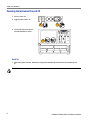
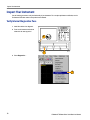
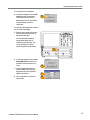
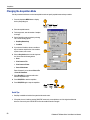
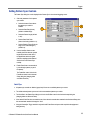
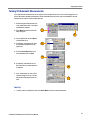
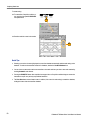
4. Select Compensation...
4
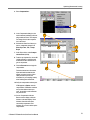
5. In the Compensation dialog box, the
main instrument (mainframe) and sampling modules are listed. The temperature change from the last compensation is also listed.
5
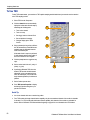
6. Wait until the Status for all items you
want to compensate changes from
Warm Up to Pass, Fail, or Comp
Req’d.
6
7
8
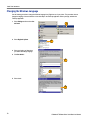
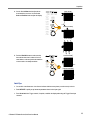
7. Under Select Action, select Compensate and Save (default).
8. From the top dropdown list, choose All
(default selection) to select the main
instrument and all its modules as targets to compensate.
9. Click the Execute button to begin the
compensation.
9
11
10
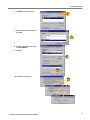
Follow the instructions to disconnect
inputs and install terminations that
appear on screen; be sure to follow
static precautions (see the user
information for your sampling module)
when following these instructions.
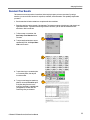
10. Verify the compensation routines pass.
If Fail appears as Status, rerun the
compensation. If Fail status continues
and you have allowed warm up to
occur, the module or main instrument
may need service.
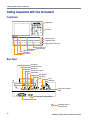
11. Use the Compensation Indicator
Button control to display or hide the
indicator on the main display. Green
indicates all modules have been
successfully compensated. Red
indicates one or more modules require
compensation.
CSA8200 & TDS8200 Series Quick Start User Manual
21