1
www.seagate.com
3.4
Drive mounting
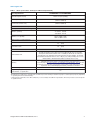
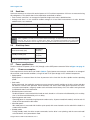
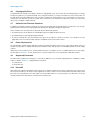
Users can mount the drive in any orientation using four screws in the side-mounting holes or four screws in the
bottom-mounting holes. Refer to Figure 4 for drive mounting dimensions. Follow these important mounting
precautions when mounting the drive:
• Allow a minimum clearance of 0.030 inches (0.76mm) around the entire perimeter of the drive for cooling.
• Use only 6-32 UNC mounting screws.
• The screws should be inserted no more than 0.150 inch (3.81mm) into the bottom or side mounting holes.
• Do not overtighten the mounting screws (maximum torque: 6 inch-lb).
Weight: (maximum)
Note
655g (1.44 lb)
These dimensions conform to the Small Form Factor Standard documented
in SFF-8301 and SFF-8323 found at www.sffcommittee.org
Figure 4 Mounting dimensions
Note
This image may not be representative of the actual drive.
Seagate Archive HDD Product Manual, Rev. C
16