1
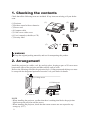
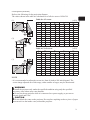
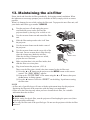
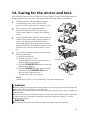
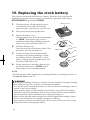
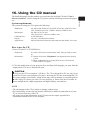
1. Checking the contents Check that all the following items are included. If any items are missing, tell your dealer soon. (1) Projector (2) Remote control with two batteries (3) Power cord (4) Computer cable (5) Cable cover with a screw (6) User’s manuals (a booklet, a CD) (7) Security label (1) (2) (3) (5) (4) (6) (7) WARNING ■ Keep the original packing materials, and use for transporting this product. 2. Arrangement Install the projector in a stable, cool, dry and airy place, keeping a space of 30 cm or more between the sides of the projector and other objects such as walls. Refer to the following to decide the projection style. Ceiling mount and tabletop use must be setup with the designated optional accessories. Ask your dealer for details. (3) Ceiling mount (2) Tabletop use (1) Usual use NOTE • When installing the projector, confirm that there is nothing that blocks the projection light between the projector and the screen. • When installing the projector, check that the remote sensors are not exposed to any strong ray. (7)