1
•
•
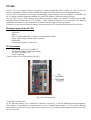
TCP – port 3389 and 5300
UDP – port 8080 and 8083
The UDP packets from diallers are sent to the fix IP with port 8080 of a network server (firewall or another
local Internet connection), therefore this IP should be public and accessible by external network. A server
should resent these packets to the PC-350’s local IP address.
Starting the PC-350
The PC-350 computer has two users activated. Use the following user when working with the PC-350:
User: IPCMS
Password: ipcommunication
The user „Jablotron“ is activated for a remote access by authorized Jablotron company technician if any
change of configuration is demanded.
Note: Do not change user names or user passwords of the PC-350 computer during the time of testing
operation (3 month period after the delivery).
When the PC-350 is started for the first time, a user should choose one of the running modes of the PC-350.
The icon CMS setup displays possible running mode. See the text below for detailed information about the
modes.
Running modes
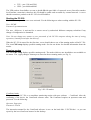
The icon CMS setup displays possible running mode. The mode which are not installed are not available on
the menu. The „Apply changes“ button press starts the chosen running mode (see Fig. 2).
Fig. 2 PC-350 modes
ComGuard mode
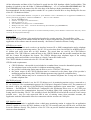
This mode set the PC-350 as a standalone monitoring station with user software - ComGuard. After the
confirming of the choice, the ComGuard software starts. The ComGuard requires an operators name and
password. Use the following:
Operator: Supervisor
Password: 123456
The instruction manual for the ComGuard software is save on the hard disk: C:\PC350\doc\.. or you can
open it by the icon ComGuard manual on the desktop.



![[User manual] - KX_series_user_EN](http://vs1.manualzilla.com/store/data/005985322_1-73e2348e6003cbf1e0abe0da04f5dcec-150x150.png)