1
UMAN-RWS-006 Rev. A
November, 2006
Contents
Proprietary Statement .................................................. 5
Document Conventions ................................................ 7
Introduction to the RW Series ................................... 10
Unpacking and Inspection................................................... 10
Reporting Damage .............................................................. 10
Getting Ready to Print ................................................ 11
Battery Safety ...................................................................... 11
Charger Safety ..................................................................... 11
Installing RW Series Batteries .................................................................... 13
Charging the Battery .................................................................................. 13
Charging Battery Packs with the Two-Wire Version .............................. 14
Charging Battery Packs with the Three-Wire Version ........................... 15
Model UCLI72-4 Quad Charger.................................................................. 16
Loading the Media ............................................................... 18
Loading Media Procedure .......................................................................... 18
Loading Media From An Internal Supply .................................................. 19
Loading Media From An External Supply ................................................. 20
Operator Controls ................................................................ 22
Control Panel .............................................................................................. 22
Programmable LCD Settings ..................................................................... 23
Verify the Printer Is Working................................................ 26
Printing a Configuration Label ................................................................... 26
Connecting the Printer ................................................ 27
Cable Communications ....................................................... 27
Serial (RS232C)........................................................................................... 27
USB ............................................................................................................ 28
Wireless Communications .................................................. 29
Wireless Communications with Bluetooth® ............................................. 29
Bluetooth Networking Overview ............................................................... 29
Wireless Local Area Network Overview .................................................... 29
Setting Up the Software............................................................................. 30
Radio Regulatory Information .................................... 32
Bluetooth RW -ZBR3 Radio (RW 220 and RW 420) ........... 32
Compact Flash (802.11b) Radio Module ............................ 33
Zebra Value Radio, 802.11b ................................................ 35
WLAN Module Using 802.11b/g Radio .............................. 37
Compact Flash (802.11b) and Bluetooth Co-located Radio
Modules ............................................................................... 39
Card Reader Options ................................................... 41
Magnetic Stripe Reader ....................................................... 41
Smart Card Reader .............................................................. 43
Using the Accessories ................................................. 44
Belt Clip ................................................................................ 44
Adjustable Shoulder Strap .................................................. 45
continued
3
RW Series User Guide
Cradles ................................................................................. 46
RW 420 Vehicle Cradle ............................................................................... 46
Installing the Printer in the Cradle ......................................................... 47
Removing the Printer from the Cradle .................................................. 49
RW 220 Vehicle Cradle ............................................................................... 50
Installing the Printer in the Cradle ......................................................... 50
Removing the Printer from the Cradle .................................................. 51
Preventive Maintenance ............................................. 52
Extending Battery Life ......................................................... 52
General Cleaning Instructions ............................................. 53
Troubleshooting .......................................................... 55
LCD Control Panel Indicators .............................................. 55
Troubleshooting Topics ....................................................... 55
Troubleshooting Techniques ............................................... 58
Printing a Configuration Label ................................................................... 58
Performing a Forced Shutdown................................................................. 58
Communications Diagnostics .................................................................... 58
Calling Technical Support .......................................................................... 59
Specifications .............................................................. 63
Printing Specifications ........................................................ 63
Memory/Communications Specifications .......................... 63
Communications Ports ........................................................ 64
USB ......................................................................................................... 64
RS232 ...................................................................................................... 64
RW 420 Media Specifications ............................................. 66
RW 220 Media Specifications ............................................. 66
Font/Bar Code Specifications .............................................. 67
Physical/Environmental/Electrical Specifications .............. 68
RW Series Accessories ...................................................... 71
Appendix A Interface Cables .............................................. 72
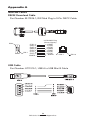
RS232 Download Cable ............................................................................. 72
USB Cable ................................................................................................... 72
More Interface Cables ................................................................................ 73
Appendix B Media Supplies ............................................... 74
Appendix C Maintenance Supplies ....................................... 75
Appendix D................................................................... 76
Product Support ......................................................................................... 76
Battery Disposal ......................................................................................... 78
Product Disposal ........................................................................................ 78
Appendix E Using www.zebra.com ....................................... 79
Index ............................................................................. 81
Patent Numbers ........................................................... 83
4
RW Series User Guide
Proprietary Statement
This manual contains proprietary information of Zebra Technologies Corporation. It is
intended solely for the information and use of parties operating and maintaining the equipment described herein. Such proprietary information may not be used, reproduced, or disclosed to any other parties for any other purpose without the expressed written permission
of Zebra Technologies Corporation.
Product Improvements
Since continuous product improvement is a policy of Zebra Technologies Corporation, all
specifications and signs are subject to change without notice.
FCC Compliance Statement
Class B digital device. Tested to comply with FCC standards for home or office use.
WARNING: Exposure to Radio Frequency radiation. To conform to FCC RF exposure requirements this device shall be used in accordance with the operating conditions and instructions listed in this manual. Note that there are several radio options available with this
printer. Additional regulatory information is contained in later sections devoted to each
radio individually.
NOTE: This unit was tested with shielded cables on the peripheral devices. Shielded
cables must be used with the unit to insure compliance.
Changes or modifications to this unit not expressly approved by Zebra Technologies Corporation could void the user’s authority to operate this equipment.
Canadian Compliance Statement
This Class B digital apparatus complies with Canadian ICES-003.
Cet appareil numérique de la classe B est conforme á la norme NMB-003 du Canada.
“IC:” before the equipment certification number signifies that the Industry Canada technical specifications were met. It does not guarantee that the certified product will operate to
the user’s satisfaction.
Agency Approvals and Regulatory Information
• FCC part 15
• Canadian STD RSS-210
• NOM/NYCE (Mexico)
• EN60950: 2000 Safety Standard
• EN55022:1998 Class B European
• C-Tick (Australia)
Electromagnetic Radiation Standard
Liability Disclaimer
Inasmuch as every effort has been made to supply accurate information in this manual,
Zebra Technologies Corporation is not liable for any erroneous information or omissions.
Zebra Technologies Corporation reserves the right to correct any such errors and disclaims
liability resulting therefrom.
No Liability for Consequential Damage
In no event shall Zebra Technologies Corporation or anyone else involved in the creation,
production, or delivery of the accompanying product (including hardware and software)
be liable for any damages whatsoever (including, without limitation, damages for loss of
business profits, business interruption, loss of business information, or other pecuniary
loss) arising out of the use of or the results of use of or inability to use such product, even
if Zebra Technologies Corporation has been advised of the possibility of such damages.
Because some states do not allow the exclusion of liability for consequential or incidental
damages, the above limitation may not apply to you.
Copyrights
The copyrights in this manual and the label print engine described therein are owned by
Zebra Technologies Corporation. Unauthorized reproduction of this manual or the software
in the label print engine may result in imprisonment of up to one year and fines of up to
$10,000 (17 U.S.C.506). Copyright violators may be subject to civil liability.
This product may contain ZPL®, ZPL II®, and ZebraLink tm programs; Element Energy Equalizer ® Circuit; E3®; and AGFA fonts. Software © ZIH Corp. All rights reserved worldwide.
ZebraLink and all product names and numbers are trademarks, and Zebra, the Zebra logo,
ZPL, ZPL II, Element Energy Equalizer Circuit, and E3 Circuit are registered trademarks of
ZIH Corp. All rights reserved worldwide.
Monotype®, Intellifont ® and UFST® are trademarks of Monotype Imaging, Inc. registered in
the United States Patent and Trademark Office and may be registered in certain jurisdictions.
AndyTM , CG PalacioTM, CG Century SchoolbookTM, CG TriumvirateTM, CG TimesTM, Monotype
continued
5
RW Series User Guide
Kai TM, Monotype MinchoTM and Monotype SungTM are trademarks of Monotype Imaging,
Inc. and may be registered in some jurisdictions.
HY Gothic Hangul TM is a trademark of Hanyang Systems, Inc.
AngsanaTM is a trademark of Unity Progress Company (UPC) Limited.
Andale®, Arial®, Book Antiqua®, Corsiva®, Gill Sans®, Sorts® and Times New Roman® are
trademarks of The Monotype Corporation registered in the United States Patent and Trademark Office and may be registered in certain jurisdictions.
Century Gothic™, Bookman Old StyleTM and Century SchoolbookTM are trademarks of The
Monotype Corporation and may be registered in certain jurisdictions.
HGPGothicB is a trademark of the Ricoh company, Ltd. and may be registered in some jurisdictions.
UniversTM is a trademark of Heidelberger Druckmaschinen AG, which may be registered in
certain jurisdictions, exclusively licensed through Linotype Library GmbH, a wholly owned
subsidiary of Heidelberger Druckmaschinen AG.
Futura® is a trademark of Bauer Types SA registered in the United States Patent and Trademark Office and may be registered in some jurisdictions.
TrueType® is a trademark of Apple Computer, Inc. registered in the United States Patent and
Trademark Office and may be registered in certain jurisdictions.
All other brand names, product names, or trademarks belong to their respective holders.
©
2006 ZIH Corp.
6
RW Series User Guide
Document Conventions
The following conventions are used throughout this document to convey certain information:
If you are viewing this guide online, click the
underlined text to jump to a related Web site. Click on
italic text (not underlined) to jump to that location in this manual.
Cautions, Important, and Note
Caution • Warns you of the potential for electrostatic discharge.
Caution • Warns you of a potential electric shock situation.
Caution • Warns you of a situation where excessive heat could cause a
burn
Caution • Advises you that failure to take or avoid a specific action
could result in physical harm to you.
Caution • Advises you that failure to take or avoid a specific action
could result in physical harm to the hardware.
Important • Advises you of information that is essential to complete a
task.
Note • Indicates neutral or positive information that emphasizes or
supplements important points of the main text.
7
RW Series User Guide
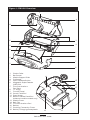
Figure 1: RW 420 Overview
1
2
13
12
3
11
4
10
5
6
8
7
9
8
1.
2.
3.
4.
5.
6.
7.
8.
9.
10.
11.
12.
13.
14.
15.
16.
17.
18.
Platen Roller
Bar Sensor
Media Support Disks
Printhead
Latch Release Button
Magnetic Stripe Reader
(MSR) Slot
Communications
Port Door
“D” Rings
Control Panel
Smart Card Slot
Gap Sensor
Bottom Media Feed Slot
(external media models only)
Media Cover
Belt Clip
Communications Port
Battery
Docking Connector Cover
Battery Charging Receptacle
14
15
16
17
18
8
RW Series User Guide
12
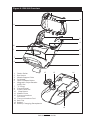
Figure 2: RW 220 Overview
1
2
11
3
4
10
9
5
6
7
8
7
1.
2.
3.
4.
5.
6.
7.
8.
9.
10.
11.
12.
13.
14.
15.
16.
Platen Roller
Bar Sensor
Media Support Disks
Printhead
Latch Release Button
Magnetic Stripe Reader
(MSR) Slot
“D” Rings
Control Panel
Smart Card Slot
Gap Sensor
Media Cover
Communications
Port Door
Communications Port
Belt Clip
Battery
Battery Charging Receptacle
12
13
14
15
16
9
RW Series User Guide
Introduction to the RW Series
Thank you for choosing one of our Zebra RW series Mobile
Printers. It is one of a series of rugged printers that are sure
to become productive and efficient additions to your workplace thanks to their innovative design. Because the RW series
is made by Zebra Technologies, you’re assured of world-class
support for all of your bar code printers, software, and supplies.
• This User’s Guide gives you the information you’ll need to
operate and maintain your RW 220 or RW 420 printer.
• The RW series printers use the CPCL programming language. To create and print receipts and labels using
the CPCL language, refer to our Label Vista™ label creation program or the Mobile Printing Systems CPCL
Programming Manual which are both available on our
Web site at: http://www.zebra.com .
• RW series printers software includes interpreters for the
ZPL II® programming language (up to Version 30.8.4) and
the EPL programming language. Manuals for the ZPL and
EPL label design programming languages are also available on our Web site. Refer to Appendix “E” of this manual for more information on accessing and downloading
manuals and other user information.
Unpacking and Inspection
Inspect the printer for possible shipping damage:
• Check all exterior surfaces for damage.
• Open the media cover (refer to “Loading the Media” in
the Getting Ready to Print section) and inspect the media
compartment for damage.
In case return shipping is required, save the carton and all
packing material.
Reporting Damage
If you discover shipping damage:
• Immediately notify and file a damage report with the shipping company. Zebra Technologies Corporation is not responsible for any damage incurred during shipment of
the printer and will not cover the repair of this damage
under its warranty policy.
• Keep the carton and all packing material for inspection.
• Notify your authorized Zebra re-seller.
10
RW Series User Guide
Getting Ready to Print
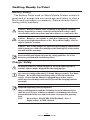
Battery Safety
The Battery Packs used on Zebra Mobile Printers contain a
great deal of energy and can cause personal injury or start a
fire if used improperly or carelessly. Please observe the following safety practices:
Caution • Avoid accidental short circuiting of any battery. Allowing
battery terminals to contact conductive material will create a short
circuit which could cause burns and other injuries or could start a fire.
Caution • Batteries can explode or catch fire if improperly charged
or exposed to high temperatures or fire. Do not disassemble, crush or
expose batteries to water.
Caution • Use of any charger not approved specifically by Zebra for use
with its batteries could cause damage to the battery pack or the printer
and will void the warranty.
Read carefully and always observe the safety guidelines for Li-Ion
batteries provided with each Battery Pack.
Charger Safety
Do not place the LI72-4 Quad Charger in locations where liquids or
metallic objects may be dropped into the charging bays.
Use care in locating either the LI 72 Single Charger or the LI 72-4 Quad
Charger. Do not block the ventilating slots on the top and bottom
covers. Ensure that the Charger is plugged into a power source
which won’t accidently be turned off if you will be charging batteries
overnight.
Required Regulatory Text for Argentina
Only certified adaptors with the following electrical characteristics
shall be used. The use of different adaptors could damage the device,
present hazards to the user and declare the correspondent guaranty
void.
LI 72:
Input ratings: 100-240 VAC 50/60Hz 200mA., Class 2
Output ratings: 8.4 VDC, 800 mA
11
RW Series User Guide
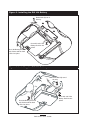
Figure 3: Installing the RW 420 Battery
Rotate Belt Clip out of
the way.
Insert this end of the
Battery Pack into the
printer
Rock the Battery Pack into
the Printer until the latch
clicks into place.
Figure 4: Installing the RW 220 Battery
Rotate Belt Clip out of
the way.
Insert this end of the
Battery Pack into the
printer
Rock the Battery Pack into
the Printer until the latch
clicks into place.
12
RW Series User Guide
Installing RW Series Batteries
Important • Batteries are shipped uncharged. Remove protective
shrink-wrap and labels from new battery packs prior to use.
1. Rotate the Belt Clip to allow access to the Battery compartment. This is an optional step on the RW 220.
2. Insert the battery into the printer as shown in Figure 3 or
4,
3. Rock the Battery into the printer as shown until it locks in
place.
When the battery is first installed, the Control Panel indicators may briefly turn on and then go off, indicating the battery
is not fully charged (see “Charging the Battery” below and
“Operator Controls.”)
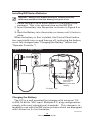
Figure 5: LI 72 Single Charger
LI72 Charger
For best results,
remove the
Battery Pack while
charging.
Charger Jack
Charging the Battery
The LI72 is a wall mounted fast charger with universal 110
to 230, 50-60 Hz. VAC input. Multiple A.C. plug configurations
comply with most international standards. This charger is intended for use with the RW series printers which are equipped
with Lithium Ion (Li-Ion) batteries.
continued
13
RW Series User Guide
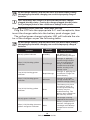
Figure 6: LI 72 Single Charger Types
Yellow
Green
Charging
Trickle
Charging
Fault
Condition
LI72 3-Wire Charger
LI72 2-Wire Charger
The LI 72 is supplied in two variations: a two wire version
and a three-wire versionper Figure 6. The three-wire version
offers more intelligent charging features and will gradually replace the two-wire version as production is ramped-up.
Both of the LI72 models will charge a battery pack as fast as
its charge level will allow, and then switch over to a maintenance charge to keep the charge at its maximum.
Charging Battery Packs with the Two-Wire Version
Plug the LI72 into the appropriate A.C. wall receptacle, then
insert the charge cable into the battery pack charger jack.
The charge indicator LED will indicate the status of the charger as follows:
Indicator
Steady
Slow Flashing (1 HZ)
Rapid Flashing (4 Hz)
Charger
Function
Charger Status
Charging.
Battery Pack is undergoing a
fast charge
Maintain
Battery is ready for use
Error
The battery may have an
internal short, or its charge
monitoring circuitry may be
malfunctioning. The battery
pack should not be used
any further.
14
RW Series User Guide
Do not charge batteries with the two-wire LI72 model while printing.
Attempting to print while charging can result in inproperly charged
batteries.
Once the battery has charged, do not leave the two-wire charger
plugged into the printer. Leaving the charger plugged into the printer
for a prolonged period of time could cause damage to the printer.
Charging Battery Packs with the Three-Wire Version
Plug the LI72 into the appropriate A.C. wall receptacle, then
insert the charge cable into the battery pack charger jack.
The yellow/green charge indicator LED will indicate the status of the charger as per the following table.
Do not charge batteries with the three-wire LI72 model while printing.
Attempting to print while charging can result in improperly charged
batteries
Charger
Function
Indicator
Steady yellow indicator
Standby
Charger Status
AC power on; no
battery being charged
Slow (1 Hz) flashing yellow
indicator
Pre-Charge
Charger is applying
trickle charge current
(5% of maximum) to
bring a cold battery
temperature up to 0°C
before starting a full
charge cycle
Fast (4 Hz) flashing green
indicator
Rapid Charge
Charger is applying the
maximum charge rate
to the battery
Slow (1 Hz) flashing green
indicator
Maintain
Charger is in trickle
charge mode(10% of
nominal cahrge value).
Fast (4 Hz) flashing yellow
indicator
Error
The battery may have
an internal short, or
its charge monitoring
circuitry may be
malfunctioning. The
battery pack should not
be used any further.
Steady green indicator
Ready
No charge is being
applied to the battery
Wait
Battery temperature is
too hot. Charging will
not begin until battery
temperature reaches
45°C.
Slow (1 Hz) flashing alternate
yellow and green indicator
continued
15
RW Series User Guide
Charging will cease three (3) hours after the charger has entered the
“Maintain” mode.
Model UCLI72-4 Quad Charger
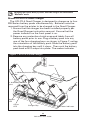
The UCLI72-4 Quad Charger is designed to charge up to four
RW Series battery packs simultaneously. Batteries must be
removed from the printer to be charged in the Quad Charger.
1. Ensure that the charger has been installed properly per
the Quad Charger instruction manual. Ensure that the
power indicator on the front panel is on.
2. Remove any protective shrink-wrap and labels from all
battery packs prior to use. Plug a battery pack into any
one of the four charging bays as shown in Figure 7, noting
the orientation of the battery pack. Slide the battery pack
into the charging bay until it stops. Then rock the battery
pack back until it snaps into place. The amber indicator
Figure 7: UCLI72-4 Quad Charger
Power
1. Slide Battery Pack into Charger
Bay
2. Rock Battery Pack into
place
Fast
Faul
Char
ge
t
Full
Char
ge
Read
y
Fast
Faul
t
Char
ge
Full
Char
ge
Read
y
Fast
Amber
LED
Green
LED
Faul
t
Char
ge
Full
Char
ge
Read
y
Fast
Faul
Char
ge
t
Full
Char
ge
Read
Powe
Charger Bay
y
r
Power Indicator
16
RW Series User Guide
directly under the battery being charged will turn on if the
battery is properly inserted.
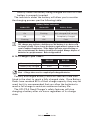
The indicators under the battery will allow you to monitor
the charging process per the following table:
Battery Status Indicators
Amber LED
Green LED
Battery Status
On
Off
Charging
On
Flashing
80% charged (O.K. to use)
Off
On
Completely Charged
Flashing
Off
Fault
Important • A fault condition is caused by a problem with the battery.
The charger may indicate a fault because the battery is too hot or cold
to charge reliably. Try to charge the battery again when it returns to the
room’s ambient temperature. If the Amber indicator starts flashing on
the second attempt, the battery should be discarded. Always dispose of
batteries in a proper manner. Refer to Appendix D
LI 72-4 Charger Cycle Times :
RW 420
RW 220
Battery 80% Charged
2.5 Hrs
1.25 Hrs.
Battery Fully Charged
5 Hrs.
2.5 Hrs.
Note • Charge times are for completely discharged batteries.
Partially discharged Battery Packs will take less time than
listed in the chart to reach a fully charged state. Once Battery
Packs have reached 80% of their charge capacity they may be
used, but it is recommended that you allow the batteries to
reach a full charge to maintain maximum battery life.
The UCLI72-4 Quad Charger’s safety features will stop
charging a battery after six hours regardless of its charge
state.
17
RW Series User Guide
Loading the Media
The RW series printers are designed to print either continuous (journal) media or label stock.
Loading Media Procedure
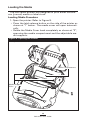
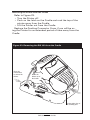
1. Open the printer: Refer to Figure 8.
• Press the latch release button on the side of the printer as
shown at “1” below. The media cover will open automatically
• Rotate the Media Cover back completely as shown at “2”,
exposing the media compartment and the adjustable media supports.
Figure 8: Opening the Printer
RW 420 printer shown.
Media Compartment
Media Support
Disks
18
RW Series User Guide
Loading Media From An Internal Supply
• Refer to Figure 9. Pull the media supports apart as shown.
Insert the roll of media between them, and let the media
supports close. Ensure that the media pulls off the core
in the direction shown in Figure 9. The supports will adjust themselves to the width of the media, and the roll of
media should be able to spin freely on the supports.
Figure 9: Loading Media from an Internal Supply
Media Roll
Note direction media
pulls off the roll.
Pull on Media Supports
where shown.
continued
19
RW Series User Guide
Loading Media From An External Supply
Note • Only the RW 420 supports an external media supply.
Refer to Figure 10. The RW 420 configured with the
External Media option has a loading slot in the rear of
the media compartment allowing you to use standard 4
in. (101.6 mm) wide fanfold media from an external supply. The external supply must be designed such that it
does not exert excessive drag as media is fed through the
printer, which could result in distorted printing.
Zebra offers a series of vehicle cradles for the RW 420
(P/Ns AK17463-003 and AK17463-004) which incorporate
provisions for installation of an external media supply bin.
• Pull the media supports apart, insert a Media Spacer
(Zebra part number BA16625-1) between them, and let
the media supports close. Insert the media from the external supply through the rear feed slot, between the meFigure 10: Loading Media from an External Supply
Media Spacer
p/n BA16625-1
Feed media through
bottom feed slot
Printing surface of
media must face the
printhead
20
RW Series User Guide
dia guides and up through the media compartment as
shown. Make sure the side of the media you will be printing on faces the printhead.
4. Close the Media Cover: Refer to Figure 11.
• Pull the media out of the printer as shown at “1.”
• Close the media cover as shown at “2”, ensuring that it
latches securely into place.
• Turn the printer on or press the Feed button if the printer
is already on.
The printer will advance a short strip of media and will then
be ready for printing.
Figure 11: Closing the Media Cover
Press Media Cover
firmly when closing
to ensure it latches
in place.
Pull Media out of
the Printer
21
RW Series User Guide
Operator Controls
Control Panel
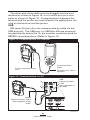
The control panel has buttons for the power on/off and media feed functions and a display for providing information regarding printer functions. Two keys provide easy navigation
and selection of menu options affecting many printer functions.
The “Scroll” button allows scrolling through the various options and settings. The “Select” button allows selection of the
option or function displayed on the screen.
Figure 12: LCD Control Panel
Feed Button
Scroll Button
Press to advance the media one
blank label or a software determined
length of journal media.
Press to scroll through the
menu choices on the LCD.
Printer Status Icons
Indicates the status of several
printer functions
Zebra RW 420
Signal:0%
Battery
Latch: ok
Rdr
(ok)
MENU
Power Button
Select Button
Press to turn unit on. Press again to turn
unit off
Press to select a menu choice
on the LCD.
LCD
See LCD Functions Table for an overview of menu options
Zebra RW 420
Signal:0%
Battery
Latch: ok
Rdr
NOTE: LCD menu options are under specific application
control. Not all options may be available In your printer’s
application.
22
RW Series User Guide
(ok)
MENU
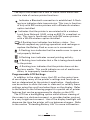
The top of the screen has a row of status icons which indicate the state of various printer functions:
Indicates a Bluetooth connection is established. A flashing icon indicates data transmission. This icon is functional only with RW series printers with a Bluetooth wireless
option installed.
Indicates that the printer is associated with a wireless
Local Area Network (LAN) using an 802.11x compliant radio. This icon is functional only with RW series printers
with a WLAN wireless option installed.
A flashing icon indicates low battery status. You
should suspend any printing operations and recharge or
replace the Battery Pack as soon as is convenient.
A flashing icon indicates that the media cover is open or
not properly latched.
A flashing icon indicates normal printing activity.
A flashing icon indicates that a file is being downloaded
to the printer.
A flashing icon indicates that the printer does not detect any media. This could indicate an out of media condition, or improperly loaded media.
Programmable LCD Settings
In addition to the status icons, the LCD on the control panel can display many of the printer’s settings and functions as
text as determined by the printer’s application. Applications
can be written to allow the user to view and /or modify these
settings using the scroll and select keys on the display. Refer
to the tables on the following pages for a partial set of printer
features that can be programmed to display on the LCD.
The LCD has a backlighting option which allows viewing of
the screen in a dark environment, or provides better contrast
in a very bright environment. Use of the display backlight will
decrease the time the printer will run between charges. Refer
to the section “Extending Battery Life” for more information.
continued
23
RW Series User Guide
Function
Extended LCD Functions1
Default setting
Sensor Type
Bar
Baud Rate
19200
Data Bits
8
Parity
N (none)
LCD Contrast
8
No-activity Timeout
120 sec.
Flip Screen
Off
Audio Volume
3
Media Type
Journal
LCD Backlight3
Momentary On
Factory Reset
(Resets all to
factory set values)
No
Scroll & Select Options
•
•
•
•
•
•
•
•
•
•
•
•
•
•
•
•
•
•
•
•
•
•
•
•
•
•
•
Bar
Gap
9600
19200
32400
57600
115200
7
8
E (Even)
N (None)
O (Odd)
Increase (15max.)
Decrease (15 max.)
Decrease (0 min.)2
Increase (120 max.)
Off
On (The 4 text lines
of display will be
flipped 180 ° when the
printer is in the Cradle
Location of icons will
remain unchanged.
1 – Low
2 – Medium
3 - High
Label
Journal
Momentary On w/
time delay
Off
No
Yes
NOTE:
1 LCD menu options are under specific application control. Not all options may be available In your
printer’s application.
2.
A No-activity timeout value of “0” means the printer will remain on until powered off by the operator.
3.
LCD Backlight turns on when any key other than FEED is pressed
24
RW Series User Guide
Display Functions Not Accessible from the Keypad1
Function
Default setting
WLAN ID2
Factory Set
Value
00
Tear-off
Position (Top of Form)
Scroll & Select Options
N/A
• Increase (max. = +10)
• Decrease (min. = -120
• All protocols On
• Protocols On or Off
individually
Network & RF Settings
Bridge Mode
Off
• Off
• On
DTR/VBUS-Power Off
Off
• On
• Off
Present-at
000
• Increase (max.= +120)
• Decrease (min. = 000
Bluetooth parameters
n/a
Displays current
Bluetooth operating
parameters
802.11b WLAN parameters
n/a
Displays current
802.11b operating
parameters
Media Type
Journal
Smart Card or
MSR Card
Reader Status3
Off
• Journal
• Label
• Off
• Display “RDR”
NOTES:
1 The parameters in this table will appear on the display but can be set only by using a PC running
Zebra’s Label Vista label creation program and a data cable link to the printer.
2. Can be adjusted from the factory default using a PC running Zebra’s Label Vista label creation program
and a data cable link to the printer.
3.
Card reader status is under application control, and is not user selectable.
.
25
RW Series User Guide
Verify the Printer Is Working
Before you connect the printer to your computer or portable
data terminal, make sure that the printer is in proper working
order. You can do this by printing a configuration label using
the “two key reset” method. If you can’t get this label to print,
refer to “Troubleshooting.”
Printing a Configuration Label
1. Turn the printer off. Load the media compartment with
journal media (media with no black bars printed on the
back)
2. Press and hold the Feed Button.
3. Press and release the Power button and keep the Feed
button pressed. When printing starts, release the Feed
button.
The unit will print a line of interlocking “x” characters to
ensure all elements of the printhead are working, print out the
version of software loaded in the printer and then print two reports.
The first report indicates model, ROM version, serial number, baud rate, etc. The second report prints out more detailed information on the printer’s configuration and parameter
settings. If no second report appears, there is no application
loaded. (See the Troubleshooting Section for a sample printout and a further discussion on how to use the configuration
label as a diagnostic tool.)
26
RW Series User Guide
Connecting the Printer
The printer must establish communications with a host terminal which sends the data to be printed. Communications
occur in three basic ways:
• By a cable between the printer and its host terminal using
either RS232C or USB protocols
• By means of a Bluetooth short-range radio frequency link
• By means of a wireless LAN (Local Area Network) per
802.11b specifications
Cable Communications
Caution • The printer should be turned off before connecting or
disconnecting the communications cable.
Figure 13: Communications Port
USB Port
Align Locking Plug
features with these
cutouts.
Rotate clockwise
to lock the cable
in place; counterclockwise to
unlock the cable.
RS232 Port
Serial (RS232C)
Note • All RW series printers can communicate by cable; the specific
cable supplied with your printer will vary with the host terminal.
The 10- pin modular connector on your communications cable plugs into the serial (RS232C) communications port on the
side of the printer. Plug the connector into the RS232C port
and ensure the locking device has clicked into position. Then
press the Locking Plug into the opening around the connector, aligning its locking features with the cutouts on the printer
case. Turn the Locking Plug clockwise one-quarter turn to secure it in place.
continued
27
RW Series User Guide
The other end of the cable must be plugged into the host
terminal as shown in Figure 15, or to a serial port on a computer as shown in Figure 15. Communications between the
terminal and the printer are controlled by the applications running on the terminal and the printer.
USB
RW series Printers also can communicate by cable via the
USB protocol. The USB port is a USB Mini-AB type connector
located directly above the 10- pin modular connector used for
RS232C communications. (Refer to Figure 13)
Figure 14: Communications to a Terminal
Communications
Cable
Printer Communications
Port
Part number varies. Refer to
Appendix A
Figure 15: Communications to a PC
USB
Communications
Cable
Refer to Appendix A for
part number
RS232
Communications Cable
Refer to Appendix A for part
number
continued
28
RW Series User Guide
The RW series is configured with the USB Open HCI interface driver allowing it to communicate with Windows® based
devices. USB drivers are included in the Zebra Universal
Driver which can be downloaded from www.zebra.com. Other
terminals or communications devices may require the installation of special drivers to use the USB connection. Consult
your Zebra reseller or the factory for further details.
Wireless Communications
Wireless Communications with Bluetooth®
“Bluetooth” is a worldwide standard for the exchange of
data between two devices via radio frequencies. Bluetooth
radios are relatively low powered to help prevent interference with other devices running at similar radio frequencies.
This limits the range of a Bluetooth device to about 10 meters
(about 32 feet).
Both the printer and the device it communicates with must
follow the Bluetooth standard.
Bluetooth Networking Overview
Each Bluetooth enabled RW series printer has a unique
Bluetooth Device Address (BDA) loaded into its radio module
when manufactured.
Bluetooth software is always running in the background,
ready to respond to connection requests. One device (known
as the master or the client) must request a connection with another. The second device (the slave or the server) then accepts
or rejects the connection. A Bluetooth enabled RW series
printer will normally act as a slave creating a miniature network with the terminal sometimes referred to as a “piconet.”
For the most part, communications using Bluetooth are initiated and processed without any operator intervention.
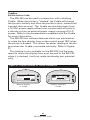
RW 420 printers can be equipped with both a Bluetooth
and an 802.11b radio, allowing communications with both
Bluetooth enabled devices and a Wireless Local Area Network
(WLAN) (see discussion below).
Wireless Local Area Network Overview
RW series printers can be equipped with several radio options which use the industry standard 802.11 WLAN protocol.
• RW series printers with a Compact Flash (CF) racontinued
29
RW Series User Guide
dio module can be identified by the FCC ID number
“I28MD-RW4137” and other regulatory information on the
serial number label on the back of the unit.
• RW series printers with a Zebra Value Radio, 802.11b can
be identified by the FCC ID number “I28MD-ZLAN11B”
and other regulatory information on the serial number label on the back of the unit.
• RW series Wireless Network Printers with the
Zebra 802.11b/g WLAN radio module can be identified by the text “Wireless Network Printer” and
FCC ID: I28MD-ZLAN11G on the serial number label on
the back of the printer.
• RW 420 printers with both an 802.11b WLAN radio and a
Bluetooth radio running in the same unit are considered
to be dual radio devices. At present only one dual radio
configuration is offered, for RW 420 only, with Bluetooth
radio FCC ID “I28MD-BTC2TY3” and 802.11b Compact
flash radio FCC ID “I28MD-RW4137”. The FCC ID numbers and other regulatory information for both radios
are located on the serial number label on the back of the
RW 420.
Printers so equipped allow wireless communication as a
node within a WLAN and its wireless capabilities allow communications from any point within the WLAN’s perimeter.
Printers equipped with the dual Bluetooth/802.11b WLAN
radio configuration can be linked to both a WLAN and a
Bluetooth network simultaneously.
Methods of establishing communications to RW series printers will vary with each LAN application. General information on establishing WLAN communications can be found
in either the ”CPCL Programmers Manual” or the “Quick
Start Guide for Mobile Wireless Printers” both available at
www.zebra.com. More information and LAN configuration
utilities may also be found in Zebra’s Label Vista™ program
(version 2.8 and later). Label Vista may be downloaded from
Zebra’s Web site at www.zebra.com.
Setting Up the Software
RW series printers use Zebra’s CPCL Programming language
which was designed for mobile printing applications. CPCL is
30
RW Series User Guide
fully described in the ”CPCL Programmers Manual”, available
on-line at www.zebra.com.
You can also use Label Vista™, Zebra’s Windows® based
label creation program which uses a graphical interface to
create and edit labels in the CPCL language. Label Vista is
available on-line from www,zebra.com.
RW series printers support an interpreter for ZPL II®, or EPL
programming languages. If you plan to use ZPL II or EPL, refer
to the appropriate Programming Guides available on-line from
Zebra’s Web site. If you choose to use a third party label preparation system, follow the installation instructions included in
the package.
31
RW Series User Guide
Radio Regulatory Information
Bluetooth RW -ZBR3 Radio (RW 220 and RW 420)
Caution • Exposure to Radio Frequency Radiation.
The radiated output power of this internal Bluetooth radio is far below
the FCC radio frequency exposure limits. The internal Bluetooth radio
operates within guidelines found in radio frequency safety standards
and recommendations. Do not use the printer in an unauthorized
manner.
Note • The following section only applies when the RW-ZBR3 Bluetooth
Radio (FCC ID: I28MD-BTC2TY3) is installed in an RW series printer.
Unless specified elsewhere in this manual, the antenna used for this
transmitter must not be co-located or must not operate in conjunction
with any other antenna.
European Regulatory Information for the RW-ZBR3 Bluetooth Radio
This device is intended for use in all EU and EFTA member states.
Europe – EU Declaration of Conformity
This device complies with the essential requirements of the R&TTE Directive
1999/5/EC. The following test methods have been applied in order to prove
presumption of compliance with the R&TTE Directive 1999/5/EC:
• EN 60950: 2000
Safety of Information Technology Equipment
• EN 300 328-2 V1.4.1 (2003-04)
Technical requirements for spread-spectrum radio equipment
• EN 301 489-1/-17 V1.4.1/1.2.1 (2002-08)
EMC requirements for spread-spectrum radio equipment.
This device is a 2.4 GHz wireless LAN transceiver, intended for indoor home and
office use in all EU and EFTA member states.
Important Notice:
This device is a portable RF printer intended
for commercial and industrial use in all EU
and EFTA member states.
32
RW Series User Guide
Compact Flash (802.11b) Radio Module
The following section only applies when the CF (Compact Flash) WLAN module (With
FCC ID: I28MD-RW4137) is installed in a RW series printer. The FCC ID number is on the serial number
label on the back of the printer and can be read with the module installed. Other than conditions specified
elsewhere in this manual, only one of the radio options can be installed in the printer at one time and the
antenna used for this transmitter must not be co-located or must not operate in conjunction with any other
antenna.
Caution • Use of a RW series printer with the radio module marked
with “FCC ID: I28MD-RW4137” meets the FCC requirements for
radio frequency (RF) radiation exposure in the standard body worn
configuration with no minimum separation. In this configuration, which
applies whether the belt clip or shoulder strap is used, the face of the
printer from which paper is transported is facing away from the user’s
body. The standard configuration must always be used when the printer
is body worn.
RW 220 printers with this radio option have been SAR tested. The
maximum SAR value measured for each model was 0.011527 W/g
averaged over 1 gram.
RW 420 printers with this radio option have been SAR tested. The
maximum SAR value measured for each model was 0.062 W/kg
averaged over 1 gram.
European Regulatory Information for this Radio
AT
BE
CY
CZ
DK
EE
FI
FR
DE
GR
HU
IE
IT
LV
LT
LU
MT
NL
PL
PT
SK
SI
ES
SE
GB
Note: -Member states in the EU with restrictive use for this device are
crossed out!
This device is also authorized for use in all EFTA member states (CH, IS, LI, NO)
Important Notice:
This device is a portable RF printer intended
for commercial and industrial use in all EU and
EFTA member states except in France where
restrictive use applies.
0336
continued
33
RW Series User Guide
Europe – EU Declaration of Conformity
This device complies with the essential requirements of the R&TTE Directive
1999/5/EC. The following test methods have been applied in order to prove
presumption of compliance with the R&TTE Directive 1999/5/EC:
• EN 60950: 2000
Safety of Information Technology Equipment
• EN 300 328-2 V1.2.1 (2001-12)
Technical requirements for spread-spectrum radio equipment
• EN 301 489-17 V1.2.1 (2002-08)
EMC requirements for spread-spectrum radio equipment.
This device is a 2.4 GHz wireless LAN transceiver, intended for indoor home and
office use in all EU and EFTA member states, except in France where restrictive
use applies.
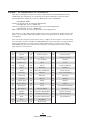
The use of this frequency band in France is subject to restrictions. You may only
use channels 10 and 11 (2457 and 2462 MHz) on French territory, except in those
French departments as listed in the table below where channels 1-13 (24122472 MHz) may be used. For more information see http://www.anfr.fr/ and/or
http://www.art-telecom.fr
01
Ain
36
Indre
69
Rhone
02
Aisne
37
Indre et Loire
70
Haute Saone
03
Allier
39
Jura
71
Saone et Loire
05
Hautes Alpes
41
Loir et Cher
72
Sarthe
08
Ardennes
42
Loire
75
Paris
09
Ariege
45
Loiret
77
Seine et Marne
10
Aube
50
Manche
78
Yvelines
11
Aude
54
Meurthe et Moselle
79
Deux Sievres
12
Aveyron
55
Meuse
82
Tarn et Garonne
16
Charente
57
Moselle
84
Vaucluse
19
Correze
58
Nievre
86
Vienne
Vosges
2A
Corse Sud
59
Nord
88
2B
Haute Corse
60
Oise
89
Yonne
21
Cote d’Or
61
Orne
90
Territoire de Belfort
24
Dordogne
63
Puy de Dome
91
Essonne
25
Doubs
64
Pyrenees Atlantique
92
Hauts de Seine
26
Drome
65
Hautes Pyrenees
93
Seine St Denis
94
Val de Marne
27
Eure
66
Pyrenees Orientales
32
Gers
67
Bas Rhin
35
Ille et Vilaine
68
Haute Rhin
34
RW Series User Guide
Zebra Value Radio, 802.11b
The following section only applies when the Zebra Value Radio, 802.11b (with FCC ID: I28MD-ZLAN11B) is
installed in a RW series printer. The FCC ID number is on the serial number label on the back of the printer
and can be read with the module installed. Other than conditions specified elsewhere in this manual, only
one of the radio options can be installed in the printer at one time and the antenna used for these transmitters must not be co-located or must not operate in conjunction with any other antenna.
Caution • The radiated output power of this internal 802.11b radio is far
below the FCC radio frequency exposure limits. Nevertheless, this radio
must be used in such a manner that the antenna is 2.5 cm. or further
from the human body. The radio and antenna are mounted internally
in this printer such that when the printer is worn with the back of the
printer against the body and the front of the printer (where paper exits)
away from the body, then the 2.5 cm distance between the antenna and
the users body will be met. Do not use the printer in an unauthorized
manner.
European Regulatory Information for this Radio
AT
BE
CY
CZ
DK
EE
FI
FR
DE
GR
HU
IE
IT
LV
LT
LU
MT
NL
PL
PT
SK
SI
ES
SE
GB
Note: -Member states in the EU with restrictive use for this device are
crossed out!
This device is also authorized for use in all EFTA member states (CH, IS, LI, NO)
Important Notice:
This device is a portable RF printer intended
for commercial and industrial use in all EU and
EFTA member states except in France where
restrictive use applies.
0336
continued
35
RW Series User Guide
Europe – EU Declaration of Conformity
This device complies with the essential requirements of the R&TTE Directive
1999/5/EC. The following test methods have been applied in order to prove
presumption of compliance with the R&TTE Directive 1999/5/EC:
• EN 60950: 2000
Safety of Information Technology Equipment
• EN 300 328-2 V1.2.1 (2001-12)
Technical requirements for spread-spectrum radio equipment
• EN 301 489-17 V1.2.1 (2002-08)
EMC requirements for spread-spectrum radio equipment.
This device is a 2.4 GHz wireless LAN transceiver, intended for indoor home and
office use in all EU and EFTA member states, except in France where restrictive
use applies.
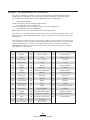
The use of this frequency band in France is subject to restrictions. You may only
use channels 10 and 11 (2457 and 2462 MHz) on French territory, except in those
French departments as listed in the table below where channels 1-13 (24122472 MHz) may be used. For more information see http://www.anfr.fr/ and/or
http://www.art-telecom.fr
01
Ain
36
Indre
69
Rhone
02
Aisne
37
Indre et Loire
70
Haute Saone
03
Allier
39
Jura
71
Saone et Loire
05
Hautes Alpes
41
Loir et Cher
72
Sarthe
08
Ardennes
42
Loire
75
Paris
09
Ariege
45
Loiret
77
Seine et Marne
10
Aube
50
Manche
78
Yvelines
11
Aude
54
Meurthe et Moselle
79
Deux Sievres
12
Aveyron
55
Meuse
82
Tarn et Garonne
16
Charente
57
Moselle
84
Vaucluse
19
Correze
58
Nievre
86
Vienne
Vosges
2A
Corse Sud
59
Nord
88
2B
Haute Corse
60
Oise
89
Yonne
21
Cote d’Or
61
Orne
90
Territoire de Belfort
24
Dordogne
63
Puy de Dome
91
Essonne
25
Doubs
64
Pyrenees Atlantique
92
Hauts de Seine
26
Drome
65
Hautes Pyrenees
93
Seine St Denis
94
Val de Marne
27
Eure
66
Pyrenees Orientales
32
Gers
67
Bas Rhin
35
Ille et Vilaine
68
Haute Rhin
36
RW Series User Guide
WLAN Module Using 802.11b/g Radio
The following section only applies when the 802.11b/g WLAN module (With FCC ID: I28MD-ZLAN11G) is
installed in a RW series printer). Other than conditions specified elsewhere in this manual, only one of the
radio options can be installed in the printer at one time and the antenna used for these transmitters must not
be co-located or must not operate in conjunction with any other antenna.
RW Series models have the FCC ID number on a label on the back of the unit.
Caution • Use of a RW series printer with the radio module marked
with FCC ID: I28MD-ZLAN11G meets the FCC requirements for
radio frequency (RF) radiation exposure in the standard body worn
configuration with no minimum separation. In this configuration, which
applies whether the belt clip or shoulder strap is used, the face of the
printer from which paper is transported is facing away from the user’s
body. The standard configuration must always be used when the printer
is body worn.
The RW 220 and RW 420 printers with this radio option have
been SAR tested. The maximum SAR value measured for
each model is listed below:
Model
SAR value W/Kg (1g average) )
RW220
0.004
RW 420
0.004
European Regulatory Information for this Radio
AT
BE
CY
CZ
DK
EE
FI
FR
DE
GR
HU
IE
IT
LV
LT
LU
MT
NL
PL
PT
SK
SI
ES
SE
GB
Note: -Member states in the EU with restrictive use for this device are
crossed out!
This device is also authorized for use in all EFTA member states (CH, IS, LI, NO)
Important Notice:
This device is a portable RF printer intended
for commercial and industrial use in all EU and
EFTA member states except in France where
restrictive use applies.
continued
37
RW Series User Guide
Europe – EU Declaration of Conformity
This device complies with the essential requirements of the R&TTE Directive
1999/5/EC. The following test methods have been applied in order to prove
presumption of compliance with the R&TTE Directive 1999/5/EC:
• EN55022:1998
European Emmissions Standard
• EN 60950: 2000
Safety of Information Technology Equipment
• EN 300 328-2 V1.2.1 (2001-12)
Technical requirements for spread-spectrum radio equipment
• EN 301 489-17 V1.2.1 (2002-08)
EMC requirements for spread-spectrum radio equipment.
This device is a 2.4 GHz wireless LAN transceiver, intended for indoor home and
office use in all EU and EFTA member states, except in France where restrictive
use applies.
The use of this frequency band in France is subject to restrictions. You may only
use channels 10 and 11 (2457 and 2462 MHz) on French territory, except in those
French departments as listed in the table below where channels 1-13 (2412-2472
MHz) may be used. For more information see http://www.anfr.fr/ and/or http://
www.art-telecom.fr
01
Ain
36
Indre
69
Rhone
02
Aisne
37
Indre et Loire
70
Haute Saone
03
Allier
39
Jura
71
Saone et Loire
05
Hautes Alpes
41
Loir et Cher
72
Sarthe
08
Ardennes
42
Loire
75
Paris
09
Ariege
45
Loiret
77
Seine et Marne
10
Aube
50
Manche
78
Yvelines
11
Aude
54
Meurthe et Moselle
79
Deux Sievres
12
Aveyron
55
Meuse
82
Tarn et Garonne
16
Charente
57
Moselle
84
Vaucluse
19
Correze
58
Nievre
86
Vienne
Vosges
2A
Corse Sud
59
Nord
88
2B
Haute Corse
60
Oise
89
Yonne
21
Cote d’Or
61
Orne
90
Territoire de Belfort
24
Dordogne
63
Puy de Dome
91
Essonne
25
Doubs
64
Pyrenees Atlantique
92
Hauts de Seine
26
Drome
65
Hautes Pyrenees
93
Seine St Denis
94
Val de Marne
27
Eure
66
Pyrenees Orientales
32
Gers
67
Bas Rhin
35
Ille et Vilaine
68
Haute Rhin
38
RW Series User Guide
Compact Flash (802.11b) and Bluetooth Co-located Radio
Modules
The following section only applies when the CF (Compact Flash) WLAN module (With
FCC ID: I28MD-RW4137) and Bluetooth module (FCC ID: I28MD-BTC2TY3) are installed in a RW 420 printer.
This co-located radio configuration has demonstrated compliance to FCC regulations. The FCC ID numbers
are on the serial number label on the back of the printer and can be read with the module installed.
Caution • Use of a RW 420 printer with the radio module marked
with both “FCC ID: I28MD-RW4137” and “I28MD-BTC2TY3” meets the
FCC requirements for radio frequency (RF) radiation exposure in the
standard body worn configuration with no minimum separation. In this
configuration, which applies whether the belt clip or shoulder strap is
used, the face of the printer from which paper is transported is facing
away from the user’s body. The standard configuration must always be
used when the printer is body worn. RW 420 printers with this radio
option have been SAR tested. The maximum SAR value measured for
each model was 0.28 W/kg averaged over 1 gram.
European Regulatory Information for the Compact Flash 802.11b
Radio and Bluetooth Co-located Radio Modules
AT
BE
CY
CZ
DK
EE
FI
FR
DE
GR
HU
IE
IT
LV
LT
LU
MT
NL
PL
PT
SK
SI
ES
SE
GB
Note: -Member states in the EU with restrictive use for this device are
crossed out!
This device is also authorized for use in all EFTA member states (CH, IS, LI, NO)
Europe – EU Declaration of Conformity
Important Notice:
This device is a portable RF printer intended
for commercial and industrial use in all EU and
EFTA member states except in France where
restrictive use applies.
This device complies with the essential requirements of the R&TTE Directive
1999/5/EC. The following test methods have been applied in order to prove
presumption of compliance with the R&TTE Directive 1999/5/EC:
• EN 60950: 2000
Safety of Information Technology Equipment
• EN 300 328-2 V1.2.1 (2001-12)
Technical requirements for spread-spectrum radio equipment
• EN 301 489-17 V1.2.1 (2002-08)
EMC requirements for spread-spectrum radio equipment.
This device is a 2.4 GHz wireless LAN transceiver, intended for indoor home and
office use in all EU and EFTA member states, except in France where restrictive
use applies.
39
RW Series User Guide
continued
The use of this frequency band in France is subject to restrictions. You may only
use channels 10 and 11 (2457 and 2462 MHz) on French territory, except in those
French departments as listed in the table below where channels 1-13 (24122472 MHz) may be used. For more information see http://www.anfr.fr/ and/or
http://www.art-telecom.fr
01
Ain
36
Indre
69
Rhone
02
Aisne
37
Indre et Loire
70
Haute Saone
03
Allier
39
Jura
71
Saone et Loire
05
Hautes Alpes
41
Loir et Cher
72
Sarthe
08
Ardennes
42
Loire
75
Paris
09
Ariege
45
Loiret
77
Seine et Marne
10
Aube
50
Manche
78
Yvelines
11
Aude
54
Meurthe et Moselle
79
Deux Sievres
12
Aveyron
55
Meuse
82
Tarn et Garonne
16
Charente
57
Moselle
84
Vaucluse
19
Correze
58
Nievre
86
Vienne
Vosges
2A
Corse Sud
59
Nord
88
2B
Haute Corse
60
Oise
89
Yonne
21
Cote d’Or
61
Orne
90
Territoire de Belfort
24
Dordogne
63
Puy de Dome
91
Essonne
25
Doubs
64
Pyrenees Atlantique
92
Hauts de Seine
26
Drome
65
Hautes Pyrenees
93
Seine St Denis
94
Val de Marne
27
Eure
66
Pyrenees Orientales
32
Gers
67
Bas Rhin
35
Ille et Vilaine
68
Haute Rhin
40
RW Series User Guide
Card Reader Options
The RW series can be equipped with optional Magnetic
Stripe and Smart Card readers. The magnetic stripe card
reader allows the user to swipe magnetic stripe cards such
as credit cards through a slot in the printer and then read and
process the data contained in the card.
In a similar manner the Smart Card reader can read the information written in the microchip embedded in Smart Cards,
and process the information in the chip in a variety of ways
depending on the printer’s application.
Figure 16: Magnetic Stripe Reader Status Indicator
“Rdr” indicates
MSR is enabled.
Zebra RW 420
Signal:0%
Battery
Latch: ok
Rdr
(ok)
MENU
Magnetic Stripe Reader
The status of the Magnetic Stripe Reader (MSR) is indicated
in three possible ways:
• Reader status is displayed on the Main Menu LCD as
shown in Figure 16.
• The LCD backlight flashes to indicate status (3 flashes =
enabled, 2 flashes = disabled).
• Chimes indicates the reader status (3 chimes = enabled,
2 chimes = disabled).
Zebra RW 420
Signal:0%
Battery
Latch: ok
Rdr
41
RW Series User Guide
continued
(ok)
MENU
The MSR is used as follows:
1. When the reader is enabled, place the card into the reader slot as shown. The magnetic stripe (typically on the
back of the card) must face the bottom of the printer, and
be inserted into the bottom of the card reader slot as
shown in Figure 17.
2. Slide the card through the slot. The card will be read
if slid in either direction. Depending on the application
software, the printer will sound one chime when a scan is
successful .
3. If the card did not read, slide it back through the slot in
the opposite direction.
Figure 17: Using the Magnetic Stripe Reader
Magnetic Stripe Card
Place the Card in the reader slot with the magnetic stripe
facing down as shown.
Magnetic
Stripe Reader
Slot
Card can be read in both directions.
42
RW Series User Guide
Smart Card Reader
The optional Smart Card reader is used as follows:
1. The LCD will display “RDR” to indicate the Smart Card
reader is active. (Some reader applications may flash the
display backlight and/or chime three times to indicate the
reader status is “ready.”) At this time, the Printer is acting
only as a Smart Card reader connected to the host terminal; all other printer functions are suspended.
2. Insert the card into the reader slot as shown in Figure 18.
The microchip imbedded in the card must be oriented
facing the bottom of the printer and must be completely
inserted into the Reader Slot to scan successfully .
3. Depending on the application software, the printer will
sound a chime after a successful transaction.
4. After the card has been successfully read the Printer can
resume normal printing operations and the Smart Card
can be removed.
Figure 18: Using the Smart Card Reader
Smart Card Reader
Slot
Insert Smart Card
with microchip
facing down.
Insert Smart Card
completely into
Printer.
43
RW Series User Guide
Using the Accessories
Belt Clip
Refer to Figure 19. All RW series printers are equipped with
a belt clip as standard. To use: hook the clip over your belt,
and ensure that the clip is securely attached to the belt. The
belt clip will pivot to allow you to move freely while wearing
the printer.
Figure 19: Using the Belt Clip
Clip printer
to belt
Printer can
pivot freely
44
RW Series User Guide
Adjustable Shoulder Strap
Refer to Figure 20. If your printer is equipped for the shoulder strap option: snap each end of the shoulder strap into the
“D” rings in the top of the printer. Slide the buckle away from
or towards the printer until you achieve the desired length.
Figure 20: Using the Shoulder Strap
Hold
Buckle
Pull Strap
here to
lengthen
Pull Strap
here to
shorten
Snap in to
“D” rings
on printer
45
RW Series User Guide
Cradles
RW 420 Vehicle Cradle
The RW 420 can be used in conjunction with a docking
Cradle. When the printer is “docked” the Cradle will charge
the printer’s battery and allow the printer to print, receive and
transmit data as usual. The Cradle can provide power from
a 12 VDC power supply either from a power take-off point in
a vehicle or from an external power supply running off A.C.
power. Refer to the documentation supplied with the Cradle
for more information.
The RW 420 has software features which can automatically rotate the four display lines on the control panel 180º when
the printer is docked. This allows for easier reading of the display when the Cradle is mounted vertically. Refer to Figure
21.
This feature is also available on the RW 220, but the command to rotate the display lines must be sent to the RW 220
when it is docked; it will not rotate the display text automatiZebra RW 420
Signal:0%
cally.
Battery
Latch: ok
Rdr
(ok)
MENU
Figure 21: Display Rotated for Cradle Installation
(ok)
MENU
(ok)
MENU
Zebra RW 420
Signal:0%
Battery
Latch: ok
Rdr
Zebra RW 420
Signal:0%
Battery
Latch: ok
Rdr
Display rotated in
Cradle
Normal Display
in Cradle
Zebra RW 420
Signal:0%
Battery
Latch: ok
Rdr
46
RW Series User Guide
(ok)
MENU
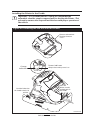
Installing the Printer in the Cradle
Important • It is recommended as a safety precaution that the
adjustable shoulder strap be removed prior to docking the Printer. This
precaution ensures the strap will not interfere with proper operation of
the vehicle.
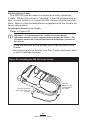
Figure 22: Installing the RW 420 into the Cradle
Remove and retain the
Docking Connector
Cover
Power Indicator
Charge
Indicator
Always Green when power is on
Place the
Printer over the
retaining pins in
the Cradle.
Rock the Printer into
the Cradle to latch it in
position.
continued
47
RW Series User Guide
• Remove the Docking Connector Cover from the bottom
of the printer, and retain it for future use. (Refer to Figure
22.)
• Place the bottom of the printer over the two pins in the
Cradle.
• Rock the top of the Printer into the Cradle and press firmly until it latches in place.
• Ensure the Cradle power and charge indicators are lit and
turn the printer on.
If the charge indicator does not light up, unlatch the printer from the
Vehicle Cradle, lift it clear from the Cradle and re-seat it.
Refer to the Vehicle Cradle Installation Guide for more complete
information on the power and charge indicators
You can load media (including media from an external supply) and perform cleaning operations normally when the
RW 420 Printer is installed in the Cradle .
48
RW Series User Guide
Removing the Printer from the Cradle
Refer to Figure 23.
• Turn the Printer off.
• Push on the latch on the Cradle and rock the top of the
printer away from the Cradle.
• Lift the Printer out from the Cradle.
Replace the Docking Connector Cover if you will be using the Printer for an extended period of time away from the
Cradle.
Figure 23: Removing the RW 420 from the Cradle
Press the
Latch button
to release the
Printer.
Rotate the
Printer out of
the Cradle.
Lift the printer free of
the retaining pins.
49
RW Series User Guide
RW 220 Vehicle Cradle
The RW 220 can be used in conjunction with a docking
Cradle. When the printer is “docked” it can be powered by either its own battery or one of the RCLI series of external chargers. Refer to the documentation supplied with the Cradle for
more information.
Installing the Printer in the Cradle
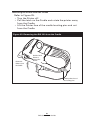
Refer to Figure 24.
Important • It is recommended as a safety precaution that the
adjustable shoulder strap be removed prior to docking the Printer. This
precaution ensures the strap will not interfere with proper operation of
the vehicle.
• Place the bottom of the printer over the two pins in the
Cradle.
• Rock the top of the Printer into the Cradle and press firmly until it latches in place.
Figure 24: Installing the RW 220 in the Cradle
Place the
Printer over the
retaining pins in
the Cradle.
Rock the Printer into
the Cradle to latch it in
position.
50
RW Series User Guide
Removing the Printer from the Cradle
Refer to Figure 25.
• Turn the Printer off.
• Pull the latch on the Cradle and rotate the printer away
from the Cradle.
• Lift the Printer free of the cradle locating pins and out
from the Cradle.
Figure 25: Removing the RW 220 from the Cradle
Rotate the
Printer out of
the Cradle.
Pull the Latch
button to
release the
Printer.
Lift the printer free of
the locating pins.
51
RW Series User Guide
Preventive Maintenance
Extending Battery Life
• Avoid exposing the battery to direct sunlight or temperatures over 104° F (40° C).
• Always use a Zebra charger designed specifically for
Lithium-Ion batteries. Use of any other kind of charger
may damage the battery.
• Use the correct media for your printing requirements. An
authorized Zebra re-seller can help you determine the optimum media for your application.
• If you print the same text or graphic on every label, consider using a preprinted label.
• Choose the correct print darkness, and print speed for
your media.
• Use software handshaking (XON/XOFF) whenever possible.
• Use the LCD display backlight only when necessary. Turn
it off whenever it is not needed.
• Remove the battery from the printer if it won’t be used for
a day or more and you’re not performing a maintenance
charge.
• Consider purchasing an extra battery.
• Remember that any rechargeable battery will lose its ability to maintain a charge over time and can be recharged
a finite number of times before it must be replaced.
Always dispose of used batteries properly. Refer to
Appendix D for more information on proper battery disposal.
Caution • Do not print while the LI 72 Wall Charger is plugged into the
unit. Unreliable battery charging can result.
52
RW Series User Guide
General Cleaning Instructions
Caution • Always turn the printer off before cleaning.
To avoid possible personal injury or damage to the printer, never insert
any pointed or sharp objects into the printer.
Use care when working near the Tear Bar. The edges are very sharp.
Caution • The printhead can become very hot after prolonged printing.
Allow it to cool off before attempting any cleaning procedures.
Caution • Use only cleaning agents specified in the following table.
Zebra Technologies Corporation will not be responsible for damage
caused by any other cleaning materials used on this printer.
Clean the printer with either the cleaning pen supplied with the printer
or a cotton swab saturated with alcohol.
53
RW Series User Guide
continued
RW Series Cleaning
Area
Printhead
(Figure 26)
Method
Interval
Use the supplied cleaning pen or 70%
isopropyl alcohol on a cotton swab to
clean the print elements from end to
end (the print elements are located in
the thin gray line on the printhead).
Platen Roller
(Figure 26)
Rotate the platen roller and clean it
thoroughly with the cleaning pen or
70% isopropyl alcohol and a cotton
swab.
Tear bar
(Figure 26)
Clean thoroughly with the cleaning
pen or 70% isopropyl alcohol and a
cotton swab.
Exterior
Interior
(Figure 26)
After every five rolls of
media (or more often, if
needed)
Water-dampened cloth
As needed
Brush/air blow. Ensure the Bar
Sensor and Gap Sensor windows are
free of dust.
After every five rolls of
media (or more often, if
needed)
Figure 26: Cleaning RW Series Printers
RW 420 illustrated
Bar Sensor
Printhead
Elements
Tear Bar
Gap Sensor
54
RW Series User Guide
Platen Surface
Troubleshooting
LCD Control Panel Indicators
The top of the display shows several icons which indicate
various printer functions. Check the indicator status, then refer
to the Troubleshooting topic referenced in the chart to resolve
the problem.
Status Icon
Condition
Indication
Ref. to Topic #
Steady
Flashing
Bluetooth Link established
Transmitting/Receiving
via Bluetooth
n/a
n/a
Off
No Bluetooth Link
6
Steady
Off
Blank Screen
802.11x RF Link established
No 802.11x RF Link
n/a
6
Flashing
Low Battery
3, 6, 7
Flashing
Head latch not closed
9, 11
Flashing
Indicates Printing activity
n/a
Steady
data processing in process
8
Flashing
Out of Media
9,11
n/a
No application
1,13
Troubleshooting Topics
1. No power
• Check that battery is installed properly.
• Recharge or replace battery as necessary. (Always dispose
of used batteries properly. Refer to Appendix D for
more information on proper battery disposal.)
2. Media does not feed:
• Ensure Media Cover is properly closed and latched.
• Check media supports for any binding.
3. Poor or faded print or flashing
icon:
• Clean print head.
• Check battery and recharge or replace as necessary.
• Check quality of media.
55
RW Series User Guide
continued
4. Partial/missing print:
• Check media alignment.
• Clean print head.
• Ensure Media Cover is properly closed and latched.
5. Garbled print:
• Check baud rate.
6. No print:
• Check baud rate.
• Replace battery. Always dispose of used batteries
properly. Refer to Appendix D for more information on
proper battery disposal.
• Check cable to terminal.
• Wireless units (Bluetooth or 802.11b) only: Establish RF
Link. Restore LAN associativity on 802.11b wireless units.
• Invalid label format or command structure — put printer in
Communications Diagnostic (Hex Dump) Mode to diagnose
problem (refer to Troubleshooting Tests section).
7. Reduced battery life
• Check battery date code — if battery is one to two years
old, short life may be due to normal aging.
• Replace battery. (Always dispose of used batteries
properly. Refer to Appendix D for more information on
proper battery disposal.)
8. Flashing
icon:
• No application or application corrupted: reload program.
•Flashing indicator is normal while data is being received.
8. Flashing
icon:
• No application or application corrupted: reload program.
•Flashing indicator is normal while data is being received.
9. Flashing
or
icon :
• Check that media is loaded.
• Ensure Media Cover is properly closed and latched.
10. Skips labels (only when using label stock):
• Check media for top of form sense mark or label gap.
• Check that the maximum print field has not been exceeded
on label.
• Ensure bar or gap sensor is not blocked or malfunctioning.
11. Communication Error:
• Check media is loaded.
56
RW Series User Guide
• Ensure Media Cover is properly closed and latched and
error indicators are off.
• Check baud rate.
• Replace cable to terminal.
12. Label Jam:
• Open media cover.
• Apply generous amount of alcohol to printer in area of
jammed label.
13. Blank LCD Screen
• No application loaded or application corrupted: reload
program.
14. Magnetic Strip Card or Smart Card Won’t Read
• Ensure the “RDR” text is displayed, indicating card reader is
enabled. (Refer to the Operator Controls section.)
• Ensure card is inserted with the magnetic stripe or
microchip facing in the correct direction.
• Check card for excessive wear or damage to either the
magnetic strip or the microchip.
15. Battery Pack Is Hard to Insert
• The battery packs for the RW and QL series printers are
similar in size and shape, but not interchangeable. Verify
you are using the correct battery pack. The battery pack
part number for the RW 420 is AK17463-005.
The battery pack part number for the RW 220 is
AK18026-002.
• Verify that the shrink wrapping and the warning card
protecting the battery contacts have been removed.
57
RW Series User Guide
Troubleshooting Techniques
Printing a Configuration Label
To print out a listing of the printer’s current configuration follow these steps:
1. Turn the printer off. Load the media compartment with
journal media (media with no black bars printed on the
back)
2. Press and hold the Feed Button.
3. Press and release the Power button and keep the Feed
button pressed. When printing starts, release the Feed
button.
Refer to Figures 26 through 26b for a sample configuration printout.
Performing a Forced Shutdown
It the printer has locked up and is not responding to any operator inputs or external commands, from either a connected
terminal or a linked LAN, you can perform a forced shutdown.
• If the printer software locks up during normal operation,
force the printer to shut down by pressing and holding
the Power Button for 3 seconds.
• If you try to turn the printer off normally and the software locks up, the printer will automatically shut itself off
after a 10 second delay.
• If you try to turn the printer off and it does not respond,
you can force an immediate shut down by pressing and
holding the Power Button again within 10 seconds.
A forced shutdown will preserve the printer’s data and settings.
Communications Diagnostics
If there’s a problem transferring data between the computer
and the printer, try putting the printer in the Communications
Diagnostics Mode (also referred to as the “DUMP” mode). The
printer will print the ASCII characters and their and their text
representation (or the period ‘.’, if not a printable character) for
any data received from the host computer
To enter Communications Diagnostics Mode:
1. Print a configuration label as described above.
2. At the end of 2nd diagnostics report, the printer will print:
“Press FEED key to enter DUMP mode.”
58
RW Series User Guide
3. Press the FEED key. The printer will print: “Entering
DUMP mode.”
Note • If the FEED key is not pressed within 3 seconds, the printer will
print “DUMP mode not entered” and will resume normal operation.
4. At this point, the printer is in DUMP mode and will print
the ASCII hex codes of any data sent to it, and their text
representation (or “.” if not a printable character).
Additionally, a file with a “.dmp” extension containing the
ASCII information will be created and stored in the printer’s
memory. It can be viewed, “cloned” or deleted using the Label
Vista application. (Refer the Label Vista documentation for
more information.)
To terminate the Communications Diagnostics Mode and return the printer to normal operations:
1. Turn the printer OFF.
2. Wait 5 seconds.
3. Turn the printer ON.
Calling Technical Support
If the printer fails to print the configuration label, or you encounter problems not covered in the Troubleshooting Guide,
contact Zebra Technical Support ad the locations below. You
will need to supply the following information:
• Model number/type (e.g. RW 420)
• Unit serial number (14 digit number, including dashes)
(Refer to Figures 27 through 27b.)
• Product Configuration Code (PCC) (15 digit number, including dashes). Refer to Appendix D for more information.
Zebra Technologies International, LLC
333 Corporate Woods Parkway
Vernon Hills, Illinois 60061-3109 USA
Phone: +1.847.793.2600 or
+1.800.423. 0422
Fax: +1.847.913.8766
Zebra Technologies Asia Pacific, LLC
16 New Industrial Road
#05-03 Hudson TechnoCentre
Singapore 536204
Phone: +65-6858 0722
Fax: +65-6885 0838
Zebra Technologies Europe Limited
Zebra House
The Valley Centre, Gordon Road
High Wycombe
Buckinghamshire HP13 6EQ, UK
Phone: +44.1494.472872
Fax: +44.1494.450103
59
RW Series User Guide
Print Head Test
End of First Report
Unit Serial Number
Software and
Firmware
Settings for
RS232 and USB
communications
via cable
Report appears
only on units with
wireless options
installed.
Units with no
wireless options
will print an
empty line and
resume printing
This example
has a Bluetooth
module installed.
(Refer to page 28
for more details.)
Information on
TCP/IP and LAN
addresses and
settings.
Figure 27: Configuration Label Example
60
RW Series User Guide
Information on
any installed
802.11x wireless
devices
In this example,
an 802.11b WLAN
card has been
detected.
List of peripherals
installed. In
this example
the printer has
the Mag Card
and SmartCard
reader option,
and the wireless
expansion module
has an 802.11b
and Bluetooth
wireless module1.
List of power
management
settings. Also
includes a count
of the number of
times the unit has
been powered on.
1. Dual radio units as illustrated above are available only on the RW 420.
Figure 27a: Configuration Label Example (continued)
61
RW Series User Guide
Flash Memory Size
RAM Size
Maximum Label
Size
Resident Fonts
Installed
Resident
Pre-scaled Font
Installed
(my 2010.CPF)
(my 2020.CPF)
myfont
myfont2
myfont3
my_2010
my_2020
Pre-scaled fonts
(.cpf) listed
separately
Files Loaded in
Printer Memory
(will include Prescaled or Scalable
Fonts)
.FNT
.FNT
.FNT
.CPF
.CPF
Amount of Memory
Available
End of Configuration
Report
Figure 27b: Configuration Label Example (continued)
62
RW Series User Guide
Specifications
Note.- Printer specifications are subject to change without notice.
Printing Specifications
RW 420
Print Width
RW 220
4.09 in. [103.8 mm] max.
2.20 in [56 mm] max.
Print Speed
@ 30% density
3 in. /second
[76.2 mm/second]
Distance from
Print Element
to Tear Edge
.20 in. [5 mm]
41 dots
Print Head Life,
calculated
1,964,160 in. (50 Km)
nominal
Print Density
203 dots/inch (8 dots/mm)
Memory/Communications Specifications
Flash Memory
4 MB flash (standard)
RAM Memory
8 MB RAM (standard)
Standard
Communications
RS-232C serial port (RJ-45 connector)
Configurable Baud rate (from 9600 to 115.2
Kbps), parity and data bits.
Software (X-ON/X-OFF) or hardware (DTR/STR)
communication handshake protocols.
USB 2.0 Full Speed Interface (12 Mb/s))
Bluetooth compatible 2.4 GHz SRRF link
Optional Wireless
Communications
Wireless LAN capabilities comply with 802.11b
protocols
Dual Bluetooth + 802.11b radios (RW 420 only)
63
RW Series User Guide
Communications Ports
USB
Pin#
Signal
Name
Type
1
VBUS
-
2
USB -
bi-directional
I/O signals
3
USB +
bi-directional
I/O signals
4
USB_ID
-
Identifies A/B connector
5
Return
-
Ground
Signal
Name
Type
1
NC
no connect
2
NC
no connect
Description
USB Bus Power
RS232
Pin#
Description
3
RXD
input
Receive Data
4
TXD
output
Transmit Data
5
DTR
output
Data Terminal Ready
set high when printer is on.
6
GND
7
DSR
input
Data Set Ready
low to high transition turns
printer on, high to low transition turns printer off (if enabled)
8
RTS
output
Request To Send
set high when printer is ready
to accept a command or data
9
CTS
input
Clear To Send from host
10
NC
no connect
Ground
64
RW Series User Guide
USB
1
5
10
1
RS232
Figure 28: Communication Ports
65
RW Series User Guide
RW 420 Media Specifications
Media Width
2.0 in. to 4.12 in.
(50.8 to 104.6 mm)
Max. continuous
receipt (w/std. memory)
Continuous, dependent on installed memory
Inter-label Gap.
0.08 in. to 0.16 in. (0.12 in. preferred)
(2 mm to 4 mm [3 mm preferred])
Label Thickness
.0025” to .0065” (.064 mm to .165 mm)
Max. Label Roll dia.
2.25 in. (57 mm) O.D.
Label Inner Core
.75 in. (19 mm) minimum dia;
1.38 in. (35 mm) optional setting
Black Mark
Dimensions
The reflective media black marks should
extend past the centerline of the roll.
Media
Requirements
Minimum mark width: 1.0” (25.4 mm)
perpendicular to edge of media, centered within
the width of the roll.
Mark length: 0.094” (2.4 mm) parallel to edge of
media
RW 220 Media Specifications
Media Width
1.0” in. to 2.37 in.
[25.4 to 60.1 mm]
Max. continuous
receipt (w/std. memory)
Continuous, dependent on installed memory
Inter-label Gap.
0.08 in. to 0.16 in. (0.12 in. preferred)
(2 mm to 4 mm [3 mm preferred])
Label Thickness
.0025” to .0065” (.064 mm to .165 mm)
Max. Label Roll dia.
2.25 in. [57 mm] O.D.
Label Inner Core
.75 in. [19 mm) minimum dia;
1.38 in. (35 mm) optional setting
Black Mark
Dimensions
The reflective media black marks should
extend past the centerline of the roll.
Media
Requirements
Minimum mark width: .5” (12.7 mm)
perpendicular to edge of media, centered within
the width of the roll.
Mark length: 0.094” (2.4 mm) parallel to edge of
media
Use Zebra brand direct thermal media that is outside wound. Media may be
reflective (black mark) sensing, or transmissive (gap) sensing, die-cut, or
continuous. RW 420 units configured with the External Media option will accept
fanfold media used with an external media supply.
For die-cut labels, use only full auto dies.
66
RW Series User Guide
Font/Bar Code Specifications
Fonts Available
Standard Fonts: 25 bit-mapped fonts; 1 scalable
font (CG Trimvirate Bold Condensed*)
Downloadable optional bit-mapped & scalable
fonts via Label Vista software.
Optional International character sets:
Chinese 16 x 16 (trad), 16 x 16 (simplified),
24 x 24 (simplified); Japanese 16 x 16, 24 x 24;
Hebrew/Arabic
*contains UFST from Agfa Monotype Corporation
Linear Bar Codes
Available
2-D Bar Codes
Available
Rotation Angles
Codabar
UCC/EAN 128
UCC-128 Composite A/B/C
Code 39
Code 93
EAN 8/JAN 8, 2 and 5 digit extensions
EAN-8 Composite
EAN 13/JAN 13, 2 and 5 digit extensions
EAN-13 Composite
lnterleaved 2 of 5
MSI/Plessey
FIM/POSTNET
UPC-A, 2 and 5 digit extensions
UPCA Composite
UPC E, 2 and 5 digit extensions
UPCE Composite
MaxiCode
PDF 417
Datamatrix (using ZPL emulation)
RSS: RSS-14 Truncated
RSS-14 Stacked
RSS-14 Stacked Omnidirectional
RSS Limited
RSS Expanded
0°, 90°, 180°, and 270°
67
RW Series User Guide
Physical/Environmental/Electrical Specifications
RW 420
Weight w/ battery,
excluding media
RW 220
2.0 lbs. (907 g. )1
1.45 lb.(658 g.)1
2.15 lbs. (975 g)2
1.55 lb. (703 g)2
Operating Temperature
-4° to 131° F (-20° to 55° C)
Charging Temperature
32° to 104°F (0° to 40° C)
Storage Temperature
-22° to 149° F (-30° to 65° C)
w/o battery
-4° to 113° F (-20° to 45°C) with battery
Relative Humidity
Battery
Operating: 10% to 90%
(non-condensing)
Storage: 10% to 90%
(non-condensing)
7.4V Lithium-Ion
4 AHr.
Intrusion Protection
(IP) Rating
7.4V Lithium-Ion
2 AHr
54
1. Weight is for base unit (without MCR /SmartCard option)
2. Weight is for unit with MCR/SmartCard option installed ˙
68
RW Series User Guide
6.9” [175 mm]
6.3”
[160 mm]
3.7”
[94 mm]
max. 1
3.2”
[81 mm]
max. 1
7.4” [188 mm]
NOTE:
1. Dimensions shown are for units
with the MSR/Smart Card option
installed. Subtract .08” [2 mm]
from these dimensions for units
without this option.
.25” [6 mm]
Figure 29: RW 420 Overall Dimensions
69
RW Series User Guide
1.8” [46 mm]
3.7”
[94.1 mm]1
4.4”
[111.8 mm]
7.2” [185.3 mm]
6.8” [173.6 mm]
1.8” [45.6 mm]
3.2”
[81 mm]1
3.9” [99.1 mm]
# 6-32 x .25”
[6.4 mm] deep
(2) places
NOTE:
1. Dimensions shown are for units
with the MSR/Smart Card option
installed. Subtract 0.27” [5 mm]
from these dimensions for units
without this option.
Figure 30: RW 220 Overall Dimensions
70
RW Series User Guide
RW Series Accessories
Description
Input Voltage
Adjustable shoulder strap
n/a
Carrying Strap
n/a
RW 420 Protective Soft Case
n/a
RW 220 Protective Soft Case
n/a
RW 420 Extra Battery Pack
n/a
RW 220 Extra Battery Pack
n/a
RW 420 Vehicle Cradle/Charger
9-30 VDC
RW 420 Vehicle Cradle/Charger
w/ cigarette lighter adapter
9-30 VDC
RW 220 Vehicle Cradle w/
mounting arm
n/a
RW 220 Vehicle Cradle w/o
mounting arm
n/a
Model RCLI-DC Mobile Chargers
DC-DC run/charge units
12 VDC
9-30 VDC
30-60 VDC
12 VDC
Model RCLI-AC Mobile Charge
AC/DC run/charge unit
100-240 VAC
50/60 Hz
Model LI 72- Single Battery
Charger
100-240 VAC
50/60 Hz
Model UCLI72-4 Four Battery
Charger (U.S./ Japan)
100-240 VAC
50/60 Hz
Model UCLI72-4 Four Battery
Charger (U.K.)
100-240 VAC
50/60 Hz
Model UCLI72-4 Four Battery
Charger (Euro)
100-240 VAC
50/60 Hz
Model UCLI72-4 Four Battery
Charger (Australia)
100-240 VAC
50/60 Hz
NOTES
1. Part number of LI72 Single Battery Chargers will vary depending upon the intended country of
use. Contact the factory or your Zebra re-seller for complete part number information.
2. CC16614-9 is the cigarette lighter adapter version of CC16614-1.
3. Refer to Appendix A for information on Data I/O Cables.
71
RW Series User Guide
Appendix A
Interface Cables
RS232 Download Cable
Part Number BL17205-1; RW Mod Plug to 9-Pin DB PC Cable
PIN 9
(TXD) 3
(RXD) 2
(DSR) 6
(GND) 5
(DTR) 4
(CTS) 8
PIN 1 (RTS) 7
SHIELD
10 PIN MOD Plug
(Printer Signals)
3 (RXD)
4 (TXD)
5 (DTR)
6 (GND)
7 (DSR)
8 (RTS)
9 (CTS)
SHIELD
PIN 1
USB Cable
Part Number AT17010-1; USB A to USB Mini B Cable
72
RW Series User Guide Appendices
PIN 10
Appendix A
More Interface Cables
Contact the Factory or your Zebra Sales Representative for more
information on interface cables to most major manufactur’s data
terminals.
You may also vist the Zebra Web site at http://www.zebra.com for a
listing of interface cables for all series of Zebra mobile printers
73
RW Series User Guide Appendices
Appendix B
Media Supplies
To insure maximum printer life and consistent print quality and performance for your individual application, it is recommended that only media produced by Zebra be used.
Advantages include:
• Consistent quality and reliability of media products.
• Large range of stocked and standard formats.
• In-house custom format design service.
• Large production capacity which services the needs of
many large and small media consumers including major
retail chains world wide.
• Media products that meet or exceed industry standards.
For more information about standard or custom media
contact your re-seller or Zebra Technologies Corporation at
+1.866.230.9495 (U.S., Canada and Mexico) and ask to speak
to a Media Sales Representative.
74
RW Series User Guide Appendices
Appendix C
Maintenance Supplies
In addition to using quality media provided by Zebra, it is
recommended that the printer be cleaned as prescribed in the
maintenance section. The following items are available for
this purpose:
• Cleaning Pen (10 pack), Reorder No. AN11209-1
• Cleaning Kit with Cleaning Pen, and Cotton Swabs,
Reorder No. AT702-1
75
RW Series User Guide Appendices
Appendix D
Product Support
When calling with a specific problem regarding your printer,
please have the following information on hand:
• Model number/type (e.g. QL 420)
• Unit serial number (refer to figure on opposite page)
• Product Configuration Code (PCC) (refer to figure on opposite page))
For on-line product support, contact Zebra Technologies at:
www.zebra.com
In the Americas contact
Corprate Headquarters
Zebra Technologies International,LLC
333 Corporate Woods Parkway
Vernon Hills, Illinois 60061.3109 U.S.A
T: +1 847 793 2600
Toll-free +1 800 423 0422
Technical Support
Customer Service Dept.
T: +1 847 913 2259
F: +1 847 913 2578
Hardware:
[email protected]
Software:
[email protected]
For printers, parts, media,
and ribbon, please call your
distributor, or contact us.
T: +1 866 230 9494
F: +1 847 913 8766
E: [email protected]
In Europe, Africa, the Middle East, and India contact
Regional Headquarters
Technical Support
Internal Sales Dept.
Zebra Technologies Europe Limited
Zebra House
The Valley Centre, Gordon Road
High Wycombe
Buckinghamshire HP13 6EQ, UK
T: +44 (0)1494 472872
F: +44 (0) 1494 450103
T: +44 (0) 1494 768298
F: +44 (0) 1494 768210
Germany:
[email protected]
F: +44 (0) 1494 768244
E: mseurope@zebra.
com
France:
[email protected]
Spain/Portugal:
[email protected]
All other areas:
[email protected]
For printers, parts, media,
and ribbon, please call your
distributor, or contact us.
T: +44 (0) 1494 768316
F: +44 (0) 1494 768244
E: [email protected]
In the Asia Pacific region contact
Regional Headquarters
Technical Support
Customer Service
Zebra Technologies Asia Pacific, LLC
16 New Industrial Road
#05-03 Hudson TechnoCentre
Singapore 536204
T: +65 6858 0722
F: +65 6885 0838
T: +65 6858 0722
F: +65 6885 0838
E: tsasiapacific@zebra.
com
For printers, parts, media,
and ribbon, please call your
distributor, or contact us.
T: +65 6858 0722
F: +65 6885 0837
76
RW Series User Guide Appendices
Product
Configuration
Code
Serial Number
RW 420
Product Configuration
Code
Serial Number
RW 220
Serial and PCC Number Locations for RW Series Printers
77
RW Series User Guide Appendices
Appendix D
Battery Disposal
The EPA certified RBRC® Battery Recycling
Seal on the Lithium-Ion (Li-Ion) battery supplied
with your printer indicates Zebra Technologies
Corporation is voluntarily participating in an industry program to collect and recycle these batteries at the end of their useful life, when taken
out of service in the United States or Canada. The RBRC® program provides a convenient alternative to placing used Li-Ion
batteries into the trash or the municipal waste stream, which
may be illegal in your area.
When the battery is worn out, insulate the terminals with tape before
disposal
Please call 1-800-8-BATTERY for information on Li-Ion battery recycling and disposal bans or restrictions in your area.
Zebra Technologies Corporation’s involvement in this program
is part of our commitment to preserving our environment and
conserving our natural resources.
Outside North America, please follow local battery recycling
guidelines.
Product Disposal
Do not dispose of this product in unsorted municipal waste. This product is recyclable. Please
recycle according to your local standards. For
more information, please see our web site at:
http://www.zebra.com/recycle
78
RW Series User Guide Appendices
Appendix E
Using www.zebra.com
The following details using the search functions on Zebra’s
Web site www.zebra.com for finding specific documents .
Finding Manuals:
http://www.zebra.com/id/zebra/na/en/index/resource_ library/manuals.html
Select printer
model (e.g.
RW 420)
RW420
Select
language
Select manual
type
Click
on“SUBMIT”
Example: FInd the Mobile Printer WIreless Configuration Guide.
Perform the above step and select as a manual type “Networking Manual”
RW420
Sort by
“Manual Type”
(optional step)
Select the Wireless
Configuration Guide
Click on
“Download”
to save a .pdf
file to your
local drive
continued
79
RW Series User Guide Appendices
Finding the Label Vista Download page:
http://www.zebra.com/id/zebra/na/en/index/drivers_downloads.html
At the resulting window select your printer model from the pull-down menu in the “Utilities” section.
RW420
Enter your printer
model number and
click on “SUBMIT”
RW420
Click on
“Download” to save
a demo application
to your local drive
80
RW Series User Guide Appendices
Index
A
radios 39
Zebra 802.11g WLAN
37
Zebra Value Radio, 802.11b 36
Accessories
Adjustable Shoulder Strap 45
Belt Clip 44
list of 71
Vehicle Cradle RW 220 50
Vehicle Cradle RW 420 46
L
Label, Configuration
printing 26
B
Label, configuration, example 60
Label Vista 30,31
Battery, charging 13
Battery pack
M
disposal of 52,55,56
installing 13
life, tips for extending 52
Manual
CPCL Programming 30,31
EPL Programming 31
ZPL II Programming 31
Bluetooth Device Address (BDA) 29
Bluetooth Networking Overview 29
Media, loading 18
C
fan-fold media 20
media Spacer, use of 20
Card Readers
Magnetic Stripe Reader 41
Smart Card Reader 43
P
Programming language
Charger, Battery
EPL 31
ZPL II 31
Quad Charger 16
Charger, battery
R
LI72 Wall Chargers 13
Radio Regulatory Information
Cleaning
802.11b/g Radio 37
EU countries 38
802.11b (Compact Flash radio)
EU countries 33
Bluetooth radio (RW-ZBR3)
EU countries 32
Co-located 802.11b & Bluetooth 39
Zebra Value Radio, 802.11b 35
EU Countries 35
exterior 54
interior 54
platen 54
printhead 54
tear bar 54
Communications
RS232 27
Connector signals 64
USB 28
Configuration Code, Product (PCC) 59
Controls, Operator 22
S
Cradle, Vehicle, RW 220 50
Software 30
Specifications
Safety
Battery 11
Charger 11
functions illustrated 22
LCD functions, extended 24
Installing printer in 50
removing printer from 51
Font/bar Codes 67
Media, RW 220 66
Media, RW 420 66
Memory/communications 63
Physical 68
printing 63
Cradle, Vehicle, RW 420 24,46
Installing printer in 47
removing printer from 49
rotate display text when docking
46
T
D
Technical Support
Declaration of Conformity
contacting 59
802.11b (Compact Flash radio)
EU countries 34,36,39
Bluetooth radio (ZBR-3)
EU Countries 32
co-located 802.11b & Bluetooth
Troubleshooting
control panel indicators 55
entering communications diagnostic mode 58
81
RW 420 User Guide
continued
forced shutdown 58
printing a configuration label 58
topics 55
W
Wireless Communications
802.11b/g WLAN Radio
37
802.11b (Compact Flash radio) 33,35
using in a WLAN 29
Bluetooth (ZBR3) radio 29,30
dual radio configuration 30,39
Zebra Value Radio. 802.11b 35
82
RW 420 User Guide
Patent Numbers
This product and/or its use may be covered by one or more of the
following US patents and corresponding international patents
worldwide
D275,286
5,047,617
5,103,461
5,372,439
5,373,148
5,570,123
5,578,810
6,068,415
6,095,704
5,113,445
5,140,144
5,378,882
5,396,053
5,589,680
5,612,531
6,109,801
6,123,471
5,132,709
5,142,550
5,396,055
5,399,846
5,642,666
5,657,066
6,147,767
6,151,037
5,149,950
5,157,687
5,168,148
5,168,149
5,408,081
5,410,139
5,410,140
5,412,198
5,768,991
5,790,162
5,791,796
5,806,993
6,201,255 B1
6,231,253 B1
6,261,009
6,261,013
5,180,904
5,229,591
5,415,482
5,418,812
5,813,343
5,816,718
6,267,521
6,270,072 B1
5,230,088
5,235,167
5,420,411
5,436,440
5,820,279
5,848,848
6,285,845 B1
6,292,595
5,243,655
5,247,162
5,444,231
5,449,891
5,860,753
5,872,585
6,296,032
6,364,550
5,250,791
5,250,792
5,449,893
5,468,949
5,874,980
5,909,233
6,379,058 B1
6,409,401 B1
5,262,627
5,267,800
5,479,000
5,479,002
5,976,720
5,978,004
6,411,397 B1
6,428,227 B2
4,896,026
4,897,532
5,280,163
5,280,164
5,479,441
5,486,057
5,995,128
5,997,193
6,530,705
6,540,122
4,923,281
4,933,538
5,280,498
5,304,786
5,503,483
5,504,322
6,004,053
6,010,257
6,607,316
6,609,844
4,992,717
5,015,833
5,304,788
5,321,246
5,528,621
5,532,469
6,020,906
6,034,708
6,874,958
6,899,477
5,017,765
5,021,641
5,335,170
5,364,133
5,543,610
5,545,889
6,036,383
6,057,870
5,029,183
5,367,151
5,552,592
6,068,415
D347,021
D389,178
D430,199
D433,702
3,964,673
4,019,676
4,044,946
4,360,798
4,369,361
4,387,297
4,460,120
4,496,831
4,593,186
4,607,156
4,673,805
4,736,095
4,758,717
4,816,660
4,845,350