1
User’s Manual
Thank you for buying a Samsung Camera.
This manual will guide you through using the camera, including
capturing images, downloading images and using the application software.
Please read this manual carefully before using your new camera.
ENGLISH
Instructions
Getting to know your camera
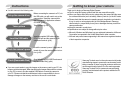
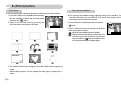
■ Use this camera in the following order
Set up the camera driver
Take a picture
Insert the USB cable
Before connecting the camera to a PC, via
the USB cable, you will need to set up the
camera driver. Install the camera driver
that is contained in Application software
CD-ROM. (p.80)
Take a picture. (p.16)
Insert the supplied USB cable into the
PC’s USB port and the camera’s USB
connection terminal. (p.82)
Check the camera’s power
Check the camera’s power. If the power is
turned off, press the camera button to turn
it on. (p.20)
Check [Removable Disk]
Open Window’s EXPLORER and search
for [Removable Disk]. (p.84)
● If you use a card reader to copy the images on the memory card to your PC, the
images could be damaged. When transferring the images taken with the camera
to your PC, be sure to use the supplied USB cable to connect the camera to
your PC. Please note that the manufacturer holds no responsibility for loss or
damage of images on the memory card due to the use of a card reader.
Thank you for buying a Samsung Digital Camera.
● Prior to using this camera, please read this user manual thoroughly.
● When you require After Sales service, please bring the camera and the cause of
the camera malfunction (such as battery, Memory card etc.) to the A/S centre.
● Please check that the camera is operating properly long before you intend to use
it (e.g. for a trip or an important event) to avoid disappointment. Samsung
camera takes no responsibility for any loss or damages that may result from
camera malfunction.
● Keep this manual in a safe place.
● Specifications are subject to change without prior notice.
Microsoft, Windows and Windows logo are registered trademarks of Microsoft
Corporation incorporated in the United States and/or other countries.
All brand and product names appearing in this manual are registered trademarks
of their respective companies.
Samsung Techwin cares for the environment at all product
manufacturing stages to preserve the environment, and is
taking a number of steps to provide customers with more
environment-friendly products.The Eco mark represents
Samsung Techwin’s will to create environment-friendly
products, and indicates that the product satisfies the EU
RoHS Directive.
《1》
DANGER
DANGER indicates an imminently hazardous situation which, if not avoided, will
result in death or serious injury.
■ Do not attempt to modify this camera in any way. This may result in fire, injury, electric
shock or severe damage to you or your camera. Internal inspection, maintenance and
repairs should be carried out by your dealer or Samsung Camera Service centre.
■ Please do not use this product in close proximity to flammable or explosive
gases, as this could increase the risk of explosion.
■ Should any form of liquid or a foreign object enter the camera, do not use it. Switch off the camera,
and then disconnect the power source. You must contact your dealer or Samsung Camera
Service centre. Do not continue to use the camera as this may cause a fire or electric shock.
■ Do not insert or drop metallic or inflammable foreign objects into the camera through access
points e.g. the memory card slot and battery chamber. This may cause a fire or electric shock.
■ Do not operate this camera with wet hands. This could pose a risk of electric shock.
《2》
WARNING
WARNING indicates a potentially hazardous situation which, if not avoided, could
result in death or serious injury.
■ Do not use the flash in close proximity to people or animals. Positioning the flash
too close to your subject’s eyes may cause eyesight damage.
■ For safety reasons keep this product and accessories out of reach of children or
animals to prevent accidents e.g.:
•Swallowing battery or small camera accessories. If an accident should occur,
please consult a doctor immediately.
•There is the possibility of injury from the camera’s moving parts.
■ Battery and camera may become hot during prolonged use and it may result in camera malfunction.
Should this be the case, allow the camera to sit idle for a few minutes to allow it time to cool.
■ Do not leave this camera in places subject to extremely high temperatures, such as a sealed
vehicle, direct sunlight or other places of extreme variances in temperature. Exposure to extreme
temperatures may adversely affect the camera’s internal components and could cause a fire.
■ When in use, do not cover the camera or AC Charger. This may cause heat to build up and distort the
camera body or cause a fire. Always use the camera and its accessories in a well-ventilated area.
CAUTION
CAUTION indicates a potentially hazardous situation which, if not avoided, may
result in a minor or moderate injury.
■ Leaking, overheating, or burst battery could result in fire or injury.
•Use battery with the correct specification for the camera.
•Do not short circuit, heat or dispose of battery in a fire.
•Do not insert the battery with the polarities reversed.
■ Remove the battery when not planning to use the camera for a long period of
time. Battery may leak corrosive electrolyte and permanently damage the
camera’s components.
■ Do not fire the flash while it is in contact with hands or objects. Do not touch the
flash after using it continuously. It may cause burns.
■ If you are using the AC Charger to drive the camera, do not move the camera
while it is switched on.
After use, always switch off the camera before unplugging the cable from the
wall socket. Then make sure that any connector cords or cables to other devices
are disconnected before moving the camera. Failure to do so may damage the
cords or cables and cause a fire or electric shock.
■ Take care not to touch the lens or the lens cover to avoid taking an unclear
image or causing a camera malfunction.
■ Avoid obstructing the lens or the flash when you capture an image.
■ Low temperatures can affect the performance of the LCD monitor and you may
experience the following problems. (These problems will usually disappear at
normal operating temperatures and are perfectly normal.)
- The time of power on can be delayed and the colour of LCD monitor can be
changed slightly.
- Fast movement, when pointing the camera at the subject, can make an afterimage appear on the LCD monitor.
■ Credit cards may be demagnetized if left near case. Avoid leaving magnetic strip
cards near the case.
Contents
READY
●System chart ………………………5
●Identification of features ……………6
■Front & Top …………………………6
■Back & Bottom ……………………7
■Bottom/ 5-function button …………8
■Cradle (optional) ……………………8
■Self-timer lamp ……………………9
■Camera Status Lamp………………9
■Mode icon …………………………9
●Connecting to a Power Source ……9
●Inserting the memory card ………12
●Instructions on how to use the memory
card …………………………………12
●When Using the Camera for the
First Time …………………………14
RECORDING
●LCD monitor indicator ……………15
●Starting the recording mode………16
■How to use the Auto mode ………16
■How to use the Program mode …16
■How to use the ASR (Advanced
Shake Reduction) mode …………17
■Wise Shot …………………………17
■How to use the Scene modes ……18
■How to use the Movie clip mode …18
■Recording the movie clip without
voice ………………………………19
■Pausing while recording a movie
clip …………………………………19
■How to use the VOICE RECORDING
mode ………………………………19
■ Pausing while recording a voice …19
●Things to watch out for when taking
pictures ……………………………20
●Using the camera buttons to set the
camera ……………………………20
■POWER button……………………20
■SHUTTER button …………………20
●ZOOM W/ T button ………………21
●Voice recording / Voice memo /
UP button …………………………22
●Macro/ Down button ………………23
●Focus lock …………………………24
●Flash / Left button …………………24
●Self-timer / Right button …………26
●MENU/ OK button …………………27
●+/- button …………………………27
●E (Effect) button……………………31
■Colour ……………………………31
■Preset focus frames ………………32
■Composite shooting ………………33
■Photo Frame………………………34
■Movie Clip frame stabiliser ………34
●Using the LCD monitor to adjust
the camera settings ………………35
●How to use the menu ……………35
●Size…………………………………36
●Quality/ Frame rate ………………36
《3》
Contents
●Metering ……………………………37
●Continuous shot……………………37
●Sharpness …………………………38
●Auto Focus type……………………38
●OSD(On Screen Display)
information …………………………39
PLAY
●Starting play mode ………………40
■Playing back a still image ………40
■Playing back a movie clip ………40
■Movie clip capture function ………40
■On camera movie trimming………41
■Playing back a recorded voice …41
●LCD monitor indicator ……………42
●Using the camera buttons to adjust
the camera …………………………42
■Play mode button …………………42
●Thumbnail / Enlargement button/
Volume button ……………………43
●Voice memo/ Up button …………44
●Play & Pause / Down button ……45
●Left/ Right/ Menu/ OK button ……45
●E (Effect) button……………………46
●Delete button ………………………46
●Printer button ……………………46
●Setting up the play back function
using the LCD monitor ……………47
●Starting the slide show ……………48
●Protecting images …………………49
《4》
●Deleting images……………………50
●Resize………………………………50
●Rotating an image …………………51
●DPOF ………………………………51
●DPOF : STANDARD………………52
●DPOF : Index………………………52
●DPOF : Print size …………………53
●On Screen Display information …53
●Copy To Card ……………………54
●PictBridge …………………………54
●PictBridge : Picture Selection ……55
●PictBridge : Print Setting …………56
●PictBridge : Reset …………………56
SETUP
●Setup menu ………………………57
■File name …………………………58
■Auto power off ……………………58
■Language …………………………58
■Format ……………………………59
■Setting up the Date/ Time/ Date type …59
■Imprinting the recording date ……59
■Sound ……………………………60
■Connecting an External Device
(USB)………………………………60
■AF Sound …………………………60
■Auto Focus lamp …………………60
■LCD brightness……………………61
■Selecting Video out type …………61
■Quick view…………………………62
■Initialisation ………………………62
●Setting up the Mycam menu ……62
●Start up image ……………………63
●Start up sound ……………………63
●Shutter sound ……………………63
MP3 / PMP / TEXT VIEWER MODE
●MP3 / PMP / TEXT VIEWER
mode ………………………………63
●Downloading files …………………63
●Starting the MP3 / PMP /TEXT
VIEWER mode ……………………64
●LCD monitor indicator for MP3/ PMP/
TEXT VIERWER mode……………66
●Using the camera buttons to
adjust the camera …………………67
■Volume button ……………………67
■Play & Pause/ Control button ……67
■Delete button ……………………67
■Hold / Equalizer button……………68
■Playlist button ……………………68
●Setting up the play back function
using the LCD monitor ……………69
■Resume……………………………70
■Play mode …………………………70
■Skin of MP3 player ………………70
■Delete all …………………………71
■Setting slide show interval ………71
■Playing back the slide show ……71
■Frame search ……………………71
■Display setting ……………………72
■Setting up the recording function in
the MP3 mode ……………………72
■Auto Scroll …………………………72
■MP3 BGM Setting …………………72
■Language setting……………………72
●Important notes ……………………73
●Warning indicator …………………74
●Before contacting a service centre…75
●Specification ………………………76
SOFTWARE
●Software Notes ……………………79
●System Requirements ……………79
●About the software ………………79
●Setting up the application software …80
●Starting PC mode …………………82
●Removable Disk …………………83
●Removing the removable disk ……84
●Setting up the USB Driver for MAC …85
●Using the USB Driver for MAC …85
●Removing the USB Driver for
Windows 98SE ……………………85
●Digimax Converter ………………86
●Digimax Master ……………………87
●FAQ ………………………………90
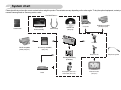
System chart
Please check that you have the correct contents before using this product. The contents can vary depending on the sales region. To buy the optional equipment, contact your
nearest Samsung dealer or Samsung service centre.
< Included items >
Camera case
User manual,
Product warranty
PictBridge compatible
printer(see p.54)
Computer
Camera strap
Software CD
(see p.79)
AV cable
DPOF compatible
printer (see p.51)
SD memory card/MMC
(see p.12)
Earphones AV
Earphones gender
Rechargeable battery
(SLB-0837)
Cradle
AC adapter (SAC-45) /
USB cable (SUC-C2)
External monitor
(see p.61)
《5》
Identification of features
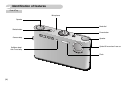
Front & Top
Microphone
Speaker
Mode dial
Shutter button
Power button
Camera strap
Self-timer lamp /
Auto Focus lamp
Speaker
Optical 3X zoom lens/ Lens cover
Flash
《6》
Identification of features
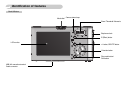
Back & Bottom
Mode dial
Camera status lamp
Zoom/ Thumbnail/ Volume button
Earphones Jack
E (Effect) button
LCD monitor
+/- button, DELETE button
5 function button
Play mode button /
Print button
USB/ AV connection terminal
Cradle connector
《7》
Identification of features
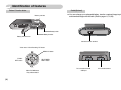
Bottom/ 5-function button
Cradle(Optional)
■ You can recharge your rechargeable battery, transfer a captured image to print,
and download images with the cradle. (Refer to pages 11, 54, 83)
Memory card slot
Battery holder
Battery chamber
Battery chamber cover
Camera connection terminal
Voice memo / Voice Recording / UP button
MENU/ OK button
FLASH/
LEFT button
SELF-TIMER/
RIGHT button
Macro/ DOWN button,
Play & Pause button
《8》
DC connection terminal
/ USB port
AV connection terminal
Identification of features
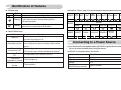
■ Self-timer lamp
Icon
■ Mode icon : Refer to page 16 for more information about the camera mode setting.
Status
Blinking
Description
For 2 seconds the lamp blinks quickly at 0.25-second intervals.
For the first 8 seconds, the lamp blinks at 1 second intervals.
Blinking For the final 2 seconds, the lamp blinks quickly at
0.25-second intervals.
A picture will be taken after about 10 seconds and 2
Blinking
seconds later a second picture will be taken.
VOICE
MODE RECORDING MP3
TEXT
PMP VIEWER MOVIE AUTO PROGRAM ASR
PLAY
Icon
SCENE
MODE
NIGHT
PORTRAIT CHILDREN LANDSCAPE CLOSE UP
TEXT
Icon
■ Camera Status Lamp
Status
Power on
After taking a picture
MODE SUNSET
Description
The lamp turns on; when the camera is ready to take
a picture the lamp turns off.
The lamp blinks while saving the image data and then
turns off when the camera is ready to take another
picture
The lamp lights up
(LCD monitor turns off after initializing the device)
USB cable is
connected to a PC
Transmitting Data to a
The lamp blinks (LCD monitor turns off)
PC
USB cable is
The lamp lights up
connected to a printer
When the printer is
The lamp blinks
printing
DAWN
BACKLIGHT FIREWORKS
BEACH &
SNOW
-
Icon
Connecting to a Power Source
■ You should use the rechargeable battery (SLB-0837) supplied with the camera.
Be sure to charge the battery before using the camera.
■SLB-0837 rechargeable battery Specification
Model
Type
Capacity
Voltage
SLB-0837
Lithium Ion
860mAh
3.7V
Charging time
(When the camera is turned off)
Approx. 150 MIN
《9》
Connecting to a Power Source
■ Number of images and battery life : Using the SLB-0837
Battery life / Number of
images
Based on the following shooting conditions
Using the fully charged battery, Auto mode,
7M image size, Fine image quality, Shot to
Approx. 100 MIN / shot interval : 30Sec.
Still image
Changing the zoom position between the Wide
About 200 shots and the Tele after every shot. Using the flash
on every second shot.Using the camera for 5
minutes and then Powering it off for 1 minute.
Movie
MP3
PMP
Using the fully charged battery
640X480 image size/ 30fps frame rate
Approx. 240 MIN Using the fully charged battery LCD Off.
Approx. 135 MIN Using the fully charged battery
Approx. 90 MIN
■ You can charge the rechargeable battery (SLB-0837) by using the SAC-45 KIT which
consists of the AC adapter (SAC-45) and the USB cable (SUC-C2). When the SAC-45
and SUC-C2 are combined, they can be used as an AC cable.
● Using an AC cable
: Connect the AC adapter to the USB cable. It can be
used as a power cable.
● Using a USB cable
: Remove the AC adapter (SAC-45). You can
download stored images to your PC (p.83) or supply
the power to your camera through the USB cable.
※These figures are measured under Samsung’s standard conditions and shooting
conditions and may vary depending on the user's methods.
INFORMATION
Important information about battery usage.
● When the camera is not used, turn off the camera power.
● Please remove the battery if the camera will not be used for long periods.
Batteries can lose power over time and are prone to leaking if kept inside the camera.
● Low temperatures (below 0˚C) can affect the performance of the battery
and you may experience reduced battery life.
● Batteries will usually recover at normal temperatures.
● During extended use of the camera, the camera body may become warm.
This is perfectly normal.
● When you use earphones, do not remove the battery while the camera is
turning on. It may generate a loud noise.
《10》
CAUTION
Important information about USB cable usage.
● Use a USB cable (SUC-C2) with the correct specification.
● If the camera is connected to the PC through a USB hub :
connect the camera directly to the PC.
● If the camera and other devices are connected to the PC at the same time :
remove other device.
● If the USB cable is connected to a port located on the front of the PC :
remove the cable and connect it to a port located on the back of the PC.
● If the USB port of the PC doesn't meet the Power output standard (5V, 500mA), the
camera may not be charged.
Connecting to a Power Source
■You can charge the rechargeable battery (SLB-0837) by using the cradle.
■How to charge the rechargeable battery (SLB-0837)
● Charging with the cradle
CAUTION
● Before inserting any cables or AC adapter, check the directions and do not
insert by force. It may cause breakage of cable or camera.
● If the charging LED of the AC Charger does not turn on or blink after
inserting the rechargeable battery, please check whether the battery is
inserted correctly.
● If you charge the battery with the camera power on, the battery can't charge
fully. Turn the camera off while charging the battery.
■ Charging LED of the AC Adapter
Being Charged
Charging is complete
Charging error
● Charging with the camera
Charging LED
Being discharged
(Using the AC adapter)
Charging LED
Red LED is on
Green LED is on
Red LED is off or blinking
Orange coloured LED is on
● If you insert the fully discharged battery to charge it, do not turn on the camera at
the same time. The camera may not be turned on because of the low battery
capacity. Charge the battery for more than 10 minutes before using the camera.
● Do not use the flash frequently or take a movie clip with the fully discharged
battery charged for a short time. Even if the charger is inserted, the camera
power may be turned off because the rechargeable battery is discharged again.
● When you charge the battery with the cradle, you only can use Lithium Ion
battery pack (SLB-0837).
《11》
Connecting to a Power Source
■ Insert the battery as shown
- If the camera does not turn on after you
have inserted battery, please check
whether the battery is inserted with the
correct polarity (+ / -).
- When the battery chamber cover is opened,
do not press the battery chamber cover by
force. This may cause damage to the
battery chamber cover.
■ There are 4 indicators for battery condition that are displayed on the LCD monitor.
Battery
indicator
Battery
status
The battery is
fully charged
Low battery capacity Low battery capacity Low battery capacity
(Prepare to recharge (Prepare to recharge (Prepare to recharge
or use spare battery) or use spare battery) or use spare battery)
Inserting the memory card
■ Insert the memory card as shown.
- Turn off the camera’s power before
inserting the memory card.
- Have the front of the memory card
facing toward the front of the camera
(lens) and the card pins toward the back
of the camera (LCD monitor).
- Do not insert the memory card the
wrong way round. Doing so may
damage the memory card slot.
《12》
Instructions on how to use the memory card
● Be sure to format the memory card (see p.59) if you are using a newly
purchased memory for the first time, if it contains data that the camera cannot
recognise, or if it contains images captured with a different camera.
● Turn off the camera power whenever the memory card is being inserted or
removed.
● Repeated use of the memory card will eventually reduce the memory card’s
performance. Should this be the case, you will need to purchase a new memory
card. Wear and tear on the memory card is not covered by the Samsung
warranty.
● The memory card is an electronic precision device.
Do not bend, drop or subject the memory card to any heavy impact.
● Do not store the memory card in an environment with strong electronic or
magnetic fields, e.g. near loud speakers or TV receivers.
● Please do not use or store in an environment where there are extremes in
temperature.
● Do not allow the memory card to become dirty or to come into contact with any
liquid. Should this happen, clean the memory card with a soft cloth.
● Please keep the memory card in its case when not in use.
● During and after periods of extended use, you may notice that the memory card
is warm. This is perfectly normal.
● Do not use a memory card that is used in another digital camera.
To use the memory card in this camera, format the memory card using this
camera.
● Do not use a memory card formatted by another digital camera or memory card
reader.
● If the memory card is subjected to any of the following, the recorded data may
become corrupted :
- When the memory card is used incorrectly.
- If the power is switched off or the memory card is removed while recording,
deleting (formatting) or reading.
Instructions on how to use the memory card
● Samsung cannot be held responsible for lost data.
● It is advisable to copy important data onto other media as back-up e.g. floppy
disks, hard disks, CD etc.
● If there is insufficient memory available
: A [Memory Full!] message will appear and the camera will not operate. To
optimise the amount of memory in the camera, replace the memory card or
delete unnecessary images stored on the memory card.
■ When using a 256MB MMC (Multi Media Card), the specified shooting capacity
will be as follows. These figures are approximate as image capacities can be
affected by variables such as subject matter and memory card type.
Recorded image size Super Fine
INFORMATION
● Don't remove the memory card when the camera status lamp is blinking as
this may cause damage to data in the memory card.
Still
image
■ The camera can use SD Memory Cards and MMC (Multi Media Cards).
When using MMC cards, please consult the instructions supplied with the cards.
Movie
Card pins
Write protect
switch
Label
[ SD (Secure Digital) memory card ]
The SD memory card has a write protect
switch that prevents image files from being
deleted or formatted. By sliding the switch
towards the bottom of the SD memory
card, the data will be protected. By sliding
the switch towards the top of the SD
memory card, the data protection will be
cancelled. Slide the switch towards the top
of the SD memory card before taking a
picture.
30FPS
20FPS
15FPS
7M
Approx. 63 Approx. 116 Approx. 171
-
-
-
6M
Approx. 74 Approx. 138 Approx. 195
-
-
-
5M
Approx. 88 Approx. 162 Approx. 223
-
-
-
Approx. 88
Approx. 162 Approx. 223
-
-
-
4M
Approx. 118 Approx. 202 Approx. 274
-
-
-
3M
Approx. 131 Approx. 236 Approx. 318
-
-
-
2M
Approx. 208 Approx. 332 Approx. 422
-
-
-
1M
Approx. 381 Approx. 520 Approx. 600
-
-
-
VGA
Approx. 1201 Approx. 1420 Approx. 1736
-
-
-
5M(W)
Fine
Normal
720
-
-
-
-
About 13’ 36’’
-
640
-
-
-
320
-
-
-
About 17’ 19’’
About 37’ 24’’
-
About 33’ 3’’
About 69’ 36’’
※ The recording times can be changed by the zoom operation.
The zoom button doesn't operate while recording movies.
《13》
When Using the Camera for the First Time
■ When the camera is turned on for the first time, a menu will be displayed to set
date, time and language in the LCD monitor. This menu will not be displayed
again after setting up the date, time and language. Set up the date, time and
language before using this camera.
● Setting up the date, time and date type
SETUP
1. Select the [Date&Time] menu by pressing the
Date&Time
▲
Language
06/07/01
UP/DOWN button and press the RIGHT button.
▼
13:00
2. Select the desired sub menu by pressing the
yy/mm/dd
UP/ DOWN/ LEFT/ RIGHT button.
Back:◀
Set:OK
RIGHT button : selects YEAR/ MONTH/ DAY/
HOUR/ MINUTE/ DATE TYPE
LEFT button : Moves the cursor to the [Date&Time] main menu if the cursor is
at the first item of the date and time setup. In all other instances,
the cursor will be shifted to the left of its current position.
UP/ DOWN button : changes the value of each item.
《14》
● Setting up the language
1. Select the [Language] menu by pressing the
UP/DOWN button and press the RIGHT button.
2. Select the desired sub menu by pressing the UP/
DOWN button and press the OK button.
SETUP
Date&Time
Language
Back:◀
ENGLISH
한국어
FRANÇAIS
DEUTSCH
ESPAÑOL
Set:OK
INFORMATION
● You can select one of the following 22 languages. :
- English, Korean, French, German, Spanish, Italian, S.Chinese, T.Chinese,
Japanese, Russian, Portuguese, Dutch, Danish, Swedish, Finnish, Thai,
BAHASA(MALAY/ INDONESIAN), Arabic, Polish, Hungarian, Czech and
Turkish.
● Even if the camera is restarted, the language setting will be maintained.
LCD monitor indicator
■ The LCD monitor displays information about the shooting functions and
selections.
⑳
①
⑲
②
⑱
③
⑰
④
⑯
⑤
⑮
⑥
⑭
⑦
⑬
⑧
⑫
⑨ ⑩
Description
1
Recording mode
Description
Icons
Page
8
Card inserted indicator
9
Auto focus frame
-
10
Camera shake warning
p.20
11
Date/ Time
12
Exposure compensation
13
White Balance
p.29
14
ISO
p.28
15
RGB
-
2006/07/01 01:00 PM
p.59
p.30
RGB
p.28
16
Sharpness
p.38
17
Image quality / Frame rate
p.36
18
Image size
P.36
⑪
[Image & Full Status]
No.
No.
Icons
Page
p.9
2
Battery
p.12
3
Continuous shot
p.37/17
4
Flash
p.24
5
Self-timer
p.26
6
Macro
p.23
7
Metering
p.37
Number of available
shots remaining
8
P.13
Remaining time
(Movie clip/ Voice recording)
00:01:30/ 00:30:00
P.13
19
20
Voice memo/ Mic. off
p.22/19
21
Optical/ Digital Zoom bar
/Digital Zoom rate
P.21
《15》
Starting the recording mode
■ How to use the AUTO mode (
)
Please select this mode for quick and easy picture taking with minimal user
interaction.
1. Insert the batteries (p.12) taking note of the
polarity (+ / -).
2. Insert the memory card (p.12). As this camera
has a 15MB internal memory, it is not essential to
nsert the memory card. If the memory card is not
inserted, an image will be stored in the internal
memory. If the memory card is inserted, an image
will be stored on the memory card.
3. Close the battery chamber cover.
4. Press the power button to turn on the camera.
(If the date/ time that is displayed on the LCD
[ AUTO mode ]
monitor is incorrect, reset the date/ time before
taking a picture.)
5. Select the AUTO mode by rotating the mode dial.
6. Point the camera towards the subject and compose the image by using the
LCD monitor.
7. Press the shutter button to capture an image.
INFORMATION
● If the auto focus frame turns to red when you press the shutter button down
half way, it means that the camera cannot focus on the subject. Should this
be the case, the camera is unable to capture an image clearly.
《16》
■ How to use the PROGRAM mode (
)
Selecting the automatic mode will configure the
camera with optimal settings. You can still manually
configure all functions except the aperture value and
shutter speed.
1. Select the PROGRAM mode by rotating the mode
dial.
2. Press the menu button to configure advanced
functions such as image size (p.35), quality (p.36),
metering (p.37), continuous shooting (p.37),
sharpness (p.38), AF type (p.38) and OSD
information (p.39).
[ PROGRAM mode ]
Starting the recording mode
■ How to use the ASR (Advanced Shake Reduction) mode (
)
The ASR mode can help you get clearer pictures by minimizing camera shake.
■ Wise Shot
2 images are taken at a time. One is taken in the Fill-In Flash mode and the other
is taken in the ASR mode. You can select and save only one of the images.
● Things to watch out for using the ASR mode
1. The digital zoom will not operate in the ASR
mode.
2. If the lighting conditions are brighter than
fluorescent lighting condition, the ASR doesn’t
activate.
3. If the lighting condition is darker than in
fluorescent lighting condition, camera shake
warning indicator (
) will display. For best
results only take pictures in situations where the
camera shake warning indicator is not displayed.
[ ASR mode ]
4. If the subject is moving, the final image captured
may be blurred.
5. Avoid moving the camera while the [Capturing!] message is displayed to
achieve a better result.
6. As the ASR uses the camera’s digital processor, images taken using the ASR
may take a little longer for the camera to process.
● How to use the Wise Shot
1. Select the ASR mode by rotating the mode dial.
2. Press the E button and the Wise Shot function is
activated.
3. Press the Shutter button to capture images.
4. Captured images are displaying.
- To select image, press the Left/Right button.
- To change the enlarged part, press the E button and 5 function button.
- Press the E button again and the enlarged part will be changed automatically.
Image with the ASR
mode
Image with Flash
Enlarged image
Enlarged image
Save: OK
Move:E
5. Press the OK / Shutter button and the selected image will be saved.
INFORMATION
● The 3072X1728 image size can't be selected when using this function.
● In the Wise shot mode, the shutter speed value shown on the LCD monitor may be
different with the real shutter speed.
《17》
Starting the recording mode
■ How to use the SCENE mode (
)
Use the menu to easily configure optimal settings
for a variety of shooting situations.
1. Select the SCENE mode by rotating the mode
dial.
2. Press the menu button and select a desired
scene menu.
[SCENE mode]
※ The scene modes are listed below.
[Nightscene] (
) : Use this for shooting still images at night or in other
dark conditions.
[Portrait]
(
) : To take a picture of a person.
[Children]
(
) : To take a picture of fast moving objects, for example,
children.
[Landscape] (
) : To take pictures of distant scenery.
[Close up]
(
) : Close-up shooting for small objects such as plants and
insects.
[Text]
(
) : Use this mode to shoot a document.
[Sunset]
(
) : For taking pictures of sunsets.
[Dawn]
(
) : Daybreak scenes.
[Backlight]
(
) : Portrait without shadows caused by backlight.
[Firework]
(
) : Firework scenes.
[Beach&Snow](
) : For ocean, lake, beach and snow scape scenes.
《18》
■ How to use the MOVIE CLIP mode (
)
A movie clip can be recorded for as long as the
available recording time of the memory capacity
allows.
1. Select the MOVIE CLIP mode by rotating the
mode dial. (Available recording time will display
on the LCD monitor)
2. The MOVIE CLIP mode icon and available
recording time will display on the LCD monitor.
3. Point the camera towards the subject and
compose the image by using the LCD monitor.
[MOVIE CLIP mode]
Press the shutter button and movie clips are
recorded for as long as the available recording time allows. Movie clips will still
be recorded if the shutter button is released.
If you wish to stop recording, press the shutter button again.
* Image size and type are listed below.
- Image size : 720X480, 640X480, 320X240 (Selectable)
- File type : *.avi (MPEG-4)
Starting the recording mode
■ Recording the movie clip without voice
You can record the movie clip without voice.
1. Press the Up button and the (
) icon will display
on the LCD monitor.
2. Press the shutter button and movie clip is recorded
without voice for as long as the available recording
time allows.
3. To stop the recording, press the shutter button again.
[ MOVIE CLIP mode ]
■ Pausing while recording a movie clip (Successive Recording)
This camera allows you to temporarily stop during unwanted scenes, while
recording a movie clip. Using this function, you can record your favourite scenes
into a movie clip without having to create multiple movie clips.
1. Press the Pause button while recording a movie clip
and the recording will be paused.
2. Press the Pause button again to resume the
recording.
3. If you wish to stop recording, press the shutter button
again.
[Successive recording
of a movie clip]
■ How to use the VOICE RECORDING mode
A voice recording can be recorded for as long as the memory capacity allows.
(Max: 1 hour).
1. In any mode with the exception of Movie clip mode,
select the VOICE RECORDING mode by pressing
the Voice recording button twice.
2. Press the shutter button to record a voice.
- Press the shutter button once and voice is recorded
for as long as the available recording time
[Voice recording mode]
allows (Max : 1 hour). Voice will still be recorded if
the shutter button is released.
- If you wish to stop recording, press the shutter button again.
- File type : *.wav
● Pausing while recording a voice
Using this function, you can record your favorite voice clips into a voice recording
file without having to create multiple voice recording files.
1. Press the Pause button (
) to pause recording.
2. Press the Pause button (
) again to resume the
recording.
3. If you wish to stop recording, press the shutter button
again.
※ If a camera button is pressed during the movie recording, camera operation
sound can be recorded.
[Pausing the voice recording]
INFORMATION
● A distance of 40cm between you and the camera (microphone) is the best
distance to record sound.
● If the camera power is turned off while the voice recording is paused, the
voice recording is cancelled.
《19》
Things to watch out for when taking pictures
■ Pressing the shutter button down half way.
Lightly press the shutter button to confirm focus and flash battery charge.
Press the shutter button all way down to take the picture.
Using the camera buttons to set the camera
■ The recording mode function can be set up by using the camera buttons.
POWER button
[Lightly press the shutter button]
[Press the shutter button]
■ The available recording time may vary depending on shooting conditions and
camera settings.
■ When the Flash Off or Slow synchro mode is selected in a low lighting condition,
the camera shake warning indicator (
) may appear on the LCD monitor. In
this case, use a tripod, support the camera on a solid surface or change to flash
shot mode.
■ Shooting against the light :
Do not take pictures into the sun. Taking a picture against the sun may make the
picture dark. To take a picture against the sun, please use the [Backlight] in the
scene shooting mode (see page 18), fill-in flash (see page 25), spot metering
(see page 37), or exposure compensation (see page 30).
■ Avoid obstructing the lens or the flash when you capture an image.
■ Compose the image by using the LCD monitor.
■ Under certain conditions the auto focus system may not perform as expected.
- When photographing a subject that has little contrast.
- If the subject is highly reflective or shiny.
- If the subject is moving at high speed.
- When there is strong reflected light, or when the background is very bright.
- When the subject matter has only horizontal lines or the subject is very narrow
(such as a stick or flagpole).
- When the surroundings are dark.
《20》
● Used for turning the camera’s power on/ off.
● If there is no operation during the specified time, the
camera's power will be turned off automatically to
save battery life.
Refer to page 58 for more information about the auto
power off function.
SHUTTER button
● Used for taking an image or recording voice in the
RECORDING mode.
● In MOVIE CLIP mode :
Pressing the shutter button down fully starts the
process for recording a movie clip. Press the shutter
button once and the movie clip is recorded for as long as
the available recording time in the memory allows. If you wish to stop recording,
press the shutter button again.
● In STILL IMAGE mode
Pressing the shutter button down halfway activates the autofocus and checks
the condition of the flash. Pressing the shutter button down fully takes and stores
the image. If you select voice memo recording, the recording will start after the
camera has finished storing the image data.
ZOOM W/ T button
● This camera has a 3X optical zoom and a 5X
digital zoom function.
Using both will offer a total zoom ratio of 15X.
● WIDE Zoom
Optical zoom WIDE : Pressing the ZOOM W button. This will zoom out from
the subject i.e. the subject will appear farther away.
Pressing the ZOOM W button continuously will set the
camera to its minimum zoom setting i.e. the subject
appears at its farthest from the camera.
● TELE Zoom
Optical zoom TELE : Pressing the ZOOM T button. This will zoom into the
subject i.e. the subject will appear nearer.
Digital zoom TELE : When the maximum (3X) optical zoom is selected,
pressing the ZOOM T button activates the digital zoom
software. Releasing ZOOM T button stops the digital
zooming at the required setting. Once the maximum
digital zoom (5X) is achieved, pressing the ZOOM T
button will have no effect.
[ TELE zoom ]
Optical zoom
Digital zoom
[WIDE zoom]
[TELE zoom]
[ Optical zoom 2X ]
Digital zoom WIDE
Pressing
the ZOOM
T button
Pressing
the ZOOM
T button
Pressing
the ZOOM
W button
Pressing
the ZOOM
W button
[ WIDE zoom ]
: When the digital zoom is in operation, pressing the
ZOOM W button will reduce the digital zooming in
steps. Releasing ZOOM W button stops digital
zooming. Pressing the ZOOM W button will reduce the
digital zoom and then it will continue to reduce the
optical zoom until the minimum setting is reached.
[Digital zoom 5X]
Pressing
the ZOOM
W button
Pressing
the ZOOM
W button
[ Digital zoom 5X ]
[ TELE zoom ]
[ WIDE zoom ]
《21》
ZOOM W/ T button
INFORMATION
● Images taken using the digital zoom may take a little longer for the camera
to process. Allow time for this to take place.
● You may notice a decrease in image quality when using the digital zoom.
● To view a clearer digital zoom image, press the shutter button halfway at the
maximum optical zoom position and press the zoom T button again.
● The digital zoom can’t be activated in the [Nightscene], [Children],
[Closeup], [Text], [Fireworks] scene modes, the Movie clip mode, the ASR
(Wise shot)mode and the [Highlight], [Photo Frame], [Composite] effect
menu.
● Take care not to touch the lens as this may cause a camera malfunction.
Voice recording(
)/ Voice memo(
)/ UP button
■ While the menu is showing, press the UP button to move up the sub menu.
When the menu is not displayed on the LCD monitor, the UP button operates as
the voice recording or voice memo button. You can add your voice-over to a
stored still image. Refer to page 19 for more information about the voice
recording.
● Recording a voice memo
1. Rotate the MODE DIAL to select a RECORDING mode with the exception of
MOVIE CLIP mode.
2. Press the VOICE MEMO (
) button. If the voice memo indicator is
displayed on the LCD monitor, the setting is completed.
[Preparing for Voice Memo]
[Recording Voice Memo]
3. Press the shutter button and take a picture. The picture is stored on the
memory card.
4. Voice memo will be recorded for ten seconds from the moment the picture is
stored. In the middle of the sound recording, pressing the shutter button will
stop the voice memo.
INFORMATION
● A distance of 40cm between you and the camera (microphone) is the best
distance to record sound.
《22》
Macro (
)/ Down button
■ While the menu is showing, the DOWN button operates
as a direction button. When the menu is not showing,
you can use the MACRO/ DOWN button to take macro
pictures. The distance ranges are shown below.
Press the Macro button until the desired macro mode
indicator displays on the LCD monitor.
INFORMATION
[Auto focus - No icon]
●When the macro mode is selected, be particularly careful to avoid camera
shake.
●When you take a picture within 20cm (Wide zoom) or 30cm (Tele zoom) in
the Macro mode, select the FLASH OFF mode.
●When you take a picture within the 5cm Super macro range, the auto-focus
on the camera will take longer to set the correct focus distance.
■ Available focusing method, by recording mode
( O: Selectable , X: Not selectable, ∞: Infinity focus range)
[Auto macro (
)]
[Super Macro (
)]
■ Types of focus modes and focus ranges (W: Wide, T: Tele)
Mode
Focus Type
Focus range
Mode
Focus Type
Focus range
Mode
Focus Type
Focus range
Super macro(
W : 1~5
(Wide only)
)
Super macro(
W : 1~5
(Wide only)
)
Super macro(
)
-
Auto(
)
Auto macro(
)
W : 5~Infinity
T : 50~Infinity
Program(
)
Macro(
)
W : 5~50
T : 25~50
ASR mode(
)
Auto Macro(
)
W : 5~Infinity
T : 50~Infinity
[Macro (
)]
(Unit : cm)
Mode
Auto macro
Super macro
Macro
Normal
X
X
O
O
O
O
X
O
Auto macro
Super macro
Macro
Normal
O
X
X
O
SCENE
Mode
Normal
W : 50~Infinity
T : 50~Infinity
X
O
O
O
X
X
X
O
X
X
X
O
X
X
X
O
X
X
X
∞
X
X
O
X
O
X
X
X
X
X
X
∞
X
X
X
∞
X
X
X
O
X
X
X
∞
X
X
X
O
Normal
W : 50~Infinity
T : 50~Infinity
Normal
W : 50~Infinity
T : 50~Infinity
《23》
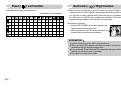
Focus lock
Flash (
■ To focus on a subject not positioned in the centre of the picture, use the focus
lock function.
● Using the Focus Lock
1. Ensure the subject is in the centre of the autofocus frame.
2. Press the SHUTTER button halfway. When the green auto focus frame lights
up, it means the camera is focused on the subject. Be careful not to press the
SHUTTER button all the way down to avoid taking an unwanted picture.
3. With the SHUTTER button still pressed down only halfway, move the camera
to recompose your picture as desired, and then press the SHUTTER button
completely to take the picture. If you release your finger from the SHUTTER
button, the focus lock function will be cancelled.
)/ Left button
■ When the menu is displayed on the LCD monitor,
pressing the LEFT button makes the cursor shift to the
left tab.
■ When the menu is not displayed on the LCD monitor,
the LEFT button operates as the FLASH button.
● Selecting the flash mode
[Selecting the Auto flash]
1. Rotate the MODE DIAL to select a RECORDING
mode with the exception of Movie clip and Motion capture modes.
2. Press the Flash button until the desired flash mode indicator displays on the
LCD monitor.
3. A flash mode indicator will be displayed on the LCD monitor.
Use the correct flash to suit the environment.
(Unit : m)
● Flash range
ISO
1. The image to be
captured.
《24》
2. Press the SHUTTER
button halfway and
focus on the subject.
3. Recompose the
picture and fully press
the SHUTTER button.
AUTO
Normal
WIDE
0.8 ~ 3.4
TELE
0.8 ~ 2.5
Macro
WIDE
0.3 ~ 0.8
TELE
0.5 ~ 0.8
Auto macro
WIDE
TELE
0.3 ~ 3.4 0.5 ~ 2.5
※ When the Super Macro is selected, flash is fixed as the Flash Off mode.
Flash (
)/ Left button
INFORMATION
● If you press the shutter button after selecting the Auto, Fill-in, Slow sychro
flash, the first flash fires to check the shooting condition (Flash range and
Power ratio of flash).
Do not move the camera until the second flash fires.
● Using the flash frequently will reduce the life of the battery.
● Under normal operating conditions the re-charging time for the flash is
usually within 4 seconds. If the battery is weak, the charging time will be
longer.
● In the ASR mode, [Macro], [Landscape], [Text], [Sunset], [Dawn], [Firework]
scene modes and the Movie clip mode, the flash function will not operate.
● Take photographs within the flash range.
● The image quality is not guaranteed if the subject is too close or highly
reflective.
● When taking an image in poorly lit conditions with the flash, there may be a
white speck in the captured image. The speck is caused by the the flash
light reflecting off atmospheric dust.
● Flash mode indicator
Menu tab
Flash mode
Description
Auto flash
If the subject or background is dark, the camera
flash will operate automatically.
Auto &
Red eye
reduction
If a subject or background is dark, the camera flash
will work automatically and will reduce the red-eye
effect by using the red-eye reduction function.
Fill in flash
The flash fires regardless of the available light. The
intensity of the flash will be automatically controlled
to suit the prevailing conditions.
Slow synchro
The flash operates with a slow shutter speed to
obtain a balanced correct exposure. In poor lighting
conditions the camera shake warning indicator
(
) will display on the LCD monitor.
Flash off
The flash does not fire. Select this mode when
capturing images in a place or situation where flash
photography is prohibited. When you capture an
image in a poorly lit condition, the camera shake
warning indicator (
) will display on the LCD
monitor.
Red-eye reduction
When a shot with "red eye" is detected, this mode
will reduce the red-eye effect automatically.
《25》
Flash (
)/ Left button
Self-timer (
● Available flash mode, by recording mode
(O:Selectable, X:Not Selectable)
X
X
O
X
X
X
X
X
X
X
X
X
X
O
X
O
O
X
O
O
X
X
X
X
X
X
X
X
X
X
O
X
X
X
X
X
X
X
X
O
X
X
X
X
X
O
O
X
X
X
X
X
X
X
X
X
O
O
O
O
O
O
O
O
O
O
O
X
O
X
X
O
O
O
O
O
X
X
X
X
X
X
X
X
)/ Right button
■ When the menu is displayed on the LCD monitor, pressing the Right button
makes the cursor shift to the right tab. The right button can also be used to move
to a sub menu to select a different setting. When the menu is not displayed on
the LCD monitor, the RIGHT button operates as the Self-timer. This function is
used when the photographer would also like to be in the image.
● Selecting the self-timer
1. Press the SELF-TIMER button until the desired mode
indicator displays on the LCD monitor.
2. When you press the SHUTTER button, the picture will
be taken after the specified time has elapsed.
[Selecting the 2 SEC self-timer]
INFORMATION
● In Movie Clip mode, only the 10SEC self-timer will work.
● When you select 2SEC self-timer with flash, the delay (2 second) can be
extended according to the flash charging status.
●If you operate the Power button and Play mode button during the self-timer
operation, the self-timer function is cancelled.
● Use a tripod to prevent camera shake.
《26》
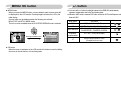
MENU/ OK button
+/- button
■ MENU button
- When you press the MENU button, a menu related to each camera mode will
be displayed on the LCD monitor. Pressing it again will return the LCD to the
initial display.
- A menu option can be displayed when the following are selected :
MOVIE CLIP and STILL IMAGE mode.
There is no menu available when the VOICE RECORDING mode is selected.
Size
Pressing the MENU button
[Menu off]
3072 x 2304
2816 x 2112
2592 x 1944
3072 x 1728
2272 x 1704
2048 x 1536
■ You can use the +/- button to adjust the values for the RGB, ISO, white balance,
exposure compensation and Long Time shutter speed.
■ When the ASR mode is selected, ISO value is fixed as AUTO and Exposure value is
fixed as 0.0EV.
Main menu
Sub menu
Available camera mode
R (Red), G (Green), B (Blue)
AUTO, 80, 100, 200, 400, 800, 1000
ISO
WHITE BALANCE AUTO, DAYLIGHT, CLOUDY, FLUORESCENT H,
FLUORESCENT L, TUNGSTEN, CUSTOM.
Exposure
-2.0 ~ 0.0 ~ +2.0 (0.5EV steps)
compensation
RGB
LT
Shutter speed/ Aperture Value
(Changed by zoom rate)
[Menu on]
■ OK button
- When the menu is displayed on the LCD monitor, this button is used for shifting
the cursor to the sub menu or for confirming data.
《27》
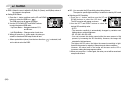
+/- button
■ RGB : Allows the user to adjust the R (Red), G (Green), and B (Blue) values of
the images to be captured.
● Setting RGB Values
1. Press the +/ - button, and then use the UP and DOWN
buttons to select the RGB icon (
).
The RGB menu bar will appear as shown.
2. Use the UP/ DOWN/ LEFT and RIGHT buttons
to select the desired RGB value.
- Up/ Down Button : Navigates between R, G,
and B icons.
- Left/ Right Button : Changes value of each icon.
3. When you press the +/ - button again, the value you
set will be saved and RGB setup mode will end.
※ When special effect (colour) from the icon other than
not be able to select the RGB.
《28》
is selected, it will
■ ISO : You can select the ISO sensitivity when taking pictures.
The speed or specific light-sensitivity of a camera is rated by ISO numbers.
● Selecting an ISO Sensitivity
1. Press the +/ - button, and then use the UP and
DOWN buttons to select the ISO icon(
).
The ISO menu bar will appear as shown.
2. Use the LEFT and RIGHT buttons to select the
desired ISO sensitivity value.
- AUTO
: The camera's sensitivity is automatically changed by variables such as
lighting value or subject brightness.
- 80, 100, 200, 400, 800,1000
: You can increase the shutter speed while the same amount of light is
present, by increasing the ISO sensitivity. However, the image may be
saturated in high luminance.
The higher the ISO value, the higher the camera’s sensitivity to light and
therefore the greater its capacity to take pictures in darker conditions.
However, the noise level in the image will increase as the ISO value
increases, making the image appear coarser.
3. When you press the +/ - button again, the value you set will be saved and ISO
setup mode will end.
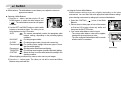
+/- button
■ White balance : The white balance control allows you to adjust the colours to
appear more natural.
● Selecting a White Balance
1. Press the +/ - button, and then use the UP and
DOWN buttons to select the white balance icon
(
). The white balance menu bar will appear
as shown.
2. Use the LEFT and RIGHT buttons to set the white
balance to the desired value. The value you set
wil be displayed on the LCD monitor.
AUTO
: The camera automatically selects the appropriate white
balance settings, depending on the prevailing lighting
conditions.
DAYLIGHT
: For taking images outside.
CLOUDY
: For taking images under a cloudy and overcast sky.
Fluorescent H
: For shooting under daylight fluorescent types of threeway fluorescent lighting.
Fluorescent L
: Shooting under white fluorescent lighting.
TUNGSTEN
: For shooting under tungsten (standard light bulb) lighting.
CUSTOM
: Allows the user to set the white balance according to the
shooting condition.
Different lighting conditions may cause a colour cast on your images.
3. Press the +/ - button again. The value you set will be saved and White
Balance setup mode will end.
● Using the Custom White Balance
White balance settings may vary slightly depending on the shooting
environment. You can select the most appropriate white balance setting for a
given shooting environment by setting up the custom white balance.
1. Select the CUSTOM (
) menu of the White
Balance.
2. Place a sheet of white paper in front of the camera
so that the LCD monitor shows only white, and
then press the SHUTTER button.
3. Your custom white balance value is stored.
- The custom white balance value will be applied,
starting with the next picture you take.
- The user configured white balance will be remain
effective until it is overwritten.
Measure:Shutter
[White paper]
《29》
+/- button
■ Exposure compensation : This camera automatically adjusts the exposure
according to the ambient lighting conditions.
You can also select the exposure value by using the
+ / - button.
■ Long Time shutter :
This camera automatically adjusts the shutter speed and aperture values to the
shooting environment. However, in NIGHT SCENE mode, you can set the
shutter speed and aperture values to your preference.
● Compensating Exposure
1. Press the + / - button, and then use the UP and
DOWN buttons to select the exposure
compensation icon (
).
The exposure compensation menu bar will appear
as shown.
2. Use the LEFT and RIGHT buttons to set the desired
exposure ompensation factor.
3. Press the + / - button again. The value you set will be saved and the Exposure
Compensation setup mode will close.
If you change the exposure value, the exposure indicator (
) will be
displayed on the bottom of the LCD monitor.
● Adjusting the shutter speed and aperture values
1. Select the [Night] scene mode.
2. Press +/- button and Long Time shutter menu (LT, For selecting shutter speed
and aperture value) will be displayed.
3. Configure the Long Time shutter value with
the up/ down/ left/ right button.
4. Press the +/- button again.
The value you set will be
saved and the mode will
switch to NIGHT SCENE
AUTO, WIDE : F3.5 ~ F6.3, Aperture Value
mode.
TELE : F4.5 ~ F8.0
※ A negative exposure compensation value reduces the exposure.
Note that a positive exposure compensation value increases the exposure and
the LCD monitor will appear white or you may not get good pictures.
《30》
Shutter Speed
AUTO,1~16S
E (Effect) button
■ It is possible to add special effects to your images by using this button.
■ Available Effects, by recording mode (O : Selectable X : Not selectable)
■ When you select 3072X1728 (Wide 5M) image size, you can only select the
color menu of the special effects.
Color
(
)
O
O
O
O
O
O
O
X
O
O
O
O
O
HighLight
(
)
X
Composite
(
)
X
X
O
O
O
O
O
Photo Frame (
)
X
X
O
O
O
O
O
Stabilizer
(
)
O
X
X
X
X
X
X
INFORMATION
● If a special effect is selected, any previously selected special effect
(HighLight, Composite, Photo Frame) is automatically cancelled.
● The digital zoom and date imprinting functions do not operate in the
[HighLight], [Composite] and [Photo Frame] special effect settings.
● Even if the camera is turned off, the special effect setting will be preserved.
To cancel the special effect, select the
sub menu (Color) or
sub
menu (HighLight, Composite, Photo Frame).
● When an effect is selected, the preview image on the LCD may be slow to
appear.
Colour
■ By using the camera’s digital processor, it is possible to add special effects to
your images.
1. Press the E button in the available camera modes
and select the
menu.
2. Select a desired sub menu by pressing the
Up/Down button and press the OK button.
: No effect is added to the image
: Captured images will be stored in black
and white.
: Captured images will be stored in a sepia
tone.
: Captured images will be stored in a red tone.
: Captured images will be stored in a green tone.
: Captured images will be stored in a blue tone.
: Save the image in negative mode.
Normal
[Still image mode]
3. Press the shutter button to capture an image.
《31》
E (Effect) button
Capture:SH
[The frame is activated]
2. Press the Up/ Down/ Left/ Right button to move the
focus frame position.
Capture:SH
HighLight
[Range 1]
HighLight
[Range 2]
HighLight
[Range 3]
Move:◀▶
[After changing the frame position]
HighLight
[Range 4]
3. To select the focus frame position, press the +/- button
again and you can take a picture.
3. The preset focus frame will appear.
Press the shutter button to capture an image
Capture:SH
《32》
Move:◀▶
◀▶
● Moving and changing the focus frame
You can change the focus frame after selecting a Range
menu.
1. Press the +/- button after selecting a preset focus
frame.
◀▶
Preset focus frames
■ You can make the subject stand out from its surroundings. The subject will be
sharp and in focus while making the rest out of focus.
1. Press the E button in the available camera modes
with the exception of Movie clip and Auto mode
and select the
menu.
2. Select a desired sub menu by pressing the
HighLight
Up/ Down button and press the OK button.
Edit:+/-
Capture:SH
Edit:+/-
E (Effect) button
● Changing a part of composite
Before taking the last composite shot, you can change a part of composite shot.
Composite shooting
■ You can combine 2 ~ 4 different shots in a still image.
1. Press the E button in the available camera modes
with the exception of Movie clip and Auto mode
and select the
menu.
Composite
Capture:SH
Del:+/-
Capture:SH
[Before taking the 3rd shot]
2. Select a desired sub menu by pressing the Up/ Down button and press the
OK button.
Composite
Composite
Composite
Del:+/-
[Moving backward to the 2nd shot]
After taking the last composite shot, you can change a part of composite shot.
Composite
Save : OK
3. Press the shutter button to capture an image
4. To save the composite shots, press the OK button after taking the last shot.
Del:+/-
[After taking the 4th shot]
Save : OK
Del:+/-
[Moving backward to the 2nd shot]
[Deleting the 2nd shot]
Pressing the
Shutter button
INFORMATION
● You can use the flash button, self-timer button, macro button, voice memo
button and the Zoom W/T button during the composite shooting. If you
press the camera buttons (ASR button and Play mode button) during the
composite shots, each mode of the camera buttons is executed.
The images captured before will be deleted.
● After taking the last composite shooting, press the OK button.
And then the voice memo will start.
Save : OK
[The final picture]
Del:+/-
[After taking the 2nd shot again]
《33》
E (Effect) button
Photo Frame
Movie Clip frame stabiliser
■ You can add 9 types of frame-like borders to a still image you want to capture.
1. Press the E button in the available camera modes
with the exception of Movie clip and Auto mode
and select the
menu.
2. Select a desired sub menu by pressing the
Up/ Down button and press the OK button.
Photo Frame
■ This function helps stabilise images captured during movie recording. You
can select this menu only in the MOVIE CLIP mode. If the memory card is
not inserted, this function will not operate.
1. Press the E button in the Movie clip mode and select the
menu.
2. Select a desired sub menu by pressing the Up/ Down
button and press the OK button.
: Movie clip frame stabilizer function is disabled.
: Reduces camera shake during movie recording. The
recording frame range will become narrower than
when you select the
menu. If the subject moves,
the Pre-view frames may be changed slightly.
3. The selected Photo Frame will appear. Press the shutter button to capture an
image
※ Before taking a picture, you can change the frame type by pressing the +/button.
《34》
Stabilizer
Using the LCD monitor to adjust the camera settings
■ You can use the menu on the LCD monitor to set up recording functions.
■ The items indicated by
are default settings.
Sub menu
Menu tab Main menu
SIZE
(Still Image)
SIZE
(Movie)
QUALITY
FRAME RATE
METERING
SHOOTING
SHARPNESS
AUTO
FOCUS
OSD
INFORMATION
Camera working mode Page
3072x2304
2816x2112
2592x1944
3072x1728
2272x1704
2048x1536
1600x1200
1024x768
640x480
-
720X480
640X480
320X240
-
Super Fine
Fine
Normal
-
30 FPS
20 FPS
15 FPS
-
Multi
Spot
Single
Continuous
AEB
-
Soft
Normal
Vivid
-
Center AF
Multi AF
Full
Basic
LCD Save
-
How to use the menu
1. Turn on the camera and press the MENU button. A menu for each camera
mode appears. However, there is no menu for Voice Recording mode (
).
2. Use the LEFT and RIGHT buttons to navigate through the menus.
SIZE
P.36
3072
2816
2592
3072
2272
2048
x
x
x
x
x
x
2304
2112
1944
1728
1704
1536
Press the
LEFT or
RIGHT button.
QUALITY
Super Fine
Fine
Normal
Press the
LEFT or
RIGHT button.
METERING
Multi
Spot
3. Use the UP and DOWN buttons to select a sub menu.
P.36
SIZE
P.36
3072
2816
2592
3072
2272
2048
x
x
x
x
x
x
2304
2112
1944
1728
1704
1536
Press the
UP or DOWN
button.
SIZE
3072
2816
2592
3072
2272
2048
x
x
x
x
x
x
2304
2112
1944
1728
1704
1536
Press the
UP or DOWN
button.
SIZE
3072
2816
2592
3072
2272
2048
x
x
x
x
x
x
2304
2112
1944
1728
1704
1536
p.36
p.37
4. Select a sub menu, and then the value you set will be saved.
Press the MENU button and the menu will disappear.
p.37
p.38
p.38
p.39
※ Menus are subject to change without prior notice.
※ When the image size (Movie clip) is 720X480, the default of the frame rate is 20 fps.
《35》
Quality/ Frame rate
Size
■ You can select the image size appropriate for your application.
Mode
STILL IMAGE mode
MOVIE CLIP mode
■ You can select the compression ratio appropriate for your application of the
captured images. The higher the compression ratio, the lower the picture quality.
Icon
Size
3072X 2816X 2592X 3072X 2272X 2048X 1600X 1024X 640X 720x
2304 2112 1944 1728 1704 1536 1200 768 480 480
2304
2112
1944
1728
1704
1536
720 x 480
640 x 480
320 x 240
[STILL IMAGE mode]
[MOVIE CLIP mode]
x
x
x
x
x
x
INFORMATION
● High resolution images use more memory than lower resolution shots.
Therefore the higher the resolution selected the fewer will be the number of
shots available.
《36》
QUALITY
Super Fine
Fine
Normal
FRAME RATE
30 FPS
20 FPS
15 FPS
SIZE
SIZE
3072
2816
2592
3072
2272
2048
640x 320x
480 240
[STILL IMAGE mode]
[MOVIE CLIP mode]
INFORMATION
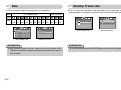
● This file format complies with the DCF(Design rule for Camera File system).
Metering
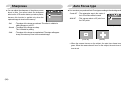
■ If you cannot obtain suitable exposure conditions, you can change the metering
method to take brighter pictures.
- Multi : Exposure will be calculated based on an
METERING
average of the available light in the image
Multi
Spot
area. However, the calculation will be
biased towards the centre of the image
area. This is suitable for general use.
- Spot : Only the rectangular area in the centre of
the LCD monitor will be metered for light.
This is the preferable setting when you want the subject in the centre of
the image exposed correctly, regardless of the back lighting.
INFORMATION
● If the subject is not the centre of the focus area, do not use the spot
metering as this may result in an exposure error. In this circumstance, It is
better to use exposure compensation.
Continuous shot
■ You can select continuous shot, and AEB (Auto Exposure Bracketing).
- Single
- Continuous
- AEB
: Take one picture only
SHOOTING
: Images will be taken continuously
Single
Continuous
until the shutter button is released.
AEB
AEB
The shooting capacity depends on
the memory.
: Take three pictures in a series in
[ PROGRAM mode ]
different exposures: standard
exposure(0.0EV), short exposure
(-0.5EV) and over exposure (+0.5EV). Use the mode if it is hard
to decide exposure of the object.
※ High resolution and picture quality increases file saving time, which increases
stand-by time.
※ If the [Continuous] or [AEB] sub menu is selected, the flash will be off
automatically.
※ If less than 3 pictures are available in the memory, the AEB shooting is not
available.
※ It is best to use a tripod for the AEB shooting as the time to save each image
file is longer and blurring caused by camera shake may occur.
《37》
Sharpness
■ You can adjust the sharpness of the picture you are
about to take. You cannot check the sharpness
effect on the LCD monitor before you take a picture,
because this function is applied only when the
captured image is stored on the memory.
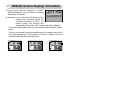
Auto Focus type
■ You can select your preferred Auto Focus type according to the shooting condition.
SHARPNESS
Soft
Normal
Vivid
- Center AF : The rectangular area in the center of
the LCD monitor will be focused
- Multi AF
: This camera selects a AF point from
the 5 AF points.
: The edges of the image are softened. This effect is suitable for
editing images on your PC.
- Normal : The edges of the image are sharp.
This is suitable for printing.
- Vivid
: The edges of the image are emphasized. The edges will appear
sharp, but noise may occur in the recorded image.
AUTO FOCUS
Center AF
Multi AF
- Soft
[Program mode]
[Center AF]
[Multi AF]
※ When the camera focuses on the subject, the auto focus frame turns too
green. When the camera doesn’t focus on the subject, the auto focus frame
turns to red.
《38》
OSD(On Screen Display) information
■ In any mode with the exception of VOICE
OSD INFORMATION
RECORDING mode, you can check the recording
Full
Basic
status in the LCD monitor.
LCD Save
■ Idle mode : If you select the [LCD Save] and the
camera isn't operated during the
specified time(about 30 SEC.), the
camera power will become idle
automatically (LCD monitor : OFF, Camera status lamp : Blinking).
- To use the camera again, press any of the camera buttons except the power
button.
- If there is no operation during the specified time, the camera power will be
turned off automatically to save battery life. Refer to page 58 for more
information about the auto power off function.
Full
Basic
LCD Save
《39》
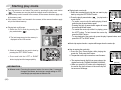
Starting play mode
■ Turn the camera on and select Play mode by pressing the play mode button
(
). The camera can now play back the images stored in the memory.
■ If the memory card is inserted in the camera, all the camera functions apply only
to the memory card.
■ If the memory card is not inserted in the camera, all the camera functions apply
only to the internal memory.
● Playing back a still image
1. Select the PLAY mode by pressing the
play mode button (
).
2. The last image stored on the memory is
displayed on the LCD monitor.
● Playing back a movie clip
1. Select the recorded movie clip that you want to play
back by using the LEFT/RIGHT button.
2. Press the play & pause button (
) to play back a
Play:▶/
Capture:E
movie clip file.
- To pause a movie clip file while playing it back,
press the play & pause button again.
- Pressing the play & pause button again will cause
the movie clip file will restart.
- To rewind the movie clip while it is playing, press
the LEFT button. To fast forward the movie clip,
press the RIGHT button.
- To stop playback of the movie clip, press the play & pause button, and then
press the LEFT or RIGHT button.
■ Movie clip capture function : capture still images from the movie clip.
3. Select an image that you want to view by
pressing the LEFT/ RIGHT button.
※ Press and hold the LEFT or RIGHT
button to play back the images quickly.
INFORMATION
● Manner mode : Pressing the power button for more than 3 seconds
changes the buzzer and start-up sound setting to OFF,
even though you may have set these to ON.
《40》
● How to capture the movie clip
1. Press the Play/ Pause button while playing the
movie clip. Then press the E button.
2. The paused movie clip is saved in a new file name.
Trim:T
※ The captured movie clip file has same size as the
original movie clip (720X480, 640X480, 320X240).
※ When you press the E button at the beginning of
the movie clip, the first frame of the movie clip will
be save as a still image.
Capture:E
[Paused]
[Press the E button]
Starting play mode
■ On camera movie trimming : You can extract desired frames of movie clip during
the movie clip play back.
● If the running time is under 10 seconds, the movie clip can’t be trimmed.
1. Press the Pause button at the point of the movie clip
that you want to start extracting.
2. Press the T button.
3. Press the Play & Pause button and the extracted
Trim:T
Capture:E
range will be displayed on the status bar.
4. Press the Play & Pause button once more at the point
where you wish the extracted file to stop.
5. Press the T button and a confirmation window will
display.
6. Select a desired sub menu by pressing the
Trim:T
Left/ Right button and press the OK button.
[Yes] : The extracted frames are saved as a new
file name.
Trimming?
[No] : The movie trimming will cancel.
Yes
● Playing back a recorded voice
1. Select the recorded voice that you want to play back
by using the LEFT/ RIGHT button.
2. Press the play & pause button (
) to play back a
recorded voice file.
- To pause a recorded voice file, while playing it back,
press the play & pause button again.
- To resume playback of the voice file, press the play & pause button
- To rewind the voice file while it is playing, press the LEFT button. To fast
forward the voice file, press the RIGHT button.
- To stop playback of the voice file, press the play & pause button, and then
press the LEFT or RIGHT button.
- When a voice is playing back, you can use the earphones.
No
Confirm : OK
INFORMATION
● When a voice is playing back, you can use the earphones.
● If you want to extract the movie clip at the beginning of the frame, press the
Zoom T button before starting the movie clip.
● If the time line bar passes by the start point by pressing the REW(Left)
button, the first frame of the movie clip will display.
● If you don't specify the ending point of the movie clip, the trimming
confirmation window will display at the point of the last frame.
《41》
LCD monitor Indicator
Using the camera buttons to adjust the camera
■ The LCD monitor displays shooting information about the displayed image.
⑫
①
②
Play mode button
ISO:80
Av:F3.5
Tv:1/30
Flash:On
3072X2304
2006/07/01
③
④
⑤
No.
1
2
3
4
5
6
7
8
9
10
11
12
《42》
■ In Play mode, you can use the buttons on the camera to conveniently set up the
Play mode functions.
Description
Play mode icon
Battery
Voice Memo
Protect
DPOF
Recording date
Image size
Flash
Shutter speed
Aperture value
ISO
Folder name & File name
Icon
2006/07/01
3072X2304 ~ 640X480
On/Off
15 ~ 1/2000
F3.5 ~ F4.5
80 ~ 1000
100-0007
⑪
⑩
⑨
⑧
⑦
⑥
Page
p.12
p.44
p.49
p.51
p.36
p.24
p.30
p.30
p.28
p.58
■ If you have turned on the camera by pressing the POWER button, you can press
the PLAY MODE button once to switch to Play mode and press it again to switch
to Recording mode.
■ You can turn the power on with the play mode button. The camera is turned on in
play mode. Press the play mode button (Under 1 Sec.) again to turn off the camera.
■ When pressing the Play mode button for over 1 second, you can check the
recording information.
ISO sensitivity
Pressing for
over 1 Sec.
[Play mode display]
ISO : 100
Av : F3.5
Tv : 1/60
Flash : Off
3072x2304
2006/0701
[Recording information]
Aperture value
Shutter speed
Whether or not the flash is used
Size
Recording date
■ When you press the Play mode button in the PMP, MP3, TEXT VIEWER mode,
the play list of each mode will display.
Thumbnail(
)/ Enlargement(
) button/ Volume button( )
■ You can view multiple pictures, enlarge a selected picture, and crop and save a
selected area of an image.
■ When a movie clip, voice memo or voice recording file is playing back, you can
control the volume of those files using this button.
● Thumbnail display
1. While an image is displayed full screen, press the
thumbnail button.
2. The thumbnail display will highlight the image that
had been showing at the time the thumbnail mode
was selected.
3. Press the 5 function button to move to a desired image.
4. To view an image separately, press the enlargement button.
Pressing the Thumbnail
button(
)
● Image enlargement
1. Select an image that you want to enlarge and press the enlargement button.
2. Different parts of the image can be viewed by
pressing the 5 function button.
3. Pressing the thumbnail button will zoom back to the
original full sized image.
- You can tell whether the image displayed is an
enlarged view by checking the image enlargement indicator shown at the
bottom left of the LCD monitor. (If the image is not an enlarged view, the
indicator will not be displayed.) You can also check the area of enlargement.
- Movie clips and WAV files can’t be enlarged.
- If an image is enlarged, a loss of quality may occur.
● The maximum enlargement in proportion to the image size.
Image size
Maximum
X12.0 X11.0 X10.1 X12.0 X8.9
enlargement
Pressing the enlargement
button (
)
[Normal display mode]
X8.0
X6.3
X4.0
X2.5
[Thumbnail display mode]
《43》
Thumbnail(
)/ Enlargement(
) button/ Volume button( )
● Trimming : You can extract part of the image and save it separately.
1. Select an image that you want to enlarge and press
the enlargement button.
Trimming?
2. Different parts of the image can be viewed by
Yes
No
pressing the 5 function button.
Confirm : OK
3. Press the MENU button and a message will be
displayed as shown alongside.
4. Select a desired sub menu by pressing the UP/ DOWN button and press the
OK button.
[Yes] : The trimmed image will save as a new file name, and display on the
LCD monitor.
[No] : The trimming menu will disappear.
※ If there is insufficient memory space to save the trimmed image, the image
can’t be trimmed.
※ To delete the enlarged image during the trimming function, press the delete
button.
● Volume control : When a movie clip, voice memo or
voice recording file is playing back, you
can control the volume using this
button.
Play:▶/
Capture:E
[Movie Clip : Stop]
《44》
Pause:▶/
[Movie Clip : Playing back]
Voice (
) memo/ Up button
■ When the menu is displayed on the LCD monitor, the UP button operates as a
direction button.
■ When the menu is not displayed on the LCD monitor, the UP button operates as
the voice memo button. You can add your voice to a stored still image.
● Adding a Voice Memo to a Still Image
1. Press the LEFT/ RIGHT button to select an image
that you wish to add sound to.
2. Press the voice memo button (
) and the voice
memo indicator will display. The camera is now ready
to record a voice memo.
3. Press the shutter button to start recording and voice
will be recorded to the still image for 10 seconds.
While the voice is recording, the recording status
window will be displayed as shown alongside. The
recording can be stopped by pressing the shutter
button again.
4. The (
) icon will be displayed on the LCD monitor
after voice memo recording has finished.
- The voice memo will be saved in * .wav format, but
has the same file name as the still image to which it
corresponds.
- If you add a new voice memo to the still image that
already has a voice memo, the existing voice memo
will be erased.
Play & Pause (
)/ Down button
■ In Play mode, the play & pause/ down button works as follows:
- If the menu is displayed
Press the DOWN button to move from the main menu to a sub menu, or to
move down the sub menu cursor.
- If a still image with a voice memo, a voice file, or a movie clip is playing
In Stop mode : Plays a still image with a voice memo, a voice file, or a movie clip.
During playback : Temporarily stops playback.
In Pause mode : Resumes playback
PLAY: ▶
PAUSE: ▶
REW ◀
[Voice recording is stopped]
PLAY: ▶
STOP:OK
EXIT:OK
Left/ Right/ Menu/ OK button
■ LEFT/ RIGHT/ MENU/ OK buttons activate the following.
- LEFT button
: While the menu is showing, the LEFT button operates as a
direction button. While the menu is not showing, press the
LEFT button to select the previous image.
- RIGHT button : While the menu is showing, the RIGHT button operates as a
direction button. While the menu is not showing, press the
RIGHT button to select the next image.
- MENU button : When you press the MENU button, the play mode menu will
be displayed on the LCD monitor. Pressing it again will return
the LCD to the initial display.
- OK button
: When the menu is displayed on the LCD monitor, the OK
button is used for confirming data that is changed by using
the 5 function button.
▶ FF
[Voice recording is playing]
[Voice recording is paused]
《45》
E (Effect) button
Delete (
Colour
■ By using the camera’s digital processor, it is possible to add special effects to
your images.
1. Select a still image or movie clip and press the
button.
2. Select a desired sub menu and press the OK button.
: Captured images will be stored in black and white.
: Captured images will be stored in a sepia tone.
: Captured images will be stored in a red tone.
: Captured images will be stored in a green tone.
: Captured images will be stored in a blue tone.
: Save the image in negative mode.
■ This deletes images stored on the memory card.
1. Select an image that you want to delete by pressing the LEFT/ RIGHT button
and press the DELETE( ) button.
Delete?
Yes
Delete?
No
Yes
Confirm : OK
Exit : E
■ When a shot with "red eye" is played back, pressing this button can remove the
red eye from the subject.
1. Select a still image and press the E button.
2. Select
menu by pressing the Left / Right
button.
3. Press
the Down button and the red-eye will
be edited.
Exit : E
4. Press the OK button and the the changed image
will save as a new file name.
Save : OK
Red Eye Fix
No
Confirm : OK
2. Select the submenu values by pressing the Left/ Right button and then press
the OK button.
If [Yes] is selected : deletes the selected images.
If [No] is selected : cancels "Delete Image".
Printer (
Red eye reduction
《46》
) button
) button
■ If the [USB] menu is set to the [Computer], you
cannot connect a Pictbridge compatible printer to the
camera through USB cable with [Connecting
Computer] message. By pressing the Printer button,
at this point, you can connect the easy printing mode
with [Connecting Printer] message.
*In some instances the camera may not connect to the printer, this will depend on
the make of the printer.
- After the connection, the Easy printing menu will
display on the LCD monitor. To display the
PictBridge menu, press the Menu button.
For more information about the PictBridge menu,
refer to page 54.
Pictbridge
IMAGES
Size
Layout
Type
Quality
Back:◀
One Pic
All Pics
Set:OK
Setting up the play back function using the LCD monitor
■PLAY mode functions can be changed by using the LCD monitor. In the
PLAY mode, pressing the MENU button displays the menu on the LCD
monitor. The menus you can set up in Play mode are as follows. To capture
an image after setting up the play menu, press the PLAY mode button or
shutter button.
Menu tab
Main menu
SLIDE
Sub menu
Show
Interval
Effect
PROTECT
DELETE
RESIZE
ROTATE
DPOF
Select
All Pics
Select
All Pics
2816X2112
2048X1536
1024X768
640X480
Start Image
MP3 Skin
Right 90˚
Left 90˚
180˚
Horizontal
Vertical
Standard
Index
Size
Secondary menu
Play, Repeat Play
1, 3, 5, 10sec
Off
Unlock / Lock
Select/ All Pics/ Cancel
No / Yes
Select/ All Pics/ Cancel
Menu tab
OSD
INFORMATION
COPY TO CARD
Page
p.48
Main menu
IMAGES
p.50
Size
p.50
p.51
Layout
p.51
Sub menu
Full
Basic
OSD Off
No
Yes
Secondary menu
-
Page
p.53
p.54
■ This menu is available while the camera is connected to a PictBridge supporting
printer (direct connection to the camera, sold separately) with a USB cable.
Menu tab
p.49
Main menu
Sub menu
One Pic
All Pics
Auto
PostCard
Card
4X6
L
2L
Letter
A4
A3
Auto
Full
1
2
4
8
9
16
Index
Secondary menu
-
Page
p.55
p.56
《47》
Setting up the play back function using the LCD monitor
Menu tab
Main menu
Type
Quality
Date
File Name
RESET
Sub menu
Auto
Plain
Photo
FastPhoto
Auto
Draft
Normal
Fine
Auto
Off
On
Auto
Off
On
No
Yes
Secondary menu
-
※ Menus are subject to change without prior notice.
Page
p.56
p.56
Starting the slide show
■ Images can be displayed continuously at pre-set intervals. You can view the
slide show by connecting the camera to an external monitor.
1. Select the [Show] sub menu by pressing the
SLIDE
UP/DOWN button and press the RIGHT button.
Play
Show
2. Use the Up/Down buttons to select the desired sub
Repeat Play
Interval
Effect
menu.
[Play] selected :
Back:◀
Set:OK
The slide show is closed after one cycle.
[Repeat Play] selected :
The slide show is repeated until cancelled.
3. Press the OK button to start the slide show.
- Press the Pause button to pause the slide show.
- Press the Pause button (
) again to resume the slide show.
- To stop the slide show, press the play & pause button, and then press the
LEFT or RIGHT button.
● Repeat setting : Setting the slide show to repeat after the first cycle.
1. Use the Up/ Down buttons to select the Interval
SLIDE
menu and press the Right button.
Show
1 sec
2. Use the Up/ Down buttons to select the desired
Interval
3 sec
Effect
5 sec
sub menu.
10 sec
3. Press the OK button to save the configuration.
Back:◀
Set:OK
INFORMATION
● The loading time depends on the image size and quality.
● While the slide show is playing, only the first frame of a MOVIE file is
displayed.
● While the slide show is playing, the voice recording file will not display.
《48》
● Configure slide show effects : Unique screen effects can be used for the slide
show.
1. Select the [Effect] sub menu by pressing the
SLIDE
UP/ DOWN button and press the RIGHT button.
Show
Off
Interval
2. Use the Up/ Down Button to select the type of
Effect
effect.
: Normal display.
Back:◀
Set:OK
: Image is displayed slowly.
: Image is displayed slowly from the centre outwards.
: Image moves from the top left.
: The image slides diagonally from top left to bottom right.
: The image slides irregularly.
3. Press the OK button to confirm the setting.
Protecting images
■ This is used to protect specific shots from being accidentally erased (Lock).
It also unprotects images that have been previously protected (Unlock).
● Protecting Images
1. Select a desired sub menu by pressing the
UP/ DOWN button and press the OK button.
[Select] : Selection window for an image to be
protected/released is displayed.
- Up/ Down/ Left/ Right : Select an image
- Zoom W/T Button : Protect/ release the image
- OK Button : Your changes will be saved and
the menu will disappear.
[All Pics] : Protect/ release all saved images
- Zoom W/T Button : Protect/ release the images
- OK Button : Your changes will be saved and
the menu will disappear.
- If you protect an image, the protect icon will be
displayed on the LCD monitor.
(An unprotected image has no indicator)
- An image in LOCK mode will be protected from the
delete function, but will NOT be protected from the
format function.
PROTECT
Select
All Pics
Exit:MENU
Move:
W◀
W◀
◀▶
Starting the slide show
Unlock ▶T
Set:OK
Unlock
▶T
Set:OK
《49》
Resize
Deleting images
《50》
2048X1536
1024X768
640X480
Start Image
Exit:MENU
Move:
● Image Resize Types (O : Sectable X : Not Selectable)
DELETE
Select
All Pics
Exit:MENU
Move:
Select:T
Del:OK
◀▶
● Deleting images
1. Select a desired sub menu by pressing the
UP/ DOWN button and press the OK button.
[Select] : Selection window for an image to delete
is displayed.
- Up/ Down/ Left/ Right : Select an image
- Zoom T Button : Select the image for deletion.
(V mark)
- OK Button : Press the OK Button to display the
confirmation message. Select the
[Yes] menu and press the OK button
to delete marked images.
[All Pics] : Displays confirmation window. Select
the [Yes] menu and press the OK
button to delete all unprotected images.
If there aren’t protected images, all the
images are deleted and a [No Image!]
message will display.
2. After deletion, the screen will be changed to the
play mode screen.
■ Change the resolution(size) of pictures taken. Select [Start image],[MP3 Skin] to
save an image to be the start-up image, MP3 Skin.
1. Select a desired sub menu by pressing the
RESIZE
UP/ DOWN button and press the OK button.
2816X2112
◀▶
■ Of all the files stored in the memory card, the unprotected files in the DCIM
subfolder will be deleted. Remember that this will permanently delete
unprotected images. Important shots should be stored on a computer before
deletion takes place. The startup image and SKIN image are stored in the
camera's internal memory (i.e., not on the memory card) and it will not be
deleted even if you delete all files on the memory card.
Size
7M
6M
5M
4M
3M
2M
1M
VGA
2816X2112 2048X1536
O
O
X
O
X
O
X
O
X
X
X
X
X
X
X
X
1024X768
O
O
O
O
O
O
X
X
640X480
O
O
O
O
O
O
O
X
Start Image
O
O
O
O
O
O
O
O
MP3 Skin
O
O
O
O
O
O
O
O
INFORMATION
Delete?
Yes
No
Confirm : OK
Del:OK
● You can change the resolution of only those files compressed in the JPEG
4:2:2 format.
● The resized image will have a new file name. The [Start Image, MP3 Skin]
image is stored not on the memory card but on the internal memory.
● Only two [Start Image, MP3 Skin] images can be saved. If you save a new [Start
Image, MP3 Skin] image, the existing startup image will be deleted in order.
● If the memory capacity is insufficient to store the resized image, a [Memory
Full!] message will display on the LCD monitor and the resized image will
not be stored.
● The picture taken with 5M(Wide) can be resized only to 2560X1440,
1920X1080, 1280X720.
Rotating an image
DPOF
■ You can rotate the stored images by various degrees. Once the playback of the
rotated picture is finished, it will switch back to the original state.
1. Select a desired sub menu by pressing the
UP/ DOWN button.
■ The DPOF indicator will display on the LCD monitor when an image that has
DPOF information plays back. Images can then be printed on DPOF printers, or
at an increasing number of photo labs.
ROTATE
Move:
◀▶
Right 90°
Left 90°
180°
Horizontal
Vertical
Exit:MENU
■ DPOF (Digital Print Order Format) allows you to embed printing information on
your memory card’s MISC folder. Select the pictures to be printed and how
many prints to make.
■ This function is not available for Movie clips and Voice recording files.
■ If a memory card is not inserted, the menus are still displayed in the LCD, but are
not selectable.
[Before rotating the image]
[Right 90°]
[Left 90°]
[180°]
[Horizontal]
[Vertical]
2. Press the OK button and the rotated image will be displayed. If you display the
rotated image on the LCD monitor, empty spaces may appear to the left and
right of the image.
《51》
DPOF : STANDARD
DPOF : Index
■ This function allows you to embed print quantity information on a stored image.
1. Select the [Standard] menu by pressing the
UP/ DOWN button and press the RIGHT button.
2. Select a desired sub menu by pressing the
UP/ DOWN button.
[Select] : Selection window for an image to print is
displayed.
- Up/ Down/ Left/ Right : Select an image to print.
- Zoom W/T Button : Select the number of prints.
[All Pics] : Configure number of prints for all
pictures except movie and voice files.
- W/T button : Select a number of prints
[Cancel] : Cancel the print setup.
3. Press the OK button to confirm the setting.
If an image carries DPOF instructions, the DPOF
indicator (
) will show.
DPOF
Standard
Index
Size
Select
All Pics
Cancel
Back:◀
Set:OK
W◀ 00 Prints ▶T
Set:OK
W◀
00 Prints
Set:OK
《52》
▶T
■ Images (except for movie clips and voice file) are printed as index type.
1. Select the [Index] menu by pressing the
UP/ DOWN button and press the RIGHT button.
2. Select a desired sub menu by pressing the UP/
DOWN button.
If [No] is selected : Cancel the index print setting.
If [Yes] is selected : The image will be printed in
index format.
3. Press the OK button to confirm the setting.
DPOF
Standard
Index
No
Yes
Size
Back:◀
Set:OK
DPOF : Print size
On Screen Display information
■ You can specify the print size when printing images stored on the memory card.
The [Size] menu is available only for DPOF 1.1 compatible printers.
※ DPOF [Size] secondary menu : Cancel, 3X5, 4X6,
5X7, 8X10
※ Depending on the manufacturer and printer model,
cancelling the printing may take a little longer for
the printer to process.
1. Select a desired sub menu by pressing the
UP/ DOWN button and press the OK button.
DPOF
Standard
Select
All Pics
Cancel
Index
Size
OSD INFORMATION
Full
Basic
OSD Off
Exit:MENU
Move:
◀▶
● Setting the Print Size
1. Select the [Size] menu by pressing the UP/ DOWN
button and press the RIGHT button.
2. Select a desired sub menu by pressing the
UP/ DOWN button and press the OK button.
[Select] : Selection window to change the print size
of an image is displayed.
- Up/ Down/ Left/ Right : Select an image.
- Zoom W/T Button : Change the print size.
- OK button : Your changes will be saved and the
menu will disappear.
[All Pics] : Change print size of all saved images.
- W/ T button : Select a print size
- OK button : Confirm the changed setting.
[Cancel] : Cancel all of the print size settings.
■ You can check shooting information about the displayed image.
Set:OK
Back:◀
ISO : 100
Av : F3.5
Tv : 1/60
Flash : Off
3072x2304
2006/07/01
W◀
W◀
Cancel
Set:OK
Cancel
▶T
[Full]
[Basic]
[OSD Off]
▶T
Set:OK
《53》
Copy To Card
PictBridge
■ This enables you to copy image files, movie clips and voice recording files on the
camera's built-in internal memory to the camera's removable SD memory card.
COPY TO CARD
No
Yes
Exit:MENU
Move:
◀▶
● Copying to the Memory Card
1. Select a desired sub menu by pressing the
UP/ DOWN button and press the OK button.
- [No] : Cancels "Copy to Card".
- [Yes] : All images, movie clips and voice
recording files saved in the internal
memory are copied to the memory card
after the [Processing!] message is
displayed. After copying has been
completed, the screen will return to play
mode.
INFORMATION
● When this menu is selected without inserting a memory card, you can select
the [COPY TO CARD] menu but the menu can’t be run.
● If there is not enough space available in the memory card to copy saved
images in the internal memory (15MB), the [COPY TO CARD] command will
copy only some of the images and display [Memory Full!] message. Then the
system will return to the playback mode. Please be sure to delete any
unnecessary files to free up space before inserting the memory card into the
camera.
● When you move images from the internal memory to the removable SD
card, they will be automatically renumbered to avoid duplication of the file
name. If the last file in the memory card is SNV30010.jpg, the copied file
names start from SNV30011.jpg. After completing [COPY TO CARD], the
last stored image of the last copied folder is displayed on the LCD monitor.
《54》
■ You can use the USB cable to connect this camera to a printer that supports
PictBridge (sold separately) and print the stored images directly. Movie clips and
voice files cannot be printed.
■ Setting up the camera for connection to the printer
SET UP
1. In any mode with the exception of Voice Recording
Format
Computer
Printer
Date&Time
mode, press the MENU button.
Imprint
2. Press the LEFT/ RIGHT button and select
Sound
USB
[SETUP] menu tab.
Back:◀
Set:OK
3. Select [USB] menu by pressing the UP/ DOWN
button and press the RIGHT button.
4. Select [Printer] menu by pressing the UP/ DOWN button and press the OK button.
■ Connecting the Camera to a Printer
● Using the USB cable with Cradle : Connect the camera and the cradle.
Connect the cradle to a printer’s USB port
with the supplied USB cable.
● Using the USB cable with Camera : Connect the camera to a printer’s USB
port with the supplied USB cable.
[Using the USB cable with Cradle]
[Using the USB cable with Camera]
PictBridge
PictBridge : Picture Selection
※ If the [USB] menu is set to the [Computer], you cannot connect a Pictbridge
compatible printer to the camera through USB cable with [Connecting
Computer] message. By pressing the Printer button, at this point, you can
connect the easy printing mode with [Connecting Printer] message.
In some instances the camera may not connect to the printer, this will
depend on the make of the printer.
Pictbridge
IMAGES
Size
Layout
Type
Quality
Back:◀
One Pic
All Pics
Set:OK
▶
Menu:OK
▶
0
0
PREV◀
Exit:Shutter
◀
Print:
◀
■ Easy printing
When you connect the camera to printer in the Play
back mode, you can print a picture easily.
- Pressing the printer(
) button :
Currently displayed image will be printed with the
printer’s default setting.
- Pressing the Left / Right button :
Selects a previous / next image.
■ You can select images you want to print
● Setting the Number of Copies to Print
1. Press the Menu button and the PictBridge menu
will display.
2. Use the Left and Right buttons to select the
[IMAGES] menu.
3. Use the Up and Down buttons to select a desired
sub menu and press the OK button.
- Select [One Pic] or [All Pics]. A screen where
you can set the number of copies to print will
appear as shown below.
▶NEXT
Set:OK
[When [One Pic] is selected]
Exit:Shutter
Set:OK
[When [All Pics] is selected]
- Press the Up/ Down button to select the number of prints.
- When [One Pic] is selected : Use the Left/ Right button to select another
picture. After selecting another picture, select
the number of prints for another picture.
- After setting the number of prints, press the OK button to save.
- Press the Shutter button to return to the menu without setting the number
of prints.
4. Press the Print button (
) and images will be printed.
《55》
PictBridge : Print Setting
PictBridge : Reset
◀▶
■ You can select the Paper Size, Print Format, Paper Type, Print Quality, Date
Print, and File Name Print menus for printed pictures.
1. Press the Menu button and the PictBridge menu
Pictbridge
will display.
Auto
Size
2. Use the UP and DOWN buttons to select the
Auto
Layout
Auto
Type
desired menu, and then press the RIGHT button.
Auto
Quality
Auto
Date
3. Use the UP and DOWN buttons to select the
Move:
Print:
desired submenu value, and then press the OK
button.
■ The menus you can set up are as follows:
Menu
Function
Sub menu
Size
Auto, PostCard, Card, 4X6, L, 2L,
Set the size of the printing paper
Letter, A4, A3
Layout
Set the number of pictures to be
Auto, Full, 1, 2, 4, 8, 9, 16, Index
printed on a sheet of paper
Type
Quality
Date
Set the quality of the printing
paper
Auto, Plain, Photo, FastPhoto
Set the quality of the picture to
be printed
Auto, Draft, Normal, Fine
Set whether to print the date
Auto, Off, On
File Name Set whether to print the file name Auto, Off, On
※ Some menu options are not supported on all printers.
If not supported, the menus are still displayed in the LCD, but are not selectable.
《56》
■ Initialises user-changed configurations.
1. Use the Up and Down buttons to select the
Pictbridge
[RESET] menu tab. And then press the Right
No
Type
Yes
Quality
button.
Date
2. Use the UP and DOWN buttons to select the
File Name
RESET
desired sub menu value, and then press the OK
Back:◀
Set:OK
button.
If [Yes] is selected : All print and image settings will be reset.
If [No] is selected : Settings will not be reset.
※ Default print setting varies depending on the printer manufacturer.
For your printer’s default setting, refer to the user’s guide that came with your
printer.
Setup menu
■ In this mode, you can set up basic settings. In any camera modes, except Voice
Recording and MP3, PMP, TEXT VIEWER modes, press the MENU button.
Press the LEFT/RIGHT button and select the [SETUP] menu tab. The items
indicated by
are default settings.
Menu tab
Main menu
File
Power Off
Sub menu
Series
Reset
1, 3, 5, 10min
ENGLISH
DEUTSCH
Secondary menu
-
ESPAÑOL
Menu tab
Main menu
Off
Sound
Page
p.58
USB
p.58
FRANÇAIS
ITALIANO
AF Sound
AF Lamp
Language
P”CCK»…
DANSK
POLSKI
Format
Date&Time
Imprint
PORTUGUÊS
SVENSKA
BAHASA
Magyar
-
No
Yes
06/07/01 13:00
yy/mm/dd
dd/mm/yy
mm/dd/yy
Off
Off
Date
Date&Time
DUTCH
SUOMI
p.58
LCD
-
-
Video Out
p.59
Quick View
Reset
p.59
Sub menu
Low
Medium
High
Computer
Printer
Off
On
Off
On
Dark
Normal
Bright
NTSC
PAL
Off/ 0.5, 1, 3sec
No
Yes
Secondary menu
-
Page
p.60
p.60
p.60
p.60
p.61
p.61
p.62
p.62
※ Menus are subject to change without prior notice.
p.59
《57》
Setup menu
[ File name ]
[ Auto power off ]
■This function allows the user to select the file naming format.
[Series] : New files are named using numbers that
follow the previous sequence, even when a
File
Power Off
new memory card is used, or after
Language
formatting, or after deleting all pictures.
Format
Date&Time
[Reset] : After using the reset function, the next file
Back:◀
name will be set from 0001 even after
formatting, deleting all or inserting a new
memory card.
■ This function switches the camera off after a set amount of time in order to
prevent unnecessary battery drainage.
SETUP
Series
Reset
Set:OK
[1, 3, 5, 10min] : The power will turn off
automatically if not used for the
period of time specified.
SETUP
File
Power Off
Language
Format
Date&Time
Back:◀
1 min
3 min
5 min
10 min
Set:OK
INFORMATION
INFORMATION
● The first stored folder name is 100SSCAM, and the first file name is
SNV3XXXX.
● File names are assigned sequentially from SNV30001 → SNV30002 → ~
→ SNV39999.
● The folder number is assigned sequentially from 100 to 999 as follows:
100SSCAM → 101SSCAM → ~ → 999SSCAM.
● The files used with the memory card conform to the DCF(Design rule for
Camera File systems) format.
● Even if the battery and AC charger are removed and inserted again, the
power off setting will be preserved.
● Note that the automatic power off function will not operate if the camera is;
in PC / Print mode, slide show, playing back a voice recording, playing back
a movie clip or playing back an MP3/ PMP file.
[ Language ]
■ There is a choice of languages that can be displayed on the LCD monitor. Even
if the battery and AC charger are removed and inserted again, the language
setting will be preserved.
LANGUAGE sub menu :
English, Korean, French, German, Spanish, Italian,
S.Chinese, T.Chinese, Japanese, Russian,
Portuguese, Dutch, Danish, Swedish, Finnish, Thai,
BAHASA(MALAY/ INDONESIAN), Arabic, Polish,
Hungarian, Czech and Turkish.
《58》
SETUP
File
Power Off
Language
Format
Date&Time
Back:◀
ENGLISH
한국어
FRANÇAIS
DEUTSCH
ESPAÑOL
Set:OK
Setup menu
[ Format ]
[ Setting up the Date/ Time/ Date type ]
■ This is used for formatting the memory. If you run [Format] on the memory, all
images, including the protected images MP3, TEXT and PMP files will be
deleted.Be sure to download important images to your PC before formatting the
memory.
■ You can change the date and time that will be displayed on the captured images
and set up the date type.
If [No] is selected : The memory card will not be
formatted. Press the menu
button twice and the menu
display will disappear.
If [Yes] is selected : A [Processing!] message
appears and the memory card
will be formatted. If you ran
FORMAT in Play mode, a [No
Image!] message will appear.
SETUP
File
Power Off
Language
Format
Date&Time
Back:◀
No
Yes
Set:OK
RIGHT button : Selects the year/ month/ day/ hour/
minute date type.
LEFT button : Moves the cursor to the [Date&Time]
main menu if the cursor is at the first
item of the date and time setup. In all
other cases, the cursor will be shifted
to the left of its current position.
UP and DOWN buttons : Changes the setting value.
SETUP
File
Power Off
Language
Format
Date&Time
▲
06/07/01
▼
13:00
yy/mm/dd
Back:◀
Set:OK
[ Imprinting the recording date ]
■ There is an option to include DATE/ TIME on still images.
INFORMATION
● This is used for formatting the memory. If you run [Format] on the memory,
all images, including the protected images, MP3, PMP and TEXT files, will
be deleted. Be sure to download important images and files to your PC
before formatting the memory.
● Always format the memory card using this camera. If you insert a memory
card that has been formatted using other cameras, memory card readers, or
PCs, you will get a [Card Error!] message.
[Off]
: The DATE & TIME will not be
imprinted on the image file.
[Date]
: Only the DATE will be imprinted on the
image file.
[Date&Time] : The DATE & TIME will be imprinted on
the image file.
SETUP
Power Off
Language
Format
Date&Time
Imprint
Back:◀
Off
Date
Date&Time
Set:OK
※ The Date & Time are imprinted at the bottom right side of the still image.
※ The imprint function is applied only to still images except for the images taken
in the [Text] scene mode and photo frame effect mode.
※ Depending on the manufacturer and print mode, the date printed on an image
may not be printed correctly.
《59》
Setup menu
[ Sound ]
■ If you set the operation sound to on, various sounds
will be activated for camera startup when buttons
pressed, so that you can be aware of the camera
operation status.
● [Sound] sub menu : Off/ Low/ Medium/ High
[ AF Sound ]
■ If you set the operation sound to ON, various
sounds will be activated for camera startup so that
you can be aware of the camera operation status.
SETUP
Language
Format
Date&Time
Imprint
Sound
Off
Low
Medium
High
Back:◀
[ Auto Focus lamp ]
■ You can select an external device to which you want to connect the camera
using the USB cable.
■ You can turn the Auto Focus lamp on or off.
《60》
SETUP
Format
Date&Time
Imprint
Sound
USB
Back:◀
Computer
Printer
Set:OK
Off
On
Back:◀
Set:OK
[ Connecting an External Device (USB) ]
[Computer] : Select this if you want to connect the
camera to your PC. Refer to page 82
for instructions on how to connect the
camera to your PC.
[Printer]
: Select this if you want to connect the
camera to your printer. Refer to page
54 for instructions on how to connect
the camera to your printer.
SETUP
Date&Time
Imprint
Sound
USB
AF Sound
If [Off] is selected : The AF lamp will not light up.
If [On] is selected : The AF lamp will light up.
※ If you select [Off] menu and take an image in poorly
lit conditions or select the [Night scene] mode, the
camera may not be able to focus accurately.
※ The Auto Focus lamp will function while using the
self-timer even if the configuration is set to off.
Set:OK
SETUP
Imprint
Sound
USB
AF Sound
AF Lamp
Back:◀
Off
On
Set:OK
Setup menu
[ LCD brightness ]
■ Connecting to an external monitor
■ You can adjust the LCD brightness.
SETUP
Sound
USB
AF Sound
AF Lamp
LCD
[Using the AV cable with Cradle]
Dark
Normal
Bright
Back:◀
Set:OK
[ Selecting Video out type ]
■ The Movie output signal from the camera can be
NTSC or PAL. Your choice of output will be
governed by the type of device (monitor or TV, etc.)
to which the camera is connected. PAL mode can
support only BDGHI.
[Using the AV cable with Camera]
SETUP
USB
AF Sound
AF Lamp
LCD
Video Out
Back:◀
NTSC
PAL
Yellow - Video
White - sound
Set:OK
《61》
Setup menu
[ Initialisation ]
INFORMATION
● NTSC : U.S.A, Canada, Japan, South Korea, Taiwan, Mexico.
● PAL : Australia, Austria, Belgium, China, Denmark, Finland, Germany, U.K.,
Holland, Italy, Kuwait, Malaysia, New Zealand, Singapore, Spain,
Sweden, Switzerland, Thailand, Norway.
● When using a TV as an external monitor, you will need to select the external
or AV channel of the TV.
● There will be a digital noise on the external monitor, but it is not a malfunction.
● If the image is not in the centre of the screen, use the TV controls to centre it.
● The menu functions are the same as those indicated on the LCD monitor.
■ All camera menu and function settings will be restored to their default values.
However, values for DATE/TIME, LANGUAGE, and VIDEO OUT will not be
changed.
If [No] is selected :
Settings will not be restored to their defaults.
If [Yes] is selected :
All settings will be restored to their defaults.
SETUP
AF Lamp
LCD
Video Out
Quick View
Reset
Back:◀
No
Yes
Set:OK
Setting up the Mycam menu
[ Quick view ]
■ If you enable Quick View before capturing an image, you can view the image
you just captured on the LCD monitor for the duration set in the [Quick View]
setup. Quick view is possible only with still images.
: The quick view function can’t be
activated.
[0.5, 1, 3sec] : The captured image is briefly
displayed during the selected time.
■ You can set up a start up image, start up sound and shutter sound.
Every working mode of camera (with the exception of Voice recording,
MP3, PMP, and TEXT VIEWER modes) has the MyCAM menu. The
items indicated by
are default settings.
Menu tab
Main menu
Start Image
[Off]
SETUP
AF Sound
AF Lamp
LCD
Video Out
Quick View
Back:◀
Off
0.5 sec
1 sec
3 sec
Start Sound
Set:OK
Shutter Sound
Sub menu
Off
LOGO
User Image 1
User Image 2
Off
Sound 1
Sound 2
Sound 3
Off
Sound 1
Sound 2
Sound 3
※ Menus are subject to change without prior notice.
《62》
Page
p.63
p.63
p.63
Start up image
MYCAM
Start Image
Start Sound
Shutter Sound
◀
Off
◀
■ You can select the image that is first displayed on the
LCD monitor whenever the camera is turned on.
●Use a saved image for the start-up image with the
[Start Image] in the [RESIZE] menu in the play
mode.
●The start-up image will not be deleted by deleting
all images or [Format]menu.
●The User images will be deleted by [Reset]menu.
MP3/ PMP/ TEXT VIEWER Mode
Back:◀
Set:OK
■This camera has an embedded MP3, TEXT VIEWER & Portable Media Player
program. You can take a picture, listen to the MP3 files and watch the movie clip
(Movie and Video clip) whenever you want. To use the PMP mode, you must
convert the multimedia file with the Digimax Converter. In the TEXT VIEWER
mode you can see the text on the LCD monitor with listening MP3 music.
■If the file name is over 128 (2 Byte language like Korean, Chinese, etc.) or 256 (1
Byte language like English) characters, the file name doesn't display on the
playlist.
Downloading files
Start up sound
■ You can select the sound that is activated
whenever the camera is turned on.
-If the start up image is set to [Off], the start up
sound will not activate, even though you may
have set these to on.
MYCAM
Start Image
Start Sound
Shutter Sound
Off
Sound 1
Sound 2
Sound 3
Back:◀
Set:OK
■ To use MP3, PMP and TEXT VIEWER functions, MP3, PMP(multimedia files)
and TEXT files must be saved in the internal memory or memory card of this
camera.
1. Save the desired files on your PC.
2. Connect the camera to your PC with the USB cable and turn on the camera.
3. Open Window's EXPLORER and search for [Removable Disk].
4. Make a folder under the Removable Disk.
- MP3 Mode : [MP3]
- PMP Mode : [PMP]
-TEXT VIEWER mode
: [TEXT]
Shutter sound
■ You can select the shutter sound.
MYCAM
Start Image
Start Sound
Shutter Sound
Back:◀
5. Select desired files that you want to save and copy them to the desired folder.
Off
Sound 1
Sound 2
Sound 3
Set:OK
《63》
Downloading files
INFORMATION
● Take care of the illegal duplication of MP3 & multimedia files. It violates
various copyright laws.
● This camera can only play back MP3 files in the MP3 mode and SDC files
(modified XviD MPEG4 video / MPEG Layer2 audio type) in the PMP mode.
● If a file can not be played back on this camera, convert it into the supported
file format by using the Digimax Converter. (p.86)
● Up to 200 files can be saved in a folder.
● You can make up to 100 subfolders under the MP3 or PMP folder. You
can't make subdirectories under the subfolder.
《64》
Starting the MP3/ PMP/ TEXT VIEWER mode
■ Insert the memory card that holds MP3, PMP and TEXT files. As this camera has a
15MB internal memory, you can save the files on the internal memory too.
1. Select the MP3/PMP/TEXT VIEWER mode by rotating the
mode dial.
2. A menu will display as shown.
[Resume] : memorizes the latest stopped frame.
MP3 mode : plays back from the beginning of the file.
PMP mode : plays back from the latest stopped frame
TEXT VIEWER mode : plays back from the latest stopped
frame
[Open] : The browsing menu will display to select a desired
file
3. Select a desired file and press the OK button. And then the
file will play back.
Resume
Open
Confirm : OK
Starting the MP3/ PMP/ TEXT VIEWER mode
INFORMATION
[MP3 mode]
003/003
Move: ◀▶
◀▶
J-Heart - Misty.mp3
waiting for you by J He
misty by J Heart.MP3
Select:OK
MP3 misty by J He
[PMP mode]
0:00:03/ 0:26:28
003/003
Move: ◀▶
◀▶
Animation
Comic
[SDC]-Movie sample.sdc
Select:OK
[SDC]-Movie sample.s
Who bent my camera?
[TEXT VIEWER mode]
001/001
Move: ◀▶
◀▶
TEXT.TXT
Thank you for buying a Samsung Camera.
This manual will guide you through using the camera,
including
capturing images, downloading images and using the
application software.
Please read this manual carefully before using your
new camera.
Select:OK
● When the [Resume] menu (p.70) of each mode are set as [Off], the
browsing menu doesn't open. If the last played file was deleted, the
browsing menu opens though the setting is same as above.
● In the PMP mode, icons on the LCD monitor will disappear after 5-6
seconds.
● The order of play lists on the browsing menu and the order of file saved in
the memory are the same.
● A title coded with unsupported language is displayed as "--------".
● The automatic power off function will not operate if the a file is playing back.
● If there over 100 files in the memory, it takes a little longer for the camera to
process to the MP3/ PMP mode.
● If there is no operation during the specified time (About 30 sec.) in the MP3 /
TEXT VIEWER mode (B.G.M : Off, Auto scroll : Off), the LCD monitor is
turned off automatically and the camera status lamp blinks. To use the
camera, press any of the camera buttons except the Power button.
● Playing back the VBR (Variable Bit Rate) file. A VBR file varies the amount
of output data in each time segment based on the complexity of the input
the data in that segment. When the VBR encoded files are played back, the
LCD will display as shown.
- The VBR icon will display instead of the Bit rate icon.
- The time line isn't displayed.
- Playing time will display but the whole running time doesn't display.
● For about 2 seconds of the start and end frames of the PMP file, no camera
button except the Power button can be operated.
● When an MP3 file doesn't play back correctly, download a free MP3
conversion program and convert it before using the MP3 file on the camera .
《65》
LCD monitor indicator for MP3/PMP/TEXT VIEWER mode
■ The LCD monitor displays information about the MP3, multimedia and Text file.
Indication of present TEXT
MP3 mode
Battery (p.12)
Current page / Whole page
Encoding Type (ANSI, Uni)
TEXT VIEWER mode
Volume Indication
Battery (p.12)
Equalizer
TEXT Contents
Playing time
Time line
Type of play back (p.70)
Bit rate (p.65)
MP3 misty by J He
Volume (p.67)
Play & Pause/
Control button (p.67)
[TEXT VIEWER mode]
Title of file
[MP3 mode]
Play & Pause/
Control button(p.67)
PMP mode
Battery (p.12)
Thank you for buying a Samsung Camera.
This manual will guide you through using the
camera, including
capturing images, downloading images and
using the application software.
Please read this manual carefully before using
your new camera.
Volume (p.67)
0:00:03/ 0:26:28
[SDC]-Movie sample.s
Title of file
※Encoding Type : ANSI(American National Standards Institute) Type,
Uni (Unicode) Type
- When the ANSI encoding type is displayed : You should set the Language of
the TEXT VIEWER menu to view the text. Set the Language menu as one that
is the same as the Operating System language that the text was created.
- When the UNI encoding type is displayed : The text file will be displayed with
any language menu.
Playing time
※If the text file size is over 10MB, it may take long time to view the text file. Divide
the text file and the loading time will be shorten.
Time line
Who bent my camera?
Caption
[PMP mode]
※ When you playback a movie converted with the Digimax Converter, there may
be a white spot under the LCD monitor of the camera. It's not the camera
malfunction and there are no problems to use the camera.
《66》
Using the camera buttons to adjust the camera
Volume button
■ You can control the volume with this button.
There are 0~30 steps
Play & Pause/ Control button
■ When a file is playing back, press the Down button to
pause the file. Pressing it again will resume playback.
■ MP3 mode
You can search the MP3 files by pressing the Left/ Right
button. You can’t search the MP3 file during play back.
■ PMP mode
You can search the Multimedia files by pressing the Left/
Right button.
And you can search a desired frame of the file during play back by pressing the
Left/ Right button.
Delete button
■ This deletes files stored on the memory.
1. Select a desired file to delete on the browsing menu
and press the Delete button.
2. A message will display as shown
[Yes]: deletes the selected file.
[No] : cancels "Delete files" and the browsing menu
will display.
Delete?
Yes
No
Confirm : OK
INFORMATION
● Before deleting files from the camera, take care to download files you want
to keep to your computer.
■TEXT VIEWER mode
When the text list menu is displayed : select a text file by pressing the Up/Down
button.
When the text is displayed : press the Up/Down button and previous / next page
of the file will display.
《67》
Using the camera buttons to adjust the camera
Hold / Equalizer button
Playlist button
● If you press the Hold button for over 1 second, the
camera buttons are locked.
- If the camera buttons are locked, the buttons can't be
operated while playing back. But Power off, Video
out, USB connection and LCD on functions can be
operated.
● While a multimedia file is playing back, you can select a desired file by using the
browsing menu.
1. While a multimedia file is playing back, press the Playlist button (
).
2. A playlist that is currently playing will be highlighted.
3. Move the cursor to a desired list by pressing the Control button.
Pressing the OK button : the selected file is played back.
Pressing the Playlist button : the selection will be cancelled.
[SDC]-Movie sample.s
003/003
Animation
Comic
[SDC]-Movie sample.sdc
TEXT.TXT
Move: ◀▶
Move: ◀▶
■ The user can select appropriate sound with this
setting.
- Press the E button and select either <Normal>,
<Classic>, <Dance>, <Jazz>, <Live>, <Rock>, or
<3D>.
MP3 misty by J He
[ MP3 Mode ]
192K
Select:OK
[ PMP Mode ]
Move: ◀▶
◀▶
Select:OK
◀▶
192K
- If you press the Lock button again or turn off the camera, the camera is
unlocked.
《68》
003/003
J-Heart - Misty.mp3
waiting for you by J He
misty by J Heart.MP3
◀▶
MP3 misty by J He
003/003
Select:OK
[ TEXT VIEWER Mode ]
Setting up the playback function using the LCD monitor
Menu tab
■ MP3/ PMP mode functions can be changed by using the LCD monitor.
Press the MENU button and the menu will display on the LCD monitor.
Menu tab
Main menu
Resume
Sub menu
Page
p.70
TEXT
Main menu
MP3
MP3 Skin
p.70
Delete All
p.71
Show Interval
-
Page
p.70
Auto Scroll
p.72
p.72
MP3 BGM
Language
p.70
Play mode
Sub menu
Resume
ENG, KOR, FRA, DEU, ESP, ITA, CHN, TWN, JPN, RUS,
PRT, NLD, DNK, SWE, FIN, MYS, POL, HUN, CSK, TUR
Delete All
p.72
p.71
※Menus are subject to change without prior notice.
p.71
Show Play
p.71
Resume
p.70
Seeking
p.71
PMP
Player Display
Delete All
-
p.72
p.71
《69》
Setting up the playback function using the LCD monitor
Play mode
Resume
■ You can set the playback type.
1. Press the Menu button in each mode.
2. Select a desired playing type in the [Resume] menu by pressing the Up /
Down button and pressing the OK button.
Resume
Resume
Resume
[MP3 mode]
[PMP mode]
[TEXT VIEWER mode]
: When the camera is turned on/ off or camera mode is changed, this
camera will memorize the latest stopped frame.
MP3 mode : plays back from the beginning of the file.
PMP mode : plays back from the latest stopped frame
TEXT VIEWER mode : plays back from the lastest stopped frame.
: The browsing menu will display to select a desired file
《70》
■ You can set various repeat and shuffle options. This
function is adopted only in the selected folder.
: plays a single track once.
: plays a single track repeatedly.
: plays all tracks in the folder repeatedly.
: randomly plays all tracks in the folder once.
: randomly plays all tracks in the folder repeatedly.
Play All
Skin of MP3 player
■ You can set the skin of MP3 player
[
,
] : Default skin will be set.
[
,
] : An image created by the [MP3 Skin] menu
(p.50) will be set.
MP3 SKIN
Setting up the playback function using the LCD monitor
Delete all
Playing back the slide show
■ All files stored on the memory card will be deleted. In the MP3 mode, only MP3
files are deleted. In the PMP mode, only multimedia files are deleted. In the
TEXT VIEWER mode, TEXT files are deleted.
■While the MP3 file is playing back, captured images are
displaying on the LCD monitor continuously.
: Display the images once.
: Display the images continuously.
SHOW PLAY
※ When the playing back is complete, the slide show will stop.
※ To stop the slide show, press the Pause button and then press the E button.
Delete All
Delete All
Delete All
[MP3 mode]
[PMP mode]
[TEXT VIEWER mode]
: cancels "Delete files"
: A confirmation window will display. Select [Yes]
and press the OK button. All files will be deleted.
Frame search
Delete?
Yes
No
Confirm : OK
Setting slide show interval
■ You can set the slide show play interval of MP3 mode.
- Select an interval among 2, 3, 5 second.
■ You can set the time of skip range when you search the
movie by pressing the Left/ Right button.
You can search a frame you want easily.
[
]:This will skip frame by frame whenever you press
Seeking
the Left / Right button.
[
,
,
,
,
] : This will skip a set frame
whenever you press the Left / Right button.
SHOW INTERVAL
《71》
Setting up the playback function using the LCD monitor
Display setting
■ You can set the play back function display on the LCD.
[
] : If there is no operation during 5 seconds, Menu
bar will disappear.
[
] : Menu bar will not display on the LCD monitor.
[
] : Menu bar will display on the LCD monitor.
Auto Scroll
Player Display
※ To see the caption, insert the caption file (.smi) by using the Digimax
Converter. (p.86)
※ If a multimedia file has a caption, the caption will display regardless of
display setting.
MP3 : E
INFORMATION
● The camera settings are fixed to default setting of Auto mode
(
,
,
,
). The settings can’t be changed.
● If the memory card is not inserted, this function will not operate.
Occasionally the next file will be played back when you press the Shutter
button, even though a memory card is inserted.
● If the memory card is not inserted, the Auto mode will be selected when you
press the Shutter button.
● To cancel the recording mode of the MP3 mode, press the E button or do
not operate any buttons for about 10 seconds.
《72》
Auto Scroll
MP3 BGM Setting
Setting up the recording function in the MP3 mode.
■ You can take a picture and listen to the MP3 files at the
same time
1. Press the Shutter button and the MP3 stand-by icon
will display.
2. Press the Shutter button and an image will be taken.
■ The playing text is scrolled automatically and
displays on the LCD monitor.
: The text will not be scrolled automatically.
※ Press the Up/Down button and you can use
the Auto Scroll function.
: The text will be scrolled
automatically. The interval is
marked on each menu icon.
■ You can play MP3 files when you are playing the
text.
: You cannot play the MP3 files.
: When you are playing the text, you can play the
MP3 files.
※ The last played MP3 files will be executed.
MP3 BGM
Language setting
■ You can setup the language of OS (Operating
System) that the text file was made.
- If the characters of the text file don't display
correctly, open the file on Windows 2000 or later
and save it again. We recommend using 'Notepad'
and it has to be saved as ANSI encoding type.
- Some unique characters may not be displayed
correctly on the camera.
ENG
KOR
FRA
DEU
ESP
ITA
CHN
ENGLISH
Important notes
Be sure to observe the following precautions!
■ This unit contains precision electronic components. Do not use or store this unit in
the following locations.
- Areas exposed to severe changes in temperature and humidity.
- Areas exposed to dust and dirt.
- Areas exposed to direct sunlight or the inside of a vehicle in hot weather.
- Environments where there is high magnetism or excessive vibration.
- Areas with high explosives or highly flammable materials.
■ Do not leave this camera in places subject to dust, chemicals (like naphthalene
and mothball), high temperature and high humidity. Keep this camera in a
hermetically sealed box with silica gel when not planning to use it for a long
period.
■Sand can be particularly troublesome to cameras.
- Do not let sand get inside the unit when using it on beaches, coastal dunes, or
other areas where there is lots of sand.
- Doing so may result in failure or may permanently render the unit unusable.
■ Handling the camera
- Never drop the camera or subject it to severe shocks or vibrations.
- Protect the large size LCD monitor from impact. When this camera is not used,
keep this camera in the camera case.
- Avoid obstructing the lens or the flash when you capture an image.
- This camera is not waterproof. To avoid dangerous electrical shocks, never hold
or operate the camera with wet hands.
- If you use this camera in wet places, such as beach or pool, do not let water or
sand get inside the camera. Doing so may result in failure or may permanently
damage the unit.
■ Extremes in temperature may cause problems.
- If the camera is transferred from a cold to a warm and humid environment,
condensation can form on the delicate electronic circuitry. If this occurs, turn the
camera off and wait for at least 1 hour until all moisture is dispersed. Moisture
build up can also occur in the memory card. If this happens, turn off the camera
and remove the memory card. Wait until the moisture has dispersed.
■ Caution on Using the Lens
- If the lens is subjected to direct sunlight, it could result in discoloration and
deterioration of the image sensor.
- Don't get fingerprints or foreign substances on the surface of the lens.
■ If the digital camera is not used for a long period, an electric discharge can occur.
It is a good idea to remove the batteries and the memory card if you do not intend
using the camera for an extended period of time.
■ If the camera is exposed to an electronic interference, it will turn itself off to protect
the memory card.
■ Camera Maintenance
- Use a soft brush (available from photo stores) to gently clean the lens and LCD
assemblies. If this does not work, lens-cleaning paper with lens cleaning fluid can
be used. Clean the camera body with a soft cloth. Do not allow this camera to
come into contact with solvent materials such as benzol, insecticide, thinners etc.
This may damage the body shell of the camera and also affect its performance.
Rough handling can damage the LCD monitor. Take care to avoid damage and
keep the camera in its protective carry case at all times when not in use.
《73》
Important notes
■ Do not attempt to disassemble or modify the camera.
■ Under certain conditions, static electricity can cause the flash unit to fire.
This is not harmful to the camera and is not a malfunction.
■ When images are uploaded or downloaded (when the charger and USB cable
are inserted into the cradle at the same time), the data transfer may be affected
by static electricity. In this case, disconnect and re-connect the USB cable before
trying the transfer again.
■ Before an important event or going on a trip, you should check the camera
condition.
- Take a picture to test the camera and always carry a spare fully charged battery.
- Samsung cannot be held responsible for camera malfunctions.
■ Do not use headphones/earphones while driving, cycling, or operating any
motorized vehicle. It may create a traffic hazard and can be illegal in some areas.
■ Avoid using headphones/earphones at high volume. Hearing experts advise
against continuously loud and extended play. If you experience a ringing in your
ears, reduce volume or discontinue use.
Warning indicator
■ There are several warnings that may appear on the LCD display
Card Error!
ㆍMemory card error
→ Turn off the camera power and turn it on again
→ Insert the memory card again
→ Insert the memory card and format the memory card (p.59)
Card Locked!
ㆍThe memory card is locked
→ SD memory card : Slide the write protect switch towards the top of the
memory card
《74》
No Card!
ㆍA memory card is not inserted
→ Turn off the camera power
→ Insert the memory card
→ Turn on the camera power
No Image!
ㆍThere are no images stored on the memory
→ Take images
→ Insert a memory card that is holding some images
File Error!
ㆍFile error
→ Delete the file
ㆍMemory card error
→ Contact a camera service centre
Low Battery!
ㆍThere is low battery capacity
→ Insert charged battery
Low Light!
ㆍWhen taking pictures in dark places
→ Take pictures in Flash Photography mode.
Out Of Number
ㆍ When selecting too many printing pages in the PictBridge menu.
→ Select printing page within the limitation.
Before contacting a service centre
■ Please check the following
The camera doesn’t switch on
ㆍThere is low battery capacity
→ Insert charged battery (p.12)
ㆍBattery is inserted incorrectly with the polarities reversed.
→ Insert the battery according to the polarity marks (+, -)
ㆍThe rechargeable battery is not inserted
→ Insert the battery and turn on the camera
The camera power ceases while in use
ㆍThe battery are exhausted
→ Insert charged battery
ㆍThe Camera is turned off automatically
→ Turn on the camera power again.
Battery power quickly drains
ㆍThe Camera is being used in low temperatures
→ Keep the camera in warm conditions (i.e. inside a coat or jacket) and only
remove it in order to take images
Camera does not take images when the Shutter button is pressed
ㆍThere is insufficient memory capacity
→ Delete unnecessary image files
ㆍThe memory card has not been formatted
→ Format the memory card (p.59)
ㆍThe memory card is exhausted
→ Insert a new memory card
ㆍThe memory card is locked
→ Refer to [Card Locked!] error message
ㆍThe camera’s power is off
→ Turn the camera power on
ㆍThe battery is exhausted
→ Insert charged battery.
ㆍBattery is inserted incorrectly with the polarities reversed.
→ Insert the battery according to the polarity marks (+, -)
The camera suddenly stops working while in use
ㆍThe camera stopped due to a malfunction
→ Remove /re-insert battery and switch the camera on
The images are unclear
ㆍA picture was taken of the subject without setting an appropriate macro mode
→ Select an appropriate macro mode to take a clear image.
ㆍTaking a picture beyond the flash range
→ Take a picture within the flash range
ㆍThe lens is smudged or dirty
→ Clean the lens
The flash does not fire
ㆍFlash off mode has been selected
→ Dis-engage flash off mode
ㆍThe camera mode can’t use the flash
→ Refer to the FLASH instruction (p.24)
Incorrect date and time is displayed
ㆍThe date and time have been set incorrectly or the camera has adopted the default settings
→Reset the date and time correctly
The camera buttons do not operate
ㆍCamera malfunction
→ Remove/re-insert battery and switch the camera on
A card error has occurred while the memory card is in the camera.
ㆍIncorrect memory card format
→ Re-format the memory card
The images don't play back
ㆍIncorrect file name (Violation of DCF format)
→ Do not change the image file name
Colour of image is different to the original scene
ㆍWhite balance or effect setting is incorrect
→ Select appropriate White balance and effect
《75》
Before contacting a service centre
Images are too bright
ㆍExposure is excessive
→ Reset exposure compensation
No image on external monitor
ㆍThe external monitor has not been connected properly with the camera
→ Check the connection cables
ㆍThere are incorrect files in the memory card
→ Insert a memory card that has correct files
When using the PC’s explorer, the [Removable Disk] file does not show
ㆍCable connection is incorrect
→ Check the connection
ㆍThe camera is off
→ Turn the camera on
ㆍThe operating system is not Windows 98, 98SE, 2000, ME, XP/ Mac OS 9.0 ~
10.4. Alternatively the PC does not support USB
→ Install Windows 98, 98SE, 2000, ME, XP/ Mac OS 9.0 ~ 10.4 to PC that
supports USB
ㆍThe camera driver is not installed
→ Install a [USB Storage Driver]
Specification
■ Image Sensor
- Type : 1/2.5" CCD
- Effective Pixel : Approx. 7.2 Mega-pixel
- Total Pixel : Approx. 7.4 Mega-pixel
■ Lens
- Focal Length : NV Lens f = 6.3 ~ 18.9mm
(35mm film equivalent : 38~114mm)
- F No. : F 3.5 ~ F 4.5
- Digital Zoom :ㆍStill Image mode : 1.0X ~ 5.0X
ㆍPlay mode : 1.0X ~ 12.0X (depends on image size)
■ LCD Monitor : 2.5" Color TFT LCD
■ Focusing
- Type : TTL auto focus (Multi, Center)
- Range
Normal
Wide
Tele
80cm ~ infinity
Macro
5 ~ 80cm
40 ~ 80cm
Super Macro
1cm ~ 5cm
-
Auto Macro
5cm ~ Infinity
40cm ~ Infinity
■ Shutter
- Speed : 2 ~ 1/2,000 sec. (Night : 15 ~ 1/2,000 sec.)
■ Exposure
- Control : Program AE, Metering : Multi, Spot
- Compensation : ±2EV (0.5EV steps)
- ISO Equivalent : Auto, 80, 100, 200, 400, 800, 1000
■ Flash
- Modes : Auto, Red-eye reduction, Fill-in flash, Slow sync, Flash off, Red-eye fix
- Range : Wide : 0.3m ~ 3.4m, Tele : 0.5m ~ 2.5m (ISO AUTO)
- Recharging Time : Approx. 4 sec.
《76》
Specification
■ Sharpness : Soft, Normal, Vivid
■ Effect : Normal, B&W, Sepia, Negative, Red, Green, Blue, RGB, Composite ,
Highlight, Frame
■ White Balance : Auto, Daylight, Cloudy, Fluorescent_H, Fluorescent_L,
Tungsten, Custom
■ Voice Recording : Voice Recording (max 1 hour), Voice Memo in Still Image
(max. 10 sec.)
■ Date Imprinting : Date, Date&Time, Off (user selectable)
■ Shooting
- Still Image : Modes : Auto, Program, Scene, ASR
※ Scene : Night, Portrait, Children, Landscape, Text, Close-up,
Sunset, Dawn, Backlight, Fireworks, Beach & Snow
ㆍContinuous : Single, Continuous, AEB
ㆍSelf-timer : 2 sec., 10 sec., Double(10 sec., 2 sec.)
- Movie Clip : With Audio (recording time : Depend on Storage size)
- Size : 720x480, 640x480, 320x240 (3X Optical Zoom with sound recording)
- Frame rate : 30 fps, 20 fps(only 720x480 size), 15 fps
- Color Effect & WB selectable
- Movie Stabilizer (User Selectable)
- Movie Editing (Embeded) : Pause during recording, Still Image Capture
Time Trimming
■ Storage
- Media : Internal memory: About 15MB
External memory(Optional) : MMC/SD card (Up to 1GB Guaranteed)
*Internal memory capacity is subject to change without prior notice.
- File Format : Still Image : JPEG (DCF), EXIF 2.2, DPOF 1.1, PictBridge 1.0
Movie Clip : AVI(MPEG-4)
Audio : WAV
- Image Size
7M
6M
3072x 2816x
2304 2112
5M
5M(W) 4M
3M
2M
1M
2592x 3072x 2272x 2048x 1600x 1024x
1944 1728
1704 1536 1200
768
VGA
640x
480
- Capacity (256MB MMC(Multi Media Card))
7M
Super Fine 63
116
Fine
Normal 171
6M
74
138
195
5M
88
162
223
5M(W) 4M
88
118
162
202
223
274
3M
131
236
318
2M
208
332
422
1M
381
520
600
VGA
1201
1420
1736
※ These figures are measured under Samsung’s standard conditions and may
vary depending on shooting conditions and camera settings.
■ Image Play
- Type : Single image, Thumbnails, Slide show with Effect & BGM, Movie Clip
- Editing : Color Effect, Trimming, Rotating, Resizing
■ Interface : Digital output connector : USB 2.0
Audio : Mono for Movie clip & Voice Recording, Stereo for MP3 & PMP
Video output : NTSC, PAL (user selectable)
DC power input connector : 24pin Connector
《77》
Specification
■ Power Source : Rechargeable battery : SLB-0837 (860mAh)
Adaptor : SAC-45, SUC-C2
Cradle : SCC-NV3 (Optional)
※ Included battery type may vary depending on sales region.
■ Dimensions (WxHxD) : 94.5 x 57 x 17.5 mm
■ Weight : 142g (without battery and card)
■ Operating Temperature : 0 ~ 40°C
■ Operating Humidity : 5 ~ 85%
■ Software
- Camera Driver : Storage Driver
(Windows98/98SE/2000/ME/XP, Mac OS 9.0 ~ 10.4)
- Application : Digimax Converter* , Digimax Master* , Adobe Reader
* OS : Windows 98SE/2000/ME/XP (Windows 2000/XP recommended)
* PentiumIII 500MHZ or above (PentiumIV recommended)
※ MP3 Specification
■ Audio
- Frequency : 20Hz~20KHz
- Earphone Port : 2.5mm Port (Stereo Type)
- Output : Maximum Volume Left 40mW + Right 40mW (16Ω)
- Noise Ratio : 88 dB with 20 KHz LPF
■ File
- File Format : MP3 (MPEG-1/2/2.5 Layer 3)
- Bit Rate : 48 ~ 320kbps (Including VBR)
■ Sound Effect : Normal, Classic, Dance, Jazz, Live, Rock, 3D
■ Play Mode : All, Repeat One, Repeat All, Random, Random Repeat
Skipping in Play, Auto Skipping
Slide Show On/Off (User Selectable),
MP3&Capturing (Capturing Mode is Auto Default, 3M)
Auto reload function (Remember last played file)
Background skin of MP3 playback using user images
《78》
※ PMP Specification
■ PMP Decoder
- Movie : Xvid MPEG4 (Using Digimax Converter S/W)
- Audio : MPEG1 Layer 2 (Using Digimax Converter S/W)
■ Play Mode
- Seeking in Play (Max 32X), Skipping in Play,
- Auto skipping after one file played
- Auto reload function (Remember last played frame)
- Support Full Screen in Converting S/W
■ Subtitle : Support SMI file (Using Digimax Converter S/W)
※ TEXT VIEWER Specification
■ File : Text file (TXT extension name, up to 99999 pages)
■ File Format
- Window : ANSI(Windows 98 or later), Unicode/Unicode(Big-Endian)/UTF-8
(Windows 2000/XP)
- Mac : ANSI, Unicode(UTF-16)
■ Function :
-Auto Scroll (0.8sec ~ 2.3sec)
-Skipping by 1 page/10pages
-Auto reload function (Remember last page)
-Support MP3 BGM during displaying text file
■ Language : English, Korean, French, German, Spanish, Italian, Chinese,
Taiwanese, Japanese, Russian,Portuguese, Dutch, Swedish,
Finnish, Bahasa, Polish, Hungarian, Czech, Turkish
* Supportable language is subject to change without prior notice.
※ Specifications are subject to change without prior notice.
※ All trademarks are the property of their respective owners.
About the software
Software Notes
Please ensure that you read the software instructions carefully before use.
·The attached software is a camera driver and image editing software tool for Windows.
·Under no circumstances should all or part of either the software or the user manual be
reproduced.
·Copyrights for software are licensed only for use with a camera.
·In the unlikely event of a manufacturing fault, we will repair or exchange your camera.
We cannot, however, be held responsible in any way for damage caused by
inappropriate use.
·Using a Hand-made PC or a PC and OS that has not been guaranteed by the
manufacturer is not covered by the Samsung warranty.
·Before reading these instructions, you should have a basic knowledge of computers
and O/S (Operating Systems).
System Requirements
For Windows
PC with processor better than Pentium II
450MHz (Pentium 700MHz recommended)
Windows 98/98SE/2000/ME/XP
Minimum 128MB RAM
200MB of available hard disk space
1024x768 pixels, 16-bit colour
display compatible monitor
(24-bit colour display recommended)
DirectX 9.0 or late
Digimax Converter
PC with processor better than Pentium III 500MHz
(Pentium Ⅳ recommended)
Windows 98SE/2000/ME/XP
(Windows 2000/XP recommended)
For Macintosh
Power Mac G3 or later
Mac OS 9.0 ~ 10.4
Minimum 64MB RAM
110MB of available hard-disk space
QuickTime player or a media player
that supports AVI file format.
For playing back a movie clip
Mac OS 10.1~10.4
MPlayer, VLC Media Player
After inserting the CD-ROM provided with this camera into the CD-ROM drive, the
following window should automatically run.
Before connecting the camera to the PC,
you should first install the camera driver.
※Screen Captures illustrated on this
manual is based on English Edition of
Windows.
■ Camera driver : This enables images to transfer between the camera and PC.
This camera uses the USB Storage Driver as the camera driver. You can use
the camera as a USB card reader. After installing the driver and connecting this
camera to the PC, you can find [Removable Disk] in [Windows Explorer] or [My
computer]. A USB Storage Driver is provided only for Windows. A USB Driver for
MAC is not included with the Application CD. You can use the camera with Mac
OS 9.0 ~ 10.4.
■ XviD codec : This makes movie clips (MPEG-4) recorded with this camera
play back on a PC.
To play back a movie clip recorded with this camera, you must install the XviD
codec. If a movie clip recorded with this camera does not play well, install this
codec. This software is only compatible with Windows.
■ Digimax Converter : Multimedia converting program
Multimedia (Movie, Video clip, etc) files can be converted into movie clips that
can be played back on this camera. This software is only compatible with
Windows.
《79》
About the software
■ Digimax Master : This is the all-in-one multi media software solution.
You can download, view, edit and save your digital images and movie clips clip
with this software. This software is only compatible with Windows.
INFORMATION
● Be sure to check the system requirements before installing the driver.
● You should allow 5 ~ 10 seconds for running the automatic setup program.
If the frame does not show, run the [Windows Explorer] and select
[Samsung.exe] in the CD-ROM Drive root directory.
● PDF documents of user manual are included in the Software CD-ROM
supplied with this camera. Search the PDF files with Window's explorer.
Before opening the PDF files, you must install the Adobe Reader included in
the Software CD-ROM.
● To install the Adobe Reader 6.0.1 correctly, Internet Explorer 5.01 or later
had to be installed. Visit "www.microsoft.com" and upgrade the Internet
Explorer.
《80》
Setting up the application software
■ To use this camera with a PC, install the application software first.
After this has been done, the stored images in the camera can be moved to the
PC and can be edited by an image editing program.
■ You can visit the Samsung web-site through the internet.
http://www.samsungcamera.com : English
http://www.samsungcamera.co.kr : Korean
1. The auto run frame will display.
Click the [Install] menu in the Auto run frame.
2. Install the camera driver and DirectX by selecting a button shown on the monitor.
Setting up the application software
3. To play back the movie clip recorded with this camera on the computer, install
the XviD codec.
4. Install the software by instructions on the monitor.
※ The XviD codec is distributed according to and under the terms and conditions of
the GNU General Public License and everyone can copy, modifiy and distribute
this codec freely, but WITHOUT ANY WARRANTY, IMPLIED OR
EXPRESSED, OF MERCHANTABILITY OR FITNESS FOR A PARTICULAR
PURPOSE; provided, however, that you have to follow the GNU General Public
License whenever you are distributing this codec or modification thereof.
For more information see the GNU General Publice License documents
(http://www.gnu.org/copyleft/gpl.html).
《81》
Setting up the application software
5. After restarting the computer, connect the PC to
the camera with the USB cable.
6. Turn the camera power on.
The [Found New Hardware Wizard] will open and
the computer will recognize the camera.
Starting PC mode
•If you connect the USB cable to a USB port on your PC and then turn on the
power, the camera will automatically switch to "computer connection mode".
•In this mode, you can download stored images to your PC through the USB
cable.
•The LCD monitor is always turned off in PC mode.
■ Connecting the camera to a PC
※ If your OS is Windows XP, an image viewer program will open.
If the download window of Digmax Master opens after starting Digimax
Master, the camera driver was setup successfully.
INFORMATION
● If you have installed the camera driver, The [Found New Hardware Wizard]
may not open.
● On a Windows 98 or 98 SE system, the Found New Hardware Wizard
dialog box opens and a window asking you to select a driver file may
appear. In this case, specify "USB Driver" in the CD supplied.
《82》
1. In any mode with the exception of Voice
SETUP
Recording mode, press the Menu button.
Format
Computer
Date&Time
Printer
2. Press the LEFT/ RIGHT button and select the
Imprint
[SETUP] menu tab.
Sound
USB
3. Select the [USB] menu by pressing the UP/
Back:◀
Set:OK
DOWN button and press the RIGHT button.
4. Use the UP and DOWN buttons to select [Computer], and then press the OK
button.
5. Press the menu button twice and the menu will disappear.
6. Connect the PC to the camera with the USB cable.
Starting PC mode
■ Connecting the camera to a PC
[Using the USB cable with Cradle (optional) ]
Removable Disk
■ Downloading stored images
You can download the still images stored on the camera to your PC's hard disk
and print them or use a photo editing software to edit them.
1. Connect the camera to your PC with the USB cable.
[Using the USB cable with Camera]
※If you selected [Printer] in Step 4, when you connect the camera to your
printer, the [Connecting Printer] message will display and the connection will
not be established.
In this case, disconnect the USB cable, and then follow the procedure from
Step 2 and onward.
■ Disconnecting the camera and PC : Refer to page 84
(Removing the removable disk).
INFORMATION
● Before inserting any cables or AC adapter, check the directions and do not
insert by force. It may cause breakage of cable or camera.
2. On your computer's desktop display, select [My
computer] and double click [Removable Disk →
DCIM → 100SSCAM].
3. Select an image and press the right mouse button.
4. A pop-up menu will open.
Click the [Cut] or [Copy] menu.
- [Cut] : cuts a selected file.
- [Copy] : copies files.
5. Click a folder where you want to paste the file.
《83》
Removable Disk
6. Press the right mouse button and a pop-up menu
will open. Click [Paste].
7. An image file is transferred from the camera to
your PC.
Removing the removable disk
■ Windows 98/ 98SE
1. Check whether the camera and PC are transferring a file. If the camera status
lamp blinks, please wait until the lamp has finished blinking and is constantly on.
2. Unplug the USB cable.
■ Windows 2000/ ME/ XP
(The illustrations may differ from those shown depending on the Windows O/S.)
1. Check whether the camera and PC are transferring a file.
If the camera status lamp blinks, please wait until the lamp has finished
blinking and is constantly on.
2. Double-click the [Unplug or Eject Hardware]
icon on the task bar.
[Double Click!]
3. The [Unplug or Eject Hardware] window will
open. Select the [USB Mass Storage Device]
and click the [Stop] button.
CAUTION
● We recommend that you should copy the images to the PC to view them.
Opening images directly from the removable disk may be subject to
unexpected disconnection.
● When you upload a file that is not taken by this camera to the Removable
Disk, the [File Error!] message will be displayed on the LCD monitor in the
PLAY mode, and nothing is displayed in THUMBNAIL mode.
4. The [Stop a Hardware device] window will
open. Select the [USB Mass Storage Device]
and click the [OK] button.
5. A [Safe to Remove Hardware] window will
open. Click the [OK] button.
《84》
Removing the removable disk
6. A [Unplug or Eject Hardware] window will open.
Click the [Close] button and the removable disk
may be removed safely.
Removing the USB Driver for Windows 98SE
■ To uninstall the USB driver, refer to the process shown below.
1. Connect the camera to your PC and turn them on.
2. Check whether the Removable Disk is on the [My Computer].
3. Remove the [Samsung Digital Camera] on the Device manager.
7. Unplug the USB cable.
Setting up the USB Driver for MAC
1. A USB Driver for MAC is not included with the software CD as MAC OS
supports the camera driver.
2. Check the MAC OS version during start-up.
This camera is compatible with MAC OS 9.0 ~ 10.4.
3. Connect the camera to the Macintosh and turn the camera power on.
4. A new icon will be displayed on the desktop after connecting the camera to the MAC.
Using the USB Driver for MAC
4. Disconnect the USB cable.
5. Remove the [Samsung USB Driver] on the Add/ Remove Programs
Properties.
1. Double click a new icon on the desktop and the folder in the memory will be
displayed.
2. Select an image file and copy or move it to MAC.
INFORMATION
● For Mac OS 10.0 or later : First complete uploading from computer to
camera and then remove the removable disk with the Extract command.
● If a movie clip can’t play back on the Mac OS, please visit the following
site(http://www.divx.com/divx/mac/) and download the codec.
Or, use a media player that supports the Xvid codec (Mplayer,
VLC(VideoLAN Client) media player).
6. Uninstallation is complete.
《85》
Digimax Converter
■ Multimedia (Movie, Video clip, etc) files can be converted into movie clips that
can be played back on this camera. This software is only compatible with
Windows. (Windows 2000/XP recommended)
■ How to use the Digimax Converter
1. Double click the Digimax Converter icon
(
) on the desktop.
2. Click the Add icon (
) and select a file that
you want to add.
3. If you want to add a caption,
check "Use subtitles from file(*.smi)".
4. Select settings that you want and click
the Convert button.
- Frame size : You can set the width and height of output movie clip.
- Frame rate : You can set fps (Frame Per Second).
- Screen size : You can set type of display.
- Split by size : You can set the file size of
output movie clip.
5. Connect the camera to the computer with the
supplied USB cable.
6. Copy the converted movie clip in the
destination folder and paste the file in the
[PMP] folder.
7. You can play back the converted movie clip in
the Play mode of the camera.
0:00:03/ 0:26:28
[SDC]-Movie sample.s
Who bent my camera?
※ Refer to the [Help] menu in Digimax Converter for further information.
《86》
INFORMATION
● Before converting a multimedia file, check whether it plays back correctly on
the Windows Media Player.
● The converted files are saved as *.sdc file type that can be played back on
the Windows Media Player.
● The Digimax Converter doesn't cover every kind of codecs. If a multimedia
file can't play back on the Windows Media Player, install a multicodec(We
recommend Full version of latest K-Lite Codec). Install the Digimax
Converter again after installing the multi-codec.
● You can select destination folder of each converted file. When the folder is
not selected, the converted files are saved on a folder where the source file
is.
● If you convert several files at the same time, the computer may be running
slow because of the CPU capacity. In this case, add the files in the program
one by one.
● Computer specification, installed code and programs are the main causes
of converting error. When a converting error happens, please check the
following.
- Any condecs compatible with the files were not installed or installed
incorrectly. In this case, find a compatible codec and install it. If you do not
find any compatible codecs, install a multi-codec.
- If you installed various multi-codecs on your computer, it may cause
converting problems. In this case, remove all codecs and install a proper
multi-codec.
- Install a latest Windows Media Player.
- Visit device (PC, Graphic card, Sound card) manufacturer web-site and
upgrade them with the latest version.
● Some kinds of multimedia files are not converted.
If the converted media files are damaged, they may not play back on the
camera. Unusual type of files may not be converted. The sound and scenes
may not syncronise.
● The expected file sizes after converting a media file may vary. It depends on
the computer system you use.
Digimax Converter
INFORMATION
● If there is no font that is compatible with the script file on your PC, the script
is shown as '
'.
● Transferring the converted file to a removable disk is time consuming. It
may take a long time. The duration depends on the file size.
● Do not use the PMP mode while driving. It may create a traffic hazard.
● A file that does not support fast search on the Windows Media Player can't
select converting range and divide file size.
Digimax Master
■ You can download, view, edit and save your images and movies with this software.
This software is only compatible with Windows (but not Windows 98.).
■ To run the Digimax Master, double click the Digimax Master icon on the desktop.
● Downloading images
1. Connect the camera to your PC.
2. A window for downloading images will display
after connecting the camera to your PC.
- To download the captured images, select the
[Select All] button.
- Select desired folder in the window and click the
[Select All] button. You can save captured
images and selected folder.
- If you click the [Cancel] button, downloading will
be cancelled.
3. Click [Next >] button.
《87》
Digimax Master
4. Select a destination and make a new folder in
which to save downloaded images and folders.
- Folder names can be made in order of date and
images will be downloaded.
- Folder name will be made as you want and
images will be downloaded.
- After selecting a folder that was made before,
images will be downloaded.
5. Click [Next >] button.
● Image viewer : You can view the stored images.
①
⑤
⑥
⑦
②
③
④
6. A window will open as shown alongside.
The destination of the selected folder will be
displayed on the upper side of the window.
Click the [Start] button to download the images.
7. Downloaded images will be displayed.
- Image viewer functions are listed below.
① Menu bar : You can select menus.
File, Edit, View, Tools, Change functions, Auto download, help, etc.
② Image selection window : You can select the desired images in this window.
③ Media type selection menu : You can select image viewer, image edit and
movie edit functions in this menu.
④ Preview window : You can preview an image or a movie clip and check the
multi media information.
⑤ Zoom bar : You can change preview size.
⑥ Folder display window : You can see the folder location of the selected image.
⑦ Image display window : Images in the selected folder are displayed.
※ Refer to the [Help] menu in Digimax Master for further information.
《88》
Digimax Master
●Movie edit : You can get the still image, movie clip, narration, music files together
in a movie clip.
● Image edit : You can edit the still image.
①
①
④
②
②
③
- Image edit functions are listed below.
① Edit menu : You can select the following menus.
[Tools]
: You can resize or crop the selected image. See the [Help] menu.
[Adjust]
: You can modify image quality. See the [Help] menu.
[Retouch] : You can change the image or add effects to the image.
See the [Help] menu.
② Drawing tools : Tools for editing an image.
③ Image display window : A selected image displays in this window.
④ Preview window : You can preview the changed image.
※ A still image edited with Digimax Master can’t be played back on the camera.
※ Refer to the [Help] menu in Digimax Master for further information.
- Movie clip edit functions are listed below.
① Edit menu : You can select the following menus.
[Add Media] : You can add other media elements to a movie.
[Edit Clip] : You can change the brightness, contrast, colour and saturation.
[Effects]
: You can insert an effect.
[Set Text] : You can insert texts.
[Narrate]
: You can insert a narration.
[Produce] : You can save the edited multi media as a new file name.
* You can select AVI, Windows media (wmv), Windows media
(asf) and movie clip for this camera (avi, MPEG-4) file types.
② Frame display window : You can insert multi media in this window.
※ Some movie clips that were compressed with a codec that is not compatible with
the Digimax Master can’t play back in the Digimax Master.
※ Refer to the [Help] menu in Digimax Master for further information.
《89》
FAQ
■ Please check the following if the USB connection malfunctions.
Case 1
The USB cable is not connected or you are using a cable with an
incorrect specification.
→ Use a USB cable with the correct specification.
Case 2
The camera is not recognized by your PC. Sometimes, the camera
may appear under [Unknown Devices] in Device Manager.
→ Install the camera driver correctly. Turn off the camera, remove the
USB cable, plug in the USB cable again, and then turn on the camera.
Case 3
There is an unexpected error during file transfer
→ Turn the camera power off and on again. Transfer the file again.
Case 4
When using the USB hub.
→ There may be a problem in connecting the camera to the PC through
a USB hub if the PC and the hub are not compatible. Wherever
possible, connect the camera directly to the PC.
Case 5
《90》
Are other USB cables connected to the PC?
→ The camera may malfunction when it is connected to the PC at the
same time as another USB cable. In this instance, disconnect the
other USB cable so that only the camera's USB cable is connected to
the computer.
Case 6
When I open the Device Manager (by clicking Start → (Settings) →
Control Panel → (Performance and Maintenance) → System →
(Hardware) → Device Manager), there are「Unknown Devices」
「Other Devices」entries with a yellow question mark(?) beside them
or devices with an exclamation mark(!) beside them.
→ Double-click on the entry with the question (?) or exclamation (!)
mark, and remove them (Click the right mouse button and ‘Remove’
menu will display). Re-boot your computer and connect the computer
and the camera. In Windows 98, remove the camera driver and reboot the computer. And then connect the computer and the camera.
Case 7
In some security programs (Norton Anti Virus, V3, etc.), the computer
may not recognise the camera as a removable disk.
→ Stop the security programs and connect the camera to the computer.
Refer to the security program instructions about how to stop the
program.
Case 8
The camera is connected to the USB port located on the front of the
computer.
→ When the camera is connected to the USB port located on the front of
the computer, the computer may not recognise the camera.
Connect the camera to the USB port located on the back of the
computer.
FAQ
■ When the movie clip doesn’t play back on the PC
※ When the movie clip recorded by the camera doesn’t play back on the PC,
the causes are mostly due to the codec installed on the PC.
● When codec for play back the movie clip isn’t installed
→ Install the codec as listed below.
[ Installing codec for Windows ]
1) Insert the CD provided with the camera.
2) Run the windows explorer and select [CD-ROM drive:\XviD] folder and
click the XviD-1.1.0-30122005.exe file.
※ The XviD codec is distributed according to the GNU General Public License
and everyone can copy, distribute and change this codec. This License
applies to any program or other work which contains a notice placed by the
copyright holder saying it may be distributed under the terms of this General
Public License.
For more information, see the License documents
(http://www.gnu.org/copyleft/gpl.html).
[ Installing codec for Mac OS ]
1) Visit the following site for downloading the codec.
(http://www.divx.com/divx/mac)
2) Click the [Free Download] button located at the upper right side of the page
and a window for downloading the DivX codec will display.
3) Select Mac OS you use and click the [Download] button. Save it to a
suitable folder.
4) Run the downloaded file and the codec for playing back the movie clip will
be installed.
※ If a movie clip can’t play back on the Mac OS, use a media player that
supports XviD codec (Mplayer, VideoLanClient).
● When the DirectX 9.0 or later is not installed
→ Install the DirectX 9.0 or later
1) Insert the CD provided with the camera
2) Run the windows explorer and select the [CD-ROM drive:\ USB
Driver\DirectX 9.0] folder and click the DXESETUP.exe file.
The DirectX will be installed. Visit the following site for downloading the
DirectX.http://www.microsoft.com/directx
● If a PC (Windows 98) stops responding while the camera and PC are connected
repeatedly
→ If a PC (Windows 98) is turned on for a long time and the camera is onnected
repeatedly, the PC may not recognise the camera. In this case, re-start the
PC.
● If a PC connected with the camera stops responding while Windows is starting.
→ In this case, disconnect the PC and the camera and Windows will start.
If the problem happens continuously, set the Legacy USB Support to disable
and re-start the PC. The Legacy USB Support is in the BIOS setup menu.
(The BIOS setup menu differs from the PC manufacturers and some BIOS
menus don’t have Legacy USB Support) If you can’t change the menu by
yourself, contact to the PC manufacturer or BIOS manufacturer.
● If the movie clip can’t be deleted, or the removable disk can’t be extracted or an
error message displays during the file transfer →If you install only the Digimax Master, the problems mentioned above
occasionally happen.
- Close the Digimax Master program by clicking the Digimax Master icon on the
Taskbar.
- Install all the application programs included in the software CD.
《91》
Correct Disposal of This Product
Correct Disposal of This Product (Waste Electrical & Electronic
Equipment)
(Applicable in the European Union and other European countries with
separate collection systems) This marking shown on the product or its
literature, indicates that it should not be disposed with other household
wastes at the end of its working life.
To prevent possible harm to the environment or human health from uncontrolled
waste disposal, please separate this from other types of wastes and recycle it
responsibly to promote the sustainable reuse of material resources. Household
users should contact either the retailer where they purchased this product, or their
local government office, for details of where and how they can take this item for
environmentally safe recycling. Business users should contact their supplier and
check the terms and conditions of the purchase contract.
This product should not be mixed with other commercial wastes for disposal.
FCC notice
■ NOTE:
This equipment has been tested and found to comply with the limits for a
Class B digital device, pursuant to part 15 of the FCC Rules. These limits are
designed to provide reasonable protection against harmful interference in a
residential installation.
This equipment generates, uses and can radiate radio frequency energy and,
if not in-stalled and used in accordance with the instructions, may cause
harmful interference to radio communications. However, there is no guarantee
that interference will not occur in a particular installation. If this equipment does
cause harmful interference to radio or television reception, which can be
determined by turning the equipment off and on, the user is encouraged to try
to correct the interference by one or more of the following measures:
- Reorient or relocate the receiving antenna.
- Increase the separation between the equipment and receiver.
- Connect the equipment into an outlet on a circuit different from that to which
the receiver is connected.
- Consult the dealer or an experienced radio/ TV technician for help.
■ CAUTION :
Changes or modifications not expressly approved by the manufacturer
responsible for compliance could void the user’s authority to operate the
equipment.
■ Declaration of Conformity
Trade Name
: SAMSUNG TECHWIN
Model No.
: Samsung NV3
Responsible Party : Samsung Opto-Electronics America, INC.
Address
: 40 Seaview Dr. Secaucus,NJ 07094
Telephone No.
: 201-902-0347
This device complies with Part 15 of the FCC Rules. Operation is subject to
the following two conditions: (1) This device may not cause harmful
interference, and (2) this device must accept any interference received,
including interference that may cause undesired operation.
《92》
SAMSUNG TECHWIN CO., LTD.
SAMSUNG FRANCE S.A.S.
SAMSUNG OPTO-ELECTRONICS UK LIMITED
OPTICS & DIGITAL IMAGING DIVISION
145-3, SANGDAEWON 1-DONG, JUNGWONGU,
SUNGNAM-CITY, KYUNGKI-DO, KOREA
462-121
TEL : (82) 31-740-8086, 8088, 8090, 8092, 8099
FAX : (82) 31-740-8398
www.samsungcamera.com
BP 51 TOUR MAINE MONTPARNASSE 33,
AV .DU MAINE 75755, PARIS CEDEX 15, FRANCE
HOTLINE PHOTO NUMÉRIQUE :
00 800 22 26 37 27(Numéro Vert-Appel Gratuit)
TEL : (33) 1-4279-2200
FAX : (33) 1-4320-4510
www.samsungphoto.fr
SAMSUNG HOUSE 1000 HILLSWOOD DRIVE
HILLSWOOD BUSINESS PARK
CHERTSEY KT16 OPS U.K.
TEL : 00800 12263727
(free for calls from UK only)
UK Service Hotline : 01932455320
www.samsungcamera.co.uk
SAMSUNG OPTO-ELECTRONICS AMERICA, INC.
SAMSUNG OPTO-ELECTRONICS GMBH
HEADQUARTERS
40 SEAVIEW DRIVE, SECAUCUS,
NJ07094, U.S.A.
TEL : (1) 201-902-0347
FAX : (1) 201-902-9342
WESTERN REGIONAL OFFICE
18600 BROADWICK ST.,
RANCHO DOMINGUEZ, CA 90220, U.S.A.
TEL : (1) 310-900-5263/5264
FAX : (1) 310-537-1566
www.samsungcamerausa.com
AM KRONBERGER HANG 6
D-65824 SCHWALBACH/TS., GERMANY
TEL : 49 (0) 6196 66 53 03
FAX : 49 (0) 6196 66 53 66
www.samsungcamera.de
RUSSIA INFORMATION CENTER
SAMSUNG ELECTRONICS
117545 ST. DOROZHNAYA BUILDING 3,
KORPUS 6, ENTRANCE 2, MOSCOW, RUSSIA
TEL : (7) 095-363-1700
CALL FREE : (8) 800 200 0 400 (from Russia only)
www.samsungcamera.ru
TIANJIN SAMSUNG OPTO-ELECTRONICS CO.,LTD.
7 PINGCHANG ROAD NANKAI DIST., TIANJIN
P.R CHINA POST CODE : 300190
TEL : (86) 22-2761-4599
FAX : (86) 22-2769-7558
www.samsungcamera.com.cn
Internet address - http : //www.samsungcamera.com
The CE Mark is a Directive conformity
mark of the European Community (EC)
6806-0094