1
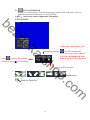
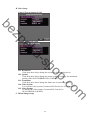
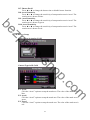
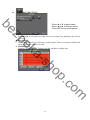
zp
be
USER MANUAL
09 CHANNELS
ek
HYBRID DIGITAL VIDEO
sh
a-
RECORDER
m
o
.c
op
INSTRUCTION MANUAL
To obtain the best performance and ensure device function correctly, please read this instruction manual carefully and
completely.
FCC Compliance
USER-INSTALLER CAUTION: YOUR AUTHORITY TO OPERATE THIS FCC VERIFIED EQUIPMENT
COULD BE VOIDED IF YOU MAKE CHANGES OR MODIFICATIONS NOT EXPRESSLY APPROVED BY THE
PARTY RESPONSIBLE FOR COMPLIANCE TO PART 15 OF THE FCC RULES.
be
NOTE: THIS EQUIPMENT HAS BEEN TESTED AND FOUND TO COMPLY WITH THE LIMITS FOR A
CLASS A DIGITAL DEVICE, PURSUANT TO PART 15 OF THE FCC RULES. THESE LIMITS ARE
DESIGNED TO PROVIDE REASONABLE PROTECTION AGAINST HARMFUL INTERFERENCE WHEN THE
EQUIPMENT IS OPERATED IN A COMMERCIAL ENVIRONMENT. THIS EQUIPMENT GENERATES, USES,
AND CAN RADIATE RADIO FREQUENCY ENERGY AND IF NOT INSTALLED AND USED IN
ACCORDANCE WITH THE INSTRUCTION MANUAL, MAY CAUSE HARMFUL INTERFERENCE TO RADIO
COMMUNICATIONS.
zp
OPERATION OF THIS EQUIPMENT IN A RESIDENTIAL AREA IS LIKELY TO CAUSE HARMFUL
INTERFERENCE IN WHICH CASE THE USER WILL BE REQUIRED TO CORRECT THE INTERFERENCE AT
HIS OWN EXPENSE.
THIS CLASS A DIGITAL APPARATUS MEETS ALL REQUIREMENTS OF THE CANADIAN
INTERFERENCE-CAUSING EQUIPMENT REGULATIONS.
ek
WARNINGS, CAUTIONS & COPYRIGHT
CAUTION
sh
a-
WARINGS
TO REDUCE THE RISK OF FIRE OR ELECTRIC SHOCK, DO NOT EXPOSE THIS PRODUCT TO RAIN OR
MISTURE.
DO NOT INSERT ANY METALLIC OBJECT THROUGH VENTILATION GRILLS.
CAUTION
RISK OF ELECTRIC SHOCK
DO NOT OPEN
op
CAUTION: TO REDUCE THE RISK OF ELECTRIC SHOCK.
DO NOT REMOVE COVER (OR BACK).
NO USER-SERVICEABLE PARTS INSIDE.
REFER SERVICING TO QUALIFIED SERVICE PERSONNEL.
Explanation of Graphical Symbols
o
.c
The lightning flash with arrowhead symbol, within an equilateral triangle, is intended to alert the
user to the presence of insinuated "dangerous voltage" within the products enclosure that may be of
sufficient magnitude to constitute a risk of electric shock to persons.
m
The exclamation point within an equilateral rhombus is intended to alert the user to the presence of
important operating and maintenance (servicing) instruction in the literature accompanying the
product.
USERS OF THE SYSTEM ARE RESPONSIBLE FOR CHECKING AND COMPLYING WITH ALL FEDERAL,
STATE, AND LOCAL LAWS AND STATUTES COIPCERNING THE MONITORING AND RECORDING OF
VIDEO AND AUDIO SIGNALS. ULTRAK SHALL NOT BE HELD RESPONSIBLE FOR THE USE OF THIS
SYSTEM IN VIOLATION OF CURRENT LAWS AND STATUTES.
COPYRIGHT
THE TRADEMARKS MENTIONED IN THE MANUAL ARE LEGALLY REGISTERED TO THEIR RESPECTIVE
COMPANIES.
2
TABLE OF CONTENTS
INTRODUCTION...................................................................................................................... 5
2
1.1
FEATURE ......................................................................................................................5
1.2
SPECIFICATION..........................................................................................................5
HARDWARE OVERVIEW...................................................................................................... 9
2.1
FRONT PANEL .............................................................................................................9
2.2
BACK PANEL..............................................................................................................10
be
1
3
sh
a-
op
4
ek
zp
2.3
ADVANCED AUTO SWITCH ZOOM, PTZ, COPY KEY CONTROL & USB
INFORMATION ......................................................................................................................10
2.4
CAMERA & MONITOR LOOPING......................................................................... 11
2.5
EXTERAL ALARM..................................................................................................... 11
2.6
IR REMOTE CONTROL ...........................................................................................12
2.7
PTZ (PAN, TILT AND ZOOM) CAMERA ...............................................................13
SYSTEM SETUP ..................................................................................................................... 14
3.1
MENU SETUP INTERFACE(GUI)...........................................................................14
3.2
LIVE VIEWING AND POP-UP MENU....................................................................16
3.3
CAMERA SETUP ........................................................................................................18
3.4
RECORD SETUP ........................................................................................................24
3.5
ALARM SETUP...........................................................................................................25
3.6
NETWORK SETUP ....................................................................................................27
3.7
AUTHORITY SETUP .................................................................................................31
3.8
DISK MANAGEMENT...............................................................................................33
3.9
SYSTEM SETUP .........................................................................................................34
HYBRID DVR PLAYBACK ................................................................................................... 37
4.1
TIME SEARCH ...........................................................................................................38
4.2
EVENT SEARCH ........................................................................................................38
4.3
BACKUP.......................................................................................................................39
m
o
.c
4.4
SYSTEM LOG .............................................................................................................40
5
BACKUP PLAYBACK ........................................................................................................... 41
5.1
MAIN SCREEN SETTING ........................................................................................41
5.2
USB & LOCAL BACKUP FILE PLAYBACK .........................................................45
5.3
BACKUP FILE TO AVI ..............................................................................................47
6
NETWORK VIEWING & PLAYBACK............................................................................... 48
6.1
IP ADDRESS SETUP ON PC SITE...........................................................................48
6.2
OPTIONAL MICROSOFT INTERNET EXPLORER SETUP..............................49
6.3
LOGIN ..........................................................................................................................52
6.4
REMOTE CONTROL.................................................................................................53
6.5
CONFIGURE ...............................................................................................................58
APPENDIX A: RECORDING TIME LAPSE (HOURS)............................................................. 67
3
APPENDIX B: HDD COMPATIBLE TABLE .............................................................................. 68
APPENDIX C: ERROR MESSAGE LIST.................................................................................... 69
sh
a-
ek
zp
be
m
o
.c
op
4
1
be
INTRODUCTION
1.1 FEATURE
z H.264 hardware video compression
z Recording rate up to 240 PPS @ D1
z Support Mega Pixel IPcam for each channel.
z Real-time Display & Playback.
z Support each channel backup
z Support CMS (Central Management System)
z Powerful mobile surveillance function, support JAVA、blackberry、i-Phone &
zp
Windows mobile
z Audio:4 in & 1out/ Audio Backup / Audio Streaming
ek
z Individual recording setup & function for each channel
z Support Privacy Mask.
z HDD damaged block detection & temperature alarm system (HDD S.M.A.R.T)
1.2
sh
a-
z Support Pre-alarm
z DVR log function (ex. user login/ logout) for device safety management
z Up to four online clients for independent remote control; individual live-time,
play-back & time-search function available
SPECIFICATION
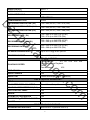
VIDEO
MODE
Multiplex
720 x 480 (NTSC)
720 × 576 (PAL)
LIVE-TIME DISPLAY RATE
9 × 30 Frame / Sec (NTSC)
9 × 25 Frame / Sec (PAL)
IPCAM RESOLUTION
Up to 1600 x 1200 (2 M-pixel)
IPCAM FRAME RATE
Up to 30 FPS @ NTSC per CH
SPLIT SCREEN
1, 4, 9
VIDEO INPUT
BNC × 8
VIDEO OUTPUT (BNC)
BNC × 1
VIDEO OUTPUT (VGA)
Yes
VIDEO OUTPUT (HDMI)
Yes
AUDIO INPUT
RCA × 4
5
m
AUDIO
o
.c
op
LIVE-TIME RESOLUTION
AUDIO OUTPUT
RCA × 1
AUDIO BACKUP
Yes
AUDIO STREAMING
Yes
RECORDING
H.264
RECORDING RESOLUTION ( D1)
720 x 480 (NTSC) / 720 x 576 (PAL)
RECORDING RESOLUTION ( Half
D1)
720 x 240 (NTSC) / 720 x 288 (PAL)
RECORDING RESOLUTION (CIF)
360 x 240 (NTSC) / 360 x 288 (PAL)
be
COMPRESSION TYPE
720 x 480 up to 240 PPS (NTSC)
720 x 576 up to 200 PPS (PAL)
RECORDING RATE ( Half D1)
720 x 240 up to 240 PPS (NTSC)
720 x 288 up to 200 PPS (PAL)
ek
zp
RECORDING RATE ( D1)
RECORDING RATE (CIF)
360 x 240 up to 240 PPS (NTSC)
360 x 288 up to 200 PPS (PAL)
IPCAM RECORDING RATE
Up to 30 FPS @ NTSC per CH
sh
a-
RECORDING MODE
Manual / Schedule / Alarm
PLAYBACK & SEARCH
PLAYBACK SPEED
Yes
op
TIME SEARCH
Fast Forward
X 2 X8 X 16 X32 X64
Picture by picture Playback
Pause
Fast Backward
X32
EVENT SEARCH
Yes
EVENT LIST
10000 records per H.D.D (Maximum)
OSD & CONTROL INTERFACE
8 Characters
ON SCREEN DISPLAY & SETUP
Time / Date / Setup Menu
GRAPHIC USER INTERFACE (GUI)
Yes
DVR CONTROL PANEL
Yes
MOUSE
Yes
IR REMOTE CONTROLLER
Yes
SUPPORT IE、FIREFOX & SAFARI
Yes
PLAYER
Yes
m
o
.c
TITLE
STORAGE & BACKUP DEVICE
INTERNAL HDD SUPPORT
SATA HDD x 2 (optional HDD x 4)
6
EXTERNAL USB BACKUP DEVICE
(PAN DRIVE, HDD, BURNER)
Yes
INTERNAL DVD BURNER BACKUP
No
NETWORK
Yes
ETHERNET COMPRESSION FORMAT
H.264
IE REMOTE CONTROL
Yes
DDNS
Yes
E-MAIL & FTP
Yes
NETWORK IP
Static/ DHCP/ PPPoE/DDNS
zp
be
ETHERNET
MULTI-REMOTE CLIENT
Yes ( 4 Clients at the same time available)
PDA/ CELL PHONE SUPPORT
Yes
ALARM
2 In
ALARM OUTPUT
2 Out (NO/ NC)
MOTION DETECTION
Yes
MOTION DETECTION AREA
8 x 8 grids
MOTION DETECTION SENSITIVITY
1~10
VIDEO LOSS DETECTION
Yes
ALARM RECORDING
Yes
sh
a-
ek
ALARM INPUT
PRE-ALARM RECORDING
Yes
BUZZER
Yes
SETUP & OTHER FUNCTIONS
op
Yes
EACH CHANNEL BACKUP
Yes
WATER MARK
Yes
PRIVACY MASK
Yes
PTZ CONTROL
Yes
RS-485
Yes
DIGITAL ZOOM
Yes
PASSWORD CONTROL
Two levels, one for system and the other for HDD format
KEY-LOCK
Yes
MULTI-LANGUAGE
Yes
FIRMWARE UPDATE
USB Host & Update on line
OTHERS
POWER INPUT
DC 12V
7
m
o
.c
DST
DIMENSIONS (W x H x D)
360mm X 60mm X 311mm
0 - 40 ℃
OPERATION TEMPERATURE
* SPECIFICATIONS ARE SUBJECT TO CHANGE WITHOUT NOTICE
sh
a-
ek
zp
be
m
o
.c
op
8
2
HARDWARE OVERVIEW
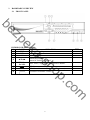
2.1 FRONT PANEL
ek
zp
be
IR Sensor For Remote Control.
m
o
.c
op
8
PTZ
sh
a-
HYBRID DVR OPERATION
NO.
LABEL
OPERATION
Button Of Recording.
1
REC
Led Indicator
2
LED
1~9 CH Display Buttons
3
1~9
Button Of Controller.
▲▼◄►
4
Button Of Switching Channel.
CONTROL
5
Menu, Enter, Copy, Zoom, Auto and PTZ Button.
PANEL
USB Connector
6
USB Mouse Connector (Only by supplied mouse).
7
Mouse
9
2.2
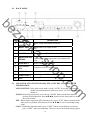
BACK PANEL
zp
be
NO.
2
3
HDMI VIDEO
OUTPUT
HDMI/ VGA
HDMI and VGA output switch.
AUDIO OUT
Audio output
POWER
Power switcher: DC 12V 5A / 50-60 Hz input.
Video output with HDMI connector.
sh
a-
4
5
RELAY /RS-232
/RS-485
6
ETHERNET
VGA D-SUB
7
OUT
2 pin connector for external control unit, 8 pin
connector for Alarm input and 2 pin connector for
relay
RJ-45 connector for network.
Connect to CRT or LCD monitor.
8
AUDIO IN
9
VIDEO INPUT
Video input with BNC connector.
10
FAN
Cooling Fan
Audio input.
o
.c
op
2.3
OPERATION
ek
1
LABEL
ADVANCED AUTO SWITCH ZOOM, PTZ, COPY KEY CONTROL & USB
INFORMATION
m
AUTO SWITCH : In the split screen mode, use the “AUTO” key in the front panel to
enable auto switch function. Moreover, press “AUTO” key again to
disable it.
ZOOM :In the full screen mode, user can use “ZOOM” button on the front panel to
perform ZOOM function. Press ▲▼◄►, located on the front panel, to move
the zoom window.
PTZ : When camera supported PTZ function, user can use “PTZ” button, located on the
front panel, to perform PTZ function. Press ▲▼◄► to select and change setup
value.
COPY : Within the playback mode, press “COPY” button to start backup record and
press “COPY” again to end backup. The user can see the backup image approx.
10
3 ~5 sec.
USB INFORMATION: Within the LIVE VIEWING, press “ENTER” key in the front
panel will present the USB information. (NOTE: Please
confirm that USB Device has plugged into HYBRID DVR.)
2.4 CAMERA & MONITOR LOOPING
Here recommend link cameras by sequence to avoid unexpected image broken, from CH1,
CH2, CH3, CH4…….
be
2.5
EXTERAL ALARM
There are three types of alarms that the system can be configured to handle. They are
Motion detection Alarm, External Alarm and Video Loss Alarm.
zp
A. Motion detection Alarm and External Alarm:
When motion detection or External Alarm was triggered, there are 5 possible actions
will be taken.
ek
sh
a-
a. Monitor will display corresponding full screen alarm channel, it will switch
automatic mode to manual mode if buttons pressing activity occurred in 5 seconds.
b. Relays can be activated by motion detection or external alarm when turning on.
c. External alarm will be recorded in the event list. Motion detection can be set to yes
or no.
B. Video Loss Alarm:
The default setting of Video Loss alarm is enabled and cannot be changed. Although
buzzer action can be disabled, an ALM record will still be added to the Event List that
indicates the precise time of video loss.
m
o
.c
op
11
2.6
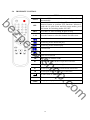
IR REMOTE CONTROL
ITEM
AUTO
be
SEL
Press AUTO to switch channel by channel
automatically.
Press this button to select the different assembled of
camera formats or perform PTZ functions. Moreover,
under the 16 split screen and full screen modes, press
this button for switching Audio ON/ OFF.
Press REC to start recording & again to stop.
1-16
Press the button to select the channel for full screen.
Fast backward
Picture by picture backward play
ek
zp
.REC
Picture by picture forward play
Fast forward
Play video forward
sh
aMODE
Split Screen Switch
**ID setup to control NVRs
▲
Switch split screen & Move upward or increase.
►
Switch split screen & Move right or increase.
▼
Switch split screen & Move downward or decrease.
◄
Switch split screen & Move left or decrease.
op
ID
To enter item or make choose.
To into or exit main menu
STOP
Stop play and playback
m
o
.c
MENU
12
2.7 PTZ (PAN, TILT AND ZOOM) CAMERA
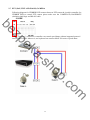
Following diagram for HYBRID DVR connect between PTZ camera & joystick controller, for
HYBRID DVR to control PTZ camera please make sure the CAMERA ID, BANDRATE
(default at 9600 bps) and RS-485 cable.
2 CORE
zp
be
Under “Two Core” connection, controller can control speed dome without integrated protocol
into HYBRID DVR. Moreover, one keyboard can connect MAX 256 units of speed dome.
sh
a-
ek
m
o
.c
op
13
3
SYSTEM SETUP
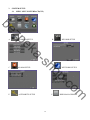
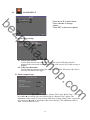
3.1 MENU SETUP INTERFACE(GUI)
zp
be
A.
CAMERA SETUP
B.
RECORD SETUP
sh
a-
ek
C.
ALARM SETUP
D.
NETWORK SETUP
AUTHORITY SETUP
F.
14
m
o
.c
op
E.
DISK MANAGEMENT
be
SYSTEM SETUP
H.
EXIT
sh
a-
ek
zp
G.
m
o
.c
op
15
3.2
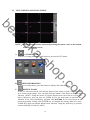
LIVE VIEWING AND POP-UP MENU
zp
be
GUI MENU BAR
With live viewing mode, press this button to get into the GUI menu.
sh
a-
A.
ek
NOTE:The pop-up menu can be activated by moving the mouse cruise to the bottom
of the live viewing screen.
o
.c
op
DISK INFORMATION
With live viewing mode, press this button to display disk information.
C.
DIGITAL ZOOM
In the live full screen mode, left-click the button of the mouse to pull a range to zoom
in or zoom out the image. User can right-click the button of the mouse to disable this
function. (NOTE: Using the mouse to operate digital zoom can zoom in to max. 16
times.) Moreover, user can also use ZOOM key on the front panel to perform this
function. (First, click ZOOM Key and then click ▲▼◄► key to select zoom in or
zoom out position. Finally, click ENTER key to complete the setting. Moreover, click
ZOOM Key again can disable digital zoom function. Using the panel key to perform
zoom in function is fixed at 2 times.)
m
B.
16
D.
PTZ CONTROLLER
Within live-viewing mode, Clicks this button to get into the PTZ setup menu. User can
right-click the button of the mouse to exit PTZ Setup.
NOTE: Only for the camera supported PTZ function.
PTZ CONTROL
ek
zp
be
to process Preset Point
sh
a-
Press
Under PTZ control mode, press
into PTZ setup menu.
User can also press the “MENU”
key on the HYBRID DVR front
panel to get into PTZ setup menu.
setup and press ■ to exit setting
To process AUTO function.
/
/
/
/
/
/
Direction key
m
o
.c
Zoom In/ Zoom Out
op
/
17
E.
AUDIO CONTROL
Press this button to turn the audio on or off。
F.
DISPLAY CONTROL
Within live-viewing or playback mode, use display control to switch the camera
channel.
be
G.
RECORD AND PLAYBACK CONTROL
Same as front panel controller and remote controller.
zp
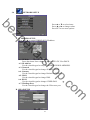
3.3
CAMERA SETUP
ek
Press ▲ or ▼ to select items.
Press ◄ or ► to change values.
Press SET to see more options.
sh
a-
A. Camera Setup
Hybrid DVR can connect two various cameras, analog camera or IP-Cam and it can setup
4CHs analog or IP cameras in maximum.
m
o
.c
op
Camera Type in Analog-CAM
18
Camera Type in IP-CAM
zp
be
sh
a-
ek
A-1. IPCam Quick Search
op
Press the “IPCam Quick Search” button and click “Search Device” button in the
following, HYBRID DVR will search the IPCAM devices which IP address are
setup as the same domain as HYBRID DVR IP address. Moreover, click the
IPCam device which from the list can import the device information to the
channel automatically without any manual key-in step.
o
.c
1. Enable:Click the checkbox to decide performing the connection or not.
2. IP Address:Insert the IP address of the connecting device.
3. Port:Insert the port number of the connecting device.
4. User:Insert the user name of the connecting device.
5. Password:Insert the password of the connecting device.
6. State:After click the “connect IPCAM” button to test the IPCAM device, the
connection state will reveal among this column.
m
A-2. Connect IPCAM:After insert the IPCAM related information, click this button
to test the connection circumstances.
19
B. Video Setup
Camera Type in Analog-CAM
zp
be
Camera Type in IP-CAM
sh
a-
ek
m
o
.c
op
B-1. Resolution
Click drop down list to change the resolution of connecting device.
B-2. Quality
Click drop down list to change the image quality. (Currently, the maximum
quality of the 09CH HYBRID DVR is 18M/bps)
B-3. FrameRate
Click drop down list to change the frame rate of connecting device.
B-4. Video System
To reveal the video system of connected IP Cam device. (NTSC or PAL)
B-5. Video Format
To display the video format of connected IP Cam device.
(H.264, MPEG4 or MJPEG)
C. IPCam Image Setup
20
Camera Type in Analog-CAM
zp
be
Camera Type in IP-CAM
sh
a-
ek
m
o
.c
op
C-1. Display
Use the mouse to enable or disable the camera display on the screen or not.
C-2. Audio
Click the checkbox to decide enable or disable the audio function.
C-3. Title
Use the mouse to setup the title of connecting IP device.
C-4. Contrast
Press ◄ or ► to change contrast level. The adjustment value is between 0~255
C-5. Brightness
Press ◄ or ► to change brightness level. The adjustment value is between
0~255
C-6. Hue
Press ◄ or ► to change hue level. The adjustment value is between 0~255
C-7. Saturation
Press ◄ or ► to change saturation level. The adjustment value is between
0~255
C-8. Sharpness
Press ◄ or ►/ mouse wheel to change sharpness level. The adjustment value is
between 0~15
C-9. Switch Dwell
Press ◄ or ► to change auto switch second. The value is between 0~99 sec.
21
D. Motion Setup
Camera Type in Analog-CAM
zp
be
sh
a-
ek
D-1. Relay Dwell
Press ◄ or ► to change the relay time or disable relay function.
D-2. Buzzer Dwell
Press ◄ or ► to change the buzzer time or disable buzzer function.
D-3. Motion Detection
Click the checkbox to decide enable or disable motion detection.
D-4. Sensitivity
Press ◄ or ► to change sensitivity level.
D-5. Motion Area Setup
to setup motion area.
Press
op
m
o
.c
Camera Type in IP-CAM
D-6. Relay Dwell
Press ◄ or ► to change the relay time or disable relay function.
22
be
D-7. Buzzer Dwell
Press ◄ or ► to change the buzzer time or disable buzzer function.
D-8. Area1 Sensitivity
Press ◄ or ► to change the sensitivity of setup motion area in Area1. The
motion area is drawn in blue.
D-9. Area2 Sensitivity
Press ◄ or ► to change the sensitivity of setup motion area in Area2. The
motion area is drawn in green.
D-10. Area3 Sensitivity
Press ◄ or ► to change the sensitivity of setup motion area in Area3. The
motion area is drawn in red.
zp
E. Privacy Setup
Camera Type in Analog-CAM
sh
a-
ek
Camera Type in IP-CAM
o
.c
op
m
E-1. Area1
Click the “Area1” option to setup the mask area. The color of the mask area is
blue.
E-2. Area2
Click the “Area2” option to setup the mask area. The color of the mask area is
green.
E-3. Area3
Click the “Area3” option to setup the mask area. The color of the mask area is
red.
23
3.4
RECORD SETUP
be
Press ▲ or ▼ to select items.
Press ◄ or ► to change values.
Press SET to see more options.
sh
a-
ek
zp
A. Post-Alarm Record Time
Press ◄ or ► to switch the recording time of post-alarm. The adjusting value is from
5~99 sec.
B. Record Mode
Use the drop down list to switch the recording mode. There are manual, schedule and
alarm trigger three varieties of mode.
C. Schedule Setup
Click the “Schedule Setup” button to set the schedule recording time.
m
o
.c
op
24
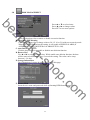
3.5
ALARM SETUP
zp
be
Press ▲ or ▼ to select items.
Press ◄ or ► to change
values.
Press SET to see more options.
A. Alarm Trigger Setup
sh
a-
ek
op
A-1. Alarm Auto Switch
Use the drop down list to switch the alarm auto switch. When the alarm is
triggered, the screen will switch to full screen, split screen (16CH split screen) or
disable.
A-2. Video Loss Detection
Use the drop down list to switch the video loss detection. When the video loss is
detected, the alarm will trigger.
B. Alarm Output Setup
m
o
.c
This control item separates into two parts, “Buzzer Time” and “Relay Time”. User can
press ◄ or ► to switch video loss buzzer time in “Buzzer Time” option. The
adjustment value is from 5 to 99 seconds. Moreover, among “Relay Time” option, the
user can press ◄ or ► to switch the video loss relay time. The adjustment value is
from 5 to 99 seconds as well.
25
C. Alarm Event Setup
be
sh
a-
ek
zp
There are six sort of events can be selected. When the selected items are happened and
triggered, the alarm will be activated.
m
o
.c
op
26
3.6
NETWORK SETUP
zp
be
Press ▲ or ▼ to select items.
Press ◄ or ► to change values.
Press SET to see more options.
A. IP ADDRESS SETUP
Press ◄ or ► to setup HYBRID DVR IP address.
sh
a-
ek
o
.c
op
A-1. IP Mode
Press drop down list to change IP mode to STATIC IP or DHCP.
A-2. IP Address
Use the virtual keypad to setup the HYBRID DVR IP ADDRESS.
A-3. Network
Use the virtual keypad to change SUBNET MASK.
A-4. Gateway
Use the virtual keypad to change Default GATEWAY.
A-5. DNS1
Use the virtual keypad to change DNS.
A-6. DNS2
Use the virtual keypad to change OTHER DNS.
A-7. WebPage Port
Use the virtual keypad to change the IE browser port.
B. PPPoE SETUP
m
27
zp
be
B-1. PPPoE Setting
Press the drop down list to enable or disable PPPoE.
B-2. User Name
Insert the user name (ADSL account) which provided from local ISP.
B-3. Password
Insert the password which provided from local ISP.
B-4. Password Confirm
Insert the password again to confirm the password.
B-5. State
Present the current status of PPPoE function.
B-6. Send Mail After Dialed
Click the drop down list to enable or disable the function.
B-7. Subject
Insert the mail subject when dialed successfully.
C. DDNS SETUP
sh
a-
ek
28
m
o
.c
op
C-1. DDNS Enable
Click the checkbox to enable or disable DDNS function.
C-2. Provider
Click the drop down list to select DDNS provider.
C-3. Host Name
Insert the registered host name in the selected provider.
C-4. User Name
Insert the registered user name in the selected provider.
C-5. Password
Insert the registered password in the selected provider.
C-6. Update Interval
A period of time to update IP address.
C-7. State
The state after apply for DDNS.
Updating: Information update.
Idle: Stop service.
DDNS registered successfully, now log by
http://<username>.ddns.camddns.com: Registered successfully.
Updating Failed, the name is already registered.
Updating Failed, please check your internet connection.
D. MAIL SETUP
be
sh
a-
ek
zp
D-1. Enable
Use the checkbox to enable or disable the Mail Server function.
D-2. Mail Server
The IP address of Mail Server
D-3. SMTP Port
The port of SMTP (known as Simple Mail Transfer Protocol). (Default value is
25)
D-4. User Name
The user name while log in to the mail server.
D-5. Password
The password while log in to the mail server.
D-6. Sender’s Mail
The sender’s account when send the mail via this mail server.
D-7. Receiver’s Mail
The receiver’s mail address.
D-8. BCC Mail
The receiver’s mail address for Bcc Mail.
D-9. Subject
The subject while sending the mail.
E. FTP SETUP
29
m
o
.c
op
E-1. Enable
Use the checkbox to enable or disable FTP Server.
E-2. FTP Server
The IP address of FTP Server.
E-3. User Name
The username while log in to the ftp server.
E-4. Password
The password while log in to the ftp server.
E-5. FTP Port
The port number of file transmission. (Default value is 21)
E-6. Path
The ftp path where the user wants to reserve the information.
F. DHCP Server Setup
zp
be
sh
a-
ek
F-1. Enable
Use the checkbox to enable or disable DHCP Server function. When the function
is activated, the HYBRID DVR can be treated as the DHCP server. The
HYBRID DVR will assign or distribute one of the IP address which is according
to the setup IP address range (start and end IP Address.) to the connecting
IPCAM (setup DHCP function as well).
F-2. Start IP Address
Use the virtual keypad to insert the start IP Address of DHCP server.
F-3. End IP Address
Use the virtual keypad to insert the end IP Address of DHCP server.
F-4. Lease Time
Press ◄ or ► to change the lease time of DHCP server.
G. UPNP Port Forwarding Setup
o
.c
op
G-1. Enable
Use the checkbox to enable or disable UPNP port setup.
G-2. External HTTP Port
Use the virtual keypad to insert the external http port.
G-3. External RTSP Port
Use the virtual keypad to insert the external rtsp port.
m
30
3.7
AUTHORITY SETUP
be
Press ▲ or ▼ to select items.
Press ◄ or ► to change values.
Press SET to see more options.
sh
a-
ek
zp
A. HDD Format
Use the checkbox to enable or disable the authority of HDD Format function. If
enable this function, the user has to insert password while performing HDD format.
B. Anonymous User Login
Use the checkbox to enable or disable the authority of anonymous user login. If enable
this function, the user does not have to insert the username/ password and can view
the live image via IE browser.
C. Password Protection
Use the checkbox to enable or disable the authority of password protection.
D. Keyboard Lock
Use the checkbox to enable or disable the operation of control bar which is in the right
hand side of live view. The control bar can not work when keyboard lock is activated.
E. User Management
Among this item, user can setup the user management permission and the user
authority management.
op
m
o
.c
E-1. Permission
Use the mouse to click the checkbox to modify and alter the user authority.
31
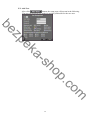
E-2. Add User
After click
button, the setup page will present in the following.
The user can distribute the authority and the permission for the new user.
sh
a-
ek
zp
be
m
o
.c
op
32
3.8
DISK MANAGEMENT
zp
be
Press ▲ or ▼ to select items.
Press ◄ or ► to change values.
Press SET to see more options.
sh
a-
ek
A. Overwrite Mode
Click the drop down list to enable or disable overwrite function.
B. Hard Disk Full Warning
Click the drop down list to change value to 20/ 15/ 10 or 5% with non-overwrite mode.
When LEFT RATIO is below the setting, it will enable AUDIBLE ALARM (If
AUDIBLE ALARM of BUZZER of ALARM SETUP is ON).
C. Auto Deletion
Click the drop down list to enable or disable auto deletion function.
D. Reserve Day
Use ◄ or ► to setup the reserve day. While enable auto deletion function, the data
will be removed when reserve day is exceed the setting. The value can be setup
between 1~30 days
E. Storage Information
The information of storage device will present in this page.
o
.c
op
F. Format HDD
Insert the user name and password while performing HDD format function.
m
33
3.9
SYSTEM SETUP
zp
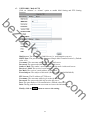
be
sh
a-
ek
A. System Name
Use the virtual keypad to insert the name of the HYBRID DVR.
B. System ID
Use ◄ or ► to setup the HYBRID DVR ID. The adjustment value is between 0~32
C. Language
Use the drop down list to change the HYBRID DVR language. Currently, there are
English, Traditional Chinese and Simplified Chinese three options.
D. Date Format
Use the drop down list to change DATE. There are DD/MM/YYYY, YYYY/MM/DD
and MM/DD/YYYY three modes.
E. Version
The firmware version of the HYBRID DVR will show in this column.
F. Software Update
Click
button to perform firmware updating.
m
o
.c
op
34
G. Configure Setup
Click the checkbox to select which item can be setup by the user. The user can also
load the setting to factory default, load the configure from USB and backup configure
to USB.
be
sh
a-
ek
zp
H. Time Setup
Click
button within “Time” block can adjust and synchronize the time of
the HYBRID DVR as the system time of the PC. Moreover, if the user clicks the
button within the NTP Setup block, the time of the
enable checkbox and
HYBRID DVR will synchronize as the NTP Server.
I. Day Light Saving Time
o
.c
op
After enable the daylight saving time function, the user can use the drop down list to
select the start time and the end time of daylight saving time. After complete the
m
button to reserve the setting.
setting, please click
J. Status Display Setup
Use the mouse to click the options, which is including “Date and Time Display”,
“Record Information Display” and “Camera Title Display”.
35
be
K. Monitor Adjust
User can use ◄ or ► to adjust the monitor related setting within this page, there are
“Brightness”, “Contrast”, “Hue” and “Saturation” four options can be set.
sh
a-
ek
zp
m
o
.c
op
36
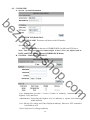
4
HYBRID DVR PLAYBACK
zp
be
Note: Under playback mode, it will output sound when switch to full screen mode.
RECORD BACKUP
With playback mode, press this button to backup record (.264 video backup) and press
this button again to finish backup. For performing the single image backup (.Y42 single
image backup), press
first and then click this button to backup the necessary image.
B.
AUDIO CONTROL
Press this button to turn the audio on or off
C.
DISPLAY CONTROL
Within playback mode, use display control to switch the camera channel.
D.
RECORD AND PLAYBACK CONTROL
Same as front panel controller and remote controller.
E.
DIGITAL ZOOM
In the live full screen mode, left-click the button of the mouse to pull a range to zoom in
or zoom out the image. User can right-click the button of the mouse to disable this
function. (NOTE: Using the mouse to operate digital zoom can zoom in to max. 16 times.)
Moreover, user can also use ZOOM key on the front panel to perform this function. (First,
click ZOOM Key and then click ▲▼◄► key to select zoom in or zoom out position.
Finally, click ENTER key to complete the setting. Moreover, click ZOOM Key again can
disable digital zoom function. Using the panel key to perform zoom in function is fixed at
2 times.)
sh
a-
ek
A.
m
o
.c
op
37
4.1
TIME SEARCH
Select the start of playback time and then click
button to playback the
recorded data. If the time contains the recorded data, the time point within this page will
become red.
ek
zp
be
4.2
EVENT SEARCH
sh
a-
After entry to the event search page, user can click the event log item which shown on the
list to start playback. Moreover, the user could click
button to select the
specific event option to filter the event option that shown on the list.
m
o
.c
op
38
4.3
BACKUP
After click the backup button, the user could use drop down list to select the storage
device, USB/ DVD-RW (08CH/ 16CH models) and the backup time selection mode,
Time Mode/ Hours Mode. After that, click
button to start backup.
sh
a-
ek
zp
be
TIME MODE
Click ◄ or ► to select the start and end backup time.
Moreover, among “Select Channel” option, use the mouse to select the channel which is
going to backup.
m
o
.c
op
39
4.4
SYSTEM LOG
System log is reserved all of the system record. The maximum storage quantity is 2000.
Click
button to perform the further data filter action. After complete
the specific item selection, please click
button to reserve the setting. While
return to the system log page, it will only reveal the specific selection items.
ek
zp
be
button
sh
a-
After click
m
o
.c
op
40
5
BACKUP PLAYBACK
SYSTEM REQUIREMENT
CPU: Intel Celeron 1.6G
MEMORY: 256MB.
VGA: 32MB
VGA RESOLUTION: 1024 x 768.
OS: Windows XP / 2000
be
zp
SUGGESTED REQUIREMENT
CPU:Intel P4 2.8G
MEMORY:512MB or above
VGA:64MB or above
VGA RESOLUTION:1024 x 768
OS: Windows XP / 2000
NETWORK BANDWIDTH: Upload Speed is 256kbps or above
5.1
sh
a-
ek
MAIN SCREEN SETTING
A. MAIN SCREEN
Channel Selected
Save as AVI
m
o
.c
op
Time & Event Search
41
B. HDD PLAY
Play about all the data from the Hard disk of HYBRID DVR or perform the specific
Time and Event Search to play.
Note: Remove the HYBRID DVR HDD and connect to the PC first. Then, use
sh
a-
ek
zp
be
(K6Viewer.exe) to play the data of HDD.
HYBRID DVR player
HYBRID DVR player (K6Viewer.exe) can be attained from the attached CD or
via the Internet; moreover, while performing USB backup and DVD-RW backup,
the software will be built automatically as well.
m
o
.c
op
42
B-1. TIME SEARCH
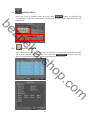
Insert search Date and Time and then click
film.
to play all the searched
ek
zp
be
B-2. EVENT SEARCH
It will display all the events which are reserved within the HYBRID DVR HDD
sh
a-
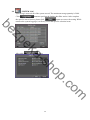
after press
(Shown in the following) and double click left button of
mouse to trigger event.
op
B-3. HDD COPY
Copied and reserved the HYBRID DVR HDD data to other data storage device.
o
.c
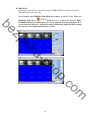
Press
button, the Copy screen will pop-up.
m
43
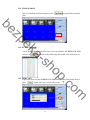
Then, select the “StartTime” and “EndTime”.
button to choose the storage destination and press
to start reserving.
ek
zp
be
After that, press
Finally, the complete information will pop-up while finished storage.
sh
a-
(K6 Viewer.exe) can play not only HYBRID DVR H.D.D (*.idx).
but also the *.264 and *.Y42 files which are reserved within the data storage
devices. (i.e. CD/DVD disc, pen drive and the PC H.D.D which the data backup
from HYBRID DVR H.D.D)
op
C. File (*.264) Play
m
o
.c
D. File (*.Y42) Play
44
zp
be
5.2 USB & LOCAL BACKUP FILE PLAYBACK
sh
a-
ek
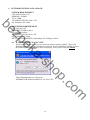
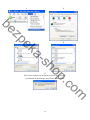
A. Plug the USB disk into PC or check the local backup folder.
If using USB mode, please double click the player.exe from the pop-up diagram. (As
below)
op
B. The play backup program would appear on the screen, select "Open".
m
o
.c
45
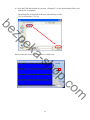
C. Open the USB disk located driver letter. (Example E:) or the local backup folder, and
pick the file to playback.
The backup file will named as the time when backup, as like:
170319.264 will be 17:03:19
sh
a-
ek
zp
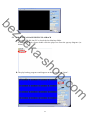
be
D. Press the play icon to play the video or still picture.
m
o
.c
op
46
5.3 BACKUP FILE TO AVI
A. Please select specific channel to backup.
ek
zp
be
B. During video playback mode please press AVI bottom
to start.
sh
a-
C. Make up a filename and path than press
D. Press AVI bottom
bottom to start AVI backup.
to finish backup.
m
o
.c
op
47
6
NETWORK VIEWING & PLAYBACK
SYSTEM REQUIREMENT
CPU: Intel Celeron 1.6G
MEMORY: 256MB.
VGA: 32MB
VGA RESOLUTION: 1024 x 768.
OS: Windows XP / 2000
be
zp
SUGGESTED REQUIREMENT
CPU: Intel P4 2.8G
MEMORY:512MB or above
VGA:64MB or above
VGA RESOLUTION:1024 x 768
OS: Windows XP / 2000
NETWORK BANDWIDTH: Upload Speed is 256kbps or above
sh
a-
ek
6.1 IP ADDRESS SETUP ON PC SITE
Install cameras inside in LAN or use network cable to connect with PC. This is for
IPInstallerEng.exe to set up IP address of cameras. If OS is Windows XP SP2 or above,
the following Windows Security Alert will popup. Then, please click on Unblock.
op
Then, IPInstallerEng.exe will popup:
HYBRID DVR default IP address is 192.168.1.220
m
o
.c
48
ek
zp
be
NOTE: Please input correct network parameters without blank spaces.
sh
a-
On Device Lists, it lists all servers. Click on one server and then its IP setting will show
on the right side. After editing the parameters and clicking on Submit, the following
dialogue box will popup. And, it will reboot the device with new parameters.
op
m
o
.c
6.2 OPTIONAL MICROSOFT INTERNET EXPLORER SETUP
OPTION 1: DISABLE ACTIVEX WARNING
A. IE Æ Tools Æ Internet Options Æ Security Æ Custom Level Æ Security Settings Æ
Download unsigned ActiveX controls Æ Enable or Prompt (recommend).
B. IE Æ Tools Æ Internet Options Æ Security Æ Custom Level Æ Security Settings Æ
Initialize and script ActiveX controls not marked as safe Æ Enable or Prompt
(recommend).
49
1
2
zp
be
3
4
sh
a-
ek
op
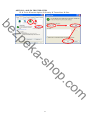
5
Above three options are all based on select as the prompt.
As indicated in the dialogue box. Please select "YES."
m
o
.c
50
OPTION 2: ADD TO TRUSTED SITES
IE Æ Tools Æ Internet Options Æ Security Æ Trusted sites Æ Sites
sh
a-
ek
zp
be
m
o
.c
op
51
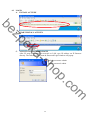
6.3 LOGIN
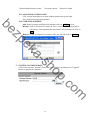
A. INSTALL ACTIVEX
be
B.
START INSTALL ACTIVEX
ek
zp
C.
sh
a-
ACCOUNT & PASSWORD LOGIN
After IP setup and connect to network or LAN, type IP address on IE Browser
directly. The following User name & Password Login window will popup.
Default user name: admin
Default password: admin
m
o
.c
op
52
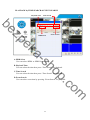
6.4 REMOTE CONTROL
LIVE VIEWING
HYBRID DVR
zp
be
PTZ Control
sh
a-
ek
System Time
Play Back
Screen Format
REC
Full Screen
Time-Point Backup
A. HYBRID DVR Configuration
Get into HYBRID DVR network menu.
op
B. PTZ Control
PTZ control function panel
o
.c
Direction Keys
m
PTZ Zoom in/out
Auto Pan Function
Preset Point
Setup
53
ek
zp
be
Up to 32 preset points
for operation
C. SYSTEM TIME
Live viewing mode: The current live viewing time.
sh
a-
D. SCREEN FORMAT
Switch screen format and click twice to switch different channels with full screen.
E.
Full Screen. Click again to return.
F.
REC. Videos are saved as AVI file.
G.
Playback
Click
op
H.
Time-Point Backup
,
and playback window will popup
m
o
.c
54
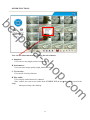
PLAYBACK by TIME SEARCH & EVENT SEARCH
Playback Time
Time Search
sh
a-
ek
zp
be
Event Search
HDD Select
A. HDD Select
User can select HDD1 or HDD2 for playback
B. Playback Time
User can select the time then press “Time Search” for playback.
op
C. Time Search
User can select the time then press “Time Search” for playback.
D. Event Search
User can select event item by pressing “Event Search” for playback.
m
o
.c
55
Click
to operate Time-Point backup.
TIME-POINT BACKUP
First, select Start and End backup time which have to among the Record Time.
zp
be
Then, click Save button to select the position on PC where the user is going to backup the data.
After that, press OK button to start the backup.
sh
a-
ek
op
Finally, double-click the left button of the mouse to open the saved backup file. The backup file
will named as the time when start to backup, such as,
(20080526113258.264) will be 2008/05/26 11:32:58.
m
o
.c
56
OTHER FUNCTIONS
sh
a-
ek
zp
be
User can use other functions by clicking the left of mouse
A. Snapshot:
User can save any single picture from image.
B. Performance:
User can select image quality (high, medium & low).
op
C. Use Overlay:
User can use Overlay function.
m
o
.c
D. Play audio:
User can play audio function by channel.
Note: remote user can receive audio from HYBRID DVR & the audio will be saved with
image
when processing video backup.
57
6.5 CONFIGURE
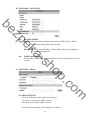
A. System - System Information
zp
be
A-1 SYSTEM INFORMATION
SERVER NAME: This name will show on the IP Installer.
ek
A-2 NTP Setting
NTP SERVER: Revise the time of HYBRID DVR via different NTP Server.
sh
a-
Note: Time zone and Interval cannot adjust in here (User can adjust both in
DATE and TIME SETUP option of HYBRID DVR Menu).
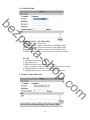
B. SYSTEM – USER MANAGEMENT
o
.c
op
m
User Management provides 3 levels of limits of authority: Administrator (the
highest), User, and Guest.
Administrator: Possessing the highest level of authority to operate full functions
within network.
User: Having Live Image and Video Playback authority. Moreover, PTZ controlled
is included as well.
Guest: Only have Live Image authority.
58
Default administrator account:
Username: admin
Password: admin
B-1 ANONYMOUS USER LOGIN:
YES: Accept anonymous user login without password as guest login.
NO: Anonymous login unacceptable.
OK.
Remove: Click on selected User name on the user list and click on Remove.
sh
a-
ek
zp
be
B-2 USER MANAGEMENT:
Add: Input Username and Password and then click on Add/Set to save.
Modify: Click on selected User name on User List and the following window
will popup. After inputting Password and Confirm Password, click on
C. SYSTEM / SYSTEM UPDATE
Click on the “Browse” button to select the latest firmware and then press “Upgrade”
button to upgrade the firmware.
m
o
.c
op
59
D. NETWORK – IP SETTING
zp
be
D-1
ek
IP ASSIGNMENT
DHCP: In Dynamic Host Configuration Protocol (DHCP) mode, DHCP
server will get setting done automatically.
STATIC IP: Please input IP address, Subnet Mask, and Gateway based on
network environment.
sh
a-
D-2
PORT ASSIGNEMENT
With IP Share (Router), the following Ports needed to be adjusted in case of
conflict.
E. NETWORK – PPPoE
After dialed successfully, new IP address will appear.
60
m
o
.c
op
E-1 PPPoE SETTING
Click on Enabled to enable ADSL dial function.
Username: Username for ADSL account.
Password: Password for ADSL account.
E-2 SEND MAIL AFTER DIALED
Click on Enabled to enable SEND MAIL AFTER DIALED function.
E-3 SUBJECT
Mail subject.
ek
zp
be
F. NETWORK / DDNS SETTING
sh
a61
m
o
.c
op
Click on Enabled to enable DDNS function.
F-1 DYNDNS.ORG
zp
be
sh
a-
ek
DDNS SETTING - DYNDNS.ORG
PROVIDER: Select dyndns.org
HOSTNAME: The registered hostname in DYNDNS.ORG.
USERNAME: The registered username in DYNDNS.ORG.
PASSWORD: The registered password in DYNDNS.ORG.
SCHEDULE UPDATE: A period of time to update IP address.
op
STATE
1. Updating: Information update.
2. Idle: Stop service.
3. DDNS registered successfully, now log by
http://<username>.ddns.camddns.com: Registered successfully.
4. Updating Failed, the name is already registered.
5. Updating Failed, please check your internet connection.
F-2 DDNS.CAMNNDS.COM
m
o
.c
62
DDNS SETTING – DDNS.CAMDDNS.COM
PROVIDER: Select ddns.camddns.com
USERNAME: The registered username in DDNS.CAMDDNS.COM.
SCHEDULE UPDATE: A period of time to update IP address.
zp
be
STATE
1. Updating: Information update.
2. Idle: Stop service.
3. DDNS registered successfully, now log by
http://<username>.ddns.camddns.com: Registered successfully.
4. Updating Failed, the name is already registered.
5. Updating Failed, please check your internet connection.
DDNS Setting Steps:
1 “ENABLE” option to enable DDNS function and select ○
2
Press ○
ek
“ddns.camddns.com” of the provider drop down list which is suggested to use. In
the following, insert ○
3 the username which the user wants to apply
sh
a-
(i.e. HYBRID DVR_GODDNS in here). After that, click ○
4 “Apply” button to
apply a DDNS domain name.
1.
4.
o
.c
op
2.
3.
Finally, the HYBRID DVR domain name○
5 (http://HYBRID
m
DVR_GODDNS.ddns.camddns.com) will be shown on the state block.
63
be
5.
1. If the user selects another provider which is ddns2.ydsHYBRID DVR.com, all of
the setting steps are the same with ddns.camddns.com setting.
2. However, if dyndns.org provider is selected, please go to www.dyndns.org website
to register the account first. The user has to fill in the username, password and
hostname for applying the account. After the user applied the account successfully,
the dyndns.org will give the user a complete DDNS domain name.
3. If setting up IP schedule update too frequently, the IP may be blocked. In general,
schedule update every day (1440 minutes) is recommended.
sh
a-
ek
zp
NOTE:
m
o
.c
op
64
G.
NETWORK / Mail & FTP
Click on “Motion” or “Alarm” option to enable Mail Setting and FTP Setting
function.
sh
a-
ek
zp
be
op
Mail Server: The IP address of Mail Server (i.e. mail.huntelec.com.tw).
SMTP Port: The port of SMTP (known as Simple Mail Transfer Protocol). (Default
value is 25)
Username: The username while log in to the mail server.
Password: The password while log in to the mail server.
Sender’s Mail: The sender’s account when send the mail via this mail server.
Receiver’s Mail: The receiver’s mail address.
Bcc Mail: The receiver’s mail address for Bcc Mail.
Event Subject: The subject of this mail. (Default value is ALARM MAIL)
o
.c
FTP Server: The IP address of FTP Server.
Username: The username while log in to the ftp server.
Password: The password while log in to the ftp server.
Port: The port number of file transmission. (Default value is 21)
Path: The ftp path where the user wants to reserve the information.
Finally, click on Apply button to reserve the setting.
m
65
H. OTHERS / Player Downloaded
User can click “Run” button to download the player to local PC.
zp
be
I.
sh
a-
ek
OTHERS/ HYBRID DVR Setting
HYBRID DVR setting can be changed via the Internet.
m
o
.c
op
66
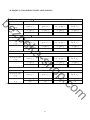
APPENDIX A: RECORDING TIME LAPSE (HOURS)
2TB
be
IMAGE QUALITY
(Mbps)
16CH
LOW(0.25M)
MEDIUM(0.5M)
STANDARD(1M)
HIGH(1.5M)
AVERAGE
AVERAGE
AVERAGE
AVERAGE
960
480
240
160
zp
IMAGE QUALITY
16CH
4TB
LOW(0.25M)
UNIT:Hours
MEDIUM (0.5M)
ek
(Mbps)
UNIT:Hours
STANDARD (1M)
HIGH (1.5M)
AVERAGE
AVERAGE
AVERAGE
AVERAGE
1920
960
480
320
6TB
(Mbps)
16CH
sh
a-
IMAGE QUALITY
UNIT:Hours
LOW(0.25M)
MEDIUM (0.5M)
STANDARD (1M)
HIGH (1.5M)
AVERAGE
AVERAGE
AVERAGE
AVERAGE
2880
1440
720
480
8TB
(Mbps)
LOW(0.25M)
MEDIUM (0.5M)
STANDARD (1M)
HIGH (1.5M)
AVERAGE
AVERAGE
AVERAGE
AVERAGE
3840
1920
960
640
* The value is for reference only
m
o
.c
16CH
op
IMAGE QUALITY
UNIT:Hours
67
APPENDIX B: HDD COMPATIBLE TABLE
Model
Capacity
others
SEAGATE
STM3250820AS
250 GB
7200 10
ST3250310SV
250GB
SV35.3
ST3400620AS
400 GB
7200 10
ST3500320SV
500GB
SV35.3
ST3500320AS
500GB
7200 11
ST3500418AS
500GB
7200 12
ST3750640AS
750 GB
7200 10
ST3750330AS
750 GB
7200 11
ST31000333AS
1TB
7200 11
ST31000340AS
1TB
7200 11
ST31000340NS
1TB
Barracuda ES.2
ST31000340SV
1TB
SV35.3
ST31500341AS
1.5TB
7200 11
WD1600AAJS
160 GB
7200 CB
WD2500AAKS
250 GB
7200 CB
WD2500AVVS
250 GB
7200 GP
WD5000AACS
500 GB
7200 GP
WD5000AVVS
500 GB
7200 GP
WD5000AAKS
500GB
7200 CB
WD6400AAKS
640 GB
7200 BLUE
WD6400AVVS
640 GB
7200 GP
WD7500AACS
750GB
7200 GP
WD7500AVVS
750GB
7200 GP
WD10EACS
1TB
7200 GP
WD10EADS
1TB
Caviar Green
WD10EVDS
1TB
Green Power
WD10EVVS
1TB
7200 GP
WD15EADS
1.5TB
WD15EARS
1.5TB
WD20EADS
2.0TB
HDS721616PLA380
160 GB
7200
HDT725025VLA380
250 GB
7200
HDT725032VLA360
320 GB
7200
HDP725050GLA360
500 GB
7200
HCP725050GLA380
500GB
7200
HDT721010SLA360
1TB
7200
WD
sh
a-
ek
zp
be
Brand
7200 GP
7200 GP
m
68
o
.c
* The compatible table is for reference only
op
HITACHI
7200 GP
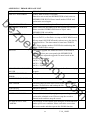
APPENDIX C: ERROR MESSAGE LIST
ERROR STATUS & REASON
DISK ACCESS ERROR!
H.D.D. Data structure Un-normal.
Data does not record into HYBRID DVR or bad sector on
HYBRID DVR H.D.D. Please install another H.D.D. and
perform the record again.
UPDATE FILE ERROR!
Please re-download the update file and update again.
FIRMWARE UPGRADE
FAILED
Please reboot the HYBRID DVR and upgrade the firmware.
Please send the HYBRID DVR back to repair when
HYBRID DVR is disability.
MEDIA ACCESS FAIL!
The USB file format is incorrect (Please format the pen
drive to FAT32) or Pen Drive is setup to ONLY READ mode
(Please annul ONLY READ mode) when reserve the data by
using Pen Drive. The data cannot be burn into CD/DVD
disc. Please change another CD/DVD disc and backup the
file in CD/DVD disc storage.
NO FILE!
NOTE
ek
zp
be
ERROR MESSAGE
sh
a-
There is no upgrade file within Pen Drive or the name of
upgrade file does not correspond with HYBRID DVR
format. Please adjust the upgrade file name based on the
following information.
16CH -> UpdateR.bin
08CH -> Update8.bin
04CH -> Update4.bin
Pen Drive undetected. Please Unplug the Pen Drive and plug
it again.
BACKUP START TIME
ERROR
Backup start time error.
BACKUPEND TIME ERROR
Backup end time error.
DISK ERROR
The data cannot be burn into CD/DVD disc. Please change
another CD/DVD disc and backup the file.
FAN FAILED
Fan Error Warning.
NO LOG DATA
No Events Record.
SCHEDULE RECORD
The condition is caused by trying to stop recording when
perform the schedule record. Please setup the record to
manual mode and then stop the record.
PLEASE SELECT ONE
CAMERA
The message will be shown while using the ZOOM function
under split screen condition. Please switch the screen into
full screen mode and then operate the ZOOM function.
m
o
.c
op
USB DEVICE NOT FOUND
NO USB
69
V1.0_110822