1
User Manual
M D A E M O N ®
V E R S I O N
9 . 6 . 0
ALT-N TECHNOLOGIES, LTD.
MDaemon Version 9.6 – User Manual
®
MDaemon is a product of Alt-N Technologies.
2550 SW Grapevine Parkway, Suite 150
Grapevine, Texas 76051
817.601.3222
Fax: 817.601.3223
www.mdaemon.com
Copyright © 1996 - 2007 Alt-N Technologies®. All Rights Reserved.
MDaemon, WorldClient, and RelayFax are registered ® trademarks of Alt-N Technologies®.
2
M D A E M O N
LICENSE AGREEMENT
Please read this entire agreement. If you do not agree to the terms of this
agreement promptly return your distribution materials to the place you
obtained them for a full refund or delete your trial package.
ALT-N TECHNOLOGIES END-USER LICENSE AGREEMENT
This End-User License Agreement ("EULA") is a legal agreement between
you ("Customer" or "Sub Licensee") and Alt-N Technologies ("Licensee")
for the Alt-N software product(s) you are installing which include(s)
computer software, "online" or electronic documentation, and may include
associated media and printed materials ("SOFTWARE PRODUCT" or
"SOFTWARE").
By installing, copying, or otherwise using the SOFTWARE PRODUCT,
you agree to be bound by the terms of this EULA. If you do not agree to
the terms of this EULA, promptly return the entire unused SOFTWARE
PRODUCT, including all subscription UPDATES that you may have
received as part of the SOFTWARE PRODUCT, to the place from which
you obtained it for a full refund and/or delete all files related to your trial
demonstration version of the SOFTWARE PRODUCT.
V E R S I O N
9 . 6 . 0
CUSTOMER REMEDIES.
ALT-N TECHNOLOGIES ENTIRE LIABILITY AND YOUR EXCLUSIVE
REMEDY SHALL NOT EXCEED THE PRICE PAID FOR THE
SOFTWARE. NO LIABILITY FOR CONSEQUENTIAL DAMAGES. TO
THE MAXIMUM EXTENT PERMITTED BY APPLICABLE LAW, IN NO
EVENT SHALL ALT-N TECHNOLOGIES BE LIABLE FOR ANY
DAMAGES WHATSOEVER (INCLUDING, WITHOUT LIMITATION,
DAMAGES FOR LOSS OF BUSINESS PROFITS, BUSINESS
INTERRUPTION, LOSS OF BUSINESS INFORMATION, OR ANY
OTHER PECUNIARY LOSS) ARISING OUT OF THE USE OF OR
INABILITY TO USE THIS SOFTWARE PRODUCT, EVEN IF ALT-N
TECHNOLOGIES HAS BEEN ADVISED OF THE POSSIBILITY OF
SUCH DAMAGES. BECAUSE SOME STATES DO NOT ALLOW THE
EXCLUSION OR LIMITATION OF LIABILITY FOR CONSEQUENTIAL
OR INCIDENTAL DAMAGES, THE ABOVE LIMITATION MAY NOT
APPLY TO YOU.
ALT-N TECHNOLOGIES SOFTWARE LICENSE
This SOFTWARE PRODUCT is protected by copyright laws and
international copyright treaties, as well as other intellectual property laws
and treaties. The SOFTWARE PRODUCT is licensed, not sold. The
SOFTWARE PRODUCT consists of product documentation, a server
application, and support files individually identified as "COMPONENT" and
collectively referred to herein as "SOFTWARE".
GRANT OF LICENSE.
Alt-N Technologies grants to you as an individual, a personal, nonexclusive, non-transferable license to install and execute a single instance
of the SOFTWARE on a single computer or on multiple computers
provided that there is no chance of concurrently running two or more
distinct instances of the SOFTWARE simultaneously for the purposes of
evaluating the performance of the SOFTWARE PRODUCT for a period of
no more than 30 days. If after that time continued use of the SOFTWARE
PRODUCT is desired then the SOFTWARE PRODUCT must be
registered with Alt-N Technologies subject to the terms as laid out in the
registration information which can be found in the documentation
accompanying the SOFTWARE PRODUCT. If you are an entity Alt-N
Technologies grants you the right to appoint an individual within your
organization to use and administer the SOFTWARE subject to the same
restrictions enforced on individual users.
COPYRIGHT
All title and copyrights in and to the SOFTWARE PRODUCT are owned
by Alt-N Technologies, its suppliers, or component vendors. The
SOFTWARE PRODUCT is protected by copyright laws and international
treaty provisions. Therefore, you must treat the SOFTWARE PRODUCT
like any other copyrighted material except that you may either (a) make
one copy of the SOFTWARE PRODUCT solely for backup or archival
purposes, or (b) install the SOFTWARE PRODUCT on a single computer
provided you keep the original solely for backup or archival purposes. You
may not copy the printed materials accompanying the SOFTWARE
PRODUCT.
THIRD PARTY COMPONENT LICENSING TERMS
Third party utilities, application programs, and/or components designed to
integrate with the SOFTWARE PRODUCT are subject to the license terms
governing those products.
You may not reverse-engineer, decompile, or disassemble the
SOFTWARE PRODUCT, except and only to the extent that such activity is
expressly permitted by applicable law, notwithstanding this limitation.
DISCLAIMER OF WARRANTY
NO WARRANTIES. THE SOFTWARE PRODUCT IS PROVIDED "AS IS"
WITHOUT WARRANTY OF ANY KIND. TO THE MAXIMUM EXTENT
PERMITTED BY APPLICABLE LAW, ALT-N TECHNOLOGIES
DISCLAIMS ALL WARRANTIES, EITHER EXPRESS OR IMPLIED,
INCLUDING, BUT NOT LIMITED TO, IMPLIED WARRANTIES OF
MERCHANTABILITY AND FITNESS FOR A PARTICULAR PURPOSE
AND ANY WARRANTY AGAINST INFRINGEMENT, WITH REGARD TO
THE SOFTWARE PRODUCT. THIS LIMITED WARRANTY GIVES YOU
SPECIFIC LEGAL RIGHTS. YOU MAY HAVE OTHERS WHICH VARY
FROM STATE TO STATE.
3
M D A E M O N
V E R S I O N
9 . 6 . 0
Chapter List
MDaemon® v9.6 _____________________________________________________________________________ 17
MDaemon’s Main Display _____________________________________________________________________ 31
Primary Domain Configuration _________________________________________________________________ 39
Secondary Domains__________________________________________________________________________ 71
Remote Configuration ________________________________________________________________________ 76
WorldClient Server ___________________________________________________________________________ 86
LDaemon/Address Book Options ______________________________________________________________ 119
Shared Folders/Mail Queues __________________________________________________________________ 125
Security Features ___________________________________________________________________________ 138
Header Translation__________________________________________________________________________ 239
IP Cache and DNS Lookup ___________________________________________________________________ 242
Scheduling and Dialup_______________________________________________________________________ 245
DomainPOP Mail Collection __________________________________________________________________ 262
Content Filter and Anti-virus__________________________________________________________________ 277
Priority Mail ________________________________________________________________________________ 310
Logging ___________________________________________________________________________________ 312
System Service Settings _____________________________________________________________________ 323
Miscellaneous Options ______________________________________________________________________ 325
Managing MDaemon Accounts ________________________________________________________________ 350
Account Editor _____________________________________________________________________________ 377
Importing Accounts _________________________________________________________________________ 411
Address Aliases ____________________________________________________________________________ 417
Auto Responders and MBF Files ______________________________________________________________ 422
Mailing Lists _______________________________________________________________________________ 435
Catalogs __________________________________________________________________________________ 468
Domain Gateways __________________________________________________________________________ 470
Queue and Statistics Manager ________________________________________________________________ 492
Additional MDaemon Features ________________________________________________________________ 504
Appendix A ________________________________________________________________________________ 519
Appendix B ________________________________________________________________________________ 521
Appendix C ________________________________________________________________________________ 522
Appendix D ________________________________________________________________________________ 524
Glossary __________________________________________________________________________________ 527
Index _____________________________________________________________________________________ 546
4
M D A E M O N
V E R S I O N
9 . 6 . 0
Table of Contents
Section I – MDaemon’s Primary Features
CHAPTER 1
MDaemon® v9.6 _____________________________________________________________ 17
Introduction_________________________________________________________________________________ 17
MDaemon Standard and Pro___________________________________________________________________ 17
MDaemon Features__________________________________________________________________________ 17
New in MDaemon 9.6 _________________________________________________________________________ 19
Account Grouping ___________________________________________________________________________ 19
Subaddressing______________________________________________________________________________ 19
DKIM Updated ______________________________________________________________________________ 19
Message Certification (MDaemon Pro only) _______________________________________________________ 19
Backscatter Protection (MDaemon Pro only) ______________________________________________________ 20
Minger (MDaemon Pro only) ___________________________________________________________________ 20
Gateway Address Verification Expanded (MDaemon Pro only) ________________________________________ 20
Performance Enhancements ___________________________________________________________________ 21
Additional Features and Changes _______________________________________________________________ 22
New in MDaemon 9.5 _________________________________________________________________________ 22
Custom Scheduling and Mail Queuing ___________________________________________________________ 22
Spam Traps ________________________________________________________________________________ 22
“Notes” Support for WorldClient, Outlook Connector, and SyncML _____________________________________ 23
Improved SyncML Now Supports Sync4j Clients ___________________________________________________ 23
Support for SecurityPlus for MDaemon 3.0________________________________________________________ 23
New in MDaemon 9.0 _________________________________________________________________________ 23
Active Directory Monitoring ____________________________________________________________________ 23
Active Directory Support for Mailing Lists _________________________________________________________ 24
Sender ID _________________________________________________________________________________ 24
Integrated Web-based Administration ____________________________________________________________ 24
Improved IMAP Performance __________________________________________________________________ 24
Improved AntiSpam Performance _______________________________________________________________ 25
Improved Content Filter and AntiVirus Performance_________________________________________________ 25
WorldClient and Groupware Improvements _______________________________________________________ 25
Free/Busy Server __________________________________________________________________________ 25
SyncML Server ____________________________________________________________________________ 25
Improved Meeting Invitation Support ___________________________________________________________ 25
Unicode (UTF-8) Support ____________________________________________________________________ 25
Improved Support for Pocket PC Users _________________________________________________________ 26
Upgrading to MDaemon 9.6____________________________________________________________________ 26
Version 9.6.0 Special Notes ___________________________________________________________________ 26
Version 9.5.0 Special Notes ___________________________________________________________________ 27
Version 9.0.0 Special Notes ___________________________________________________________________ 28
Installation__________________________________________________________________________________ 30
5
T A B L E
O F
C O N T E N T S
CHAPTER 2
MDaemon’s Main Display _____________________________________________________ 31
Statistics and Tools __________________________________________________________________________ 31
Message and Event Tracking __________________________________________________________________ 32
Event Tracking Window’s Shortcut Menu________________________________________________________ 34
Composite Log View _________________________________________________________________________ 34
Tray Icon ___________________________________________________________________________________ 35
Shortcut Menu ______________________________________________________________________________ 36
Locking/Unlocking MDaemon’s Main Interface ___________________________________________________ 36
Connection Window __________________________________________________________________________ 37
MDaemon’s SMTP Work Flow __________________________________________________________________ 38
CHAPTER 3
Primary Domain Configuration _________________________________________________39
Primary Domain Editor _______________________________________________________________________ 39
Domain ___________________________________________________________________________________ 41
Delivery ___________________________________________________________________________________ 43
Retry Queue Settings _______________________________________________________________________ 46
Ports _____________________________________________________________________________________ 48
DNS ______________________________________________________________________________________ 51
Timers ____________________________________________________________________________________ 54
Sessions __________________________________________________________________________________ 57
Dequeue __________________________________________________________________________________ 60
On-Demand Mail Relay (ODMR) ______________________________________________________________ 62
Dequeue AUTH ___________________________________________________________________________ 62
Archival ___________________________________________________________________________________ 63
Pruning ___________________________________________________________________________________ 65
Pre-processing _____________________________________________________________________________ 67
Unknown Mail ______________________________________________________________________________ 69
CHAPTER 4
Secondary Domains___________________________________________________________ 71
Hosting Multiple Domains (MDaemon Pro only) ___________________________________________________ 71
Secondary Domain Editor _____________________________________________________________________ 72
Adding a Secondary Domain___________________________________________________________________ 75
Editing a Secondary Domain ___________________________________________________________________ 75
Removing a Secondary Domain ________________________________________________________________ 75
CHAPTER 5
Remote Configuration_________________________________________________________76
WebAdmin (web configuration) ________________________________________________________________ 78
Web Server ________________________________________________________________________________ 78
Using WebAdmin with HTTPS ________________________________________________________________ 79
Running WebAdmin under IIS ________________________________________________________________ 80
HTTPS____________________________________________________________________________________ 84
6
M D A E M O N
V E R S I O N
9 . 6 . 0
CHAPTER 6
WorldClient Server____________________________________________________________86
Overview ___________________________________________________________________________________ 86
Calendar & Scheduling System_________________________________________________________________ 86
ComAgent _________________________________________________________________________________ 87
ComAgent’s Instant Messaging System_________________________________________________________ 87
Automatic Address Book Synchronization ________________________________________________________ 88
Using WorldClient ___________________________________________________________________________ 89
Starting WorldClient__________________________________________________________________________ 89
Logging in to WorldClient _____________________________________________________________________ 89
Changing WorldClient’s Port Setting _____________________________________________________________ 90
WorldClient Documentation ___________________________________________________________________ 90
Client-side Help _____________________________________________________________________________ 90
WorldClient Web Mail_________________________________________________________________________ 91
Web Server ________________________________________________________________________________ 91
Running WorldClient under IIS6 _______________________________________________________________ 93
HTTPS____________________________________________________________________________________ 96
Calendar __________________________________________________________________________________ 98
Free/Busy Options _________________________________________________________________________ 99
SyncML __________________________________________________________________________________ 101
Configuring Your SyncML Clients_____________________________________________________________ 102
RelayFax _________________________________________________________________________________ 104
Options __________________________________________________________________________________ 106
Outlook Connector for MDaemon______________________________________________________________ 110
Outlook Connector Users ____________________________________________________________________ 111
Outlook Connector Options ___________________________________________________________________ 113
Attachment Linking _________________________________________________________________________ 115
CHAPTER 7
LDaemon/Address Book Options______________________________________________ 119
LDaemon _________________________________________________________________________________ 120
LDAP Options _____________________________________________________________________________ 122
CHAPTER 8
Shared Folders/Mail Queues __________________________________________________ 125
Shared Folders _____________________________________________________________________________ 126
Shared Folders ____________________________________________________________________________ 126
Public Folders _____________________________________________________________________________ 128
Access Control List ________________________________________________________________________ 130
Mail Queues _______________________________________________________________________________ 133
Holding Queue_____________________________________________________________________________ 135
Restore __________________________________________________________________________________ 137
CHAPTER 9
Security Features ____________________________________________________________ 138
Security Features ___________________________________________________________________________ 138
7
T A B L E
O F
C O N T E N T S
DNS Black Lists (DNS-BL)____________________________________________________________________ 140
Hosts ____________________________________________________________________________________ 141
Options __________________________________________________________________________________ 143
Auto-generating a Spam Folder and Filter for Each Account________________________________________ 144
White List_________________________________________________________________________________ 146
Spam Filter ________________________________________________________________________________ 147
Spam Filtering _____________________________________________________________________________ 148
Heuristics _________________________________________________________________________________ 151
Bayesian _________________________________________________________________________________ 154
Bayesian Advanced Options ________________________________________________________________ 157
Reporting _________________________________________________________________________________ 160
MDSpamD ________________________________________________________________________________ 162
White List_________________________________________________________________________________ 165
White List (auto) ___________________________________________________________________________ 166
White List (to) _____________________________________________________________________________ 169
White List (from) ___________________________________________________________________________ 170
Black List _________________________________________________________________________________ 171
Spam Traps ________________________________________________________________________________ 172
SSL & Certificates __________________________________________________________________________ 174
MDaemon ________________________________________________________________________________ 175
WorldClient _______________________________________________________________________________ 177
WebAdmin ________________________________________________________________________________ 180
Creating and Using SSL Certificates ___________________________________________________________ 182
Creating a Certificate ______________________________________________________________________ 183
Using Certificates Issued by a Third-party CA ___________________________________________________ 183
Address Suppression _______________________________________________________________________ 185
Host Screening _____________________________________________________________________________ 187
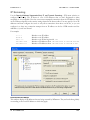
IP Screening _______________________________________________________________________________ 189
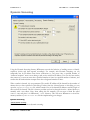
Dynamic Screening _________________________________________________________________________ 191
IP Shielding ________________________________________________________________________________ 193
SMTP Authentication ________________________________________________________________________ 195
Backscatter Protection ______________________________________________________________________ 197
Backscatter ______________________________________________________________________________ 197
MDaemon’s Solution ______________________________________________________________________ 197
Backscatter Protection_______________________________________________________________________ 198
POP Before SMTP __________________________________________________________________________ 200
Site Policy _________________________________________________________________________________ 202
Creating an SMTP Session Policy Statement ___________________________________________________ 202
Relay Settings______________________________________________________________________________ 203
Trusted Hosts ______________________________________________________________________________ 205
Tarpit Settings _____________________________________________________________________________ 207
Reverse Lookup ____________________________________________________________________________ 209
LAN IPs ___________________________________________________________________________________ 212
Greylisting_________________________________________________________________________________ 214
Sender Policy Framework ____________________________________________________________________ 217
SPF / Sender ID ___________________________________________________________________________ 217
8
M D A E M O N
V E R S I O N
9 . 6 . 0
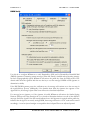
DomainKeys and DomainKeys Identified Mail ___________________________________________________ 220
DKIM Sign ________________________________________________________________________________ 221
DKIM Verify _______________________________________________________________________________ 224
Authentication-Results header _______________________________________________________________ 227
DK/DKIM Headers in Mailing List Messages ____________________________________________________ 227
DKIM Options _____________________________________________________________________________ 228
Approved List______________________________________________________________________________ 230
Message Certification _______________________________________________________________________ 232
Certifying Incoming Messages _______________________________________________________________ 232
Certifying Outgoing Messages _______________________________________________________________ 232
Certification _______________________________________________________________________________ 234
Certification Setup ________________________________________________________________________ 235
HashCash _________________________________________________________________________________ 237
CHAPTER 10
Header Translation __________________________________________________________239
Header Translation__________________________________________________________________________ 240
Header Translation Exceptions ________________________________________________________________ 241
CHAPTER 11
IP Cache and DNS Lookup ___________________________________________________242
IP Cache __________________________________________________________________________________ 242
DNS Lookup _______________________________________________________________________________ 244
CHAPTER 12
Scheduling and Dialup _______________________________________________________245
Event Scheduling ___________________________________________________________________________ 246
Send & Collect Mail _________________________________________________________________________ 246
AntiVirus Updates __________________________________________________________________________ 250
AntiSpam Updates__________________________________________________________________________ 252
RAS Dialup Settings_________________________________________________________________________ 254
Dialup Settings ____________________________________________________________________________ 254
ISP Logon Settings _________________________________________________________________________ 256
Post Connection ___________________________________________________________________________ 258
LAN Domains _____________________________________________________________________________ 259
LAN IPs __________________________________________________________________________________ 260
CHAPTER 13
DomainPOP Mail Collection __________________________________________________262
DomainPOP Mail Collection __________________________________________________________________ 264
Account __________________________________________________________________________________ 264
Parsing __________________________________________________________________________________ 267
Processing________________________________________________________________________________ 269
Routing Rules _____________________________________________________________________________ 271
Foreign Mail_______________________________________________________________________________ 273
Security __________________________________________________________________________________ 274
Name Matching ____________________________________________________________________________ 275
9
T A B L E
O F
C O N T E N T S
CHAPTER 14
Content Filter and Anti-virus __________________________________________________277
SecurityPlus for MDaemon ___________________________________________________________________ 277
New in SecurityPlus for MDaemon 3.0 __________________________________________________________ 278
Outbreak Protection _______________________________________________________________________ 278
Malware Protection ________________________________________________________________________ 278
Improved AV Engine_______________________________________________________________________ 278
Expanded Updater ________________________________________________________________________ 278
Content Filter Editor_________________________________________________________________________ 279
Creating a New Content Filter Rule_____________________________________________________________ 281
Modifying an Existing Content Filter Rule ________________________________________________________ 285
Using Regular Expressions in Your Filter Rules ___________________________________________________ 285
Attachments_______________________________________________________________________________ 289
Compression ______________________________________________________________________________ 291
Notifications _______________________________________________________________________________ 294
Message Macros ___________________________________________________________________________ 295
Recipients ________________________________________________________________________________ 297
AntiVirus _________________________________________________________________________________ 298
AntiVirus Updater __________________________________________________________________________ 301
Configure updater _________________________________________________________________________ 302
Outbreak Protection_________________________________________________________________________ 305
Outbreak Protection_________________________________________________________________________ 306
CHAPTER 15
Priority Mail ________________________________________________________________ 310
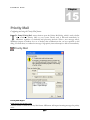
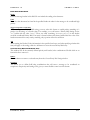
Priority Mail ________________________________________________________________________________ 310
CHAPTER 16
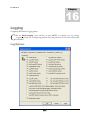
Logging ___________________________________________________________________ 312
Log Options _______________________________________________________________________________ 312
Log Mode_________________________________________________________________________________ 316
Log Maintenance ___________________________________________________________________________ 318
Composite Log ____________________________________________________________________________ 320
Event Log ________________________________________________________________________________ 322
CHAPTER 17
System Service Settings_______________________________________________________323
Service Settings ____________________________________________________________________________ 323
Network Resource Access ___________________________________________________________________ 324
CHAPTER 18
Miscellaneous Options _______________________________________________________325
GUI _____________________________________________________________________________________ 325
Servers __________________________________________________________________________________ 328
Headers __________________________________________________________________________________ 331
Special Fixes ______________________________________________________________________________ 334
1 0
M D A E M O N
V E R S I O N
9 . 6 . 0
System___________________________________________________________________________________ 336
Disk _____________________________________________________________________________________ 338
MultiPOP _________________________________________________________________________________ 340
WAB ____________________________________________________________________________________ 342
Quotas ___________________________________________________________________________________ 344
Miscellaneous _____________________________________________________________________________ 346
Section II – MDaemon’s Account Features
CHAPTER 19
Managing MDaemon Accounts ________________________________________________350
Account Database Options ___________________________________________________________________ 351
Account DB _______________________________________________________________________________ 351
ODBC Selector Wizard ______________________________________________________________________ 352
Migrating Your Account Database to an ODBC Accessible Store ____________________________________ 353
Creating a New System Data Source__________________________________________________________ 354
Active Directory ____________________________________________________________________________ 358
Active Directory ____________________________________________________________________________ 360
AD Options _______________________________________________________________________________ 362
Minger ___________________________________________________________________________________ 365
Account Manager ___________________________________________________________________________ 367
Creating an MDaemon User Account ___________________________________________________________ 369
New Account Defaults _______________________________________________________________________ 370
Account __________________________________________________________________________________ 370
Template Macros _________________________________________________________________________ 371
Web Access_______________________________________________________________________________ 372
Quotas ___________________________________________________________________________________ 375
Groups ___________________________________________________________________________________ 376
CHAPTER 20
Account Editor______________________________________________________________377
Account Editor _____________________________________________________________________________ 378
Account __________________________________________________________________________________ 378
Mailbox __________________________________________________________________________________ 381
Forwarding________________________________________________________________________________ 383
Admin ___________________________________________________________________________________ 385
Quotas ___________________________________________________________________________________ 387
Restrictions _______________________________________________________________________________ 389
Web _____________________________________________________________________________________ 392
Auto Responder____________________________________________________________________________ 395
Filters ____________________________________________________________________________________ 398
MultiPOP _________________________________________________________________________________ 402
Options __________________________________________________________________________________ 404
Shared Folders ____________________________________________________________________________ 407
Access Control List ________________________________________________________________________ 409
1 1
T A B L E
O F
C O N T E N T S
CHAPTER 21
Importing Accounts _________________________________________________________ 411
Importing Accounts From a Text File___________________________________________________________ 411
Windows Account Integration_________________________________________________________________ 413
SAM/Active Directory Account Importer _________________________________________________________ 414
Domains ________________________________________________________________________________ 414
Accounts ________________________________________________________________________________ 415
Options _________________________________________________________________________________ 415
CHAPTER 22
Address Aliases _____________________________________________________________ 417
Aliases ____________________________________________________________________________________ 418
Options __________________________________________________________________________________ 420
CHAPTER 23
Auto Responders and MBF Files _______________________________________________422
Auto Responders ___________________________________________________________________________ 423
Accounts _________________________________________________________________________________ 423
Auto Responders___________________________________________________________________________ 424
Exception List _____________________________________________________________________________ 427
Options __________________________________________________________________________________ 428
Creating Auto Response Scripts _______________________________________________________________ 429
Auto Response Script Samples ______________________________________________________________ 429
Creating and Using MBF Files ________________________________________________________________ 430
MBF Macros and Examples __________________________________________________________________ 431
Section III – Additional MDaemon Features
CHAPTER 24
Mailing Lists _______________________________________________________________435
Mailing List Editor __________________________________________________________________________ 435
Creating a New Mailing List___________________________________________________________________ 435
Modifying an Existing Mailing List ______________________________________________________________ 435
Options __________________________________________________________________________________ 436
Members _________________________________________________________________________________ 439
Enhanced List Pruning _____________________________________________________________________ 441
Routing __________________________________________________________________________________ 442
ODBC ___________________________________________________________________________________ 444
Selecting and Configuring an ODBC System Data Source for a Mailing List ___________________________ 446
Creating a New System Data Source__________________________________________________________ 449
AD ______________________________________________________________________________________ 452
Subscriptions ______________________________________________________________________________ 455
Subscribing To Mailing Lists_________________________________________________________________ 456
Support Files ______________________________________________________________________________ 458
Notifications _______________________________________________________________________________ 460
Security __________________________________________________________________________________ 462
1 2
M D A E M O N
V E R S I O N
9 . 6 . 0
Digest ___________________________________________________________________________________ 464
Public Folder ______________________________________________________________________________ 466
Catalogs ___________________________________________________________________468
Catalog Editor _____________________________________________________________________________ 468
The PUBLIC Catalog ______________________________________________________________________ 469
Domain Gateways ___________________________________________________________470
Gateway Editor _____________________________________________________________________________ 471
Gateway _________________________________________________________________________________ 473
Dequeuing ________________________________________________________________________________ 475
Forwarding________________________________________________________________________________ 478
Verification________________________________________________________________________________ 480
Using multiple configurations for LDAP verification queries_________________________________________ 482
MUA Access ______________________________________________________________________________ 484
Quotas ___________________________________________________________________________________ 486
Options __________________________________________________________________________________ 488
Automatic Gateway Creation _________________________________________________________________ 490
Queue and Statistics Manager _________________________________________________492
Queue Page ______________________________________________________________________________ 493
Selecting Files ___________________________________________________________________________ 494
User Page ________________________________________________________________________________ 497
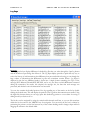
Log Page _________________________________________________________________________________ 499
Report Page ______________________________________________________________________________ 501
Customizing the Queue/Statistic Manager _______________________________________________________ 502
MDstats.ini File ___________________________________________________________________________ 502
MDStats Command Line Parameters__________________________________________________________ 503
Additional MDaemon Features ________________________________________________504
Bandwidth Throttling ________________________________________________________________________ 504
Bandwidth Throttling ________________________________________________________________________ 505
LAN Domains _____________________________________________________________________________ 507
LAN IPs __________________________________________________________________________________ 508
Signature Files _____________________________________________________________________________ 509
Signature Files_____________________________________________________________________________ 509
MDaemon and Text Files _____________________________________________________________________ 510
Editing MDaemon Files ______________________________________________________________________ 510
The RAW Message Specification ______________________________________________________________ 511
Bypassing the Content Filter __________________________________________________________________ 511
RAW Headers _____________________________________________________________________________ 511
Special fields supported by RAW ______________________________________________________________ 512
Sample RAW mail messages: _______________________________________________________________ 513
Remote Server Control Via Email ______________________________________________________________ 514
Account Access and Control __________________________________________________________________ 514
Mailing List and Catalog Control _______________________________________________________________ 515
General Email Controls ______________________________________________________________________ 517
MDaemon and Proxy Servers _________________________________________________________________ 517
1 3
T A B L E
O F
C O N T E N T S
Miscellaneous Information ___________________________________________________________________ 518
APPENDICES
Appendix A ________________________________________________________________ 519
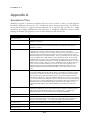
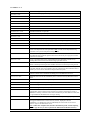
Semaphore Files____________________________________________________________________________ 519
Appendix B ________________________________________________________________ 521
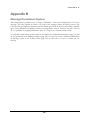
Message Precedence System _________________________________________________________________ 521
Appendix C ________________________________________________________________522
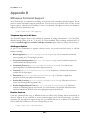
Route Slips ________________________________________________________________________________ 522
Appendix D ________________________________________________________________524
MDaemon Technical Support _________________________________________________________________ 524
Telephone Support for All Users _______________________________________________________________ 524
Self-Support Options ________________________________________________________________________ 524
Reseller Purchase __________________________________________________________________________ 524
Sales and Reseller Inquiries __________________________________________________________________ 525
Contacts __________________________________________________________________________________ 525
Alt-N Technologies, LTD. ____________________________________________________________________ 525
Sales and Reseller Inquiries_________________________________________________________________ 525
Documentation Issues _______________________________________________________________________ 525
MDaemon Beta Testing______________________________________________________________________ 525
Glossary ___________________________________________________________________527
Index______________________________________________________________________546
1 4
M D A E M O N ®
V 9 . 6
SECTION I
MDAEMON® VERSION 9.6.0
MDaemon’s Primary Features
1 5
C H A P T E R
1 6
1
M D A E M O N ®
V 9 . 6
I N T R O D U C T I O N
M D A E M O N ®
V 9 . 6
1
Chapter
MDaemon v9.6
®
Versatile Email Server for Windows
Introduction
M
Daemon Server v9.6 is a standards-based SMTP/POP/IMAP mail server that offers a full
range of mail server functionality. MDaemon is designed to manage the email needs of any
number of individual users and comes complete with a powerful set of integrated tools for
managing mail accounts and message formats. MDaemon offers a scalable SMTP, POP3, and
IMAP4 mail server complete with LDAP and Active Directory support, an integrated browser-based
email client, content filtering, spam filters, extensive security features, and more.
MDaemon Standard and Pro
Alt-N Technologies’ MDaemon Server is available in two versions: MDaemon Standard and MDaemon
Pro. With the powerful features of MDaemon Standard, you can collect your network’s email from a
single ISP provided POP3 account, or host an entire domain with MDaemon’s full-fledged SMTP server.
With the increased functionality of IMAP4 and Multiple Domain Support, MDaemon Pro is an ideal
email backbone for enterprise level organizations. MDaemon Pro also adds group calendar and
scheduling, an instant messaging system, multiple language support for WorldClient, automatic domain
gateway creation, and more to MDaemon Standard’s already extensive set of features. For a complete
discussion on the differences between MDaemon Standard and Pro see the white paper, “MDaemon
Versions: Comparing Standard and Pro”. This white paper and other helpful resources can be obtained form
our web site at www.altn.com.
MDaemon Features
MDaemon is equipped with many features besides SMTP, POP, and IMAP email processing. The
following is a list of just some of those features.
MDaemon’s extensive parsing features make it possible to provide email for an entire LAN with as little as a
single dial-up ISP POP3 mailbox. This makes it possible to provide email to an entire network for a fraction of
the normally associated cost.
Complete support for virus scanning and protection through SecurityPlus for MDaemon. This add-on for
MDaemon provides potent anti-virus protection. Messages can be scanned for viruses and cleaned or deleted
automatically before ever reaching the intended recipients. Further, you can configure MDaemon to send a
message to the administrator, sender, and recipient of the infected message notifying them of the virus.
SecurityPlus for MDaemon is a separately licensed product that is available from www.altn.com.
MDaemon features a complete suite of Mailing List or email group management functions allowing for the
formation of an unlimited number of distinct distribution lists that can contain local and/or remote members.
1 7
C H A P T E R
1
M D A E M O N ®
V 9 . 6
Lists can be set to allow or refuse subscription requests, be public or private, post replies to either the list or the
originator of the message, be sent in digest format, and be configured using numerous other features.
An integrated component of MDaemon is WorldClient. This exciting product makes it possible for your users to
access their email using their favorite web browser rather than from a workstation dependent email client. This
tool is perfect for mobile staff and users who do not have a dedicated machine from which to access their email.
WorldClient is equipped with a complete suite of email client features. You can: send and receive email, spell
check messages, manage your email in multiple personal folders, display the interface in any of 18 languages,
schedule meetings and appointments and share calendars and tasks with other users, manage your MDaemon
account settings (when used in conjunction with WebAdmin), manage contacts, and more. WorldClient is also
equipped with ComAgent, a small utility that can be downloaded and installed on a user’s local computer. This
provides easy access to your email and folders and checks for new messages without having to open your web
browser. It also includes a complete Instant Messaging system that can be used to quickly “chat” with other
MDaemon/WorldClient users.
MDaemon is equipped with many features designed to help you make your email system secure. The Spam
Filter and DNS Black Lists features will help you put an end to most “spam” email messages that “spammers”
try to route through or to your domain. IP and Host Screening and Address Suppression provide the capability
to screen and prevent certain addresses and domains from connecting to or sending mail through your system.
They also make it possible to connect to specific IP addresses while screening all others.
Equipped with support for Lightweight Directory Access Protocol (LDAP), MDaemon can keep your LDAP
server up to date on all of its user accounts. This makes it possible for you to keep an LDAP address book up to
date so that users with email clients that support LDAP can access it. You can also choose to use Active
Directory or your LDAP server as the MDaemon account database instead of an ODBC compliant database or
the local USERLIST.DAT system. Thus, you can configure multiple MDaemon’s at different locations to share
the same account database.
MDaemon can be configured to keep your Windows Address Book or Microsoft Outlook Contact Store up to
date with your user information. This provides another means of making a global address book available to your
users.
Address Aliases provides the ability to route email messages addressed to “fictitious” mailboxes to a valid
account or mailing list. This makes it possible for individual accounts and lists to have multiple email addresses
at one or more domains.
The Domain Gateways feature provides the option of setting up separate domains for various departments or
groups that may be local to your network or located somewhere else on the Internet. Using this feature, all mail
addressed to a domain for which MDaemon is acting as a gateway will be placed in that domain’s mailbox by
MDaemon. It can then be collected by that domain’s MDaemon server or email client and distributed to the
domain’s users. This feature can also be used to enable MDaemon to act as a backup mail server for other
domains.
Accounts can be controlled remotely by users by using specially formatted email messages. This allows greater
administrative flexibility, and empowers users by turning day-to-day simple account maintenance tasks, such as
changing passwords, over to them.
Integrated web-based remote administration via WebAdmin. WebAdmin is integrated with MDaemon and
WorldClient and enables your users to review and edit their account settings via their web-browser. You can
designate which settings that your users may edit, and assign access permissions on a per account basis.
WebAdmin can also be used by the Administrator (and whomever else you wish to allow) to review or edit any
of MDaemon’s settings and any other files that you wish to make available to the WebAdmin system for
reviewing.
With File Catalogs, the email administrator can create password protected groups of files which users can have
encoded and automatically sent to them through the use of specially formatted email messages.
1 8
I N T R O D U C T I O N
C H A P T E R
1
M D A E M O N ®
V 9 . 6
Account mailbox formats can be abstracted using Mailbox Format Files (MBF), which allows for a wide range
of mail system compatibility.
An internal message transport system known as RAW mail provides a simple method for placing messages into
the mail stream and greatly simplifies custom mail software development. Using RAW, a complete mail system
can be devised using a simple text editor and a couple of batch files.
A highly versatile Content Filtering system makes it possible for you to customize server behavior based on the
content of incoming and outgoing email messages. You can insert and delete message headers, add footers to
messages, remove attachments, route copies to other users, cause an instant message to be sent to someone, run
other programs, and more.
New in MDaemon 9.6
Account Grouping
MDaemon now supports account Groups. You can create Groups via the new Groups tab on the
New Account Defaults dialog (AccountsÆNew account defaults/Groups...ÆGroups tab), and you
can assign accounts to one or more Groups using an option on each account’s Mailbox tab under the
Account Editor. With two new Content Filter rule conditions, you can then assign actions to
messages based on whether or not the sender or recipient of a message is a member of a specific
Group. Finally, you can assign Access Control List rights for Shared Folders to specific Groups, and
members of those Groups will share those rights.
Subaddressing
Subaddressing is a system for including a folder name in the mailbox portion of an account’s email
address. Using that system, messages addressed to the mailbox+folder name combination (for example,
[email protected]) will be routed automatically to the account’s folder
included in the address. This makes it possible to route messages to specific folders without having to
creating filters to do so. Subaddressing can be enabled for individual accounts via an option located
on each account’s Filters tab. For more on Subaddressing, see page 398.
DKIM Updated
After much hard work, in February 2007 DKIM was approved by the Internet Engineering Task
Force (IETF) as a Proposed Standard (RFC-4871). DKIM’s implementation in MDaemon 9.6 was
therefore updated to the final IETF version. For more on DKIM in MDaemon, see page 220. For
more on the DKIM standard, see: www.dkim.org.
Message Certification (MDaemon Pro only)
Message Certification is a process by which one entity vouches for or “certifies” the good email
conduct of another entity. Consequently, when this certifying entity is one whom a receiving email
server trusts, messages sent from a domain who is vouched for by that entity can be viewed with less
suspicion. Thus the receiving server can be reasonably assured that the sending domain adheres to a
set of good email practices and doesn’t send spam or other problematic messages. Certification is
beneficial because it can help ensure that messages will not be erroneously or needlessly subjected to
unwarranted spam filter analysis. It also helps lower the resources required to process each message.
MDaemon Pro version 9.6 supports Message Certification by including the world’s first commercial
implementation of a new Internet mail protocol called “Vouch-By-Reference” (VBR), which Alt-N
Technologies is working to help create and expand through its participation in the Domain Assurance
N E W
I N
M D A E M O N
9 . 6
1 9
C H A P T E R
1
M D A E M O N ®
V 9 . 6
Council (DAC)—www.domain-assurance.org. VBR provides the mechanism through which
Certification Service Providers (CSP) or “certifiers” vouch for the good email practices of specific
domains.
For more on Message Certification, see page 232.
For information on the certification services provided by Alt-N Technologies, visit:
www.altn.com/email-certification/
Backscatter Protection (MDaemon Pro only)
“Backscatter” refers to response messages that your users receive to emails that they never sent. This
occurs when spam messages or messages sent by viruses contain a “Return-Path” address that is
forged. Consequently, when one of these messages is rejected by the recipient’s server, or if the
recipient has an autoresponder or “out of office”/vacation message associated with his account, the
response message will then be directed to the forged address. This can lead to huge numbers of bogus
Delivery Status Notifications (DSNs) or auto response messages ending up in your users’ mailboxes.
To combat backscatter, MDaemon Pro version 9.6 contains a new feature called Backscatter
Protection (BP). BP can help to ensure that only legitimate Delivery Status Notifications and
autoresponders get delivered to your accounts by using a private key hashing method to generate and
insert a special time-sensitive code into the “Return-Path” address of your users’ outgoing messages.
For more on Backscatter Protection, see page 197.
Minger (MDaemon Pro only)
Located on the Account Database Options dialog (AccountsÆAccount Database...ÆMinger),
Minger is a new email address verification protocol created by Alt-N Technologies. Originally based
loosely on the Finger protocol, Minger is primarily intended to provide a simple and efficient
mechanism for allowing others to query your server in order to verify whether or not an email address
is valid. For efficiency Minger uses UDP rather than TCP, and for security it can require
authentication—though it supports anonymous queries as well. The Minger dialog is used to
enable/disable MDaemon’s Minger server, designate the port that it will use (the default is 4069), and
choose whether to require authentication via a shared secret system or to allow anonymous queries.
MDaemon also has a Minger client, which is built in to the Domain Gateways system (see
Verification, page 480). Each domain for which MDaemon is acting as a gateway or backup server
can be configured to use Minger so that MDaemon will connect to the remote server and verify
whether or not the recipients of incoming messages for those domains are valid. This prevents you
from having to assume that all recipients are valid addresses.
For more on Minger, see page 365.
Gateway Address Verification Expanded (MDaemon Pro only)
The remote address verification features for gateways was expanded. Formerly “LDAP Verify,” the
new “Verification” tab of the Gateways Editor includes two new methods of verification: “Minger”
and “File.” Minger (see above) verifies email addresses by using the new Minger protocol developed by
Alt-N Technologies. The new File feature allows verification by entering addresses into the
2 0
N E W
I N
M D A E M O N
9 . 6
C H A P T E R
1
M D A E M O N ®
V 9 . 6
GatewayUsers.dat file (opened from a new button on the Verification tab). Any gateway message
sent to an email address found within this file will be considered valid.
Gateway LDAP verification settings have also been changed to better support Exchange/Active
Directory, by changing the default search filter strings created for new gateways to use an objectclass
of “user” rather than “MDaemonContact.” Further, the default search filter strings will also now
include “(proxyAddresses=SMTP:$EMAIL$).” Finally, the format of the LDAP cache file has
changed in order to fix a bug preventing multiple base DNs at the same host from working. As a
result, all existing cached values are invalid. You can either delete the entire file to let MDaemon
rebuild it or do nothing and allow the invalid entries to expire automatically over time.
For more on Verification, see page 480.
Performance Enhancements
Several new options where added and changes were made to increase MDaemon’s queuing and
message delivery efficiency:
•
Added a connection failure cache system that can be configured via a new option on the Sessions
tab of the Primary Domain editor. If an SMTP session results in a connection error or connection
failure the IP address is cached in memory for a designated number of minutes. Once cached,
further connection attempts to that IP address are not attempted until the cache expires. The
cache is maintained in memory and is reset on a restart and at midnight.
•
When large numbers of messages are waiting to be delivered a problem occurs when MDaemon
continually rebuilds its internal message delivery memory structure. This problem leads to very
slow message processing because the CPU is split between actually doing the delivery and
continually rebuilding this memory structure. To address this problem, when MDaemon’s internal
memory structure already has 1000 or more messages queued it will not dynamically rebuild this
structure. This preserves the beneficial nature of dynamic queuing for the vast majority of
MDaemon users who rarely have 1000 or more messages awaiting simultaneous delivery, and at
the same time it better serves the performance needs of those who do. You can raise or lower this
1000 message limit by manually editing the following MDaemon.ini key:
[Sessions]
MaxQueuedCount=1000
•
A new option on the Event Scheduler governs how recently messages must have been queued
before the Send mail immediately after getting queued option will spool them for delivery. When that
option triggers remote mail processing, instead of attempting to deliver everything in the queue,
MDaemon will process only those messages that were queued within the designated number of
minutes. The entire queue will still be processed, however, when the Process...queue toolbar button
is pressed or when any other normal scheduling event triggers remote mail processing. By default,
this option is set to one minute. You can set it to “0” if you wish to process the entire queue every
time remote mail processing is triggered, but that is not recommended since it is much less
efficient.
•
Added a “Maximum simultaneous connections to any single IP” option to the Primary Domain editor’s
Sessions tab. This option limits the number of simultaneous connections to any IP address during
N E W
I N
M D A E M O N
9 . 6
2 1
C H A P T E R
1
M D A E M O N ®
V 9 . 6
delivery of queued outbound mail. It is useful to prevent making too many connections all at once
to various IP addresses. During delivery, if a message would require a connection to an IP that
would exceed this connection limit, then the connection is skipped and the next MX host (or
smart host) is used. If no additional hosts are available the message is queued for the next delivery
cycle. By default, this option is disabled, which preserves existing behavior. Also by default,
connections to trusted IP addresses are exempt from this feature. However, if you’d like to
enforce it for trusted IPs you can set the following switch in the MDaemon.ini file:
[Sessions]
TrustedIPsUseConnectionLimit=Yes (default No)
Also by default, connections to IP addresses reserved for intranet use are exempt from this
feature. These are 127.0.0.*, 192.168.*.*, 10.*.*.*, and 172.16.0.0/12. However,
if you’d like to enforce it for reserved IP addresses you can set the following switch in the
MDaemon.ini file:
[Sessions]
ReservedIPsUseConnectionLimit=Yes (default No)
Additional Features and Changes
See the Relnotes.txt file located in MDaemon’s \Docs\ subfolder for a complete list of all new
features, changes, and fixes to MDaemon from the previous version.
New in MDaemon 9.5
Custom Scheduling and Mail Queuing
You can now use the Event Scheduler to create custom schedules and assign them to custom remote
mail queues. Messages can then be routed to those custom queues automatically by using the Content
Filter. This makes it possible for you to create any number of custom schedules and assign them to
whatever types of messages you wish. For example, you could create custom schedules that govern
when to send large messages, mailing list messages, messages from certain domains, and so on.
Spam Traps
You can now designate specific email addresses in MDaemon as “Spam Traps.” Spam Traps (located
at SecurityÆSpam Traps…) are local email addresses purposely designed to collect spam. They are
not valid MDaemon accounts or address aliases and will never be used for sending or receiving
legitimate email, but by posting a spam trap address to a news group, public mailing list, or other
source from which spammers often farm addresses, you should begin to see incoming messages
addressed to the Spam Traps. Because Spam Traps will never receive legitimate email, all incoming
messages addressed to them will always be routed directly to your Bayesian spam trap folder for
processing. Further the IP addresses of the sending servers can optionally be added to the Dynamic
Screening system, banning future connections from those addresses for a designated period of time.
All of this helps increase the probability of identifying and blocking spam in the future.
2 2
N E W
I N
M D A E M O N
9 . 5
C H A P T E R
1
M D A E M O N ®
V 9 . 6
“Notes” Support for WorldClient, Outlook Connector, and SyncML
WorldClient now supports a new folder type: "Notes." Notes folders can be shared with other users,
and they will synchronize with SyncML or Outlook Connector when using MDaemon PRO.
Improved SyncML Now Supports Sync4j Clients
MDaemon’s SyncML server now supports the open source Sync4j SyncML clients. Our testing has
revealed that the version 3.x clients, which are currently in beta, are more robust and feature complete
than the version 2.x clients. The Sync4j encryption option is not supported at this time. The Sync4j
SyncML clients may be downloaded from:
http://www.funambol.com/opensource/downloads.html.
Support for SecurityPlus for MDaemon 3.0
MDaemon now supports SecurityPlus for MDaemon 3.0. Formerly AntiVirus for MDaemon,
SecurityPlus 3.0 now includes Outbreak Protection, extended malware protection, a more robust AV
engine, and more. For more information, see SecurityPlus for MDaemon (page 277).
New in MDaemon 9.0
Active Directory Monitoring
Using the options located on the Active Directory and AD Options tabs of the Account Database
Options dialog, MDaemon can now be configured to monitor Active Directory and automatically
create, edit, delete and disable MDaemon accounts when their associated accounts are altered in
Active Directory. Further, all monitoring is one-way from Active Directory to MDaemon—the
Active Directory features do not alter the Active Directory schema files in any way.
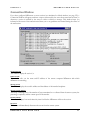
When set to monitor Active Directory, MDaemon will query for changes at a designated interval and
then create a new MDaemon user account whenever it finds that a new Active Directory account has
been added. This new MDaemon user account will be created using the full name, logon, mailbox,
description, and enabled/disabled state found within Active Directory. When MDaemon detects
changes to Active Directory accounts, it will automatically update the associated properties in the
matching MDaemon account.
For accounts that are deleted in Active Directory, MDaemon can be configured to take one of the
following actions: do nothing, delete the associated MDaemon account, disable the associated
MDaemon account, or freeze the associated MDaemon account (i.e. the account can still receive mail
but the user can’t collect it or access it).
Accounts created by MDaemon’s Active Directory feature must be setup for Dynamic Authentication
if you want them to work immediately without any need to configure the account manually from
within MDaemon. With Dynamic Authentication, MDaemon has no need to store the account’s
password within its own user database. Instead, the account holder will use his or her Windows
login/password credentials and MDaemon will pass those to Windows for authentication of the
associated account.
N E W
I N
M D A E M O N
9 . 0
2 3
C H A P T E R
1
M D A E M O N ®
V 9 . 6
Finally, Active Directory monitoring will continue to work even when MDaemon is shut down—all
Active Directory changes will be tracked and then MDaemon will process them once it restarts.
For more information on MDaemon’s Active Directory Monitoring, see page 358.
Active Directory Support for Mailing Lists
MDaemon’s Mailing Lists can now be configured to pull list addresses from within Active Directory.
By using the options on the Mailing List Editor’s AD tab (see page 452), you can specify your Active
Directory settings, search filters, search scope, and the Active Directory attribute that will contain the
member’s email address.
Sender ID
MDaemon now supports Sender ID. Related to Sender Policy Framework (SPF), Sender ID seeks to
verify that every email message originates from the Internet domain from which it claims to have been
sent. This is accomplished by checking the address of the server sending the mail against a registered
list of servers that the domain owner has authorized to send mail on its behalf. This verification is
automatically performed by MDaemon before the email message is delivered to the user. The result of
the Sender ID check can be used as additional input into the filtering tasks already performed by the
mail server. Once the sender has been authenticated, the mail server may consider past behaviors,
traffic patterns, and sender reputation, as well as apply conventional content filters when determining
whether to deliver mail to the recipient.
When the Sender ID option is enabled (located at SecurityÆSPF & Sender ID…), MDaemon will
identify the Purported Responsible Address (PRA) of the incoming message through careful
inspection of its headers and then verify whether or not the message originated from that location.
The PRA is the most recent address purported to be responsible for the message, which may or may
not be its original sender.
For more information on MDaemon’s support for Sender ID, see page 217.
Integrated Web-based Administration
WebAdmin, MDaemon’s web-based remote administration system, is now installed as part of
MDaemon—you no longer have to download and install WebAdmin separately. Updates and fixes,
however, may still be released periodically and independently from MDaemon if necessary. Therefore,
WebAdmin will continue to have its own version number and web site presence.
Because of this change WebAdmin must now be installed to \MDaemon\WebAdmin. If WebAdmin
is currently installed at another location then you must uninstall it before installing or upgrading
MDaemon to version 9. Otherwise, WebAdmin will not be recognized or function properly.
For details on WebAdmin, see page 78 and visit: http://www.altn.com/WebAdmin/.
Improved IMAP Performance
MDaemon’s IMAP server has been significantly improved to make better use of multiple threads and
multiple CPUs, which can provide better performance and responsiveness.
2 4
N E W
I N
M D A E M O N
9 . 0
C H A P T E R
1
M D A E M O N ®
V 9 . 6
Improved AntiSpam Performance
MDaemon’s anti-spam system now runs as a separate daemon—the MDaemon Spam Daemon
(MDSpamD), which is fed messages via TCP/IP for scanning. This greatly increases the Spam Filter’s
performance and makes it possible for you to run MDSpamD locally, on a separate computer, or
have MDaemon use another MDSpamD (or any other SpamD enabled product) running at some
other location. By default MDSpamD runs locally and receives messages on port 783 at 127.0.0.1, but
you can configure a different port and IP address if wish to send the messages to some other spam
daemon running at a different location or on a different port.
Improved Content Filter and AntiVirus Performance
MDaemon’s Content Filter and AntiVirus processing is now fully multi-threaded and will process
many messages simultaneously rather than sequentially as in previous versions.
WorldClient and Groupware Improvements
Free/Busy Server
MDaemon 9 includes a Free/Busy server, which makes it possible for a meeting planner to view the
availability of potential meeting attendees. To access this feature, you will click Scheduling within
WorldClient when creating a new appointment. This opens a Scheduling window containing the list
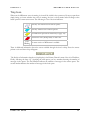
of attendees and a color-coded calendar grid with a row for each one. Each attendee’s row is colorcoded to indicate the times at which he or she might be available for a meeting. There are colors for
Busy, Tentative, Out of Office, and No information. There is also an Auto-Pick Next button that
makes it possible for you to query the server for the next timeslot at which all attendees may be
available. Then, when you have finished creating the appointment it will send an invitation to all of the
attendees, who can then accept or decline.
WorldClient’s Free/Busy server is also compatible with Microsoft Outlook. To use it, you will simply
have to configure Outlook to query WorldClient’s Free/Busy Server URL.
For more on how to use WorldClient’s Free/Busy features to schedule your appointments, see page
99 and the online Help system within WorldClient.
SyncML Server
WorldClient now includes a SyncML v1.1 compliant server to synchronize your WorldClient calendar,
contact, and task folders with SyncML capable devices. See page 101 for more information on
WorldClient’s SyncML server.
Improved Meeting Invitation Support
WorldClient now includes support for native Outlook (TNEF) meeting invitations, and support for
iCalendar meeting invitations has also been greatly improved. When viewing a message containing a
meeting invitation or retraction, a toolbar is presented to the user. This toolbar allows the user to
accept, decline, or view the invitation. The user has the opportunity to send a response to the meeting
organizer with their comments.
Unicode (UTF-8) Support
WorldClient now outputs everything in Unicode (UTF-8), which allows it to display numerous
character-sets at once. Consequently, users will not need to switch their browser’s encoding setting
based on the character set of the message. WorldClient’s Languages.ini (located in
N E W
I N
M D A E M O N
9 . 0
2 5
C H A P T E R
1
M D A E M O N ®
V 9 . 6
\WorldClient\Templates) also uses the UTF-8 encoding, and each user’s WC\Messages.idx
file will be converted to UTF-8 when that user next logs in to WorldClient. XML files used for
contacts, calendars, and so on, will also be converted to UTF-8.
Improved Support for Pocket PC Users
WorldClient’s Pocket PC theme now permits access to your groupware folders—you can access
contacts, tasks and calendar events through your Pocket PC browser. Windows Pocket PC 2003 OS
or higher is required for full functionality.
Upgrading to MDaemon 9.6
Below is a list of special considerations and notes that you may need to be aware of when upgrading to
MDaemon version 9.6 from a previous version.
Version 9.6.0 Special Notes
•
MDaemon 9.6 is capable of taking advantage of the new Outbreak Protection features shipping
with the next version of SecurityPlus for MDaemon. These features include improved image
spam detection and support for the Internet Watch Foundation’s efforts to expose and classify
child pornography and other sites promoting or involved in illegal activities. SecurityPlus is a
separately licensed product. For more on SecurityPlus for MDaemon, see page 277, or visit:
http://www.altn.com/SecurityPlus/.
•
MDaemon’s DNS-BL system is once again able to “Skip this many of the oldest ‘Received’ headers”
when processing SMTP and POP collected messages. There are new options for configuring this
on the Options tab of the DNS Black Lists dialog (SecurityÆDNS black lists...ÆOptions tab).
Note: Your existing configuration for the SMTP and POP Skip this many of the most recent ‘Received’
headers option has been reset to a default of 0 and 1 respectively. This will be fine in most cases. If
you have special needs you might need to adjust these settings.
2 6
•
DomainPOP and MultiPOP mail collection has changed. The option to retain a certain number
of messages on servers was removed. In its place a new option to delete old messages stored on
the server has been added to the DomainPOP and MultiPOP dialogs (SetupÆDomainPOP...
and AccountsÆEdit account...Æ[Account]ÆMultiPOP tab). This has required several changes to
the API and MD_UserInfo structure which may require your custom applications and plug-ins
to be recompiled.
•
“relays.ordb.org” was removed from the DNS-BL host list. This RBL no longer exists.
Also, any entry for “sbl-xbl.spamhaus.org” will change to the new “zen.spamhaus.org”.
•
You might need to generate and deploy new DKIM keys. This would only be necessary if in the
past you manually generated keys of 512 bits or less (it is not possible to do this via the UI). So, if
your outbound message signing is failing with error 4 you will need to generate and deploy new
DKIM keys. The default for bit size is 1024.
U P G R A D I N G
T O
M D A E M O N
9 . 6
C H A P T E R
1
M D A E M O N ®
V 9 . 6
Version 9.5.0 Special Notes
•
If you are a licensed user of MDaemon Antivirus (MDAV) or SecurityPlus for MDaemon, these
products now require registration key activation. The goal of the activation system is to combat
piracy and protect the interests of legitimate customers.
Activation verifies that the key you are using is legitimate, and it ties your registration information
to your computer using the MAC address of your Network Interface Card, which makes it
difficult for others to illegally use your registration key. No personal information about you is
required or transmitted, and reactivation is only required if you replace your Network card. If you
should need to reactivate your software, the HelpÆActivate your Alt-N software menu selection
will open an Activation Wizard, which will walk you through the simple activation process—you
can activate in a fully automated fashion or manually if you prefer. The process takes only a few
seconds.
Multiple activations are allowed, but this is for customer convenience only and should not be
considered license to violate the EULA. Registered users have 30 days in which to activate, and
activation is required in order for Alt-N products to continue functioning after that period.
For a more detailed description of activation see:
http://www.altn.com/Activation/faq.asp
•
MDaemon no longer supports AntiVirus products from Deerfield.com.
•
If you were using the Bounce the message back to sender option on the Spam Filtering tab of the Spam
Filter dialog, your configuration has been changed to …flag the message but let it continue down the
delivery path. This change was necessary due to a design change in the bounce system. If, however,
you need to bounce spam it can still be done by setting the following switch manually in the
CFilter.ini file:
[SpamFilter]
BounceSpam=Yes (default no)
Setting this switch will cause MDaemon to ignore the other spam disposition options (i.e. delete
the message, put it in the spam trap folder, or flag the message).
•
When gateways are configured to forward mail and the option to “Retain a local copy of all forwarded
messages” is enabled on the Forwarding tab of the Gateway Editor, there is the potential to
redeliver all the same mail if someone then enables the “Deliver stored messages each time MDaemon
processes remote mail” option on the Gateway tab. Because of this, the “Retain a local copy…” option
was changed to be disabled by default. You should therefore check all of your gateways to make
sure that this setting is as you desire. Further, a warning box will now be displayed whenever you
enable the “Deliver stored messages each time MDaemon processes remote mail” option.
•
The “Send mail at this interval” slider on the Event Scheduler was reset to a default value of five
minutes. If you were using the slider then you may need to reset it to your desired interval.
U P G R A D I N G
T O
M D A E M O N
9 . 6
2 7
C H A P T E R
1
M D A E M O N ®
V 9 . 6
•
Added SMTP parameter RFC compliance checking. As such, the SMTP server will now reject
parameters that contain control or 8-bit characters. This check has been combined with the
existing basic body compliance check in the option: “SMTP server checks commands and headers for
RFC compliance” located on the Servers tab of Miscellaneous Options (SetupÆMiscellaneous
OptionsÆServers). This option is now enabled by default, but you can disable it if you must
receive mail from non-compliant sources.
•
The PTR settings on the Reverse Lookup dialog were reset due to required internal changes. You
should therefore check those settings at: SecurityÆRelay/Trusts/Tarpit/Reverse Lookup…
•
For the Japanese version of MDaemon, the installer will correct bad folder names used by older
versions of MDaemon and Outlook Connector. If you are using the Japanese version then please
make a backup before installing 9.5.0. If you are using Outlook Connector, then please update to
version 2.1.2 or newer on the server and all client machines.
•
See the Relnotes.txt file located in MDaemon’s \Docs\ subfolder for a complete list of all
new features, changes, and fixes to MDaemon from the previous version.
Version 9.0.0 Special Notes
2 8
•
MDaemon now requires Windows 2000/2003/XP. It no longer supports Windows NT/9x/ME.
The installer will not allow installs on machines running those OS versions, and MDaemon will
not start or run properly on them.
•
MDaemon now limits the number of Domain Gateways to the maximum number of users
allowed by your license key. For example, if you have a 12 user key MDaemon will allow you to
create 12 user accounts plus 12 Domain Gateways; a 50 user key permits up to 50 user accounts
and 50 gateways, and so on. The installer will warn you if your current number of gateways
exceeds the number permitted by your license. If this happens, none of your gateways or their
configurations will been lost—they will still be located in the Gateways.dat file. However, you
will only be able to access and configure the number of them permitted by your license, starting
with the first gateway and proceeding until the maximum number is reached. Additionally, the
Automatic Gateway Creation feature will be disabled when the limit is reached. Upgrading your
MDaemon to a larger license-size will re-enable the remaining Domain Gateways.
•
If you previously installed WebAdmin to a location other than \MDaemon\WebAdmin, you must
uninstall the previous version of WebAdmin before upgrading to MDaemon 9. WebAdmin is
now included in MDaemon’s installer, and it will not be installed and configured properly if you
have a previous version installed at a different location.
•
Your OverQuota.dat file in the \MDaemon\APP folder may contain this text: “or
$MAXBYTES$ KB of disk space”. Please open the file with Notepad and change it to this: “or
$MAXBYTES$ MB of disk space”.
•
MDaemon no longer supports the message encryption option. Consequently, all references to
that option have been removed from the user interface. It was inferior to MDaemon’s current
U P G R A D I N G
T O
M D A E M O N
9 . 6
C H A P T E R
1
M D A E M O N ®
V 9 . 6
compliment of security features and isn’t needed since MDaemon no longer supports older, less
secure OS versions. Please use Notepad to update your ACCTINFO.DAT file and remove the line
that references “$ENCRYPTMAIL$”. Currently MDaemon will still read encrypted messages but it
will no longer create them.
•
If you are using SecurityPlus for MDaemon, several alternative update sites may have been added
to your SecurityPlus configuration. No previously existing update sites were altered, and you can
remove the new update sites if you choose.
•
You can use the %SetSubject% macro in the calendar and task reminder templates
(Calremind.dat and Taskremind.dat) to customize the subject text of calendar and task
reminder emails. You can delete your existing Calremind.dat and Taskremind.dat files
and restart MDaemon to create new default files, or you can add these lines to the end of the files:
Calremind.dat
%SetSubject%=Calendar reminder: $CALSUBJECT$ $CALSTARTTIME$
Taskremind.dat
%SetSubject%=Task reminder: $TASKSUBJECT$ $TASKSTARTDATE$
•
The subject text within Content Filter notifications for Spam and Antivirus updates has been reset
to defaults and changed to be more readable.
•
The Mailbox template (at New Account DefaultsÆAccount Defaults) was changed from
$USERFIRSTINITIAL$$USERLASTNAME$ to $USERFIRSTNAME$.$USERLASTNAME$. For
example, previously a new account for Frank Thomas would have resulted in his email address
being set to [email protected]. Now it would be [email protected].
•
Authentication is now required by default before MDaemon will accept an ETRN request to
dequeue a Domain Gateway’s messages. You can change this via an option on the Options tab of
the Gateway Editor.
•
MDaemon will strip any existing X-Spam-Flag headers from incoming messages if the
following switch is set in MDaemon.ini:
[Special]
StripSpamFlagHeaders=Yes (default is No)
•
ComAgent now maintains an independent version number from MDaemon. Consequently, your
users will no longer be prompted to update ComAgent whenever there is a new version of
MDaemon unless that new version also includes some changes to ComAgent. They will,
however, need to download ComAgent to get the 9.0.0 version.
•
See the Relnotes.txt file located in MDaemon’s \Docs\ subfolder for a complete list of all
new features, changes, and fixes to MDaemon from the previous version.
I N S T A L L A T I O N
2 9
C H A P T E R
1
M D A E M O N ®
V 9 . 6
Installation
MDaemon Server v9.6 requires Microsoft Windows 2000/2003/XP, and a computer system with a
Pentium III 500MHz equivalent microprocessor and 512 MB of RAM (a Pentium 4 2.5 GHz or higher
with 1 GB or more of RAM is recommended). The typical installation requires 100MB of Hard Disk
space plus additional space for mail to be stored. SMTP/POP/IMAP and related services require a
Winsock compliant TCP/IP stack, such as that which ships with Microsoft Windows, and Internet access
with an ISP service. If you will be using MDaemon as an internal email server only (you will not be using
it to send or receive messages externally) then an Internet Service Provider is not necessary.
To install MDaemon click StartÆRun… and enter the path to the setup executable file provided in your
MDaemon package, then click OK. Alternatively, you may install MDaemon by using “Add/Remove
Programs” located in the Control Panel.
The installation process will prompt you for some basic information such as a registration name and a
root directory where MDaemon files should be created. The installation process also provides a step-bystep configuration wizard that can be used to guide you through the most common configuration
scenarios.
See:
Primary Domain Configuration—page 39
New Account Defaults—page 370
See also:
DomainPOP Mail Collection—page 264
3 0
I N S T A L L A T I O N
M D A E M O N ’ S
M A I N
D I S P L A Y
2
Chapter
MDaemon’s Main Display
M
Daemon’s Main Graphical User Interface (GUI) automatically appears at program startup and
gives you important information regarding MDaemon’s resources, statistics, active sessions,
and queued mail waiting to be processed. It also contains options for easily
activating/deactivating MDaemon’s various servers. The GUI’s tabbed panes keep you up to date on how
the server and its incoming and outgoing connections are performing.
Statistics and Tools
The default left pane of MDaemon’s main interface contains two tabs: Tools and Stats. The Tools tab
contains an entry for the Primary Domain and each Secondary Domain. Under each entry there is a
shortcut to the various dialogs that can be used to configure that domain’s settings and users. The Stats
tab contains three sections: Statistics, Queues, and Servers. Right-click any of the controls in a section to
3 1
C H A P T E R
2
M D A E M O N ’ S
M A I N
D I S P L A Y
open a shortcut menu relevant to that control.
The Statistics section contains statistics regarding the number of messages sent and received by MDaemon
as well as the number of mail sessions that have been initiated since startup. This section also tells you
how many user accounts have been used and how many more can be created. Statistics contains two rightclick shortcut menus: one for the Accounts controls and one for the Statistics/Root Node controls. The
Accounts shortcut menu provides shortcuts for creating, editing, and deleting accounts. The rest of the
controls have a shortcut menu that can be used to clear the root node counters.
Note
When you click the “reset root node counters” option, all of the counters will be reset—not
merely the one you right-click. Further, there is an option at Miscellaneous OptionsÆGUI
that can be used to Save Stat window root node counters across reboots. Otherwise they will be reset
whenever the server is rebooted.
The Queues section contains an entry for each message queue, and the number of messages (if any) that
each queue contains. You can right-click on each of the queue entries to open a shortcut menu containing
one or more of the following options, depending on which queue you select:
View Queue—this option switches the main pane to the Queues tab and displays the selected queue. A list of
all messages the queue contains will be displayed, and you can right-click any message to open a shortcut
menu containing numerous options similar to those available in the Queue & Statistics Manager such as
Copy, Move, Edit, White list, and so on.
Queue and statistics manager—open the Queue and Statistics Manager to the Queue Page with the selected
queue displayed.
Process Now—this option “re-queues” all messages contained in the queue and attempts to process them
normally for delivery. If you attempt to process messages contained in the Holding queue, Bad queue, or
the like then the messages may encounter the same errors that put them there in the first place and return
them to the same queue.
Freeze/unfreeze queue—temporarily pauses processing for the selected queue, or continues the processing if it
is currently paused.
Release—releases messages from the Holding Queue. MDaemon will attempt to deliver the messages
regardless of errors encountered—they will not be returned to the Holding Queue even if they encounter
the same errors the caused them to be moved there originally.
Enable/disable queue—activates or deactivates the Holding Queue. When disabled, messages will not be
moved to the Holding Queue regardless of errors encountered.
The Servers section contains an entry for each server within MDaemon, and each entry lists the current
state of the server: “Active” or “Inactive”. Listed below each entry is the port on which that particular
server is listening, if that server is currently active. The shortcut menu provides a control for toggling each
server between the Active and Inactive state.
Message and Event Tracking
The default right-hand pane of the main interface contains several tabs. They display the status of
MDaemon’s various servers and resources and are frequently updated to reflect current server conditions.
Each SMTP/POP/IMAP session and other server activity is logged onto the appropriate tab once it is
3 2
I N S T A L L A T I O N
C H A P T E R
2
M D A E M O N ’ S
M A I N
D I S P L A Y
complete so that a visible record of network activity is made available. The information displayed on these
tabs is mirrored in the log files kept in the Logs directory, if you have chosen to log such activity. See page
312 for more information.
The primary pane of MDaemon’s GUI contains the following tabs:
System—at program startup, the System tab displays a log of the Initialization Process, which can alert you to
possible problems with MDaemon’s configuration or status. It also displays activity such as
enabling/disabling any of MDaemon’s various servers.
Statistics—this tab will display a server statistics report corresponding to the information contain in the various
root node counters on the Stats tab in the Stats and Tools pane. If you wish to change the font or font size
used for this report you can do so by editing the following keys in the MDaemon.ini file:
[ReportWindow]
DefFontFace=Courier New
DefFontHeigh=15
DefFontWidth=7
Further, at midnight each night, the Postmaster and all addresses listed on the Recipients tab of the Content
Filter will a copy of this report via email. This is the same report that is generated when you use the
“Status” email command listed in the Remote Server Control via Email section. If you do not wish this
report to be sent, then you can prevent it by editing the following keys in the MDaemon.ini file:
[Special]
SendStatsReport=No (default is Yes)
Routing—displays the routing information (To, From, Message ID, and so on) for each message that is parsed
by MDaemon.
Security—click this tab and several other security-related tabs will appear above it.
Content Filter—MDaemon’s Content Filter operations are listed on this tab. When a message matches the
criteria of one of the Content Filter’s message rules, the relevant information related to that message
and the actions taken are logged here.
AntiVirus—if you have installed SecurityPlus for MDaemon, then all AntiVirus operations are listed on
this tab. When a message is scanned for viruses the relevant information related to that message and
the action taken is logged here.
AntiSpam—displays all of MDaemon’s spam filtering and prevention activities.
MDSpamD—lists all activity of the MDaemon Spam Daemon.
SPF/Sender ID—displays all Sender Policy Framework and Sender ID activities.
DK/DKIM—lists all DomainKeys and DomainKeys Identified Mail activities.
Certification—this tab displays message certification activities.
Screening—this tabs displays Tarpitting and Dynamic Screening activities.
Mail—click this tab and several other mail-related tabs will appear above it.
SMTP (in)—all incoming session activity using the SMTP protocol is displayed on this tab.
SMTP (out)—all outgoing session activity using the SMTP protocol is displayed on this tab.
IMAP—mail sessions using the IMAP protocol are logged on this tab.
POP—when users collect email from MDaemon using the POP3 protocol, that activity is logged here.
MultiPOP—this tab displays MDaemon’s MultiPOP mail collection activities.
DomainPOP—this tab displays MDaemon’s DomainPOP activity.
LDAP—displays LDaemon LDAP server activity.
Minger—displays Minger server activity.
I N S T A L L A T I O N
3 3
C H A P T E R
2
M D A E M O N ’ S
M A I N
D I S P L A Y
RAW—RAW or system generated message activity is logged on this tab.
Outlook Connector—displays all Outlook Connector activities.
WorldClient—displays WorldClient’s mail activities.
SyncML—this tab mirrors the data contained in the SyncML log file.
Queues—this tab gives access to another row of tabs above it with one tab corresponding to each message
queue, such as: Local, Remote, Holding, Quarantine, Bayesian Spam, and so on.
Plug-ins—displays all activities related to any MDaemon plug-ins.
Sessions—click this tab and several other tabs will appear above it. These tabs display an entry for each active
connection to MDaemon. Whether the connection is SMTP in or out, POP in or out, IMAP, WorldClient,
or some other type, information about each active session is displayed here.
Note
The information displayed on these tabs has no affect on the amount of data that is actually
stored in the log files. However, MDaemon does support a great deal of flexibility with
regard to the amount and type of information that is logged in those files. See the Logging
dialog (page 312) for more information on logging options.
Event Tracking Window’s Shortcut Menu
If you right-click in any of the Event Tracking window’s tabs it will open a shortcut menu. Various
options are provided on this menu that can be used to select, copy, deleted, or save the contents of a given
tab. The menu’s Print/Copy option will open any currently selected text in Notepad, which can then be
used to print the data or save it to a file. The Delete option will delete the text you have selected, and the
Mail to support… menu item will open the selected text into a window that you can use to send a message
to Technical Support. The Search option will open a window in which you can specify a word or phrase
to search for in the log files. MDaemon will search all log files for the text string and then all session
transcripts containing that string will be combined into a single file and opened in Notepad for your
review. A practical use of this feature would be to search for a particular Message-ID, which would
provide a compilation from all the logs of all session transcripts containing that Message-ID.
Composite Log View
Located on the Windows menu of MDaemon’s menu bar is a Composite log view option. Clicking that
option will add a window to the main display that will combine the information displayed on one or more
of the main pane’s tabs. Use the controls on the GUI tab of the Miscellaneous Options dialog (page 325)
to designate the information that will be combined in that window.
Note
The layout of the panes in the Event Tracking window is not limited to the default positions
described above. You may change the layout be selecting the Windows menu selection and
then clicking the Switch panes control corresponding to the desired layout.
3 4
I N S T A L L A T I O N
C H A P T E R
2
M D A E M O N ’ S
M A I N
D I S P L A Y
Tray Icon
Whenever the MDaemon server is running, its icon will be visible in the system tray. However, apart from
simply letting you know whether the server is running, the icon is also dynamic and will change colors
based upon the current server status. The following is a list of the icon indicators:
All okay. No mail in local or remote queues.
All okay. Mail in local or remote queues.
Available disk space below threshold (see page 338).
Network is down, dialup failed, or disk is full.
Icon
Blinking
A newer version of MDaemon is available.
There is additional information about the server available through the icon’s tooltip. Pause the mouse
pointer over it and the tool tip will appear.
The first bit of information that the tool tip displays is the Primary Domain’s name. Next is its IP address.
Finally, following the letter “Q” (signifying the mail queues), are two numbers denoting the number of
messages in the queues. The first numbers indicates the number of messages in the remote queue. The
second number indicates the number of messages in the local queue.
S H O R T C U T
M E N U
3 5
C H A P T E R
2
M D A E M O N ’ S
M A I N
D I S P L A Y
Shortcut Menu
Right click on MDaemon’s tray icon to open the shortcut menu. This
menu gives you quick access to virtually all of MDaemon’s menus and
features without having to open the main user interface.
Click the “About Alt-N…” options in the top section of the shortcut
menu to find out more about MDaemon or Alt-N Technologies.
In the second section you can access the following MDaemon menus:
Setup, Security, Accounts, Lists, Gateways, Catalogs, and Queues.
Each of these cascading menus is identical to the menu of the same
name located on the menu bar of the main interface.
The third section has options to open the Account Manager and Queue
and Statistics manager, and one that will cause all of MDaemon’s mail
queues to be processed.
Next, there are commands to lock and unlock MDaemon’s interface (See
“Locking/Unlocking MDaemon’s Main Interface” below) followed by
the “Open MDaemon…” menu selection, used for opening/restoring
MDaemon’s interface when it is minimized to the system tray.
The last option is “Shut down MDaemon,” which is used to quit MDaemon or shut down its system
service (the service settings are not changed—the MDaemon service is merely stopped).
Locking/Unlocking MDaemon’s Main Interface
To lock the user interface, minimize MDaemon, click the “Lock server…” menu item and then enter a
password into the dialog that opens. After confirming the password by entering it a second time,
MDaemon’s user interface will be locked. It cannot be opened or viewed, but MDaemon will continue to
function normally. You will, however, still be able to use the “Process all queues now…” option to
process the mail queues manually. To unlock MDaemon, open the “Unlock MDaemon” dialog by
double-clicking the tray icon, or by right-clicking the icon and then choosing “Unlock Server…” Then,
enter the password that you created when you locked it.
3 6
C O N N E C T I O N
W I N D O W
C H A P T E R
2
M D A E M O N ’ S
M A I N
D I S P L A Y
Connection Window
If you have configured MDaemon to create sessions in a minimized or default window (see page 325), a
Connection Window will appear each time a request is detected by the server from some remote client, or
whenever a session is initiated by the server to collect or deliver a message. This window keeps you
informed of the status of the transaction and alerts you to any problems encountered during the course of
the mail session.
Session transcript
This window displays all session i/o.
Remote host/IP
This window tells you the name and IP address of the remote computer MDaemon with which
MDaemon is interacting.
Message from/to
This window displays the sender’s address and the address of the intended recipients.
Message transfer statistics
This keeps a running total of the number of bytes transmitted to or collected from the remote system, the
percentage completed, and the current speed of the transfer.
Inactivity timeout
This counter displays how much inactivity time is left before MDaemon will close the session.
Disconnect
This button will immediately disconnect the server from the remote system.
M D A E M O N ’ S
S M T P
W O R K
F L O W
3 7
C H A P T E R
2
M D A E M O N ’ S
M A I N
D I S P L A Y
MDaemon’s SMTP Work Flow
When an incoming SMTP connection is made, MDaemon goes through a complex series of processing
steps to determine whether to accept the message for delivery, and what to do with it once it is accepted.
The following chart is a graphical representation of this work flow for inbound SMTP messages. Note:
the extent to which these steps are executed is dependent upon your particular configuration. One or
more steps might be skipped if a given feature is disabled in your configuration.
3 8
M D A E M O N ’ S
S M T P
W O R K
F L O W
P R I M A R Y
D O M A I N
C O N F I G U R A T I O N
3
Chapter
Primary Domain Configuration
Primary Domain Editor
T
he Primary Domain editor can be reached via the SetupÆPrimary domain… menu selection and
allows you to enter several key pieces of information regarding your domain setup. Your primary
domain is the default domain name and set of configuration options that your users will use to
send and receive their email. Only one primary domain can be configured, but MDaemon can manage
mail for any number of Secondary Domains (MDaemon PRO only), and store mail for any number of
Domain Gateways as well.
See:
Secondary Domain Editor—page 72
Domain Gateways—page 471
The Primary Domain Editor is a tabbed dialog containing the following sections, which are necessary for
configuring MDaemon.
Domain
This dialog contains your Primary Domain’s name and IP address, and your HELO domain name and
machine name.
Delivery
Here you will specify the degree to which you want MDaemon itself to handle delivery of mail versus
relaying mail to an ISP or gateway host for them to deliver for you.
Ports
On this dialog, the ports that MDaemon will monitor and use for SMTP and POP email delivery are
designated. You will also designate the port on which MDaemon will listen for IMAP events, and the
UDP port used for querying DNS servers. In most cases the default settings will not need to be changed.
However, being able to configure these port settings is useful when attempting to integrate MDaemon
with various other products that you may be using on your system.
DNS
This dialog is used for designating a primary and backup DNS server’s IP address. It also contains various
controls governing MDaemon’s handling of MX and A records and SMTP errors that are encountered
during mail delivery.
3 9
C H A P T E R
3
P R I M A R Y
D O M A I N
C O N F I G U R A T I O N
Timers
This area contains various time limits that MDaemon will observe while connecting to remote hosts,
waiting for protocol dialogs, waiting for DNS server responses, and so on. In addition, this dialog contains
the Maximum Message Hop Count limit, which is used to help prevent messages from being caught in a
delivery loop.
Sessions
Here you will designate the maximum number of concurrent session threads that MDaemon will use for
sending and receiving SMTP, POP, and IMAP mail. You will also designate the number of messages that
MDaemon will attempt to send/receive at the same time. In addition, if you so choose, you can set a limit on
the number of outbound SMTP messages that will be spooled per session thread.
Dequeue
Use the Dequeue tab to have MDaemon automatically send ETRN, QSND, or similar commands to an
ISP in order to have them dequeue email that you may have them “holding” for you so that you can
receive this sort of email via SMTP rather than DomainPOP.
Archival
Use the Archival tab to save a copy of all inbound and outbound mail that MDaemon processes. You can
also choose whether this archive will include Mailing List or MultiPOP messages or omit them.
Pruning
This tab is used for denoting the amount of time that an account may remain inactive before it will be
deleted. It also contains controls for limiting how long messages may be stored.
Pre-Processing
This dialog is used to designate the path to any program that you may want MDaemon to run immediately
before processing and delivering of mail. Here you can also set parameters for MDaemon’s actions related
to this process.
Unknown Local Mail
This dialog contains various settings that you can use to control what MDaemon will do with messages
that arrive at the server addressed to a Local domain but to an unknown or undefined user’s mailbox. The
various control choices include: sending the email message back to the sender, sending it to the
Postmaster, putting it in the Bad Message queue, and forwarding the message to another host. These
controls may be set to act individually or in any combination.
See:
Hosting Multiple Domains—page 71
Domain Gateways—page 471
See Also:
DomainPOP Mail Collection—page 264
4 0
P R I M A R Y
D O M A I N
E D I T O R
C H A P T E R
3
P R I M A R Y
D O M A I N
C O N F I G U R A T I O N
Domain
Primary Domain Properties
Primary domain name
Enter your primary domain name here. This is the default domain name used when creating new
accounts. Typically, the value entered here will be the registered Internet domain name that a DNS server
resolves to the IP address of the local machine running the server, or a qualified alias of that name.
Alternatively, you may choose to use an internal-only or otherwise non-valid, non-public domain name
(such as “company.mail”) for your Primary Domain Name. When configuring your server in this way it
may be necessary to use the Header Translation feature (page 240), and/or the Domain Name
Replacement Engine (page 269), to enable proper mail distribution.
P R I M A R Y
D O M A I N
E D I T O R
4 1
C H A P T E R
3
P R I M A R Y
D O M A I N
C O N F I G U R A T I O N
FQDN for this host
This value is the Fully Qualified Domain Name (FQDN) that will be used in the SMTP HELO/EHLO
instruction when sending mail. In most cases, this will be your Primary Domain Name. An IP literal
syntax is allowed in this option (for example, “[1.2.3.4]”).
Primary Domain IP
This is the Primary Domain’s IP address.
Restrict connections to this IP
Enabling this option causes MDaemon to restrict the primary domain’s connections to the specific IP
address found in the Primary Domain IP text box. Ordinarily, this control will only need to be used in
certain circumstances when hosting multiple domains.
For more information on this type of configuration, see:
Hosting Multiple Domains—page 71
4 2
P R I M A R Y
D O M A I N
E D I T O R
C H A P T E R
3
P R I M A R Y
D O M A I N
C O N F I G U R A T I O N
Delivery
Mail Delivery Options
Always send all outbound email directly to the recipient’s mail server
When this option is chosen, MDaemon will attempt to deliver all mail directly instead of passing it to
another host. MDaemon will place undeliverable messages into its Retry System and continue to attempt
to deliver them according to the parameters and time intervals that you set in the Retry Configuration
dialog. You can access this dialog by clicking the Click here to configure the retry queue and fate of undeliverables
button.
Always send every outbound email to the server specified below
Select this option if you want all outbound email, regardless of its destination domain, to be spooled to a
gateway host for routed delivery. If selected, all outbound email will be sent to the domain or host
specified in the Mail serer field. Typically, this feature is useful during high volume periods when direct
message delivery would result in an excessive taxation of server resources. If a message cannot be
delivered to the designated host then it will be moved to into the Retry System and MDaemon will
continue to attempt to deliver it according to the parameters and time intervals that you set in the Retry
P R I M A R Y
D O M A I N
E D I T O R
4 3
C H A P T E R
3
P R I M A R Y
D O M A I N
C O N F I G U R A T I O N
Configuration dialog. You can access this dialog by clicking the Click here to configure the retry queue and fate of
undeliverables button.
Try direct delivery but send problem emails to the server specified below
Click this option if you want to spool only undeliverable outbound email to the domain or host specified
in the mail server field. Undeliverable mail is email destined for hosts that could not be resolved to an actual
IP address (such as an unregistered gateway to a remote network) or email destined for a host that was
resolved properly but could not be connected to directly or is refusing direct connections. Rather than
return such mail to its originator, this option causes MDaemon to pass the message off to a more
powerful MTA. Sometimes the mail system run by your ISP may have routed methods of mail delivery to
which your local server may not have direct access. If a message cannot be delivered directly to its
intended recipient and then it also cannot be delivered to the domain or host you have designated, then it
will be moved to into the Retry System and MDaemon will continue to attempt to deliver it according to
the parameters and time intervals that you set in the Retry Configuration dialog. At each subsequent
delivery attempt, MDaemon will again first try to deliver the message directly to its recipient and then to
the designated domain or host.
Click here to configure the retry queue and fate of undeliverables
Click this button to open the Retry Configuration dialog from which you can designate how often
MDaemon will attempt to deliver messages that encounter problems during the delivery process. You can
also specify a time interval after which the attempts will cease, and what to do with these messages after
the final attempt is made. See the Retry Configuration dialog below.
Mail Server
Specify your ISP or mail host’s domain name or IP address here. This is generally the SMTP server on
your ISP.
Note
Do not enter MDaemon’s Primary Domain Name or IP address into this text box. This
entry should be an ISP or other mail server that can relay mail for you.
Access to the above mail server…
As an added security measure, some smart hosts or ISPs require you to authenticate using login
credentials or perform a POP mail check before you are allowed to send mail through their servers. If
your ISP or mail host requires this then use these options to specify your login or POP credentials.
…requires authentication
Click this check box if the ISP or host to which you will be sending messages requires authentication.
Enter your login credentials below. These login credentials will be used for all outbound SMTP messages
sent to the server specified above. If, however, you choose to use the Allow per-account authentication option
below, then MDaemon will authenticate to your host separately for each message, using the sending
account’s Email address and Smart host password, designated on the Account tab of the Account Editor.
User name
Enter your user name or login here.
4 4
P R I M A R Y
D O M A I N
E D I T O R
C H A P T E R
3
P R I M A R Y
D O M A I N
C O N F I G U R A T I O N
Password
Use this option to specify your ISP or mail host login password.
…requires a POP check
If your ISP or mail host requires a POP check before it will accept messages from you, then click this
check box and enter your required credentials below.
Host or IP
Enter the host or IP address to which you wish to connect.
User name
This is the POP account’s login or account name.
Password
This is the POP account’s password.
Allow per-account authentication
Click this checkbox if you wish to use per-account authentication for outbound SMTP messages sent to
the server specified above. Instead of using the User name and Password credentials provided here, each
account’s Email address and Smart host password (designated on the Account tab of the Account Editor) will
be used for authentication. If, however, no Smart host password has been designated for a given account,
then the above credentials will be used for that account.
If for some reason you do not wish to use a given account’s Email address as the user name when
authenticating to your smart host, then you can manually configure an alternate user name for that
account by editing its HIWATER.MRK file, found in the account’s root mail folder. Add the following key
to that file:
[AUTH]
ISPAUTHUserName=-<user name> (example: [email protected])
The “<user name>” portion should be prefaced with a dash (i.e. “-”) so that MDaemon will encrypt it
for security.
If you with to configure per-account authentication to use each account’s Email password instead of its Smart host
password, then you do so by editing the following key in the MDaemon.ini file:
[AUTH]
ISPAUTHUsePasswords=Yes (default No)
, Caution!
Enabling the ISPAUTHUsePasswords=Yes option will over time effectively
communicate all your accounts’ local mail passwords to your smart host. This could pose a
risk to mail security, since it is providing sensitive information to another server. You should
not use this option unless you are using a smart host that you absolutely trust and you
believe it is necessary to do so. Further, you should note that if you use this option and give
your users permission to change their Email password via WebAdmin or some other means,
then changing the Email password will also effectively change the Smart host password. This
P R I M A R Y
D O M A I N
E D I T O R
4 5
C H A P T E R
3
P R I M A R Y
D O M A I N
C O N F I G U R A T I O N
could cause smart host authentication to fail for an account when its Email password is
changed locally but the corresponding Smart host password isn’t changed at your smart host.
Retry Queue Settings
Retry Frequency
Keep message in the remote queue for at least XX minutes
This setting governs the length of time a message will remain in the remote queue before being removed
and placed in the retry queue. The remote queue will generally attempt to deliver the message more
frequently than the retry queue.
Retry sending undeliverable mail once every XX minutes
This setting determines how frequently the messages in the retry queue are processed.
Inform the sender when message is placed in retry queue
This switch will inform the sender when his/her message is removed and placed in the retry queue. The
text of this message can be found (and edited) in the DELWARN.DAT file.
Inform the sender when subsequent delivery attempts fail
If a delivery attempt of a message in the retry queue fails, a message explaining this fact will be dispatched
to the sender of the message. The text of this message can be found (and edited) in the DELWARN.DAT
file.
4 6
P R I M A R Y
D O M A I N
E D I T O R
C H A P T E R
3
P R I M A R Y
D O M A I N
C O N F I G U R A T I O N
Include original message when informing sender
Click this option to include the original message as an attachment in the above notification messages to
the sender.
Place undeliverable DSN messages into bad queue
Click this checkbox if you wish to place undeliverable Delivery Status Notification (DSN) messages into
the bad message queue rather than retrying them.
Note
This only applies to DSN messages generated by MDaemon.
Ultimate Fate of Undeliverable Mail
If a message is still undeliverable after XX days then:
This setting determines the number of days that a message can remain in the retry queue before being
removed. If you enter “0” days into this option then the message will be bounced back after the first retry
attempt.
Place the undeliverable message in the bad message queue
Once a message has reached the time limit set in the If a message is still undeliverable after xx days then: control,
a copy of that message will be moved to the bad message directory if this switch is enabled.
Inform the sender that the message could not be delivered
Once a message has reached the time limit set in the If a message is still undeliverable after xx days then: control,
this switch will cause MDaemon to send a message to the sender informing them that the message has
been permanently removed from the server. The text of this message can be found (and edited) in the
DELERR.DAT file.
Inform the postmaster that the message could not be delivered
If this switch is enabled, the postmaster will be notified when a message has been permanently removed
from the retry system.
. . . unless it’s an MDaemon auto-generated message
The retry system will never inform MDaemon when an auto-generated message fails to be delivered.
However, because such information may be useful to the postmaster, he or she will be informed when
these messages cannot be delivered. Click this checkbox if you do not want the postmaster to be informed
when auto-generated messages cannot be delivered. Examples of auto-generated messages are returnreceipt notifications, auto-responder generated messages, results of account processing, and so on.
Include original message when informing sender
Click this option to include the original message as an attachment in the delivery failure messages to the
sender.
P R I M A R Y
D O M A I N
E D I T O R
4 7
C H A P T E R
3
P R I M A R Y
D O M A I N
C O N F I G U R A T I O N
Ports
SMTP/ODMR Server Ports – SSL/TLS available in PRO only
SMTP/MSA servers monitor these ports
MDaemon will monitor these TCP ports for incoming connections from SMTP/MSA clients. The first
port is the main SMTP port, which in most cases should be left at the default setting of port 25. The
second is an alternate, Message Submission Agent (MSA) port. Transmission on that port requires
AUTH, therefore users sending on that port must configure their mail clients appropriately to ensure that
their connections are authenticated. Further, because some ISPs block port 25, your remote users might
be able to circumvent that restriction by using the MSA port instead. If you do not wish to designate an
MSA port then set the value to “0” to disable it.
4 8
P R I M A R Y
D O M A I N
E D I T O R
C H A P T E R
3
P R I M A R Y
D O M A I N
C O N F I G U R A T I O N
Note
Connections to the MSA port are exempt from PTR and reverse lookups, Host and IP
screening, the IP Shield, and Tarpitting. MSA port connections continue to utilize dictionary
attack connection limiting.
SMTP server connects to this remote port when sending mail
This port will be used when mail is sent to other SMTP servers.
ODMR server monitors this port
MDaemon will monitor this port for incoming On-Demand Mail Relay (ODMR) connections such as
ATRN from Domain Gateways.
Dedicated SSL port for SMTP
This is the port dedicated to SMTP mail sessions using a Secure Sockets Layer (SSL) connection. See SSL
& Certificates—page 174 for more information.
POP/IMAP Server Ports (IMAP Available in MDaemon Pro only)
POP server monitors this port
MDaemon will monitor this port for incoming connections from remote POP clients.
POP server connects to this remote port when collecting mail
This port will be used when MDaemon retrieves mail from POP3 servers.
Dedicated SSL port for POP
This is the port dedicated to POP3 mail clients using a Secure Sockets Layer (SSL) connection. See SSL &
Certificates—page 174 for more information.
IMAP server monitors this port
MDaemon will monitor this port for incoming IMAP requests.
Dedicated SSL port for IMAP
This is the port dedicated to IMAP mail clients using a Secure Sockets Layer (SSL) connection. See SSL &
Certificates—page 174 for more information.
Miscellaneous Ports
Query DNS servers using this UDP port
Enter the Port you want MDaemon to use for sending and receiving data grams to the DNS server.
LDAP port for database & address book posting
MDaemon will post database and address book information to your LDAP server on this port.
See: LDAP Address Book Support—page 122
WebAdmin monitors this port
This is the port that MDaemon will monitor for WebAdmin connections.
P R I M A R Y
D O M A I N
E D I T O R
4 9
C H A P T E R
3
P R I M A R Y
D O M A I N
C O N F I G U R A T I O N
Minger monitors this port
This is the port that the Minger server will monitor for connections. For more information, see Minger—
page 365.
Return port settings to defaults
This button returns all the port settings to their standard values.
Bind to new port values now
When you alter the values of any of the port settings you will need to press this button to have your
changes take immediate effect. Otherwise, your changes will not be put into place until the next time the
server is started.
Note
The preceding port settings are critical for proper server operation and should not be altered
unless you are certain that you must do so. Being able to configure the ports that MDaemon
uses will allow you to configure the server to operate with proxy systems or other software
services that require certain port numbers.
An IP address (a machine) has only one of each available port. If another program attempts
to gain access to a port that is already in use by another piece of software an error message
will inform the user that the requested address (IP:PORT) is already in use.
5 0
P R I M A R Y
D O M A I N
E D I T O R
C H A P T E R
3
P R I M A R Y
D O M A I N
C O N F I G U R A T I O N
DNS
DNS Server Settings
Try to use DNS servers defined in windows TCP/IP settings
Windows sometimes keeps a DNS server IP address in the local TCP/IP configuration. If this is the case
on your computer then you can check this option. If MDaemon cannot find a locally maintained DNS
server it will continue on and use the ones specified on this screen.
Primary DNS server IP address
Enter the IP address of the DNS server that you want MDaemon to query for ‘A’ and ‘MX’ records. In
order to ensure proper operation this entry must be specified.
Backup DNS server IP address
Enter the IP address of the backup or secondary DNS server that you want MDaemon to query for ‘A’
and ‘MX’ records. This entry is optional but recommended.
Retry failed lookup attempts this many times
If a lookup attempt fails, this is the number of times that MDaemon will repeat the attempt. If you have
designated a backup DNS server, both servers will be included in each lookup attempt.
P R I M A R Y
D O M A I N
E D I T O R
5 1
C H A P T E R
3
P R I M A R Y
D O M A I N
C O N F I G U R A T I O N
A and MX Record Processing
Query DNS servers for ‘MX’ records when delivering mail
Enable this control if you want MDaemon to query your designated DNS servers for ‘MX’ records when
it is attempting to deliver mail.
Note
The following applies globally anywhere within MDaemon where you are allowed to specify
a host to forward, copy, or send email to. If you enclose the host in brackets (e.g.
[example.com]), MDaemon will skip MX record lookups when delivering to that host.
For example, if the Send the message to this host option on the Unknown Mail tab contained
“example.com” then MX lookups would be performed normally. If, however, that option
contained “[example.com]” then only the A-record lookup would be performed.
Use A record IP addresses returned within MX query results
Click this checkbox if you want MDaemon to attempt delivery to A record IP addresses when such are
discovered during MX record queries.
Bounce message if receiving domain has no MX and no A records
Click this option to cause MDaemon to immediately return the message when the DNS lookup shows
that there is neither an MX record nor an A record for the recipient’s domain. This will prevent that sort
of message from needlessly going into the delivery retry cycle.
Bounce message on first 5XX from an MX host
When this checkbox is enabled, MDaemon will return/bounce the message when it receives a 5xx fatal
error response from an MX host. Consequently, it won’t continue trying to deliver the message to any
subsequent MX hosts that may be designated for the recipient’s domain. If this option is disabled,
MDaemon won’t bounce the message as long as at least one of the MX hosts returns a 4xx non-fatal error
response.
Local Lookup Tables
Hosts file…
Before querying the DNS servers, MDaemon will first attempt to resolve an address by processing the
Windows HOSTS file. If this file contains the IP address of the domain in question, MDaemon will not
need to query the DNS server.
Note
You must enter the complete path and filename rather than just the filename. MDaemon
will attempt to use the following value as the default location of this file:
[drive]:\windows\system32\drivers\etc\hosts
The HOSTS file is a Windows file that contains the A-record or primary IP address for
domain names. MDaemon also allows you to specify MX-record IP addresses within a file
5 2
P R I M A R Y
D O M A I N
E D I T O R
C H A P T E R
3
P R I M A R Y
D O M A I N
C O N F I G U R A T I O N
called MXCACHE.DAT. This file can be found within the MDaemon\APP\ subdirectory.
Load the MXCACHE.DAT file into a text editor and read the comments at the top of the file
for more information.
Edit MXCACHE file
Click this button to view or edit the MXCACHE.DAT file with MDaemon’s text editor.
Edit hosts File
Click this button to view or edit the HOSTS file with MDaemon’s text editor.
P R I M A R Y
D O M A I N
E D I T O R
5 3
C H A P T E R
3
P R I M A R Y
D O M A I N
C O N F I G U R A T I O N
Timers
Event Timers (IMAP options available in Pro version only)
Wait XX seconds for sockets to connect before giving up
After initiating a connection request MDaemon will wait this many seconds for the remote system to
accept the connection. If the remote system does not respond within this time frame MDaemon will send
the message to either the Gateway Host or Retry Queue depending upon which option you have chosen
on the Domain/ISP tab (page 41) of the Primary Domain Editor.
Wait XX seconds for protocol dialog to start before giving up
Once a connection has been established with a remote host, this is the number of seconds that MDaemon
will wait for the remote host to begin the SMTP or POP3 protocol dialog. If the remote host does not
begin the protocol session within this time frame MDaemon will send the message to either the Gateway
Host or Retry Queue depending upon which option you have chosen on the Domain/ISP tab (page 41)
of the Primary Domain Editor.
5 4
P R I M A R Y
D O M A I N
E D I T O R
C H A P T E R
3
P R I M A R Y
D O M A I N
C O N F I G U R A T I O N
Wait XX seconds for MX DNS server responses
While using DNS services to resolve ‘MX’ hosts for remote domains, MDaemon will wait for responses
to its ‘MX’ queries for this number of seconds. If the DNS server does not respond within this time frame
MDaemon will attempt to deliver the message to the IP address specified in the remote host’s ‘A’ DNS
record. If that attempt fails MDaemon will send the message to either the Gateway Host or Retry Queue
depending upon which option you have chosen on the Domain/ISP tab (page 41) of the Primary
Domain Editor.
Wait XX seconds for A-record DNS server responses
This timer governs how long MDaemon will wait while attempting to resolve a remote host’s IP address.
If the attempt fails, MDaemon will send the message to either the Gateway Host or Retry Queue
depending upon which option you have chosen on the Domain/ISP tab (page 41) of the Primary
Domain Editor.
SMTP and POP sessions timeout after XX inactive minutes
If a successfully connected and operating session remains inactive (no i/o) for this length of time,
MDaemon will abort the transaction. MDaemon will try again at the next scheduled processing interval.
Wait on response to SMTP DATA command for XX minutes
This option governs how long MDaemon will wait for the “250 Ok” response after sending the DATA
command during the SMTP process. Since some receiving servers perform lengthy anti-spam, anti-virus,
or other necessary operations at that time, this option can be used to give them time to complete those
tasks. The default is 10 minutes.
IMAP sessions timeout after XX inactive minutes
If an IMAP session has no activity for this number of minutes, MDaemon will close the session.
IMAP NOOP and IDLE commands trigger 1 minute inactivity timeout
When this checkbox is enabled, the IMAP inactivity timer will be set to one minute when a NOOP or
IDLE command is encountered. Some IMAP clients will issue NOOP commands simply to keep
sessions open even though there is no actual mail transaction activity going on. This feature will prevent
such sessions from remaining active and thus will reduce resources consumed, which can be extremely
useful for higher volume IMAP based mail sites.
Loop Detection and Control
Maximum message hop count (1-100)
RFC standards stipulate that a mail server must stamp each message each time that it is processed. These
stamps can be counted and used as a stopgap measure against recursive mail loops that can sometimes be
caused by errant configurations. If undetected, these looping message delivery cycles will consume your
resources. By counting the number times the message has been processed, such messages can be detected
and placed in the bad message directory. The assumption is that if a message hasn’t reached its recipient
after being processed by a given number of mail servers then there is probably a mail loop in progress.
Most likely, the default setting of this control should be sufficient to prevent mail loops and will not need
to be changed.
Latency
Latency – XX milliseconds
This is the delay in milliseconds between POP/SMTP/IMAP protocol commands. This is useful for
preventing high-speed connections from processing data faster than the recipient can extract it. This delay
P R I M A R Y
D O M A I N
E D I T O R
5 5
C H A P T E R
3
P R I M A R Y
D O M A I N
C O N F I G U R A T I O N
takes effect only during the POP/SMTP/IMAP protocol command sequence – the actual transfer of a
mail message file is already fully buffered.
5 6
P R I M A R Y
D O M A I N
E D I T O R
C H A P T E R
3
P R I M A R Y
D O M A I N
C O N F I G U R A T I O N
Sessions
SMTP
Maximum concurrent SMTP outbound sessions
The value entered here represents the maximum possible outbound SMTP sessions that will be created
when it is time to send outbound mail. Each session will send outbound messages until either the queue is
empty or the Max SMTP outbound messages spooled per session setting has been reached. For example, if the
outbound mail queue has twenty messages waiting when it is time to send mail and the value of this
setting is five, then five sessions will be simultaneously created and each will consecutively deliver four
messages.
You should experiment with the number of sessions that yield the best performance for your bandwidth.
It is possible to specify so many sessions that your bandwidth will be overloaded or your Windows
machine will run out of resources and you will lose delivery efficiency. Remember, each SMTP session
created by MDaemon will deliver messages consecutively and therefore four sessions delivering two
messages each might perform better and faster than eight threads delivering only one message each. A
good place to start would be five to ten threads when using a 56k modem and ten to twenty for
broadband.
P R I M A R Y
D O M A I N
E D I T O R
5 7
C H A P T E R
3
P R I M A R Y
D O M A I N
C O N F I G U R A T I O N
Maximum concurrent SMTP inbound sessions
This value controls the number of concurrent inbound SMTP sessions that the server will accept before it
begins responding with a “Server Too Busy” message.
Maximum SMTP outbound messages spooled per session
This setting places a limit on the number of individual messages that each session will send before it stops
delivering mail and frees itself from memory. Ordinarily, you should leave this control set to zero, which
will cause each session to continue delivering messages until the queue is empty.
Cache SMTP connection failures for this many minutes (0 = never)
When an SMTP connection to a given host fails, MDaemon will cease trying to connect to that host for
the number of minutes specified in this option. This can prevent MDaemon from needlessly attempting
to connect to a problem host over and over again when, for example, it has multiple messages designated
for that host and yet discovers that it is down when making the first delivery attempt. The default setting is
“5” minutes. Use “0” if you do not wish to cache SMTP failures.
Maximum simultaneous connections to any single IP (0 = unlimited)
Use this option to limit the number of simultaneous connections that will be allowed to a single IP
address during mail delivery. Use “0” if you do not wish to limit simultaneous connections.
This option is useful to prevent making too many connections at once to various IP addresses. During
delivery, if a message would require a connection to an IP that would exceed this connection limit, then
the connection is skipped and the next MX host (or smart host) is used. If no additional hosts are
available the message is queued for the next delivery cycle. By default, this option is disabled, which
preserves existing behavior. Also by default, connections to trusted IP addresses are exempt from this
feature. However, if you’d like to enforce it for trusted IPs you can set the following switch in the
MDaemon.ini file:
[Sessions]
TrustedIPsUseConnectionLimit=Yes (default No)
Also by default, connections to IP addresses reserved for intranet use are exempt from this feature. These
are 127.0.0.*, 192.168.*.*, 10.*.*.*, and 172.16.0.0/12. However, if you’d like to enforce
it for reserved IP addresses you can set the following switch in the MDaemon.ini file:
[Sessions]
ReservedIPsUseConnectionLimit=Yes (default No)
POP/IMAP (IMAP option MDaemon Pro only)
Maximum concurrent MultiPOP outbound sessions
The value entered here represents the maximum possible outbound POP sessions that will be created
when it is time to collect MultiPOP mail. Each session will collect this type of mail until all MultiPOP
servers have been processed, and all mail has been collected. For example, if there are fifteen MultiPOP
sessions amongst all of your users and the value of this setting is set to three, then each session will collect
mail from five MultiPOP sources.
You should experiment with the number of sessions to determine what number will yield the best
performance for your bandwidth. It is possible to specify so many sessions that your bandwidth will be
overloaded, or your Windows machine will run out of resources and you will lose processing efficiency.
5 8
P R I M A R Y
D O M A I N
E D I T O R
C H A P T E R
3
P R I M A R Y
D O M A I N
C O N F I G U R A T I O N
Remember that each POP sessions created by MDaemon will collect mail until all sources have been
exhausted. Therefore, four sessions collecting mail from twenty sources might perform better and faster
than twenty sessions collecting from a single source.
Maximum concurrent POP inbound sessions
This value controls the maximum number of concurrent POP inbound mail sessions that the server will
accept before it begins responding with a “Server Too Busy” message.
Maximum concurrent IMAP sessions
This value controls the maximum number of concurrent IMAP sessions that the server will allow before it
begins responding with a “Server Too Busy” message.
P R I M A R Y
D O M A I N
E D I T O R
5 9
C H A P T E R
3
P R I M A R Y
D O M A I N
C O N F I G U R A T I O N
Dequeue
Dequeue Engine
Signal ISP to dequeue waiting mail
When it is time to process remote mail MDaemon can connect to any server on any port and send any
string that you wish to send. This is useful when you need to signal a remote server to release your mail by
sending some string to them. For example, ATRN, ETRN, or QSND. You can also use this feature when a
FINGER or TELNET session is briefly required in order for your ISP to determine that you are online.
Send signal once every [xx] times remote mail is processed
By default the dequeue signal will be sent each time that remote mail is processed. Entering a number into
this control will prevent the dequeue signal from being sent every time. It will be sent every x number of
times as designated. For example, setting this value to “3” would cause the signal to be sent every third
time that remote mail is processed.
Remote Server
Send signal to this remote host
This is the host to which you wish to connect to signal the release of your mail.
6 0
P R I M A R Y
D O M A I N
E D I T O R
C H A P T E R
3
P R I M A R Y
D O M A I N
C O N F I G U R A T I O N
Use this TCP port
Enter the port on which you wish to make the connection. The default is 25 (the SMTP port), which is
appropriate for the ETRN or QSND signaling method. Port 366 is typically used for ATRN, and port 79 is
used for FINGER.
Dequeue Instruction
Send this string to host
This control is for specifying the text string that needs to be sent in order for your email to be released.
For example, the ETRN method requires the text “ETRN” followed by the domain name of the site being
queued. Other methods require different text to be sent. Consult your ISP if you need more information
on what to send to unlock your mail queue.
Note
When using a dequeue method of mail hosting, we recommend using On-Domain Mail
Relay (ODMR) whenever possible. We believe that it is currently the best method available
for hosting your email in this manner. ODMR requires the ATRN command to be used in
this control.
Send SMTP “EHLO” before transmitting string to host
If you enable this checkbox then you should be connecting to an SMTP server to signal release of your
mail. This switch causes an SMTP session to be initiated with the specified host and allows the session to
progress just beyond the SMTP “EHLO” stage before sending the unlock string.
I must authenticate before sending the dequeue signal (required for ATRN)
As a security measure, in order to prevent unauthorized users from attempting to dequeue their
customers’ email, some ISPs require their customers to authenticate themselves via ESMTP AUTH
before sending the dequeue signal. If this is the case for your ISP, you can open the Dequeue AUTH
dialog by clicking this button. There you can enter the required authentication information. See Dequeue
AUTH below.
Note
Authentication is required when using the ATRN command to dequeue your email.
Session Windows
Hide dequeue session windows while they are in progress
Click this checkbox if you want to hide sessions windows while they are in progress.
Note
If the value you enter into the Send signal to this host control is a domain name and not an IP
address, MDaemon will perform an MX record resolution of this site in an attempt to
connect to the site’s MX IP address. This assumes you have the MX resolution engine
P R I M A R Y
D O M A I N
E D I T O R
6 1
C H A P T E R
3
P R I M A R Y
D O M A I N
C O N F I G U R A T I O N
switched on and working (see DNS on page 51). If the value entered is an IP address and
not a domain name then the connection will be made using that IP address.
On-Demand Mail Relay (ODMR)
We believe that the best relay (queue/dequeue) method currently available for hosting your email is OnDemand Mail Relay (ODMR). This method is superior to ETRN and other methods in that in requires
authentication before mail is dequeued. Further, it utilizes a new ESMTP command called ATRN that does
not require the client (customer) to have a static IP address because it immediately reverses the flow of
data between the client and server (provider) and despools the messages without having to make a new
connection to do so (unlike ETRN).
MDaemon fully supports ODMR on the client side via using the ATRN command and authentication
controls on the Dequeue tab, and on the server side using the Domain Gateways features on the
Dequeuing tab of the Gateway Editor (page 475).
Many mail servers do not yet support ODMR, therefore you should check with your provider before
attempting to use it.
Dequeue AUTH
Dequeue Authentication
Use ESMTP AUTH when sending dequeue signal to host
Besides requiring their customers to authenticate themselves before sending mail, some ISPs require their
customers to authenticate themselves before sending the signal to dequeue any incoming mail that is being
held for them. If you are required to do this, then click this checkbox to cause MDaemon to send your
authentication information before attempting to collect any queued email.
Logon
If authentication is required before sending the signal to dequeue your mail, place the required AUTH
logon parameter here.
Password
Enter the logon password required by your ISP.
6 2
P R I M A R Y
D O M A I N
E D I T O R
C H A P T E R
3
P R I M A R Y
D O M A I N
C O N F I G U R A T I O N
Archival
Archive Settings
Archive a copy of all inbound/outbound mail
This switch enables the archival engine. Activating it will cause a copy of every inbound and outbound
message that passes through the server to be sent to the address(es) specified in the control following.
Send a copy of every inbound/outbound email to these addresses
Enter one or more addresses to which you wish to send archival messages. Multiple addresses must be
separated by a comma. You may specify Local and Remote addresses and Address Aliases.
Include MDaemon mailing list messages in the archive also
Select this switch if you want archived mail to include your mailing list messages.
Include MultiPOP collected mail in the archive also
Select this switch if you want archived mail to include messages collected through MDaemon’s MultiPOP
feature.
P R I M A R Y
D O M A I N
E D I T O R
6 3
C H A P T E R
3
P R I M A R Y
D O M A I N
C O N F I G U R A T I O N
Label archive messages with “(archive copy)” in message subject
Enable this switch if you want to include “(Archive Copy)” in the Subject: header of archived mail.
Archive to Public Folders (MDaemon PRO only)
Archive inbound mail
Click this check box to save a copy of all inbound messages in the Mail Archive public folder. By default,
this folder is only accessible only by the Postmaster via IMAP. If you want to alter the permissions or
grant access to more users you can do so from the Access Control List on the Public Folders dialog.
…archive based on recipient address
Click this option if you want the inbound mail archive to be categorized by the recipient’s email address.
Archive outbound mail
Click this check box to save a copy of all outbound messages in the Mail Archive public folder. By default,
this folder is only accessible only by the Postmaster via IMAP. If you want to alter the permissions or
grant access to more users you can do so from the Access Control List on the Public Folders dialog.
…archive based on sender address
Click this option if you want the outbound mail archive to be categorized by the sender’s email address.
Provide separate archives for each MDaemon domain
Click this option if you want to maintain a separate archive for each domain.
6 4
P R I M A R Y
D O M A I N
E D I T O R
C H A P T E R
3
P R I M A R Y
D O M A I N
C O N F I G U R A T I O N
Pruning
The options in the first section of this dialog are used to designate when or if inactive accounts or old
messages belonging to this domain will be deleted by MDaemon. Each day at midnight MDaemon will
remove all messages and accounts that have exceeded the time limits stated. There are similar controls
used for setting these limits for your other domains on the Secondary Domains dialog (page 72). There
are also controls on the Account Editor that can be used to override these settings for individual accounts
(see page 387). The remaining options are global, applying to all domains.
Note
When old messages are pruned, rather than actually delete them, MDaemon will move them
to the “…\BADMSGS\[Mailbox]\” folder where they can be manually deleted later by
the administrator or a nightly process. Note: This only applies to pruned old messages.
When an account is pruned, it will be deleted along with its messages instead of moved. See
AccountPrune.txt in the “…MDaemon\App\” folder for more information and
command line options.
P R I M A R Y
D O M A I N
E D I T O R
6 5
C H A P T E R
3
P R I M A R Y
D O M A I N
C O N F I G U R A T I O N
Account and Old Mail Pruning
Automatically delete account if inactive for XX days (0 = never)
Specify the number of days that you wish to allow an account belonging to this domain to be inactive
before it will be deleted. A value of “0” in this control means that accounts will never be deleted due to
inactivity.
Delete messages older than XX days (0 = never)
A value specified in this control is the number of days that any given message may reside in a user’s
mailbox before it will be deleted by MDaemon automatically. A value of “0” means that messages will
never be deleted due to their age.
Purge deleted IMAP messages older than XX days (0 = never)
Use this control to specify the number days that you wish to allow IMAP messages that are flagged for
deletion to remain in your users’ folders. Messages flagged for deletion longer than this number of days
will be purged from their mailboxes. A value of “0” means that messages flagged for deletion will never be
purged due to their age.
Delete old messages from IMAP folders as well
Click this checkbox if you want the “Delete messages older than…” control to apply to messages in IMAP
folders as well. When this control is disabled, messages contained in IMAP folders will not be deleted,
regardless of their age.
Public folder pruning
Delete messages older than XX days (0=never)
Specify a number of days in this option if you want old messages to be deleted from Public Folders.
Antivirus / Content Filter Cleanup
Delete all quarantined files
Click this option if you want all quarantined file attachments to be deleted each night.
Delete all quarantined messages
Click this option if you want all quarantined messages to be deleted each night.
Delete all restricted attachments
Click this option if you want all restricted attachments to be deleted each night.
6 6
P R I M A R Y
D O M A I N
E D I T O R
C H A P T E R
3
P R I M A R Y
D O M A I N
C O N F I G U R A T I O N
Pre-processing
Local/Remote Queue Pre-processing
Just before processing the (local/remote) mail queue run this program
This field specifies a program path and name that will be executed just prior to the processing and delivery
of any RFC-2822 messages that might be in the local or remote message queues. If complete path
information is not provided, MDaemon will first search for the executable in the MDaemon directory,
then in the Windows System directory, next in the Windows directory, and finally the directories listed in
the PATH environment variable.
…suspend all operations for xx seconds
The value entered here determines how MDaemon will behave while the specified program is in progress.
MDaemon can be configured to pause its execution thread for the number of seconds specified while
waiting for the process thread to return. If the process returns before the number of seconds has elapsed,
MDaemon will resume its execution thread immediately. Enter the numeral zero in this control and
MDaemon will not suspend operations at all. Entering “-1” will cause MDaemon to wait until the process
returns, no matter how long that might be.
P R I M A R Y
D O M A I N
E D I T O R
6 7
C H A P T E R
3
P R I M A R Y
D O M A I N
C O N F I G U R A T I O N
Don’t execute when queue is empty
Enable this switch if you do not want the specified program to run when the queue is empty.
Force process to terminate
Sometimes the process you need to run may not terminate on its own. This switch will cause MDaemon
to force the session to terminate once the time specified in …Suspend All Operations For XX Seconds has
elapsed. This switch does not work if the elapsed time interval is set to “-1”.
Run process in a hidden window
Click this checkbox if you want the process to run in a hidden window.
6 8
P R I M A R Y
D O M A I N
E D I T O R
C H A P T E R
3
P R I M A R Y
D O M A I N
C O N F I G U R A T I O N
Unknown Mail
What To Do With Mail For Unknown Local Users
Route message back to sender
Messages that arrive at the server destined for unknown yet supposedly local users will be returned to the
message originator if this option is activated.
Send message to the “Postmaster” user
Messages that arrive at the server destined for unknown yet supposedly local users will be forwarded to
whatever user has been aliased as the postmaster.
Place message in bad message directory
Messages that arrive at the server destined for unknown yet supposedly local users will be routed to the
bad message directory.
Advanced Options
Enable advanced options
Click this checkbox to enable the following advanced mail routing properties.
P R I M A R Y
D O M A I N
E D I T O R
6 9
C H A P T E R
3
P R I M A R Y
D O M A I N
C O N F I G U R A T I O N
Send the message to this host
If a mail host is specified here, messages addressed to unknown local users will be sent to it.
Note
The following applies globally anywhere within MDaemon where you are allowed to specify
a host to forward, copy, or send email to. If you enclose the host in brackets (e.g.
[example.com]), MDaemon will skip MX record lookups when delivering to that host.
For example, if this option contained “example.com” then MX lookups would be
performed normally. If, however, that option contained “[example.com]” then only the
A-record lookup would be performed.
Use this address in SMTP envelope
This address will be used in the SMTP “Mail From:” statement used during the session handshaking
with the accepting host. Normally the sender of the message is used in this portion of the SMTP
envelope. If you require an empty command (MAIL FROM <>) then enter “[trash]” into this control.
Use this TCP port
MDaemon will send this message on the TCP port specified here rather than the default SMTP outbound
port.
7 0
P R I M A R Y
D O M A I N
E D I T O R
S E C O N D A R Y
D O M A I N S
4
Chapter
Secondary Domains
Hosting additional Domains with MDaemon.
Hosting Multiple Domains (MDaemon Pro only)
M
Daemon contains full support for multiple domains. In addition to the Primary Domain
Configuration settings (page 39), it contains the Secondary Domain Editor used for
designating any number of additional domains that you want to support as well as the IP
address to which each will be associated. MDaemon supports both dedicated and multi-homed IP
addresses.
In order to support multi-homing (sharing the same IP across multiple different domains) MDaemon
automatically detects the IP address that an incoming connection is attempting to reach and uses the
appropriate domain name accordingly. For example, suppose you have the following domains and
accounts configured:
altn.com, IP = 1.1.1.1
[email protected], logon = user-1, POP password = ALTN
arvelh.com - 2.2.2.2
[email protected], logon = user-2, POP password = ARVELH
If a connection is attempted to 1.1.1.1 then MDaemon will answer as “altn.com”. If a connection is made
to 2.2.2.2 then “arvelh.com” will be used.
If [email protected] connects to 1.1.1.1 to check his mailbox, he will supply “user-1” as his
logon and “ALTN” as his password to log in. However, if [email protected] connects to 1.1.1.1
to check his mail then he is technically connecting to the wrong server (he should be connecting to
2.2.2.2). In that case, he will need to supply his full email address in the login field to gain access. Of
course, if he had connected to 2.2.2.2 he would only need to supply his login value. Therefore, if an
account connects to the IP address corresponding to its domain, and that IP address is not used by any
other domain, then the account need only specify the login value. Otherwise, it must specify a complete
email address. In this way, support for servicing multiple domains can be accomplished using a single IP
address. When several domains share the same IP address then the login must contain the full email
address. Otherwise MDaemon will not know which user is attempting to log in. When in doubt use the
full email address as your login value.
So, how is the login and domain specified? You would expect that providing the account’s email address
would work like this: [email protected]. MDaemon will always accept logon values that contain the ‘@’
7 1
C H A P T E R
4
S E C O N D A R Y
D O M A I N S
symbol, so if your mail client supports using the ‘@’ symbol in the logon value then there is no problem.
However, it turns out that many email clients on the market today will not allow the ‘@’ symbol to be
used in the login field. To accommodate those mail clients that do not permit this, MDaemon allows you
to specify an alternative character. MDaemon’s default alternative character is ‘$’. That means that you
could use: arvel$altn.com as easily as [email protected].
The alternative character is specified on the System tab of the Miscellaneous Options dialog (page 336).
This value can be up to 10 characters long, making it possible to provide a string of characters to serve as
the delimiter instead of only a single character such as ‘$’. For example, using ‘.at.’ will allow you to
make logon values of “arvel.at.altn.com”.
Several key features, such as Accounts, Mailing Lists, and Security Settings, are on a per domain basis.
When you create a mail account you must specify the domain to which the new account belongs. The
same goes for Mailing Lists. This means that features such as the IP Screen and IP Shield are tied to
domains individually. Some features, however, such as the DomainPOP ‘Real Name Matching’ feature,
are tied exclusively to the primary domain.
As part of the multi-domain process, when you create a secondary domain the following aliases will be set
up to automatically:
[email protected] = [email protected]
[email protected] = [email protected]
[email protected] = [email protected]
[email protected] = [email protected]
These aliases will be automatically removed if the secondary domain is deleted.
Secondary Domain Editor
MDaemon contains full support for multiple domains. In addition to the Primary Domain Configuration
settings (page 39), it contains the Secondary Domains Editor used for designating any number of
additional domains that you wish to support as well as the IP address to which each will be associated.
MDaemon supports both dedicated (static) and multi-homed IP addresses.
On the Secondary Domains Editor, for each secondary domain that you wish to host, you will include:
the domain name, the IP address to which it will be associated, and whether or not it will be bound to its
IP address.
For more information on hosting multiple domains, see:
Hosting Multiple Domains—page 71
See also:
Primary Domain Configuration—page 39
Account Editor—page 378
7 2
S E C O N D A R Y
D O M A I N
E D I T O R
C H A P T E R
4
S E C O N D A R Y
D O M A I N S
Secondary Domain List
This window contains the list of your secondary domains. It has several columns: Domain Name—lists
the name of each domain, IP—each domain’s IP address, Bind—shows whether or not the given domain
is bound to its IP address, and several other columns that correspond to the controls below the list. This
list can be sorted in ascending or descending order by any column. Simply click the column by which you
wish to sort the list and it will be sorted by that column in ascending order. Click the same column again
to sort it in descending order.
Domain name
Enter the domain name of the secondary domain that you wish to host.
FQDN
This value is the Fully Qualified Domain Name (FQDN) that will be used in the SMTP HELO/EHLO
instruction when sending mail for this domain. For incoming connections, if the Bind listening sockets to this
IP option below is used, the domain is bound to its own IP address and the proper FQDN will be used
S E C O N D A R Y
D O M A I N
E D I T O R
7 3
C H A P T E R
4
S E C O N D A R Y
D O M A I N S
for connections made to that domain. Using the “Bind...” option, however, is not strictly required for this
to work. But, if you have two or more domains using the same unbound IP address then the FQDN used
will be the one that is associated with the domain that is first in alphabetical order.
In most cases the FQDN will be either the Domain name above or a subdomain of it (for example,
“mail.example.com”), but an IP literal syntax such as “[1.2.3.4]” may also be used. When no
FQDN value is specified, MDaemon will use the primary domain’s FQDN.
IP address
Enter the IP address to associate with the domain being added or edited.
Bind listening sockets to this IP
Click this checkbox if you want to bind the secondary domain to its IP address.
Add
Click this button to add the secondary domain along with its IP address and binding status to the Domain
List.
Replace
When you click an entry in the Domain List, its settings will appear in the corresponding controls. Click
this button after making any desired changes to the information to replace the entry with the new settings.
Remove
After selecting an entry in the Domain List, click this button to remove it from the list.
Account and Old Mail Pruning
The remaining three controls on this dialog have corresponding controls on the Accounts Editor (page
387) that can be used if you want an individual account’s settings to override these defaults.
Delete accounts within this domain if inactive for XX days (0=never)
Specify the number of days that you wish to allow an account belonging to this domain to be inactive
before it will be deleted. A value of “0” in this control means that accounts will never be deleted due to
inactivity.
Delete messages kept by users within this domain if older than XX days (0=never)
A value specified in this control is the number of days that any given message may reside in a user’s
mailbox before it will be deleted by MDaemon automatically. A value of “0” means that messages will
never be deleted due to their age.
Delete deleted IMAP messages in this domain older than XX days (0 = never)
Use this control to specify the number days that you wish to allow IMAP messages that are flagged for
deletion to remain in this domain’s users’ folders. Messages flagged for deletion longer than this number
of days will be purged from their mailboxes. A value of “0” means that messages flagged for deletion will
never be purged due to their age.
Delete old messages from IMAP folders as well
Click this checkbox if you want the “Delete messages kept by users…” control to apply to messages in IMAP
folders as well. When this control is disabled, messages contained in IMAP folders will not be deleted,
regardless of their age.
7 4
S E C O N D A R Y
D O M A I N
E D I T O R
C H A P T E R
4
S E C O N D A R Y
D O M A I N S
Note
When old messages are pruned, rather than actually delete them, MDaemon will move them
to the “…\BADMSGS\[Mailbox]\” folder where they can be manually deleted later by
the administrator or a nightly process. This only applies to pruned old messages – when an
account is pruned, it will be deleted along with its messages instead of moved. See
AccountPrune.txt in the “…MDaemon\App\” folder for more information and
command line options.
Enable AntiVirus
If SecurityPlus for MDaemon is installed, click this check box if you want the SecurityPlus settings to be
applied to the selected secondary domain.
Enable AntiSpam
Click this check box is you want MDaemon’s current Spam Filter settings to be applied to the selected
secondary domain.
Adding a Secondary Domain
To add a secondary domain to the Domain List:
1.
Enter the Domain Name and IP Address.
2.
Click Bind to this IP (only if you want to bind the domain to its IP address).
3.
Click Add.
Editing a Secondary Domain
To edit a secondary domain:
1.
Click the Domain List entry that you wish to edit.
2.
Make any desired changes to the information the will appear in the controls.
3.
Click Replace.
Removing a Secondary Domain
To remove a secondary domain:
1.
Click the entry that you wish to remove from the Domain List.
2.
Click Remove.
S E C O N D A R Y
D O M A I N
E D I T O R
7 5
R E M O T E
C O N F I G U R A T I O N
5
Chapter
Remote Configuration
Setting up Remote Configuration. Using WebAdmin.
W
ebAdmin is an application designed to provide support for web-based remote administration
of Alt-N Technologies software. WebAdmin is included with MDaemon and supports remote
administration of both MDaemon® and its integrated web-based email component,
WorldClient®.
WebAdmin is a server application designed to run in the background on the same computer as the Alt-N
Technologies software to be administered. To access WebAdmin you will simply open your browser and
point it to the URL and port number on which WebAdmin resides (e.g. www.mywebadmin.com:1000).
After providing your login credentials, you will be given access to various controls and settings within
MDaemon and other Alt-N products. The type and number of settings to which you will have access is
dependent upon the level of access given. There are three levels of access that can be provided to
WebAdmin users: Global, Domain, and User.
•
Global Administrators—Global administrators are users who have global access permission
enabled under their account settings within MDaemon. Global access means that the user can see
and configure every setting and control that is accessible via WebAdmin. Global administrators
can add, edit, and delete users, domains, and mailing lists. They can edit product INI files,
designate other users as Domain administrators, manage passwords, and do many other things;
they have complete administrative control.
•
Domain Administrators—Similar to Global administrators, Domain administrators have
complete control over all users and product settings accessible via WebAdmin. Their
administrative control, however, is limited to the domain or domains to which they have been
given access. Domain administrators and the domains over which they have control are
designated from within WebAdmin by a Global administrator, or by another Domain
administrator with access to those domains.
•
Users—The lowest possible level of WebAdmin access is User access. MDaemon users, for
example, can sign in to WebAdmin and view their individual account settings as well as edit their
MultiPOP entries, mail filters, auto responders, and so on. The type and number of settings that
can be edited depends on the permissions given in each user’s individual account settings.
Everyone who has permission to access both WorldClient and WebAdmin can access WebAdmin from
within WorldClient. When the “Advanced Settings” option under “Options” is chosen from within
WorldClient, it will open WebAdmin in separate browser window.
7 6
C H A P T E R
5
R E M O T E
C O N F I G U R A T I O N
For more information on WebAdmin, see:
Web Access Defaults—page 372
Account EditorÆWeb—page 392
W E B A D M I N
( W E B
C O N F I G U R A T I O N )
7 7
C H A P T E R
4
WebAdmin (web configuration)
Web Server
Properties
WebAdmin is disabled
Choose this option to disable WebAdmin. You can also toggle WebAdmin active/inactive from the File
menu or Statistics and Shortcuts frame of the main MDaemon GUI.
WebAdmin runs using built-in web server
Choose this option to run WebAdmin using MDaemon’s built-in web server. You can also toggle
WebAdmin active/inactive from the File menu or Statistics and Shortcuts frame of the main MDaemon
GUI.
WebAdmin runs using external web server (IIS, Apache, etc)
Choose this option when you wish to run WebAdmin under Internet Information Server (IIS) or some
other web server instead of MDaemon’s built-in server. This prevents certain GUI elements from being
accessed which might otherwise cause conflicts with your alternate server.
7 8
W E B A D M I N
( W E B
C O N F I G U R A T I O N )
C H A P T E R
5
R E M O T E
C O N F I G U R A T I O N
For more information, see Running WebAdmin under IIS—page 80.
Run WebAdmin using this TCP port
This is the port on which WebAdmin will listen for connections from your web browser.
Sessions expire after xx inactive minutes
When you are logged in to WebAdmin, this is the amount of time that your session is allowed to be
inactive before WebAdmin will close it.
Use cookies to remember logon name and other properties
Click this option if you want WebAdmin to store your logon name and certain other properties in a
cookie on your local computer. Using this feature gives you a more customized login experience but
requires that they have support for cookies enabled in your browser.
Require IP persistence throughout WebAdmin session
As an added security measure you can click this checkbox to cause WebAdmin to restrict each session to
the IP address from which you connected when the session began. Thus, no one can “steal” the session
since IP persistence is required. This configuration is more secure but could cause problems if you are
using a proxy server or dial-up account that dynamically assigns and changes IP addresses.
Stop WebAdmin when MDaemon stops
Click this option if you want WebAdmin to be shut down whenever MDaemon is shut down. Otherwise,
WebAdmin will continue to run in the background.
WebAdmin URL
This is the URL that WorldClient will use internally when users click the Advanced Settings link to edit
their account settings via WebAdmin. If you are running WebAdmin with the built-in web server, then
leave this field blank. If you are using an alternate web server such as IIS, and you have configured
WebAdmin to run at an alternate URL or IP address, then specify that URL here.
Bind WebAdmin’s web server to these IPs only
If you wish to restrict the WebAdmin server to only certain IP addresses, specify those addresses here
separated by commas. If you leave this field blank then WebAdmin will monitor all IP Addresses that you
have designated for your Primary and Secondary Domains.
Restart WebAdmin (required when port or IIS value changes)
Click this button if you wish to restart the WebAdmin server. Note: when changing the port setting you
must restart WebAdmin in order for the new setting to be recognized.
Using WebAdmin with HTTPS
You can configure HTTPS support for WebAdmin on the HTTPS tab of the WebAdmin dialog. The
HTTPS tab is a mirror of the WebAdmin tab of the SSL & Certificates dialog (page 180).
For more information, see SSL & Certificates (page 174) and Creating and Using SSL Certificates (page
182).
W E B A D M I N
( W E B
C O N F I G U R A T I O N )
7 9
C H A P T E R
4
Running WebAdmin under IIS
WebAdmin is equipped with a built-in web server and therefore doesn’t require Internet Information
Server (IIS) to operate. However, it does support IIS, and can therefore function as an ISAPI DLL.
Note
When running WebAdmin under IIS you will no longer be able to start and stop it from
MDaemon’s interface. You must use the tools provided with IIS to do so.
To configure WebAdmin 3.x to operate under IIS 5:
1. If WebAdmin is not yet installed, then during installation select the option, “I wish to use another
web server for WebAdmin”. If WebAdmin is already installed, then stop it from MDaemon’s
interface or using the “Stop WebAdmin” shortcut in the WebAdmin group under the Windows
Start menu.
2. Open the IIS management program (StartÆSettingsÆControl PanelÆAdministrative
ToolsÆInternet Services Manager).
3. Right-click Default Website and then select NewÆVirtual Directory.
4. Follow the Wizard as it takes you through the steps of creating a Virtual Directory. The following
are suggested names and locations for data to be typed into the Wizard, but will vary depending
on your installation of MDaemon and the location of WebAdmin.
a) Alias: “WebAdmin”. Click Next.
b) Directory: “c:\mdaemon\webadmin\templates.” Click Next.
c) Click Next.
d) Click Finish.
5. Set the Execute Permissions to Scripts Only.
6. Set the Application Protection to Low (IIS Process).
7. Click the Configuration button in the Application Settings section of the Virtual Directory tab.
8. On the Mappings tab click the Add.
9. In the Executable field enter “c:\mdaemon\webadmin\templates\WebAdmin.dll”. Note:
This field cannot contain any spaces. If the path contains a space it must be converted to 8.3
format. The dir /x command will show the 8.3 name for a file or directory.
10. In the Extension field enter “.wdm” and select the radio button for All Verbs.
11. Click the Script Engine box.
12. Click OK.
8 0
W E B A D M I N
( W E B
C O N F I G U R A T I O N )
C H A P T E R
5
R E M O T E
C O N F I G U R A T I O N
13. All other mappings can be removed if you choose, then click the OK.
14. On the Documents tab add login.wdm as a Default Document and remove all other entries
from the list.
15. In MDaemon, go to SetupÆWebAdmin… and click Enable WebAdmin server and WebAdmin
is running under IIS.
16. In WebAdmin URL type “/WebAdmin/login.wdm”.
17. Click OK.
To configure WebAdmin 3.x to operate under IIS 6:
Create a new application pool for WebAdmin:
1. If WebAdmin is not yet installed, then during installation select the option, “I wish to use another
web server for WebAdmin”. If WebAdmin is already installed, then stop it from MDaemon’s
interface or using the “Stop WebAdmin” shortcut in the WebAdmin group under the Windows
Start menu.
2. Open the IIS management program (StartÆSettingsÆControl PanelÆAdministrative
ToolsÆInternet Services Manager).
3. Right-click Application Pools.
4. Click NewÆApplication Pool.
5. In the Application pool ID field type “Alt-N” and click OK.
6. Right-click Alt-N
7. Click Properties.
8. Click Performance tab.
9. Clear “Shutdown worker processes after being idle for” and “Limit the kernel request queue”.
10. Click Identity tab.
11. In the dropdown for Predefined, choose Local System.
12. Click OK.
W E B A D M I N
( W E B
C O N F I G U R A T I O N )
8 1
C H A P T E R
4
Create a virtual directory for WebAdmin:
1. Open the IIS management program (StartÆSettingsÆControl PanelÆAdministrative
ToolsÆInternet Services Manager).
2. Right-click your web site and then select NewÆVirtual Directory.
3. Specify and alias for the virtual directory (for example, “WebAdmin).
4. In the Path field, type the path to the WebAdmin Templates directory—for example,
“C:\Program Files\Alt-N Technologies\WebAdmin\Templates”.
5. Leave the Read and Run Scripts options checked.
6. Finish the wizard and right-click on the Virtual Directory that was created.
7. Select Properties.
8. On the Home Directory tab change the application pool to Alt-N.
9. Click the Configuration button.
10. Click Add to add an ISAPI extension mapping.
11. In the Executable field enter the path to the WebAdmin.dll file. For example, “C:\Program
Files\Alt-N Technologies\WebAdmin\Templates\WebAdmin.dll”.
12. In the Extension field enter “.wdm”
13. Click the boxes for Script Engine and Verify the file exists.
14. Click OK.
15. All other mappings can be removed if you choose, then click the OK.
16. Select the Documents tab.
17. Ensure that Enable default content page is checked.
18. Ensure that only “login.wdm” exists in the list.
19. Click the Ok and exit the virtual directory properties dialog.
Add .WDM to list of allowed web extensions:
1. Click on the Web Service Extensions folder (in the IIS MMC).
2. Click Add new web service extension.
8 2
W E B A D M I N
( W E B
C O N F I G U R A T I O N )
C H A P T E R
5
R E M O T E
C O N F I G U R A T I O N
3. In the Extension name field enter “WebAdmin”.
4. Click Add and then browse to the WebAdmin ISAPI extension. For example:
C:\Program Files\Alt-N Technologies\WebAdmin\Templates\WebAdmin.dll.
5. Check Set extension status to allowed.
6. Click OK.
7. In MDaemon, go to SetupÆWebAdmin… and click Enable WebAdmin server and WebAdmin
is running under IIS.
8. In WebAdmin URL type “/WebAdmin/login.wdm”.
9. Click OK.
W E B A D M I N
( W E B
C O N F I G U R A T I O N )
8 3
C H A P T E R
4
HTTPS
MDaemon’s built-in web server supports the Secure Sockets Layer (SSL) protocol. The SSL protocol,
developed by Netscape Communications Corporation, is the standard method for securing server/client
web communications. It provides server authentication, data encryption, and optional client
authentication for TCP/IP connection. Further, because SSL is built into all current major browsers,
simply installing a valid digital certificate on your server will activate the connecting client’s SSL
capabilities. If you choose not to run WebAdmin under IIS or some other web server, this security is built
directly into MDaemon’s internal web server.
The options for enabling and configuring WebAdmin to use SSL are located on the SSL & Certificates
dialog (click Ctrl+L or SecurityÆSSL/TLS/Certificates…ÆWebAdmin). For your convenience, however,
the HTTPS options are also mirrored on this tab of the WebAdmin dialog.
For information on this dialog see page 180.
For information on SSL & Certificates see page 174.
8 4
W E B A D M I N
( W E B
C O N F I G U R A T I O N )
C H A P T E R
5
R E M O T E
C O N F I G U R A T I O N
Note
This dialog only applies to WebAdmin when using MDaemon’s built-in web server. If you
have configured WebAdmin to work with some other web server, these options will not be
used—SSL/HTTPS support must be configured within IIS.
W E B A D M I N
( W E B
C O N F I G U R A T I O N )
8 5
W O R L D C L I E N T
S E R V E R
6
Chapter
WorldClient Server
Setting up and using the WorldClient Server
Overview
I
ncluded in MDaemon is WorldClient. WorldClient is a web-based email solution designed to offer
users email client functionality using their favorite web browser. All of their email folders reside on
the server so that they have access to everything as if they were at the office. WorldClient can easily
hold its own against traditional mail clients while providing the added bonus of its ability to enable users
to access their email from anywhere at anytime.
There are many ways in which WorldClient can be used. Use it to keep your mobile staff in touch with
their email—remember, WorldClient is not workstation dependent so “mobile” can also mean just
traveling across the building. Use WorldClient to offer web-based email services to your customers, and
customize the interface to display advertising banners. Use it on a kiosk or in a computer lab to provide
email to students or other individuals who may not have a personal computer of their own.
WorldClient also provides many benefits to email administrators. Now you don’t have to configure and
maintain each individual email client since WorldClient isn’t workstation dependent. Customize the
graphical images and HTML pages used in WorldClient to suit your corporate needs or the needs of your
customer. Further, give your users the ability to maintain their own account settings thus saving you
time—you can give as much or as little control to your users as you want.
Finally, there are features that will benefit your customers directly, such as: extensive email functionality
wherever you find a browser, client-side interface available in 18 languages, personal and domain address
books, manageable mail folders and filters, send/receive file attachments, multiple visual “themes” for
interface, and much more.
Calendar & Scheduling System
MDaemon is equipped with a complete collaboration system. From within WorldClient you can easily
create appointments, schedule meetings, and work with address books. Recurring appointments are fully
supported, and appointments have many fields available to describe them. Further, contacts, calendars,
and task data are stored as IMAP folders within each user’s root mail directory. Through WorldClient,
your users can access these personal folders and control which other users have access to them. All
WorldClient themes (especially Lookout) have templates that present contact, calendar, notes, and task
folders in a logical and attractive way.
Because the Calendar system is integrated with MDaemon, there is the added benefit of email
notifications of appointments, whether scheduled by you or a third-party. Whenever someone other than
8 6
C H A P T E R
6
W O R L D C L I E N T
S E R V E R
yourself schedules an appointment for you, you will receive an email message summarizing the
appointment. Each designated appointment attendee will receive an email message detailing the
appointment’s date, time, location, subject, and list of attendees. Further, any attendees who have calendar
entries that conflicted with the appointment’s timeslot will receive a message notifying them of the
appointment and its conflict with their schedule. The person who scheduled the meeting will receive a
summary message listing all of the meeting’s details and invited attendees who did or did not have
scheduling conflicts.
The Calendar System is also equipped with support for Internet Calendar (iCal) used by Microsoft
Outlook and other iCalendar compliant email programs. The Calendar System can detect and process
iCalendar information sent to your users and update their calendars accordingly. When a user opens an
iCalendar attachment from within WorldClient the information contained in the attachment will be
reflected in the user’s WorldClient calendar. Also, when users create new meetings or appointments they
can list one or more email addresses to which they wish an iCalendar email to be sent. This feature can be
set by individual users in their WorldClient Options.
ComAgent
MDaemon is equipped with ComAgent, a secure instant messaging system, address book client, and tray
applet that provides quick access to WorldClient’s email features. ComAgent can be downloaded by each
WorldClient user and then installed on the individual’s local computer. It is preconfigured for the specific
user when downloaded thus limiting the need to configure it manually.
ComAgent runs in the background and checks your account for new mail by querying the WorldClient
server directly. This eliminates the need to open a browser or keep one open to check your email—
ComAgent checks for new mail and notifies you with a sound or visual alert when new mail arrives.
ComAgent also displays a list of your mail folders and the number and type of messages that each one
contains (new, unread, and read). Furthermore, it can be used to launch your browser and move it
immediately to a specific mail folder, the first unread message, the compose page, or your calendar page.
Additionally, ComAgent can be used to provide two-way address book synchronization between
MDaemon and the Outlook/Outlook Express address book on each user’s local computer. Thus, if you
use both Outlook or Outlook Express and WorldClient at different times, the address books will match in
both products.
Finally, ComAgent is also equipped with a complete instant messaging system. You can view your list of
ComAgent “buddies” and each one’s online status (online, away, offline), start a conversation with any
one or group of them, set your own online status, and view past conversations in a history folder. For
specific instructions on how to use ComAgent, see its online help system.
There are several options related to ComAgent and instant messaging (IM) located on the Domain
Options tab—page 106.
ComAgent’s Instant Messaging System
ComAgent is equipped with a simple but effective instant messaging (IM) system. With this system you
can communicate instantly with any other account on your MDaemon server. You can choose a list of
“buddies” from a list of all MDaemon users and then see which ones are online and ready to receive an
IM. You will also be able to start a group conversation involving several buddies at once. All of the IM
features are available via the shortcut (right-click) menu within ComAgent.
O V E R V I E W
8 7
C H A P T E R
6
W O R L D C L I E N T
S E R V E R
ComAgent’s IM system is also scriptable, which allows custom programs to interface with it. By creating
semaphore (SEM) files in the \MDaemon\WorldClient\ directory, an external application can send IM
messages to ComAgent users immediately. The following is the format of the SEM file:
To: [email protected]
From: [email protected]
Email address of ComAgent user.
Email address of instant message’s sender.
<blank line>
Text of instant message.
This is the text sent as an instant message.
The SEM file name must start with the characters “IM-” and be followed by a unique numerical value. For
example, “IM-0001.SEM”. Applications should also create a corresponding file called “IM-0001.LCK”
to lock the SEM file. Once the SEM file is completed remove the LCK file and the SEM file will be
processed. MDaemon uses this scripting method to send Instant Message reminders to you about
upcoming appointments and meetings.
An action was added to the Content Filter system that uses this scripting method to send instant
messages. Further, rules utilizing this action can use the Content Filter macros in the IM. For example,
you can create an instant message rule that looks like this:
You have received an email from $SENDER$.
Subject: $SUBJECT$
This rule would be an effective way to get new mail alerts through ComAgent.
Because many businesses and administrators have reservations about using an Instant Messaging system
in their company due to the inherent lack of centralized accountability and the inability to monitor IM
traffic that is in traditional and well known IM clients, we have designed ComAgent’s instant messaging
system to minimize those deficiencies. First of all, our system is not peer-to-peer—individual ComAgent
clients do not connect directly to each other. Further, because every IM passes through the server, each
message is logged in a central location accessible to the MDaemon/WorldClient administrator. Thus a
record of all conversations can be maintained for the security of both your company and your employees
or users. IM activity is logged in a file called InstantMessaging.log located in the MDaemon\LOGS\
directory. The assurance of accountability is also the primary reason we do not support other IM clients
such as ICQ, AOL, and MSN. We may, however, add that capability as an optional feature in some future
version of MDaemon. Finally, our IM system is secure in that each transaction is strongly encrypted from
start to finish so that plain text is never transmitted.
Instant Messaging is provided on a per-domain basis. Controls for activating instant messaging and
designating whether or not IM traffic should be logged are located on the Options tab of the WorldClient
dialog (SetupÆWorldClient…ÆOptions).
Automatic Address Book Synchronization
By using ComAgent in conjunction with MDaemon’s integrated address book system, you can provide
two-way synchronization between MDaemon and the Outlook/Outlook Express address book on each
user’s local computer. Thus, if you use both Outlook or Outlook Express and WorldClient at different
times, the address books will match in both products.
8 8
O V E R V I E W
C H A P T E R
6
W O R L D C L I E N T
S E R V E R
MDaemon maintains an accurate and continuously up to date database of users each time an MDaemon
account is added, removed, or modified. ComAgent has the ability to poll MDaemon at regular intervals
and acquire all the contact information being stored there. It then publishes this information to the local
computer’s Windows Address Book or contact store. This has the effect of instantaneously updating any
local software package which uses the local address book system (for example, Outlook/Outlook
Express).
Anyone using ComAgent with the proper access credentials can also add Public contacts by using the
Windows Address Book directly, or through Outlook/Outlook Express. The new contact will be picked
up by ComAgent and uploaded to MDaemon’s address book. From there all other users on your network
will have access to the new contact the next time their ComAgent poles MDaemon.
On the Synchronization tab of ComAgent’s properties dialog you can specify the folders within your
Windows Address Book that you wish to be synchronized. You can designate separate folders for both
Public and Private contacts.
Note
Windows Address Book (WAB) synchronization requires IE 5 or greater with identity
support enabled.
For information on other Address Book options within MDaemon and WorldClient see:
LDAP Options—Page 122
Miscellaneous OptionsÆWAB—Page 342
Using WorldClient
Starting WorldClient
There are three ways to start/stop the WorldClient server:
1.
On the Stats tab on the left-hand side of the MDaemon GUI, right-click on the WorldClient entry and
choose the Toggle Active/Inactive selection on the shortcut menu.
2.
Click FileÆEnable WorldClient server on the main interface.
3.
Click SetupÆWorldClient (web mail)… on the main interface, and then click WorldClient runs using
built-in web server on the Web Server tab.
Logging in to WorldClient
1.
Point your web-browser to http://main-or-second-domain.com:WCPortNumber. This port is
designated on the Web Server tab of the WorldClient dialog (page 91). If you configure WorldClient to
listen to the default web port (port 80) then you do not need to denote the port number in the login URL
(e.g. www.mydomain.com instead of www.mydomain.com:3000).
2.
Type your MDaemon account’s user name and password.
3.
Click Sign in.
U S I N G
W O R L D C L I E N T
8 9
C H A P T E R
6
W O R L D C L I E N T
S E R V E R
Changing WorldClient’s Port Setting
1.
Click SetupÆWorldClient (web mail)… on the menu bar.
2.
Type the desired port number in the control labeled Run WorldClient Server using this TCP Port.
3.
Click OK.
WorldClient Documentation
Client-side Help
WorldClient is equipped with extensive client-side help for your users. See the online help system within
WorldClient for information on the client features and functions.
9 0
W O R L D C L I E N T
W E B
M A I L
C H A P T E R
6
W O R L D C L I E N T
S E R V E R
WorldClient Web Mail
Use the SetupÆWorldClient… menu selection to enable your WorldClient server and configure various
WorldClient related settings. You can designate the port on which it will operate as well as the time that
you wish to allow WorldClient sessions to remain inactive before they expire. You can also control many
global or domain specific settings such as: the default language and theme to use, whether users can create
accounts, the default pagination of the message listing, whether or not ComAgent support is enabled,
whether or not Instant Messaging is allowed and logged, many Calendar and Scheduling features, Public
and Private address book settings, RelayFax integration, and much more.
Web Server
This tab contains various global, server level settings that govern WorldClient’s configuration and
behavior regardless of the users or domains to which they belong.
W O R L D C L I E N T
W E B
M A I L
9 1
C H A P T E R
6
W O R L D C L I E N T
S E R V E R
WorldClient Properties
WorldClient is disabled
Choose this option to disable WorldClient. You can also toggle WorldClient active/inactive from the File
menu or Statistics and Shortcuts frame of the main MDaemon GUI.
WorldClient runs using built-in web server
Choose this option to run WorldClient using MDaemon’s built-in web server. You can also toggle
WorldClient active/inactive from the File menu or Statistics and Shortcuts frame of the main MDaemon
GUI.
WorldClient runs using external web server (IIS, Apache, etc)
Choose this option when you wish to run WorldClient under Internet Information Server (IIS) or some
other web server instead of MDaemon’s built-in server. This prevents certain GUI elements from being
accessed which might otherwise cause conflicts with your alternate server.
For more information, see Running WorldClient under IIS—page 93.
Run WorldClient server using this TCP port
This is the port on which WorldClient will listen for connections from your users’ web browsers.
Maximum number of concurrent sessions
This is the maximum number of sessions that may be connected to WorldClient at the same time.
Sessions not composing a message expire after xx inactive minutes
When a user is logged in to WorldClient but is not composing a message, this is the amount of time that
their session will remain inactive before WorldClient will close it.
Sessions composing a message expire after xx inactive minutes
This timer governs how long a user’s session will be kept open while they are composing a message and
the session remains inactive. It is a good idea to set this timer higher than the Sessions not composing a
message… timer since inactivity time is typically greater while a user is composing a message. This is
because composing a message requires no communication with the server until the message is sent.
Cache HTML templates to increase web server performance
Click this box to cause WorldClient to cache templates in memory rather than read them each time they
need to be accessed. This can dramatically increase server performance but WorldClient will have to be
restarted if you ever make a change to one of the template files.
Use cookies to remember logon name, theme, and other properties
Click this option if you want WorldClient to store each user’s logon name, theme, and certain other
properties in a cookie on his or her local computer. Using this feature gives your users a more
“customized” login experience but requires that they have support for cookies enabled in their browsers.
Respond to read confirmation requests
Click this option if you want WorldClient to respond to incoming messages that contain a request for read
confirmation. When the WorldClient user opens the message MDaemon will send a notification to the
sender indicating that it was displayed by the recipient. The WorldClient user who received the message
will not have seen any indication that the read confirmation was requested or responded to.
9 2
W O R L D C L I E N T
W E B
M A I L
C H A P T E R
6
W O R L D C L I E N T
S E R V E R
Clear the check box if you want WorldClient to ignore read confirmation requests regardless of whether
the message is read or not.
Require IP persistence throughout WorldClient session
As an added security measure you can click this checkbox to cause WorldClient to restrict each user
session to the IP address from which the user connected when the session began. Thus, no one can
“steal” the user’s session since IP persistence is required. This configuration is more secure but could
cause problems for users who may be using a proxy server or dial-up account that dynamically assigns and
changes IP addresses.
Use HTTP Compression
Click this check box if you want to use HTTP compression in your WorldClient sessions.
Bind WorldClient’s web server to these IPs only
If you wish to restrict the WorldClient server to only certain IP addresses then specify those addresses
here separated by commas. If you leave this field blank then WorldClient will monitor all IP Addresses
that you have designated for your Primary and Secondary Domains.
Restart WorldClient (required when port or IIS value changes)
Click this button if you wish to restart the WorldClient server. Note: when changing WorldClient’s port
setting you must restart WorldClient in order for the new setting to be recognized.
Running WorldClient under IIS6
WorldClient is equipped with a built-in web server and therefore doesn’t require Internet Information
Server (IIS) to operate. However, WorldClient does support IIS, and can therefore function as a ISAPI
DLL. The following information on how to configure WorldClient to operate under IIS6 was taken from
article #01465 of the MDaemon Knowledge Base at www.altn.com:
1. Open the Internet Information Services Management Console.
2. Right-click on Application Pools.
3. Choose New/Application Pool.
4. Name the Pool Alt-N and click the OK button.
5. Right-click on Alt-N.
6. Click on Properties.
7. Click on the Performance tab.
8. Uncheck the options for Shutdown worker processes after being idle for (time in minutes): and
Limit the kernel request queue (number of requests).
9. Click on the Identity tab.
10. In the dropdown for Predefined, choose Local Service.
11. Click the OK button.
12. Right-click on Web Sites.
13. Choose New.
14. Click on Web Site. (This will launch a wizard)
W O R L D C L I E N T
W E B
M A I L
9 3
C H A P T E R
6
W O R L D C L I E N T
S E R V E R
15. Click on the Next button.
16. Type in a name for the site such as WorldClient.
17. Click on the Next button.
18. Click on the Next button again.
19. Browse to the Home directory: which will be C:\MDaemon\WorldClient\HTML with a
default installation.
20. Click on the Next button.
21. Make sure the options for Read and Run Scripts are checked.
22. Click on the Next button.
23. Click on the Finish button.
24. Right click on the website you just made (WorldClient).
25. Choose Properties.
26. Click on the Documents tab.
27. Remove all listed documents.
28. Add WorldClient.dll.
29. Choose the Home Directory tab.
30. Choose Alt-N in the Application Pool dropdown.
31. Click the OK button.
32. Click on Web Service Extensions.
33. Enable All Unknown ISAPI Extension or Create a new one for WorldClient.DLL.
The Internet Guest Account - IUSER_<SERVER_NAME> - needs Full Access NTFS permissions for
the MDaemon directory and all sub-directories.
1. Right-click on the MDaemon directory. (C:\MDaemon)
2. Select Properties.
3. Select the Security tab.
4. Click the Add button.
5. Click the Advanced button.
6. Click the Find Now button.
7. Select IUSER_<SERVER_NAME> (where “<SERVER_NAME>” is the name of the local
computer).
8. Click the OK button.
9. Click the OK button.
10. Check the box for Full Control.
11. Click the OK button.
9 4
W O R L D C L I E N T
W E B
M A I L
C H A P T E R
6
W O R L D C L I E N T
S E R V E R
Note: These same steps need to be applied to any directory MDaemon is configured to use.
When doing upgrades to MDaemon after setting up the web:
1. Open the Internet Information Services Management Console.
2. Open Application Pool list.
3. Right-click Alt-N.
4. Choose Stop.
5. Shutdown MDaemon.
6. Install the upgrade.
7. Once installation is complete, start MDaemon.
8. In Information Services Management Console again, Right-click Alt-N.
9. Choose Start.
If you follow the above method, the following should occur.
1. After stopping the Application Pool users will get a message Service Unavailable.
2. Following these steps should help minimize your chances of having to reboot your computer
after upgrading MDaemon.
Note
The setup of this program under IIS is NOT supported by tech support and those who
choose to run WC under IIS must be aware of all security issues and ramifications of
running any applications under IIS. It is recommended that all Patches and updates be
installed on IIS before the installation of WorldClient as an ISAPI extension.
Note
When running WorldClient under IIS you will no longer be able to start and stop it from
MDaemon’s interface. You must use the tools provided with IIS to do so.
W O R L D C L I E N T
W E B
M A I L
9 5
C H A P T E R
6
W O R L D C L I E N T
S E R V E R
HTTPS
MDaemon’s built-in web server supports the Secure Sockets Layer (SSL) protocol. The SSL protocol,
developed by Netscape Communications Corporation, is the standard method for securing server/client
web communications. It provides server authentication, data encryption, and optional client
authentication for TCP/IP connection. Further, because SSL is built into all current major browsers,
simply installing a valid digital certificate on your server will activate the connecting client’s SSL
capabilities. If you are unable or choose not to run WorldClient under IIS you now have this security built
directly into WorldClient.
The options for enabling and configuring WorldClient to use SSL/HTTPS are located on the SSL &
Certificates dialog (click Ctrl+L or SecurityÆSSL/TLS/Certificates…ÆWorldClient). For your
convenience, however, these SSL/HTTPS options are also mirrored on this tab of the WorldClient dialog
(click Ctrl+W and WorldClient or SetupÆWorldClient…ÆHTTPS).
For information on this dialog see page 177.
For information on SSL & Certificates see page 174.
9 6
W O R L D C L I E N T
W E B
M A I L
C H A P T E R
6
W O R L D C L I E N T
S E R V E R
Note
This dialog only applies to WorldClient when using MDaemon’s built-in web server. If you
have configured WorldClient to work with some other web server, these options will not be
used—SSL/HTTPS support must be configured within IIS.
W O R L D C L I E N T
W E B
M A I L
9 7
C H A P T E R
6
W O R L D C L I E N T
S E R V E R
Calendar
Calendar Options
Allow meetings to be created without specifying a location
Click this option if you do not want to require that users specify a meeting location whenever a meeting
event is created. Clear the check box if you want to force all meetings to have a location specified when
they are scheduled. This is a global setting; it cannot be set per domain.
Select a domain
Use this drop-down list to choose the domain whose Calendar settings you wish to edit. If you make
changes to any of the settings on this tab then you must Apply them before switching to a different Select
domain setting. If you make changes and then attempt to select a different domain without first applying
them, a box will appear asking you to choose whether or not you wish to save the changes before
switching to the new domain. Click Yes to save the changes or No to discard them.
9 8
W O R L D C L I E N T
W E B
M A I L
C H A P T E R
6
W O R L D C L I E N T
S E R V E R
First day of week
Choose a day from the drop-down list. The selected day will appear in the domain’s calendars as the first
day of the week.
Send calendar and task reminders
Click this checkbox if you wish to allow WorldClient’s calendar and task reminders to be sent to your
users via email and ComAgent.
…send reminders to Outlook Connector users also
If you have enabled the “Send calendar and task reminders” option above, click this option if you also wish to
enable reminders for Outlook Connector users.
Free/Busy Options
MDaemon includes a Free/Busy server, which makes it possible for a meeting planner to view the
availability of potential meeting attendees. To access this feature, click Scheduling within WorldClient
when creating a new appointment. This opens a Scheduling window containing the list of attendees and a
color-coded calendar grid with a row for each one. Each attendee’s row is color-coded to indicate the
times at which he or she might be available for a meeting. There are colors for Busy, Tentative, Out of
Office, and No information. There is also an Auto-Pick Next button that makes it possible for you to
query the server for the next timeslot at which all attendees may be available. When you have finished
creating the appointment it will send an invitation to all of the attendees, who can then accept or decline.
WorldClient’s Free/Busy server is also compatible with Microsoft Outlook. To use it, configure Outlook
to query the URL listed below for Free/Busy data. In Outlook 2002, for example, the Free/Busy options
are located under ToolsÆOptionsÆCalendar Options…ÆFree/Busy Options…
Free/Busy server URL for Outlook:
http://<WorldClient><:Port>/Worldclient.dll?view=fbinfo&user=%NAME%@%SERVER%
Replace “<WorldClient>” with the IP address or domain name of your WorldClient server, and
“<:Port>” with the port number (if you aren’t using the default web port). For example:
http://example.com:3000/Worldclient.dll?view=fbinfo&user=%NAME%@%SERVER%
For more on how to use WorldClient’s Free/Busy features to schedule your appointments, see the online
Help system within WorldClient.
Enable Free/Busy services for users of this domain
Click this option if you wish to provide access to the Free/Busy server features to users of the domain
selected above.
Free/Busy password
If you wish to require a password when this domain’s users attempt to access the Free/Busy server
features via Outlook, then include the password here. This password must be appended to the URL listed
above (in the form: “&password=FBServerPass”) when the users configure their Free/Busy settings
within Outlook. For example:
http://example.com:3000/Worldclient.dll?view=fbinfo&user=%NAME%@%SERVER%&passw
ord=MyFBServerPassword
W O R L D C L I E N T
W E B
M A I L
9 9
C H A P T E R
6
W O R L D C L I E N T
S E R V E R
Allow users to query X months worth of Free/Busy data
Use this option to designate how many months worth of Free/Busy data your users may query.
1 0 0
W O R L D C L I E N T
W E B
M A I L
C H A P T E R
6
W O R L D C L I E N T
S E R V E R
SyncML
WorldClient includes a SyncML v1.1 compliant server to synchronize your WorldClient calendar, contact,
note, and task folders with SyncML capable devices.
For more information on SyncML and the SyncML specification, visit the Open Mobile Alliance (OMA)
at:
http://www.openmobilealliance.org/tech/affiliates/syncml/syncmlindex.html
For information about your particular device’s capabilities and its support for SyncML, consult your
device’s manufacturer or its included documentation.
W O R L D C L I E N T
W E B
M A I L
1 0 1
C H A P T E R
6
W O R L D C L I E N T
S E R V E R
Note
MDaemon’s SyncML server supports the open source Sync4j SyncML clients. Our testing
has revealed that the version 3.x clients, which are currently in beta, are more robust and
feature complete than the version 2.x clients. The Sync4j encryption option is not supported
at this time. The Sync4j SyncML clients may be downloaded from:
http://www.funambol.com/opensource/downloads.html
SyncML Options
Select domain
Use this drop-down list box to choose the domain to which you wish the Enable SyncML server setting to
be applied. After selecting the domain, enable or disable that option and then click Apply or OK to save
that setting. Choose “Default” from the drop-down list to designate the default setting. The default setting
will be applied to all new domains and all existing domain for which you have not specifically defined a
SyncML setting.
Enable SyncML server
Enable or disable this option to designate whether or not the SyncML server will be accessible by the
domain selected in the Select domain option above. After designating a setting for a domain, click Apply
or OK to save that setting.
SyncML sessions time out after XX inactive minutes
This is the length of time a SyncML session will be permitted to remain inactive before it will time out and
be closed. This is a global setting—it is applied to all SyncML sessions regardless of the domain.
SyncML log level
Use this drop-down list to designate the degree to which SyncML activities will be logged. There are six
possible levels of logging: 1-Debug logging, 2-Normal logging, 3-Warnings and errors only, 4-Errors only,
5-Critical errors only, and 6-No logging. This is a global setting—it cannot be applied to specific domains.
Configuring Your SyncML Clients
In order to access WorldClient’s SyncML server, your SyncML clients must be configured to connect to:
http://<WorldClient Server><:port>/MDSyncML.dll
Examples:
http://mail.example.com:3000/MDSyncML.dll
http://www.example.com/MDSyncML.dll
If your SyncML client asks for folder names then use Contacts, Calendar, and Tasks. Those names
always expand to the user’s default WorldClient folders of the corresponding type.
The SyncML server supports any of the following formats for the folder paths:
contacts
1 0 2
W O R L D C L I E N T
W E B
M A I L
C H A P T E R
6
W O R L D C L I E N T
S E R V E R
/contacts
./contacts
contacts/phone (assuming a phone sub-folder exists)
contacts.imap\phone.imap
Note
Before attempting to synchronize using SyncML, a user must log in to WorldClient one
time.
W O R L D C L I E N T
W E B
M A I L
1 0 3
C H A P T E R
6
W O R L D C L I E N T
S E R V E R
RelayFax
Alt-N Technologies’ RelayFax Server is an email to fax and fax to email gateway that can be integrated
seamlessly with WorldClient in order to provide fax services to your users. When this functionality is
enabled, WorldClient users will be given access to various features that will enable them to compose and
send faxes via the WorldClient client pages. For more information about RelayFax, visit the RelayFax web
site at www.relayfax.com.
RelayFax Integration Options
Allow WorldClient users to send faxes thru RelayFax
Click this option to integrate RelayFax with WorldClient. When active it will cause a “Compose Fax”
control and other fax related features to appear on the WorldClient pages.
Use SMTP to deliver faxes to RelayFax
RelayFax monitors a specific mailbox for incoming messages that are to be faxed. Click this option and
MDaemon will use the normal SMTP email delivery process to send these messages to that mailbox’s
address. This option is useful when RelayFax is monitoring a mailbox located somewhere other than your
LAN. If RelayFax resides on your LAN you may choose to have MDaemon deliver the messages directly
1 0 4
W O R L D C L I E N T
W E B
M A I L
C H A P T E R
6
W O R L D C L I E N T
S E R V E R
to RelayFax’s message queue and thus bypass the SMTP delivery process altogether. For more
information on this method, see Directly deliver faxes into RelayFax’s incoming queue below.
RelayFax server’s email address
Specify the email address to which you want messages intended for faxing to be delivered. This value
must match the address that you have configured RelayFax to monitor for these messages.
Directly deliver faxes into RelayFax’s incoming queue
If RelayFax resides on your LAN you may choose this method rather than SMTP for distributing
messages to it for faxing. When MDaemon receives a message intended for RelayFax it will place it
directly into RelayFax’s incoming queue rather than deliver it using SMTP. If RelayFax resides on the
same machine on which MDaemon is running you may leave the file path field blank. Otherwise, you
must specify the network path to RelayFax’s \app\ directory.
W O R L D C L I E N T
W E B
M A I L
1 0 5
C H A P T E R
6
W O R L D C L I E N T
S E R V E R
Options
The settings on this tab are domain specific. Most of the features and controls deal with client level
behavior rather than the overall behavior and configuration of the WorldClient server.
WorldClient Options
Select domain
Use this drop-down list to choose the domain whose settings you wish to edit. Leave it set to Default if you
wish to edit the default settings. The default settings will be used for all domains whose settings you
haven’t specifically changed. If you make changes to any of the settings on this tab then you must Apply
them before switching to a different Select domain setting. If you make changes and then attempt to select a
different domain without first applying them, a box will appear asking you to choose whether or not you
wish to save the changes before switching to the new domain. Click Yes to save the changes or No to
discard them.
1 0 6
W O R L D C L I E N T
W E B
M A I L
C H A P T E R
6
W O R L D C L I E N T
S E R V E R
Set to defaults
This option resets a domain to the Default settings. Use the Select domain control to select a domain and
then click Set to defaults to restore it.
Language (MDaemon PRO only)
Use the drop-down list box to choose the default language in which the WorldClient interface will appear
when your users first sign in to the selected domain. Users can change their personal language setting
through an option in OptionsÆPersonalize within WorldClient.
Theme (MDaemon PRO only)
Use this drop-down list box to designate the default WorldClient theme to use for the client interface
when the selected domain’s users first sign in. The users can personalize the theme setting from the
OptionsÆPersonalize page within the client.
Date format
Use this text box to designate how dates will be formatted for the selected domain. Click the Help button
to display a list of macro codes that can be used in this text box. You can use the following macros in this
control:
%A — Full weekday name
%B — Full month name
%d — Day of month (displays as “01-31”)
%m — Month (displays as “01-12”)
%y — 2-digit year
%Y — 4-digit year
For example, “%m/%d/%Y” might be displayed in WorldClient as “12/25/2002”.
Note
This setting is per domain. Individual users cannot modify the date format used for their
accounts.
Help
Click this button to display the list of macro codes that can be used in the Date format above.
Allow users to create new accounts (MDaemon PRO only)
Click this checkbox if you want a “Create Account” button to appear on WorldClient’s sign-in screen
when a user connects to the selected domain. This will enable users to create their own MDaemon
accounts accessible via WorldClient.
TIP!
If you choose to allow users to create their own email accounts then you should carefully
review the New Account Defaults settings (page 370). Use New Account Defaults to
designate the degree of control that you will allow users to have over their own accounts.
W O R L D C L I E N T
W E B
M A I L
1 0 7
C H A P T E R
6
W O R L D C L I E N T
S E R V E R
New Account creation password
Type a password here if you want to restrict new account creation from the sign-in screen to only those
users who know the password. Users will have to type the new account creation password into the
Password box on the sign-in screen before the “Create Account” button will allow them to proceed. If
Create Account is clicked without specifying the proper password, a message will be displayed stating that
the password is required.
When the user is taken to the Account Creation screen they must specify their account name (mailbox
name), password, full name, and the language in which they want the interface to appear.
Message listing shows this many msgs per page
This is the number of messages that will be listed on each page of the Message Listing for each of your
mail folders. If a folder contains more than this number of messages then there will be controls above and
below the listing that will allow you to move to the other pages. Individual users can modify this setting
from the OptionsÆPersonalize page within WorldClient.
Message listing refresh frequency (in minutes)
This is the number of minutes that WorldClient will wait before automatically refreshing the Message
Listing. Individual users can modify this setting from the OptionsÆPersonalize page within WorldClient.
Save messages to ‘Sent’ folder
Click this option if you want a copy of each message that you send to be saved in your mailbox’s Sent
folder. Individual users can modify this setting from the OptionsÆCompose page within WorldClient.
Display time using AM/PM
Click this option if you want a 12-hour clock with AM/PM to be used when times are displayed for this
domain within WorldClient. Clear the check box if you want to use a 24-hour clock for the domain.
Individual users can modify this setting from the OptionsÆCalendar page within WorldClient.
Compose in new browser window
Click this option if you want a separate browser window to open for composing messages instead of
simply switching the main window to the compose screen. Clear the box if you do not want separate
windows to open. Individual users can modify this setting from the OptionsÆCompose page within
WorldClient.
Empty trash on exit
This option causes the user’s trash to be emptied when he or she signs out from WorldClient. Individual
users can modify this setting from the OptionsÆPersonalize page within WorldClient.
Use advanced compose
Click this option to cause the Advanced Compose rather than the normal Compose screen to be opened
by default for the domain’s users. Individual users can modify this setting from the OptionsÆCompose
page within WorldClient.
Enable ComAgent support
This option makes the ComAgent messaging utility available to the selected domain’s users. They can
download it from the OptionsÆComAgent page within WorldClient. The downloaded installation file
will be automatically customized for each user’s account to make installation and setup easier.
1 0 8
W O R L D C L I E N T
W E B
M A I L
C H A P T E R
6
W O R L D C L I E N T
S E R V E R
Enable Instant Messaging (MDaemon PRO only)
Click this option if you want to activate ComAgent’s instant messaging (IM) system for the selected
domain’s users. Clear the check box if you want the instant messaging controls to be unavailable.
Log all IM traffic at the server level (MDaemon PRO only)
Click this check box if you want all of the selected domain’s instant messaging traffic to be included in the
InstantMessaging.log file (located in the MDaemon/LOGS/ folder).
IM buddy list includes members of other domains
Click this option if you want all of your MDaemon domains’ users to be available for adding to the
selected domain’s buddy lists. Clear this checkbox if you want only users of the same domain to be
available for adding to buddy lists. For example, if your MDaemon is hosting mail for example.com and
mycompany.com then activating this control for your example.com users will enable them to add buddies
to their lists from both domains. Clearing it would mean that they could only add other example.com
users.
Use HTML editor when composing new messages
Click this check box if you want to allow your users to compose messages in a rich text (HTML) format.
Reminders sent via IM system are sent ‘From:’
When an Appointment or Meeting is scheduled on a user’s WorldClient calendar, the event can be set to
send a reminder to the user at a specified time. If the IM system is active for the user’s domain then the
reminder will be sent in an instant message if he or she is using ComAgent. Use this text box to specify
the name that you wish the message to appear to be ‘From:’
O U T L O O K
C O N N E C T O R
F O R
M D A E M O N
1 0 9
C H A P T E R
6
W O R L D C L I E N T
S E R V E R
Outlook Connector for MDaemon
MDaemon PRO supports Outlook Connector for MDaemon, a separately licensed product available
from Alt-N Technologies. Outlook Connector makes it possible for you to share your Microsoft Outlook
calendars, contacts, tasks, and more with other users—something which was ordinarily only possible
when Outlook was coupled with Microsoft Exchange Server. Outlook Connector for MDaemon can
effectively eliminate your dependency on Exchange.
When you have installed Outlook Connector for MDaemon, the Outlook Connector dialog will be
available from SetupÆOutlook Connector… (or Ctrl+C). This dialog is used for activating and configuring
Outlook Connector and for authorizing specific accounts to use it.
For more information on Outlook Connector for MDaemon, visit www.altn.com.
1 1 0
O U T L O O K
C O N N E C T O R
F O R
M D A E M O N
C H A P T E R
6
W O R L D C L I E N T
S E R V E R
Outlook Connector Users
Outlook Connector Users
…accounts allowed to connect using Outlook Connector
This is the list of MDaemon users who are authorized to share their Outlook folders, Calendars, Contacts,
Notes, and so on via Outlook Connector. You can add users to the list by using the options outlined
below.
New Outlook Connector user
To add an MDaemon user to the list of authorized Outlook Connector users, select the desired user from
this drop-down list and then click Add.
Add
After selecting a user from the New Outlook Connector user drop-down list, click this button to add that
account to the list of authorized Outlook Connector users.
Remove
To remove an account from the list of authorized Outlook Connector users, select the desired user in the
list and then click Remove.
O U T L O O K
C O N N E C T O R
F O R
M D A E M O N
1 1 1
C H A P T E R
6
W O R L D C L I E N T
S E R V E R
Authorize any account to connect using Outlook Connector
To instantly authorize all MDaemon accounts to connect via Outlook Connector, click this button and all
MDaemon accounts will be added to the …accounts allowed to connect using Outlook Connector list.
Authorize accounts the first time they connect using Outlook Connector
Click this checkbox if you want each MDaemon user to be added to the …accounts allowed to connect using
Outlook Connector list the first time he or she attempts to connect using Outlook Connector. Note: if you
enable this option then you have in effect authorized all MDaemon accounts to use Outlook Connector
for MDaemon. The accounts simply will not be added to the list until the first time each one uses it.
1 1 2
O U T L O O K
C O N N E C T O R
F O R
M D A E M O N
C H A P T E R
6
W O R L D C L I E N T
S E R V E R
Outlook Connector Options
Enable users to connect using Outlook Connector for MDaemon
Click this checkbox to activate Outlook Connector for MDaemon. Your users will not be able to utilize
Outlook Connector’s features unless this option is enabled.
Share account data with Outlook Connector users
Click this option if you want all MDaemon accounts that have been authorized to connect via Outlook
Connector to be visible on the Permissions list that appears in the Outlook Connector for MDaemon
Plugin. When sharing Outlook items, Outlook Connector users will choose from the list those accounts
to which they wish to grant permission to share them. When this feature in disabled, the Outlook
Connector Plugin’s Permissions list will be blank and the users will have to enter email addresses
manually—only addresses belonging to accounts authorized to connect via Outlook Connector will be
able to share the Outlook items. If a user enters an address that is not authorized then the items will
simply not be shared with that address unless it is authorized to connect via Outlook Connector at some
later time.
Restrict shared data to members of users own domain
This option is only available when the Share account data with Outlook Connector users feature is enabled. Click
this checkbox if you want only users who are authorized to connect via Outlook Connector and who
belong to same domain to appear on the Permissions list in the Outlook Connector Plugin—accounts
O U T L O O K
C O N N E C T O R
F O R
M D A E M O N
1 1 3
C H A P T E R
6
W O R L D C L I E N T
S E R V E R
belonging to different domains will not be listed even if they are authorized to connect via Outlook
Connector.
Generate Outlook Connector shared folders
Click this button to generate a set of Outlook Connector folders for each domain. It will generate the
following folders: contact, appointment, journal, task, and note.
1 1 4
A T T A C H M E N T
L I N K I N G
C H A P T E R
6
W O R L D C L I E N T
S E R V E R
Attachment Linking
Attachment Linking (SetupÆAttachment linking…, or Ctrl+K) is a new feature that makes it possible for
MDaemon to remove all attachments from incoming email messages automatically, store them in a
designated location, and then place URL links in the message from which they were extracted pointing to
their location.
This can greatly speed up mail processing when your users retrieve their messages or synchronize their
mail folders since the messages will be devoid of large attachments. It can also provide increased security
and an increased level of protection for your users since attachments can be stored in a central location for
monitoring by the administrator and will not be downloaded automatically to mail clients where they
might be executed automatically.
Further, both the location where files will be stored and the URL links inserted into messages in place of
attachments are flexible. In MDaemon you merely designate the location where you wish to store the files
and the format of the URL that will be inserted into the messages. You can use macros to make these
paths dynamic, or you can simply make them static. The level of security and user requirements for getting
to these files is up to you and depends entirely upon your particular system and the security measures that
you have implemented. You could, for example, place files in a storage location accessible via FTP, or in a
secure directory requiring specific access credentials, or in a public location accessible to anyone—
whatever you prefer.
In order for Attachment Linking to work, an Account must have the “Enable automatic extraction of
MIME encoded attachments” option enabled (located on the Mailbox tab of the Account Editor) and use
a mail client such as WorldClient, which understands how to render HTML formatted email messages.
Normally, automatically extracted attachments are placed within the account’s FILES directory. However,
because it might be useful to group all the attachments for all accounts into a single directory (such as an
accessible directory on your web server), the Attachment Linking feature allows you to do this by
providing a space for you to designate a path to the directory, and it supports template and message
macros to make the path dynamic. When you specify the location where extracted attachments will be
stored you can use the macros to create multiple shared directories. For example,
“$ROOTDIR$\Attachments\$DOMAIN$\” will group all attachments into a subdirectory named for
the domain to which the user belongs. That directory is contained in another subdirectory called
“Attachments” that is under MDaemon’s root directory (usually C:\MDaemon\). So, if your account’s
email address is [email protected], then the above example will cause your extracted attachments to be
placed in the subdirectory, “C:\MDaemon\Attachments\example.com\.” You can further
subdivide attachment storage by appending the “$MAILBOX$” template macro to the above example.
This will cause your files to be stored in a subdirectory beneath “\example.com\” called “Frank.”
Therefore the full file path of the directory where your extracted files will be stored is:
“C:\MDaemon\Attachments\example.com\Frank\.”
The format of the URL that you include in the space provided can also be made dynamic by using
template and message macros. Because your account holders will be using this URL to gain access to their
file attachments you must make certain that the designated storage directory is accessible via URLs in
HTML formatted email. The format and nature of the URL depends on how you wish to use it and the
method of access that you wish to provide to your MDaemon users. If all of your users access their email
exclusively from your local area network then you might choose to store attachments in a shared directory
that is accessible locally but not via the Internet, and thus format the URL accordingly with a network or
A T T A C H M E N T
L I N K I N G
1 1 5
C H A P T E R
6
W O R L D C L I E N T
S E R V E R
intranet file path. Or, you might wish to make the attachments freely available to everyone and therefore
place them in a public html folder, or a folder that is accessible via anonymous FTP. If you are using
MDaemon’s integrated web server then one easy method of making the attachments available to your
users is to place them in a subdirectory of WorldClient’s “HTML” directory (usually
“C:\MDaemon\WorldClient\HTML\”). For example, the attachment path could be,
“$ROOTDIR$\WorldClient\HTML\attachments\$DOMAIN$\” and the message URL,
“http://$DOMAIN$:3000/attachments/$DOMAIN$/.” However, depending on your network’s
security measures, this might make the attachments available to anyone, since it is a public html directory.
Where you store the files and how your users will get to them is completely up to you.
, Caution!
If you are using IIS or some other web server then you should make sure that you have
configured it to not allow scripts or programs to be executed automatically by the server in
the directory in which you are storing the extracted attachments. For example, IIS should
not automatically execute files with the extension “*.asp” If your server automatically
launched scripts then someone could simply email a file with a script or program attached—
knowing that it would be extracted—and then launch it remotely. This would represent a
serious vulnerability and could potentially give a malicious person access to your server.
Exercise extreme caution when composing your attachment path and message URL. Always
keep security in mind.
Finally, when users delete or expunge messages with POP, IMAP, or WorldClient, MDaemon will
automatically delete all attachments linked to that message in order to recover disk space.
, Caution!
MDaemon deletes linked attachments whenever their associated message is deleted on the
server. Because it is normal for a POP client to send a command to the mail server to delete
each message after it is retrieved, any user that collects his email via a POP client must have
that client configured to leave messages on the server. If mail is retrieved via a POP client
that is not set to leave messages on the server then the attachments will be deleted
immediately after each message is retrieved. Thus the attachments intended for the user will
be irretrievably lost and the URL in the message will point to a file that no longer exists.
Virtually all POP mail clients support the option to leave messages on the server.
If you wish to prevent extracted attachments from being deleted then you can disable the
option, “Delete attachments from disk when messages are deleted.” With this option disabled, no
attachments will be deleted regardless of the state of the message to which it was originally
attached or the protocol that was used to collect the message.
1 1 6
A T T A C H M E N T
L I N K I N G
C H A P T E R
6
W O R L D C L I E N T
S E R V E R
Attachment Linking
Enable attachment linking
Click this checkbox to enable Attachment Linking for all accounts that are configured to have
attachments automatically extracted from their messages. The “Enable automatic extraction of MIME encoded
attachments” option is located on the Mailbox tab of the Account Editor. When you click the Enable
attachment linking option, you will be asked if you wish to enable automatic extraction of attachments for all
MDaemon accounts. If you choose “No” then Attachment Linking will be enabled but you must
manually activate attachment extraction for each account that you desire to use it.
Attachment path
Use this text box to designate the directory where you wish to store extracted file attachments. You can
use template and message macros to make this path dynamic.
Message URL
This is the base URL that will be inserted into messages from which files have been extracted. For
example, if a file named “myfile.gif” is extracted from a message and the Message URL is set to
A T T A C H M E N T
L I N K I N G
1 1 7
C H A P T E R
6
W O R L D C L I E N T
S E R V E R
“http://example.com/attachments/,” then the URL inserted into the message will be:
“http://example.com/attachments/myfile.gif.”
Delete attachments from disk when messages are deleted
Click this option if you want extracted attachments to be deleted from the server whenever the message to
which they are linked is deleted. Give this option careful consideration before enabling it. If it is enabled
and a user collects his email via a POP client that is not configured to leave messages on the server, then
all of his extracted attachments will be irretrievably lost. If this option is not enabled then no attachments
will be lost, but a great deal of your hard drive space could eventually be taken up by outdated and useless
files that their original recipient no longer wants or needs.
1 1 8
A T T A C H M E N T
L I N K I N G
L D A E M O N / A D D R E S S
B O O K
O P T I O N S
7
Chapter
LDaemon/Address Book Options
Using LDAP and Supporting Global Address Books.
M
Daemon supports Lightweight Directory Access Protocol (LDAP) functionality. Click
SetupÆLDaemon/LDAP… to open the LDAP Options dialog used for configuring
MDaemon to keep your LDAP server up to date on all of its user accounts—MDaemon can
maintain an accurate and continuously up to date LDAP database of users by communicating with your
LDAP server each time an MDaemon account is added or removed. This makes it possible for users with
mail clients that support LDAP to “share” a global address book that will contain entries for all of your
MDaemon users as well as any other contacts that you include.
You can also use your LDAP server as the MDaemon user database rather than its local USERLIST.DAT
system or an ODBC compliant database. You might want to use this method of maintaining your user
information if you have multiple MDaemon servers at different locations but want them to share a single
user database. Each MDaemon server would be configured to connect to the same LDAP server in order
to share user information rather than storing it locally.
Finally, you can also use this dialog for managing Alt-N’s LDaemon LDAP server. You can obtain this
standards-based LDAPv3 server free of charge from http://files.altn.com/ldaemon/release/.
For information on using your LDAP server as the account database, see LDAP Options—page 122 and
Account Database Options—page 351.
1 1 9
C H A P T E R
7
L D A E M O N / A D D R E S S
B O O K
O P T I O N S
LDaemon
This tab is used to control Alt-N Technologies’ LDaemon LDAP server. Note: these controls will not be
available until LDaemon has been installed. LDaemon can be downloaded free of charge from
http://files.altn.com/ldaemon/release/.
LDaemon LDAP Server Properties
Start & Stop LDaemon when MDaemon starts & stops
Click this checkbox if you want to launch the LDaemon LDAP server when MDaemon starts, and stop it
when MDaemon stops.
LDaemon command line (optional)
If you wish to utilize some command line switches for LDaemon you can do so by typing the command
line into this control.
Edit LDaemon configuration file
Click this button to open the LDaemon configuration file for editing in the default text editor.
Stop & Restart LDaemon
After make any changes to LDaemon, click this button to stop and restart the LDAP server so that your
changes will be implemented.
1 2 0
A T T A C H M E N T
L I N K I N G
C H A P T E R
7
L D A E M O N / A D D R E S S
B O O K
O P T I O N S
LDaemon Logging/Debugging Options
This section contains various logging/debugging options for LDaemon. You must restart LDaemon after
making any changes to these options before the new settings will take effect.
A T T A C H M E N T
L I N K I N G
1 2 1
C H A P T E R
7
L D A E M O N / A D D R E S S
B O O K
O P T I O N S
LDAP Options
LDAP Options
Store account data in an LDAP accessible store (PRO version only)
Click this check box if you want MDaemon to use your LDAP server as the MDaemon user database
rather than ODBC or its local USERLIST.DAT system. You might want to use this method of
maintaining your user information if you have multiple MDaemon servers at different locations but want
them to share a single user database. Each MDaemon server would be configured to connect to the same
LDAP server in order to share user information rather than storing it locally.
Use LDAP server for address book and remote verification
If you are using ODBC or the default USERLIST.DAT method of maintaining your account database
rather than the LDAP server method, you can still keep an LDAP server up to date with all of your users’
names, email addresses, and aliases by enabling this checkbox. Thus, you can still keep an LDAP server up
to date for use as a global address book system for users of email clients that contain support for LDAP
address books.
This will maintain a database of your mailboxes, aliases, and mailing lists that your remote backup servers
can query for remote verification of address information. See Base entry DN (remote verification) below for
more information.
1 2 2
A T T A C H M E N T
L I N K I N G
C H A P T E R
7
L D A E M O N / A D D R E S S
B O O K
O P T I O N S
LDAP Server Properties
Host name or IP
Enter the host name or IP address of your LDAP server here.
RDN filter
This control is used to generate the RDN for each user’s LDAP entry. The relative distinguished name
(RDN) is the leftmost component in each entry’s distinguished name (DN). For all peer entries (those
sharing a common immediate parent) the RDN must be unique, therefore we suggest using each user’s
email address as their RDN to avoid possible conflicts. Using the $EMAIL$ macro as the value of the
attribute in this control (i.e. mail=$EMAIL$) will cause it to be replaced by the user’s email address when
their LDAP entry is created. The user’s DN will be comprised of the RDN plus the Base entry DN below.
Bind DN
Enter the DN of the entry to which you have granted administrative access to your LDAP server so that
MDaemon can add and modify your MDaemon user entries. This is the DN used for authentication in
the bind operation.
Bind Password
This password will be passed to your LDAP server along with the Bind DN value for authentication.
Port
Specify the port that your LDAP server is monitoring. MDaemon will use this port when posting account
information to it.
Base entry DN (database)
Enter the base entry (root DN) that will be used in all of your MDaemon user entries when you are using
the LDAP server as your user database rather than the USERLIST.DAT file. The Base entry DN is
combined with the RDN (see RDN filter above) to make up each user’s distinguished name (DN).
Base entry DN (address book)
When mirroring account information to an LDAP database address book, enter the base entry (root DN)
that will be used in all of your MDaemon user address book entries. The Base entry DN is combined with
the RDN (see RDN filter above) to make up each user’s distinguished name (DN).
Object class (database)
Specify the object class to which each MDaemon user’s user database entry must belong. Each entry will
contain the objectclass= attribute with this as its value.
Object class (address book)
Specify the object class to which each MDaemon user’s LDAP address book entry must belong. Each
entry will contain the objectclass= attribute with this as its value.
Base entry DN (remote verification)
One common problem with domain gateways and backup servers is that they don’t usually have a method
for determining whether or not the recipient of an incoming message is valid. For instance, if a message
comes to example.com’s backup server for [email protected] then the backup server has no way of
knowing whether or not there is actually a mailbox, alias, or mailing list at example.com for “frank”. Thus
the backup server has no choice but to accept all of the messages. MDaemon contains a method for
verifying these addresses and solving this problem. By specifying a Base entry DN that will be used for all
mailboxes, aliases, and mailing lists, your LDAP server can be kept up to date with all of this information.
A T T A C H M E N T
L I N K I N G
1 2 3
C H A P T E R
7
L D A E M O N / A D D R E S S
B O O K
O P T I O N S
Then, your backup server can simply query your LDAP server each time a message arrives for your
domain and verify whether or not the recipient’s address is valid. If it isn’t then the message will be
rejected.
Note
Any LDAP server may be used. However, for our costumers’ convenience Alt-N
Technologies makes available the LDaemon LDAP server, specifically designed to integrate
easily with MDaemon. You can obtain LDaemon free of charge from:
http://files.altn.com/ldaemon/release/
Configure
Click this button to open the LDAP.dat configuration file in a text editor. It is used for designating the
LDAP attribute names that will correspond to each MDaemon account field.
1 2 4
A T T A C H M E N T
L I N K I N G
S H A R E D
F O L D E R S / M A I L
Q U E U E S
8
Chapter
Shared Folders/Mail Queues
Creating additional mail queues, and configuring and utilizing Shared IMAP folders.
M
Daemon supports Shared IMAP Folders—Public and User folders may both be shared.
Public folders are extra folders that do not belong to any particular account but can be made
available to multiple IMAP users. User folders are IMAP folders that belong to individual
MDaemon accounts. Not to be confused with public FTP or html folders, MDaemon’s Shared IMAP
folders, whether Public or User, may not be accessed by everyone. Each shared folder must have a list of
MDaemon users associated with it, and only members of that access list may access it via WorldClient or
an IMAP email client.
When IMAP users access their list of personal folders, shared public folders and shared user folders to
which they have been given access will also be displayed. In this way certain mail folders can be shared by
multiple users but still require each user’s individual logon credentials. Further, having access to a folder
doesn’t necessarily mean having full read/write or administrative access to it. Specific access rights can be
granted to individual users, thus allowing you to set different levels of access for each one. For example,
you might allow some users to delete messages while restricting that from others.
Once a public or user IMAP folder has been created you can use the Content Filter to set criteria by
which certain messages are moved into that folder. For example, it might be useful to make a rule that
would cause messages containing [email protected] in the TO: header to be moved into the
Support public folder. The Content Filter actions “Move Message to Public Folders…” and
“Copy Message to Folder…” make this possible. For shared user folders, you can use your personal
mail filters to route specific messages to them. In addition to using Content Filters and mail filters, you
can associate a specific account with a shared folder so that messages destined for that “Submission
Address” will be automatically routed to the shared folder. However, only users who have been granted
“post” permission to the folder will be able to send to that address.
For added convenience, the mailing list editor also contains a Public Folders tab that makes it possible for
you to configure a public folder for use with a particular list. If you enable this feature then a copy of each
list message will be placed into the specified public folder. All public folders are stored in the \Public
Folders\ directory within the MDaemon directory hierarchy.
1 2 5
C H A P T E R
8
S H A R E D
F O L D E R S / M A I L
Q U E U E S
Shared Folders
To reach the Shared Folders dialog click SetupÆShared folders… on MDaemon’s menu bar.
Shared Folders
Public Folders
Enable public folders
Click this switch if you wish to allow IMAP users to gain access to public folders. The users that can
access them and the level of access granted is designated under each folder on the Public Folders tab.
Clear this check box if you want to hide public folders from all users.
Public folder prefix string (ex: ‘Public/’)
Public folders are prefixed with a sequence of up to 20 characters, such as ‘#’ or ‘Public/’. This is to help
users easily distinguish public from private folders from within their email client software. Use this text
box to specify the series of characters that you wish to use to denote public folders.
1 2 6
S H A R E D
F O L D E R S
C H A P T E R
8
S H A R E D
F O L D E R S / M A I L
Q U E U E S
Create Contact, Calendar, Task, Journal, and Notes folders
Click this check box if you wish to ensure that these folders exist for all domains. Whenever a secondary
domain is added to MDaemon, these folders will be created.
Keep contact folders up to date with MDaemon users
If this option is enabled, MDaemon will keep the contact folders synchronized with its account list.
User Folders Sharing
Enable shared folders
Click this switch if you wish to allow IMAP users to share access to their IMAP folders. The users that
can access them and the level of access granted is designated under each folder on the Shared Folders tab
of the Account Editor (AccountsÆAccount Manager…ÆUser Account on MDaemon’s menu bar). Clear
this check box if you want to prevent users from being able to share access to their folders, and prevent
the aforementioned Shared Folders tab from appearing on the Account Editor.
Note
When using Outlook Connector for MDaemon, this option will be unavailable. You will not
be able to deactivate it because user folder sharing is required for Outlook Connector to
function properly.
Shared IMAP folder prefix string (ex: ‘Shared/’)
Shared user folders are prefixed with a sequence of up to 20 characters, such as ‘Shared/’ or ‘User-’. This
is to help users easily distinguish shared from private folders from within their email client software. Use
this text box to specify the series of characters that you wish to use to denote shared user folders.
S H A R E D
F O L D E R S
1 2 7
C H A P T E R
8
S H A R E D
F O L D E R S / M A I L
Q U E U E S
Public Folders
IMAP Folders
Displayed in this area is each public IMAP folder that you have created, the Per-user flags setting, and the
Submission Address with which each one has been associated (if any). When MDaemon is first installed,
this area will be empty until you use the Folder name and Create controls to add a folder to it. Subfolders in
this list will have the folder and subfolder names separated by the delimiter character designated on the
Shared Folders tab.
Remove
To remove a public IMAP folder from the list, select the desired folder and then click the Remove button.
New IMAP Folder
Folder name
To add a new folder to the list, specify a name for it in this control, set the per-user flags and Submission
address controls, and then click Create. If you want the new folder to be a subfolder of one of the folders
in the list, then prefix the new folder’s name with the parent folder’s name and the delimiter character
designated on the Shared Folders tab. For example, if the delimiter character is ‘/’ and parent folder is
1 2 8
S H A R E D
F O L D E R S
C H A P T E R
8
S H A R E D
F O L D E R S / M A I L
Q U E U E S
“My Folder” then the new subfolder name would be “My Folder/My New Folder”. If you don’t want it
to be a subfolder, then name the new folder “My New Folder” without the prefix.
Store IMAP message flags on per-user basis
Click this check box if you want the folder’s message flags (read, unread, replied to, forwarded, and so on)
to be set on a per-user basis instead of globally. Each user will see the status of the messages in the shared
folder displayed according to their personal interaction with them. A user who hasn’t read a message will
see it flagged as ‘unread’ while a user who has read it will see the status as ‘read’.
If this control is disabled then all users will see the same status. So, once any user has read a message then
all users will see it marked as ‘read’.
Submission address
Use this drop-down list to associate a specific account with a shared folder so that messages destined for
that “Submission Address” will be automatically routed to the shared folder. However, only users who
have been granted “post” permission to the folder will be able to send to that address.
Create
After specifying a folder’s name and other settings, click this button to add the folder to the list.
Replace
If you wish to edit one of the Public Folders entries, click the entry, make the desired changes to the Folder
name or other setting, and then click the Replace.
Edit access control list
Choose a folder and then click this button to open the Access Control List dialog for that folder. Use the
Access Control List dialog to designate the users or groups that will be able to access the folder and the
permissions for each user or group.
S H A R E D
F O L D E R S
1 2 9
C H A P T E R
8
S H A R E D
F O L D E R S / M A I L
Q U E U E S
Access Control List
Access Rights
This area is for designating the MDaemon user accounts or groups that you wish to grant access to the
shared folder, and for setting the access permissions for each one. You can reach this dialog from the
Public Folders tab of the Shared Folders dialog (click SetupÆShared folders…ÆPublic Folders).
Double-click the desired folder, or click the folder and then click Edit access control list, to open the Access
Control dialog for that folder. Each entry lists the email address of the account and a one letter Access
Level abbreviation for each Access Right that you grant to the user.
Email address
Type the email address or click the Account icon to choose the MDaemon account or group that you
wish to grant access to the shared folder. After designating an account or group, choose the desired
Access Rights and then click Add to add that entry to the list.
Remove
To remove an entry from the Access Rights list, select the desired entry and then click Remove.
1 3 0
S H A R E D
F O L D E R S
C H A P T E R
8
S H A R E D
F O L D E R S / M A I L
Q U E U E S
Import
With the Import feature you can add the members of an existing Mailing List to the list of users with
Access Rights. Choose the access rights that you wish to grant to the users, click Import, and then doubleclick the desired list. All of the list’s members will be added to the list with the rights that you set.
Set sub
Select an account or group and then click this button if you wish to add that account or group along with
its designated access rights to all subfolders of the folder to which you are currently assigning rights. If the
account or group already has rights assigned for that folder then those rights will be changed to match the
ones listed here.
Access Rights
Choose the rights that you wish to grant to the user or group by clicking the desired options in this area
and then clicking Add for new entries or Replace for existing entries.
You can grant the following Access Control Rights:
Lookup (l) – user can see this folder in their personal list of IMAP folders.
Read (r) – user can open this folder and view its contents.
Write (w) – user can change flags on messages in this folder.
Insert (i) – user can append and copy messages into this folder.
Create (c) – user can create subfolders within this folder.
Delete (d) – user can delete messages from this folder.
Set Seen Flag (s) – user can change the read/unread status of messages in this folder.
Administer (a) – user can administer the ACL for this folder.
Post (p) – user can send mail directly to this folder (if folder allows).
Add
After designating an Email Address or Group and choosing the access rights that you wish to grant, click
Add to add the account or group to the list.
Replace
To modify an existing Access Rights entry, select the entry, make any desired changes to the Access
Rights, and then click Replace.
Help
Click Help to display a list of the access rights and their definitions.
Note
Access rights are controlled through MDaemon’s support for Access Control Lists (ACL).
ACL is an extension to the Internet Message Access Protocol (IMAP4), which makes it
possible for you to create an access list for each of your IMAP message folders, thus
granting access rights to your folders to other users who also have accounts on your mail
server. If your email client doesn’t support ACL you can still set the permissions via the
controls on this dialog.
S H A R E D
F O L D E R S
1 3 1
C H A P T E R
8
S H A R E D
F O L D E R S / M A I L
Q U E U E S
M A I L
Q U E U E S
ACL is fully discussed in RFC 2086, which can be viewed at:
http://www.rfc-editor.org/rfc/rfc2086.txt
1 3 2
C H A P T E R
8
S H A R E D
F O L D E R S / M A I L
Q U E U E S
Mail Queues
Use the Queues dialog (click QueuesÆQueues on the menu bar) to create custom local and remote mail
queues. Custom queue support makes it possible for you to have MDaemon monitor several locations
from which to send mail. On the Mail Queues tab you can create new queues and designate them as local
or remote. You can then use Content Filters (page 279) to cause messages to be automatically placed into
your custom mail queues, and for remote queues you can use the Event Scheduler to create custom
schedules to control how often those queues will be processed.
Mail Queues
This area displays an entry for each custom queue, listing its file path and whether it is local or remote.
Remove
If you wish to remove a queue from the list, select its entry and then click the Remove button.
Note
When you delete a custom queue, any custom schedules or content filter rules associated
with that queue will also be deleted.
M A I L
Q U E U E S
1 3 3
C H A P T E R
8
S H A R E D
F O L D E R S / M A I L
Q U E U E S
New queue name or folder path
Use this text field to specify the queue name or path to the folder that you wish to designate as a mail
queue. If you wish to enter a full file path or browse to a specific folder, then clear the “Place queue under
root queue folder (uncheck to browse for folder)” option below. If you do not clear that option then the queue will
be created under MDaemon’s \queues\ folder.
Place queue under root queue folder (uncheck to browse for folder)
If this check box is enabled, the queue name specified in the “New queue name…” option will be created as
a subfolder under MDaemon’s \queues\ folder. If you disable this check box, the queue name specified
will be created as a subfolder under MDaemon’s \app\ folder. When this option is disabled you can also
type a full file path or use the Browse button to navigate manually to the folder you wish to use as a
custom queue.
This queue contains…
…remote mail
Choose this option if you want the custom mail queue to be used for remote mail.
…local mail
Choose this option if you want the custom mail queue to be used for local mail.
Add
After you have chosen the name, location, and type for your queue, click the Add button to add it to the
list of custom queues.
1 3 4
M A I L
Q U E U E S
C H A P T E R
8
S H A R E D
F O L D E R S / M A I L
Q U E U E S
Holding Queue
The Holding Queue (configured by clicking QueuesÆQueues…ÆHolding Queue on the menu bar) can
be used to receive messages that cause software exceptions during AntiVirus, AntiSpam, or Content Filter
processing. If a software error occurs when processing a message it will be moved into the holding queue
and not delivered.
Messages placed into the holding queue will stay there until the administrator takes some action to remove
them. There is a Process holding queue button on the main user interface and an identical option on the
Queues menu (click QueuesÆProcess holding queue or press Ctrl+F11). You can also process the
messages by right-clicking the holding queue on the main interface and then selecting “Re-Queue” from
the right-click menu. Processing the holding queue will move all of its messages into either the remote or
local queues for normal mail processing. If the error that caused a message to be placed into the holding
queue still exists then that message will be placed back into the holding queue when the error reoccurs. If
you want to attempt to deliver the holding queue’s messages regardless of any error which might occur,
then you can do so by right-clicking the holding queue on the main interface and then selecting “Release”
from the right-click menu. When releasing messages from the holding queue a confirmation box will open
to remind you that the messages could contain viruses or otherwise not be able to filter properly through
the Content Filter, AntiSpam and/or AntiVirus engines.
M A I L
Q U E U E S
1 3 5
C H A P T E R
8
S H A R E D
F O L D E R S / M A I L
Q U E U E S
Holding Queue
Enable and use the holding queue
Click this check box to activate the holding queue. Messages that cause software exceptions during
AntiVirus and Content Filter processing will be moved to this queue whenever an error occurs.
Use holding queue when spam filter encounters errors
Click this option if you also wish to move messages that cause errors during Spam Filter processing to the
holding queue.
Process holding queue after each AV signature update
When this option is enabled, the holding queue will be processed automatically each time after the
SecurityPlus for MDaemon virus signatures are updated.
Send a summary of the queue content to the following addresses
If you wish to send a summary of messages contained in the holding queue to one or more email
addresses at regular intervals then click this option and list the addresses in the text space provided. When
listing multiple addresses, separate them by commas.
Notification messages are sent at MDaemon startup, the first time a message is placed into the holding
queue, and at the interval specified in the Send the summary once every XX minutes option below.
Note
If a notification messages causes a software error then it may not be delivered to remote
recipients. It will, however, still be delivered to local recipients.
Send a summary to the Content Filter administrators
Click this option if you want an additional copy of each notification message to be sent to the Content
Filter Administrators designated on the Admins/Attachments tab of the Content Filter (see page 289).
Send the summary once every XX minutes
Use this option to designate the number of minutes that will pass before MDaemon will send a holding
queue notification message to each specified address or Content Filter Administrator.
1 3 6
M A I L
Q U E U E S
C H A P T E R
8
S H A R E D
F O L D E R S / M A I L
Q U E U E S
Restore
Queue Location Restoration
Reset queue locations to installation defaults
By default, a new installation of MDaemon stores message queues such as Remote, Local, Raw, and the
like under the \MDaemon\Queues\ subfolder. Previous versions of MDaemon stored queues elsewhere.
If your installation of MDaemon is using the old folder locations and you would like to move your queues
to this more organized structure then click this button and all queues and the files and messages they
contain will be moved for you. After clicking this button you will need to restart MDaemon for the
changes to be implemented.
Note
Custom mail queues defined on the Mail Queues tab will not be moved by this feature.
M A I L
Q U E U E S
1 3 7
S E C U R I T Y
F E A T U R E S
9
Chapter
Security Features
MDaemon’s Security and Screening Features
M
Daemon is equipped with an extensive suite of security features and controls. Click Security
on MDaemon’s menu bar to reach the following security features:
Security Features
AntiVirus Settings—SecurityPlus for MDaemon can help you stop email-borne computer viruses by providing
the highest level of integrated protection available for MDaemon customers. It will catch, quarantine, repair,
and/or remove any email message found to contain any virus. For MDaemon PRO users, SecurityPlus also
contains a feature called Outbreak Protection, which can be used to protect you from certain spam, phishing,
and virus outbreaks that can sometimes be missed by the other traditional, content and signature-based security
measures. For more on SecurityPlus for MDaemon see page 298.
Content Filter—a highly versatile and fully multi-threaded Content Filtering system makes it possible for you
to customize server behavior based on the content of incoming and outgoing email messages. You can insert
and delete message headers, add footers to messages, remove attachments, route copies to other users, cause an
instant message to be sent to someone, run other programs, and much more. For more on Content Filtering see
page 279.
DNS Black Lists—allows you to specify several DNS blacklisting services that will be checked each time
someone tries to send a message to your server. If the connecting IP has been blacklisted by any one of these
hosts, the message(s) will be refused or flagged.
Spam Filter—new spam filtering technology to heuristically examine email messages in order to compute a
“score”. This score is used to determine the likelihood of a message being spam. Based on that determination
the server can then take certain actions such as refusing or flagging the message.
SSL & Certificates—MDaemon supports the Secure Sockets Layer (SSL) protocol for SMTP, POP, and
IMAP, and for WorldClient’s web server. SSL is the standard method for securing server/client Internet
communications.
Address Suppression—lists addresses that are not allowed to send mail traffic through your server.
IP Screening—used to designate IP addresses from which you will allow or refuse connections to your server.
Host Screening—used to designate hosts (domain names) from which you will allow or refuse connections to
your server.
IP Shielding—if a domain name specified in this list attempts to connect to your server, its IP address must
match the one that you have assigned to it.
SMTP Authentication—used for setting several options that denote how MDaemon will behave when a user
sending a message to MDaemon has or has not been authenticated first.
1 3 8
C H A P T E R
9
S E C U R I T Y
F E A T U R E S
POP Before SMTP—the controls on tab are used to require each user to first access his or her mailbox before
being allowed to send a message through MDaemon, thus authenticating that the user is a valid account holder
and allowed to use the mail system.
Site Usage Policy—used for creating a Site Security Policy to be transmitted to sending servers at the
beginning of every SMTP mail session. An example of a common site policy is, “This server does not relay.”
Relay Settings—used to control what MDaemon will do when a message arrives at your mail server that is
neither from nor to a local address.
Trusted Hosts—domain names and IP addresses that will be considered as exceptions to the relay rules listed
on the Relay Settings tab.
Tarpitting—makes it possible for you to deliberately slow down a connection once a specified number of
RCPT commands have been received from a message’s sender. This is to discourage spammers from trying to
use your server to send unrequested bulk email (“spam”). The assumption behind this technique is that if takes
spammers an inordinately long period of time to send each message then that will discourage them from trying
to use your server to do so again in the future.
Reverse Lookup—MDaemon can query DNS servers to check the validity of the domain names and addresses
reported during incoming messages. Controls on this tab can be used to cause suspicious messages to be refused
or a special header inserted into them. Reverse Lookup data will also be reported in the MDaemon logs.
Sender Policy Framework—All domains publish MX records to identify the machines that may receive mail
for them, but this doesn’t identify the locations allowed to send mail for them. Sender Policy Framework (SPF)
is a means whereby domains can also publish “reverse MX” records to identify those locations authorized to
send messages for them.
DomainKeys and DomainKeys Identified Mail—DomainKeys (DK) and DomainKeys Identified Mail
(DKIM) are email verification systems that can be utilized to prevent spoofing. They can also be used to ensure
the integrity of incoming messages, or ensure that the message hasn’t been tampered with between the time it
left the sender’s mail server and arrived at yours. They accomplish this by using an encrypted public/private key
pairs system. Outgoing messages are signed using a private key and incoming messages have their signatures
verified by testing them with the public key published on the sender’s DNS server.
D N S
B L A C K
L I S T S
( D N S - B L )
1 3 9
C H A P T E R
9
S E C U R I T Y
F E A T U R E S
DNS Black Lists (DNS-BL)
DNS Black Lists (DNS-BL) can be used to prevent most “spam” email from reaching your users. This
security feature allows you to specify several DNS blacklisting services (which maintain lists of servers
known to relay spam) that will be checked each time someone tries to send a message to your server. If
the connecting IP has been blacklisted by any one of these services, the message(s) will be refused or
flagged.
Note
Use of this feature can prevent most spam from being sent to your users. However, some
sites are blacklisted by mistake and therefore using this feature could cause some difficulties
if you use it to outright refuse messages from blacklisted IP addresses, but it is still
worthwhile to use, especially if used in conjunction with the Spam Filter and Content Filter.
DNS-BL lookups are performed using the DNS server specified in SetupÆPrimary
Domain…ÆDNS. This feature has been extensively tested and performs well with no
significant delay per mail session.
DNS Black Lists includes a White List for designating IP addresses that you wish to make exempt from
DNS-BL queries. Before activating DNS-BL, you should add your local IP address range to the White
List to prevent lookups on those addresses. 127.0.0.1 is exempt and therefore doesn’t need to be added to
the list.
1 4 0
D N S
B L A C K
L I S T S
( D N S - B L )
C H A P T E R
9
S E C U R I T Y
F E A T U R E S
Hosts
DNS-BL Hosts
Enable DNS-BL engine
Activate this option if you wish to check incoming mail against DNS Black Lists. MDaemon will query
each listed host when performing a DNS-BL lookup on the sending IP address. If a host replies to the
query with a positive result, MDaemon can refuse to accept the message from that IP address. Further, it
can then return the designated short message associated with the blacklisting host, if you have enabled the
“SMTP server refuses with ‘Message’…” option below.
Note
If you do not elect to use the “Refuse mail from senders...” option below, then messages from
blacklisted IP addresses will still be flagged with a special header, and they can be
automatically filtered into the recipient’s IMAP spam folder by using the “Automatically filter
DNS-BL...” option that is listed on the Options tab.
D N S
B L A C K
L I S T S
( D N S - B L )
1 4 1
C H A P T E R
9
S E C U R I T Y
F E A T U R E S
Remove
Select an entry from the DNS-BL service list and click this button to remove it from the list.
Stop DNS-BL queries on first host which lists the connecting IP
Oftentimes there are multiple hosts contained in the headers of each message that DNS-BL processes,
and multiple DNS-BL services that are queried. Ordinarily, DNS-BL will continue to query these services
for all hosts in the message regardless of the number of matches found. Click this option if you want
DNS-BL to stop querying the services for any given message as soon as a match is found.
Refuse mail from senders who are listed at DNS-BL sites
When this option is enabled, MDaemon will refuse messages that receive a blacklisted result from the
DNS-BL lookup during the SMTP session. If you uncheck this option, messages from blacklisted IP
addresses will not be refused, but will have an X-RBL-Warning header inserted. You can then use the
Content Filter feature to search for messages with this header and do with them as you please. Further, if
messages aren’t being refused then you can also use the “Automatically filter DNS-BL matches into user’s
IMAP spam folder” option located on the Options tab, or have the message’s Spam Filter score adjusted via
an option located on the Spam Filtering tab of the Spam Filter dialog .
...SMTP server refuses with ‘Message’ rather than ‘User unknown’
Click this option if you want the specific message you have assigned to the DNS-BL host to be passed
during the SMTP session whenever an IP address is found to be blacklisted. Otherwise, a “user
unknown” message will be passed instead. This option is only available if you have elected to use the
“Refuse mail from senders...” option above.
New DNS-BL service host name
If you wish to add a new host to be queried for blacklisted IP addresses, enter it here.
Message to return if IP listed with host
This is the message that will be sent when an IP address has been blacklisted by the corresponding DNSBL host listed above.
Add
After entering a host and return message, click this button to add it to the DNS-BL hosts list.
1 4 2
D N S
B L A C K
L I S T S
( D N S - B L )
C H A P T E R
9
S E C U R I T Y
F E A T U R E S
Options
DNS-BL Options
Check IPs within ‘Received’ headers on SMTP delivered mail
Click this switch if you want DNS Black Lists to check the IP address stamped in the “Received”
headers of messages received via SMTP.
Check only this many ‘Received’ headers (0 = all)
Specify the number of ‘Received’ headers that you want DNS-BL to check, starting with the most
recent. A value of “0” means that all ‘Received’ headers will be checked.
Skip this many of the most recent ‘Received’ headers (0 =none)
Use this option if you want DNS-BL to skip over one or more of the most recent Received headers
when checking SMTP messages.
Skip this many of the oldest ‘Received’ headers (0 =none)
Use this option if you want DNS-BL to skip over one or more of oldest Received headers when
checking SMTP messages.
D N S
B L A C K
L I S T S
( D N S - B L )
1 4 3
C H A P T E R
9
S E C U R I T Y
F E A T U R E S
Check IPs within ‘Received’ headers on POP collected mail
When this switch is enabled DNS-BL will check the IP address stamped in the “Received” headers of
messages collected via DomainPOP and MultiPOP.
Check only this many ‘Received’ headers (0 = all)
Specify the number of ‘Received’ headers that you want DNS-BL to check, starting with the most
recent. A value of “0” means that all ‘Received’ headers will be checked.
Skip this many of the most recent ‘Received’ headers (0 =none)
Use this option if you want DNS-BL to skip over one or more of the most recent Received headers
when checking DomainPOP and MultiPOP messages. Since it is often necessary to skip the most
recent Received header on POP collected mail such as DomainPOP, this option has a default
setting of “1”.
Skip this many of the oldest ‘Received’ headers (0 =none)
Use this option if you want DNS-BL to skip over one or more of the oldest Received headers
when checking DomainPOP and MultiPOP messages.
Skip ‘Received’ headers within messages from white listed sites
When this option is enabled, DNS-BL will not check the “Received” headers within messages coming
from IP addresses that you have listed on the White List tab.
Automatically filter DNS-BL matches into user’s IMAP spam folder
Click this option and an “Inbox\Spam\” IMAP folder will be created for all future user accounts that
you add to MDaemon. MDaemon will also create a mail filter for each of those users, which will search
for the X-RBL-Warning header and then place messages containing that header into the user’s spam
folder. When you click this option you will also be asked whether or not you would like MDaemon to
create this folder and filter for each of your already existing user accounts. See Auto-generating a Spam Folder
and Filter for Each Account below.
Authenticated sessions are exempt from DNS-BL queries
Click this checkbox if you want those sessions that were authenticated using the AUTH command to be
exempt from DNS-BL queries. It will perform no lookups for those sessions.
Always exempt Trusted IPs from DNS-BL queries
Click this checkbox if you want addresses that are listed on the Trusted Hosts tab of Relay Settings (see
page 205) to be exempt from DNS-BL queries.
Auto-generating a Spam Folder and Filter for Each Account
MDaemon can automatically create an “Inbox\Spam\” IMAP mail folder for each account and
generate a mail filter that will move messages into that folder whenever if finds the X-RBL-Warning
header. Whenever you click the Automatically filter DNS-BL matches into user’s IMAP spam folder option, you
will be presented with the option to create the folder and accompanying filter for all accounts. Simply
choose “yes” on the dialog to create the folders and filters. Although not foolproof, this is an easy and
generally reliable way to help your users quickly identify spam email messages—it can effectively prevent
spam email from being mixed in with all of their legitimate email. They will only occasionally need to
review the contents of their spam folder just to make sure that an important message doesn’t accidentally
get put there (which may sometimes occur). When creating the folders and filters for your accounts, if
1 4 4
D N S
B L A C K
L I S T S
( D N S - B L )
C H A P T E R
9
S E C U R I T Y
F E A T U R E S
MDaemon finds that an account already has a filter that checks for the existence of the X-RBL-Warning
header then no action will be taken and no filter will be created for that account. If you want the name of
the IMAP folder to be something other than “Spam,” you can change the default setting by editing the
following key in the MDaemon.ini file:
[Special]
DefaultSpamFolder=Spam (Replace “Spam” with another name - 20 chars maximum)
D N S
B L A C K
L I S T S
( D N S - B L )
1 4 5
C H A P T E R
9
S E C U R I T Y
F E A T U R E S
White List
White List
Use this tab to designate IP addresses that will be exempt from DNS-BL queries. You should always
include your local IP address range to prevent DNS Black Lists from looking up messages originating
from local users and domains (i.e. 127.0.0.*, 192.168.*.*, and so on). Place one address on each line.
Wildcards are permitted.
1 4 6
S P A M
F I L T E R
C H A P T E R
9
S E C U R I T Y
F E A T U R E S
Spam Filter
The Spam Filter increases MDaemon’s already extensive suite of spam prevention tools. The Spam Filter
incorporates new technology to heuristically examine incoming email messages in order to compute a
“score” based on a complex system of rules. The score is then used to determine the likelihood of a
message being spam, and certain actions can be taken based on that score—you can refuse the message,
flag it as possible spam, and so on.
Addresses can be white or black listed, or designated as completely exempt from Spam Filter examination.
You can have a spam report inserted into messages, showing their spam scores and how those scores
were achieved, or you can generate the report as a separate email and have the original spam message
included with it as an attachment. Further, you can even use Bayesian learning to help the Spam Filter
learn over time to identify spam more accurately and thus increase its reliability.
Finally, by examining many thousands of known spam messages, the rules have been optimized over time
and are very reliable in detecting the fingerprint of a spam message. You can, however, customize or add
new rules by editing the Spam Filter’s configuration files to meet your specific needs.
MDaemon’s Spam Filter uses an integrated, popular open-source heuristic technology. The homepage for
the open-source project is:
http://www.spamassassin.org
S P A M
F I L T E R
1 4 7
C H A P T E R
9
S E C U R I T Y
F E A T U R E S
Spam Filtering
Spam Filter Options
If the Spam Filter determines that a message is spam then…
The Spam Filter will take the action chosen below if a message’s spam score is greater than or equal to the
spam score specified on the Heuristics tab.
…just delete the message completely
Choose this option if you want to simply delete any incoming message whose spam score exceeds the
designated limit.
…put the message in the spam trap public folder
Choose this option if you want to flag messages as spam and then move them to the spam public
folder rather than allow them to be delivered.
Send summary of folder content to postmaster every day
When using the ...put the message in the spam trap folder option above, click this checkbox if you would
like the postmaster to receive a daily message with a summary of the folder’s contents.
1 4 8
S P A M
F I L T E R
C H A P T E R
9
S E C U R I T Y
F E A T U R E S
…flag the message but let it continue down the delivery path
Choose this option if you want to go ahead and deliver each spam message to its intended recipient,
but flag it as spam by inserting various spam headers and/or tags designated on the Heuristics tab.
Don’t filter mail from...
local sources
Click this check box if you want messages from local users and domains to be exempt from filtering.
trusted or authenticated sources
Enable this option if you want messages sent from trusted domains or authenticated senders to be
exempt from spam filtering.
Don’t filter messages larger than [XX] kb (0=filter all messages)
It is typical for spam messages to be fairly small since the usual goal of the spammers is to deliver as many
messages as possible in the shortest amount of time. If you want messages over a certain size to be
exempt from spam filtering then specify that amount (in KB) here. Use “0” as the amount if you don’t
want size to be a factor in determining exemption from spam filtering—messages will be processed
through the spam filter regardless of size.
Don’t forward spam
Click this check box if you do not wish to allow spam messages to be forwarded.
Move spam into user’s IMAP spam folder automatically
Click this option and MDaemon will automatically place each message that the Spam Filter determines to
be spam into each user’s “Spam” IMAP folder (if such a folder exists). It will also automatically create the
folder for each new user account that is added.
When you click this option you will also be asked whether or not you would like MDaemon to create this
folder for each of your already existing user accounts. If you choose “Yes” then a folder will be created
for all users. If you choose “No” then a folder will only be created when each new user is added. Any
folders that already exist for some or all of your users will not be altered or affected in any way.
Note
The remaining options on this tab are unavailable when you have configured MDaemon to
use another server’s MDaemon Spam Daemon (MDSpamD) for Spam Filter processing.
See the MDSpamD tab for more information.
Is DNS service available?
These options allow you to choose whether or not DNS is available to the Spam Filter when processing
messages. You may choose one of the following options:
Yes—DNS is available. SURBL/RBL and other rules that require DNS connectivity will therefore be utilized.
No—DNS is not available. Spam filtering rules that require DNS will not be utilized.
Test—DNS availability will be tested and if present it will be used. This is the default setting.
A white list match subtracts this many points from the spam score
Placing an address on the Spam Filter’s White List (to) or White List (form) tab does not automatically
S P A M
F I L T E R
1 4 9
C H A P T E R
9
S E C U R I T Y
F E A T U R E S
guarantee that a message to or from that address will not be considered spam. Instead, those white listed
addresses will simply have the amount specified in this control subtracted from their spam scores. For
example, if you have the spam score threshold set to 5.0 and this value set to 100, and then a particularly
excessive spam message arrives that gets a spam score of 105.0 or higher before the white list value is
subtracted, then the final spam score of the message will be at least 5.0—thus denoting it as spam. This
would rarely happen, however, because spam rarely has a value that high unless it contains some other
exceptionally high-scoring element, such as a blacklisted address. Of course, if you set the white list
subtraction value to a much lower amount then it would occur much more frequently.
Note
If you wish to cause messages addressed to certain recipients to bypass the Spam Filter
completely rather than simply adjust their scores, include those recipient addresses in the
exclusion list located on the White List tab. You can also exclude messages from Spam Filter
scoring based on the sender by using the Address book white listing feature located on the
White List (auto) tab.
A black list match adds this many points to the spam score
As with the white list option above, including an address on the Spam Filter’s black list doesn’t guarantee
that a message from that address will be considered spam. Instead, the value specified in this option will
be added to the message’s spam score, which will then be used to determine whether or not the message
is spam.
DNS-BL match adds this many points to the spam score
If you are using DNS Black Lists (page 140) then you can use this option to specify a value that will be
added to a message’s spam score when a DNS-BL match results. Sometimes the Spam Filter’s heuristic
examination of a message may not score it high enough to be considered spam, but a DNS-BL lookup
may show that it probably is spam. Adding this value to the spam score of these messages can help to
reduce the number of spam messages that manage to slip through undetected by the Spam Filter.
Scheduled updates
Click this button to open the AntiSpam Updates event scheduling dialog (SetupÆEvent Scheduling…)
on which you can schedule the times that the Spam Filter will check for heuristic engine file updates.
1 5 0
S P A M
F I L T E R
C H A P T E R
9
S E C U R I T Y
F E A T U R E S
Heuristics
Heuristic Engine Options
Enable heuristic message scoring system
Click this check box to activate the heuristic message-scoring, spam filtering system. No Spam Filter
options on any of the tabs will be available until this option is enabled.
A message is spam if its score is greater or equal to XX (0.0-500.0)
The value that you specify here is the required spam threshold that MDaemon will compare to each
message’s spam score. Any message with a spam score greater than or equal to this amount will be
considered spam, and then the appropriate actions will be taken based on your Spam Filter settings.
SMTP rejects messages with scores greater or equal to XX (0=never)
Use this option to designate a spam score rejection threshold. When a message’s spam score is greater
than or equal to this score it will be rejected completely rather than proceed through the rest of the
options and possibly be delivered. The value of this option should always be greater than the value of the
“A message is spam if its score…” option above. Otherwise, a message would never be considered spam and
have the rest of the Spam Filter’s options applied to it—it would simply be rejected during delivery. Use
“0” in this option if wish to disable scanning during the SMTP process, and if you do not want
S P A M
F I L T E R
1 5 1
C H A P T E R
9
S E C U R I T Y
F E A T U R E S
MDaemon to reject any messages regardless of their scores. If SMTP scanning is disabled then a queuebased scan will still be performed on the messages after they are accepted. The default setting for this
option is “12”.
Example,
If you have the spam score threshold set to 5.0 and the rejection threshold set to 10.0 then any message
with a spam score that is greater than or equal to 5.0 but less than 10.0 will be considered spam and
handled according to the rest of the settings on the Spam Filter dialog. Any message with a spam score
greater than or equal to 10.0 will be rejected by MDaemon during the delivery process.
Note
You should monitor the spam filter’s performance over time and refine both the spam and
rejection thresholds to suit your need. For most people, however, a spam score threshold of
5.0 will catch most spam, with relatively few false negatives (spam that slips through
unrecognized) and rarely any false positives (messages flagged as spam that are not). A
rejection threshold of 10-15 will cause only messages that are almost certainly spam to be
rejected. It is extremely rare that a legitimate message will have a score that high. The default
rejection threshold is 12.
Show heuristic results within SMTP session transcripts
Click this option to display heuristic processing results inline with SMTP session transcripts. This option is
not available when you have your Spam Score rejection threshold set to “0”— meaning that spam will
never be rejected because of its score. For more information see, “SMTP rejects messages with scores greater or
equal to XX (0=never)” above. Note: when using this option, the results of spam processing during the
SMTP session will be logged in the SMTP log, not the Spam log.
Skip queue-based scan on messages processed during SMTP sessions
By default, MDaemon scans messages during the SMTP session to determine whether or not they should
be rejected for having a spam score above the rejection threshold. For messages that are accepted
MDaemon will then perform another, queue-based, scan and treat the messages accordingly, based on
their scores and your spam filter configuration. Click this option if you want MDaemon to omit the
queue-based scan and treat the results of the initial Spam Filter scan as definitive. This can potentially,
significantly decrease CPU usage and increase the efficiency of the AntiSpam system. However, only the
default SpamAssassin headers will be added to messages when the queue-based scan is omitted. If you
have made any changes to the default SpamAssassin headers or specified custom headers in your
local.cf file, those changes and additions will be ignored.
Refuse message if there’s an error during SMTP scanning
Click this option if you want a message to be refused when an error is encountered while it is being
scanned during the SMTP process.
Subject tag
This tag will be inserted at the beginning of the Subject header of all messages that meet or exceed the
required spam score threshold. It can contain information about the spam score, and you can use your
IMAP message filters to search for it and filter the message accordingly (assuming that you have the Spam
1 5 2
S P A M
F I L T E R
C H A P T E R
9
S E C U R I T Y
F E A T U R E S
Filter configured to continue delivering spam messages). This is a simple method for automatically routing
spam messages to a designated “spam” folder. If you want to dynamically insert the message’s spam score
and the value of the required spam threshold then use the tag “_HITS_” for the message’s score and
“_REQD_” for the required threshold. Alternatively, you can use “_SCORE(0)_” instead of “_HITS_”—
this will insert a leading zero into lower scores, which can help ensure the proper sort-order when sorting
messages by subject in some email clients.
Example,
A subject tag set to: ***SPAM*** Score/Req: _HITS_/_REQD_ will cause a spam message with a score of 6.2 and the subject: “Hey, here’s some spam!”
to be changed to “***SPAM*** Score/Req: 6.2/5.0 – Hey, here’s some spam!”
If “_SCORE(0)_” is substituted for “_HITS_” then it would be changed to
“***SPAM*** Score/Req: 06.2/5.0 – Hey, here’s some spam!”
If you do not wish to alter the subject header then leave this option blank. No subject tag will be inserted.
Note
This option is unavailable when you have configured MDaemon to use another server’s
MDaemon Spam Daemon (MDSpamD) for Spam Filter processing. The Subject tag
configuration will be determined by the other server’s settings. See the MDSpamD tab for
more information.
S P A M
F I L T E R
1 5 3
C H A P T E R
9
S E C U R I T Y
F E A T U R E S
Bayesian
Note
The Bayesian tab is unavailable when you have configured MDaemon to use another
server’s MDaemon Spam Daemon (MDSpamD) for Spam Filter processing. All Bayesian
learning will be performed on the other server. See the MDSpamD tab for more
information.
The Spam Filter supports Bayesian learning, which is a statistical process that can optionally be used to
analyze spam and non-spam messages in order to increase the reliability of spam recognition over time.
You can designate a folder for spam messages and non-spam message that will be scanned each night
about midnight. All of the messages in those folders will be analyzed and indexed so that new messages
can be compared to them statistically in order to determine the likelihood that they are spam. The Spam
Filter can then increase or decrease a message’s spam score based upon the results of its Bayesian
comparison.
1 5 4
S P A M
F I L T E R
C H A P T E R
9
S E C U R I T Y
F E A T U R E S
Note
The Spam Filter will not apply a Bayesian classification to messages until a Bayesian analysis
has been performed on the number of spam and non-spam messages designated on the
Bayesian Advanced dialog (click Advanced on this tab to access that dialog). This is necessary
in order for the Spam Filter to have a sufficient pool of statistics to draw from when making
the Bayesian comparison. Once you have given the system these messages to analyze, it will
be sufficiently equipped to begin applying the results of a Bayesian comparison to each
incoming message’s spam score. By continuing to analyze even more messages the Bayesian
classifications will become more accurate over time.
Bayesian Classification
Enable Bayesian classification
Click this check box if you want each message’s spam score to be adjusted based on a comparison to the
currently known Bayesian statistics.
Schedule Bayesian learning for midnight each night
When this option is active, once each day at midnight the Spam Filter will analyze and then delete all
messages contained in the spam and non-spam folders specified below. If you wish to schedule Bayesian
learning for some other time interval then clear this option and use the Schedule Bayesian learning for once every
XX hours option below. If you do not wish Bayesian learning to ever occur automatically, then clear this
option and specify “0” hours in the option below.
Schedule Bayesian learning for once every XX hours (0=never)
If you wish Bayesian learning to occur at some time interval other than once each night at midnight, then
clear the above option and specify a number of hours in this option instead. Each time that number of
hours has elapsed, the Spam Filter will analyze and then delete all messages contained in the spam and
non-spam folders specified below. If you do not wish Bayesian learning to ever occur automatically, then
clear the above option and specify “0” hours in this option.
Note
If you do not want the messages to be deleted after they are analyzed then you can prevent
that by copying LEARN.BAT to MYLEARN.BAT in the \MDaemon\App\ subfolder and
then deleting the two lines that begin with “del” in that file. When the MYLEARN.BAT file
is present in that folder MDaemon will use it instead of LEARN.BAT. See SA-Learn.txt
in your \MDaemon\SpamAssassin\ subfolder for more information. For more detailed
information on heuristic spam filtering technology and Bayesian learning, visit:
http://www.spamassassin.org/doc/sa-learn.html
Don’t learn from messages larger than XX bytes (0=no limit)
Use this option to designate a maximum message size for Bayesian analysis. Messages larger this value will
not be analyzed. Specify “0” in this option if you do not wish to implement any size restriction.
S P A M
F I L T E R
1 5 5
C H A P T E R
9
S E C U R I T Y
F E A T U R E S
Learn
Click this button to initiate a manual Bayesian analysis of the designated folders rather than waiting for the
automatic analysis.
Enable Spam and Ham forwarding addresses
Click this check box if you wish to allow users to forward spam and non-spam (ham) messages to
designated addresses so that the Bayesian system can learn from them. The default addresses that
MDaemon will use are “SpamLearn@<domain.com>” and “HamLearn@<domain.com>”. Messages
sent to these addresses must be received via SMTP from a session that is authenticated using SMTP
AUTH. Further, MDaemon expects the messages to be forwarded to the above addresses as attachments
of type “message/rfc822”. Any message of another type that is sent to these email addresses will not
be processed.
You can change the addresses MDaemon uses by adding the following key to the CFILTER.INI file:
[SpamFilter]
SpamLearnAddress=SpamLearnAddress@
HamLearnAddress=NonSpamLearnAddress@
Note: the last character of these values must be “@”.
Create
Click this button to create Spam and Ham public IMAP folders automatically, and to configure
MDaemon to use them. The following folders will be created:
<Bayesian Learning>
<Bayesian Learning\\Spam>
<Bayesian Learning\\Ham>
—root IMAP folder
—this folder is for false negatives (spam that doesn’t score
high enough to get flagged as such).
—this folder is for false positives (non-spam messages that
erroneously score high enough to get flagged as spam).
By default, access permission to these folders is only granted to local users of local domains and is limited
to Lookup and Insert. The postmaster’s default permissions are Lookup, Read, Insert, and Delete.
Path to known spam directory (false negatives):
This is the path to the folder that will be used for Bayesian analysis of known spam messages. Only copy
messages to this folder that you consider to be spam. You should not automate the process of copying
messages to this folder because of the potential for errors. Automating this process could sometimes
cause non-spam messages to be analyzed as spam, which would decrease the reliability of the Bayesian
statistics.
Path to known non-spam directory (false positives):
This is the path to the folder that will be used for Bayesian analysis of messages that are definitely not
spam. Only messages that you do not consider to be spam should be copied to this folder. You should
not automate the process of copying messages to this folder because of the potential for errors.
Automating this process could sometimes cause spam messages to be analyzed as non-spam, which
would decrease the reliability of the Bayesian statistics.
1 5 6
S P A M
F I L T E R
C H A P T E R
9
S E C U R I T Y
F E A T U R E S
Pub Folder
Click one of these buttons to designate one of your Public Folders as the Bayesian directory. This is an
easy way for your users to place their messages incorrectly categorized as spam or non-spam into your
Bayesian directories for analysis. Note, however, that giving access to more people increases the likelihood
that some messages will be put into the wrong folders thus skewing the statistics and decreasing reliability.
Note
If you rename a Public folder via a mail client, Windows Explorer, or some other means,
then you must manually reset this path to the appropriate new folder name. If you rename a
folder but do not change its path here, the Spam Filter will continue to use this path for the
Bayesian folder instead of the new one.
Advanced
Click this button to open the Bayesian advanced options dialog, which contains options for automatic
Bayesian learning and designating Bayesian database token limits. See Bayesian Advanced Options below.
Bayesian Advanced Options
S P A M
F I L T E R
1 5 7
C H A P T E R
9
S E C U R I T Y
F E A T U R E S
Note
The Bayesian Advanced Options are unavailable when you have configured MDaemon to
use another server’s MDaemon Spam Daemon (MDSpamD) for Spam Filter processing. All
Bayesian learning will be performed on the other server. See the MDSpamD tab for more
information.
Automatic Learning
Enable Bayesian automatic learning
With automatic Bayesian learning you can designate spam and non-spam scoring thresholds. Any message
scoring below the non-spam threshold will be treated by automatic learning as non-spam, and any
message scoring above the spam threshold will be treated as spam. Although automatic learning is not
generally recommended, it can be beneficial if you are careful in setting your thresholds values because it
will allow old expired tokens that are removed from the database files (see Token expiration message count
below) to be replaced automatically. This prevents the need for manual retraining to recover expired
tokens.
Non-spam score threshold
Messages with a spam score below this value will be treated as non-spam messages by the Bayesian
Classification system.
Spam score threshold
Messages with a spam score above this value will be treated as spam messages by the Bayesian
Classification system.
Non-spam samples required before learning starts
The Spam Filter will not apply a Bayesian classification to messages until this number of non-spam
messages (and spam messages specified in the next option) has been analyzed by the Bayesian system.
This is necessary in order for the Spam Filter to have a sufficient pool of statistics to draw from when
making the Bayesian comparison. Once you have given the system these messages to analyze, it will be
sufficiently equipped to begin applying the results of a Bayesian comparison to each incoming message’s
spam score. By continuing to analyze even more messages the Bayesian classifications will become more
accurate over time.
Spam samples required before learning starts
Just as the previous option applies to non-spam messages, this option is for designating the number of
spam messages that must be analyzed before the Spam Filter will begin applying a Bayesian classification to
them.
Database Management
Enable Bayesian automatic token expiration
Click this option if you want the Bayesian system to automatically expire database tokens whenever the
number of tokens specified below is reached. Setting a token limit can prevent your Bayesian database
from getting excessively large.
1 5 8
S P A M
F I L T E R
C H A P T E R
9
S E C U R I T Y
F E A T U R E S
Maximum Bayesian database tokens
This is the maximum number of Bayesian database tokens allowed. When this number of tokens is
reached, the Bayesian system removes the oldest, reducing the number to 75% of this value, or 100,000
tokens, whichever is higher. The number of tokens will never fall below the larger of those two values
regardless of how many tokens are expired. Note: 150,000 database tokens is approximately 8Mb.
Restore all settings to server defaults
Click this button to restore all of the Bayesian advanced options to their default values.
S P A M
F I L T E R
1 5 9
C H A P T E R
9
S E C U R I T Y
F E A T U R E S
Reporting
Note
The Spam Filter Reporting options are unavailable when you have configured MDaemon to
use another server’s MDaemon Spam Daemon (MDSpamD) for Spam Filter processing.
Spam Filter Reporting will be controlled by the other server’s settings. See the MDSpamD
tab for more information.
Spam Filter Reporting
Insert spam report into the headers of the original message
Choose this reporting option if you want the Spam Filter to insert a spam report into each spam
message’s headers. The following is an example of a simple spam report:
X-Spam-Report: ---- Start Spam Filter results
5.30 points, 5 required;
* -5.7 -- Message-Id indicates the message was sent from MS Exchange
* 2.0 -- Subject contains lots of white space
1 6 0
S P A M
F I L T E R
C H A P T E R
9
S E C U R I T Y
F E A T U R E S
* -3.3 -- Has a In-Reply-To header
* 3.0 -- Message has been marked by MDaemon's DNS Black List
* 2.9 -- BODY: Impotence cure
* 2.2 -- BODY: Talks about exercise with an exclamation!
* 0.5 -- BODY: Message is 80% to 90% HTML
* 0.1 -- BODY: HTML included in message
* 1.6 -- BODY: HTML message is a saved web page
* 2.0 -- Date: is 96 hours or more before Received: date
---- End of Spam Filter results
Create a new message and attach the original message to it
Choose this reporting option if you want spam to cause a new email message to be created containing the
spam report. The original spam message will be included with it as a file attachment.
Same as above but attach the message as text/plain
Like the previous reporting option, this option will generate the spam report as a new message that
includes the original spam message as a file attachment. The difference is that the original message will be
attached using the text/plain MIME type. Because spam sometimes contains HTML code that is unique
for each message and can potentially reveal to the spammer which email and IP address opened it, this
method can prevent that from happening by converting the HTML code to plain text.
S P A M
F I L T E R
1 6 1
C H A P T E R
9
S E C U R I T Y
F E A T U R E S
MDSpamD
MDaemon’s anti-spam system runs as a separate daemon—the MDaemon Spam Daemon (MDSpamD),
which is fed messages via TCP/IP for scanning. This greatly increases the Spam Filter’s performance and
makes it possible for you to run MDSpamD locally, on a separate computer, or have MDaemon use
another MDSpamD (or any other SpamD enabled product) running at some other location. By default
MDSpamD runs locally and receives messages on port 783 at 127.0.0.1, but you can configure a different
port and IP address if wish to send the messages to some other spam daemon running at a different
location or on a different port.
MDSpamD
Host or IP
This is the host or IP address to which MDaemon will send messages to be scanned by MDSpamD. Use
127.0.0.1 if MDSpamD is running locally.
Port
This is the port on which the messages will be sent. The default MDSpamD port is 783.
1 6 2
S P A M
F I L T E R
C H A P T E R
9
S E C U R I T Y
F E A T U R E S
Ping external MDSpamD once every XX seconds
If you are using an MDSpamD or some alternative SpamD enabled product that is running externally, you
can use this option to ping its location periodically if necessary. Use “0” if you do not wish to ping that
location.
Locally running MDSpamD
Show MDSpamD external process window
When MDSpamD is running locally, enable this option if you would like it to run in an external process
window. This option will cause the output from MDSpamD to be piped to the external process window
rather than to MDaemon’s internal UI or logging system. Using this option could increase performance
since MDSpamD’s data will not have to be piped into and logged by MDaemon. However, no log file will
be created and as such this feature cannot be used with the logging option below, nor will MDSpamD
data appear in the SecurityÆMDSpamD tab of MDaemon’s main GUI.
Log all MDSpamD activity (debug logging—performance drain)
Click this option if you wish to log all MDSpamD activity. This option is unavailable if you are using the
Show MDSpamD external process window option above. Further, if using user credentials in the Network
Resource Access dialog rather than running MDaemon under the SYSTEM account, no MDSpamD
activity will be logged.
Note
When using this logging option, you may see decreased performance in your mail system,
depending on your system and the level of activity. Generally you should only use this
option for debugging purposes.
Maximum message processing threads
This is the maximum number of threads that MDaemon will use for internal processing.
Maximum TCP connections per thread
This is the maximum number of TCP connections accepted by an MDSpamD thread before it branches
into another thread.
Listen on and accept connections only from 127.0.0.1
Click this option if do not you wish to allow your local MDSpamD to accept connections from any
external source. Only connections from the same machine on which it is running will be allowed.
Listen for connections on this IP
If the previous option is disabled, you can use this option to bind or restrict connections to a specific IP
address. Only connections to the designated IP address will be allowed. Use “<all>” if you do not wish
to restrict MDSpamD to any particular IP address.
Allow connections from these IPs
These are the IP addresses from which MDSpamD will accept incoming connections. Connections from
other IP addresses will be rejected. This is useful if you wish to allow connections from another server in
order to share Spam Filter processing.
S P A M
F I L T E R
1 6 3
C H A P T E R
9
S E C U R I T Y
F E A T U R E S
Optional command line options to pass to MDSpamD:
MDSpamD can accept many command line options, documented at:
http://spamassassin.apache.org/full/3.0.x/dist/doc/spamd.html
If you wish to use any of those options, construct a string containing the desired options and place it here.
Note
Some of those options can be configured via the settings on this dialog and therefore do not
need to be set up manually using command line options.
1 6 4
S P A M
F I L T E R
C H A P T E R
9
S E C U R I T Y
F E A T U R E S
White List
Exclusion List
Messages sent to addresses on this list will not be filtered
Use this tab to designate recipient addresses that you wish to be exempt from spam filtering. Messages
destined for these addresses will not be processed through the spam filter.
Note
This tab is unavailable when you have configured MDaemon to use another server’s
MDaemon Spam Daemon (MDSpamD) for Spam Filter processing. This Spam Filter list
will be maintained on the other server. See the MDSpamD tab for more information.
S P A M
F I L T E R
1 6 5
C H A P T E R
9
S E C U R I T Y
F E A T U R E S
White List (auto)
Automatic White Listing
Enable address book white listing
Click this option to add private address book entries to the white list automatically. Using this option,
MDaemon can query each user’s private address book file with each incoming message. If the sender of
the message is in the recipient’s address book file then the message will be automatically white listed. If
you do not wish to apply automatic white listing to every MDaemon user then you can disable it for
individual users by clearing the Use private address book as Spam Filter white list option on the Options tab of
the Account Editor.
Keeping your address book updated and synchronized with WorldClient, Outlook, Outlook Express, the
Windows Address Book, and other MAPI mail clients that use the Windows Address Book, can be done
easily using ComAgent.
Enable automatic address book updating
This option automatically adds to your address book any non-local email addresses to which you send
mail—non-local recipients are added to your XML address book file. When used in conjunction with the
1 6 6
S P A M
F I L T E R
C H A P T E R
9
S E C U R I T Y
F E A T U R E S
option to use your private address book file as your white list, the number of Spam Filter false positives
can be drastically reduced.
If you do not wish to apply automatic address book updating to every MDaemon user then you can
disable it for individual users by clearing the Update private address book when the account sends mail check box
on the Options tab of the Account Editor.
Note: This option is disabled for accounts using auto-responders.
Update Bayesian engine with copies of white listed messages
Click this option to cause qualified messages to be copied automatically into the Bayesian non-spam
learning folder (designated on the Bayesian tab). This helps to automate the process of providing the
Bayesian engine with samples of non-spam email, or “ham”. Regularly providing the Bayesian engine with
new examples of non-spam to learn from will increase its reliability over time and help to reduce the
number of false positives (i.e. messages that are erroneously classified as spam).
To qualify for this feature, an incoming message must be addressed to a local user and the sender must be
someone in his WorldClient address book. If the message is outgoing, then it must be the recipient who is
in the address book. If you do not want any outgoing messages to qualify, then use Notepad to edit the
following setting in the MDaemon.ini file:
[SpamFilter]
UpdateHamFolderOutbound=No (default = Yes)
When a message qualifies, it is copied into the Bayesian non-spam learning folder even if Bayesian
scheduled learning is disabled on the Bayesian tab. Thus, when scheduled learning is later enabled, or
when learning is manually activated, a set of non-spam messages will be ready for analysis. Not every
message that qualifies, however, is copied into the learning folder. When the feature is activated,
MDaemon will copy qualified messages until a designated number is reached. Subsequently it will copy
single messages at designated intervals. By default, the first twenty-five qualifying messages will be copied
and then every tenth qualifying message after that. The initial number copied is equal to the number
designated in the option, “Non-spam samples required before learning starts” located on the Bayesian Advanced
dialog. Changing that setting will also change this value. If you wish to change the interval by which
subsequent messages are copied, you can do so by editing the following setting in the MDaemon.ini file:
[SpamFilter]
HamSkipCount=10 (default = 10)
Finally, once a designated total number of messages has been copied, the entire process will be begin
again—twenty-five will be copied and then every tenth (or an alternate value if you have changed these
settings). By default, the process will be restarted after 500 qualifying messages have been copied. You can
change this value by editing the following setting in the MDaemon.ini file:
[SpamFilter]
HamMaxCount=500 (default = 500)
S P A M
F I L T E R
1 6 7
C H A P T E R
9
S E C U R I T Y
F E A T U R E S
Note
This option is unavailable when you have configured MDaemon to use another server’s
MDaemon Spam Daemon (MDSpamD) for Spam Filter processing. All Bayesian learning
functions are determined by the other server’s settings and are performed on the other
server. See the MDSpamD tab for more information.
Enable white list forwarding address
When your account is set to “Use private address book as Spam Filter white list” on the Account Editor’s
Options tab, enabling this option will allow you to forward messages to whitelist@<domain.com>
and have MDaemon add the sender of the original message to your personal address book. The white
listed address is taken from the forwarded messages From header.
Messages forwarded to whitelist@<domain.com> must be forwarded as attachments of the type
message/rfc822, and they must be received by MDaemon via SMTP from a session that is
authenticated using SMTP AUTH. Forwarded messages not meeting these requirements will not be
processed.
You can change the address MDaemon uses by editing the following key in the CFILTER.INI file:
[SpamFilter]
WhiteListAddress=WhiteList@
Note: the last character must be “@”.
1 6 8
S P A M
F I L T E R
C H A P T E R
9
S E C U R I T Y
F E A T U R E S
White List (to)
Messages to addresses on this white list are not usually spam
Including an address on this white list does not automatically guarantee that a message to that address will
not be considered spam. Instead, messages to the white listed addresses will have the amount specified on
the Spam Filtering tab subtracted from their spam score. For example, if you have the spam score
threshold set to 5.0 and the white list value on the spam filtering tab set to 50, and then a particularly
excessive spam message arrives that gets a spam score of 55.0 or higher before the white list value is
subtracted, then the final spam score of the message will be at least 5.0—thus denoting it as spam. This
would rarely happen, however, because spam rarely has a value that high unless it contains some other
exceptionally high-scoring element, such as a blacklisted address.
Note
This tab is unavailable when you have configured MDaemon to use another server’s
MDaemon Spam Daemon (MDSpamD) for Spam Filter processing. This Spam Filter list
will be maintained on the other server. See the MDSpamD tab for more information.
S P A M
F I L T E R
1 6 9
C H A P T E R
9
S E C U R I T Y
F E A T U R E S
White List (from)
Messages from addresses on this white list are not usually spam
Including an address on this white list does not automatically guarantee that a message from that address
will not be considered spam. Instead, messages from these white listed addresses will have the amount
specified on the Spam Filtering tab subtracted from their spam score. For example, if you have the spam
score threshold set to 5.0 and the white list value on the spam filtering tab set to 50, and then a particularly
excessive spam message arrives that gets a spam score of 55.0 or higher before the white list value is
subtracted, then the final spam score of the message will be at least 5.0—thus denoting it as spam. This
would rarely happen, however, because spam rarely has a value that high unless it contains some other
exceptionally high-scoring element, such as a blacklisted address.
Note
This tab is unavailable when you have configured MDaemon to use another server’s
MDaemon Spam Daemon (MDSpamD) for Spam Filter processing. This Spam Filter list
will be maintained on the other server. See the MDSpamD tab for more information.
1 7 0
S P A M
F I L T E R
C H A P T E R
9
S E C U R I T Y
F E A T U R E S
Black List
Messages from addresses on this black list are usually spam
Including an address on this black list does not automatically guarantee that a message from that address
will be considered spam. Instead, messages from the black listed addresses will have the amount specified
on the Spam Filtering tab added to their spam score. For example, if you have the spam score threshold
set to 5.0 and the black list value on the spam filtering tab set to 50, and a particularly low-scoring message
arrives that gets a spam score of -50.0 or lower before the black list value is added, then the final spam
score of the message will be less than 5.0—thus denoting it as a legitimate non-spam message. This would
rarely happen, however, because messages rarely have that much subtracted from their spam scores unless
they contain some other special element, such as a white listed address.
Note
This tab is unavailable when you have configured MDaemon to use another server’s
MDaemon Spam Daemon (MDSpamD) for Spam Filter processing. This Spam Filter list
will be maintained on the other server. See the MDSpamD tab for more information.
S P A M
T R A P S
1 7 1
C H A P T E R
9
S E C U R I T Y
F E A T U R E S
Spam Traps
Spam Traps
Spam Traps (located at SecurityÆSpam Traps…) are local email addresses purposely designed to collect
spam. They are not valid MDaemon accounts or address aliases and should never be used for sending or
receiving legitimate email. But, by posting a spam trap address to a news group, public mailing list, or
other source from which spammers often farm addresses, you should begin to see incoming messages
addressed to the Spam Traps—you could also pull spam trap addresses from other spam that you have
received addressed to other invalid local addresses. Because Spam Traps will never receive legitimate
email, all incoming messages addressed to them will always be routed directly to your Bayesian spam trap
folder for processing. Further the IP addresses of the sending servers can optionally be added to the
Dynamic Screening system, banning future connections from those addresses for a designated period of
time. All of this helps increase the probability of identifying and blocking spam in the future.
Spam trap email addresses
This list contains all addresses that you have designated as Spam Traps.
New address
To add a Spam Trap, enter the address here and click Add.
1 7 2
S P A M
T R A P S
C H A P T E R
9
S E C U R I T Y
F E A T U R E S
Remove
To remove a Spam Trap, select the desired address and then click Remove.
Submit sending IPs to the Dynamic Screening system
Click this checkbox if you wish to submit all IP addresses from which a Spam Trap message arrives to the
Dynamic Screening system. Dynamic Screening (located at SecurityÆAddress Suppression/Host, IP,
and Dynamic Screening…) must be enabled on your server before this feature will be available.
S S L
&
C E R T I F I C A T E S
1 7 3
C H A P T E R
9
S E C U R I T Y
F E A T U R E S
SSL & Certificates
MDaemon supports the Secure Sockets Layer (SSL)/Transport Layer Security (TLS) protocol for SMTP,
POP, and IMAP, and for WorldClient’s web server. The SSL protocol, developed by Netscape
Communications Corporation, is the standard method for securing server/client Internet
communications. It provides server authentication, data encryption, and optional client authentication for
TCP/IP connection. Further, because SSL is built into all current major browsers, simply installing a valid
digital certificate on your server will activate the connecting browser’s SSL capabilities when connecting to
WorldClient.
If you are connecting to the standard mail ports via a mail client instead of using WorldClient, MDaemon
supports the STARTTLS extension over TLS for SMTP and IMAP, and the STLS extension for POP3.
However, you must first have your client configured to use SSL, and it must support those extensions—
not all mail clients support them.
Finally, you can also dedicate specific ports for SSL connections. This isn’t required but can provide a
further level of accessibility for clients that do not support certain SSL extensions. For example, Microsoft
Outlook Express doesn’t support STARTTLS for IMAP over the default mail port, but it does support
connections to dedicated SSL ports.
The options for enabling and configuring SSL are located on the SSL & Certificates dialog (click Ctrl+L or
SecurityÆSSL/TLS/Certificates… on MDaemon’s menu bar). The SSL port settings are located on the
Ports tab of the Primary Domain Configuration dialog (click F2 or SetupÆPrimary domain…ÆPorts).
For information on creating and using SSL Certificates, see:
Creating & Using SSL Certificates—page 182
For more general information on the SSL protocol and Certificates, see:
http://wp.netscape.com/security/techbriefs/ssl.html
http://www.microsoft.com/technet/prodtechnol/iis/maintain/featusability/default.asp
(At this URL see: “Chapter 6 - Managing Microsoft Certificate Services and SSL”)
—
The TLS/SSL protocol is addressed in RFC-2246, which can be viewed at:
http://www.rfc-editor.org/rfc/rfc2246.txt
The STARTTLS extension for SMTP is addressed in RFC-3207, which can be viewed at:
http://www.rfc-editor.org/rfc/rfc3207.txt
Using TLS with the IMAP and POP3 protocols is addressed in RFC-2595, which can be viewed at:
http://www.rfc-editor.org/rfc/rfc2595.txt
1 7 4
S S L
&
C E R T I F I C A T E S
C H A P T E R
9
S E C U R I T Y
F E A T U R E S
MDaemon
SSL Options
Enable SSL, STARTTLS, and STLS support for SMTP, IMAP, POP servers
Click this check box to activate support for the SSL/TLS protocol and the STARTTLS and STLS
extensions. Then, choose the certificate that you want to use from the Select Certificate section below.
Enable the dedicated SSL ports for SMTP, IMAP, POP servers
Click this option if you want to make available the dedicated SSL ports specified on the Ports tab of the
Primary Domain Configuration dialog. This will not affect clients using STARTTLS and STLS on the
default mail ports—it merely provides an additional level of support for SSL.
Send messages using STARTTLS whenever possible
Click this option if you want MDaemon to attempt to use the STARTTLS extension for every SMTP
message it sends. If a server to which MDaemon is connecting doesn’t support STARTTLS then the
message will be delivered normally without using SSL.
S S L
&
C E R T I F I C A T E S
1 7 5
C H A P T E R
9
S E C U R I T Y
F E A T U R E S
Select Certificate
This box displays your SSL certificates. Single-click a certificate in this list to designate it as the certificate
that you wish the mail servers to use. Double-click a certificate to open it in the Certificate dialog on
which you can review its details.
Note
Currently, MDaemon does not support different certificates for multiple domains. All mail
domains must share a single certificate. If you have more than one domain then enter those
domain names into the control called “Alternative host names (separate multiple entries with a
comma)” outlined below.
Delete
Select a certificate in the list and then click this button to delete it. A confirmation box will open and ask
you if you are sure that you want to delete the certificate.
Create Certificate
The following controls are used to create certificates. To edit any certificate, double-click its entry in the
list above.
Host name
Enter the host name to which your users will connect (for example, “mail.example.com”).
Organization/company name
Enter the organization or company that “owns” the certificate here.
Alternative host names (separate multiple entries with a comma)
Currently, MDaemon does not support separate certificates for multiple domains—all domains must
share a single certificate. If there are alternative host names to which users may be connecting and you
want this certificate to apply to those names as well, then enter those domain names here separated by
commas. Wildcards are permitted, so “*.example.com” would apply to all sub domains of
example.com (for example, “wc.example.com,” “mail.example.com,” and so on).
Encryption key length
Choose the desired bit-length of the encryption key for this certificate. The longer the encryption key the
more secure the transferred data will be. Note, however, that not all applications support key lengths
longer than 512.
Country/region
Choose the country or region in which your server resides.
Create Certificate
After entering the information into the above controls, click this button to create your certificate.
Restart Servers
Click to restart the SMTP/IMAP/POP servers. The servers must be restarted when a certificate changes.
1 7 6
S S L
&
C E R T I F I C A T E S
C H A P T E R
9
S E C U R I T Y
F E A T U R E S
WorldClient
The options for enabling and configuring WorldClient to use SSL are located on the SSL & Certificates
dialog (click Ctrl+L or SecurityÆSSL/TLS/Certificates…ÆWorldClient). For your convenience these
options are also located on the WorldClient/RelayFax Properties dialog (click Ctrl+W or
SetupÆWorldClient…ÆHTTPS).
Note
This dialog only applies to WorldClient when using its built-in web server. If you have
configured WorldClient to work with IIS instead of its own web server then these options
will not be used—SSL support must be configured within IIS.
S S L
&
C E R T I F I C A T E S
1 7 7
C H A P T E R
9
S E C U R I T Y
F E A T U R E S
HTTPS Options
Accept HTTP connections only
Choose this option if you do not wish to allow any HTTPS connections to WorldClient. Only HTTP
connections will be accepted.
Accept HTTP and HTTPS connections
Choose this option if you want to enable SSL support within WorldClient, but do not wish to force your
WorldClient users to use HTTPS. WorldClient will listen for connections on the HTTPS port designated
below, but it will still respond to normal http connections on the WorldClient port designated on the Web
Server tab of the WorldClient (web mail) dialog.
Accept HTTPS connections only
Choose this option if you want to require HTTPS when connecting to WorldClient. WorldClient will
respond only to HTTPS connections when this option is enabled—it will not respond to HTTP requests.
Redirect HTTP connections to HTTPS
Choose this option if you wish to redirect all HTTP connections to HTTPS on the HTTPS port.
HTTPS port
This is the TCP port that WorldClient will listen to for SSL connections. The default SSL port is 443. If
the default SSL port is used then you will not have to include the port number in WorldClient’s URL
when connecting via HTTPS (i.e. “https://example.com” is equivalent to “https://example.com:443”).
Note
This is not the same as the WorldClient port that is designated on the Web Server tab of the
WorldClient (web mail) dialog. If you are still allowing HTTP connections to WorldClient
then those connections must use that other port to connect successfully. HTTPS
connections must use the HTTPS port.
Select Certificate
This box displays your SSL certificates. Single-click a certificate in this list to designate it as the certificate
that you wish WorldClient to use. Double-click a certificate to open it in the Certificate dialog on which
you can review its details.
Note
Currently, MDaemon does not support multiple certificates for WorldClient. All
WorldClient domains must share a single certificate. If you have more than one WorldClient
domain then enter those domain names (and any others that you wish to use to access
WorldClient) into the control called “Alternative host names (separate multiple entries with a
comma)” outlined below.
Delete
Select a certificate in the list and then click this button to delete it. A confirmation box will open and ask
you if you are sure that you want to delete the certificate.
1 7 8
S S L
&
C E R T I F I C A T E S
C H A P T E R
9
S E C U R I T Y
F E A T U R E S
Create Certificate
The following controls are used to create certificates. To edit any certificate, double-click its entry in the
list above.
Host name
Enter the host name to which your users will connect (for example, “wc.example.com”).
Organization/company name
Enter the organization or company that “owns” the certificate here.
Alternative host names (separate multiple entries with a comma)
Currently, MDaemon does not support multiple certificates—all WorldClient domains must share a single
certificate. If there are alternative host names to which users may be connecting and you want this
certificate to apply to those names as well, then enter those domain names here separated by commas.
Wildcards are permitted, so “*.example.com” would apply to all sub domains of example.com (for
example, “wc.example.com,” “mail.example.com,” and so on).
Encryption key length
Choose the desired bit-length of the encryption key for this certificate. The longer the encryption key the
more secure the transferred data will be. Note, however, that not all applications support key lengths
longer than 512.
Country/region
Choose the country or region in which your server resides.
Create Certificate
After entering the information into the above controls, click this button to create your certificate.
Restart web server
Click this button to restart the web server. The web server must be started before new certificates will be
used.
S S L
&
C E R T I F I C A T E S
1 7 9
C H A P T E R
9
S E C U R I T Y
F E A T U R E S
WebAdmin
The options for enabling and configuring WebAdmin to use SSL are located on the SSL & Certificates
dialog (click Ctrl+L or SecurityÆSSL/TLS/Certificates…ÆWebAdmin). For your convenience, however,
you can also access these options on the HTTPS tab of the WebAdmin dialog (click Alt+I or
SetupÆWebAdmin…ÆHTTPS).
Note
This dialog only applies to WebAdmin when using MDaemon’s built-in web server. If you
have configured WebAdmin to work with some other web server, these options will not be
used—SSL/HTTPS support must be configured within IIS.
1 8 0
S S L
&
C E R T I F I C A T E S
C H A P T E R
9
S E C U R I T Y
F E A T U R E S
HTTPS Options
Accept HTTP connections only
Choose this option if you do not wish to allow any HTTPS connections to WebAdmin. Only HTTP
connections will be accepted.
Accept HTTP and HTTPS connections
Choose this option if you want to enable SSL support within WebAdmin, but do not wish to force your
WebAdmin users to use HTTPS. WebAdmin will listen for connections on the HTTPS port designated
below, but it will still respond to normal http connections on the WebAdmin port designated on the Ports
tab of the Primary Domain dialog.
Accept HTTPS connections only
Choose this option if you want to require HTTPS when connecting to WebAdmin. WebAdmin will
respond only to HTTPS connections when this option is enabled—it will not respond to HTTP requests.
Redirect HTTP connections to HTTPS
Choose this option if you wish to redirect all HTTP connections to HTTPS on the HTTPS port.
HTTPS port
This is the TCP port that the web server will monitor for SSL connections. The default SSL port is 443. If
the default SSL port is used then you will not have to include the port number in WebAdmin’s URL when
connecting via HTTPS (i.e. “https://example.com” is equivalent to “https://example.com:443”).
Note
This is not the same as the port designated on the Ports tab of the Primary Domain dialog.
If you are still allowing HTTP connections, then those connections must use that port.
HTTPS connections must use the HTTPS port.
Select Certificate
This box displays your SSL certificates. Single-click a certificate in this list to designate it as the certificate
that you wish WebAdmin to use. Double-click a certificate to open it in the Certificate dialog on which
you can review its details.
Note
Currently, MDaemon does not support multiple certificates for WebAdmin—all
WebAdmin domains must share a single certificate. If you have more than one domain then
enter those domain names (and any others that you wish to use to access WebAdmin) into
the control called “Alternative host names (separate multiple entries with a comma)” outlined below.
Delete
Select a certificate in the list and then click this button to delete it. A confirmation box will open and ask
you if you are sure that you want to delete the certificate.
S S L
&
C E R T I F I C A T E S
1 8 1
C H A P T E R
9
S E C U R I T Y
F E A T U R E S
Create Certificate
The following controls are used to create certificates. To edit any certificate, double-click its entry in the
list above.
Host name
Enter the host name to which your users will connect (for example, “wa.example.com”).
Organization/company name
Enter the organization or company that “owns” the certificate here.
Alternative host names (separate multiple entries with a comma)
Currently, MDaemon does not support multiple certificates—all domains must share a single certificate. If
there are alternative host names to which users may be connecting and you want this certificate to apply to
those names as well, then enter those domain names here separated by commas. Wildcards are permitted,
so “*.example.com” would apply to all sub domains of example.com (for example,
“wa.example.com,” “webadmin.example.com,” and so on).
Encryption key length
Choose the desired bit-length of the encryption key for this certificate. The longer the encryption key the
more secure the transferred data will be. Note, however, that not all applications support key lengths
longer than 512.
Country/region
Choose the country or region in which your server resides.
Create Certificate
After entering the information into the above controls, click this button to create your certificate.
Restart web server
Click this button to restart the web server. The web server must be started before new certificates will be
used.
Creating and Using SSL Certificates
In Windows 2000/XP, when using the SSL & Certificates dialog to create certificates, MDaemon
generates certificates that are self-signed. In other words, the Issuer of the certificate, or Certificate
Authority (CA), is the same as the owner of the certificate. This is perfectly valid and allowed, but because
the CA won’t already be listed in yours users’ lists of trusted CAs, whenever they connect to WorldClient
or WebAdmin’s HTTPS URL they will be asked whether or not they wish to proceed to the site and/or
install the certificate. Once they agree to install the certificate and trust your WorldClient’s domain as a
valid CA they will no longer have to see the security alert message when connecting to WorldClient or
WebAdmin.
When connecting to MDaemon via a mail client such as Microsoft Outlook, however, they will not be
given the option to install the certificate. They will be allowed to choose whether or not they wish to
continue using the certificate temporarily, even though it isn’t validated. Each time they start their mail
client and connect to the server, they will have to choose to continue using the non-validated certificate.
1 8 2
C R E A T I N G
A N D
U S I N G
S S L
C E R T I F I C A T E S
C H A P T E R
9
S E C U R I T Y
F E A T U R E S
To avoid this you should export your certificate and distribute it to your users via email or some other
means. Then, they can manually install and trust your certificate to avoid future warning messages.
Creating a Certificate
To create a certificate from within MDaemon:
1. Move
to
the
SSL
&
Certificates dialog within MDaemon
SecurityÆSSL/TLS/Certificates… on MDaemon’s menu bar).
(click
Ctrl+L
or
2. In the text box labeled, “Host name,” enter the domain to which the certificate belongs (for
example, “mail.example.com”).
3. Type the name of the organization or company that owns the certificate into the text box labeled,
“Organization/company name.”
4. In “Alternative host names…”, type all other domain names that your users will be using to access
your server (for example, “*.mydomain.com,” “example.com,” “wc.altn.com,” and so on).
5. Choose a length for the encryption key from the drop-down list box.
6. Choose the Country/region where your server resides.
7. Click Create certificate.
Using Certificates Issued by a Third-party CA
If you have purchased or otherwise generated a certificate from some source other than MDaemon, you
can still use that certificate by using the Microsoft Management Console to import it into the certificate
store that MDaemon uses. To do so:
1. On your Windows toolbar, click StartÆRun…, and then type “mmc /a” into the “Open:” text
box.
2. Click OK.
3. In the Microsoft Management Console, click ConsoleÆAdd/Remove Snap-in… (or press Ctrl+M
on your keyboard).
4. On the Standalone tab, click Add….
5. Click Certificates, and then click Add.
6. Choose Computer account, and then click Next.
7. Choose Local computer, and then click Finish.
8. Click Close, and click OK.
C R E A T I N G
A N D
U S I N G
S S L
C E R T I F I C A T E S
1 8 3
C H A P T E R
9
S E C U R I T Y
F E A T U R E S
9. Under “Certificates (Local Computer)”, click the “Certificates” subfolder under the “Trusted
Root Certification Authorities” folder if the certificate that you are importing is self-signed. If it is
not self-signed then click the “Personal” folder.
10. Click ActionÆAll TasksÆImport… , and click Next.
11. Enter the file path to the certificate that you wish to import (using the Browse button if
necessary), and click Next.
12. Click Next, and click Finish.
Note
MDaemon will only display certificates that have private keys using the Personal
Information Exchange format (PKCS #12). If your imported certificate does not appear in
the list then you may need to import a *.PEM file, which contains both a certificate key and
private key. Importing this file using the same process outlined above will convert it to the
PKCS #12 format.
1 8 4
A D D R E S S
S U P P R E S S I O N
C H A P T E R
9
S E C U R I T Y
F E A T U R E S
Address Suppression
Use SecurityÆAddress Suppression… (or F4) to edit the addresses on the suppression list. This list
contains addresses that are not allowed to send mail traffic through your server. If a message arrives from
an address on this list, it will either be accepted and moved to the bad message queue or refused during
the SMTP session and thus never accepted at all, depending upon your settings. This is useful for
controlling problem users. Addresses may be suppressed on a per domain basis or globally (applied to all
MDaemon domains).
Currently Suppressed Addresses
This window displays all currently suppressed addresses listed by the domain that is suppressing them.
New Suppression Entry
Domain name
Choose the domain to which this suppressed address will apply. In other words, what domain do you
want to prevent from receiving mail from the suppressed address? Choose “All Domains” from this list to
suppress the address globally.
A D D R E S S
S U P P R E S S I O N
1 8 5
C H A P T E R
9
S E C U R I T Y
F E A T U R E S
Note
Messages arriving from addresses listed in the “All Domains” category will be accepted and
then moved to the bad message queue. Messages from addresses listed under specific
domains will be handled according to that domain’s suppression settings. See “Refuse to accept
mail during SMTP session” and “Inform sender when their mail is rejected” below for more
suppression options.
Email address
Enter the address that you wish to suppress. Wildcards are accepted, therefore “*@badmail.com” will
suppress any message from any user at “badmail.com” and “frank@*” will suppress any message from
anyone named “frank”, regardless of the domain the message is from.
Remove
Click this button to remove an entry that you have selected in the Currently Suppressed Addresses display.
Add
Click this button to add the designated user to the suppression list.
Options
Refuse to accept mail during SMTP session
When this control is enabled, mail to the selected domain from a suppressed address will be refused
during the SMTP transaction stage. No mail to that domain from a suppressed address will ever be stored
on your server, even in temporary work files. When this control is disabled, messages will be accepted but
then moved to the bad message queue. This feature is set on a per domain basis; it is not available for “All
Domains” suppressed addresses.
Inform sender when their mail is rejected
If selected, a polite message will be routed back to the suppressed sender telling him or her that their
message was deleted. This feature is set on a per domain basis.
Note
In order for this function to work, a copy of the message must be downloaded during the
SMTP session so that it can be parsed. Consequently, this option is incompatible with the
“Refuse to accept mail during SMTP session” switch.
1 8 6
H O S T
S C R E E N I N G
C H A P T E R
9
S E C U R I T Y
F E A T U R E S
Host Screening
Current Host Screen Entries
This window displays all hosts that are being screened by MDaemon. They are listed either globally or
according to the Local IP Address to which they apply.
New Host Screen Entry
Local IP
Choose from the drop-down list either “All IP’s” or the local IP to which you wish to apply the screen.
This is the IP address that the remote host is attempting to connect to.
Remote host
Enter a host that you wish to add to the screened list. Wildcards are permitted, so you could enter
“*.example.com” to prevent or allow connections from all sub domains of example.com, or
“example.*” to apply the screen to all top-level domains beginning with “example”. The wildcard
“#” can be used to match any numeric value. Click the Add button to add the specified host to the list.
This remote host can connect
Selecting this option will allow only those hosts designated under the given local IP to connect and deliver
messages to that IP address. Attempts to connect to that IP address by hosts not specified in the listing
will be refused and immediately aborted. This option is useful for setting up private mail network systems.
H O S T
S C R E E N I N G
1 8 7
C H A P T E R
9
S E C U R I T Y
F E A T U R E S
This remote host can not connect
Selecting this option will allow all hosts other than those designated under the given local IP to connect
and deliver messages to that IP address. When a screened host attempts to connect to that IP address, the
connection will be refused and immediately aborted. This option is useful for excluding hosts that cause
problems for your mail transport system.
Add
Click this button to add the host to the list.
Remove
Click this button to remove a selected entry from the list.
Default for Undefined Hosts
Undefined hosts can connect to this local IP
When this option is chosen, all hosts not listed in the host screen will be allowed to connect to the
specified IP address.
Undefined hosts cannot connect to this local IP
When this option is chosen, only those hosts specifically granted permission in the host screen will be
allowed to connect to the specified IP address.
Note
Host Screening will never block trusted or local domains.
1 8 8
I P
S C R E E N I N G
C H A P T E R
9
S E C U R I T Y
F E A T U R E S
IP Screening
Use the SecurityÆAddress Suppression/Host, IP, and Dynamic Screening… (F4) menu selection to
configure IP Screening. The IP Screen is a list of IP addresses that you have designated as either
acceptable or non-acceptable. How the server treats attempted connections from the IP addresses listed
on the IP Screen depends on the security setting selected in the Screen editor. You may specify a list of IP
addresses and then configure the server to only allow connections from those on the list, or you can
configure it to abort any connection attempt from an IP address on the list. CIDR notation and the
wildcards *, #, and ? are allowed.
For example:
*.*.*.*
#.#.#.#
192.*.*.*
192.168.*.239
192.168.0.1??
Matches to any IP address
Matches to any IP address
Matches to any IP that begins with 192
Matches to IP addresses from 192.168.0.239 to 192.168.255.239
Matches to IP addresses from 192.168.0.100 to 192.168.0.199
Current IP Screen Entries
This window displays all IP addresses that are being screened by MDaemon. They are listed either globally
or according to the Local IP Address to which they apply.
I P
S C R E E N I N G
1 8 9
C H A P T E R
9
S E C U R I T Y
F E A T U R E S
New IP Screen Entry
Local IP
Choose from the drop-down list either “All IP’s” or the local IP to which you wish to apply the screen.
Remote IP
Enter an IP address that you wish to add to the screened list. You must enter this address in dotted
decimal form. The IP Screen works with IP addresses only. Click the Add button to add the specified IP
address to the address listing.
This IP can connect
Selecting this option will allow only those IP addresses specified under the given domain to connect and
deliver messages. Attempts to connect via IP addresses not specified in the listing will be refused and
immediately aborted. This option is useful for setting up private mail network systems.
This IP can not connect
Selecting this option will allow all IP addresses other than those specified in the address listing to connect
and deliver messages. Attempts to connect from IP addresses specified in the address listing will be
refused and immediately aborted. This option is useful for excluding IPs that cause problems for your
mail transport system.
Add
Click this button to add the address specified in the IP Address control to the Current IP Screen Settings
window.
Remove
Click this button to remove a selected entry from the listing.
Default for Undefined IP’s
Undefined IPs can connect to this local IP
When this option is chosen, all IP addresses not listed in the IP Screen will be allowed to connect.
Undefined IPs cannot connect to this local IP
When this option is chosen, only those IP addresses specifically granted permission in the IP Screen will
be allowed to connect.
Note
IP Screening will never block trusted or local domains.
1 9 0
D Y N A M I C
S C R E E N I N G
C H A P T E R
9
S E C U R I T Y
F E A T U R E S
Dynamic Screening
Using the Dynamic Screening features, MDaemon can track the behavior of sending servers to identify
suspicious activity and then respond accordingly. For example, with Dynamic Screening you can
temporarily ban an IP address from future connections to your server once a specified number of
“unknown recipient” errors occur during a mail session with that IP address. You can also ban senders
that connect to your server more than a specified number of times in a specified number of minutes, and
senders that fail authentication attempts more than a designated number of times.
When a sender is banned, it is not permanent. The sender’s IP address will be banned for the number of
minutes that you have specified on this dialog. Further, from the Advanced button on this dialog you can
open the DynamicScreen.dat file, which contains a list of the banned IP addresses and the length of
time each will be banned. This file is memory resident and can be changed from the Advanced button or
manually with a text editor. Note: when editing this file manually you can create a blank file called
TARPIT.SEM and place it in MDaemon’s \APP\ directory. This will cause MDaemon to reload the
memory resident DynamicScreen.dat file thus implementing your changes.
Dynamic Screening
Activate dynamic screening
Click this check box to activate dynamic screening.
D Y N A M I C
S C R E E N I N G
1 9 1
C H A P T E R
9
S E C U R I T Y
F E A T U R E S
Advanced
Click this button to open the DynamicScreen.dat ban list. This lists all IP addresses that have been
banned by Dynamic Screening. You can manually add IP addresses and the number of minutes to ban
them by listing them one entry per line in the form: IP_address<space>Minutes. For example,
1.2.3.4 60.
White list
Click this button to open the Tarpit/Dynamic Screening white list. IP addresses listed there are exempt
from tarpitting and dynamic screening.
Ban senders who cause this many failed RCPT attempts
When a sender causes this number of “Recipient unknown” errors during a mail session it will be
automatically banned for the number of minutes specified in the Ban senders for this many minutes option
below. Frequent “Recipient unknown” errors are often a clue that the sender is a spammer, since
spammers commonly attempt to send messages to outdated or incorrect addresses.
Ban senders that connect more than [X] times in [X] minutes
Click this check box if you wish to temporarily ban senders who connect to your server an excessive
number of times in a limited time period. Specify the number of minutes and the number of connections
allowed in that period.
Ban senders that fail this many authentication attempts
Use this option if you wish to temporarily ban senders that fail an authentication attempt a specified
number of times. This can help prevent attempts to “hack” a user account and falsely authenticate a
session.
Ban senders for this many minutes
When an IP address is automatically banned, this is the number of minutes the ban will last. When the ban
expires the host will be able to send to you again normally. This feature prevents you from accidentally
banning a valid sender permanently.
Close SMTP session after banning site
Enabling this option causes MDaemon to close the SMTP session after the sender’s IP address is banned.
Don’t ban senders who use an authenticated session
Click this checkbox if you want senders who authenticate their mail sessions before sending to be exempt
from Dynamic Screening.
1 9 2
I P
S H I E L D I N G
C H A P T E R
9
S E C U R I T Y
F E A T U R E S
IP Shielding
Use the SecurityÆIP Shielding… menu selection to configure IP Shielding. The IP Shield is a list of
domain names and matching IP addresses that will be checked during the SMTP MAIL FROM:
command. An SMTP session claiming to be from someone at one of the listed domains will be honored
only if it is coming from a machine with one of the associated IP addresses. For example, suppose your
domain name is mdaemon.com and your local LAN computers use IP addresses in the range from
192.168.0.0 to 192.168.0.255. With this information you can set up IP Shielding to associate the domain
name mdaemon.com with the IP address range 192.168.0.* (wildcards are allowed). Thus anytime a
computer connects to your SMTP server and states, “MAIL FROM <[email protected]>”, the
SMTP session will continue only if the connecting computer has an IP address within the required range
from 192.168.0.0 to 192.168.0.255.
Currently Defined Domain/IP Pairs
This is the list of domain names and their corresponding IP addresses that will be compared when
someone attempts to connect to MDaemon claiming to be from one of them.
Messages to valid local users are exempt from domain/IP matching
Click this option if you want only those messages that are destined for a non-local user or invalid local
user to be checked for a domain/IP match. This will prevent others from posing as one of your local
users in order to relay their mail through your server but save resources by not checking those sending
I P
S H I E L D I N G
1 9 3
C H A P T E R
9
S E C U R I T Y
F E A T U R E S
messages to users on your server. If you click both this option and the IP Shield honors aliases option below,
messages to valid aliases will be accepted as well.
IP Shield honors aliases
Click this option if you want the IP Shield to honor address aliases when checking domain/IP address
shields. If IP Shield honors aliases is clicked, the IP Shield will translate an alias to the true account to which it
points and thus honor it if it passes the shield. Without this option enabled, the IP Shield will treat each
alias as if it is an address independent of the account that it represents. Thus, if an alias’ IP address violates
an IP Shield then the message will be refused. This option is mirrored on the Alias Editor
(AccountsÆAddress aliases…)—changing the setting here will be reflected there.
If you want incoming messages to valid address aliases to be exempt from IP Shielding then click both
this option and the Messages to valid local users are exempt from domain/IP matching option above.
Domain name
Enter the domain name that you wish to associate with a specific IP address range.
IP address
Enter the IP address that you wish to associate with a domain name. You must enter this address in
dotted decimal form.
Add
Click the Add button to add the domain and IP address range to the listing.
Remove
Click this button to remove the selected entries from the listing.
1 9 4
S M T P
A U T H E N T I C A T I O N
C H A P T E R
9
S E C U R I T Y
F E A T U R E S
SMTP Authentication
SMTP Authentication
Authenticated senders are valid regardless of the IP they are using
When this control is active, currently shielded IP addresses will not apply to users that have been
authenticated. Mail will be accepted from them regardless of the IP address from which they are
connecting.
Authenticated users are exempt from the POP before SMTP requirement
If you are utilizing the POP before SMTP security feature below, you may click this control to make
authenticated users exempt from this restriction. An authenticated user will not need to check his or her
email before sending messages.
Authentication is always required when mail is from local accounts
When this option is enabled and an incoming message claims to be from one of MDaemon’s domains,
the account must first be authenticated or MDaemon will refuse to accept the message for delivery.
…unless message is to a local account
If you are requiring authentication of messages from local accounts but wish to skip the authentication
when the recipient also is a local account, and then click this option. Note: this may be necessary in some
S M T P
A U T H E N T I C A T I O N
1 9 5
C H A P T E R
9
S E C U R I T Y
F E A T U R E S
situations where you require some of your users to use different mail servers for outgoing and incoming
mail.
Mail from ‘Postmaster’, ‘abuse’, ‘webmaster’ requires an authenticated session
Click this checkbox to require messages claiming to be from one of your “postmaster@...”, “abuse@...”
or “webmaster@...” aliases or accounts to be authenticated before MDaemon will accept them.
Spammers and hackers know that these addresses might exist, and may therefore attempt to use one of
them to send mail through your system. This option will prevent them and other unauthorized users from
being able to do so. This option is also available on the Alias Editor (AccountsÆAddress
aliases…ÆOptions). Changing the setting here will be reflected there as well.
Authentication credentials must match those of the email sender
Click this checkbox if you wish to require users who authenticate during SMTP delivery to use only their
own authentication credentials. The logon and password used must be those of the sender given in the
SMTP MAIL command. This will prevent valid local users from being able to send email through your
system from addresses other than their own.
Global AUTH password
If the Authenticated senders are valid regardless of the IP they are using control is enabled, MDaemon accounts
configured for dynamic NT authentication must use this global AUTH password for authentication
instead of their normal NT password.
1 9 6
B A C K S C A T T E R
P R O T E C T I O N
C H A P T E R
9
S E C U R I T Y
F E A T U R E S
Backscatter Protection
Backscatter
“Backscatter” refers to response messages that your users receive to emails that they never sent. This
occurs when spam messages or messages sent by viruses contain a “Return-Path” address that is forged.
Consequently, when one of these messages is rejected by the recipient’s server, or if the recipient has an
autoresponder or “out of office”/vacation message associated with his account, the response message will
then be directed to the forged address. This can lead to huge numbers of bogus Delivery Status
Notifications (DSNs) or auto response messages ending up in your users’ mailboxes. Further, spammers
and virus authors frequently take advantage of this phenomenon and will sometimes use it to launch
Denial of Service (DoS) attacks against email servers, causing a flood of invalid emails to arrive from
servers located all over the world.
MDaemon’s Solution
To combat backscatter, MDaemon 9.6 contains a new feature called Backscatter Protection (BP). BP can
help to ensure that only legitimate Delivery Status Notifications and autoresponders get delivered to your
accounts by using a private key hashing method to generate and insert a special time-sensitive code into
the “Return-Path” address of your users’ outgoing messages. Then, when one of these messages
encounters a delivery problem and is bounced back, or when an auto-reply is received with a “mailerdaemon@...” or NULL reverse path, MDaemon will see the special code and know that it is a genuine
automated reply to a message that was sent by one of your accounts. If the address doesn’t contain the
special code, or if the code is more than seven days old, it will be logged by MDaemon and can be
rejected.
The Backscatter Protection dialog is located under MDaemon’s Security menu at: SecurityÆIP
shielding/AUTH/Backscatter...ÆBackscatter Protection tab.
Backscatter Protection is an implementation of Bounce Address Tag Validation (BATV). For more on
BATV, visit:
http://www.mipassoc.org/batv/
B A C K S C A T T E R
P R O T E C T I O N
1 9 7
C H A P T E R
9
S E C U R I T Y
F E A T U R E S
Backscatter Protection
Backscatter Protection
Enable Backscatter Protection
Click this checkbox if you wish to insert a special Backscatter Protection code into each outgoing
message’s “Return-Path” address. MDaemon will generate this special code by using the private key found
in the rsa.private file located in MDaemon’s PEM\_batv\ folder, and the code will be valid for
seven days. Any incoming DSNs or other auto-response messages (with a “mailer-daemon@...” or
NULL reverse path) must have a valid, non-expired BP code or they will fail BP verification.
Note
If you disable this option, MDaemon will not insert the special Backscatter Protection code
into outgoing messages. It will, however, continue to check incoming DSNs and autoresponse messages to ensure that any incoming message with a valid code is not rejected by
mistake.
...apply Backscatter Protection to gateway domains
When Backscatter Protection is enabled, click this option if you also wish to apply it to domains for
which MDaemon is acting as a gateway or backup server (see Domain Gateways—page 470).
1 9 8
B A C K S C A T T E R
P R O T E C T I O N
C H A P T E R
9
S E C U R I T Y
F E A T U R E S
Reject messages that fail Backscatter Protection verification
Click this checkbox if you wish to reject DSNs or other auto-response messages that fail BP verification.
Messages with a “mailer-daemon@...” or NULL reverse path will fail if they do not contain the
special code or if the code’s seven day life-cycle has expired. Because of Backscatter Protection’s solid
reliability, there are no false positives or “gray areas”—a message is valid or it isn’t. For this reason it is
safe to configure MDaemon to reject invalid messages, as long as you ensure that all of your accounts’
outgoing messages contain the special BP code. In all cases, however, the result of BP verification will be
logged into the SMTP-in log file, even when you choose not to reject messages that fail verification.
Incoming messages for gateways will not be rejected unless you have checked the ...apply Backscatter
Protection to gateway domains option above.
, Warning!
When you enable Backscatter Protection, you should wait about a week before setting it to
reject invalid auto-response messages. This is because during that time you might still receive
DSNs or auto-responses to messages that were sent out before BP was activated. If BP was
configured to reject invalid message during that time then those legitimate response
messages would be rejected by mistake. After a week it should be safe to start rejecting
invalid messages. This same warning applies when you create a new BP key and choose to
delete the old key immediately instead of allowing it to continue working for another seven
days. (see the Create new Backscatter Protection key option below).
Create new Backscatter Protection key
Click this button to generate a new Backscatter Protection key. This key is used by MDaemon to create
and then verify the special BP codes that are inserted into messages. The key is located in a file called
rsa.private in MDaemon’s PEM\_batv\ folder. When the new key is generated, a box will open to
inform you that the old key will continue to work for seven more days unless you wish to delete it
immediately. In most cases you should click “No”, electing to allow the key to work for seven more days.
If you choose to delete the key immediately then that could cause some incoming messages to fail BP
verification, since they would be responses to messages containing the special code generated by the old
key.
Note
If you have your email traffic split across multiple servers, you may need to share the key file
with all of your other servers or Mail Transfer Agents (MTAs).
P O P
B E F O R E
S M T P
1 9 9
C H A P T E R
9
S E C U R I T Y
F E A T U R E S
POP Before SMTP
POP Before SMTP
Local sender must have accessed mailbox within last [XX] minutes
With this feature enabled, whenever someone claims to be a local user they must have logged in and
checked their local mailbox within the specified number of minutes before they will be allowed to send
mail.
Messages collected via ATRN are exempt from this requirement
Click this control if you want messages collected via ATRN to be exempt from the POP Before SMTP
requirement.
Messages sent to local recipients are exempt from this requirement
Click this checkbox if you want messages that are sent from one local user to another to be exempt from
the “Local sender must have accessed mailbox…” requirement. Ordinarily, MDaemon will enforce the
“POP before SMTP” requirement as soon as the sender is known, but when this control is enabled
MDaemon will wait until the recipient of the message is revealed before determining whether or not it is
required.
2 0 0
P O P
B E F O R E
S M T P
C H A P T E R
9
S E C U R I T Y
F E A T U R E S
Messages sent from trusted IPs are exempt from this requirement
If this checkbox is enabled, messages arriving from a domain listed in the Currently defined domain/IP pairs
area of this dialog will be exempt from the Local sender must have accessed mailbox… requirement.
S I T E
P O L I C Y
2 0 1
C H A P T E R
9
S E C U R I T Y
F E A T U R E S
Site Policy
Creating an SMTP Session Policy Statement
Use this dialog to specify a Site Security Policy. The text is stored in the policy.dat file located in
MDaemon’s \app\ subdirectory and is transmitted to sending servers at the beginning of every SMTP
mail session. An example of a common site policy is, “This server does not relay” or
“Unauthorized use prohibited.” You do not need to prepend each line with “220” or “220-”.
MDaemon handles each line accordingly, either with or without these prepended codes.
A site usage policy with a statement regarding relaying of mail would look like this during the SMTP
transaction:
220-Alt-N Technologies ESMTP MDaemon v9.6
220-This site does relay unauthorized email.
220-If you are not an authorized user of our server
220-then you must not relay mail through this site.
220
HELO domain.com…
The POLICY.DAT file must be comprised of printable ASCII text only and have no more than 512
characters per line; however no more than 75 characters per line is highly recommended. The maximum
size of this file is 5000 bytes. MDaemon will not display files larger than 5000 bytes.
2 0 2
R E L A Y
S E T T I N G S
C H A P T E R
9
S E C U R I T Y
F E A T U R E S
Relay Settings
Use the SecurityÆRelay/… (Alt+F1) menu selection to define how your server reacts to mail relaying.
When a message arrives at your mail server that is neither from nor to a local address, your server is being
asked to relay (or deliver) the message on behalf of an unknown third party. If you do not want your
server to relay mail for unknown users, you can use the options provided here.
, Warning!
Relaying email indiscriminately for other servers could result in your domain being
blacklisted by one or more DNS-BL services (see page 141). Open relaying is greatly
discouraged because “spammers” exploit open servers to hide their tracks.
R E L A Y
S E T T I N G S
2 0 3
C H A P T E R
9
S E C U R I T Y
F E A T U R E S
Mail Relaying
Do not allow message relaying
When this option is enabled, MDaemon will refuse to accept messages for delivery that are both FROM
and TO a non-local user.
...unless addressed to a known alias
Click this check box if you want MDaemon to relay mail for Address Aliases (page 418) regardless of
your Relay settings.
...unless sent via authenticated SMTP session
When this checkbox is enabled, MDaemon will always relay mail when it is sent via an authenticated
SMTP session.
...unless sent from a trusted host or IP
Enable this option is you wish to allow relaying when the mail is coming from a Trusted Host or
Trusted IP address.
...unless sent from a gateway user
Enable this checkbox if you want MDaemon to permit mail relaying through domain gateways
regardless of your Relay settings. This feature is disabled by default and isn’t recommended.
Account Verification
SMTP MAIL address must exist if it uses a local domain
Click this option is you wish to verify that the MAIL value passed during the SMTP process points to an
actual valid account when it is purported to be from a local domain or gateway.
...unless sent via authenticated SMTP session
Click this option if you wish to exempt a message from the SMTP MAIL address must exist... option
when it is being sent via an authenticated SMTP mail session.
...unless sent from a trusted host or IP
Click this option if you wish to exempt a message from the SMTP MAIL address must exist... option
when it is being sent from a Trusted IP address.
SMTP RCPT address must exist if it uses a local domain
Click this option is you wish to verify that the RCPT value passed during the SMTP process points to an
actual valid account when it is purported to be from a local domain.
...unless sent via authenticated SMTP session
Click this option if you wish to exempt a message from the SMTP RCPT address must exist... option
when it is being sent via an authenticated SMTP mail session.
...unless sent from a trusted host or IP
Click this option if you wish to exempt a message from the SMTP RCPT address must exist... option
when it is being sent from a Trusted IP address.
2 0 4
T R U S T E D
H O S T S
C H A P T E R
9
S E C U R I T Y
F E A T U R E S
Trusted Hosts
Domain and IP Permissions
Trusted domains
Domains that you list here are exempt from some security settings and restrictions. On various dialogs
and security features throughout MDaemon you will see options that allow you to choose whether or not
“Trusted Hosts” will be exceptions to or exempt from those options. This is the list to which those
options refer.
New trusted domain
Enter a new domain name to be added to the Trusted Domains list.
Add
Click this button to add the new domain to the Trusted Domains list.
Remove
Click this button to remove the selected entries from the Trusted Domains list.
T R U S T E D
H O S T S
2 0 5
C H A P T E R
9
S E C U R I T Y
F E A T U R E S
Trusted IP addresses
IP addresses that you list here are exempt from some security settings and restrictions. On various dialogs
and security features throughout MDaemon you will see options that allow you to choose whether or not
“Trusted IP Addresses” or “Trusted IPs” will be exceptions to or exempt from those options. This is the
list to which those options refer.
New trusted IP address
Enter a new IP address to be added to the Trusted IP Addresses list.
Add
Click this button to add the new IP address to the Trusted IP Addresses list.
Remove
Click this button to remove the selected entries from the Trusted IP Addresses list.
2 0 6
T A R P I T
S E T T I N G S
C H A P T E R
9
S E C U R I T Y
F E A T U R E S
Tarpit Settings
Click SecurityÆRelay/Trusts/Tarpit/… (Alt+F1) to open this dialog. It is used for configuring two security
features: Tarpitting and Automatic IP Screening.
Tarpitting makes it possible for you to deliberately slow down a connection once a specified number of
RCPT commands have been received from a message’s sender. This is to discourage spammers from
trying to use your server to send unrequested bulk email (“spam”). You can specify the number of RCPT
commands allowed before tarpitting begins and the number of seconds to delay the connection each time
a subsequent command is received from that host during the connection. The assumption behind this
technique is that if takes spammers an inordinately long period of time to send each message then that will
discourage them from trying to use your server to do so again in the future.
Tarpit Settings
Activate tarpitting
Click this check box to activate MDaemon’s tarpitting features.
T A R P I T
S E T T I N G S
2 0 7
C H A P T E R
9
S E C U R I T Y
F E A T U R E S
SMTP EHLO/HELO delay (in seconds)
Use this option to delay the server response to EHLO/HELO SMTP commands. Delaying the responses by
even as little as ten seconds can potentially save a significant amount of processing time by reducing the
amount of spam received. Frequently spammers depend on rapid delivery of their messages and therefore
do not wait long for a response to EHLO/HELO commands. With even a small delay, spam tools will
sometimes give up and move on rather than wait for a response. Connections on the MSA port
(designated on the Ports tab of the Primary Domain editor) are always exempt from this delay. The
default setting for this option is “0”, meaning EHLO/HELO will not be delayed.
Authenticated IPs experience a single EHLO/HELO delay per day
Click this check box if you wish to limit the EHLO/HELO delay to once per day for authenticated
connections from a given IP address. The first message from that IP address will be delayed, but any
subsequent messages sent from the same IP address will not.
SMTP RCPT tarpit threshold
Specify the number of SMTP RCPT commands that you wish to allow for a given host during a mail
session before MDaemon will begin tarpitting that host. For example, if this number was set to 10 and a
sending host attempted to send a message to 20 addresses (i.e. 20 RCPT commands), then MDaemon
would allow the first 10 normally and then pause after each subsequent command for the number of
seconds specified in the SMTP RCPT tarpit delay control below.
SMTP RCPT tarpit delay (in seconds)
Once the SMTP RCPT tarpit threshold is reached for a host, this is the number of seconds that MDaemon
will pause after each subsequent RCPT command is received from that host during the mail session.
Scaling factor
This value is a multiplier by which the base tarpit delay will be increased over time. When the tarpit
threshold is reached and the tarpit delay is applied to a session, each delay will be multiplied by this value
to determine to length of the next delay in the session. For example, if the tarpit delay is set to 10 and the
scaling factor is set to 1.5 then the first delay will be 10 seconds, the second will be 15 seconds, the third
22.5, then 33.75, and so on (i.e. 10 x 1.5 = 15, 15 x 1.5 = 22.5, etc.). The default Scaling factor is 1,
meaning that the delay will not be increased.
White list
Click this button to open the Tarpitting White List dialog. On it you can designate IP addresses that you
wish to be exempt from tarpitting.
Authenticated sessions are exempt from tarpitting
Click this checkbox if you want senders who authenticate their mail session to be exempt from Tarpitting.
2 0 8
R E V E R S E
L O O K U P
C H A P T E R
9
S E C U R I T Y
F E A T U R E S
Reverse Lookup
Using the controls on this tab, MDaemon can be configured to do a reverse lookup on the domain passed
in the HELO/EHLO and/or MAIL commands. When performing the lookups MDaemon will attempt to
acquire all of the MX and A record IP addresses for the given domain. Then the IP of the machine
making the connection is compared to this list in an attempt to determine whether the sender might be
forging their identity.
Oftentimes the sending mail server’s IP address will not match any known MX or A records for a given
domain and yet still be delivering the mail legitimately. The purpose of the Reverse Lookup process is
therefore not to exclude mail but to include as much information as possible in the log files, and to
provide the means whereby the postmasters can act according to their own local policies regarding these
suspicious messages. To that end, an option exists that makes it possible for a special header to be inserted
into all messages that do not pass a reverse lookup. The content filter system can then be used to
determine the fate of messages containing the header.
R E V E R S E
L O O K U P
2 0 9
C H A P T E R
9
S E C U R I T Y
F E A T U R E S
You can also perform reverse lookups on pointer (PTR) records of incoming IP addresses. When using
this option the connection can be aborted or a warning header inserted into the message if the incoming
IP address does not match any PTR record.
Finally, it is generally agreed that accepting mail from sources that identify themselves by using a domain
that does not exist should be optional. Therefore, a switch exists that makes it possible for you to refuse
messages for which the reverse lookup process returns a “domain not found” message from the DNS
server. In such cases, MDaemon will return a 451 error code, refuse to accept the message, and then
allow the SMTP session to progress. However, should you wish to return a 501 error code, close the
socket connection, or do both, other switches are provided for those purposes.
Trusted IP addresses and localhost (127.0.0.1) are always exempt from reverse lookups.
Reverse Lookups
Perform PTR lookup on inbound SMTP connections
Enable this option if you want MDaemon to perform pointer record lookups on all inbound SMTP
connections.
…send 501 and close connection if no PTR record exists (caution)
If this box is checked then MDaemon will send a 501 error code (syntax error in parameters or
arguments) and close the connection if no PTR record exists for the domain.
…send 501 and close connection if no PTR record match
If this box is checked then MDaemon will send a 501 error code (syntax error in parameters or
arguments) and close the connection if the result of a pointer record lookup fails to match.
Exempt authenticated sessions (lookup will defer until after MAIL)
Click this option if you wish to defer the PTR lookup on inbound SMTP connections until after the
SMTP MAIL command in order to see whether or not the connection used authentication.
Perform lookup on HELO/EHLO domain
Click this box if you want a lookup to be performed on the domain name that is reported during the
HELO/EHLO portion of the session. The HELO/EHLO command is used by the client (sending machine)
to identify itself to the server. The domain name passed by the client in this command is used by the
server to populate the from portion of the Received header.
Perform lookup on value passed in the MAIL command
Enabling this switch will cause a lookup to be performed on the domain name that is passed during the
MAIL command portion of the mail transaction. The address passed in the MAIL command is supposed
to be the reverse-path for the message, and is usually the mailbox from which the message is originating.
Sometimes, however, it is the address to which error messages should be directed instead.
…send 501 and close connection on forged identification (caution)
Click this check box if you want a 501 error code to be sent and then the connection closed when the
result of a lookup appears to be a forged identification.
2 1 0
R E V E R S E
L O O K U P
C H A P T E R
9
S E C U R I T Y
F E A T U R E S
, Caution!
When the result of a reverse lookup states that the server is using a forged identification, this
result may frequently be incorrect. It is very common for mail servers to identify themselves
with values that do not match their IP addresses. This can be due to ISP limitations and
restrictions and other legitimate reasons. For this reason, you should exercise caution before
enabling this option. It is likely that using this option could result in your server refusing
some legitimate messages.
Refuse to accept mail if a lookup returns ‘domain not found’
When a lookup results in “domain not found”, enabling this option will cause the message to be
refused with a 451 error code (Requested action aborted: local error in processing) and then the session
will be allowed to progress normally to its conclusion.
…send 501 error code (normally sends 451 error code)
Enable this checkbox if you want the error code that is sent in response to a “domain not found” result to
be 501 (syntax error in parameters or arguments) instead of 451.
…and then close the connection
Click this checkbox if you want the connection to be closed immediately instead of allowed to progress
when “domain not found” is the result of the reverse lookup.
Insert ‘X-Lookup-Warning’ header into suspicious messages
Click this checkbox if you want a header to be inserted into messages that are considered suspicious due
to the results of the reverse lookup. You can edit the name and content of the header by editing the
following MDaemon.ini key:
[Special]
LookupWarningHeader=X-LookupWarning: text
If you edit this value, MDaemon will allow you to make the “X-LookupWarning: text” portion anything
that you want, but be certain that your alterations conform to RFC regulations regarding mail headers.
White list
Click this button to open the Reverse Lookup White List dialog. On it you can designate IP addresses that
you wish to be exempt from reverse lookups.
L A N
I P S
2 1 1
C H A P T E R
9
S E C U R I T Y
F E A T U R E S
LAN IPs
Note: This dialog is identical to the dialogs of the same name located in RAS Dialup Settings (page 260)
and Bandwidth Throttling (page 508). Changes made to the settings on any one of these dialogs will
appear on all of them.
These IPs are on my local LAN
This tab is used to list IP addresses that reside on your LAN (local area network). These IP addresses
therefore do not require RAS to reach them, and they are treated as local traffic for the purposes of
bandwidth throttling. Further, there are various other security and spam prevention restrictions that they
may be exempt from since they are local addresses.
Remove
Select an IP address from the list and then click this button to remove it. You may also double click an
entry to remove it.
New local LAN IP
Enter an IP address to add to the local IP list and click Add. Wildcards like 127.0.*.* are permitted.
2 1 2
L A N
I P S
C H A P T E R
9
S E C U R I T Y
F E A T U R E S
Add
After entering an IP Address into the New local LAN IP control, click this button to it to the list.
Hide local IPs when processing message headers
Click this check box if you want MDaemon to hide all local IP addresses when it creates received headers.
…hide these LAN IPs also
If MDaemon is configured to hide local IP addresses, click this check box if you want to hide these LAN
IP addresses as well.
G R E Y L I S T I N G
2 1 3
C H A P T E R
9
S E C U R I T Y
F E A T U R E S
Greylisting
Configured from the Security dialog (located at SecurityÆRelay/…/Greylist…ÆGreylisting), Greylisting is
a spam-fighting technique that exploits the fact that SMTP servers retry delivery of any message that
receives a temporary (i.e. “try again later”) error code. Using this technique, when a message arrives from a
non-white listed or otherwise previously unknown sender, its sender, recipient, and sending server’s IP
address will be logged and then the message will be refused by Greylisting during the SMTP session with a
temporary error code. Furthermore, for a designated period of time (say, 30 minutes) any future delivery
attempts will also be temporarily refused. Because “spammers” do not typically make further delivery
attempts when a message is refused, Greylisting can significantly help to reduce the amount of spam your
users receive. But, even if the spammers should attempt to retry delivery at a later time, it is possible that
by that time the spammers will have been identified and other spam-fighting options (such as DNS Black
Listing) will successfully block them. It’s important to note, however, that this technique can deliberately
delay “good” email along with the “bad”. But, the legitimate messages should still be delivered sometime
later after the greylisting period has expired. It is also important to note that you have no way of knowing
how long the sending servers will wait before making further delivery attempts. It is possible that
purposely refusing a message with a temporary error code could cause it to be delayed by as little as just a
few minutes or by as much as an entire day.
2 1 4
G R E Y L I S T I N G
C H A P T E R
9
S E C U R I T Y
F E A T U R E S
There are several traditional problems and negative side-effects associated with greylisting, and the
Greylisting dialog contains a number of options designed to deal with them.
First, some sending domains use a pool of mail servers to send outbound mail. Since a different mail
server could be used for each delivery attempt, each attempt would be treated as a new connection to the
greylisting engine. This could multiply the length of time it would take to get past greylisting because each
of those attempts would be greylisted as if they were separate messages instead of retries of a previous
message. By utilizing an SPF lookup option, this problem can be solved for sending domains who publish
their SPF data. Furthermore, there is an option to ignore the IP of the sending mail server completely.
Using this option lowers the efficiency of greylisting, but it does completely solve the server pool problem.
Second, greylisting traditionally entails a large database since each incoming connection must be tracked.
MDaemon minimizes the need to track connections by placing the greylisting feature nearly last in the
SMTP processing sequence. This allows all of MDaemon’s other options to refuse a message prior to
reaching the greylisting stage. As a result, the size of the greylisting data file is greatly reduced, and since it
is memory resident there is little practical performance impact.
Finally, several options are available to minimize the impact of greylisting on “good” messages. First,
messages sent to mailing lists can be excluded. Next, Greylisting has its own whitelist file on which you
can designate IP addresses, senders, and recipients that you wish to be exempt from greylisting. Finally,
Greylisting contains an option for using each account’s private address book files as a whitelist database.
So, mail to a user from someone in that user’s address book can be excluded from greylisting.
For more information about greylisting in general, visit Even Harris’ site at:
http://projects.puremagic.com/greylisting/.
Greylist Settings
Enable greylisting
Click this option to enable the Greylisting feature within MDaemon.
…but only for Gateway domains
Click this check box if you wish only to greylist messages destined for gateway domains.
White list
This button opens the Greylisting white list on which you can designate senders, recipients, and IP
addresses that will be exempt from greylisting.
Defer initial delivery attempt with 451 for this many minutes
Designate the number of minutes for which a delivery attempt will be greylisted after the initial attempt.
During that period of time, any subsequent delivery attempts by the same server/sender/recipient
combination (i.e. “greylisting triplet”) will be refused with another temporary error code. After the greylist
period has elapsed, no further greylisting delays will be implemented on that triplet unless its Greylisting
database record expires.
Expire unused greylisting database records after this many days
After the initial greylisting period has elapsed for a given greylisting triplet, no further messages matching
that triplet will be delayed by Greylisting. However, if no message matching that triplet is received for the
number of days designated in this option, its Greylisting database record will expire. A subsequent attempt
G R E Y L I S T I N G
2 1 5
C H A P T E R
9
S E C U R I T Y
F E A T U R E S
by that triplet will cause a new Greylisting record to be created it will have to go through the initial
greylisting period again.
Advanced
Click this button to open the Greylisting database, which you can use to review or edit your greylisting
triplets.
Don’t include IP address when greylisting (use only MAIL & RCPT values)
Click this check box if do not wish to use the sending server’s IP address as one of the greylisting
parameters. This will solve the potential problem that can be caused by server pools, but it will reduce
Greylisting’s efficiency.
Don’t greylist subsequent connections which pass SPF processing
When using this option, if an incoming message matches a triplet’s sender and recipient but not the
sending server, but SPF processing determines that the sending server is a valid alternate to the one listed
in the triplet, then the message will be treated as a subsequent delivery matching that triplet rather than a
new connection requiring a new Greylisting record.
Don’t greylist mail from senders in local address books
Click this option if you wish to exempt a message from greylisting when its sender is listed in the
recipient’s address book.
Don’t greylist messages to mailing lists
Click this check box if you wish to exempt mailing list messages from greylisting.
Don’t greylist mail sent over authenticated sessions
Use this option if you wish all messages coming in over an authenticated session to be exempt from
greylisting.
Don’t greylist mail from trusted IPs
Use this option if you wish all messages coming from trusted IP addresses to be exempt from greylisting.
2 1 6
S E N D E R
P O L I C Y
F R A M E W O R K
C H A P T E R
9
S E C U R I T Y
F E A T U R E S
Sender Policy Framework
SPF / Sender ID
MDaemon supports both Sender Policy Framework (SPF) and Sender ID Framework to help verify
sending servers and protect against spoofing and phishing, which are two common types of email forgery
in which the sender of the message attempts to make the message appear to be coming from someone
else.
Many domains publish MX records in the Domain Name System (DNS) to identify the locations
permitted to receive mail for them, but this doesn’t identify the locations allowed to send mail for them.
SPF is a means whereby domains can also publish sender records to identify those locations authorized to
send messages. By performing an SPF lookup on incoming messages, MDaemon can attempt to
determine whether or not the sending server is permitted to deliver mail for the purported sending
domain, and consequently determine whether or not the sender’s address may have been forged or
“spoofed”. Sender ID is related to SPF, but it is more complex in order to more reliably determine the
actual domain purported to have sent the message, and to reduce the likelihood of incorrect results.
Use the options on this tab to configure your server’s SPF and Sender ID settings.
S E N D E R
P O L I C Y
F R A M E W O R K
2 1 7
C H A P T E R
9
S E C U R I T Y
F E A T U R E S
For more information on SPF, visit:
http://spf.pobox.com.
For more information on Sender ID, visit:
http://www.microsoft.com/mscorp/safety/technologies/senderid/default.mspx.
SPF / Sender ID
Verify sending host using SPF
When this option is enabled, MDaemon will perform queries for SPF data on the sending host of any
incoming messages that do not come from white listed IP addresses or exempt sessions, such as
authenticated connections or Trusted IP addresses (when those exemptions have been enabled). The host
MDaemon will verify is taken from the MAIL value passed during SMTP processing This SPF verification
option is enabled by default.
Verify PRA using Sender ID
Enable this option if you wish to use the Sender ID framework to verify incoming messages. MDaemon
will identify the Purported Responsible Address (PRA) of the incoming message through careful
inspection of its headers and then verify whether or not the message originated from that location. The
PRA is the most recent address purported to be responsible for the message, which may or may not be its
original sender.
When verification produces a FAIL result:
…send 550 error code
Click this check box if you want a 550 error code to be sent when the result of the SPF/Sender ID
query is “Fail”.
…and then close the connection
Enable this option if you want the connection to be closed immediately after sending the 550 error
code.
Approved messages add this to the Spam Filter score
Specify the amount that you wish to be added to a message’s Spam Score when SPF/Sender ID confirms
that it originated from a domain found on the Approved List.
Note
Ordinarily the value specified here should be a negative number so that the spam score will
be reduced for the approved messages.
Messages which fail SPF add this to the Spam Filter score
Specify the amount that you wish to be added to the message’s Spam Score when it fails to pass
SPF/Sender ID verification.
Insert ‘Received-SPF’ header into messages
Click this option if you want a “Received-SPF” header to be inserted into each message.
2 1 8
S E N D E R
P O L I C Y
F R A M E W O R K
C H A P T E R
9
S E C U R I T Y
F E A T U R E S
…except when the SPF result is ‘none’
Enable this option if you do not wish the “Received-SPF” header to be inserted into a message when the
result of the SPF query is “none”.
Interpret ‘v-spf1’ records as ‘spf2.0/mfrom,pra’
Sender ID prefers SPF 2.0 records. However, when no SPF 2.0 records are found, Sender ID will attempt
to use SPF 1 data and retask it for Sender ID purposes. Ordinarily you should leave this option enabled,
but if you do not wish to allow Sender ID to interpret SPF 1 records in this way then you can disable it by
clearing the option.
Use local address in SMTP envelope when forwarding messages
Click this option if you want all mail forwarded by MDaemon to use a local address in the SMTP
envelope. This helps reduce problems associated with forwarding. Normally, forwarded messages are sent
using the email address of the original sender and not the email address that is actually doing the
forwarding. In some situations, using a local address may be necessary in order to prevent the receiving
server from falsely identifying the forwarded message as having a “spoofed” address.
Verification Options
Authenticated sessions are exempt from SPF/Sender ID verification
Click this check box if you wish authenticated connections to be exempt from SPF/Sender ID queries.
Authenticated sessions include those verified via AUTH, POP before SMTP, or the IP Shield.
Connections from Trusted IPs are exempt from SPF/Sender ID verification
Enable this option if you want connections from Trusted IP addresses to be exempt from SPF/Sender
ID verification.
Cache verification results
Click this option if you wish to temporarily cache the results of SPF queries.
Cache
This button opens the SPF cache.
White List
Click this button to open the SPF white list on which you can designate IP addresses that you wish to be
exempt from SPF lookups.
D O M A I N K E Y S
A N D
D O M A I N K E Y S
I D E N T I F I E D
M A I L
2 1 9
C H A P T E R
9
S E C U R I T Y
F E A T U R E S
DomainKeys and DomainKeys Identified Mail
DomainKeys (DK) and DomainKeys Identified Mail (DKIM) are cryptographic email verification
systems that can be utilized to prevent spoofing (forging another person’s email address in order to pose
as a different message sender). Additionally, because most junk email (spam) messages contain spoofed
addresses, DK/DKIM can help greatly in the reduction of spam even though the specifications weren’t
specifically designed to be an anti-spam tool. DK/DKIM can also be used to ensure the integrity of
incoming messages, or ensure that the message hasn’t been tampered with between the time it left the
signing mail server and arrived at yours. In other words, with DK/DKIM cryptographic verification the
receiving server can be certain that the arriving message is from the server that signed it, and that no one
changed that message in any way.
In order to ensure the validity and integrity of messages, DK/DKIM uses a public and private key-pairs
system. An encrypted public key is published to the sending server’s DNS records and then each outgoing
message is signed by the server using the corresponding encrypted private key. For incoming messages,
when the receiving server sees that a message has been signed, it will retrieve the public key from the
sending server’s DNS records and then compare that key with the message’s cryptographic signature to
determine its validity. If the incoming message cannot be verified then the receiving server knows it
contains a spoofed address or has been tampered with or changed. A failed message can then be rejected,
or it can be accepted but have its spam score adjusted.
To configure MDaemon to verify incoming cryptographically signed messages, use the options provided
on the DKIM Verify tab located at SecurityÆSPF & Sender ID/DomainKeys & DKIM…. To configure
MDaemon to sign outgoing messages, use the options provided on the DKIM Sign tab of that same
dialog. MDaemon’s main interface includes a “DK/DKIM” tab (located under the Security tab) that can
be used for monitoring DK/DKIM activity in real time, and you can log DK/DKIM activity using the
option at SetupÆLogging…ÆOptions.
Note
After much hard work, in February 2007 DKIM was approved by the Internet Engineering
Task Force (IETF) as a Proposed Standard (RFC-4871). DKIM’s implementation in
MDaemon 9.6 was therefore updated to the final IETF version. Consequently, DKIM
checks will now take place before DK checks. In addition, when DKIM checks produce a
“pass” result, no DK check will be made. Finally, MDaemon will sign according to the
Proposed Standard’s requirements by default (i.e. v=1, SHA256, bh=, and so on). For the
near term, however, MDaemon will maintain backwards-compatibility with the pre-IETF
version and will therefore continue to honor the previous version’s signatures.
For more on DomainKeys Identified Mail, visit:
http://www.dkim.org/
For more on DomainKeys, visit:
http://antispam.yahoo.com/domainkeys.
2 2 0
D O M A I N K E Y S
A N D
D O M A I N K E Y S
I D E N T I F I E D
M A I L
C H A P T E R
9
S E C U R I T Y
F E A T U R E S
DKIM Sign
Use the options contained on the DKIM Sign tab to control whether or not some outgoing messages will
be cryptographically signed, the method that will be used to sign them (DK and/or DKIM), and to
designate which messages should be signed. You can also use this tab to designate selectors and generate
corresponding public and private keys suitable for use with the DK and DKIM specifications. A default
selector (“MDaemon”) and a default public and private key are created for you automatically on startup.
All keys are unique—they are never the same from one site to another, regardless of the selector specified.
By default, keys are generated with a secure bit depth of 1024 bits.
Note
DKIM’s implementation in MDaemon 9.6 has been updated to the IETF Proposed
Standard (published as RFC-4871). Consequently, MDaemon will sign according to the
Proposed Standard’s requirements by default (i.e. v=1, SHA256, bh=, and so on).
D O M A I N K E Y S
A N D
D O M A I N K E Y S
I D E N T I F I E D
M A I L
2 2 1
C H A P T E R
9
S E C U R I T Y
F E A T U R E S
DKIM Signing
Sign outgoing messages using DomainKeys
Click this option if you wish to use DomainKeys to cryptographically sign some outgoing messages. In
order for a message to be signed, it must meet the criteria designated under the Define which messages are
eligible for signing button and be received by MDaemon for delivery on an authenticated session via SMTP
AUTH. There is also a Content Filter action, “Sign with DomainKeys selector…” that you can use to cause
messages to be signed.
Sign outgoing messages using DomainKeys Identified Mail (DKIM)
Click this option if you wish to use DomainKeys Identified Mail to cryptographically sign some outgoing
messages. In order for a message to be signed, it must meet the criteria designated under the Define which
messages are eligible for signing button and be received by MDaemon for delivery on an authenticated session
via SMTP AUTH. There is also a Content Filter action, “Sign with DKIM selector…” that you can use to
cause messages to be signed.
...sign mailing list messages
Click this check box if you wish to cryptographically sign all outgoing Mailing List messages. Because
MDaemon will sign all mail to all of your lists, you do not need to use the “Define which messages are eligible for
signing” option to authorize them for cryptographic signing.
Note
Signing list mail requires content filter processing for each list message after “cracking” the
list. This could affect server performance when dealing with large, highly active mailing lists.
Default selector
From the drop-down list, choose the selector whose corresponding public/private key pair you wish to
use when signing messages. If you wish to create a new key pair with a different selector, type the desired
selector name here and click “Create new public and private keys” below. If you wish to sign some messages
using an alternate selector, designate a specific selector under the “Define which messages are eligible for signing”
option, or create a Content Filter rule using the “Sign with DomainKeys selector…” action.
Create new public and private keys
Click this button to generate a public/private key pair for the selector specified above. A public/private
key pair will be generated for the selector, and the file dns_readme.txt will be generated and
automatically opened. This file contains example DK/DKIM data that you will need to publish to your
domain’s DNS records listing your DK/DKIM Policy and the public key for the designated selector. The
file lists samples for both testing and not testing status, and for whether you are signing all messages or
just some messages originating from your domain. If you are currently testing DK/DKIM or this selector,
then you will need to use the information contained in the Testing entries for either the Policy or the
selector, depending on what you are testing. Otherwise you will need to use the Not Testing entries.
All keys are stored in PEM format, and all selectors and keys are stored under the \MDaemon\Pem folder
in the following way:
\MDaemon\Pem\<Selector>\rsa.public - public key for this selector
\MDaemon\Pem\<Selector>\rsa.private - private key for this selector
2 2 2
D O M A I N K E Y S
A N D
D O M A I N K E Y S
I D E N T I F I E D
M A I L
C H A P T E R
9
S E C U R I T Y
F E A T U R E S
, Warning!
The files contained in these folders are not encrypted or hidden, but they contain RSA
private encryption keys that should never be accessed by anyone without permission. You
should therefore take steps to secure these folders and subfolders using your OS tools.
Define which messages are eligible for signing
When you have enabled one or both of the Sign outgoing messages... options above, click this button to edit
the DKSign.dat file, which contains the list of domains and addresses that MDaemon will use to
determine whether or not a message should be signed. For each address listed you must designate whether
or not the message should be To or From that address in order for it to qualify to be signed, or you can
designate some other header such as “Reply-To” or “Sender”. Optionally, you can designate a selector
for each entry, which will be used when signing a message that matches that entry. Finally, you can specify
an optional signing domain to be used in the “d=” tag within the signature header. This can be useful, for
example, when you have multiple sub-domains signing messages. In such cases you could use the “d=”
tag to tell the receiving servers to look for the DK/DKIM keys in a single domain’s DNS record thus
making it possible for you to manage all of the keys in one record rather than having to manage separate
records for each sub-domain. Wildcards are permitted in domains and addresses.
All messages from local domains are eligible for signing
Use this option if you wish to make all messages from your local domains eligible for signing. If you use
this option then you do not need to add any of your local domains to the eligibility list (i.e. the
DKSign.dat file) unless you wish to designate a specific selector or “d=” tag to be used when signing a
specific domain’s messages. This option is enabled by default.
D O M A I N K E Y S
A N D
D O M A I N K E Y S
I D E N T I F I E D
M A I L
2 2 3
C H A P T E R
9
S E C U R I T Y
F E A T U R E S
DKIM Verify
Use this tab to configure MDaemon to verify DomainKeys (DK) and/or DomainKeys Identified Mail
(DKIM) signatures in incoming remote messages. When this feature is enabled and an incoming message
has been cryptographically signed, MDaemon will retrieve the public key from the DNS record of the
domain taken from the signature and then use that key to test the message’s DKIM or DK signature to
determine its validity.
If the DK/DKIM signature passes the verification test, the message will continue on to the next step in
the regular delivery process. Additionally, if the domain taken from the signature also appears on the
Approved List, the message’s Spam Filter score will receive a beneficial adjustment.
If a message has no signature, or if the signature is invalid, MDaemon will retrieve the Sender Signing
Practices (SSP) record of the domain in the From header to determine whether or not all of that domain’s
messages should be signed. If the SSP record indicates that a valid signature is required and the public key
indicates that the signer is not merely testing DKIM, the message will receive a “Fail” result and be treated
accordingly—it can be rejected outright or accepted but have its Spam Filter score adjusted upward.
2 2 4
D O M A I N K E Y S
A N D
D O M A I N K E Y S
I D E N T I F I E D
M A I L
C H A P T E R
9
S E C U R I T Y
F E A T U R E S
Finally, MDaemon 9.6 supports Internet-Draft 01 of the DKIM Sender Signing Practices. If a site’s SSP
record uses a later SSP draft’s syntax, if no SSP record exists at all, or if the SSP option located on the
DKIM Options tab is disabled, the unsigned or invalidly signed message will be treated as if the domain
signs only some of its messages. In those cases the message will be treated as “non-Suspicious.” You can
find Internet-Draft 01 of the DKIM Sender Signing Practices at:
http://tools.ietf.org/html/draft-allman-dkim-ssp-01
Note
DKIM’s implementation in MDaemon 9.6 has been updated to the IETF Proposed
Standard (published as RFC-4871). Consequently, DKIM checks will now take place before
DK checks. In addition, when DKIM checks produce a “pass” result, no DK check will be
made. For the near term, however, MDaemon will maintain backwards-compatibility with
the pre-IETF version and will therefore continue to honor the previous version’s signatures.
You can find RFC-4871 at:
http://tools.ietf.org/html/rfc4871
For more on DKIM see:
http://www.dkim.org/
DKIM Verification
Verify DomainKeys signatures
Click this option to enable DomainKeys verification of incoming remote messages.
Verify DomainKeys Identified Mail (DKIM) signatures
Click this option to enable DomainKeys Identified Mail verification of incoming remote messages. If you
have configured MDaemon to verify both DKIM and DK signatures, and a given message contains both
types of signatures, then no DK verification will be attempted if a DKIM signature produces a “pass”
result.
Verification Outcomes
Messages which are missing a required valid signature:
The following punitive measures can only be applied to messages when the Sender Signing Practices (SSP)
option is enabled on the DKIM Options tab. When the SSP option is disabled, no messages will be
rejected or scored negatively by DKIM verification, regardless of these settings.
…send 550 error code
When the SSP record indicates that a valid signature is required, any message without one will be
rejected—MDaemon will return the 550 code and reject the message during the SMTP process. If,
however, the signer’s public key indicates that the signer is merely testing DK/DKIM, the message
will be processed normally.
D O M A I N K E Y S
A N D
D O M A I N K E Y S
I D E N T I F I E D
M A I L
2 2 5
C H A P T E R
9
S E C U R I T Y
F E A T U R E S
…and then close the connection
Click this option if you wish to close the connection to the sending server when a message is rejected
according to the previous option. If this option is disabled then the message will still be rejected
according to the previous option but the connection will be allowed to continue.
...add this to the Spam Filter score
When the SSP record indicates that a valid signature is required, any message without one will have
this value added to its Spam Filter score. If, however, you have enabled the “…send 550 error code”
option above, the message will be rejected as invalid without having to be processed by the Spam
Filter at all. In all cases, if the signer’s public key indicates that the domain is “testing,” no action will
be taken—the Spam Filter score will not be modified.
Note
Using this option could still cause a message to be rejected if the resulting Spam Filter score
exceeds the SMTP rejection threshold designated on the Heuristics tab of the Spam Filter.
Messages with valid signatures from a domain listed on the ‘Approved List’:
...add this to the Spam Filter score
The value specified here will be added to the Spam Filter score of any DK or DKIM signed messages
that receive a “Pass” result when the domain taken from the signature appears on the Approved List.
When a message’s signature is verified but the domain is not on the Approved List, the Spam Filter
score will not be adjusted—the verified signature will have no effect on the score. However, normal
Spam Filter processing and scoring will still be applied to that message.
Note
Ordinarily the value specified here should be a negative number so that the spam score will
be reduced for messages containing a valid cryptographic signature when the domain taken
from the signature is on the Approved List. MDaemon’s default value for this option is -0.5.
Verification Options
Authenticated sessions are exempt form cryptographic verification
Click this option if you want to exempt messages from cryptographic verification when the message
session is authenticated via AUTH, POP before SMTP, or the IP Shield.
Connections from Trusted IPs are exempt form cryptographic verification
Use this option if you want connections from Trusted IP addresses to be exempt from cryptographic
verification.
Cache verification results
Click this option if you wish to cache the DK/DKIM information found during the DNS lookup. By
temporarily caching the information contained in a domain’s DNS record, you can increase the efficiency
of processing DK/DKIM signed messages that arrive in the near future from the same domain.
2 2 6
D O M A I N K E Y S
A N D
D O M A I N K E Y S
I D E N T I F I E D
M A I L
C H A P T E R
9
S E C U R I T Y
F E A T U R E S
Cache
This button opens the DomainKeys cache. When using the Cache verification results option above, this file
will list any currently cached information.
White list
Click this button to open the exception list. Messages originating from any IP addresses specified on the
list will not be subject to cryptographic verification.
Authentication-Results header
Whenever a message is authenticated using SMTP AUTH, SPF, DomainKeys, or DomainKeys Identified
Mail, MDaemon will insert the Authentication-Results header into the message listing the results of the
authentication process. If MDaemon is configured to accept messages even when they fail authentication,
then the Authentication-Results header will contain a code to identify the reason for the failure.
Note
There is ongoing work via the Internet Engineering Task Force (IETF) on this header and
the authentication protocols mentioned in this section. You can find more information on
this at the IETF web site, located at: http://www.ietf.org/.
DK/DKIM Headers in Mailing List Messages
By default, MDaemon strips DK/DKIM signatures from incoming list messages because those signatures
can be broken by changes made to the message headers or content during list processing. If you would
like MDaemon to leave signatures in list messages, you can configure it to do so by manually setting the
following option in the MDaemon.ini file:
[DomainKeys]
StripSigsFromListMail=No (default is “Yes”)
D O M A I N K E Y S
A N D
D O M A I N K E Y S
I D E N T I F I E D
M A I L
2 2 7
C H A P T E R
9
S E C U R I T Y
F E A T U R E S
DKIM Options
Signing Options
Signatures expire after X days
If you wish to limit the number of days that a DKIM signature can be considered valid, activate this
option and specify the desired number of days. Messages with expired signatures will always fail
verification. This option corresponds to the signature’s “x=” tag. The default setting is 7 days.
Signatures include query method(s)
Click this option to include the query method tag in the DKIM signature (i.e. q=dns)
Signatures include body length count
Enable this option if you wish to include the body length count tag in DKIM signatures.
Signatures include original header content
Click this option if you wish to include the “z=” tag in the DKIM signature. This tag will contain a copy
of the message’s original headers. This can potentially make signature quite large.
2 2 8
D O M A I N K E Y S
A N D
D O M A I N K E Y S
I D E N T I F I E D
M A I L
C H A P T E R
9
S E C U R I T Y
F E A T U R E S
Canonicalization
Canonicalization is a process whereby the message’s headers and body are converted into a canonical
standard and “normalized” before the DKIM signature is created. This is necessary because some email
servers and relay systems will make various inconsequential changes to the message during normal
processing, which could otherwise break the signature if a canonical standard was not used to prepare
each message for signing. Currently there are two canonicalization methods used for DKIM signing and
verification: Simple and Relaxed. Simple is the strictest method, allowing little to no changes to the
message. Relaxed is more forgiving than Simple, allowing several inconsequential changes.
Canonicalize headers using: Simple, Relaxed
This is the canonicalization method used for the message headers when signing the message. Simple
allows no changes to the header field in any way. Relaxed allows for converting header names (not header
values) to lower case, converting one or more sequential spaces to a single space, and other innocuous
changes. The default setting is “Simple.”
Canonicalize body using: Simple, Relaxed
This is the canonicalization method used for the message body when signing the message. Simple ignores
empty lines at the end of the message body—no other changes to the body are allowed. Relaxed allows
for blank lines at the end of the message, ignores spaces at the end of lines, reduces all sequences of spaces
in a single line to a single space character, and other minor changes. The default setting is “Simple.”
Verifying Options
Verifier honors body length count
When this option is enabled, MDaemon will honor the body length count tag when it is found in an
incoming message’s DKIM signature. When the actual body length count is greater than the value
contained in this tag, MDaemon will only verify the amount specified in the tag—the remainder of the
message will remain unverified. This indicates that something was appended to the message, and
consequently that unverified portion could be considered suspect. When the actual body length count is
less than the value contained in this tag, the signature will not pass verification (i.e. it will receive a “FAIL”
result). This indicates that some portion of the message was deleted, causing the body length count to be
less than the amount specified in the tag.
Verifier requires signatures to protect the Subject header
Enable this option if you wish to require the DKIM signature of incoming messages to protect the
Subject header.
Sender Signing Practices (SSP)
Unsigned/Improperly signed messages trigger SSP processing
Enable this option if you wish to query for and enforce Sender Signing Practices (SSP) records when an
incoming message is unsigned or improperly signed. MDaemon 9.6 supports Internet-Draft 01 of the
DKIM Sender Signing Practices (http://tools.ietf.org/html/draft-allman-dkim-ssp-01). If
this option is disabled or if the SSP record uses a later SSP draft’s syntax, the message will be treated as if
the domain “signs some” messages. In those cases unsigned messages will be treated as “non-Suspicious.”
D O M A I N K E Y S
A N D
D O M A I N K E Y S
I D E N T I F I E D
M A I L
2 2 9
C H A P T E R
9
S E C U R I T Y
F E A T U R E S
Approved List
Because some spammers have begun using SPF or signing messages with valid DK or DKIM signatures,
the fact that a message is signed and verified is no guarantee that you won’t consider it to be spam, even
though it does ensure that the message originated from a valid source. For this reason, a message’s spam
score will not be lowered as a result of SPF, Sender ID, DK, or DKIM verification unless the domain
taken from the signature is on the Approved List. This is essentially a white list that you can use to
designate domains permitted to have their messages’ spam scores reduced when those incoming messages
are verified.
When a message signed by one of these domains is verified by SPF, Sender ID, DK or DKIM, its spam
score will be reduced according to the settings found on the SPF/Sender ID and DKIM Verify tabs. You
can, however, append any combination of the flags listed below if you wish to prevent one or more of
those verification methods from reducing the score. There is also a flag that you can use to prevent
verified messages from being passed through the Spam Filter.
-spf Don’t lower the spam score for SPF or Sender ID verified messages sent by this domain.
Don’t lower the spam score for DK verified messages from this domain.
-dk
-dkim Don’t lower the spam score for DKIM verified messages from this domain.
2 3 0
D O M A I N K E Y S
A N D
D O M A I N K E Y S
I D E N T I F I E D
M A I L
C H A P T E R
-sf
M E S S A G E
9
S E C U R I T Y
F E A T U R E S
Don’t process verified messages from this domain through the Spam Filter.
C E R T I F I C A T I O N
2 3 1
C H A P T E R
9
S E C U R I T Y
F E A T U R E S
Message Certification
Message Certification is a process by which one entity vouches for or “certifies” the good email conduct
of another entity. Consequently, when this certifying entity is one whom a receiving email server trusts,
messages sent from a domain who is vouched for by that entity can be viewed with less suspicion. Thus
the receiving server can be reasonably assured that the sending domain adheres to a set of good email
practices and doesn’t send spam or other problematic messages. Certification is beneficial because it can
help ensure that messages will not be erroneously or needlessly subjected to unwarranted spam filter
analysis. It also helps lower the resources required to process each message.
MDaemon Pro version 9.6 supports Message Certification by including the world’s first commercial
implementation of a new Internet mail protocol called “Vouch-By-Reference” (VBR), which Alt-N
Technologies is working to help create and expand through its participation in the Domain Assurance
Council (DAC). VBR provides the mechanism through which Certification Service Providers (CSP) or
“certifiers” vouch for the good email practices of specific domains.
Certifying Incoming Messages
It is easy to configure MDaemon’s Message Certification feature to check incoming messages. All you
have to do is click the Enable certification of inbound messages option on the Certification dialog
(SecurityÆSPF & Sender-ID/.../CertificationÆCertification tab) and include one or more certification
providers whom you trust to vouch for incoming email (e.g. vbr.emailcertification.org). You
can also choose either to exempt certified messages from spam filtering or give their Spam Filter scores a
beneficial adjustment.
Certifying Outgoing Messages
Before you can configure MDaemon to insert certification data into your outgoing messages, you will first
need to arrange to have one or more CSPs certify your email. Alt-N Technologies provides a certification
service for MDaemon customers. For details, visit: www.altn.com/email-certification/.
To configure your MDaemon server to use Message Certification with your outgoing mail, after you have
registered with a CSP:
1. Open the Certification dialog: press Alt+X or click SecurityÆSPF & Sender-
ID/.../Certification... and then switch to the Certification tab.
2. Click “Insert certification data into outgoing messages.”
3. Click “Configure a domain for message certification.” This opens the Certification Setup dialog.
4. Type the Domain name whose outgoing messages will contain the certification data.
5. Use the Mail type drop-down list to choose the type of email that your CSP agrees to certify
for this domain, or enter a new type if the desired type isn’t listed.
6. Enter one or more CSPs who will certify the domain’s outbound email. If you have more
than one CSP then use a space to separate each one.
7. Click “OK.”
2 3 2
M E S S A G E
C E R T I F I C A T I O N
C H A P T E R
9
S E C U R I T Y
F E A T U R E S
8. Configure your server to sign the domain’s outgoing messages with DKIM or DK, or ensure
that they are being sent from an SPF or Sender-ID/PRA approved server. This is necessary
in order to guarantee that the message originated from you. A message cannot be certified
unless the receiving server can first determine that the message is authentic.
Note
VBR does not require the certified messages to be signed by or transmitted to your CSP.
The CSP is not signing or validating specific messages—it is vouching for the domain’s
good email practices.
For information on the certification services provided by Alt-N Technologies, visit:
www.altn.com/email-certification/
For more information on VBR and Message Certification, visit:
http://www.domain-assurance.org/
VBR Specification—Internet-Draft 00:
http://files.altn.com/MDaemon/drafts/draft-hoffman-dac-vbr-00.txt
For more information on DKIM visit:
http://www.dkim.org/
M E S S A G E
C E R T I F I C A T I O N
2 3 3
C H A P T E R
9
S E C U R I T Y
F E A T U R E S
Certification
To open the Certification dialog, press Alt+X (or click SecurityÆSPF & Sender-ID/.../Certification...) and
then switch to the Certification tab.
Message Certification
Enable certification of inbound messages
Click this checkbox to enable certification of inbound messages. When MDaemon receives an inbound
message needing certification, it will query the trusted CSP to confirm whether or not the message should
actually be considered “certified.” If so then the message will either be exempt from spam filtering or have
its Spam Filter score adjusted, depending up which option you have selected below.
Host name(s) of certification services that I trust (space separated list):
Use this box to enter the host names of the certification services that you trust. If you trust multiple
services then separate each one with a space.
Certified messages are exempt from spam filtering
Choose this option if you wish to exempt certified messages from spam filtering.
2 3 4
M E S S A G E
C E R T I F I C A T I O N
C H A P T E R
9
S E C U R I T Y
F E A T U R E S
Certified messages add this many points to the spam filter score
If you do not wish to exempt certified messages from spam filtering, use this option to designate the
amount by which you wish to adjust the message’s Spam Filter score. Ordinarily this should be a negative
number so that certified messages will receive a beneficial adjustment. The default setting is “-3.0.”
Insert certification data into outgoing messages
Click this checkbox to insert the certification data into outgoing messages. Then, click the Configure a
domain for message certification button to open the Certification Setup dialog to designate the specific domains
to be certified and CSPs associated with them.
Configure a domain for message certification
After enabling the Insert certification data into outgoing messages option above, click this button to open the
Certification Setup dialog. On this dialog you will designate the domain whose outbound messages will be
certified, the types of mail that will be certified, and the CSPs associated with the domain.
Edit certification configuration file directly
After enabling the Insert certification data into outgoing messages option above, click this button to open the
Vouch-by-Reference (VBR) Configuration File. Any domains that you have configured via the
Certification Setup dialog to use VBR will be listed in this file, along with the associated VBR data. You
can use this file to edit those entries or manually create new entries.
Certification Setup
After enabling the Insert certification data into outgoing messages option on the Certification dialog, click the
Configure a domain for message certification button to open the Certification Setup dialog. This dialog is used to
designate the domain whose outbound messages will be certified, the types of mail that will be certified,
and the CSPs associated with the domain.
M E S S A G E
C E R T I F I C A T I O N
2 3 5
C H A P T E R
9
S E C U R I T Y
F E A T U R E S
Certification Setup
Domain name
Use this option to enter the domain whose outbound messages will be certified.
Find
If you have previously configured the Message Certification settings for a particular domain, type the
Domain name and then click this button and that domain’s settings will be listed in the Certification Setup
dialog’s options.
Mail type
Use this drop-down list to choose the type of mail that the associated CSP has agreed to certify for this
domain. If the type is not listed then you can type it in manually.
Host names(s) of services…
Enter the host names of the CSPs who have agreed to certify the domain’s outbound messages (for
example, vbr.emailcertification.org). If you enter more than one CSP then separate each one
with a space.
2 3 6
H A S H C A S H
C H A P T E R
9
S E C U R I T Y
F E A T U R E S
HashCash
HashCash is a “proof of work” system that is both an anti-spam tool and a Denial of Service
countermeasure similar to an electronic form of postage. Using the HashCash system MDaemon can
mint HashCash stamps, which are in effect “paid for” with CPU processing time rather than actual
currency. A HashCash stamp is inserted into an outgoing message’s headers and then verified by the
recipient’s email server and weighed according to the value of the stamp. Stamped messages are more
likely to be legitimate and can therefore be passed through the receiving server’s anti-spam systems. Use
of HashCash stamps can help to reduce false positives and prevent messages from being erroneously
rejected due to their failing to pass a word-filter or blacklist system.
Spammers rely on the ability to send many hundreds or even hundreds of thousands of messages in
extremely short periods of time, and they frequently send a single copy to many recipients by using BCC
and similar techniques that do not require a significant amount of processing time for any given recipient.
A spammer attempting to use a HashCash system, however, would have to mint a unique HashCash
stamp for each recipient each time that recipient was sent a message. This would be highly prohibitive and
inefficient for the typical spammer. Conversely, for the typical legitimate mail server and sender, the extra
cost in CPU time required to stamp outgoing messages is essentially insignificant and will not affect mail
H A S H C A S H
2 3 7
C H A P T E R
9
S E C U R I T Y
F E A T U R E S
delivery speeds or mail processing time in any noticeable way, especially since outgoing mailing list
messages are never stamped.
Stamps are only generated for outbound remote messages that are either from or to the addresses
designated on the Mint List, and they are never generated for mailing list messages. Further, by default
MDaemon will only generate those HashCash stamps when the message arrives via an authenticated
SMTP session. Requiring authenticated sessions is recommended but optional. You can deactivate this
requirement if you wish to stamp messages arriving on unauthenticated sessions.
For incoming messages, only stamps contained in messages for recipients designated on the Validation
List will be checked for validity. If an incoming message contains a HashCash stamp but the recipient isn’t
on the list, then the stamp will be ignored and the message will be processed normally as if it didn’t
contain a HashCash stamp at all. By default, only your primary domain is contained on this list. Click the
Validation List button if you wish to add secondary domains or domain gateways to it.
For more information on HashCash, visit http://www.hashcash.org/.
HashCash
Mint and insert HashCash stamps into outbound mail
Click this check box to activate the HashCash system. MDaemon will generate stamps for outbound
remote messages that are either from or to the addresses designated on the Mint List
…but only if message arrived via AUTH’ed SMTP session
Click this check box if you wish to generate stamps only for those messages arriving on authenticated
SMTP sessions. Clear it if you do not wish to require authentication, but this is not recommended.
Mint List
Click this button to open the Mint List. MDaemon will only generate HashCash stamps for addresses on
this list. By default only your primary domain is listed. If you wish to generate stamps for your secondary
domains, domain gateways, or for messages addressed either to or from specific individuals then you will
need to add those addresses to the list.
Mint stamps of this many bits (10-32)
This is the bit count MDaemon will use when generating HashCash stamps. The larger the count the
greater the amount of processing time required to generate a stamp.
Test
Click this button to test the amount of time required to generate a stamp with the designated bit count.
Check inbound mail for HashCash stamps
Enable this option if you wish to check inbound messages for HashCash stamps and adjust their spam
scores based on the results. Only messages with recipients specified on the Validation List will be checked.
If an incoming message contains a HashCash stamp but the recipient isn’t on the list, then the stamp will
be ignored and the message will be processed normally as if it didn’t contain a HashCash stamp at all.
Validation List
MDaemon will only attempt to validate HashCash stamps in messages for recipients designated on the
Validation List. Incoming messages for recipients who are not on the list will be processed normally. No
HashCash stamp check will be performed. Only your primary domain is listed by default.
2 3 8
H A S H C A S H
H E A D E R
T R A N S L A T I O N
Chapter
10
Header Translation
Changing header text on the fly.
T
he “Header Translation” feature can change any portion of text found within a header to a new
value whenever a message is detected which must leave your domain and travel across the
Internet. You specify the text you want to search for and its corresponding replacement value.
MDaemon will then search through all the headers in the message and make the replacements. You may
also specify headers that MDaemon should not modify (such as “Subject:” or “Received:” headers) by
clicking the “Exceptions” button on this dialog.
This feature is necessary for some MDaemon configurations in which the local domain name is fictitious
or different from the domain name that must appear on outbound mail. In such a situation, Header
Translation could be used to change every occurrence of “@localdomain.com” to
“@RemoteDomain.com”.
2 3 9
C H A P T E R
1 0
H E A D E R
T R A N S L A T I O N
Header Translation
Enter New Header Translation
Existing header text
Type the text that you want to be replaced when it is found within the headers of any outbound message.
New header text
This text will be substituted for that which you specified in the Existing Header Text field.
Add
Click this button to add the above text parameters to the Current Header Translations list.
Translate headers in forwarded messages
Click this checkbox to cause the header translations to apply also to messages automatically forwarded
from a local domain to a non-local domain.
Translate headers in gateway messages forwarded to host or IP
Click this check box if you want the headers to be translated in forwarded domain gateway mail. See the
Forwarding tab of the Gateway Editor (page 478) for more information.
Currently Defined Header Translations
This list contains the portions of text that MDaemon will scan for in the outbound message headers, and
the text that will be substituted when a match is found.
2 4 0
H E A D E R
T R A N S L A T I O N
C H A P T E R
1 0
H E A D E R
T R A N S L A T I O N
Remove
Select an entry in the Current Header Translations list and then click this button to remove it from the list.
Exceptions
Click this button to open the Header Translation Exceptions dialog. This dialog is used for specifying any
Headers that you wish to be omitted from the Header Translation process.
Header Translation Exceptions
Do Not Translate Values in These Headers
Header value
Enter any header that you want to be omitted from the Header Translation process.
Add
Click this button to add a new header to the list.
Except These Headers
MDaemon will not scan these headers when it is substituting header text.
Remove
Select a header in the list and then click this button to remove it.
H E A D E R
T R A N S L A T I O N
2 4 1
I P
C A C H E
A N D
D N S
L O O K U P
Chapter
11
IP Cache and DNS Lookup
Using the IP Cache and performing DNS Lookups.
I
n order to speed message delivery and shorten mail processing time MDaemon caches the IP
addresses of all hosts with which it comes in contact. These IP’s are stored and the cache is checked
each time MDaemon requires a DNS resolution on a domain name. If the domain name needing
resolution is found in the IP cache then the DNS lookup is skipped, which can save a surprising amount
of processing time. The settings in this window allow you to manipulate the parameters under which the
cache will operate. You may also manually add and remove entries and set the maximum size of the cache.
The IP Cache can be reached from the SetupÆIP Cache… menu selection.
IP Cache
2 4 2
C H A P T E R
1 1
I P
C A C H E
A N D
D N S
L O O K U P
Caching Options
Clear cache at each processing interval
If selected, the entire contents of the cache will be flushed at the start of each mail session. This allows the
cache to be refreshed at each processing interval.
Automatically cache uncached domains
This switch governs MDaemon’s internal auto-caching engine. If you want MDaemon to cache domains
automatically then enable this option. If you want to build the IP Cache yourself, then clear this checkbox.
Default time to live
This is the default value in minutes that an entry in the IP Cache can survive. Once the entry has been in
the IP Cache for this number of minutes, MDaemon will remove it. If you want to set a permanent entry
in the IP Cache then designate the Default Time To Live as 9999 in which case the entry will never expire.
Max cached entries
This value determines how large the cache may be. Once this setting has been reached, the next cache
entry will bump the first one out of the cache.
Currently Cached IPs
Remove
Select an entry in the Currently Cached IPs window and then click this button to remove it.
No cache
Click this button to bring up a list of domain names and/or IP addresses that you never want MDaemon
to add to the IP Cache.
Clear
This button will flush the cache.
Add New IP Cache Entry
Domain
Enter the domain name that you wish to add to the IP cache.
IP
Enter the IP address that you wish to add to the IP cache.
Add
Once you have entered a domain name and IP address, click this button to manually add them to the
cache.
D N S
L O O K U P
2 4 3
C H A P T E R
1 1
I P
C A C H E
A N D
D N S
L O O K U P
DNS Lookup
The DNS Lookup utility (SetupÆPerform a DNS Lookup…) can be very useful when used in
conjunction with the IP Cache. DNS Lookup makes it possible for you to quickly and easily perform a
DNS lookup for any valid Internet domain name. A successfully resolved domain name lookup will
display the domain’s A-Record and any MX-Records that might be listed. There is also a control that can
be used to automatically add the results of a successful lookup to the IP Cache.
Host Information
Enter the domain name whose DNS information you wish to retrieve.
“A” Record Results
Add results to IP cache
Click this checkbox if you want the results of DNS lookups to be added to the IP Cache.
Domain name
This is the name of the resolved domain name.
Domain IP
This is the resolved domain’s IP address.
“MX” Record Results
This window will display any MX records listed for the resolved domain.
Lookup!
Click this button to perform a DNS lookup for the domain name that you have listed in the Host
Information section.
2 4 4
D N S
L O O K U P
S C H E D U L I N G
A N D
D I A L U P
Chapter
12
Scheduling and Dialup
Using the Event Scheduler and RAS Dialup/Dialdown Engine.
C
lick the SetupÆEvent scheduling… menu selection (or press F6) to open MDaemon’s Event
Scheduler. This dialog makes it possible for you to schedule MDaemon’s Remote mail processing
events as extensively or as simply as you prefer. You can schedule exact times for mail delivery
and collection or use a counter to process mail at regular intervals. You can also set conditions that will
trigger mail processing at unscheduled times such as when a certain number of messages are waiting to be
delivered, or when a message has been waiting a specified amount of time. Further, you can also create
custom schedules that you can assign to custom remote mail queues. Custom schedules make it possible
for you to set different schedules for different types of messages. For example, you could create schedules
for large messages, mailing list messages, certain domains, and so on.
Finally, if you have installed Alt-N’s SecurityPlus for MDaemon, there will be an additional tab on this
dialog called AntiVirus Updates. This tab is used for scheduling how often to check for SecurityPlus virus
signature updates.
2 4 5
C H A P T E R
1 2
S C H E D U L I N G
A N D
D I A L U P
Event Scheduling
Send & Collect Mail
Schedules
Name…
Use this drop-down list box to select a schedule to edit. The Default schedule will always be used for the
regular, remote mail queue and for DomainPOP and MultiPOP collected mail. For configurations using
dialup services, the Default schedule will also be used for LAN Domains, which are remote domains that
you have designated as residing on your local area network and therefore do not require RAS dialup.
Other schedules can be assigned to custom remote mail queues, and messages can be routed to those
custom queues automatically by using the Content Filter. When you are finished editing a schedule, click
OK, Apply, or select another schedule for editing. If you make changes to a schedule and then select
another schedule before clicking Apply, a confirmation box will open asking you whether you wish to
save or discard the schedule’s changes before switching to the other schedule.
2 4 6
E V E N T
S C H E D U L I N G
C H A P T E R
1 2
S C H E D U L I N G
A N D
D I A L U P
New
Click this option to create a new schedule. A box will open so that you can designate a name for it before
choosing the custom schedule’s times and settings.
Delete
To delete a custom schedule, first select it in the Name… drop-down list and then click Delete. A
confirmation box will open asking you if you are sure you wish to delete it. Deleting a custom schedule
will not delete any custom remote queue or content filter rules associated with it. However, if you delete a
custom queue then any schedules associated with that queue will also be deleted…as will all associated
content filter rules.
Scheduling
Send mail at this interval
Click the check box and slide this bar left or right to specify the time interval between mail processing
sessions. It can be configured to count down from a range of 1 to 60 minutes. After that amount of time,
MDaemon will process remote mail before beginning the countdown again. When this check box is
cleared, Remote Mail processing intervals will be determined by the other scheduling options on the dialog.
Send mail immediately after getting queued
When this option is enabled and a message arrives and is queued for remote delivery, rather than waiting
for the next scheduled processing interval or some other event to trigger mail processing, MDaemon will
immediately process and deliver all remote mail that has been queued within the number of minutes
designated in the Send only messages queued within the last [xx] minutes option below.
…including messages stored for gateway domains
Click this check box if you also want messages for Domain Gateways to be delivered immediately.
However, this only applies to gateways with the, Deliver stored messages each time MDaemon processes remote
mail option enabled on the Gateway tab of the Gateway Editor.
Send only messages queued within the last [xx] minutes (0=send all)
This option governs how recently messages must have been queued before the Send mail immediately
after getting queued option above will spool them for delivery. When that option triggers remote mail
processing, instead of attempting to deliver everything in the queue, MDaemon will process only
those messages that were queued within the designated number of minutes. The entire queue will still
be processed, however, when the Process...queue toolbar button is pressed or when any other normal
scheduling event triggers remote mail processing. By default, this option is set to one minute. You can
set it to “0” if you wish to process the entire queue every time remote mail processing is triggered, but
that is not recommended since it is much less efficient.
Wait XX minutes after the last mail sending event and then start another one
There are numerous ways a remote mail session can be triggered in MDaemon. This feature is handy
when you want a remote mail processing session to occur at a regular time interval after the last session
occurred, regardless of the trigger that initiated the session. Unlike the rigidly fixed intervals used when
setting up specific times or using the Send mail at this interval slide bar, this option’s time interval will reset
whenever mail is processed, regardless of what caused the mail session to be initiated.
E V E N T
S C H E D U L I N G
2 4 7
C H A P T E R
1 2
S C H E D U L I N G
A N D
D I A L U P
Note
In order for this feature to take effect for a given day, at least one timed entry must exist for
that day in the Schedule list. For example, suppose you wanted to schedule 45 minutes
between mail sessions but only on Monday through Friday. You would need to enable Wait
XX minutes after the last mail sending event and then start another one, enter 45 minutes, and then
enter at least one scheduled time for each day (Monday through Friday). Since there would
be no scheduled time for Saturday or Sunday, those days would be exempt and would not
trigger a Remote Mail session. The hour and minute setting you designate when you setup
your trigger days doesn’t matter; this feature only checks whether there is an entry present
for that day.
Options
Send mail if there’s xx or more messages queued for delivery
MDaemon will trigger a mail session whenever the number of messages waiting in the remote queue
meets or exceeds the number that you specify here. These mail sessions are in addition to any other
normally scheduled sessions.
Send mail if a message has been waiting for xx minutes
When this control is enabled, MDaemon will trigger a mail session whenever a message has been waiting
in the remote queue for the number of minutes specified. These sessions are in addition to any other
normally scheduled sessions.
Schedule
What day?
Select the days that you wish to schedule.
What hour?
Select the hour that you wish to schedule.
What minute?
Select the minute that you wish to schedule.
Add
Once you’ve selected the day, hour, and minute click this button to add this time to the list of scheduled
events.
Clear all
This button removes all entries from the schedule listing.
Remove
Clicking this button will remove an entry that you have selected from the schedule listing.
2 4 8
E V E N T
S C H E D U L I N G
C H A P T E R
1 2
S C H E D U L I N G
A N D
D I A L U P
Tip
Most configurations will do well to simply use the slide bar or scheduling options to control
mail processing intervals. For example, it is pointless to schedule every minute of every day
using the scheduler when you can simply set the slide bar to one minute intervals and
accomplish the same thing. On the other hand, if you want the processing intervals to be
more than an hour apart, or only on certain days, then you can use some combination of the
scheduling options and specific times.
Queues
Attach this schedule to this queue
Use this option to associate the selected schedule with a specific custom remote mail queue. You can then
use the content filter to create rules that will place certain messages in that queue. For example, if wanted
to schedule mailing list messages destined for remote addresses to be delivered at some specific time, then
you could create a custom queue for those messages, create a rule to put all of them into your custom
queue, and then create a custom schedule and assign it to that queue.
Queues
Click the button to open the queues editor, from which you can create custom remote queues to use with
the event scheduler.
E V E N T
S C H E D U L I N G
2 4 9
C H A P T E R
1 2
S C H E D U L I N G
A N D
D I A L U P
AntiVirus Updates
AntiVirus Updates
Wait XX minutes after the last AntiVirus update before conducting another one.
Click this checkbox and specify the number of minutes that you want SecurityPlus for MDaemon to wait
before checking for new virus signature updates. Note, this is actually the number of minutes that
SecurityPlus for MDaemon will attempt to wait after the last time you checked for an update, whether the
update was triggered by the scheduler or manually. The scheduler and manually triggered updates are
given precedence over this setting and will therefore reset this counter if an SecurityPlus update event is
triggered by one of those other methods. Thus, for example, if you have this option set to check for
updates every 240 minutes and you manually check for an update after 100 minutes, this counter will be
reset to 240.
2 5 0
E V E N T
S C H E D U L I N G
C H A P T E R
1 2
S C H E D U L I N G
A N D
D I A L U P
Urgent Updates
Activate urgent updates
Click this checkbox to activate the urgent updates feature. With this feature enabled, SecurityPlus for
MDaemon will immediately connect to the update location and download the high-priority update
whenever MDaemon receives an “Urgent Update” message. To receive these messages you must first
subscribe to the “Urgent Updates” mailing list at:
http://www.altn.com/Products/Urgent_Update.asp
See AntiVirus Updater (page 301) for more information.
Schedule
What day?
Select the days that you wish to schedule.
What hour?
Select the hour that you wish to schedule.
What minute?
Select the minute that you wish to schedule. Select “Random (60)” if you wish the minute to be random.
Selecting a random minute can help to increase the speed of updates because it reduces the number of
servers attempting to update at the same time.
Add
Once you’ve selected the day, hour, and minute click this button to add this time to the list of scheduled
events.
Remove
Clicking this button will remove an entry that you have selected from the schedule listing.
Clear all
This button removes all entries from the schedule listing.
E V E N T
S C H E D U L I N G
2 5 1
C H A P T E R
1 2
S C H E D U L I N G
A N D
D I A L U P
AntiSpam Updates
Similar to the AntiVirus Updates tab, use this tab for scheduling how often you want to check for new
Spam Filter rules. Because spam rules are updated much less frequently than virus definitions, and are
much less critical, we recommend only scheduling one update check per week. If you wish to check for
updates more frequently, once per day is the maximum that can be scheduled. You can, however, use the
“Check for update now” button as often as you wish. Most weeks there will not be an update, but
whenever there is one, a message will be sent to the addresses designated on the Recipients tab of the
Content Filter dialog. (SecurityÆContent Filter…ÆRecipients) detailing exactly what took place.
AntiSpam Updates
Activate Spam Filter updates
Click this check box if you want the Spam Filter rules to be updated automatically. Similar to AntiVirus
updating feature, the Spam Filter can connect to Alt-N Technologies at scheduled intervals to check for
new rules and then download and install them automatically when found.
2 5 2
E V E N T
S C H E D U L I N G
C H A P T E R
1 2
S C H E D U L I N G
A N D
D I A L U P
Check for update now
Click this button to check immediately for a Spam Filter rules update.
Schedule
What day?
Select the days on which you wish to schedule an update.
What hour?
Select the hour for which you wish to schedule the update on the given days.
What minute?
Choose or type the minutes value that you wish to be coupled with the “What hour?” setting above.
Add
Once you’ve selected the day, hour, and minute click this button to add the time to the list of scheduled
events.
Remove
Select one or more entries from the schedule and click this button to delete them from the list.
Clear all
This button removes all entries from the schedule listing.
R A S
D I A L U P
S E T T I N G S
2 5 3
C H A P T E R
1 2
S C H E D U L I N G
A N D
D I A L U P
RAS Dialup Settings
Click the SetupÆRAS Dialup/Dialdown… menu selection (or press F7) to configure your RAS Dialup
Settings. This dialog will only be available if you have Remote Access Services installed on your system. It
is used by MDaemon when you need to dial up your ISP just prior to a Remote Mail processing event.
Dialup Settings
Dialup Control
Enable RAS dialup/dialdown engine
Selecting this option will cause MDaemon to use the settings specified here to make a connection to a
remote host before sending and/or receiving remote mail.
Dialup only if remote mail is waiting in outbound queue
When this switch is checked, MDaemon will not dial up the ISP unless there is remote mail waiting in the
Remote queue. This may be beneficial in some circumstances but be aware that if MDaemon does not
dial up then it cannot do any mail collecting either (unless it is delivered across the local LAN).
Notify [address] when dialup attempts fail
When selected, MDaemon will send a message to the specified address when a dialup event fails because
of some error.
Dialup Attempts
Make this many attempts to establish a session
MDaemon will attempt to connect to the remote host this many times before giving up.
2 5 4
R A S
D I A L U P
S E T T I N G S
C H A P T E R
1 2
S C H E D U L I N G
A N D
D I A L U P
After dialing, wait this many seconds for a valid connection
This value determines how long MDaemon will wait for the remote computer to answer and complete
the RAS connection.
Connection Persistence
Once established, MDaemon will not close the RAS session
By default, MDaemon will shut down a created connection immediately after all mail transactions have
been completed, and the session is no longer in use. Selecting this option will cause the connection to
remain open even after all transactions have been completed.
Note
MDaemon will never close a connection that it did not create.
Keep sessions alive for at least xx minutes
If enabled, this option will cause an MDaemon created RAS session to remain open for at least the
number of minutes specified or until all mail transactions have been completed, whichever is greater.
R A S
D I A L U P
S E T T I N G S
2 5 5
C H A P T E R
1 2
S C H E D U L I N G
A N D
D I A L U P
ISP Logon Settings
Dialup Profile
Use any currently active dialup session
Click this checkbox if you want MDaemon to be able to utilize other connection profiles when it detects
that one is active. Whenever it is time to dialup, MDaemon will first check to see if there is an active
connection that it can use rather than dialing.
Logon name
The value specified here will be passed to the remote host during the authentication process.
Logon Password
The value specified here will be passed to the remote host during the authentication process.
Use this RAS dialup profile
This drop-down list box allows you to select a session profile that has been previously defined through
windows Dialup Networking or Remote Access Services Setup.
New profile
Click this button to create a new Dialup Networking or Remote Access Services profile.
Edit profile
Click this button to edit the currently selected Dialup Networking or Remote Access Services profile.
2 5 6
R A S
D I A L U P
S E T T I N G S
C H A P T E R
1 2
S C H E D U L I N G
A N D
D I A L U P
Hang-up now
This button will close the connection to the ISP. This button is active only if MDaemon has initiated the
RAS session.
R A S
D I A L U P
S E T T I N G S
2 5 7
C H A P T E R
1 2
S C H E D U L I N G
A N D
D I A L U P
Post Connection
Post Connection Process
Once connected, run this process
If a program is specified here, MDaemon will spawn a thread and execute the process. This is extremely
useful for those who require Finger or some other program to unlock the ISP’s mailbox.
Pause server for xx seconds (-1 = infinite, 0=no waiting)
If the Once Connected, Run This Process control contains a valid entry then the server will pause its operations
for the number of minutes specified here while it waits for the executing process to return. Entering “-1”
will cause the server to wait indefinitely for the process to return.
Force process to shutdown after pause interval has elapsed
Sometimes the program you need to run may not exit once it has run its course; some programs require
user intervention in order to close them down. This is not acceptable when the software must run
unattended. If this switch is selected MDaemon will force the process thread to terminate once the
number of seconds specified in Pause Server For XX Seconds has elapsed. This function does not work when
the server is configured to wait indefinitely for the process to return.
2 5 8
R A S
D I A L U P
S E T T I N G S
C H A P T E R
1 2
S C H E D U L I N G
A N D
D I A L U P
LAN Domains
These domains are on my local LAN
The domains listed here are considered by MDaemon to be part of your local LAN. Therefore, no dialup
is required in order to deliver a message to one of them.
New local LAN domain
Enter a domain name to add to the Local LAN list and click the Add button to add it.
Relay mail for these domains
If this switch is selected MDaemon will relay mail for these domains. This provides some measure of
control over the traffic sent to and from these domains.
Add
Click this button to add an entry to the list of LAN domains.
Remove
Click this button to remove a selected entry from the list of LAN Domains.
R A S
D I A L U P
S E T T I N G S
2 5 9
C H A P T E R
1 2
S C H E D U L I N G
A N D
D I A L U P
LAN IPs
Note: This dialog is identical to the dialogs of the same name located in RAS Dialup Settings (page 260)
and Security Settings (page 212). Changes made to the settings on any one of these dialogs will appear on
all of them.
These IPs are on my local LAN
This tab is used to list IP addresses that reside on your LAN (local area network). These IP addresses
therefore do not require RAS to reach them, and they are treated as local traffic for the purposes of
bandwidth throttling. Further, there are various other security and spam prevention restrictions that they
may be exempt from since they are local addresses.
Remove
Select an IP address from the list and then click this button to remove it. You may also double click an
entry to remove it.
New local LAN IP
Enter an IP address to add to the local IP list and click Add. Wildcards like 127.0.*.* are permitted.
Add
After entering an IP Address into the New local LAN IP control, click this button to it to the list.
2 6 0
R A S
D I A L U P
S E T T I N G S
C H A P T E R
R A S
1 2
D I A L U P
S C H E D U L I N G
S E T T I N G S
A N D
D I A L U P
2 6 1
D O M A I N P O P
M A I L
C O L L E C T I O N
Chapter
13
DomainPOP Mail Collection
Using MDaemon’s DomainPOP Mail Collection features.
U
se DomainPOP Mail Collection (SetupÆDomainPOP…, or F8) to configure MDaemon to
download mail from a remote POP mailbox for redistribution to your users. This feature works
by using the POP protocol to download all the mail found in the ISP’s POP mailbox associated
with the specified logon. Once collected, the messages are parsed according to the settings provided on
this dialog and then placed in user mailboxes or the remote mail queue for MDaemon to deliver, just as if
the messages had arrived at the server using conventional SMTP transactions.
It is important to note that messages stored in POP mailboxes and retrieved using the POP protocol will
be devoid of the important routing information (sometimes called the message’s “envelope”) that would
ordinarily be supplied had the messages been delivered using the more powerful SMTP protocol. Without
this routing information, MDaemon is forced to “read” the message and examine the headers in an
attempt to determine to whom the message was originally intended. This is not an exact science to say the
least. Message headers are sometimes notorious for their lack of sufficient information that is needed to
determine the intended recipient. This lack of what would seem to be a fundamental characteristic of an
email message - the recipient - may seem surprising but one must keep in mind that the message was
never intended to be delivered to its recipient using the POP protocol. With SMTP, the contents of the
message are irrelevant since the protocol itself dictates specifically to the server, during the mail
transaction, the intended recipient of the message.
In order to allow for POP retrieval and delivery of mail messages in a reliable and consistent way,
MDaemon employs a powerful suite of header processing options. When MDaemon downloads a
message from a remote POP source it immediately parses all the relevant headers within that message and
builds a collection of potential recipients. Every email address found in the headers that MDaemon
inspects is included in the collection.
Once this process is complete, MDaemon’s collection of recipients is divided into local and remote sets.
Further, all addresses that are parsed and placed into the collection of potential recipients are processed
through the Address Alias translator before being divided into local and remote sets. Every member of
the local set (addresses with a domain that matches either MDaemon’s Primary domain or one of the
Secondary domains) will receive a copy of the message. What happens to the remote set is governed by
the settings in this dialog. You can elect to simply ignore these addresses, forward a summary listing of
them to the postmaster, or honor them—in which case MDaemon will actually deliver a copy of the
message to the remote recipient. Only under rare circumstances would the need to deliver these messages
to remote recipients be warranted.
2 6 2
C H A P T E R
1 3
D O M A I N P O P
M A I L
C O L L E C T I O N
Care must be taken to prevent duplicate messages or endlessly looping mail delivery cycles. A common
problem that results from the loss of the SMTP envelope manifests itself with mailing list mail. Typically,
messages distributed by a mailing list do not contain within the message body any reference to the
addresses of the recipients. Rather, the list engine simply inserts the name of the mailing list into the TO:
field. This presents an immediate problem: if the TO: field contains the name of the mailing list then the
potential exists for MDaemon to download this message, parse the TO: field (which will yield the name of
the mailing list), and then dispatch the message right back to the same list. This would in turn deliver
another copy of the same message back to the POP mailbox from which MDaemon downloaded the
original message—thus starting the whole cycle over again. To cope with such problems mail
administrators must take care to use the tools and settings that MDaemon provides to either delete
mailing list mail or perhaps alias it in such a way that it will be delivered to the proper local recipient(s).
You could also utilize the Routing Rules or Content Filters to deliver the message to the correct
recipient(s).
Additional concerns when employing this sort of mail collection scheme revolve around the issue of
unwanted message duplication. It is very easy for mail that is delivered to the ISP’s POP mailbox using
SMTP to generate unwanted duplicates, once it has been collected using DomainPOP. For example,
suppose a message is sent to someone at your domain and a carbon copy is sent to another person at the
same domain. In this situation, SMTP will deliver two copies of the same message to your ISP’s
mailbox—one for each recipient. Each of the two message files will contain references to both
recipients—one in the TO: field and the other in the CC: field. MDaemon will collect each of these two
identical message files and parse both addresses from each of them. This would result in both recipients
receiving one unwanted duplicate message. To guard against this sort of duplication MDaemon uses a
control which allows you to specify a header that MDaemon will use to check for duplication. The
Message-ID field is ideal for this. In the above example, both messages are identical and will therefore
contain the same Message-ID field value. MDaemon can use this value to identify and remove the
second message during the download stage before it can be parsed for address information.
As a final measure guarding against duplicate messages and endless looping delivery cycles, MDaemon
employs a means for detecting how many trips or “hops” a message has made through the transport
system. Each time an SMTP mail server processes a message it “stamps” the message with a “Received”
header. MDaemon counts all such headers when it encounters a message for the first time. If the total
number of mail servers exceeds a specified value, it is likely the message is caught in a delivery loop and
should be taken out of the mail stream and moved to the bad message directory. This value can be
configured through the Primary Domain Editor (page 54).
See:
Primary Domain Configuration—page 39
Content Filters—page 279
Mailing Lists—page 435
D O M A I N P O P
M A I L
C O L L E C T I O N
2 6 3
C H A P T E R
1 3
D O M A I N P O P
M A I L
C O L L E C T I O N
DomainPOP Mail Collection
Account
DomainPOP Host Properties
Enable DomainPOP mail collection engine
If selected, MDaemon will use the setting provided on this screen to collect mail from a DomainPOP
mail host for local redistribution.
Host name or IP
Enter your DomainPOP host’s domain name here. Additionally, if you wish to specify a port to collect
the mail from other than MDaemon’s current default POP port, you can do so by appending a new port
value to the host name separated by a colon. For example, using “mail.altn.com” as a DomainPOP
host will connect to that host using the default outbound POP port while using
“mail.altn.com:523” will connect to that host on port 523.
Extra hosts
Click this button to open the DpopXtra.dat file, on which you can designate extra hosts from which to
collect DomainPOP mail. See the contents of that file for more information.
2 6 4
D O M A I N P O P
M A I L
C O L L E C T I O N
C H A P T E R
1 3
D O M A I N P O P
M A I L
C O L L E C T I O N
Logon name
Enter your logon of the POP account used by DomainPOP.
Password
Enter the POP or APOP account’s password here.
Use APOP
Click this box if you wish to use the APOP command and CRAM-MD5 authentication when retrieving
your mail. This makes it possible to authenticate yourself without having to send clear text passwords.
Mail Download Control
Leave a copy of message on host server
If selected, MDaemon will not remove collected messages from your DomainPOP mail host.
Note
Some ISP’s may limit the amount that you are allowed to store in your mailbox.
Delete messages older than [xx] days (0=never)
This is the number of days that a message can remain on the DomainPOP host before it will be
deleted. Use “0” if you do not wish to delete older messages.
Don’t download messages larger than [xx] KB (0 = no limit)
Messages greater than or equal to this size will not be downloaded from your DomainPOP mail host.
Enter “0” if you want MDaemon to download messages no matter the size.
Delete large messages from DomainPOP and MultiPOP hosts
Click this switch and MDaemon will delete messages that exceed your maximum set size. The messages
will simply be removed from the DomainPOP and MultiPOP mail hosts and will not be downloaded.
Warn postmaster about large DomainPOP messages
Click this switch and MDaemon will send a warning to the postmaster whenever a large message is
discovered in the DomainPOP mailbox.
Download messages according to size (small messages first)
Enable this checkbox if you want the message downloading order to be based on size—beginning with
the smallest and proceeding to the largest.
Note
This option retrieves smaller messages quicker but requires a larger amount of internal
sorting and processing.
D O M A I N P O P
M A I L
C O L L E C T I O N
2 6 5
C H A P T E R
1 3
D O M A I N P O P
M A I L
C O L L E C T I O N
Over Quota Accounts
Warn account holder and delete over quota message
When this option is chosen and a message is collected for an account that is over its quota (designated on
the Quotas tab of the account editor), MDaemon will delete the message and send a warning to the user
letting them know that their account is over its limit.
Warn account holder and forward over quota message to Postmaster
When this option is chosen and a message is collected for an account that is over its quota (designated on
the Quotas tab of the account editor), MDaemon will forward the message to the Postmaster and send a
warning to the user letting them know that their account is over its limit.
2 6 6
D O M A I N P O P
M A I L
C O L L E C T I O N
C H A P T E R
1 3
D O M A I N P O P
M A I L
C O L L E C T I O N
Parsing
Parsing Properties
De-dupe collected mail using the Message-ID field
If this option is selected MDaemon will remember the value of the specified header and will not process
additional messages collected in the same processing cycle which contain an identical value. The
Message-ID field is the natural header to use but the actual header can be anything you want.
Parse “Received” headers for email addresses
It is possible to store the recipient information ordinarily found only within the message’s envelope in the
“Received” message headers. This makes it possible for parsers of the mail message to be able to glean
the actual recipient address by merely inspecting the Received headers later. Click this checkbox if you
wish to parse valid addresses from all of the “received” headers found within the mail message.
Skip over the first xx “Received” headers
Sometimes it is useful to process Received headers but starting at the nth occurrence of them. This setting
allows you to enter the number of “Received” headers that MD will skip over before beginning its
processing.
D O M A I N P O P
M A I L
C O L L E C T I O N
2 6 7
C H A P T E R
1 3
D O M A I N P O P
M A I L
C O L L E C T I O N
Stop parsing if “Received” yields a valid local address
If while parsing a “received” header MDaemon detects a valid local address, this switch will cause all
further parsing to stop and MDaemon will not search the message for more potential delivery addresses.
Parse “Subject:” header for address inside “(” and “)” characters
When this is selected and MDaemon finds an address contained in “( )” in the “Subject:” header of a
message, this address will be added to the message’s list of recipients along with any other parsed
addresses.
Parse these headers for email addresses
This control lists the headers that MDaemon will parse in an attempt to extract addresses. Every header
listed here is checked for addresses.
Remove
This button will remove the selected entries from the header list.
Default
This button will clear the current contents of the header list and add MDaemon’s default list of headers.
The default headers are typically sufficient to extract all addresses from the message.
New header
Enter the header you wish to add to the header list.
Add
Add the header listed in the New Header control to the list.
2 6 8
D O M A I N P O P
M A I L
C O L L E C T I O N
C H A P T E R
1 3
D O M A I N P O P
M A I L
C O L L E C T I O N
Processing
Domain Name Replacement
Enable domain name replacement engine
This option is an attempt to cut down on the number of domain aliases your site will require. When a
message is downloaded *all* domain names in *all* addresses which are parsed from that message are
instantly transformed into the one specified here.
Ignore unknown local addresses parsed from messages
As mentioned above, the Domain Name Replacement feature will alter the domain name in all email
addresses parsed from the message, converting it into the one you specify on this screen. This could create
some addresses which do not have a corresponding mailbox account at your site. Since the domain name
will match your primary domain name, MDaemon will consider such addresses local but undefined. Such
mail typically generates a “No Such User” message directed at the postmaster. This switch will prevent the
Domain Name Replacement Engine from generating “No Such User” messages.
Address Filtering
Always strip the following text from all parsed addresses
Some ISP’s will stamp each message with a line that indicates who the recipient of the message should be
along with a bit of routing information appended to the address on either the left or right hand side. This
stamp would be perfect to use for parsing the recipient address except that the additional routing
D O M A I N P O P
M A I L
C O L L E C T I O N
2 6 9
C H A P T E R
1 3
D O M A I N P O P
M A I L
C O L L E C T I O N
information makes this impossible without a lot of account aliasing. Rather than do all that you can simply
specify the value of this appended text in the edit control associated with this feature and MDaemon will
strip any occurrence of this text from all addresses that it parses.
2 7 0
D O M A I N P O P
M A I L
C O L L E C T I O N
C H A P T E R
1 3
D O M A I N P O P
M A I L
C O L L E C T I O N
Routing Rules
Existing Rules
This list shows you the rules that you have created and will be applied to your messages.
Remove
Press this button and the selected rules in the Existing Rules list will be removed.
Clear all
This button removes all existing rules.
New Rule
If the parsed address…
Is equal to, is not equal to, contains, does not contain
This is the type of comparison that will be made when an address is compared to this routing rule.
MDaemon will search each address for the text contained in the “This text” field and then proceed based
upon this control’s setting—does the address’s complete text match exactly, not match exactly, contain
the text, or not contain it at all?
This text
Enter the text that you want MDaemon to search for when scanning the addresses.
D O M A I N P O P
M A I L
C O L L E C T I O N
2 7 1
C H A P T E R
1 3
D O M A I N P O P
M A I L
C O L L E C T I O N
Then do this with the message
This control lists the available actions that can be performed if the result of the rule is true. Here is a list of
actions and what they do:
Don’t deliver to this address - Selecting this rule will prevent the message from being delivered to the
specified address.
Send to user or group of users - Selecting this action will bring up a dialog that will allow you to create a
list of email addresses that should receive a copy of the message being processed.
2 7 2
D O M A I N P O P
M A I L
C O L L E C T I O N
C H A P T E R
1 3
D O M A I N P O P
M A I L
C O L L E C T I O N
Foreign Mail
What to do with non-local mail
Forward summary of non-local addresses to postmaster
If this option is selected MDaemon will send a single copy of the message to the postmaster along with a
summary of the non-local addresses that the parsing engine extracted using the current set of headers and
parsing rules.
Deliver non-local mail to all remote recipients
If this option is selected MDaemon will deliver a copy of the message to any non-local recipient that it
finds within the inspected headers.
Do not deliver mail addressed to non-local addresses
If this option is selected MDaemon will remove from the recipient list any address that is non-local. It will
be as if MDaemon never parsed remote addresses from the original downloaded message.
Note
The various Unless.. buttons allow you to define addresses which are exceptions to the rules.
D O M A I N P O P
M A I L
C O L L E C T I O N
2 7 3
C H A P T E R
1 3
D O M A I N P O P
M A I L
C O L L E C T I O N
Security
Safety Options
Place an extra copy of all downloaded mail into this directory
This is a safety feature to ensure that you don’t lose any mail due to unforeseen parsing or other errors
that might occur when downloading mail in bulk quantities.
2 7 4
D O M A I N P O P
M A I L
C O L L E C T I O N
C H A P T E R
1 3
D O M A I N P O P
M A I L
C O L L E C T I O N
Name Matching
Note
The Name Matching feature is only active in conjunction with the DomainPOP Mail
Collection engine. If you wish to use this feature, you must make sure that you have
DomainPOP enabled. DomainPOP can be reached from the SetupÆDomainPOP menu
selection.
Real Name Matching Engine
Activate real name matching engine
This feature allows MDaemon to determine who should receive a DomainPOP collected message based
not upon what the email address is but upon what the text portion (typically a person’s real name) is. For
example, a message’s TO header might read:
TO: “Joe User” <[email protected]>
or
TO: Joe User <[email protected]>
D O M A I N P O P
M A I L
C O L L E C T I O N
2 7 5
C H A P T E R
1 3
D O M A I N P O P
M A I L
C O L L E C T I O N
Name Matching does not care about the “[email protected]” portion of the address. It instead
extracts the “Joe User” portion and attempts to lookup this name in the MDaemon user database. If a
match is found to an account’s real name field then that account’s local email address is used for delivery
purposes. If no match is made then MDaemon reverts to delivering the message to the email address
parsed from the data ([email protected] in this example).
Note
The real name portion of the address should not contain a comma, semi-colon, or colon
character so take care when you setup this information in your mail clients.
Only apply this feature if the address portion matches this value
This control allows you to specify an email address that must be present in the extracted data in order for
the real name matching process to proceed. This allows you a measure of control over when the Name
Matching feature will be employed. For example, you can specify an address such as “[email protected]” and then only addresses matching this value will be candidates for Name Matching.
Suppose you have “[email protected]” in this control.
This means that:
TO: “Joe User” <[email protected]> will be a candidate for Name Matching while
TO: “Joe User” <[email protected]> will not.
2 7 6
D O M A I N P O P
M A I L
C O L L E C T I O N
C O N T E N T
F I L T E R
A N D
A N T I - V I R U S
Chapter
14
Content Filter and Anti-virus
Filtering messages and scanning for viruses.
T
he Content Filter dialog (SecurityÆContent Filter…) can be used for a large number of purposes
such as: preventing spam email, intercepting messages containing viruses before they reach their
final destination, copying certain emails to one or more additional users, appending a note or
disclaimer to the bottom of messages, adding and deleting headers, stripping email attachments, deleting
messages, and more. Because individual Content Filter rules are created by the administrator, and because
of their diversity, they can be used in many situations and are limited for the most part only be the
creativity of the person creating them. With a little bit of thought and experimentation, this feature can be
very useful.
SecurityPlus for MDaemon
MDaemon has integrated support for SecurityPlus for MDaemon. Alt-N Technologies, in a joint effort
with Kaspersky Labs a world-renowned anti-virus software developer, has developed SecurityPlus, an
anti-virus engine that can be installed and integrated with MDaemon. When SecurityPlus is installed you
will see two additional tabs on the Content Filter dialog. These tabs are used to directly control the
product’s features and designate what actions MDaemon will take when a virus is detected. For
MDaemon PRO users, SecurityPlus also contains a feature called Outbreak Protections, which is not
2 7 7
C H A P T E R
1 4
C O N T E N T
F I L T E R
A N D
A N T I - V I R U S
heuristics-based or signature dependent like the traditional protection tools, but is designed to catch spam,
phishing and virus attacks that are part of an ongoing outbreak, and which can sometimes by missed by
the traditional tools. See the sections beginning on page 298 for more on using SecurityPlus for
MDaemon and Outbreak Protection.
To obtain SecurityPlus for MDaemon, visit www.altn.com.
New in SecurityPlus for MDaemon 3.0
Outbreak Protection
Outbreak Protection (OP) is a revolutionary real time anti-spam, anti-virus, and anti-phishing technology
capable of proactively protecting an MDaemon email infrastructure automatically and within minutes of
an outbreak. Outbreak Protection is completely content agnostic, meaning that it doesn’t rely on strict
lexical analysis of message content. Thus, it doesn’t require heuristic rules, content filtering, or signature
updates. Instead, OP analyzes “patterns” associated with an email transmission and compares them to
similar patterns collected from millions of email messages worldwide, which are sampled and compared in
real time. Because messages are being analyzed worldwide in real time, protection is provided within
minutes—often seconds—of a new outbreak. See page 305 for more in Outbreak Protection.
Malware Protection
SecurityPlus is capable of detecting numerous forms of malware when they arrive via email. For a list of
the types of malware protection provide by this expanded capability, see AntiVirus Updater (page 301).
Improved AV Engine
SecurityPlus for MDaemon 3.0 includes the latest Kaspersky antivirus engine. The new engine is more
robust and multithreaded and will thus support more demanding email applications.
Expanded Updater
A new updater is now capable of updating not only virus signatures, but engines, DLLs, and other critical
files. This help to ensure a more reliable and always up to date system.
2 7 8
C O N T E N T
F I L T E R
E D I T O R
C H A P T E R
1 4
C O N T E N T
F I L T E R
A N D
A N T I - V I R U S
Content Filter Editor
All messages processed by MDaemon will at some point reside temporarily in one of the message queues.
When Content Filtering is enabled, before any message is allowed to leave the queue it will first be
processed through the Content Filter rules. The result of this procedure will determine what is done with
the message.
Note
Messages that have a filename beginning with the letter “P” will be ignored by the content
filtering process. Every other message will be processed through the content filter system.
Once processed, MDaemon will change the first character of the filename to a “P”. In this
way a message will only be processed through the content filtering system once.
Content Filtering Rules
Enable rules processing engine
Click this checkbox to enable content filtering. All messages processed by MDaemon will be filtered
through the content filter rules before being delivered.
C O N T E N T
F I L T E R
E D I T O R
2 7 9
C H A P T E R
1 4
C O N T E N T
F I L T E R
A N D
A N T I - V I R U S
Existing Content Filter Rules
This box lists all of your Content Filter rules, with a checkbox beside each one so that you can
enable/disable them at will. To see a description of any given rule in its internal script format, click that
rule and pause your mouse-cursor over it (moving your mouse will cause the description to disappear).
Whenever a message is processed through the Content Filter, these rules will be applied in the order in
which they are listed. This makes it possible for you to arrange your rules to achieve a greater level of
versatility.
For example: If you have a rule that deletes all messages containing the words, “This is Spam!” and a
similar rule that sends those messages to the Postmaster, then putting them in the right order will enable
both rules to be applied to the message. This assumes that there isn’t a “Stop Processing Rules” rule that
applies to the message higher up in the list. If so, then you would use the Move Up/Move Down buttons to
move the “Stop” rule below the other two. Then, any message containing “This is Spam!” would be
copied to the Postmaster and then deleted.
Note
MDaemon has the capability to create rules that will perform multiple tasks and use
and/or logic. Considering the example above, instead of using multiple rules you could
create a single rule that would accomplish all of those tasks and more.
New rule
Click this button to create a new content filter rule. This will open the Setup New Rule dialog.
Edit rule
Click this button to open the selected rule in the Modify Rule editor.
Copy rule
Click this button to clone the selected content filter rule. An identical rule will be created and added to the
list. The new rule will be given a default name of: “Copy of [Original Rule Name].” This is useful if you
wish to create multiple similar rules. You can create a single rule, clone it several times, and then modify
the copies as needed.
Delete rule
Click this button to delete the selected content filter rule. You will be asked to confirm your decision to
delete the Rule before MDaemon will do so.
Move up
Click this button to move the selected rule up.
Move down
Click this button to move the selected rule down.
2 8 0
C O N T E N T
F I L T E R
E D I T O R
C H A P T E R
1 4
C O N T E N T
F I L T E R
A N D
A N T I - V I R U S
Creating a New Content Filter Rule
This dialog is used for creating Content Filter Rules. It is reached by clicking the New Rule button on the
Content Filter dialog.
Create Rule
Name this rule
Type a descriptive name for your new rule here. By default it will be called “New Rule #n”.
Conditions…
This box lists the conditions that may be applied to your new rule. Click the checkbox corresponding to
any condition that you want to be applied to the new rule. Each enabled condition will appear in the Rule
Description box below. Most Conditions will require additional information that you will specify by
clicking on the Condition’s hyperlink in the Rule Description box.
C O N T E N T
F I L T E R
E D I T O R
2 8 1
C H A P T E R
1 4
C O N T E N T
F I L T E R
A N D
A N T I - V I R U S
If the [HEADER] contains—Click any of these options to base your rule on the content of
those particular message headers. You must specify the text for which to scan. This condition now
supports regular expressions. See “Using Regular Expressions in Your Filter Rules”—page 285.
If the user defined [# HEADER] contains—Click one or more of these options to base
the rule on message headers that you will define. You must specify the new header, and the text for
which to scan. This condition now supports regular expressions. See “Using Regular Expressions in
Your Filter Rules”—page 285.
If the MESSAGE BODY contains—This option makes the contents of the message body one
of the conditions. This condition requires you to specify a text string for which to search. This
condition now supports regular expressions. See “Using Regular Expressions in Your Filter Rules”—
page 285.
If the MESSAGE has Attachment(s)—When this option is selected, the rule will be
contingent upon the presence of one or more message attachments. No additional information is
required.
If the MESSAGE SIZE is greater than—Click this option if you want the rule to be based
upon the size of the message. The size must be specified in KB. Default is 10KB.
If the MESSAGE HAS A FILE called—This option will scan for a file attachment with a
particular name. The filename must be specified. Wildcards such as *.exe and file*.* are
permitted.
If message is INFECTED…—This condition is TRUE when SecurityPlus for MDaemon
determines that a message is infected with a virus.
If the EXIT CODE from a previous run process is equal to—If a previous rule
in your list utilizes the Run Process action, you can use this condition to look for a specific exit code
from that process.
If the MESSAGE IS DIGITALLY SIGNED—The condition applies to messages that have been
digitally signed. No further information is required by this condition.
If SENDER is a member of GROUP...—This condition applies to a message when it is sent
by an account that is a member of the account Group designated in the rule.
If RECIPIENT is a member of GROUP...— This condition applies to a message when its
recipient is a member of the account Group designated in the rule.
If ALL MESSAGES—Click this option if you want the rule to be applied to all messages. No further
information is required; this rule will affect every message except those to which a “Stop Processing
Rules” or “Delete Message” action has been applied in a previous rule.
Actions…
MDaemon can perform these actions if a message matches the rule’s conditions. A few Actions will
require additional information that you will specify by clicking on the Action’s hyperlink in the Rule
Description box.
2 8 2
C O N T E N T
F I L T E R
E D I T O R
C H A P T E R
1 4
C O N T E N T
F I L T E R
A N D
A N T I - V I R U S
Delete Message—Selecting this action will cause the message to be deleted.
Strip All Attachments From Message—This action causes all attachments to be stripped
from the message.
Move Message To Bad Message Directory—Click this action to cause a message to be
moved to the bad message directory.
Skip n Rules—Selecting this action will cause a specified number of rules to be skipped. This is
useful in situations where you may want a rule to be applied in certain circumstances but not in others.
For example: you may wish to delete messages that contain the word “Spam”, but not those that
contain “Good Spam”. To accomplish this you could create a rule that deletes messages containing
“Spam” and then place above it another rule that states “if the message contains “Good Spam” then
Skip 1 Rule”.
Stop Processing Rules—This action will skip all remaining rules.
Copy Message To Specified User(s)—Causes a copy of the message to be sent to one or
more recipients. You must specify which recipients are to receive the message.
Append Standard Disclaimer—This action makes it possible for you to create a small amount
of text that will be appended as a footer to the message. Alternatively, it can add the contents of a text
file.
For example: you could use this rule to include a statement that says “This email originated from my
company, please direct any complaints or questions to [email protected]”.
Add Extra Header Item To Message—This action will add an additional header to the
message. You must specify the name of the new header and its value.
Delete A Header Item From Message—This action will remove a header from a message.
You must specify the header that you wish to delete.
Send Note To... —This action will send an email to a particular address. You will be able to
specify the recipient, sender, subject, and a small amount of text. You can also configure this action to
attach the original message to the note.
For example: you might wish to create a rule that will move all messages containing “This is Spam!” to
the bad message directory and create another rule that will send a note to someone letting them know
that this has been done.
Remove Digital Signature—Click this action to cause a digital signature to be removed from
the message.
Run Process…—This action can be used to run a particular program when a message meets the
rule’s conditions. You must specify the path to the program that you wish to run. You can use the
$MESSAGEFILENAME$ macro to pass the name of the message to the process, and you can
specify whether or not MDaemon should suspend its operations temporarily or indefinitely while it
C O N T E N T
F I L T E R
E D I T O R
2 8 3
C H A P T E R
1 4
C O N T E N T
F I L T E R
A N D
A N T I - V I R U S
waits for the process to terminate. Further, you can force the process to terminate and/or run it in a
hidden window.
Send Message through SMS Gateway Server…—Click this option to send the message
through an SMS Gateway Server. You must supply the Host or IP Address and the SMS phone
number.
Copy Message to Folder…—Use this option to place a copy of the message into a specific
folder.
MOVE the messages to custom QUEUE…—Use this action to move the message into one or
more previously created custom mail queues. When moving messages to custom remote mail queues
you can use the custom scheduling options on the Event Scheduler to control when those messages
will be processed.
Add Line To Text File—This option will cause a line of text to be added to a specific text file.
When choosing this action you will have to specify the path to the file and the text that you want to be
appended to it. You may use certain MDaemon macros in your text to cause the content filter to
dynamically include information about the message such as the sender, recipient, message ID, and so
on. Click the Macros button on the “Add line to text file” dialog to display a list of permitted macros.
Move Message to Public Folders…—Use this action to cause the message to be moved to
one or more Public Folders (page 128).
Search and Replace Words in a Header—Use this option to scan a specified header for
certain words and then delete or replace them. When creating this rule, click the “specify information”
link in the Rule Description to open the “Header – Search and Replace” dialog on which you will
designate the header and words to replace or delete. This action now supports regular expressions. See
“Using Regular Expressions in Your Filter Rules” below.
Search and Replace Words in the Message Body—Use this option to scan the message
body and replace any desired text. This action now supports regular expressions. See “Using Regular
Expressions in Your Filter Rules” below.
Jump to Rule…—Use this action to jump immediately to a rule further down in the list, skipping
over all rules between the two.
Sign with DomainKeys selector…—Use this action if you want the rule to cause a message
to contain a DomainKeys signature. You can also use it if you wish to sign some messages using a
selector other than the one designated on the DK & DKIM dialog.
Sign with DKIM selector…—Use this action if you want the rule to cause a message to
contain a DKIM signature. You can also use it if you wish to sign some messages using a selector
other than the one designated on the DK & DKIM dialog.
Rule description
This box displays the new rule’s internal script format. Click any of the rule’s conditions or actions (listed
as hyperlinks) and the appropriate editor will be opened for specifying any needed information.
2 8 4
C O N T E N T
F I L T E R
E D I T O R
C H A P T E R
1 4
C O N T E N T
F I L T E R
A N D
A N T I - V I R U S
Modifying an Existing Content Filter Rule
To modify an existing content filter rule, select the rule and then click the Edit Rule button on the Content
Filter dialog. The rule will be opened for editing in the Modify Rule editor. The controls on this editor are
identical to the Create Rule Dialog.
Using Regular Expressions in Your Filter Rules
The Content Filtering system supports “regular expression” searches, which is a versatile system that
makes it possible for you to search not only for specific text strings, but also for text patterns. Regular
expressions contain a mix of plain text and special characters that indicate what kind of matching to do,
and can thus make your Content Filter rules more powerful and better targeted.
What are Regular Expressions?
A regular expression (regexp) is a text pattern consisting of a combination of special characters known as
metacharacters and alphanumeric text characters, or “literals” (abc, 123, and so on). The pattern is used to
match against text strings—with the result of the match being either successful or not. Regexps are used
primarily for regular text matches and for search and replace.
Metacharacters are special characters that have specific functions and uses within regular expressions. The
regexp implementation within the MDaemon Content Filtering system allows the following
metacharacters:
\ | () [] ^ $ * + ? . <>
Metacharacter
Description
\
When used before a metacharacter, the backslash ( “\“ ) causes the metacharacter to be
treated as a literal character. This is necessary if you want the regular expression to search
for one of the special characters that are used as metacharacters. For example, to search for
”+” your expressions must include “\+”.
|
The alternation character (also called “or” or “bar”) is used when you want either expression
on the side of the character to match the target string. The regexp "abc|xyz" will match any
occurrence of either “abc” or “xyz” when searching a text string.
[…]
A set of characters contained in brackets (“[“ and “]”) means that any character in the set may
match the searched text string. A dash (“-“) between characters in the brackets denotes a
range of characters. For example, searching the string “abc” with the regexp “[a-z]” will yield
three matches: “a,“ “b, “ and “c. “ Using the expression “[az]” will yield only one match: “a.”
^
Denotes the beginning of the line. In the target string, “abc ab a” the expression "^a" will yield
one match—the first character in the target string. The regexp “^ab” will also yield one
match—the first two characters in the target string.
[^…]
The caret (“^”) immediately following the left-bracket (“[“) has a different meaning. It is used to
exclude the remaining characters within brackets from matching the target string. The
expression "[^0-9]" indicates that the target character should not be a digit.
(…)
The parenthesis affects the order of pattern evaluation, and also serves as a tagged
expression that can be used in search and replace expressions.
The results of a search with a regular expression are kept temporarily and can be used in the
replace expression to build a new expression. In the replace expression, you can include a
“&” or “\0” character, which will be replaced by the sub-string found by the regular expression
during the search. So, if the search expression "a(bcd)e" finds a sub-string match, then a
replace expression of "123-&-123" or "123-\0-123" will replace the matched text with "123-
C O N T E N T
F I L T E R
E D I T O R
2 8 5
C H A P T E R
1 4
C O N T E N T
F I L T E R
A N D
A N T I - V I R U S
abcde-123".
Similarly, you can also use the special characters “\1,” “\2,” “\3,” and so on in the replace
expression. These characters will be replaced only by the results of the tagged expression
instead of the entire sub-string match. The number following the backslash denotes which
tagged expression you wish to reference (in the case of a regexp containing more than one
tagged expression). For example, if your search expression is “(123)(456)” and your replace
expression is “a-\2-b-\1” then a matching sub-string will be replaced with “a-456-b-123”
whereas a replace expression of “a-\0-b” will be replaced with “a-123456-b”.
$
The dollar sign (“$”) denotes the end of the line. In the text string, “13 321 123” the expression
"3$" will yield one match—the last character in the string. The regexp “123$” will also yield
one match—the last three characters in the target string.
*
The asterisk (“*”) quantifier indicates that the character to its left must match zero or more
occurrences of the character in a row. Thus, “1*abc” will match the text “111abc” and “abc.”
+
Similar to the asterisk quantifier, the “+” quantifier indicates that the character to its left must
match one or more occurrences of the character in a row. Thus, “1+abc” will match the text
“111abc” but not “abc.”
?
The question mark (“?”) quantifier indicates that the character to its left must match zero or
one times. Thus, “1*abc” will match the text “abc,” and it will match the “1abc” portion of
“111abc.”
.
The period or dot (“.”) metacharacter will match any other character. Thus “.+abc” will match
“123456abc,” and “a.c” will match “aac,” abc,” acc,” and so on.
Eligible Conditions and Actions
Regular expressions may be used in any Header filter rule Condition. For example, any rule using the “if
the FROM HEADER contains” condition. Regular expressions may also be used in the “if the
MESSAGE BODY contains” condition.
Regular expressions may be used in two Content Filter rule Actions: “Search and Replace Words
in a Header” and “Search and Replace Words in the Message Body.”
Note
Regular expressions used in Content Filter rule conditions are case insensitive. Case will not be
considered.
Case sensitivity in Regular expressions used in Content Filter rule actions is optional. When
creating the regexp within the rule’s action you will have the option to enable/disable case
sensitivity.
Configuring a Regexp in a Rule’s Condition
To configure a header or message body condition to use a regular expression:
1. On the Create Rule dialog, click the checkbox that corresponds to the header or message body
condition that you wish to insert into your rule.
2 8 6
C O N T E N T
F I L T E R
E D I T O R
C H A P T E R
1 4
C O N T E N T
F I L T E R
A N D
A N T I - V I R U S
2. In the summary area at the bottom of the Create Rule dialog, click the “contains specific
strings” link that corresponds to the condition that you selected in step 1. This will open the
Specify Search Text dialog.
3. Click the “contains” link in the “Currently specified strings…” area.
4. Choose “Matches Regular Expression” from the drop-down list box, and click OK.
5. If you need help creating your regexp or want to test it then click “Test regular expression.” If
you do not need to use the Test Regular Expression dialog then type your regexp into the text
box provided, click Add, and then go to step 8.
6. Type your regular expression into the “Search expression” text box. To simplify the process we
have provided a shortcut menu that can be used to easily insert the desired metacharacters into
your regexp. Click the “>” button to access this menu. When you choose an option from this
menu its corresponding metacharacter will be inserted into the expression and the text insertion
point will be moved to the appropriate place required by the character.
7. Type any text that you wish to use to test your expression in the text area provided, and click
Test. When you are finished testing your expression, click OK.
8. Click OK.
9. Continue creating your rule normally.
Configuring a Regexp in a Rule’s Action
To configure a “Search and Replace Words in…” action to use a regular expression:
1. On the Create Rule dialog, click the checkbox that corresponds to the “Search and Replace
Words in…” action that you wish to insert into your rule.
2. In the summary area at the bottom of the Create Rule dialog, click the “specify information”
link that corresponds to the action that you selected in step 1. This will open the Search and
Replace dialog.
3. If you chose the “Search…header” action in step 1, then use the drop-down list box provided to
choose the header that you wish to search, or type a header into the box if the desired header isn’t
listed. If you did not choose the “Search…header” action in step 1 then skip this step.
4. Type the search expression that you wish to use in this action. To simplify the process we have
provided a shortcut menu that can be used to easily insert the desired metacharacters into your
regexp. Click the “>” button to access this menu. When you choose an option from this menu its
corresponding metacharacter will be inserted into the expression and the text insertion point will
be moved to the appropriate place required by the character.
5. Type the replace expression that you wish to use in this action. As with the search expression we
have provided a metacharacter shortcut menu for this option as well. Leave this text box blank if
you wish to delete a matched sub-string instead of replace it with more text.
C O N T E N T
F I L T E R
E D I T O R
2 8 7
C H A P T E R
1 4
C O N T E N T
F I L T E R
A N D
A N T I - V I R U S
6. Click “Match case” if you want the expression to be case sensitive.
7. Click “Regular expression” if you want the search and replace strings to be treated as regular
expressions. Otherwise each will be treated as a simple sub-string search and replace—it will look
for an exact literal match of the text rather than process it as a regular expression.
8. If you do not need to test your expression then skip this step. If you do need to test your
expression then click “Run Test.” On the Search and Replace Tester dialog, type your search and
replace expressions and the text that you wish to test with, then click Test. When you are finished
testing your regexps click OK.
9. Click OK.
10. Continue creating your rule normally.
Note
For a comprehensive look at regular expressions, see Mastering Regular Expressions published
by O’Reilly & Associates, Inc. – http://www.oreilly.com/catalog/regex2/
2 8 8
C O N T E N T
F I L T E R
E D I T O R
C H A P T E R
1 4
C O N T E N T
F I L T E R
A N D
A N T I - V I R U S
Attachments
Use this tab to specify attachments that you wish to classify as allowed or restricted. Attachments that are
not allowed will be automatically removed from messages.
Restricted Attachments
Filenames specified in RESTRICT these attachments list will be stripped from messages automatically when
MDaemon encounters them. If you list any files in the ALLOW only these attachments list, then only those
files listed will be permitted—all other attachments will be stripped from messages. After the attachment
is stripped, MDaemon will continue normally and delivery the message without it. You can use the
options on the Notifications tab to cause a notification message to be sent to various addresses when one
of these restricted attachments is encountered.
Wildcards are permitted in list entries. An entry of “*.exe”, for example, would cause all attachments
ending with the EXE file extension to be allowed or removed. To add an entry to either of the lists, type
the filename in the space provided and the click Add.
C O N T E N T
F I L T E R
E D I T O R
2 8 9
C H A P T E R
1 4
C O N T E N T
F I L T E R
A N D
A N T I - V I R U S
Click here to configure exceptions to attachment handling
Click this button to specify addresses that you wish to exclude from attachment restriction monitoring.
When a message is directed to one of these addresses MDaemon will allow the message to pass even if it
contains a restricted attachment.
Check for restricted files within ZIP attachments
Click this option if you wish to scan the contents of zipped files for restricted attachments. Additionally,
any Content Filter rule set to look for a particular filename will be triggered if a matching file is found
within a zipped attachment.
Quarantine restricted attachments to:
Click this option and specify a location if you wish to quarantine restricted attachments to a specific
location rather than simply delete them.
2 9 0
C O N T E N T
F I L T E R
E D I T O R
C H A P T E R
1 4
C O N T E N T
F I L T E R
A N D
A N T I - V I R U S
Compression
With the controls on this tab you can cause message attachments to be automatically compressed or
decompressed before the message is delivered. The level of compression can be controlled as well as
several other parameters and exclusions. This feature could significantly reduce the amount of bandwidth
and throughput required to deliver your outbound messages.
Outbound Compression
Enable compression of attachments for outbound messages
Click this checkbox if you want to enable automatic message attachment compression for outbound
remote mail messages. Enabling this control will not cause all message attachments to be compressed; it
simply turns the feature on. Whether an outbound message’s files are compressed or not is determined by
the remaining settings on this tab.
Compress outbound local domain attachments
Enabling this control will cause the file compression settings to be applied to all outbound mail – even
those messages whose destination is another local address.
C O N T E N T
F I L T E R
E D I T O R
2 9 1
C H A P T E R
1 4
C O N T E N T
F I L T E R
A N D
A N T I - V I R U S
Compression Options
Create self-extracting zips
Click this checkbox if you want the compression files that MDaemon creates to be self-extracting zip files
with an EXE file extension. This is useful if you are concerned that the message recipients may not have
access to a decompression utility. Self-extracting zip files can be decompressed simply by double-clicking
on them.
Compress only if compression % is greater than XX%
MDaemon will not compress a message’s attachments before sending it unless they can be compressed by
a percentage greater than the value specified in this control. For example, if you designate a value of 20
and a given attachment can’t be compressed by at least 21% then MDaemon will not compress it before
sending the message.
Note
MDaemon must first compress a file to determine by what percentage it can be compressed.
Thus, this feature does not prevent files from being compressed – it simply prevents file
attachments from being sent in a compressed format when they cannot be compressed
beyond the designated value. In other words, if after compressing the file MDaemon finds
that it couldn’t be compressed by more than this value, the compression will be disregarded
and the message will be delivered with its attachments unchanged.
Compress if total attachment size is greater than XX KB
When automatic attachment compression is enabled, MDaemon will only attempt to compress a
message’s attachments when their total size exceeds the value specified here. Messages with total
attachment sizes below this threshold will be delivered normally with the attachments unchanged.
Compression level
Use the drop-down list box to choose the degree of compression that you want MDaemon to apply to
automatically compressed attachments. You can choose three levels of compression: minimum (fastest
compression process with least compression), medium (default value), or maximum (slowest compression
process but highest degree of compression).
Use fixed archive name: [archive name]
Click this checkbox and choose a name if you want the automatically compressed attachments to have a
specific filename.
Compression exclusions
Exclude these attachments…
Click this button to specify files that you want to exclude from the automatic compression features. When
a message attachment matches one of these filenames it will not be compressed, regardless of the
compression settings. Wildcards are permitted in these entries. Therefore, you could specify “*.exe”, for
example, and all files ending with “.exe” would remain uncompressed.
2 9 2
C O N T E N T
F I L T E R
E D I T O R
C H A P T E R
1 4
C O N T E N T
F I L T E R
A N D
A N T I - V I R U S
Exclude these domains…
Click this button to specify recipient domains whose messages you wish to exclude from automatic
compression. Messages bound for these domains will not have their file attachments compressed,
regardless of your compression settings.
Inbound Decompression
Enable decompression of attachments for inbound messages
Click this checkbox if you want to enable automatic decompression of inbound remote mail message
attachments. When a message arrives with a zipped attachment, MDaemon will decompress it before
delivering it to the local user’s mailbox.
Decompress inbound local domain attachments
Enable this control if you want automatic decompression to apply to local mail as well.
C O N T E N T
F I L T E R
E D I T O R
2 9 3
C H A P T E R
1 4
C O N T E N T
F I L T E R
A N D
A N T I - V I R U S
Notifications
Use this tab to designate those who should receive notification messages when a virus or restricted
attachment is detected.
Notification Messages
Send using this email address
Use this control for specifying the address from which you wish the notification message to be sent.
Send virus notification message to…
When a message arrives with a file attachment containing a virus, a warning message will be sent to the
individuals designated in this section. A customized warning message can be sent to the sender, recipient,
and the administrators that you have designated on the Recipients tab. To customize the message for any
of the three entries, select one of them from the list and then edit the message that appears on the bottom
half of this tab. Each entry has its own message, though by default this isn’t obvious since all three are
identical.
Send restricted attachment notification message to…
When a message arrives with a file attachment matching a restricted attachment entry (listed on the
Attachments tab) a warning message will be sent to the individuals designated in this section. A
2 9 4
C O N T E N T
F I L T E R
E D I T O R
C H A P T E R
1 4
C O N T E N T
F I L T E R
A N D
A N T I - V I R U S
customized warning message can be sent to the sender, recipient, and the administrators that you have
designated on the Recipients tab. To customize the message for any of the three entries, select one of
them from the list and then edit the message that appears on the bottom half of this tab. Each entry has
its own message, though by default this isn’t obvious since all three are identical.
Subject
This text will be displayed in the “Subject:” header of the notification message that is sent.
Message
This is the message that will be sent to the entry selected in the list above when the checkbox
corresponding to that entry is enabled. You can directly edit this message from the box in which it is
displayed.
Note
The actual files containing this text are located in the MDaemon\app\ directory. They are:
cfattrem[adm].dat
cfattrem[rec].dat
cfattrem[snd].dat
cfvirfnd[adm].dat
cfvirfnd[rec].dat
cfvirfnd[snd].dat
Restricted attachment
Restricted attachment
Restricted attachment
Virus found message –
Virus found message –
Virus found message –
message – Admins
message – Recipient
message – Sender
Admins
Recipient
Sender
Should you desire to restore one of these messages to its original appearance, simply delete
the relevant file and MDaemon will recreate it in its default state.
Message Macros
For your convenience, certain macros may be used in the notification messages and other messages that
the Content Filters generate. You may use any of the following macros, many of which are listed on page
431:
$ACTUALTO$
Some messages may contain an “ActualTo” field which generally
represents the destination mailbox and host as it was entered by the
original user prior to any reformatting or alias translation. This
macro is replaced with that value.
Lists the version of SecurityPlus for MDaemon that you are using.
This macro is replaced with the current time when the message is
being processed.
Some messages may contain an “ActualFrom” field which
generally represents the origination mailbox and host prior to any
reformatting or alias translation. This macro is replaced with that
value.
This macro is replaced by the name of the rule whose criteria the
message matched.
$AV_VERSION$
$CURRENTTIME$
$ACTUALFROM$
$FILTERRULENAME$
C O N T E N T
F I L T E R
E D I T O R
2 9 5
C H A P T E R
1 4
C O N T E N T
F I L T E R
A N D
A N T I - V I R U S
$HEADER:XX$
This macro will cause the value of the header specified in place of
the “xx” to be expanded in the reformatted message. For example:
If the original message has “TO: [email protected]” then the
$HEADER:TO$ macro will expand to “[email protected]”. If
the original message has “Subject: This is the subject” then the
$HEADER:SUBJECT$ macro would be replaced with the text
“This is the subject”
$HEADER:MESSAGE-ID$
As with $HEADER:XX$ above, this macro will expand to the
value of the Message-ID header.
$LIST_ATTACHMENTS_REMOVED$ When one or more attachments are removed from the message,
this macro will list them.
$LIST_VIRUSES_FOUND$
When one or more viruses is found in a message, this macro will
list them.
$MESSAGEFILENAME$
This macro expands to the file name of the current message being
processed.
$MESSAGEID$
As $HEADER:MESSAGE-ID$ above, except this macro strips
“<>” from the value of the message ID.
$PRIMARYDOMAIN$
Expands to MDaemon’s primary domain name, which is
designated on the Primary Domain Configuration dialog (click
SetupÆPrimary Domain).
$PRIMARYIP$
This macro expands to the IP address of your primary domain
(specified on the Primary Domain Configuration dialog)
$RECIPIENT$
This macro resolves to the full address of the message recipient.
$RECIPIENTDOMAIN$
This macro will insert the domain name of the message recipient.
$RECIPIENTMAILBOX$
Lists the recipient’s mailbox (the value to the left of “@” in the
email address).
$REPLYTO$
This macro expands to the value of the message’s “Reply-to”
header.
$SENDER$
Expands to the full address from which the message was sent.
$SENDERDOMAIN$
This macro will insert the domain name of the message’s sender
(the value to the right of “@” in the email address).
$SENDERMAILBOX$
Lists the sender’s mailbox (the value to the left of “@” in the email
address).
$SUBJECT$
Displays the text contained in the message’s subject.
2 9 6
C O N T E N T
F I L T E R
E D I T O R
C H A P T E R
1 4
C O N T E N T
F I L T E R
A N D
A N T I - V I R U S
Recipients
Recipients
This list of recipients corresponds to the various “send…to administrator” options located on the
Notifications tab. These addresses will receive notification messages when one of the Administrator
options is selected on that tab. To add an address to this section, type it into the space provided and then
click Add. To remove an address, select it from the list and then click Remove.
Only send antivirus update notification on failure
Click this checkbox if you wish to send antivirus update notification messages only when the update
attempt fails for some reason.
C O N T E N T
F I L T E R
E D I T O R
2 9 7
C H A P T E R
1 4
C O N T E N T
F I L T E R
A N D
A N T I - V I R U S
AntiVirus
This tab (and the AntiVirus Updater tab) will only be visible when you have installed SecurityPlus for
MDaemon. To obtain SecurityPlus for MDaemon, visit www.altn.com.
Scanner Configuration
Enable AntiVirus scanner
Click this checkbox to enable AntiVirus scanning of messages. When MDaemon receives a message with
attachments, it will activate SecurityPlus for MDaemon and scan them for viruses before delivering the
message to its final destination.
Exclude gateways from virus scanning
Click this checkbox if you want messages bound for one of MDaemon’s domain gateways to be excluded
from virus scanning. This may be desirable for those who wish to leave the scanning of those messages to
the domain’s own mail server. For more information on domain gateways, see Domain Gateways – page
470.
Refuse to accept messages that are infected with viruses
Click this option is you wish to scan incoming messages for viruses during the SMTP session rather than
after the session is concluded, and then reject those messages found to contain viruses. Because each
2 9 8
C O N T E N T
F I L T E R
E D I T O R
C H A P T E R
1 4
C O N T E N T
F I L T E R
A N D
A N T I - V I R U S
incoming message is scanned before MDaemon officially accepts the message and concludes the session,
the sending server is still responsible for it—the message hasn’t technically been delivered yet. Thus the
message can be rejected outright when a virus is found. Further, because the message was rejected, no
further AntiVirus related actions listed on this dialog will be taken. No quarantine or cleaning procedures
will be taken, and no notification messages will be sent. This can greatly reduce the number of infected
messages and virus notification messages that you and your users receive.
The SMTP-(in) log will show the result of AV processing. The possible results you might see are:
1) the message was scanned and found infected with a virus
2) the message was scanned and no virus was found
3) the message could not be scanned (usually because a ZIP or other type or attachment could not
be opened/accessed)
4) the message could not be scanned (it exceeds the max size limit)
5) an error occurred during the scan
Configure Exclusions
Click the Configure Exclusions button to specify recipient addresses to exclude from virus scanning.
Messages bound for these addresses will not be scanned for viruses by SecurityPlus for MDaemon.
Wildcards are allowed in these addresses. You could therefore use this feature to exclude entire domains
or specific mailboxes across all domains. For example, “*@example.com or “VirusArchive@*”.
Scanner Actions
Click one of the option buttons in this section to designate the action that MDaemon will take when
SecurityPlus for MDaemon detects a virus.
Delete the infected attachment
This option will delete the infected attachment. The message will still be delivered to the recipient but
without the infected attachment. You can use the “Add a warning…” control on the bottom of this dialog
to add text to the message informing the user that an infected attachment was deleted.
Quarantine the infected attachment to…
Choose this option and specify a location in the space provided if you want infected attachments to be
quarantined to that location rather than deleted or cleaned. Like the “Delete the infected attachment” option,
the message will still be delivered to the recipient but without the infected attachment.
Clean the infected attachment
When this option is chosen, SecurityPlus for MDaemon will attempt to clean (i.e. disable) the infected
attachment. If the attachment cannot be cleaned, it will be deleted.
Delete the entire message
This option will delete the entire message rather than just the attachment when a virus is found. Because
this deletes the whole message, the “Add a warning…” option doesn’t apply. However, you can still send a
notification message to the recipient by using the controls on the Notifications tab.
C O N T E N T
F I L T E R
E D I T O R
2 9 9
C H A P T E R
1 4
C O N T E N T
F I L T E R
A N D
A N T I - V I R U S
Quarantine the entire message to…
This option is like the “Delete the entire message” option above, but the message will be quarantined in the
specified location rather than deleted.
Do nothing (use content filter to handle)
Choose this option if you wish to take none of the above actions, and have set up content filter rules to
take some alternative actions instead.
Add a warning message to the top of the message body if infected
When one of the “…attachment” options is chosen above, click this option if you want to add some
warning text to the top of the previously infected message before it is delivered to the recipient. Thus you
can inform the recipient that the attachment was stripped and why.
Warning message
Click this button to display the warning text that will be added to messages when the “Add a warning
message…” feature is used. After making any desired changes to the text, click “OK” to close the dialog
and save the changes.
3 0 0
C O N T E N T
F I L T E R
E D I T O R
C H A P T E R
1 4
C O N T E N T
F I L T E R
A N D
A N T I - V I R U S
AntiVirus Updater
Use the controls on this tab to manually or automatically update SecurityPlus for MDaemon’s virus
definitions. There is a scheduler for automatic updating, a report viewer so that you can review when and
which updates have been downloaded, and a test feature used for confirming that you your virus scanning
is working properly.
Scanner info
This section tells you whether SecurityPlus for MDaemon is installed and, if so, what version you are
running. It also lists the date of your last virus definition update.
Updater Configuration
Activate urgent updates
Click this checkbox to activate the urgent updates feature. With this feature enabled, SecurityPlus will
immediately connect to the update location and download the high-priority update whenever MDaemon
receives an “Urgent Update” message. To receive these messages you must first subscribe to the “Urgent
Updates” mailing list. See the Subscribe control below.
Subscribe
This button opens your default browser to Alt-N Technologies’ Urgent Updates subscription page. On
C O N T E N T
F I L T E R
E D I T O R
3 0 1
C H A P T E R
1 4
C O N T E N T
F I L T E R
A N D
A N T I - V I R U S
that page enter your domain name to subscribe your domain to the Urgent Updates mailing list.
Whenever there is an urgent update to SecurityPlus for MDaemon’s virus definitions, an email will be
dispatched to the domain. When MDaemon receives the message, SecurityPlus will be updated
immediately.
Update AV signatures now
Click this button to update the virus definitions manually. The updater will connect immediately after the
button is pressed.
Configure updater
Click this button to open the Updater Configuration dialog (see below). This dialog contains four tabs:
Update URLs, Connection, Proxy, and Misc.
View update report
The SecurityPlus Log Viewer is opened by clicking the View update report button. The viewer lists the times,
actions taken, and other information about each update.
Scheduler
Click this button to open MDaemon’s Event Scheduler to the AntiVirus Updates tab. The controls on
that tab are similar to those on the Send & Collect Mail tab and can be used to schedule checks for virus
signature updates at specific times on specific days or at regular intervals. There is also an Activate urgent
updates option on that tab that can be used to activate or deactivate Automatic Urgent Updates. That
option is the same as the control of the same name described above.
Test Scanner
Send EICAR
Click this button to send a test message to the postmaster, with the EICAR virus file attached. This
attachment is harmless – it is merely used to test SecurityPlus for MDaemon. By watching the Content
Filter’s log window on MDaemon’s main interface you can see what MDaemon does with this message
when it is received. For example, depending upon your settings, you might see a log excerpt that looks
something like the following:
Mon 2002-02-25 18:14:49: Processing C:\MDAEMON\LOCALQ\md75000001128.msg
Mon 2002-02-25 18:14:49: > eicar.com
(C:\MDaemon\CFilter\TEMP\cf1772420862.att)
Mon 2002-02-25 18:14:49: > Message from: [email protected]
Mon 2002-02-25 18:14:49: > Message to: [email protected]
Mon 2002-02-25 18:14:49: > Message subject: EICAR Test Message
Mon 2002-02-25 18:14:49: > Message ID:
<[email protected]>
Mon 2002-02-25 18:14:49: Performing viral scan...
Mon 2002-02-25 18:14:50: > eicar.com is infected by EICAR-Test-File
Mon 2002-02-25 18:14:50: > eicar.com was removed from message
Mon 2002-02-25 18:14:50: > eicar.com quarantined to
C:\MDAEMON\CFILTER\QUARANT\
Mon 2002-02-25 18:14:50: > Total attachments scanned
: 1 (including
multipart/alternatives)
Mon 2002-02-25 18:14:50: > Total attachments infected
: 1
Mon 2002-02-25 18:14:50: > Total attachments disinfected: 0
Mon 2002-02-25 18:14:50: > Total attachments removed
: 1
Mon 2002-02-25 18:14:50: > Total errors while scanning : 0
3 0 2
C O N T E N T
F I L T E R
E D I T O R
C H A P T E R
1 4
C O N T E N T
Mon 2002-02-25 18:14:50:
[email protected]
Mon 2002-02-25 18:14:50:
[email protected]
Mon 2002-02-25 18:14:50:
[email protected]
Mon 2002-02-25 18:14:50:
(admin)
Mon 2002-02-25 18:14:50:
> Virus notification
(sender)
> Virus notification
(recipient)
> Virus notification
(admin)
> Virus notification
F I L T E R
A N D
A N T I - V I R U S
sent to
sent to
sent to
sent to [email protected]
Processing complete (matched 0 of 12 active rules)
Configure Updater
Click the Configure updater button on the AV Updater tab to open the Updater Configuration dialog. It
contains the following four tabs:
Update URLs
The Update URLs tab contains a list of sites to which SecurityPlus for MDaemon will connect to
check for virus signature updates. You can add and remove web sites to and from the list, and move
the URLs up and down in the list by using the provided arrow buttons; the web sites are checked for
updates from top to bottom. Clicking the control, “Use random starting point in the URL list” will cause
the sites to be checked in random order rather than in the order that they are listed. This tab also
contains the option: Use extended virus and malware signature definitions. Enable that option if you wish to
have SecurityPlus scan messages for various types of malware in addition to normal virus scanning.
SecurityPlus’ extended malware protection scans for:
•
Adware—software application displaying advertising banners. These programs are often a
part of the officially distributed products whose producers provide free versions of their
software.
•
Spyware—programs that monitor your computer for specific information such as your IP
address, the version of the OS or Internet browser installed, the list of the most frequently
visited Internet-resources, search inquiries, and other information that can be used for
marketing, advertising, or even malicious purposes. Spyware often accompanies Adware.
•
Proxy-programs—programs that use your computer as a proxy or “zombie” to receive or
transfer files or emails.
•
Porn-dialers—these programs grant access to porn resources for a fee, using a dial-up
connection.
•
Riskware—software that can be risky for the user (FTP, IRC, mIRC, Radmin, and the like).
•
StartPage—programs that change Internet Explorer’s start page.
Connection
The Connection tab is used to designate the Internet Connection Profile that you wish SecurityPlus to
use when connecting to the update sites. The “Use Internet Settings from Control Panel” option uses your
default Internet settings. The “Setup Internet settings manually” option and subsequent controls can be
used to manually choose a Connection Profile and designate its user name and password settings.
C O N T E N T
F I L T E R
E D I T O R
3 0 3
C H A P T E R
1 4
C O N T E N T
F I L T E R
A N D
A N T I - V I R U S
Proxy
The Proxy tab contains options for configuring any HTTP or FTP proxy settings that your current
network configuration may require in order to connect to the update sites.
Misc
The Misc tab contains options governing updater logging. You can choose to log updater action in a
log file, and you can specify a maximum size for the file.
3 0 4
O U T B R E A K
P R O T E C T I O N
C H A P T E R
1 4
C O N T E N T
F I L T E R
A N D
A N T I - V I R U S
Outbreak Protection
Outbreak Protection (OP) is a revolutionary real time anti-spam, anti-virus, and anti-phishing technology
capable of proactively protecting an MDaemon email infrastructure automatically and within minutes of
an outbreak. Included in SecurityPlus for MDaemon, Outbreak Protection requires SecurityPlus for
MDaemon 3.0 or later and MDaemon PRO 9.5 or later, and it is accessible from MDaemon’s Security
menu (SecurityÆOutbreak protection…, or Ctrl+Shift+1).
Outbreak Protection is completely content agnostic, meaning that it doesn’t rely on strict lexical analysis of
message content. Thus, it doesn’t require heuristic rules, content filtering, or signature updates. Further,
that means it is not fooled by the addition of seed text, clever spelling changes, social engineering tactics,
language barriers, or differences in encoding techniques. Instead, OP relies on the mathematical analysis
of message structure and message distribution characteristics over SMTP—it analyzes “patterns”
associated with an email transmission and compares them to similar patterns collected from millions of
email messages worldwide, which are sampled and compared in real time.
Because messages are being analyzed worldwide in real time, protection is provided within minutes—
often seconds—of a new outbreak. For viruses, this level of protection is critical since it is often hours
after an outbreak before a traditional antivirus vendor can verify and submit a virus signature update, and
it can then be even longer before that update is put into production use. During that interval, servers
without Outbreak Protection are vulnerable to that particular outbreak. Similarly, for spam messages it will
often take time and effort to analyze the spam and create a safe filtering rule before it will be recognized
by traditional heuristic and content based systems.
It is important to note, however, that the Outbreak Protection feature in SecurityPlus is not a replacement
for traditional anti-virus, anti-spam, and anti-phishing techniques. In fact, OP provides another specialized
layer of protection on top of the existing heuristics, signature, and content based tools found within
SecurityPlus and MDaemon. Specifically, OP is designed to deal with large-scale outbreaks rather than old,
unique, or specifically targeted messages that can be more readily caught by the traditional tools.
Note
Outbreak Protection is based on CommTouch RPD and Zero-Hour technology. It works
by extracting patterns from your incoming mail and comparing them to patterns taken from
millions of internet email messages sampled daily from numerous sources all over the world.
In no way is the actual content of any message ever transmitted, nor can the message
content ever be derived from the extracted patterns.
For more on SecurityPlus and Outbreak Protection, see the remainder of this section and visit:
http://www.altn.com/SecurityPlus
O U T B R E A K
P R O T E C T I O N
3 0 5
C H A P T E R
1 4
C O N T E N T
F I L T E R
A N D
A N T I - V I R U S
Outbreak Protection
Outbreak Protection
Enable Outbreak Protection
Click this checkbox to enable Outbreak Protection for your server. Incoming messages will be analyzed to
see if they are part of an ongoing virus, spam, or phishing outbreak. The remaining options on this dialog
are used to determine what will be done with messages found to be part of an outbreak, and to designate
the senders that will be exempt from OP processing.
Viruses should be...
blocked in real time
Select this option if you wish to block messages during the SMTP process when they are determined
to be part of a virus outbreak. These messages will not be quarantined or delivered to their intended
recipients—they will be rejected by the server.
3 0 6
O U T B R E A K
P R O T E C T I O N
C H A P T E R
1 4
C O N T E N T
F I L T E R
A N D
A N T I - V I R U S
quarantined
Select this option if you wish to accept messages that OP determines are part of a virus outbreak.
Although these messages will not be rejected by the server, they will be quarantined instead of
delivered to their intended recipients. Quarantined messages are placed in SecurityPlus’ quarantine
folder.
Spam should be...
blocked in real time
Select this option if you wish to block messages during the SMTP process when OP confirms that
they are part of a spam outbreak. These messages will not be flagged as spam and delivered to their
intended recipients—they will be rejected by the server. Messages classified by OP as “bulk” mail will
not be blocked by this option unless you activate the When blocking spam, block messages which classify as
“bulk” spam also option below. Messages classified as “bulk” by OP could simply be a part of certain
very large mailing lists or other similar widely distributed content, so you may or may not consider
those types of messages to be spam. For that reason, those types of messages generally shouldn’t be
scored negatively or blocked by OP.
accepted for filtering
Select this option if you wish to accept messages that OP confirms to be part of a spam outbreak, so
that they can then be subjected to spam filtering and content filter processing. These messages will
not be blocked by OP, but they will have their Spam Filter scores adjusted according to the Score
option below.
Note
When using the accepted for filtering option, OP will not directly cause a confirmed spam
message to be blocked, but a message may still be blocked by MDaemon during the SMTP
process if you have configured the Spam Filter to use the SMTP rejects messages with scores
greater than or equal to [xx] option, located on the Spam Filter’s Heuristics tab.
For example, if the scoring option below caused a message’s Spam Filter score to be 15.0,
then the message would still be rejected as spam if you had also configured the Spam Filter’s
“SMTP rejects...” option to reject messages that have a score of 15.0 or greater.
Score
When using the accepted for filtering option above, this amount will be added to a message’s Spam Filter
score when OP confirms that the message is part of a spam outbreak.
IWF Content
The following option applies to content identified by the Internet Watch Foundation (IWF) as referring to
child abuse image sites (i.e. child pornography sites). It enables OP to use an integrated URL list provided
by the IWF to detect and tag messages that refer to that content. The IWF operates an independent
internet “hotline” for reporting potentially illegal online content, including child abuse content hosted
anywhere in the world. They work in partnership with the police, governments, the wider online industry
and the public to combat the availability of illegal online content. The Foundation’s URL list is updated
daily with new sites hosting child abuse images.
O U T B R E A K
P R O T E C T I O N
3 0 7
C H A P T E R
1 4
C O N T E N T
F I L T E R
A N D
A N T I - V I R U S
Many organizations have internal compliance rules governing the content of email sent or received by its
employees, especially with regard to obscene or illegal material. In addition, many countries have outlawed
the sending or receipt of such content. This feature can assist in your efforts to ensure compliance.
For more on the IWF, see:
http://www.iwf.org.uk/
IWF content should be...
blocked in real time
Choose this option if you wish to reject incoming messages during the SMTP process when they have
IWF restricted content.
accepted for filtering
Choose this option if you wish to increase a message’s Spam Filter score instead of rejecting it when it
has IWF restricted content. The Spam Filter score will be increased by the amount specified in the
Score option below.
Score
When the accepted for filtering option above is selected, this is the amount that will be added to a
message’s Spam Filter score when it contains IWF restricted content.
When blocking spam, block messages which classify as “bulk” spam also
Sometimes OP will identify certain messages that could be considered spam but aren’t being sent from a
known spammer or bot-net—as is sometimes the case with legitimate bulk mailings and newsletters. OP
classifies these types of messages as “Spam (bulk)” rather than “Spam (confirmed).” Click this checkbox if
you wish to apply OP’s spam blocking features to “Spam (bulk)” mail as well. If this option is disabled,
only messages classified as “Spam (confirmed)” will be affected by OP’s spam blocking features above.
Accepting this type of spam for later processing may be necessary for sites that want to receive bulk
mailings but for some reason cannot white list the source or recipient.
Log processing activity to MDaemon’s plugin log file
Enable this checkbox if you wish to log all OP processing activity into MDaemon’s plugin log file.
Exceptions
Authenticated SMTP sessions are exempt from OP processing
When this option is enabled, authenticated SMTP sessions are exempt from OP processing. This means
that messages sent during that session will not be subjected to Outbreak Protection checks.
SMTP sessions from trusted IPs are exempt from OP processing
Enable this option if you wish to exempt trusted IP addresses from Outbreak Protection—messages
arriving from a server at a trusted IP address not be subjected to OP checks.
SPF/Sender-ID/DK/DKIM approved mail is exempt from OP processing
Click this checkbox if you wish to exempt a message from OP processing when it is validated by SPF,
Sender-ID, DK, or DKIM.
3 0 8
O U T B R E A K
P R O T E C T I O N
C H A P T E R
1 4
C O N T E N T
F I L T E R
A N D
A N T I - V I R U S
Use Spam Filter’s “Exclusion” & “White List (from)” to exempt from OP processing
Click this option if you wish to use the Spam Filter’s “White List” and “White List (from)” as additional
white lists for Outbreak Protection. The “White List” applies to the recipient, or RCPT value given during
the SMTP session. The “White List (from)” applies to the sender, or MAIL value given during the SMTP
session. These operations are not based on message header values.
False Positives and False Negatives
False positives, or classifying a legitimate message improperly as part of an outbreak, should rarely if ever
happen. Should a false positive occur, however, you can send that message to us at [email protected]
for spam/phishing false positives or [email protected] for virus false positives, so that we can use it to
help refine and improve our detection and classification processes.
False negatives, or classifying a message as not part of an outbreak even though it is still spam or an attack,
will happen more often than false positives. However, it worth noting that OP is not designed to catch all
spam, virus attacks, and the like—it is simply one layer of protection that specifically targets outbreaks.
Old messages, specifically targeted messages and the like, which are not part of a currently ongoing
outbreak, might pass the OP check. Those sorts of messages should then be caught by the other
SecurityPlus and MDaemon features further down the processing chain. Should a false negative occur,
however, you can send that message to us at [email protected] for spam/phishing false negatives or
[email protected] for virus false negatives, so that we can use it to help refine and improve our detection
and classification processes.
When sending improperly classified messages to us, the original email should be sent as a MIME email
attachment rather than forwarded. Otherwise, headers and other information critical to the classification
process will be lost.
O U T B R E A K
P R O T E C T I O N
3 0 9
P R I O R I T Y
M A I L
Chapter
15
Priority Mail
Configuring and using the Priority Mail feature.
T
he SetupÆPriority Mail… menu selection opens the Priority Mail dialog, which is used to define
what constitutes Priority Mail on your system. Priority mail is delivered immediately by
MDaemon regardless of scheduled mail processing intervals. When a new message arrives,
MDaemon inspects its headers for a set of header/value combinations that you have specified on this
dialog. If it finds them, it considers the message a high priority item and attempts to deliver it immediately.
Priority Mail
Priority Mail Engine
Enable priority mail checking engine
Click this switch to enable the Priority Mail feature. MDaemon will inspect incoming messages for priority
status.
3 1 0
C H A P T E R
1 5
P R I O R I T Y
M A I L
Enter New Header/Value
Header
Enter the message header in this field. Do not include the ending colon character.
Value
Enter the value that must be found in the specified header in order for the message to be considered high
priority.
Trigger even if value is a sub-string
When entering a new Priority Mail setting you may select this feature to enable priority matching of a
portion (or sub-string) of a header value. For example, you could create a Priority Mail Setting for the
“To” header with the value “Boss”. Then, any email containing “Boss@anything” in that header
would be considered Priority Mail. If an entry is created without this feature enabled then the value of the
header must match the entry exactly; matching only a portion will not be sufficient.
Add
After entering the Header/Value information in the specified text boxes, and after specifying whether this
entry will apply to sub-strings, click the Add button to create the new Priority Mail entry.
Current Priority Mail Header/Value Pairs
This window lists all the currently defined priority mail header/value combinations. Double click on an
item in this list to remove it.
Remove
Click this button to remove a selected entry from the Current Priority Mail Settings window.
Exceptions
This allows you to define field/value combinations that will cause a message to be considered an
exception to the priority mail settings. This gives you more flexible control over this feature.
P R I O R I T Y
M A I L
3 1 1
L O G G I N G
Chapter
16
Logging
Configuring MDaemon’s Logging options.
C
lick the SetupÆLogging… menu selection (or press Alt+F7) to configure your Log settings.
Logging is a useful tool for diagnosing problems and seeing what the server has been doing while
unattended.
Log Options
3 1 2
C H A P T E R
1 6
L O G G I N G
Log Options
Create ‘All’ log
Click this option if you want the “*-all.log” file to be generated, which contains a composite of all
logged activities.
Log SMTP activity
Enable this option if you want to log all of MDaemon’s send/receive SMTP activity.
Log POP activity
Click this checkbox to log all POP mail activity. This will log your users’ POP mail collection sessions
Log DomainPOP activity
Click this checkbox to log all DomainPOP mail activity.
Log MultiPOP activity
Click this checkbox to log all of your users’ MultiPOP mail collection activity.
Log IMAP activity
Enabling this option causes all of your users’ IMAP sessions to be included in MDaemon’s log files.
Log RAS activity
Click this switch if you want MDaemon to copy RAS dialup/dialdown activities into the log file. This
information is useful for diagnosing dialup problems.
Log IP Screen activity
Click this checkbox if you want the IP Screening activities to be included in MDaemon’s log file.
Log Minger activity
Click this checkbox to log Minger server activities.
Log mail server statistics
Because the statistics log file can potentially use a lot of disk space and CPU power to maintain, this
option makes it possible for you to control whether or not that file will be created. The switch is disabled
by default.
Log full WC/HTTP/IM activity
Click this option if you wish to log all WorldClient, HTTP, and ComAgent instant messaging activity.
When disabled, WorldClient and HTTP logs will still be created showing WorldClient’s startup and
shutdown times, but other WC/HTTP/IM activity will not be logged.
Log AntiVirus activity
This option logs SecurityPlus for MDaemon activities
Log Spam Filter activity
Logs all Spam Filter activity.
Log DNS black list activity
This option causes MDaemon to log DNS black list activity. Using this option will allow you to have an
easy reference to the sites that were logged as blacklisted.
L O G
O P T I O N S
3 1 3
C H A P T E R
1 6
L O G G I N G
Log message parsing activities
MDaemon periodically performs a great deal of message parsing activity when determining to whom a
message should be delivered. Enable this switch if you want this information to be included in the log file.
Log content filter activity
Click this checkbox if you want to include Content Filter activity in the log file.
Log Outlook Connector activity
This option governs whether or not Outlook Connector activities are logged.
Log SPF activity
Click this check box if you wish to log all Sender Policy Framework lookup activities.
…but only when DNS data is found
If you are logging SPF activities, click this check box if you wish to log only lookups where actual SPF
data is found during the DNS lookup, rather than logging all SPF lookups.
Log DK/DKIM activity
Click this option if you wish to log DomainKeys (DK) and DomainKeys Identified Mail (DKIM) activity.
…but only when DNS data is found
Click this check box if you are logging DomainKeys activity but wish to log only those instances
where DNS data is found instead of logging all activity.
Log certification activity
Use this option if you wish to log message certification.
…but only when DNS data is found
If you are logging message certification activity, click this check box if you wish to log it only when
actual certification data is found during the DNS lookup.
Log all local MDSpamD activity (debug logging—performance drain)
Use this option to log all local MDSpamD activities (see Caution below).
Log sessions in real time (debug logging—performance drain)
Ordinarily, session information is logged after the session is completed in order to conserve resources.
Click this option if you want session information to be logged as it occurs.
, Caution!
When using either or both of the previous two logging options, you may see decreased
performance in your mail system, depending on your system and the level of activity.
Generally you should only use these options for debugging purposes.
Log multi-line protocol responses
Sometimes the responses to protocol requests require more than one line of information. Click this
checkbox if you want to log these additional lines.
3 1 4
L O G
O P T I O N S
C H A P T E R
1 6
L O G G I N G
, Caution!
Enabling this switch could potentially increase the amount of logged information a great
deal. Because the number of lines in a response can’t be determined in advance, and because
some responses have great potential for “filling up” your log file with possibly unnecessary
information (POP TOP, for example, lists the actual contents of the message), we do not
recommend using this feature if log file size or verbosity is of concern to you.
Log unique ID string in mail session logs
Click this check box if you wish to include [%d:%d] unique ID strings in session logs
Log SMTP ‘probes’ (sessions with no DATA command)
Click this option to log SMTP sessions were no message data is transmitted by the sending server (i.e. the
sending server does not use the DATA command).
Always log to screen
Click this option if you want the logged data to be copied to the MDaemon GUI even when it is
minimized or running in the tray.
When this control is cleared, log data isn’t copied to the Event Tracking window when MDaemon is
running in the system tray. Consequently, the most recent activity won’t be listed on any of the Event
Tracking window’s tabs when MDaemon is first opened. It will begin displaying newly logged information
from that point forward.
L O G
O P T I O N S
3 1 5
C H A P T E R
1 6
L O G G I N G
Log Mode
Note
There are several controls on the Miscellaneous Options dialog governing the amount of log
data that may be displayed in the Event Tracking window of MDaemon’s main interface.
For more information, see Miscellaneous Options – GUI on page 325.
Log Mode
Log nothing
Choosing this option will deactivate all logging. The log files will still be created, but no logging data will
be written to them.
3 1 6
L O G
O P T I O N S
C H A P T E R
1 6
L O G G I N G
, Warning!
We do not recommend using this option. Without logs it can be extremely difficult, if not
impossible, to diagnose or debug any potential email-related problems you may encounter.
Log everything into a separate log file (MDaemon-all.log)
Choose this option if you wish to log everything into a single, separate file named MDaemon-all.log.
Log everything into separate files based on the date
If this option is selected then a separate log file will be generated each day. The name of the file will
correspond to the date it was created.
Log everything into 7 separate files based on the day of the week
If this option is selected, a separate log file will be generated for each day of the week. The name of the
log file will correspond to the day of the week on which it was created.
Log each service into a separate log file
Click this checkbox to cause MDaemon to maintain separate logs by service rather than in a single file.
For example, with this switch set MDaemon will log SMTP activity in the MDaemon-SMTP.log file and
IMAP activity in the MDaemon-IMAP.log file. When running a Configuration Session or Terminal
Services instance of the MDaemon interface, this option must be selected in order for the tabs on the
interface to display the logged information.
Log detailed mail sessions
A complete transcript of each mail transaction session will be copied to the log file when this option is
active.
Log summarized mail sessions
The option causes a summarized transcript of each mail transaction session to be copied to the log file.
Put log files in this folder:
Use this option if you wish to designate a specific folder path for your log files.
L O G
O P T I O N S
3 1 7
C H A P T E R
1 6
L O G G I N G
Log Maintenance
Maximum log file size [xx] KB
This is the maximum size in kilobytes that a log file may reach. Once this size is reached, the log file is
copied to LOGFILENAME.OLD and a new log is started.
Perform no more than one automatic backup per day
When limiting the log file size, click this checkbox if you want no more than one log file to be backed up
per day. Each day, the first time that the maximum log file size is reached it will be renamed to “*.OLD”
and saved normally. The subsequent log file will continue to grow regardless of the maximum size
specified. It will not be rolled over until the next day—even if the maximum size setting is surpassed.
Overwrite existing log files when log file names change at midnight
By default, when MDaemon changes the log file’s name at midnight and the filename to which it is
changing already exists, it will append newly logged information to the existing file. For example, if
MDaemon is changing from Monday.log to Tuesday.log and a file named Tuesday.log already exists, it will
append newly logged data to the existing file rather than overwrite it or create a new one. Click this
checkbox if you want MDaemon to overwrite any existing file rather than append new data to it.
3 1 8
L O G
O P T I O N S
C H A P T E R
1 6
L O G G I N G
Automatically ZIP and archive log file older than XX days (0=never)
Click this option if you want MDaemon to archive each log file whose age exceeds the number of days
specified. Each day at midnight, MDaemon will ZIP old *.log and *.old files and move them to the
\Logs\OldLogs\ subfolder (deleting the original files in the process). This process will not archive or
delete files that are in use, nor will it archive files when the “Create a standard set of log files” option is selected
on the Log Mode tab.
Archive now
Click this button to archive old log files immediately rather than waiting for MDaemon to archive them
automatically at midnight.
L O G
O P T I O N S
3 1 9
C H A P T E R
1 6
L O G G I N G
Composite Log
Composite log
Composite log window contains data from the following services:
Located on the Windows menu of MDaemon’s menu bar is a Composite log view option. Clicking that
option will add a window to MDaemon’s main display that will combine the information displayed on one
or more of the Event Tracker’s tabs. Use the controls in this section to designate which tabs’ information
to combine in that window. The information contained on the following tabs can be combined:
System – Displays MDaemon’s system activity such as initializing services and enabling/disabling any of
MDaemon’s various servers.
Routing – Displays the routing information (To, From, Message ID, and so on) for each message that is parsed
by MDaemon.
SMTP – All send/receive session activity using the SMTP protocol is displayed.
POP – When users collect email from MDaemon using the POP3 protocol, that activity is logged.
IMAP – Mail sessions using the IMAP protocol are logged.
RAW – RAW or system generated message activity is logged.
MultiPOP – Displays MDaemon’s MultiPOP mail collection activities.
3 2 0
L O G
O P T I O N S
C H A P T E R
1 6
L O G G I N G
DomainPOP – Displays MDaemon’s DomainPOP activity.
WorldClient/HTTP/IM – Displays all WorldClient activity and ComAgent instant messages activity.
Content Filter – MDaemon’s Content Filter operations are listed.
Spam Filter – Displays all Spam Filtering activity.
LDAP – Displays LDaemon/LDAP activity.
AntiVirus – AntiVirus operations are display in the composite view.
SPF/DK/DKIM – Displays all Sender Policy Framework and DomainKeys activity.
Outlook Connector – Displays all Outlook Connector activity.
Plugin activity – Logs MDaemon plugin activities to the composite log.
Activate composite log
Click this button to launch the composite log window in MDaemon’s main interface. It can also be
activated from the Windows menu of MDaemon’s menu bar.
L O G
O P T I O N S
3 2 1
C H A P T E R
1 6
L O G G I N G
Event Log
Log important events to the Windows Event Log
Click this check box if you want to log critical system errors, warnings, and certain other events into the
Application section of the Windows Event Log.
Log the following events:
If you are logging Windows Events, use this set of options to specify which events you wish to log.
3 2 2
L O G
O P T I O N S
S Y S T E M
S E R V I C E
S E T T I N G S
Chapter
17
System Service Settings
Running MDaemon as a System Service.
U
se the SetupÆSystem Service… menu selection (or press Alt+F8) to open the Service dialog
from which you can configure MDaemon to run as a system service under Windows
XP/2000/2003.
Service Settings
Service Settings
When MDaemon is running as a service, the service’s name is “MDaemon.”
Start service
This is the initial state of the service.
Dependencies
This lists any services that you have designated that must be active before the MDaemon service should
attempt to load.
3 2 3
C H A P T E R
1 7
S Y S T E M
S E R V I C E
S E T T I N G S
Install service
Click this button to install the MDaemon service.
Network Resource Access
When running MDaemon as a system service, by default it runs under the SYSTEM account. Because this
account does not have access to network devices, MDaemon will not be able to access mail if you wish to
store it on other computers across your LAN. That is, not unless you provide logon credentials for an
account that can be used to provide the MDaemon service access to network shares. If you need to do
this then you can create a Windows user account specifically designed for running MDaemon with
whatever restrictions that you desire, but which has access to those network shares that you want
MDaemon to be able to use. That way you can access network shares with UNC notation or mapped
drives when running MDaemon as a service. Further, all applications launched by MDaemon (e.g.
MDStats and Pre-Processing utilities) will also use the security context of that same Windows account.
Logon name
This is the logon name of the Windows account under which the MDaemon service should run.
Password
This is the Windows account’s password.
Domain
This is the Windows Domain on which the account resides. Leave this field blank to login to the default
domain.
3 2 4
N E T W O R K
R E S O U R C E
A C C E S S
M I S C E L L A N E O U S
O P T I O N S
Chapter
18
Miscellaneous Options
MDaemon’s Miscellaneous Options settings.
U
se the SetupÆMiscellaneous Options… menu selection to edit various global toggles, set SMTP
message size limitations, configure Disk Space Monitoring, and specify default window sizes for
Server startup and Mail Sessions.
GUI
3 2 5
C H A P T E R
1 8
M I S C E L L A N E O U S
O P T I O N S
Note
The controls on this tab do not affect the amount of data that is actually stored in the log
files – they only affect the information displayed in the Event Tracking window of
MDaemon’s main interface.
GUI Properties
Use small display font in log windows
Enables the small display font in the Event Tracking and Session windows.
Minimize MDaemon GUI to task bar on startup
When this option is enabled, MDaemon will start minimized to the taskbar, and it will appear on both the
taskbar and in the system tray when minimized. Clear this checkbox if you do not want MDaemon to
appear on the Windows taskbar when minimized; only the tray icon will be visible.
Display domains within GUI controls in alphabetical order
Click this option to cause the list of domains in the Tools menu on MDaemon’s main interface to be
sorted alphabetically. If you clear this option, the domains will be listed in the order in which they appear
in the domains.dat file located in MDaemon’s \app\ directory. When this setting is changed, the new
sort order will not be reflected in the GUI until you restart MDaemon.
Keep GUI updated with current queued message counts
This switch governs whether MDaemon will check the disk to count waiting messages in the mail queues.
Doing so can cause excessive disk spin over the long term.
Save Stat window root node counters across reboots
Enable this option if you wish to save the root node counters across server reboots. The root node
counters are listed in the “Statistics” section of the Stats tab on MDaemon’s main GUI.
Restrict MDStats to a single instance only
Click this checkbox if you do not want more the one copy of MDaemon’s queue and statistics manager to
be able to run at once. Attempting to launch MDStats when it is already running will simply cause the
currently running instance to become the active window.
MDStats shows queue and mail directory subfolders
Click this checkbox if you want the queue statistics manager to display subfolders contained in the various
queues and user mail directories.
Max number of accounts shown in GUI controls (0=show all)
This is the maximum number of accounts that will be shown in the drop-down list boxes on various
dialogs. Further, when the value in this control is set to anything other than “0” (show all) the “Edit
Account” and “Delete Account” options will no longer appear on the Accounts menu. Those functions
will only be available from the Accounts Manager. You must restart MDaemon before any changes to this
control will go into effect.
3 2 6
N E T W O R K
R E S O U R C E
A C C E S S
C H A P T E R
1 8
M I S C E L L A N E O U S
O P T I O N S
Max domains listed in tool window controls (0=show all)
This is the maximum number of secondary domains that will be listed under the “Servers” controls in the
main display’s tool window. After changing this value, you must press F5 or restart MDaemon before the
change will be visible in the tool window. This control cannot be set to anything less than 50.
Max number of log lines displayed before router window refresh
This is the maximum number of lines that will be displayed in the log window of the main display. When
this number of lines is reached the window will be cleared. This has no affect on the log file. Only the
display will be cleared.
Max number of log lines displayed before session windows refresh
This is the maximum number of lines that will appear in each session Connection window before it is
cleared. This has no affect on the log file.
Start MDaemon…
In the system tray
Choose this option if you want MDaemon’s interface to be minimized at startup.
In a maximized window
Choose this option if you want MDaemon’s interface to be maximized at startup.
In a default window
Choose this option if you want MDaemon’s interface to appear in a default window at startup.
Create Session…
In a minimized window
If this option is selected MDaemon will create new mail session windows in a minimized state.
In a hidden window
If this options is selected MDaemon will create new mail session windows that are completely hidden
from view.
In a default window
If this option is selected MDaemon will create new mail session windows using the default settings
provided by Windows which relate to size and visibility.
N E T W O R K
R E S O U R C E
A C C E S S
3 2 7
C H A P T E R
1 8
M I S C E L L A N E O U S
O P T I O N S
Servers
Server Related Options
SMTP system uses ESMTP whenever possible
Select this switch if you wish to enable support for extended SMTP commands.
Honor ESMTP VRFY commands
Click this switch to allow ESMTP VRFY commands.
Honor ESMTP EXPN commands
Click this checkbox if you want MDaemon to honor ESMTP EXPN commands.
Remember states of SMTP/POP/IMAP servers across server reboots
If this control is enabled, MDaemon will ensure that the state of its servers (enabled or disabled) remains
the same after a reboot.
3 2 8
N E T W O R K
R E S O U R C E
A C C E S S
C H A P T E R
1 8
M I S C E L L A N E O U S
O P T I O N S
Allow plain text passwords
This option governs whether or not MDaemon will accept passwords sent in plain text to the SMTP,
IMAP, or POP3 servers. If disabled, the POP3 USER, POP3 PASS, IMAP LOGIN, IMAP AUTH
LOGIN, and SMTP AUTH LOGIN commands will return an error unless the connection is using SSL.
Servers honor APOP/CRAM-MD5 authentication methods
Enable this control if you want MDaemon’s servers (POP, IMAP, and so on) to honor the APOP and
CRAM-MD5 methods of authentication. These methods provide extra security by making it possible for
users to be authenticated without sending clear text passwords.
POP DELE command immediately removes messages from mailbox
Click this switch and MDaemon will delete immediately messages that a user has retrieved even if the
POP session does not complete properly.
Hide ESMTP SIZE command parameter
Click this checkbox if you want the ESMTP SIZE command parameter to be hidden.
SMTP sends 552 response to over quota condition (normally 452)
Enabling this control will cause a 552 response (“Requested mail action aborted: exceeded storage
allocation”) when delivery is attempted to a recipient whose account exceeds its quota. Normally there
would be a 452 response (“Requested action not taken: insufficient system storage”).
SMTP server checks [message/parameters] for RFC compliance
Use this option to designate whether or not MDaemon should reject messages that are not compliant to
RFC internet standards—they will be rejected during the SMTP process. Use the parameters option if you
wish to reject messages with parameters that contain control or 8-bit characters. Use the message option if
you wish to reject messages missing a Date, Sender, or From header. Further, these required headers must
have a corresponding value—they cannot exist as empty headers. If you do not wish to reject noncompliant messages, then clear these check boxes. Authenticated sessions are always exempt from this
option.
POP/IMAP servers always accept connections from IP [IP address]
The POP and IMAP servers will always accept connections from the IP Address entered into this field
regardless of screening and shielding settings.
RAW server converts this many messages per interval
Use this control if you wish to limit the number of RAW messages that may be converted during any
given mail processing interval. If the limit is reached then MDaemon will wait until the next processing
interval before converting further messages.
Allow this many RCPT commands per message (RFC says 100)
Use this control if you wish to limit the number of RCPT commands that can be sent per message.
Kernel socket send buffer size (in bytes, 0=system default)
If you wish to designate a non system-default socket send buffer size then you can use this control to do
so. Specify the new size (in bytes) in the space provided.
N E T W O R K
R E S O U R C E
A C C E S S
3 2 9
C H A P T E R
1 8
M I S C E L L A N E O U S
O P T I O N S
Data Transfer Limits
Max acceptable SMTP message size
Setting a value here will prevent MDaemon from accepting or processing SMTP delivered mail that
exceeds a certain fixed size. When this feature is active MDaemon will attempt to use the ESMTP SIZE
command specified in RFC-1870. If the sending agent supports this SMTP extension then MDaemon will
determine the message size prior to its actual delivery and will refuse the message instantly. If the sending
agent does not support this SMTP extension then MDaemon will have to begin acceptance of the
message, track its size periodically during transfer, and finally refuse to deliver the message once the
transaction has completed.
Kill connection if data transmission exceeds XX KB
If the transmission of data during an MDaemon connection exceeds this threshold, MDaemon will close
the connection.
3 3 0
N E T W O R K
R E S O U R C E
A C C E S S
C H A P T E R
1 8
M I S C E L L A N E O U S
O P T I O N S
Headers
Message Header Processing
Create “Date” header if it’s missing
When a message is encountered that doesn’t have a “Date:” header, MDaemon will create one and add
it to the message file if this option is enabled. It will be the date on which MDaemon first receives the
message, not when it was created by the sender. There are some mail clients that do not create this header,
and since some mail servers refuse to honor such messages this feature will enable them to be delivered.
Create “Reply-To” header if it’s missing
When this option is enabled and a message is encountered that doesn’t have a “Reply-To” header,
MDaemon will create and add one to the message file using the address found in the “From” header. If a
“Reply-To” header is present but empty, MDaemon will create the header like this: Reply-To: “”.
This fixes problems for some mail clients.
Create “Message-ID” header if it’s missing
When a message is encountered which doesn’t have a “Message-ID” header, MDaemon will create one
at random and insert it into the message.
N E T W O R K
R E S O U R C E
A C C E S S
3 3 1
C H A P T E R
1 8
M I S C E L L A N E O U S
O P T I O N S
Honor “Return-Receipt-To” headers
Click this check box if you wish to honor requests for delivery confirmation from incoming messages and
send a confirmation message to the sender. Click this check box to ignore delivery confirmation requests.
Add “Precedence: bulk” header to system generated mail
Click this option if you want all system generated messages (welcome messages, warnings, “could not
deliver” messages, and so on) to have a “Precedence: bulk” header inserted.
Add “X-Authenticated-Sender:” header to authenticated messages
Check this switch if you want MDaemon to add an “X-Authenticated-Sender:” header to messages that
arrive on an authenticated session using the AUTH command.
Add “Content-ID:” headers to RAW messages with attachments
Click this switch if you wish to add unique MIME Content-ID headers to messages that MDaemon
creates from a RAW file that contains attachments.
Add “For” sections to “Received:” headers
Click this switch if you want “For [SMTP Recipient]” sections to be added to the message’s
“Received:” header added by MDaemon.
Add “Sender” header to list mail
Enable this option if you wish to insert the Sender header into mailing list messages. Note: because the
Sender header is required when DomainKeys signing list messages, this option will have no effect when
you have configured MDaemon to DomainKeys sign them—all list mail will have a Sender header.
Strip “Received:” headers from list messages
Click this switch if you wish to strip all existing “Received:” headers from list messages. This is
sometimes useful for Mailing List mail.
Strip “X-RBL-Warning:” headers from incoming messages
In previous versions of MDaemon, any RBL header inserted by another MDaemon earlier in the message
delivery process was automatically removed. In most configurations this data should be preserved. Click
this checkbox if you want MDaemon to continue to strip out RBL headers inserted earlier in the delivery
chain. By default, this feature is not enabled.
Strip “X-Spam-Flag:” headers from incoming messages
Enable this option if you wish to strip old “X-Spam-Flag:” headers from messages.
Strip X-type headers from local messages
MDaemon uses many server specific headers called X-Type headers in order to route mail and perform
various MDaemon specific functions. This switch will force MD to clean up after itself and remove these
headers from messages as they are moved into local mailboxes. Note: this option does not remove XRBL-Warning headers.
Hide local IPs when processing message headers
Click this option to prevent MDaemon from placing local IP addresses into message headers when it
processes mail.
3 3 2
N E T W O R K
R E S O U R C E
A C C E S S
C H A P T E R
1 8
M I S C E L L A N E O U S
O P T I O N S
Create secure ‘Received’ headers
Click this check box if you want to mask IP addresses, PTR lookup results, and local machine names from
Received header stamps when the IP address is local or the message is received via an authenticated
session. This option is enabled by default.
Use FQDN value in “by” section in all “Received” header stamps
When this check box is enabled, MDaemon will always use the FQDN value when creating Received
header stamps. The FQDN value is specified on the Domain tab of the Primary Domain editor, and on
the Secondary Domains dialog. By default, MDaemon uses this value instead of the domain name value
associated with the connecting IP or recipient.
Add this header and value to every list message [header]
If you wish to add a static header/value combination (such as “Precedence: bulk”) to all list messages,
then specify it here.
N E T W O R K
R E S O U R C E
A C C E S S
3 3 3
C H A P T E R
1 8
M I S C E L L A N E O U S
O P T I O N S
Special Fixes
Various Fixes and Work Arounds
Fix MS Internet mail build 1160+ bug
This switch has been added in an attempt to deal with the Microsoft Internet Mail problem of messages
not appearing on the display after they are downloaded. With this switch turned on, MDaemon will strip
consecutive CRLFCRLF sequences from the end of the message body. Three sets of CRLF pairs at the tail
end of a message file is the cause of the Microsoft problem.
Fix MS Outlook missing “from” field bug
Some versions of Microsoft Outlook fail to create a FROM header when you compose a message. The
FROM field information is instead placed in the SENDER field. This can confuse downstream mail servers
as well as the recipient of your message. Select this switch and MDaemon will create the missing FROM
field using the address found in the SENDER field.
Fix Netscape Messenger and Pegasus Mail bugs
This switch adds support for correcting three bugs present in various versions of Netscape Messenger and
Pegasus Mail. Without this switch set messages collected with those clients have the potential to be
3 3 4
N E T W O R K
R E S O U R C E
A C C E S S
C H A P T E R
1 8
M I S C E L L A N E O U S
O P T I O N S
mishandled by them. When the option is checked \r\n., \n.\r, and .\r\r\n will be stripped from
the end of messages.
Fix Outlook IMAP IDLE bug by not using the IDLE command
Some versions of Microsoft Outlook have problems with the IMAP IDLE command. If you notice that
your Outlook users are experiencing problems then click this checkbox to disable support for the IMAP
IDLE command.
Fix bad headers by prefixing them with “X-MDaemon-Bad-Header:”
When this option is enabled and MDaemon encounters a bad message header, it will prefix the bad
header with “X-MDaemon-Bad-Header:”
Strip NULLs, EOF chars, and allow LF.LF to mark end of message
Allow Nulls, EOF characters, and LF.LF for end of message mark in addition to the normal
CRLF.CRLF sequence.
N E T W O R K
R E S O U R C E
A C C E S S
3 3 5
C H A P T E R
1 8
M I S C E L L A N E O U S
O P T I O N S
System
System Properties
Pre-process mailing list mail
When a message arrives for a mailing list that should have been directed to the system address, MDaemon
will reject it when this control is enabled. For example, a user may join or leave a list by placing the
Subscribe or Unsubscribe command at the beginning of an email message and sending it to the system
address. Oftentimes users erroneously try to send these messages to the list itself. Enabling this control
will prevent these messages from being posted to the list.
Move account mail to new directories when domain names change
If this checkbox is enabled when you rename a domain, that domain’s existing account mail will be moved
to directories with the new name. Otherwise, MDaemon will continue to use the old mail directory
names.
MDaemon system account mailbox alias [address]
This is the email address from which system generated messages will come. Subscription confirmations,
“Could not deliver” messages, various notification messages, and so on are all system messages.
3 3 6
N E T W O R K
R E S O U R C E
A C C E S S
C H A P T E R
1 8
M I S C E L L A N E O U S
O P T I O N S
Default attachment extension
System generated messages will be created using this extension. This will also be the extension assigned to
attachments included with system generated messages. For example, if MDaemon generates a warning
message to the postmaster about a specific message it will attach that message with an extension of “.md”.
Default logon delimiter character (string of 10 characters max)
When using an email address as the account logon parameter, this character or string of characters can be
used as an alternative to “@”. This may be necessary for some users that have email clients which do not
support “@” in the logon field. For example, if you used “$” in this field then users could login using
“[email protected]” or “user$domain.com”.
Default spam folder name
Use this text box to specify the default name for the Spam folder that MDaemon can create automatically
for your users. The default name is “Junk E-mail” to match the Microsoft Office 2003 default.
Char-set value for auto-generated messages
Specify the character set that you wish to be used for auto-generated messages. The default setting is iso8859-1.
Second machine IP for dual socket binding
If you want the Primary domain to be bound to an additional IP address then include it here.
Welcome message Subject:
MDaemon typically sends a “Welcome” message to new accounts. This text will appear as the message’s
“Subject” header. The welcome message is constructed from the Welcome.dat file contained in the
…/MDaemon/app/ directory, and this subject header may contain any macros permitted in auto response
scripts.
Hash message directories
Click this check box if you wish to enable directory hashing—MDaemon will hash certain directories by
making up to 65 sub-directories. Hashing can increase performance for certain hi-volume sites but may
degrade performance slightly for typical MDaemon sites. This option is disabled by default.
Rebuild internal remote delivery queue dynamically
By default, MDaemon will dynamically reorder messages waiting in the delivery queue whenever
necessary. This is to allow newly arrived messages of a higher priority to be delivered before other
messages that may have been awaiting delivery in the queue longer. When very large numbers of messages
are queued, this can potentially cause slowdowns and unresponsiveness since MDaemon is being forced
to constantly rebuild internal data structures. If you do not wish to allow MDaemon to dynamically
reorder messages in the queue, clear/disable this option.
Enable outbound IP binding for domains using inbound IP binding
Click this option to cause domains that are using the Bind listening sockets to this IP option to also bind to
outbound sockets. The IP address that will be used is the same one that is associated with the handling of
inbound mail. If no IP address can be determined then MDaemon can use a specific IP that you can
designate by adding the following text to the MDaemon.ini file:
[Domain]
OutboundSocketIP=<IP>
N E T W O R K
R E S O U R C E
A C C E S S
3 3 7
C H A P T E R
1 8
M I S C E L L A N E O U S
O P T I O N S
Disk
Disk Monitor Properties
Enable disk space checking engine
Activate this checkbox if you want MDaemon to monitor the amount of disk space that is available on
the drive where the MDAEMON.EXE is located.
Low Disk Space Warning
Send warning to [user or address] when free disk space falls below [xx] KB
By using this option you can configure MDaemon to send a notification message to the user or address of
your choice when disk space drops below a certain level.
Automatic Shutdown
MDaemon will automatically disable TCP/IP services if free disk space falls below [xx] KB
Enable this feature if you want MDaemon to disable TCP/IP Services if free disk space drops to a certain
level.
3 3 8
N E T W O R K
R E S O U R C E
A C C E S S
C H A P T E R
1 8
M I S C E L L A N E O U S
O P T I O N S
Miscellaneous
Delete all files in bad message queue at midnight each night
Click this checkbox if you want MDaemon to delete all files from the bad message queue each night at
midnight. This can help to conserve disk space.
Backup configuration files at midnight each night
Click this checkbox if you want to archive all MDaemon configuration files at midnight each night to the
Backups directory.
Files to backup
Use this text box to specify exactly which files and file extensions to back up. Wildcards are permitted and
each filename or extension must be separated be the “|” character.
N E T W O R K
R E S O U R C E
A C C E S S
3 3 9
C H A P T E R
1 8
M I S C E L L A N E O U S
O P T I O N S
MultiPOP
MultiPOP Collection Frequency
Collect MultiPOP mail every time remote mail is processed
Click this option if you want MDaemon to collect all MultiPOP mail every time that remote mail is
processed.
Collect MultiPOP mail once every XX times remote mail is processed
Click this option button and specify a numeral in the box if you want MultiPOP mail to be collected less
often than remote mail is processed. The numeral denotes how many times remote mail will be processed
before MultiPOP mail will be collected.
Collect MultiPOP mail dynamically
Click this checkbox if you wish to collect MultiPOP messages dynamically. Ordinarily, MuliPOP is
collected for all users at the same time at each remote mail processing interval, or at every x number of
intervals. When collected dynamically, MultiPOP messages are collected for each individual user when
that user checks his or her local mail via POP, IMAP, or WorldClient rather than for all users at once.
However, because MultiPOP collection is triggered by a user checking his email, any new MultiPOP
3 4 0
N E T W O R K
R E S O U R C E
A C C E S S
C H A P T E R
1 8
M I S C E L L A N E O U S
O P T I O N S
messages collected will not be visible to the user until he checks his mail again. Thus, he would need to
check his mail twice in order to see new MultiPOP messages – once to trigger MultiPOP and a second
time to see the mail that was collected.
But no more often than XX times per hour
In order to reduce the load that extensive use of MultiPOP can potentially place on your MDaemon, you
can use this control to specify a maximum number of times per hour that MultiPOP can be collected for
each user.
Wait at least XX minutes between each collection
This option can help to reduce the load on the mail server by limiting how frequently MultiPOP messages
can be collected by each user. It will restrict MultiPOP mail collection to once every so many minutes per
user. Specify the number of minutes that you wish to require the user to wait before being allowed to
check MultiPOP again.
MultiPOP always deletes mail from all servers after collection
Click this check box if you wish to override the Leave a copy of message on POP server option (located on the
MultiPOP tab of the Account Editor) for all users. All messages will be deleted from each MultiPOP
server after they are collected.
N E T W O R K
R E S O U R C E
A C C E S S
3 4 1
C H A P T E R
1 8
M I S C E L L A N E O U S
O P T I O N S
WAB
MDaemon has the ability to automatically keep a Windows Address Book file (*.wab) or Microsoft
Outlook Contact Store current with each account’s full name and email address. This is desirable for those
who wish to share an address book amongst users of products like Outlook, but do not wish to use an
LDAP server or ComAgent for that purpose.
Windows Address Book (WAB) Options
Mirror email addresses and full names to Windows Address Book
Enable this checkbox if you want your users’ names and email addresses to be mirrored to a *.wab file or
the Microsoft Outlook Contact Store. In the Windows Address Book, on the ToolsÆOptions menu, you
can configure whether or not your Windows Address Book will share contact information between
Outlook and other applications by storing data in the Microsoft Outlook Contact Store or an address
book (*.wab) file.
3 4 2
N E T W O R K
R E S O U R C E
A C C E S S
C H A P T E R
1 8
M I S C E L L A N E O U S
O P T I O N S
Use this specific WAB file
Specify the path to the *.wab file in which you wish to mirror your user information. If you leave this
control empty then MDaemon will use the shared contacts store within the default Windows Address
Book.
N E T W O R K
R E S O U R C E
A C C E S S
3 4 3
C H A P T E R
1 8
M I S C E L L A N E O U S
O P T I O N S
Quotas
Quotas
Over quota accounts can accept mail but not send mail
Normally, when an account has a message quota restriction placed on it the accountholder will no longer
be able to receive any further messages once the quota is reached. Until he or she deletes some of the
messages no more mail will be accepted by MDaemon for the account. The user can, however, still send
messages with the over-quota account. Click this option of you want the restriction to be handled in the
exact opposite manner—while the account is over the quota it can still receive email but cannot send it.
Include all inbox sub-folders in quota calculations
When this box is checked, all files and sub-folders under a user’s account inbox will apply toward any size
or message number limitations placed on that account. Otherwise, only actual message files will count
toward those limitations.
…include groupware folders in quota calculations
Click this check box if you wish to include all groupware folders (such as calendar, contacts, tasks, and the
like) in the quota calculations.
3 4 4
N E T W O R K
R E S O U R C E
A C C E S S
C H A P T E R
1 8
M I S C E L L A N E O U S
O P T I O N S
Accounts that exceed this percent of their quota will be warned (0=no warnings)
When an MDaemon account exceeds this percentage value of either its Maximum number of messages in
mailbox or Maximum disk space consumed by mailbox quota restriction, a warning message will be sent to the
account at midnight. This message will list the account’s current number of stored messages, the size of its
mailbox, and the percentage used and the percentage remaining. Further, if an existing warning is found in
the account’s mailbox it will be replaced with an updated message. Use “0” in this option if you wish to
disable warning messages.
N E T W O R K
R E S O U R C E
A C C E S S
3 4 5
C H A P T E R
1 8
M I S C E L L A N E O U S
O P T I O N S
Miscellaneous
Do not send welcome message to new accounts
By default, MDaemon will generate a Welcome message based upon the welcome.dat file and
distribute it to new users when their account is created. Enable this control if you want to prevent the
message from being generated.
Create “Everyone” lists
Clear this checkbox if you do not wish “Everyone” mailing lists to be created and maintained for your
domains. Maintaining mailing lists of every user on every MDaemon domain could be a potential waste of
resources if the lists are never used or are for very large numbers of users. Clear this checkbox if you do
not want MDaemon create these lists.
Create “MasterEveryone” list
Enable this option if you want there to be a “MasterEveryone” mailing list. Everyone on all of your
domain-specific “everyone” lists will be included on this list.
Honor requests for account information
provides the user list when requested via EXPN or LISTS commands.
3 4 6
N E T W O R K
R E S O U R C E
A C C E S S
C H A P T E R
1 8
M I S C E L L A N E O U S
O P T I O N S
System generated messages use NULL reverse path
Click this checkbox if you want auto-generated emails to be sent with a NULL reverse path. This switch is
checked by default in order to comply with SMTP email standards, but in spite of these standards some
servers refuse to accept emails which are generated with a NULL reverse path, so you can clear this switch
if you desire. However, in some cases (such as auto-responders for example) using anything other than a
NULL reverse path can lead to mail loops.
System generated messages are sent through the Content Filter
Click this option if you want system generated messages (such as AV notifications, for example) to be
processed through the Content Filter.
Apply content filter rules to list mail before individual messages for list members are cracked
When the MDaemon will crack list mail option is chosen on the Routing tab of the mailing list editor,
enabling this control will cause the content filter rules to be applied to list messages before they are
cracked and distributed to list members.
Attachment extraction includes “text/plain” type attachments
By default, automatic attachment extraction will not extract text/plain attachment types. Click this
checkbox if you wish to include those types in automatic extraction.
List pruner deletes messages that don’t contain parsable addresses
When you have configured MDaemon to scan messages that are returned to a Mailing List in an attempt
to delete list members that cannot be reached, this control will cause those messages to be deleted that do
not contain a parsable address. For more information, see the Automatically remove dead addresses from list
membership control on the Members tab of the Mailing List editor (page 439).
List pruner saves messages which result in list member removal
When MDaemon scans returned list messages in an attempt to remove member addresses that cannot be
reached, this control will cause messages that result in a list member’s removal to be saved.
Honor ‘<List>-subscribe’ and ‘<List>-unsubscribe’ addresses
Click this checkbox if you want MDaemon to recognize email addresses of this format as valid (as long as
the list actually exists) in order to facilitate an easier method for users to join and leave your mailing lists.
For example: suppose you have a list called [email protected]. People will be able to
subscribe/unsubscribe to your list by sending an email message to [email protected]
and [email protected]. The content of the subject and message body is irrelevant.
Also, when this feature is active MDaemon will insert the following header into all list messages:
List-Unsubscribe: <mailto:<List>[email protected]>
Some mail clients can pick up on this and make an UNSUBSCRIBE button available to users
automatically.
Disable subaddressing feature for all accounts
Click this option if you wish to globally disable the Subaddressing feature. Subaddressing will not be
permitted for any account, regardless of the individual account settings. For more on Subaddressing, see
the Filters tab of the Account Editor—page 398.
N E T W O R K
R E S O U R C E
A C C E S S
3 4 7
C H A P T E R
1 8
M I S C E L L A N E O U S
O P T I O N S
Don’t include session transcripts in NDR messages
Click this option if you do not want to include SMTP session transcripts in delivery error and warning
messages.
POP, IMAP, and WorldClient passwords are case sensitive
POP, IMAP, and WorldClient passwords will be case-sensitive when this control is checked.
Require strong passwords
By default, MDaemon now requires stronger and more secure passwords when creating new accounts or
changing existing passwords. Clear this check box if you want to disable this strong passwords restriction.
Strong and secure passwords:
•
Must be at least a specified number of characters long (six by default).
•
Must contain both letters and numbers.
•
Must contain both upper and lower case letters.
•
May not contain the account mailbox or full name data.
You can designate the minimum password length by editing the following key in MDaemon.ini:
[Special]
MinPasswordLength=XX (default 6)
Periodically check for new MDaemon updates
When enabled, this option will cause MDaemon to periodically check to see if an update for the software
is available. When a new version is available, MDaemon will notify you so that you can choose whether or
not to download and install it.
Delete forwarded messages which encounter delivery errors
This option causes forwarded messages that encounter delivery errors to be deleted. If you clear this
option then those messages will be returned to the original sender.
3 4 8
N E T W O R K
R E S O U R C E
A C C E S S
SECTION II
MDAEMON® VERSION 9.6.0
MDaemon’s Account Features
3 4 9
M A N A G I N G
M D A E M O N
A C C O U N T S
Chapter
19
Managing MDaemon Accounts
Managing and editing your MDaemon User Accounts.
T
his section contains information on MDaemon’s Account Database Options, the Account
Manager, and New Account Defaults. The Account Database Options dialog (Ctrl+M or
AccountsÆAccount database…) is used to designate the method that you want MDaemon to
use to maintain your user accounts: ODBC, LDAP, or the local USERLIST.DAT system. The Account
Manager (Alt+M or AccountsÆAccount manager…) is used to maintain, create, and delete your user
accounts. The New Account Defaults dialog (Alt+F10 or AccountsÆNew account defaults…) is used to
designate the default settings that will be used for newly created accounts.
3 5 0
C H A P T E R
1 9
M A N A G I N G
M D A E M O N
A C C O U N T S
Account Database Options
Account DB
Store account data in USERLIST.DAT disk file
Choose this option if you want MDaemon to use its internal USERLIST.DAT file as the account
database. This is MDaemon’s default setting and causes all of the MDaemon user account information to
be stored locally. Most information is stored in a single file, which is memory resident to increase
efficiency and speed.
Store account data in LDAP accessible store
Choose this option if you want MDaemon to use your LDAP server as the MDaemon user database
rather than ODBC or its local USERLIST.DAT system. You might want to use this method of
maintaining your user account data if you have multiple MDaemon servers at different locations but want
them to share a single user database. Each MDaemon server would be configured to connect to the same
LDAP server in order to share user information rather than storing it locally. LDAP servers typically
respond quickly and efficiently to queries but are slower to update or insert new data.
A C C O U N T
D A T A B A S E
O P T I O N S
3 5 1
C H A P T E R
1 9
M A N A G I N G
M D A E M O N
A C C O U N T S
Configure
When the LDAP account data option is selected, click this button to open the LDAP Options dialog for
configuring your LDAP server settings.
For more information on the LDAP Options dialog, see: LDAP Options—page 122.
Store account data in an ODBC accessible store
Choose this option if you want to use an ODBC compliant database as your MDaemon account database.
Configure
When the ODBC account data option is selected, click this button to open the ODBC Selector wizard for
selecting and configuring your ODBC compliant database. See ODBC Selector Wizard below for more
information.
ODBC Selector Wizard
Use this wizard to select or configure an ODBC compliant system data source to use as your MDaemon
accounts database. To open this wizard, click Ctrl+M or AccountsÆAccount database… within
MDaemon. Then, choose the option labeled, “Store account data in an ODBC accessible store.” Finally, click the
“Configure” button beside that option.
First, select data source
This area lists all of your ODBC system data sources. Choose the one that you wish to use as MDaemon’s
user account database.
For step by step instructions on switching your account database to an ODBC accessible store, see:
Migrating Your Account Database to an ODBC Accessible Store—page 353
3 5 2
A C C O U N T
D A T A B A S E
O P T I O N S
C H A P T E R
1 9
M A N A G I N G
M D A E M O N
A C C O U N T S
Some data sources require a logon and password
If your selected data source requires a logon and password to access it then enter that information here.
New DSN
If there is not a compatible system data source listed, or if you need to create a new one, click New DSN.
For step by step instructions on creating a new system data source, see:
Creating a New System Data Source —page 354
Migrating Your Account Database to an ODBC Accessible Store
To use an ODBC accessible database as your MDaemon account database:
1. On the Account Database Options dialog (AccountsÆAccount database…), click Store account
data in an ODBC accessible store, and then click Configure to open the ODBC Selector
Wizard.
2. Select the data source that you wish to use for your account database. If there is not a compatible
data source listed, create a new one by following the instructions listed under Creating a New System
Data Source—page 353.
3. Click Next.
4. If the data source already contains the tables that are required by MDaemon, go to Step 7.
Otherwise, click Run a script to create the necessary tables….
A C C O U N T
D A T A B A S E
O P T I O N S
3 5 3
C H A P T E R
1 9
M A N A G I N G
M D A E M O N
A C C O U N T S
5. Type the file path (or Browse) to the desired script file that you wish to use to create the tables for
your database application. The \MDaemon\app\ folder contains scripts for several of the most
popular database applications.
6. Click Run script and create database tables now, Click OK, and click Close.
7. Click Finish, and click OK to close the Account Database Options dialog.
8. A database migration tool will migrate all of your user accounts to the ODBC data source and
then close MDaemon. Click OK, and then restart MDaemon and begin using the new ODBC
account database.
Creating a New System Data Source
To create a new ODBC system data source:
1. On the Account Database Options dialog, click Store account data in an ODBC accessible
store, and then click Configure to open the ODBC Selector Wizard.
2. Click New DSN to open the Select Data Source dialog. Switch to the Machine Data Source tab.
3 5 4
A C C O U N T
D A T A B A S E
O P T I O N S
C H A P T E R
1 9
M A N A G I N G
M D A E M O N
A C C O U N T S
3. Click New… to open the Create New Data Source dialog.
4. Select System Data Source, and click Next.
A C C O U N T
D A T A B A S E
O P T I O N S
3 5 5
C H A P T E R
1 9
M A N A G I N G
M D A E M O N
A C C O U N T S
5. Select the database driver for which you wish to set up the data source, and click Next.
6. Click Finish to display the driver-specific setup dialog. The appearance of this dialog will vary
based on which driver you have selected (Microsoft Access Setup dialog shown below).
7. Designate a Data Source Name for your new data source and provide any other information
required by the driver-specific dialog (such as creating or specifying a database, choosing a
directory or server, and so on).
3 5 6
A C C O U N T
D A T A B A S E
O P T I O N S
C H A P T E R
1 9
M A N A G I N G
M D A E M O N
A C C O U N T S
8. Click OK to close the driver-specific dialog.
9. Click OK to close the Select Data Source dialog.
A C T I V E
D I R E C T O R Y
3 5 7
C H A P T E R
1 9
M A N A G I N G
M D A E M O N
A C C O U N T S
Active Directory
Using the options located on the Active Directory and AD Options tabs of the Account Database
Options dialog, MDaemon can be configured to monitor Active Directory and automatically create, edit,
delete and disable MDaemon accounts when their associated accounts are altered in Active Directory.
Creating Accounts
When set to monitor Active Directory, MDaemon will query for changes at a designated interval and then
create a new MDaemon user account whenever it finds that a new Active Directory account has been
added. This new MDaemon user account will be created using the full name, logon, mailbox, description,
and enabled/disabled state found within Active Directory.
By default, new MDaemon accounts created as a result of Active Directory monitoring will be added to
MDaemon’s primary domain. Alternatively, you can choose to have those accounts added to the domain
found within the account’s “UserPrincipalName” Active Directory attribute. When using this option,
if an account requires a domain that doesn’t yet exist within MDaemon, a new secondary domain will be
created automatically.
Deleting Accounts
MDaemon can be configured to take one of the following actions when an account is deleted from Active
Directory: do nothing, delete the associated MDaemon account, disable the associated MDaemon
account, or freeze the associated MDaemon account (i.e. the account can still receive mail but the user
can’t collect it or access it).
Updating Accounts
When MDaemon detects changes to Active Directory accounts, it will automatically update the associated
properties in the matching MDaemon account.
Synchronizing MDaemon with Active Directory
A “Perform full AD scan now” option is available to cause MDaemon to query the Active Directory database
and then create or modify MDaemon user accounts as necessary. When an Active Directory account is
found that matches an already existing MDaemon account, the MDaemon account will be linked to it.
Then, any future changes made to the Active Directory accounts will be propagated to the MDaemon
accounts automatically.
Dynamic Authentication
Accounts created by MDaemon’s Active Directory feature will be setup for Dynamic Authentication by
default. With Dynamic Authentication, MDaemon has no need to store the account’s password within its
own user database. Instead, the account holder will use his or her Windows login/password credentials
and MDaemon will pass those to Windows for authentication of the associated account.
To use Dynamic Authentication with Active Directory, a Windows domain name must be present in the
space provided on this dialog. This is the Windows domain that MDaemon will use when attempting to
authenticate accounts. In most cases, MDaemon will detect this Windows domain name automatically and
fill it in for you. However, you can use an alternate domain in this option if you choose, or you can use
“NT_ANY” if you wish to allow authentication across all of your Windows domains instead of limiting it to
a specific one. If you leave this option blank then MDaemon will not use Dynamic Authentication when
3 5 8
A C T I V E
D I R E C T O R Y
C H A P T E R
1 9
M A N A G I N G
M D A E M O N
A C C O U N T S
new accounts are created. Instead it will generate a random password, which you will have to edit
manually before users will be able to access their mail accounts.
Persistent Monitoring
Active Directory monitoring will continue to work even when MDaemon is shut down. All Active
Directory changes will be tracked and then MDaemon will process them once it restarts.
Active Directory File Security
It is worth noting that MDaemon’s Active Directory features do not alter the Active Directory schema
files in any way—all monitoring is one-way from Active Directory to MDaemon. MDaemon will not alter
your directory.
Active Directory Template
Whenever MDaemon adds or makes changes to accounts due to Active Directory monitoring and
scanning, it will use an Active Directory template (“/app/ActiveDS.dat”) to link certain Active
Directory attribute names to MDaemon’s account fields. For example, MDaemon links the Active
Directory attribute “cn” to MDaemon’s “FullName” field by default. These links, however, are not
hard-coded. You can easily edit this template with Notepad if desired and alter any of the default field
mappings. For example, “FullName=%givenName% %sn%” could be used as a replacement for the
default setting: “FullName=%cn%”. See ActiveDS.dat for more information.
A C T I V E
D I R E C T O R Y
3 5 9
C H A P T E R
1 9
M A N A G I N G
M D A E M O N
A C C O U N T S
Active Directory
Active Directory
Monitor Active Directory for user account changes
Click this option to activate Active Directory monitoring.
Use Active Directory domain names when creating accounts
Use this option if you would like new accounts created as a result of Active Directory monitoring to be
added to the domain found within the account’s “UserPrincipalName” Active Directory attribute.
When using this option, if an account requires a domain that doesn’t yet exist within MDaemon, a new
secondary domain will be created automatically. Clear/disable this option if you would like all new
accounts to be added to MDaemon’s primary domain.
Windows domain for dynamic authentication
Specify a Windows domain name here if you wish to use Dynamic Authentication for accounts created by
Active Directory monitoring. If you leave this field blank then new accounts will be assigned random
passwords. You will then have to edit those passwords manually in order for the accounts to be accessed.
Query Active Directory for new data every XX seconds
This is the interval at which MDaemon will monitor Active Directory for changes.
3 6 0
A C T I V E
D I R E C T O R Y
C H A P T E R
1 9
M A N A G I N G
M D A E M O N
A C C O U N T S
When accounts are deleted in Active Directory:
The option selected below determines the action MDaemon will take when an MDaemon account’s
associated Active Directory account is deleted.
…do nothing
Choose this option if you do not wish MDaemon to make any changes to an MDaemon account when its
associated account is deleted from Active Directory.
…delete them from MDaemon
Choosing this option will cause the MDaemon account to be deleted when its associated account is
deleted from Active Directory.
, Caution!
This will cause the associated MDaemon account to be completely removed. All of the
account’s messages, message folders, address books, calendars, and so on will be deleted.
…disable the account
When this option is selected and an Active Directory account is deleted, its corresponding MDaemon
account will be disabled. This means that the MDaemon account will still exist on the server, but it cannot
send or receive email or be accessed by anyone.
…freeze the account
When this option is selected MDaemon will still accept the account’s incoming mail but effectively “lock”
it so that it cannot be accessed. In other words, incoming mail addressed to that account will not be
rejected or deleted by MDaemon but the account holder will not be able to collect or access that mail as
long is the account is frozen.
Freeze disabled accounts
By default, when you disable an account in Active Directory, MDaemon will also disable the associated
account in MDaemon. This makes the account inaccessible and MDaemon will neither accept nor deliver
messages for it. However, if you prefer to have the associated MDaemon account frozen instead of
disabled, click/enable this option. MDaemon will still accept messages for frozen accounts, but users will
not be able to access those accounts to collect or send their email.
New Account Defaults
Click this button to open the New Account Defaults dialog. Use that dialog to review or edit the default
settings for new accounts.
Perform full AD scan now
Click this button to cause MDaemon to query the Active Directory database and then create, edit, or
delete accounts as necessary. When an Active Directory account is found that matches an already existing
MDaemon account, the MDaemon account will be linked to it.
A C T I V E
D I R E C T O R Y
3 6 1
C H A P T E R
1 9
M A N A G I N G
M D A E M O N
A C C O U N T S
AD Options
Note
Access to Active Directory may require special permissions to be set for all features to
function.
Active Directory Options
Base entry DN
This is the Distinguished Name (DN) or starting point in the Directory Information Tree (DIT) at which
MDaemon will search your Active Directory for accounts and changes. By default MDaemon will begin
searching at Root DSE, which is the topmost entry in your Active Directory hierarchy. Designating a
more precise starting point closer to the location of your user accounts in your particular Active Directory
tree can reduce the amount of time required to search the DIT for accounts and account changes. Leaving
this field blank will restore the default setting of LDAP://rootDSE.
3 6 2
A C T I V E
D I R E C T O R Y
C H A P T E R
1 9
M A N A G I N G
M D A E M O N
A C C O U N T S
Search filter
This is the LDAP search filter that will be used when monitoring or searching your Active Directory for
accounts and account changes. Use this filter to more precisely locate the desired user accounts that you
wish to include in Active Directory monitoring.
Bind DN
This is the DN that MDaemon will use when binding to Active Directory using LDAP. Active Directory
permits the use of a Windows account or UPN when binding.
Note
When using a DN in this option rather than a Windows logon, you must disable/clear the
“Use secure authentication” option below.
Password
This is the password that corresponds to the DN or Windows logon used in the Bind DN option above.
Test
Click this button to test MDaemon’s Active Directory configuration.
Search scope:
This is the scope or extent of your Active Directory searches.
Base DN only
Choose this option if you wish to limit your search to only the base DN specified above. The search will
not proceed below that point in your tree (DIT).
1 level below base DN
Use this option if you wish to extend your Active Directory search to one level below the supplied DN in
your DIT.
Base DN and all children
This option will extend the scope of your search from the supplied DN to all of its children, down to the
lowest child entry in your DIT. This is the default option selected, which when combined with the default
Root DSE setting above means that the entire DIT below the Root DSE will be searched.
Options:
Use secure authentication
Click this checkbox if you wish to use secure authentication when performing your Active Directory
searches. You cannot use this option when you are using a DN rather than a Windows logon in the Bind
DN option above.
Use SSL authentication
Click this checkbox if you wish to use SSL authentication when performing your Active Directory
searches.
A C T I V E
D I R E C T O R Y
3 6 3
C H A P T E R
1 9
M A N A G I N G
M D A E M O N
A C C O U N T S
Note
Use of this option requires an SSL server and infrastructure on your Windows network and
Active Directory. Contact your IT department if you are unsure if your network is setup this
way, and to find out if you should enable this option.
Page size
If the results of an Active Directory query exceed a specified number of entries, then they will be returned
in separate “pages” in order to retrieve all the results. This setting is the maximum number of entries that
will be included per page.
Email address attribute
This attribute is used for MDaemon mailing lists and is only available when accessing the Active Directory
options via the Mailing Lists dialog. See the AD tab of that dialog for more information.
3 6 4
A C T I V E
D I R E C T O R Y
C H A P T E R
1 9
M A N A G I N G
M D A E M O N
A C C O U N T S
Minger
Located on the Account Database Options dialog (AccountsÆAccount Database...ÆMinger), Minger is
a new email address verification protocol created by Alt-N Technologies. Originally based loosely on the
Finger protocol, Minger is primarily intended to provide a simple and efficient mechanism for allowing
others to query your server in order to verify whether or not an email address is valid. For efficiency
Minger uses UDP rather than TCP, and for security it can require authentication—though it supports
anonymous queries as well. The Minger dialog is used to enable/disable MDaemon’s Minger server,
designate the port that it will use (the default is 4069), and choose whether to require authentication via a
shared secret system or to allow anonymous queries.
MDaemon also has a Minger client, which is built in to the Domain Gateways system (see Verification,
page 480). Each domain for which MDaemon is acting as a gateway or backup server can be configured
to use Minger so that MDaemon will connect to the remote server and verify whether or not the
recipients of incoming messages for those domains are valid. This prevents you from having to assume
that all recipients are valid addresses.
You can find the latest draft of the Minger protocol (as of May 2007) at:
http://files.altn.com/MDaemon/drafts/draft-hathcock-minger-02.txt
A C T I V E
D I R E C T O R Y
3 6 5
C H A P T E R
1 9
M A N A G I N G
M D A E M O N
A C C O U N T S
Minger Server
Enable Minger server
Click this checkbox to enable MDaemon’s Minger server.
Listen for Minger connections on this UDP port
This is the port on which the Minger server will listen for connections. The Internet Assigned Numbers
Authority (IANA)—http://www.iana.org/—has reserved and assigned TCP and UDP port 4069
for use with Minger clients and servers. Changing this port is not recommended as it has been reserved
exclusively for Minger use.
Minger queries require a shared secret
If you wish to require authentication via a shared secret system, choose this option and enter a text string
of at least 16 characters. When this option is chosen the Minger server will refuse unauthenticated queries.
Minger server supports anonymous queries
Choose this option if you wish to support anonymous Minger queries—the connecting client isn’t
required to authenticate itself before making address verification queries. This is similar to what can be
accomplished now by sources using the SMTP VRFY command or SMTP “call back” or “call forward”,
but it is much more efficient and doesn’t result in lots of dropped SMTP sessions over TCP, SMTP logs
cluttered with dropped sessions, and similar problems inherent in those methods.
3 6 6
A C C O U N T
M A N A G E R
C H A P T E R
1 9
M A N A G I N G
M D A E M O N
A C C O U N T S
Account Manager
To better manage the selection, addition, deletion, or modification of your accounts, MDaemon contains
the Account Manager (AccountsÆAccount Manager… or Alt+M). This dialog provides access to
account information and can be used to sort accounts by mailbox, domain, real name, or mail directory.
The Account Manager dialog is resizable and you can open multiple copies of it.
Account List
Above the Account List you will see two statistics regarding the list. The first number is the total number
of MDaemon user accounts that currently exist on your system. The second number is the number of
those accounts currently displayed in the Account List. Which accounts that will be displayed is
contingent upon what you have chosen in the Show only accounts from this domain option. If you have selected
“All Domains” then all of your MDaemon accounts will be displayed in the list.
Each Account List entry contains an Account Status Icon (see below), the Mailbox, the Domain to which
it belongs, the “Real Name” of the account holder, any Groups to which it belongs, and the Mail
Directory in which the account’s messages are stored. This list can be sorted in ascending and descending
order by whichever column that you prefer. Click any column heading to sort the list in ascending order
by that column. Click the column again to sort it in descending order.
A C C O U N T
M A N A G E R
3 6 7
C H A P T E R
1 9
M A N A G I N G
M D A E M O N
A C C O U N T S
Note
By default, only 500 accounts at a time will be displayed in this list. If you want to see more
accounts from the currently selected domain (or All Domains, if you have selected that
option) then you must click the “Show More Accounts” button to display the next 500. If
you want to be able to display more than 500 accounts at a time then open the
MDaemon.ini file and change the MaxAccountManagerEntries=500 key to
whatever value that you prefer.
Account Status Icons
Full access account. Both POP and IMAP access
are enabled.
Restricted access account. Either POP or IMAP
access is disabled.
Restricted access account. Both POP and IMAP
access are disabled.
Disabled account. All access to the account is
disabled.
System Account. This is the MDaemon system
account.
Show only accounts from this domain
Choose “All Domains” from this drop-down list box to display all MDaemon accounts. Choose a specific
domain to show only that domain’s accounts.
New
Click this button to open the Account Editor in order to create a new account.
Edit
Select an account from the Account List and then click this button to open it in the account editor.
Delete
Select an account from the Account List and then click this button to delete it. You will be asked to
confirm you decision to delete the account before MDaemon will proceed.
Show more accounts
The account list will only display 500 accounts at a time. If there are more than 500 accounts in the
domain that you have chosen then click this button to display the next 500. See the note above for
instructions on how to increase the maximum number of accounts that may be displayed.
Top
Click this button to quickly move to the top of the Account List.
Import
This opens the OPEN dialog from which you can choose a text file to import accounts from. This button
is identical to the AccountsÆImportÆFrom a text file… menu selection.
3 6 8
A C C O U N T
M A N A G E R
C H A P T E R
1 9
M A N A G I N G
M D A E M O N
A C C O U N T S
New account defaults
Click this button to open the New Account Defaults dialog. See page 370 for more information.
Creating an MDaemon User Account
Create a new MDaemon user account by clicking the new account button on the toolbar or New on the
Account Manager. This will open the Account Editor for configuring the account. You can designate
default settings for new accounts by using the New Account Defaults dialog (page 370).
N E W
A C C O U N T
D E F A U L T S
3 6 9
C H A P T E R
1 9
M A N A G I N G
M D A E M O N
A C C O U N T S
New Account Defaults
Use the AccountsÆNew Account Defaults… menu selection to edit your New Account and Web Access
defaults, your default Quota settings, or your available account Groups.
Account
The Account tab contains various account setting controls and template strings. Templates make it
possible for you to specify default values for common user account components. The Mailbox and Mail
directory text string values associated with accounts can be constructed using a variety of special macros that
will be replaced by actual values when an account is being created or imported. Use of these templates can
greatly simplify and automate new account management.
Mailbox
Mailbox
Use this field to specify a default Mailbox name template for new accounts. In addition to being the
Mailbox, this value will be the name passed in the USER POP command, which enables access to a
mailbox from a remote location or POP aware mail clients. See Macros below for a list of the Macros that
can be used in this template string. “$USERFIRSTNAME$.$USERLASTNAME$” is the default template
3 7 0
N E W
A C C O U N T
D E F A U L T S
C H A P T E R
1 9
M A N A G I N G
M D A E M O N
A C C O U N T S
for this option. So, creating an account for Frank Thomas under the example.com domain would result in
his mailbox being set to “[email protected]”.
Mail directory
Use this field to specify a default mail directory for new accounts. These directories are where the actual
mail files delivered to the mailbox will be stored. Care must be taken to ensure that once expanded, the
template provided here will form a valid file path.
Note
MDaemon supports a basic system for directory hashing. Under NTFS, for example,
keeping many directories under the same root can cause performance problems. To reduce
this problem you can use the macro $MAILBOXFIRSTCHARSn$ where “n” is a number
between 1 and 10. This will expand to the first “n” characters of the mailbox name.
Changing your default mail directory template to something like the following will achieve a
decent directory hashing system:
D:\MailboxRoot\$MAILBOXFIRSTCHARS4$\$MAILBOXFIRSTCHARS2$\$MAILBOX$\
Options
These options are used for designating default values for various account settings. For more information
on these options, see Account Editor—page 378.
Template Macros
Below is a quick reference to the macros available for automating your account setup.
$DOMAIN$
$DOMAINIP$
$MACHINENAME$
$USERNAME$
$USERFIRSTNAME$
$USERLASTNAME$
$USERFIRSTINITIAL$
$USERLASTINITIAL$
$MAILBOX$
N E W
A C C O U N T
This variable will resolve to the domain name selected for the account.
This variable will resolve to the IP associated with the domain currently selected for the account.
This macro returns the machine name field from the Domain tab of the Primary Domain dialog.
The macro is now used in the default account information script (ACCTINFO.DAT) for new
installations.
This variable resolves to the full first and last name of the account holder. This field is equivalent to
“$USERFIRSTNAME$ $USERLASTNAME$”
This variable resolves to the first name of the account holder.
This variable resolves to the last name of the account holder.
This variable resolves to the first letter of the account holder’s first name.
This variable resolves to the first letter of the account holder’s last name.
This variable resolves to the mailbox name of the current account. The value will also used as the
POP user name used in POP3 mail sessions. This is the value expected in the USER command
during POP session handshaking.
D E F A U L T S
3 7 1
C H A P T E R
1 9
M A N A G I N G
M D A E M O N
A C C O U N T S
Web Access
The Web Access tab of the New Account Defaults dialog is used for designating the default access rights
that new accounts will have for WorldClient and WebAdmin. You can designate whether or not accounts
will be able to access their email via WorldClient and whether or not users will be able to configure their
accounts via WebAdmin. In addition, if you are granting access to WebAdmin, you can control which
settings that accounts will be allowed to edit.
WorldClient
Account can access email via WorldClient
Enable this checkbox if you would like new accounts to be able to access the WorldClient server, which
enables them to check their email via a web browser.
WebAdmin
Account can modify its own settings via WebAdmin
Enable this feature if you want to grant MDaemon users permission to modify their account settings via
WebAdmin. They will only be able to edit those settings that you designate on this dialog.
When this feature is enabled, and the WebAdmin server is active, users will be able to log in to
WebAdmin using their browser by pointing it to http://mdaemonsdomain.com:Port. They will first
3 7 2
N E W
A C C O U N T
D E F A U L T S
C H A P T E R
1 9
M A N A G I N G
M D A E M O N
A C C O U N T S
be presented with a logon screen and then a screen that contains the settings that they have been given
permission to edit. All they need to do is edit whatever settings they choose and then click the Save Changes
button. They can then close their browser; there is no need to logoff or do anything further.
Accounts that have been given administrative permission (designated on the individual account’s Web
tab) will see a different screen after they log in to WebAdmin. For a discussion on the administrative
options within WebAdmin, see the WebAdmin section.
By default, accounts can do the following via WebAdmin:
Edit real name
Enabling this feature will allow users to modify their Real Name setting.
Edit mailbox
Enabling this feature will allow the user to modify the name of his or her mailbox.
Note
Because the mailbox setting is equivalent to the account’s email address, changing it means
that the user will be changing his or her actual email address, which could result in any future
messages directed to the old address being rejected, deleted, or the like.
Edit password
Click this checkbox if you wish to allow users to modify their Password.
Edit mail directory location
This control is used to give users permission to modify the location of their Message Directory.
Note
You should exercise caution in granting this permission to users. Giving users the ability to
change their mail directory could effectively give them access to any directory on your
system.
Edit forwarding address
When this feature is enabled users will be able to modify their forwarding address settings.
Edit advanced forwarding
When this feature is enabled users will be able to modify their Advanced Forwarding Options.
Edit filters
Use this control to enable users to create and manage their own Filters (see page 398). This feature is only
available in MDaemon Pro.
Edit EVERYONE list setting
This feature allows users to control whether or not they will be included on MDaemon’s EVERYONE
Mailing List.
N E W
A C C O U N T
D E F A U L T S
3 7 3
C H A P T E R
1 9
M A N A G I N G
M D A E M O N
A C C O U N T S
Edit mail restrictions
This checkbox controls whether or not the account will be able to edit the Inbound/Outbound mail
restriction, located on the Restrictions tab of the Account Editor.
Edit quota settings
Click this checkbox if you wish to allow accounts to modify their quota settings.
Edit MultiPOP settings
Click this checkbox if you wish users to be able to add new MultiPOP entries and enable/disable
MultiPOP collection for their accounts.
Edit autoresponder settings
Click this checkbox if you want users to be able to add, edit, or delete Autoresponders for their account.
Edit allow changes via email
Click this checkbox if you wish to allow users to modify their Account Settings via specially formatted email
messages.
Apply to all accounts now
Click this button to cause these default settings to be applied to all MDaemon accounts. Any alternate
settings that have been specified under individual accounts will be lost; the Web settings of all current
MDaemon users will be changed to the settings specified here.
3 7 4
N E W
A C C O U N T
D E F A U L T S
C H A P T E R
1 9
M A N A G I N G
M D A E M O N
A C C O U N T S
Quotas
This tab is used for designating the default values for account quota settings. These options correspond to
the Account Editor options described on page 387.
Quotas
Enable quota restrictions
Here you can specify the default account settings for the maximum number of messages allowed and the
maximum amount of disk space that an account can consume (this includes any decoded file attachments
in the account’s File Directory). If a mail delivery to an account is attempted that would exceed the
maximum message or disk space limitations, the message will be refused and an appropriate warning
message will be placed in the user’s mail directory. If a MultiPOP collection would exceed the account’s
maximum, a similar warning is issued and the account’s MultiPOP entries are automatically switched off,
but they are not removed from the database.
Maximum numbers of messages in mailbox
This is the maximum number of messages that will be stored for an account.
Maximum disk space consumed by mailbox
This is the maximum amount of disk space (including file directory storage) that an account may use.
N E W
A C C O U N T
D E F A U L T S
3 7 5
C H A P T E R
1 9
M A N A G I N G
M D A E M O N
A C C O U N T S
Groups
Groups
Use this dialog to create account Groups to which your user accounts can belong. You can add members
to Groups under individual account settings, and you can create Content Filter rule conditions based on
whether or not the sender or recipient of a message is a member of a specific Group. You can also assign
Access Control List rights for Shared Folders to specific Groups. Then, all members of that Group will
share those access rights.
Group name
To create a new group, type its name here, add a short description in the Describe... option below, and then
click Add.
Describe this group
Use this text box to add a short description when creating a group.
Add
After naming and describing your group, click this button to add it to the Groups list.
Remove
To remove a group, select it in the Groups list and then click Remove.
3 7 6
N E W
A C C O U N T
D E F A U L T S
A C C O U N T
E D I T O R
Chapter
20
Account Editor
Using MDaemon’s Account Editor to create and edit accounts.
T
he Account Editor contains all settings specific to MDaemon accounts. It is used for creating new
user accounts and for editing existing accounts. When creating a new account, most fields will be
automatically filled in while typing the Real Name of the user. This auto-generated information is
based on the templates and settings found in New Account Defaults (page 370).
See:
Account Manager—page 367
New Account Defaults—page 370
Creation an MDaemon User Account—page 369
3 7 7
C H A P T E R
2 0
A C C O U N T
E D I T O R
Account Editor
Account
Personal Information
First and last name
Enter the user’s first and last name here. When setting up a new mail account, the templates are reapplied
each time the value in this field is changed. Real names cannot contain “ ! ” or “ | ”.
Email address and access
Email address
Use this field to specify the email address for the account. Enter a mailbox name in the text box and then
click the drop-down list box after the “@” symbol to pick the domain to which the account will belong.
This mailbox/domain combination must be unique and it cannot contain spaces or “ ! ” or “|” characters.
The email address is used both to identify this particular account and as its login for POP, IMAP,
WorldClient, and the like. MDaemon’s Primary Domain will appear in the drop-down list by default.
3 7 8
A C C O U N T
E D I T O R
C H A P T E R
2 0
A C C O U N T
E D I T O R
Email password
This is the password that the account will use when connecting to MDaemon to send or receive email via
POP or IMAP, when authenticating during the SMTP process, or when using WorldClient, WebAdmin,
or Outlook Connector. Next to this password is a short statement identifying whether or not Dynamic
Authentication is being used for the account (see page 413).
Note
You should always provide an Email password even if you do not wish to allow POP/IMAP
access to the mail account. In addition to mail session verification, Email address and Email
password values are used to allow remote account manipulation and remote file retrieval. If
you wish to prevent POP/IMAP access, use the This account uses: POP/IMAP/Outlook
Connector options. If you wish to prevent all access, then use the This account is disabled option.
SyncML password
Use this option if you wish to designate a different password for the account to use when interacting with
the SyncML server. If no SyncML password is assigned then the account’s Email password is used for
SyncML connections. For accounts using Dynamic Authentication, however, a SyncML password is
necessary—they cannot log in to the SyncML server via Dynamic Authentication.
Smart host password
If the Allow per-account authentication option is enabled at SetupÆPrimary DomainÆDelivery, then specify a
Smart host password here if you wish MDaemon to authenticate to your smart host using the account’s
Email address and Smart host password instead of using the User name and Password provided on the Delivery
tab when sending this account’s outbound SMTP mail. If you do not wish to use per-account
authentication for this account then leave this option blank.
If for some reason you do not wish to use this account’s Email address as the User name when
authenticating to your smart host, then you can manually configure an alternate user name by editing the
HIWATER.MRK file, found in the account’s root mail folder. Add the following key to that file:
[AUTH]
ISPAUTHUserName=-<user name> (example: [email protected])
The “<user name>” portion should be prefaced with a dash (i.e. “-”) so that MDaemon will encrypt it
for security.
This account is disabled
Click this option if you wish to disable all access to the account. The user will not be able to access the
account by any means, nor will MDaemon accept mail for it. MDaemon will operate as if the account
doesn’t exist. It will, however, still count toward the number of accounts used in your license’s account
limit.
This account uses:
POP
Clear this check box if you do not want the user to be able access his or her account via POP. The
account may still be accessed via IMAP, WorldClient, or WebAdmin if those options are enabled for the
account.
A C C O U N T
E D I T O R
3 7 9
C H A P T E R
2 0
A C C O U N T
E D I T O R
IMAP
Clear this check box if you do not want the user to be able access his or her account via IMAP. The
account may still be accessed via POP, WorldClient, or WebAdmin if those options are enabled for the
account.
Outlook Connector
Click this option if you wish to allow the account to share Microsoft Outlook folders using Outlook
Connector for MDaemon. Note: this option will only be available when Outlook Connector is installed.
Notes/Comments on this Account
Use this text area for detailing any notes or comments regarding the account.
3 8 0
A C C O U N T
E D I T O R
C H A P T E R
2 0
A C C O U N T
E D I T O R
Mailbox
Mail Storage Information
Message directory
Enter the directory where inbound mail messages destined for this account’s mailbox should be placed.
Storage Format
Storage format
This window allows you to attach an MBF to the mailbox message directory. MBF files provide a method
of mail system compatibility which may be useful in integrating your existing mail system with MDaemon.
For a complete discussion of MBF files and how to construct them, see: Creating and using MBF files
–page 430.
Edit MBF
This button will allow easy editing of the account’s MBF file.
A C C O U N T
E D I T O R
3 8 1
C H A P T E R
2 0
A C C O U N T
E D I T O R
Groups
This account is a member of the following groups:
Use this box to add the account to one or more Groups. Separate each group with a space, or use the
Account icon to browse a list of available Groups. For more on Groups, see page 376.
File Extraction
Enable automatic extraction of MIME encoded attachments
If set, this switch causes MDaemon to automatically extract any Base64 MIME embedded file
attachments found within incoming mail messages. Extracted files are removed from the incoming mail
message, decoded, and placed in the account’s File Directory, or in some other directory if you have enabled
the Attachment Linking feature (see page ) and designated an alternate directory. A notice is placed within
the textual portion of the mail message in place of the encoded data which states where the file was placed
and what the file name is. If Attachment Linking is enabled then an html hyperlink will appear in the
message that can be used to download the file. This feature is extremely useful for mail transport systems
and clients that do not have built in MIME capability or that require encoded parcels to be extracted and
placed in separate directories from the textual portions of the mail message before being submitted into
the mail stream.
Users who access their accounts through mail clients such as Eudora or Microsoft Outlook or Outlook
Express may not wish to use this option since those more powerful email clients can properly handle
MIME Base64 encoded attachments.
For more information on the new Attachment Linking feature, see: Attachment Linking—page 115.
3 8 2
A C C O U N T
E D I T O R
C H A P T E R
2 0
A C C O U N T
E D I T O R
Forwarding
Mail Forwarding Options
This account is currently forwarding mail
This switch governs whether or not mail will be forwarded to the address specified in the Forwarding
Address field.
Forwarding address(es)
This field allows you to specify an address where copies of all inbound mail messages destined for this
account will be automatically forwarded once they arrive at the server and are delivered to the account’s
local mail directory. A copy of each new message arriving at the server will be automatically generated and
forwarded to the address specified in this field provided the This Account Is Currently Forwarding Mail switch
is selected.
Retain a local copy of forwarded mail
If the account is forwarding mail to another address it may not be necessary for MDaemon to retain a
copy of the message in the users local mailbox. This switch governs that action.
A C C O U N T
E D I T O R
3 8 3
C H A P T E R
2 0
A C C O U N T
E D I T O R
Advanced Forwarding Options
Forward the message to this domain
If you wish to route the forwarded messages through a particular domain’s MX servers, then specify that
domain here. If you wish to route the messages to a specific host, then enclose the value in brackets (e.g.
[host1.example.com]).
Use this address in SMTP envelope
If an address is specified here, this address will be used in the SMTP “Mail From:” statement used during
the session handshaking with the accepting host. Normally, the sender of the message is used in this
portion of the SMTP envelope. If you require an empty SMTP “Mail From:” command (looks like this:
MAIL FROM <>) then enter “[trash]” into this control.
Use this TCP port
MDaemon will send this message on the TCP port specified here rather than the default SMTP outbound
port.
3 8 4
A C C O U N T
E D I T O R
C H A P T E R
2 0
A C C O U N T
E D I T O R
Admin
Administrator Access
This account is a Global Administrator
Enable this checkbox to grant the user server-level administrative access. Users with server level
administrative access have:
Full access to server configuration, all users, and all domains via WebAdmin
Access to all calendars of all users
Access to all MDaemon users of all MDaemon domains as Instant Messaging buddies.
The ability to post to all mailing lists even if flagged as “Read Only”.
The ability to post to all mailing lists even if not a member.
The user will have complete access to MDaemon’s files and options. For a discussion on the
administrative options within WebAdmin, see the WebAdmin section.
A C C O U N T
E D I T O R
3 8 5
C H A P T E R
2 0
A C C O U N T
E D I T O R
This account is a Domain Administrator
Click this checkbox to designate the user as a Domain Administrator. Domain Administrators are similar
to global or server level admins except that their administrative access is limited to the domain to which
they belong. For more information on Domain Administrators see the WebAdmin section.
3 8 6
A C C O U N T
E D I T O R
C H A P T E R
2 0
A C C O U N T
E D I T O R
Quotas
Quota Options
This account must observe these quota settings
Here you can specify the account’s maximum number of messages allowed and the maximum amount of
disk space that the account can use (this includes any file attachments in the account’s File Directory). If a
mail delivery to the account is attempted that would exceed the maximum message or disk space
limitations, the message will be refused and an appropriate warning message will be placed in the user’s
mail directory. If a MultiPOP collection would exceed the account’s maximum a similar warning is issued
and the account’s MultiPOP entries are automatically switched off (but not removed from the database).
Note
Use the Accounts that exceed this percent of their quota will be warned option at Miscellaneous
OptionsÆQuotas to cause a warning message to be sent when an account nears its quota
limits. When the account exceeds a designated percentage value of either its Maximum number
of messages in mailbox or Maximum disk space consumed by mailbox restriction, a warning message
A C C O U N T
E D I T O R
3 8 7
C H A P T E R
2 0
A C C O U N T
E D I T O R
will be sent to the account at midnight. The message will list the account’s number of stored
messages, the size of its mailbox, and the percent used and remaining. Further, if an existing
warning is found in the account’s mailbox it will be replaced with an updated message.
Account and Old Mail Pruning
The controls in this section are used to designate when or if this account will be deleted by MDaemon if it
becomes inactive. You can also designate whether or not old messages belonging to the account will be
deleted after a certain time period. Each day at midnight, MDaemon will remove all messages that have
exceeded the time limits stated, or it will delete the account completely if it has reached the inactivity limit.
The default controls for these settings are located in the Primary Domain Configuration (page 65) and
Secondary Domains (page 72) dialogs, but the controls on this tab can be used instead if you want this
account’s settings to override the domain defaults.
Use defaults for this domain
If you want to use the default Account and Old Mail Pruning settings for the domain to which this
account belongs then click this checkbox. The default settings are located on either the Primary Domain
Configuration (page 65) or Secondary Domains (page 72) dialog, depending on which type of domain the
account belongs to.
Automatically delete account if inactive for XX days (0 = never)
Specify the number of days that you wish to allow the account to be inactive before it will be deleted. A
value of “0” in this control means that the account will never be deleted due to inactivity.
Delete messages older than XX days (0 = never)
A value specified in this control is the number of days that any given message may reside in the account’s
mailbox before it will be deleted by MDaemon automatically. A value of “0” means that messages will
never be deleted due to their age.
Delete deleted IMAP messages older than XX days (0 = never)
Use this control to specify the number days that you wish to allow IMAP messages that are flagged for
deletion to remain in this user’s folders. Messages flagged for deletion longer than this number of days will
be purged. A value of “0” means that messages flagged for deletion will never be purged due to their age.
Delete old messages from IMAP folders as well
Click this checkbox if you want the “Delete messages older than…” control to apply to messages in IMAP
folders as well. When this control is disabled, messages contained in IMAP folders will not be deleted,
regardless of their age.
Note
When old messages are pruned, rather than actually delete them, MDaemon will move them
to the “…\BADMSGS\[Mailbox]\” folder where they can be manually deleted later by
the administrator or a nightly process. This only applies to pruned old messages – when an
account is pruned, it will be deleted along with its messages instead of moved. See
AccountPrune.txt in the “…MDaemon\App\” folder for more information and
command line options.
3 8 8
A C C O U N T
E D I T O R
C H A P T E R
2 0
A C C O U N T
E D I T O R
Restrictions
Use the controls on this tab to govern whether or not the displayed account will be able to send or receive
mail to or from non-local domains (domains located somewhere other than your Local Area Network).
There is a switch on the New Account Defaults dialog (page 370) for designating whether or not new
accounts will have this restriction enabled by default.
Inbound Mail Restriction
This account can’t receive messages from the outside world
Click this checkbox if you want the displayed account to be prevented from receiving email messages
from non-local domains.
…except if from one of these addresses
Addresses specified in this area are exceptions to the Inbound Mail restriction. Wildcards are permitted.
Thus if you designated “*@altn.com” as an exception then all inbound messages from any address at
altn.com would be accepted and delivered to the account.
A C C O U N T
E D I T O R
3 8 9
C H A P T E R
2 0
A C C O U N T
E D I T O R
New address
If you wish to add an address exception to the Inbound Mail Restrictions list then type it here and click
the add button.
Add
After entering an address into the New address control, click this button to add it to the exceptions list.
Remove
If you wish to remove an address from the restrictions list, select the address and then click this button.
Messages from unauthorized sources should be…
The options in this drop-down list box govern what MDaemon will do with messages that are destined
for this account but originate from a non-local or otherwise unauthorized domain. You may choose any
of the following options:
Refused – Restricted messages will be refused by MDaemon.
Returned to sender – Messages from restricted addresses will be returned to the sender.
Sent to postmaster – Messages that are restricted will be accepted but delivered to the postmaster instead
of this account.
Outbound Mail Restriction
This account can’t receive messages to the outside world
Click this checkbox if you want the displayed account to be prevented from sending email messages to
non-local domains.
…except if from one of these addresses
Addresses specified in this area are exceptions to the Outbound Mail restriction. Wildcards are permitted.
Thus if you designated “*@altn.com” as an exception then all outbound messages to any address at
altn.com would be delivered normally by MDaemon.
New address
If you wish to add an address exception to the Outbound Mail Restrictions list then type it here and click
the add button.
Add
After entering an address into the New address control, click this button to add it to the exceptions list.
Remove
If you wish to remove an address from the restrictions list, select the address and then click this button.
Messages to unauthorized sources should be…
The options in this drop-down list box govern what MDaemon will do with messages that originate from
this account but are destined for a non-local or otherwise unauthorized domain. You may choose any of
the following options:
Refused – Messages to unauthorized addresses will be refused by MDaemon.
Returned to sender – Messages from restricted addresses will be returned to the sender.
3 9 0
A C C O U N T
E D I T O R
C H A P T E R
2 0
A C C O U N T
E D I T O R
Sent to postmaster – Messages that are restricted will be accepted but delivered to the postmaster instead
of the designated recipient.
A C C O U N T
E D I T O R
3 9 1
C H A P T E R
2 0
A C C O U N T
E D I T O R
Web
Web-based Mail Access
Account can access email via WorldClient
Enable this checkbox if you want the account to be able to access the WorldClient server, which enables
them to check their email using a web browser.
Web-based Remote Configuration Permissions
Account can modify its own settings via the WebAdmin
Enable this feature if you wish to grant the MDaemon user permission to modify their account settings
via WebAdmin. They will only be able to edit those settings that you enable below.
When this feature is enabled and the WebAdmin server is active, users will be able to log in to WebAdmin
using their browser by pointing it to http://mdaemonsdomain.com:Port. They will first be presented
with a logon screen and then a screen that contains the settings that they have been given permission to
edit. All they need to do is edit whatever settings they choose and then click the Save changes button. They
can then logout and close their browser.
3 9 2
A C C O U N T
E D I T O R
C H A P T E R
2 0
A C C O U N T
E D I T O R
If the user has been given Global or Domain Administrative permission (designated on the Admin tab)
they will see a different screen after they log in to WebAdmin. For a discussion on the administrative
options within WebAdmin, see the WebAdmin section.
Apply defaults
Click this button to cause the default settings designated on the Web Access Defaults dialog (page 372) to
be applied to this MDaemon account. Any alternate settings that have been specified on this individual’s
account will be replaced by the Web Access Defaults settings.
Edit real name
Enabling this feature will allow the user to modify their Real Name setting.
Edit mailbox
Enabling this feature will allow the user to modify the name of his or her mailbox.
Note
Because the mailbox setting is equivalent to the account’s email address, changing it means
that the user will be changing his or her actual email address, which could result in any future
messages directed to the old address being rejected, deleted, or the like.
Edit password
Click this checkbox if you wish to allow the user to modify the account’s Password.
Edit mail directory location
This control is used to give the user permission to modify the account’s Message Directory location.
, Caution!
You should exercise caution in granting this permission to users. Giving users the ability to
change their mail directory could effectively give them access to any directory on your
system.
Edit forwarding address
When this feature is enabled, the user will be able to modify the forwarding address settings.
Edit advanced forwarding
When this feature is enabled, the user will be able to modify the Advanced Forwarding Options.
Edit filters
Use this control to enable users to create and manage their own mail filters (see page 398). This feature is
only available in MDaemon Pro.
Edit EVERYONE list setting
This feature allows the user to control whether or not they will be included on MDaemon’s EVERYONE
Mailing List.
A C C O U N T
E D I T O R
3 9 3
C H A P T E R
2 0
A C C O U N T
E D I T O R
Edit mail restrictions
This checkbox controls whether or not the account will be able to edit the Inbound/Outbound mail
restriction, located on the Restrictions tab.
Edit quota settings
Click this checkbox if you wish to allow the account to modify the quota settings.
Edit MultiPOP settings
Click this checkbox if you wish to give the account permission to add new MultiPOP entries and to
enable/disable MultiPOP collection for those entries.
Edit autoresponder settings
Click this checkbox if you wish to allow the user to be able to add, edit, or delete Auto Responders for his
or her account.
Edit allow changes via email
Click this checkbox if you wish to allow the user to modify the Account Settings via specially formatted
email messages.
3 9 4
A C C O U N T
E D I T O R
C H A P T E R
2 0
A C C O U N T
E D I T O R
Auto Responder
Auto Response Event
Enable an auto responder for this account
Enable this control to activate an auto responder for the account. For more information on auto
responders see:
Auto Responders and MBF Files—page 424
Use this auto response script
This field specifies the full path and filename of the response file (*.RSP) that will be processed and
dispatched to the message sender. This file will first be passed through the filtering mechanism associated
with MBF files. Any template string available for use in an MBF file will also be available for use in an
auto-response file.
See:
Creating Auto Response Scripts—page 429
Creating and Using MBF Files—page 430
A C C O U N T
E D I T O R
3 9 5
C H A P T E R
2 0
A C C O U N T
E D I T O R
Schedule
Click this button to open the Schedule dialog on which you can set a start and end date and time for the
Auto Responder to be active. Leave the Schedule blank if you want the Auto Responder to be active
continually.
Do not send auto response if message is from one of these addresses
Here you can list addresses that you wish to be excluded from responses initiated by this Auto Responder.
Note
Occasionally Auto Response messages may be sent to an address that returns an Auto
Response of its own. This can create a “ping-pong” effect causing messages to be
continually passed back and forth between the two servers. You can use this feature to
prevent an MDaemon Auto Responder from sending responses to one or more of these
addresses by entering them here.
Del
Click this button to delete selected entries from the list of excluded addresses.
New excluded address—wildcards okay
If you wish to add an address to the list of excluded addresses enter it here and then click the Add button.
Add
After entering an address in the New Excluded Address text box, click this button to add it to the list of
excluded address.
Run a Program
Run this program
This field specifies the full path and filename to a program that will be launched when new mail arrives at
the specified mailbox. Care must be taken to ensure that this process terminates properly and can run
unattended. Optional command line parameters can be entered immediately following the executable path
if desired.
3 9 6
A C C O U N T
E D I T O R
C H A P T E R
2 0
A C C O U N T
E D I T O R
Pass message to process
Select this option and the process specified in the Run This Process field will be passed the name of the
triggering message as the first available command line parameter. Note that by the time the message name
is passed to the specified process the account’s MBF file will already have been applied. This is useful in
that applying an MBF can reformat the message into a consistent structure regardless of the source of the
original message. When the auto responder is setup on an account which is forwarding mail to another
location and not retaining a local copy in its own mailbox (see Forwarding—page 383) then this function
will be disabled.
Note
By default, MDaemon will place the name of the message file as the last parameter on the
command line. You can override this behavior by using the $MESSAGE$ macro. Use this
macro in place of where the message file name should be placed. This allows more flexibility
in the use of this feature since a complex command line such as this will be possible:
logmail /e /j /message=$MESSAGE$ /q
Advanced Options
Add sender to this mailing list
If a mailing list is entered in this field then the sender of the mail message will be automatically joined to
that mailing list. This is a very handy feature for building automatic lists.
Remove sender from this mailing list
If a mailing list is entered in this field then the sender of the mail message will be automatically removed
from the specified mailing list.
Tip
Auto-Response events are always honored when the triggering message is from a remote
source. However, for messages originating locally, Auto Responders will only be triggered if
you enable the Auto responders are triggered by intra-domain mail option, located on the Auto
RespondersÆOptions dialog (page 428).
A C C O U N T
E D I T O R
3 9 7
C H A P T E R
2 0
A C C O U N T
E D I T O R
Filters
With MDaemon, IMAP users can have their mail routed automatically to specific folders on the server by
using filters. Similar to the Content Filters, MDaemon will examine the headers of each of the account’s
incoming messages and then compare them to the account’s filters. When a message for the account
matches one of its filters, MDaemon will move it to the folder specified in that filter. This method is
much more efficient (for both the client and server) than attempting to filter the messages at the client,
and since some IMAP clients do not even support message rules or filtering, mail filters provide this
functionality to them.
Filters and message folders can be created directly on the server via the Filters tab of the Account Editor,
but they can also be created by the users themselves via specially formatted email messages (see page 514).
Support for managing filters is also included in both WorldClient and WebAdmin. By simply logging in to
WorldClient or WebAdmin with a browser, users can manage their own account filters and settings that
you have given them permission to manage. Thus, by using WorldClient or WebAdmin you can give your
users total control over their own filters and avoid having to manage those features for them.
3 9 8
A C C O U N T
E D I T O R
C H A P T E R
2 0
A C C O U N T
E D I T O R
Subaddressing
Subaddressing is a system for including a folder name in the mailbox portion of an account’s email
address. Using that system, messages addressed to the mailbox+folder name combination will be routed
automatically to the account’s folder included in the address (assuming that folder actually exists), without
the need to create specific filtering rules to make that happen.
For example, if [email protected] has an IMAP mail folder called “stuff,” then mail
arriving addressed to “[email protected]” would be routed automatically to that
folder. Subfolders can be designated by including the folder and subfolder names separated by a period,
and underscores are used to replace spaces in folder names. Further, because periods are used as the
folder/subfolder delimiter, they are not permitted in subaddressed folder names. So, using the example
above, if Frank’s “stuff” folder had a subfolder called “my older stuff,” then messages addressed
to “[email protected]” would be routed automatically to
Frank’s “stuff\my older stuff” mail folder.
Since subaddressing requires the use of the + character, mailboxes that contain “+” cannot be
subaddressed. So, in the example above, if the actual address was “[email protected]”
instead of “[email protected]” then it could not be subaddressed. A subaddress of the
form: “[email protected]” is not permitted. Further, you cannot use an address
alias in a subaddress. You can, however, create an alias that refers to an entire subaddressed form. So,
even though “[email protected]” is not permitted, using “[email protected]” to
point to “[email protected]” would be fine.
To prevent exploits or abuse, the IMAP folder included in the subaddress must be valid. If a
subaddressed message arrives for an account that does not have a folder matching the name of the folder
defined in the subaddress, then the subaddress will be treated as an unknown email address and handled
accordingly, based on your other MDaemon settings. For example, if [email protected] does not
have a folder named “stuff” and yet a message arrives for “[email protected]” then that
message will be treated as if were addressed to an unknown user, and it will most likely be rejected.
How you might configure your mail client to use various subaddresses depends on the mail client.
Alternatively, the Content Filter could be used to do a header search/replace based on the message
destination or some other criteria.
Enable subaddressing
Click this checkbox if you wish to permit subaddressing for this account.
Note
By default, each account has the subaddressing feature disabled. You can, however, disable
this feature globally via the Disable subaddressing feature for all accounts option located on the
Miscellaneous tab of the Miscellaneous Options dialog. If Subaddressing is disabled via that
option, it will not be permitted for any account, regardless of the individual account settings.
Filters
This box displays the list of all filters that have been created for the user’s account. Filters are processed in
the order in which they are listed until a match is found. Therefore, as soon as a message matches one of
A C C O U N T
E D I T O R
3 9 9
C H A P T E R
2 0
A C C O U N T
E D I T O R
the filters it will be moved to the folder specified in that filter and then filter processing for that message
will cease. Use the Up and Down buttons to move filters to different positions in the list.
Remove
Click a filter in the list and then click Remove to delete it from the list.
Clear all
Clicking this button will delete all of the user’s filters.
Up
Click a filter in the list and then click this button to move it to a higher position in the list.
Down
Click a filter in the list and then click this button to move it to a lower position in the list.
If the [message header/Size]
Choose “Message Size” or a header from this drop-down list box, or type a header into the box if the
desired header is not listed. When a header is designated, MDaemon will scan that header in all of the
account’s incoming messages, for the text contained in the “this value” box below. Then, based upon the
type of comparison being made, it will determine which messages should be moved to the filter’s specified
folder.
Comparison drop-down list box
This is the type of comparison that will be made to the message’s header or size indicated in the filter.
MDaemon will scan the specified header for the text contained in the “this value” field (or compare the
message’s size to that value) and then proceed based upon this option’s setting—does the message size or
header’s complete text match exactly, not match exactly, contain the text, not contain it at all, start with it,
and so on.
this value
Enter the text that you want MDaemon to search for when scanning the message header that you have
specified for the filter. When the filter is set to check the message’s size, set this value to the desired
number of KB.
then move message to this folder:
After specifying the various parameters for the filter, click the folder that you want messages matching it
to be moved to and then click the Add filter button to create the filter. This list also contains three special
entries explained below called: “ !!Delete Message!! ,” “ !!Redirect Message!! ,” and “ !!Forward Message!! .”
!! Delete Message !! – Choose your filter values, click this option in the folder list, and then click Add filter
to create a filter that will cause a message to be deleted when it matches the filter’s conditions.
!! Redirect Message !! – Choose your filter values, click this option in the folder list, click Add filter, and
then enter an Email address. This will create a filter that will cause a message that meets the filter’s
conditions to be redirected to the designated email address. No changes to the message headers or
body will be made. The only thing changed is the SMTP envelope recipient.
!! Forward Message !! – Choose your filter values, click this option in the folder list, click Add filter, and
then enter an Email address. This will create a filter that will cause a message that meets the filter’s
4 0 0
A C C O U N T
E D I T O R
C H A P T E R
2 0
A C C O U N T
E D I T O R
conditions to be forwarded to the designated email address. A new message will be created and sent,
with the Subject header and body content taken from the original message.
New folder
Click this button to create a new folder. This will open the Create Folder dialog on which you will assign a
name for the folder. If you want it to be a subfolder of an existing folder then choose the folder from the
drop-down list.
Add filter
When you are finished making your choices for a new filter, click this button to add it the list.
A C C O U N T
E D I T O R
4 0 1
C H A P T E R
2 0
A C C O U N T
E D I T O R
MultiPOP
The MultiPOP feature (located on the Account Editor) allows you to script an unlimited number of POP
host/user/password combinations for collection of mail messages from multiple sources. This is useful
for your users who have mail accounts on multiple servers but would prefer to collect and pool all their
email together in one place. Before being placed in the user’s mailbox, MultiPOP collected mail is first
placed in the local queue so that it can be processed like other mail having auto responders and Content
filters applied to it.
MultiPOP Mail Collection
Enable MultiPOP mail collection for this account
This switch must be enabled for MultiPOP processing to occur for the account.
Server
Enter the POP3 server from which you wish to collect mail. Additionally, if you wish to specify a port to
collect the mail from other than MDaemon’s current default POP port, you can do so by appending a
new port value to the host name separated by a colon. For example, using “mail.altn.com” as a
MultiPOP host will connect to that host using the default outbound POP port while using
“mail.altn.com:523” will connect to that host on port 523.
4 0 2
A C C O U N T
E D I T O R
C H A P T E R
2 0
A C C O U N T
E D I T O R
Logon
Enter the POP3 USER or LOGON name that accesses the mail account on the specified server.
Password
Enter the POP3 or APOP password used for accessing the mail account on the specified server.
Use APOP
Click this checkbox is you want the MultiPOP entry to use the APOP method of authentication when
retrieving mail from its corresponding host.
Leave a copy of message on POP server
Click this checkbox if you want to leave a copy of collected messages on the server. This is useful when
you plan to retrieve these messages again at a later time from a different location.
Add
Click this button to add your values to the list of MultiPOP records.
Remove
Click this button to remove the selected MultiPOP entries from the list.
Enable/disable
Clicking this button toggles the state of the selected MultiPOP entries. This switch gives you control over
whether MDaemon will collect mail for this entry or skip over it when it performs its MultiPOP
processing.
Replace
When an entry is selected from the list it will be presented for editing. After making any desired changes,
click this button to apply them.
Delete messages older than [XX] days (0 = never)
This is the number of days that a message can remain on the MultiPOP host before it will be deleted. Use
“0” if you do not wish to delete older messages.
Don’t download messages larger than [XX] KB (0 = no limit)
Enter a value here if you wish to limit the size of messages that may be downloaded.
A C C O U N T
E D I T O R
4 0 3
C H A P T E R
2 0
A C C O U N T
E D I T O R
Options
Account Options
Hide account from calendar ‘EVERYONE’ list, and VRFY results
MDaemon automatically maintains a mailing list called [email protected] that can
be used to address every account on the server. It also maintains lists for each secondary domain called
[email protected] that can be used to address all users of specific domains. By default
MDaemon will include all accounts of all domains when it constructs the MasterEveryone list, and all
accounts of the each separate domain for the individual Everyone lists. Click this checkbox if you want
the account to be private and hidden from these lists. This will also hide the account from the calendar
system and VRFY results.
By default, users are added to the MasterEveryone list in “Read Only” mode. If you want them to be
added in “normal” mode then change the following key in the MDaemon.ini file located in MDaemon’s
\app\ subfolder to the following setting:
MasterEveryoneListReadOnly=No (default setting is Yes)
If you wish to completely disable the Master Everyone list feature then change the following
4 0 4
A C C O U N T
E D I T O R
C H A P T E R
2 0
A C C O U N T
E D I T O R
MDaemon.ini setting to the following value:
[Special]
CreateMasterEveryoneList=No (default setting is Yes)
Allow changes to account settings via email messages
This switch determines whether the user has access to account variables through remote email messages.
This feature allows the user to perform common account maintenance such as changing passwords or
mail directories by sending specially formatted mail messages to the server. For a complete discussion on
remote account manipulation see Remote Server Control Via Email .
Account can modify the public address book
Click this option if you want the account to be able to add and delete entries from the WorldClient or
LDAP-based public address books.
, Caution!
If the Account is synchronizing folders with ComAgent then modifications could be
propagated to all users. Exercise caution when enabling this feature.
Automatically accept meeting requests and process cancellations
Click this checkbox if you wish to cause automatic processing of meeting requests, changes, and
cancellations for this account. When the account receives a message that contains a meeting request, the
account’s calendar will be updated automatically. This option is disabled for all accounts by default.
Use default address book as Spam Filter white list
The Spam Filter’s White List (auto) tab contains a global option that can be used to cause Spam Filter
processing to be skipped when the sender of a message is found in the local recipients default address
book file. This option controls that feature for this specific account. If you have enabled the Spam Filter’s
global option but do not wish to apply address book white listing to this MDaemon user, then clear this
check box.
Note: Keeping your address book updated and synchronized with WorldClient, the Windows Address
Book, and other MAPI mail clients that use the Windows Address Book, can be easily done using
ComAgent.
Update default address book when account sends mail
Click this option if you wish to add to this account’s address book all non-local email addresses to which it
sends mail. When used in conjunction with the option to use the default address book file as the white list,
the number of Spam Filter false positives can be drastically reduced. The option “Enable automatic address
book updating” located on the Spam Filter dialog’s White List (auto) tab, must be enabled before you can
use this feature.
Note: This option is disabled when the account is using an auto-responder.
A C C O U N T
E D I T O R
4 0 5
C H A P T E R
2 0
A C C O U N T
E D I T O R
Aliases
Aliases
Click this button to open the Alias Editor, which will have the current account displayed and any aliases
assigned to the account listed. You can use this dialog to edit previously configured aliases or create new
ones.
4 0 6
A C C O U N T
E D I T O R
C H A P T E R
2 0
A C C O U N T
E D I T O R
Shared Folders
Note: This tab is only available when the Enable shared folders option is enabled on the Shared Folders
dialog (click SetupÆShared folders…, or press Ctrl+F).
IMAP Folders
This area displays all of the user’s IMAP Folders and can be used to share access to them with other
MDaemon users or Groups. When the account is first created, this area will be empty until you use the
Folder name and Create options (or the options on the Filters tab) to add a folder to it. Subfolders in this list
will have the folder and subfolder names separated by a slash.
Remove
To remove a Shared IMAP folder from the list, select the desired folder and then click the Remove
button.
New IMAP Folder
Folder name
To add a new folder to the list, specify a name for it in this control and click Create. If you want the new
folder to be a subfolder of one of the folders in the list, then prefix the new folder’s name with the parent
A C C O U N T
E D I T O R
4 0 7
C H A P T E R
2 0
A C C O U N T
E D I T O R
folder’s name and a slash. For example, if the parent folder is “My Folder” then the new subfolder name
would be “My Folder/My New Folder”. If you don’t want it to be a subfolder then name the new folder
“My New Folder” without the prefix.
Create
After specifying a folder’s name click this button to add the folder to the list.
Replace
If you wish to edit one of the Shared Folders, click the entry, make the desired change, and then click
Replace.
Edit access control list
Choose a folder and then click this button to open the Access Control List dialog for that folder. Use the
Access Control List dialog to designate the users or groups that will be able to access the folder and the
permissions for each user or group.
4 0 8
A C C O U N T
E D I T O R
C H A P T E R
2 0
A C C O U N T
E D I T O R
Access Control List
Access Rights
This area is for designating the MDaemon user accounts or groups that you wish to grant access to the
shared folder, and for setting the access permissions for each one. You can reach this dialog from the
Shared Folders tab of the Account Editor (click AccountsÆAccount Manager…ÆUser
AccountÆShared Folders). Double-click the desired folder, or click the folder and then click Edit access
control list, to open the Access Control dialog for that folder. Each entry lists the email address of the
account and a one letter Access Level abbreviation for each Access Right that you grant to the user.
Email address
Type the email address or click the Account icon to choose the MDaemon account or group that you
wish to grant access to the shared folder. After designating an account or group, choose the desired
Access Rights and then click Add to add that entry to the list.
Remove
To remove an entry from the Access Rights list, select the desired entry and then click Remove.
A C C O U N T
E D I T O R
4 0 9
C H A P T E R
2 0
A C C O U N T
E D I T O R
Import
With the Import feature you can add the members of an existing Mailing List to the list of users with
Access Rights. Choose the access rights that you wish to grant to the users, click Import, and then doubleclick the desired list. All of the list’s members will be added to the list with the rights that you set.
Set sub
Select an account or group and then click this button if you wish to add that account or group along with
its designated access rights to all subfolders of the folder to which you are currently assigning rights. If the
account or group already has rights assigned for that folder then those rights will be changed to match the
ones listed here.
Access Rights
Choose the rights that you wish to grant to the user or group by clicking the desired options in this area
and then clicking Add for new entries or Replace for existing entries.
You can grant the following Access Control Rights:
Lookup (l) – user can see this folder in their personal list of IMAP folders.
Read (r) – user can open this folder and view its contents.
Write (w) – user can change flags on messages in this folder.
Insert (i) – user can append and copy messages into this folder.
Create (c) – user can create subfolders within this folder.
Delete (d) – user can delete messages from this folder.
Set Seen Flag (s) – user can change the read/unread status of messages in this folder.
Administer (a) – user can administer the ACL for this folder.
Post (p) – user can send mail directly to this folder (if folder allows).
Add
After designating an Email Address or Group and choosing the access rights that you wish to grant, click
Add to add the account or group to the list.
Replace
To modify an existing Access Rights entry, select the entry, make any desired changes to the Access
Rights, and then click Replace.
Help
Click Help to display a list of the access rights and their definitions.
4 1 0
A C C O U N T
E D I T O R
I M P O R T I N G
A C C O U N T S
Chapter
21
Importing Accounts
Importing user accounts into MDaemon.
M
Daemon supports multiple methods of importing user accounts. They may be imported from
a SAM database, an SLMail user database, or directly from a text file. MDaemon’s import
features are reached from the AccountsÆImporting… menu selection.
Importing Accounts From a Text File
Click the AccountsÆImporting…ÆImport accounts from a comma delimited text file… menu selection to
access this account generation feature. It can also be reached by clicking the Import button on the Account
Manager (page 367). This is a simple method for importing and automatically generating mail accounts.
MDaemon will read a text file and generate new mail accounts using as little as just the first and last names
of the user. If you are careful to setup your account template strings properly (see New Account
Defaults—page 370) you can generate unique accounts using only the first and last names, but you can
also include many other options for specific user settings if you want to override the new account defaults.
All fields must be separated by commas.
Each line of the comma delimited text file must contain only a single entry. The first line must be a base
line giving the names and sequence of the fields in subsequent lines. A sample file would look something
like this:
"Mailbox", "FullName", "MailDir", “AllowAccess”
"arvel", "Arvel Hathcock", "C:\Mail\Arvel\", Y
"frank", "Frank Thomas", "C:\Mail\Frank\", N
Note
The field names in the base line are used by MDaemon to determine the data sequence and
can therefore appear in any order. Each of the field names must be in quotes.
All “String” values must be contained in quotes, and a “bool” field value is considered
FALSE unless the first char is: y, Y, 1, t, or T.
First, middle, and last names are acceptable in each full name. However, you may not use
commas in them.
After running the import process, MDaemon will create TXIMPORT.LOG, detailing the
import results and listing which accounts imported successfully and which failed. Typical
4 1 1
C H A P T E R
2 1
I M P O R T I N G
A C C O U N T S
reasons why an account might not be imported would include a conflict with an existing
account’s mailbox, name, or directory information, a conflict with an existing alias to an
account, or a conflict with a mailing list name.
See the description of the MD_ImportUserInfo() and the MD_ExportAllUsers()
within the MD-API.HTML file located in your \API\ directory, for more information on
the field mappings.
Use the following values in the base line to map to MDaemon account fields:
Field Name
MailBox
Domain
FullName
MailDir
Password
AutoDecode
IsForwarding
AllowAccess
AllowChangeViaEmail
KeepForwardedMail
HideFromEveryone
EncryptMail
ApplyQuotas
EnableMultiPOP
MaxMessageCount
MaxDiskSpace
FwdAddress
FwdHost
FwdSendAs
FwdPort
NTAccount
MailFormat
AutoRespScript
AutoRespProcess
AddToList
RemoveFromList
PassMessageToProcess
MaxUIDLCount
MaxMessageSize
RecurseIMAP
MaxInactive
MaxMessageAge
MaxDeletedIMAPMessageAge
4 1 2
Type
string
string
string
string
string
bool
bool
bool
bool
bool
bool
bool
bool
bool
int
int
string
string
string
string
string
string
string
string
string
string
bool
int
int
bool
int
int
int
I M P O R T I N G
A C C O U N T S
F R O M
A
T E X T
F I L E
C H A P T E R
2 1
Comments
UserDefined
I M P O R T I N G
A C C O U N T S
string
string
Windows Account Integration
MDaemon supports Windows Account integration. This support consists of a SAM/Active Directory
import engine, which can be reached through the MDaemon menu selection
AccountsÆImporting…ÆImport accounts from SAM/Active directory… Additionally, support for
dynamic authentication of users is embedded into the MDaemon user management code. It is possible to
specify a Windows domain in an account’s password field and then MDaemon will dynamically
authenticate such accounts in real-time, using the specified Windows domain’s security system. Under
such a scheme, changing the account’s password in Windows user management will automatically update
MDaemon. Therefore, your users will only have to remember one set of authentication credentials. This
also makes for very easy account setup for new installations.
, Important!
The security context of the account running MDaemon must have the SE_TCB_NAME
privilege (i.e. “To act as part of the Operating System”). If the process is a service running in
the Local System account, it will have this privilege by default. Otherwise, it must be set in the
Windows user manager for the account under which MDaemon is running.
W I N D O W S
A C C O U N T
I N T E G R A T I O N
4 1 3
C H A P T E R
2 1
I M P O R T I N G
A C C O U N T S
SAM/Active Directory Account Importer
Domains
PDC/BDC Machine name
This field allows you to specify the machine name from which MDaemon will read Windows account
database information. You can specify \\<DEFAULT> and MDaemon will read data from the local
machine.
Refresh
Click this button to refresh the Windows Accounts listing.
Windows domain name
Type the Windows domain name from which you wish to import accounts.
MDaemon domain name
Choose from the drop-down list box the MDaemon domain into which the accounts will be imported.
4 1 4
W I N D O W S
A C C O U N T
I N T E G R A T I O N
C H A P T E R
2 1
I M P O R T I N G
A C C O U N T S
Accounts
Windows accounts
This window contains a list of all the account names collected from the Windows account database.
Selected accounts
This window contains all the account names that you have selected and wish to import.
>>
Click this button to move the highlighted account names from the “Windows Accounts” window into the
“Selected Accounts” window.
<<
Click this button to remove the highlighted entries from the “Selected Accounts” window.
Options
Make account mailboxes equal to the SAM/AD account name
Click this switch to force each imported user’s Windows account name to be used as their Mailbox value.
With this method, you will not need to worry about setting up the correct New Account Template macros
(page 370).
Use the account template to generate passwords
This option causes MDaemon to generate passwords for imported accounts using the account template
settings (see New Account Defaults—page 370).
Set account passwords equal to account names
This switch causes MDaemon to use the account name as the account password.
Make every password equal to…
This switch allows you to specify a static password value that will be used by all imported accounts.
Authenticate passwords dynamically using SAM/AD
This switch enables dynamic authentication of imported accounts. Rather than specifying a password
MDaemon will simply authenticate the mail client supplied USER and PASS values using the Windows
database in real-time.
Authenticate on this Windows domain
Enter the name of the Windows domain that MDaemon will use when authenticating connections
dynamically. This is not the machine name of the domain controller. It is the actual name of the
Windows Domain.
Note
When accounts are configured for dynamic authentication, the name of the Windows
domain preceded by two backslash characters is used in the account’s PASSWORD field and
is stored unencrypted within the USERLIST.DAT file. For example, if an account is
configured for dynamic authentication on a Windows domain called ALTN, the account’s
password field will contain the value \\ALTN. The two backslash characters preceding the
domain name signify to MDaemon that the password field actually contains the name of a
W I N D O W S
A C C O U N T
I N T E G R A T I O N
4 1 5
C H A P T E R
2 1
I M P O R T I N G
A C C O U N T S
Windows domain and that MDaemon should attempt to authenticate the USER and PASS
values provided by the mail client using that domain’s account database. For that reason you
must not start a password with two backslash characters unless the account is configured for
dynamic authentication as described above. In other words, you can’t just have regular
passwords that start with two backslashes. Passwords beginning with two backslashes are
always assumed to be providing a Windows domain name and not a password.
Note
You may enter the two backslashes and Windows domain name combination into an
account’s password field in the regular Account Editor. You need not restrict yourself to
using the importer in order to setup accounts for dynamic authentication.
4 1 6
W I N D O W S
A C C O U N T
I N T E G R A T I O N
C H A P T E R
2 3
Chapter
22
Address Aliases
Setting up Address Aliases.
T
he AccountsÆAddress Aliases… menu selection is used to open the Alias Editor. The Alias
Editor makes it possible for you to create “fictitious” mailbox names for your accounts or mailing
lists, which is extremely useful when you want multiple mailbox names resolved to a single user
account or list. For example, if [email protected] handled all billing inquiries to your domain, but
you wanted to tell everyone to send them to [email protected], then you could create an Address Alias so
that messages addressed to [email protected] would actually go to [email protected]. Or, if you were
hosting multiple domains and wanted all messages addressed to the Postmaster (regardless of the domain)
to go to a single user, then you could create the alias “Postmaster@*[email protected]”.
Because a “Postmaster” must exist at each Internet mail site, MDaemon will check your defined aliases at
program startup and issue a warning if you have failed to create such an alias.
4 1 7
C H A P T E R
2 2
A D D R E S S
A L I A S E S
Aliases
Define a New Alias
Address alias
Enter the email address that you wish to be an alias of the “Actual address” listed below. Wildcards of “?”
and “*” are acceptable, and you can use “@$LOCALDOMAIN$” in the address alias as a wildcard that will
match only your local domains. For example: “frank@example.*”, “*@$LOCALDOMAIN$”, or
“frank@$LOCALDOMAIN$”.
Actual address
Select an account from the drop-down list, use the Account icon to browse for an account, or type a new
address or mailing list into this space. This is the actual address that will receive the message when it is
addressed to a corresponding alias.
4 1 8
A L I A S E S
C H A P T E R
2 2
A D D R E S S
A L I A S E S
Add
Click the Add button to register the account alias request. The contents of the Address Alias and Actual
Address fields will be combined and placed in the Current Aliases window.
Current Aliases
This window contains all current Address Aliases that you have created.
Remove
Click this button to remove a selected entry from the Current Aliases list.
Up
Aliases are processed in the order in which they are listed. You can move an Alias to a higher position in
the list by selecting it and then clicking this button.
Down
Aliases are processed in the order in which they are listed. You can move an Alias to a lower position in
the list by selecting it and then clicking this button.
A L I A S E S
4 1 9
C H A P T E R
2 2
A D D R E S S
A L I A S E S
Options
Alias Options
It’s OK to relay mail for aliases that include foreign domains
Click this control if you want MDaemon to relay mail for Address Aliases regardless of your Relay
Control settings (page 203).
Aliases are ignored if address matches an existing account or mailing list
Sometimes you may want to create an alias that will be applied to some addresses but not others when
they match an existing account. For example: you could create an alias using a wildcard stating that
“*@[email protected]” which would cause all messages containing
“@mycompany.com” to go to “[email protected]” even if the addresses matched existing accounts.
But, with this control activated only addresses that didn’t match an account would have that alias applied
to them.
4 2 0
A L I A S E S
C H A P T E R
2 2
A D D R E S S
A L I A S E S
Fully qualified aliases (no wildcards) are allowed to be list members
Click this checkbox if you want to allow address aliases to be members of MDaemon mailing lists. Only
actual accounts can be list members if this control is not enabled. Note: address aliases containing
wildcards are not permitted to be list members even if this control is enabled.
Mail from ‘Postmaster’, ‘abuse’, ‘webmaster’ requires an authenticated session
Click this checkbox to require messages claiming to be from one of your “postmaster@...”, “abuse@...”
or “webmaster@...” aliases or accounts to be authenticated before MDaemon will accept them.
Spammers and hackers know that these addresses might exist, and may therefore attempt to use one of
them to send mail through your system. This option will prevent them and other unauthorized users from
being able to do so. This option is also available on the SMTP Authentication tab in Security Settings
(SecurityÆIP Shielding/AUTH/…ÆSMTP Authentication, or Ctrl+F8). Changing the setting here will be
reflected there as well.
IP Shield honors aliases
Click this option if you want the IP Shield (SecurityÆIP Shielding…) to honor address aliases when
checking domain/IP address shields. If IP Shield honors aliases is clicked, the IP Shield will translate an alias
to the true account to which it points and thus honor it if it passes the shield. Without this option enabled,
the IP Shield will treat each alias as if it is an address independent of the account that it represents. Thus, if
an alias’ IP address violates an IP Shield then the message will be refused. This option is mirrored on the
IP Shield editor—changing the setting here will be reflected on that dialog.
Replicate aliases to LDAP address book
Click this check box if you want aliases to be replicated to the LDAP address book. Alias replication is
necessary for the remote LDAP verification feature to work reliably, but if you are not using that feature
then replicating aliases to the LDAP address book is unnecessary. If you are not using remote verification
then you can safely disable this feature to save processing time. For more information on remote LDAP
verification see page 122.
Use recursive aliasing
Click this check box if you want to process aliases recursively. Any alias match causes the resulting value
to be reprocessed back through the entire alias list—it is possible to nest aliases up to 10 levels deep. For
example, you could set up something like this:
[email protected] = [email protected]
[email protected] = [email protected]
[email protected] = [email protected]
This is logically identical to the single alias:
[email protected] = [email protected]
It also means that:
[email protected] = [email protected]
A L I A S E S
4 2 1
A D D I T I O N A L
M D A E M O N
F E A T U R E S
Chapter
Auto Responders and MBF Files
23
Creating and Using Auto Responders and MBF Files.
A
uto responders are useful tools for automating events to be triggered by an incoming email
message. One popular use for auto responders is to send back a user-defined message to any
person who sends an email to a user who will be unable to read it due to a vacation, illness, or
some other circumstance. Using the auto-response mechanisms provided with MDaemon (located in
AccountsÆAuto Responders…), incoming mail can act as a trigger generating automated and
personalized replies or as the cause of a server hosted process in which the message itself is passed as a
command line parameter. Automated response message files (*.RSP files) can contain any template string
available to an MBF file (page 430).
MBF or Mailbox Format Files are text files designed to allow cross compatibility with other email
transport systems that can accept ASCII text files into their mail streams. MBF files are essentially
templates that contain a set of special formatting macros that enable MDaemon to transform an RFC2822 message into a variety of other text-based formats. Using MBFs, MDaemon can be configured to
automatically reformat incoming mail into specific alternatives on a per mailbox basis. When a message
arrives for an MDaemon account, the account’s MBF file is used to reformat the incoming data before
distributing it to the user.
See Creating Auto Response Scripts—page 429 for more information on creating automated response
message files to be used by Auto Responders.
See Creating and Using MBF Files—page 430 for more information on MBF files.
4 2 2
C H A P T E R
2 3
A U T O
R E S P O N D E R S
A N D
M B F
F I L E S
Auto Responders
Accounts
Account List
This control lists all available local mailboxes that can host an auto responder. Double-click an account in
this list to open its corresponding Auto Resp dialog. Use the Auto Resp dialog, which is outlined below,
to configure an auto responder for the account.
A U T O
R E S P O N D E R S
4 2 3
C H A P T E R
2 3
A U T O
R E S P O N D E R S
A N D
M B F
F I L E S
Auto Responders
Auto Response Event
Enable an auto responder for this account
Enable this control to activate an auto responder for the account. For more information on auto
responders see:
Auto Responders and MBF Files—page 424
Use this auto response script
This field specifies the full path and filename of the response file (*.RSP) that will be processed and
dispatched to the message sender. This file will first be passed through the filtering mechanism associated
with MBF files. Any template string available for use in an MBF file will also be available for use in an
auto-response file.
See:
Creating Auto Response Scripts—page 429
Creating and Using MBF Files—page 430
4 2 4
A U T O
R E S P O N D E R S
C H A P T E R
2 3
A U T O
R E S P O N D E R S
A N D
M B F
F I L E S
Schedule
Click this button to open the Schedule dialog on which you can set a start and end date and time for the
Auto Responder to be active. Leave the Schedule blank if you want the Auto Responder to be active
continually.
Do not send auto response if message is from one of these addresses
Here you can list addresses that you wish to be excluded from responses initiated by this Auto Responder.
Note
Occasionally Auto Response messages may be sent to an address that returns an Auto
Response of its own. This can create a “ping-pong” effect causing messages to be
continually passed back and forth between the two servers. You can use this feature to
prevent an MDaemon Auto Responder from sending responses to one or more of these
addresses by entering them here.
Del
Click this button to delete selected entries from the list of excluded addresses.
Add
After entering an address in the New Excluded Address text box, click this button to add it to the list of
excluded address.
New excluded address
If you wish to add an address to the list of excluded addresses enter it here and then click the Add button.
Run a Program
Run this program
This field specifies the full path and filename to a program that will be launched when new mail arrives at
the specified mailbox. Care must be taken to ensure that this process terminates properly and can run
unattended. Optional command line parameters can be entered immediately following the executable path
if desired.
A U T O
R E S P O N D E R S
4 2 5
C H A P T E R
2 3
A U T O
R E S P O N D E R S
A N D
M B F
F I L E S
Pass message to process
Select this option and the process specified in the Run This Process field will be passed the name of the
triggering message as the first available command line parameter. Note that by the time the message name
is passed to the specified process the account’s MBF file will already have been applied. This is useful in
that applying an MBF can reformat the message into a consistent structure regardless of the source of the
original message. When the auto responder is setup on an account which is forwarding mail to another
location and not retaining a local copy in its own mailbox (see Forwarding—page 383) then this function
will be disabled.
Note
By default, MDaemon will place the name of the message file as the last parameter on the
command line. You can override this behavior by using the $MESSAGE$ macro. Use this
macro in place of where the message file name should be placed. This allows more flexibility
in the use of this feature since a complex command line such as this will be possible:
logmail /e /j /message=$MESSAGE$ /q
Add sender to this mailing list
If a mailing list is entered in this field then the sender of the mail message will be automatically joined to
that mailing list. This is a very handy feature for building automatic lists.
Remove sender from this mailing list
If a mailing list is entered in this field then the sender of the mail message will be automatically removed
from the specified mailing list.
Tip
Auto-Response events are always honored when the triggering message is from a remote
source. For messages originating locally, whether or not an Auto Responder will but
triggered is contingent upon a setting on the Miscellaneous Options dialog (page 325).
The control is: Auto Responders are triggered by Local as well as Remote Traffic. Enable the control if
you want Local mail to trigger an auto response.
4 2 6
A U T O
R E S P O N D E R S
C H A P T E R
2 3
A U T O
R E S P O N D E R S
A N D
M B F
F I L E S
Exception List
Exception
Use the Exception List to configure global exceptions to auto responders—messages from entries in the
list will not receive any auto responders. Both email addresses and header/value pairs can be included on
the list. Enter one address or header/value pair per line. Wildcards are permitted.
Note
All system addresses (i.e. mdaemon@*, mailer-daemon@*, and so on) should be listed to
help prevent mail loops and other problems.
A U T O
R E S P O N D E R S
4 2 7
C H A P T E R
2 3
A U T O
R E S P O N D E R S
A N D
M B F
F I L E S
Options
Options
Auto responders are triggered by intra-domain mail
Click this option if you want local mail to trigger Auto Responders.
Limit auto responses to one per day per recipient
Click this option to limit the number of auto responder generated messages to one per day per recipient.
This will prevent a person from receiving the same redundant auto response message from you over and
over again in the same day every time he or she sends you an email.
4 2 8
A U T O
R E S P O N D E R S
C H A P T E R
2 3
A U T O
R E S P O N D E R S
A N D
M B F
F I L E S
Creating Auto Response Scripts
Auto Response scripts define the messages that are returned as the result of an auto-response event. They
are constructed the same as MBF files and can contain the same macros (page 431). However, several
additional macros are provided which allow you to develop more powerful auto-response messages.
In addition to those template variables defined for MBF files, auto-response scripts can use any or all of
the following macros, which override the values parsed from the original message:
%SetSender%
ex: %SetSender%[email protected]
MDaemon will treat this address as if it had sent the original message.
%SetRecipient%
ex: %SetRecipient%[email protected]
Sets the address that will receive the auto-response message, regardless of the original sender.
%SetReplyTo%
ex: %SetReplyTo%[email protected]
Controls the value of the RFC-2822 ReplyTo header
%SetActualTo%
ex: %SetActualTo%[email protected]
Changes who MDaemon thinks the “actual” recipient of the mail message should be.
%SetSubject%
ex: %SetSubject%=Subject Text
Replaces the value of the message’s subject.
%SetMessageId%
ex: %SetMessageId%=ID String
Changes the ID string of the message.
%SetPartBoundary%
ex: %SetPartBoundary%=Boundary String
Changes what MDaemon thinks is the part boundary.
%SetContentType%
ex: %SetContentType%=MIME type
Changes what MDaemon thinks is the content-type of the message.
%SetAttachment%
ex: %SetAttachment%=filespec
Forces MDaemon to attach the specified file to the newly generated auto-response message.
Auto Response Script Samples
A typical auto response script might be called VACATION.RSP and look like this:
Greetings $SENDER$
You’re message regarding ‘$SUBJECT$’ won’t be read by me because I’m on
vacation so LEAVE ME ALONE!
Yours truly (yeah right!),
$RECIPIENT$
A U T O
R E S P O N D E R S
4 2 9
C H A P T E R
2 3
A U T O
R E S P O N D E R S
A N D
M B F
F I L E S
This is essentially the VACATION.RSP file that shipped with the first version of MDaemon. This example
script uses macros developed for MBF files. Using the macros defined in the above table you can also
control the headers which will be generated when this auto-response script is processed and mailed back
to $SENDER$.
Let’s amend our old VACATION.RSP file to use some of the new macros:
Greetings $SENDER$
You’re message regarding ‘$SUBJECT$’ won’t be read by me because I’m on
vacation so LEAVE ME ALONE!
Yours truly (yeah right!),
$RECIPIENT$
%SetSubject%=RE: $SUBJECT$
%SetAttachment%=c:\windows\bugoff.exe
The new message, which will be generated using this script as a template, will have a custom subject line
and will have the specified file encoded as a MIME attachment.
The %SetSubject%=RE: $SUBJECT$ instruction is handled in this way:
1.
The $SUBJECT$ portion is expanded and replaced by the original message’s subject text. This makes the
string equivalent to: %SetSubject%=RE: Original Subject Text.
2.
MDaemon replaces the original subject, which it has stored in its internal buffers, with this newly
calculated one. From then on any call to $SUBJECT$ or use of the subject field will return the new result.
Note the placement of the new macros - they are listed at the bottom of the response script. This is
needed to avoid side effects. For example, if the %SetSubject% macro were placed before the
$SUBJECT$ macro, which appears in the third line of the response script, the subject text will have been
changed by the time the $SUBJECT$ macro is expanded. Therefore, instead of replacing $SUBJECT$
with the content of the original message’s “Subject:” header, it will be replaced with whatever you have set
the value of %SetSubject% to be.
Creating and Using MBF Files
MBF or Mailbox Format Files are text files designed to allow cross compatibility with other email
transport systems that can accept ASCII text files into their mail streams. MBF files are essentially
templates that contain a set of special formatting macros that enable MDaemon to transform an RFC2822 message into a variety of other text-based formats. Using MBFs, MDaemon can be configured to
automatically reformat incoming mail into specific alternatives on a per mailbox basis. When a message
arrives for an MDaemon account, the account’s MBF file is used to reformat the incoming data before
distributing it to the user.
MBFs are constructed as plain ASCII text files ending with the “*.MBF” file extension. They are scanned
by the server for macros, which will be replaced by actual data from an incoming message. Lines
beginning with the “#” character are ignored and are used for comments. Lines beginning with the “;”
character are used to control the value of the reformatted message’s file name. When the MBF processor
4 3 0
C R E A T I N G
A N D
U S I N G
M B F
F I L E S
C H A P T E R
2 3
A U T O
R E S P O N D E R S
A N D
M B F
F I L E S
sees a line that begins with the “;” character it assumes that the text following this character will describe
either the prefix or the extension which the processor should use when creating new files.
The syntax is:
; msg-prefix = SMF<cr><lf>
; msg-ext = <cr><lf>
If an MBF file contained lines as shown above, all reformatted mail messages created using the MBF file
would take the form “SMFxxxx” where “xxxx” represents a random but unique identifier. The maximum
length of the prefix component is four characters. The maximum extension that can be specified is three
characters. Note that the above example purposely excludes an extension. These directives are optional
and are not required to be present in any MBF file. However, their inclusion provides a means of directly
manipulating message file names, which may be useful in integrating MDaemon with an existing MTA.
The default msg-prefix value is “MD” and the default msg-ext is “MSG”.
Attachment file names can be similarly manipulated using the following syntax:
; attach-prefix = ATTH<cr><lf>
; attach-ext = ZIP<cr><lf>
This example would generate unique names for file attachments of the form “ATTHxxxx.ZIP” where
“xxxx” represents a random yet unique identifier. Like those for message file names, these directives are
optional.
Note
These directives will have no effect on accounts that are not auto-extracting embedded
attachments.
It is sometimes important to retain the original file’s extension while generating a unique file name for it.
To accomplish this use the “; attach-ext = ???” syntax. This causes MDaemon to retain the
attachment’s original extension. By default, auto-extracted attachments are decoded and stored in the
user’s FILES directory under their original file names.
MBF Macros and Examples
The following is a list of all macros available for use when constructing an MBF file. Following this list is a
series of examples.
$HEADERS$
This macro will be replaced by all the original RFC-2822 message headers - each separated by a
CRLF delimiter. Using this macro the MBF will obtain all the headers contained in the incoming
message. Text immediately preceding this macro will be duplicated at the start of each expanded
line.
For example: O-SMTP-HEADER: $HEADERS$ would place each of the original RFC-2822
headers into the reformatted message each preceded by the text string “O-SMTP-HEADER:”
This macro will cause the value of the header specified in place of the “xx” to be expanded in the
reformatted message. For example: If the original message has “TO: [email protected]” then the
$HEADER:XX$
C R E A T I N G
A N D
U S I N G
M B F
F I L E S
4 3 1
C H A P T E R
2 3
A U T O
R E S P O N D E R S
A N D
M B F
F I L E S
$HEADER:TO$ macro will expand to “[email protected]”. If the original message has “Subject:
This is the subject” then the $HEADER:SUBJECT$ macro would be replaced with the text “This is
the subject”
$BODY$
This macro will be replaced by the entire message body. In an attempt to preserve character sets for
different languages, MDaemon will read the message body as stream binary data rather than pure
text, thus allowing a byte-for-byte copy of the message body.
$BODY-AS-TEXT$
This macro will be replaced by the entire message body as with the $BODY$ macro, except that
MDaemon will read this as text rather than binary. This may not be compatible with all char sets.
Text immediately preceding this template variable will be duplicated at the start of each expanded
line; thus: >>$BODY-AS-TEXT$ would place each of the original RFC-2822 message lines into
the reformatted message with the addition of the string text “>>“ preceding them. Text could also
be added to the right of this macro.
$ATTACHMENTS$
This macro will be replaced by the entire list of all attached files extracted from the original
message. Text immediately preceding this template variable will be duplicated at the start of each
expanded line; thus:
FILE-LIST $ATTACHMENTS$
would place each of the attachment file names into the
reformatted message, each preceded by the text string “FILE-LIST”. NOTE: This macro is only
available when you are extracting attachments from the account.
$ATTACHMENTCOUNT$ This macro will be replaced with an integer value equal to the number of attachments extracted
from the original message. NOTE: This macro is only available when you are extracting
attachments from the account.
$ATTACHMENT(X)$
This macro will be replaced with the attachment file name of the relative attachment number passed
in the X parameter. If the value in X is greater than the total number of attached files then the entire
variable is removed and replaced with nothing.
$SENDER$
This macro resolves to the full address of the message originator and corresponds to the RFC-2822
“From:” header.
$SENDERMAILBOX$
This macro resolves to the mailbox of the message originator. The mailbox is the portion of the
email address to the left of the “@” symbol.
$SENDERDOMAIN$
This macro resolves to the domain of the message originator. This is the portion of the email
address to the right of the “@” symbol.
$RECIPIENT$
This macro resolves to the full address of the message recipient.
$RECIPIENTMAILBOX$ This macro resolves to the mailbox of the message recipient. The mailbox is the portion of the
email address to the left of the “@” symbol.
$RECIPIENTDOMAIN$
This macro resolves to the domain of the message recipient. The domain is the portion of the email
address to the right of the “@” symbol.
$SUBJECT$
This macro resolves to the value of the RFC-2822 “Subject” header.
$MESSAGEID$
This macro resolves to the value of the RFC-2822 “Message-ID” header.
$CONTENTTYPE$
This macro resolves to the value of the RFC-2822 “Content-Type” header.
$PARTBOUNDARY$
This macro resolves to the value of the MIME “Part-Boundary” value found in the RFC-2822
“Content-Type” header for multipart messages.
$DATESTAMP$
This macro expands to an RFC-2822 style date-time stamp line.
$ACTUALTO$
Some messages may contain an “ActualTo” field which generally represents the destination
mailbox and host as it was entered by the original user prior to any reformatting or alias translation.
$ACTUALFROM$
Some messages may contain an “ActualFrom” field which generally represents the origination
mailbox and host prior to any reformatting or alias translation.
$REPLYTO$
This macro resolves to the value found in the RFC-2822 “ReplyTo” header.
$PRODUCTID$
This macro expands to the MDaemon Server v9.6 version information string.
\\XXX
This variable specifies an ASCII character code (000 - 255) that should be inserted into the MBF
file. This variable is always 5 characters long with the first two characters being “\\”. This instructs
the server to expect a three digit number which represents an ASCII character code. For example,
\\012 will place the ASCII character 12 (a formfeed character) into the MBF file. The numeric
value specified must be three characters long and padded with zeros if necessary.
4 3 2
C R E A T I N G
A N D
U S I N G
M B F
F I L E S
C H A P T E R
2 3
A U T O
R E S P O N D E R S
A N D
M B F
F I L E S
Sample MBF file(s):
1) RFC-822.MBF
# Mailbox format for RFC-2822
# version 2.0
#
$HEADERS$
$BODY$
2) SMF70.MBF
# smf70.mbf - mailbox format for SMF minimal submission format
# version 1.1
; msg-prefix = SMF
; msg-ext =
SMF70
TO: $RECIPIENTMAILBOX$ @ $RECIPIENTDOMAIN$
FROM: $SENDER$
SUBJECT: $SUBJECT$
DATE: $DATESTAMP$
ATTACHMENT: $ATTACHMENTS$
O-SMTP-HEADER: $HEADERS$
$BODY$
3) DIGEST.MBF
# digest.mbf - default message format for digest mail
# version 1.0
Date: $HEADER:DATE$
From: $HEADER:FROM$
Subject: $HEADER:SUBJECT$
$BODY$
C R E A T I N G
A N D
U S I N G
M B F
F I L E S
4 3 3
SECTION III
MDAEMON® VERSION 9.6.0
Additional MDaemon Features
4 3 4
M A I L I N G
L I S T S
Chapter
24
Mailing Lists
Using MDaemon’s Mailing List Features.
M
ailing Lists, sometimes called Email Groups or Distribution Lists, allow groups of users to be
addressed as if they all shared a common mailbox. Copies of email messages sent to the list are
distributed to each of the list’s members. Lists may contain members with local and/or remote
destination addresses, be public or private, moderated or open, be sent in Digest or normal message
format, and more.
Mailing List Editor
The Mailing List Editor is used to create and maintain Mailing Lists and can be reached from the
ListsÆNew List… or ListsÆEdit List… menu selection.
Creating a New Mailing List
When the ListsÆNew List… menu selection is chosen, the Mailing List Editor will be opened for creating
the new list. Naming the list and designating the domain to which it will belong are the only required
parameters for creating it. All other options will contain default settings. You can change these settings
while creating the list or you can change them later by editing it.
Modifying an Existing Mailing List
Click the ListsÆEdit List… menu selection to open the Select Mailing List dialog. This dialog is used to
choose the Mailing List that you wish to edit. When a list is selected from this dialog it will be opened in
the Mailing List Editor for editing or review.
4 3 5
C H A P T E R
2 4
M A I L I N G
L I S T S
Options
List Addresses
Email address
Specify a name for the mailing list and then use the drop-down list to choose the domain to which the list
will belong. Messages directed to this list will use the name and domain specified here (e.g.
[email protected]). List names cannot contain “ ! ” or “|”.
Reply-To address
Type the email address to which you want replies to this list to be directed, or click the Account icon if
you wish to browse for a specific account to direct replies to. Use the list’s address if you want replies to
be directed back to the list. If you leave this field blank then replies to any list message will be directed
back to the sender of that message.
4 3 6
M A I L I N G
L I S T
E D I T O R
C H A P T E R
2 4
M A I L I N G
L I S T S
List Properties
This list is private (non members can not post)
When this control is enabled, the list will only propagate messages from list members. Messages
originating from non-members will be deleted.
This list is hidden from the global address book(s)
Click this option to hide the mailing list from the WorldClient and LDAP public address books.
This list responds to EXPN and LISTS requests
If this option is selected the membership of the list will be reported in response to an EXPN or LISTS
command during a mail session. Otherwise, the list’s membership will be kept private.
Messages have list name in Subject
This setting causes MDaemon to enclose the name of the list in brackets (e.g. [ListName]) and add it to
the beginning of the Subject: in all messages sent to the list.
Messages have thread numbers in Subject (ie…Subject text {5} )
This switch allows you to toggle whether thread numbers will be displayed in the Subject: header of list
messages. They are appended to the end of the subject line in braces and used as a pseudo-thread number.
Sorting your inbox by subject will align list mail in chronological order.
Delivery precedence level for this list’s traffic
Enter a number from 0-99 in this control. This value signifies the relative sort order of the messages
during the delivery process. The lower the value, the higher its importance and the further up it will be in
the sort order within a message queue. As a guideline for assigning values: 10 = Urgent, 50 = Normal, and
80 = Bulk.
Replace ‘TO:’ field with: N/A, list’s name, member’s full name
Use these options to designate what address will be displayed in the TO: field whenever MDaemon
receives a message directed to the list.
N/A - When N/A is selected MDaemon will make no changes to the address displayed. The address contained
in the TO: field will appear exactly as the sender of the message entered it.
List’s name - This option displays the address of the Mailing List in the ‘TO:’ field.
Member’s full name - When this option is selected, the ‘TO:’ field will contain the full name and email
address of the list member to whom the message is directed, or just the email address if the full name is not
available.
Note
The Member’s Name option can only be chosen when “MDaemon Will Crack List Mail” has
been selected on the Routing tab of the Mailing List Editor. When “Route A Single Copy…” is
selected, MDaemon will default to the List’s Name option.
Include “[Listname] List Member” in TO: field
When this feature is enabled, “[Listname] List Member” will be displayed in the “real name” portion of
the message’s TO: field.
M A I L I N G
L I S T
E D I T O R
4 3 7
C H A P T E R
2 4
M A I L I N G
L I S T S
Note
Not all email clients support the displaying of “real names” in the TO: field of messages. In
such clients only the actual email address designated in the “Replace TO: Field With…” feature
will appear.
Don’t distribute messages larger than XX bytes
This control places an upper limit on the size of a message accepted for this mailing list. Messages larger
than this limit are sent to the bad message directory.
4 3 8
M A I L I N G
L I S T
E D I T O R
C H A P T E R
2 4
M A I L I N G
L I S T S
Members
Membership
Current member count:
This control displays the current number of users subscribed to the list and lists them in the box below.
Each member’s entry also states his or her “type” of membership: normal, digest, read only, or post only.
Remove
This button removes the selected entries from the Current Members list.
Toggle digest
Select a member and then click this button to make it a “Digest” membership. See Digest (page 464) for
more information on Digest mail.
Toggle read only
Click this button after selecting a list member to give their membership “Read Only” status. They will still
receive messages from the list but will not be allowed to send them to it.
M A I L I N G
L I S T
E D I T O R
4 3 9
C H A P T E R
2 4
M A I L I N G
L I S T S
Post only/no mail
Clicking this button after selecting a member will set their membership to “Post Only”. They will be
allowed to send messages to the list but will not receive any.
New member email
Enter the email address that you wish to add to the mailing list, or click the Account icon if you wish to
browse MDaemon accounts to add one to the list. List member addresses cannot contain “ ! ” or “|”.
New member real name
Enter the member’s name in this field. This name will appear in the “To:” field of their list messages when
the “Replace ‘TO:’ field with: member’s full name” option is selected on the Options tab.
Normal, Digest, Read only, Post only
Click the option that you want to be applied to the New Member’s Email Address.
Add
This button adds the entry in the New Member’s Email Address control to the Current Members list.
Default
Click any one of the options next to this button (Normal, Digest, Read Only, Post Only) and then click the
button to make that option the default setting for new members.
Import
Click this button to import list members from a text file that has its fields separated by commas (i.e. a
comma delimited file). Each entry must be on its own line and all of its fields must be separated by
commas. Further, the first line of the file (the baseline) must list the names of the fields and the order in
which they appear in the remaining lines. One of the fields must be called “Email” and contain email
addresses, and you can have an optional field called “FullName” containing the list member’s name. All
other fields will be ignored by the importer.
For example:
"Email", "FullName", "Address", "telephone"
"[email protected]", "Frank Thomas", "123 Frank St", "817.555.1234"
Imported members do not receive the list welcome packet (if any), and the importer will not check for
member duplicates.
Automatically remove dead addresses from list membership
When this feature is enabled, MDaemon will automatically remove an address from the Members list when
it encounters a permanent fatal error while attempting delivery. Addresses will also be considered “dead”
and removed when their message is moved to the Retry system and subsequently expires from that
system.
Note
The Automatically remove dead addresses… switch is only designed to assist in situations where
the remote mail server refuses to accept messages. This will only work when you have
configured MDaemon to crack the mailing list (page 442) and not use a smart host. If you
4 4 0
M A I L I N G
L I S T
E D I T O R
C H A P T E R
2 4
M A I L I N G
L I S T S
are routing list messages to a smart host then see Enhanced List Pruning below for more
information.
Enhanced List Pruning
When the Automatically remove dead addresses… control is enabled and you have specified a local mailbox as
the return path for the list’s messages (see the Returned Mail control on the Notifications tab), each day at
midnight MDaemon will attempt to parse problem addresses from the returned mail and remove those
members that couldn’t be reached. This will aid in more efficiently pruning invalid addresses from mailing
lists, especially when you are routing the list’s messages to a smart host rather than delivering them
directly.
On the Misc tab of Miscellaneous Options (page 346) there are two controls related to this feature. One
of them will cause returned messages that do not contain a parsable address to be deleted. The other will
cause all messages that result in a list member being deleted to be saved.
M A I L I N G
L I S T
E D I T O R
4 4 1
C H A P T E R
2 4
M A I L I N G
L I S T S
Routing
MDaemon will crack list mail
If selected, individual list messages will be created and dispatched to each list member. This will result in
numerous individual messages being created which could affect the server’s performance. This option is
appropriate for a mailing list of around 15 members or less.
Generate a unique Message ID for each copy
When MDaemon cracks list mail it creates an individual copy of the message for each member. If you
wish, MDaemon can make certain that each copy of the list message contains a unique identifier.
Route single copy of list mail to this smart host | Host Name
If selected, MDaemon will route a single copy of each list message to the specified smart host. This
method employs multiple RCPT TO commands during the SMTP session with the specified host.
Ignore errors when spooling list mail to host
Since some smart hosts will refuse to queue or spool mail for certain domains, the routed approach to list
delivery could cause numerous problems. An error code returned from the smart host as a result of this
refusal would ordinarily cause MDaemon to abort the delivery attempt. If this switch is set MDaemon will
4 4 2
M A I L I N G
L I S T
E D I T O R
C H A P T E R
2 4
M A I L I N G
L I S T S
ignore error codes returned from the smart host during delivery of routed list mail thus allowing those
members that are accepted a chance to receive the list message.
This host allows [XX] RCPT TO’s per message (0=no limit)
Some hosts limit the number of RCPT TO statements that they will accept when you are attempting to
route a single copy of a message through them. If you specify the limit in this control then MDaemon will
work around it by creating additional copies of the message and dividing the list into smaller groups. Then
it will deliver the message to those groups thus avoiding the need to exceed the limitation. This is similar
to “cracking” the list, but into groups instead of individuals.
M A I L I N G
L I S T
E D I T O R
4 4 3
C H A P T E R
2 4
M A I L I N G
L I S T S
ODBC
You can now maintain your mailing lists’ membership lists in an ODBC compliant database. The ODBC
tab of the Mailing List editor is used to select a data source, table, and field mappings for MDaemon to
link to the list. When messages arrive for your list one or more SQL queries will be performed
automatically and the resulting email addresses will be treated as part of the list’s membership.
You can add, remove, and modify members of your list in the database using whatever ODBC compliant
database application you choose.
Current ODBC Properties
This section displays the current ODBC properties that you have set up for the mailing list. It displays the
database’s field mappings and the SQL queries that you have configured to designate each member’s
membership status (i.e. Normal, Post Only, Read Only, and/or Digest mode).
Connect to new ODBC source
Click this button to open the ODBC Selector Wizard for choosing the system data source that you wish
to use for the mailing list.
4 4 4
M A I L I N G
L I S T
E D I T O R
C H A P T E R
M A I L I N G
2 4
L I S T
M A I L I N G
E D I T O R
L I S T S
4 4 5
C H A P T E R
2 4
M A I L I N G
L I S T S
Selecting and Configuring an ODBC System Data Source for a Mailing List
To use an ODBC accessible database with a mailing list:
1. Open a mailing list (Ctrl+E or ListsÆEdit List…), switch to the ODBC tab, and click Connect to
new ODBC source to open the ODBC Selector Wizard.
2. Select the data source that you wish to use for the mailing list. If there is not a compatible data
source listed, create a new one by following the instructions listed under Creating a New System Data
Source—page 449.
3. Click Next.
4. The data source must contain at least one table with fields for email address and name. If the data
source contains one or more qualifying tables, choose the desired table and click Next. Otherwise,
click Cancel to exit the ODBC Selector Wizard and then use your database application to add a
table to the relevant database before continuing.
4 4 6
M A I L I N G
L I S T
E D I T O R
C H A P T E R
2 4
M A I L I N G
L I S T S
5. Use the drop-down list boxes to designate the table fields that will correspond to email address,
first name, and last name. Click Next.
6. The ODBC Selector Wizard will construct an SQL query statement based on your selections in
Step 5. MDaemon will use it to retrieve normal list member data from your database. You can
edit this statement as desired, and include other query statements in the remaining controls to
cause members to receive messages in Digest mode, and to designate members as Read Only or
Post Only. A Test button is provided beside each control so that you can test your query
statements to make sure they retrieve the proper data.
M A I L I N G
L I S T
E D I T O R
4 4 7
C H A P T E R
2 4
M A I L I N G
L I S T S
7. Click Next, and click Finish.
4 4 8
M A I L I N G
L I S T
E D I T O R
C H A P T E R
2 4
M A I L I N G
L I S T S
Creating a New System Data Source
To create a new ODBC system data source for use by a mailing list:
1. Open a mailing list (Ctrl+E or ListsÆEdit List…), switch to the ODBC tab, and click Connect to
new ODBC source to open the ODBC Selector Wizard.
2. Click New DSN to open the Select Data Source dialog. Switch to the Machine Data Source tab.
M A I L I N G
L I S T
E D I T O R
4 4 9
C H A P T E R
2 4
M A I L I N G
L I S T S
3. Click New… to open the Create New Data Source dialog.
4. Select System Data Source, and click Next.
5. Select the database driver for which you wish to set up the data source, and click Next.
4 5 0
M A I L I N G
L I S T
E D I T O R
C H A P T E R
2 4
M A I L I N G
L I S T S
6. Click Finish to display the driver-specific setup dialog. The appearance of this dialog will vary
based on which driver you have selected (Microsoft Access Setup dialog shown below).
7. Designate a Data Source Name for your new data source and provide any other information
required by the driver-specific dialog (such as creating or specifying a database, choosing a
directory or server, and so on).
8. Click OK to close the driver-specific dialog.
9. Click OK to close the Select Data Source dialog.
M A I L I N G
L I S T
E D I T O R
4 5 1
C H A P T E R
2 4
M A I L I N G
L I S T S
AD
Use the options on this tab if you wish to pull some list member addresses from Active Directory.
Active Directory Options
Base entry DN
Specify the Distinguished Name (DN) or starting point in the Directory Information Tree (DIT) at which
MDaemon will search Active Directory for addresses. You can use “LDAP://rootDSE” in this option
to begin searching at Root DSE, which is the topmost entry in your Active Directory hierarchy.
Designating a more precise starting point closer to the location of your user accounts or desired group of
addresses in your particular Active Directory tree can reduce the amount of time required to search the
DIT. Leave this field blank if you do not wish to pull any list addresses from Active Directory.
Search filter
This is the LDAP search filter that will be used when for searching Active Directory. Use this filter to
enable MDaemon to more precisely locate the desired user accounts or addresses that you wish to treat as
list members.
4 5 2
M A I L I N G
L I S T
E D I T O R
C H A P T E R
2 4
M A I L I N G
L I S T S
Bind DN
This is the DN that MDaemon will use when binding to Active Directory using LDAP. Active Directory
permits the use of a Windows account or UPN when binding.
Note
When using a DN in this option rather than a Windows logon, you must disable/clear the
“Use secure authentication” option below.
Password
This is the password that corresponds to the DN or Windows logon used in the Bind DN option above.
Test
Click this button to your Active Directory configuration.
Search scope:
This is the scope or extent of your Active Directory searches.
Base DN only
Choose this option if you wish to limit your search to only the base DN specified above. The search will
not proceed below that point in your tree (DIT).
1 level below base DN
Use this option if you wish extend your Active Directory search to one level below the supplied DN in
your DIT.
Base DN and all children
This option will extend the scope of your search from the supplied DN to all of its children, down to the
lowest child entry in your DIT.
Options:
Use secure authentication
Click this checkbox if you wish to use secure authentication when performing your Active Directory
searches. You cannot use this option when you are using a DN rather than a Windows logon in the Bind
DN option above.
Use SSL authentication
Click this checkbox if you wish to use SSL authentication when performing your Active Directory
searches.
Page size
If the results of an Active Directory query exceed a specified number of entries, then they will be returned
in separate “pages” in order to retrieve all the results. This setting is the maximum number of entries that
will be included per page.
M A I L I N G
L I S T
E D I T O R
4 5 3
C H A P T E R
2 4
M A I L I N G
L I S T S
Note
Use of this option requires an SSL server and infrastructure on your Windows network and
Active Directory. Contact your IT department if you are unsure if your network is setup this
way, and to find out if you should enable this option.
Email address attribute
You must use this field to specify the attribute that will contain the email addresses used by this list. For
example, if you used “Mail” in this field, then each Active Directory account that you wish to be treated
as a list member must have the “Mail” attribute, and that attribute must contain an email address.
4 5 4
M A I L I N G
L I S T
E D I T O R
C H A P T E R
2 4
M A I L I N G
L I S T S
Subscriptions
Subscribe
Allow people to subscribe to this mailing list via email
This switch controls whether or not the list will allow potential members to subscribe to the mailing list by
sending a subscription request to MDaemon.
Authenticate subscription requests
With this switch set MDaemon will attempt to authenticate the subscription request. The mechanism
employed to accomplish this consists of MDaemon generating a unique password string for the
subscription transaction. A message containing this unique password is then sent to the potential member.
Once the potential member responds by replying to the message, MDaemon will then add the member to
the mailing list’s membership.
Authenticate autoresponder generated subscribers
Click this option if you want authentication to be required when the member is added via the Add Sender to
This Mailing List Auto responder feature (page 424).
M A I L I N G
L I S T
E D I T O R
4 5 5
C H A P T E R
2 4
M A I L I N G
L I S T S
Unsubscribe
Allow people to unsubscribe from this mailing list via email
This switch controls whether or not the list will allow members to quit the mailing list by sending an
unsubscription request to MDaemon.
See:
Remote Server Control via Email—page 514
Authenticate unsubscription requests
With this switch set MDaemon will attempt to authenticate the unsubscription request. See Authenticate
Subscription Requests for a discussion of the mechanism employed to accomplish this.
Authenticate autoresponder generated unsubscribers
Click this option if you want authentication to be required when the member is removed via the Remove
Sender From This List Auto responder feature (page 424).
Time to Live (global for all mailing lists)
Outstanding authentication requests expire after XX minutes
When someone is subscribed or unsubscribed, this is the amount of time that they have to confirm the
subscription command before it will be discarded. MDaemon will generate a confirmation message and
send it the subscribed address. The recipient must reply to the message within the designated time limit
before the subscription command will be considered valid. This value is global; it applies to all MDaemon
mailing lists not just the one that is currently being edited.
Subscribing To Mailing Lists
To subscribe to a mailing list, send an email message addressed to MDaemon (or any alias thereof) at the
domain hosting the mailing list, and place the Subscribe command as the first line of the message
body. For example, there is a mailing list called MD-Support being hosted by altn.com. You can
subscribe to the list by composing a message addressed to “[email protected]” and placing the value:
SUBSCRIBE [email protected] as the first line of the message body. The message subject is
irrelevant and can be left blank.
For complete details on how to form this and other control messages, see:
Remote Server Control via Email—page 514
You can also utilize MDaemon’s Auto Responder features to automatically subscribe members to a list
when they send messages to an auto-responder enabled account. See page 424 for details on this feature.
Finally, MDaemon has a subscription feature that can be used to cause MDaemon to recognize email
addresses
of
the
formats
“[list][email protected]”
and
“[list][email protected]” (as long as the list actually exists) in order to facilitate an easier method
for users to join and leave your mailing lists. For example: suppose you have a list called
[email protected]. People will be able to subscribe/unsubscribe to your list by sending an email
message to [email protected] and [email protected]. The content
4 5 6
M A I L I N G
L I S T
E D I T O R
C H A P T E R
2 4
M A I L I N G
L I S T S
of the subject and message body is irrelevant. Also, when this feature is active MDaemon will insert the
following header into all list messages:
List-Unsubscribe: <mailto:<List>[email protected]>
Some mail clients can pick up on this and make an UNSUBSCRIBE button available to users
automatically.
This new feature is located on the Misc tab of Miscellaneous Options (page 346).
Note
Occasionally, users will attempt to subscribe/unsubscribe to lists via email by sending the
commands to the list itself rather than to the MDaemon system account. This results in the
command being posted to the list rather than the user being subscribed or unsubscribed. To
prevent these sorts of messages from being posted to mailing lists, enable the Pre-process
mailing list mail control on the System tab of Miscellaneous Options (page 336).
This will cause messages containing subscribe, unsubscribe, and signoff commands in the
first line of the message body to be rejected when those commands contain the list name
and are sent to the list’s address rather than the system account.
M A I L I N G
L I S T
E D I T O R
4 5 7
C H A P T E R
2 4
M A I L I N G
L I S T S
Support Files
New Member Welcome File
If specified, the file listed here will be processed and have its contents emailed to all new members just
after they subscribe. You may use the following macros in a new member welcome file:
$PRIMARYDOMAIN$
This macro expands to MDaemon’s primary domain name, which is designated on the Primary
Domain Configuration dialog (click SetupÆPrimary Domain).
$PRIMARYIP$
This macro will return the IP associated with MDaemon’s Primary Domain.
$MACHINENAME$
This macro returns the contents of the “Machine name” on the Domain tab of the Primary Domain
dialog.
$LISTEMAIL$
Displays the list’s email address. Example: [email protected]
$LISTNAME$
Displays the name of the mailing list. Example: MyList
$LISTDOMAIN$
This macro returns the mailing list’s domain. Example: example.com
$SETSUBJECT$
Use this macro to designate an alternate subject for the Welcome message. The designated subject
text can include other list macros such as $LISTEMAIL$. Example: $SetSubject$=Welcome
to my $LISTNAME$ list.
4 5 8
M A I L I N G
L I S T
E D I T O R
C H A P T E R
2 4
M A I L I N G
L I S T S
Apply This Suppression File
If specified, the file listed here will be used to suppress messages sent from specified users. For a
discussion on suppression files see Address Suppression—page 185.
Apply This Header/Footer File
The contents of the files specified here will be used as the header and/or footer file for list messages.
M A I L I N G
L I S T
E D I T O R
4 5 9
C H A P T E R
2 4
M A I L I N G
L I S T S
Notifications
Notification Options
Send a message to
Use this option to list an address that will be notified when the selected events take place.
…when a user subscribes to this mailing list
If selected, a note will be sent to the address specified in the associated control each time someone
subscribes to the mailing list.
…when a user unsubscribes from this mailing list
If selected, a note will be sent to the address specified in the associated control each time someone
unsubscribes from the mailing list.
…when a message arrives which exceeds the max size limit
If selected, a note will be sent to the address specified in the associated control each time someone sends a
message to the mailing list that is larger than the maximum acceptable size. Such messages are moved into
the bad message directory.
4 6 0
M A I L I N G
L I S T
E D I T O R
C H A P T E R
2 4
M A I L I N G
L I S T S
Notification Options
Notify non-members of message rejection (private lists only)
When non-members of a private list send mail to the list, MDaemon will inform them that the list is
private. They will also be given instructions on how to subscribe to lists.
Notify subscribers/unsubscribers on the status of their requests
When this checkbox is enabled MDaemon will send a completion notification message to the user that
has been subscribed/unsubscribed to the Mailing List.
Returned Mail
Send all mail returned to the list to
Here you specify the address that should receive any returned mail generated from list traffic. For
example, a mailing list with 100 recipients could have 10-20 undeliverable addresses either due to address
changes, down servers, or the like. The SMTP system will generate and return to the sender of the
message notification mail concerning these undeliverable conditions. Using this option you can designate
the address that should receive these messages for your mailing lists. You can also specify that no one
should receive them in which case MDaemon will place list mail into the mail stream in such a way that
return mail will not be possible.
M A I L I N G
L I S T
E D I T O R
4 6 1
C H A P T E R
2 4
M A I L I N G
L I S T S
Security
List Administration
Password
Enter the lists access password in this control.
List Moderation
This list is moderated by
If set, the list will be moderated by the specified user. Moderated lists forward all posts to the moderator.
The moderator alone may submit or forward messages to the list.
Anyone can post who knows the list’s password
If this option is checked the moderator can assign a password to the mailing list. Messages submitted to a
moderated list that have the appropriate password specified as the first X characters of the subject line will
not be subject to moderation - that is, the message will be immediately posted as if it had come from the
moderator.
4 6 2
M A I L I N G
L I S T
E D I T O R
C H A P T E R
2 4
M A I L I N G
L I S T S
For example: to bypass the moderator on a moderated list called MDSUPP, which has a password of
ALTN, make ALTN the first 4 characters of the message subject.
Membership limit
Limit this list’s membership to [xx] members (0=no limit)
With this feature you can place an upper limit on the number of people who are allowed to subscribe to
the Mailing List. Enter a zero into this field if you do not wish to limit list subscriptions.
Note
This limit is only placed upon those who can Subscribe to the list through the Subscribe
command. This limit does not apply to subscriptions entered through the MDaemon
interface, or through Subscription commands that are accompanied by the list Password.
M A I L I N G
L I S T
E D I T O R
4 6 3
C H A P T E R
2 4
M A I L I N G
L I S T S
Digest
Digest Settings
Enable digest support for this mailing list
This control determines whether this mailing list support message digests. When digest support is enabled,
a copy of each message sent to the mailing list will be archived. Members of the mailing list who have
elected to receive traffic from this list in digest form will be sent these archived messages in a compact and
easy to use indexed format.
Force all members to use digest mode
By default, list members can control whether they wish to receive list traffic in digest or regular format.
This control forces all members to use digest mode irrespective of the mode they may have chosen for
themselves.
Storage format
Select the MBF file that you wish to use for individual messages that are placed into the digest. The default
DIGEST.MBF file provides typical functionality comparable to most other mailing list software. You can
4 6 4
M A I L I N G
L I S T
E D I T O R
C H A P T E R
2 4
M A I L I N G
L I S T S
also create you own MBF file for use with digests, but “DIGEST.MBF” is a reserved filename because
MDaemon rebuilds this file each time it starts. So, if you wish to create you own file then you should copy
DIGEST.MBF to another filename of your choice, make any desired changes using Notepad, and then use
this option to assign your file as the Storage format. For complete details on how to create MBF files see
Creating and Using MBF Files—page 430.
When to Spool Digest Messages
Send digest mail at 9, 12, 3, 6 am and/or pm
Mailing list digests must periodically be sent to those list members who are set to receive mail in digest
format. These controls allow you to configure when you wish MDaemon to do this.
Spool digest mail if [XX] messages have accumulated (0 = N/A)
Sometimes digests should be sent to list members based upon the number of messages that have
accumulated rather than (or in addition to) specific times. This control allows you to specify the number
of messages that the list will accumulate before sending the digests to digest mode list members.
Spool digest mail if [XX] lines of message text received(0 = N/A)
This control will cause Digest mail to be sent immediately when a digest grows to this many lines of text.
Permanent Archive
Archive digests into a file catalog / which catalog do you want to use?
These controls allow you to place digest messages into a file catalog so that back-issues of the digests can
be collected in the future. MDaemon will generate a unique archive name for each digest and place it into
the catalog you specify.
For complete information on how to work with catalogs see:
Creating A New Catalog—page 468
M A I L I N G
L I S T
E D I T O R
4 6 5
C H A P T E R
2 4
M A I L I N G
L I S T S
Public Folder
New to this version of MDaemon is support for Public IMAP Folders. Public folders are extra folders
that are available to multiple IMAP users, unlike personal IMAP folders, which are typically only
accessible by a single user. The controls on this tab are used to cause all messages destined for this Mailing
List to be automatically copied to one of your public folders. For more information on Public Folders see
page 128.
Public Folder
Copy list messages to a public folder
Enable this control if you want this list’s messages to be copied to one of your Public Folders in addition
to being delivered to the list as usual.
Select a public folder
Click the Public Folder that you wish to associate with this list’s messages.
4 6 6
M A I L I N G
L I S T
E D I T O R
C H A P T E R
2 4
M A I L I N G
L I S T S
New
Click the New button if you wish to create a new Public Folder for use with this list. This will cause the
Public Folders dialog (page 128) to be opened.
M A I L I N G
L I S T
E D I T O R
4 6 7
C A T A L O G S
Chapter
25
Catalogs
Utilizing MDaemon’s Catalogs feature.
U
se the CatalogsÆNew Catalog… or CatalogsÆEdit Catalog… menu selection to open the
Catalogs Editor for creating or editing a file catalog. Catalogs give users the ability to request
files across the network and have them encoded and mailed back to them. Catalogs work by
allowing the mail administrator to assign “magic names” (shortcuts) to files on disk. Magic
names are like aliases which point to a specific file located somewhere accessible to MDaemon. A user can
then use a special type of email message to request the file using the magic name. The format of this
special email message is described in the Remote Server Control section (see the GET command in Mailing
List and Catalog Control—page 515).
Catalog Editor
4 6 8
C H A P T E R
2 5
C A T A L O G S
Catalog Properties
Name
Use this field to enter a name for the file catalog.
Password
Use this field to enter a password for the file catalog.
Note
Passwords are not required for all catalogs. You may choose to make catalogs accessible
without a password.
See:
Mailing List and Catalog Control—page 515
Add New File
Add file
Click this button to add a file to the catalog. After choosing the file that you wish to add you will be
prompted for the “Magic name” that you wish to assign.
File Listing
This window displays all the files and their associated “magic names” currently registered as members of
the specified catalog. Double click on an entry in this window to remove it from the catalog.
Remove
Click this button to remove a selected entry from the File Listing.
The PUBLIC Catalog
The PUBLIC catalog is an exception to the normal rules governing access to file catalogs. Typically, to
access a catalog requires a password that has been assigned to the catalog. With the PUBLIC catalog the
password is not required. Files listed in the PUBLIC catalog are available to anyone who knows the file’s
magic name.
M A I L I N G
L I S T
E D I T O R
4 6 9
D O M A I N
G A T E W A Y S
Chapter
26
Domain Gateways
Adding and configuring domains for which MDaemon will act as a Gateway.
T
he Gateway Editor is reached by clicking the GatewaysÆNew Gateway… or GatewaysÆEdit
Gateway… menu selection on the menu bar of the main interface. This feature provides a limited
yet useful secondary level of support for hosting multiple domains and acting as a backup mail
server. When a message arrives for a domain for which MDaemon is acting as a gateway, it is
separated from the main mail stream and delivered to the directory specified for it in the Gateway Editor.
Additionally, attachments can be automatically extracted and placed in the specified attachment directory.
Further, all mail is re-formatted according to its specified MBF file. You can host as many domains as you
like using this method.
An example will prove useful here:
Suppose you want to “partially” host a domain for another department. You want to collect its mail
and deposit it in a directory but do not want to maintain its accounts on your server. Let’s use
“company.com” as its name. The first thing you will do is enter “company.com” in the Domain
Name field on the Gateway tab of the Gateway Editor. Then, you will select and enter the disk
directory where incoming mail messages and file attachments should be stored. You don’t have to use
the auto-extraction of attachments feature unless it is needed. Finally, either select an existing MBF file
or install a new one. The default RFC-822 MBF file will ensure that all mail stored for
“company.com” will be in RFC-2822 format. Once all the settings have been entered click Apply or
Ok.
Now that the domain “company.com” has been installed as a client domain, MDaemon will store all
messages that it receives for that domain in the directory specified, and in the format you have
dictated—regardless of to whom the messages are directed. In other words, all mail for that domain
will be pooled into a single directory on disk. You will setup this directory, and a POP/IMAP account
for the domain to access, directly from the Gateway Editor by entering a name and password on the
Gateway Editor’s MUA Access tab and then clicking the Create/Update Account button. All that remains
is for the domain to collect its mail from MDaemon via its account. This can be done by either a mail
client or another MDaemon, which could utilize its DomainPOP feature to further distribute the mail
to the domain’s users (as would be the case in our example). Alternatively, you can use the controls on
the Dequeuing tab so that the domain can collect and distribute its mail to its users via ESMTP
instead of POP, DomainPOP, or IMAP.
This all works perfectly for LAN and WAN based systems that can easily be configured to resolve an
arbitrarily assigned domain name like the “company.com” example. However, how can Internet email
support be provided for “company.com” if the domain doesn’t really exist on the Internet? There are
two ways to cope with this problem. First, the domain can be registered with the Internet authorities and
4 7 0
C H A P T E R
2 6
D O M A I N
G A T E W A Y S
configured to resolve to the same IP address as the MDaemon that you want to collect its mail. Better yet,
it can be registered as an alias to the primary domain name. Failing this, a message can still be delivered by
“hiding” “company.com” within a primary domain address. Using this method, addresses can be
constructed that will pass through the primary domain and on to the users of the domain for which
MDaemon is acting as a gateway. For example, if an outside Internet mail user wishes to send a message
to “[email protected]”, which is a domain gateway served by “mydomain.com”, then the sender
would need to address his email message to “bob{company.com}@mydomain.com”. Because
“mydomain.com” is a registered domain hosted by MDaemon, this message will be delivered properly.
When MDaemon receives a message with an address in this format it will convert the address to
“[email protected]” and deliver the message to the disk directory specified for that domain. Of course
the simplest method is still to just register the domain’s name and point its DNS or MX record
information to the same MDaemon that is acting as its gateway or backup server.
Gateway Editor
The Gateway Editor includes the following tabbed dialogs:
Gateway
This dialog contains the domain name of the particular domain that you are working with, as well as the
path to the directory used for storing messages and file attachments addressed to this domain. Here you
will also assign an MBF file to be used when MDaemon delivers mail to this domain’s mailbox.
Dequeuing
Using the options on this dialog, you can configure how MDaemon will respond to ETRN and/or
ATRN requests made on behalf of the domain in order to dequeue its messages. You can also configure
several other dequeuing related options.
Forwarding
With this dialog you can declare a host or address to which the domain’s mail will be forwarded as soon as
it arrives. There are also options for stating whether a copy of these messages should be kept locally and
for designating the port on which the forwarded messages should be sent.
Verification
If the remote domain’s server is configured to keep an LDAP or Active Directory server up to date with
all of its mailboxes, aliases, and mailing lists, or if it runs a Minger server to provide remote address
verification, you can use this tab to specify that server and thus verify the validity of recipient addresses of
incoming messages. When a recipient address is found to be invalid the message will be rejected. With this
method you can avoid having to assume that all recipients of a domain’s messages are valid.
MUA Access
Here you can create a POP or IMAP user account that will have access to this domain’s stored mail.
Using the name and password that are assigned here, a mail user agent (MUA) such as an ordinary email
client or another MDaemon installation can access the domain’s mailbox and collect its mail.
Quotas
This dialog is used for assigning a limit to the amount of disk space that the domain may use and the
maximum number of messages that may be stored.
G A T E W A Y
E D I T O R
4 7 1
C H A P T E R
2 6
D O M A I N
G A T E W A Y S
Options
This tab contains a number of other options that will apply to the selected domain gateway. For example,
you can enable/disable AntiVirus and AntiSpam scanning for the gateway, designate whether or not
authentication is required when dequeuing mail, designate an authentication password, designate IP
address connection restrictions, and several other options.
4 7 2
G A T E W A Y
E D I T O R
C H A P T E R
2 6
D O M A I N
G A T E W A Y S
Gateway
Gateway
Domain name
Enter the name of the domain for which you wish MDaemon to act as an email gateway.
Mail Directory
Store messages for this domain here
Enter the directory where you want to store incoming mail for the domain.
Deliver stored messages each time MDaemon processes remote mail
Ordinarily, when MDaemon receives mail that is intended for one of its Domain Gateways, it will store
the messages until in that domain connects to MDaemon to collect it. In some situations you may want
MDaemon to attempt to deliver the mail directly via SMTP rather than waiting for the domain to collect
it. When this option is enabled, MDaemon will attempt to deliver the domain’s messages each time
remote mail is processed. The gateway’s mailbox will temporarily act as a remote queue and delivery will
be attempted. Any messages that cannot be delivered will simply remain in the gateway’s mailbox until
they are collected by the domain or are successfully delivered later; they will not be moved into the remote
queue or retry system.
G A T E W A Y
E D I T O R
4 7 3
C H A P T E R
2 6
D O M A I N
G A T E W A Y S
Automatically extract embedded attachments
Some mail systems require attached files be extracted before submission of mail messages to the mail
stream. To facilitate this, MDaemon can auto-extract incoming MIME attachments and place them in the
\Files\ subdirectory underneath the domain’s message directory. This directory will only be used if the
“Auto-Extract” switch is selected.
Apply this MBF File to Incoming Messages
The MBF file specified here will be applied to all incoming messages that arrive for the domain. This
allows for any special reformatting that may be required.
4 7 4
G A T E W A Y
E D I T O R
C H A P T E R
2 6
D O M A I N
G A T E W A Y S
Dequeuing
ETRN
This gateway honors ETRN requests
When this switch is enabled MDaemon will respond to ETRN requests made by qualified hosts on behalf
of the domain for which MDaemon is acting as an email gateway. The ETRN command is an SMTP
extension that signals a server storing mail for a particular domain that it is time to begin spooling the
mail. When MDaemon receives an ETRN request for a domain, it will immediately begin spooling the
stored mail for delivery using subsequent SMTP transactions. Please note that the SMTP session that
issues an ETRN request will not be the one that receives any stored mail. MDaemon will use subsequent
independent SMTP transactions to send any mail it has stored for the domain. This preserves the message
envelope and is more secure. Also note that the host to which MDaemon will spool any stored mail may
not immediately begin reception of these messages. ETRN only guarantees that any stored mail is spooled
for delivery. The actual process of delivery is subject to other administrator-imposed restrictions and may
have to wait in the outbound mail queue for the next scheduled remote mail processing event to take
place. Because of these limitations we recommend using On-Demand Mail Relay (ODMR) and its ATRN
command rather than ETRN. This method is not supported by all clients and servers, however, and will
therefore only be available to client domains using a server that does so. MDaemon fully supports ODMR
on both the client and server side.
G A T E W A Y
E D I T O R
4 7 5
C H A P T E R
2 6
D O M A I N
G A T E W A Y S
Note
By default MDaemon requires that the connecting host issuing the ETRN request first
authenticate itself via ESMTP AUTH using the gateway’s domain name and the password
designated on the Options tab as its login credentials. If you do not wish to require
authentication than you can disable it on the Options tab by clearing the ETRN dequeuing
requires authentication option.
When an ETRN request is received:
…deliver stored mail to the IP of the host making the request
Selecting this option will cause MDaemon to send any stored mail to the IP address of the machine that
made the ETRN request. The requesting machine must be running an SMTP server to receive these
messages.
…deliver stored mail to this domain
This is the host name, domain name, or IP address to which any stored mail will be sent when an ETRN
request is received and honored. The receiving machine must be running an SMTP server to receive these
messages. Note: when a domain name is specified in this option, A and MX records may be used,
depending on the DNS results during delivery. If you wish to deliver the messages to a particular host
then place the host name in brackets (for example, [host1.example.net]) or specify an IP address
instead of a domain name.
If the domain listed above is local treat it as if it were foreign
Activate this control if the domain is local but you want its mail to be spooled as if it is remote.
Deliver mail using this TCP port
Use this box to specify the port on which the domain’s mail will be spooled.
ATRN
This gateway honors ATRN requests
Enable this option if you want MDaemon to respond to ATRN commands from the domain specified in
the section above. ATRN is an ESMTP command used in On-Demand Mail Relay (ODMR), which is
currently the best relay method available for mail hosting. It is superior to ETRN and other methods in
that in requires authentication before mail is dequeued and does not require a static IP address. A static IP
address isn’t required because the flow of data between MDaemon and the client domain is immediately
reversed and the messages are despooled without having to make a new connection—unlike ETRN, which
uses a separate connection after the ETRN command is sent. This enables client domains using a dynamic
(non-static) dialup account to collect their messages without having to use POP or DomainPOP to
distribute them to their users, because the original SMTP envelope is preserved.
Note
ATRN requires a session using the AUTH command. You can configure the authentication
credentials on the Gateway Editor’s Options tab.
4 7 6
G A T E W A Y
E D I T O R
C H A P T E R
2 6
D O M A I N
G A T E W A Y S
Allow only one ATRN session at a time
Click this check box if you wish to restrict ATRN to one session at a time.
G A T E W A Y
E D I T O R
4 7 7
C H A P T E R
2 6
D O M A I N
G A T E W A Y S
Forwarding
Forwarding
Forward mail to this domain
Sometimes it is advantageous to simply forward a copy of all messages for a domain as they arrive. If you
wish to configure MDaemon to do this, enter the name or IP address of the domain to which copies of
incoming mail for this domain should be sent. If you wish to forward the messages to a specific host then
place the value in brackets (for example, [host1.example.net]).
Forward mail to this email address
Use this feature if you wish to forward to a specific email address all email messages destined for this
client domain.
Use this address in SMTP “MAIL From”
MDaemon will use this address in the SMTP “Mail From” transaction.
Forward mail using this TCP port
MDaemon will forward this mail using this TCP port.
4 7 8
G A T E W A Y
E D I T O R
C H A P T E R
2 6
D O M A I N
G A T E W A Y S
Retain a local copy of all forwarded messages
Select this option if you wish MDaemon to retain an archival copy of each message locally once it has
been forwarded.
Don’t send forwarded mail to smart host on errors
Click this option to prevent the sending of forwarded emails to the host specified above when delivery
errors occur.
Note
This is a global setting applying to all domain gateways, and it is disabled by default.
G A T E W A Y
E D I T O R
4 7 9
C H A P T E R
2 6
D O M A I N
G A T E W A Y S
Verification
One common problem with domain gateways and backup servers is that they don’t usually have a method
for determining whether or not the recipient of an incoming message is valid. For instance, if a message
comes to example.com’s backup server for [email protected] then the backup server has no way of
knowing whether or not there is actually a mailbox, alias, or mailing list at example.com for “frank”. Thus
the backup server has no choice but to accept all of the messages. MDaemon contains a method for
verifying these addresses and solving this problem. If the remote domain’s server is configured to keep an
LDAP or Active Directory server up to date with all of its mailboxes, aliases, and mailing lists, or if it runs
a Minger server to provide remote address verification, then you can use the options on the Verification
tab of the Domain Gateway editor to specify the LDAP or Minger server where this information is
stored. Then, when a message arrives for example.com, you can lookup the recipient’s address on the
other server and discover whether or not it is valid. If it isn’t then the message will be rejected.
For more on configuring MDaemon to keep an LDAP or Active Directory server up to date for address
verification, see page 122.
For more on configuring MDaemon to allow address verification via its Minger server, see page 365.
4 8 0
G A T E W A Y
E D I T O R
C H A P T E R
2 6
D O M A I N
G A T E W A Y S
Email Address Verification
Verify addresses using:
Nothing
Choose this option if you do not wish to use email address verification for this domain gateway.
MDaemon will treat all of the domain’s incoming messages as if the recipient is a valid address, since
it will have no way of identifying which addresses actually exist for that domain.
File
Choose this option if you wish to use the GatewayUsers.dat file as the definitive list of addresses
that will be used to verify whether or not the recipient of an incoming message for this domain is
valid. This is a global list of addresses, applicable to all of your domain gateways, and even if you have
chosen to use one of the other verification methods, this list will still be used as an extra source of
valid addresses. When using the File option, however, it will be the only verification option used. You
can open and edit the valid address list by clicking the Address verification file button below.
LDAP
Choose this option to activate remote address verification via LDAP or Active Directory. Whenever a
message arrives for the remote domain its LDAP or Active Directory server will be queried to
determine whether or not the recipient is valid. If it isn’t valid the message will be rejected. If
MDaemon is unable to connect to the LDAP/AD server then it will assume the address is valid.
Minger
Choose this option if you wish to query the domain’s Minger server to verify recipient addresses for
this domain. If MDaemon is unable to connect to the server then it will assume the address is valid.
Host name or IP
Enter the host name or IP address of the domain’s LDAP/Active Directory or Minger server. This is the
LDAP/AD or Minger server to which MDaemon will connect in order to verify that the recipient of an
incoming message is a valid address at the domain for which this MDaemon is acting as a gateway or
backup server.
Port
Specify the port that the domain’s LDAP/AD or Minger server is using. MDaemon will use this port
when verifying address information via LDAP, Active Directory, or Minger.
Test
Click this button to test whether or not you have the remote address verification settings configured
properly. MDaemon will simply attempt to connect to the designated LDAP/AD server and verify that it
responds to the specified information.
Cache
Click this button to open the LDAP/Minger cache. You can enable/disable the cache on the Options tab.
User name or Bind DN
Enter the User name or DN of the account that has administrative access to the domain’s LDAP/AD
server so that MDaemon can verify the recipients of incoming messages addressed to the domain for
which it is acting as a gateway or backup server. This is the DN used for authentication in the bind
operation.
G A T E W A Y
E D I T O R
4 8 1
C H A P T E R
2 6
D O M A I N
G A T E W A Y S
Password or Minger shared secret
This password will be passed to the domain’s LDAP/AD server along with the Bind DN value for
authentication. If using a Minger server then this is the shared secret or password used.
Base entry DN
This is the Distinguished Name (DN) or starting point in the Directory Information Tree (DIT) at which
MDaemon will query your LDAP/AD server for address verification.
Search filter
This is the LDAP/AD search filter that will be used when querying your server to verify addresses.
MDaemon will setup a default search filter that should work in most cases.
Search scope:
This is the scope or extent of your LDAP/AD searches.
Base DN only
Choose this option if you wish to limit your search to only the base DN specified above. The search will
not proceed below that point in your tree (DIT).
1 level below base DN
Use this option if you wish to extend your LDAP/AD search to one level below the supplied DN in your
DIT.
Base DN and all children
This option will extend the scope of your search from the supplied DN to all of its children, down to the
lowest child entry in your DIT.
Address verification file
Click this button to open the Gateway Valid Email Address List (i.e. the GatewayUsers.dat file). This
contains a list of addresses that MDaemon will consider to be valid recipients for incoming messages
addressed to your domain gateways. Regardless of the verification option selected above, MDaemon will
use this list as an extra source of valid address data. When using the File option, however, it will be the
definitive and only verification option used.
Using multiple configurations for LDAP verification queries
You can specify multiple LDAP configurations for your gateway domains. To specify extra sets of LDAP
parameters, setup your first set normally and then manually edit the GATEWAYS.DAT file using Notepad.
Your new set of parameters should be created using the following format:
LDAPHost1=<host name>
LDAPPort1=<port>
LDAPBaseEntry1=<base entry DN>
LDAPRootDN1=<root DN>
LDAPObjectClass1=user
LDAPRootPass1=<password>
LDAPMailAttribute1=mail
4 8 2
G A T E W A Y
E D I T O R
C H A P T E R
2 6
D O M A I N
G A T E W A Y S
For each new set of parameters, increase the numeral in each parameter’s name by 1. For example, in the
sample set above, each parameter’s name ends with “1”. To create an additional set each name would end
with “2”. In another set, each would end “3”, and so on.
When the LDAP queries take place, MDaemon will perform multiple LDAP queries in sequence to find a
match. If an error or a match is found no further checks are performed.
G A T E W A Y
E D I T O R
4 8 3
C H A P T E R
2 6
D O M A I N
G A T E W A Y S
MUA Access
Early versions of MDaemon pioneered a method of mail collection known as DomainPOP (see page
264). Besides using MDaemon to collect mail via DomainPOP it can also be used to act as a DomainPOP
host for other domains for which your MDaemon is acting as an email gateway. In other words, all
messages for the domain can be collected in a single mailbox on your server. Then, the domain can
connect to you and collect them by using their own MDaemon or an MUA (mail user agent) such as an
ordinary POP or IMAP email client, although in the latter case DomainPOP parsing would not be
available to them. The options on this dialog are used to create the account that MDaemon will use for
storing the Domain Gateway’s mail.
Because MDaemon Pro supports the IMAP email protocol, accounts created in MDaemon Pro can be
accessed by clients using either IMAP or POP. Otherwise, the POP protocol is required for MUA access.
Mailbox name (logon)
Enter the mailbox name (i.e. the user account name) that the client domain will use to access the messages
stored in its mailbox.
Password
Enter the password that the client’s domain will use to access the messages stored in its mailbox.
4 8 4
G A T E W A Y
E D I T O R
C H A P T E R
2 6
D O M A I N
G A T E W A Y S
Create/update account
Click here to create an account or to update the Mailbox name and Password values if the account already
exists.
Note
You can completely edit (or even remove) an account using the Account Editor. Be careful
if you remove an account because that will delete the account’s mail and file directories which also happen to be the ones the gateway is using.
G A T E W A Y
E D I T O R
4 8 5
C H A P T E R
2 6
D O M A I N
G A T E W A Y S
Quotas
Quotas
Apply message and disk space quotas to this gateway
Enable this option if you wish to designate a maximum number of messages allowed to be stored for the
domain, and a maximum amount of disk space (in kilobytes) that it can use. This includes any decoded file
attachments in its Files directory. When a quota is reached, any further incoming messages addressed to
the domain will be refused.
Maximum number of messages stored at once
Use this box to designate the maximum number of messages that MDaemon will store for this gateway
domain.
Maximum disk space allowed
Specify the maximum allowed disk space here. When messages and files stored for the domain reach this
limit, any further incoming messages for the domain will be refused.
4 8 6
G A T E W A Y
E D I T O R
C H A P T E R
2 6
D O M A I N
G A T E W A Y S
Place a warning message in gateway mail directory when over quota
If this option is enabled and a mail delivery to the domain is attempted that would exceed the maximum
message or disk space limitations, an appropriate warning message will be placed in the domain gateway’s
mail directory. You can designate the warning message’s “From:” and “To:” headers below.
Warning message is “From:”
Specify the address from whom the over quota warning message should appear to have been sent.
Warning message is “To:”
Specify the address to whom the over quota warning message should be sent.
G A T E W A Y
E D I T O R
4 8 7
C H A P T E R
2 6
D O M A I N
G A T E W A Y S
Options
Options
Enable AntiVirus scanning for this gateway
Click this option if you have installed SecurityPlus for MDaemon and want this domain gateway’s
messages to be scanned. If you clear this option then SecurityPlus will not scan this gateway’s messages.
Enable AntiSpam scanning for this gateway
Click this option if you want to apply the Spam Filter settings to this domain gateway’s messages.
Otherwise, they will be excluded from Spam Filter scanning.
ETRN dequeuing requires authentication
When you configure the settings on the Dequeuing tab to accept ESMTP ETRN requests, this option will
be used by default to require the connecting host to first authenticate using the ESMTP AUTH
command. When this option is enabled, you must designate an authentication password in the “Auth
password” box provided below.
Clear this checkbox if you do not wish to require authentication of hosts making ETRN requests.
4 8 8
G A T E W A Y
E D I T O R
C H A P T E R
2 6
D O M A I N
G A T E W A Y S
Authenticated requests are valid regardless of connecting IP
Enable this checkbox if you wish to honor authenticated requests regardless of the IP address from which
they are coming. If this control is not enabled then only requests from those IP addresses specified in the
Access section will be honored.
Authenticated is required when sending mail as a user of this gateway
Click this check box if you want all messages claiming to be from this domain to require authentication. If
a message is purported to be from this domain then it must be using an authenticated connection (or
connecting from a Trusted IP address) or it will be refused. This option is enabled by default.
When new domain gateways are created, this option will be enabled by default. If you wish to change the
default setting so that new gateways will have this option disabled, then edit the following key in the
MDaemon.ini file:
[Special]
GatewaySendersMustAuth=No (default is Yes)
Cache LDAP and Minger results (global for all gateway domains)
Click this checkbox if you wish to cache the results of LDAP/Minger address verification queries for your
domain gateways.
Authentication
AUTH password
When using ATRN to dequeue this gateway’s mail, or when you are requiring authentication via the
ETRN dequeuing requires authentication option above, designate the gateway’s AUTH password here.
Note
The domain for which MDaemon is acting as an email gateway must use its domain name as
the logon parameter. For example, if the domain gateway is “example.com” and is using
ATRN to dequeue its mail, then it would authenticate using the login credentials
“example.com” and the password specified here.
Access
Honor dequeue requests from these IPs
Select this switch and MDaemon will honor ETRN/ATRN requests made from any IP listed in the
associated address list.
Ignore dequeue requests from these IPs
Select this switch and MDaemon will ignore ETRN/ATRN requests that are made from any IP listed in
the associated address list.
Add new IP
To add a New IP to the current list simply enter the IP into this text box and click the ADD button.
Remove
Click this button to remove a selected entry from the list of IP addresses.
A U T O M A T I C
G A T E W A Y
C R E A T I O N
4 8 9
C H A P T E R
2 6
D O M A I N
G A T E W A Y S
Automatic Gateway Creation
Automatic Gateway Creation (PRO only)
The controls on this tab are used to configure MDaemon to automatically create a Domain Gateway
(page 471) for a previously unknown domain when another source attempts to deliver that domain’s
messages to MDaemon, and a DNS query lists MDaemon’s location as a valid MX record.
For example:
With automatic gateway creation enabled, if MDaemon’s primary domain IP address is 1.2.3.4 and a
message is delivered via SMTP for an unknown domain example.com, MDaemon will perform MX
and A-record queries on example.com to see if 1.2.3.4 is a known mail relay host for it. If the results
of the DNS queries state that MDaemon’s IP address is a valid MX host for example.com then
MDaemon will automatically create a new Domain Gateway for it and accept its email. Messages for
example.com will then be stored in a special folder and, if you so choose, spooled to higher level MX
hosts at each remote mail processing interval. This feature effectively enables you to become a backup
server for another domain by simply configuring the DNS system to use your IP as an alternate MX host.
To help secure this feature, MDaemon can be configured to send a confirmation request to an email
address of your choice. While MDaemon is waiting for the confirmation response, messages for the
domain will be accepted and stored but not delivered. Confirmation requests must be replied to within an
amount of time that you designate or the automatically created gateway will be removed and all stored
4 9 0
A U T O M A T I C
G A T E W A Y
C R E A T I O N
C H A P T E R
2 6
D O M A I N
G A T E W A Y S
messages deleted. If confirmation is received before the time has expired then the stored messages will be
delivered normally.
, Caution!
It might be possible for a malicious person or “spammer” to attempt to exploit this feature
by configuring their DNS server to list your MDaemon’s IP address as one of their MX
hosts. Automatic Gateway Creation must therefore be used with caution. To aid in
preventing possible exploitation we recommend utilizing the Send creation confirmation message
to… feature whenever possible.
Automatically create domain gateways based on DNS lookup results
Click this checkbox if you want MDaemon to automatically create Domain Gateways based upon the
results of DNS queries.
Don’t create domain gateways when sender of message is a local user
Enable this control if you do not want messages originating from local users to trigger automatic gateway
creation.
Don’t create domain gateways when MX points to reserved IPs
Click this check box if you wish to prevent an automatic gateway creation when the MX record points to
a reserved IP address such as 127.*, 192.*, or the like.
Require confirmation before rendering the gateway active
When this control is enabled, MDaemon will send a confirmation message to the email address of your
choice in order to determine whether the automatically created gateway is valid. MDaemon will continue
to accept messages for the domain in question but will not deliver them until confirmation is received.
Send creation confirmation message to
Use this textbox to list the address to which you wish confirmation messages to go.
Confirmation must be received within XX minutes
This control is for designating the number of minutes that MDaemon will wait for a response to any given
confirmation message. If this time limit expires then the Domain Gateway in question will be deleted.
Deliver gateway’s mail to higher MX hosts at each queue run
If you want MDaemon to attempt to deliver this gateway’s messages to higher level MX hosts each time
that the remote queue is processed then enable this control.
Use this gateway as a pattern
Choose a Domain Gateway from this drop-down list and MDaemon will use its settings as a template for
all future automatically created gateways.
New
Clicking the New button will open the Gateway Editor, which can be used to create a new Domain
Gateway.
A U T O M A T I C
G A T E W A Y
C R E A T I O N
4 9 1
Q U E U E
A N D
S T A T I S T I C S
M A N A G E R
Chapter
Queue and Statistics Manager
27
Using MDStats, MDaemon’s queue and statistics manager.
M
Daemon’s queue and statistics manager (MDStats) is accessed directly from within MDaemon
by choosing the QueuesÆQueue and Statistics Manager… menu selection. MDStats is made
up of a four-page dialog. Each of these pages has been designed to serve a distinct and specific
purpose while also maintaining a simple format that makes them very easy to use.
Queue Page
The default tab is the Queue Page. From this page you can easily manage all of MDaemon’s standard mail
queues, as well as the User Account mailbox folders. By simply clicking on the queue or user of your
choice, a list of all message files contained within the specified queue will be displayed along with several
key pieces of pertinent information about each message: the sender, the recipient, the content of the
“Deliver-To” header, the subject of the message, its size, and how long it has been at its current location.
In addition, controls are provided that make it easy to copy or move messages between folders, or delete
them completely.
User Page
The User Page displays a list of all MDaemon users. This list includes their full name, mailbox name, the
number of messages in their mailbox, the amount of disk space that their account is taking up, and the
date that they last checked their mail. This list can also be saved to disk as a text file, or it can be saved in
comma delimited format for use with databases.
Log Page
With this dialog you can display MDaemon’s Log Files in a simple list format. This feature is very useful for
quickly examining the history of MDaemon’s mail transactions because it condenses the selected Log File
into a columnar list which contains: the Type of the message (POP Inbound, DomainPOP, RFC2822,
and so on), the Host to which MDaemon connected during the transaction, the sender, the recipient, the
message size, the date that each message was processed, and whether or not the transaction was
successful. You can also examine the detailed portion of the log regarding any of the entries on the list by
double clicking the desired entry. This will display the portion of the log where that transaction was made.
Logs displayed on the Log Page can be saved as a text file or in comma delimited format for use with
databases.
Report Page
The last tab is the Report Page. With this feature you can produce a report containing all of MDaemon’s
configuration settings, written in a plain text readable format. Because of the large number of optional
settings and configurations in MDaemon, this can greatly speed the process of administering
configuration changes as well as aid in diagnosing possible configuration problems. Additionally, this
report is displayed in a text editable format that makes it possible to Copy/Paste the information it
4 9 2
C H A P T E R
2 7
Q U E U E
A N D
S T A T I S T I C S
M A N A G E R
contains (using the right-click shortcut menu), or add notations or other information to the file before
saving it.
Queue Page
Queue Page list box
When a queue or user is chosen from the Message Queues area or the user list box beside it, a list of all
message files contained within the selected queue will be displayed in the main list box on this page. This
list contains each message’s file name, the sender, the recipient, the content of the “Deliver-To” header,
the subject of the message, its size, and how long it has been at its current location (listed by date and
time).
Above this box the complete file path to the currently displayed directory is given, as well as the number
of messages displayed and the size of the directory.
You may copy, move, or delete one or more files by selecting them from the list and then clicking the
appropriate button below it.
A U T O M A T I C
G A T E W A Y
C R E A T I O N
4 9 3
C H A P T E R
2 7
Q U E U E
A N D
S T A T I S T I C S
M A N A G E R
The content of these files may also be edited directly from the Queue Page list box. Simply double-click the
file that you wish to edit (or choose “Edit” from the right-click shortcut menu) and MDStats will open the
file for editing in Window’s Notepad.
Note
If you want MDStats to open an editor other than Notepad by default, then you must edit
the “mdstats.ini” file located in the \mdaemon\app\ directory. Change the “Editor=“ key
located under the [QueueOptions] section heading to “editor=youreditor.exe” (without the
quotes). If the file path of the *.exe file is not in your current path, then you will have to
include the path here as part of the file name.
The list box can be navigated by using the vertical or horizontal scroll bars, or you can click anywhere
within the list box and use the ARROW keys for navigation. You can sort information contained in the
Queue Page list box by whichever column you choose. Simply click once on the desired column to sort it in
ascending order (A-Z, 1-2), or click twice to sort it in descending order (Z-A, 2-1). Columns can also be
resized by positioning the pointer over the line between any of the column headings until it changes shape
and then dragging the column to the desired width.
Selecting Files
To select files individually
Click the desired file.
To select contiguous files
Click the first file in the contiguous list of files that you wish to select,
then while holding down the SHIFT key, click the last contiguous file in
the desired list.
Alternatively, you may use the ARROW, HOME, END, PAGE UP, and
PAGE DOWN keys, while holding down the SHIFT key, to select files
in contiguous order.
To select non-contiguous files
Click on the desired files in the File Name column while holding
down the CTRL key.
Message queues
Click an entry in the lower left pane and a list of all files contained within the specified queue will be
displayed in the Queue Page list box. If you click the User Folders option, a list of all MDaemon users will be
displayed in the User List Box to the right of the Message Queues section.
Users list box
This box displays a list of all MDaemon users when the User Folders option is clicked in the Message Queues
section (lower left pane). Click a user’s name to display a list of all message files currently contained in the
user’s mailbox folder.
Refresh
Because mail queues are dynamic while MDaemon is active - with message files constantly being
transferred to and from them - you should regularly click this button to refresh any list of files that you
may have displayed.
4 9 4
A U T O M A T I C
G A T E W A Y
C R E A T I O N
C H A P T E R
2 7
Q U E U E
A N D
S T A T I S T I C S
M A N A G E R
Note
You can edit the MDstats.ini file to cause displayed lists to automatically refresh. To do this
simply open the MDstats.ini file located in MDaemon’s \app\ directory and edit the
AutoRefresh key under the [QueueOptions] heading to reflect the number of seconds
that you wish to elapse between refreshes. Entering the value 0 means that you do not want
the list to automatically refresh. Example: AutoRefresh=15 (the list would refresh every
15 seconds).
Copy
When one or more files are selected, click this button to copy the selected files to another queue or user’s
mailbox folder. After clicking this button the Copy Message(s) dialog box will open, from which you can
select the desired location to which you wish to copy the selected files.
Move
When one or more files are selected, click this button to move the selected files to another queue or user’s
mailbox folder. After clicking this button the Move Message(s) dialog box will open, from which you can
select the desired location to which you wish to move the selected files.
Note
Files copied or moved to other queues will rarely retain their original file names. To avoid
overwriting files of the same name that may already be in the queue, MDaemon always
calculates the next destination filename based on the HIWATER.MRK file located in the
destination folder.
Delete
When one or more files are selected in the Queue Status List Box, click this button to delete the selected
files. After clicking this button a confirmation box will open asking if you really do wish to delete the
selected files.
Note
Mail queues are dynamic while MDaemon is active - with message files constantly being
transferred to and from them. For this reason you should be aware that when copying,
moving, or deleting files you may at times encounter a message from MDStats stating that it
cannot complete the action that you are attempting. This will occur when the message file
that you are attempting to work with has already been removed by MDaemon before the
desired action has begun. By clicking the Refresh button, you can update the current list of
files displayed in the list box.
You can prevent messages from being moved out of the queue while you are editing them
by editing the MDstats.ini file. To do this simply open the MDstats.ini file located in
MDaemon’s \app\ directory and change the LockOnEdit=No key under the
A U T O M A T I C
G A T E W A Y
C R E A T I O N
4 9 5
C H A P T E R
2 7
Q U E U E
A N D
S T A T I S T I C S
M A N A G E R
[QueueOptions] heading to LockOnEdit=Yes. This will cause a LCK file to be created
whenever you are editing a message, which will prevent it from being moved out of the
queue until you are finished with it.
4 9 6
A U T O M A T I C
G A T E W A Y
C R E A T I O N
C H A P T E R
2 7
Q U E U E
A N D
S T A T I S T I C S
M A N A G E R
User Page
User information
When the User Page is chosen MDStats immediately loads a list of all MDaemon accounts into the User
Information list box. This list contains each user’s full name, the name of their mailbox, the domain to
which the account belongs, the number of messages it contains, its mail format, the amount of disk space
(in kilobytes) that the account is taking up, their forwarding address, and finally, the date that their mail
was last checked. Given that the information contained in this list is constantly changing, it can be easily
updated by clicking the Refresh button.
The list box can be navigated by using the vertical and horizontal scroll bars, or you can click anywhere
within the list box and use the ARROW keys for navigation. You can sort information contained in the
User Information list box by whichever column you choose. Simply click once on the desired column to sort
it in ascending order (A-Z), or click twice to sort it in descending order (Z-A). Columns may also be
resized by positioning the pointer over the line between any of the column headings until it changes shape
and then dragging the column to the desired width. Further, you can double-click any entry and MDStats
will be shifted to the Queue Page with the contents of their mailbox folder displayed.
A U T O M A T I C
G A T E W A Y
C R E A T I O N
4 9 7
C H A P T E R
2 7
Q U E U E
A N D
S T A T I S T I C S
M A N A G E R
Note
By default, the list displays the Message Count not file count, and the Disk Space used by
messages not the space used by all files in the directory. This is the Quota information reported
by MDaemon. Alternatively, MDStats can display the file count and disk space used by all
files instead of by messages. To change this setting simply open the MDstats.ini file located in
MDaemon’s \app\ directory and change the ShowQuota=Yes key under the
[UserOptions] heading to ShowQuota=No.
, Warning!
User folders contain a file called “hiwater.mrk” that MDStats reads to determine some
of this user information. You should avoid deleting this file unnecessarily as it will prevent
MDStats from being able to obtain some of the information listed in the User Information list
box.
Refresh
User statistics such as the number of messages contained in their mailboxes, and the amount of disk space
that their accounts are using, are constantly changing. You can easily update the information contained in
the User Information list box by clicking the Refresh button. This will immediately make all displayed
information current.
Progress indicator
Because User Information lists can at times be very large, below the User Information list box is a progress
indicator bar that provides a visible indication that the program is still operating when large files are being
loaded by MDStats.
Save
The information contained in the User Information list box can be saved as a file in comma delimited format
for use with databases, or as a plain ASCII text file by clicking the Save button. After choosing a name and
location for this file in the Windows Save As dialog, MDStats will ask you whether you want to save the
file in comma delimited format or as a plain text file.
4 9 8
A U T O M A T I C
G A T E W A Y
C R E A T I O N
C H A P T E R
2 7
Q U E U E
A N D
S T A T I S T I C S
M A N A G E R
Log Page
Log report
The Log Report list box displays MDaemon’s detailed log files that you select through the Open Log button
and the Windows Open dialog that follows it. The Log Report display provides a quick and easy way to
review the history of mail transactions that MDaemon has processed without having to sort through the
large volume of information that MDaemon log files may sometimes contain. When a Log Report is
displayed in this list box MDStats breaks it down into a simple format containing: the Type of the
message (POP Inbound, DomainPOP, RFC2822, and so on), the Host to which MDaemon connected
during the transaction, the sender, the recipient, the message size, the date that each message was
processed, and whether or not the transaction was successful.
You can also examine the detailed portion of the log regarding any of the entries on the list by double
clicking the desired entry. This will display the portion of the log where that transaction was made. Using
the right-click shortcut menu you can copy/paste this detailed log portion to a text editor for saving or
editing should you desire to do so.
The list box can be navigated by using the vertical and horizontal scroll bars, or you can click anywhere
within the list box and use the ARROW keys for navigation. You can resize the list box’s columns by
positioning the pointer over the line between any of the column headings until it changes shape and then
dragging the column to the desired width.
A U T O M A T I C
G A T E W A Y
C R E A T I O N
4 9 9
C H A P T E R
2 7
Q U E U E
A N D
S T A T I S T I C S
M A N A G E R
Note
The Log Page will display log files that have been compiled using either the Log Detailed Mail
Sessions or the Log Summarized Mail Sessions option located in MDaemon’s SetupÆLogging…
menu selection. However, we highly recommend that you use the Log Detailed Mail Sessions
option instead of the Summarized option. When using the Log Summarized Mail Sessions format
you will find that there is very little information that will be displayed in your Log Report.
Because the Log Page itself condenses the detailed log into a summary view of MDaemon’s
activity, while still providing the ability to look at the detailed view of every transaction when
necessary (by double-clicking an entry), there is no need to have MDaemon summarize the
log file while compiling it.
Open log
Click this button to open the Windows Open dialog for choosing which log file that you wish to view. If
you click this button when there is a Log File already displayed in the Log Report list box, MDStats will give
you the option to append the new file to the one that is already displayed.
After a log is displayed, a message box will be opened which contains a summary of the selected log.
When saving a Log Report as a text file, this log summary will be appended to it.
Progress indicator
Because Log Files can be very large, below the Log Report list box is a progress indicator bar that provides a
visible indication that the program is still operating when large files are being loaded or saved by MDStats.
Save
The information contained in the Log Report list box can be saved as a file in comma delimited format for
use with databases, or as a plain ASCII text file by clicking the Save button. After choosing a name and
location for this file in the Windows Save As dialog, MDStats will ask you whether you want to save the
file in comma delimited format or as a plain text file.
5 0 0
A U T O M A T I C
G A T E W A Y
C R E A T I O N
C H A P T E R
2 7
Q U E U E
A N D
S T A T I S T I C S
M A N A G E R
Report Page
Report
When the Report Page is clicked MDStats will produce a comprehensive report that lists every setting
within MDaemon in an easily readable text format. This feature greatly decreases the amount of time
needed by an administrator to check MDaemon’s many configuration settings, and it can aid in quickly
solving possible configuration problems.
You can navigate through this report using either the scroll bars or the CURSOR keys, and the Report
display is also a text editor - making it possible to insert notations or additional information that you may
want on the report before saving it to a file. Additionally, you can use the shortcut menu to Cut, Copy,
and Paste, to and from this display by right-clicking your mouse and making the desired selection from the
menu that opens.
Refresh
Click this button to update the currently displayed Report of MDaemon settings.
Progress indicator
As with the other tabs in MDStats, the Report Page contains a progress indicator bar that serves as a visible
indicator that the program is still operating while large files are being loaded or saved.
A U T O M A T I C
G A T E W A Y
C R E A T I O N
5 0 1
C H A P T E R
2 7
Q U E U E
A N D
S T A T I S T I C S
M A N A G E R
Save
Click this button to save the currently displayed Report. After clicking this button a standard Save As dialog
will open so that you can designate a file name and location where you want to save it.
Customizing the Queue/Statistic Manager
The following is a list of settings that can be modified in the MDstats.ini file located in MDaemon’s \app\
directory:
MDstats.ini File
[MDaemon]
AppDir=C:\mdaemon\app\
[QueueOptions]
Editor=NOTEPAD.EXE
LockOnEdit=No
AutoRefresh=Yes
ShowDirectories=Yes
[UserOptions]
ShowQuota=Yes
[LogOptions]
ShowUnknown=Yes
ShowSmtpInbound=Yes
ShowPopInbound=Yes
ShowSmtpOutbound=Yes
ShowPopOutbound=Yes
ShowRFC822=Yes
ShowSmtpHelo=Yes
IgnoreEmptyPop=Yes
ShowImap=Yes
[Remap]
5 0 2
Location of MDaemon’s \app\ directory.
Editor to use when a message is double-clicked, or
when a message is right-clicked and then Edit is
selected.
Whether or not to create a LCK file when editing a
message. This will prevent a message from being
moved out of the queue while it is being edited.
Time (in seconds) between auto refreshes of the
message listing. 0 means no auto refresh.
Show subdirectories of the queues in the list box in
addition to the messages. Directories will appear as
<DirectoryName>.
Determines whether the user listing displays quota
information (message count and disk space just like
MDaemon calculates it) or file information
(number of files and total disk space).
Show sessions that MDStats couldn’t determine if
they were inbound or outbound, SMTP or POP.
Show SMTP inbound sessions.
Show POP inbound sessions (mail checks).
Show SMTP outbound sessions.
Show POP outbound sessions (MultiPOP,
DomainPOP).
Show RFC822 local mail deliveries.
For SMTP inbound sessions, show HELO domain
in the Host column.
Ignore mail checks when no mail was deliverd.
Shows IMAP Sessions.
Drive letter remapping; for running MDStats from
A U T O M A T I C
G A T E W A Y
C R E A T I O N
C H A P T E R
2 7
Q U E U E
A N D
S T A T I S T I C S
M A N A G E R
a different machine than the one MDaemon is on.
When reading from MDaemon.ini, replace “C:”
with “\\server\c”.
C:=\\server\c
[Special]
OnlyOneInstance=No
Allow only one instance of MDStats to run.
Attempting to open it again will activate the
instance that is already running. This option can be
set on the GUI tab of Miscellaneous Options by
enabling or disabling the control: “Restrict
MDStats GUI to a single instance only”.
MDStats Command Line Parameters
Note: All command line parameters are not case sensitive.
Number 1 through 8
Display a specified queue in the Queue Page.
1 = Remote Queue
/L[N] [InputFile] [OutputFile]
/A
A U T O M A T I C
G A T E W A Y
2 = Local Queue
3 = Retry Queue
4 = LAN Queue
5 = RAW Queue
6 = Bad Queue
7 = SmtpIn Queue
8 = Save Queue
Produce a log file report. Specifying an ‘N’
after the ‘L’ means do not save as a comma
delimited file.
If producing a log file report, append new
information to the output file rather than
overwriting it.
C R E A T I O N
5 0 3
A D D I T I O N A L
M D A E M O N
F E A T U R E S
Chapter
Additional MDaemon Features
28
Additional Features, Functions, and Statistics of MDaemon v9.6.
Bandwidth Throttling
The new Bandwidth Throttling feature makes it possible for you to police the consumption of
bandwidth used by MDaemon. You can control the rate at which sessions or services progress—
different rates can be set for each of MDaemon’s major services on a per-domain basis, including
both primary and secondary domains and Domain Gateways. You can also set limits on local
connections by selecting “Local traffic” from a drop down box. This will allow you to create special
bandwidth settings that will take effect if the connection is either from or to a local IP address or
domain name. Screens have been created to allow you to configure your own list of local IP addresses
and domain names.
Bandwidth Throttling can be applied on either a per-session or per-service basis. When using the persession mode, each session will be independently throttled to the associated rate. Thus multiple
sessions of the same service type occurring simultaneously could exceed a service’s configured value.
When configured to throttle bandwidth on a per-service basis, MDaemon will monitor the combined
use of all sessions of the same service type and allocate equal fractions of the total bandwidth to each.
Multiple sessions will then share the configured maximum bandwidth equally. This will allow you to
set a limit on an entire service.
When extending Bandwidth Throttling to a Domain Gateway, it must be handled a bit differently
than a normal domain since a Domain Gateway doesn’t have a specific IP address associated with it.
MDaemon must use the value passed in the RCPT command to determine whether or not an
inbound SMTP session is bound for the gateway. If it is, then inbound SMTP bandwidth throttling
will be applied. Due to the limitations of SMTP, if even one recipient of a multiple recipient message
is destined for a Domain Gateway then the entire session will be throttled.
The Bandwidth Throttling system is calibrated in kilobytes per second (KB/s). A value of “0” means
that no limit will be applied to the speed at which a session (or service) progresses, thus it will use the
maximum amount of available bandwidth. A value of “10”, for example, will force MDaemon to
deliberately throttle back on the speed of transmission so as to remain at or slightly above 10 KB/s.
Bursts of activity at the beginning of a session can and will exceed the fixed limits. Throttling takes
place and becomes more defined as the session progresses.
5 0 4
C H A P T E R
2 8
A D D I T I O N A L
M D A E M O N
F E A T U R E S
Bandwidth Throttling
Bandwidth Throttling
Apply throttling on a per-service basis (default is per-session)
Click this checkbox if you want to throttle bandwidth on a per-service basis rather than the default persession basis. When throttling on a per-service basis, the service’s designated amount of bandwidth will be
divided equally among all active sessions of the given service type. Thus, the total amount of bandwidth
used, for example, by multiple IMAP clients connecting at the same time could never exceed the
designated amount regardless of how many clients were connected. If throttling on a per-session basis, then
no single IMAP session could exceed the designated limit but the total of multiple simultaneous sessions
could.
Maximum pipe speed (KB/s)
From the drop-down list box, choose the maximum speed of your connection in Kilobytes per second.
Configure settings for domain
Choose a domain from the drop-down list box and then adjust the options corresponding to the various
services to configure bandwidth throttling for the selected domain. A setting of “0” in any particular
control means no bandwidth limit is set for that service type. In the drop-down list box, the bottom entry
listed is Local traffic. Setting bandwidth throttling for this option will determine the limits placed on local
B A N D W I D T H
T H R O T T L I N G
5 0 5
C H A P T E R
2 8
A D D I T I O N A L
M D A E M O N
F E A T U R E S
traffic (i.e. sessions and services occurring on your local LAN rather than externally). The LAN Domains
and LAN IPs tabs can be used for listing domains and IP addresses that should be treated as local.
[Service type] bandwidth throttle – XX KB/s
After selecting a domain from the drop-down list box, adjust these controls to set bandwidth limitations
for the selected domain. A setting of “0” means no bandwidth limit is applied to that particular service
type. Setting a slider to any number other than “0” will limit the maximum bandwidth to that number of
Kilobytes per second for the designated service.
5 0 6
B A N D W I D T H
T H R O T T L I N G
C H A P T E R
2 8
A D D I T I O N A L
M D A E M O N
F E A T U R E S
LAN Domains
Note: This dialog is identical to the dialog of the same name located in RAS Dialup Settings (page 259).
Changes made to the settings on either dialog will appear on both.
These domains are on my local LAN
The domains listed here are considered by MDaemon to be part of your local LAN. The Local Traffic
setting on the Throttling tab will therefore be used to determine Bandwidth Throttling for them.
New local LAN domain
Enter a domain name to add to the local domain list, and click the Add button to add it.
Relay mail for these domains
If this switch is selected MDaemon will relay mail for these domains. This provides some measure of
control over the traffic sent to and from these domains.
Add
Click this button to add an entry to the list of LAN domains.
Remove
Click this button to remove a selected entry from the list of LAN Domains.
B A N D W I D T H
T H R O T T L I N G
5 0 7
C H A P T E R
2 8
A D D I T I O N A L
M D A E M O N
F E A T U R E S
LAN IPs
Note: This dialog is identical to the dialogs of the same name located in RAS Dialup Settings (page 260)
and Security Settings (page 212). Changes made to the settings on any one of these dialogs will appear on
all of them.
These IPs are on my local LAN
This tab is used to list IP addresses that reside on your LAN (local area network). These IP addresses
therefore do not require RAS to reach them, and they are treated as local traffic for the purposes of
bandwidth throttling. Further, there are various other security and spam prevention restrictions that they
may be exempt from since they are local addresses.
Remove
Select an IP address from the list and then click this button to remove it. You may also double click an
entry to remove it.
New local LAN IP
Enter an IP address to add to the local IP list and click Add. Wildcards like 127.0.*.* are permitted.
5 0 8
B A N D W I D T H
T H R O T T L I N G
C H A P T E R
2 8
A D D I T I O N A L
M D A E M O N
F E A T U R E S
Add
After entering an IP Address into the New local LAN IP control, click this button to it to the list.
Hide local IPs when processing message headers
Click this check box if you want MDaemon to hide all local IP addresses when it creates received headers.
…hide these LAN IPs also
If MDaemon is configured to hide local IP addresses, click this check box if you want to hide these LAN
IP addresses as well.
Signature Files
Signature Files
This dialog makes it possible for you to easily create default and per-domain message signature text. If the
default signature text is present it will be appended to all messages sent from all local users—unless there
is alternative text supplied for the user’s specific domain. When domain-specific text if found, that is given
priority over the default text.
M D A E M O N
A N D
T E X T
F I L E S
5 0 9
C H A P T E R
2 8
A D D I T I O N A L
M D A E M O N
F E A T U R E S
MDaemon and Text Files
MDaemon uses a number of plain text files to store some of its data, system generated message templates,
and configuration settings, which provides a great deal of flexibility. You can create new text files from
within MDaemon by using the FileÆNew menu selection. This can be useful for quickly creating data
files for use with Auto Responders and various other MDaemon features, such as MBF and RAW files.
Editing MDaemon Files
You can easily open a number of files used by MDaemon directly from the FileÆOpenÆ[Filename]
menu selection. If the file that you wish to edit is not listed on the Open menu then click the Generic
Document option.
Here is a list of all the documents currently listed on the Open menu:
Current version release notes
____
Server usage policy statement
HELP message
New user welcome message
Account information message
Transient delivery failure message
Permanent delivery failure message
Delivery return-receipt message
“No valid command found” message
“No such user here” message
____
MX cache database
IP cache database
IP shield database
No-cache database
Relay control database
Address alias database
Header translation database
MIME type definition database
IP screen/Host screen database
Priority mail database
5 1 0
T H E
R A W
M E S S A G E
S P E C I F I C A T I O N
C H A P T E R
2 8
A D D I T I O N A L
M D A E M O N
F E A T U R E S
The RAW Message Specification
MDaemon has inherent support for a simple and powerful mail message format known as RAW mail.
This specification was developed in 1994 for a corporation that needed a custom MTA focusing on easy
mail client development. The purpose of the RAW system is to provide a simple and standard format
which software systems such as MDaemon can use to create the much more complex RFC-2822
compliant message. Use of mail transport agents such as RAW allow client software to offload to the
server all the complicated work of maintaining adherence to Internet mail standards.
RAW mail consists of a series of required and optional text headers followed by a message body. Most
headers consist of a token followed by a value enclosed in <> symbols. Each header line ends with a
<CRLF> combination of characters. Headers are separated from the message body by a blank line and
are case insensitive, and the from and to headers are the only ones that are required. All text, headers and
body, are plain ASCII text and must be contained in a file that ends with the extension, “RAW” (for
example “my-message.raw”). Then, to queue the message for delivery, place the *.raw file in
MDaemon’s RAW queue.
Bypassing the Content Filter
By default, RAW messages are passed through the Content Filter like normal messages. If you want a
given RAW message to bypass the filter then start the name of the file with “p” or “P”. For example,
“P_my-message.raw” would bypass the Content Filter but “my-message.raw” would be processed
through it normally.
Note
Bypassing the Content Filter will prevent messages from being DK or DKIM signed. If you
have configured MDaemon to sign all messages then this could potentially cause some
delivery problems. If you want MDaemon to sign RAW messages configured to bypass the
Content Filter then you can do so by using the x-flag=sign option outlined below.
RAW Headers
From <[email protected]>
This field contains the email address of the sender.
To <[email protected] [, [email protected]]>
This field contains the email address(es) of the recipient(s). Multiple
recipients can be specified by separating each one with a comma
character.
ReplyTo <[email protected]>
An optional email address where replies to this message will be
directed.
CC <[email protected] [, [email protected]]>
An optional list of carbon copy recipients of this message. Multiple
carbon recipients can be specified by separating each one with a
comma character.
Subject <text>
An optional subject for the message.
Header <Header: Value>
Allows you to explicitly place Header/Value combinations into the
message. This makes it possible for you to place custom or other nonstandard headers into your *.raw messages.
T H E
R A W
M E S S A G E
S P E C I F I C A T I O N
5 1 1
C H A P T E R
2 8
A D D I T I O N A L
M D A E M O N
F E A T U R E S
Special fields supported by RAW
File attachment and encoding
x-flag=attach <filepath, method> [-x]
Example: x-flag=attach <c:\utils\pkzip.exe, MIME> -x
This X-FLAG specifies the value “ATTACH” along with two parameters within the <> characters. The
first parameter is a complete path to the file which should be attached to the message. The second
parameter which is separated from the first by a comma character and specifies the method of encoding
that is to be used when attaching the message. MDaemon supports two values for this parameter. The
method of MIME instructs the server to use the Internet standard Base64 method of message encoding.
The method of ASCII instructs the server to simply import the file into the message. An optional -X
parameter at the end of the string instructs the server to remove the file from disk once it has been
attached.
Delivery Status Notification
x-flag=confirm_delivery
When converting a RAW message which contains this flag into RFC-2822 mail, the string is transformed
to the “Return-Receipt-To: <[email protected]>” construct.
Placing Specific Header/Value Combinations into the RFC-2822 Message
header <header: value>
If you wish to place a specific header/value combination into the RFC-2822 message that will be
generated from a RAW file, you will need to use the HEADER macro listed in the RAW Headers section
above. For example, if you want the header “Delivered-By: [email protected]” to be placed
into the RFC-2822 message you would place this: “header <Delivered-By: [email protected]>”
in the RAW message. Note that the “header” macro requires both the field and value. You can place as
many “header” macros as you need into a RAW message.
DK/DKIM Signing RAW Messages
x-flag=sign
Including this special command in a *.raw file will cause the RAW message to be DK/DKIM signed.
This should only be used in RAW messages that you have configured to bypass the Content Filter (by
starting their filenames with “p” or “P”). You should not use this command in normal RAW Messages
that are processed through the filter. Those messages will be signed normally.
Note
All RAW messages that are generated by the Content Filter will use the x-flag=sign
command automatically.
5 1 2
T H E
R A W
M E S S A G E
S P E C I F I C A T I O N
C H A P T E R
2 8
A D D I T I O N A L
M D A E M O N
F E A T U R E S
Sample RAW mail messages:
1)
from <[email protected]>
to <[email protected]>
Hello John!
2)
from <[email protected]>
to <[email protected]>
subject <Secret FBI Files>
X-FLAG=CONFIRM_DELIVERY
X-FLAG=ATTACH <c:\secret\files\dole.zip, MIME> -X
Here are all those files you asked for.
R E M O T E
S E R V E R
C O N T R O L
V I A
E M A I L
5 1 3
C H A P T E R
2 8
A D D I T I O N A L
M D A E M O N
F E A T U R E S
Remote Server Control Via Email
Many functions of MDaemon can be accessed remotely using the email transport system itself. For
example, users can gain access to various aspects of their accounts and change or reconfigure them by
sending email messages to the server. MDaemon maintains an account for its own use in the user base.
This account is reached by sending mail to the mailbox “[email protected]”. Messages
sent to the server are stored in the server’s message directory just like any other user. At queue run time
the server will cycle through all the mail it has received and parse each message for special instructions.
Some of these control messages require a valid account on the server, and are password protected. Users
can gain access to their accounts using their account password, and the messages to the server must be
directed to “[email protected]”. For those commands which require a valid account on the
server, the Subject field of the message must contain the user’s email address and password separated
with a comma character (e.g. “[email protected], MyPassword”). Commands are placed within the
body of the message. There can be only one command per line but multiple commands can be batched in
the same message.
Account Access and Control
The following section lists the current account access and control commands available to account holders.
All of these commands require an “Email address, Password” construction in the subject line. Parameters
contained in [brackets] are optional. For example: “name [address]” could be entered as “Lois” alone, or
with the optional parameter added (“Lois [email protected]”).
COMMAND
PARMS
DESCRIPTION
ACCOUNT INFO
none
The status of the account passed in the subject line.
Ex: ACCOUNT INFO is mailed back to the originator.
PASSWORD
new password
The password of the account passed in the subject line will be changed to the
one specified.
Ex: PASSWORD kryptonite
MAILFORMAT
MBF file
The mailbox storage format of the account specified in subject line will be
changed to the one specified. A listing of the available formats can be
obtained via the MAIL FORMATS command (see General Email Controls
section below).
Ex: MAILBOX RFC-822
AUTODECODE
Y/N
Automatic decoding of incoming MIME attachments for the account
specified in the subject line will be turned on or off. Y=on, N=off.
Ex: AUTODECODE Y
BEGIN SIGNATURE
none
Begins recording of a new signature file to be appended to messages
generated by the account passed in the subject line. Subsequent lines will be
treated as the text of the signature file until the word END is encountered on
a line by itself or the end of the control message is reached.
NOTE: The signature file feature is only available for RAW format
messages. RFC-2822 mail that arrives at the server using SMTP or POP will
not append the signature file. In these cases see your mail client’s
documentation for information concerning signature files.
BEGIN AUTORESPONDER
None
Begins recording of a new autoresponder file. Subsequent lines will be
treated as the text of the autoresponder until the word END is encountered
on a line by itself or the end of the control message is reached.
Ex: BEGIN AUTORESPONDER
I’m on vacation right now. I’ll get back to you ASAP.
END
To erase an active autoresponder, use the same command but without any
5 1 4
R E M O T E
S E R V E R
C O N T R O L
V I A
E M A I L
C H A P T E R
2 8
A D D I T I O N A L
M D A E M O N
F E A T U R E S
response text.
Ex: BEGIN AUTORESPONDER
END
FORWARD TO
address
The forwarding address for the account passed in the subject line will be
changed to [address] and mail forwarding will be activated for the account.
Ex: FORWARD TO [email protected]
UNFORWARD
none
Mail forwarding will be deactivated for the account specified in the subject
line.
Ex: UNFORWARD
MULTIPOP
on/off
MultiPOP will be enabled/disabled for the account specified in the subject
line.
Ex: MULTIPOP ON
Ex: MULTIPOP OFF
Mailing List and Catalog Control
None of these commands require an account on the server; thus the subject line need not contain any
special value when specifying these instructions. Parameters contained in [brackets] are optional. For
example: “name [address]” could be entered as “Clark” alone, or with the optional parameter added:
“Clark [email protected]”. Command parameters listed in “{ }” or “( )” require those symbols to
be used.
COMMAND
PARMS
DESCRIPTION
USERS
[listname]
Retrieves the membership of the list “LISTNAME” if it is
configured to respond to the LIST command.
Ex: LIST MDSUPP
LIST
none
A listing of all non-concealed named lists (Mailing Lists that
are configured to respond to LIST commands) along with the
names and addresses of all members will be mailed back to the
message originator.
Ex: LIST
[listname (listpass)]
This command retrieves the membership of the list
“LISTNAME” even if it is configured to ignore the LIST
command; as long as the list password is correct. Parentheses
around the list password ARE required.
Ex: LIST MDSUPP (THERIGHTPASSWORD)
none
A listing of all user accounts which are not flagged to hide
their information will be mailed back to the message
originator.
Ex: USERS
listname [address] [{real name}] [(pass)]
The originator is added to the membership of the specified list
provided that list exists and allows remote subscriptions. If an
optional address is specified after the list name then that
address is added to the list’s membership rather than the
address found in the FROM: field of the subscription message.
A real name can be added for the subscriber by including it in
braces (e.g. {Frank Thomas}. If the list’s password follows
this command (parentheses around it are required) then the
command will be honored even if this list’s subscribe function
is switched off.
Ex: SUBSCRIBE mdsupp
Ex: SUBSCRIBE mdsupp [email protected] {Frank
Thomas}
Ex: SUBSCRIBE mdsupp [email protected] (MDPASS)
SUBSCRIBE
R E M O T E
S E R V E R
C O N T R O L
V I A
E M A I L
5 1 5
C H A P T E R
2 8
A D D I T I O N A L
M D A E M O N
F E A T U R E S
UNSUBSCRIBE
or
SIGNOFF
Listname [address] [(pass)]
SUPPRESS
listname address (password)
This command adds 'address' to the lists suppression file. The
list's password must be provided and the list must already have
a suppression file associated with it.
Ex: SUPPRESS [email protected]
Ex: SUPPRESS [email protected] (PASS)
UNSUPPRESS
listname address (password)
This command removes 'address' from the lists suppression
file. The list's password must be provided and the list must
already have a suppression file associated with it.
Ex: UNSUPPRESS [email protected]
Ex: UNSUPPRESS [email protected] (PASS)
DIGEST
listname [address]
The sender is set to receive mail from the list in digest format.
If an optional address is specified after the list name then that
address is set to digest mode.
Ex: DIGEST MDSupportList
Ex: DIGEST mdsupp [email protected]
NORMAL
listname [address]
The sender is set to receive mail from “list” in normal (nondigest) format. If an optional address is specified after the list
name then that address is set to receive in normal format
instead of the sender.
Ex: NORMAL [email protected]
Ex: NORMAL [email protected] [email protected]
NOMAIL
listname [address]
This command sets 'address' to nomail mode. The account will
enter a suspended state and will no longer receive list traffic. If
no address is specified then the originator of the message will
be used.
ex: NOMAIL [email protected] [email protected]
MAIL
listname [address]
This command returns 'address' to normal mode from nomail
mode. If no address is specified then the originator of the
message will be used. Ex: MAIL [email protected]
Ex: MAIL [email protected] [email protected]
REALNAME
listname [address] {real name}
This command sets the real name value for “address” who is a
member of list “listname” to the given value. The real name
must be enclosed in { and } characters.
Ex: REALNAME [email protected] {Frank Thomas}
GET
catalog magic-name (password)
Retrieves a file from the specified catalog, MIME encodes it in
an email message, and sends that message to the originating
account or to the one specified in a RESULTS TO directive.
Ex: GET utils myutil (mypass)
NOTE: The special PUBLIC catalog doesn’t require a
catalog name or password in order to retrieve a file.
DIR
catalog
Retrieves a directory of the files and magic names available
through the catalog.
Ex: DIR public.
5 1 6
The originator is removed from the membership of the
specified list provided that list exists and contains the
originator as a current member. If an optional address is
specified after the list’s name then that address is removed
from the list’s membership rather than the address found in the
FROM: field of the unsubscribe message. If the list’s password
follows this command (parentheses around it are required) then
the command will be honored even if this list’s unsubscribe
function is switched off.
Ex: UNSUBSCRIBE MDSUPP (MDSPASS)
Ex: SIGNOFF MDSupportList [email protected]
R E M O T E
S E R V E R
C O N T R O L
V I A
E M A I L
C H A P T E R
2 8
A D D I T I O N A L
M D A E M O N
F E A T U R E S
General Email Controls
COMMAND
PARMS
DESCRIPTION
HELP
none
A copy of the help.dat is processed and mailed back to the
message originator.
RESULTS TO
address
The results of subsequent instructions are redirected to the
email address specified rather than to that of the message
originator.
Ex: RESULTS TO [email protected]
LIST MDSUPP
STATUS
none
A status report on server operations and current conditions will
be mailed back to the message originator. Since the
information contained in this status report is considered private
the subject of the requesting message must contain the an
Administrator level user and password such as: Administrator,
Password
Ex: STATUS
MAIL
FORMATS
none
A listing of all the supported mailbox formats will be mailed
back to the originator.
Ex: MAIL FORMATS
GET ADDRESS
none
MDaemon will send a message back to the originator which
will contain the current machine name and IP address assigned
to MDaemon’s computer. This is useful when you want to find
out the IP address assigned by your ISP when using a dynamic
dial-up situation. Since the information contained in this
message is considered private the subject of the requesting
message must contain an Administrator level user and
password such as: Administrator, Password
Ex: GET ADDRESS
MDaemon and Proxy Servers
MDaemon was purposely designed to be highly versatile. Consequently, it can be configured for use with
a wide variety of network configurations and various other products, and its flexibility allows it to work
well with LAN proxy servers. To configure MDaemon to work through any proxy server, all you must do
is make sure that the port settings (see Ports—page 48) you are using do not conflict with any that may be
set in the proxy server itself. For example, SMTP email normally takes place on port 25. Since an IP
address can only have a single port 25, two servers cannot both listen for SMTP email at the same time on
the same machine. When attempting to integrate MDaemon with a proxy, it is recommended that you
allow MDaemon as much control over mail processing and delivery as possible. To that end, SMTP,
POP, IMAP, and several other ports in the proxy server may need to be disabled so that MDaemon can
handle mail delivery independently.
However, should you find it necessary to channel mail through a proxy, MDaemon allows you to
configure the ports which it will use to send and receive SMTP/POP/IMAP transactions. You may need
to set these ports to non-standard values in order to filter your SMTP/POP/IMAP transactions through
a proxy server or firewall.
For more detailed information on configuring MDaemon to work with a proxy server, please consult the
resources available at www.altn.com.
M D A E M O N
A N D
P R O X Y
S E R V E R S
5 1 7
C H A P T E R
2 8
A D D I T I O N A L
M D A E M O N
F E A T U R E S
Miscellaneous Information
If you send a message to “[email protected]” MDaemon will generate the
PROCNOW.SEM file. As a result of this, you can’t use “procnow” as an email mailbox for one of
your accounts.
If you send a message to “[email protected]” MDaemon will send a message back to
you telling you the domain name and IP address that has been assigned to MDaemon’s computer.
This is useful if you want to know what IP address has been assigned to your computer from your
ISP when you have a dynamic dial-up situation.
5 1 8
M I S C E L L A N E O U S
I N F O R M A T I O N
A P P E N D I X
A
Appendix A
Semaphore Files
MDaemon responds to numerous semaphore files that can be used for a variety of useful purposes.
Periodically MDaemon will scan the \APP\ subdirectory for the existence of these files. If it finds one,
the associated behavior is triggered and the semaphore file is removed. This provides for a simple
mechanism that enables administrators and developers to manipulate MDaemon without actually
handling the interface. The following is a list of all the semaphores and what they do:
FILENAME
ACTION
RESTART.SEM
Restarts MDaemon.
DISPLAY
If DISPLAY.SEM is found, the entire contents of the file is dumped line-for-line into
MDaemon’s system log.
USERLIST.SEM
Forces MDaemon to reload the USERLIST.DAT file and rebuild the EVERYONE.GRP
mailing list. Use this when you make modifications to the USERLIST.DAT and need
MDaemon to reload it.
EDITUSER.SEM
This semaphore is used to update specific records within the USERLIST.DAT file without a
potentially time consuming complete rebuild. To update a specific record within
USERLIST.DAT you first construct a complete replacement record according to the format
specified in the Account Management Functions section of the MDaemon API (see MDAPI.html in MDaemon’s \docs\API\ subfolder).. The new record will reflect the changes that
need to be updated within USERLIST.DAT. How does MDaemon know which record in
USERLIST.DAT to update? This is accomplished by prepending the new record with the
original record’s email address followed by a comma. The EDITUSER.SEM file can contain
multiple records to update – each on its own line. MDaemon will process the file one line at
a time. You can create EDITUSER.LCK to lock the file while you are updating it and
MDaemon will not touch EDITUSER.SEM until EDITUSER.LCK is deleted. To see a
sample EDITUSER.SEM file open EDITUSER.SMP in your APP directory with a text
editor.
ADDUSER.SEM
This semaphore creates new accounts. It is used to force MDaemon to append new records to
the end of the USERLIST.DAT file without causing a potentially time consuming complete
rebuild of the user database. Each line in this file must be a complete account record of the
form specified in the Account Management Functions section of the MDaemon API (see
MD-API.html in MDaemon’s \docs\API\ subfolder). Multiple new accounts can be specified
– one account record per line. MDaemon will process the file one line at a time and add each
new account. You can create ADDUSER.LCK to lock the file while you are updating it and
MDaemon will not touch ADDUSER.SEM until ADDUSER.LCK is deleted. To see a
sample ADDUSER.SEM file open ADDUSER.SMP in your APP directory with a text
editor.
DELUSER.SEM
You can use this semaphore file to delete one or more user accounts. Create a text file
containing the addresses of each account that you want to be deleted (one address per line),
name the file “DELUSER.SEM” and then move it to MDaemon’s …\app\ directory.
MDaemon will delete the accounts and then delete the DELUSER.SEM file.
RELOADCACHE.SEM
Reloads all cached settings and files except for Content Filter settings and files.
CLEARQUOTACOUNTS.SEM
The results of user quota checks are maintained in the quotacounts.dat file. If you wish to
clear the cached quota value for a user, add the user’s email address to this SEM file and
then place it in the \app\ folder. “ * ” on a line by itself will clear all cached counts.
PROCNOW.SEM
MDaemon will immediately go into mail processing mode.
PROCREM.SEM
MDaemon will immediately go into mail processing mode and transact all remote mail.
PROCDIG.SEM
Forces Digests to be sent immediately.
5 1 9
A P P E N D I X
A
PROCRETR.SEM
Forces the Retry Queue to be processed.
PROCBAD.SEM
Forces the Bad Message Queue to be processed.
EXITNOW.SEM
MDaemon will terminate and remove itself from memory.
SCHEDULE.SEM
Forces MDaemon to reload the SCHEDULE.DAT file.
PRIORITY.SEM
Forces MDaemon to reload the PRIORITY.DAT file.
EXCPTION.SEM
Forces MDaemon to reload the EXCPTION.DAT file.
ALIAS.SEM
Reloads the alias file.
TRANSLAT.SEM
Reloads the header translation file.
SPAMEXCEPT.SEM
Reloads the DNS-BL exception file.
AUTORESPEXCEPT.SEM
Reloads the Auto Responder exception file.
MXCACHE.SEM
Reloads the MX cache file.
UPDATEAV.SEM
Forces an AntiVirus update.
PRUNE.SEM
Runs the old mail and account pruner program (the same thing that happens at midnight).
CFILTER.SEM
Reloads the content filter, including AntiVirus and AntiSpam settings.
EXPORTLDAP.SEM
Exports account information to LDAP address books (requires LDaemon).
BAYESLEARN.SEM
This SEM manually starts the Bayesian learning process. This is like clicking the Learn
button on the Bayesian tab of the Spam Filter. Note: this will start the Bayesian learning
procedure even if you have Bayesian learning disabled.
HANGUPR.SEM
Forces a “rude” hang-up of a connected RAS session. This is an immediate and
unconditional hang-up without regard to mail sessions which may be in progress across the
connection so watch out!
HANGUPG.SEM
Forces a “graceful” hang-up of a connected RAS session. MDaemon will wait for any
pending mail sessions to close and will then hang-up the RAS session.
QUEUERUN.SEM
Just before a mail session begins MDaemon will create this semaphore file. Inside the file
will be a datestamp indicating the time and date of the most recent mail processing interval.
ONLINE.SEM
MDaemon will create this semaphore file once it makes a successful connection using RAS
to the ISP. MD will remove the semaphore once the connection has been terminated. This is
useful if you want to know when MD is using the RAS sub-system.
PREDIAL.SEM
MDaemon will create this file just before trying to use RAS/DUN. This will allow other
software to detect when it should free the dialup port so that MDaemon can use it.
POSTDIAL.SEM
MDaemon will create this file immediately after a connection made by MDaemon is taken
down.
TRAY.SEM
Redraws MDaemon’s icon in the system tray.
SUPPRESS.SEM
Reloads the suppressed address list for all domains.
GRPLIST.SEM
Reloads Mailing List names dynamically.
CATLIST.SEM
Reloads Catalog names dynamically.
WATCHDOG.SEM
MDaemon will check for and remove this semaphore from the APP directory at
approximately 10-20 second intervals. This file can be used by external apps to check if
MDaemon is running. If this file remains in the APP directory for more than 20 seconds, that
is a good indication that MDaemon is no longer running.
TARPIT.SEM
Reloads the memory resident DynamicScreen.dat file thus implementing any changes.
ALERT.SEM
Displays in a pop-up window the contents of the semaphore file to all WorldClient users who
are logged in when the file is created. It is not, however, displayed to all users
immediately—it is displayed to each user individually the next time his or her browser
makes a request to the WorldClient server.
Note: Unlike other semaphore files, this file is WorldClient specific. Instead of placing
it in the \app\ directory it must be placed in the \MDaemon\WorldClient\ directory.
5 2 0
S E M A P H O R E
F I L E S
A P P E N D I X
B
Appendix B
Message Precedence System
This feature makes it possible for you to assign a “Precedence” value (level of importance) of 0 to 99 to
messages. This value signifies the relative sort order of the messages during the delivery process. The
lower the value, the higher its importance and the further up it will be in the sort order within a message
queue. Thus, MDaemon will attempt to deliver a message with a value of 10 before one with a value of
90. As a guideline for assigning Precedence values: 10 = Urgent, 50 = Normal, and 80 = Bulk.
You will find controls related to this feature on the Headers tab of Miscellaneous Options (page 331) and
on the Options tab of the Mailing List Editor (page 436). You can also use the “Add Extra Header Item
To Message” action of the Content Filters (page 281) to insert the Precedence header into any
message.
5 2 1
A P P E N D I X
C
Appendix C
Route Slips
The concept of a “route slip” has been present in MDaemon since the beginning but has never been
documented. Typically, a message file that is waiting in a queue contains within itself all the information
that is needed to get the message delivered to the proper location. There are headers stored within the
.MSG file (such as the X-MDaemon-Deliver-To header) which provide MDaemon with instructions as
to where and to whom the message should be delivered. Sometimes however it is necessary or useful to
override this information and provide specific alternatives to where and to whom an .MSG file must be
sent. The route slip provides just such a mechanism. A route slip is a file which provides MDaemon with
very specific instructions as to where and to whom a message file should be sent. If a route slip is present
for a particular message file then the settings within the route slip - and not those within the .MSG file
itself - control where and to whom the message is sent.
Route slips end with the extension .RTE. For example, if a message file waiting to be sent is called
MD0000.MSG then the corresponding route slip file for this message will be called MD0000.RTE and
must be located in the same directory (mail queue) as the message file.
The format of a route slip is as follows:
[RemoteHost]
DeliverTo=remote-domain.com
This section of a route slip provides MDaemon with the server to which the corresponding .MSG file is
to be sent. MDaemon will always attempt a direct connection to this host attempting to route the message
in as short a time as possible. Only one host may be specified.
[Port]
Port=xxx
This switch specifies the port that the TCP/IP connection and delivery attempt should be made on. 25 is
the default for SMTP email.
[LocalRcpts]
[email protected]
[email protected]
[email protected]
[RemoteRcpts]
[email protected]
[email protected]
[email protected]
5 2 2
A P P E N D I X
C
These sections of the route slip allow you to specify any number of local and remote recipients who
should receive a copy of the associated .MSG file. Local and remote recipient addresses must be kept
separate and placed in their corresponding [LocalRcpts] and [RemoteRcpts] sections.
Route slips provide a good mechanism for delivering or redirecting email but they are not generally
necessary. One use that MDaemon makes of route slips is in the case of “routed” mailing list mail. When
you have a mailing list that is set to route a single copy of the list message to some remote host a route slip
is employed to accomplish this. It is a very efficient method of mail delivery when you have bulk
addresses to deliver mail to since only a single copy of the message is required while any number of
recipients of the message can be specified. Not all remote hosts allow this sort of routing to occur
however. Since it is ultimately they who will have to deliver a copy of the message file to each address
some hosts place an upper limit on the number of recipients they will allow you to specify.
R O U T E
S L I P S
5 2 3
A P P E N D I X
D
Appendix D
MDaemon Technical Support
Alt-N Technologies is committed to providing our customers with outstanding technical support. We are
proud to feature well-trained support professionals. To best serve our customers' needs we offer several
support options outlined below, including a variety of web-based self-support resources and telephone
support. For more information, visit:
http://www.altn.com/Support/
Telephone Support for All Users
The Technical Support Team is also available by telephone by calling (International +1) 817.601.3222,
Monday through Friday, 8:30 am - 5:30 pm U.S. Central Standard Time, excluding weekends and U.S.
holidays. Standard support is available at $90 per occurrence (price subject to change without notice).
Self-Support Options
As part of our commitment to superior customer service, we provide web-based access to self-help
facilities, including:
Knowledge Base (www.altn.com/Support/KnowledgeBase)—List of commonly mentioned
issues regarding Alt-N Technologies’ products.
Frequently Asked Questions (www.altn.com/Support/FAQ)—a mix of technical and process
oriented commonly asked questions.
Community Forums (www.altn.com/Support/CommunityForums)—User forums that
require registration for additional product support questions.
Literature (www.altn.com/Downloads/Literature)—Repository of technical documentation
available for Alt-N products.
Downloads (www.altn.com/Downloads/FreeEvaluation)—Collection of application
programs, manuals, user guides, and release notes.
Product Key Locator (www.altn.com/Help/FindRegistrationKey)—Directions on how to
locate your current product registration key.
Product Support Request Form (www.altn.com/Support/RequestSupport)—Preferred
method for submitting support cases because you can document your question in detail and have
questions immediately directed to the most appropriate support professional.
Reseller Purchase
Users who purchased their copy of MDaemon from an Official Alt-N Partner will be referred back to
them for support. If you would like to receive technical support from Alt-N Technologies, you will be
required to pay the telephone support charge for a per incident flat rate fee of $60.00. For information
about Official Alt-N Partners, or to locate a reseller near you visit:
http://www.altn.com/Partners/
5 2 4
A P P E N D I X
D
Sales and Reseller Inquiries
Sales questions (of a non-technical nature) relative to MDaemon software should be directed to
<[email protected]>. Alternatively, you can call Alt-N Technologies at 817.601.3222.
Contacts
MDaemon, WorldClient, and RelayFax are trademarks of Alt-N Technologies, LTD.
Alt-N Technologies, LTD.
2550 SW Grapevine Parkway, Suite #150
Grapevine, TX 76051
http://www.altn.com
817.601.3222
817.601.3223 fax
Sales and Reseller Inquiries
Sales questions (of a non-technical nature) relative to MDaemon software should be directed to
<[email protected]>. Alternatively, you can call Alt-N Technologies at 817.601.3222.
You can locate an MDaemon reseller near you by using the Alt-N partner Database located at:
http://www.altn.com/partners/
Documentation Issues
[email protected]
MDaemon Beta Testing
Alt-N Technologies maintains an open policy on Beta-team participation. If you would like to join AltN’s Beta-test Team and receive advance beta-copies of future MDaemon releases, Service Packs, and
other Alt-N software, simply send a message to [email protected] with the following in the first line of
the body:
SUBSCRIBE [email protected] [email protected]
Our system will return an information packet to you with instructions for obtaining Beta software and
participating in Beta testing. For more information on the MDaemon Beta Team visit:
http://www.altn.com/Beta/Default.asp
Note
The Beta Team is for those who wish to acquire Alt-N software before its general release
and aid in its testing; it is not a technical support alternative. Technical support for
MDaemon will only be provided through those methods outlined in the MDaemon
Technical Support section. If you would like to subscribe to the MDaemon support
C O N T A C T S
5 2 5
A P P E N D I X
D
Mailing List hosted by Alt-N Technologies, send a message to [email protected] with
the following in the first line of the body of the message and you will be added to the
mailing list:
SUBSCRIBE [email protected] [email protected]
5 2 6
C O N T A C T S
G L O S S A R Y
Glossary
ACL—Stands for Access Control Lists. ACL is an extension to the Internet Message Access Protocol
(IMAP4) that makes it possible for you to create an access list for each of your IMAP message folders,
thus granting access to your folders to other users whom also have accounts on your mail server. Further,
you can set permissions governing the extent to which each user has control over those folders. For
example, you can designate whether or not a user is allowed to delete messages, flag them as read or
unread, copy messages to folders, create new subfolders, and so on. Only email clients that support ACL
can be used to share this access and set permissions. However, if your email client doesn’t support ACL
you can still set these permissions from the MDaemon GUI.
ACL is fully discussed in RFC 2086, which can be viewed at:
http://www.rfc-editor.org/rfc/rfc2086.txt
ASCII—Pronounced as-key, ASCII is an acronym for “American Standard Code for Information
Interchange”. It is the worldwide standard code for representing all upper and lower-case Latin letters,
numbers, and punctuation as a 7 digit binary number, with each character assigned a number from 0 to
127 (i.e. 0000000 to 1111111). For example, the ASCII code for uppercase M is 77. The majority of
computers use ASCII codes to represent text, which makes it possible for them to transfer data to other
computers. Most text editors and word processors are capable of storing files in ASCII format (sometimes
called ASCII files). However, most data files—particularly those containing numeric data—are not stored
in ASCII format.
Several larger character sets have 128 additional characters because they use 8 bits instead of 7. These
extra characters are used to represent symbols and non-English characters. The DOS operating system
uses a superset of ASCII called extended ASCII or high ASCII. A standard that is closer to universal,
however, is ISO Latin 1, which is used by many operating systems and Web browsers.
ATRN—See ETRN and ODMR below.
Attachment—A file attached to an email message. Most email systems only support sending text files as
email, therefore if the attachment is a binary file or formatted text file (e.g. a word processor document), it
must first be encoded as text before it is sent and then decoded once it is received. There are a number of
encoding schemes—two of the most prevalent being Multipurpose Internet Mail Extensions (MIME) and
Unix-to-Unix encode (Uuencode). For incoming messages, Alt-N’s MDaemon server can be configured
to either leave the decoding process to the recipient’s email client or automatically decode attachments and
store them in a specific location before delivering the message to the local user.
Backbone—A line or series of connections that form the major pathway within a network. This term is
relative since the non-backbone lines in a large network might be larger than the backbone in a smaller
network.
Bandwidth—The amount of data that can be transmitted in a fixed amount of time through a network
or modem connection, usually measured in bits-per-second (bps). A full page of English text is about
16,000 bits, which a fast modem could transfer in about 1 to 2 seconds. Full-motion full-screen video
would require roughly 10,000,000 bits-per-second, depending on compression.
5 2 7
G L O S S A R Y
A good illustration of bandwidth is a highway. The highway represents the connection while the cars
traveling on it represent the computer data. The wider the highway (the greater the bandwidth) the more
cars that will be able to travel on it.
Baud—Baud rate is a measure of how frequently carrier signals change value on a phone line. It is a
reference to the speed at which a modem transmits data. Usually, slower modems are described in terms
of Baud rate while higher speed modems are described in bits per second. “Baud rate” and “bits per
second” are not necessarily synonymous terms since each signal can encode more than one bit in highspeed connections.
Bit—A single Binary digit. It is the smallest unit of computer data; a single digit number in base-2 (i.e. 0
or 1). It is usually abbreviated with a lower case “b” as in “bps” (bits per second). A full page of text is
approximately 16,000 bits.
Bitmap—Most pictures you see on your computer, including all the ones found on the Internet, are
bitmaps. A bitmap is a really just a map of dots (or bits) that looks like a picture as long as you’re not to
close to the screen, or have the bitmap magnified too much, to see the shape they make. Common
Bitmap file types include BMP, JPEG, GIF, PICT, PCX, and TIFF. Because bitmap images are made up
of a bunch of dots, if you zoom in on a bitmap it looks blocky rather than smooth. Vector graphics
(usually created in CorelDraw, PostScript, or CAD formats) scale up much better because they are
geometric shapes generated mathematically rather than simply being made of seemingly “random” dots.
Bps—“Bits Per Second” is a measurement of how fast computer data can be moved from one place to
another. For example, a 33.6 kbps modem can transfer 33,600 bits per second. Kilobits (1000 bits) per
second and megabits (1.000,000 bits) per second are abbreviated “Kbps” and “Mbps” respectively.
Browser—Short for “Web browser”, it is an application used to display web pages. It interprets HTML
code, text, hypertext links, images, JavaScript, and so on. The most widely distributed browsers are
Internet Explorer and Netscape Communicator.
Byte—A set of bits (usually eight) that represent a single character. There are 8 bits in a byte, sometimes
more, depending on how the measurement is being made. “Byte” is abbreviated with an uppercase “B”.
Cache—Pronounced like “cash”. There are various types of caches, but all are used to store recently used
information so that it can be accessed quickly later. For example, a web browser uses a cache to store the
pages, images, URLs, and other elements of web sites that you have recently visited. When you return to a
“cached” page the browser will not have to download these elements again. Because accessing the cache
on your hard disk is much faster than accessing the Internet, this significantly speeds up browsing.
MDaemon’s IP Cache stores the IP addresses of domains to which you have recently delivered messages.
This prevents MDaemon from having to lookup these addresses again when delivering additional
messages to the same domains. This can greatly speed up the delivery process.
CGI—Common Gateway Interface is a set of rules that describe how a Web Server communicates with
another piece of software on the same machine, and how the other piece of software (the “CGI
program”) talks to the web server. Any piece of software can be a CGI program if it handles input and
output according to the CGI standard. However, a CGI program is usually a small program that takes
data from a web server and does something with it, like putting the content of a form into an email
5 2 8
G L O S S A R Y
message, or doing something else with that data. CGI programs are often stored in a web site’s “cgi-bin”
directory and therefore appear in a URL that accesses them, but not always.
cgi-bin—The most common name of the directory on a web server in which CGI programs are stored.
The “bin” part of “cgi-bin” is short for “binary” because most programs used to be referred to as
“binaries”. In reality, most cgi-bin programs are text files; scripts executed by programs located elsewhere.
CIDR—“Classless Inter-Domain Routing” is a new IP addressing system that replaces the older system,
which was based on classes A, B, and C. CIDR IP addresses look like normal IP addresses followed by a
slash and number, called the IP prefix. For example:
123.123.0.0/12
The IP prefix defines how many addresses are covered by the CIDR address, with lower numbers
covering more addresses. In the above example, the IP prefix of “/12” can be used to address 4,096
former Class C addresses.
CIDR addresses reduce the size of routing tables and make more IP addresses available within
organizations.
CIDR is addressed in RFCs 1517-1519, which can be viewed at:
http://www.rfc-editor.org/rfc/rfc1517.txt
http://www.rfc-editor.org/rfc/rfc1518.txt
http://www.rfc-editor.org/rfc/rfc1519.txt
Client—A software program that is used to contact and obtain data from or send data to a server software
program. The server is usually located on another computer, either on your local network or at some
other location. Each client program is designed to work with one or more specific kinds of server programs,
and each server requires a specific kind of client. A web browser is a specific kind of client that
communicates with web servers.
Common Gateway Interface—See CGI above.
Cookie—In computer terminology, a cookie is data sent by a web server to your web browser, which is
saved and later used for various purposes when you return to the same site or go to another location on
the site. When a web server receives a request from a web browser that includes a cookie, it is able to use
the information the cookie contains for whatever purpose it was designed, such as customizing what is
sent back to the user, or for keeping a log of the user’s requests. Typically, cookies are used for storing
passwords, usernames, preferences, shopping cart information, and similar things related to the site to
which they correspond so that the site can appear to “remember” who you are and what you’ve done
there.
Depending on your browser’s settings, you may accept or not accept the cookies, and save them for
various amounts of time. Usually cookies are set to expire after a predetermined amount of time and are
saved in memory until the web browser software is closed down, at which time they may be saved to disk.
Cookies cannot read your hard drive. They can, however, be used to gather information about you related
to your usage of their particular web sites, which would be impossible without them.
5 2 9
G L O S S A R Y
Dial-up Networking—A component in Windows that enables you to connect your computer to a
network via a modem. Unless your computer is connected to a Local Area Network (LAN) with access to
the Internet, you will need to configure Dial-Up Networking (DUN) to dial a Point of Presence (POP)
and log on to your Internet Service Provider (ISP) before you will have Internet access. Your ISP may
need to provide certain information, such as the gateway address and your computer’s IP address.
DUN is accessed through the My Computer icon. A different dialup profile can be configured for each
online service that you use. Once configured, you can copy a profile shortcut to your desktop so that all
you need to do to make a connection is double-click the connection icon.
Default—This term is used to refer to the preset value for options in computer programs. Default
settings are those settings which are used when no specific setting has been designated by the user. For
example, the default font setting in Netscape Communicator is “Times”. This setting will remain “Times”
unless you change it to something else. Default settings are usually the value that most people will choose.
Frequently the term default is also used as a verb. If a custom setting won’t work or the program lacks
some needed bit of data for completing a task, it will usually “default” to a specific setting or action.
DHCP—An acronym for “Dynamic Host Control Protocol”. Network servers use this protocol to
dynamically assign IP addresses to networked computers. A DHCP server waits for a computer to
connect to it and then assigns it an IP address from a stored list.
DHCP is addressed in RFC-2131, which can be viewed at:
http://www.rfc-editor.org/rfc/rfc2131.txt
Domain Gateway—See Gateway below.
Domain Name—This is the unique name that identifies an Internet web site. For example, “altn.com” is
the domain name of Alt-N Technologies. Each domain name contains two or more parts separated by
dots; the leftmost part is the most specific while the rightmost part is the most general. Each domain
name also points to the IP address of a single server, but a single server may have more than one domain
name. For example, “mail.altn.com”, “alt-n.com”, and “somedomain.com” could all point to the same
server as “altn.com”, but “altn.com” could not point to two different servers. There are, however,
methods for designating alternate servers to which clients will be directed if the main server goes down or
is otherwise unavailable.
It is also common for a domain name to be registered but not be connected to an actual machine. The
usual reason for this is the domain name’s owner hasn’t created a web site yet, or so that they can have
email addresses at a certain domain without having to maintain a web site. In the latter case, there must be
a real Internet machine to handle the mail of the listed domain name.
Finally, it is common to see the term “domain name” shortened and referred to as simply “domain”. The
word “domain” has other meanings and can refer to other things, such as a Windows NT domain or a
class of values, so you should be aware of the distinction in order to avoid confusion.
Domain Names are addressed in RFCs 1034-1035, which can be viewed at:
http://www.rfc-editor.org/rfc/rfc1034.txt
5 3 0
G L O S S A R Y
http://www.rfc-editor.org/rfc/rfc1035.txt
DomainPOP—Developed by Alt-N Technologies to be a part of the MDaemon server, DomainPOP
makes it possible to provide email services for an entire LAN or workgroup from a single ISP POP
mailbox. In the past, unless a company’s email server had on constant “live” connection to the Internet,
the only way to provide Internet email services to a workgroup was for each person to have their own
mailbox on the company’s ISP from which they could collect their mail. With DomainPOP only a single
mailbox is required. The ISP pools all mail for the company’s domain name into the mailbox from which
it is periodically collected by DomainPOP. Then, DomainPOP parses the messages to determine the
intended recipients of each and distributes them to the appropriate local user mailboxes. Thus email is
provided for an entire network from a single dialup ISP account.
Download—The process by which your computer retrieves or obtains data from another computer. For
example, information is obtained from the Internet by downloading it from other computers. The reverse of
this is uploading. If you wish to send information to another computer then you will upload it to them.
Driver—A small program that communicates with a certain hardware device. Drivers contain
information needed by the computer and other programs to control and recognize the device. Windowsbased computers often have drivers packaged as a dynamic link library (DLL) file. Most hardware devices
used with Macs do not need drivers, but when a driver is necessary it will usually come in the form of a
System Extension.
DUN—See Dial-up Networking above.
Email—Stands for “Electronic mail”. This term also appears in the forms: “E-mail”, “e-mail”, and
“email”; all have the same meaning. Email is the transmission of text messages over communications
networks. Most computer networks have some form of email system. Some email systems are confined to
a single computer network, but others have gateways to other networks (which enables them to
communicate with multiple locations), or to the Internet (which enables them to send email anywhere in
the world).
Most email systems include some form of email client (also referred to as a mail client or just client) which
contains a text editor and other tools for composing messages, and one or more servers which receive the
email from the clients and route it to its appropriate destination. Typically, a message is composed using
the client, passed to a server for delivery to the email address (or addresses) specified in the message, and
then routed by the server to another server that is responsible for storing messages destined for that
address. If the message’s destination is a local address for which the original server is responsible then it
may be stored on the original server rather than routed to another. Last, the recipient of the message will
connect to their server and retrieve the message by using their email client. This entire process of
transferring an email message from your client to its destination server usually only takes a few seconds or
minutes.
Besides containing simple text, email messages may also include file attachments. These attachments can be
any type of file that you desire: pictures, text files, program files, other email messages, and so on.
However, since most email systems only support sending text files, attachments must first be encoded
(converted to a text format) before they can be sent, and then decoded when they arrive at their final
destination. This process is usually done automatically by the sending and receiving mail clients.
5 3 1
G L O S S A R Y
All Internet Service Providers (ISPs) offer email. Most also support gateways so that you can exchange
email with users of other email systems. Although there are many different protocols used for processing
email by many different email systems, several common standards make it possible for users on virtually
all systems to exchange messages.
Email Address—A name or string of characters that identifies a specific electronic mailbox on a network
to which email can be sent. Email addresses are the locations to and from which email messages are sent.
Email servers need email addresses so that they can route messages to their proper destinations. Different
types of networks have different formats for email addresses, but on the Internet all email addresses have
the form: “[email protected]”.
For example,
[email protected]
Email Client—Also called a mail client (or just client), an email client is a software application that enables
you to send, receive, and organize email. It is called a client because email systems are based on clientserver architecture; a client is used to compose the email and then send it to a server, which then routes it
to the recipient’s server from which it will be retrieved by the recipient’s client. Usually, email clients are
separate software applications installed on the user’s machine, but products such as Alt-N Technologies’
WorldClient Server contain a built in client that is “served” to the user’s web browser. Thus, their browser
is used as the client rather than needing to install one on their machine. This greatly enhances the
portability and convenience of email.
Encryption—A security measure, encryption is the coding or scrambling of information in a file so that it
will only be intelligible when it has been decoded or decrypted. Encryption is frequently used in email so
that if a third party intercepted the email they would not be able to read it. The message is encrypted when
it is sent and then decrypted at its final destination.
Ethernet—The most common type of connection used in a Local Area Network (LAN). Two of the
most widely used forms of Ethernet are 10BaseT and 100BaseT. A 10BaseT Ethernet can transfer data at
speeds up to 10 mbps (megabits per second) through a cable or wireless connection. A 100BaseT
Ethernet transfers data at speeds up to 100 mbps. A Gigabit Ethernet can transfer data at rates up to 1000
mbps and is employed by some Apple computers.
ETRN—An acronym meaning Extended TURN. It is an extension to SMTP that enables an SMTP
server to send a request to another SMTP server to send, or “dequeue”, mail that is being held for it.
Because SMTP by itself cannot request mail (email is usually requested via the POP or IMAP protocols),
this makes it possible for the SMTP server making the ETRN request to cause the remote server to start
an SMTP session and begin sending the stored email to the host specified in the request.
The TURN command used for this purpose posed a security risk because it caused the SMTP session to
reverse direction and begin sending the stored mail immediately without any verification or authentication
that the requesting server was actually who it claimed to be. ETRN starts a new SMTP session rather than
reversing direction. Thus if the server making the request is a “spoofed” host, the sending server will still
attempt to deliver the mail to the real host instead. There is now a proposed standard that introduces
Authenticated TURN (ATRN), which, like TURN, reverses the direction of the SMTP session but requires
5 3 2
G L O S S A R Y
authentication before doing so. This new standard is On-Demand Mail Relay (ODMR). Alt-N
Technologies’ MDaemon server supports both ETRN and ODMR’s ATRN.
ETRN is addressed in RFC 1985, which can be viewed at:
http://www.rfc-editor.org/rfc/rfc1985.txt
ODMR is addressed in RFC 2645, which can be viewed at:
http://www.rfc-editor.org/rfc/rfc2645.txt
FAQ—Pronounced together as “fack” or as separate letters “F-A-Q”, FAQ stands for “Frequently
Asked Questions”. FAQs are documents that provide answers to the most commonly asked questions on
a given subject. They usually appear in some form of list format with each question listed first followed by
its answer. In larger FAQs, oftentimes all of the questions will be listed at the beginning of the document
with references (or hyperlinks, in online FAQs) to the location of the question and answer in the
document. FAQs are frequently used as a starting point for technical support and instructions—a great
deal of time and effort can be saved if you have access to a FAQ that answers your question instead of
being forced to contact technical support.
File Transfer Protocol—See FTP below.
Firewall—In computer terminology, a firewall exists when you undertake security measures, through
either software or hardware means, to separate a computer network into two or more parts, or otherwise
limit access to it to certain users. For example, you might want to let everyone view the home page of a
web site hosted on your network but allow only your employees to get to an “employee only” area.
Regardless of the method that you use to accomplish this—requiring a password, allowing connections
from only certain IP addresses, or the like—the employee area is said to be behind a firewall.
FTP—Acronym for “File Transfer Protocol.” It is a common and efficient method of transferring files
via the Internet from one computer to another. There are specific client/server applications designed for
this purpose called “FTP servers” and “FTP clients”—FTP Voyager and CuteFTP are two of the most
common clients. Usually FTP clients can perform quite a few other functions besides simply transferring
files and are thus highly useful products. Some web browsers also contain support for File Transfer
Protocol, though sometimes for downloading only. Additionally, most FTP servers are “anonymous
FTP”, which means that anyone can log in to them in order to download files—usually by specifying
“anonymous” as the user name and then your email address as the password. Oftentimes you can
download files from anonymous FTP sites without having to log in at all—they can be retrieved by simply
clicking on a link. For browsers that support FTP, usually all that needs to be done is to connect to the
FTP site using “ftp://…” in its URL rather than “http://…”
FTP is addressed in RFC-959, which can be viewed at:
http://www.rfc-editor.org/rfc/rfc959.txt
Gateway—Computer hardware or software that translates data between two applications or networks
with protocols that are dissimilar. “Gateway” is also used to describe any means by which access is
provided from one system to another. For example, your ISP is a gateway to the Internet.
5 3 3
G L O S S A R Y
Alt-N Technologies’ MDaemon email server can function as an email gateway for other domains through
the use of its Domain Gateways feature. It acts as an intermediary, or Gateway, by collecting the domain’s
email and then holding it until the domain collects it. This is useful both for domains that do not maintain
a continuous connection to the Internet and for domains that require a backup server in case theirs goes
down.
GIF—“Graphics Interchange Format” is a popular format for image files and is the most common
format of images found on the Internet. GIF uses indexed colors or a palette of a certain number of
colors, which greatly reduces file size—especially when the image contains large areas of the same color.
The reduced size enables them to be quickly transferred between systems and accounts for their
popularity on the Internet. The GIF compression formula was originally developed by CompuServe and
thus you will often see GIF referred to as CompuServe GIF.
Graphical User Interface—See GUI below.
GUI—Pronounced “gooey”, this acronym stands for “Graphical User Interface”. A GUI makes it
possible to interact with your computer or application by using a pointing device to click graphical
elements on the screen rather than typing in text at a command line. The Microsoft Windows and Apple
Mac operating systems are both GUI-based, but—although first introduced by Apple—the idea of a
graphical user interface actually originated from Xerox.
Host—Any computer on a network that acts as a server for other computers on the same network. The
host machine may be running a web server, email server, or other services, and it is common for it to
provide several services at once. Host is also often used in the verb form “to host”. For example, a
machine running an email server would be “hosting” the email.
On peer-to-peer networks it is common for machines to be both hosts and clients at the same time. For
example, your machine may host your network’s printer but also be used by you as a client to collect email
and download files from another host.
HTML—An acronym for “Hypertext Markup Language. It is the coding language used to create
Hypertext documents used on the World Wide Web. Simply put, an HTML document is a plain text
document that contains formatting codes and tags that the user’s web browser interprets and presents as a
web page complete with formatted text and colors. For example, a browser receiving an HTML
document containing the text “<B>Text</B>” would present the word “Text” in Bold. Because plain
text files are very small, this makes it possible for them to be quickly transferred over the Internet.
HTTP—Hypertext Transfer Protocol (HTTP) is the protocol used for transferring hypertext files
between computers over the Internet. HTTP requires a client program on one end (usually a web
browser) and an HTTP server on the other end.
HTTP is addressed in RFC-2616, which can be viewed at:
http://www.rfc-editor.org/rfc/rfc2616.txt
Hypertext—Any text that contains a hyperlink or jump to another document or place within the same
document is called hypertext. Sometimes the text is also called a hypertext link or simply link. Hypertext
can be either a word or phrase and has the link embedded in it so that clicking it will move you to the
“book marked” location or cause the linked document to be displayed. Usually hypertext links are
5 3 4
G L O S S A R Y
apparent because the text is underlined and a different color, but that is not required. Sometimes hypertext
will look no different than normal text, but will almost always be indicated by some sort of graphical
change to your pointer when the mouse pointer is paused over it.
Hypertext Markup Language—See HTML above.
IMAP—Developed by Stanford University, Internet Message Access Protocol (IMAP) is a protocol used
for managing and retrieving email messages. The latest version is IMAP4 and is similar to POP3 but with
a number of additional features. IMAP4 is best known as a protocol used for managing email messages on
the server rather than on the user’s local machine—messages can be searched for keywords, organized in
folders, specifically selected for downloading, and other features, all while they are still on the server. Thus
IMAP places less demand on the user’s machine and centralizes email so that it can be accessed from
multiple locations.
IMAP is addressed in RFC-2060, which can be viewed at:
http://www.rfc-editor.org/rfc/rfc2060.txt
IMAP4 ACL extension—See ACL above.
Internet—The Internet was created in 1969 by the United States military, originally to be a
communications network that couldn’t be destroyed during a nuclear war. It now consists of millions of
computers and networks all over the world. By design, the Internet is decentralized—it is not controlled
by any company, organization, or country. Each host (or machine) on the Internet is independent of the
others and can provide whatever information or services its operators wishes to make available.
Nevertheless, most information transferred over the Internet at some point passes through “backbones”,
which are extremely high-bandwidth high-speed connections controlled by the largest Internet Service
Providers and organizations. Most people access the Internet through an online service such as AOL or
through an Internet Service Provider (ISP) that maintains or is connected to one of these backbones.
Many people believe that the World Wide Web (WWW) and the Internet are the same thing, but this is not
the case. The WWW is only one part of the Internet not the Internet itself. It is the most visible and
popular part, largely driven by commerce, but still only a part.
Intranet—Simply put, an intranet is a small or private Internet used strictly within a company or
organization’s network. Although intranets vary widely from organization to organization, they may
contain any of the features available on the Internet. They may have their own email systems, file
directories, web pages to be browsed, articles to be read, and so on. The primary difference between an
intranet and the Internet is that an intranet is relatively small and confined to an organization or group.
IP—An acronym for “Internet Protocol” (e.g. as in TCP/IP). Internet protocols make it possible for data
to be transferred between systems over the Internet. Regardless of each machine’s platform or operating
system, if the same Internet Protocol is used by each machine then they will be able to transfer data to
each other. The term “IP” is also commonly used as a further abbreviation of the term “IP Address”. The
current standard Internet Protocol is IP version 4 (IPv4).
Internet Protocol is addressed in RFC-791, which can be viewed at:
http://www.rfc-editor.org/rfc/rfc791.txt
5 3 5
G L O S S A R Y
IP Address—Occasionally called an IP Number, IP Address stands for Internet Protocol Address and is
used to identify a particular TCP/IP network and the hosts or machines on that network. It is a 32-bit
numeric address containing four numbers between 0 and 255 separated by dots (e.g. “127.0.0.1”). Within
an isolated network, each computer must have a unique IP address, which can be assigned at random.
But, every computer on the Internet must have a registered IP address to avoid duplication. Each Internet
IP address can be either static or dynamic. Static addresses do not change and always represent the same
location or machine on the Internet. Dynamic IP addresses change and are usually assigned by an ISP to
computers that are only on the Internet temporarily—such as when a user with a dial-up account accesses
the Internet. However, it is still possible for a dial-up account to have a static IP address assigned to it.
ISPs and large organizations usually attempt to acquire a range or set of IP addresses from the InterNIC
Registration Service so that all clients on their network or using their service may have similar addresses.
These sets are broken up into three classes: Class A, B, and C. Class A and B sets are used by very large
organizations and support 16 million and 65,000 hosts respectively. Class C sets are for smaller networks
and support 255 hosts. Class A and B sets are now very difficult to get due to the shortage of available
addresses; consequently most companies have to settle for multiple class C sets instead. Because of this IP
address shortage, there is a new IP address protocol called Classless Inter-domain Routing (CIDR) that is
gradually replacing the older system.
The current Internet Protocol standard, IPv4, is addressed in RFC-791, which can be viewed at:
http://www.rfc-editor.org/rfc/rfc791.txt
IP version 6 (IPv6) is addressed in RFC-2460 at:
http://www.rfc-editor.org/rfc/rfc2460.txt
CIDR is addressed in RFCs 1517-1519 at:
http://www.rfc-editor.org/rfc/rfc1517.txt
http://www.rfc-editor.org/rfc/rfc1518.txt
http://www.rfc-editor.org/rfc/rfc1519.txt
IP Number—See IP Address above.
ISP—An Internet Service Provider (ISP) is a company that provides Internet access and services to the
end user. Most ISPs provide multiple Internet services to their customers, such as: WWW access, email,
access to newsgroups and news servers, and so on. Typically, users will connect to their ISP via dial-up, or
some other form of connection, and then the ISP will connect them to a router, which will in turn route
them to the Internet backbone.
Java—Developed by Sun Microsystems, Java is a network-oriented computer programming language
with syntax much like C/C++ but is structured around classes instead of functions. In Internet
applications it is commonly used for programming applets, which are small programs embedded in web
pages. These programs can be automatically downloaded and executed by a user’s browser in order to
provide a large number of functions that wouldn’t ordinarily be possible with just HTML or other
scripting languages, and without fear of viruses or harm to your computer. Because Java is both efficient
and easy to use, it is becoming popular among many software and hardware developers.
5 3 6
G L O S S A R Y
JavaScript—Not to be confused with Java, JavaScript was developed by Netscape as a scripting language
designed to extend the capabilities of HTML and create interactive web pages. It is a highly pared down
and easy to use programming language, which makes it much easier to use than Java and other languages
but also limits it to some degree. It spite of its limitations it is very useful for adding a number if interactive
elements to web sites. For example, JavaScript is useful when you want data to be preprocessed before it
is submitted to the server, or when you want your pages to respond to user interaction with links or form
elements. It can also be used to control plug-ins and applets based on user choices, and to accomplish a
large number of other functions. JavaScript is included within the text of HTML documents and is
interpreted by web browsers in order to perform the functions.
JPEG—A graphics file format that is very efficient at compressing high-color and photographic
images—much more so than the GIF format. While GIF is the best choice for images containing regular
shapes and large areas of repeating color patterns, JPEG is much more suited to images with irregular
patterns and large numbers of colors. JPEG is the most commonly used format for high-color and
photographic images on the Internet. The acronym JPEG stands for “Joint Photographic Experts
Group”—the group that developed the format.
Kbps—Commonly used when referring to modem speeds (e.g. 56 Kbps), this acronym stands for
“Kilobits Per Second”. It is the number of kilobits (1000 bits) of data being moved or processed every
second. Note that this is kilobits not kilobytes—a kilobyte would be eight times more data than a kilobit.
Kilobyte—A kilobyte (K or KB) is a thousand bytes of computer data. Technically it is 1024 bytes (2^10
= 1024) but in normal usage it is usually rounded off to 1000 for simplicity.
LAN—A Local Area Network (LAN) is a computer network limited to a single building or area, usually
having all nodes (computers or workstations) connected together with some configuration of wires or
cables or some other form of media. Most large companies have a LAN, which greatly simplifies the
management and sharing of information amongst employees and offices. Most LANs utilize some form
of email or chat system, and share devices such as printers in order to avoid having to have a separate
device for each station. When the network’s nodes are connected together via phone lines, radio waves, or
satellite links it is called a Wide Area Network (WAN) instead of LAN.
Latency—The time it takes a data packet to move across a network connection. While a data packet is
being sent, there is “latent” time during which the sending computer waits for a confirmation that the
packet has been received. In addition to bandwidth, latency is one of the factors that determine the speed
of your connection.
LDAP—Lightweight Directory Access Protocol (LDAP) is an online directory service protocol that is a
simplification of Directory Access Protocol (DAP). The directory system is in a hierarchical structure
consisting of the following levels: The “root” or starting directory, country, organization, organizational
unit, and individual within that unit. Each LDAP entry is a collection of attributes with a unique identifier,
called a distinguished name (DN). Because it is an open protocol, is efficient, and has the ability to be
distributed across many servers, LDAP may eventually make it possible for virtually any application on
any platform to access directory information for locating email addresses, organizations, files, and so on
worldwide.
LDAP is addressed in RFC-2251, which can be viewed at:
http://www.rfc-editor.org/rfc/rfc2251.txt
5 3 7
G L O S S A R Y
Link—See Hyperlink above.
List server—A server application that is used to distribute email messages to multiple recipients by simply
addressing the message to a single address. Simply put, when an email message is addressed to a mailing list
maintained by the list server it will be automatically broadcast to the members of the list. Mailing lists
typically have a single normal email address (for example, [email protected]) but that address refers
to a whole list of recipients rather than to a specific person or mailbox. When someone subscribes to a
mailing list, the list server will automatically add the address to the list and distribute future emails directed
to the list to that address, or member, and all other members. When someone unsubscribes, the list server
simply removes the address so that it will receive no further list messages.
Frequently the term listserv is used generically to refer to any mailing list server. However, Listserv® is a
registered trademark of L-Soft international, Inc. and is a specific program developed by Eric Thomas for
BITNET in 1986. Besides other list servers, Alt-N Technologies’ MDaemon server is equipped with an
entire suite of list server, or mailing list, functions and features.
Logon—a unique code or series of characters used to gain access or otherwise identify yourself to a
server or machine. In most cases a password must accompany the logon in order to gain access.
There are many terms used synonymously with “logon”, such as login, username, user name, user ID, sign-in,
and others. Frequently, “logon” is also used as a verb. For example, “I am going to logon to the mail
server”. In that context, however, the more common usage (and perhaps more proper) is “I am going to
log on to the mail server”.
Mailbox—An area in memory or on a storage device that is assigned to a specific email address and
where email messages are stored. In any email system, each user has a private mailbox in which messages
are stored when that user’s mail server receives them. It is also common for the term “mailbox” to be
used when referring to the leftmost portion of an email address. For example, “Frank” in
“[email protected]” is the mailbox while “altn.com” is the domain name.
Mailing List—Also called email groups, a mailing list is a list or group of email addresses identified by a
single email address. For example, “[email protected]”. Typically when a list server receives an
email message addressed to one of its mailing lists that message will be automatically distributed to all of
the list’s members (i.e. the addresses included in the list). Alt-N Technologies’ MDaemon server is
equipped with an extensive suite of mailing list features that enable lists to be public or private (anyone
can post or join, or only members can post or join), moderated (each message must be approved by
someone before it will go to the list), sent in digest format or as individual messages, and used in a variety
of other ways.
Megabyte—Though technically 1,048,576 bytes (or 1024 kilobytes), a megabyte is more commonly
rounded off and used to refer to a million bytes. Megabyte is abbreviated: “MB”, as in “20 MB”.
MIME—Defined in 1992 by the Internet Engineering Task Force (IETF), Multipurpose Internet Mail
Extensions (MIME) is the standard encoding method used for attaching non-text files to standard
Internet email messages. Because typically only plain text files can be transferred via email, non-text files
must first be encoding into a plain text format and then decoded after reaching their destination. Thus, an
email program is said to be MIME Compliant if it can both send and receive files using the MIME
standard. When a MIME-encoded message attachment is sent, generally both the type of file being sent
5 3 8
G L O S S A R Y
and the method that should be used to turn it back into its original form are specified as part of the
message. There are many predefined MIME content types, such as “image/jpeg” and “text/plain”.
However, it is also possible to define your own MIME types.
The MIME standard is also used by web servers to identify the files they are sending to web browsers.
Because web browsers support various MIME types, this enables the browser to display or output files
that are not in HTML format. Further, by updating the browser’s lists of MIME-Types and the software
used for handling each type, new file formats can be readily supported.
MIME is addressed in RFCs 2045-2049, which can be viewed at:
http://www.rfc-editor.org/rfc/rfc2045.txt
http://www.rfc-editor.org/rfc/rfc2046.txt
http://www.rfc-editor.org/rfc/rfc2047.txt
http://www.rfc-editor.org/rfc/rfc2048.txt
http://www.rfc-editor.org/rfc/rfc2049.txt
Mirror—A server (usually an FTP server) that has a copy of the same files that are on another server. Its
purpose is generally to provide an alternate location from which the mirrored files can be downloaded
should the original server go down or be overloaded. The term “mirror” can also refer to a configuration
whereby information is written to more than one hard disk simultaneously. This is used as a redundancy
measure so that if one disk fails the computer can continue to operate without losing any vital data.
Modem—An acronym derived from modulator-demodulator. A modem is a device connected to a
computer that enables the transfer of data to other computers over telephone lines. The modem converts
the computer’s digital data to an analog format (modulates) and then transmits it to another modem
where the process is reversed (demodulates). Put simply, a modem is an analog-to-digital and digital-toanalog converter. The speed at which the data is transferred is expressed in either baud-rate (e.g. 9600
baud) or kilobits per second (e.g. 28.8 kbps).
MultiPOP—A component of Alt-N Technologies’ MDaemon email server that can be configured to
collect email, via the POP3 protocol, simultaneously from various email servers on behalf of MDaemon’s
users. This makes it possible for MDaemon account holders who have email accounts elsewhere on other
email servers to have that email collected and pooled with their MDaemon account email. Thus storing all
of their email in a single mailbox.
NAT—See Network Address Translation below.
Network—Two or more computers connected together in some fashion. The purpose of a network is to
enable the sharing of resources and information between multiple systems. Some common examples are:
multiple computers sharing printers, DVD-ROM drives, hard disks, individual files, and so on.
There are many types of networks, but the most broadly defined types are Local Area Networks (LANs)
and Wide Area Networks (WANs). In a LAN, the individual computers (or nodes) are geographically
close together—usually in the same building. They are also usually connected together directly with wires,
although wireless connections are becoming common as well. The nodes in a WAN are usually farther
apart (in another building or city) and connected via telephone lines, satellite hook-up, or some other form
of connection.
5 3 9
G L O S S A R Y
The Internet itself is a network. It is often described as a network of networks.
Network Address Translation—Network address translation (NAT) is a system whereby two sets of
Internet Protocol addresses (IP addresses) are used by a single network—one for external traffic and the
other for internal traffic. This is mainly used as a firewall measure to help ensure network security. Your
computer will appear to have a certain IP address to computers outside your LAN while your actual IP
address is altogether different. Hardware or software placed “between” your network and the Internet
performs the translations between the two addresses. Using this method, it is common for multiple
computers in a LAN to “share” one company IP address. Thus there is no way for someone outside your
network to know your actual address and directly connect to your computer without it first being qualified
or authenticated during the translation.
Network Interface Card—A network interface card (NIC) is a computer circuit board that enables a
computer to be connected to a network. NICs provide a full-time network connection whereas a modem
(used by most home computers to dial-in to a network via telephone lines) usually provides only a
temporary connection. Most NICs are designed for specific types of networks and protocols, such as
Ethernet or token ring and TCP/IP.
Network News Transfer Protocol—See NNTP below.
NIC—See Network Interface Card above.
NNTP—Network News Transfer Protocol (NNTP) is the protocol used to transfer and distribute
messages on USENET newsgroups. The most common and popular browsers and email clients now
have NNTP clients built-in.
NNTP is addressed in RFC-977, which can be viewed at:
http://www.rfc-editor.org/rfc/rfc977.txt
Node—Any single computer connected to a network.
ODMR—On-Demand Mail Relay is a new protocol designed to enable mail servers with only an
intermittent connection to a service provider, and which do not have a static IP address, to receive mail
similarly to those servers that do have one and use the ETRN command. If the system has a static IP
address, the ESMTP ETRN command can be used. However, systems with dynamic IP addresses have
no widely deployed solution. ODMR solves this problem. Among other things, ODMR introduces the
Authenticated TURN command (ATRN) which causes the flow of an SMTP session to be reversed (like
the older TURN command) but with the added security of requiring that the requesting server be
authenticated. This makes it possible for an SMTP server with a dynamic IP address to connect to its ISP
and have one or more host’s email delivered to it via SMTP rather than collect it via POP or IMAP. This
helps meet the widespread demand for a low-cost solution for those companies that need to their own
mail server but cannot afford a static IP address or dedicated online presence.
ODMR is addressed in RFC 2645, which can be viewed at:
http://www.rfc-editor.org/rfc/rfc2645.txt
5 4 0
G L O S S A R Y
OEM—Original Equipment Manufacturer (OEM) is an often confusing and misunderstood term. An
OEM is a company that uses another company’s equipment or products in its own product that is
packaged and sold under a different brand or company name. For example, HyperMegaGlobalCom, Inc.
is an OEM because it purchases computer components from one or more different companies, puts them
all together into a single customized product, and then sells it with “HyperMegaGlobalCom” stamped on
it. The company that sold HyperMegaGlobalCom the components might also be an OEM if they in turn
got their components from someone else as well. “OEM” is an unfortunate misnomer because OEMs are
not actually the original manufacturers; they are the “packagers” or “customizers”. In spite of this, many
people still often use the term “OEM” when referring to the actual hardware manufacturers instead of
those who repackage it—and understandably so.
On the fly—The term “on the fly” is commonly used it two different ways. First, it is often used to
denote something that can be done “in a hurry” or easily while “in the middle” of performing some other
task. For example, a bookkeeping product might support creating accounts “on the fly” while in the
middle of entering sales figures—“Simply stop entering figures, click button X, enter a name, and then
continue entering more figures.” The other way that “on the fly” is used is in referring to something that
can be generated dynamically or automatically instead of manually or statically. For example, by using the
information stored in a “cookie” a customized web page might be generated “on the fly” when a user
returns to a web site. Rather than requiring someone to manually create a page customized to the user’s
tastes, it would be generated dynamically based upon that person’s actions while browsing.
Original Equipment Manufacturer—See OEM above.
Packet—A unit of computer data sent over a network. Any time you receive data from another
computer on your LAN or over the Internet it comes to your computer in the form of “packets”. The
original file or message is divided into these packets, transmitted, and then recombined at the destination.
Each packet contains a header containing its source and destination, a block of data content, and an errorchecking code. It is also “numbered” so that it can be connected to related packets being sent. The
process of sending and receiving packets is known as “packet-switching”. Packets are also commonly
called “datagrams”.
Packet Switching—The process of sending and receiving packets over a network or the Internet. In
contrast to circuit switching (such as in an analog telephone), which sends the data in a continuous stream
over a single path or circuit, packet switching transmits the data broken up into “packets”, which may not
necessarily take the same route to get to their destination. Further, because the data is in separate units,
multiple users can send different files simultaneously over the same path.
Parameter—A parameter is a characteristic or value. In computing, it is any value passed to a program by
a user or another program. Your name and password, a preference setting, font size, and so on are all
parameters. In programming, a parameter is a value that is passed to a subroutine or function for
processing.
PDF—Portable Document Format (PDF) is a highly compressed multi-platform file format developed
by Adobe Systems Incorporated that captures document formatting, text, and images from a variety of
applications. This makes it possible for the document to appear the same and print accurately on multiple
computers and platforms (unlike many word processors). Viewing a PDF file requires the Adobe Acrobat
Reader, a free application distributed by Adobe Systems. There is also a plug-in for viewing PDF files with
5 4 1
G L O S S A R Y
your web browser. This makes it possible to view PDF files posted on a web site directly instead of having
to download them first and then view them with a separate program.
Parse—In linguistics, to parse is to divide language into its grammatical components that can be analyzed.
For example, dividing a sentence into verbs, adjectives, nouns, and so on.
In computers, to parse is to divide a computer language statement into parts that can be made useful for
the computer. A parser in a compiler is takes each program statement that a developer has written and
divides it into parts that can then be used for developing further actions or for creating the instructions
that form an executable program.
Alt-N Technologies’ MDaemon server and other products often parse email messages to determine their
destination or to process them through filters and other tools.
Ping—An acronym for Packet Internet Groper. It is a basic Internet program used to determine whether
a specific IP address is reachable and accepting requests. It does this by sending an Internet Control
Message Protocol (ICMP) Echo request and waiting for a response. “Ping” is commonly used as a verb
when referring to this process. For example, “I am going to ping that server to see if it is online.”
“Pinging” an IP address is usually as simple as typing “ping” followed by the IP address or domain at the
DOS prompt. For example “Ping 1.2.3.4.”
ICMP is addressed in RFC-792 and the Echo protocol is addressed in RFC-862. These can be viewed at:
http://www.rfc-editor.org/rfc/rfc792.txt
http://www.rfc-editor.org/rfc/rfc862.txt
POP—Stands for Post Office Protocol. POP (also commonly appears as POP3) is the most commonly
used email protocol for retrieving email from a mail server. Most email clients use the POP protocol
although some also support the newer IMAP protocol as well. POP2 became a standard in the mid 1980s
and required SMTP to send messages. It was replaced by the newer version, POP3, which can be used
with or without SMTP. POP is sometimes used as a verb when referring to collecting your email from a
server. For example, “I’m going to POP my mailbox to get my mail.”
POP3 is addressed in RFC-1939, which can be viewed at:
http://www.rfc-editor.org/rfc/rfc1939.txt
Port—In TCP/IP and UDP networks and the Internet, a port is the endpoint of a logical connection and
is identified by a number from 0 to 65536. Ports 0 to 1024 are reserved for use by certain privileged
protocols and services. For example, web servers typically are listed on port 80, SMTP servers typically
communicate on port 25, and POP servers send and receive mail on 25. Generally, only one program at a
time can use, or “bind”, to any given port on each machine. When browsing the Internet, oftentimes
certain servers will be running on non-default ports, which require you to specify the port in the URL
after a colon. For example, “www.example.com:3000.”
Port can also be used to refer to the sockets on a computer used for connecting peripheral devices and
hardware to it. For example, serial ports, parallel ports, USB ports, and so on.
5 4 2
G L O S S A R Y
Finally, port is often used to describe the process of making a program designed for a specific platform or
machine function on another platform. For example, “to port a Windows application to UNIX” or “to
create a UNIX port for an application.”
Post—In Internet messaging, such as email or newsgroups, it is a single message entered into a network
communications system for others to see. For example, a message displayed on a newsgroup, mailing list,
or discussion board is a post. It can also be used as a verb, as in “post a message to the mailing list or on
the newsgroup.”
PPP—Stands for “Point to Point Protocol.” It is the Internet standard for dial-up connections. PPP is a
set of rules that defines how your modem connection exchanges packets of data with other systems on
the Internet.
PPP is addressed in RFC-1661, which can be viewed at:
http://www.rfc-editor.org/rfc/rfc1661.txt
Protocol—In computing, a protocol is a set of guidelines or standards by which servers and applications
communicate. There are many different protocols used for many different purposes, for example,
TCP/IP, SLIP, HTTP, POP3, SMTP, IMAP, FTP, and so on.
Registry—A database used by Microsoft Windows to store configuration information about software
installed on the computer. This includes things like user settings, file extension associations, desktop
background, color schemes, and many others. It has the following six parts:
HKEY_User—Stores user information for each user of the system.
HKEY_Current_User—Preferences for the current user.
HKEY_Current_Configuration—Stores settings for the display and printers.
HKEY_Classes_Root—File associations and OLE information.
HKEY_Local_Machine—Hardware, operating system, and installed application settings.
HKEY_Dyn_Data—Performance data.
When programs are installed on your computer the installer usually writes some information to the
registry automatically. You can manually edit the registry, however, by using the regedit.exe program that
is built in to Windows. But, you should exercise extreme caution when doing this because altering the
wrong setting in the registry could cause your computer to function improperly, or not at all.
RFC—Request For Comments is the name of the result and the process for creating a standard on the
Internet. Each new standard and protocol is proposed and published on the Internet as a “Request For
Comments.” The Internet Engineering Task Force (IETF) facilitates discussions on the new standard and
eventually it is established. In spite of the fact that the standard is established and no further “comments”
are “requested,” the standard still retains the “Request for Comment” acronym along with its identifying
number. For example RFC-822 (now superseded by RFC-2822) is the official standard, or “RFC,” for
email. However, those protocols that are officially adopted as “standards” do have an official standard
number associated with them that is listed in the Internet Official Protocol Standards document (which
itself is STD-1 and currently RFC-3700). You can find RFCs on the Internet at many locations but the
authoritative source is The RFC Editor, located at http://www.rfc-editor.org/.
5 4 3
G L O S S A R Y
The Internet Official Protocol Standards document is located at:
http://www.rfc-editor.org/rfc/std/std1.txt
RTF—Rich Text Format is a universal file format developed by Microsoft that is supported by nearly all
word processors. In contrast to plain text format, RTF enables you to retain formatting, font information,
text color, and so on. The file size of RTF files can be very large when compared to other file formats
such as Word 2000’s document format (*.doc) and Adobe PDF.
Server—A computer, or program, that provides a specific kind of service to client software running on
other computers. The term can refer to a particular piece of software, such as an SMTP server, or a
machine on which the software is running. A single server machine could have many different server
programs running on it concurrently. For example, your network’s server might be running a web server,
email server, FTP server, fax server, and others all at once.
SMTP—An acronym for Simple Mail Transfer Protocol. It is the primary protocol used to send email
on the Internet from one server to another or from a client to a server. SMTP consists of a set of rules for
how a program sending mail and a program receiving mail should interact. Once a server has received
email via SMTP it is usually stored there and can then be retrieved by a client via the POP, IMAP, or
other protocol.
The SMTP protocol is addressed in RFC-2821, which can be viewed at:
http://www.rfc-editor.org/rfc/rfc2821.txt
Spam—Junk mail on the Internet. “Spam” is most commonly used to refer to unsolicited bulk email,
although it is often used to refer to any unwanted email in general. A “spammer” will obtain hundreds,
thousands, or even hundreds of thousands of email addresses from various sources and then “spam” the
list with a message or solicitation. “Spam” can, however, be used to refer to a newsgroup or discussion
board posting as well, when the posting is some unwanted or unrelated advertisement for a product or
web site.
Spam is quickly becoming a serious problem on the Internet, tying up a great deal of time and server
resources. And because spammers oftentimes use various techniques to attempt to mask the origin of the
message—such as “spoofing” their addresses to appear to be someone else or attempting to relay the
spam covertly through multiple mail servers—preventing it can be a challenge. Alt-N Technologies’
MDaemon server is equipped with a number of features designed specifically to aid in fighting spam, such
as: DNS Black Lists, IP Shielding, IP Screening, Relay Control, and others.
The origin of using the term “Spam” to refer to junk email is debated, but it is generally accepted that it
comes from a popular Monty Python sketch in which the word “spam” is repeated over and over and
periodically accompanied by Vikings singing, “Spam spam spam spam, spam spam spam spam…”
However, it may simply be a disparaging comparison to the trademarked Hormel meat product of the
same name—everybody gets it at one time or another, but does anyone ever really ask for it or like it?
TCP/IP—Transmission Control Protocol/Internet Protocol (TCP/IP) has been described as the
foundation of the Internet. It is the basic suite of communication protocols used on the Internet to
connect hosts. It is the most commonly used protocol on Local Area Networks as well. It is a two-layer
system, the topmost layer being TCP, which manages the disassembling and assembling of files into
5 4 4
G L O S S A R Y
packets for transmitting over the network. IP, which is the lower layer, handles the addressing of the
packets so that they get to the proper destinations. TCP is addressed in the following RFC-793. IP is
addressed in RFC-791. These RFCs can be found at:
TCP – http://www.rfc-editor.org/rfc/rfc793.txt
IP – http://www.rfc-editor.org/rfc/rfc791.txt
Telnet—A command and program used to log on to Internet sites that support Telnet access. The Telnet
command gets you to the logon prompt of the Telnet server. If you have an account on that server, you
can access your permitted resources such as your files, email, and so on. The downside of Telnet is that it
is a command line program that uses Unix commands.
The TELNET protocol is addressed in RFCs 854-855, which can be viewed at:
http://www.rfc-editor.org/rfc/rfc854.txt
http://www.rfc-editor.org/rfc/rfc855.txt
Terminal—A device that allows you to send commands to a remote computer. A terminal is a keyboard,
display screen, and some simple circuitry. Oftentimes, however, personal computers are used to “emulate”
terminals.
Tiff—An acronym for Tagged Image File Format. It is a graphics file format created to be a universal
graphics translator across multiple computer platforms. TIFF can handle color depths ranging from 1-bit
to 24-bit.
UDP—User Datagram Protocol (UDP) is one of the protocols that make up the TCP/IP suite of
protocols used for data transfers. UDP is a known as a stateless protocol because it doesn’t acknowledge
that packets being sent have been received.
UDP is addressed in RFC-768, which can be viewed at:
http://www.rfc-editor.org/rfc/rfc768.txt
Unix—Unix, or UNIX, is an operating system created by Bell Labs in the 1960s. Designed to be used by
many users at the same time, it is the most popular operating system for servers on the Internet. There are
now many different operating systems based on UNIX such as Linux, GNU, Ultrix, XENIX, and others.
URL—Every file or server on the Internet has a Uniform Resource Locator (URL). It is the address that
you enter into your web browser to get to that server or file. URLs cannot have spaces and always use
forward slashes. They have two parts separated by “://”. The first part is the protocol being used or
resource being addressed (for example, http, telnet, ftp, and so on) and the second part is the Internet
address of the file or server (for example, www.altn.com or 127.0.0.1).
Uuencode—A set of algorithms for converting files into a series of 7-bit ASCII characters for
transmission over the Internet. Although it stands for Unix-to-Unix encode, it is no longer exclusive to
UNIX. It has become a universal protocol used to transfer files between different platforms. It is an
encoding method commonly used in email.
5 4 5
I N D E X
WAN—A WAN, or Wide Area Network, is similar to a Local Area Network (LAN) but is usually spread
across multiple buildings, or even cities. WANs are sometimes composed of smaller LANs that are
interconnected. The Internet could be described as the biggest WAN in the world.
Zip—Refers to a compressed or “zipped” file, usually with the “.zip” file extension. “Zipping” is
compressing one or more files into a single archive file in order to save space for storage or to facilitate
faster transfer to another computer. To use a zip file, however, you’ll need to unzip it first with the
appropriate program such as PKZIP or WinZip. There are multiple compression/decompression utilities
available—both shareware and freeware—from many sites on the Internet. Hopefully you won’t have to
unzip the utility before you can install it.
Index
A
Activating the Outlook Connector server 113
Access Control List .......................... 128, 130
Adding a signature to all messages......... 509
access permission......................................76
Adding Outlook Connector users ............. 111
accessing WebAdmin .................................76
Additional Information.............................. 518
Account Access and Control.................... 514
Address Aliases ........................................ 417
Account alias database............................ 510
Address book............................................ 342
Account Alias Editor................................. 417
Address Book Synchronization ..................88
Account Aliases ....................................... 417
Address Suppression................................ 185
Account Editor
Admin tab ................................................. 385
Active Directory .........................................23
Account ................................................. 377
Aliases .............................................. 417, 419
Admin .................................................... 385
Alt-N MDaemon for Windows ......................17
Auto Responders................................... 395
Alt-N Technologies ................................... 525
Filters .................................................... 398
AntiVirus ................................................... 488
Forwarding ............................................ 383
Scheduler ...................................... 245, 301
Mailbox.................................................. 381
Testing .................................................. 301
Options .......................................... 385, 404
Updater ......................................... 245, 301
Quotas ........................................... 375, 387
Viewing update report .......................... 301
Restrictions........................................... 389
Anti-virus support ............................. 277, 298
Web ....................................................... 392
Appointments ....................................... 25, 99
Account Groups .................................. 19, 376
Archival.......................................................63
Account information message ................. 510
Archiving mail in a pre-parsed state ........ 274
Account Integration ................................. 413
ATRN............................... 49, 61, 62, 471, 476
Account List
Attachment Linking .................................. 115
Auto Responders................................... 423
Attachment restricting............................. 289
Account Manager ..................................... 367
AUTH............................................. 61, 62, 476
Account Pruning .........................................74
Authentication .......................................... 195
Account Template Editor ......................... 370
Authorizing Outlook Connector users ...... 112
Account Templates .................................. 370
Auto Responders ...................... 395, 422, 429
Accounts........... 264, 377, 411, 413, 415, 416
Options .................................................. 428
Database Options ................................. 350
Auto Responders Account List ................ 423
Defaults ......................................... 350, 370
Auto Responders Exception List.............. 427
Manager ........................................ 350, 367
Auto Responders Options......................... 428
ODBC ..................................................... 352
Auto Response Script Examples .............. 429
POP mail accounts................................ 264
Auto Response Scripts ............................. 429
5 4 6
I N D E X
Automatic domain gateways ................... 490
Control ...................................................... 514
Automatic extraction of attachments ..... 115
Converting Headers.................................. 239
Automatic IP Screening ........................... 207
Copying mail before parsing .................... 274
Automatically compressing/decompressing
Creating a Content Filter rule .................. 281
attachments ........................................ 291
Creating a New Catalog ........................... 468
AV 277
Creating And Installing An Auto-Responder424
B
Creating and Using MBF Files .................. 430
Creating Auto Response Scripts .............. 429
Backscatter Protection .............. 20, 197, 198
Creating Site Policy.................................. 202
Backup Servers ........................ 122, 471, 480
Creating SSL Certificates......................... 182
Bad Messages ............................................46
Cryptographic
Bandwidth Throttling................................ 505
Signing .......................................... 220, 221
LAN Domains......................................... 507
Verification ................................... 220, 224
LAN IPs ................................. 212, 260, 508
CSP ........................................................... 232
Throttling .............................................. 505
Custom mail queues ................................. 133
Base entry DN........................... 123, 362, 452
Custom Scheduling............................. 22, 246
BATV ................................................. 197, 198
D
Bayesian ................................................... 158
Advanced Bayesian Options ................. 158
DATA ...........................................................55
Automatic Learning .............................. 158
Decompressing attachments ................... 291
Bayesian Learning .................... 147, 151, 154
Deduping Mail ........................................... 267
Bayesian Tokens ...................................... 158
Default headers ........................................ 267
Beta Testing ............................................. 525
Defining Content Filter administrators .... 289
Bind DN ............................................. 123, 481
Deleting mail ............................................ 271
Black List.................................. 147, 151, 171
Deleting mail after collection................... 264
browser.......................................................76
Delivery return-receipt message.............. 510
C
Delivery Times .......................................... 245
Cache........................................................ 242
Detailed Spam Reporting ......................... 160
Caching IP addresses............................... 242
Dialup only if Remote Mail is waiting....... 254
Calendar & Scheduling....................... 98, 101
Dialup Profile ............................................ 256
Catalog control......................................... 515
Dialup Settings ......................................... 254
Catalog Editor........................................... 468
Digest........................................................ 464
Catalogs.................................................... 468
Digest Toggle ........................................... 439
Certificates84, 96, 138, 174, 175, 177, 180, 182
Disk ........................................................... 338
Certification................ 19, 232, 233, 234, 314
Display ........................................................31
Logging ................................................. 314
DKIM ......................................... 220, 221, 224
Closing the RAS session .......................... 254
Logging ................................................. 314
Collecting stored SMTP mail ......................60
Sign ....................................................... 221
Dequeue.............................................. 60, 475
ComAgent ...................................................87
Verify..................................................... 224
Composite Log Window ............................ 320
DKIM Options............................................ 228
Compressing attachments ....................... 291
DNS .............................................................51
Configuring
DNS Black Lists ........................ 140, 141, 146
Domain Gateways ................................. 470
DNS Black Lists Exceptions..................... 146
IP Screen............................................... 189
DNS Black Lists Hosts ............................. 141
IP Shield ................................................ 193
DNS Lookup .............................................. 244
Primary Domain Settings ........................39
DNS Server .................................................51
Connection ............................................... 257
DNS Server IP Address ...............................51
Connection attempts................................ 254
DNS UDP port .............................................49
Connection Window....................................37
DNS-BL Exceptions................................... 146
Contact info .............................................. 525
DNS-BL Hosts ........................................... 141
Content Filter ........................................... 277
DNS-BL White List .................................... 146
Content Filter administrators................... 289
Domain Administrators...............................76
Context Menu .............................................36
Domain alias database ............................. 510
5 4 7
Domain Gateway Settings........................ 473
features ......................................................17
Domain gateways
File attachment compression .................. 291
automatically creating.......................... 490
Filtering messages ................................... 277
Domain Gateways..................................... 470
Filtering Spam147, 151, 154, 160, 165, 169, 170, 171
Domain Name Replacement ..................... 269
Filters........................................................ 398
Domain Settings ................................. 41, 473
Fingering an ISP .........................................60
DomainKeys.............................. 220, 221, 224
Fixes ......................................................... 334
Logging ................................................. 314
Flagging Messages as Spam .................... 151
DomainKeys Identified Mail ..... 220, 221, 224
Flagging Spam .......................................... 141
DomainPOP Connection Window................ 37
Footer ....................................................... 458
DomainPOP Mail Collection...................... 262
Forwarding................................ 383, 471, 478
Account ................................................. 264
Forwarding Mail........................................ 271
Name Matching ..................................... 275
Free/Busy Server .................................. 25, 99
Parsing .................................................. 267
Free/Busy URL ...................................... 25, 99
Routing Rules........................................ 271
G
Security ................................................. 274
Domains ......................................................71
Domains
Gateway Editor
Active Directory .................................... 480
Trusted .................................................. 205
Dequeuing ............................................. 475
Domains .................................................... 259
Domain Settings.................................... 473
Domains .................................................... 507
ETRN ..................................................... 475
Download Size Limits ............................... 264
Gateway ................................................ 473
Downloading limits ................................... 264
LDAP................................................ 20, 480
Duplicate mail .......................................... 267
Mail Forwarding .................................... 478
E
Minger ............................................. 20, 480
Editing
POP/IMAP .............................................. 484
Options .................................................. 488
Account Alias File................................. 510
Verification ..................................... 20, 480
Domain Alias File .................................. 510
Gateways.................. 122, 470, 471, 480, 490
Global Suppression File ........................ 510
Verification ........................................... 365
IP Sreen File.......................................... 510
Global access .............................................76
Mime Type Definition File ..................... 510
Global Administrators ................................ 76
Editing a Domain Gateway ....................... 470
Global Suppression File............................ 185
Editing Content Filter rules ...................... 285
Greylisting ................................................ 214
Editing Headers ........................................ 239
Groups ........................................ 19, 376, 382
EICAR........................................................ 301
GUI ..............................................................31
EICAR virus test message........................ 301
GUI tab...................................................... 325
Email SSL.......................................... 174, 175
Enabling DomainPOP Mail Collection....... 264
H
ESMTP ETRN ............................................ 475
Hashcash .................................................. 237
ETRN ............................. 60, 61, 471, 475, 489
Hashcash stamps ..................................... 237
Event Log.................................................. 322
Header ...................................................... 458
Event Scheduler ....................................... 245
Header Translation................................... 239
Event Scheduling........................................22
Headers .................................... 239, 267, 331
Event Tracking window..............................31
Help.............................................................31
Exception List
Help Desk ................................................. 524
Auto Responders................................... 427
HELP message.......................................... 510
Exclusion List ........................................... 165
Heuristics ................................................. 151
Expressions .............................................. 285
Host Screening ......................................... 187
F
Hosting Multiple Domains ..........................71
False Negatives ........................................ 309
HTTPS Ports ............................................. 180
False Positives ......................................... 309
Faxes ........................................................ 104
5 4 8
HTTPS .........................................................84
I N D E X
I
List Routing .............................................. 442
icon .............................................................35
literals....................................................... 285
icon colors ..................................................35
Local IP Addresses................... 212, 260, 508
IIS 80, 93
Local Queue prepost processing ............... 67
IMAP...................................... 39, 55, 380, 405
Locking the MDaemon interface ................ 36
IMAP filters ......................................... 76, 398
Log File ............................................. 312, 316
IMAP Folders ............................................ 128
Log Maintenance ...................................... 318
List Security ............................................. 462
IMAP port ....................................................49
Log Mode .................................................. 316
Importing Accounts .......................... 411, 413
Log Options .............................................. 312
Inbound Session Threads ...........................58
Logging
Infected messages ................................... 298
DomainKeys and DKIM ......................... 314
Inserting a Spam tag ................................ 151
Login ...........................................................62
Installation .................................................30
Logon ..........................................................62
Installing Domains Gateways .................. 470
logon name ............................................... 256
Instant Messaging ......................................87
Logon Settings ......................................... 256
Integration ................................................ 413
Looking up IP addresses .......................... 244
Introduction ................................................17
Loop Detection ...........................................54
IP Cache ................................................... 242
IP cache database.................................... 510
M
IP screen database................................... 510
Macros ...................................................... 431
IP Screening ..................................... 189, 207
Mail ........................................................... 262
IP Shield.................................................... 193
DomainPOP Mail Collection .................. 262
IP shield database .................................... 510
POP mail collection .............................. 262
IP Shielding............................................... 193
Mail filters................................................. 398
ISP LAST command .................................. 264
Mail Forwarding ........................................ 478
ISP Logon Settings ................................... 256
Mail queues .............................................. 133
ISP POP Accounts .................................... 264
Mailing List and Catalog Control.............. 515
K
Mailing list Editor
Knowledge Base....................................... 524
Mailing List Editor
Membership........................................... 439
Digest .................................................... 464
L
Message Routing .................................. 442
LAN Domains .................................... 259, 507
Moderation ............................................ 462
LAN IPs ..................................... 212, 260, 508
Notifications ......................................... 460
Latency .......................................................55
ODBC ..................................................... 444
LDaemon command line ........................... 120
Public Folder ......................................... 466
LDaemon LDAP Server ..................... 119, 120
Security ................................................. 462
LDAP ......................................... 119, 471, 480
Subscriptions ........................................ 455
Base entry DN ....................... 123, 362, 452
Support Files ......................................... 458
Bind DN ......................................... 123, 481
Mailing Lists ...............................................76
LDaemon Server.................................... 120
Main Window ..............................................31
Object class .................................. 123, 124
Malware Protection .................. 278, 302, 303
port................................................ 123, 481
Manager .................................................... 367
RDN filter............................................... 123
Marking Messages as Spam ..................... 141
Root DN ................................. 123, 362, 452
Maximum Message Hop .............................55
LDAP port.................................... 49, 123, 481
MBF Files .......................................... 422, 430
Leaving mail at ISP................................... 264
MBF Macros and Examples ...................... 431
Lightweight Directory Access Protocol ... 119
MDaemon
Limiting bandwidth................................... 505
features ...................................................17
Limits ........................................ 264, 375, 387
MDaemon and Proxy Servers ................... 517
Linking attachments ................................ 115
MDaemon GUI.............................................31
List Members ............................................ 439
MDaemon Server v6....................................17
List Moderation ........................................ 462
MDaemon Technical Support ................... 524
5 4 9
Meetings ............................................... 25, 99
Outbreak Protection ................. 278, 305, 306
Menu ...........................................................31
Outlook ..................................................... 380
Message Certification 19, 232, 233, 234, 314
Outlook Connector ............. 23, 110, 113, 380
Logging ................................................. 314
Activating the Outlook Connector server113
Message filters ......................................... 398
Adding users ......................................... 111
Message Precedence ............................... 521
Authorizing users .................................. 112
Metacharacters ........................................ 285
Currently authorizing users .................. 111
MIME type definition database................. 510
Removing users .................................... 111
Minger ......................................... 20, 365, 480
Overview.....................................................17
Miscellaneous........................................... 518
P
Miscellaneous Options ............................. 325
Disk ....................................................... 338
Parsing
Fixes...................................................... 334
Deduping Mail ....................................... 267
GUI ........................................................ 325
List of parsed headers .......................... 267
Headers ................................................. 331
Names preceeding email address ........ 275
Miscellaneous ....................................... 346
parsing "received" headers .................. 267
MultiPOP ............................................... 340
Parsing "Subject" for addresses........... 267
Servers .................................................. 328
Skipping over "Received" headers ....... 267
System .................................................. 336
Password .................................................. 256
WAB....................................................... 342
ISP POP accounts ................................. 264
Moderation................................................ 462
POP mail account ................................. 264
Modifying Content Filter rules.................. 285
Permanent delivery failure message ....... 510
Multiple Domains ........................................71
Phishing blocking ..................................... 306
Multiple-homed IP.......................................71
POP ................................................... 379, 402
MultiPOP ..................................... 76, 340, 402
POP before SMTP ............................. 200, 202
Collection frequency............................. 340
POP Connection Window ............................37
MX cache ....................................................51
POP mail collection .................................. 262
MX cache database .................................. 510
POP ports....................................................49
MX records .................................................51
POP Server................................................ 264
N
POP/IMAP .................................................. 471
Name Matching ........................................ 275
Ports ...........................................................48
new accounts ................................... 370, 377
HTTPS ............................................. 84, 180
port .............................................................76
New user welcome message ................... 510
SSL .............................. 49, 84, 96, 177, 180
No valid command found Message .......... 510
Post Connection ....................................... 258
No-cache database................................... 510
Postmaster ............................................... 254
non-local mail ........................................... 273
informed when dialup fails ................... 254
Notes ..........................................................23
Precedence............................................... 521
Notification messages
Prepost Processing ....................................67
AV update.............................................. 294
Preventing duplicate messages ............... 267
Restricted attachment.......................... 294
Primary Domain Configuration ...................39
Virus ...................................................... 294
Archival ...................................................63
Notifications ............................................. 460
Binding listening sockets .......................41
NT System Service Settings .................... 323
Dequeue ..................................................60
NT/Win 95 System Service Settings......... 323
Domain Settings......................................41
O
HELO domain name ................................41
Object class...................................... 123, 124
Machine name.........................................41
ODBC......................................................... 444
Ports........................................................48
ODMR ............................................ 49, 62, 476
Prepost Processing .................................67
Old Mail Pruning .........................................74
Threading ................................................57
On-Demand Mail Relay ....................... 62, 476
Timers/Loop Detection............................54
IP Address ...............................................41
Options ............................................. 106, 437
Unknown Local Users .............................69
Outbound Session Threads ........................57
Primary Domain Setup................................39
5 5 0
I N D E X
Priority Mail ...................................... 310, 311
Rules ......................................................... 271
Priority mail database .............................. 510
Process ..................................................... 258
S
Profile ....................................................... 256
Sales info .................................................. 524
Programs .................................................. 258
Saving Mail ............................................... 274
Proxy Servers ........................................... 517
Scanning for viruses................................. 298
Pruning........................................................74
Scheduler.................................................. 245
Public Folders ........................................... 128
AntiVirus updating ................................ 245
Public IMAP Folders ................................. 125
Custom queue scheduling .................... 245
Q
Remote mail scheduling ....................... 245
QSND...........................................................61
SecurityPlus updating........................... 245
Event scheduling .................................. 245
Quarantine ................................................ 298
Spam Filter updating ............................ 245
Queued Mail................................................31
Scheduling ........................ 22, 25, 98, 99, 101
Queues........................................................46
Scheduling Appointments .................... 25, 99
Quotas ...................................... 375, 387, 471
Scheduling virus updates ................. 245, 301
R
Screening.......................................... 187, 189
RAS Dialup Engine .................................... 254
Secure Sockets Layer protocol84, 96, 138, 174, 175,
RAS Dialup Settings
Secondary Domains.............................. 71, 72
177, 180, 182
Dialup Settings...................................... 254
Security .................................... 274, 413, 462
ISP Logon Settings ............................... 256
Security Features ..................................... 138
LAN Domains......................................... 259
SecurityPlus ..................................... 277, 298
Post Connection.................................... 258
Scheduler ...................................... 245, 301
RAW Message Specification v3.1............. 511
Testing .......................................... 245, 301
RBL Hosts ................................................. 141
Updater ......................................... 245, 301
RDN filter .................................................. 123
Viewing update report .......................... 301
Received header....................................... 267
SecurityPlus for MDaemon23, 277, 301, 305, 306
Regular Expressions................................. 285
Semaphore Files ....................................... 519
Relay control database ............................ 510
Sender Policy Framework ........................ 217
Relay Settings .......................................... 203
Sending mail to various users .................. 271
RelayFax ................................................... 104
server..........................................................76
Relaying Mail ............................................ 203
Server
Remote Access and Control............. 514, 515
WorldClient..............................................86
Remote Mail Scheduling........................... 245
Server usage policy statement ................ 510
Remote Queue prepost processing............67
Servers...................................................... 328
Remote Server Control Via Email............. 514
Service...................................................... 323
Remote Verification ................. 122, 471, 480
Session Threads .........................................57
Removing Outlook Connector users ........ 111
Setting Download Size Limits .................. 264
Reporting .................................................. 160
Setting parameters for mail delivery ....... 271
Reseller info ............................................. 524
Setting the number if dialup attempts ..... 254
Resources...................................................31
Setting up
Responding automatically to messages .. 424
Account Aliases .................................... 417
Restricting attachments .......................... 289
Account Template Strings .................... 370
Restrictions .............................................. 389
Auto Response Scripts ......................... 429
Retrieving stored SMTP mail......................60
Auto-Responders................................... 424
Retry ...........................................................47
Domain Gateways ................................. 470
Retry Queue Settings .................................46
Global Suppression List ........................ 185
Reverse lookup ......................................... 209
IP Screen............................................... 189
Root DN..................................... 123, 362, 452
MultiPOP ............................................... 402
Route Slips ....................................... 522, 523
New Account Defaults .......................... 370
Routing ..................................................... 442
New Accounts....................................... 377
Routing mail to various users .................. 271
Primary Domain.......................................39
Routing Rules ........................................... 271
Sharing mail folders ................................. 125
5 5 1
Shortcut Menu ............................................36
Technical Support .................................... 524
Signaling an ISP to dequeue mail ..............60
Telephone Support ................................... 524
Signature Files ......................................... 509
Templates................................................. 370
Signatures ................................................ 509
Threading....................................................57
Signing Messages............................. 220, 221
Throttling .................................................. 505
Simple Scheduling .................................... 247
Timeout.......................................................55
Simple Spam Reporting ............................ 160
Timers.........................................................54
Site Security Policy .................................. 202
Timers....................................................... 245
Skipping "Received" headers ................... 267
TLS.................................................... 174, 175
SMTP Authentication................................ 195
Toolbar........................................................31
SMTP Connection Window .........................37
Tooltip.........................................................35
SMTP DATA.................................................55
Transient delivery failure message.......... 510
SMTP ports .................................................48
Tray Icon.....................................................35
Spam blocking .......................................... 306
Trusted Domains ...................................... 205
Spam Filter
Trusted hosts ........................................... 205
Bayesian Learning ................................ 154
Black List .............................................. 171
U
Exclusion List ....................................... 165
Undeliverable Mail......................................47
Hashcash .............................................. 237
Unknown Local Mail ...................................69
Heuristics.............................................. 151
Unlocking the MDaemon interface.............36
Reporting .............................................. 160
Updating virus definitions ................ 245, 301
White List .............................. 165, 169, 170
URL .............................................................76
Spam Filtering147, 151, 154, 158, 160, 165, 169,
170, 171
Spam Filtering Exceptions ....................... 151
User access................................................76
Using Regular Expressions in content filter rules 285
Spam headers ........................................... 151
V
Spam Reports ........................................... 160
VBR ........................................................... 232
Spam Score151, 154, 160, 165, 169, 170, 171
Verification ......................... 20, 122, 471, 480
Spam Traps................................... 22, 58, 172
Verifying Signatures ......................... 220, 224
SPF............................................................ 217
Virus
SSL & Certificates84, 96, 138, 174, 175, 177, 180,
182
Notification messages .......................... 294
Protection ..................................... 277, 298
SSL Ports ........................ 49, 84, 96, 177, 180
Quarantine ............................................ 298
stamps ...................................................... 237
Scanning ............................................... 298
STARTTLS......................................... 174, 175
Updater ......................................... 245, 301
Statistics ....................................................31
Warning message.................................. 298
STLS.................................................. 174, 175
Warning messages ................................ 294
Subaddressing .......................................... 399
Virus blocking........................................... 306
Subscribe.......................................... 455, 456
Vouch-By-Reference ................................. 232
Summary.....................................................17
Support ..................................................... 524
W
Support Files ............................................ 458
Web Options ............................................. 392
Suppressed Users..................................... 186
Web Server .................................................91
Suppression ...................................... 185, 458
WebAdmin............................................. 76, 78
Suppression File ....................................... 185
HTTPS ............................................. 84, 180
Sync4j Clients..................................... 23, 102
Running under IIS ...................................80
Synchronization ..........................................88
SSL ..........................................................84
SyncML ............................................... 23, 102
WebConfig port ...........................................49
System ...................................................... 336
Welcome File ............................................ 458
System Service......................................... 323
White List.......................... 147, 151, 169, 170
T
Windows address book............................. 342
Tarpit Settings.......................................... 207
Windows NT Security Account Integration413
TCP .............................................................49
WorldClient ............................... 23, 76, 86, 92
5 5 2
DNS-BL .................................................. 146
I N D E X
Options .................................................. 106
WorldClient SSL .............. 96, 138, 174, 177
RelayFax ............................................... 104
WorldClient SSL .................. 96, 138, 174, 177
Running under IIS ...................................93
WorldClient Web Mail .................................91
Web Server ..............................................91
5 5 3