1
USER MANUAL
5 Reports module
5.1
PURPOSE OF THE MODULE
This module allows you to generate individual or group reports for students who
have completed the SAS or STAT. Reports can be printed or saved for later use in
a variety of formats. The reports are norm-based: this means that an individual’s
performance is reported in comparison to results collected from a large national
population of students. An individual can be compared to different norm groups,
for example to a Key Skill level 1 group or to a Key Skill level 3 group.
This section of the User Manual introduces you to getting started with generating
reports. For further information on generating different sorts of reports, on the
more sophisticated features of the report module and on interpreting reports,
please refer to the Sherwood Reports Interpretation Guide.
If you have purchased a pay-per-use version of the Sherwood Assessment
System, note that producing some reports uses up credits. For information on how
to get more credits, see section 5.4.
5.2
GETTING STARTED
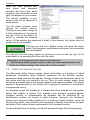
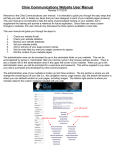
When you start the test
module
(click
on
the
Produce Reports choice),
you will see a screen similar
to the one on the left.
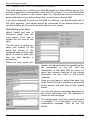
The screen is divided into a
number of areas. The panel
at the top left lists the types
of reports that are currently
available.
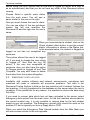
Below this (bottom left) is a
list of available reports on
aspects of management and administration.
The largest panel lists all users who have been registered through the BioData
module or who have conducted the test under kiosk mode. You can sort the
records in terms of any other attribute by clicking on the heading at the top of the
columns (System ID etc); students are initially listed in alphabetical order of
surname. You can also find particular student records by selecting the Find a user
User manual 2.1
21