1
Telephone Helpline: 1300225960
Apuro prides itself on quality and service, ensuring that at the time of packaging the contents are supplied
fully functional and free of damage. Should you find any damage as a result of transit, please contact your
Apuro dealer immediately.
Operation
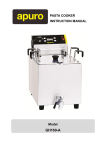
Thermal Cut-out reset cover
Thermal Cut-out reset switch
Power indicator light
Thermostat
Element
Safety switch
Connecting the Element/Control Panel
The Element and Control Panel are supplied as a single detachable
part to aid in cleaning the appliance.
To connect to the body of the appliance:
1.
Locate the lugs on the rear of the appliance with the tabs on the
rear of the element/panel unit.
2.
Ensure the safety switch is aligned with the slots on the
appliance [A].
3.
Lower the unit onto the appliance, ensuring the tabs are located
inside the lugs on the rear of the appliance [B].
[A]
[B]
Cooking
1.
Connect the appliance to the mains power supply.
2.
Set the thermostat to the desired temperature. The amber power indicator light turns On.
Note: 170°C to 180°C is suitable for general cooking.
3.
The appliance begins to heat the oil.
Note: The red Heat indicator light turns On during heat-up. When the oil is at the set
temperatures the light turns Off.
2