1
Register your product and get support at
www.magnavox.com/usasupport
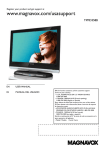
19MD358B
EN
USER MANUAL
EN: For further assistance, call the customer support
service in your country.
• 1-800-705-2000
Enter below the Serial No. located on the rear of the cabinet.
ES: Para obtener más información, llame al servicio de soporte
al cliente de su país.
• 1-800-705-2000
Escriba a continuación el Nº de serie, el cual se encuentra en la
parte posterior del gabinete.
• Model / Modelo • Serial / Serie:
Registering your model with MAGNAVOX makes you eligible for all of the valuable benefits listed below, so don’t miss out.
Complete and return your Product Registration Card at once, or register online at
www.magnavox.com/usasupport to ensure:
Returning the enclosed card
guarantees that your date of
purchase will be on file, so no
additional paperwork will be
required from you to obtain
warranty service.
*Product Safety
Notification
*Additional Benefits
By registering your product,
you’ll receive notification
directly from the manufacturer
- in the rare case of a product
recall or safety defect.
Registering your product
guarantees that you’ll receive
all of the privileges to which
you’re entitled, including
special money-saving offers.
ESPAÑOL
Know these
safety symbols
CAUTION
Congratulations on your purchase,
and welcome to the “family!”
Dear MAGNAVOX product owner:
Thank you for your confidence in MAGNAVOX.
You’ve selected one of the best-built, best-backed
products available today. We’ll do everything in our
power to keep you happy with your purchase for
many years to come.
As a member of the MAGNAVOX “family,” you’re
entitled to protection by one of the most
comprehensive warranties and outstanding service
networks in the industry. What’s more, your purchase guarantees you’ll receive all the information
and special offers for which you qualify, plus easy
access to accessories from our convenient home
shopping network.
Most importantly, you can count on our
uncompromising commitment to your total
satisfaction.
All of this is our way of saying welcome - and
thanks for investing in a MAGNAVOX product.
P.S.To get the most from your MAGNAVOX
purchase, be sure to complete and return
your Product Registration Card at once or
register online at:
www.magnavox.com/usasupport
FRANÇAISE
*Proof of Purchase
ENGLISH
Return your Product Registration Card or register online at
www.magnavox.com/usasupport today to get the very most from your purchase.
RISK OF ELECTRIC SHOCK
DO NOT OPEN
CAUTION: TO REDUCE THE RISK OF ELECTRIC SHOCK, DO NOT
REMOVE COVER (OR BACK). NO USER-SERVICEABLE PARTS
INSIDE. REFER SERVICING TO QUALIFIED SERVICE PERSONNEL.
This “bolt of lightning” indicates
uninsulated material within your unit
may cause an electrical shock. For the
safety of everyone in your household,
please do not remove product covering.
The “exclamation point” calls attention
to features for which you should read the
enclosed literature closely to prevent operating and
maintenance problems.
WARNING: To reduce the risk of fire or electric
shock, this apparatus should not be exposed to rain
or moisture and objects filled with liquids, such as
vases, should not be placed on this apparatus.
CAUTION: To prevent electric shock, match wide
blade of plug to wide slot, fully insert.
ATTENTION: Pour éviter les choc électriques,
introduire la lame la plus large de la fiche dans la
borne correspondante de la prise et pousser jusqu’au
fond.
For Customer Use
Enter below the Serial No. which is located
on the rear of the cabinet. Retain this
information for future reference.
Model No._______________________
Serial No. _______________________
Visit our World Wide Web Site at http://www.magnavox.com/usasupport
EN-1
FRANÇAISE
ENGLISH
1.
Read before operating equipment
1.
2.
3.
4.
5.
6.
7.
8.
ESPAÑOL
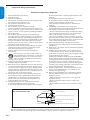
Important safety instructions
9.
10.
11.
12
13.
14.
15.
16.
Read and keep these instructions.
Heed all warnings.
Follow all instructions.
Do not insert any strange object into the ventilation slots.
This might lead to damage of the TV.
Do not use this apparatus near water.
Clean only with a dry cloth.
Do not block any of the ventilation openings.
Install in accordance with the manufacturers instructions.
Do not install near any heat sources such as radiators, heat
registers, stoves, or other apparatus (including amplifiers)
that produce heat.
Do not defeat the safety purpose of the polarized or
grounding-type plug. A polarized plug has two blades with
one wider than the other. A grounding type plug has two
blades and third grounding prong. The wide blade or third
prong are provided for your safety. When the provided
plug does not fit into your outlet, consult an electrician for
replacement of the obsolete outlet.
Protect the power cord from being walked on or pinched
particularly at plugs, convenience receptacles, and the
point where they exit from the apparatus.
Only use attachments/accessories specified by the
manufacturer.
Use only with a cart, stand, tripod, bracket, or
table specified by the manufacturer, or sold with
the apparatus. When a cart is used, use caution
when moving the cart/apparatus combination to
avoid injury from tip-over.
Unplug this apparatus during lightning storms or when
unused for long periods of time.
Refer all servicing to qualified service personnel. Servicing
is required when the apparatus has been damaged in any
way, such as power-supply cord or plug is damaged, liquid
has been spilled or objects have fallen into apparatus, the
apparatus has been exposed to rain or moisture, does not
operate normally, or has been dropped.
This product may contain lead or mercury. Disposal of
these materials may be regulated due to environmental
considerations. For disposal or recycling information,
please contact your local authorities or the Electronic
Industries Alliance:www.eiae.org.
Damage Requiring Service - The appliance should be
serviced by qualified service personnel when:
A. The power supply cord or the plug has been damaged; Example of Antenna Grounding as per
NEC - National Electric Code
17.
18.
19.
20.
21.
22.
GROUND CLAMP
B. Objects have fallen, or liquid has been spilled into the
appliance;
C. The appliance has been exposed to rain
D. The appliance does not appear to operate normally or
exhibits a marked change in performance;
E. The appliance has been dropped, or the enclosure
damaged.
Tilt/Stability - All televisions must comply with
recommended international global safety standards for tilt
and stability properties of its cabinet design.
• Do not compromise these design standards by applying
excessive pull force to the front, or top, of the cabinet
which could ultimately overturn the product.
• Also, do not endanger yourself, or children, by placing
electronic equipment/toys on the top of the cabinet. Such
items could unsuspectingly fall from the top of the set and
cause product damage and/or personal injury.
Wall or Ceiling Mounting - The appliance should be
mounted to a wall or ceiling only as recommended by the
manufacturer.
Power Lines - An outdoor antenna should be located away
from power lines.
Outdoor Antenna Grounding - If an outside antenna is
connected to the receiver, be sure the antenna system is
grounded so as to provide some protection against voltage
surges and built up static charges.
Section 810 of the National Electric Code, ANSI/NFPA
No. 70-1984, provides information with respect to proper
grounding of the mast and supporting structure, grounding
of the lead-in wire to an antenna discharge unit, size of
grounding connectors, location of antenna-discharge unit,
connection to grounding electrodes, and requirements for
the grounding electrode. See Figure below.
Object and Liquid Entry - Care should be taken so that
objects do not fall and liquids are not spilled into the
enclosure through openings.
Battery Usage CAUTION - To prevent battery leakage
that may result in bodily injury, property damage, or
damage to the unit:
• Install all batteries correctly, with + and - aligned as
marked on the unit.
• Do not mix batteries (old and new or carbon and
alkaline, etc.).
• Remove batteries when the unit is not used for a long
time.
ANTENNA LEAD IN WIRE
ANTENNA DISCHARGE UNIT (NEC SECTION 810-20)
GROUNDING CONDUCTORS (NEC SECTION 810-21)
GROUND CLAMPS
ELECTRIC SERVICE EQUIPMENT
POWER SERVICE GROUNDING ELECTRODE SYSTEM (NEC ART 250, PART H)
Note to the CATV system installer: This reminder is provided to call the CATV system installer’s attention to Article
820-40 of the NEC that provides guidelines for proper grounding and, in particular, specifies that the cable ground
shall be connected to the grounding system of the building, as close to the point of cable entry as practical.
EN-2
2008 © Koninklijke Philips Electronics
N.V. All rights reserved. Specifications
are subject to change without notice.
Trademarks are the property of
Koninklijke Philips Electronics N.V. or their
respective owners.
Philips reserves the right to change
products at any time without being obliged
to adjust earlier supplies accordingly.
The material in this manual is believed
adequate for the intended use of the
system. If the product, or its individual
modules or procedures, are used for
purposes other than those specified
herein, confirmation of their validity
and suitability must be obtained. Philips
warrants that the material itself does not
infringe any United States patents. No
further warranty is expressed or implied.
Philips can’t be held responsible neither for
any errors in the content of this document
nor for any problems as a result of the
content in this document. Errors reported
to Philips will be adapted and published
on the Philips support website as soon
as possible.
Warranty
No components are user-serviceable.
Do not open or remove covers to the
inside of the product. Repairs may only
be done by Philips Service Centers and
official repair shops. Failure to do so
shall void any warranty, stated or implied.
Any operation expressly prohibited in
this manual, any adjustments, or assembly
procedures not recommended or
authorised in this manual shall void the
warranty.
Pixel characteristics
This LCD product has a high number
of color pixels. Although it has effective
pixels of 99,999% or more, black dots or
bright points of light (red, green or blue)
may appear constantly on the screen.
This is a structural property of the display
(within common industry standards) and is
not a malfunction.
Federal Communications Commission
Notice
This equipment has been tested and found
to comply with the limits for a Class B
digital device, pursuant to part 15 of the
FCC Rules. These limits are designed to
provide reasonable protection against
harmful interference in a residential
installation. This equipment generates,
uses, and can radiate radio frequency
energy and, if not installed and used in
accordance with the instructions, may
cause harmful interference to radio
communications. However, there is
no guarantee that interference will
not occur in a particular installation. If
this equipment does cause harmful
interference to radio or television
reception, which can be determined by
turning the equipment off and on, the
user is encouraged to try to correct
the interference by one or more of the
following measures:
1. Reorient or relocate the receiving
antenna.
2. Increase the separation between the
equipment and the receiver.
3. Connect the equipment into an outlet
on a circuit different from that to
which the receiver is connected.
4. Consult the dealer or an experienced
radio or television technician for help.
The exclamation point calls
attention to features for which
you should read the enclosed literature
closely to prevent operating and
maintenance problems.
If the TV is mounted on a swivel base or
swivel arm, ensure no strain is placed on
the power cord when the TV is swivelled.
Strain on the power cord can loosen
connections. This may cause arcing and
result in fire.
Copyright
Modifications
The FCC requires the user to be notified
that any changes or modifications made
to this device that are not expressly
approved by Philips Consumer Lifestyle
may void the user’s authority to operate
the equipment.
Cables
Connections to this device must be made
with shielded cables with metallic RFI/EMI
connector hoods to maintain compliance
with FCC Rules and Regulations.
ENERGY STAR
As an ENERGY STAR® Partner,
Magnavox has determined this product
meets the ENERGY STAR® guidelines
for energy efficiency. ENERGY STAR®
is a U.S. registered mark. Using
products with ENERGY STAR® label
can save energy. Saving energy reduces
air pollution and lowers utility.
Canadian notice
This Class B digital apparatus meets
all requirements of the Canadian
Interference-Causing Equipment
Regulations.
Avis Canadien
Manufactured under license from Dolby
Laboratories. ‘Dolby’ and the double-D
symbol are trademarks of Dolby
Laboratories.
Cet appareil numérique de la classe
B respecte toutes les exigences du
Règlement sur le matériel brouilleur du
Canada.
Safety symbols
Know these safety symbols:
CAUTION
RISK OF ELECTRIC SHOCK
DO NOT OPEN
CAUTION: TO REDUCE THE RISK OF ELECTRIC SHOCK, DO NOT
REMOVE COVER (OR BACK). NO USER-SERVICEABLE PARTS
INSIDE. REFER SERVICING TO QUALIFIED SERVICE PERSONNEL.
This “bolt of lightning” indicates
uninsulated material within your unit may
cause an electrical shock. For the safety
of everyone in your household, please do
not remove product covering.
EN-3
ENGLISH
Table of Contents
1. Important safety instructions ������������������ 2
FRANÇAISE
2. Important �������������������������������������������������� 5
2.1
Product information  ���������������������������������������������� 5
2.2
Screen care  ������������������������������������������������������������ 5
2.3
Environmental care ������������������������������������������������ 5
2.4
Regulatory notices  ������������������������������������������������ 5
ESPAÑOL
3. Your TV ������������������������������������������������������ 6
3.1
TV overview  ���������������������������������������������������������� 6
3.2
Remote control ������������������������������������������������������ 7
4. Get started ������������������������������������������������ 8
7. Change your TV installation  ������������������ 24
7.1
Select your menu language ���������������������������������� 24
7.2
Autoprogramming ������������������������������������������������ 24
7.3
Return your settings to default values ���������������� 24
8. Connect devices �������������������������������������� 25
8.1
Connection overview ������������������������������������������ 25
8.2
Select connection quality  ������������������������������������ 25
8.3
Connect devices  �������������������������������������������������� 27
9. Built-in DVD player  �������������������������������� 29
9.1
Disc operations ���������������������������������������������������� 29
9.2
Playable discs �������������������������������������������������������� 29
9.3
Playing discs ���������������������������������������������������������� 30
9.4
Basic playback controls ���������������������������������������� 30
9.5
Playing MP3/JPEG picture CD ������������������������������ 32
9.6
OSD settings for DVD  ���������������������������������������� 33
4.1
Position the TV  ������������������������������������������������������ 8
4.2
Install the remote control batteries ���������������������� 8
4.3
Connect the antenna or cable  ������������������������������ 8
4.4
Connect the AC power cord ������������������������������ 10
4.5
Manage cables ������������������������������������������������������ 10
4.6
Switch on the TV �������������������������������������������������� 10
10. Glossary  �������������������������������������������������� 34
5. Use your TV  �������������������������������������������� 11
11. Trouble shooting �������������������������������������� 35
5.1
Switch your TV on or to standby ������������������������ 11
5.2
Watch TV �������������������������������������������������������������� 11
5.3
Watch channels from a cable receiver box  �������� 12
5.4
Watch a DVD  ������������������������������������������������������ 12
6. Use more of your TV ������������������������������ 13
6.1
Remote control overivew-TV ������������������������������ 13
6.2
Remote control overview-DVD �������������������������� 14
6.3
Change picture and sound settings  �������������������� 15
6.4
Use Smart mode �������������������������������������������������� 17
6.5
Create favorite channels list �������������������������������� 18
6.6
Set the clock �������������������������������������������������������� 18
6.7
Set the sleeptimer ������������������������������������������������ 18
6.8
Use parental control and rating locks  ���������������� 19
6.9
Closed captions ���������������������������������������������������� 22
6.10 Use your TV as a PC monitor  ���������������������������� 23
6.11 Select your TV in PC mode  �������������������������������� 23
EN-4
12. Trouble shooting-DVD ���������������������������� 36
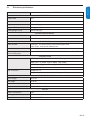
13. Technical specifications �������������������������� 37
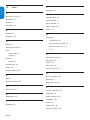
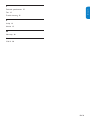
14. Index �������������������������������������������������������� 38
15. Warranty �������������������������������������������������� 40
To fully benefit from the support that Magnavox offers,
register your product at www.magnavox.com/usasupport.
To avoid deformations or color fading, wipe off water
droplets as soon as possible.
•
Do not touch, push, rub or strike the screen with hard
objects as this may damage the screen permanently.
•
Where possible, avoid stationary images that remain
on-screen for extended periods of time. If you must
use stationary images, reduce the screen contrast and
brightness to avoid screen damage.
Registering your model with Magnavox makes you eligible for
all of the valuable benefits listed below, so don’t miss out.
Complete and return your Product Registration Card at
once, or register online at www.magnavox.com/usasupport
to ensure:
• Proof of Purchase
Returning the enclosed card guarantees that your date
of purchase will be on file, so no additional paperwork
will be required from you to obtain warranty service.
•
Product Safety Notification
By registering your product you’ll receive notification
- directly from the manufacturer - in the rare case of a
product recall or safety defect.
•
Additional Benefits of Product Ownership Registering
your product guarantees that you’ll receive all of the
privileges to which you’re entitled, including special
money-saving offers.
DD Note: Specifications and information are subject to
change without notice.
For further assistance, call the customer support service
in your country.
• TO OBTAIN ASSISTANCE IN THE U.S.A., PUERTO
RICO, OR U.S. VIRGIN ISLANDS. Contact Magnavox
Customer Care Center at:
1-800-705-2000
•
2.1
TO OBTAIN ASSISTANCE IN CANADA. Contact
Magnavox Customer Care Center at:
1-800-661-6162 (French Speaking)
1-800-705-2000 (English or Spanish Speaking)
Product information
2.3
Environmental care
Recycling
The packaging of this product is intended to be recycled.
Contact your local authorities for information about how to
recycle the packaging.
End of life directives
Like all LCD products, this set contains a lamp with Mercury,
please dispose of according to all Local, State and Federal
laws.
Magnavox is paying a lot of attention to produce
environmentally-friendly products in green focal areas. Your
new TV contains materials which can be recycled and reused.
At the end of its life, specialized companies can dismantle
the discarded TV to concentrate the reusable materials and
to minimize the amount of materials to be disposed off.
Please ensure you dispose off your old TV according to local
regulations.
Disposal of batteries
The batteries supplied do not contain the heavy metals
mercury and cadmium. Nevertheless, in many areas batteries
may not be disposed of with your household waste.
Please ensure you dispose of batteries according to local
regulations.
The model and serial number are on the rear of the TV and
on the packaging.
This TV consumes minimal energy in standby mode
to minimise environmental impact. The active power
consumption is given on the type plate at the rear of the TV.
2.2
Screen care
• Turn off and unplug the AC power cord before cleaning
the screen.
•
2.4
ENGLISH
Congratulations on your purchase and welcome to
Magnavox!
•
FRANÇAISE
Important
Regulatory notices
BB WARNING: To reduce the risk of fire or electric
shock, this apparatus should not be exposed to rain
or moisture. Objects filled with liquids, such as vases,
should not be placed on this apparatus.
Clean the screen with a soft, dry cloth. Do not use
substances such as household cleaning agents as these
may damage the screen.
EN-5
ESPAÑOL
2.
ENGLISH
3.
Your TV
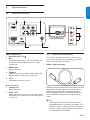
This section gives you an overview of commonlyused TV controls and functions.
3.1
TV overview
75 Ω
Cable
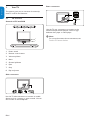
Controls of TV and DVD
3
4
5
Use the TV rear connectors to connect to the
antenna and permanent devices such as a highdefinition disc player or DVD player.
ESPAÑOL
FRANÇAISE
Rear connectors
2
1
6
3
7
4
8
5
1. Power switch
2. Remote control sensor
3. Volume up/down
4. Menu
2
5. Channel up/down
1
75 Ω
6. Eject
7. Stop
6
7
8. Play and pause
8
Side connectors
75 Ω
Use the TV side connectors to connect to mobile
devices such as a camera or game console. You Cable
can
also connect to the headphone.
75 Ω
EN-6
75 Ω
DD Note
For more information about connections, see
Section 8 Connect devices.
Remote control
ENGLISH
3.2
1
FRANÇAISE
2
9
8
3
ESPAÑOL
4
SMART
MODE
7
5
6
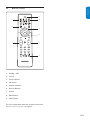
1. Standby / ON
2. Format
3. Cursor buttons
4. OK button
5. Channel selection
6. Source selection
7. Volume
8. Menu button
9. INFO button
For more information about the remote control, See
Remote control overview. on page 13.
EN-7
ESPAÑOL
FRANÇAISE
ENGLISH
4.
Get started
4.2
Install the remote control batteries
This section describes how to position and connect
your TV, and how to perform your first-time
installation.
4.1
Position the TV
BB WARNING
• Do not insert the power plug into the wall
socket before all the connections are made.
• Large screen TVs are heavy. Two people are
required to carry and handle the TV.
1. Open the battery cover on the back of the
remote control.
Wherever you decide to position your TV, ensure
that you always have easy access to the AC power
cord or plug to disconnect the TV from the power.
2. Insert the 2 batteries supplied. Make sure the
+ and - ends of the batteries line up correctly.
(inside of case is marked).
If the TV is mounted on a swivel base or swivel arm,
ensure no strain is placed on the AC power cord
when the TV is swivelled. Strain on the AC power
cord can loosen connections. This may cause arcing
and result in fire.
3. Close the cover.
For ideal viewing conditions, position the TV where
light does not fall directly on the screen.
4.3
Connect the antenna or cable
This section describes how to connect your TV to an
antenna, cable, Direct Broadcast Satellite, and to a
cable receiver box.
The ideal viewing distance for watching TV is three
times its screen size.
Kensington security slot
Your TV is equipped with a Kensington Security Slot
at the back of the TV.
If you connect an anti-theft Kensington lock
(not supplied), position the TV within reach of a
permanent object that can be attached to the lock.
CABLE
Connect to an antenna
Any DTV programs that are broadcast in your
area can be received for free through an antenna
connection.
Contact your local content provider or your local
electronics retailer if you are unsure about what
HDTV programs are available in your area.
SATELLITE
Broadcasters are transitioning from analog to digital
TV. This means that a given broadcaster can have
channels available either in analog or in digital, or
both analog and digital at the same time.
The TV has stereo sound if the broadcasting channel
makes it available.
ANTENNA
EN-8
SATELLITE
OR
CABLE
OR
Connect to a cable
•
A/V (Composite Video and Audio)
When your TV is connected to the cable socket,
you may receive free digital and high definition
programming (depending on your cable provider).
Digital and high definition cable channels can be CABLE
recognized by the format of the channel number. The
channel number includes a dot “.” For example, 11.1,
46.30, 108.201. Contact your cable provider for more
information.
•
S-Video and Audio
•
YPbPr (Component Video Input)
•
HDMI
CABLE
SATELLITE
CABLE
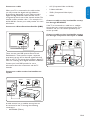
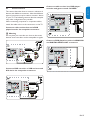
Connect a cable receiver box/satellite set-top
box through RF IN/OUT
If the TV is connected to a cable box or satellite
set-top box via a coaxial connection, set the TV to
channel 3 and 4, or theCable
channel
specified by the
Receiver Box
service provider.
Connect a cable receiver box/satellite set-top
box through component video input or HDMI
CABLE
SATELLITE
There are two main DBS systems: DirecTV and
DishNetwork. These systems require a separate,
proprietary set-top box to decode signals and send
ANTENNA
SATELLITE
CABLE
them to the TV. The set-top box contains a digital TV
tuner for receiving off-air digital television broadcasts.
OR
OR
Cable
Receiver Box
OR
OR
Contact your local DBS provider
for more
information about the connections and the TV
SATELLITE
channels.
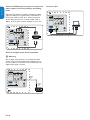
Connect to a cable receiver box/satellite settop box
Cable Receiver Box
ANTENNA
SATELLITE
CABLE
OR
OR
CABLE
OR
OR
Cable Receiver Box
A cable receiver box or satellite set-top box can
be connected to the TV through the following
Cable
connections:
Receiver Box
CABLE
• ANTENNA (75ohm)
OR
OR
EN-9
FRANÇAISE
OR
OR
ESPAÑOL
Connect to a Direct Broadcast Satellite (DBS)
ANTENNA
ENGLISH
SATELLITE
FRANÇAISE
ENGLISH
4.4
Connect the AC power cord
Cable
Receiver Box
BB WARNING:
Verify that your voltage corresponds with
the voltage printed at the back of the TV.
Do not insert the AC power cord if the
voltage is different.
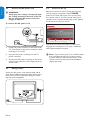
4.6
Switch on the TV
Before you switch on the TV, check that the mains
cord is properly connected. Press POWER
button at the front side of the TV, or press power
the remote control. The TV normally takes 10-15
seconds to start up and the following screen appears
the first time you turn on the TV.
To connect the AC power cord
Thank you for your purchase
TV.
ESPAÑOL
Please proceed with the following steps to set-up your TV. For the BEST
possible picture performance, contact your local Cable / Satellite signal
provider for High Definition signal options available in your area.
Next
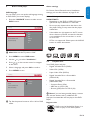
Press the GREEN Next button on your remote to proceed.
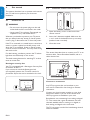
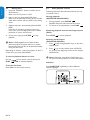
1. Locate the power connector at the back of the
TV. The location of the power connector varies
according to TV model.
2. Insert the AC power cord fully into the TV
power connector.
3. Connect the AC power cord plug to the power
outlet. Ensuring that the cord is tightly secured
at both ends.
4.5
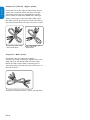
Manage cables
Route your AC power cord, antenna cable and all
other device cables through the cable holder at the
back of the TV. The holder helps keep your cables
tidy and easily manageable.
75 Ω
EN-10
Follow the on-screen instructions to select your
language and complete your TV setup. Installation
takes
10 TV.
minutes.
Thankapproximately
you for your purchase
Please proceed with the following steps to set-up your TV. For the BEST
possible picture performance, contact your local Cable / Satellite signal
provider for High Definition signal options available in your area.
DD Note: If you connect your TV to a cable receiver
box or satellite set-top box, you do not need
to install channels.
Press the red button on the
Next
remote
to exit
the channel installation
Press
the GREEN Nextcontrol
button on your remote
to proceed.
stage of the setup.
5.2
This section helps you perform basic TV operations.
5.1
Switch channels
•
Press a number (1 to 999) or press CH +/- on
your remote control.
•
Press PREV CH to return to the previously
viewed TV channel.
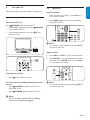
Switch your TV on or to standby
To Switch the TV on
Watch TV
SMART
MODE
POWER at the front of the TV.
Press
• If the standby indicator is off, press
POWER
on the front of the TV.
If the standby indicator is on, press
remote control.
on the
ESPAÑOL
•
DD Note
You can also switch channels by pressing CH +/on the top of the TV
Adjust volume
1. Press VOL+ or VOL- on your remote control.
2. Press MUTE on your remote control to mute
the sound. Press MUTE again or press VOL or + to restore the sound.
SMART
SMART
MODE
MODE
To Switch to standby
•
Press
on the remote control.
SMART
MODE
To switch on from standby without the remote
control.
POWER at the front of the TV to
• Press
switch the TV off.
SMART
MODE
•
Press
ENGLISH
Use your TV
FRANÇAISE
5.
DD Note
You can also switch volume by pressing VOL +/on the top of the TV
POWER again to switch the TV on.
DD Note
The TV is never powered off completely
unless it is physically unplugged.
EN-11
ENGLISH
Watch channels from a cable receiver
box
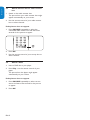
1. Switch on the cable receiver box.
The picture from your cable receiver box might
appear automatically on your screen.
2. Use the remote control of your cable receiver
box to select channels.
If the picture does not appear
SMART
MODE
1. Press SOURCE repeatedly to select the
connected cable receiver box and wait a few
seconds for the picture to appear.
ESPAÑOL
FRANÇAISE
5.3
2. Press OK.
3. Use the remote control of your set-top box to
select channels.
5.4
Watch a DVD
1. Insert a DVD disc in your player.
2. Press Play > on the remote control of your
player.
The picture from the player might appear
automatically on your screen.
If the picture does not appear
1. Press SOURCE repeatedly to select correct
source and wait a few seconds for the picture
to appear.
2. Press OK.
EN-12
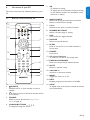
6.1
Remote control overivew-TV
1
2
19
18
3
6. SMART MODE
Selects the among Personal, Sports, Standard,
Movie, or Powers Saver settings.
7. CH +/Switches to the next or previous channel.
8. NUMBER BUTTONS
Selects a channel, page or setting.
9. DOT
Uses the dot for digital channels.
17
4
SMART
MODE
5
6
16
7
15
8
14
13
9
12
11
10
10. SOURCE
Selects connected devices.
11. SLEEP
Press to set the TV to turn itself off within a
certain time.
12. FREEZE
No function
13. CC (Close Captions)
To select CC on, Off or On during mute.
14. PREVIOUS CHANNEL
Returns to the previously-viewed channel.
15. MUTE
Mutes or restores sound.
16. VOLUME +/Increases or decreases volume.
17. MENU
Toggles the menu on or off.
18. INFO
Displays programme information, if available.
1.
POWER
Switches the TV on from standby or back to
standby.
2.
To add or remove a channel in the favorite list
of TV channel
ENGLISH
This section describes the advanced features of your
TV.
5. OK
- To activates a setting.
- To display the list of channels stored (according
to the selection made in the Installation mode
(Antenna or Cable)
FRANÇAISE
Use more of your TV
ESPAÑOL
6.
19. VIEW
To display a list of all channels marked as favorite
(incl. subchannels).
3. FORMAT
Selects a picture format. See Change Picture
format on page 16.
4. CURSOR BUTTONS
To navigate through the menus.
EN-13
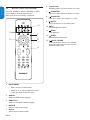
Press the “SOURCE” button repeatedly to select
source DVD to activate DVD function.
Make sure the source “DVD” is selected.
1-8
13
ESPAÑOL
6. Repeat A-B
Repeat playback a specific section on a disc.
Remote control overview-DVD
FRANÇAISE
ENGLISH
6.2
9
12
10
SMART
MODE
11
1. DISC MENU
• Enter the disc contents menu.
• Switches on or off the playback control
mode. (for VCD version 2.0 only)
2. AUDIO
Select the DVD audio language.
3. SUBTITLE
Select the the DVD subtitle language
4. ANGLE
Select a DVD camera angle.
5. Repeat
Select various repeat modes.
EN-14
7.
CHAPTER
Search or select previous chapter or track.
8.
CHAPTER
Search or select next chapter or track.
9.
EJECT
Eject the disc from the DVD player.
10.
FF
Forward/Quick forward/
11.
STOP
Stop playback.
12.
RWD
Backward/slow backward
13.
PLAY / PAUSE
Press the button once to start plyback.
Press the button second time to pause
playback temporarily.
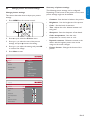
This section describes how to adjust your picture
settings.
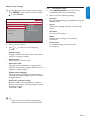
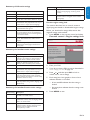
1. Press MENU on the remote control.
2. Press
or
The following picture settings can be configured.
Depending on the format of the picture source, some
picture settings might not be available.
•
Contrast - Sets the level of white in the picture.
•
Brightness - Sets the brightness of the picture.
•
Color - Sets the level of saturation.
•
Tint - Adjusts the color balance between red
and green.
•
Sharpness - Sets the sharpness of fine details.
•
Color temperature - Sets the color
temperature to normal, warm or cool.
•
Dynamic contrast - Enhances contrast in the
darker and the brighter picture areas as the
image on the screen changes.
•
Picture format - Changes the format of the
picture.
to select the Picture menu.
3. Press or to select the one of the picture
settings, and press to enter the setting.
SMART
MODE
4. Press or to adjust the setting, and press OK
to confirm the change.
5. Press Menu to exit.
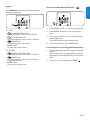
Settings
Picture
Picture
Contrast
Sound
Brightness
Features
Color
Parental control
Sharpness
Installation
Color temperature
Tint
Dynamic contrast
Picture format
Settings
Picture
Contrast
Contrast
50
Brightness
50
Color
50
Sharpness
1
Color temperature
Tint
3
Dynamic contrast
Picture format
EN-15
ENGLISH
Change picture settings
Summary of picture settings
FRANÇAISE
Change picture and sound settings
ESPAÑOL
6.3
ENGLISH
FRANÇAISE
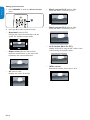
Change picture format
1. Press FORMAT to enter the Picture format
menu.
2. Press
ESPAÑOL
•
or
to select a picture format.
•
Movie expand 14:9 (Not for HD)
Scales the classic 4:3 format to 14:9.
•
Movie expand 16:9 (Not for HD)
Scales the classic 4:3 format to 16:9.
Automatic (Not for PC)
Enlarges the picture automatically to fill the
screen. The subtitles remain visible.
SMART
MODE
•
•
Super zoom (Not for HD and PC)
Removes the black bars on the side of 4:3
broadcasts with minimal distortion.
•
•
16:9 subtitle (Not for PC)
Display 4:3 pictures using the full surface of the
screen leaving the subtitles visible.
4:3 (Not for HD)
Displays the classic 4:3 format.
EN-16
Wide screen
Stretches the classic 4:3 format to 16:9.
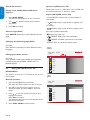
Settings
Sound
Picture
Sound setting
Sound
Sound mode
Features
Alternate audio
Parental control
Digital audio language
Installation
AVL
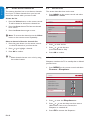
2. Press
to enter the list.
3. Press or
settings:
to select one of the following
•
Sound setting
Changes the bass and treble of the sound. Select
each bar to change a setting.
•
Sound mode
Mono, Stereo, Virtual surround
•
Alternate audio
This gives you the possibility to swap between
Main and second audio program (SAP), when it is
available in analog channel.
•
Digital audio language
This gives you the possibility to swap between
main and alternative language, when it is available
in digital channel.
•
Automatic volume leveling
Reduces sudden volume changes, for example,
during commercials or when switching from one
channel to another.
Select On or Off.
2. Select one of the following settings:
•
Personal
The customized settings you defined by using the
Picture menu.
•
Sports
Vivid picture settings and clear sound for high
action.
•
Standard
For normal TV viewing.
•
Movie
Brilliant picture settings for a cinematic
experience.
•
Power saver
Eco friendly settings for lower power
consumption.
ENGLISH
6.4
Use Smart mode
1. Press SMART MODE to set your TV to a
predefined picture and sound setting.
FRANÇAISE
This section describes how to adjust sound settings.
1. Press MENU on the remote control and press
to select Sound.
ESPAÑOL
Adjust sound settings
EE Tip:
• There are only two options Sound setting
and Virtual surround in PC and DVD mode.
EN-17
ENGLISH
FRANÇAISE
6.5
Create favorite channels list
This section describes how to use favorite channels
list of your TV. Select channels from your list, and
choose the channel which you want to add.
Create the list
1. Press the Yellow button on the remote control.
To add a channel in the favorite channels list.
2. Press the Green button. The favorite channels
list is shown.
ESPAÑOL
3. Press the Green button again to exit.
6.6
Set the clock
This section describes how set the time.
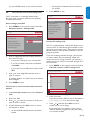
1. Press MENU on the remote control and select
Installation > Clock
Settings
Installation
Clock
Language
--
Autoprogram
:
--
AM
Source
Clock
Current software info
DD Note: To remove the channel, press the Yellow
button on the remote control repeatedly.
Select a channel of favorite channels list
1. Press the green button on the remote control.
to show all channels of your favorite list.
2. Press
or
to highlight a channel.
3. Press OK to confirm.
Reset AV settings
2. Press
to enter the list.
3. Settings
Press or to set the time.
Settings
Installation
(hour/minute/AM or PM) Clock
Features
Language
4. Closed
Press
OK to confirm.
captions
Autoprogram
EE Tip
• Select channels that are not in a list by using
the number buttons.
Caption service
Source
Sleeptimer
--
:
--
AM
caption service
6.7Digital
Clock Set the sleeptimer
Digital caption options
Current software info
Sleeptimer
switches the TV to standby after a defined
Preferred channels
Reset AV settings
period
of time.
Sleeptimer
0
1. Press MENU on the remote control and select
Features > Sleeptimer.
Settings
Features
Sleeptimer
Closed captions
Caption service
Digital caption service
Digital caption options
Preferred channels
Sleeptimer
2. Press
0
to enter the Sleeptimer bar.
3. Press or to set the sleep time from zero to
180 minutes. If set to zero minutes, the
Sleeptimer is switched off.
4. Press OK to activate the Sleeptimer.
EN-18
Region ratings lock
Change PIN
Use parental control and rating locks
Lock TV channels or connected devices with a
four digit code to prevent children from watching
unauthorised content.
5. Channel
Press
MENU to quit.
lock
Please enter your PIN
US TV ratings lock
US Movie ratings lock
Settings
Canada
English
ratings lock
Parental
control
Channel lock
AV1
Set or change your PIN
Region
ratingslock
lock
US TV ratings
DVD
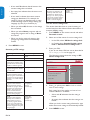
1. Press MENU on the remote control and select
Parental control > Change PIN.
Change
PIN
US Movie
ratings lock
Side AV
Canada English ratings lock
HDMI
Canada French ratings lock
PC
Region ratings lock
2
Change PIN
3
Parental control
Channel lock
Change PIN
Settings
US Movie ratings lock
UseParental
the control
TV ratings lock
Canada English ratings lock
Region ratings lock
Change PIN
2. Enter a 4-digit PIN with the number buttons on
the remote control.
• If you have a PIN, enter your current PIN.
• If you do not have a PIN, enter the default
code 0000 .
Settings
Channel lock
• If you have lost your PIN, enter
master code
AV1
0711.
DVD
US TV ratings
lock
Channel lock
US Movie ratings lock
Side AV
3. Enter your new 4-digit PIN and then enter it
Canada English ratings lock
HDMI
again to confirm.
Canada French ratings lock
A message appears to confirmPCthat your PIN has
Region ratings lock
2
been changed.
Change PIN
4. Press MENU to exit.
Channel lock
Channel lock
AV1
Region ratings lock
2
Your
TVratings
is equipped
with a V-chip DVD
that allows you to
US TV
lock
control
access to individual programs
based on their
US Movie ratings lock
Side AV
control
ageSettings
ratingI Parental
and content
rating. The program content
Canada English ratings lock
HDMI
US TV ratings
advisory
datalock
are sent by the broadcaster
or by the
Canada French
ratings lock
PC
program
provider.
All
(D) Dialog
Canada French ratings lock
Parental control
4
Please enter your PIN
US TV ratings lock
ESPAÑOL
Canada French ratings lock
Channel lock
Settings
3
4
To lock one or more channels and connected
devices
1. In the Parental control menu, select Channel
lock.
Settings I Parental control
2. USEnter
your
TV ratings
lock PIN.
3. Press
or to select the channel
or device you
All
(D) Dialog
want
None to lock or unlock.
(L) Language
TV-Yeach selection, press OK to(S)
Sex or unlock
4. At
lock
the
TV-Y7channel or device.
(V) Violence
TV-G
•
An box with X indicates that the channel is
TV-PG
locked.
ENGLISH
6.8
• An empty box indicates that the channel is
not locked.
Parental control
Change PIN
Settings
FRANÇAISE
(or press SLEEP button on the remote control)
(L) Language
If youNone
are receiving channels through
a set-top box
Change PIN
3
TV-Y receiver box connected by(S)HDMI,
Sex
or cable
you
4 set-top box or
cannot
use the TV ratings lock. Your
TV-Y7
(V) Violence
cableTV-G
receiver box must be connected through RF or
AV connectors.
TV-PG
1. Press MENU on the remote control and select
TV-14
Parental control > US TV ratings lock.
TV-MA
Settings I Parental control
US TV ratings lock
All
(D) Dialog
None
(L) Language
TV-Y
Settings
TV-Y7
Parental control
(S) Sex
(V) Violence
US Movie ratings lock
TV-G
Channel lock
ALL
TV-PG
US TV ratings lock
NR
TV-14
US Movie ratings lock
G
TV-MA
Canada English ratings lock
PG
Canada French ratings lock
PG-13
ratings
lock PIN.
2. Region
Enter
your
R
Change
PIN do not have a PIN, set one
NC-17as described in
If you
X
Set or change you PIN on the previous
page.
3. Settings
Press or and then press OK to lock or
unlock
one or more ratings.US Movie ratings lock
Parental
control
Eachlock
rating has a box-graphic ALL
in front of it to
Channel
whether programs carrying
that rating
NR
USindicate
TV ratings lock
are currently locked:
US Movie ratings lock
G
TV-14
SettingsEnglish ratings lock
Canada
TV-MA
Parental control
Canada French ratings lock
Change PIN
PG-13
Channel
lock lock
Region ratings
Please enter your PIN
PG
EN-19
Channel lock
AV1
US TV ratings lock
DVD
US Movie ratings lock
ENGLISH
• A box with X indicates that all items in the
content ratings list are locked.
• An empty box indicates that the item is not
selected.
FRANÇAISE
• A box with / indicates that some content
ratings are deselected. For example, for
rating TV-14, you can deselect one or more
of the following content ratings: Dialog (D),
Language (L), Sex (S), or Violence (V).
• When you select All, all items in the ratings
list are locked.
ESPAÑOL
• When you select None, programs with no
rating and programs with a rating of None
are locked.
• When you lock a rating, all ratings in the
younger age categories are automatically
locked.
4. Press MENU to exit.
HDMI
Content
rating
Canada French ratings lock
TV-MA
Programs
are designed
to be
Region ratings
lock
viewed by adults and may be
Change PIN
unsuitable
for children under
the age of 17. These programs
may contain graphical violence,
explicit sexual activity and/or
crude or indecent language.
LanguagePC(L)
Sex (S) 2
Violence (V)
3
4
Use the movie ratings lock
This section describes how to control viewing of
movies
on
their Motion Picture Association of
Settingsbased
I Parental
control
America
(MPAA)
rating.
US TV ratings
lock
All
(D) Dialog and select
1. Press
MENU on the remote control
Parental
control.
None
(L) Language
TV-Y
(S) Sexratings lock.
2. Select
one of the menus for movie
TV-Y7
(V) Violence
• In the USA, select US Movie
ratings lock.
TV-G
•
In Canada, select Canada English ratings
TV-PG
lock or Canada French ratings lock.
TV-14
Summary of TV ratings
Age rating
Content rating
All
None
None
None
TV-Y
Appropriate for children of all
ages with themes and elements
suitable for children aged 2-6.
None
TV-Y7
Programs designed for children
age 7 and older.
Fantasy Violence (FV)
TV-G
Programs suitable for all ages.
These programs contain little or
no violence, no strong language
and little or no sexual dialog or
situations.
None
TV-PG
Programs contain elements
that some parents may find
unsuitable for younger children
and which may need parental
guidance. The program may
contain moderate violence,
sexual dialog and/or situations
and some strong language.
Dialog (D)
Language (L)
Sex (S)
Violence (V)
TV-14
Programs contain elements
that may not be suitable for
children under 14 years of
age. These programs include
one or more of the following:
intense violence, intense sexual
situations, suggestive dialog and
strong language.
Dialog (D)
Language (L)
Sex (S)
Violence (V)
TV-MA your PIN.
3. Enter
If you do not have a PIN, set one as described in
Set or change you PIN on the page 19
The following screen shows the ratings in US
Movie ratings lock.
Settings
Parental control
US Movie ratings lock
Channel lock
ALL
US TV ratings lock
NR
US Movie ratings lock
G
Canada English ratings lock
PG
Canada French ratings lock
PG-13
Region ratings lock
R
Change PIN
NC-17
X
4. Press or , then press OK to lock or unlock
one or more ratings.
Each rating has a box-graphic in front of it to
indicate whether it is locked:
Settings
• A box with X indicates that the rating is
locked
Parental
control
Change PIN
Please enter your PIN
• An empty box indicates
that the rating is not
locked
Channel lock
US TV ratings lock
US Movie ratings lock
When you lock a movie rating, all items for ages
below that movie rating are automatically locked.
Canada English ratings lock
Canada French ratings lock
5. Region
Press
MENU to exit.
ratings lock
Change PIN
EN-20
Side AV
Canada
English ratings lock
Age
rating
All items in the ratings list are locked.
NR
Not rated.
G
Movies with a mild content, suitable for all ages.
PG
Movies for which parental guidance is
recommended. They may contain a few racy or
violent scenes or maybe some bad language.
PG -13
Movies for which parental guidance may be
recommended if under age 13.
R
Restricted. The movies usually contain offensive
sex or bad language and may be unsuitable for
children under the age of 17. Parental guidance
or permission needed.
NC-17
Even with parental permission, forbidden under
age 17. More offensive sex, violence or bad
language.
X
Movies which generally focus on sex,
violence and/or bad language. Also known as
pornography.
US TV ratings lock
NR
Only to be viewed by adults and contains
G
violence and graphic
sexual content/
pornography.
Canada English ratings
lock
PG
18 ans+
US Movie ratings lock
extreme
Canada French ratings lock
PG-13
Change PIN
NC-17
Use
the region rating lock
Region ratings lock
R
This section describes how to control access to
X
digital programs based on downloaded
region ratings.
Before you download a ratings table, ensure that
regional ratings are broadcast.
1. Press MENU on the remote control and select
Parental control > Region ratings lock.
Settings
Parental control
Channel lock
Change PIN
Please enter your PIN
US TV ratings lock
Summary of Canadian movie ratings.
US Movie ratings lock
Canada English ratings lock
Movie rating
Description
Canada French ratings lock
C
Programming suitable for children under the age
of 8 years. No profanity or sexual content of
any level allowed. Minimal comedic violence.
Region ratings lock
C8+
Suitable for children ages 8 and over. Low
intensity violence and fantasy horror allowed.
G
Movies with a mild content, suitable for all ages.
PG
Movies for which parental guidance is
recommended. They may contain a few racy or
violent scenes or maybe some bad language.
14+
Programming intended for children ages 14 and
over. May contain intense scenes of violence,
strong profanity, and depictions of sexual activity
within the context of a story.
18+
Programming intended for viewers ages 18 and
over. May contain strong violence, language, and
sexual activity.
Summary of Canadian French movie ratings.
Movie rating
Description
G
Appropriate for all ages with little or no violence
and little to no sexual content.
8 ans+
Appropriate for children 8 and up which may
contain little violence, some foul language and/or
little to no sexual content.
13 ans+
Appropriate for children 13 and up, with
moderate violence, language, and some sexual
situations. Persons under 13 should be
accompanied by an adult.
ENGLISH
Description
All
Description
US Movie
lockstrong
16Parental
ans+ control Appropriate for children
16 andratings
up, with
violence, strong language,ALL
and strong sexual
Channel lock
content.
Change PIN
2. Enter your PIN.
3. If you do not have a PIN, set one as described in
Set or change your PIN on page 19.
4. Press or and then press OK to lock or
unlock one or more ratings.
5. Each rating has a box-graphic in front of it to
indicate whether it is locked:
• A box with X indicates that the rating is
locked
• An empty box indicates that the rating is not
locked
6. Press MENU to exit.
EN-21
FRANÇAISE
Movie rating
Movie
rating
Settings
ESPAÑOL
Summary of US movie ratings
ENGLISH
FRANÇAISE
ESPAÑOL
6.9
• Press MENU on the remote control and
select Features > Digital caption service.
Closed captions
The caption service displays transmitted CC-, T-,
and CS- text. The caption text can be displayed
permanently or only when the TV is muted. This
section describes how to use the caption service.
DD Note
• This television provides a display of television
closed captioning that conforms with the EIA608 standard and in accordance with Sections
15.119 of the FCC rules.
• If you connect your cable receiver box via
HDMI or component video input, you cannot
select closed caption through the TV. You
can select closed caption through the cable
receiver box only.
• The captions do not always use correct
spelling and grammar.
• Not all TV programs and product commercials
include closed caption information. Refer
to your area TV program listings for the TV
channels and times of closed caption shows.
The captioned programs are usually noted in
the TV listings with service marks such as ‘CC’.
Display captions
1. Press MENU on the remote control and select
Features > Closed captions.
2. Press or to select On, Off or On during
mute, and press OK to confirm your choice.
3. Press MENU to exit.
Select caption services
For information about the caption services see
Summary of caption service on next page.
1. Turn captions on as described in Display
captions on this page.
2. Select a caption service for analog channels:
• Press MENU on the remote control and
select Features > Caption service.
• Press or to select one of the listed
caption services and press OK to confirm
your choice.
Not all caption services are necessarily being
used by a TV channel during the transmission
of a closed caption program.
3. Select a caption service for digital channels:
EN-22
• Press or to select one of the listed
caption services and press OK to confirm
your choice.
4. Press MENU to exit.
Summary of caption services
• CC-1, CC-2, CC-3, and CC-4
Dialog and descriptions for the action on the
captioned TV program show on screen. Usually
CC 1 is the most used. CC 2 can be used for
alternate languages if they are being transmitted.
•
T-1, T-2, T-3 and T-4
Often used for channel guide, schedules, bulletin
board information for Closed Captions programs,
news, weather information, or stock market
reports.
•
CS-1, CS-2, CS-3, CS-4, CS-5 and CS-6
Service 1 is designated as the Primary Caption
Service. This service contains verbatim, or nearverbatim captions for the primary language being
spoken in the accompanying program audio.
Service 2 is designated as the Secondary
Language Service. This service contains captions
in a secondary language which are translations of
the captions in the Primary Caption Service. The
other service subchannels are not pre-assigned.
It is up to the discretion of the individual caption
provider to utilize the remaining service channels.
Choose how digital captions are displayed
You can define the size, font, color, background and
other characteristics of the caption text.
1. Press MENU on the remote control and select
Features > Digital caption options.
2. Press or to highlight an option for digital
captions, and press OK to select the option.
3. Press or to highlight a setting for the option,
and press OK to confirm your choice.
4. Press MENU to exit.
Use your TV as a PC monitor
ENGLISH
6.10
Using a VGA cable connects a PC to your TV as a PC
monitor.
BB Caution
FRANÇAISE
Before you connect your PC, set the PC monitor
refresh rate to 60Hz.
Supported screen resolutions
ESPAÑOL
The following screen resolutions are supported in
PC mode:
Resolution
Refresh rate
640 x 480
60Hz
800 x 600
60Hz
1024 x 768
60Hz
1280 x 768
60Hz
1440 x 900
60Hz
If necessary, you can adjust the picture position to
the center of the screen with the cursor buttons.
6.11
Select your TV in PC mode
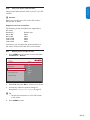
1. Press MENU on the remote control and select
Installation > Source
Settings
Installation
Source
Language
TV
Autoprogram
DVD
Source
AV1
Clock
Side AV
Current software info
HDMI
Reset AV settings
PC
2. Select PC and press OK to confirm your choice.
3. If necessary, adjust the picture settings as
described in Change picture settings on page 15.
Settings
Installation
Language
English
ELanguage
E Tip:
• Set the picture format toFrançais
4:3 or Full screen
Autoprogram
in PC mode.
Español
Source
4. Clock
Press MENU to exit.
Current software info
Reset AV settings
EN-23
Settings
FRANÇAISE
ENGLISH
7.
Installation
Source
Language
TV
Autoprogram
DVD
Change your TV installation
The first time you switch on your TV you select the
Source
AV1
language
for the TV menus and make
basic choices
Side AVthis chapter to
forClock
picture and sound settings. Use
HDMI
reinstall
the TV,info
to set preferences
in the TV menus,
Current software
or Reset
to tune
new TV channels. PC
AV settings
• When Cable is selected,Français
the TV detects
signals supplied by cable.Español
It searches for
Clock NTSC, ATSC, and QAM modulated channels
available in your area.
Autoprogram
Source
Current software info
7.1
Select your menu language
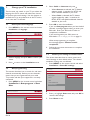
1. Press MENU on the remote control and select
Installation > Language.
Settings
ESPAÑOL
2. Select Cable or Antenna and press .
• When Antenna is selected, the TV detects
Settings
Installation
Language
antenna signals. It searches
for NTSC and
ATSC channels available English
in your area.
Language
Installation
Settings
Source
Installation
Language
Language
TV
Language
Autoprogram
English
DVD
Autoprogram
Source
Français
AV1
Source
Clock
Español
Side AV
Clock software info
Current
HDMI
Current
Reset
AVsoftware
settings info
PC
Reset AV settings
AV settings
3. Reset
Press
OK to start the installation.
If you run Autoprogram when you have locked
channels, a message appears asking to enter your
PIN code. Enter your PIN code in order to
complete the installation.
If you have forgotten your PIN, reset it as
described in Set or change your PIN on page 19.
Settings I Installation
When autoprogramming is complete,
Antenna
this message appears “Channel search
completed”.
Autoprogram
Antenna
7.3
2. Select a language and press OK to confirm your
choice.
Settings
menu.
3. Installation
Press to return to the Installation
Language
Settings I Installation
Autoprogram
Language
Antenna
English
Antenna
Autoprogram
Français
Cable
Source
Start
now
Español
7.2
Autoprogramming
ThisClock
section describes how to search for and store
channels
automatically. Before you tune channels,
Current software info
ensure that you are registered with your cable
AV settings
TV Reset
provider
and that your equipment is correctly
connected.
1. Press MENU on the remote control and select
Installation > Autoprogram > Start
Now.
Start now
Cable
4. Follow the on-screen instructions to complete
the installation.
Return your settings to default values
This section describes how to return picture and
sound settings to their default values. The channel
installation settings are not affected.
1. Press MENU on the remote control and select
Installation > Reset AV settings.
Settings
Installation
Reset AV settings
Language
Autoprogram
Start now
Source
Clock
Current software info
Reset AV settings
Settings I Installation
Autoprogram
Settings
Antenna
Installation
Antenna
Reset AV settings
Cable
Language
Start now
Autoprogram
Start now
Source
Clock
Current software info
Reset AV settings
EN-24
2. Press to highlight Start now, and press OK to
reset the AV settings.
3. Press Menu to exit.
Connection overview
4
ENGLISH
8.1
2
3
75 Ω
5
Rear connectors
1. Antenna input / 75
2. AV1
Component video input. Y Pb Pr and Audio L/R
connectors for DVD, digital receiver or game
console, etc.
6
VIDEO IN
75 Ω
L - AUDIO - R
7
FRANÇAISE
Connect devices
ESPAÑOL
8.
1
8.2
Select connection quality
This section describes how you can enhance your
audio visual experience by connecting your devices
with the best possible connectors.
HDMI - Highest quality
3. SPDIF Out
Digital audio out.
4. HDMI In
HDMI in connector for Blu-ray Disc player, HD
digital receiver or HD game console, etc.
5. PC In
VGA, Audio connectors for PC.
Side connectors
6. Headphones
Stereo Mini Jack.
7. Video (Side)
Video input cinch connector to be used together
with Audio L/R connectors for camcorder, game
console, etc.
HDMI produces the best audio visual quality possible.
Both audio and video signals are combined in one
HDMI cable, providing an uncompressed, digital
interface between your TV and HDMI devices. You
must use HDMI to experience full high-definition
video.
HDMI
EE Tip
If the device only with a DVI connector, use a
DVI-HDMI adaptor to connect your device to a
HDMI connector at the back of the TV.You must
connect a separate audio cable from the device
to the AUDIO L/R at Side AV.
EN-25
Co
re
Component (Y Pb Pr) video provides better picture
quality than composite video connections. Though
component video supports high-definition signals,
picture quality is lower than HDMI and is analogue.
When connecting a component video cable, match
the cable colours. Also connect a Audio L/R cable to
the red and white Audio L/R input connectors at AV1.
ESPAÑOL
FRANÇAISE
ENGLISH
Component (Y Pb Pr) - Higher quality
Component
video cable
L/RAudio
cable L/R
Component
videoAudio Audio
L/R
Component
video
- Red, Green, Blue
- Red, White
red,
gree,
blue
red,
white
red, gree, blue
red, white
Composite - Basic quality
Composite video provides basic analogue
connectivity, usually combining a (yellow) video cinch
cable with (red and white) Audio L/R cinch cable.
Match the cable colours when connecting to the
composite Video and Audio L/R input connectors on
the side of the TV.
Composite
audio/video
cable - yellow, red and white
Composite
audio/video
yellow, red, white
EN-26
S-video
S-video
Composite
audio/vid
Composite
audio/vide
yellow,
red,
white
yellow, red, white
Connect
a cable receiver box, DVD player/
Connect a set-top box, DVD player/recorder and game console
recorder
via HDMI and game console via HDMI
Connect devices
When connecting composite or component cables,
match the cable colors to the connectors on the TV.
FRANÇAISE
This section describes how to connect a selection of
devices with different connectors. Note that different
types of connectors may be used to connect a device
to your TV. The following sections describe examples
only, other configurations are possible.
L - AUDIO - R
Connect a cable receiver box and a DVD
player/recorder via composite connectors
WarningBB Warning
Connect a set-top box and DVD player/recorder via
Do
not place
your recorder too close to the screen
composite
connectors
because some recorders can be susceptible to signals.
Connect a set-top box and DVD player/recorder via
composite connectors
Connect a DVD player/recorder via HDMI-DVI and DIGITAL
AUDIO OUT connectors
Connect a DVD player/recorder via HDMI-DVI and DIGITAL
AUDIO OUT connectors
Connect
a DVD player/recorder via HDMI-DVI
Connect
a DVD player/recorder
via HDMI-DVI
and DIGITAL
and
DIGITAL
AUDIO OUT
connectors
Connect a set-top box and DVD player/recorder via
composite connectors
AUDIO OUT connectors
CABLE
L - AUDIO - R
RF IN
1
L - AUDIO - R
SAT / Cable receiver box
SIDE AV
VIDEO IN
L - AUDIO - R
SIDE AV
L - AUDIO - R
OUT
RF IN
AV 2
1
L + R + VIDEO
SAT / Cable receiver box
OUT
IN
L - AUDIO - RVIDEO IN
L - AUDIO - R
CABLE
3
CABLE
DVI
L - AUDIO - R
2
RF IN
OUT
3
1
AV 2
+ R + VIDEO
SAT / Cable Lreceiver
box
VIDEO IN
L - AUDIO - R
L - AUDIO - R
OUT3RECORDER
AV 2
OUT
IN
DVI
2
RF OUT
AUDIO
IN
AUDIO
OUT
AUDIO
IN
AUDIO
OUT
DVI
L + R + VIDEO
4
IN
SIDE AV
OUT
RECORDER
2
RF OUT
Connect a DVD recorder or VCR
4 and a second A/V device via
composite connectors
Connect a DVD player/recorder via component video
AUDIO
output connectors
(YPbPr) and analog AUDIO
audio
composite connectors
Connect a DVD player/recorder via component video
output connectors (YPbPr) and analog audio
Connect a DVD recorder or VCR and a second
4 and a second A/V device via
Connect
a DVDvia
recorder
or VCR
A/V
device
composite
connectors.
RECORDER
RF OUT
Connect a DVD recorder or VCR and a second A/V device via
composite connectors
IN
OUT
Connect a DVD player/recorder via component video
output connectors (YPbPr) and analog audio
CABLE
RF IN
L - AUDIO - R
RF OUT
R
L - AUDIO - R
CABLE
RF IN
L - AUDIO - R
L - AUDIO
VIDEO
- RIN
L
R
SIDE AV
R
L - AUDIO - R
CABLE
RF IN
RF IN
AV 2
L +RECORDER
R + VIDEO
DVD / Cable receiver box
L - AUDIO - R
RF OUT
DVD / Cable receiver box
L - AUDIO - R
RF IN
L
VIDEO IN
SIDE AV
RF OUT
L
VIDEO IN
L - AUDIO - R
L - AUDIO - R
AV 2
L + R + VIDEO
AV 2
L + R + VIDEO
RECORDER
RF OUT
DVD / Cable receiver box
RF IN
SIDE AV
RECORDER
RF OUT
Connect a set-top box, DVD player/recorder and game console
RF OUT
via HDMI
Connect a digital home theater amplifier
Connect a set-top box, DVD player/recorder and game console
via HDMI
Connect a digital home theater amplifier
Connect a set-top box, DVD player/recorder and game console
via HDMI
Connect a digital home theater amplifier
L - AUDIO - R
DIGITAL
AUDIO
IN
L - AUDIO - R
DIGITAL
AUDIO
IN
L - AUDIO - R
L - AUDIO - R
C
ENGLISH
8.3
EN-27
DIGITAL
ESPAÑOL
ote
RF OUT
VG
CABLE
AUDIO OUT connectors
ENGLISH
L - AUDIO - R
CABLE
FRANÇAISE
via
AUDIO
AUDIO
AUDIO
IN
AUDIO
OUT
Connect a DVD player/recorder via component video
output connectors (YPbPr) and analog audio
L - AUDIO - R
DVD / Cable receiver box
CABLE
nsole
nsole
Connect a PC
VGA TO PC
L - AUDIO - R
Selected TV models
are capable of displaying
1080i,
IN
OUT
720p and 480i/p DTV signals when connected to a
DTV tuner cable receiver box. Select the output
DVI
of the
cablea DVD
receiver
box to either
1080i, 720p
Connect
player/recorder
via component
videoor
480i/p.
Aconnectors
DTV signal
mustand
be analog
available
in your area.
output
(YPbPr)
audio
ESPAÑOL
CABLE
via
Connect a DVD player/recorder via component
DVI
video output connectors (YPbPr) and analog
audio
L - AUDIO - R
DVD / Cable receiver box
Connect a digital home theatre amplifier
Connect a digital home theater amplifier
BB Warning
Due to legal requirements, it is possible that with
certain copy protected PCM audio qualities from a
accessory device connected to the HDMI input, the
Connect a digital home theater amplifier
digital
audio signal is muted.
L - AUDIO - R
DIGITAL
AUDIO
IN
DIGITAL
AUDIO
OUT
L - AUDIO - R
DIGITAL
AUDIO
IN
DIGITAL
AUDIO
OUT
VGA TO PC
VGA TO PC
L - AUDIO - R
L - AUDIO - R
EN-28
L - AUDIO - R
OSD language
You can select your own preferred language setting
to DVD OSD. (on screen display)
1. Press the “SOURCE” button to select source
DVD function.
For Picture, Sound, Parental control, Installation
settings, you can take reference of page 13-24.
9.1
Disc operations
IMPORTANT !
• Depending on the DVD or VIDEO CD, some
operations may be different or restricted.
•
Do not put any objects other than disc in the
disc player. Doing so may cause the disc player
malfunction.
•
If the inhibit icon (ø) appears on the TV screen
when a button is pressed, it means the function
is not available on the current disc or at the
current time.
•
DTS is not supported. Please press the AUDIO
button to select alternatives.
Settings
Installation
Source
Language
TV
Source
DVD
Clock
AV1
Current software info
Side AV
Reset AV settings
HDMI
ENGLISH
Other settings
PC
Settings
Installation
Source
DLanguage
D Note: Make sure the TV power
TV is “ON”.
Settings
Source
Installation
DVD
Language
Language
AV1
English
2. Clock
Press MENU to enter DVD menu.
or to select “Installation”.
3. Current
Use software
the info
Side
AV
Français
Source
HDMI
AV settings
Clock
on the remote Español
control to navigate
4. Reset
Press
PC
in
the
menu.
Current software
info
AV settings
5. Reset
Select
a language and press OK to confirm.
6. Press MENU to exit.
Settings
Installation
Language
Language
Settings
Source
Parental control
English
Clock
Channel lock
Français
Channel lock
Español
DVD
Current software info
Disc rating lock
AV1
Reset AV
settings
Change
PIN
HDMI
9.2
Playable discs
Your DVD player will play:
• Digital Versatile Discs (DVDs)
•
Video CDs (VCDs)
•
Super Video CDs (SVCDs)
•
Digital Versatile Discs + Recordable
(DVD+R/-R)
•
Digital Versatile Discs + Rewritable
(DVD+RW/-RW)
•
– Compact Discs (CDs)
– MP3 disc on CD-R (W)
– Picture (JPEG) files on CD-R (W)
Side AV
PC
2
3
4
EESettings
Tip: Set the picture format to 4:3 or 16:9 in DVD
Parental control
Channel lock
mode.
Channel lock
DVD
Disc rating lock
AV1
Change PIN
HDMI
DD Note: If you are having trouble playing a certain
disc, remove the disc and try a different one.
Improper formatted disc will not play on this DVD
Player.
Region codes
DVDs must be labeled for Region 1 in
order to play on this DVD system.
Side AV
PC
2
3
EN-29
FRANÇAISE
Built-in DVD player
ESPAÑOL
9.
ENGLISH
FRANÇAISE
ESPAÑOL
9.3
Playing discs
1. Press the “SOURCE” button to select source
DVD function.
Make sure the TV power is “ON”.
9.4
2. Insert a disc into integrated DVD player.
Make sure the label side is facing up. For doublesided discs, load the side you want to play facing
down.
Pausing playback
(DVD/SVCD/VCD/CD/MP3)
1. During playback, press PAUSE
.
Playback will pause and sound will be muted.
3. Playback will start automatically. (Exclude MP3,
JPEG)
If the disc is locked by parental control, you
must enter your four-digit password or default
password to unlock this function.
2. To return to normal playback, press PLAY
4. At any time, simply press STOP
playback.
Press PLAY
to stop
DD Note: If DVD playback can not eject the disc,
please turn off the TV power, and turn on it after
few seconds.Then the disc can be ejected smoothly.
Using the disc menu
Depending on the disc, a menu may appear on the TV
screen when you press DISC MENU.
To select a playback feature or item.
Use the
PLAY
on the remote control, then press
or OK to activate playback.
To access the menu.
Press MENU on the remote control.
EN-30
Basic playback controls
Following operations described are based on the use
of remote control.
.
Resuming playback from the last stopped point
(DVD)
to resume playback.
Selecting track/chapter
(DVD/SVCD/VCD/CD)
1. Press briefly during playback to go to the next
chapter/track.
2. Press to go to the previous track (VCD/CD)
or return to the beginning of the current chapter
(DVD/SVCD).
DD Note: Whenever using built-in DVD player, you
can press numerical buttons to select the chapter.
Subtitles
Press SUBTITLE repeatedly to select different
subtitle languages.
Repeat A-B (DVD/SVCD/VCD/CD)
For DVD
–
CHAPTER REPEAT ON:
to repeat playback of the current chapter.
–
TITLE REPEAT ON:
to repeat playback of the current track/title.
–
REPEAT ALL:
to repeat playback of all the disc.
– REPEAT OFF:
to cancel the repeat mode.
For VCD/CD
–
REPEAT CHAPTER/ONE:
to repeat playback of the current track/title.
–
REPEAT ALL:
to repeat playback of all the disc and all the
programmed tracks.
– REPEAT OFF:
to cancel the repeat mode.
1. Press REPEAT A-B at your chosen starting point.
2. Press REPEAT A-B again at your chosen end
point.
3. The section A and B can be set only within the
same chapter/track.
The section will now repeat continuously.
4. To exit the sequence, press REPEAT A-B.
Forward/Reverse searching (DVD/SVCD/VCD)
1. Press / during playback to select the required
speed:
2X, 4X, 8X, 16X or 32X (backward or forward).
Sound will be muted (DVD/VCD) or intermittent
(CD).
2. To return to normal speed, press PLAY
.
EN-31
FRANÇAISE
ENGLISH
Press REPEAT continuously to choose a Repeat
mode during playback.
ESPAÑOL
Repeat
ENGLISH
Special disc features
Playing a title (DVD) (When DVD disc is
support)
FRANÇAISE
1. Press DISC MENU.
The disc title menu appears on the TV screen.
or numeric button (0-9) to select a
2. Use
play option.
3. Press OK to confirm.
ESPAÑOL
Camera angle (DVD)
Press ANGLE repeatedly to select different desired
angle.
Changing the Audio language (DVD)
For DVD
Press AUDIO repeatedly to select different audio
languages.
Changing the Audio channel
Special for JPEG picture CD
When pictures are in “Slide show”, press STOP and
the screen will enter in “Preview” mode.
Repeat (MP3/JPEG picture CD)
– Press REPEAT continuously to access different
‘Play Mode’.
•
Shuffle: keep to play all files irregularly and
no repeats.
•
Random: keep to play all files irregularly and
files may be played repeatedly.
•
Single: play a file only.
•
REPEAT ONE: play a file repeatedly.
•
REPEAT FOLDER: play all files in the folder.
• REPEAT OFF: to cancel the repeat mode.
MP3
00:15 04:54
003/006
\
For VCD
Press AUDIO to select the available audio channels
provided by the disc (STEREO, MONO LEFT, or
MONO RIGHT).
AAAA
BBBB
CCCC
DDDD
9.5
Playing MP3/JPEG picture CD
EEEE
FFFF
IMPORTANT !
You have to turn on your TV and set to the correct
source DVD.
General operation
1. Insert an MP3/JPEG Picture CD disc.
The data disc menu appears on the TV screen.
or use the numeric button (0-9) to
2. Use
select the folder and press OK to open the
folder.
or use the numeric button (0-9) to
3. Press
highlight an option.
Press OK to confirm.
The playback will start from the selected file to
the end of the folder.
4. Press DISC MENU to file browser.
EN-32
JPG
00:00 00:00
002/005
\PPPP
..
CCCC
DDDD
EEEE
FFFF
GGGG
192kpbs
PG-13
PG-R
R
NC-17
Adult
This allows you to set disc function.
Use the Disc rating lock
This allows you to limit access to individual programs
base on disc rating.
Press MENU on the remote control and select Disc
setup.
DD Note: Make sure the source “DVD” is selected
and TV power is “ON”.
1. Press MENU on the remote control and select
Parental control > Disc rating lock.
Settings
Disc setup
Picture
DVD output format
Sound
PBC
Parental control
Last memory
ENGLISH
Use the Disc setup
OSD settings for DVD
FRANÇAISE
9.6
Installation
Settings
Disc setup
Channel lock
Kid safe
Disc rating lock
G
Change PIN
PG
PG-13
ESPAÑOL
Disc rating lock
Parental control
•
DVD output format - Sets DVD content
format to 4:3 or 16:9.
•
PBC - Sets the playback control function.
Select On or Off.
•
Last memory - Sets Last memory function.
Select On or Off.
PG-R
R
NC-17
Adult
2. Enter your PIN.
3. If you do not have a PIN, set one as described in
Set or change your PIN on page 19.
4. Press or and then press OK to lock or
Settings
Disc setup
unlock one or more ratings.
Picture
DVD output format
Parental control
Last memory
5. Sound
Each rating has a box-graphic
in front of it to
PBC
indicate whether it is locked:
• A box with X indicates that the rating is
locked
Disc setup
Installation
• An empty box indicates that the rating is not
locked.
6. Press MENU to exit.
Disc rating
Description
Kid safe
Kid safe.
G
All ages.
PG
Parental guidance.
PG-13
Parental guidance less than 13 years old.
PG-R
Under 17 years old, parental guidance suggested.
R
Under 17 years old , parental guidance strongly
suggested.
NC-17
17 years old and above.
Adult
Adult only.
EN-33
ESPAÑOL
FRANÇAISE
ENGLISH
10.
Glossary
Aspect Ratio
The ratio between the width and height of the TV picture on the screen. In a normal TV set the
aspect ratio is 4 to 3 (4:3). The new aspect ratio in HDTV is 16:9 which resembles the aspect
ratio in a movie
theatre (Widescreen). New TV systems support both 4:3 and 16:9 aspect ratio and can automatically switch between them.
Audio Video (A/V)
A term often used when discussing a channel on a TV receiver or on video equipment, which has
been
especially designed to accept VCR audio-video signals. This channel automatically activates
special circuitry within the TV set to prevent picture distortion and skewing. It is also used for
audio-video processors, which handle both types of signals.
ATSC
ATSC: Advanced Television Systems Committee. Formed to establish technical standards for
advanced
television systems, including digital high definition television (HDTV).
CVBS
Composite Video Baseband Signal. In broadcast television this refers to the video signal, including the colour information and syncs.
Component Video
Input (Y Pb Pr)
Component Video Input is a type of connection that uses a cinch-type connector to allow set
top boxes or analog DVD players to connect a signal to the TV. By offering the cinch-type input
(YPbPr) the primary colors, red, green and blue are connected from a set top box directly into
the TV allowing for the signal to display on the screen.
DTV
Digital television. Generic term that refers to all digital television formats, including highdefinition
television (HDTV) and standard-definition television (SDTV).
DOLBY Digital
Dolby Digital - Six-channel digital audio standard that is part of the U.S. digital television standard; also called AC-3 or Digital 5.1. The channels consist of front left, front right, front center,
surround or rear left, surround or rear right, and a separate subwoofer.
Digital Tuner
A digital tuner serves as the decoder required to receive and display digital broadcasts. It can be
included inside TV sets or via a cable receiver box.
HDTV
The generally agreed upon definition of HDTV is approximately twice the vertical and
horizontal picture resolution of today’s NTSC TV, which essentially makes the picture twice
as sharp. HDTV also has a screen ratio of 16:9 as compared with most of today’s TV screens,
which have a screen ratio of 4:3. HDTV offers reduced motion artifacts (i.e. ghosting, dot crawl),
and offers 5.1 independent channels of CD-quality stereo surround sound, (also referred to as
AC-3).
NTSC
National television system committee. The organization that developed the analog television
standard currently in use in the U.S., Canada, and Japan. Now generally used to refer to that
standard. The NTSC standard
combines blue, red, and green signals modulated as an AM signal with an FM signal for audio.
Progressive Scan
In Progressive Scanning all the horizontal scan lines are scanned on to the screen at one time.
The Digital TV and HDTV Standards accept both Interlaced Scan and Progressive Scan broadcast
and display methods.
Resolution
Resolution: A measurement of the finest (smallest) detail that is visible in a video image. TV
Resolutions may be expressed as number of pixels in an image; or more commonly,
As Total Number of (horizontally scanned) Lines used to create the image.
Standard Digital TV Resolutions:
SDTV: 480i - The picture is 704x480 pixels, 480p - The picture is 704x480 pixels.
HDTV: 720p - The picture is 1280x720 pixels, 1080i - The picture is 1920x1080 pixels,
1080p - The picture is 1920x1080 pixels.
SPDIF
SPDIF (Sony and Philips Digital Interconnect Format) is highly recommended for high quality
digital sound output.
EN-34
Possible cause
No power or indicator light.
The TV is not
connected to the
power.
What should you do
1. Press POWER at the front of the TV, or press
on the remote control.
2. Ensure the AC power cord is connected tightly to the TV power connector and to
the power socket outlet.
3. Remove the AC power cord from the power socket outlet, wait 60 seconds and
reconnect the AC power cord.
4. Connect the TV to a different power socket outlet.
Error message on the screen
with HDMI connection.
HDCP authentication
fail.
1. Ensure that your HDMI cable is certified.
FRANÇAISE
Symptoms
ENGLISH
Trouble shooting
2. Press SOURCE on the remote control to switch to another source and then
switch back to the HDMI source.
3. Reset the accessory device and the TV.
Turn on the TV
Select the HDMI channel
Turn on the accessory device
4. While the TV and the accessory device are powered on, unplug either end of the
HDMI cable and then reinsert the cable.
No sound is detected from
the PC.
Audio cable is not
connected.
2. Connect an audio cable to the PC AUDIO IN port on the TV.
TV does not respond to the
remote control.
Batteries are installed
incorrectly, or low
battery power.
1. Ensure the indicator light on the TV blinks when the remote control buttons are
pressed.
3. Press SOURCE on the remote control, and select the PC source.
2. Ensure that you are using the remote control supplied with the TV.
3. Ensure that the batteries of the remote control are inserted according to the
illustration on the remote control and that the batteries do not need to be replaced.
4. Remove the AC power cord from the power socket outlet, wait 60 seconds and
reconnect the AC power cord.
The picture is distorted. It is
stretched out, has short, fat,
black bars on the side or top.
Broadcast video format.
1. Press the FORMAT button on the remote control to select the best picture
format.
The picture is mostly red
and green, or the picture is
missing red when the TV is
connected to an accessory
device via component cables.
Insecure/incorrect
connection.
1. Ensure all the connections are made according to the color code.
No sound on the TV
loudspeaker.
Volume level is set
to zero.
1. Increase the volume.
Sound is muted.
2. Press MUTE on the remote control.
Headphones are
connected.
3. Ensure the headphones are not plugged into the TV.
Audio cable is not
connected.
4. For AV connection, ensure that the Audio L/R cable is connected as described in
Connect devices on page 26. If you are using a component cable, ensure that you have
not crossed the red audio cable with the red video cable.
Accessory device
audio output setting is
incorrect.
5. For HDMI connections, some accessory devices have an HDMI audio output
setting that must be turned on for HDMI to HDMI connections.
Bad picture quality with a
coaxial connection.
Standard definition
channels are not as
clear as high definition
channels.
1. Connect the devices via component or HDMI cables.
No picture or sound.
Incorrect channel
1. Ensure you have selected the correct channel.
Incomplete channel
installation.
1. If the TV receives channels via an AV connection, set the TV to the correct source
input.
2. For some accessory devices, the picture format has to be set in the accessory
device.
2. Push the component cables all the way into the YPbPr sockets on the TV.
2. If the TV is connected directly to the wall via a coaxial connection, perform the
auto-installation again.
EN-35
ESPAÑOL
11.
ENGLISH
12.
Trouble shooting-DVD
Symptoms
Items to check and actions to follow
No picture
1. Refer to your TV’s manual for correct Video In channel selection.
ESPAÑOL
FRANÇAISE
2. Change the TV channel until you see the DVD screen.
3. Check if the TV is switched on.
Distorted picture
Sometimes a small amount of picture distortion may appear depending on
the disc being played back.
This is not a malfunction.
Completely distorted picture or
black/white picture with DVD
1. Make sure the disc is compatible with the DVD player.
No sound or distorted sound
1. Adjust the volume of TV.
2. Ensure that the DVD player’s TV Type is set to match that of the Disc
and your TV.
2. Ensure to select stereo output on your disc (except multichannel).
Disc can’t be played
1. The DVD+R/CD-R must be finalized.
2. Ensure the disc label is facing up.
3. Check if the disc is defective by trying another disc.
4. Region code incorrect.
Picture freezes momentarily during
playback
Check the disc for fingerprints/scratches and clean with a soft cloth wiping
from centre to edge.
The player does not respond to the
remote control
• Aim the remote control directly at the sensor on the front of the player.
Reduce the distance to the player.
Replace the batteries in the remote control.
Re-insert the batteries with their polarities (+/– signs) as indicated.
Player does not respond to some
operating commands during playback.
EN-36
Operations may not be permitted by the disc. Refer to the instructions of
the disc jacket.
Technical specifications
Model no.
ENGLISH
13.
19MD338B
PICTURE/DISPLAY
16:9
Resolution
1440x900p
Brightness
300 cd/m2 (typ.)
Response Time (on/off)
5ms (typ.)
Viewing Angles (V/H)
160 by 160 (typ.)
Sound output (RMS Watts)
3W x 2
Sound modes
Mono, Stereo, Virtual surround
FRANÇAISE
Aspect Ratio
ESPAÑOL
SOUND ENHANCEMENT
EASE OF USE
Video formats
Automatic, 4:3, Movie Expand 14:9, Movie Expand 16:9,
Super Zoom, 16:9 subtitle, Wide Screen,
Smart modes
Personal, Sports, Standard, Movie, Power saver
Playback disc of
Built-in DVD player
Plays - DVD-DVD+R/RW, DVD-R/RW, CD, CD-RW, Picture CD, MP3
CONNECTIONS
Rear connectors
AV1: Component video input with Audio L/R (support 480i/p, 720p, 1080i)
HDMI (Ver 1.3a HDMI, support 480i/p, 720p, 1080i)
SPDIF output (Digital audio out, support AC-3 & PCM)
PC IN: VGA, PC Audio IN
Side connectors
Headphone x 1
Composite video input with audio L/R (support 480i)
WEIGHT & DIMENSIONS
Gross weight
14.77 lbs
Net weight
12.43 lbs
Box dimension (LxWxH)
20.3” x 18” x 9”
Product dimension (HxWxD)
15.62” x 18.34” x 6.85”
Power consumption
55W
Standby power consumption
<1W
Mains Power
100-120 V/60HZ
POWER
EN-37
ENGLISH
14.
Index
Language 24
A
AC power cord 10
FRANÇAISE
Alternative 17
Antenna 6
Automatic 16
M
Manage cables 10
Model number 1
Movie expand 16
Movie ratings 20
Mute 13
B
ESPAÑOL
L
Batteries 8
Brightness 15
O
Overview
C
Connection 25
Cable 8
Remote control -DVD 14
Cable receiver box 9
Remote control -TV 13
Care
TV 6
Environment 5
Screen 5
Channel
Install 10
Channel lock 19
Clock 18
Connect devices 27
D
DBS 9
Dynamic contrast 15
F
Favorite list 18
P
Parental control 19
PC mode 23
Picture 15
PIN code 19
Position the TV 8
R
Rear connectors 25
Recycling 5
Registration Card 1
S
Screen resolutions 23
H
Sharpness 15
HDMI cable 25
Side connectors 25
Sleeptimer 18
I
Sound 15
installation 8
Super zoom 16
Switch on the TV 10
EN-38
T
ENGLISH
Technical specifications 37
Tint 15
Trouble shooting 35
FRANÇAISE
V
V-chip 19
Volume 13
W
ESPAÑOL
Warranty 40
Y
Y Pb Pr 28
EN-39
15.
Warranty
LIMITED WARRANTY
NINETY (90) DAY LABOR / ONE (1) YEAR PARTS
WARRANTY COVERAGE:
This warranty obligation is limited to the terms as set forth
below.
WHO IS COVERED:
This product warranty is issued to the original purchaser or the
person receiving the product as a gift against defects in materials
and workmanship as based on the date of original purchase
(“Warranty Period”) from an Authorized Dealer. The original
sales receipt showing the product name and the purchase date
from an authorized retailer is considered such proof.
WHAT IS COVERED:
This warranty covers new products if a defect in material or
workmanship occurs and a valid claim is received by within the
Warranty Period. At its option, the company will either (1)
repair the product at no charge, using new or refurbished
replacement parts, or (2) exchange the product with a product
that is new or which has been manufactured from new, or serviceable used parts and is at least functionally equivalent or most
comparable to the original product in current inventory, or (3)
refund the original purchase price of the product.
Replacement products or parts provided under this warranty are
covered against defects in materials and workmanship from the
date of the replacement or repair for ninety (90) days or for the
remaining portion of the original product’s warranty, whichever
provides longer coverage for you. When a product or part is
exchanged, any replacement item becomes your property and the
replaced item becomes company property. When a refund is
given, your product becomes company property.
Note: Any product sold and identified as refurbished or
renewed carries a ninety (90) day limited warranty.
Replacement product can only be sent if all warranty
requirements are met. Failure to follow all requirements
can result in delay.
WHAT IS NOT COVERED - EXCLUSIONS AND LIMITATIONS:
This Limited Warranty applies only to new company manufactured products that can be identified by the trademark, trade
name, or logo affixed to it. This Limited Warranty does not apply
to any hardware product or any software, even if packaged or
sold with the product, as manufacturers, suppliers, or publishers
may provide a separate warranty for their own products packaged with the bundled product.
The company is not liable for any damage to or loss of any programs, data, or other information stored on any media contained
within the product, or other additional product or part not covered by this warranty. Recovery or reinstallation of programs,
data or other information is not covered under this Limited
Warranty.
or a part that has been modified without written company permission, or (d) if any serial number has been removed or
defaced, or (e) product, accessories or consumables sold “AS IS”
without warranty of any kind by including refurbished product
sold “AS IS” by some retailers.
This Limited Warranty does not cover:
• Shipping charges to return defective product.
• Labor charges for installation or setup of the product, adjustment of customer controls on the product, and installation or
repair of antenna/signal source systems outside of the product.
• Product repair and/or part replacement because of improper
installation or maintenance, connections to improper voltage
supply, power line surge, lightning damage, retained images or
screen markings resulting from viewing fixed stationary content for extended periods, product cosmetic appearance items
due to normal wear and tear, unauthorized repair or other
cause not within the control of the company.
• Damage or claims for products not being available for use, or
for lost data or lost software.
• Damage from mishandled shipments or transit accidents when
returning product.
• A product that requires modification or adaptation to enable
it to operate in any country other than the country for which
it was designed, manufactured, approved and/or authorized, or
repair of products damaged by these modifications.
• A product used for commercial or institutional purposes
(including but not limited to rental purposes).
• Product lost in shipment and no signature verification receipt
can be provided.
• Failure to operate per Owner’s Manual.
TO OBTAIN ASSISTANCE…
Contact the Customer Care Center at:
1-800-705-2000
REPAIR OR REPLACEMENT AS PROVIDED UNDER THIS
WARRANTY IS THE EXCLUSIVE REMEDY FOR THE CONSUMER, WITH THE ISSUING COMPANY NOT LIABLE FOR
ANY INCIDENTAL OR CONSEQUENTIAL DAMAGES FOR
BREACH OF ANY EXPRESS OR IMPLIED WARRANTY ON
THIS PRODUCT. EXCEPT TO THE EXTENT PROHIBITED BY
APPLICABLE LAW, ANY IMPLIED WARRANTY OF MERCHANTABILITY OR FITNESS FOR A PARTICULAR PURPOSE
ON THIS PRODUCT IS LIMITED IN DURATION TO THE
DURATION OF THIS WARRANTY.
Some states do not allow the exclusions or limitation of incidental or consequential damages, or allow limitations on how long an
implied warranty lasts, so the above limitations or exclusions may
not apply to you.
This warranty does not apply (a) to damage caused by accident,
abuse, misuse, neglect, misapplication, or non-supplied product,
(b) to damage caused by service performed by anyone other than
company approved Authorized Service Location, (c) to a product
This warranty gives you specific legal rights. You may have other rights which vary from state/province to state/province.
Funai Corporation Inc., Rutherford, NJ 07070
062408
2
EN-40