1
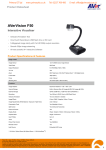
Antenna
Head
Abdomen
Cut out the Middleman!
Use the AP20 interactive pen with AVerVision F50
for Amazing Direct Annotation over Captured Images without the PC
Onboard Annotation Has Arrived for Portable Visualizers
By combining the awesome abilities of the AVerVision F50 and the AP20 interactive pen you can annotate directly over captured images in
real-time, avoiding the hassle of connecting your visualizer to a computer and annotating via computer software. Have the freedom to easily and
accurately make notes on textbooks, essays, even living plants and animals, without making any physical changes to the object or damaging it in
any way.
Adding the Power of A+ Interactive Software 2
Using the AVerVision F50 and AP20 with A+ Interactive Software 2, the latest version of the extensive and user-friendly A+ Interactive Software,
provides you with a nearly endless world of possibilities to explore. You can effortlessly create a wide variety of teaching materials with A+ Interactive
Software 2, integrate them into your lessons with the AVerVision F50 and AP20, and even use the AP20 as a wireless presenter for easy and effective
instruction.
Two Amazing Products, One Successful Solution
The AVerVision F50’s top of the line image quality and great zoom capabilities coupled with its direct audio/video recording feature and built-in
microphone make it an amazingly versatile, yet functional teaching solution that’s perfect for practically any classroom setting. With sophisticated
sensor technology and an ergonomic design that reinforces proper penmanship without sacrificing comfort, the revolutionary AP20 presents teachers
with a wide-range of inventive means for leading lessons. Maximize your in-class synergy and bring a whole new approach
h to note-taking and overall
class instruction by uniting these innovative products.
Benefits
• Skip the PC! Quickly and accurately annotate over images captured to the AVerVision F50 by directly connecting thee AP20 to
the F50 and easily save the modified images for immediate playback.
• Share the fun! Pass the pen onto the students to let them annotate directly, creating an added element of excitement
nt and
class cohesion that is sure to turn even the dullest of activities into a class favorite.
• Inject energy into every lesson! Combine the AVerVision F50, AP20 and A+ Interactive Software 2 to generate
te all-new
teaching materials in a snap and increase the efficiency, efficacy and interactivity of your lessons.
• Record it all! Capture top-notch video and audio to a USB flash drive or SDHC card at the touch of a button with thee
AVerVision F50’s direct recording capabilities and built-in microphone.
With F50 and AP20, you can display and
annotate on…
Show enlarged images to your
audience
through ...
a
Interactive
Whiteboard
Documents
Microscopic Images
Projection
Screen
or
Output
Outpu
putt
Input
Digital Projector
Pro
Digital Monitor
TV Monitor
3D Objects
X-Rays
Film Slides / Filmstrips
AP20
AVerVision F50
F50 Product Specifications
AP20 Specifications
Image Sensor
1/2.5” CMOS Color Image Sensor
Pen Type
Teacher Pen
Total Pixels
5M Pixels
Wireless Technology
2.4GHz RF
Output Resolution
Full HD1080p (1920x1080)
Range
15m (50ft)
TV Lines
700
Pen Tip Technology
proprietary image sensor,
Zoom
80X Total Zoom (10X AVer® Optical Zoom + 8X Digital Zoom)
Frame Rate
30fps (Max.)
Software Platform
A+ Interactive Software 2 for Windows
Focus
Auto / Manual
Connectivity
USB dongle
Shooting Area
A4 Portrait (400 x 300 mm Max.)
Battery
rechargeable AAA
Image Rotation
Electronic Rotation 0° / 90° / 180° / 270°
Recording
Yes (to SDHC Card or USB Flash Drive)
Onboard Annotation
Yes (no software is needed)
Battery Usage
8 days per full charge
Internal Storage
Built-in Memory (Max: 80; up to 5M each)
Recharging Time
4 hours to charge fully
External Storage
SDHC (32GB Max.) / USB Flash Drive (64GB Max.)
Charging Options
micro USB port to PC / MAC
Image Effects
Color / B&W / Negative / Mirror / Freeze
Image Adjustments
Auto / Manual
LED and lens module
(can be replaced with non-rechargeable,
Alkaline AAA)
or wall-mounted USB power adapter
Dimensions (W x H x D) 22 x 151 x 25 mm
(White Balance / Exposure / Night View)
Weight
45g
Presentation Tools
Yes (Spotlight & Mask functions)
Warranty
3 years
Split Screen
Yes (Vertical & Horizontal)
Certifications
FCC and IEC (USA), CE and IEC (EU),
Picture-in-Picture
Yes
Display Mode
Sharp / Graphic / Motion / Microscope / Macro / Infinity
Capture Mode
Single / Continuous
User Profiles
Up to 3
Timer
Yes
Flicker Filter Control
Yes (50/60Hz)
Remote Control
Yes
Light Source
Embedded LED Lamp
DVI-I Output
Yes
RGB I/O
1 In; 1 Out (15-Pins D-Sub, Pass Through)
Composite Video Output
Yes (NTSC or PAL)
RS-232 Port
Yes (with RS-232 / S-Video Adapter Cable)
Mini USB 2.0 Port
Yes (PC Camera / Built-in Image Download)
Audio Input
Built-in MIC; MIC In (3.5 mm Jack, Pink)
Audio Output
Audio Out (3.5mm Jack, Green)
Dimensions (W x H x D)
Operating: 200 x 540 x 380 mm
BSMI and NCC (TW)
Distributor / Dealer :
C
FC
Folded: 245 x 77 x 305 mm
Net Weight
2.6kg (5.73lbs)
Power Source
AC 100V~240V, 50/60 Hz
Certifications
FCC, CE
Compatible Operating System (A+ Interactive Software 2)
Windows®
XP (SP2), Vista (32-bit or 64-bit), 7 (32-bit or 64-bit)
Package Content
AVerVision F50 Unit
Mini USB Cable
Quick Guide
Remote Control with Batteries
Power Adapter
Anti-Glare Sheet
RCA Cable
A+ Interactive Software 2 CD
Warranty Card
RGB Cable
User Manual CD
Carrying Bag
Composite / RS-232 Y Cable
Patent No.: Japan 3122844, Taiwan 1276904
© 2011 AVer Information Inc. All rights reserved.
No part of this document may be reproduced or transmitted in any form, or by any means without the prior written permission of AVer Information Inc. AVer Information Inc. reserves the rights to modify
its models, including their characteristics, specifications, accessories and any other information stated herein without notice. The official printout of any information shall prevail should there be any
discrepancy between the information contained herein and the information contained in that printout. “AVer”, “AVerVision”, and “AVerZoom” are trademarks owned by AVer Information Inc. Other
trademarks used herein for description purpose only belong to each of their companies. (201107)
www.aver.com