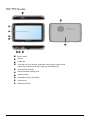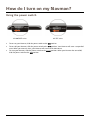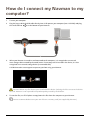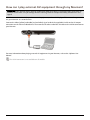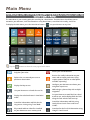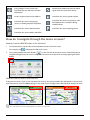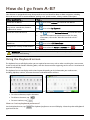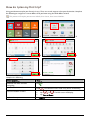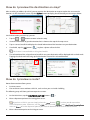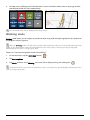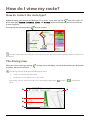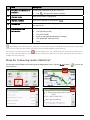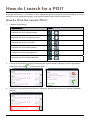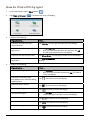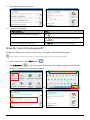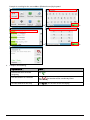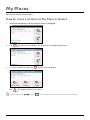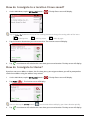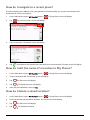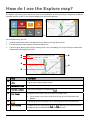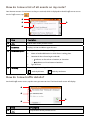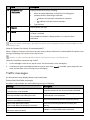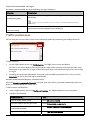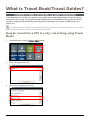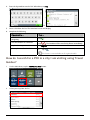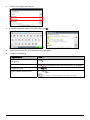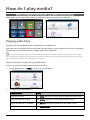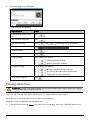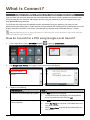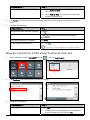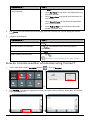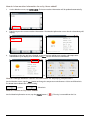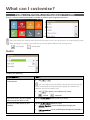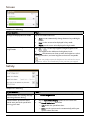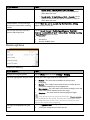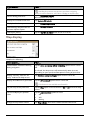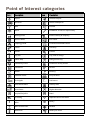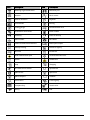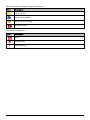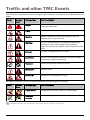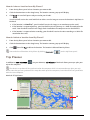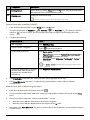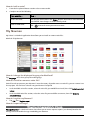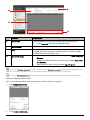
1
MY-Series MY ₆₀T/₆₅T/₇₅T Series Hardware User Manual Important safety information PLEASE READ CAREFULLY BEFORE INSTALLING PRODUCT IN VEHICLE This is the safety alert symbol. It is used to alert you to potential personal injury hazards. Obey all safety messages that follow this symbol to avoid possible injury or death. WARNING indicates a potentially hazardous situation which, if not avoided, could result in death or serious injury. CAUTION indicates a potentially hazardous situation which, if not avoided, may result in minor or moderate injury. CAUTION used without the safety alert symbol indicates a potentially hazardous situation which, if not avoided, may result in property damage. Removing original equipment, adding accessories or modifying your vehicle could affect the vehicle’s safety or make it illegal to operate in some jurisdictions. Follow all product instructions and all instructions in your vehicle owner’s manual regarding accessories or modifications. Consult your country’s and/or state’s laws regarding operation of a vehicle with any accessories or modifications. It is your sole responsibility to place, secure and use your Navman in a manner that will not cause accidents, personal injury or property damage. Always observe safe driving practices. Do not mount your Navman in a way that may interfere with the safe operation of the vehicle, the deployment of air bags or other safety equipment. Do not operate your Navman while driving. Before you use your Navman for the first time, familiarise yourself with your device and its operation. On main roads, the distance to an exit calculated by your Navman may be further than the distance shown on road signs. Road signs show the distance to the start of an exit while your Navman shows the distance to the next intersection, i.e., the end of the exit ramp or road. To prepare to exit a road, always follow distance information on road signs. The use of information regarding safety or speed camera locations may be subject to local laws in the country of use. You are responsible for checking that you can legally use the information in your country or in the country where the information will be used. Do not handle your Navman while it is hot. Let the product cool, out of direct sunlight. At full power, prolonged listening to your Navman via headphones or earphones can damage the ear of the user. Do not expose your Navman to direct sunlight in an unattended vehicle for prolonged periods. Overheating may damage the unit and void warranty. To discourage theft, do not leave your Navman, mounting bracket or any cables in plain view in an unattended vehicle. Warning Notice to Drivers in the United States State law may prohibit drivers in states such as Arizona, California and Minnesota from mounting objects on their windshields while driving. Please make sure you research and follow your most current State laws. An alternative mounting option may be provided in the box with your product; or see our website for additional mounting alternatives. Navman does not take any responsibility for any fines, penalties, or damages that may be incurred as a result of disregarding this notice. 2 Home charger-specific safety information To charge your Navman from the mains power, use the home charger (Model: MII050100; Input: 100-240V AC 50-60Hz; Output: 5V DC 1A Max) supplied by Navman as an accessory (may be sold separately). Using other home chargers with your Navman could result in serious injury or property damage. Never use the charger if the plug or cord is damaged. Do not expose the charger to moisture or water. Do not use the charger in a high moisture environment. Exposure to water may cause electrical sparks or fires. Never touch the charger when your hands or feet are wet. Allow adequate ventilation around the charger when using it to operate your Navman or charge the internal battery. Do not cover the charger with paper or other objects that will reduce ventilation. Do not use the charger while it is inside a carrying case or other container. Ensure that the charger is connected to a power source with the correct fitting and voltage requirements. The voltage requirements can be found on the home charger casing and/or packaging. Do not attempt to service the charger as this could result in personal injury. Replace the charger if it is damaged or exposed to excess moisture. Internal battery-specific safety information Your Navman contains a non-replaceable internal lithium-ion battery. The battery may burst or explode if mishandled, releasing hazardous chemicals. To reduce the risk of fire or burns, do not disassemble, crush or puncture the battery. Recycle or dispose of the battery safely and properly according to local laws and regulations. Do not dispose of the battery in fire or water. About the battery Use a specified battery in the equipment. CAUTION: The battery can burst or explode, releasing hazardous chemicals. To reduce the risk of fire or burns, do not disassemble, crush, puncture, or dispose of in fire or water. Important instructions (for service personnel only) Caution: Risk of explosion if battery is replaced by an incorrect type. Dispose of used batteries according to the instructions. Replace only with the same or equivalent type recommended by the manufacturer. The battery must be recycled or disposed of properly. Use the battery only in the specified equipment. Only use the correct home charger (may be sold separately), usb cable or in-car charger supplied by Navman to charge your Navman internal battery. Only use your Navman internal battery with your Navman unit. The Navman battery will stop charging when the ambient temperature is less than 0ºC (32ºF) or more than 45ºC (113ºF). Failure to adhere to these warnings and cautions may lead to death, serious injury or property damage. Navman disclaims all liability for installation or use of your Navman that causes or contributes to death, injury or property damage or that violates any law. 3 Compliance WARNING This product, its packaging and its components contain chemicals known to the State of California to cause cancer, birth defects or reproductive harm. This Notice is being provided in accordance with California’s Proposition 65. For regulatory identification purposes: MY 60T and MY 65T are assigned a model name of N268. MY 75T is assigned a model name of N275. Marking labels located on the exterior of your Navman indicate the regulations that your model complies with. Please check the marking labels on your Navman and refer to the corresponding statements in this chapter. Some notices apply to specific models only. The user needs to switch off the Navman when exposed to areas with potentially explosive atmospheres such as petrol stations, chemical storage depots and blasting operations. Bluetooth (for models with Bluetooth capabilities only) MY ₆₅T Bluetooth QD ID B016475 MY ₇₅T Bluetooth QD ID B016536 WEEE This product must not be disposed of as normal household waste, in accordance with the EU directive for waste electrical and electronic equipment (WEEE - 2002/96/EC). Instead, it should be disposed of by returning it to the point of sale, or to a municipal recycling collection point. 4 Contents Important safety information ....................................................................................................... 2 Home charger-specific safety information............................................................................ 3 Internal battery-specific safety information......................................................................... 3 Compliance .................................................................................................................................. 4 Bluetooth (for models with Bluetooth capabilities only) .................................................. 4 WEEE.............................................................................................................................................. 4 Contents ............................................................................................................................................ 5 Welcome............................................................................................................................................ 6 Important information for using the manual........................................................................ 6 Mounting your Navman in a vehicle............................................................................................ 7 MY 60T/65T Series ..................................................................................................................... 7 MY 75T Series .............................................................................................................................. 8 Enabling Traffic (TMC) Reception............................................................................................ 8 Getting to know your Navman ..................................................................................................... 9 MY 60T/65T Series ..................................................................................................................... 9 MY 75T Series ............................................................................................................................ 10 How do I turn on my Navman? ...................................................................................................11 Using the power switch ............................................................................................................11 How do I charge the battery?...................................................................................................... 12 How do I charge the battery in a vehicle? ........................................................................... 12 How do I charge the battery via my computer? ................................................................ 12 How do I charge the battery at home or work? ................................................................. 12 How do I insert a memory card? ................................................................................................ 13 How do I connect my Navman to my computer? .................................................................. 14 Other features ................................................................................................................................ 15 How do I make a hands-free call? ......................................................................................... 15 How do I search for a place using Live Local Search? ....................................................... 15 How do I receive current traffic information?.................................................................... 15 How do I play music or video? ............................................................................................... 15 How can I play external AV equipment through my Navman?...................................... 16 Reference ..........................................................................................................................................17 What is GPS? ..............................................................................................................................17 How does my Navman receive GPS signals?.......................................................................17 Caring for your Navman...........................................................................................................17 Troubleshooting ........................................................................................................................ 18 Navman Customer Support.................................................................................................... 18 5 Welcome Thank you for purchasing this Navman. Please read this manual carefully before using your Navman for the first time. Keep this manual in a safe place and use as your first point of reference. Important information for using the manual It is important to understand the terms and typographical conventions used in this manual. Formatting The following kinds of formatting in the text identify special information: Convention Type of Information Bold Components or items displayed on screen, including buttons, headings, field names and options. Italics Indicates the name of a screen. Icons The following icons are used throughout this manual: Icon Description Note Tip Warning Terms The following terms are used throughout this manual to describe user actions. Term Description Press Press and release a button quickly. Tap Press and release an item displayed on the touch screen. Select Tap an item in a list or tap a command from a menu. 6 Mounting your Navman in a vehicle CAUTION: Never mount your Navman where the driver’s field of vision is blocked. If the windscreen is tinted with a reflective coating, it may be athermic and impact the GPS reception. In this instance, please mount your Navman where there is a “clear area” - usually just beneath the rear-view mirror. To protect your Navman against sudden surges in current, connect the in-car charger only after the car engine has been started. Never expose your Navman to extreme heat or direct sunlight for prolonged periods. Overheating may damage your Navman. MY ₆₀T/₆₅T Series 1 3 2 4 5 7 MY ₇₅T Series 1 3 2 4 5 Enabling Traffic (TMC) Reception Depending on the model of your Navman you can receive live traffic information via the in-car charger which is used as an antenna. For information on using traffic information on your Navman, see the Software User Manual. 8 Getting to know your Navman MY ₆₀T/₆₅T Series n o p q Power switch r s t u v Slot for MicroSD memory card Cradle slot Speaker Connector for in-car charger, USB cable, home charger (may be sold separately) and TMC accessory kit (may be sold separately) Capture button Microphone (not on all models) Touch screen Main Menu button 9 MY ₇₅T Series n o p q Power switch r s t u v w Connector for AV cable Speaker Cradle slot Connector for in-car charger, USB cable, home charger (may be sold separately) and TMC accessory kit (may be sold separately) Slot for MicroSD memory card Capture button Microphone (not on all models) Touch screen Main Menu button 10 How do I turn on my Navman? Using the power switch MY 60T/65T series MY 75T series To turn on your Navman, slide the power switch to the ON position. To turn off your Navman, slide the power switch to the OFF position. Your Navman will enter a suspended state. When you next turn it on, your Navman will return to the Main Menu. To reset your Navman, slide the power switch to the RESET position. When your Navman has turned off, slide the power switch to the ON position. 11 How do I charge the battery? Your Navman has an internal battery that when fully charged, should provide power for up to 2 hours. The battery can take up to 4 hours to fully charge. The battery may not be fully charged when you use your Navman for the first time. CAUTION: For optimal performance of the battery, note the following: Do not charge the battery when the temperature is high (e.g. in direct sunlight). There is no need to fully discharge the battery before charging. When leaving your Navman for long periods, slide the power switch to the RESET position to save internal battery power. Fully charging the battery once per month will help the device retain GPS fix. How do I charge the battery in a vehicle? To charge your Navman in a vehicle, plug the in-car charger into other end into the vehicle power socket. on the bottom of your Navman and the How do I charge the battery via my computer? 1. Turn on your computer. 2. Plug the large end of the USB cable directly into a USB port on your computer (not a USB hub) and plug on the bottom of your Navman. the small end into For optimal charging results, ensure that your Navman is turned off while connected to your computer. How do I charge the battery at home or work? You can use an optional home charger to charge the battery. To charge your Navman using a mains power socket, plug the home charger cable into your Navman and the mains power charger into the power socket. The home charger is not included with all models and may be purchased separately (see www.navman.com for details). 12 on the bottom of How do I insert a memory card? CAUTION: Do not apply pressure to the centre of the memory card. Hold the MicroSD card by the edges and gently insert it into the slot as shown in the above diagram of your Navman. To remove a card, gently push the top edge of the card inwards to release it, then pull it out of the slot. 13 How do I connect my Navman to my computer? 1. Turn on your computer. 2. Plug the large end of the USB cable directly into a USB port on your computer (not a USB hub) and plug on the bottom of your Navman. the small end into 3. When your Navman is turned on and connected to the computer, it is recognised as an external mass-storage device named by the model name. If a memory card is inserted in the device, it is also recognised as an external storage device (a removable disk). A USB Connection screen appears to prevent you from using your Navman. DO NOT delete any files that are pre-installed on the device. Deleting the files can cause the device to crash. Navman is not responsible for product quality caused by file deletion. 4. To transfer files, use File Explorer to copy/move the files from the computer to your Navman. You are recommended to store your own files on a memory card (not supplied by Navman). 14 Other features How do I make a hands-free call? If you have a compatible mobile phone with Bluetooth wireless technology, you can use your Navman as a hands-free car kit. Before you can use this feature you must pair your mobile phone with your Navman. Hands-free calling is not available on all models. Ensure that the Bluetooth wireless feature of your mobile phone is turned on before you begin pairing. Not all phones with Bluetooth wireless technology are compatible with your Navman. For a list of compatible phones, visit www.navman.com. How do I search for a place using Live Local Search? Using Live Local Search, you can search online for places near a specific location. For information about Live Local Search and using Bluetooth wireless, refer to the Software User Manual. Live Local Search is not available on all models and is only available in selected countries. To use Live Local Search, you must pair your Navman with your mobile phone. If your Navman isn’t paired with your mobile phone, then the Bluetooth screen will display. Not all phones with Bluetooth wireless technology are compatible with your Navman. For a list of compatible phones, visit www.navman.com. How do I receive current traffic information? You can receive current traffic information on your Navman using the Traffic Message Channel (TMC) service. The TMC service may require a subscription in some countries. See www.navman.com for details. For more information about Traffic, refer to the Software User Manual. Traffic information is available in selected countries. How do I play music or video? WARNING: The video player feature MUST NOT be used when driving. Using this feature may cause an accident. Please make sure you comply with this warning. Navman accepts NO liability whatsoever in this regard. Using Media you can play music or video files that you have downloaded to your Navman, or from your MicroSD card. For more information about playing music and video, refer to the Software User Manual. Media playback is not available on all models. 15 How can I play external AV equipment through my Navman? WARNING: Your Navman MUST NOT be used to play video when driving. Using this feature may cause an accident. Please make sure you comply with this warning. Navman accepts NO liability whatsoever in this regard. Your Navman can receive AV input from external equipment, such as a DVD player. This means that you can use your Navman as a second screen. Connect the video (yellow) and audio (red and white) signal ends of the supplied AV cable to the AV output connectors on the external video device. Then connect the other end of the AV cable to the AV IN connector on your Navman. For more information about playing external AV equipment via your Navman, refer to the Software User Manual. The AV IN connector is not available on all models. 16 Reference What is GPS? The Global Positioning System (GPS) is available at any time, free of charge, and is accurate to within 5m (15ft). GPS navigation is made possible by a network of satellites that orbit the Earth at around 20,200km (12,552mi). Each satellite transmits a range of signals which are utilised by GPS receivers, such as your Navman, to determine an exact location. Although a GPS receiver can detect signals from up to 12 satellites at any time, only four signals are required to provide a position or "GPS fix" (latitude and longitude), for vehicle navigation systems. How does my Navman receive GPS signals? Your Navman receives GPS signals via the internal GPS antenna. To guarantee the optimum GPS signal strength, ensure your Navman is outdoors, or in a vehicle outdoors, and has an unobstructed view of the sky. GPS reception is not usually affected by weather, however, very heavy rain or snow may have a negative effect on your reception. To obtain a faster GPS fix, ensure car is stationary and battery is fully charged once per month. Caring for your Navman Taking good care of your Navman will ensure trouble-free operation and reduce the risk of damage to your Navman: Keep your Navman away from excessive moisture and extreme temperatures. Avoid exposing your Navman to direct sunlight or strong ultraviolet light for extended periods of time. Do not place anything on top of your Navman or drop objects on your Navman. Do not drop your Navman or subject it to severe shock. Do not subject your Navman to sudden and severe temperature changes. This could cause moisture condensation inside the unit, which could damage your Navman. In the event of moisture condensation, allow your Navman to dry out completely before use. The screen surface can easily be scratched. Avoid touching it with sharp objects. Non-adhesive generic screen protectors designed specifically for use on portable devices with LCD panels may be used to help protect the screen from minor scratches. 17 Never clean your Navman when it is turned on. Use a soft, lint-free cloth to wipe the screen and the exterior of your Navman. Do not use paper towels to clean the screen. Never attempt to disassemble, repair or make any modifications to your Navman. Disassembly, modification or any attempt at repair could cause damage to your Navman and even bodily injury or property damage and will void any warranty. Do not store or carry flammable liquids, gases or explosive materials in the same compartment as your Navman, its parts or accessories. Troubleshooting If you encounter a problem you cannot solve, contact an authorised service centre for assistance. Problem Steps to Take and things to check What Next? The unit is not turning on/charging Try to charge the unit through a USB cable connected to a computer. If the unit charges then the issue is with the in car charger. If the unit still fails to charge, then the fault is with the unit. Contact technical support and an RMA will be created to fix the unit or replace the in car charger. I can not get a GPS Signal Make sure you are stationary and have a clear line of site to the sky. If this fails to resolve the issue, please reset the GPS chip through the Settings menu of your unit. If the fault is still not resolved, please visit our self help site on www.navman.com.au/support or contact our technical support team. My unit is always showing that the speed limit is 70 kph even when it is not The units are set at a manual speed limit defaulted at 70 kph. This can be changed through the 'Safety' section of your 'Settings' menu. If the fault is still not resolved, please visit our self help site on www.navman.com.au/support or contact our technical support team. The unit is not showing any addresses in my state. When you type in an address through the 'Find' Menu, please ensure that the correct state for the destination is showing after ' Find in:…'. If the correct state is not selected, no results will be shown. If the fault is still not resolved, please visit our self help site on www.navman.com.au/support or contact our technical support team. Where is my product key? I want to activate my unit. There is no need to activate your unit in anyway. This Activation tab within the NavDesk software is for subscriptions, travel books, international maps and map upgrades only. Your unit will work straight out of the box and there is no need to activate it in anyway. If the fault is still not resolved, please visit our self help site on www.navman.com.au/support or contact our technical support team. Navman Customer Support To report a faulty product or speak to a member of our Technical Support team, contact: Australia: 1300 NAVMAN (628626), or visit www.navman.com.au. New Zealand: 0800 GO NAVMAN (46 628626), or visit www.navman.co.nz. 18 MY-Series MY ₆₀T/₆₅T/₇₅T Series Software User Manual Contents Contents ............................................................................................................................................ 2 Welcome............................................................................................................................................ 5 How do I use the touch screen?.................................................................................................... 6 Navigating on the screen .......................................................................................................... 6 How do I get started? ..................................................................................................................... 7 Main Menu......................................................................................................................................... 8 How do I navigate through the menu screens?.................................................................... 9 How do I go from A-B? ................................................................................................................. 10 Using the Keyboard screen ..................................................................................................... 10 How do I plan my first trip?.....................................................................................................11 How do I preview the destination on map? ........................................................................ 12 How do I preview a route?...................................................................................................... 12 Walking mode............................................................................................................................ 13 How do I view my route? ............................................................................................................. 14 How do I select the route type? ............................................................................................ 14 The driving map......................................................................................................................... 14 How do I view my route statistics?....................................................................................... 15 How do I adjust the volume? ................................................................................................. 16 How do I zoom in/out the map?............................................................................................ 16 How do I view the traffic status on my route?....................................................................17 What if I miss a turn? ................................................................................................................17 Smart Route and My Drive.......................................................................................................17 How do I create a trip with multiple stops?............................................................................. 19 How do I capture a location or a journey? ............................................................................... 22 How do I capture the GPS co-ordinates of my location? ................................................ 22 How do I capture a journey? .................................................................................................. 22 How do I navigate to a location I have captured? .............................................................23 How do I search for a POI? ..........................................................................................................24 How do I find the nearest POIs?............................................................................................24 How do I find a POI by type? ................................................................................................. 25 How do I search by keyword? ................................................................................................26 My Places .........................................................................................................................................28 How do I save a location as My Place or Home? ...............................................................28 How do I navigate to a location I have saved? ...................................................................29 How do I navigate to Home? .................................................................................................29 How do I navigate to a recent place? ...................................................................................30 How do I edit the name of a location in My Places? .........................................................30 How do I delete a saved location? ........................................................................................30 How do I use the Explore map? .................................................................................................. 31 2 How do I find a POI using the POI Cluster? ........................................................................32 How do I set my POI preferences?........................................................................................32 How do I receive current traffic information via TMC?.........................................................34 How will I know when a Traffic Event occurs? ...................................................................34 Traffic overview screen ............................................................................................................35 How do I view a list of all events on my route? .................................................................36 How do I view traffic details?.................................................................................................36 Traffic messages........................................................................................................................ 37 Traffic preferences ....................................................................................................................38 What is Travel Book/Travel Guides?..........................................................................................39 How do I search for a POI in a city I am visiting using Travel Book? .............................39 How do I search for a POI in a city I am visiting using Travel Guides?..........................40 How do I play media? ...................................................................................................................42 Playing audio files .....................................................................................................................42 Playing video files .....................................................................................................................43 How do I play videos on my Navman via AV IN? ...................................................................45 How do I make a hands-free call? ..............................................................................................46 How do I pair my Navman with a Bluetooth device? .......................................................46 How do I make a phone call? .................................................................................................48 How do I view my call history?.............................................................................................. 51 What is Connect?........................................................................................................................... 52 How do I search for a POI using Google Local Search? ....................................................52 How do I search for a POI using TrueLocal.com.au? .........................................................53 How do I receive weather information using Connect? ...................................................54 What can I customise?..................................................................................................................56 Audio............................................................................................................................................56 Screen .......................................................................................................................................... 57 Safety........................................................................................................................................... 57 Route options ............................................................................................................................58 Map display ................................................................................................................................59 My Maps......................................................................................................................................60 Language.....................................................................................................................................60 Units.............................................................................................................................................60 Time Zone................................................................................................................................... 61 Bluetooth.................................................................................................................................... 61 Device ..........................................................................................................................................62 Demo ...........................................................................................................................................62 Help..............................................................................................................................................63 Point of Interest categories .........................................................................................................64 Traffic and other TMC Events...................................................................................................... 67 What is NavDesk?..........................................................................................................................68 How do I install NavDesk onto my computer? ..................................................................68 NavDesk Menu ..........................................................................................................................70 My Subscriptions........................................................................................................................71 3 My Maps...................................................................................................................................... 72 Custom POIs .............................................................................................................................. 75 Image Search.............................................................................................................................. 77 Application Gallery...................................................................................................................78 My Places .................................................................................................................................... 79 Trip Planner ................................................................................................................................80 My Navman................................................................................................................................82 Connect.......................................................................................................................................84 Activation ...................................................................................................................................85 For more information....................................................................................................................86 Online support...........................................................................................................................86 Navman Customer Support....................................................................................................86 Speed Limit.................................................................................................................................86 Safety Camera POIs .................................................................................................................86 Disclaimer...................................................................................................................................86 Third party recipient terms and conditions.........................................................................87 Copyright ....................................................................................................................................88 4 Welcome Thank you for purchasing this Navman. This manual has been prepared to guide you through the operation of your Navman from first set-up through to continuous use. Please read this manual carefully before using your Navman for the first time. Keep this manual in a safe place and use as your first point of reference. Important information for using the manual It is important to understand the terms and typographical conventions used in this manual. Formatting The following kinds of formatting in the text identify special information: Convention Type of Information Bold Navman components or items displayed on screen, including buttons, headings, field names and options. Italics Indicates the name of a screen. Icons The following icons are used throughout this manual: Icon Description Note Tip Warning 5 How do I use the touch screen? Navigating on the screen To operate your Navman, touch the screen with your fingertip. You can perform the following actions: Tap Press and release an item displayed on the touch screen. Select Tap an item in a list or tap a command from a menu. 6 How do I get started? The first time you use your Navman it may take several minutes to establish a GPS connection. How do I turn my Navman on for the first time? To get started for the first time, complete the following steps: 1. Read the Important Safety Information 2. Position your Navman in your vehicle Follow the instructions in the Quick Start Guide. CAUTION: Ensure that your Navman does not obstruct the driver's view, or interfere with the operation of the vehicle airbags and safety devices. 3. Turn your Navman on Your Navman will turn on and display the Language screen. 4. Select your preferred language On the Select Language screen, tap your preferred language. 5. You can change your preferred language while using your Navman. Read the warning message The Safety Agreement screen will display after you have selected your preferred language. Read the Safety Agreement message. To confirm that you have read and understood the message, tap Accept. Due to legal requirements this Agreement must always be selected. It cannot be turned off. 6. Customise the device Follow the onscreen instructions to select your preferred distance unit, date format, and time format. 7. Set up Home The Home setup wizard only appears on the first time you start your Navman. Tap OK to set up your home immediately using the address-entry wizard. You can tap Cancel to skip the wizard, and then select your home later in My Places. When you have finished the steps above, the Main Menu screen will display. If you have a GPS fix, you can start to use Navman to plan your trip. 7 Main Menu Main Menu items and the order of the items may differ from the below, depending on your region, maps installed or model of Navman. The Main Menu is your starting point for searching for a destination. The Main Menu also allows you to customise your Navman, view saved locations as My Place/Home, search for POIs nearby, and so on. To display the Main Menu, press the Main Menu button ( Tap the ) on your Navman at any time. button to show the next page of Main Menu. Search for places, areas and streets to help plan your route. Access your saved locations. Explore the area around your current position or destination. Receive live traffic information on your route and set traffic preferences (may require optional TMC kit or subscription, available separately). Display the Map screen. Configure your Navman to enhance your navigation experience. Use your Navman as a hands-free car kit. Add or begin a planned trip with multiple waypoints. Display the calculated route in simulation mode. Set your Navman to avoid the Four-wheel tracks or not, and to display/hide the POIs along the Four-wheel tracks on map. Search for information and POIs for the city you are visiting using Travel Book. Search for information and POIs using Lonely Planet Scenic Tours and Travel Guides. Play stored audio or video files installed on your Navman or on a memory card. Search online for live POI information using Google™ Local Search. 8 Search online for live POI information (using Google™ Local Search and TrueLocal.com.au) and latest weather information. Switch to AV mode to receive the video signal from the external AV device. Set or navigate to your home address. Search for the nearest petrol stations. Search for the nearest emergency services, including hospitals and police. Search for the nearest restaurants, cafes, fast-food premises and other dining establishments. Search for the nearest hotels/motels. Search for the nearest parking places. Search for the nearest banks and ATMs. How do I navigate through the menu screens? How do I use the BACK button in the title bar? 1. On the Main Menu, tap the desired menu button to enter the menu screen. For example, tap 2. to display the FIND main screen. The system provides the BACK button ( ) in the title bar of the menu screen, which allow you to navigate through the menu screens easily. You can return to the previous screen by tapping the BACK button. How do I use the tabs in the title bar? In some menu screens (such as the map Overview screen), the system provides the tab buttons in the title bar that allow you to enter the additional page in the menu screen. Simply tap the desired tab to change the view. The selected tab will be highlighted as a darker-colour tab. 9 How do I go from A-B? Your Navman is equipped with maps that provide street-level detail for door-to-door navigation, including Points of Interest such as accommodation, parking areas, petrol stations, railway stations and airports. When you want to ... Then ... search for an address tap then select Address to search for the address. search all information on the device city, streets, named sites, features, landmarks or venues tap then select By Keyword. search for a Point of Interest tap then select Points of Interest to search for a POI. tap the POI buttons to search nearest POIs. For more instructions, refer to the “How do I search for a POI?” section. search for a location using a GPS coordinate tap then select GPS Coordinate. navigate to a recently visited location tap then select the Recent Locations tab ( ). WARNING For your safety, enter destination information before you start a journey. Do not enter a destination while driving. Using the Keyboard screen The Keyboard screen will display when you are required to enter text, such as when searching for a street name. Search results will be listed in matching order, with the closest matches appearing on the screen. A maximum of 99 results will display. The Keyboard screen can display with various layouts depending on the information you need to enter, including alphabet, number, alternate characters and combinations of these. Æ To select a character, tap the character. To delete a character, tap To enter numbers, tap . . How can I set my keyboard preference? On the Keyboard screen, tap type from the list. . The Keyboard preference screen will display. Select the preferred keyboard 10 How do I plan my first trip? Using your Navman to plan your first trip is easy. There are several ways to select your destination. Complete the following to navigate to a street address that you know using the FIND address wizard. This process will require you to enter Suburb, then Street, then Street Number. Æ Æ Æ Æ Æ Complete the following: If you want to ... Then ... calculate the route and start navigating tap save the location as a favourite tap save the location as Home tap tap Save as Home. explore the map . . The location will be saved in My Places immediately. Æ tap Explore. 11 . The Edit screen will display. How do I preview the destination on map? After searching an address (or a POI), you can preview the destination on map to explore the area near the location. On the Destination screen, tap the Explore button to display the destination preview map as below. Æ On the destination preview map, you can: Tap the View the information of your destination that is shown at the top of the map screen. Tap on a street/area/POI to display the related information of the location near your destination. If available, tap the Call button ( The information of the selected street/area/POI near your destination will be displayed with a check mark. Tapping the check mark will bring up the Destination screen of the selected location. / button to zoom in/out the map. ) to place a phone call to the POI. This feature is not available on all regions/models. Æ How do I preview a route? Route demonstration allows you to: Preview a route. Plan and view a route without a GPS fix, such as when you are inside a building. The following steps will show you how to preview a route. 1. On the Main Menu, tap the ROUTE SIMULATION button ( 2. Select a departure point on the Leaving from screen. ). If you have a GPS fix, you can simply select the Here button ( ) so that you do not need to select a departure point. Otherwise, use the FIND address wizard, Explore map, My Places/Recent places menu or Home to set the departure point if you want the demonstrated route to start elsewhere. 3. Select a destination point on the Going to screen. 12 4. The Map screen will display the calculated route in route simulation mode. Select a route type and the route demonstration will start automatically. The simulated route will be displayed as orange colour. Walking mode Walking mode allows you to navigate to your destination using roads and paths appropriate for a pedestrian, including non-vehicle segments. When in Walking mode, you will not be routed onto motorways and their associated on/off ramps (slip roads). If your destination is more than 10 kilometres (6.3 miles) away, a warning message is displayed indicating that the route is a long way to walk. How can I set my navigation mode to walking? ). 1. On the Main Menu, tap the SETTINGS button ( 2. Tap Route options. 3. Tap Mode, and then select Walking. Your route will be displayed using the walking icon: . If your destination is more than ten kilometres away, a warning message will display indicating that the route is a long way to walk. 13 How do I view my route? How do I select the route type? By default setting, your Navman will display the “Trip Select” screen when you tap after your search. All of the route types (Fastest, Economical, Easiest, and Shortest) will be calculated and you have to select one to start navigating. Select your preferred route and tap to start navigate. For more information of setting the preferred route type, refer to the Route Options section in “What can I customise?” The driving map When you select a route type and tap by spoken and visual instructions. , the Map screen will display. You will be directed to your destination The driving map will be displayed automatically when: a route is calculated and selected. the device is reset and the user is on a route. Alternately, you can access the map screen manually by tapping the MAP button ( Menu. ) on the Main r n o p q 14 Item Description n Direction and distance of next turn The direction and distance to your next turn. o Current route Your current route is highlighted. p Current position Your current position is marked with q Address bar The current address will be displayed in the text box at the bottom of the map screen. r Distance and time information Tap to expand and select the following options: Tap to repeat the vocal instruction. . DTG (Distance to Go) TTG (Time to Go) km/h or mph (speed) and compass heading ETA (Estimated Time of Arrival) Time Depending on your driving route, you may see some icons that provide different information on your map screen. Please note that these icons will not be always displayed during your journeys. ) on the Map screen. The Speed Limit icon shows the speed limit of For example: the Speed Limit icon ( the current road. If greyed out, you are below this speed limit. When over set limit, you will be warned with an audible and visual warning. How do I view my route statistics? Tap anywhere on the Map screen to bring up the Map options screen. Tap the Route button ( route statistics. 15 ) to view the Tap the tabs in the title bar to view the additional information in the different screens. Your Navman provides information on your: time to destination distance to go estimated time of arrival distance travelled time taken for trip stationary time How do I adjust the volume? On the Map options screen, tap . The volume buttons will be displayed on the map screen in translucent mode. Complete the following: If you want to ... Then ... Increase/decrease the volume tap mute or unmute tap / . The volume bar indicates the current volume level. . The speaker icon indicates the status: : muted : unmuted The volume buttons will automatically disappear after the map is idled for 5 seconds. How do I zoom in/out the map? On the Map options screen, tap mode. . The zoom buttons will be displayed on the map screen in translucent 16 Complete the following: If you want to ... Then ... zoom in the map tap and hold . zoom out the map tap and hold . The zoom buttons will automatically disappear after the map is idled for 5 seconds. How do I view the traffic status on my route? On the Main Menu, tap the TRAFFIC button ( ). The Traffic screen will be displayed. For more instructions, refer to the “How do I receive current traffic information via TMC?” section. What if I miss a turn? Back-On-Track™ Automatic Rerouting You will be redirected if you make a wrong turn. A message informing you that your route is being re-calculated will display at the top of the screen. To cancel a route re-calculation, tap on the Map options screen. A warning will display asking you to confirm the cancellation. If confirmed, both the re-calculation and your current route will be cancelled. Smart Route and My Drive Your Navman features Smart Route, which intelligently anticipates congested roads at peak times so that they can be avoided. Your Navman does this by using historical, anomalised data from millions of fellow drivers. Since Smart Route helps you automatically avoid predicted heavy congestion, you will be able to save time and money during your journeys. With My Drive technology, your Navman includes an intelligent capability that learns and adapts to your personal driving style. Over time, your Navman learns your preference for road types and driving speeds, turns and more. Your Navman will save the information and provide a more personalised route and accurate time of arrival the next time you plan a trip. When you restore factory defaults, you’re My Drive profile will be cleared form the device. 17 For more information of Smart Route and My Drive settings, refer to the Route Options section in “What can I customise?” Æ 18 How do I create a trip with multiple stops? You can use Trip Planner to set multiple stops or waypoints for your trip. Your route will be calculated to go via each of these points in the specified order. ). The Trip Planner screen will display. 1. On the Main Menu, tap the TRIP PLANNER button ( 2. Tap Create New Trip. The Edit screen will display. 3. Tap Add. The Add as waypoint screen will display. Use the FIND address wizard, Explore map, My Places/Recent Locations menu or Here/Return to start to set the waypoint. 4. When your search has done, tap . The waypoint is added and the Edit screen will display. Æ 19 5. Complete one or more of the following: If you want to ... Then ... add another waypoint tap Add. The Add as waypoint screen will display. return to step 3. Waypoints added after a multi-stop trip has commenced will not be included in the current route. navigate to your selected destination ). tap GO ( The Map screen will display the calculated route. edit the trip tap Edit, then you can: optimise your trip by selecting Optimise. change the trip title by selecting Rename. delete the planned trip by selecting Delete. The Optimise function does not take all factors into account. Your waypoints might be reordered to reduce your estimated travel distance. Be sure to confirm the trip on the map and make adjustments as appropriate, particularly if your trip returns to the start location. The following is an example of optimising the pre-planned trip: Æ Æ Æ How do I edit the waypoints in the trip? 1. On the Main Menu, tap the TRIP PLANNER button ( 2. Tap the trip to edit. Æ 20 ). The Trip Planner screen will display. 3. Tap a waypoint on the Edit screen. The Preview screen will display. Æ 4. Complete one or more of the following: If you want to ... Then ... delete a waypoint tap Delete, then select OK. change the order of the waypoint tap Up or Down. How do I skip a waypoint during a multi-stop trip? 1. Tap anywhere on the Map screen to bring up the Map options screen. 2. Tap Skip Waypoint, then select Yes. The next waypoint will be skipped and the route recalculated to the following waypoint. You can also add waypoints during the trip by selecting Add Waypoint from the Map options screen. 21 How do I capture a location or a journey? Your Navman has a capture feature which allows you to record GPS co-ordinates of a location, capture a location with a voice recording and capture a journey and save them so you can navigate back at a later time. How do I capture the GPS co-ordinates of my location? 1. Press the Capture button ( ) on your Navman. The Capture screen will display. 2. Tap Save, or wait for 5 seconds. You will hear a shutter sound to indicate that the GPS co-ordinates have been saved. The location is saved in My Places. How do I capture a journey? To enable capturing of journeys, you must first enable Capture Journey from For more instructions, refer to the “What can I customise?” section. > Route options. 1. At the beginning of the journey you would like to record, tap Clear. All travel that you have made (i) since midnight, (ii) the previous time you tapped Clear, or (iii) last captured a journey, will be deleted. 2. Travel on your journey. Your Navman will keep a record of where you travel. 3. At the end of your journey, press the Capture button ( display. 4. Tap 5. Tap Save, then Yes. The journey is saved in My Places. . The Journey screen will display. 22 ) on your Navman. The Capture screen will How do I navigate to a location I have captured? 1. On the Main Menu, tap the MY PLACES button ( ). The My Places screen will display. 2. Tap the destination you want to travel to. The Preview screen will display. 3. Tap . Your Navman will calculate the route from your current location. The Map screen will display. 23 How do I search for a POI? A POI (Point of Interest) is a named site, feature, landmark or public venue which can be displayed as an icon on the map. POIs are grouped by category, such as petrol stations, parks, beaches and museums. How do I find the nearest POIs? 1. Complete the following: If you want to ... 2. Then ... search for the nearest petrol stations Æ search for the nearest emergency service Æ search for the nearest restaurants Æ search for the nearest hotels/motels Æ search for the nearest parking places Æ search for the nearest banks and ATMs Æ A list of the selected POI category based upon your current location is displayed. Tap the desired item from the list, then tap on the Preview screen. Æ 3. If you have a route planned, two distances will display: distance from your current location and detour distance. 24 How do I find a POI by type? 1. On the Main Menu, tap the FIND button ( 2. Tap Points of Interest ( 3. Complete the following: 4. ). ). The Find a POI screen will display. If you want to ... Then ... search for the POIs near your current location tap Nearby. The POI Type Selection screen will display. search for the POIs in a specified city or area search for the POIs on your route tap Along Route. The POI Type Selection screen will display. search for the POIs near your destination tap Near Destination. The POI Type Selection screen will display. tap In City/Area. The Keyboard screen will display. after you have entered a name of a city/area, tap OK. The POI Type Selection screen will display. Complete the following: If you want to ... Then ... search for POIs by keyword search for restaurants, cafes, fast-food premises and other dining establishments tap . The POI List screen will display. tap . The POI List screen will display. search for petrol stations search for parking places tap tap By Name. The Keyboard screen will display. after you have entered a keyword, tap OK. The POI List screen will display. . The POI List screen will display. view more POI types search for hotels and motels tap . The POI List screen will display. search for banks and ATMs tap . The POI List screen will display. search for emergency services tap . The POI List screen will display. tap By Type. The POI Type List screen will display. select a POI type. The POI List screen will display. 25 5. Tap the desired item from the list. Æ 6. Complete the following: If you want to ... Then ... calculate the route and start navigating tap save the location as a favourite . The location will be saved in My Places tap immediately. view the POI location on the map tap Explore. The Preview screen will display. . How do I search by keyword? Complete the following to navigate to a POI or the street address that you find by keyword. Note that this process will search in a spiral from your current/last known position. 1. On the Main Menu, tap the FIND button ( 2. Tap By Keyword ( ). ). Enter the keyword of the POI or Street Address that you want to search. Example 1: searching for a POI (café) by keyword Æ Æ 26 Æ Example 2: searching for the street address (Elizabeth street) by keyword 3. Æ Æ Æ Æ Complete the following: If you want to ... Then ... calculate the route and start navigating tap save the location as a favourite . The location will be saved in My Places tap immediately. view the location on the map tap Explore. The Preview screen will display. . 27 My Places My Places has all your saved locations. How do I save a location as My Place or Home? 1. Search for an address until the Preview screen is displayed. 2. Tap 3. To save the location as Home, tap Tap . The Save screen will display. The location has been added to My Places. . The Edit screen will display. . The location has been set as Home. You can also tap the HOME button ( ) on the Main Menu to set your Home location quickly. 28 How do I navigate to a location I have saved? 1. On the Main Menu, tap the MY PLACES button ( ). The My Places screen will display. Tap the Order by button on the top of the scrolling buttons to change the sorting order of the items: : order by time : order by name : order by type 2. Tap the favourite destination you want to travel to. The Preview screen will display. 3. Tap . Your Navman will calculate the route from your current location. The Map screen will display. How do I navigate to Home? If you have not set an address as Home, the first time you try to navigate to Home you will be prompted to search for an address using the address-entry wizard. 1. On the Main Menu, tap the MY PLACES button ( 2. Tap Home ( ). The Preview screen will display. You can also tap the HOME button ( 3. Tap ). The My Places screen will display. ) on the Main Menu to display your Home location quickly. . Your Navman will calculate the route from your current location. The Map screen will display. 29 How do I navigate to a recent place? To make navigating to an address easier, your Navman will automatically save all your start locations and destinations in a list of recent places. ). The My Places screen will display. 1. On the Main Menu, tap the MY PLACES button ( 2. Tap 3. Tap a recent place. The Preview screen will display. 4. Tap . The Recent Locations screen will display. . Your Navman will calculate the route from your current location. The Map screen will display. How do I edit the name of a location in My Places? 1. On the Main Menu, tap the MY PLACES button ( ). The My Places screen will display. 2. Select a location to edit. The Preview screen will display. 3. Tap 4. Tap 5. After you have edited the name, tap OK. . The Edit screen will display. . The Keyboard screen will display. How do I delete a saved location? 1. On the Main Menu, tap the MY PLACES button ( ). The My Places screen will display. 2. Select the location you would like to delete. The Preview screen will display. 3. Tap . The Edit screen will display. 4. Tap . The location is deleted. 30 How do I use the Explore map? The Explore map allows you to explore the local area to find Points of Interest (POIs) or navigate to an address. If you do not have a GPS fix, the map will display your last known position. Æ On the Explore map, you can: View the information of the selected POI that is shown at the top of the screen. Tap and drag the map to explore your desired local area. Tap the map to display a POI Cluster showing POIs in the surrounding area. Tap a POI icon to show more information and navigate to the POI. r n o p s q Item n Description Tap to return to the previous screen. o Information area Display the information of the selected POI/position. p Current position Your current position is marked with q POI Cluster To display a POI Cluster, tap an area on the Explore map. . Tap an icon or street name in the POI Cluster to view information and options. r s Tap to display the POI Display screen, allowing you to set POI preferences. Zoom in/out or . Zooming in or out will increase To zoom in or out, tap and hold or decrease the area contained within the Explore area. 31 How do I find a POI using the POI Cluster? Tapping on the POI selected will bring up the screen with the POI destination details. Æ Æ Æ Complete the following: If you want to ... Then ... calculate the route and start navigating tap save the location as a favourite tap view the POI location on the map tap Explore. The Preview screen will display. . . The location will be saved in My Places immediately. How do I set my POI preferences? Points of Interest (POIs) are grouped into categories. You may choose to either display (or hide) icons of all POI categories on the map screen, or only display the icons from selected categories. For example, you may only be interested in entertainment venues and want to disable other categories such as schools. 1. On the Explore map, tap . The POI Display screen will display. 32 2. Complete the following: If you want to ... Then ... display all POI icons (i.e. icons from all categories) tap Show all. display no POI icons tap Hide all. Hiding POIs will stop you from finding them when using explore mode/cluster search. select a specific POI category icon for display on the map screen return to the Explore map tap the required POI category to show ( ) on the map screen. ( repeat until all required categories are selected. . tap Your preferences are automatically saved. 33 ) or hide How do I receive current traffic information via TMC? Your Navman can receive current traffic information for all main roads, motorways and major cities, enabling you to avoid potential delays on your route. Event messages and traffic icons will display as they occur. If an event message obscures your current location, the map will adjust to display both the message and your location. How does my Navman receive traffic information? Depending on your model, you may receive current traffic information on your Navman using the built-in TMC receiver or via the Navman traffic accessory kit. The traffic accessory kit may be sold separately. The Traffic Message Channel (TMC) broadcasts real-time traffic information via the FM Radio Data System (RDS). FM radio stations transmit TMC data on a cycle of several minutes, with hundreds of events able to be broadcast to TMC receivers. You have to pay for TMC service in other countries. How will I know when a Traffic Event occurs? When travelling through an area in which you can receive traffic updates, your Navman will decode these events and display them on-screen. An icon will display at the event location on the map screens, and an audible warning is given if an event is on your route. Where an event spans a specific distance, the road will be highlighted and arrows will indicate the direction affected. A message will display at the bottom of the screen with the road name, the section of road affected and the type of event that has occurred. The message remains on screen for 8 seconds and is added to the All traffic events. When the message is suppressed, the TMC icon ( the icon to bring up the All traffic events screen. ) will be displayed on the Map screen. You can tap 34 Traffic overview screen When you see the traffic event message on your driving map screen, you can open the Traffic screen to display a general overview of the traffic situation on your route, including all events in the immediate vicinity. On the Main Menu, tap the TRAFFIC button ( ). Æ Depending on your Navman model, traffic information may not be available, may require a subscription, or may require the Traffic Accessory Kit (may be sold separately). How do I use the Traffic screen? n q o r p Item n Description Tap to return to the previous screen. o Event icon Displays icon to indicate type of event. p Current position Your current position is marked with q Title bar tabs Tap to change the display between the Traffic, All traffic events, and Traffic Options windows. r Zoom in/out To zoom in or out, tap and hold 35 . or . How do I view a list of all events on my route? Your Navman creates a list of events as they are received, which is displayed on the All traffic events screen. On the Traffic screen, tap . n o q p Item Description n Tap to return to the previous screen. o Event icon Displays an icon to indicate type of event. p Event description Displays details of the Event, including: Name of road and direction in which Event is taking place. Location of where Event begins and ends. o > indicates an Event from a location, to a location. o < > indicates an Event between locations. q Order by Type of Event. Tap to change the sorting order of the items: : order by distance : order by road name How do I view traffic details? On the All traffic events screen, tap the event you want to view. The Event Details screen will display. n o q p Item n Description Tap to return to the previous screen. 36 o Item Description Event icon and description Displays details of the Event, including: Name of road and direction in which Event is taking place. Location of where Event begins and ends. o > indicates an Event from a location, to a location. o < > indicates an Event between locations. Type of Event. p Explore Tap to explore the map. q Avoid Tap to initiate a new route to avoid the event. Only available if a detour or re-route is available. The Unavoid Area button is displayed when a re-route has been calculated. When the detour information is provided, the details will be displayed as detour recommendation on the Event details screen. How do I know if a detour is recommended? When a Traffic or Clearance event occurs on your route, a detour will often be recommended. The detour event message will display in the status bar on map screens. Detours are only recommended for Traffic or Clearance Events on a calculated route. How do I avoid an event on my route? 1. On the All traffic events screen, tap the event. The Event Details screen will display. 2. If a detour has been calculated to avoid an event on your route, Avoid is available; tap to accept the new route and avoid the event. The Map screen will display. Traffic messages The Event Details screen displays detour status information. Detour Not Available messages If a detour is not available, one of the following messages will display: Message Description This Event is not locatable This clearance is not locatable A specific location for the Event cannot be identified. This Event does not affect your route This clearance does not affect your route The Event is not on the current leg of your journey, or is behind your current position. You are avoiding this Event You have accepted this clearance The Event is not on the current leg of your journey. You are too distant to re-route You are too distant to accept this clearance The Event is currently too distant to affect your journey. Detour not found Clearance route not found A detour / re-route could not be calculated. 37 Detour Recommended messages If a detour is recommended, one of the following messages will display: Message Description Finding detour.... Your Navman is calculating a new route. During calculation, the % complete will display. Recalculating route..... Exiting this screen before the new route is calculated will cancel the operation. Detour distance..... Clearance change A detour has been calculated. The difference between the distance of your current route and the proposed route is displayed. Traffic preferences You can view your current traffic system status and change options by customising the traffic preferences. Traffic Service 1. On the Traffic Options screen, tap Traffic Service. The Traffic Service screen will display. The TMC service screen displays the frequency of the radio station currently used to receive traffic event information. A bar shows the strength of the traffic signal being received; the more green bars the stronger the signal. 2. To change your preferred radio station, select your preferred radio station from the list. You can select Automatic to receive the traffic signal automatically. Accept recommended detours automatically When the Accept recommended detours is selected, your route will be re-planned automatically when the detour is recommended by the traffic event. Traffic event notification 1. On the Traffic Options screen, tap Traffic notifications. The Traffic notifications screen will display. 2. Complete the following: If you want to… Then… view all traffic events nearby select All events nearby. view the traffic events on your route select Only events on my route. view the traffic events with detour information provided select Only if a detour is recommended. reject the traffic signal select Turn off notifications. 38 What is Travel Book/Travel Guides? Travel Book is not available on all models and is only available in selected countries. Travel Book and Travel Guides are a collection of city guides that provide detailed Points of Interest maps for major cities in local region. The city guides provide information on accommodation, dining, night life, business essentials, shopping, important tourist spots and practical information such as banks, medical centres, bus stations, etc. Travel Book and Travel Guides are provided by third party. Navman does not guarantee the accuracy of the data contained within this database either expressed or implied. How do I search for a POI in a city I am visiting using Travel Book? 1. On the Main Menu, tap the TRAVEL BOOK button. 2. Select your city from the list. 3. Select a POI category from the list. 39 4. Enter the keyword to search a POI. When done, tap OK. Æ 5. Select a POI from the list. The POI details screen will display. 6. Complete the following: If you want to ... Then ... calculate the route and start navigating tap save the location as a favourite tap explore the map tap Explore. place a phone call to the POI . . The location will be saved in My Places immediately. tap . This feature is not available on all regions/models. How do I search for a POI in a city I am visiting using Travel Guides? 1. On the Main Menu, tap the TRAVEL GUIDES button. 2. Select your city from the list. 40 3. Select a POI category from the list. 4. Enter the keyword to search a POI. When done, tap OK. 5. Select a POI from the list. The POI details screen will display. 6. Complete the following: Æ If you want to ... Then ... calculate the route and start navigating tap save the location as a favourite tap explore the map tap Explore. place a phone call to the POI . . The location will be saved in My Places immediately. tap . This feature is not available on all regions/models. 41 How do I play media? Media is not available for all models and is only available in selected countries. Media allows users to play stored media files installed on your Navman or on a memory card. Æ Playing audio files Only mp3, wma, wav audio formats are supported for the audio feature. If your files are on a memory card, insert the card into your Navman. You can play music files that are stored on your Navman or on a memory card by a random order, artist and albums. You can connect your Navman to the computer using the USB cable, and then transfer the music/video files to your Navman through File Explorer. For more instructions, refer to the “How do I connect my Navman to my computer?” section in the Hardware User Manual. How do I listen to a music file on my Navman? There are several ways to play audio files on your Navman. 1. On the Media screen, tap Music. The Music screen will display. 2. Complete one of the following: If you want to ... Then ... play all music files tap Songs and select a song to start with from the Songs screen. sort music files by an artist tap Artists and select an artist from the Artists screen. listen to music files in an album tap Albums and select an album from the Albums screen. play music files randomly tap Play Random. 42 3. The Now Playing screen will display. Complete one of the following: If you want to ... Then ... listen to the previous music file tap . skip the current music file tap . pause the music file tap . Tap adjust the volume tap mute the volume tap . unmute the volume tap . set play settings tap to change the options: set repeat settings return to the song list to starting playing the audio file. . – playing music files in order. – playing music files randomly. tap to change the options: (default) – repeating all the music files. – the current music file will be repeated once. – playing the music files only once. tap . Playing video files WARNING DO NOT view videos while driving. It may be illegal in your state or country for a display showing a video to be in view of the driver. Only mp4, 3gp, m4v, asf, wmv and avi video formats are supported for the video feature. If your files are on a memory card, insert the card into your Navman. How do I view a video file on my Navman? 1. From the Media screen tap Videos. The Videos screen will display. Tap to play a video file from the list. 43 2. The Playback screen will display. The screen will automatically switch to full screen mode in seconds. You can tap anywhere on the screen to exit the full screen mode. 3. Complete one of the following: If you want to ... Then ... view the previous video file tap . Tap and hold the icon for more than 1 second to rewind the video. skip the current video file . tap Tap and hold the icon for more than 1 second to fast-forward the video. pause the video file tap adjust the volume tap mute the volume tap . unmute the volume tap . set play settings tap to change the options: set repeat settings return to the video list . Tap to start playing the video file. . – playing video files in order. – playing video files randomly. tap to change the options: (default) – repeating all the video files. – the current video file will be repeated once. – playing the video files only once. tap . 44 How do I play videos on my Navman via AV IN? AV IN function is not available on all models. Your Navman has an AV IN connector that can turn your Navman into an external screen to display video playback from an external composite video source. The AV IN function supports NTSC/PAL (interlace) formats. 1. Before you use the AV IN function, connect your Navman to an AV external source according to the instructions in the Hardware User Manual. 2. On the Main Menu, tap the AV button ( 3. You can now start playing back the video. The playback screen will appear on your Navman. 4. To exit the playback, tap ). The AV screen will display. . 45 How do I make a hands-free call? Hands-free calling is not available on all models. If you have a compatible mobile phone with Bluetooth wireless technology, you can use your Navman as a hands-free car kit or to provide an internet connection. It can also be used to connect to a Bluetooth mono/stereo earphone to output audio. Models with Bluetooth capabilities can exchange information over a distance of about 10 metres (30 feet) without requiring a physical connection. Before you can use this feature you must pair your mobile phone with your Navman. Ensure that the Bluetooth wireless feature of your mobile phone is turned on before you begin pairing. When you search for or connect to a mobile phone/ headset, the Bluetooth on your Navman will be turned on automatically. To save power, Bluetooth is set to OFF by default. How do I pair my Navman with a Bluetooth device? 1. On the Main Menu, tap the SETTINGS button ( screen will display. ), then tap the Bluetooth option. The Bluetooth 2. Tap Search New Devices. The Search New Devices screen will display a list of nearby Bluetooth devices. Æ 3. Select the device from the list. The Connecting screen will display. Complete the following: 4. If you want to ... Then ... pair with a mobile phone enter 1234 on the mobile phone when prompted. pair with a headset On the Enter Passcode screen, enter the passcode and tap OK. When done, the Bluetooth screen will display. When you pair the Bluetooth device with your Navman, a connection is established between them. The 12 most recently paired devices will be displayed on the My Paired Devices screen. 46 Paired device detail screen On the Bluetooth screen, tap My Paired Devices. The My Paired Devices screen will display. Æ The Bluetooth icon next to the paired device indicates the connection status: icon Status Used for… Connected headset Connection with hands-free enabled phone Connection with dial-up networking enabled phone How do I configure internet settings Once the Internet connection is turned on, you are able to access live information over the internet. 1. Tap the paired device from the My Paired Devices screen, then tap SETTINGS. Æ 2. Tap Internet Settings. The Internet settings screen will display. Æ Complete the following: If you want to ... Then ... configure the Internet settings by mobile phone’s setting tap Automatic (copy from phone). 47 If you want to ... Then ... change the operator for your region enter your internet settings tap User-defined and define your User Name, Password, Dial Number, and Access Point Name. tap By Operator, then you can: o tap Country/Region to change your country/region. The Select a country screen will display. Select your country from the list. o tap Operator to change the operator for your region. The Select an operator screen will display. Select your operator from the list. When internet settings are not available, a warning message will be displayed. For more information, contact your mobile phone service provider. How do I make a phone call? The hands-free feature on your Navman can be turned ON or OFF. When turned ON, the following features can be used: Display caller’s number Answer or ignore incoming call Dial a number through the Dial, Favorites, Contacts, and Call History screens 1. On the Main Menu, tap the PHONE button ( 2. From the Phone screen tap Dial. The Dial screen will display. ). Æ 3. Enter the number you want to call. To delete the last digit entered, tap To clear the entire number, tap and hold . . The number of the last call will display when you next access the Dial screen. The number will be cleared as you start entering a new number. International calls require a country code to be included in the phone number. On your Navman, the country code is separated from the rest of the number sequence by a +. If you are making an international call, tap and hold 0 until the + sign displays. 48 4. Tap to place the call. The Dialling screen will display. Complete the following: If you want to… Then… adjust the volume tap the volume. end or cancel the call tap Hangup. to increase or decrease How do I receive a phone call? When you receive a call, the Incoming call screen will display. Complete the following: If you want to… Then… answer the call reject the call tap Ignore. tap Answer. If you want to answer the call using your mobile phone, select Voice to Phone. In-call options When a call is in progress, the in-call screen will display as below: 49 Complete the following: If you want to… Then… display the Main Menu tap . display the keypad screen tap . mute the microphone during the call tap . transfer the call to your phone tap Voice to Phone. end the call tap Hangup. adjust the volume tap volume. to increase or decrease the How do I make a phone call to a contact? 1. From the Phone screen tap Contacts. The Contacts screen will display. 2. Select a contact from the list. The Contact Detail screen will display. 3. Tap Call. The Select Number screen will display. Complete the following: If you want to ... Then ... call the contact on their mobile phone, home number, work number, or any other number tap next to the number you want to call. add the number to your Favorites tap next to the desired number. 50 How do I view my call history? From the Call History screen you can view a list of Incoming Calls, Outgoing Calls and Missed Calls. The Call History screen lists the calls made during the time your Navman is connected to a mobile phone. Numbers are arranged by time with the most recent time at the top. Your Navman can store up to 30 numbers; limited to 10 entries for incoming, outgoing and missed calls each. 1. From the Phone screen tap Call History. The Call History screen will display. 2. Tap an item in the list. The Call Record screen will display. Complete the following: If you want to ... Then ... delete the call from history tap Clear this Record. place a call tap Call. To delete all calls in call history, tap Delete from the Call History screen. 51 What is Connect? Connect is not available on all models and is only available in selected countries. Connect allows you to search online for live POI information and receive weather updates for up to five cities. Using Connect you can search for and navigate to POIs using your Navman or you can navigate to POIs you have downloaded using NavDesk. To search for POIs and to receive updated weather information using your Navman, you must pair your Navman with your mobile phone. If your Navman isn’t paired with your mobile phone, the Bluetooth screen will display. For more instructions, refer to the “How do I pair my Navman with a Bluetooth device?” section. Additional data charges may apply. All charges are billed by your service provider. Please check with your service provider for more information. How do I search for a POI using Google Local Search? 1. On the Main Menu, tap the CONNECT button ( ), then tap Local Search. Æ 2. Tap Google Local Search. The Google™ Local Search screen will display. Æ 3. Complete the following: If you want to ... Then ... search for POI information by keyword tap the Find field to enter keyword. search for POI information near your current location The Keyboard screen will display. Use the Keyboard screen to search for a POI, then tap OK. tap the Near field to: Select My Places to search for a POI information near a My Place location. Select Find a Place to search for POI information in a new location. 52 If you want to ... Then ... Select Recent Places to search for POI information near a recent location. Select Pick on Map to search for POI information around a particular area. 4. Tap Search. The Select Result screen will display. From the result list, tap a POI to display the Preview screen. 5. Complete the following: If you want to ... Then ... calculate the route and start navigating tap save the location as a favourite . The location will be saved in My Places tap immediately. save the destination as a favourite tap Save. place a phone call to the POI . tap . This feature is not available on all regions/models. How do I search for a POI using TrueLocal.com.au? 1. On the Main Menu, tap the CONNECT button ( ), then tap Local Search. Æ 2. Tap TrueLocal. The TrueLocal.com.au screen will display. Æ 3. Complete the following: If you want to ... Then ... search for POI information by keyword tap the Find field to enter keyword. The Keyboard screen will display. Use the Keyboard screen to search for a POI, then tap OK. 53 If you want to ... Then ... search for POI information near your current location Select My Places to search for a POI information near a My Place location. Select Find a Place to search for POI information in a new location. Select Recent Places to search for POI information near a recent location. Select Pick on Map to search for POI information around a particular area. tap the Near field to: 4. Tap Search. The Select Result screen will display. From the result list, tap a POI to display the Preview screen. 5. Complete the following: If you want to ... Then ... calculate the route and start navigating tap save the location as a favourite . The location will be saved in My Places tap immediately. save the destination as a favourite tap Save. place a phone call to the POI . tap . This feature is not available on all regions/models. How do I receive weather information using Connect? 1. On the Main Menu, tap the CONNECT button ( ), then tap Weather. Æ 2. Tap Add City, then follow the prompts to select your region, country, and city. When done, the selected city is added to the list. Æ 54 How do I view weather information for a city I have added? 1. On the Weather screen, tap Update now. The latest weather information will be updated automatically. 2. Tap the city to view current weather information. The Weather Information screen for the selected city will display. Æ 3. Depending on the city you have selected, a range of current and forecast weather and temperature information may be displayed. If available, tap More to view the forecast information. Æ How do I change between Celsius and Fahrenheit for displaying temperature? On the Weather screen, tap the Unit button to change the temperature unit between Celsius and Fahrenheit. The button icon indicates the current setting: : Celsius : Fahrenheit How do I remove a city I have added? On the Weather Information screen, tap the Delete button ( 55 ). The city is removed from the list. What can I customise? Depending on your Navman model, certain setting options may not be available. There are various customisation options available to enhance your navigation experience. Æ Once you change the settings and return to the previous screen, your preferences are automatically saved. While changing the settings, the check box next to the option indicates the setting status: : on/enabled : off/disabled Audio Complete the following: If you want to ... Then ... increase/decrease the volume, or mute/unmute / tap . You can simply tap on the Volume bar so that the volume will be set immediately at the position you tapped. The Volume bar indicates the current volume level. tap . The speaker icon indicates the status: : muted : unmuted hear which letter you have tapped when you tap the touch screen tap the Touch audio option to turn it on or off. change the audio output of your Navman tap the Audio output option to select: Internal Speaker: receive audio output through your Navman. FM transmitter: receive audio output through the FM radio in your car. 56 Screen Complete the following: If you want to ... Then ... change the displayed screen mode tap Screen mode and select: change the screen brightness in day /night mode Auto: set to automatically change between Day and Night modes. Day: set the screen to be displayed in Day mode. Night: set the screen to be displayed in Night mode. / tap on the Day brightness/Night brightness bar. The brightness bar indicates the brightness level. Warning: Your Navman can heat up when the brightness scale is set high, therefore, use lower brightness whenever acceptable. You can simply tap on the brightness bar so that the screen brightness will be set immediately at the position you tapped. Safety Complete the following: If you want to ... Then ... Enable/disable the warning message after long-distance driving tap the Driver fatigue alert option to turn it on or off. enable/disable speed limit alerts, which warn you of the speed limit on any given road tap the Speed limit display option to turn it on or off. tap Speed limit alerts and select: o Off: disable the speed limit alert. o Auto: set the system to alert automatically while your speed is above the limit. 57 If you want to ... Then ... o Speed limit + 5 km/h (Speed limit + 3 mph): set the system to alert while your speed is 5 km/h (3 mph) or more above the limit. o Speed limit + 10 km/h (Speed limit + 7 mph): set the system to alert while your speed is 10 km/h (7 mph) or more above the limit. enable/disable a visual warning if the screen is accessed in a moving vehicle tap the Warn me not to operate my Navman while driving option to turn it on or off. set how you want to receive the camera and safety alerts tap the Speed Camera / Mobile Speed Camera / Red Light Camera / Accident Black Spot / School Zone / Railway Crossing / Speed Check options to select: No alerts Visual alert Visual & Audible alerts Route options Complete the following: If you want to ... Then ... change the navigating mode tap the Mode option to select Driving or Walking. set route type options for your route select your route type preference from the list: Fastest – The route that should be the fastest when navigating. Easiest – The simplest route with the least number of turns and favours motorways where appropriate. Economical – The route with least number of stops, turns and urban areas which should save on fuel usage. Shortest – The route with the shortest physical length. If you do not select the preferred route type, Choose on map is set as default for this option. All of the four route types will be calculated after your search. Then, you have to select one route type on the map to start navigating. set types of road options for your route tap Types of road. The Types of road screen will display. select your road preference from the list. 58 If you want to ... Then ... Avoiding ferry routes may prevent you from navigating between certain countries, even when a bridge or tunnel exists. set the routing preference tap the Advanced routing option to turn the Smart Route / My Drive functions on or off. display the installed custom POI tap Custom POI alerts. display landmarks on your route tap the Landmark guidance option to turn it on or off. record mileage for your route to generate expense reports tap the Mileage recorder option to turn it on or off. record your journey tap the Capture Journey option to turn it on or off. Map display Complete the following: If you want to ... Then ... enable/disable automatic zooming during navigation tap the Auto-zoom map when navigating option to turn it on or off. If selected, the Map screens will automatically zoom in or out, depending on your speed, to allow optimal viewing of your route. display “no entry” icons on “no entry” roads on the Map screens tap Show no-entry road signs option to turn it on or off. display 3D landmarks on your route tap the 3D landmark option to turn it on or off. This feature is not available on all models. set your map screen preference set how to display the junction views change the map colour scheme tap the Map option to select between a 3D or 2D view of the Map screen. tap the Junction views option to select: Off Still Moving tap Map scheme, then select a colour scheme from the list. 59 My Maps Complete the following: If you want to ... Then ... view the map information tap Map Version to display a list of all maps, providing the following information: select a set of maps to load Name Date Version/Build number Coverage area tap Map set, then select your preference from the list. Language Complete the following: If you want to ... Then ... change the on-screen language tap Language and select your preferred language from the list. change the voice scheme tap Voice and select your preferred voice scheme from the list. Units 60 Complete the following: If you want to ... Then ... change the distance units tap Distance Units and then select your preferred distance unit type. change the time format tap Time format and then select your preferred time format. change the date format tap Date Format and then select your preferred date format type. Time Zone Complete the following: If you want to ... Then ... set the time zone automatically select Auto time zone. change the time zone manually select Manual time zone, then adjust the setting by tapping / . Bluetooth The Bluetooth option allows you to pair and select a mobile phone or the headset with your Navman. Complete the following: If you want to ... Then ... enable/disable Bluetooth on your Navman tap SETTINGS. Tap Bluetooth to turn enable/disable Bluetooth. Tap Auto Connection to enable/disable auto connection function. connect to a Bluetooth device tap Search New Devices and then select a device from the list. view details of the paired device tap My Paired Devices and then select a device from the list. 61 Device Complete the following: If you want to ... Then ... delete the saved information in your Navman tap Delete saved information: restore factory default settings Tap Delete My Places and tap Yes when the warning dialog box displays. The data saved in My Places will be deleted. Tap Delete recent locations and tap Yes when the warning dialog box displays. The data of recent locations will be deleted. Tap Delete planned trips and tap Yes when the warning dialog box displays. The planned trips saved in your Navman will be deleted. tap Restore factory defaults. When the warning dialog box displays, tap Yes. Your Navman will restart. The Restore factory defaults option allows you to restore default factory settings but will not delete recent locations or saved My Places destinations. When you restore factory defaults, your My Drive profile will be cleared form the device. reset the GPS tap Reset GPS. When the warning dialog box displays, tap Yes. Occasionally, the GPS fix may need to be reset. This may occur if the receiver has been transported a long distance since last being used; for example, to a different country, and is still trying to establish the previous position. record a GPS log of your trip tap the GPS logging option to turn it on or off. Demo 62 Demo will begin when the device is connected to power via genuine Navman AC Chargers. Complete the following: If you want to ... Then ... enable a shop demonstration of Navman Spirit to be played select a demonstration country from the list and tap Start. Tap OK. Your Navman will restart. When your Navman is in Shop demo mode, you will see the navigation demonstration of the pre-defined route without having to set a destination. You cannot operate your Navman properly in Shop demo mode. enable the screen saver feature on your Navman tap Screen Saver Video. When your Navman is idle for 10/30/60 minutes, the screen saver will display. The screen saver will only display if your Navman is connected to a power supply. Help Complete the following: If you want to ... view the tutorial Then ... tap View Tutorial. view copyright and trademark information To display the tutorial on each start-up, select the Show tutorial on start-up option on the initial screen of tutorial. tap About. 63 Point of Interest categories Icon Description Icon Description Airport Amusement park Art centre ATM/Cash dispenser Bank Bar/Pub Beach Breakdown service/Car repair facility Bowling centre Business facility or company Business office Bus station Camping ground Car dealer/Automobile dealer Casino Cemetery Church Cinema City hall City, town or village Coffee shop College/University Community centre Commuter railway station Courthouse Dentist Doctor Embassy Exhibition centre Ferry terminal Fire Brigade Golf course Government office Grocery store Guest house Higher education Hospital/Polyclinic Hotel Ice skating Important tourist attraction Information/Tourist information office Library Marina/Yacht basin Medical Monument Motorcycle dealer 64 Icon Description Icon Description Motoring organisation office Mountain pass Museum Music centre Natural attraction Nightlife Park and ride Parking Parking garage Park/Recreation area Performance art/Theater Petrol station Pharmacy Place of worship Police station Post office Public restroom/Toilet facilities Public sport airport Railway crossing Rental car agency Rest area Restaurant Road accident black spot Scenic/Panoramic views School School zone Shop Shopping Ski resort/Ski lift station Speed check Sport centre Sports hall Sports complex Stadium Tennis court Travel agency Transport ferry Veterinarian Winery Zoo 65 Point of Interest categories by subscription Icon Description Safety Cameras Safety Camera (Mobile) Safety Camera (Average) Red Light Camera My Places categories Icon Description Home Saved locations Captured journey 66 Traffic and other TMC Events Each TMC Event is sorted in to one of nine categories. When an Event is received, one of the following icons will display: Event Avoided Event Message Type Event Description Danger There is a dangerous situation on the route; for example, people are on the road. Traffic Any event that will cause a delay on a route. Weather Weather conditions are adversely affecting a route; for example, there is ice on the road. Warnings There is a situation of which you should be aware on the route, but it is not serious enough to be considered a dangerous situation; for example, a minor accident has taken place. Forecast An event is expected to occur on a route. Restrictions There is a restricted flow of traffic on a route; for example, a lane has been closed on a motorway. Clearance A traffic event that has now been cleared. Information All other events. Roadworks Roadworks are taking place on a route. If a Traffic or Clearance event has a recommended detour, the following icons will display: Event Avoided Event Message Type Event Description Traffic Detour A Traffic Event, for which a detour is recommended. Clearance Re-route A Clearance Event, for which a re-route is recommended. Avoided Event icons will only display on the Map screen, at the event location. 67 What is NavDesk? NavDesk is a suite of tools you can use to access greater functionality and product information via your computer. NavDesk allows you to: obtain software updates manage maps search online for local POIs manage custom POIs plan trips report trip mileage manage safety camera subscriptions browse the Navman website for special offers register your Navman against theft Can I use NavDesk with my computer? Ensure your computer has the following minimum system requirements before installing NavDesk: IBM compatible PC Microsoft® Windows® XP SP2, Vista x32, or Windows 7 only (XP 64/Vista 64 not supported) Internet Explorer 6 or higher DVD drive USB port Internet connection for activation. Microsoft .NET 2.0, 3.0 and 3.5 will be installed on your computer as part of the installation of NavDesk. How do I install NavDesk onto my computer? Before you begin: Ensure that your computer meets the minimum system requirements for NavDesk, especially: i. Ensure that Internet Explorer 6 or higher is installed on you computer before you install NavDesk, even if it is not your default browser. ii. Windows XP users, ensure that Windows XP Service Pack 2 or higher has been applied before you install NavDesk. CAUTION: When your Navman is turned on and connected to a computer, it is recognised as an external mass-storage device. Do NOT delete any files that are pre-installed on your Navman. Deleting the files can cause your Navman to crash 1. Close all programs on your computer. 2. Insert the NavDesk Application Installer DVD into your computer DVD drive. The NavDesk installer will start. 68 If your computer does not automatically launch the DVD, start the installation manually: Start Æ Run. Type D:\Install.exe where “D” is the letter assigned to your DVD drive, then click OK. 3. Select your preferred language for NavDesk. 4. Click Install Software, then Install NavDesk. 5. 6. Follow the screen prompts to install NavDesk: Review and accept the Licence Agreement for NavDesk when prompted. Select a destination folder for NavDesk when prompted. When the installation is complete, click Finish. NavDesk will open. If prompted to connect your Navman to your computer, complete the following: Plug the large end of the USB cable (supplied) directly into a USB port on your computer (not a USB hub) and plug the small end into the USB Socket ( ) on the bottom of your Navman. Where possible, plug the USB cable into a USB port at the back of your computer. 7. Slide the Power switch to the ON position, to turn on your Navman. The following screen will display on your Navman: If prompted to update your Navman software, follow the on-screen prompts. You are now ready to use NavDesk to install maps to your Navman. From now on, you can access NavDesk via: Start Æ All Programs Æ Navman Æ NavDesk 69 NavDesk Menu Depending on your Navman model, certain NavDesk Menu options may not be available. n o p q r s t u v w Component Description n Navman Online Display the Navman website, Navman Store and other online features. o My Subscriptions Information on your current subscriptions, including safety camera subscriptions. p My Maps Application that allows you to import custom POIs. q Custom POIs Install and manage maps. r Image Search Search online and download NavPix™ which can be added to My Places or Navman. This feature is powered by Flickr™. s Application Gallery Customise and rearrange applications available on the Main Menu screen of your Navman. t MY PLACES View and modify all places including addresses, Points of Interest, NavPix™, and others added using NavDesk and stored on your Navman. u TRIP PLANNER Add or begin a planned trip with multiple waypoints on your computer, and then save the trip to your Navman. v MY NAVMAN A collection of applications that allow you to transfer data to and from your Navman, including: Change the language for NavDesk Voice transfer Backup and restore Mileage reporter Recover keys 70 Component Description w Options CONNECT Search for and add live POIs to My Places. Activation Allow you to enter the activation key for the service you purchased. My Subscriptions Subscription information is not available on all models and is only available in selected countries. Your Navman contains pre-loaded subscriptions, such as safety camera and travel book information. NavDesk Æ My Subscriptions For the latest subscription updates, visit: www.navman.com Safety Camera alerts can be set to enable a warning sound or visual warning when on your route. How do I purchase a subscription? 1. Select a type of subscription. A list of regions will display. 2. Select a region. A list of available subscriptions will display. 3. Select a subscription or offer, then click Purchase an activation key from the Navman store. The Navman Store website will open. 4. Follow the prompts to purchase your subscription. A product key will be sent to you via email when you have subscribed. You will need to use this product key to activate your subscription. How do I activate my subscription? NavDesk Æ Activation 1. Enter your product key. 2. Follow the prompts to activate your subscription. 71 How do I update subscriptions on my Navman? The My Subscriptions section will display a list of subscriptions already installed on your Navman: Icon Description Red Expired subscriptions. Yellow right click to purchase a new subscription. Available subscriptions. Green right click to update and purchase new subscription. Active subscriptions. No updates are available for these subscriptions. My Maps My Maps allows you to install new maps, remove maps from your Navman and purchase new maps. NavDesk Æ My Maps Click View Installed Maps. o p n q r Component Description n Map Source A list of maps on the DVD or available for purchase via the Navman Store website. o My Maps Tap to return to the previous window, allowing you to download/purchase maps. p My Navman A list of maps installed on your Navman. q Install map Click to install the selected map in the Map Source list to you Navman. r Remove map Click to remove the selected map from your Navman. 72 Occasionally Navman may offer you free map updates. If a free map update is available and your Navman is connected to your computer, a message will display when you first start NavDesk. How do I download a map update immediately? 1. Select the map updates that you would like to download, then click Download. 2. Navigate to your Loadable Maps location and save the files. The default Loadable Maps location is the Maps folder in your Documents folder. You can change the location by clicking the Change Path button. How do I download a map update at a later time? 1. Click Close to close the Free Map Updates window. 2. When you are ready to download the map update, click My Maps. A list of available map updates will be displayed under Free to download in the Available Downloads section. The Navman’s 2 Years Map Feature must be used within 2 years from the first date you use your Navman. 3. Select the map update that you would like to download, then click Yes. 4. Navigate to your Loadable Maps location and save the files. The default Loadable Maps location is the Maps folder in your Documents folder. You can change the location by clicking the Change Path button. How do I install a map update that I have downloaded? 1. Click My Maps. A list of downloaded map updates will be displayed in the Loadable Maps section. 2. Click Open next to the map update that you would like to install. The free maps that you downloaded are yellow. 3. Click the map you want to install to your Navman. The map will change colour to a brighter yellow to indicate it has been selected. To deselect a map, click the map again. You may need to install multiple maps to cover the required geographical area. 4. Select the destination media for the selected map, then click Transfer Now. The selected map will be installed and change colour to green. 5. To use your Navman, disconnect the USB cable. WARNING: Do not disconnect the USB cable from the Navman USB Socket until the Globe has refreshed, and the installed map or maps have changed colour to green. How do I install maps onto my Navman? Your Navman comes with one or more pre-activated maps. You can install maps from the DVD that came with your Navman or one that you have purchased separately to a memory card or your Navman internal memory; however you may need to purchase a Map Product Key to activate maps on the DVD that came with your Navman. 1. 2. Open NavDesk, if it is not already open: Start Æ All Programs Æ Navman Æ NavDesk Insert a Map DVD into your computer DVD drive. The maps already installed on your Navman are green. 73 The maps that are unlocked and ready to be installed to your Navman are yellow. The maps that require activation before being installed to your Navman are red. The maps that are available for purchase from Navman are blue. If your computer opens Windows Explorer when the DVD is inserted, close the Windows Explorer window. 3. 4. 5. 6. Complete the following: If the map to be installed is ... Then ... yellow go to step 6. red the map needs to be activated via the Internet before it can be installed; continue to step 4. If you connect to the Internet via a dial-up connection, connect to the Internet now. Follow the prompts to activate your Map Product Key, including: Enter the Map Product Key when prompted. Your computer will connect to the Internet and activate your Map Product Key. When activation has completed, the map will change colour to yellow; continue to step 7. Click the map you want to install to your Navman. The map will change colour to a brighter yellow to indicate it has been selected. To deselect a map, click the map again. You may need to install multiple maps to cover the required geographical area. 7. Complete the following: If you want to ... Then ... install a yellow map go back to step 6. install a red map the map needs to be activated via the Internet before it can be installed; go back to step 4. install the selected maps to your Navman continue to step 8. 8. Select the destination media (Navman internal memory) for the selected maps, then click Transfer Now. The selected maps will be installed and change colour to green. 9. To use your Navman, disconnect the USB cable. You may need to manually reset your Navman. WARNING: Do not disconnect the USB cable from the Navman USB Socket until the Globe has refreshed, and the installed map or maps have changed colour to green. How do I remove maps from my Navman? 1. Click View Installed Maps. 2. From the My Navman panel, select the check box next to the map you want to remove. 3. Click Remove Maps to remove the selected maps. 4. Confirm that you want to remove the selected map when prompted. The map is removed from your Navman. You can reinstall these maps at any time via NavDesk. 74 Custom POIs Depending on your Navman model, some Custom POIs features may not be available. The Custom POIs (Points of Interest) application allows you to create or import your own POI files. These are called custom POIs. Unlike preinstalled POIs, custom POIs can be removed from your Navman and can have audio as well as visual alerts associated with them. NavDesk Æ Custom POIs How do I install custom Points of Interest? Various POI files are available for download free or by subscription from third-party websites 1. Ensure that downloaded files are in .csv (Comma Separated Values) format. 1. In the Add new POIs section, click Browse to select a source file. The Open dialog box will open. 2. Select the file from your local or network drive, then click Open. 3. From the POI Category section: 4. If you want to... Then... use an existing custom POI category select the Existing category option, then select a type from the drop down list. create a new custom POI category select the New category option, then type a name for the POI category. Set Alert setting as required: If you want to... Then... enable a visual warning when a POI of this category is in close proximity select the Visual alert check box. select an icon to display on the map screens for POIs of this category Click Browse to select the icon file from your local or network drive. When you have located the icon file, select 1 Navman is not responsible for the content or accuracy of the information or the reliability or availability of these websites. The use of information regarding safety camera locations may be subject to local laws in the country of use. You are responsible for checking that you can use the information in your country or in the country where the information will be used. 75 If you want to... Then... it and click Open. The icon file must be a bitmap (.bmp) graphic with a minimum size of 6x6 pixels and a maximum size of 32x32 pixels. If you do not select a custom icon, a default icon will display. select the distance from a POI of this category at which the visual warning should display or the warning chime should sound select the distance from the Distance box. To change the units used to measure distance for this POI category, from the tools menu click on options and from the general option select Use metric units check box. enable a warning sound when a POI of this category is in close proximity select the Audio alert check box. select a custom sound alert file to play when a POI of this category is in close proximity Either select a sound file from the list, or Click Add to select a sound file (.WAV format) from your local or network drive. When you have located the file, select it and click Open. If you do not select a custom sound file, a default sound alert will play. 5. Click Add to device to add the POI to your Navman. Each file corresponds to a POI category; for example, Hotels.csv will be listed in your Navman as the Hotels category. How do I delete a Custom POI file/category from my Navman? 1. In the Installed POIs section, click Delete next to the file name. The file is removed from the list, but is not yet deleted. 2. Accept the warning message. The selected file/category is deleted. 76 Image Search Image Search is a NavDesk application powered by Flickr™ allowing you to download photos and import them to Photo Album. You can then upload the photo to the Flickr website, transfer photos to your Navman, export pictures to Google Earth or search for other NavPix™ near the longitude and latitude of your NavPix™. NavDesk Æ Image Search How do I download NavPix™ from the internet? 1. In the Description field enter a search description for the image you are looking for. 2. Select one of the Sort by options. 3. Click Search. Thumbnails of the NavPix™ will be displayed in the NavPix™ display area. You can narrow your search by selecting the Advanced search check box and then selecting a city from the drop down list or by entering latitude and longitude details. How do I import NavPix™ to My Places? 1. Select a picture or group of pictures you want to add to your My Places. 2. Click Add to My Places. The selected image is added to My Places. 77 Application Gallery Application Gallery is a NavDesk application that allows you to add, remove and rearrange applications on the Main Menu screen of your Navman. NavDesk Æ Application Gallery How do I rearrange Main Menu applications on my Navman? 1. Select any application from the Device Main Menu screen section. 2. Drag the application to the position that you would like it to appear on your Navman. 3. Click Save to Device. The order of the Main Menu screen is saved on your Navman. Click Reset to Default Settings to restore the Main Menu screen to the factory default order. How do I remove an application from my Navman? The following applications cannot be removed from your Navman: . 1. Select any application from the Device Main Menu screen section. 2. Drag and drop the application to the Available Settings section. 3. Click Save to Device. The application is removed from the Main Menu screen on your Navman and is no longer accessible. How do I add an application to my Navman? 1. Select any application from the Available Settings section. 2. Drag and drop the application to the Device Main Menu screen section. 3. Click Save to Device. The application is added to the Main Menu screen on your Navman. 78 My Places My Places is a NavDesk application that allows you to use Google Maps™ to view all places that you have saved on your Navman. My Places includes saved addresses, captured journeys and sound, Points of Interest, NavPix™, and other locations. You can select, modify and delete places. You can also add locations from Connect and Image Search to My Places. Make sure you have an active Internet connection for this feature. You can install a maximum of 99 locations on your Navman via My Places. NavDesk Æ My Places How do I sort My Place locations? You can sort My Place locations by type and name: If you want to ... Then ... sort My Place locations by type click Type on the My Places panel. sort My Place locations by name click Name on the My Places panel. How do I edit a location name or notes in My Places? 1. From the My Places panel select the location you want to edit. 2. Click the location icon on the Google map. The location summary pop-up will display. 3. Complete one of the following: If you want to ... Then ... edit the location name click the location name. enter a new name or edit the existing name. The location name is changed in both NavDesk and your Navman. click Edit notes. enter notes. The location notes is changed in both NavDesk and your Navman. edit the location notes 79 How do I share a location from My Places? 1. From the My Places panel select a location you want to edit. 2. Click the location icon on the Google map. The location summary pop-up will display. 3. Click . An email will open ready to send to your friends. Your friend will receive the email with links to either save the image or to save the location in My Places in NavDesk. If the location is a NavPix™, your friend will receive the image as an attachment to the email. If the location is a captured journey, your friend will receive the journey as a .KMZ file attached to the email. Your friend will need to have Google Earth installed on the computer to view the KMZ file. If the location is a captured voice recording, your friend will receive the voice recording as a .WAV file attached to the email. How do I delete a location from My Places? 1. From the My Places panel select a location you want to edit. 2. Click the location icon on the Google map. The location summary pop-up will display. 3. Click , then click Yes to delete the location. The location is deleted from My Places. You can delete all locations in My Places by clicking Delete All ( ) on the My Places panel. Trip Planner In addition to TRIP PLANNER ( trip on the computer. ) on your Navman, Trip Planner of NavDesk allows you to pre-plan your The device’s map data will be synchronised to the computer while it is connected to pre-plan your trip. Please note that you can synchronise the map data with up to five computers, but without limit to synchronise with the same computer. NavDesk Æ Trip Planner n o 80 Component Description n Route planner Plan a route by entering From point and To point. A list of planned routes will display in the Pre-planned Routes section. o Display area Display the route on the map. You can also plan your route directly on the map. How do I pre-plan a route by search? 1. From the Route planner panel, set your From point and To point. You can find a location by Keyword ( and click results. 2. ), Address ( ) or Postcode ( ). Input your content to start a search. You may need to select from a category list to narrow your search Complete the following: If you want to ... Then ... add a waypoint click Add Waypoint. reset or remove a waypoint set the route preferences next to the waypoint. click click Route option and select: Type of route: Select the Fastest, Shortest, Easiest, or Economical way to plan your route. Avoidance: Avoid Highways, Toll Roads or Ferries in your route. The Route option settings will only apply to the route you are editing. arrange the destinations in the most efficient order while two or more waypoints are included in the planned trip click Waypoint Optimization. 3. Click Plan Route to calculate your route. The route will be displayed on the map. 4. Click Save this route. The route is saved to the Pre-planned Routes section and your Navman simultaneously. How do I pre-plan a route using the map? . 1. From the map displayed in the Display area, click 2. The cursor will be marked with “Add route”. Move the cursor and then click on the map to set the From point. 3. The cursor will be marked with “Click to set destination”. You can: 4. Move the cursor and then click on the map to set the waypoint. Move the cursor and then double-click on the map to set the To point. When done, click Save this route. The route is saved to the Pre-planned Routes section and your Navman simultaneously. 81 How do I edit a route? 1. From the Pre-planned Routes section select a route to edit. 2. Complete one of the following: If you want to ... Then ... rename the route click the title of the route in the Name column, then enter a new name and press ENTER. Your changes are automatically saved. delete a saved route click next to the route you want to remove. My Navman My Voices is a NavDesk application that allows you to install or remove voice files. NavDesk Æ My Navman How do I change the displayed language for NavDesk? Tap Language, then select your preferred language. How do I install or remove a voice file? Voice files take up space on your Navman’s internal memory. If you do not use a voice file, you can remove it to free up space. You can later reinstall it to your Navman if required. In the Available voice files section, select the voice file you would like to install, then click Install selected voices. In the Installed voice files section, select the voice file you would like to remove, then click Remove selected voices. How do I register my Navman? Tap PIN, then Register now. How do I report mileage? Mileage Reporter is not available for all models. Mileage Reporter is a NavDesk feature that allows you to create expense reports (.csv format) based on the mileage and estimated fuel usage recorded by your Navman. 82 p n o q n Element Description Timeframe Specifies the time for which the mileage report will be created. o Select Show All to include all recorded mileage. Report panel Displays your trip log data. p Fuel Select to include the amount of fuel (estimate) used for the mileage recorded. If selected, specify the number of miles travelled per gallon, or miles/kilometers travelled per litre. q Control buttons Import report data from your Navman by clicking Load from your Navman. Remove all report data from your Navman by clicking Clear from you Navman. Export data to a report (.csv) by clicking Export report. To use the Mileage Reporter function of NavDesk, the Mileage recorder option must be enabled in your Navman. For more instructions, refer to the Route Options section in “What can I customise?” To change Mileage Reporter preferences, click NavDesk Æ My Navman Æ Options Æ Mileage Reporter. How do I backup and restore? You can save backups of data from your Navman, and later restore it if required. 1. Tap Backup and Restore. 2. Click Create new backup. 83 3. Select the data you would like to backup. 4. Click OK. The backup will be saved to your computer. The backup will be listed on the Backup & Restore window. How do I reinstall software and recover keys on my Navman? The My Navman menu provides you with the tools for user to fix your Navman if a problem occurs during operation, including: Reinstall software on your Navman. Recover keys. Simply click the desired function button in the menu and then follow the prompts to complete the process. Make sure you have an active Internet connection to recover keys. How do I configure NavDesk? Tap Options, then select the desired settings to configure. Connect Connect is not available for all models. Connect is a NavDesk application that allows you to search and install local POIs information from your computer to your Navman. POI locations will be shown in My Places. Make sure you have an active Internet connection for this feature. NavDesk Æ Connect 84 How do I search for a POI using Connect? You can either search using the last known location on your Navman, or search for a new location by completing the following: 1. In the Select Location field, you can : Use the last know location on your Navman to search. Select a custom location to search. Follow the prompts to select your Country Æ Region/State Æ Place name, and then select your preference. 2. Click Continue. 3. The Available Services page will display. Select your preferred search service. The selected services page will display. Depending on the country you are navigating, the available search services may vary. 4. Enter your search criteria, then click Search. A list of search results will display. 5. Click next to the POI you want to install to your Navman. The POI will be added to My Places. Activation If you have purchased a map unlock code or subscriptions for your Navman, you have to enter the activation key using the Unlock Features application. NavDesk Æ Activation The activation key will be sent to you by email, or printed on the inside cover of the box if you purchase the map update DVD. You can click the link on the screen to purchase an activation key online. Make sure you have an active Internet connection for this feature. 85 For more information Online support For 24/7 help and support with Navman products, visit our Technical Support website at: www.navmansupport.com.au Navman Customer Support If you have a faulty product or you would like to speak to a member of our Technical Support team, contact: Australia: 1300 NAVMAN (628626), or visit www.navman.com.au New Zealand: 0800 GO NAVMAN (46 628626), or visit www.navman.co.nz Speed Limit Navman products are designed to be used as an aid to safer driving. Navman does not condone speeding or any other failure to comply with your local traffic laws. It is your responsibility to drive within the posted speed limit at all times and to drive in a careful manner. Navman accepts NO liability whatsoever for you receiving any speeding fines or points on your license through using this device. Navman does not guarantee the accuracy of the data contained within this database either expressed or implied. In the event you receive a fine or any other penalty for speeding or contravention of any traffic law, or are involved in an accident, Navman is not responsible for any damages of any type. In some countries the data information regarding speed limits may conflict with local law and/or regulations. It is your responsibility to make sure that your use of the data is in compliance with local laws and/or regulations. Usage is at your own risk. Safety Camera POIs Navman products are designed to be used as an aid to safer driving. You can receive messages to alert you to locations of safety cameras, which will enable you to monitor your speed through these areas. Navman does not warrant that all types and locations of safety camera data are available, as cameras may be removed, relocated or new cameras installed. Navman does not condone speeding or any other failure to comply with your local traffic laws. It is your responsibility to drive within the posted speed limit at all times and to drive in a careful manner. Navman accepts NO liability whatsoever for you receiving any speeding fines or points on your license through using this device. Navman does not guarantee the accuracy of the data contained within this database either expressed or implied. In the event you receive a fine or any other penalty for speeding or contravention of any traffic law, or are involved in an accident, Navman is not responsible for any damages of any type. In some countries the data information regarding safety or speed cameras may conflict with local law and/or regulations. It is your responsibility to make sure that your use of the data is in compliance with local laws and/or regulations. Usage is at your own risk. Disclaimer Navman operates a policy of ongoing development. Navman reserves the right to make changes and improvements to any of the products described in this document without prior notice. Navman does not warrant that this document is error-free. The screenshots and other presentations shown in this manual may differ from the actual screens and presentations generated by the actual product. All such differences are minor and the actual product will deliver the described functionality as presented in this User Manual in all material respects. 86 Third party recipient terms and conditions The Legal Stuff By activating, using and/or accessing the SUNA Traffic Channel, SUNA Predictive or other content or material provided by Intelematics (together, SUNA Products and/or Services), you must accept certain terms and conditions. The following is a brief summary of the terms and conditions that apply to you. To view the full terms and conditions relevant to your use of the SUNA Products and/or Services, please consult www.sunatraffic.com.au/termsandconditions/ . 1. Acceptance By using SUNA Products and/or Services, you will be deemed to have accepted and agreed to be bound by the terms and conditions fully detailed at www.sunatraffic.com.au/termsandconditions/ . 2. Intellectual Property SUNA Products and/or Services are for your personal use. You may not record, or retransmit the content, nor use the content in association with any other traffic information or route guidance service or device not approved by Intelematics. You obtain no right of ownership in any Intellectual Property Rights (including copyright) in the data that is used to provide SUNA Products and/or Services. 3. Appropriate Use SUNA Products and/or Services are intended as an aid to personal motoring, and do not provide comprehensive or accurate information on all occasions. On occasions, you may experience additional delay as a result of using SUNA Products and/or Services. You acknowledge that it is not intended, or suitable, for use in applications where time of arrival or driving directions may impact the safety of the public or yourself. 4. Use of SUNA Products and Services while driving You, and other authorised drivers of the vehicle in which SUNA Products and/or Services are installed and active, remain at all times responsible for observing all relevant laws and codes of safe driving. In particular, you agree to only actively operate SUNA Products and/or Services when the Vehicle is at a complete stop and it is safe to do so. 5. Service Continuity and Reception of the SUNA Traffic Channel We will use reasonable endeavours to provide the SUNA Traffic Channel 24 hours a day, 365 days a year. The SUNA Traffic Channel may occasionally be unavailable for technical reasons or for planned maintenance. We will try to perform maintenance at times when congestion is light. We reserve the right to withdraw SUNA Products and/or Services at any time. Also, we cannot assure the uninterrupted reception of the SUNA Traffic Channel RDS-TMC signal at any particular location. 6. Limitation of Liability Neither Intelematics (nor its suppliers or the manufacturer of your device (the “Suppliers”)) shall be liable to you or to any third party for any damages either direct, indirect, incidental, consequential or otherwise arising out of the use of or inability to use SUNA Products and/or Services even if Intelematics or a Supplier has been advised of the possibility of such damages. You also acknowledge that the neither Intelematics nor any Supplier guarantees nor make any warranties that relate to the availability, accuracy or completeness of SUNA Products and/or Services, and to the extent which it is lawful to do so, both Intelematics and each Supplier excludes any warranties which might otherwise be implied by any State or Federal legislation in relation to SUNA Products and/or Services. . 7. Please Note Great care has been taken in preparing this manual. Constant product development may mean that some information is not entirely up-to-date. The information in this document is subject to change without notice. 87 Copyright © 2010 MiTAC International Corporation. Navman is either a registered trademark or trademark of MiTAC International Corporation and is used under licence by Navman Technology Limited. All rights reserved. The software contains proprietary information of MiTAC International Corporation; it is provided under a licence agreement containing restrictions on use and disclosure and is also protected by copyright law. Reverse engineering of the software is prohibited. No part of this publication may be reproduced, stored in a retrieval system, or transmitted in any form or by any means, electronic, mechanical, photocopying, recording or otherwise, without the prior written permission of Navman. Microsoft, Windows, Windows Vista, Windows 7, and Internet Explorer are either registered trademarks or trademarks of Microsoft Corporation in the United States and/or other countries. All rights reserved. © 2010 Microsoft Corporation. All rights reserved. Microsoft, MSN, and the MSN logo are trademarks of the Microsoft group of companies. Location Identifiers © 2010 International Air Transport Association. POI Data © 2010 InfoUSA. The software is based in part on the work of the Independent JPEG Group. All other trademarks and registrations are the property of their respective owners. Revision: R01 (08/2010) 88