1
MachStdMill README
3.2.7 Select Components
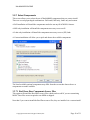
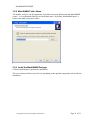
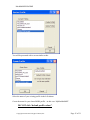
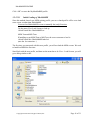
This screen allows you to select the set of MachStdMill components that you want to install.
There are several prepackaged combinations: Full install, Mill only, Lathe only and custom.
A Full installation will install the components needed to run any/all of MSM’s features.
A Mill only installation will install the components necessary to run a mill.
A Lathe only installation will install the components necessary to run a (XZ) lathe.
A Custom installation will allow you to pick and choose the available components.
The listed available optional components may differ from the screen shot shown above as
components are made available.
3.2.7.1 Real Draw Base Components Source Files
This option will install the Read Draw source files which can be useful if you are customizing
MSM. These files are not required to run MSM as shipped.
Note that if you want to install the Real-Draw source files, they are installed via a custom install.
Copyright © 2010-2015 Calypso Ventures, Inc.
Page 10 of 21