Transcript
Charging Energen Light Mini:
User Manual
Caution:
Light Mini and the cable are not water resistant. Always keep Light Mini dry.
Do not leave Light Mini exposed to direct sunlight or extreme heat for extended
period of time.
z Recycle or dispose Light Mini properly. Disposal in fire may cause battery
leaking or explosion.
z When not in use, unplug Light Mini from the charging cable and all devices.
z
z
Note:
Charge your Light Mini for the FIRST time for a full of 8 hours before regular
use. After the initial charge, normal charging will take approximately 3~4 hours.
z Light Mini may become warm during charging or in use.
1
2
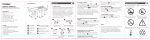
Product Illustration
4
z
Plug in the micro USB adapter tip to the round female connector of the cable.
Insert the USB end of the cable to the power source which comes with a USB port.
For example, the USB port from your notebook, desktop, car charger or power
outlet.
3 Insert the micro USB end of the cable into the micro USB port of tEnergen Light
Mini. The blue LED indicator starts blinking.
When fully charged, the LED indicator will be solid blue.
Charging your device using Energen Light Mini:
1
2
3
1.
2.
Insert the USB end of the cable into the USB port on top of the Light Mini.
Connect the tip to your device and press the “Function Button” to start charging.
Remove your device from Light Mini when fully charged.
LED Flash Light Function:
Press the “Function Button” for 3 seconds, the LED flash light turns on.
Press the “Function Button” for 3 seconds, the LED flash light turns off.