1
986LCD-M Family
KTD-00691-X
Public
User Manual
Date: 2011-05-17
Page
1 of 91
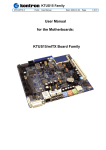
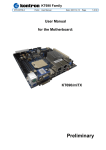
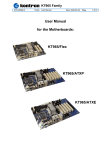
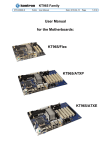
User Manual
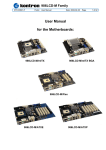
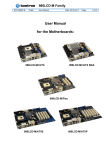
for the Motherboards:
986LCD-M/mITX
986LCD-M/mITX BGA
986LCD-M/Flex
986LCD-M/ATXE
986LCD-M/ATXP
986LCD-M Family
KTD-00691-X
Public
User Manual
Date: 2011-05-17
Page
2 of 91
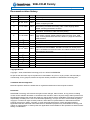
Document revision history.
Revision
Date
By
X
W
th
May 17 2011
nd
Dec. 22 2010
MLA
MLA
V
Apr. 28 2010
th
MLA
U
Oct. 13 2009
th
MLA
T
Feb. 10 2009
th
MLA
S
Nov. 26 2008
th
MLA
R
Q
P
May 30 2008
nd
April 22 2008
th
Feb. 28 2008
th
MLA
MLA
MLA
O
Jan. 10 2008
th
MLA
N-L
K
G-J
D-F
B-C
A
0
Oct. 18 , 2007
rd
Sep. 3 , 2007
st
Jun. 1 , 2007
th
Mar. 13 , 2007
th
Dec. 19 2006
th
Dec. 5 2006
July 6, 2006
th
MLA
MLA
MLA
MLA
MLA
MLA
PJA
Comment
CF pinning corrected.
Corrected miniPCIe pin 24 info.
Note in Processor table and added SL9VA. Warning to turn off power
before configuring the MB.
Added BIOS setting CRT+EFP2. Changed CPU to T7400 and added
BIOS setting Core Multi-Processing. New T7400 stepping added.
Added “mounting the board to chassis”.
Battery alternative added. Added BIOS setting: PCI Slot-1 IRQ
Preference. Correction to LAN connector pinning.
APM – Throttle removed from manual. Added “USB Device Wakeup
From S3/S4” in BIOS. Added to BIOS: PWM, Fan Step Time, USB
beep, Lock Keyboard before OS boot, Allow F11 popup and Execute
OEM extention.
Battery type updated. Procesor 530 added.
Removed note that WOL only on ETH1. 3.3V tolerance increased.
Battery load information added. Added “Resume On PME#”
Deleted remaining Floppy controller info in BIOS description. Added
LED color info for ETHER2/3. ETHER1 removed from ATXE picture.
Chp. 5: ATXPWR corrected and ATX+12V added. Revised TV-Out and
MacroVision licencing text.
(Text removed in revision T of this document)
(Text removed in revision R of this document)
(Text removed in revision O of this document)
(Text removed in revision N of this document)
(Text removed in revision M of this document)
(Text removed in revision L of this document)
First preliminary manual version.
Copyright Notice:
Copyright Ó 2006, KONTRON Technology A/S, ALL RIGHTS RESERVED.
No part of this document may be reproduced or transmitted in any form or by any means, electronically or
mechanically, for any purpose, without the express written permission of KONTRON Technology A/S.
Trademark Acknowledgement:
Brand and product names are trademarks or registered trademarks of their respective owners.
Disclaimer:
KONTRON Technology A/S reserves the right to make changes, without notice, to any product, including
circuits and/or software described or contained in this manual in order to improve design and/or performance.
Specifications listed in this manual are subject to change without notice. KONTRON Technology assumes no
responsibility or liability for the use of the described product(s), conveys no license or title under any patent,
copyright, or mask work rights to these products, and makes no representations or warranties that these
products are free from patent, copyright, or mask work right infringement, unless otherwise specified.
Applications that are described in this manual are for illustration purposes only. KONTRON Technology A/S
makes no representation or warranty that such application will be suitable for the specified use without further
testing or modification.
986LCD-M Family
KTD-00691-X
Public
User Manual
Date: 2011-05-17
Page
3 of 91
Life Support Policy
KONTRON Technology’s PRODUCTS ARE NOT FOR USE AS CRITICAL COMPONENTS IN LIFE
SUPPORT DEVICES OR SYSTEMS WITHOUT EXPRESS WRITTEN APPROVAL OF THE GENERAL
MANAGER OF KONTRON Technology A/S.
As used herein:
1. Life support devices or systems are devices or systems which, (a) are intended for surgical implant into
body, or (b) support or sustain life and whose failure to perform, when properly used in accordance with
instructions for use provided in the labeling, can be reasonably expected to result in significant injury to the
user.
2. A critical component is any component of a life support device or system whose failure to perform can be
reasonably expected to cause the failure of the life support device or system, or to affect its safety or
effectiveness.
KONTRON Technology Technical Support and Services
If you have questions about installing or using your KONTRON Technology Product, check this User’s
Manual first – you will find answers to most questions here. To obtain support, please contact your local
Distributor or Field Application Engineer (FAE).
Before Contacting Support: Please be prepared to provide as much information as possible:
§ CPU Board
1. Type.
2. Part-number.
3. Serial Number.
§ Configuration
1. CPU Type, Clock speed.
2. DRAM Type and Size.
3. BIOS Revision (Find the Version Info in the BIOS Setup).
4. BIOS Settings different than Default Settings (Refer to the BIOS Setup Section).
§ System
1. O/S Make and Version.
2. Driver Version numbers (Graphics, Network, and Audio).
3. Attached Hardware: Harddisks, CD-rom, LCD Panels etc.
986LCD-M Family
KTD-00691-X
Public
User Manual
Date: 2011-05-17
Page
4 of 91
Table of contents:
1.
INTRODUCTION ..................................................................................................................................... 7
2.
INSTALLATION PROCEDURE............................................................................................................... 8
2.1
Installing the board ............................................................................................................................ 8
2.2
Requirement according to EN60950................................................................................................. 9
3.
SYSTEM SPECIFICATION ................................................................................................................... 10
3.1
Component main data ..................................................................................................................... 10
3.2
Processor support table. ................................................................................................................. 13
3.3
System Memory support ................................................................................................................. 14
3.4
System overview .............................................................................................................................. 14
3.5
986LCD-M Power Distribution & Power State Map ....................................................................... 15
3.6
Power Consumption ........................................................................................................................ 17
3.7
986LCD-M Clock Distribution ......................................................................................................... 20
4.
CONNECTOR DEFINITIONS ................................................................................................................ 21
4.1
Connector layout .............................................................................................................................. 22
4.1.1
986LCD-M/mITX ......................................................................................................................... 22
4.1.2
986LCD-M/Flex ........................................................................................................................... 24
4.1.3
986LCD-M/ATXP ........................................................................................................................ 25
4.1.4
986LCD-M/ATXE ........................................................................................................................ 26
4.2
Power Connector (ATXPWR) .......................................................................................................... 27
4.3
Keyboard and PS/2 mouse connectors ......................................................................................... 28
4.3.1
Stacked MINI-DIN keyboard and mouse Connector (MSE & KBD) ............................................ 28
4.3.2
Keyboard and mouse pin-row Connector (KBDMSE) ................................................................. 28
4.4
Display Connectors ......................................................................................................................... 29
4.4.1
CRT Connector (CRT) ................................................................................................................ 29
4.4.2
TV-Out (Optional)........................................................................................................................ 30
4.4.3
LVDS Flat Panel Connector (LVDS) ........................................................................................... 31
4.5
PCI-Express Connectors ................................................................................................................. 32
4.5.1
PCI-Express x16/ SDVO connector ............................................................................................ 32
4.5.2
PCI-Express x4 in a x16 connector ........................................................................................... 33
4.5.3
miniPCI-Express connector ........................................................................................................ 35
4.6
Parallel ATA harddisk interface ...................................................................................................... 36
4.6.1
IDE Hard Disk Connector (IDE_P) .............................................................................................. 37
4.6.2
CF Connector (CF) ..................................................................................................................... 38
4.7
Serial ATA harddisk interface ......................................................................................................... 39
4.7.1
SATA Hard Disk Connector (SATA0, SATA1, SATA2, SATA3) ................................................. 39
4.8
Printer Port Connector (PRINTER). ................................................................................................ 40
986LCD-M Family
KTD-00691-X
Public
User Manual
Date: 2011-05-17
Page
5 of 91
4.9
Serial Ports ....................................................................................................................................... 41
4.9.1
Com1 (Port1) DB9 Connector. .................................................................................................... 41
4.9.2
Com2, Com3 & Com4 Pin Header Connectors. ......................................................................... 41
4.10
Ethernet connectors..................................................................................................................... 42
4.10.1 Ethernet connector 1 (ETHER1) ................................................................................................. 42
4.10.2 Ethernet connector 2/3 (ETHER2/3) ........................................................................................... 43
4.11
Firewire/ IEEE-1394 connectors. ................................................................................................. 44
4.11.1 IEEE1394 Connector (IEEE1394_0) ........................................................................................... 44
4.11.2 IEEE1394 Connector (IEEE1394_1) ........................................................................................... 44
4.12
USB Connector (USB) .................................................................................................................. 45
4.12.1 USB Connector 0/2 (USB0/2) ..................................................................................................... 45
4.12.2 USB Connector 4/5 (USB4/5) ..................................................................................................... 46
4.12.3 USB Connector 6/7 (USB6_7) .................................................................................................... 46
4.13
Audio Connector .......................................................................................................................... 47
4.13.1 Audio Line-in, Line-out and Microphone ..................................................................................... 47
4.13.2 CD-ROM Audio input (CDROM) ................................................................................................. 48
4.13.3 AUDIO Header (AUDIO_HEAD) ................................................................................................. 49
4.14
Fan connectors , FAN_CPU and FAN_SYS. ............................................................................... 50
4.15
The Clear CMOS Jumper, Clr-CMOS. ......................................................................................... 50
4.16
TPM connector (unsupported). ................................................................................................... 51
4.17
SPI connector (unsupported). ..................................................................................................... 51
4.18
Front Panel connector (FRONTPNL). ......................................................................................... 52
4.19
Feature Connector (FEATURE) ................................................................................................... 53
4.20
PCI Slot .......................................................................................................................................... 54
4.20.1 PCI Slot Connector .................................................................................................................... 54
4.20.2 Signal Description –PCI Slot Connector ..................................................................................... 55
4.20.3 PCI IRQ & INT routing ................................................................................................................ 57
5.
ONBOARD CONNECTORS .................................................................................................................. 58
6.
SYSTEM RESSOURCES ...................................................................................................................... 59
6.1
Memory map ..................................................................................................................................... 59
6.2
PCI devices ....................................................................................................................................... 60
6.3
Interrupt Usage ................................................................................................................................. 61
6.4
I/O Map .............................................................................................................................................. 62
6.5
DMA Channel Usage ........................................................................................................................ 63
7.
8.
OVERVIEW OF BIOS FEATURES ....................................................................................................... 64
7.1
System Management BIOS (SMBIOS / DMI) .................................................................................. 64
7.2
Legacy USB Support ....................................................................................................................... 64
BIOS CONFIGURATION / SETUP........................................................................................................ 65
986LCD-M Family
KTD-00691-X
Public
User Manual
Date: 2011-05-17
Page
6 of 91
8.1
Introduction ...................................................................................................................................... 65
8.2
Main Menu......................................................................................................................................... 65
8.3
Advanced Menu ................................................................................................................................ 66
8.3.1
Advanced settings – CPU Configuration..................................................................................... 67
8.3.2
Advanced settings – IDE Configuration ...................................................................................... 68
8.3.3
Advanced settings – LAN Configuration ..................................................................................... 70
8.3.4
FW/IEEE 1394 Configuration ...................................................................................................... 71
8.3.5
Advanced settings – Super IO Configuration .............................................................................. 72
8.3.6
Advanced settings – Hardware Health Configuration ................................................................. 73
8.3.7
Advanced settings – Voltage Monitor ......................................................................................... 74
8.3.8
Advanced settings – ACPI Configuration .................................................................................... 74
8.3.9
Advanced settings – APM Configuration .................................................................................... 75
8.3.10 PCI Express Configuration.......................................................................................................... 76
8.3.11 Advanced settings – Remote Access Configuration ................................................................... 77
8.3.12 Advanced settings – USB Configuration ..................................................................................... 78
8.3.13 Advanced settings – USB Mass Storage Device Configuration.................................................. 79
8.4
PCIPnP Menu .................................................................................................................................... 80
8.5
Boot Menu......................................................................................................................................... 81
8.5.1
Boot – Boot Settings Configuration ............................................................................................. 81
8.5.2
Boot – Boot Device Priority ......................................................................................................... 83
8.6
Security Menu ................................................................................................................................... 84
8.7
Chipset Menu.................................................................................................................................... 86
8.7.1
Advanced Chipset Settings – North Bridge Chipset Configuration ............................................. 86
8.7.2
Advanced Chipset Settings – Video Function Configuration ...................................................... 87
8.7.3
Advanced Chipset Settings – SouthBridge Configuration ........................................................... 88
8.8
Exit Menu .......................................................................................................................................... 89
8.9
AMI BIOS Beep Codes ..................................................................................................................... 90
9.
OS SETUP ............................................................................................................................................. 91
10.
WARRANTY .......................................................................................................................................... 91
986LCD-M Family
KTD-00691-X
1.
Public
User Manual
Date: 2011-05-17
Page
7 of 91
Introduction
This manual describes the 986LCD-M/Flex, 986LCD-M/ATXP, 986LCD-M/ATXE and 986LCD-M/mITX
boards made by KONTRON Technology A/S. The boards will also be denoted 986LCD family if no
differentiation is required.
All boards are to be used with the Intel® Core™Duo, Intel® Core™ 2 Duo, Intel® Core™Solo and Celeron®
M Processors. These belong to the Intel Yonah and Merom processor families.
Use of this manual implies a basic knowledge of PC-AT hard- and software. This manual is focused on
describing the 986LCD Board’s special features and is not intended to be a standard PC-AT textbook.
New users are recommended to study the short installation procedure stated in chapter 3 before switching-on
the power.
All configuration and setup of the CPU board is either done automatically or by the user in the CMOS setup
menus. Except for the CMOS Clear jumper, no jumper configuration is required.
986LCD-M Family
KTD-00691-X
Public
User Manual
2.
Installation procedure
2.1
Installing the board
Date: 2011-05-17
Page
8 of 91
To get the board running, follow these steps. In some cases the board shipped from KONTRON Technology
has CPU, DDR DRAM and Cooler mounted. In this case Step 2-4 can be skipped.
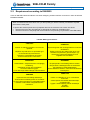
1. Turn off the power supply.
!
Warning: Turn off PSU (Power Supply Unit) completely (no mains power connected to the
PSU) or leave the Power Connectors unconnected while configuring the board. Otherwise
components (RAM, LAN cards etc.) might get damaged.
Do not use PSU without 3.3V monitoring watchdog, which is standard feature in ATX PSU.
Running the board without 3.3V connected will damage the board after a few minutes.
2. Insert the DDR2 DIMM 240pin DRAM module(s). Important: If only one module is used then use Slot 0.
Be careful to push it in the slot(s) before locking the tabs. For a list of approved DDR2 DIMM modules
contact your Distributor or FAE (list under preparation). DDR2-667 (PC5400) are supported.
3. Install the processor. The CPU is keyed and will only mount in the CPU socket in one way. Use the
handle to open/ close the CPU socket. Intel® Core™Duo, Intel® Core™ 2 Duo, Intel® Core™Solo and
Celeron® M Processors are supported, refer to supported processor overview for details.
4. Use heat paste or adhesive pads between CPU and cooler and connect the Fan electrically to the
FAN_CPU (J21) connector.
5. Insert all external cables for hard disk, keyboard etc. except for flat panel. A CRT monitor must be
connected in order to change CMOS settings to flat panel support. To achieve UDMA-66/100
performance on the IDE interface, 80poled UDMA cables must be used. When using bootable SATA disk,
then connect to SATA0 or SATA2 or select in BIOS “ATA/IDE Configuration” = Enhanced.
6. Connect power supply to the board by the ATX/ BTXPWR and 4-pin ATX connectors. For board to operate
connection of both the ATX/BTX and 4-pin ATX (12V) connectors are required.
7. Turn on the power on the ATX/ BTX power supply.
8. The PWRBTN_IN must be toggled to start the Power supply; this is done by shorting pins 16 (PWRBTN_IN)
and pin 18 (GND) on the FRONTPNL connector (see Connector description). A “normally open” switch can
be connected via the FRONTPNL connector.
9. Enter the BIOS setup by pressing the “DEL” key during boot up. Refer to the Software Manual (under
preparation) for details on BIOS setup.
Enter Advanced Menu / CPU Configuration / Intel SpeedStep Tech. and set this option to “Maximum
Performance”.
Note: To clear all CMOS settings, including Password protection, move the CMOS_CLR jumper (with or without
power) for approximately 1 minute. Alternatively turn off power and remove the battery for 1 minute, but be
careful to orientate the battery corretly when reinserted.
10. Mounting the board to chassis
!
Warning: When mounting the board to chassis etc. please notice that the board contains
components on both sides of the PCB which can easily be damaged if board is handled without
reasonable care. A damaged component can result in malfunction or no function at all.
When fixing the Motherboard on a chassis it is recommended using screws with integrated washer and
having diameter of ~7mm.
Note: Do not use washers with teeth, as they can damage the PCB mounting hole and may cause short
circuits.
986LCD-M Family
KTD-00691-X
2.2
Public
User Manual
Date: 2011-05-17
Page
9 of 91
Requirement according to EN60950
Users of 986LCD boards should take care when designing chassis interface connectors in order to fulfill the
EN60950 standard:
When an interface/connector has a VCC (or other power) pin, which is directly connected to a power
plane like the VCC plane:
To protect the external power lines of peripheral devices the customer has to take care about:
· That the wires have the right diameter to withstand the maximum available power.
· That the enclosure of the peripheral device fulfils the fire protecting requirements of IEC/EN 60950.
Lithium Battery precautions:
CAUTION!
Danger of explosion if battery is incorrectly
replaced.
Replace only with same or equivalent type
recommended by manufacturer.
Dispose of used batteries according
to the manufacturer’s instructions.
VORSICHT!
Explosionsgefahr bei unsachgemäßem Austausch
der Batterie.
Ersatz nur durch den selben oder einen vom
Hersteller empfohlenen gleichwertigen Typ.
Entsorgung gebrauchter Batterien nach
Angaben des Herstellers.
ADVARSEL!
ADVARSEL
Lithiumbatteri – Eksplosionsfare ved fejlagtig
håndtering.
Udskiftning må kun ske med batteri
af samme fabrikat og type.
Levér det brugte batteri tilbage til leverandøren.
Eksplosjonsfare ved feilaktig skifte av batteri.
Benytt samme batteritype eller en tilsvarende
type anbefalt av apparatfabrikanten.
Brukte batterier kasseres i henhold til fabrikantens
instruksjoner.
VARNING
Explosionsfara vid felaktigt batteribyte.
Använd samma batterityp eller en ekvivalent
typ som rekommenderas av apparattillverkaren.
Kassera använt batteri enligt fabrikantens
instruktion.
VAROITUS
Paristo voi räjähtää, jos se on virheellisesti
asennettu.
Vaihda paristo ainoastaan laltevalmistajan
suosittelemaan
tyyppiin. Hävitä käytetty paristo valmistajan
ohjeiden
mukaisesti.
986LCD-M Family
KTD-00691-X
3.
Public
User Manual
Date: 2011-05-17
Page
10 of 91
System specification
3.1
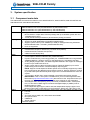
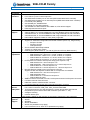
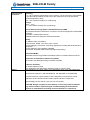
Component main data
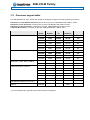
The table below summarises the features of the 986LCD-M/mITX, 986LCD-M/Flex, 986LCD-M/ATXP and
986LCD-M/ATXE embedded motherboards.
Form factor
Processor
Memory
Chipset
Video
Audio
986LCD-M/mITX: mini ITX (170.18millimeters by 170.18millimeters)
986LCD-M/Flex: Flex-ATX (190,50millimeters by 228,60millimeters)
986LCD-M/ATXP: ATX (190,50millimeters by 304,00millimeters)
986LCD-M/ATXE: ATX (190,50millimeters by 304,00millimeters)
· Support for Intel® Core™Duo, Intel® Core™ 2 Duo, Intel® Core™Solo and Celeron®
M Processors in 478pin Micro-FCPGA package with up to 667MHz system bus and
1/2/4MB internal cache.
· Yonah (65 nanometer) and Merom (65 nanometer) family processors.
· 2 pcs DDR2 DIMM 240pin DRAM sockets.
· Support for DDR 400/533/667 (PC3200/PC4200/PC5300)
· Support system memory from 256MB up to 3GB (2+1GB type Samsung PC5300UM378T5663AZ3-CE6 + PC5300U_M378T2953CZ3-CE6).
· ECC not supported
Intel 945GM Chipset consisting of:
· Intel® 82945G Graphics and Memory Controller Hub (GMCH)
· Intel® ICH7R I/O Controller Hub (ICH7R)
· 8 Mbit Firmware Hub (FWH)
· Intel® Integrated Graphics Engine (Generation 3.5)
· Intel® Graphics Media Accellerator 950 (Intel® GMA 950)
· Dynamic Video Memory Technology (DVMT) 3.0, 160MB/224MB when using SDRAM
256MB/512MB min. (System memory is allocated when it is needed dynamically).
· Analog Display Support CRT, 400-MHz integrated RAMDAC with support for analogue
monitors up to 2048x1536 at 75 Hz
· Single or dual channel 18bit LVDS panel support (OpenLDI/ SPWG) up to UXGA
(1600x1200) panel resolution. Interlaced Display output support.
NOTE: Support of 24bit OpenLDI/ SPWG panels are not officially supported by Intel®,
but is supported by the 986LCD series boards by Kontron. Kontron intends to continue
to provide 24bit OpenLDI/ SPWG panel support even if Intel® withdraws this from the
chipset.
· TV-Out option, NTSC/ PAL, three integrated 10-bit DACs, Macrovision support.
IMPORTANT: If the TV-Out option is available then you must make agreement with
Macrovision (http://www.macrovision.com/) about lincence fee. Only Macrovision (not
Kontron) can determine the actual licence fee which depends on the application.
· Serial Digital Video Out (SDVO) ports (2 channels) for additional CRT, LVDS panel,
DVI, TV-Out and/or HDMI support via Advanced Digital Display 2 (ADD2) cards or
Media Expansion Cards.
Dual independent pipe support, Mirror and Dual independent display support. Dual
Monitor support with combinations of LVDS interface, SDVO port, CRT and TV-Out.
Audio, 7.1 and 7.2 Channel High Definition Audio Codec using the Realtek ALC882 codec
· Line-out
· Line-in
· Surround output: SIDE, LFE, CEN, BACK and FRONT
· Microphone: MIC1
· CDROM in
· SPDIF Interface
Onboard speaker
(continues)
986LCD-M Family
KTD-00691-X
I/O Control
Peripheral
interfaces
LAN
Support
BIOS
Expansion
Capabilities
Hardware
Monitor
Subsystem
Operating
Systems
Support
Public
User Manual
Date: 2011-05-17
Page
11 of 91
Winbond W83627THF LPC Bus I/O Controller
· Four USB 2.0 ports on I/O area
· Four USB 2.0 ports on internal pinrows
· One IEEE1394a Firewire port on I/O area (IEEE1394a-2000 OHCI controller)
· One IEEE1394a Firewire port on internal pinrow (IEEE1394a-2000 OHCI controller)
· Four Serial ports (RS232)
· One Parallel port, SPP/EPP/ECP
· Four Serial ATA 300 IDE interfaces
· Two Parallel ATA IDE interfaces with UDMA 33, ATA-66/100 support
· PS/2 keyboard and mouse ports
· 986LCD-M/mITX: 3x 10/100/1000Mbits/s LAN using Realtek RTL8111B controllers
· 986LCD-M/Flex: 2x 10/100/1000Mbits/s LAN using Realtek RTL8111B controllers
· 986LCD-M/ATXP: 3x 10/100/1000Mbits/s LAN using Realtek RTL8111B controllers
· 986LCD-M/ATXE: 2x 10/100/1000Mbits/s LAN using Realtek RTL8111B controllers
· PXE netboot supported. Wake On LAN (WOL) supported.
· Kontron Technology / AMI BIOS (core version)
· Support for Advanced Configuration and Power Interface (ACPI 3.0), Plug and Play
o Suspend To Ram
o Suspend To Disk
o Intel Speed Step
· Secure CMOS/ OEM Setup Defaults
· “Always On” BIOS power setting
· RAID Support (RAID modes 0, 1, 5 and 10) (for Linux O/S only RAID 0 and 1)
· PCI Bus routed to PCI slot(s) (PCI Local Bus Specification Revision 2.3)
o 986LCD-M/mITX: 1 slot PCI 2.3, 32 bits, 33 MHz, 5V compliant
o 986LCD-M/Flex: 2 slots PCI 2.3, 32 bits, 33 MHz, 5V compliant
o 986LCD-M/ATXP: 6 slots PCI 2.3, 32 bits, 33 MHz, 5V compliant
o 986LCD-M/ATXE: 5 slots PCI 2.3, 32 bits, 33 MHz, 5V compliant
· PCI-Express bus routed to PCI Express slot(s) (PCI Express 1.0a)
o 986LCD-M/mITX: 1 slot PCI-Express x16
o 986LCD-M/Flex: 1 slot PCI-Express x16, 1 slot PCI-Express x4
o 986LCD-M/ATXP: 1 slot PCI-Express x16
o 986LCD-M/ATXE: 1 slot PCI-Express x16, 1 slot PCI-Express x4
· Mini PCI-Express routed to mini PCI-Express connector
Support for Mini PCI-Express modules with no components on backside.
o 986LCD-M/mITX: 1 slot mini PCI-Express x1
o 986LCD-M/Flex: None
o 986LCD-M/ATXP: 1 slot mini PCI-Express x1
o 986LCD-M/ATXE: None
· SMBus routed to FEATURE, PCI slot, PCI Express and mini-PCI Express connectors
· LPC Bus routed to TPM connector
· DDC Bus routed to LVDS and CRT connector
· 8 x GPIOs (General Purpose I/Os) routed to FEATURE connector
· Smart Fan control system, support Thermal® and Speed® cruise for three onboard
Fan control connectors: FAN_CPU, FAN_SYS and FEATURE
· Three thermal inputs: CPU die temperature, System temperature and External
temperature input routed to FEATURE connector. (Precision +/- 7ºC)
· Voltage monitoring
· Intrusion detect input
SMI violations (BIOS) on HW monitor not supported. Supported by API (Windows).
· Win2000
· WinXP
· Win2003
· WinXP Embedded
· WinCE.net (limitations may apply)
· Linux: Feodora Core 5, Suse 10.01 (limitations may apply)
(continues)
986LCD-M Family
KTD-00691-X
Environmental
Conditions
Public
User Manual
Date: 2011-05-17
Page
12 of 91
Operating:
0°C – 60°C operating temperature (forced cooling). It is the customer’s responsibility
to provide sufficient airflow around each of the components to keep them within
allowed temperature range.
10% - 90% relative humidity (non-condensing)
Storage:
-20°C – 70°C
5% - 95% relative humidity (non-condensing)
Electro Static Discharge (ESD) / Radiated Emissions (EMI):
All Peripheral interfaces intended for connection to external equipment are ESD/ EMI
protected.
EN 61000-4-2:2000 ESD Immunity
EN55022:1998 class B Generic Emission Standard.
Safety:
UL 60950-1:2003, First Edition
CSA C22.2 No. 60950-1-03 1st Ed. April 1, 2003
Product Category: Information Technology Equipment Including Electrical Business
Equipment
Product Category CCN: NWGQ2, NWGQ8
File number: E194252 (986LCD-M/ATXP approval pending)
Theoretical MTBF:
160.000/91.000 hours @ 40/60ºCCalculation based on Telcordia SR-332 method.
Restriction of Hazardeous Substances (RoHS):
All boards in the 986LCD-M family are RoHS compliant.
Battery
Capacitor utilization:
No Tantal capacitors used.
Only Japanese brand Aluminium capacitors rated for 100ºC is used.
Exchangeable 3.0V Lithium battery for onboard Real Time Clock and CMOS RAM.
Manufacturer Panasonic / PN CR2032NL/LE, CR-2032L/BE or CR-2032L/BN.
Expected minimum 5 years retention varies depending on temperature, actual
application on/off rate and variation within chipset and other components.
Approximately current draw is 2.2µA (no PSU connected).
CAUTION: Danger of explosion if the battery is incorrectly replaced. Replace
only with the same or equivalent type recommended by the manufacturer.
Dispose of used batteries according to the manufacturer’s instructions.
986LCD-M Family
KTD-00691-X
3.2
Public
User Manual
Date: 2011-05-17
Page
13 of 91
Processor support table.
The 986LCD-M/mITX, /Flex, /ATXP and /ATXE are designed to support the PGA (478 pins) processors:
Intel® Core™ 2 Duo Mobile Processor, Merom 65 nm process, FSB 667MHz with 4 MB L2 cache
Intel® Core™ Duo Processor, Yonah 65 nm process, FSB 667MHz with 2 MB L2 cache
Intel® Core™ Solo Processor, Yonah 65 nm process, FSB 667MHz with 2 MB L2 cache
Celeron® M Processor, Yonah 65 nm process, FSB 533MHz with 1 MB L2 cache
Processor Brand
Intel® Core™ 2 Duo, 65nm, 4 MB L2
Intel® Core™ Duo, 65nm, 2 MB L2
Intel® Core™ Solo, 65nm, 2 MB L2
Celeron® M, 65nm, 1 MB L2
986LCD-M/mITX(BGA) w Core Duo
986LCD-M/mITX(BGA) w Celeron M
1MB L2
Clock
Speed
Processor
Number
sSpec
no.
Thermal
Guideline
Embedded
2.33 GHz
T7600
SL9SD
34.0 W
No
2.16 GHz
T7400
SL9SE
34.0 W
Yes
2.16 GHz
T7400
SLGFJ
34.0 W
Yes
2.00 GHz
T7200
SL9SF
34.0 W
No
1.83 GHz
T5600
SL9SG
34.0 W
No
1.66 GHz
T5500
SL9SH
34.0 W
No
2.16 GHz
T2600
SL8VN
31.0 W
No
2.00 GHz
T2500
SL8VP
31.0 W
Yes
1.83 GHz
T2400
SL8VQ
31.0 W
No
1.66 GHz
T2300
SL8VR
31.0 W
No
1.83 GHz
T1400
SL92V
27.0 W
No
1.66 GHz
T1300
SL8VY
27.0 W
No
1.86 GHz
440
SL9KW
27.0W
Yes
1.73 GHz
530
SL9VA
27.0 W
No
1.73 GHz
530
SLA2G*
27.0 W
No
1.73 GHz
430
SL92F
27.0 W
No
1.60 GHz
420
SL8VZ
27.0W
No
1.46 GHz
410
SL8W2
27.0 W
No
1.66 GHz
L2400
SL8VW
15W
Yes
1.06 GHz
-
-
5.5W
-
*) For the SLA2G and in general only socket M version is supported.
986LCD-M Family
KTD-00691-X
3.3
Public
User Manual
Date: 2011-05-17
Page
14 of 91
System Memory support
The 986LCD-M boards have two onboard DDR2 DIMM sockets and support the following memory features:
·
·
·
·
·
·
1.8V (only) 240-pin DDR2 SDRAM DIMMs with gold-plated contacts
Supports Single- / Dual channel DDR2 SDRAM
Supports 256 Mbit, 512 Mbit and 1 Gbit technologies for x8 and x16 width devices.
Maximum of 3 Gbytes (2GB + 1GB) based on Samsung PC5300U-M378T5663AZ3-CE6 +
PC5300U_M378T2953CZ3-CE6).
Supports 400 MHz (PC3200) , 533 MHz (PC4200), and 667 MHz (PC5400) DDR2 devices
64-bit data interface (ECC not supported)
The installed DDR2 SDRAM should support the Serial Presence Detect (SPD) data structure. This allows the
BIOS to read and configure the memory controller for optimal performance. If non-SPD memory is used, the
BIOS will attempt to configure the memory settings, but performance and reliability may be impacted.
Important: If only one module is used then use Slot 0.
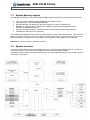
3.4
System overview
The block diagram below shows the architecture and main components of the 986LCD boards. The two key
®
®
components on the board are the Intel 945GM and Intel ICH7R Embedded Chipsets.
Components shown shaded are optional depending on board type (986LCD-M/mITX, /Flex, /ATXP or /ATXE)
and variants of the board.
986LCD-M Family
KTD-00691-X
3.5
Public
User Manual
Date: 2011-05-17
Page
15 of 91
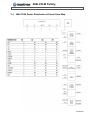
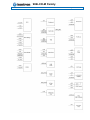
986LCD-M Power Distribution & Power State Map
(continues)
986LCD-M Family
KTD-00691-X
Public
User Manual
Date: 2011-05-17
Page
16 of 91
986LCD-M Family
KTD-00691-X
3.6
Public
User Manual
Date: 2011-05-17
Page
17 of 91
Power Consumption
In order to ensure safe operation of the board, the ATX power supply must monitor the supply voltage and
shut down if the supplies are out of range – refer to the hardware manual for actual power specification.
The 986LCD-M board is powered through the ATX connector and the additional 12V separate supply for CPU
as specified in the ATX specification; besides this the power supplied to the board must be within the ATX
specification.
The requirements to the supply voltages are as follows:
Supply
Min
Max
Note
Vcc3
3.135V
3.465V
Should be ±5% for compliance with the ATX specification
Vcc
4.75V
5.25V
Should be ±5% for compliance with the ATX specification
+12V
11.4V
12.6V
Should be ±5% for compliance with the ATX specification
–12V
–13.2V
–10.8V
Should be ±10% for compliance with the ATX specification
-5V
-5,50V
-4.5V
5VSB
4.75V
–5.25V
Not required for the 986LCD-M/mITX board
Should be ±5% for compliance with the ATX specification
Test system configuration
The following items are used in the test setup:
1.
2.
3.
4.
5.
986LCD-M board equipped with CPU, RAM and 12V active cooler if required
ATX PSU
CRT, PS/2 keyboard & mouse and HD
Tektronix TDS 7404, P6345 probes
Fluke Current Probe 80i-100S AC/DC
ATX supplies
986LCD-M
Incl. CRT, PS/2
Kbd/Mse and HD
PSU
Gnd
Current
Probe
Tektronix TDS 7404
Note:
The Power consumption of CRT, Fan and HD is not included.
Test results:
The power consumption of the 986LCD-M Board is measured under:
1- DOS, idle, mean
2- WindowsXP, Running 3DMARK & CPU BURN, mean
3- WindowsXP, Running 3DMARK & CPU BURN, peak
4- S1, mean
5- S3, mean
6- S4, mean
7- Inrush, peak
986LCD-M Family
KTD-00691-X
Public
User Manual
Date: 2011-05-17
Page
986LCD-M/mITX with Core Duo (T2500) & 1GB DDR2 Ram test results:
Test
DOS, Idle, mean
Supply
+12V
+5V
+3V3
-12V
5VSB
WinXP, 3DMARK2000 &
CPUBURN, mean
+12V
+5V
+3V3
-12V
5VSB
WinXP, 3DMARK2000 &
CPUBURN, peak
+12V
+5V
+3V3
-12V
5VSB
S1, mean
+12V
+5V
+3V3
-12V
5VSB
S3, mean
+12V
+5V
+3V3
-12V
5VSB
S4, mean
+12V
+5V
+3V3
+-12V
5VSB
Inrush, peak
+12V
+5V
+3V3
-12V
5VSB
Current draw
0.88A
1.48A
1.22A
0.05A
0A
Total
2.34A
1.73A
1.22A
0.05A
0A
Total
2.67A
2.48A
1.28A
0.08A
0A
Total
0.83A
1.17A
1.21A
0.03A
0A
Total
0A
0A
0A
0.03A
0.64A
Total
0A
0A
0A
0A
0.64A
Total
5.08A
2.48A
3.52A
0.3A
2.92A
Power consumption
10.56W
7.4W
4.03W
0.6W
0W
22.59W
28.08W
8.65W
4.03W
0.6W
0W
41.36W
32.04W
12.4W
4.22W
0.96W
0W
49.62W
9.96W
5.85W
3.99W
0.36W
0W
20.16W
0W
0W
0W
0.36W
3.68W
4.04W
0W
0W
0W
0W
3.2W
3.2W
18 of 91
986LCD-M Family
KTD-00691-X
Public
User Manual
Date: 2011-05-17
Page
986LCD-M/mITX with w/1.06GHz Celeron M 512MB test results:
Test
DOS, Idle, mean
Supply
+12V
+5V
+3V3
-12V
5VSB
WinXP, 3DMARK2000 &
CPUBURN, mean
+12V
+5V
+3V3
-12V
5VSB
WinXP, 3DMARK2000 &
CPUBURN, peak
+12V
+5V
+3V3
-12V
5VSB
S1, mean
+12V
+5V
+3V3
-12V
5VSB
S3, mean
+12V
+5V
+3V3
-12V
5VSB
S4, mean
+12V
+5V
+3V3
+-12V
5VSB
Inrush, peak
+12V
+5V
+3V3
-12V
5VSB
Current draw
0.36A
1.37A
1.31A
0A
0A
Total
0.4A
1.47A
1.54A
0A
0A
Total
0.61A
2.1A
1.64A
0A
0A
Total
0.25A
1.05A
0.75A
0A
0A
Total
0A
0A
0A
0A
0.18A
Total
0A
0A
0A
0A
0.18A
Total
1.54A
1.02A
1.2A
0.09A
3.5A
Power consumption
4.32W
6.85W
4.323W
0W
0W
15.493W
4.8W
7.35W
5.08W
0W
0W
17.232W
7.32W
10.5W
5.41W
0W
0W
23.232W
3W
5.25W
2.48W
0W
0W
10.73W
0W
0W
0W
0W
0.9W
0.9W
0W
0W
0W
0W
0.9W
0.9W
19 of 91
986LCD-M Family
KTD-00691-X
3.7
Public
User Manual
986LCD-M Clock Distribution
Date: 2011-05-17
Page
20 of 91
986LCD-M Family
KTD-00691-X
4.
Public
User Manual
Date: 2011-05-17
Page
21 of 91
Connector Definitions
The following sections provide pin definitions and detailed description of all on-board connectors.
.
The connector definitions follow the following notation:
Column
name
Description
Pin
Shows the pin-numbers in the connector. The graphical layout of the connector definition
tables is made similar to the physical connectors.
Signal
The mnemonic name of the signal at the current pin. The notation “XX#” states that the signal
“XX” is active low.
Type
AI:
Analog Input.
AO:
Analog Output.
I:
Input, TTL compatible if nothing else stated.
IO:
Input / Output. TTL compatible if nothing else stated.
IOT:
Bi-directional tristate IO pin.
IS:
Schmitt-trigger input, TTL compatible.
IOC:
Input / open-collector Output, TTL compatible.
NC:
Pin not connected.
O:
Output, TTL compatible.
OC:
Output, open-collector or open-drain, TTL compatible.
OT:
Output with tri-state capability, TTL compatible.
LVDS:
Low Voltage Differential Signal.
PWR:
Power supply or ground reference pins.
Ioh: Typical current in mA flowing out of an output pin through a grounded load, while the
output voltage is > 2.4 V DC (if nothing else stated).
Iol: Typical current in mA flowing into an output pin from a VCC connected load, while the
output voltage is < 0.4 V DC (if nothing else stated).
Pull U/D
On-board pull-up or pull-down resistors on input pins or open-collector output pins.
Note
Special remarks concerning the signal.
The abbreviation TBD is used for specifications which are not available yet or which are not sufficiently
specified by the component vendors.
986LCD-M Family
KTD-00691-X
4.1
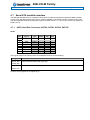
4.1.1
Public
User Manual
Date: 2011-05-17
Page
22 of 91
Connector layout
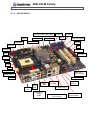
986LCD-M/mITX
Mini-PCIe (backside of 986LCD-M/mITX)
(Support for modules with no components mounted on backside).
CF (backside of
986LCD-M/mITX)
FAN_CPU
SATA3 SATA1
SATA2 SATA0
DDR2 SLOT 1
LVDS
DDR2 SLOT 0
FEATURE
SPI
IEEE1394 1
TPM
ATX/ BTXPWR
PCIe x16 /
SDVO
PCI SLOT
ATX+12V
FRONTPNL
IDE_P
AUDIO_HEAD
Clr-CMOS
COM3
COM4
COM2
FAN_SYS
PRINTER
KBDMSE
CDROM
USB6_7
IEEE1394_0
USB5
USB4
COM1
CRT
MSE
KBD
ETHER1
USB2
USB0
ETHER2
ETHER3
AUDIO STACK
TV-OUT
(Not available)
986LCD-M Family
KTD-00691-X
Public
User Manual
Date: 2011-05-17
Page
23 of 91
986LCD-M/mITX BGA
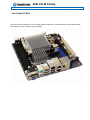
Same connectors available as on the standard 986LCD-M/mITX, except that CPU socket is replaced with
BGA version of CPU. (Passive cooler included).
986LCD-M Family
KTD-00691-X
4.1.2
Public
User Manual
Date: 2011-05-17
Page
24 of 91
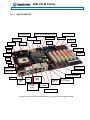
986LCD-M/Flex
SATA1 SATA2 SATA0 SATA3
USB6_7
FRONTPNL
ATX+12V
FAN_System
LVDS
Clr-CMOS
IDE_P
ATX/ BTXPWR
PCIe x16 / SDVO
PCIe x4
FEATURE
SPI
PRINTER
PCI Slot 1
TPM
PCI Slot 2
FAN_CPU
COM2
COM4
COM3
DDR2 SLOT 0
IEEE1394_1
(Not mounted)
DDR2 SLOT 1
KBDMSE
AUDIO_HEAD
COM1
CRT
MSE
KBD
USB2
USB0
IEEE1394_0
USB5
USB4
CDROM
Audio in
ETHER2
ETHER3
AUDIO STACK
ETHER1 is not available
on this board
TV-OUT
(Not available)
986LCD-M Family
KTD-00691-X
4.1.3
Public
User Manual
Date: 2011-05-17
25 of 91
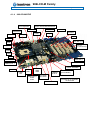
986LCD-M/ATXP
ATX/ BTXPWR
FRONTPNL
Mini-PCIe (*)
SATA1 SATA2 SATA0 SATA3
ATX+12V
FAN_System
Clr-CMOS
PCI Slot 1
LVDS
FEATURE
Page
IDE_P
USB6_7
SPI
PRINTER
PCI Slot 2 - 5
TPM
PCI Slot 6
FAN_CPU
COM2
COM4
COM3
IEEE1394 1
DDR2 SLOT 0
PCIe x16 / SDVO
DDR2 SLOT 1
KBDMSE
COM1
CRT
MSE
KBD
AUDIO HEADER
ETHER1
USB2
USB0
IEEE1394_0
USB5
USB4
CDROM
Audio in
TV-OUT
(Not available)
ETHER2
ETHER3
AUDIO STACK
* Support for Mini PCI-Express modules with no components mounted on backside.
986LCD-M Family
KTD-00691-X
4.1.4
Public
User Manual
Date: 2011-05-17
26 of 91
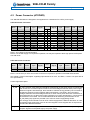
986LCD-M/ATXE
ATX/ BTXPWR
FRONTPNL
SATA1 SATA2 SATA0 SATA3
ATX+12V
FAN_System
Clr-CMOS
PCI Slot 1
LVDS
FEATURE
Page
IDE_P
USB6_7
SPI
PRINTER
PCI Slot 2 - 5
TPM
PCIe x4
(in x16 socket)
FAN_CPU
COM2
COM4
COM3
IEEE1394 1
DDR2 SLOT 0
PCIe x16 / SDVO
DDR2 SLOT 1
KBDMSE
COM1
CRT
MSE
KBD
AUDIO HEADER
ETHER1
USB2
USB0
IEEE1394_0
USB5
USB4
CDROM
Audio in
TV-OUT
(Not available)
ETHER2
ETHER3
AUDIO STACK
ETHER1 is not available
on this board
986LCD-M Family
KTD-00691-X
4.2
Public
User Manual
Date: 2011-05-17
Page
27 of 91
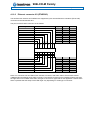
Power Connector (ATXPWR)
The 986LCD-M boards are designed to be supplied from a standard ATX or BTX power supply.
ATX/ BTX Power Connector:
Note
Pull
U/D
-
Ioh/Iol
-
PIN
-
-
Type
PWR
PWR
PWR
PWR
I
PWR
PWR
PWR
PWR
PWR
PWR
PWR
Signal
3V3
+12V
+12V
SB5V
P_OK
GND
5V
GND
5V
GND
3V3
3V3
12
11
10
9
8
7
6
5
4
3
2
1
24
23
22
21
20
19
18
17
16
15
14
13
Signal
GND
5V
5V
5V
-5V
GND
GND
GND
PSON#
GND
-12V
3V3
Type
PWR
PWR
PWR
PWR
PWR
PWR
PWR
PWR
OC
PWR
PWR
PWR
Ioh/Iol
-
Pull
U/D
-
-
-
Note
1
Note 1: -5V supply is not used onboard.
Note 2: Use of BTX supply not required for operation, but may be required to drive high-power PCI Express
x16 Add cards.
ATX+12V Power Connector:
Note
1
1
Pull
U/D
-
PIN
Ioh/Iol
-
Type
PWR
PWR
Signal
GND
GND
1
2
3
4
Signal
+12V
+12V
Type
PWR
PWR
Ioh/Iol
-
Pull
U/D
-
Note
1
1
Note 1: Use of the 4-pin ATX+12V Power Connector is required for operation of the 986LCD-M boards.
See chapter “Power Consumption” regarding input tolerances on 3.3V, 5V, SB5V, +12 and -12V (also refer to
ATX specification).
Control signal description:
Signal
P_OK
PS_ON#
Description
P_OK is a power good signal and should be asserted high by the power supply to indicate that
the +5VDC and +3.3VDC outputs are above the undervoltage thresholds of the power supply.
When this signal is asserted high, there should be sufficient energy stored by the converter to
guarantee continuous power operation within specification. Conversely, when the output
voltages fall below the undervoltage threshold, or when mains power has been removed for a
time sufficiently long so that power supply operation is no longer guaranteed, P_OK should be
de-asserted to a low state. The recommended electrical and timing characteristics of the
P_OK (PWR_OK) signal are provided in the ATX12V Power SupplyDesign Guide.
It is strongly recommended to use an ATX or BTX supply with the 986LCD-M boards, in order
to implement the supervision of the 5V and 3V3 supplies. These supplies are not supervised
onboard the 986LCD-M boards.
Active low open drain signal from the board to the power supply to turn on the power supply
outputs. Signal must be pulled high by the power supply.
986LCD-M Family
KTD-00691-X
4.3
Public
User Manual
Date: 2011-05-17
Page
28 of 91
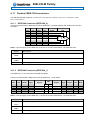
Keyboard and PS/2 mouse connectors
Attachment of a keyboard or PS/2 mouse adapter can be done through the stacked PS/2 mouse and
keyboard connector (MSE & KBD).
Both interfaces utilize open-drain signaling with on-board pull-up.
The PS/2 mouse and keyboard is supplied from 5V_STB when in standby mode in order to enable keyboard
or mouse activity to bring the system out from power saving states. The supply is provided through a 1.1A
resetable fuse.
4.3.1
Note
Stacked MINI-DIN keyboard and mouse Connector (MSE & KBD)
Pull
U/D
Ioh/Iol
Type
Signal
-
-
-
NC
6
-
-
PWR
-
5V/SB5V
NC
4
-
NC
PWR
-
5V/SB5V
NC
-
PIN
-
Signal
Type
Ioh/Iol
Pull
U/D
5
MSCLK
IOC
TBD
4K7
3
GND
MSDAT
PWR
IOC
TBD
4K7
6
5
KBDCLK
IOC
TBD
4K7
4
3
GND
KBDDAT
PWR
IOC
TBD
4K7
2
2
1
1
Note
Signal Description – Keyboard & and mouse Connector (MSE & KBD), see below.
4.3.2
Keyboard and mouse pin-row Connector (KBDMSE)
PIN
1
2
3
4
5
6
Signal
KBDCLK
KBDDAT
MSCLK
MSDAT
5V/SB5V
GND
Type
IOC
IOC
IOC
IOC
PWR
PWR
Ioh/Iol
TBD
TBD
TBD
TBD
-
Pull
U/D
4K7
4K7
4K7
4K7
-
Note
Signal Description – Keyboard & and mouse Connector (KBDMSE).
Signal
Description
MSCLK
Bi-directional clock signal used to strobe data/commands from/to the PS/2 mouse.
MSDAT
Bi-directional serial data line used to transfer data from or commands to the PS/2 mouse.
KDBCLK
Bi-directional clock signal used to strobe data/commands from/to the PC-AT keyboard.
KBDDAT
Bi-directional serial data line used to transfer data from or commands to the PC-AT keyboard.
986LCD-M Family
KTD-00691-X
4.4
Public
User Manual
Date: 2011-05-17
Page
29 of 91
Display Connectors
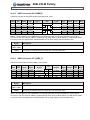
The 986LCD-M board family provides onboard two basic types of interfaces to a display: Analog CRT
interface and a digital interface typically used with flat panels. The digital interface to flat panels can be
achieved through the onboard LVDS dual channel interface and/or the SDVO port available on the PCI
Express connector.
4.4.1
CRT Connector (CRT)
Note
Pull
U/D
Ioh/Iol
Type
Signal
PIN
/75R
*
A0
RED
1
/75R
*
A0
GREEN
2
6
11
7
12
8
/75R
*
A0
BLUE
3
13
9
-
-
-
NC
4
-
-
PWR
DIG-GND
5
14
10
15
Signal
Type
Ioh/Iol
ANA-GND
NC
ANA-GND
DDCDAT
ANA-GND
HSYNC
5V
VSYNC
DIG-GND
DDCCLK
PWR
PWR
IO
PWR
O
PWR
O
PWR
IO
TBD
TBD
TBD
TBD
Pull
U/D
Note
2K2
2K2
Note 1: The 5V supply in the CRT connector is fused by a 1.1A reset-able fuse.
Signal Description - CRT Connector:
Signal
Description
HSYNC
CRT horizontal synchronization output.
VSYNC
CRT vertical synchronization output.
DDCCLK
Display Data Channel Clock. Used as clock signal to/from monitors with DDC interface.
DDCDAT
Display Data Channel Data. Used as data signal to/from monitors with DDC interface.
RED
Analog output carrying the red color signal to the CRT. For 75 Ohm cable impedance.
GREEN
BLUE
Analog output carrying the green color signal to the CRT. For 75 Ohm cable impedance.
Analog output carrying the blue color signal to the CRT. For 75 Ohm cable impedance.
DIG-GND
Ground reference for HSYNC and VSYNC.
ANA-GND
Ground reference for RED, GREEN, and BLUE.
1
986LCD-M Family
KTD-00691-X
4.4.2
Public
User Manual
Date: 2011-05-17
Page
30 of 91
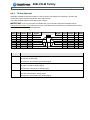
TV-Out (Optional)
Optionally the 986LCD-M board include TV-Out connector with support for Component, S-Video and
Composite Output interfaces and NTSC/ PAL output format.
The Intel® 945GM chipset include Macrovision support.
IMPORTANT: If the TV-Out option is available then you must make agreement with Macrovision
(http://www.macrovision.com/) about lincence fee. Only Macrovision (not Kontron) can determine the actual
licence fee which depends on the application.
Note
Pull
U/D
PIN
Ioh/Iol
Type
Signal
Signal
TVDACC
GND
TVDACB
4
2
7
3
6 5 1
GND
GND
Signal
TVDACA
Description
TVDAC Channel A output supports:
Composite: CVBS signal
Component: Chrominance (Pb) analog signal
TVDACB
TVDAC Channel B output supports:
S-Video: Luminance analog signal
Component: Luminance (Y) analog signal
TVDACC
TVDAC Channel C output supports:
S-Video: Chrominance analog signal
Component: Chrominance (Pr) analog signal
GND
TVDACA
Type
Ioh/Iol
Pull
U/D
Note
986LCD-M Family
KTD-00691-X
4.4.3
Public
User Manual
Date: 2011-05-17
Page
31 of 91
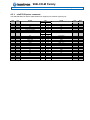
LVDS Flat Panel Connector (LVDS)
Note
Max. 0.5A
Max. 0.5A
Max. 0.5A
Max. 0.5A
Max. 0.5A
4K7Ω, 3.3V
3.3V level
3.3V level
Note 1
Max. 0.5A
Note 1
Max. 0.5A
Type
PWR
PWR
PWR
PWR
PWR
OT
OT
OT
LVDS
LVDS
LVDS
LVDS
LVDS
PWR
LVDS
LVDS
LVDS
LVDS
LVDS
PWR
Signal
+12V
+12V
+12V
+5V
LCDVCC
DDC CLK
BKLTCTL
BKLTEN#
LVDS A0LVDS A1LVDS A2LVDS ACLKLVDS A3GND
LVDS B0LVDS B1LVDS B2LVDS BCLKLVDS B3GND
Pin
1
3
5
7
9
11
13
15
17
19
21
23
25
27
29
31
33
35
37
39
2
4
6
8
10
12
14
16
18
20
22
24
26
28
30
32
34
36
38
40
Signal
+12V
+12V
GND
GND
LCDVCC
DDC DATA
VDD ENABLE
GND
LVDS A0+
LVDS A1+
LVDS A2+
LVDS ACLK+
LVDS A3+
GND
LVDS B0+
LVDS B1+
LVDS B2+
LVDS BCLK+
LVDS B3+
GND
Type
PWR
PWR
PWR
PWR
PWR
OT
OT
PWR
LVDS
LVDS
LVDS
LVDS
LVDS
PWR
LVDS
LVDS
LVDS
LVDS
LVDS
PWR
Note
Max. 0.5A
Max. 0.5A
Max. 0.5A
Max. 0.5A
Max. 0.5A
4K7Ω, 3.3V
3.3V level
Max. 0.5A
Note 1
Max. 0.5A
Note 1
Max. 0.5A
Note 1: Support of 24bit OpenLDI/ SPWG panels is not officially supported by Intel®, but is supported by the
986LCD series boards by Kontron. Kontron intends to continue to provide 24bit OpenLDI/ SPWG panel
support even if Intel® withdraws this from the chipset, by an external converter module.
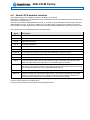
Signal Description – LVDS Flat Panel Connector:
Signal
Description
LVDS A0..A3
LVDS A Channel data
LVDS ACLK
LVDS A Channel clock
LVDS B0..B3
LVDS B Channel data
LVDS BCLK
LVDS B Channel clock
BKLTCTL
Backlight control (1), PWM signal to implement voltage in the range 0-3.3V
BKLTEN#
Backlight Enable signal (active low) (2)
VDD ENABLE
LCDVCC
Output Display Enable.
VCC supply to the flat panel. This supply includes power-on/off sequencing.
The flat panel supply may be either 5V DC or 3.3V DC depending on the CMOS
configuration. Maximum load is 1A at both voltages.
DDC CLK
DDC Channel Clock
DDC DATA
DDC Channel Data
Note 1) Windows API (version Hwmon_KTAPI ver 4.5 or newer) is available to operate the BKLTCTL signal.
Some Inverters has a limited voltage range 0- 2.5V for this signal: If voltage is > 2.5V the Inverter
might latch up. Some Inverters generates noise to the BKLTCTL signal resulting in making the lvds
transmision fail (corrupted picture on the display). By adding 1K Ohm resistor in series with this signal
and mounted in the Inverter end of the cable kit the noise is limited and picture is stabil.
Note 2) If the Backlight Enable is required to be active high then make the BIOS Chipset setting: Backlight
Signal Inversion = Enabled.
986LCD-M Family
KTD-00691-X
4.5
4.5.1
Public
User Manual
Date: 2011-05-17
Page
32 of 91
PCI-Express Connectors
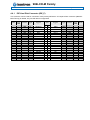
PCI-Express x16/ SDVO connector
The 986LCD-M boards supports one 16-lane (x16) PCI Express port for external PCI Express based
graphics boards or ADD2 devices.
Note
Type
Signal
PIN
Signal
+12V
+12V
+12V
GND
SMB_CLK
SMB_DATA
GND
+3V3
NC
SB3V3
WAKE#
B1
B2
B3
B4
B5
B6
B7
B8
B9
B10
B11
A1
A2
A3
A4
A5
A6
A7
A8
A9
A10
A11
NC
+12V
+12V
GND
NC
NC
NC
NC
+3V3
+3V3
RST#
NC
GND
PEG_TXP[15] / SDVOB_RED
PEG_TXN[15] / SDVOB_RED#
GND
SDVO_CTRLCLK
GND
PEG_TXP[14] / SDVOB_GREEN
PEG_TXN[14] / SDVOB_GREEN#
GND
GND
PEG_TXP[13] / SDVOB_BLUE
PEG_TXN[13] / SDVOB_BLUE#
GND
GND
PEG_TXP[12] / SDVOB_CLKP
PEG_TXN[12] / SDVOB_CLKN
GND
NC
SDVO_CTRLDATA
GND
PEG_TXP[11] / SDVOC_RED
PEG_TXN[11] / SDVOC_RED#
GND
GND
PEG_TXP[10] / SDVOC_GREEN
PEG_TXN[10] / SDVOC_GREEN#
GND
GND
PEG_TXP[9] / SDVOC_BLUE
PEG_TXN[9] / SDVOC_BLUE#
GND
GND
PEG_TXP[8] / SDVOC_CLKN
PEG_TXN[8] / SDVOC_CLKP
GND
PRSNT#2
GND
PEG_TXP[7]
PEG_TXN[7]
GND
GND
PEG_TXP[6]
PEG_TXN[6]
GND
GND
PEG_TXP[5]
PEG_TXN[5]
B12
B13
B14
B15
B16
B17
B18
B19
B20
B21
B22
B23
B24
B25
B26
B27
B28
B29
B30
B31
B32
B33
B34
B35
B36
B37
B38
B39
B40
B41
B42
B43
B44
B45
B46
B47
B48
B49
B50
B51
B52
B53
B54
B55
B56
B57
B58
B59
A12
A13
A14
A15
A16
A17
A18
A19
A20
A21
A22
A23
A24
A25
A26
A27
A28
A29
A30
A31
A32
A33
A34
A35
A36
A37
A38
A39
A40
A41
A42
A43
A44
A45
A46
A47
A48
A49
A50
A51
A52
A53
A54
A55
A56
A57
A58
A59
GND
PCIE_x16 CLK
PCIE_x16 CLK#
GND
PEG_RXP[15] / SDVO_TVCLKIN
PEG_RXN[15] / SDVO_TVCLKIN#
GND
NC
GND
PEG_RXP[14] / SDVOB_INT
PEG_RXN[14] / SDVOB_INT#
GND
GND
PEG_RXP[13] / SDVO_FLDSTALL
PEG_RXN[13] / SDVO_FLDSTALL#
GND
GND
PEG_RXP[12]
PEG_RXN[12]
GND
NC
NC
GND
PEG_RXP[11]
PEG_RXN[11]
GND
GND
PEG_RXP[10] / SDVOC_INT
PEG_RXN[10] / SDVOC_INT#
GND
GND
PEG_RXP[9]
PEG_RXN[9]
GND
GND
PEG_RXP[8]
PEG_RXN[8]
GND
NC
GND
PEG_RXP[7]
PEG_RXN[7]
GND
GND
PEG_RXP[6]
PEG_RXN[6]
GND
GND
Type
Note
(continues)
986LCD-M Family
KTD-00691-X
Public
User Manual
GND
GND
PEG_TXP[4]
PEG_TXN[4]
GND
GND
PEG_TXP[3]
PEG_TXN[3]
GND
GND
PEG_TXP[2]
PEG_TXN[2]
GND
GND
PEG_TXP[1]
PEG_TXN[1]
GND
GND
PEG_TXP[0]
PEG_TXN[0]
GND
NC
NC
4.5.2
Date: 2011-05-17
B60
B61
B62
B63
B64
B65
B66
B67
B68
B69
B70
B71
B72
B73
B74
B75
B76
B77
B78
B79
B80
B81
B82
A60
A61
A62
A63
A64
A65
A66
A67
A68
A69
A70
A71
A72
A73
A74
A75
A76
A77
A78
A79
A80
A81
A82
Page
33 of 91
PEG_RXP[5]
PEG_RXN[5]
GND
GND
PEG_RXP[4]
PEG_RXN[4]
GND
GND
PEG_RXP[3]
PEG_RXN[3]
GND
GND
PEG_RXP[2]
PEG_RXN[2]
GND
GND
PEG_RXP[1]
PEG_RXN[1]
GND
GND
PEG_RXP[0]
PEG_RXN[0]
GND
PCI-Express x4 in a x16 connector
The 986LCD-M/Flex and the 986LCD-M/ATXE boards supports one 4-lane PCI Express (x16) port.
Note
Type
Signal
PIN
Signal
+12V
+12V
+12V
GND
SMB_CLK
SMB_DATA
GND
+3V3
NC
SB3V3
WAKE#
B1
B2
B3
B4
B5
B6
B7
B8
B9
B10
B11
A1
A2
A3
A4
A5
A6
A7
A8
A9
A10
A11
NC
+12V
+12V
GND
NC
NC
NC
NC
+3V3
+3V3
RST#
NC
GND
PCIE_TXP[1]
PCIE_TXN[1]
GND
NC
GND
PCIE_TXP[2]
PCIE_TXN[2]
GND
GND
PCIE_TXP[3]
PCIE_TXN[3]
GND
GND
PCIE_TXP[4]
PCIE_TXN[4]
GND
NC
NC
GND
NC
NC
GND
GND
NC
NC
GND
B12
B13
B14
B15
B16
B17
B18
B19
B20
B21
B22
B23
B24
B25
B26
B27
B28
B29
B30
B31
B32
B33
B34
B35
B36
B37
B38
B39
A12
A13
A14
A15
A16
A17
A18
A19
A20
A21
A22
A23
A24
A25
A26
A27
A28
A29
A30
A31
A32
A33
A34
A35
A36
A37
A38
A39
GND
PCIE_x4 CLK
PCIE_x4 CLK#
GND
PCIE_RXP[1]
PCIE_RXN[1]
GND
NC
GND
PCIE_RXP[2]
PCIE_RXN[2]
GND
GND
PCIE_RXP[3]
PCIE_RXN[3]
GND
GND
PCIE_RXP[4]
PCIE_RXN[4]
GND
NC
NC
GND
NC
NC
GND
GND
NC
Type
Note
(continues)
986LCD-M Family
KTD-00691-X
Public
GND
NC
NC
GND
GND
NC
NC
GND
NC
GND
NC
NC
GND
GND
NC
NC
GND
GND
NC
NC
GND
GND
NC
NC
GND
GND
NC
NC
GND
GND
NC
NC
GND
GND
NC
NC
GND
GND
NC
NC
GND
NC
NC
User Manual
Date: 2011-05-17
B40
B41
B42
B43
B44
B45
B46
B47
B48
B49
B50
B51
B52
B53
B54
B55
B56
B57
B58
B59
B60
B61
B62
B63
B64
B65
B66
B67
B68
B69
B70
B71
B72
B73
B74
B75
B76
B77
B78
B79
B80
B81
B82
A40
A41
A42
A43
A44
A45
A46
A47
A48
A49
A50
A51
A52
A53
A54
A55
A56
A57
A58
A59
A60
A61
A62
A63
A64
A65
A66
A67
A68
A69
A70
A71
A72
A73
A74
A75
A76
A77
A78
A79
A80
A81
A82
NC
GND
GND
NC
NC
GND
GND
NC
NC
GND
NC
GND
NC
NC
GND
GND
NC
NC
GND
GND
NC
NC
GND
GND
NC
NC
GND
GND
NC
NC
GND
GND
NC
NC
GND
GND
NC
NC
GND
GND
NC
NC
GND
Page
34 of 91
986LCD-M Family
KTD-00691-X
4.5.3
Public
User Manual
Date: 2011-05-17
Page
35 of 91
miniPCI-Express connector
The 986LCD-M/mITX and the 986LCD-M/ATXP supports one miniPCI Express port.
Note
Type
Signal
PIN
Signal
WAKE#
NC
NC
NC
GND
PCIE_mini CLK#
PCIE_mini CLK
GND
1
3
5
7
9
11
13
15
2
4
6
8
10
12
14
16
+3V3
GND
+1.5V
NC
NC
NC
NC
NC
NC
NC
GND
PCIE_RXN
PCIE_RXP
GND
GND
PCIE_TXN
PCIE_TXP
GND
NC
NC
NC
NC
NC
NC
NC
NC
17
19
21
23
25
27
29
31
33
35
37
39
41
43
45
47
49
51
18
20
22
24
26
28
30
32
34
36
38
40
42
44
46
48
50
52
GND
W_Disable
RST#
+3V3 Dual
GND
+1.5V
SMB_CLK
SMB_DATA
GND
NC
NC
GND
NC
NC
NC
+1.5V
GND
+3V3
Type
Note
986LCD-M Family
KTD-00691-X
4.6
Public
User Manual
Date: 2011-05-17
Page
36 of 91
Parallel ATA harddisk interface
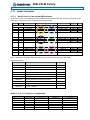
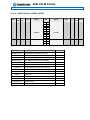
One parallel primary ATA harddisk controller is available on the board.
Standard 3½” harddisks or CD-ROM drives may be attached to the primary controller board by means of the
40 pin IDC connectors, IDE_P.
The primary controller is shared between the IDE_P connector and the backside Compact Flash connector
(986LCD-M/mITX only). In case CF is utilized, only one IDE device is supported on the IDE_P connector.
The harddisk controllers support Bus master IDE, ultra DMA 33/66/100 MHz and standard operation modes.
The signals used for the harddisk interface are the following:
Signal
PDA2..0
HDCS1..0#
Description
Address lines, used to address the I/O registers in the IDE hard disk.
Hard Disk Chip-Select. HDCS0# selects the primary hard disk.
D15..8
High part of data bus.
D7..0
Low part of data bus.
IOR#
I/O Read.
IOW#
I/O Write.
IORDY#
This signal may be driven by the hard disk to extend the current I/O cycle.
RESET#
Reset signal to the hard disk. The signal is similar to RSTDRV in the PC-AT bus.
HDIRQ
Interrupt line from hard disk. Routed by the SiS630 chipset to PC-AT bus interrupt.
CBLID
This input signal (CaBLe ID) is used to detect the type of attached cable: 80-wire cable
when low input and 40-wire cable when 5V via 10Kohm (pull-up resistor).
DDREQ
Disk DMA Request might be driven by the IDE hard disk to request bus master access to
the PCI bus. The signal is used in conjunction with the PCI bus master IDE function and is
not associated with any PC-AT bus compatible DMA channel.
DDACK#
Disk DMA Acknowledge. Active low signal grants IDE bus master access to the PCI bus.
HDACT#
Signal from hard disk indicating hard disk activity. The signal level depends on the hard
disk type, normally active low. The signals from primary and secondary controller are
routed together through diodes and passed to the connector FEATURE.
All of the above signals are compliant to [4].
The pinout of the connectors are defined in the following sections.
986LCD-M Family
KTD-00691-X
4.6.1
Public
User Manual
Date: 2011-05-17
Page
37 of 91
IDE Hard Disk Connector (IDE_P)
This connector can be used for connection of two primary IDE drives. If Compact Flash connector (986LCDM/mITX only) is utilized, only one IDE device is supported.
Note
Pull
U/D
Ioh/Iol
Type
Signal
4K7
8K2
-
TBD
TBD
TBD
TBD
TBD
TBD
TBD
TBD
TBD
TBD
TBD
TBD
TBD
TBD
-
O
IO
IO
IO
IO
IO
IO
IO
IO
PWR
I
O
O
I
O
I
O
O
O
I
RESET#
DA7
DA6
DA5
DA4
DA3
DA2
DA1
DA0
GND
DDRQ
IOW#
IOR#
IORDY
DDACK#
HDIRQ
PDA1
PDA0
HDCS1#
HDACT#
PIN
1
3
5
7
9
11
13
15
17
19
21
23
25
27
29
31
33
35
37
39
2
4
6
8
10
12
14
16
18
20
22
24
26
28
30
32
34
36
38
40
Signal
Type
Ioh/Iol
GND
DA8
DA9
DA10
DA11
DA12
DA13
DA14
DA15
KEY
GND
GND
GND
GND
GND
NC
CBLID#
PDA2
HDCS3#
GND
PWR
IO
IO
IO
IO
IO
IO
IO
IO
PWR
PWR
PWR
PWR
PWR
I
O
O
PWR
TBD
TBD
TBD
TBD
TBD
TBD
TBD
TBD
TBD
TBD
-
Pull
U/D
-
Note
986LCD-M Family
KTD-00691-X
4.6.2
Public
User Manual
Date: 2011-05-17
Page
38 of 91
CF Connector (CF)
This connector is mounted on the backside of the 986LCD-M/mITX only. If a Compact Flash Disk is used,
only one IDE device is supported on the IDE_P connector. The CF socket support DMA/UDMA CF modules.
Note
2
1
Pull
U/D
8K2
4K7
-
Ioh/Iol
TBD
TBD
TBD
TBD
TBD
TBD
TBD
TBD
TBD
TBD
TBD
TBD
-
Type
IO
IO
IO
IO
IO
O
O
O
PWR
I
PWR
PWR
O
I
I
O
I
I
IO
IO
IO
PWR
Signal
NC
DA11
DA12
DA13
DA14
DA15
HDCSA1#
NC
IORA#
IOWA#
5V
HDIRQA
5V
GND
NC
RESET_C#
IORDYA
DDRQA
DDACKA#
HDACTA#
CBLIDA#
DB8
DB9
DB10
GND
PIN
26
27
28
29
30
31
32
33
34
35
36
37
38
39
40
41
42
43
44
45
46
47
48
49
50
1
2
3
4
5
6
7
8
9
10
11
12
13
14
15
16
17
18
19
20
21
22
23
24
25
Note 1: Pin is longer than average length of the other pins.
Note 2: Pin is shorter than average length of the other pins.
Signal
GND
DB3
DB4
DB5
DB6
DB7
HDCSA0#
GND
GND
GND
GND
GND
5V
GND
GND
GND
GND
DAA2
DAA1
DAA0
DB0
DB1
DB2
NC
NC
Type
PWR
IO
IO
IO
IO
IO
O
PWR
PWR
PWR
PWR
PWR
PWR
PWR
PWR
PWR
PWR
O
O
O
IO
IO
IO
Ioh/Iol
TBD
TBD
TBD
TBD
TBD
TBD
TBD
TBD
TBD
Pull
U/D
-
-
-
-
Note
1
2
986LCD-M Family
KTD-00691-X
4.7
Public
User Manual
Date: 2011-05-17
Page
39 of 91
Serial ATA harddisk interface
The 986LCD-M boards have an intergrated SATA Host controller that supports independent DMA operation
on four ports and data transfer rates of up to 3.0Gb/s (300MB/s). The SATA controller supports AHCI mode
and has integrated RAID functionality with support for RAID modes 0, 1, 5 and 10 (Linux O/S only support for
RAID 0 and 1).
4.7.1
SATA Hard Disk Connector (SATA0, SATA1, SATA2, SATA3)
SATA:
PIN
Key
1
2
3
4
5
6
7
Signal
Type
Ioh/Iol
Pull
U/D
GND
SATA* TX+
SATA* TXGND
SATA* RXSATA* RX+
GND
PWR
-
-
PWR
-
-
PWR
-
-
Note
The signals used for the primary Serial ATA harddisk interface are the following:
Signal
SATA* RX+
Description
Host transmitter differential signal pair
SATA* RXSATA* TX+
Host receiver differential signal pair
SATA* TX“*” specifies 0, 1, 2, and 3 depending on SATA port.
All of the above signals are compliant to [4].
986LCD-M Family
KTD-00691-X
4.8
Public
User Manual
Date: 2011-05-17
Page
40 of 91
Printer Port Connector (PRINTER).
The signal definition in standard printer port mode is as follows:
Note
Pull
U/D
Ioh/Iol
Type
Signal
2K2
2K2
2K2
2K2
2K2
2K2
2K2
2K2
2K2
2K2
2K2
2K2
2K2
(24)/24
24/24
24/24
24/24
24/24
24/24
24/24
24/24
24/24
-
OC(O)
IO
IO
IO
IO
IO
IO
IO
IO
I
I
I
I
STB#
PD0
PD1
PD2
PD3
PD4
PD5
PD6
PD7
ACK#
BUSY
PE
SLCT
PIN
1
3
5
7
9
11
13
15
17
19
21
23
25
2
4
6
8
10
12
14
16
18
20
22
24
26
Signal
Type
Ioh/Iol
Pull
U/D
AFD#
ERR#
INIT#
SLIN#
GND
GND
GND
GND
GND
GND
GND
GND
GND
OC(O)
I
OC(O)
OC(O)
PWR
PWR
PWR
PWR
PWR
PWR
PWR
PWR
PWR
(24)/24
(24)/24
(24)/24
-
2K2
2K2
2K2
2K2
-
Note
The interpretation of the signals in standard Centronics mode (SPP) with a printer attached is as follows:
Signal
Description
PD7..0
Parallel data bus. The bus are able to operate in PS/2 compatible bi-directional mode.
SLIN#
Signal to select the printer sent from CPU board to printer.
SLCT
Signal from printer to indicate that the printer is selected.
STB#
This signal indicates to the printer that data at PD7..0 are valid.
BUSY
Signal from printer indicating that the printer cannot accept further data.
ACK#
Input indicating that the printer has received the data and is ready to accept further data.
INIT#
This active low output initializes (resets) the printer.
AFD#
This active low output causes the printer to add a line feed after each line printed.
ERR#
Signal from printer indicating that an error has been detected.
PE#
Signal from printer indicating that the printer is out of paper.
The printer port additionally supports operation in the EPP and ECP mode as defined in [3].
Connecting the cable kit 821026 “Cable LPT 2mm 250mm” to the mITX or the 821031 “Cable LPT 2.54mm
250mm” implements the standard DB-25 interface:
Note
Pull
U/D
Ioh/Iol
Type
Signal
2K2
(24)/24
OC(O)
STB#
1
2K2
24/24
IO
PD0
2
2K2
24/24
IO
PD1
3
2K2
24/24
IO
PD2
4
2K2
24/24
IO
PD3
5
2K2
24/24
IO
PD4
6
2K2
24/24
IO
PD5
7
2K2
24/24
IO
PD6
8
2K2
24/24
IO
PD7
9
2K2
-
I
ACK#
10
2K2
-
I
BUSY
11
2K2
-
I
PE
12
2K2
-
I
SLCT
13
Signal
Type
Ioh/Iol
Pull
U/D
14
AFD#
OC(O)
(24)/24
2K2
15
ERR#
I
-
2K2
16
INIT#
OC(O)
(24)/24
2K2
17
SLIN#
OC(O)
(24)/24
2K2
18
GND
PWR
-
-
19
GND
PWR
-
-
20
GND
PWR
-
-
21
GND
PWR
-
-
22
GND
PWR
-
-
23
GND
PWR
-
-
24
GND
PWR
-
-
25
GND
PWR
-
-
PIN
Note
986LCD-M Family
KTD-00691-X
4.9
Public
User Manual
Date: 2011-05-17
Page
41 of 91
Serial Ports
Four RS232 serial ports are available on the 986LCD-M boards
The typical interpretation of the signals in the COM ports is as follows:
Signal
Description
TxD
Transmitte Data, sends serial data to the device. The signal is set to a marking state on
hardware reset when the transmitter is empty or when loop mode operation is initiated.
RxD
Receive Data, receives serial data from the communication link.
DTR
Data Terminal Ready, indicates to the device that the on-board UART is ready to establish a
communication link.
DSR
Data Set Ready, indicates that data set is ready to establish a communication link.
RTS
Request To Send, indicates to the device that the on-board UART is ready to exchange data.
CTS
Clear To Send, indicates that the modem or data set is ready to exchange data.
DCD
Data Carrier Detect, indicates that the modem or data set has detected the data carrier.
RI
Ring Indicator, indicates that the modem has received a telephone-ringing signal.
The connector pinout for each operation mode is defined in the following sections.
4.9.1
Note
Com1 (Port1) DB9 Connector.
Pull
U/D
Ioh/Iol
Type
Signal
-
-
PWR
GND
-
AO*
AO*
AI*
AI*
DTR
TxD
RxD
DCD
/5K
/5K
PIN
5 9
4 8
3 7
2 6
1
Signal
Type
Ioh/Iol
RI
CTS
RTS
DSR
I
AI*
AO*
AI*
-
Pull
U/D
Note
/5K
/5K
/5K
-
* = +/-12V signals.
4.9.2
Com2, Com3 & Com4 Pin Header Connectors.
The pinout of Serial ports Com2, Com3 and Com4 is as follows:
Note
Pull
U/D
Ioh/Iol
Type
Signal
-
AI*
AI*
AO*
AO*
PWR
DCD
RxD
TxD
DTR
GND
-
-
PIN
1
3
5
7
9
2
4
6
8
10
Signal
Type
Ioh/Iol
DSR
RTS
CTS
RI
5V
AI*
AO*
AI*
I
PWR
-
Pull
U/D
Note
-
-
* = +/-12V signals.
Note 1: 5V supply is shared with supply pins in Com2/Com3/Com4 headers. The common fuse is 1.1A.
If the DB9 adapter (ribbon cable) is used, the DB9 pinout will be identical to the pinout of Serial Com1.
1
986LCD-M Family
KTD-00691-X
4.10
Public
User Manual
Date: 2011-05-17
Page
42 of 91
Ethernet connectors.
The 986LCD-M/mITX and 986LCD-M/ATXP boards supports 3 channels of 10/100/1000Mb Ethernet
RTL8111B LAN controllers.
The 986LCD-M/Flex and 986LCD-M/ATXE boards supports 2 channels of 10/100/1000Mb Ethernet
RTL8111B LAN controllers.
In order to achieve the specified performance of the Ethernet port, Category 5 twisted pair cables must be
used with 10/100MB and Category 5E, 6 or 6E with 1Gb LAN networks.
The signals for the Ethernet ports are as follows:
Signal
Description
MDI[0]+
In MDI mode, this is the first pair in 1000Base-T, i.e. the BI_DA+/- pair, and is the transmit
pair in 10Base-T and 100Base-TX.
MDI[0]-
In MDI crossover mode, this pair acts as the BI_DB+/- pair, and is the receive pair in
10Base-T and 100Base-TX.
MDI[1]+
MDI[1]-
In MDI mode, this is the second pair in 1000Base-T, i.e. the BI_DB+/- pair, and is the
receive pair in 10Base-T and 100Base-TX.
In MDI crossover mode, this pair acts as the BI_DA+/- pair, and is the transmit pair in
10Base-T and 100Base-TX.
MDI[2]+
In MDI mode, this is the third pair in 1000Base-T, i.e. the BI_DC+/- pair.
MDI[2]-
In MDI crossover mode, this pair acts as the BI_DD+/- pair.
MDI[3]+
In MDI mode, this is the fourth pair in 1000Base-T, i.e. the BI_DD+/- pair.
MDI[3]-
In MDI crossover mode, this pair acts as the BI_DC+/- pair.
Note: MDI = Media Dependent Interface.
4.10.1
Ethernet connector 1 (ETHER1)
Ethernet connector 1 is mounted together with USB Ports 0 and 2.
(Not available on 986LCD-M/Flex and 986LCD-M/ATXE).
The pinout of the RJ45 connector is as follows:
Signal
MDI0+
MDI0MDI1+
MDI2+
MDI2MDI1MDI3+
MDI3-
PIN
8
7
6
5
4
Type
3
2
Ioh/Iol
Note
1
On top of Ethernet1 connector there is a Green LED (to the left) turning on when a 100MHz connection is
made and it is flashing when 100MHz traffic is ongoing. The Yellow LED (to the right) turns on when a 1GHz
connection is made and it is flashing when traffic is ongoing.
986LCD-M Family
KTD-00691-X
4.10.2
Public
User Manual
Date: 2011-05-17
Page
43 of 91
Ethernet connector 2/3 (ETHER2/3)
The two Ethernet channels in ETHER2/3 are supported by two discrete Ethernet controllers (RTL8111B)
connected to the onboard PCI bus.
The pinout of the RJ45’s connector are as follows:
Signal
MDI0+
MDI0MDI1+
MDI2+
MDI2MDI1MDI3+
MDI3-
PIN
Type
8
7
6
5
4
3
2
1
1
2
3
4
5
6
7
8
Ioh/Iol
Note
MDI0+
MDI0MDI1+
MDI2+
MDI2MDI1MDI3+
MDI3-
Note: The connector has two LEDs which indicates connection and traffic status. Green/Yellow means
100MHz/1GHz and flasing when traffic is ongoing. The left LED is status for the ETHER3 (buttom port) and
the right LED is for ETHER2. More than one type of connector is approved for this application. Please notice
that it is possible that the shape of the LED might vary depending on actual type of connector.
986LCD-M Family
KTD-00691-X
4.11
Public
User Manual
Date: 2011-05-17
Page
44 of 91
Firewire/ IEEE-1394 connectors.
The 986LCD-M boards supports two IEEE Std 1394a-2000 fully compliant cable ports at 100M bits/s, 200M
bits/s, and 400M bits/s.
4.11.1
IEEE1394 Connector (IEEE1394_0)
The pinout of the Firewire / IEEE1394 connector IEEE1394_0 (stacked together with USB Ports 4 and 5) is
as follows:
Note
Pull
U/D
Ioh/Iol
Type
Signal
PIN
TPA0+
TPB0+
GND
10
9
1
12
11
14
13
+12V
TPB0TPA0Note 1: The 12V supply for the IEEE1394_0 devices is on-board fused with a 1.5A reset-able fuse.
Signal
Description
TPA0+
Differential signal pair A
TPA0–
TPB0+
Differential signal pair B
TPB0–
+12V
4.11.2
+12V supply
IEEE1394 Connector (IEEE1394_1)
The IEEE1394_1 is not mounted on the 986LCD-M/Flex.
The pinout of the Firewire / IEEE1394 connector IEEE1394_1 is as follows:
Note
Pull
U/D
Ioh/Iol
Type
TPA1+
GND
TPB1+
+12V
KEY
1
PIN
Signal
1
3
5
7
9
2
4
6
8
10
Signal
Type
Ioh/Iol
Pull
U/D
TPA1GND
TPB1+12V
GND
Note 1: The 12V supply for the IEEE1394_1 devices is on-board fused with a 1.5A reset-able fuse.
Signal
Description
TPA1+
Differential signal pair A
TPA1–
TPB1+
Differential signal pair B
TPB1–
+12V
+12V supply
Note
1
986LCD-M Family
KTD-00691-X
4.12
Public
User Manual
Date: 2011-05-17
Page
45 of 91
USB Connector (USB)
The 986LCD-M boards contains an Enhanced Host Controller Interface (EHCI) host controller that supports
USB 2.0 allowing data transfers up to 480Mb/s. The 986LCD-M boards also contains four Universal Host
Controller Interface (UHCI Revision 1.1) controllers that support USB full-speed and low-speed signaling.
The 986LCD-M boards supports a total of eight USB 2.0 ports. All eight ports are high-speed, full-speed, and
low-speed capable and USB Legacy mode is supported.
Over-current detection on all eight USB ports is supported.
USB Port 0 and 2 are supplied on the combined ETHER1, USB0, USB2 connector. USB Ports 1 and 3 are
supplied on the FRONTPNL connector; please refer to the FRONTPNL connector section for the pin-out.
USB Port 4 and 5 are supplied on the combined IEEE1394_0, USB4, USB5 connector.
USB Port 6 and 7 are supplied on the internal USB6, USB7 pinrow.
Note: It is recommended to use only High-/Full-Speed USB cable, specified in USB2.0 standard:
4.12.1
USB Connector 0/2 (USB0/2)
USB Ports 0 and 2 are mounted together with ETHER1 ethernet port.
Pull
U/D
Ioh/Iol
Type
Signal
1
/15K
0.25/2
PWR
IO
5V/SB5V
USB0-
1
/15K
0.25/2
PWR
IO
5V/SB5V
USB2-
Note
1
1
PIN
2 3
2
3
Signal
Type
Ioh/Iol
Pull
U/D
GND
USB0+
PWR
IO
0.25/2
/15K
GND
USB2+
PWR
IO
0.25/2
/15K
Note
4
4
Note 1: The 5V supply for the USB devices is on-board fused with a 1.5A reset-able fuse. The supply is
common for the two channels. SB5V is supplied during power down to allow wakeup on USB device activity.
In order to meet the requirements of USB standard, the 5V input supply must be at least 5.00V.
Signal
USB0+ USB0-
Description
Differential pair works as Data/Address/Command Bus.
USB2+ USB2USB5V
5V supply for external devices. Fused with 1.5A reset-able fuse.
986LCD-M Family
KTD-00691-X
4.12.2
Public
User Manual
Date: 2011-05-17
Page
46 of 91
USB Connector 4/5 (USB4/5)
USB Ports 4 and 5 are mounted together with IEEE1394_0 port.
Note
Pull
U/D
Ioh/Iol
Type
Signal
1
1
/15K
0.25/2
PWR
IO
/15K
0.25/2
PWR
IO
2
Signal
Type
Ioh/Iol
Pull
U/D
GND
USB5+
PWR
IO
0.25/2
/15K
GND
USB4+
PWR
IO
0.25/2
/15K
Note
4
5V/SB5V
USB51
1
PIN
2 3
3
4
5V/SB5V
USB4-
Note 1: The 5V supply for the USB devices is on-board fused with a 1.5A reset-able fuse. The supply is
common for the two channels. SB5V is supplied during power down to allow wakeup on USB device activity.
In order to meet the requirements of USB standard, the 5V input supply must be at least 5.00V.
Signal
USB4+ USB4-
Description
Differential pair works as Data/Address/Command Bus.
USB5+ USB5USB5V
4.12.3
5V supply for external devices. Fused with 1.5A reset-able fuse.
USB Connector 6/7 (USB6_7)
The pinout of the USB connector USB6_7 is as follows:
Note
Pull
U/D
1
-
Signal
USB6+ USB6-
Ioh/Iol
Type
Signal
-
PWR
IO
IO
PWR
5V/SB5V
USB6USB6+
GND
KEY
-
PIN
1
3
5
7
9
2
4
6
8
10
Signal
Type
Ioh/Iol
5V/SB5V
USB7USB7+
GND
NC
PWR
IO
IO
PWR
-
Pull
U/D
Note
1
-
-
Description
Differential pair works as Data/Address/Command Bus.
USB7+ USB7USB5V
5V supply for external devices. Fused with 1.5A reset-able fuse.
Note 1: The 5V supply for the USB devices is on-board fused with a 1.5A reset-able fuse. The supply is
common for the two channels. SB5V is supplied during power down to allow wakeup on USB device activity.
In order to meet the requirements of USB standard, the 5V input supply must be at least 5.00V.
986LCD-M Family
KTD-00691-X
4.13
Public
User Manual
Date: 2011-05-17
Page
47 of 91
Audio Connector
4.13.1
Audio Line-in, Line-out and Microphone
Audio Line-in, Line-out and Microphone are available in the stacked audio jack connector. Below is shown
audio stack configuration when configured for 8-channel audio.
Note
Type
Signal
Signal
Type
Note
1
1
CEN-OUT
LFE-OUT
GND
TIP
RING
SLEEVE
TIP
RING
SLEEVE
LINE1-IN-L
LINE1-IN-R
GND
IA
IA
PWR
REAR-OUT-L
REAR-OUT-R
GND
TIP
RING
SLEEVE
TIP
RING
SLEEVE
FRONT-OUT-L
FRONT-OUT-R
GND
OA
OA
PWR
SIDE-OUT-L
SIDE-OUT-R
GND
TIP
RING
SLEEVE
TIP
RING
SLEEVE
MIC1-L
MIC1-R
GND
IA
IA
PWR
Note 1: Signals are shorted to GND internally in the connector, when jack-plug not inserted.
Signal descriptions
Signal
Description
Note
FRONT-OUT-L
Front Speakers (Speaker Out Left).
FRONT-OUT-R
Front Speakers (Speaker Out Right).
REAR-OUT-L
Rear Speakers (Surround Out Left).
REAR-OUT-R
Rear Speakers (Surround Out Right).
SIDE-OUT-L
Side speakers (Surround Out Left)
SIDE-OUT-R
Side speakers (Surround Out Right)
CEN-OUT
Center Speaker (Center Out channel).
LFE-OUT
Subwoofer Speaker (Low Freq. Effect Out).
MIC1
LINE1-IN
MIC Input 1
Line in 1 signals
Audio 2, 4, 6, or 8-channel configuration
Port
Light Blue
Lime
Pink
Gray
Black
Yellow Orange
2-channel
Line in
Line out
Mic in
-
4-channel
Line in
Front speaker out
Mic in
Rear speaker out
-
6-channel
Line in
Front speaker out
Mic in
Rear speaker out
Center/ Subwoofer
8-channel
Line in
Front speaker out
Mic in
Side speaker out
Rear speaker out
Center/ Subwoofer
1
1
986LCD-M Family
KTD-00691-X
4.13.2
Public
User Manual
Date: 2011-05-17
Page
48 of 91
CD-ROM Audio input (CDROM)
CD-ROM audio input may be connected to this connector. It may also be used as a secondary line-in signal.
PIN
Signal
Type
Ioh/Iol
1
2
3
4
CD_Left
CD_GND
CD_GND
CD_Right
IA
IA
IA
IA
-
Pull
U/D
-
Note
1
1
Note 1: The definition of which pins are use for the Left and Right channels is not a worldwide accepted
standard. Some CDROM cable kits expect reverse pin order.
Signal
Description
CD_Left
CD_Right
Left and right CD audio input lines or secondary Line-in.
CD_GND
Analogue GND for Left and Right CD.
(This analogue GND is not shorted to the general digital GND on the board).
986LCD-M Family
KTD-00691-X
4.13.3
Note
Public
User Manual
Date: 2011-05-17
Page
49 of 91
AUDIO Header (AUDIO_HEAD)
Pull
U/D
Ioh/
Iol
-
-
Signal
Type
PWR
Signal
LFE-OUT
AAGND
FRONT-OUT-L
AAGND
REAR-OUT-L
SIDE-OUT-L
AAGND
MIC1-L
AAGND
LINE1-IN-L
NC
GND
SPDIF-OUT
PIN
1
3
5
7
9
11
13
15
17
19
21
23
25
2
4
6
8
10
12
14
16
18
20
22
24
26
Signal
CEN-OUT
AAGND
FRONT-OUT-R
AAGND
REAR-OUT-R
SIDE-OUT-R
AAGND
MIC1-R
AAGND
LINE1-IN-R
AAGND
SPDIF-IN
GND
Description
FRONT-OUT-L
Front Speakers (Speaker Out Left).
FRONT-OUT-R
Front Speakers (Speaker Out Right).
REAR-OUT-L
Rear Speakers (Surround Out Left).
REAR-OUT-R
Rear Speakers (Surround Out Right).
SIDE-OUT-L
Side speakers (Surround Out Left)
SIDE-OUT-R
Side speakers (Surround Out Right)
CEN-OUT
Center Speaker (Center Out channel).
LFE-OUT
Subwoofer Speaker (Low Freq. Effect Out).
NC
MIC1
LINE1-IN
F-SPDIF-IN
F-SPDIF-OUT
AAGND
No connection
MIC Input 1
Line in 1 signals
S/PDIF Input
S/PDIF Output
Audio Analogue ground
Note
Type
PWR
Ioh/
Iol
Pull
U/D
-
-
Note
986LCD-M Family
KTD-00691-X
4.14
Public
User Manual
Date: 2011-05-17
Page
50 of 91
Fan connectors , FAN_CPU and FAN_SYS.
The FAN_CPU is used for connection of the active cooler for the CPU.
The FAN_SYS can be used to power, control and monitor a fan for chassis ventilation etc.
PIN
1
2
3
Signal
SENSE
12V
GND
Type
PWR
PWR
PWR
Ioh/Iol
-
Pull
U/D
4K7
-
Note
Signal description:
Signal
12V
Description
+12V supply for fan, can be turned on/off or modulated (PWM) by the chipset.
A maximum of 800 mA can be supplied from this pin.
SENSE
4.15
Tacho signal from the fan for supervision. The signals shall be generated by an open collector
transistor or similar. On board is a pull-up resistor 4K7 to +12V. The signal has to be pulses,
typically 2 Hz per rotation.
The Clear CMOS Jumper, Clr-CMOS.
The Clr-CMOS Jumper is used to clear the CMOS content.
- CPU location No Jumper installed
1
3
(Pin numbers)
·
Jumper normal position
Jumper in Clear CMOS position
2
·
To clear all CMOS settings, including Password protection, move the CMOS_CLR jumper (with or without power
on the system) for approximately 1 minute.
Alternatively if no jumper is available, turn off power and remove the battery for 1 minute, but be careful to
orientate the battery corretly when reinserted.
986LCD-M Family
KTD-00691-X
4.16
Note
4.17
Note
Public
User Manual
Date: 2011-05-17
Page
51 of 91
TPM connector (unsupported).
Pull
U/D
-
Ioh/Iol
-
Type
PWR
PWR
Signal
LPC CLK
LPC FRAME#
LPC RST#
LPC AD3
+3V3
LPC AD0
SMB_CLK
SB3V3
GND
SUS_STAT#
PIN
1
3
5
7
9
11
13
15
17
19
2
6
8
10
12
14
16
18
20
Signal
GND
KEY
+5V
LPC AD2
LPC AD1
GND
SMB_DATA
LPC SERIRQ
CLKRUN#
LPC IRQ#
Type
Ioh/Iol
Pull
U/D
Note
Signal
SB3V3
BOOT0
BOOT1
NC
GND
Type
Ioh/Iol
Pull
U/D
Note
SPI connector (unsupported).
Pull
U/D
10K/
10K/
10K/
10K/
Ioh/Iol
Type
Signal
SPI_CLK
SPI_CS
SPI_ARB
SPI_MOSI
SPI_MISO
PIN
1
3
5
7
9
2
4
6
8
10
986LCD-M Family
KTD-00691-X
4.18
Public
User Manual
Date: 2011-05-17
Page
52 of 91
Front Panel connector (FRONTPNL).
Note
Pull
U/D
Ioh/Iol
-
-
-
-
Type
PWR
PWR
OC
PWR
1
Signal
USB13_5V
USB1USB1+
GND
NC
+5V
HD_LED
GND
RSTIN#
SB3V3
AGND
MIC2-L
PIN
1
3
5
7
9
11
13
15
17
19
21
23
2
4
6
8
10
12
14
16
18
20
22
24
Signal
USB13_5V
USB3USB3+
GND
LINE2-IN-L
+5V
SUS_LED
PWRBTN_IN#
GND
LINE2-IN-R
AGND
MIC2-R
Type
Ioh/Iol
Pull
U/D
PWR
PWR
-
-
PWR
-
-
-
Note
1
Note 1: Unsupported inputs, leave these inputs unconnected.
Signal
USB13_5V
USB1+
USB1USB3+
USB3+5V
HD_LED
SUS_LED
PWRBTN_IN#
Description
+5V supply for the USB devices on USB Port 1 and 3 is on-board fused with a 1.5A
reset-able fuse. The supply is common for the two channels. SB5V is supplied during
power down to allow wakeup on USB device activity.
Universal Serial Bus Port 1 Differentials: Bus Data/Address/Command Bus.
Universal Serial Bus Port 3 Differentials: Bus Data/Address/Command Bus.
Maximum load is 1A or 2A per pin if using IDC connectorfladkabel or crimp terminals
respectively.
Hard Disk Activity LED (active low signal). Output is via 475Ω to OC.
Suspend Mode LED (active high signal). Output is via 475Ω.
Power Button In. Toggle this signal low to start the ATX / BTX PSU and boot the board.
RSTIN#
Reset Input. Pull low to reset the board.
LINE2-IN
Line in 2 signals
MIC2
MIC2-L and MIC2-R are unsupported. Leave these terminals unconnected.
SB3V3
Standby 3.3V voltage
AGND
Analogue Ground for Audio
986LCD-M Family
KTD-00691-X
4.19
Public
User Manual
Date: 2011-05-17
Page
53 of 91
Feature Connector (FEATURE)
Pull
PIN
Signal
Signal
Type Ioh/Iol U/D Note
INTRUDER#
1
2
GND
PWR
EXT_ISAIRQ# 3
4
EXT_SMI#
I
PWR_OK
5
6
SB5V
PWR
PWR
SB3V3
7
8
EXT_BAT
PWR
PWR
+5V
9 10
GND
PWR
3
2K7/ /12mA
IOT
GPIO0
11 12
GPIO1
IOT
/12mA 2K7/
3
3
2K7/ /12mA
IOT
GPIO2
13 14
GPIO3
IOT
/12mA 2K7/
3
4
2K7/ /12mA
IOT
GPIO4
15 16
GPIO5
IOT
/12mA 2K7/
4
4
2K7/ /12mA
IOT
GPIO6
17 18
GPIO7
IOT
/12mA 2K7/
4
PWR
GND
19 20
FAN3OUT
FAN3IN
21 22
+12V
PWR
TEMP3IN
23 24
VREF
PWR
GND
25 26
IRRX
IRTX
27 28
GND
PWR
1
2K7/
SMBC
29 30
SMBD
2K7/
1
Note 1: Pull-up to +5V. Note 2: Pull-up to RTC-Voltage. Note 3: Pull-up to +5VDual (+5V or +5VSB). Note 4:
Pull-up to +5VSB.
Note
2
Pull
U/D
243K/
Signal
INTRUDER#
EXT_ISAIRQ#
Ioh/Iol
-
Type
I
Description
INTRUDER, may be used to detect if the system case has been opened. This signal’s
status is readable, so it may be used like a GPI when the Intruder switch is not needed.
EXTernal ISA IRQ, (active low input) can activate standard AT-Bus IRQ-interrupt.
EXT_SMI#
External SMI, (active low input) signal can activate SMI interrupt.
PWR_OK
PoWeR OK, signal is high if no power failures is detected.
SB5V
StandBy +5V supply.
SB3V3
Standby 3.3V. Max. load is 0.75A (1.5A < 1 sec.)
(EXTernal BATtery) the + terminal of an external primary cell battery can be connected to
this pin. The – terminal of the battery shall be connected to GND (etc. pin 10). The
external battery is protected against charging and can be used with or without the on
board battery installed. The external battery voltage shall be in the range: 2.5 - 4.0 V DC.
Max. load is 0.75A (1.5A < 1 sec.)
General Purpose Inputs / Output. These Signals may be controlled or monitored through
the use of the KONTRON API (Application Programming Interface) available for Win98,
WinXP and Win2000.
FAN 3 speed control OUTput. This analogue voltage output signal can be used to control
the Fan’s speed. The output has 16 values in the range from 0 – 5V. For more
information please look into the datasheet for the Winbond I/O controller W83627.
EXT_BAT
+5V
GPIO0..7
FAN3OUT
FAN3IN
+12V
FAN3 Input. 0V to +5V amplitude Fan 3 tachometer input.
VREF
Max. load is 0.75A (1.5A < 1 sec.)
Temperature sensor 3 input. (Recommended: Transistor 2N3904, having emitter
connected to GND (pin 25), collector and basis shorted and connected to pin23 (Temp3In). Further a resistor 30K/1% shall be connected between pin 23 and pin 24 (Vref).
Precision +/- 7ºC.
Voltage REFerence, reference voltage to be used with TEMP3IN input.
IRRX
IR Receive input (IrDA 1.0, SIR up to 1.152K bps)
IRTX
IR Transmit output (IrDA 1.0, SIR up to 1.152K bps)
SMBC
SMBus Clock signal
SMBD
SMBus Data signal
TEMP3IN
986LCD-M Family
KTD-00691-X
4.20
4.20.1
Public
User Manual
Date: 2011-05-17
Page
54 of 91
PCI Slot
PCI Slot Connector
Terminal
Note
Type
Signal
S
C
Signal
Type
PWR
O
PWR
I
PWR
PWR
I
I
I
I
OT
PWR
PWR
O
PWR
O
PWR
I
PWR
IOT
IOT
PWR
IOT
IOT
PWR
IOT
IOT
PWR
IOT
IOT
PWR
IOT
IOT
PWR
IOT
PWR
IOT
PWR
IOT
IOT
PWR
IOC
PWR
IOT
IOT
PWR
IOT
IOT
PWR
-12V
TCK
GND
TDO
+5V
+5V
INTB#
INTD#
REQ2#
REQ3#
GNT2#
GND
GND
CLKA
GND
CLKB
GND
REQ0#
+5V (I/O)
AD31
AD29
GND
AD27
AD25
+3.3V
C/BE3#
AD23
GND
AD21
AD19
+3.3V
AD17
C/BE2#
GND
IRDY#
+3.3V
DEVSEL#
GND
LOCK#
PERR#
+3.3V
SERR#
+3.3V
C/BE1#
AD14
GND
AD12
AD10
GND
F01
F02
F03
F04
F05
F06
F07
F08
F09
F10
F11
F12
F13
F14
F15
F16
F17
F18
F19
F20
F21
F22
F23
F24
F25
F26
F27
F28
F29
F30
F31
F32
F33
F34
F35
F36
F37
F38
F39
F40
F41
F42
F43
F44
F45
F46
F47
F48
F49
E01
E02
E03
E04
E05
E06
E07
E08
E09
E10
E11
E12
E13
E14
E15
E16
E17
E18
E19
E20
E21
E22
E23
E24
E25
E26
E27
E28
E29
E30
E31
E32
E33
E34
E35
E36
E37
E38
E39
E40
E41
E42
E43
E44
E45
E46
E47
E48
E49
TRST#
+12V
TMS
TDI
+5V
INTA#
INTC#
+5V
CLKC
+5V (I/O)
CLKD
GND
GND
GNT3#
RST#
+5V (I/O)
GNT0#
GND
REQ1#
AD30
+3.3V
AD28
AD26
GND
AD24
GNT1#
+3.3V
AD22
AD20
GND
AD18
AD16
+3.3V
FRAME#
GND
TRDY#
GND
STOP#
+3.3V
SDONE
SB0#
GND
PAR
AD15
+3.3V
AD13
AD11
GND
AD09
O
PWR
O
O
PWR
I
I
PWR
O
PWR
O
PWR
PWR
OT
O
PWR
OT
PWR
I
IOT
PWR
IOT
IOT
PWR
IOT
OT
PWR
IOT
IOT
PWR
IOT
IOT
PWR
IOT
PWR
IOT
PWR
IOT
PWR
IO
IO
PWR
IOT
IOT
PWR
IOT
IOT
PWR
IOT
F52
F53
F54
F55
F56
F57
F58
F59
F60
F61
F62
E52
E53
E54
E55
F56
E57
E58
E59
E60
E61
E62
C/BE0#
+3.3V
AD06
AD04
GND
AD02
AD00
+5V (I/O)
REQ64#
+5V
+5V
SOLDER SIDE
IOT
IOT
PWR
IOT
IOT
PWR
IOT
PWR
IOT
PWR
PWR
AD08
AD07
+3.3V
AD05
AD03
GND
AD01
+5V (I/O)
ACK64#
+5V
+5V
COMPONENT SIDE
IOT
PWR
IOT
IOT
PWR
IOT
IOT
PWR
IOT
PWR
PWR
Note
986LCD-M Family
KTD-00691-X
4.20.2
Public
User Manual
Date: 2011-05-17
Page
55 of 91
Signal Description –PCI Slot Connector
SYSTEM PINS
Clock provides timing for all transactions on PCI and is an input to every PCI device. All other PCI signals,
CLK
except RST#, INTA#, INTB#, INTC#, and INTD#, are sampled on the rising edge of CLK and all other
timing parameters are defined with respect to this edge. PCI operates at 33 MHz.
Reset
is used to bring PCI-specific registers, sequencers, and signals to a consistent state. What effect
RST#
RST# has on a device beyond the PCI sequencer is beyond the scope of this specification, except for
reset states of required PCI configuration registers. Anytime RST# is asserted, all PCI output signals
must be driven to their benign state. In general, this means they must be asynchronously tri-stated.
SERR# (open drain) is floated. REQ# and GNT# must both be tri-stated (they cannot be driven low or
high during reset). To prevent AD, C/BE#, and PAR signals from floating during reset, the central
resource may drive these lines during reset (bus parking) but only to a logic low level–they may not be
driven high.
RST# may be asynchronous to CLK when asserted or deasserted. Although asynchronous, deassertion
is guaranteed to be a clean, bounce-free edge. Except for configuration accesses, only devices that are
required to boot the system will respond after reset.
ADDRESS AND DATA
Address and Data are multiplexed on the same PCI pins. A bus transaction consists of an address phase
AD[31::00]
followed by one or more data phases. PCI supports both read and write bursts.
The address phase is the clock cycle in which FRAME# is asserted. During the address phase AD[31::00]
contain a physical address (32 bits). For I/O, this is a byte address; for configuration and memory, it is a
DWORD address. During data phases AD[07::00] contain the least significant byte (lsb) and AD[31::24]
contain the most significant byte (msb). Write data is stable and valid when IRDY# is asserted and read
data is stable and valid when TRDY# is asserted. Data is transferred during those clocks where both
IRDY# and TRDY# are asserted.
C/BE[3::0]# Bus Command and Byte Enables are multiplexed on the same PCI pins. During the address phase of a
transaction, C/BE[3::0]# define the bus command. During the data phase C/BE[3::0]# are used as Byte
Enables. The Byte Enables are valid for the entire data phase and determine which byte lanes carry
meaningful data. C/BE[0]# applies to byte 0 (lsb) and C/BE[3]# applies to byte 3 (msb).
Parity is even parity across AD[31::00] and C/BE[3::0]#. Parity generation is required by all PCI agents.
PAR
PAR is stable and valid one clock after the address phase. For data phases, PAR is stable and valid one
clock after either IRDY# is asserted on a write transaction or TRDY# is asserted on a read transaction.
Once PAR is valid, it remains valid until one clock after the completion of the current data phase. (PAR
has the same timing as AD[31::00], but it is delayed by one clock.) The master drives PAR for address
and write data phases; the target drives PAR for read data phases.
INTERFACE CONTROL PINS
Cycle Frame is driven by the current master to indicate the beginning and duration of an access.
FRAME#
FRAME# is asserted to indicate a bus transaction is beginning. While FRAME# is asserted, data transfers
continue. When FRAME# is deasserted, the transaction is in the final data phase or has completed.
Initiator Ready indicates the initiating agent’s (bus master’s) ability to complete the current data phase of
IRDY#
the transaction. IRDY# is used in conjunction with TRDY#. A data phase is completed on any clock both
IRDY# and TRDY# are sampled asserted. During a write, IRDY# indicates that valid data is present on
AD[31::00]. During a read, it indicates the master is prepared to accept data. Wait cycles are inserted
until both IRDY# and TRDY# are asserted together.
Target Ready indicates the target agent’s (selected device’s) ability to complete the current data phase of
TRDY#
the transaction. TRDY# is used in conjunction with IRDY#. A data phase is completed on any clock both
TRDY# and IRDY# are sampled asserted. During a read, TRDY# indicates that valid data is present on
AD[31::00]. During a write, it indicates the target is prepared to accept data. Wait cycles are inserted until
both IRDY# and TRDY# are asserted together.
Stop indicates the current target is requesting the master to stop the current transaction.
STOP#
Lock indicates an atomic operation that may require multiple transactions to complete. When LOCK# is
LOCK#
asserted, non-exclusive transactions may proceed to an address that is not currently locked. A grant to
start a transaction on PCI does not guarantee control of LOCK#. Control of LOCK# is obtained under its
own protocol in conjunction with GNT#. It is possible for different agents to use PCI while a single master
retains ownership of LOCK#. If a device implements Executable Memory, it should also implement
LOCK# and guarantee complete access exclusion in that memory. A target of an access that supports
LOCK# must provide exclusion to a minimum of 16 bytes (aligned). Host bridges that have system
memory behind them should implement LOCK# as a target from the PCI bus point of view and optionally
as a master.
Initialization Device Select is used as a chip select during configuration read and write transactions.
IDSEL
Device Select, when actively driven, indicates the driving device has decoded its address as the target of
DEVSEL#
the current access. As an input, DEVSEL# indicates whether any device on the bus has been selected.
(continues)
986LCD-M Family
KTD-00691-X
Public
User Manual
Date: 2011-05-17
Page
56 of 91
ARBITRATION PINS (BUS MASTERS ONLY)
Request indicates to the arbiter that this agent desires use of the bus. This is a point to point signal.
REQ#
Every master has its own REQ# which must be tri-stated while RST# is asserted.
Grant indicates to the agent that access to the bus has been granted. This is a point to point signal. Every
GNT#
master has its own GNT# which must be ignored while RST# is asserted.
While RST# is asserted, the arbiter must ignore all REQ# lines since they are tri-stated and do not
contain a valid request. The arbiter can only perform arbitration after RST# is deasserted. A master must
ignore its GNT# while RST# is asserted. REQ# and GNT# are tri-state signals due to power sequencing
requirements when 3.3V or 5.0V only add-in boards are used with add-in boards that use a universal I/O
buffer.
ERROR REPORTING PINS.
The error reporting pins are required by all devices and maybe asserted when enabled
Parity Error is only for the reporting of data parity errors during all PCI transactions except a Special
PERR#
Cycle. The PERR# pin is sustained tri-state and must be driven active by the agent receiving data two
clocks following the data when a data parity error is detected. The minimum duration of PERR# is one
clock for each data phase that a data parity error is detected. (If sequential data phases each have a data
parity error, the PERR# signal will be asserted for more than a single clock.) PERR# must be driven high
for one clock before being tri-stated as with all sustained tri-state signals. There are no special conditions
when a data parity error may be lost or when reporting of an error may be delayed. An agent cannot
report a PERR# until it has claimed the access by asserting DEVSEL# (for a target) and completed a
data phase or is the master of the current transaction.
System Error is for reporting address parity errors, data parity errors on the Special Cycle command, or
SERR#
any other system error where the result will be catastrophic. If an agent does not want a non-maskable
interrupt (NMI) to be generated, a different reporting mechanism is required. SERR# is pure open drain
and is actively driven for a single PCI clock by the agent reporting the error. The assertion of SERR# is
synchronous to the clock and meets the setup and hold times of all bused signals. However, the restoring
of SERR# to the deasserted state is accomplished by a weak pullup (same value as used for s/t/s) which
is provided by the system designer and not by the signaling agent or central resource. This pull-up may
take two to three clock periods to fully restore SERR#. The agent that reports SERR#s to the operating
system does so anytime SERR# is sampled asserted.
INTERRUPT PINS (OPTIONAL).
Interrupts on PCI are optional and defined as “level sensitive,” asserted low (negative true), using open drain output
drivers. The assertion and deassertion of INTx# is asynchronous to CLK. A device asserts its INTx# line when
requesting attention from its device driver. Once the INTx# signal is asserted, it remains asserted until the device driver
clears the pending request. When the request is cleared, the device deasserts its INTx# signal. PCI defines one
interrupt line for a single function device and up to four interrupt lines for a multi-function device or connector. For a
single function device, only INTA# may be used while the other three interrupt lines have no meaning.
Interrupt A is used to request an interrupt.
INTA#
INTB#
Interrupt B is used to request an interrupt and only has meaning on a multi-function device.
INTC#
Interrupt C is used to request an interrupt and only has meaning on a multi-function device.
INTD#
Interrupt D is used to request an interrupt and only has meaning on a multi-function device.
986LCD-M Family
KTD-00691-X
4.20.3
Public
User Manual
Date: 2011-05-17
Page
57 of 91
PCI IRQ & INT routing
Board type
Slot
IDSEL
INTA
INTB
INTC
INTD
986LCD-M/mITX
1
AD17
INT_PIRQ#E
INT_PIRQ#F
INT_PIRQ#G
INT_PIRQ#H
986LCD-M/FLEX
1
AD17
INT_PIRQ#E
INT_PIRQ#F
INT_PIRQ#G
INT_PIRQ#H
2
AD18
INT_PIRQ#F
INT_PIRQ#G
INT_PIRQ#H
INT_PIRQ#E
1
AD17
INT_PIRQ#E
INT_PIRQ#F
INT_PIRQ#G
INT_PIRQ#H
2
AD18
INT_PIRQ#F
INT_PIRQ#G
INT_PIRQ#H
INT_PIRQ#E
3
AD19
INT_PIRQ#G
INT_PIRQ#H
INT_PIRQ#E
INT_PIRQ#F
4
AD20
INT_PIRQ#H
INT_PIRQ#E
INT_PIRQ#F
INT_PIRQ#G
5
AD21
INT_PIRQ#D
INT_PIRQ#C
INT_PIRQ#B
INT_PIRQ#A
6
AD22
INT_PIRQ#C
INT_PIRQ#B
INT_PIRQ#A
INT_PIRQ#D
1
AD17
INT_PIRQ#E
INT_PIRQ#F
INT_PIRQ#G
INT_PIRQ#H
2
AD18
INT_PIRQ#F
INT_PIRQ#G
INT_PIRQ#H
INT_PIRQ#E
3
AD19
INT_PIRQ#G
INT_PIRQ#H
INT_PIRQ#E
INT_PIRQ#F
4
AD20
INT_PIRQ#H
INT_PIRQ#E
INT_PIRQ#F
INT_PIRQ#G
5
AD21
INT_PIRQ#D
INT_PIRQ#C
INT_PIRQ#B
INT_PIRQ#A
986LCD-M/ATXP
986LCD-M/ATXE
When using the 820982 “PCI Riser - Flex - 2slot w. arbiter” the lower slot has IDSEL / IRQs routed straight
through and the top slot has the routing: IDSEL=AD22, INT_PIRQ#F, INT_PIRQ#G, INT_PIRQ#H,
INT_PIRQ#E. 820982 PCI Riser shall be plugged into Slot #1.
986LCD-M Family
KTD-00691-X
5.
Public
User Manual
Date: 2011-05-17
Page
58 of 91
Onboard Connectors
Connector
Onboard Connectors
Mating Connectors
Manufacturer
Type no.
Manufacturer
Type no.
Molex
22-23-2031
AMP
1375820-3
KBDMSE
Molex
22-23-2061
Molex
22-01-2065
CDROM
Foxconn
HF1104E
Molex
50-57-9404
Molex
70543-0038
Molex
67491-0020
Molex
67489-8005
Kontron
KT 821035 (cable kit)
Molex
39-01-2205
Molex
39-01-2245
FAN_SYS,
FAN_CPU
SATA0-3
ATXPWR
Molex
44206-0002
ATX+12V
Foxconn
HM2502E
Molex
39-01-2045
COM2
Foxconn
HL20051
Molex
90635-1103
COM3
Kontron
KT 821016 (cable kit)
COM4
Kontron
KT 821017 (cable kit)
IEEE1394_0
IEEE1394_1
Foxconn
HC11051-P9
Kontron
KT 821040 (cable kit)
USB6_7
Foxconn
HC11051-P9
Kontron
KT 821401 (cable kit)
PRINTER for
Foxconn
HS55137
Molex
51110-2651
Kontron
KT 821026 (cable kit)
Molex
90635-1263
Kontron
KT 821031 (cable kit)
Molex
51110-2651
Kontron
KT 821043 (cable kit)
Molex
90635-1243
Kontron
KT 821042 (cable kit)
Molex
51110-3051
Kontron
KT 821041 (cable kit)
Kontron
KT 821018 (cable kit)
Kontron
KT 821013 (cable kit)
Don Connex
A32-40-C-G-B-1
Kontron
KT 821515 (cable kit)
Kontron
KT 821155 (cable kit)
mITX
PRINTER for
Foxconn
HL2213F
Flex/ATXP/ATXE
AUDIO_HEAD
FRONTPNL
FEATURE
IDE_P
LVDS
Molex
Foxconn
Molex
Foxconn
Don Connex
87831-2620
HL20121
87831-3020
HL20201-UD2
C44-40BSB1-G
986LCD-M Family
KTD-00691-X
6.
6.1
Public
User Manual
Date: 2011-05-17
Page
59 of 91
System Ressources
Memory map
Address range (hex)
00000000
0009FFFF
000A0000
000BFFFF
000A0000
000BFFFF
000C0000
000CFFFF
000D0000
000DFFFF
000E0000
000FFFFF
00100000
3F7FFFFF
3F800000
FFFFFFFF
D0000000
DFFFFFFF
E0000000
E3FFFFFF
FEC00000
FEC00FFF
FED13000
FED19FFF
FED1C000 FED1FFFF
FED20000
FED8FFFF
FEE00000
FEE00FFF
FF400000
FF4FFFFF
FF4FF000
FF4FFFFF
FF500000
FF5FFFFF
FF5FF000
FF5FFFFF
FF600000
FF6FFFFF
FF6FF000
FF6FFFFF
FF7C8000
FF7CBFFF
FF7CF800
FF7CFFFF
FF980000
FF9FFFFF
FFA37800
FFA37BFF
FFA37C00
FFA37FFF
FFA38000
FFA3BFFF
FFA40000
FFA7FFFF
FFA80000
FFAFFFFF
FFB00000
FFBFFFFF
FFC00000
FFEFFFFF
FFF00000
FFFFFFFF
Size
655360
131072
131072
65536
65536
131072
1064304640
3229614080
268435456
67108864
4096
28672
16384
458752
4096
1048576
4096
1048576
4096
1048576
4096
4096
2048
524288
1024
1024
16384
262144
524288
1048576
3145728
1048576
Description
System board
Mobile Intel 945GM Express Chipset Family
PCI bus
System board
PCI bus
System board
System board
PCI bus
Mobile Intel 945GM Express Chipset Family
Motherboards resources
Motherboards resources
System board
Motherboards resources
Motherboards resources
Motherboards resources
Intel 82801G PCI Express Root Port
Realtek RTL8111 PCI-E Gigabit Ethernet NIC
Intel 82801G PCI Express Root Port
Realtek RTL8111 PCI-E Gigabit Ethernet NIC
Intel 82801G PCI Express Root Port
Realtek RTL8111 PCI-E Gigabit Ethernet NIC
Texas Inst. OHCI Compliant IEEE 1394 Host Controller
Texas Inst. OHCI Compliant IEEE 1394 Host Controller
Mobile Intel 945GM Express Chipset Family
Intel 82801GR/GH SATA RAID Controller
Intel 82801G USB2 Enhanced Host Controller
Microsoft UAA Bus Driver for High Definition Audio
Mobile Intel 945GM Express Chipset Family
Mobile Intel 945GM Express Chipset Family
Intel 82802 Firmware Hub Device
Motherboard resources
Intel 82802 Firmware Hub Device
986LCD-M Family
KTD-00691-X
6.2
Bus
#
0
0
0
0
0
0
0
0
0
0
0
0
0
0
0
0
0
1
2
3
4
4
*
*
Public
User Manual
Date: 2011-05-17
Page
60 of 91
PCI devices
Device
#
0
2
2
27
28
28
28
29
29
29
29
29
30
31
31
31
31
0
0
0
0
1
-
Function
#
0
0
1
0
0
1
2
0
1
2
3
7
0
0
1
2
3
0
0
0
0
0
-
Vendor
ID
8086h
8086h
8086h
8086h
8086h
8086h
8086h
8086h
8086h
8086h
8086h
8086h
8086h
8086h
8086h
8086h
8086h
10ECh
10ECh
10ECh
104Ch
-
Device
ID
27A0h
27A2h
27A6h
27D8h
27D0h
27D2h
27D4h
27C8h
27C9h
27CAh
27CBh
27CCh
244Eh
27B8h
27DFh
27C3/27C0
27DAh
8168h
8168h
8168h
8023h
-
IDSEL
Chip
Device Function
Host bridge
VGA controller
Display controller
AD16
AD17
-
ICH7
945GME
945GME
ICH7
ICH7
ICH7
ICH7
ICH7
ICH7
ICH7
ICH7
ICH7
ICH7
ICH7
ICH7
ICH7
ICH7
RTL8111
RTL8111
RTL8111
TSB43AB22
-
Pci to Pci bridge
Pci to Pci bridge
Pci to Pci bridge
USB
USB
USB
USB
USB
Pci to Pci bridge
ISA Bridge
IDE Controller
RAID/IDE Controller
SMBus
Ethernet
Ethernet
Ethernet
FireWire
PCI slot #1
PCI-E slot #1
Mini PCI-E slot #1
When a PCI-E or Mini PCI-E card is used it could change the BUS number on other PCI-E and PCI devices
like RTL8111 and FireWire.
Note: All PCI slots for the 986LCD-M boards supports PCI BUS Mastering.
IRQ
NMI
IRQ0
IRQ1
IRQ2
IRQ3
IRQ4
IRQ5
IRQ6
IRQ7
IRQ8
IRQ9
IRQ10
IRQ11
IRQ12
IRQ13
IRQ14
IRQ15
IRQ16
IRQ17
IRQ18
IRQ19
IRQ20
IRQ21
IRQ22
IRQ23
IRQ24
IRQ25
IRQ26
·
·
·
·
·
·
·
·
·
·
·
·
·
·
·
·
·
·
·
·
Page
·
·
·
Available on PCI slots as IRQA-IRQD depending on selections in the BIOS
May be used by onboard SMBus Controller
May be used by onboard VGA Controller
Date: 2011-05-17
May be used by onboard Ethernet controller 3
May be used by onboard Ethernet controller 2
May be used by onboard Ethernet controller 1
May be used by onboard USB controller
May be used for PCI Express Root Port
User Manual
May be used for onboard Sound System
May be used for SATA RAID controller
May be used by secondary harddisk controller
May be used by primary harddisk controller
Used for Onboard co-processor support
May be used by onboard P/S 2 support
Used by onboard Real Time Clock Alarm
May be used by onboard Floppy disk Controller
May be used by onboard Parallel Port
May be used by onboard FireWire controller
Public
May be used by onboard Serial Port D
May be used by onboard Serial Port C
KTD-00691-X
May be used by onboard Serial Port B / IrDA Port
May be used by onboard Serial Port A
Used for Cascading IRQ8-IRQ15
Onboard Keyboard Interrupt
Onboard Timer 0 Interrupt
6.3
Onboard system parity errors and IOCHCHK signal activation
986LCD-M Family
61 of 91
Interrupt Usage
·
Notes
·
·
·
·
·
·
·
·
·
·
1, 2
1, 2
1, 2
1, 2
1, 2
·
·
·
·
1, 2
1, 2
1, 2
1
·
·
1
1
3
3
3
3
3
3
3
3
3
3
3
Notes:
1.
Availability of the shaded IRQs depends on the setting in the BIOS. According to the PCI Standard,
PCI Interrupts IRQA-IRQD can be shared.
2.
These interrupt lines are managed by the PnP handler and are subject to change during system
initialisation.
3.
IRQ16 to IRQ26 are APIC interrupts
986LCD-M Family
KTD-00691-X
6.4
Public
User Manual
Date: 2011-05-17
I/O Map
Address (hex)
Size
Description
00200021
1
Programmable interrupt controller
00400043
4
System Timer
00600060
1
Standard keyboard
00610061
1
System speaker
00640064
1
Standard keyboard
00700071
2
System CMOS/Real time clock
017001F7
8
Secondary Parallel ATA IDE Channel
01F0- 01F7
8
Primary Parallel ATA IDE Channel
02E8- 02EF
8
Comport 4
02F8- 02FF
8
Comport 2 / IRDA
03760376
1
Secondary IDE Channel
0378037F
8
Printer Port
03B0- 03BB
12
945GM VGA Controller
03C0- 03DF
32
945GM VGA Controller
03E8- 03EF
8
Comport 3
03F6- 03F6
1
Primary IDE Channel
03F8- 03FF
8
Comport 1
0400041F
32
SMBus Controller
A000- AFFF
4096
PCI Express Root Port
A800- A8FF
256
RTL8111 PCI-E Gigabit Ethernet NIC
B000- BFFF
4096
PCI Express Root Port
B800- B8FF
256
RTL8111 PCI-E Gigabit Ethernet NIC
C000- CFFF
4096
PCI Express Root Port
C800- C8FF
256
RTL8111 PCI-E Gigabit Ethernet NIC
D800- D81F
32
Intel 82801G ICH7 USB Universal Host Controller
D880- D89F
32
Intel 82801G ICH7 USB Universal Host Controller
DC00- DC1F
32
Intel 82801G ICH7 USB Universal Host Controller
E000- E01F
32
Intel 82801G ICH7 USB Universal Host Controller
E080- E08F
16
Intel 82801GR/GH Serial ATA Storage Controller
E400- E403
4
Intel 82801GR/GH Serial ATA Storage Controller
E480- E487
8
Intel 82801GR/GH Serial ATA Storage Controller
E800- E803
4
Intel 82801GR/GH Serial ATA Storage Controller
E880- E887
8
Intel 82801GR/GH Serial ATA Storage Controller
EC00- EC07
8
945GM VGA Controller
FFA0- FFAF
16
Intel 82801G ICH7 Ultra ATA Storage Controllers
Notes: This is the IO map after a standard Windows XP SP2 installation
Page
62 of 91
986LCD-M Family
KTD-00691-X
6.5
Public
User Manual
Date: 2011-05-17
DMA Channel Usage
DMA Channel Number
Data Width
System Ressources
0
1
2
3
4
5
6
7
8 or 16 bits
8 or 16 bits
8 or 16 bits
8 or 16 bits
8 or 16 bits
16 bits
16 bits
16 bits
Available
Available
Available
Available
DMA Controller
Available
Available
Available
Page
63 of 91
986LCD-M Family
KTD-00691-X
7.
Public
User Manual
Date: 2011-05-17
Page
64 of 91
Overview of BIOS features
This Manual section details specific BIOS features for the 986LCD-M boards.
The 986LCD-M boards are based on the AMI BIOS core version 8.10 with Kontron BIOS extensions.
7.1
System Management BIOS (SMBIOS / DMI)
SMBIOS is a Desktop Management Interface (DMI) compliant method for managing computers in a
managed network.
The main component of SMBIOS is the Management Information Format (MIF) database, which contains
information about the computing system and its components. Using SMBIOS, a system administrator can
obtain the system types, capabilities, operational status, and installation dates for system components.
The MIF database defines the data and provides the method for accessing this information. The BIOS
enables applications such as third-party management software to use SMBIOS.
The BIOS stores and reports the following SMBIOS information:
• BIOS data, such as the BIOS revision level
• Fixed-system data, such as peripherals, serial numbers, and asset tags
• Resource data, such as memory size, cache size, and processor speed
• Dynamic data, such as event detection and error logging
Non-Plug and Play operating systems, such as Windows NT*, require an additional interface for obtaining the
SMBIOS information. The BIOS supports an SMBIOS table interface for such operating systems. Using this
support, an SMBIOS service-level application running on a non-Plug and Play operating system can obtain
the SMBIOS information.
The 886LCD-M Boards supports reading certain MIF specific details by the Windows API. Refer to the API
section in this manual for details.
7.2
Legacy USB Support
Legacy USB support enables USB devices such as keyboards, mice, and hubs to be used even when the
operating system’s USB drivers are not yet available. Legacy USB support is used to access the BIOS Setup
program, and to install an operating system that supports USB. By default, Legacy USB support is set to
Enabled.
Legacy USB support operates as follows:
1. When you apply power to the computer, legacy support is disabled.
2. POST begins.
3. Legacy USB support is enabled by the BIOS allowing you to use a USB keyboard to enter and
configure the BIOS Setup program and the maintenance menu.
4. POST completes.
5. The operating system loads. While the operating system is loading, USB keyboards and mice are
recognized and may be used to configure the operating system. (Keyboards and mice are not
recognized during this period if Legacy USB support was set to Disabled in the BIOS Setup
program.)
6. After the operating system loads the USB drivers, all legacy and non-legacy USB devices are
recognized by the operating system, and Legacy USB support from the BIOS is no longer used.
To install an operating system that supports USB, verify that Legacy USB support in the BIOS Setup program
is set to Enabled and follow the operating system’s installation instructions.
986LCD-M Family
KTD-00691-X
8.
Public
User Manual
Date: 2011-05-17
Page
65 of 91
BIOS Configuration / Setup
8.1
Introduction
The BIOS Setup is used to view and configure BIOS settings for the 986LCD-M board. The BIOS Setup is
accessed by pressing the DEL key after the Power-On Self-Test (POST) memory test begins and before the
operating system boot begins. The Menu bar look like this:
Main
Advanced
BIOS SETUP UTILITY
PCIPnP
Boot
Security
Chipset
Exit
The available keys for the Menu screens are:
Select Menu: <←> or <→>
Select Item: <↑> or <↓>
Select Field: <Tab>
Change Field: <+> or <->
Help: <F1>
Save and Exit: <F10>
Exits the Menu: <Esc>
Please note that in the following the different BIOS Features will be described as having some options. These
options will be selected automatically when loading either Failsafe Defaults or Optimal Defaults. The Default
options will be indicated by the option in bold, but please notice that when Failsafe Defaults are loaded a few
of the options, marked with “*”, are now the default option.
8.2
Main Menu
BIOS SETUP UTILITY
Main
Advanced
PCIPnP
Boot
Security
Exit
Use [ENTER], [TAB] or
[SHIFT-TAB] to select
a field.
System Overview
AMIBIOS
ID
:
Build Date:
PCB ID
:
Serial # :
Part
# :
Chipset
986LCD37
02/11/09
01
00426007
67110000
Processor
Type
: Intel(R) Core(TM)2 CPU
Speed
: 2166MHz
Count
: 1
System Memory
Size
: 504MB
Use [+] or [-] to
configure system Time.
T7400 @
<||
+Tab
F1
F10
ESC
Select Screen
Select Item
Change Field
Select Field
General Help
Save and Exit
Exit
System Time
[10:18:15]
System Date
[Wed 11/26/2008]
V02.59+ (C)Copyright 1985-2005, American Megatrends, Inc.
Main Menu Selections
You can make the following selections. Use the sub menus for other selections.
Feature
Options
Description
System Time
System Date
HH:MM:SS
MM/DD/YYYY
Set the system time.
Set the system date.
986LCD-M Family
KTD-00691-X
8.3
Public
User Manual
Date: 2011-05-17
Page
66 of 91
Advanced Menu
BIOS SETUP UTILITY
Main
Advanced
PCIPnP
Boot
Security
Advanced Settings
Chipset
Exit
Configure CPU.
Warning: Setting wrong values in below sections
may cause system to malfunction.
>
>
>
>
>
>
>
>
>
>
>
>
>
CPU Configuration
IDE Configuration
LAN Configuration
FW/IEEE 1394 Configuration
SuperIO Configuration
Hardware Health Configuration
Voltage Monitor
ACPI Configuration
APM Configuration
MPS Configuration
PCI Express Configuration
Remote Access Configuration
USB Configuration
<||
Enter
F1
F10
ESC
Select Screen
Select Item
Go to Sub Screen
General Help
Save and Exit
Exit
V02.59+ (C)Copyright 1985-2005, American Megatrends, Inc.
986LCD-M Family
KTD-00691-X
8.3.1
Public
User Manual
Date: 2011-05-17
Page
67 of 91
Advanced settings – CPU Configuration
BIOS SETUP UTILITY
Advanced
Configure advanced CPU settings
Module Version –13.04
Manufacturer:
Brand String:
Frequency
:
FSB Speed
:
Cache L1
Cache L2
Intel
Intel(R) Core(TM)2 CPU
2.166GHz
667MHz
T7400
: 64 KB
: 2048 KB
Execute Disable Bit
Core Multi-Processing
Vanderpool Technology
Intel(R) SpeedStep(tm) tech.
[Enabled]
[Enabled]
[Enabled]
[Automatic]
Maximum: CPU Speed is
set to maximum.
Minimum: CPU Speed is
set to minimum.
Automatic: CPU speed
controlled by
Operating system.
Disabled: Default CPU
speed.
<||
+F1
F10
ESC
Select Screen
Select Item
Change Option
General Help
Save and Exit
Exit
V02.59+ (C)Copyright 1985-2005, American Megatrends, Inc.
Feature
Options
Description
Execute Disabled Bit
Enabled
Disabled
When disabled, force the XD feature flag to
always return 0.
Core Multi-Processing
Enabled
Disabled
Disable one execution core.
Vanderpool Technology
Enabled
Disabled
When enabled, a VMM can utilize the
additional hardware capabilities provided by
Vanderpool Technology.
Need a full reset to change its state.
Intel™ SpeedStep™ tech.
Maximum Speed
Minimum Speed
Automatic
Disabled *
Select the operation mode of the CPU. To
ensure full performance of the CPU, use the
Maximum Speed setting.
When Disabled (Failsafe Default) the CPU
speed will be same as Minimum Speed.
(In order to verify the effect of the setting a
reboot must be carried out).
986LCD-M Family
KTD-00691-X
8.3.2
Public
User Manual
Date: 2011-05-17
Page
68 of 91
Advanced settings – IDE Configuration
BIOS SETUP UTILITY
Advanced
Options
IDE Configuration
ATA/IDE Configuration
Legacy IDE Channels
[Compatible]
[SATA Pri, Pata Sec]
Primary IDE Master
Primary IDE Slave
Secondary IDE Master
Secondary IDE Slave
:
:
:
:
Hard Disk Write Protect
IDE Detect Time Out (Sec)
ATA(PI) 80Pin Cable Detection
Disabled
Compatible
Enhanced
[Hard Disk]
[Not Detected]
[Not Detected]
[Not Detected]
[Disabled]
[35]
[Host & Device]
<||
+F1
F10
ESC
Select Screen
Select Item
change option
General Help
Save and Exit
Exit
V02.59+ (C)Copyright 1985-2005, American Megatrends, Inc.
Feature
Options
Description
ATA/IDE Configuration
Disable
Compatible
Enhanced
Disable,
Compatible (SATA0 and SATA2 bootable)
Enhanced (all SATA ports bootable)
Feature
Options
Description
Legacy IDE Channels
SATA Only
PATA Pri, SATA Sec
SATA Pri, PATA Sec
PATA Only
When P-ATA only mode is selected:
Feature
Options
Configure S-ATA as
Disabled
RAID
Description
Note: Install the driver via USB-Floppy
connected to USB port 2 (lower connector)
986LCD-M Family
KTD-00691-X
Public
User Manual
Date: 2011-05-17
Page
69 of 91
BIOS SETUP UTILITY
Advanced
Select the type of
devices connected to
the system
Primary IDE Master
Device
Vendor
Size
LBA Mode
Block Mode
PIO Mode
Async DMA
Ultra DMA
S.M.A.R.T.
:Hard Disk
:ST340014A
:40.0GB
:Supported
:16Sectors
:4
:MultiWord DMA-2
:Ultra DMA-5
:Supported
Type
LBA/Large Mode
Block (Multi-Sector Transfer)
PIO Mode
DMA Mode
S.M.A.R.T.
32Bit Data Transfer
[Auto]
[Auto]
[Auto]
[Auto]
[Auto]
[Auto]
[Disabled]
<||
+F1
F10
ESC
Select Screen
Select Item
Change Option
General Help
Save and Exit
Exit
V02.59+ (C)Copyright 1985-2005, American Megatrends, Inc.
Feature
Options
Description
Type
Not Installed
Auto
CDROM
ARMD
Disabled
Auto
Select the type of device installed
LBA/Large Mode
Enabling LBA causes Logical Block
Addressing to be used in place of Cylinders,
Heads, and Sectors.
Select if the device should run in Block mode
Block (Multi-Sector Transfer)
Disabled
Auto
PIO Mode
Auto
0
1
2
3
4
Selects the method for transferring the data
between the hard disk and system memory. The
Setup menu only lists those options supported
by the drive and platform.
DMA Mode
Auto, SWDMA0,
SWDMA1, SWDMA2,
MWDMA0, MWDMA1,
MWDMA2, UDMA0,
UDMA1, UDMA2,
UDMA3, UDMA4,
UDMA5
Selects the Ultra DMA mode used for
moving data to/from the drive. Autotype the
drive to select the optimum transfer mode.
Note: To use UDMA Mode 2, 3, 4 and 5 with a
device, the harddisk cable used MUST be
UDMA66/100 cable (80-conductor cable).
S.M.A.R.T.
Auto
Disabled
Enabled
Select if the Device should be monitoring itself
(Self-Monitoring, Analysis and Reporting
Technology System)
32Bit Data Transfer
Disabled
Enabled
Select if the Device should be using 32Bit data
Transfer
(continues)
986LCD-M Family
KTD-00691-X
Public
User Manual
Date: 2011-05-17
Page
70 of 91
Feature
Hard Disk Write Protect
Options
IDE Detect Time Out (Sec)
0, 5, 10, 15, 20, 25, 30, 35
Select the time out value when the BIOS is
detecting ATA/ATAPI Devices
ATA(PI) 80Pin Cable
Detection
Host & Device
Host
Device
Select the mechanism for detecting 80Pin ATA
(PI) Cable
8.3.3
Description
Enable write protection on HDDs, only works
when it is accessed through the BIOS
Disable
Enabled
Advanced settings – LAN Configuration
BIOS SETUP UTILITY
Advanced
LAN Configuration
ETH1 Configuration
MAC Address
ETH2 Configuration
MAC Address
ETH3 Configuration
MAC Address
(Upper)
(Lower)
[Enabled]
:00E0F4000001 100Mb*
[Enabled]
:00E0F4000002
[Enabled]
:00E0F4000003
Control of Ethernet
Devices and RPL/PXE
boot
<||
+F1
F10
ESC
Select Screen
Select Item
change option
General Help
Save and Exit
Exit
V02.59+ (C)Copyright 1985-2005, American Megatrends, Inc.
* If link then speed is displayed (10Mb, 100Mb or 1000Mb)
Feature
Options
Description
ETH1 Configuration
Disabled
Enabled
With RPL/PXE boot
Disabled
Enabled
With RPL/PXE boot
Disabled
Enabled
With RPL/PXE boot
Select if you want to enable the LAN adapter, or
if you want to activate the RPL/PXE boot rom
ETH2 Configuration
ETH3 Configuration
Select if you want to enable the LAN adapter, or
if you want to activate the RPL/PXE boot rom
Select if you want to enable the LAN adapter, or
if you want to activate the RPL/PXE boot rom
986LCD-M Family
KTD-00691-X
8.3.4
Public
User Manual
Date: 2011-05-17
Page
71 of 91
FW/IEEE 1394 Configuration
BIOS SETUP UTILITY
Advanced
Configure the Firewire
Device.
FW/IEEE 1394 Configuration
FW/IEEE 1394 Configuration
[Enabled]
<||
+F1
F10
ESC
Select Screen
Select Item
change option
General Help
Save and Exit
Exit
V02.59+ (C)Copyright 1985-2005, American Megatrends, Inc.
Feature
Options
Description
FW/IEEE 1394 Configuration
Disabled
Enabled
Configure the Firewire Device.
986LCD-M Family
KTD-00691-X
8.3.5
Public
User Manual
Date: 2011-05-17
Page
72 of 91
Advanced settings – Super IO Configuration
BIOS SETUP UTILITY
Advanced
Allows BIOS to Select
Serial Port1 Base
Addresses.
Configure Win627THF Super IO Chipset
Serial Port1 Address
Serial Port2 Address
Serial Port2 Mode
Parallel Port Address
Parallel Port Mode
Parallel Port IRQ
Serial Port3 Addresse
Serial Port3 IRQ
Serial Port4 Addresse
Serial Port4 IRQ
[3F8/IRQ4]
[2F8/IRQ3]
[Normal]
[378]
[Normal]
[IRQ7]
[3E8]
[IRQ11]
[2E8]
[IRQ10]
<||
+F1
F10
ESC
Select Screen
Select Item
change option
General Help
Save and Exit
Exit
V02.59+ (C)Copyright 1985-2005, American Megatrends, Inc.
Feature
Serial Port1 Address
Options
Disabled
3F8/IRQ4
2F8/IRQ3
3E8/IRQ4
2E8/IRQ3
Disabled
3F8/IRQ4
2F8/IRQ3
3E8/IRQ4
2E8/IRQ3
Description
Select the BASE I/O addresse and IRQ.
Serial Port2 Mode
Normal, IRDA, ASK IR
Select Mode for Serial Port2
Parallel Port Address
Disabled *
378
278
3BC
Select the I/O address for the LPT.
Parallel Port Mode
Normal, Bi-Directional,
ECP, EPP, ECP & EPP
Allow BIOS to select the mode that the
parallel port will operate in.
EPP Version
1.9
1.7
Setup with version of EPP you want to run
on the parallel port
ECP Mode DMA Channel
DMA0, DMA1, DMA3
Select a DMA channel
Parallel Port IRQ
IRQ5, IRQ7
Disabled
3F8
2F8
3E8
2E8
IRQ3, IRQ4
IRQ10, IRQ11
Disabled
3F8
2F8
3E8
2E8
IRQ3, IRQ4
IRQ10, IRQ11
Select a IRQ
Serial Port2 Address
Serial Port3 Address
Serial Port3 IRQ
Serial Port4 Address
Serial Port4 IRQ
(The available options depends on the
setup for the the other Serial Ports).
Select the BASE I/O addresse and IRQ.
(The available options depends on the
setup for the the other Serial Ports).
Select the BASE I/O address
(The available options depends on the
setup for the the other Serial Ports).
Allows BIOS to select Serial Port 3 IRQ
Select the BASE I/O address
(The available options depends on the
setup for the the other Serial Ports).
Allows BIOS to select Serial Port 4 IRQ
986LCD-M Family
KTD-00691-X
8.3.6
Public
User Manual
Date: 2011-05-17
Page
73 of 91
Advanced settings – Hardware Health Configuration
BIOS SETUP UTILITY
Advanced
Hardware Health Configuration
Disable = Full Speed
System Temperature
CPU Temperature
External Temperature Sensor
:37ºC/98ºF
:43ºC/109ºF
:N/A
Thermal: Does regulate
fan speed according to
specified temperature
System Fan Speed
Fan Cruise Control
CPU Fan Speed
Fan Cruise Control
Fan Setting
External Fan Speed
Fan Cruise Control
Fan Setting
:Fail
[Disabled]
:2537 RPM
[Thermal]
[45°C/113°F]
:2164
[Speed]
[2177 RPM]
Speed: Does regulate
according to specified
RPM
Fan Step Time
[2]
Watchdog Function
[Disabled]
<||
+F1
F10
ESC
Select Screen
Select Item
change option
General Help
Save and Exit
Exit
V02.59+ (C)Copyright 1985-2005, American Megatrends, Inc.
Feature
Options
Description
Fan Cruise Control
Disabled
Thermal
Speed
Select how the Fan shall operate.
Fan Settings
1406-5625 RPM,
30°-75°C
Fan Step Time
0, 1, 2, 3, 4, 5, 6, 7
Watchdog
Disabled
15 seconds
30 seconds
1 minute
2 minutes
5 minutes
10 minutes
When set to Thermal, the Fan will start to run at
the CPU die temperature set below.
When set to Speed, the Fan will run at the Fixed
speed set below.
The fan can operate in Thermal mode or in a
fixed fan speed mode
Fan regulation delay. (0 is fast and 7 is slow)
Select the required time before the watchdog
shall generate a reset. To prevent the reset an
API shall take over the Watchdog control.
986LCD-M Family
KTD-00691-X
8.3.7
Public
User Manual
Date: 2011-05-17
Page
74 of 91
Advanced settings – Voltage Monitor
BIOS SETUP UTILITY
Advanced
Enable Hardware Health
Monitoring Device.
Voltage Monitor
Requested Core
VcoreA
:0.950 V
:0.934 V
VcoreB
+3.3Vin
+5Vin
+12Vin
-12Vin
+5VSB
:1.467 V
:3.387 V
:5.067 V
:12.074 V
:Good
:5.094 V
<||
+F1
F10
ESC
Select Screen
Select Item
change option
General Help
Save and Exit
Exit
V02.59+ (C)Copyright 1985-2005, American Megatrends, Inc.
8.3.8
Advanced settings – ACPI Configuration
BIOS SETUP UTILITY
Advanced
Select the ACPI
state used for System
Suspend
ACPI Settings
Suspend mode
Repost Video on S3 Resume
ACPI Version Features
USB Device Wakeup From S3/S4
[S3 (STR)]
[No]
[ACPI v1.0]
[Disabled]
<||
+F1
F10
ESC
Select Screen
Select Item
change option
General Help
Save and Exit
Exit
V02.59+ (C)Copyright 1985-2005, American Megatrends, Inc.
Feature
Options
Description
Suspend mode
S1 (POS) *
S3 (STR)
Auto
Select the ACPI state used for System Suspend
Repost Video on S3
Resume
No
Yes
Determine whether to invoke VGA BIOS post on
S3/STR resume.
ACPI Version Features
ACPI v1.0
ACPI v2.0
ACPI v3.0
Enable RSDP pointers to 64-bit Fixed System
Description Tables. Different ACPI version has
some addition.
USB Device Wakeup
From S3/S4
Disabled
Enabled
Wake up via USB device from S3/S4.
Note on XP see below.
Note on XP: Windows XP do not support USB wake from S3/S4, but a fix is executing (from a bat file etc.):
reg ADD HKLM\SYSTEM\CurrentControlSet\Services\usb /v USBBIOSx /t REG_DWORD /d 00000000 /f
986LCD-M Family
KTD-00691-X
8.3.9
Public
User Manual
Date: 2011-05-17
Page
75 of 91
Advanced settings – APM Configuration
BIOS SETUP UTILITY
Main
Advanced
PCIPnP
Boot
Security
Chipset
Exit
Enable or Disable
APM .
APM Configuration
Power Management/APM
Video Power Down Mode
Hard Disk Power Down Mode
Suspend Time Out
PS/2 Kbd/Mouse S4/S5 Wake
Keyboard Wake Hotkey
[Enabled]
[Suspend]
[Suspend]
[Disabled]
[Disabled]
[Any key]
Power Button Mode
[On/Off]
ADVANCED RESUME EVENT CONTROLS
Resume On Ring
Resume On PME#
Resume on RTC Alarm
[Disabled]
[Disabled]
[Disabled]
<||
+F1
F10
ESC
Select Screen
Select Item
Change Option
General Help
Save and Exit
Exit
V02.59+ (C)Copyright 1985-2005, American Megatrends, Inc.
Feature
Options
Description
Power Management/APM
Disabled
Enabled
Enable or disable APM.
Video Power Down Mode
Suspend
Disabled *
Power Down video in Suspend or Standby Mode
Hard Disk Power Down
Mode
Suspend
Disabled *
Power Down Hard Disk in Suspend or Standby
Mode
Suspend Time Out
Disabled,
1 Min, 2 Min, 4 Min,
8 Min, 10 Min, 20 Min,
30 Min, 40 Min, 50 Min,
60 Min
Go into Suspend in the specified Time.
PS/2 Kbd/Mouse S4/S5
Wake
Disabled
Enabled
Keyboard Wake Hotkey
Any Key
“SPACE”
“ENTER”
“Sleep button”
Enabled: System can be waked from S4 or S5.
Disabled: PS2 Kbd/Mse can still wake system
from S3.
Any Key
“SPACE”
“ENTER”
“Sleep button”
Power Button Mode
ON/OFF
Suspend
Go into On/Off or Suspend when Power button
is pressed.
Resume On Ring
Disabled
Enabled
Disabled/Enable RI to generate a wake event.
Resume On PME#
Disabled
Enabled
Disabled/Enable PME to generate a wake event.
See note below.
Resume On RTC Alarm
Disabled
Enabled
Disabled/Enable RTC to generate a wake event.
RTC Alarm Date (Days)
15
Key In “+” / “-“ to select.
RTC Alarm Time
12:30:30
Use [ENTER], [TAB] or [SHIFT-TAB] to select a
field.
Use [+] or [-] to configure system Time.
986LCD-M Family
KTD-00691-X
Public
User Manual
Date: 2011-05-17
Page
76 of 91
Note on “Resume On PME#” (When using PCI LAN WOL function):
BIOS version must be 986LCD27 or higher. The LAN card must have a Standby Voltage input to make it
possible to implement WOL. Very often such cards have a 3 pin connector and one of the pins is the Standby
Voltage. This voltage can be taken directly from the ATX power supply or from the Front Panel connector pin
1 (or pin 2) or from the Feature connector pin 6.
8.3.10
PCI Express Configuration
BIOS SETUP UTILITY
Main
Advanced
PCIPnP
PCI Express Configuration
Active State Power-Management
Boot
Security
[Disabled]
Chipset
Exit
Enable/Disable PCI
Express L0s and L1
link power states
<||
+F1
F10
ESC
Select Screen
Select Item
Change Option
General Help
Save and Exit
Exit
V02.59+ (C)Copyright 1985-2005, American Megatrends, Inc.
Feature
Options
Description
Active state PowerManagement
Disabled
Enable
Enable/Disable PCI Express L0s and L1 link
power states
986LCD-M Family
KTD-00691-X
8.3.11
Public
User Manual
Date: 2011-05-17
Page
77 of 91
Advanced settings – Remote Access Configuration
BIOS SETUP UTILITY
Advanced
Select Remote Access
type.
Configure Remote Access type and parameters
Remote Access
[Enabled]
Serial port number
Base Address, IRQ
Serial Port Mode
Flow Control
Redirection After BIOS POST
Terminal Type
VT-UTF8 Combo Key Support
Sredir Memory Display Delay
[COM1]
[3F8h, 4]
[115200 8,n,1]
[None]
[Always]
[ANSI]
[Enabled]
[No Delay]
<||
+F1
F10
ESC
Select Screen
Select Item
change option
General Help
Save and Exit
Exit
V02.59+ (C)Copyright 1985-2005, American Megatrends, Inc.
Options
Description
Remote Access
(Settings below not displayed if
Remote Access is disabled)
Serial port number
Disabled
Enabled
Allows you to see the screen over the
comport interface, in a terminal window
COM1
COM2
Setup which comport that should be used for
communication
Serial Port Mode
115200 8 n 1
57600 8 n 1
38400 8 n 1
19200 8 n 1
9600 8 n 1
Select the serial port speed
Flow Control
None
Hardware
Software
Disabled
Boot Loader
Always
Select Flow Control for serial port
ANSI
VT100
VT-UTF8
Disabled
Enabled
Select the target terminal type
No Delay
Delay 1 sec
Delay 2 sec
Delay 4 sec
Gives the delay in seconds to display memory
information.
Feature
Redirection After BIOS POST
Terminal Type
VT-UTF8 Combo Key Support
Sredir Memory Display Delay
How long shall the BIOS send the picture
over the serial port
Setup VT-UTF8 Combo Key
986LCD-M Family
KTD-00691-X
8.3.12
Public
User Manual
Date: 2011-05-17
Page
78 of 91
Advanced settings – USB Configuration
BIOS SETUP UTILITY
Advanced
Enables support for
legacy USB. AUTO
option disables if no
USB Devices are
connected.
USB Configuration
Module Version – 2.24.0-11.4
USB Devices Enabled :
1 Drive
Legacy USB Support
USB 2.0 Controller Mode
USB Beep Message
[Enabled]
[HiSpeed]
[Enabled]
> USB Mass Storage Device Configuration
<||
+F1
F10
ESC
Select Screen
Select Item
change option
General Help
Save and Exit
Exit
V02.59+ (C)Copyright 1985-2005, American Megatrends, Inc.
Feature
Legacy USB Support
USB 2.0 Controller Mode
USB Beep Message
Options
Disabled
Enabled
Auto
FullSpeed
HiSpeed
Disabled
Enabled
Description
Support for legacy USB Keyboard
Configure the USB 2.0 controller in HiSpeed
(480Mbps) or FullSpeed (12Mbps).
Note: This feature is not available when Failsafe
Defaults are loaded, because USB2.0 controller is
disabled as default.
(Beep during USB device enumeration)
986LCD-M Family
KTD-00691-X
8.3.13
Public
User Manual
Date: 2011-05-17
Page
79 of 91
Advanced settings – USB Mass Storage Device Configuration
BIOS SETUP UTILITY
Advanced
Number of seconds POST
waits for the USB mass
storage device after
start unit command.
USB Mass Storage Device Configuration
USB Mass Storage Reset Delay
Device #1
Emulation Type
[20 Sec]
JetFlash TS256MJF2L
[Auto]
<||
+F1
F10
ESC
Select Screen
Select Item
change option
General Help
Save and Exit
Exit
V02.59+ (C)Copyright 1985-2005, American Megatrends, Inc.
Feature
Options
Description
USB Mass Storage Reset Delay
10 Sec
20 Sec
30 Sec
40 Sec
Number of seconds POST waits for the USB
mass storage device after start unit
command.
Emulation Type
Auto
Floppy
Forced FDD
Hard Disk
CDROM
If Auto, USB devices less than 530MB will be
emulated as Floppy and remaining as hard
drive. Forced FDD option can be used to
force a HDD formatted drive to boot as FDD
(Ex. ZIP drive).
986LCD-M Family
KTD-00691-X
8.4
Public
User Manual
Date: 2011-05-17
Page
80 of 91
PCIPnP Menu
BIOS SETUP UTILITY
PCIPnP
Advanced PCI/PnP Settings
Warning: Setting wrong values in below sections
May cause system to malfunction.
Plug & Play O/S
Allocate IRQ to PCI VGA
PCI Slot-1 IRQ Preference
[No]
[Yes]
[Auto]
NO: lets the BIOS
configure all the
devices in the system.
YES: lets the
operating system
configure Plug and
Play (PnP) devices not
required for boot if
your system has a Plug
and Play operating
system.
<||
+F1
F10
ESC
Select Screen
Select Item
change option
General Help
Save and Exit
Exit
V02.59+ (C)Copyright 1985-2005, American Megatrends, Inc.
Feature
Options
Description
Plug & Play O/S
No
Yes
Allocate IRQ to PCI VGA
Yes
No
PCI Slot-1 IRQ Preference
Auto
3, 4, 5, 7, 9, 10, 11, 12,
14, 15
NO: lets the BIOS configure all the devices in
the system.
YES: lets the operating system configure Plug
and Play (PnP) devices not required for boot if
your system has a Plug and Play operating
system.
YES: Assigns IRQ to PCI VGA card if card
request IRQ.
NO: Does not assign IRQ to PCI VGA card
even if card request an IRQ.
Manual IRQ selection. Not a guaranteed
selection. COM and LPT setup has
precendence over this setting.
986LCD-M Family
KTD-00691-X
8.5
Public
User Manual
Date: 2011-05-17
Page
81 of 91
Boot Menu
BIOS SETUP UTILITY
Main
Advanced
PCIPnP
Boot
Security
Chipset
Exit
Configure Settings
during System Boot.
Boot Settings
> Boot Settings Configuration
> Boot Device Priority
<||
Enter
F1
F10
ESC
Select Screen
Select Item
Go to Sub Screen
General Help
Save and Exit
Exit
V02.59+ (C)Copyright 1985-2005, American Megatrends, Inc.
8.5.1
Boot – Boot Settings Configuration
BIOS SETUP UTILITY
Boot
Boot Settings
Allows BIOS to skip
certain tests while
booting. This will
decrease the time
needed to boot the
system.
Quick Boot
[Enabled]
Quiet Boot
[Enabled]
Long Splash
[Disabled]
AddOn ROM Display Mode
[Force BIOS]
Bootup Num-Lock
[On]
PS/2 Mouse Support
[Auto]
<Select Screen
Wait for ‘F1’ If Error
[Enabled]
||
Select Item
Hit ‘DEL’ Message Display
[Enabled]
Enter Go to Sub Screen
Lock Keyboard before OS boot
[Disabled]
F1
General Help
Allow F11 popup
[Enabled]
F10
Save and Exit
Interrupt 19 Capture
[Disabled]
ESC
Exit
Execute OEM extention
[Disabled]
Default init boot order
[Yes]
Force boot Device
[Disabled]
V02.59+ (C)Copyright 1985-2005, American Megatrends, Inc.
986LCD-M Family
KTD-00691-X
Public
User Manual
Date: 2011-05-17
Page
82 of 91
Feature
Options
Description
Quick Boot
Enabled
Disabled
Allows BIOS to skip certain test while booting in
order to decrease boot time.
Quiet Boot
Disabled
Enabled
Black Screen
White Screen
Disabled: Displays normal POST messages.
Enabled: Displays OEM Logo.
Black Screen: Displays black picture (noting).
White Screen: Display white picture.
Disabled
WinXP ™
Vista ™
(Long Splash only available if Quiet Boot).
WinXP ™: Boot logo until WinXP boots.
Vista ™: Boot logo until Vista boots.
Force BIOS
Keep current
Off
On
Disabled
Enabled
Auto
Disabled
Enabled
Disabled
Enabled
Set display mode for Option ROM.
Long Splash
AddOn ROM Display Mode
Bootup Num-Lock
PS/2 Mouse Support
Wait for ‘F1’ If Error (see note)
Hit ‘DEL’ Message Display
Lock Keyboard before OS boot
Allow F11 popup
Select Power-on state for numlock
Select support for PS/2 Mouse.
Wait for F1 key to be pressed if error occurs.
Displays “Press DEL to run Setup” in POST.
Disabled
Enabled
Disabled
Enabled
Interrupt 19 Capture
Disabled
Enabled
Allows option ROMs to trap interrupt 19.
Execute OEM extention
Disabled
Enabled
Default init boot order
0->4->3->5->2->1
0->4->3->5->1->2
1->2->3->5->0->4
3->5->1->2->0->4
3->0->4->1->2->5
2->1->0->4->3->5
2->0->4->3->1->5
3->1->0->4->2->5
The numbers in the sequence means:
0 = “Removables”
1 = “Hard Disk”
2 = “ATAPI CDROM”
3 = “BEV/onboard LAN”
4 = “USB”
5 = “External LAN”
Force boot Device
Disabled
Primary IDE Master
Primary IDE Slave
Secondari IDE Master
Secondary IDE Slave
Third IDE Master
Third IDE Slave
Network
Does overwrite current boot setting. Device
must be in the boot priority menu though. If the
device fails to boot, the system will not try other
devices.
986LCD-M Family
KTD-00691-X
Public
Note: List of errors:
<INS> Pressed
Timer Error
Interrupt Controller-1 error
Keyboard/Interface Error
Halt on Invalid Time/Date
NVRAM Bad
8.5.2
User Manual
Date: 2011-05-17
Primary Master Hard Disk Error
S.M.A.R.T HDD Error
Cache Memory Error
DMA Controller Error
Resource Conflict
Static Resource Conflict
Page
83 of 91
PCI I/O conflict
PCI ROM conflict
PCI IRQ conflict
PCI IRQ routing table error
Boot – Boot Device Priority
BIOS SETUP UTILITY
Boot
Specifies the boot
sequence from the
available devices.
Boot Device Priority
1st Boot Device
[ESS-ST380811AS]
A device enclosed in
paranthesis has been
disabled in the
corresponding type
menu.
<||
Enter
F1
F10
ESC
Select Screen
Select Item
Go to Sub Screen
General Help
Save and Exit
Exit
V02.59+ (C)Copyright 1985-2005, American Megatrends, Inc.
986LCD-M Family
KTD-00691-X
8.6
Public
User Manual
Date: 2011-05-17
Page
84 of 91
Security Menu
BIOS SETUP UTILITY
Main
Advanced
PCIPnP
Boot
Security
Chipset
Exit
Install or Change the
password.
Security Settings
Supervisor Password :Not Installed
User Password
:Not Installed
Change Supervisor Password
Change User Password
Boot Sector Virus Protection
<||
Enter
F1
F10
ESC
[Disabled]
Hard Disk Security
Primary Master HDD User Password
Select Screen
Select Item
Go to Sub Screen
General Help
Save and Exit
Exit
V02.59+ (C)Copyright 1985-2005, American Megatrends, Inc.
Feature
Options
Description
Change Supervisor Password
Password
When not cleared the advanced Supervisor
Password protection system is enabled (see
below diagram). Hereafter setting can only be
accessed when entering BIOS as Supervisor.
Only visible if Supervisor Password is installed.
Full Access: User can change all BIOS settings.
View Only: User can only read BIOS settings.
Limited: User can only read settings except:
Date & Time, Quick Boot, Quiet Boot, Repost
Video on S3 Resume, Active State PowerManagement and Remote Access.
No Access: User can not enter BIOS, but if
Password Check = Always then User password
will allow boot.
Change the User Password
Only visible if Password is installed.
Setup: Protects only BIOS settings.
Always: Protects both BIOS settings and Boot.
Will write protect the MBR when the BIOS is
used to access the harddrive
User Access Level
Full Access
View Only
Limited
No Access
Change User Password
Password Check
Password
Boot Sector Virus Protection
Enabled
Disabled
Password
HDD Password
Setup
Always
Locks the HDD with a password, the user needs
to type the password on power on
986LCD-M Family
KTD-00691-X
Public
User Manual
Date: 2011-05-17
Page
85 of 91
Supervisor Password protection (setup Supervisor before User)
Supervisor
PSW
BIOS User
Access control
Full
CMOS (most)
Date&Time *
Supervisor PSW
View
User
PSW
Limit
None
* = also: Quick Boot
Quiet Boot
Repost Video on S3 Resume
Active State Power-Management
Remote Access.
User Password protection only (no Supervisor Password used)
User
PSW
CMOS
986LCD-M Family
KTD-00691-X
8.7
Public
User Manual
Date: 2011-05-17
Page
86 of 91
Chipset Menu
BIOS SETUP UTILITY
Main
Advanced
PCIPnP
Boot
Security
Chipset
Exit
Configures North
Bridge features.
Advanced Chipset Settings
Warning: Setting wrong values in below sections
may cause system to malfunction.
> North Bridge Configuration
> South Bridge Configuration
<||
Enter
F1
F10
ESC
Select Screen
Select Item
Go to Sub Screen
General Help
Save and Exit
Exit
V02.59+ (C)Copyright 1985-2005, American Megatrends, Inc.
8.7.1
Advanced Chipset Settings – North Bridge Chipset Configuration
BIOS SETUP UTILITY
Chipset
North Bridge Adapter Priority Configuration
Boots Graphics Adapter Priority
Internal Graphics Mode Select
[PEG/ PCI]
[Enabled, 8MB]
PEG Port Configuration
PEG Port
PEG Force x1
[Auto]
[Disabled]
> Video Function Configuration
<||
Enter
F1
F10
ESC
Select Screen
Select Item
Go to Sub Screen
General Help
Save and Exit
Exit
V02.59+ (C)Copyright 1985-2005, American Megatrends, Inc.
Feature
Boots Graphics Adapter
Priority
Internal Graphics Mode
Select
PEG Port
PEG Force x1
Options
IGD
PCI/IGD
PCI/PEG
PEG/IGD
PEG/PCI
Disabled
Enabled, 1MB
Enabled, 8MB
Auto
Disabled
Enabled
Disabled
Description
Select which graphics controller to use as the
primary boot device.
Select the amount of system memory used by the
Internal graphics device
986LCD-M Family
KTD-00691-X
8.7.2
Public
User Manual
Date: 2011-05-17
Page
87 of 91
Advanced Chipset Settings – Video Function Configuration
BIOS SETUP UTILITY
Chipset
Video Function Configuration
DVMT Mode Select
DVMT/ Fixed Memory
[DVMT Mode]
[128MB]
Boot Type:
Backlight Signal Inversion
LCDVCC Voltage
[CRT]
[Disabled]
[3.3V]
Backlight PWM modulation
Backlight PWM ratio
[10KHz]
[50%]
LVDS
SDVO
[None]
[N/A]
Fixed Mode
DVMT Mode
Combo Mode
<||
Enter
F1
F10
ESC
Select Screen
Select Item
Go to Sub Screen
General Help
Save and Exit
Exit
V02.59+ (C)Copyright 1985-2005, American Megatrends, Inc.
Feature
Options
Description
DVMT Mode Select
Fixed Mode
DVMT Mode
Combo Mode
64MB
128MB
Maximum DVMT
VBIOS Default
CRT
LFP
CRT+LFP
EFP
TV
CRT+EFP
CRT+TV
EFP+EFP2
EFP+TV
CRT+CRT2
CRT+EFP2
Setup Video memory mode
DVMT/ Fixed Memory
Boot Type
LCDVCC Voltage
Backlight PWM modulation
Backlight PWM ratio
LVDS
SDVO
3.3V
5V
1KHz
5KHz
10KHz
20KHz
0%, 12.5%, 25%
37.5%, 50%, 62.5%
75%, 87.5%, 100%
(see description ->)
N/A
(see description ->)
DVI-D
DVI-I
CRT
VBIOS: Automatic detection.
CRT: Boot on CRT (onboard VGA CRT)
LFP: Boot on Local Flat Panel (onboard LVDS)
CRT+LFP: Boot on CRT and on LFP
EFP: Boot on External Flat Panel (ADD2-card)
TV: Boot on TV (only available on some boards)
CRT+EFP: Boot on CRT and on EFP
CRT+TV: Boot on CRT and TV
EFP+EFP2: Not supported
EFP+TV: Not supported
CRT+CRT2: Boot on CRT and CRT2 (ADD2-CRT)
CRT+EFP2: Boot on CRT and on EFP2
Select LCDVCC voltage for LVDS connector output
Backlight intensity PWM signal frequency setup
Backlight intensity PWM signal pulse width setup
Select Resolution, Manufacturer and Type no. for
the actual LVDS display.
N/A: No ADD2 card detected
-> ADD2-LVDS card: select display type.
DVI-D: ADD2-DVI card installed
DVI-I: Not supported
CRT: ADD2-CRT card installed
986LCD-M Family
KTD-00691-X
8.7.3
Public
User Manual
Date: 2011-05-17
Page
88 of 91
Advanced Chipset Settings – SouthBridge Configuration
BIOS SETUP UTILITY
Chipset
South Bridge Chipset Configuration
USB Functions
USB 2.0 Controller
Audio Controller
Audio Jack Sensing
SMBUS Controller
[8 USB Ports]
[Enabled]
[Enabled]
[Auto]
[Enabled]
Restore on AC Power loss
[Last State]
Disabled
2 USB Ports
4 USB Ports
6 USB Ports
8 USB Ports
<||
Enter
F1
F10
ESC
Select Screen
Select Item
Go to Sub Screen
General Help
Save and Exit
Exit
V02.59+ (C)Copyright 1985-2005, American Megatrends, Inc.
Feature
Options
USB Functions
Disabled
2 USB Ports
4 USB Ports
6 USB Ports
8 USB Ports
USB 2.0 Controller
Enabled
Disabled *
Audio Controller
Enabled
Disabled
Audio Jack Sensing
Auto
Disabled
Description
Auto: The insertion of audio jacks are auto
determined.
Disabled: Driver assumes that all jacks are
inserted (usefull when using Audio pinrow).
SMBUS Controller
Restore on AC Power loss
Enabled
Disabled
Power Off
Power On
Last State
Select whether or not to restart the system after
AC power loss: Power Off keeps the power off
until the power button is pressed. Power On
restores power to the computer. Last State
restores the previous power state before power
loss occurred.
986LCD-M Family
KTD-00691-X
8.8
Public
User Manual
Date: 2011-05-17
Page
89 of 91
Exit Menu
BIOS SETUP UTILITY
Main
Advanced
PCIPnP
Boot
Security
Chipset
Exit
Exit system setup
after saving the
changes.
Exit Options
Save Changes and Exit
Discard Changes and Exit
Discard Changes
F10 Key can be used
for this operation.
Load Optimal Defaults
Load Failsafe Defaults
Halt on invalid Time/Date
Secure CMOS
[Enabled]
[Disabled]
<||
Enter
F1
F10
ESC
Select Screen
Select Item
Go to Sub Screen
General Help
Save and Exit
Exit
V02.59+ (C)Copyright 1985-2005, American Megatrends, Inc.
Feature
Options
Description
Save Changes and Exit
Ok
Cancel
Ok
Cancel
Ok
Cancel
Ok
Cancel
Ok
Cancel
Exit system setup after saving the changes
Discard Changes and Exit
Discard Changes
Load Optimal Defaults
Load Failsafe Defaults
Halt on invalid Time/Date
Secure CMOS
Enabled
Disabled
Enabled
Disabled
Exit system setup without saving any changes
Discards changes done so far to any of the setup
questions
Load Optimal Default values for all the setup
questions
Load Failsafe Default values for all the setup
questions
Enable will store current CMOS in non volatile ram.
This will maintain the settings even if battery is failing.
986LCD-M Family
KTD-00691-X
8.9
Public
User Manual
Date: 2011-05-17
Page
90 of 91
AMI BIOS Beep Codes
Boot Block Beep Codes:
Number of
Description
Beeps
1
Insert diskette in floppy drive A:
2
‘AMIBOOT.ROM’ file not found in root directory of diskette in A:
3
Base Memory error
4
Flash Programming successful
5
Floppy read error
6
Keyboard controller BAT command failed
7
No Flash EPROM detected
8
Floppy controller failure
9
Boot Block BIOS checksum error
10
Flash Erase error
11
Flash Program error
12
‘AMIBOOT.ROM’ file size error
13
BIOS ROM image mismatch (file layout does not match image present in flash device)
POST BIOS Beep Codes:
Number of
Description
Beeps
1
Memory refresh timer error.
2
Parity error in base memory (first 64KB block)
3
Base memory read/write test error
4
Motherboard timer not operational
5
Processor error
6
8042 Gate A20 test error (cannot switch to protected mode)
7
General exception error (processor exception interrupt error)
8
Display memory error (system video adapter)
9
AMIBIOS ROM checksum error
10
CMOS shutdown register read/write error
11
Cache memory test failed
Troubleshooting POST BIOS Beep Codes:
Number of
Troubleshooting Action
Beeps
1, 2 or 3
Reseat the memory, or replace with known good modules.
4-7, 9-11
Fatal error indicating a serious problem with the system. Consult your system manufacturer.
Before declaring the motherboard beyond all hope, eliminate the possibility of interference by
a malfunctioning add-in card. Remove all expansion cards except the video adapter.
• If beep codes are generated when all other expansion cards are absent, consult your
system manufacturer’s technical support.
• If beep codes are not generated when all other expansion cards are absent, one of the addin cards is causing the malfunction. Insert the cards back into the system one at a time until
the problem happens again. This will reveal the malfunctioning card.
If the system video adapter is an add-in card, replace or reseat the video adapter. If the video
adapter is an integrated part of the system board, the board may be faulty.
8
986LCD-M Family
KTD-00691-X
9.
Public
User Manual
Date: 2011-05-17
Page
91 of 91
OS setup
Use the Setup.exe files for all relevant drivers. The drivers can be found on the 986LCD-M Driver CD or they
can be downloaded from the homepage www.kontron.com
Note: When installing/using ADD cards like ADD-DVI or ADD-LVDS it's possible that the OS start up without
any connected display(s) active. If you are able to pass the "Log On to Windows" etc. by entering the
password etc. without actually see the picture on the display and If the Hot Keys have not been disabled in
the Extreme Graphic driver then the following key combinations you can select a connected display:
<Ctrl><Alt><F1> enables the CRT (on board)
<Ctrl><Alt><F3> enables the LVDS (on board)
<Ctrl><Alt><F4> enables display conneted to the ADD card.
10.
Warranty
KONTRON Technology warrants its products to be free from defects in material and workmanship during the
warranty period. If a product proves to be defective in material or workmanship during the warranty period,
KONTRON Technology will, at its sole option, repair or replace the product with a similar product.
Replacement Product or parts may include remanufactured or refurbished parts or components.
The warranty does not cover:
1. Damage, deterioration or malfunction resulting from:
A. Accident, misuse, neglect, fire, water, lightning, or other acts of nature, unauthorized product
modification, or failure to follow instructions supplied with the product.
B. Repair or attempted repair by anyone not authorized by KONTRON Technology.
C. Causes external to the product, such as electric power fluctuations or failure.
D. Normal wear and tear.
E. Any other causes which does not relate to a product defect.
2. Removal, installation, and set-up service charges.
Exclusion of damages:
KONTRON TECHNOLOGY LIABILITY IS LIMITED TO THE COST OF REPAIR OR REPLACEMENT OF
THE PRODUCT. KONTRON TECHNOLOGY SHALL NOT BE LIABLE FOR:
1. DAMAGE TO OTHER PROPERTY CAUSED BY ANY DEFECTS IN THE PRODUCT, DAMAGES
BASED UPON INCONVENIENCE, LOSS OF USE OF THE PRODUCT, LOSS OF TIME, LOSS OF
PROFITS, LOSS OF BUSINESS OPPORTUNITY, LOSS OF GOODWILL, INTERFERENCE WITH
BUSINESS RELATIONSHIPS, OR OTHER COMMERCIAL LOSS, EVEN IF ADVISED OF THEIR
POSSIBILITY OF SUCH DAMAGES.
2. ANY OTHER DAMAGES, WHETHER INCIDENTAL, CONSEQUENTIAL OR OTHERWISE.
3. ANY CLAIM AGAINST THE CUSTOMER BY ANY OTHER PARTY.