1
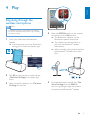
Select 'PHILIPS_AEA7000/10' on your
Bluetooth® enabled device and if necessary
input '0000' as the paring password.
»» After successful pairing and connection,
the Bluetooth® indicator on the
speaker turns solid blue and the
speaker beeps twice.
Play and charge your iPad
through the dock connector
directly
English
3
Compatible iPad
This unit supports play and charge of the
following iPad models:
•
New iPad
•
iPad 2
•
iPad
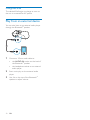
Load the iPad
•
4
Dock your iPad.
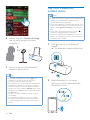
Start music play on your Bluetooth®
enabled device.
To remove the iPad
•
Pull the iPad out of the dock.
Listen to the iPad
5
Use -/+ on the top of the Bluetooth®
speaker to adjust volume.
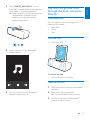
1
Make sure that the iPad has been loaded
correctly.
2
Start music play on your iPad.
»» The connected iPad starts to play.
3
Use -/+ on the top of the Bluetooth®
speaker to adjust volume.
EN
11