1
INSTALLATION
10.4.2
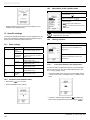
Correcting the room temperature
This function lets you rectify the temperature measured by the
room temperature thermostat (by +/- 5 °C with a step of 0.5 °C (factory setting : 0).
• Press
to highlight your choice (activate or deactivate)
to confirm.
and press the button
10.5.2
• From the installer menu (see access to the installer menu)
> select on the screen > heating parameters > correction
room TO correction.
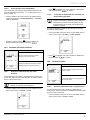
To activate or deactivate the domestic hot
water heating program
The hot water function must be activated before the
program can be set up. Depending on the appliance,
deactivation cuts off the hot water heating as well
as the production of hot water (see the appliances
installation manual).
This function makes it possible to allow the user to program
domestic hot water heating.
• From the installer menu (see access to the installer menu) >
select on the screen > hot water > enable program.
• Increase or reduce with the
buttons to display the
.
desired correction and validate with button
10.5 Domestic hot water function
Menu
This menu lets you:
Show or hide the domestic hot water
function in the end user menu.
• Press
to highlight your choice (enable or disable) and
to confirm.
press the button
10.6 Cooling function
Enable or disable the domestic hot water
heating program in the end user menu.
10.5.1
Menu
Show or hide the cooling function in the
end user menu.
Activate or deactivate the hot water
function
This function lets you activate or deactivate the hot water menu
for the user. When the function is activated, the function will be
shown in the end user menu.
If the function is deactivated, the domestic hot water
settings are adjusted via the appliance.
• From the installer menu (see access to the installer menu) >
select on the screen > hot water > on/off.
This menu lets you:
Enable or disable the cooling program in
the end user menu.
10.6.1
Activate or deactivate the cooling function
This function allows the user to activate or deactivate the
cooling menu. When the function is activated the function will be
shown in the end user menu.
• From the installer menu (see access to the installer menu) >
select on the screen > cooling > on/off.
0020094581_01 - 08/10 - Glow-worm
-7-