1
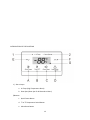
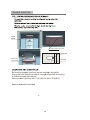
f.
Lock/Unlock Button
g. Temperature Setting/Quick Freeze Time Setting down
h. Temperature Setting/Quick Freeze Time Setting up
3) Function
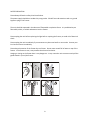
Freezer Temperature Setting
Press button E or F to set the freezer temperature between -8⁰F ~ 7⁰F (-22⁰C ~ -14⁰C). Press
button D to lock the temperature. Temperature change will take effect 10 seconds later. Press
button D again to unlock the temperature
Quick Freeze Function Setting
To enter Quick Freeze mode: Press button A and hold for 3 seconds. The screen will blink.
Press button E or button F to adjust the quick freeze time (6 or 48 hours). Freezer will exit the
setting state after 10 seconds, and quick freeze temperature (-11⁰F (-24⁰C)) will take effect. (6
hours is sufficient for most quick freeze necessities. 48 hours is NOT advised for most situations)
To exit Quick Freeze mode: Press button A to bring up quick freeze mode on the screen and
display the temperature. Press button A again to exit.
INTRODUCTION OF THE FUNCTIONS
Temperature ⁰F or ⁰C mode
Press button B to switch the freezer temperature shown between Fahrenheit and Celsius
Alarm Cancel
Press button C to cancel buzzing alarm from high temperature alarm
Lock/Unlock
Lock mode: Press button D for 3 seconds to lock. Once control pad is locked, all buttons will be
unusable until panel is unlocked.
Unlock mode: Press button D for 3 seconds to unlock.
Button D can also be used to exit setting temperature and quick freeze modes.
Please contact the Warranty Service department (1-866-747-4332) to find an authorized service
professional to diagnose and repair the freezer, should any issues occur.
14