1
Toughpower
CableManagement 1500W
Toughpower
ATX 12V 2.3 & EPS 12V 2.91 Version
CableManagement 1500W
ATX 12V 2.3 & EPS 12V 2.91 Version
5. Installation Steps
4.2 Cables
Users can optimize the cables arrangement within the chassis
by using only what users need. This feather increases the
airflow and reduces the overall ambient temperature within the
chassis, also improves the overall look and tidiness of the
system.
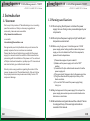
Embedded Socket and Modularized Cable Management Design:
SATA, Peripheral, and
Floppy Connector
PCI-Express
Connector
To prevent electrical shocks, please disconnect the power cord
from your existing power supply unit.
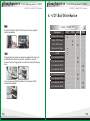
Step 1
After install the power supply unit into the chassis and then
connect the 20+4 pin main power cable to motherboard 20pin
or 24 pin socket.
1
2
Step 2
Wires & Connectors
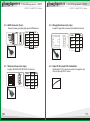
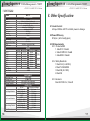
4.2.1 Inside the box, you will find the following wires and
connectors
12
Connect the 4+4 pin / 8 pin +12V power connector to
motherboard (User can use either 4-pin or 8-pin to connect
motherboard socket, please check your motherboard user
manual for detail information)
Native Cables
1 x 20+4pin motherboard connector
500mm
1 x 4+4pin EPS12V connector
550mm
1 x 8pin EPS12V connector
550mm
1 x 8pin/6pin PCI-E connector
500mm + 150mm
Modular Cables
3 x 6pin PCI-E connector
500mm
3 x 8pin PCI-E connector
500mm
2 x quad SATA power connectors
500mm+150mm+150mm+150mm
2 x quad 4pin IDE & single floppy power connectors
500mm+150mm+150mm+150mm+150mm
13