1
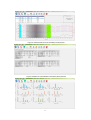
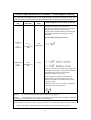
Figure c: Ambulatory blood pressure history data analysis summary map
Note:
1. Operation details of PC software of Hingmed Wearable Ambulatory Blood
Pressure Monitor, please refer to < User Guide of PC software >;
2. In the programming of monitor every time, an interface will pop up to notice that
the history data will be overwritten, so please make sure that the history data
has been derived and stored;
3. The monitor could store maximum 300 hundred records. When storage is full,
the monitor can’t save data normally until programming it from computer;
4. Data measured in the condition of programming by mobile-phone would not be
downloaded into PC device via USB data wire.
5. If not reprogram to the monitor, the preceding program will keep valid, and if
powering on next time, the monitor would execute the last program
continuously.
Chapter 5 Troubleshooting and Maintenance
5.1 Troubleshooting
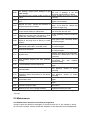
Error
Code
Description
EC01
Cuff is too loose, maybe loose winding or Retighten cuff or keep proper arm
disconnected cuff
position when inflation
Resolution
18