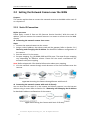
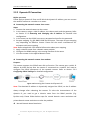
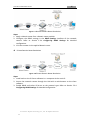
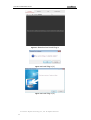
1
Network Camera User Manual V4.1.0 UD.6L0201D0129A01 Hikvision Digital Technology Co., Ltd. http://www.hikvision.com User Manual of Network Camera 1 This manual is applied to the following camera models: Type Box camera III Dome camera III Dome camera IV Model DS-2CD883F-E(W), DS-2CD855(F)-E, DS-2CD854F(WD)-E(W), DS-2CD853F-E(W), DS-2CD864F(WD)-E(W), DS-2CD863PF(NF)-E(W), DS-2CD893PFWD(NFWD)-E(W), DS-2CD833F-E(W), DS-2CD893PF(NF)-E(W) DS-2CD733F-E(I)(Z), DS-2CD793PF(NF)-E(I)(Z), DS-2CD793PFWD(NFWD)-E(I)(Z), DS-2CD763PF(NF)-E(I)(Z), DS-2CD764FWD-E(I)(Z), DS-2CD764F-E(I)(Z), DS-2CD753F-E(I)(Z), DS-2CD754F-E(I)(Z), DS-2CD754FWD-E(I)(Z)(B), DS-2CD783F-E(I)(Z), DS-2CD755F-E(I)(Z) DS-2CD7233F-E(I)Z(H)(S), DS-2CD7253F-E(I)Z(H)(S), DS-CD7254F-E(I)Z(H)(S), DS-CD7254FWD- E(I)Z(H)(S), DS-2CD7255F- E(I)Z(H)(S), DS-2CD7283F-E(I)Z(H)(S), DS-2CD7293PFWD(NFWD)- E(I)Z(H)(S), DS-2CD7263NF(PF)- E(I)Z(H)(S), DS-2CD 7264FWD- E(I)Z(H)(S), DS-2CD7293PF(NF)- E(I)Z(H)(S) DS-2CD2312-I, DS-2CD2332-I Dome camera V Dome DS-2CD2112-I, DS-2CD2132-I camera VI Dome DS-2CD7353F-E(I)(S), DS-2CD7393(PF)(NF)(WD)-E(I)(S) Camera VII DS-2CD8253F- E(I)(Z)(S), DS-2CD8233F-E(I)(Z)(S), Bullet DS-2CD8264FWD-E(I)(Z)(S), DS-2CD8264F-E(I)(Z)(S), Camera I DS-2CD8254F- E(I)(Z)(S), DS-2CD8254FWD- E(I)(Z)(S), DS-2CD8283F- E(I)(Z)(S), DS-2CD8255F- E(I)(Z)(S) Bullet DS-2CD833-EI3, DS-2CD864-EI(3)(5), DS-2CD855-EI(3)(5) Camera II Bullet DS-2CD2012-I, DS-2CD2032-I Camera III Bullet DS-2CD2212-I, DS-2CD2232-I Camera IV Cube DS-2CD8133F-E(I)(W), DS-2CD8153F-E(I)(W) Camera I Cube DS-2CD8464F-E(I)(W), DS-2CD8433F-E(I)(W) Camera II Mini DS-2CD7164-E,DS-2CD7153-E, DS-2CD7133-E Dome Camera © Hikvision Digital Technology Co., Ltd. All Rights Reserved. User Manual of Network Camera 2 Thank you for purchasing our product. If there are any questions, or requests, please do not hesitate to contact the dealer. This manual applies to Network Camera. This manual may contain several technical incorrect places or printing errors, and the content is subject to change without notice. The updates will be added to the new version of this manual. We will readily improve or update the products or procedures described in the manual. DISCLAIMER STATEMENT “Underwriters Laboratories Inc. (“UL”) has not tested the performance or reliability of the security or signaling aspects of this product. UL has only tested for fire, shock or casualty hazards as outlined in UL’s Standard(s) for Safety, UL60950-1. UL Certification does not cover the performance or reliability of the security or signaling aspects of this product. UL MAKES NO REPRESENTATIONS, WARRANTIES OR CERTIFICATIONS WHATSOEVER REGARDING THE PERFORMANCE OR RELIABILITY OF ANY SECURITY OR SIGNALING RELATED FUNCTIONS OF THIS PRODUCT.” © Hikvision Digital Technology Co., Ltd. All Rights Reserved. User Manual of Network Camera 3 Regulatory Information FCC Information FCC compliance: This equipment has been tested and found to comply with the limits for a digital device, pursuant to part 15 of the FCC Rules. These limits are designed to provide reasonable protection against harmful interference when the equipment is operated in a commercial environment. This equipment generates, uses, and can radiate radio frequency energy and, if not installed and used in accordance with the instruction manual, may cause harmful interference to radio communications. Operation of this equipment in a residential area is likely to cause harmful interference in which case the user will be required to correct the interference at his own expense. FCC Conditions This device complies with part 15 of the FCC Rules. Operation is subject to the following two conditions: 1. This device may not cause harmful interference. 2. This device must accept any interference received, including interference that may cause undesired operation. EU Conformity Statement This product and - if applicable - the supplied accessories too are marked with "CE" and comply therefore with the applicable harmonized European standards listed under the Low Voltage Directive 2006/95/EC, the EMC Directive 2004/108/EC. 2002/96/EC (WEEE directive): Products marked with this symbol cannot be disposed of as unsorted municipal waste in the European Union. For proper recycling, return this product to your local supplier upon the purchase of equivalent new equipment, or dispose of it at designated collection points. For more information see: www.recyclethis.info. 2006/66/EC (battery directive): This product contains a battery that cannot be disposed of as unsorted municipal waste in the European Union. See the product documentation for specific battery information. The battery is marked with this symbol, which may include lettering to indicate cadmium (Cd), lead (Pb), or mercury (Hg). For proper recycling, return the battery to your supplier or to a designated collection point. For more information see: www.recyclethis.info. © Hikvision Digital Technology Co., Ltd. All Rights Reserved. User Manual of Network Camera 4 Safety Warnings and Cautions Please pay attention to the following warnings and cautions: Hazardous Voltage may be present: Special measures and precautions must be taken when using this device. Some potentials (voltages) on the device may present a hazard to the user. This device should only be used by employees from our company with knowledge and training in working with these types of devices that contain live circuits. Power Supply Hazardous Voltage: AC mains voltages are present within the power supply assembly. This device must be connected to a UL approved, completely enclosed power supply, of the proper rated voltage and current. No user serviceable parts inside the power supply. System Grounding (Earthing): To avoid shock, ensure that all AC wiring is not exposed and that the earth grounding is maintained. Ensure that any equipment to which this device will be attached is also connected to properly wired grounded receptacles and are approved medical devices. Power Connect and Disconnect: The AC power supply cord is the main disconnect device to mains (AC power).The socket outlet shall be installed near the equipment and shall be readily accessible. Installation and Maintenance: Do not connect/disconnect any cables to or perform installation/maintenance on this device during an electrical storm. © Hikvision Digital Technology Co., Ltd. All Rights Reserved. User Manual of Network Camera 5 Power Cord Requirements: The connector that plugs into the wall outlet must be a grounding-type male plug designed for use in your region. It must have certification marks showing certification by an agency in your region. The connector that plugs into the AC receptacle on the power supply must be an IEC 320, sheet C13, female connector. See the following website for more information http://kropla.com/electric2.htm. Lithium Battery: This device contains a Lithium Battery. There is a risk of explosion if the battery is replaced by an incorrect type. Dispose of used batteries according to the vendor’s instructions and in accordance with local environmental regulations. Perchlorate Material: Special handling may apply. See www.dtsc.ca.gov/hazardouswaste/perchlorate. This notice is required by California Code of Regulations, Title 22, Division 4.5, Chapter 33: Best Management Practices for Perchlorate Materials. This device includes a battery which contains perchlorate material. Taiwan battery recycling: Please recycle batteries. Thermal and Mechanical Injury: Some components such as heat sinks, power regulators, and processors may be hot; care should be taken to avoid contact with these components. Electro Magnetic Interference: This equipment has not been tested for compliance with emissions limits of FCC and similar international regulations. This device is not, and may not be, offered for sale or lease, or sold, or leased until authorization from the United States FCC or its equivalent in other countries has been obtained. Use of this equipment in a residential location is prohibited. This equipment generates, uses and can radiate radio frequency energy which may result in harmful interference to radio communications. If this equipment does cause harmful interference to radio or television reception, which can be © Hikvision Digital Technology Co., Ltd. All Rights Reserved. 6 User Manual of Network Camera determined by turning the equipment on and off, the user is required to take measures to eliminate the interference or discontinue the use of this equipment. Lead Content: Please recycle this device in a responsible manner. Refer to local environmental regulations for proper recycling; do not dispose of device in unsorted municipal waste. © Hikvision Digital Technology Co., Ltd. All Rights Reserved. User Manual of Network Camera 7 Safety Instruction These instructions are intended to ensure that the user can use the product correctly to avoid danger or property loss. The precaution measure is divided into ‘Warnings’ and ‘Cautions’: Warnings: Serious injury or death may be caused if any of these warnings are neglected. Cautions: Injury or equipment damage may be caused if any of these cautions are neglected. Warnings Follow these safeguards to Cautions Follow these precautions to prevent serious injury or death. prevent potential injury or material damage. Warnings: Please adopt the power adapter which can meet the safety extra low voltage (SELV) standard. And source with DC 12V or AC 24V (depending on models) according to the IEC60950-1 and Limited Power Source standard. If the product does not work properly, please contact your dealer or the nearest service center. Never attempt to disassemble the camera yourself. (We shall not assume any responsibility for problems caused by unauthorized repair or maintenance.) To reduce the risk of fire or electrical shock, do not expose this product to rain or moisture. This installation should be made by a qualified service person and should conform to all the local codes. Please install blackouts equipment into the power supply circuit for convenient supply interruption. Please make sure that the ceiling can support more than 50(N) Newton gravities if the camera is fixed to the ceiling. If the product does not work properly, please contact your dealer or the nearest service center. Never attempt to disassemble the camera yourself. (We shall not assume any responsibility for problems caused by unauthorized repair or maintenance.) © Hikvision Digital Technology Co., Ltd. All Rights Reserved. User Manual of Network Camera 8 Cautions: Make sure the power supply voltage is correct before using the camera. Do not drop the camera or subject it to physical shock. Do not touch sensor modules with fingers. If cleaning is necessary, use a clean cloth with a bit of ethanol and wipe it gently. If the camera will not be used for an extended period of time, put on the lens cap to protect the sensor from dirt. Do not aim the camera lens at the strong light such as sun or incandescent lamp. The strong light can cause fatal damage to the camera. The sensor may be burned out by a laser beam, so when any laser equipment is being used, make sure that the surface of the sensor not be exposed to the laser beam. Do not place the camera in extremely hot, cold temperatures (the operating temperature should be between -10°C ~ 60°C), dusty or damp environment, and do not expose it to high electromagnetic radiation. To avoid heat accumulation, good ventilation is required for a proper operating environment. Keep out of water and any liquid. While shipping, the camera should be packed in its original packing. Improper use or replacement of the battery may result in hazard of explosion. Please use the manufacturer recommended battery type. © Hikvision Digital Technology Co., Ltd. All Rights Reserved. 9 User Manual of Network Camera Contents CHAPTER 1 SYSTEM REQUIREMENT ...................................................................................... 11 CHAPTER 2 NETWORK CONNECTION..................................................................................... 12 2.1 SETTING THE NETWORK CAMERA OVER THE LAN .................................................................................. 12 2.1.1 Wiring over the LAN ................................................................................................................ 12 2.1.2 Detecting and Changing the IP Address ................................................................................. 13 2.2 SETTING THE NETWORK CAMERA OVER THE WAN ................................................................................ 14 2.2.1 Static IP Connection ................................................................................................................ 14 2.2.2 Dynamic IP Connection ........................................................................................................... 15 CHAPTER 3 ACCESS TO THE NETWORK CAMERA .................................................................... 17 3.1 ACCESSING BY WEB BROWSERS........................................................................................................... 17 3.2 ACCESSING BY CLIENT SOFTWARE ........................................................................................................19 3.2.1 Installing iVMS-4200 Software................................................................................................ 19 3.2.2 Installing iVMS-4500 Software................................................................................................ 20 CHAPTER 4 WI-FI SETTINGS .................................................................................................. 20 4.1 CONFIGURING WI-FI CONNECTION IN MANAGE AND AD-HOC MODES..................................................... 21 4.2 EASY WI-FI CONNECTION WITH WPS FUNCTION................................................................................... 25 4.3 IP PROPERTY SETTINGS FOR WIRELESS NETWORK CONNECTION.............................................................. 27 CHAPTER 5 LIVE VIEW.......................................................................................................... 28 5.1 LIVE VIEW PAGE................................................................................................................................ 28 5.2 STARTING LIVE VIEW ......................................................................................................................... 29 5.3 RECORDING AND CAPTURING PICTURES MANUALLY ............................................................................... 30 5.4 OPERATING PTZ CONTROL ................................................................................................................. 30 5.4.1 PTZ Control Panel .................................................................................................................... 31 5.4.2 Setting / Calling a Preset .........................................................................................................31 5.5 CONFIGURING LIVE VIEW PARAMETERS ................................................................................................ 32 CHAPTER 6 NETWORK CAMERA CONFIGURATION ................................................................. 33 6.1 CONFIGURING LOCAL PARAMETERS......................................................................................................33 6.2 CONFIGURING TIME SETTINGS ............................................................................................................ 34 6.3 CONFIGURING NETWORK SETTINGS .....................................................................................................36 6.3.1 Configuring TCP/IP Settings.....................................................................................................36 6.3.2 Configuring Port Settings ........................................................................................................37 6.3.3 Configuring PPPoE Settings .....................................................................................................38 6.3.4 Configuring DDNS Settings ......................................................................................................39 6.3.5 Configuring SNMP Settings .....................................................................................................41 6.3.6 Configuring 802.1X Settings ....................................................................................................42 6.3.7 Configuring QoS Settings ........................................................................................................43 6.3.8 Configuring FTP Settings .........................................................................................................43 6.3.9 Configuring UPnP™ Settings ...................................................................................................44 © Hikvision Digital Technology Co., Ltd. All Rights Reserved. User Manual of Network Camera 6.4 10 CONFIGURING VIDEO AND AUDIO SETTINGS ......................................................................................... 45 6.4.1 Configuring Video Settings .....................................................................................................45 6.4.2 Configuring Audio Settings .....................................................................................................47 6.5 CONFIGURING IMAGE PARAMETERS .....................................................................................................47 6.5.1 Configuring Display Settings ...................................................................................................47 6.5.2 Configuring OSD Settings ........................................................................................................49 6.5.3 Configuring Text Overlay Settings ........................................................................................... 50 6.5.4 Configuring Privacy Mask ........................................................................................................51 6.5.5 6.6 Configuring Picture Overlay ....................................................................................................52 CONFIGURING AND HANDLING ALARMS ............................................................................................... 53 6.6.1 Configuring Motion Detection ................................................................................................ 53 6.6.2 Configuring Tamper-proof Alarm............................................................................................ 56 6.6.3 Configuring Video Loss Alarm.................................................................................................57 6.6.4 Configuring External Alarm Input ........................................................................................... 58 6.6.5 Configuring Alarm Output.......................................................................................................60 6.6.6 Handling Exception .................................................................................................................. 61 6.6.7 Configuring Email Settings ......................................................................................................61 6.6.8 Configuring Snapshot Settings ................................................................................................ 63 6.6.9 Configuring Other Alarms .......................................................................................................64 6.6.10 Arming or Disarming the Camera ...................................................................................... 69 CHAPTER 7 STORAGE SETTINGS ............................................................................................ 71 7.1 CONFIGURING NAS SETTINGS.............................................................................................................71 7.2 CONFIGURING RECORDING SCHEDULE..................................................................................................72 CHAPTER 8 PLAYBACK.......................................................................................................... 77 CHAPTER 9 LOG SEARCHING................................................................................................. 79 CHAPTER 10 OTHERS ............................................................................................................. 80 10.1 MANAGING USER ACCOUNTS ............................................................................................................. 80 10.2 CONFIGURING RTSP AUTHENTICATION ................................................................................................ 82 10.3 ANONYMOUS VISIT ........................................................................................................................... 82 10.4 IP ADDRESS FILTER ............................................................................................................................ 83 10.5 VIEWING DEVICE INFORMATION ..........................................................................................................85 10.6 MAINTENANCE .................................................................................................................................86 10.6.1 Rebooting the Camera ........................................................................................................86 10.6.2 Restoring Default Settings ..................................................................................................86 10.6.3 Importing/Exporting Configuration File ............................................................................ 86 10.6.4 Upgrading the System .........................................................................................................87 10.7 RS-232 SETTINGS............................................................................................................................. 87 10.8 RS-485 SETTINGS............................................................................................................................. 88 APPENDIX ................................................................................................................................ 89 APPENDIX 1 SADP SOFTWARE INTRODUCTION ..................................................................................................89 APPENDIX 2 PORT MAPPING ........................................................................................................................... 91 © Hikvision Digital Technology Co., Ltd. All Rights Reserved. User Manual of Network Camera 11 Chapter 1 System Requirement Operating System: Microsoft Windows XP SP1 and above version / Vista / Win7 / Server 2003 / Server 2008 32bits CPU: Intel Pentium IV 3.0 GHz or higher RAM: 1G or higher Display: 1024×768 resolution or higher Web Browser: Internet Explorer 6.0 and above version, Apple Safari 5.02 and above version, Mozilla Firefox 3.5 and above version and Google Chrome8 and above versions. © Hikvision Digital Technology Co., Ltd. All Rights Reserved. 12 User Manual of Network Camera Chapter 2 Network Connection Before you start: If you want to set the network camera via a LAN (Local Area Network), please refer to Section 2.1 Setting the Network Camera over the LAN. If you want to set the network camera via a WAN (Wide Area Network), please refer to Section 2.2 Setting the Network Camera over the WAN. 2.1 Setting the Network Camera over the LAN Purpose: To view and configure the camera via a LAN, you need to connect the network camera in the same subnet with your computer, and install the SADP or iVMS-4200 software to search and change the IP of the network camera. Note: For the detailed introduction of SADP, please refer to Appendix 1. 2.1.1 Wiring over the LAN The following figures show the two ways of cable connection of a network camera and a computer: Purpose: To test the network camera, you can directly connect the network camera to the computer with a network cable as shown in Figure 2-1. Refer to the Figure 2-2 to set the network camera over the LAN via a switch or a router. Figure 2-1 Connecting Directly Figure 2-2 Connecting via a Switch or a Router © Hikvision Digital Technology Co., Ltd. All Rights Reserved. 13 User Manual of Network Camera 2.1.2 Detecting and Changing the IP Address You need the IP address to visit the network camera. Steps: 1. To get the IP address, you can choose either of the following methods: Use SADP, a software tool which can automatically detect the online network cameras in the LAN and list the device information including IP address, subnet mask, port number, device serial number, device version, etc., shown in Figure 2-3. Use the client software to list the online devices. Please refer to the user manual of client software for detailed information. 2. Change the IP address and subnet mask to the same subnet as that of your computer. 3. Enter the IP address of network camera in the address field of the web browser to view the live video. Notes: The default IP address is 192.0.0.64 and the port number is 8000. The default user name is admin, and password is 12345. For accessing the network camera from different subnets, please set the gateway for the network camera after you logged in. For detailed information, please refer to Section 5.3.1 Configuring TCP/IP Settings. Figure 2-3 SADP Interface © Hikvision Digital Technology Co., Ltd. All Rights Reserved. User Manual of Network Camera 14 2.2 Setting the Network Camera over the WAN Purpose: This section explains how to connect the network camera to the WAN with a static IP or a dynamic IP. 2.2.1 Static IP Connection Before you start: Please apply a static IP from an ISP (Internet Service Provider). With the static IP address, you can connect the network camera via a router or connect it to the WAN directly. Connecting the network camera via a router Steps: 1. Connect the network camera to the router. 2. Assign a LAN IP address, the subnet mask and the gateway. Refer to Section 2.1.2 Detecting and Changing the IP Address for detailed IP address configuration of the camera. 3. Save the static IP in the router. 4. Set port mapping, E.g., 80, 8000, 8200 and 554 ports. The steps for port mapping vary depending on different routers. Please call the router manufacturer for assistance with port mapping. Note: Refer to Appendix 2 for detailed information about port mapping. 5. Visit the network camera through a web browser or the client software over the internet. Figure 2-4 Accessing the Camera through Router with Static IP Connecting the network camera with static IP directly You can also save the static IP in the camera and directly connect it to the internet without using a router. Refer to Section 2.1.2 Detecting and Changing the IP Address for detailed IP address configuration of the camera. Figure 2-5 Accessing the Camera with Static IP Directly © Hikvision Digital Technology Co., Ltd. All Rights Reserved. User Manual of Network Camera 15 2.2.2 Dynamic IP Connection Before you start: Please apply a dynamic IP from an ISP. With the dynamic IP address, you can connect the network camera to a modem or a router. Connecting the network camera via a router Steps: 1. Connect the network camera to the router. 2. In the camera, assign a LAN IP address, the subnet mask and the gateway. Refer to Section 2.1.2 Detecting and Changing the IP Address for detailed LAN configuration. 3. In the router, set the PPPoE user name, password and confirm the password. 4. Set port mapping. E.g. 80, 8000, 8200 and 554 ports. The steps for port mapping vary depending on different routers. Please call the router manufacturer for assistance with port mapping. Note: Refer to Appendix 2 for detailed information about port mapping. 5. Apply a domain name from a domain name provider. 6. Configure the DDNS settings in the setting interface of the router. 7. Visit the camera via the applied domain name. Connecting the network camera via a modem Purpose: This camera supports the PPPoE auto dial-up function. The camera gets a public IP address by ADSL dial-up after the camera is connected to a modem. You need to configure the PPPoE parameters of the network camera. Refer to Section 5.3.3 Configuring PPPoE Settings for detailed configuration. Figure 2-6 Accessing the Camera with Dynamic IP Note: The obtained IP address is dynamically assigned via PPPoE, so the IP address always changes after rebooting the camera. To solve the inconvenience of the dynamic IP, you need to get a domain name from the DDNS provider (E.g. DynDns.com). Please follow below steps for normal domain name resolution and private domain name resolution to solve the problem. Normal Domain Name Resolution © Hikvision Digital Technology Co., Ltd. All Rights Reserved. User Manual of Network Camera 16 Figure 2-7 Normal Domain Name Resolution Steps: 1. Apply a domain name from a domain name provider. 2. Configure the DDNS settings in the DDNS Settings interface of the network camera. Refer to Section 5.3.4 Configuring DDNS Settings for detailed configuration. 3. Visit the camera via the applied domain name. Private Domain Name Resolution Figure 2-8 Private Domain Name Resolution Steps: 1. Install and run the IP Server software in a computer with a static IP. 2. Access the network camera through the LAN with a web browser or the client software. 3. Enable DDNS and select IP Server as the protocol type. Refer to Section 5.3.4 Configuring DDNS Settings for detailed configuration. © Hikvision Digital Technology Co., Ltd. All Rights Reserved. 17 User Manual of Network Camera Chapter 3 Access to the Network Camera 3.1 Accessing by Web Browsers Steps: 1. Open the web browser. 2. In the address field, input the IP address of the network camera, e.g., 192.0.0.64 and press the Enter key to enter the login interface. 3. Input the user name and password and click . Note: The default user name is admin, password is 12345. Figure 3-1 Login Interface 4. Install the plug-in before viewing the live video and operating the camera. Please follow the installation prompts to install the plug-in. © Hikvision Digital Technology Co., Ltd. All Rights Reserved. 18 User Manual of Network Camera Figure 3-2 Download and Install Plug-in Figure 3-3 Install Plug-in (1) Figure 3-4 Install Plug-in (2) © Hikvision Digital Technology Co., Ltd. All Rights Reserved. 19 User Manual of Network Camera Figure 3-5 Install Plug-in (3) Note: You may have to close the web browser to install the plug-in. Please reopen the web browser and log in again after installing the plug-in. 3.2 Accessing by Client Software 3.2.1 Installing iVMS-4200 Software The product CD contains the iVMS-4200 client software. You can view the live video and manage the camera with the client software. You can also download the software from our website www.hikvision.com. Follow the installation prompts to install the client software and WinPcap. The control panel and live view interface of iVMS-4200 are shown as bellow. © Hikvision Digital Technology Co., Ltd. All Rights Reserved. 20 User Manual of Network Camera Figure 3-6 iVMS-4200 Control Panel Figure 3-7 iVMS-4200 Live View Interface Note: For detailed information about iVMS-4200 client software, please refer to the user manual of the iVMS-4200 software. 3.2.2 Installing iVMS-4500 Software To view the camera with a mobile phone, install the iVMS-4500 client software in your mobile phone. You can find the software in the CD in the package, and you can also download the software from our website www.hikvision.com. Note: For detailed information about iVMS-4500 client software, please refer to the user manual of iVMS-4500 software. Chapter 4 Wi-Fi Settings Purpose: By connecting to the wireless network, you don’t need to use cable of any kind for network connection, which is very convenient for the actual surveillance application. Note: This chapter is only applicable for the cameras with the Wi-Fi module built-in. © Hikvision Digital Technology Co., Ltd. All Rights Reserved. 21 User Manual of Network Camera 4.1 Configuring Wi-Fi Connection in Manage and Ad-hoc Modes Before you start: A wireless network must be configured. Wireless Connection in Manage Mode Steps: 1. Enter the Wi-Fi configuration interface. Configuration> Advanced Configuration> Network> Wi-Fi Figure 4-1 Wireless Network List 2. Click button to search the online wireless connections. 3. Click to choose a wireless connection on the list. Figure 4-2 Wi-Fi Setting- Manage Mode 4. Check the checkbox to select the Network mode as Manage, and the Security mode and the Encryption Type of the network is automatically shown when you select the wireless network, please don’t change it manually. Note: These parameters are exactly identical with those of the router. 5. Enter the key to connect the wireless network. The key should be that of the wireless network connection you set on the router. Wireless Connection in Ad-hoc Mode © Hikvision Digital Technology Co., Ltd. All Rights Reserved. 22 User Manual of Network Camera If you choose the Ad-hoc mode, you don’t need to connect the wireless camera via a router. The scenario is the same as you connect the camera and the PC directly with a network cable. Steps: 1. Choose Ad-hoc mode. Figure 4-3 Wi-Fi Setting- Ad-hoc 2. Customize a SSID for the camera. 3. Choose the Security Mode of the wireless connection. Figure 4-4 Figure 4-5 Security Mode- Ad-hoc Mode 4. Enable the wireless connection function for your PC. 5. On the PC side, search the network and you can see the SSID of the camera listed. Figure 4-6 Ad-hoc Connection Point 6. Choose the SSID and connect. Security Mode Description: © Hikvision Digital Technology Co., Ltd. All Rights Reserved. User Manual of Network Camera 23 You can choose the Security Mode as not –encrypted, WEP, WPA-personal, WPA-enterprise, WPA2-personal, WPA2-enterprise. WEP mode: Authentication - Select Open or Shared Key System Authentication, depending on the method used by your access point. Not all access points have this option, in which case they probably use Open Sys-tem, which is sometimes known as SSID Authentication. Key length - This sets the length of the key used for the wireless encryption, 64 or 128 bit. The encryption key length can sometimes be shown as 40/64 and 104/128. Key type - The key types available depend on the access point being used. The following options are available: HEX - Allows you to manually enter the hex key. ASCII - In this method the string must be exactly 5 characters for 64-bit WEP and 13 characters for 128-bit WEP. WPA-personal and WPA2-personal Mode: Enter the required Pre-shared Key for the access point, which can be a hexadecimal number or a passphrase. © Hikvision Digital Technology Co., Ltd. All Rights Reserved. User Manual of Network Camera 24 WPA- enterprise and WPA2-enterprise Mode: Choose the type of client/server authentication being used by the access point; EAP-TLS or EAP-PEAP. EAP-TLS Identity - Enter the user ID to present to the network. Private key password – Enter the password for your user ID. EAPOL version - Select the version used (1 or 2) in your access point. CA Certificates - Upload a CA certificate to present to the access point for authentication. EAP-PEAP: User Name - Enter the user name to present to the network Password - Enter the password of the network PEAP Version - Select the PEAP version used at the access point. Label - Select the label used by the access point. EAPOL version - Select version (1 or 2) depending on the version used at the access point CA Certificates - Upload a CA certificate to present to the access point for authentication © Hikvision Digital Technology Co., Ltd. All Rights Reserved. 25 User Manual of Network Camera 4.2 Easy Wi-Fi Connection with WPS function Purpose: The setting of the wireless network connection is never easy. To avoid the complex setting of the wireless connection you can enable the WPS function. WPS (Wi-Fi Protected Setup) refers to the easy configuration of the encrypted connection between the device and the wireless router. The WPS makes it easy to add new devices to an existing network without entering long passphrases. There are two modes of the WPS connection, the PBC mode and the PIN mode. Note: If you enable the WPS function, you don’t need to configure the parameters such as the encryption type and you don’t need to know the key of the wireless connection. Steps: Figure 4-7 Wi-Fi Settings - WPS PBC Mode: PBC refers to the Push-Button-Configuration, in which the user simply has to push a button, either an actual or virtual one (as the button on the configuration interface of the IE browser), on both the Access Point (and a registrar of the network) and the new wireless client device. 1. Check the checkbox of to enable WPS. 2. Choose the connection mode as PBC. Note: Support of this mode is mandatory for both the Access Points and the connecting devices. 3. Check on the Wi-Fi router to see if there is a WPS button. If yes push the button and you can see the indicator near the button start flashing, which means the WPS function of the router is enabled. For detailed operation, please see the user guide of the router. 4. Push the WPS button to enable the function on the camera. © Hikvision Digital Technology Co., Ltd. All Rights Reserved. 26 User Manual of Network Camera If there is not a WPS button on the camera, you can also click the virtual button to enable the PBC function on the web interface. Click button. When the PBC mode is both enabled in the router and the camera, the camera and the wireless network is connected automatically. PIN Mode: The PIN mode requires a Personal Identification Number (PIN) to be read from either a sticker or the display on the new wireless device. This PIN must then be entered to connect the network, usually the Access Point of the network. Steps: 1. Choose a wireless connection on the list and the SSID is shown. Figure 4-8 Wi-Fi Settings – WPS PIN Mode 2. Choose the . If the PIN code is generated from the router side, you should enter the PIN code you get from the router side in the 3. Click button. Or © Hikvision Digital Technology Co., Ltd. All Rights Reserved. field. 27 User Manual of Network Camera You can generate the PIN code on the camera side. And the expired time for the PIN code is 120 seconds. 1. Click 2. Enter the code to the router, in the example, enter 48167581 to the router. 4.3 IP Property Settings for Wireless Network Connection The default IP address of wireless network interface controller is 192.168.1.64. When you connect the wireless network you can change the default IP. Steps: 1. Enter the TCP/IP configuration interface. Configuration> Advanced Configuration> Network> TCP/IP or Configuration> Basic Configuration> Network> TCP/IP Figure 4-9 TCP/IP Settings 2. 3. Select the NIC as wlan. Customize the IPv4 address, the IPv4 Subnet Mask and the Default Gateway. The setting procedure is the same with that of LAN. If you want to be assigned the IP address you can check the checkbox to enable the DHCP. © Hikvision Digital Technology Co., Ltd. All Rights Reserved. 28 User Manual of Network Camera Chapter 5 Live View 5.1 Live View Page Purpose: The live video page allows you to view live video, capture images, realize PTZ control, set/call presets and configure video parameters. Log in the network camera to enter the live view page, or you can click on the menu bar of the main page to enter the live view page. Descriptions of the live view page: Menu Bar Live View Parameters PTZ control Preset setting/calling Live view window Toolbar Figure 5-1 Live View Page Menu Bar: Click each tab to enter Live View, Playback, Log and Configuration page respectively. Live View Window: Display the live video. Toolbar: © Hikvision Digital Technology Co., Ltd. All Rights Reserved. 29 User Manual of Network Camera Operations on the live view page, e.g., live view, capture, record, audio on/off, two-way audio, etc. PTZ Control: Panning, tilting and zooming actions of the camera and the lighter and wiper control (if it supports PTZ function or an external pan/tilt unit has been installed). Preset Setting/Calling: Set and call the preset for the camera (if supports PTZ function or an external pan/tilt unit has been installed). Live View Parameters: Configure the image size and stream type of the live video. 5.2 Starting Live View In the live view window as shown in Figure 5-2, click on the toolbar to start the live view of the camera. Figure 5-2 Start Live View Table 5-1 Descriptions of the Toolbar Icon / Description Start/Stop live view © Hikvision Digital Technology Co., Ltd. All Rights Reserved. 30 User Manual of Network Camera Manually capture the pictures displayed in live view and then save it as a JPEG file. / Manually start/stop recording. Audio on and adjust volume /Mute. / / Turn on/off microphone. / Turn on/off 3D zooming function. Note: Before using the two-way audio function or recording with audio, please set the Stream Type to Video & Audio referring to Section 5.4. Full-screen Mode You can double-click on the live video to switch the current live view into full-screen or return to normal mode from the full-screen. Please refer to the following sections for more information: Configuring remote recording in Section 6.2 Configuring Recording Schedule. Setting the image quality of the live video in Section 5.1 Configuring Local Parameters and Section 5.4.1 Configuring Video Settings. Setting the OSD text on live video in Section 5.5.2 Configuring OSD Settings. 5.3 Recording and Capturing Pictures Manually In the live view interface, click click on the toolbar to capture the live pictures or to record the live video. The saving paths of the captured pictures and clips can be set on the Configuration > Local Configuration page. To configure remote scheduled recording, please refer to Section 6.2. Note: The captured image will be saved as a JPEG file in your computer. 5.4 Operating PTZ Control Purpose: In the live view interface, you can use the PTZ control buttons to realize pan/tilt/zoom control of the camera. Before you start: To realize PTZ control, the camera connected to the network must support the PTZ function or a pan/tilt unit has been installed to the camera. Please properly set the PTZ parameters on RS-485 Settings page referring to Section 10.6 RS-485 Settings. © Hikvision Digital Technology Co., Ltd. All Rights Reserved. 31 User Manual of Network Camera 5.4.1 PTZ Control Panel On the live view page, click to show the PTZ control panel or click to hide it. Click the direction buttons to control the pan/tilt movements. Figure 5-3 PTZ Control Panel Click the zoom/iris/focus buttons to realize lens control. Notes: There are 8 direction arrows ( , window when you click and drag the mouse in the relative positions. For the cameras which support lens movements only, the direction buttons are invalid. , , , , , , ) in the live view Table 5-2 Descriptions of PTZ Control Panel Button Description Zoom in/out Focus near/far Iris open/close Light on/off Wiper on/off One-touch focus Initialize lens Adjust speed of pan/tilt movements 5.4.2 Setting / Calling a Preset Setting a Preset: 1. In the PTZ control panel, select a preset number from the preset list. © Hikvision Digital Technology Co., Ltd. All Rights Reserved. 32 User Manual of Network Camera Figure 5-4 Setting a Preset 2. Use the PTZ control buttons to move the lens to the desired position. • Pan the camera to the right or left. • Tilt the camera up or down. • Zoom in or out. • Refocus the lens. 3. Click to finish the setting of the current preset. 4. You can click to delete the preset. Note: You can configure up to 128 presets. Calling a Preset: This feature enables the camera to point to a specified preset scene manually or when an event takes place. For the defined preset, you can call it at any time to the desired preset scene. In the PTZ control panel, select a defined preset from the list and click to call the preset. Figure 5-5 Calling a Preset 5.5 Configuring Live View Parameters Purpose: You can select the stream type and adjust the image size on the live view page. Click or tab under the menu bar of the live view interface to select the stream type as main stream or sub-stream for live viewing. © Hikvision Digital Technology Co., Ltd. All Rights Reserved. 33 User Manual of Network Camera Click each tab to set the image size to 4:3, 16:9, original or auto fix. Note: Please refer to Section 5.4.1 Configuring Video Settings for more detailed settings about video parameters. Chapter 6 Network Camera Configuration 6.1 Configuring Local Parameters Note: The local configuration refers to the parameters of the live view, record files and captured pictures. The record files and captured pictures are the ones you record and captured using the web browser and thus the saving paths of them are on the PC running the browser. Steps: 1. Enter the Local Configuration interface: Configuration > Local Configuration Figure 6-1 Local Configuration Interface 2. Configure the following settings: Live View Parameters: Set the protocol type and live view performance. Protocol Type: TCP, UDP, MULTICAST and HTTP are selectable. © Hikvision Digital Technology Co., Ltd. All Rights Reserved. 34 User Manual of Network Camera TCP: Ensures complete delivery of streaming data and better video quality, yet the real-time transmission will be affected. UDP: Provides real-time audio and video streams. HTTP: Allows the same quality as of TCP without setting specific ports for streaming under some network environments. MULTICAST: It’s recommended to select MCAST type when using the Multicast function. For detailed information about Multicast, refer to Section 6.3.1 TCP/IP Settings. Live View Performance: Set the live view performance to Least Delay, Balanced or Best Fluency. Record File Settings: Set the saving path of the recorded video files. Valid for the record files you recorded with the web browser. Record File Size: Select the packed size of the manually recorded and downloaded video files to 256M, 512M or 1G. After the selection, the maximum record file size is the value you selected. Save record files to: Set the saving path for the manually recorded video files. Save downloaded files to: Set the saving path for the downloaded video files in playback mode. Picture and Clip Settings: Set the saving paths of the captured pictures and clipped video files. Valid for the pictures you captured with the web browser. Save snapshots in live view to: Set the saving path of the manually captured pictures in live view mode. Save snapshots when playback to: Set the saving path of the captured pictures in playback mode. Save clips to: Set the saving path of the clipped video files in playback mode. Note: You can click to change the directory for saving the clips and pictures. 3. Click to save the settings. 6.2 Configuring Time Settings Purpose: You can follow the instructions in this section to configure the time synchronization and DST settings. Steps: 1. Enter the Time Settings interface: Configuration > Basic Configuration > System > Time Settings Or Configuration > Advanced Configuration > System > Time Settings © Hikvision Digital Technology Co., Ltd. All Rights Reserved. 35 User Manual of Network Camera Figure 6-2 Time Settings Select the Time Zone. Select the Time Zone which is the closest to the location of the camera from the drop-down menu. Figure 6-3 Time Zone Settings Synchronizing Time by NTP Server. (1) Check the checkbox to enable the NTP function. (2) Configure the following settings: Server Address: IP address of NTP server. NTP Port: Port of NTP server. Interval: The time interval between the two synchronizing actions with NTP server. Figure 6-4 Time Sync by NTP Server Note: If the camera is connected to a public network, you should use a NTP server that has a time synchronization function, such as the server at the National Time Center (IP Address: 210.72.145.44). If the camera is set in a customized network, NTP software can be used to establish a NTP server for time synchronization. Synchronizing Time Synchronization Manually Enable the Manual Time Sync function and then click to set the system time © Hikvision Digital Technology Co., Ltd. All Rights Reserved. 36 User Manual of Network Camera from the pop-up calendar. Note: You can also check the Sync with computer time checkbox to synchronize the time of the camera with that of your computer. Figure 6-5 Time Sync Manually Click the tab page to enable the DST function and Set the date of the DST period. Figure 6-6 DST Settings 2. Click to save the settings. 6.3 Configuring Network Settings 6.3.1 Configuring TCP/IP Settings Purpose: TCP/IP settings must be properly configured before you operate the camera over network. Steps: 1. Enter TCP/IP Settings interface: Configuration > Basic Configuration > Network > TCP/IP Or Configuration > Advanced Configuration > Network > TCP/IP © Hikvision Digital Technology Co., Ltd. All Rights Reserved. 37 User Manual of Network Camera Figure 6-7 TCP/IP Settings 2. Configure the NIC settings, including the NIC Type, IPv4 Address, IPv4 Subnet Mask, IPv4 Default Gateway, MTU settings and Multicast Address. Notes: The valid value range of MTU is 500 ~ 1500. The Multicast sends a stream to the multicast group address and allows multiple clients to acquire the stream at the same time by requesting a copy from the multicast group address. Before utilizing this function, you have to enable the Multicast function of your router. 3. If the DHCP server is available, you can check to automatically obtain an IP address and other network settings from that server. 4. If the DNS server settings are required for some applications (e.g., sending email), you should properly configure the Preferred DNS Server. Figure 6-8 DNS Server Settings 5. Click to save the above settings. Note: it will ask for a reboot for the settings to take effect. 6.3.2 Configuring Port Settings Purpose: You can set the port No. of the camera, e.g. HTTP port, RTSP port and HTTPS port. Steps: 1. Enter the Port Settings interface: Configuration > Basic Configuration > Network > Port Or Configuration > Advanced Configuration > Network > Port © Hikvision Digital Technology Co., Ltd. All Rights Reserved. 38 User Manual of Network Camera Figure 6-9 Port Settings 2. Set the HTTP port, RTSP port and HTTPS port of the camera. HTTP Port: The default port number is 80, and can be changed to any port range 1024 to 65535. RTSP Port: The default port number is 554. HTTPS Port: The default port number is 443, and can be changed to any port range 1024 to 65535. SDK Port: The default SDK port number is 8000. 3. Click to save the settings. Note: it will ask for a reboot for the settings to take effect. 6.3.3 Configuring PPPoE Settings Steps: 1. Enter the PPPoE Settings interface: Configuration >Advanced Configuration > Network > PPPoE Figure 6-10 PPPoE Settings 2. Check the Enable PPPoE checkbox to enable this feature. 3. Enter User Name, Password, and Confirm password for PPPoE access. Note: The User Name and Password should be assigned by your ISP. 4. Click to save and exit the interface. Note: it will ask for a reboot for the settings to take effect. © Hikvision Digital Technology Co., Ltd. All Rights Reserved. 39 User Manual of Network Camera 6.3.4 Configuring DDNS Settings Purpose: If your camera is set to use PPPoE as its default network connection, you can use the Dynamic DNS (DDNS) for network access. Before you start: Registration on the DDNS server is required before configuring the DDNS settings of the camera. Steps: 1. Enter the DDNS Settings interface: Configuration > Advanced Configuration > Network > DDNS Figure 6-11 DDNS Settings 2. Check the Enable DDNS checkbox to enable this feature. 3. Select DDNS Type. Three DDNS types are selectable: HiDDNS, IPServer and DynDNS. DynDNS: Steps: (1) Enter Server Address of DynDNS (e.g. members.dyndns.org). (2) In the Domain text field, enter the domain name obtained from the DynDNS website. (3) Enter the Port of DynDNS server. (4) Enter the User Name and Password registered on the DynDNS website. (5) Click to save the settings. © Hikvision Digital Technology Co., Ltd. All Rights Reserved. 40 User Manual of Network Camera Figure 6-12 DynDNS Settings IP Server: Steps: (1) Enter the Server Address of the IP Server. (2) Click to save the settings. Note: For the IP Server, you have to apply a static IP, subnet mask, gateway and preferred DNS from the ISP. The Server Address should be entered with the static IP address of the computer that runs the IP Server software. Figure 6-13 IPServer Settings Note: For the US and Canada area, you can enter 173.200.91.74 as the server address. HKDDNS Steps: (1) Choose the DDNS Type as HKDDNS. (2) Enter the Server Address www.hik-online.com © Hikvision Digital Technology Co., Ltd. All Rights Reserved. 41 User Manual of Network Camera (3) Enter the Domain name of the camera. The domain is the same with the device alias in the HKDDNS server. (4) Click to save the new settings. Note: It will ask for a reboot for the settings to take effect. 6.3.5 Configuring SNMP Settings Purpose: You can set the SNMP function to get camera status, parameters and alarm related information and manage the camera remotely when it is connected to the network. Before you start: Before setting the SNMP, please download the SNMP software and manage to receive the camera information via SNMP port. By setting the Trap Address, the camera can send the alarm event and exception messages to the surveillance center. Note: The SNMP version you select should be the same as that of the SNMP software. And you also need to use the different version according to the security level you required. SNMP v1 provides no security and SNMP v2 requires password for access. And SNMP v3 provides encryption and if you use the third version, HTTPS protocol must be enabled. Steps: 1. Enter the SNMP Settings interface: Configuration > Advanced Configuration > Network > SNMP © Hikvision Digital Technology Co., Ltd. All Rights Reserved. 42 User Manual of Network Camera Figure 6-14 SNMP Settings 2. Check the corresponding version checkbox ( , , ) to enable the feature. 3. Configure the SNMP settings. Note: The settings of the SNMP software should be the same as the settings you configure here. 4. Click to save and finish the settings. Note: it will ask for a reboot for the settings to take effect. 6.3.6 Configuring 802.1X Settings Purpose: The IEEE 802.1X standard is supported by the network cameras, and when the feature is enabled, the camera data is secured and user authentication is needed when connecting the camera to the network protected by the IEEE 802.1X. Before you start: The authentication server must be configured. Please apply and register a user name and password for 802.1X in the server. Steps: 1. Enter the 802.1X Settings interface: Configuration > Advanced Configuration > Network > 802.1X Figure 6-15 802.1X Settings 2. 3. 4. Check the Enable IEEE 802.1X checkbox to enable the feature. Configure the 802.1X settings, including EAPOL version, user name and password. Note: The EAPOL version must be identical with that of the router or the switch. Enter the user name and password to access the server. 5. Click to finish the settings. Note: it will ask for a reboot for the settings to take effect. © Hikvision Digital Technology Co., Ltd. All Rights Reserved. 43 User Manual of Network Camera 6.3.7 Configuring QoS Settings Purpose: QoS (Quality of Service) can help solve the network delay and network congestion by configuring the priority of data sending. Steps: 1. Enter the QoS Settings interface: Configuration >Advanced Configuration > Network > QoS Figure 6-16 QoS Settings 2. Configure the QoS settings, including video / audio DSCP, event / alarm DSCP and Management DSCP. The valid value range of the DSCP is 0-63. The bigger the DSCP value is the higher the priority is. Note: DSCP refers to the Differentiated Service Code Point; and the DSCP value is used in the IP header to indicate the priority of the data. 3. Click to save the settings. Note: it will ask for a reboot for the settings to take effect. 6.3.8 Configuring FTP Settings Purpose: You can configure the FTP server related information to enable the uploading of the captured pictures to the FTP server. The captured pictures can be triggered by events or a timing snapshot task. Steps: 1. Enter the FTP Settings interface: Configuration >Advanced Configuration > Network > FTP © Hikvision Digital Technology Co., Ltd. All Rights Reserved. 44 User Manual of Network Camera Figure 6-17 FTP Settings 2. Configure the FTP settings; and the user name and password are required for login the FTP server. Directory: In the Directory Structure field, you can select the root directory, parent directory and child directory. When the parent directory is selected, you have the option to use the Device Name, Device Number or Device IP for the name of the directory; and when the Child Directory is selected, you can use the Camera Name or Camera No. as the name of the directory. Upload type: To enable uploading the captured picture to the FTP server. Anonymous Access to the FTP Server (in which case the user name and password won’t be requested.): Check the checkbox to enable the anonymous access to the FTP server. Note: The anonymous access function must be supported by the FTP server. 3. Click to save the settings. Notes: If you want to upload the captured pictures to FTP server, you have to enable the continuous snapshot or event-triggered snapshot on Snapshot page. For detailed information, please refer to the Section 6.6.8. 6.3.9 Configuring UPnP™ Settings Universal Plug and Play (UPnP™) is a networking architecture that provides compatibility among networking equipment, software and other hardware devices. The UPnP protocol allows devices to connect seamlessly and to simplify the implementation of networks in the home and corporate environments. With the function enabled, you don’t need to configure the port mapping for each port, and the camera is connected to the Wide Area Network via the router. Steps: 1. Enter the UPnP™ settings interface. Configuration >Advanced Configuration > Network > UPnP 2. Check the checkbox to enable the UPnP™ function. The name of the device when detected online can be edited. © Hikvision Digital Technology Co., Ltd. All Rights Reserved. 45 User Manual of Network Camera Figure 6-18 Configure UPnP Settings To port mapping with the default port numbers: Choose To port mapping with the customized port numbers: Choose And you can customize the value of the port number by yourself. 3. Click to save the settings. 6.4 Configuring Video and Audio Settings 6.4.1 Configuring Video Settings Steps: 1. Enter the Video Settings interface: Configuration >Basic Configuration > Video / Audio > Video Or Configuration > Advanced Configuration > Video / Audio > Video © Hikvision Digital Technology Co., Ltd. All Rights Reserved. 46 User Manual of Network Camera Figure 6-19 Configure Video Settings 2. Select the Stream Type of the camera to main stream (normal) or sub-stream. The main stream is usually for recording and live viewing with good bandwidth, and the sub-stream can be used for live viewing when the bandwidth is limited. 3. You can customize the following parameters for the selected main stream or sub-stream: Video Type: Select the stream type to video stream, or video & audio composite stream. The audio signal will be recorded only when the Video Type is Video & Audio. Resolution: Select the resolution of the video output. Bitrate Type: Select the bitrate type to constant or variable. Video Quality: When bitrate type is selected as Variable, 6 levels of video quality are selectable. Frame Rate: Set the frame rate to 1/16~25 fps. The frame rate is to describe the frequency at which the video stream is updated and it is measured by frames per second (fps). A higher frame rate is advantageous when there is movement in the video stream, as it maintains image quality throughout. Max. Bitrate: Set the max. bitrate to 32~16384 Kbps. The higher value corresponds to the higher video quality, but the higher bandwidth is required. Video Encoding: When the Stream Type of the camera is main stream, the Video Encoding standard can be set to H.264. When the Stream Type of the camera is sub-stream, the Video Encoding standard can be set to H.264, MJPEG. Profile: Basic profile, Main Profile and High Profile are selectable. © Hikvision Digital Technology Co., Ltd. All Rights Reserved. 47 User Manual of Network Camera I Frame Interval: Set the I-Frame interval to 1~400. 4. Click to save the settings. 6.4.2 Configuring Audio Settings Steps: 1. Enter the Audio Settings interface Configuration > Basic Configuration > Video / Audio > Audio Or Configuration > Advanced Configuration > Video / Audio > Audio Figure 6-20 Audio Settings 2. Configure the following settings. Audio Encoding: G.711 ulaw, G.711alaw and G.726 are selectable. Audio Input: MicIn and Linein are selectable for the connected microphone and pickup respectively. 3. Click to save the settings. 6.5 Configuring Image Parameters 6.5.1 Configuring Display Settings Purpose: You can set the image quality of the camera, including brightness, contrast, saturation, hue, sharpness, etc. Note: The Display parameters vary depending on the camera model. Steps: 1. Enter the Display Settings interface: Configuration > Basic Configuration> Image> Display Settings Or Configuration > Advanced Configuration> Image> Display Settings 2. Set the image parameters of the camera. © Hikvision Digital Technology Co., Ltd. All Rights Reserved. 48 User Manual of Network Camera Figure 6-21 Display Settings Descriptions of parameter configuration: Overexposure Prevention: Enable or disable the function in this field. Exposure Time: Value ranges from 1/25 to 1/100,000s. Adjust it according to the lightening condition. Iris Mode: Auto and Manual are selectable. Video Standard: 50 Hz and 60 Hz are selectable. Choose according to the different video standards; normally 50Hz for PAL standard and 60Hz for NTSC standard. Day/Night Switch: Day, Night and Auto are selectable. Mirror: The mirror function enables you to view another aspect of the image. You can flip the image horizontally and vertically. It can be used to view the image in the way you see it directly using your eyes. BLC Area: BLC area is the area sense the light intensity; Close, Up, Down, Left, Right and Center are selectable. White Balance: The below figure shows the white balance type selectable. You can choose it according to the real condition. For example, if in the surveillance scene, there is a fluorescent lamp, you can choose the white balance type as the Fluorescent Lamp. © Hikvision Digital Technology Co., Ltd. All Rights Reserved. 49 User Manual of Network Camera Digital Noise Reduction: Close, Normal Mode and Expert Mode are selectable. Noise Reduction Level: For adjusting the noise reduction level and only valid when the DNR function is enabled. 6.5.2 Configuring OSD Settings Purpose: You can customize the camera name and time on the screen. Steps: 1. Enter the OSD Settings interface: Configuration > Advanced Configuration > Image > OSD Settings Figure 6-22 OSD Settings 2. Check the corresponding checkbox to select the display of camera name, date or week if required. 3. Edit the camera name in the text field of Camera Name. 4. Select from the drop-down list to set the time format, date format, display mode and the OSD font size. 5. You can use the mouse to click and drag the text frame view window to adjust the OSD position. © Hikvision Digital Technology Co., Ltd. All Rights Reserved. in the live 50 User Manual of Network Camera Figure 6-23 Adjust OSD Location 6. Click to activate above settings. 6.5.3 Configuring Text Overlay Settings Purpose: You can customize the text overlay. Steps: 1. Enter the Text Overlay Settings interface: Configuration > Advanced Configuration > Image > Text Overlay 2. Check the checkbox in front of textbox to enable the on-screen display. 3. Input the characters in the textbox. 4. Use the mouse to click and drag the red text frame window to adjust the text overlay position. 5. Click . Note: There are up to 4 text overlays configurable. © Hikvision Digital Technology Co., Ltd. All Rights Reserved. in the live view 51 User Manual of Network Camera Figure 6-24 Text Overlay Settings 6.5.4 Configuring Privacy Mask Purpose: Privacy mask enables you to cover certain areas on the live video to prevent certain spots in the surveillance area from being live viewed and recorded. Steps: 1. Enter the Privacy Mask Settings interface: Configuration > Advanced Configuration> Image > Privacy Mask 2. Check the checkbox of Enable Privacy Mask to enable this function. 3. Click . © Hikvision Digital Technology Co., Ltd. All Rights Reserved. 52 User Manual of Network Camera Figure 6-25 Privacy Mask Settings 4. Click and drag the mouse in the live video window to draw the mask area. Note: You are allowed to draw up to 4 areas on the same image. 5. Click to finish drawing or click to clear all of the areas you set without saving them. 6. Click to save the settings. 6.5.5 Configuring Picture Overlay Purpose: Picture overlay enables you to overlay a picture on the image. Steps: 1. Enter the Picture Overlay Settings interface: Configuration > Advanced Configuration> Image > Picture Overlay © Hikvision Digital Technology Co., Ltd. All Rights Reserved. 53 User Manual of Network Camera 2. Click button to add a picture from your PC. 3. Click button to upload it. 4. Check the checkbox to enable the function. X Coordinate and Y Coordinate values are for the location of the picture on the image. And the Picture width and Height are for adjusting the size of the picture. 6.6 Configuring and Handling Alarms Purpose: This section explains how to configure the network camera to respond to alarm events, including motion detection, external alarm input, video loss, tamper-proof and exception. These events can trigger the alarm actions, such as Notify Surveillance Center, Send Email, Trigger Alarm Output, etc. For example, when an external alarm is triggered, the network camera sends a notification to an e-mail address. 6.6.1 Configuring Motion Detection Purpose: Motion detection is a feature which can take alarm response actions and record the video for the motion occurred in the surveillance scene. Tasks: 1. Set the Motion Detection Area. Steps: (1) Enter the motion detection settings interface © Hikvision Digital Technology Co., Ltd. All Rights Reserved. 54 User Manual of Network Camera Configuration > Advanced Configuration> Events > Motion Detection (2) Check the checkbox of Enable Motion Detection. Figure 6-26 Enable Motion Detection (3) Click . Click and drag the mouse on the live video image to draw a motion detection area. Note: You can draw up to 8 motion detection areas on the same image. (4) Click Note: You can click to finish drawing. to clear all of the areas. (5) Move the slider to set the sensitivity of the detection. 2. Set the Arming Schedule for Motion Detection. Steps: Figure 6-27 Arming Time © Hikvision Digital Technology Co., Ltd. All Rights Reserved. 55 User Manual of Network Camera (1) Click to edit the arming schedule. The Figure 5-28 shows the editing interface of the arming schedule. (2) Choose the day you want to set the arming schedule. (3) Click to set the time period for the arming schedule. (4) After you set the arming schedule, you can copy the schedule to other days (Optional). (5) Click to save the settings. Note: The time of each period can’t be overlapped. Up to 4 periods can be configured for each day. Figure 6-28 Arming Time Schedule 3. Set the Alarm Actions for Motion Detection. Purpose: You can specify the linkage method when an event occurs. The following contents are about how to configure the different types of linkage method. Figure 6-29 Linkage Method Steps: (1) Check the checkbox to select the linkage method. Audible warning, notify © Hikvision Digital Technology Co., Ltd. All Rights Reserved. User Manual of Network Camera 56 surveillance center, send email, upload to FTP, trigger channel and trigger alarm output are selectable (Optional). Audible Warning Trigger the audible warning locally. Notify Surveillance Center Send an exception or alarm signal to remote management software when an event occurs. Send Email Send an email with alarm information to a user or users when an event occurs. Note: To send the Email when an event occurs, you need to refer to Section 6.6.7 to set the related parameters. Upload to FTP Capture the image when an alarm is triggered and upload the picture to a FTP server. Note: Set the FTP address and the remote FTP server first. Refer to Section 6.3.8 for detailed information. Trigger Channel The video will be recorded when the motion is detected. You have to set the recording schedule to realize this function. Please refer to Section 7.2 for detailed information. Trigger Alarm Output Trigger one or more external alarm outputs when an event occurs. Note: To trigger an alarm output when an event occurs, please refer to Section 6.6.5 to set the related parameters. 6.6.2 Configuring Tamper-proof Alarm Purpose: You can configure the camera to trigger the alarm when the lens is covered and take alarm response action. Steps: 1. Enter the Tamper-proof Settings interface: Configuration > Advanced Configuration > Events > Tamper-proof © Hikvision Digital Technology Co., Ltd. All Rights Reserved. 57 User Manual of Network Camera Figure 6-30 Tamper-proof Alarm 2. Check Enable Tamper-proof checkbox to enable the tamper-proof detection. 3. Set the tamper-proof area; refer to Step 1 Set the Motion Detection Area in Section 6.6.1. 4. Click to edit the arming schedule for tamper-proof. The arming schedule configuration is the same as the setting of the arming schedule for motion detection. Refer to Step 2 Set the Arming Schedule for Motion Detection in Section 6.6.1. 5. Check the checkbox to select the linkage method taken for the tamper-proof. Audible warning, notify surveillance center, send email and trigger alarm output are selectable. Please refer to Step 3 Set the Alarm Actions for Motion Detection in Section 6.6.1. 6. Click to save the settings. 6.6.3 Configuring Video Loss Alarm Steps: 1. Enter the Video Loss Setting interface: Configuration > Advanced Configuration> Events > Video Loss © Hikvision Digital Technology Co., Ltd. All Rights Reserved. 58 User Manual of Network Camera Figure 6-31 Video Loss 2. Check the Enable Video Loss Detection checkbox to enable the video loss detection. 3. Click to edit the arming schedule for video loss detection. The arming schedule configuration is the same as the setting of the arming schedule for motion detection. Refer to Step 2 Set the Arming Schedule for Motion Detection in Section 6.6.1. 4. Check the checkbox to select the linkage method taken for the video loss alarm. Audible warning, notify surveillance center, send email and trigger alarm output are selectable. Please Step 3 Set the Alarm Actions for Motion Detection in Section 6.6.1. 5. Click to save the settings. 6.6.4 Configuring External Alarm Input Steps: 1. Enter the Alarm Input Settings interface: Configuration > Advanced Configuration> Events > Alarm Input: 2. Choose the alarm input No. and the Alarm Type. The alarm type can be NO (Normally Open) and NC (Normally Closed). Edit the name to set a name for the alarm input (optional). © Hikvision Digital Technology Co., Ltd. All Rights Reserved. 59 User Manual of Network Camera Figure 6-32 Alarm Input Settings 3. Click to set the arming schedule for the alarm input. Refer to Step 2 6. Set the Arming Schedule for Motion Detection in Section 6.6.1. Check the checkbox to select the linkage method taken for the alarm input. Refer to Step 3 Set the Alarm Actions for Motion Detection in Section 6.6.1. You can also choose the PTZ linking for the alarm input if your camera is installed with a pan/tilt unit. Check the relative checkbox and select the No. to enable Preset Calling, Patrol Calling or Pattern Calling. You can copy your settings to other alarm inputs. 7. Click 4. 5. to save the settings. Figure 6-33 Linkage Method © Hikvision Digital Technology Co., Ltd. All Rights Reserved. User Manual of Network Camera 60 6.6.5 Configuring Alarm Output Steps: 1. Enter the Alarm Output Settings interface: Configuration>Advanced Configuration> Events > Alarm Output 2. Select one alarm output channel in the Alarm Output drop-down list. You can also set a name for the alarm output (optional). 3. The Delay time can be set to 5sec, 10sec, 30sec, 1min, 2min, 5min, 10min or Manual. The delay time refers to the time duration that the alarm output remains in effect after alarm occurs. 4. Click to enter the Edit Schedule Time interface. The time schedule configuration is the same as the settings of the arming schedule for motion detection Refer to Step 2 Set the Arming Schedule for Motion Detection in Section 6.6.1. 5. You can copy the settings to other alarm outputs. 6. Click to save the settings. Figure 6-34 Alarm Output Settings © Hikvision Digital Technology Co., Ltd. All Rights Reserved. 61 User Manual of Network Camera 6.6.6 Handling Exception The exception type can be HDD full, HDD error, network disconnected, IP address conflicted and illegal login to the cameras. Steps: 1. Enter the Exception Settings interface: Configuration > Advanced Configuration> Events > Exception 2. Check the checkbox to set the actions taken for the Exception alarm. Refer to Step 3 Set the Alarm Actions Taken for Motion Detection in Section 6.6.1. Figure 6-35 Exception Settings 3. Click to save the settings. 6.6.7 Configuring Email Settings Purpose: The system can be configured to send an Email notification to all designated receivers if an alarm event is detected, e.g., motion detection event, video loss, tamper-proof, etc. Before you start: Please configure the DNS Server settings under Basic Configuration > Network > TCP/IP or Advanced Configuration > Network > TCP/IP before using the Email function. Steps: 1. Enter the TCP/IP Settings (Configuration > Basic Configuration > Network > TCP/IP or Configuration > Advanced Configuration > Network > TCP/IP) to set the IPv4 Address, IPv4 Subnet Mask, IPv4 Default Gateway and the Preferred DNS Server. Note: Please refer to Section 6.3.1 Configuring TCP/IP Settings for detailed information. 2. Enter the Email Settings interface: Configuration > Advanced Configuration > Events > Email © Hikvision Digital Technology Co., Ltd. All Rights Reserved. 62 User Manual of Network Camera Figure 6-36 Email Settings 3. Configure the following settings: Sender: The name of the email sender. Sender’s Address: The email address of the sender. SMTP Server: The SMTP Server IP address or host name (e.g., smtp.263xmail.com). SMTP Port: The SMTP port. The default TCP/IP port for SMTP is 25 (not secured). And the SSL SMTP port is 465. Enable SSL: Check the checkbox to enable SSL if it is required by the SMTP server. Attached Image: Check the checkbox of Attached Image if you want to send emails with attached alarm images. Interval: The interval refers to the time between two actions of sending attached pictures. Authentication (optional): If your email server requires authentication, check this checkbox to use authentication to log in to this server and enter the login user Name and password. Choose Receiver: Select the receiver to which the email is sent. Up to 2 receivers can be configured. Receiver: The name of the user to be notified. Receiver’s Address: The email address of user to be notified. 4. Click to save the settings. © Hikvision Digital Technology Co., Ltd. All Rights Reserved. 63 User Manual of Network Camera 6.6.8 Configuring Snapshot Settings Purpose: You can configure the scheduled snapshot and event-triggered snapshot. The captured picture can be stored in the SD card (if supported) or the netHDD (For detailed information about netHDD, please refer to Section 7.1 Configuring NAS Settings). You can also upload the captured pictures to a FTP server. Basic Settings Steps: 1. Enter the Snapshot Settings interface: Configuration > Advanced Configuration > Events > Snapshot 2. Check the Enable Timing Snapshot checkbox to enable continuous snapshot. Check the Enable Event-triggered Snapshot checkbox to check event-triggered snapshot. 3. Select the quality of the snapshot. 4. Set the time interval between two snapshots. 5. Click to save the settings. Uploading to FTP You can follow below configuration instructions to upload the snapshots to FTP. Upload continuous snapshots to FTP Steps: 1) Configure the FTP settings and check checkbox in FTP Settings interface. Please refer to Section 6.3.8 Configuring FTP Settings for more details to configure FTP parameters. 2) Check the Enable Timing Snapshot checkbox. Upload event-triggered snapshots to FTP Steps: 1) Configure the FTP settings and check checkbox in FTP Settings interface. Please refer to Section 6.3.8 Configuring FTP Settings for more details to configure FTP parameters. 2) Check checkbox in Motion Detection Settings or Alarm Input interface. Please refer to Step 3 Set the Alarm Actions Taken for Motion Detection in Section 6.6.1, or Step 4 Configuring External Alarm Input in Section 6.6.4. 3) Check the Enable Event-triggered Snapshot checkbox. © Hikvision Digital Technology Co., Ltd. All Rights Reserved. 64 User Manual of Network Camera Figure 6-37 Snapshot Settings 6.6.9 Configuring Other Alarms Purpose: This section is for the camera supporting external wireless alarm (e.g. access control alarm), embedded PIR (passive infrared sensor) alarm and manual alarm by remote control. Study the wireless alarm and the remote control Purpose: The wireless alarm is the function of the camera to communicate to wireless alarm devices such as the access control. The remote control or other remote alarm devices must be compatible and learn each other’s remote signal to communicate. Before configure the wireless alarm, the camera must study the code of the wireless alarm device. Steps: 1. Enter the Remote Control interface: Configuration> Advanced Configuration> System > Remote Control © Hikvision Digital Technology Co., Ltd. All Rights Reserved. 65 User Manual of Network Camera Figure 6-38 Remote Control Settings 2. Study the code of the remote control or the wireless alarm. To study a remote control, select Remote Control from the Study drop-down list, and click ; and then press any of the buttons on the remote control against the camera to send the signal. © Hikvision Digital Technology Co., Ltd. All Rights Reserved. 66 User Manual of Network Camera Remote Control: Figure 6-39 Remote Control Remote Control Description: Status Indicator Arm Disarm Emergency Button Stream Sending Switch Indicating the status of the remote; when you press the button on the remote, the indicator flicks in red. Press the button to arm the camera. In arming status, the alarm function, such as the wireless alarm and the PIR alarm, is enabled. Press the button to disarm the camera. In the disarming status, the alarm linkage is disabled. Press the button to trigger the emergency alarm. The emergency alarm has the highest priority. Switch for the video stream transmitting. Press the button to stop or start video stream sending. When the video stream is stopped, you can’t see the live view or get the record stream on the remote client or browser. © Hikvision Digital Technology Co., Ltd. All Rights Reserved. 67 User Manual of Network Camera To study the wireless alarms, e.g. the access control device, select Wireless Alarm from the Study drop-down list, and select the device serial number (1-8) from the drop-down list, and click ; and then send the signal from the wireless alarm device to the camera. Figure 6-40 Study the Wireless Alarm Notes: To study the access control device, you can open the door/separate the device to send the signal. Configure the Wireless Alarm and PIR Alarm Configure the Wireless Alarm Steps: (1) Enter the Wireless Alarm Settings interface: Configuration > Advanced Configuration > Events > Other Alarm (2) Select the wireless alarm number. This camera supports up to 8 channels of external wireless alarm input. Figure 6-41 Wireless Alarm Settings (3) Check the checkbox of Enable Wireless Alarm to activate the alarm and define the alarm name in the Alarm Name field. (4) Check the checkbox to select the linkage method taken for the wireless alarm. Audible warning, notify surveillance center, send email, upload to FTP, trigger channel, trigger alarm output and trigger wireless alarm output are selectable. Please refer to Step 3 Set the Alarm Actions for Motion Detection in Section 6.6.1. © Hikvision Digital Technology Co., Ltd. All Rights Reserved. 68 User Manual of Network Camera Note: DS-2CD8464F-EI(Z)(W) camera supports wireless audible and visual alarm as the wireless alarm output for the wireless alarm. Check the check box of Wireless audible and visual alarm to activate the alarm output. Figure 6-42 Wireless Alarm Output (5) Click to save the settings. Configure the PIR Alarm Steps: (1) In the Other Alarm configuration interface, check the checkbox of Enable PIR Alarm to activate the PIR alarm and define the alarm name in the Alarm Name field. Figure 6-43 PIR Alarm Settings (2) Check the checkbox to select the linkage method taken for the PIR alarm. Audible warning, notify surveillance center, send email, upload to FTP, trigger channel, trigger alarm output and trigger wireless alarm output are selectable. Please refer to Step 3 Set the Alarm Actions for Motion Detection in Section 6.6.1. Note: DS-2CD8464F-EI camera supports wireless audible and visual alarm as the wireless alarm output for the PIR alarm. Check the check box of Wireless audible and visual alarm to activate the alarm output. Figure 6-44 Wireless Alarm Output (3) Click to save the settings. Note: The wireless alarm/PIR alarm triggered record will be started if the wireless alarm or PIR alarm is triggered on the defined recording schedule, either when the wireless/PIR alarm is enabled or not. Please refer to Section 7.2 for details about configuring recording schedule. © Hikvision Digital Technology Co., Ltd. All Rights Reserved. 69 User Manual of Network Camera Manual Alarm/Emergency Alarm Certain series of camera support manual alarm by the remote control. It can be manually triggered and linked to the audio warning if any emergency happens. You can press and hold the manual alarm button on the remote control for 2 seconds to trigger the audio warning manually. Notes: The manual alarm is enabled and armed by default and not user-configurable. The manual alarm triggered record will be started if the manual alarm is triggered on the defined recording schedule, and will be stopped in 10 seconds after the manual alarm stops. Please refer to Section 7.2 for details about configuring recording schedule. 6.6.10 Arming or Disarming the Camera Purpose: This section is for camera support the function only. You can follow below steps to configure all-day arming for the camera with the wireless alarm, PIR alarm, motion detection, tamper-proof, etc. Notes: Emergency alarm is enabled and armed by default and not included in this section. The arming and disarming function can also be realized by the remote control. Arm the camera Steps: 1. Enter the Remote Control interface: Configuration> Advanced Configuration> System > Remote Control 2. Select Arm from the Arm/Disarm drop-down list. 3. Set the arming delay. Note: Arming delay refers to a time delay to arm the camera after you set it to arming status on this page. You can set the delay as 10 seconds, 30 seconds, 1 minute, 3 minutes or 5 minutes. You can also customize the delay time. Figure 6-45 Arm the Camera 4. Click to arm the camera. Disarm the camera In the Remote Control interface, select Disarm from the Arm/Disarm drop-down list and click to disarm the camera. Notes: © Hikvision Digital Technology Co., Ltd. All Rights Reserved. User Manual of Network Camera 70 You can also press the Arm/Disarm button on the remote control to arm/disarm the camera if the camera has already studied the remote control. The arming indicator glows red when the camera is armed and glows blue when it’s disarmed. © Hikvision Digital Technology Co., Ltd. All Rights Reserved. 71 User Manual of Network Camera Chapter 7 Storage Settings Before you start: To configure record settings, please make sure that you have the network storage device within the network or the SD card inserted in your camera. 7.1 Configuring NAS Settings Before you start: The network disk should be available within the network and properly configured to store the recorded files, log files, etc. Steps: 1. Add the network disk (1) Enter the NAS (Network-Attached Storage) Settings interface: Configuration > Advanced Configuration > Storage > NAS Figure 7-1 Add Network Disk (2) Enter the IP address of the network disk, and the default file path is /dvr/share. Note: The network disk file path name share is user-defined while creating the DVR network storage. Please refer to the User Manual of NAS for creating the file path. (3) Click to add the network disk. Note: After having saved successfully, you need to reboot the camera to activate the settings. 2. Initialize the added network disk. (1) Enter the HDD Settings interface (Advanced Configuration > Storage > Storage Management), in which you can view the capacity, free space, status, type and property of the disk. Figure 7-2 Initialize Disk © Hikvision Digital Technology Co., Ltd. All Rights Reserved. 72 User Manual of Network Camera (2) If the status of the disk is Uninitialized, check the corresponding checkbox to select the disk and click to start initializing the disk. Figure 7-3 Initializing When the initialization completed, the status of disk will become Normal. Figure 7-4 View Disk Status Notes: Up to 8 NAS disks can be connected to the camera. To initialize and use the SD card after insert it to the camera, please refer to the steps of NAS disk initialization. 7.2 Configuring Recording Schedule Purpose: There are two kinds of recording for the cameras: manual recording and scheduled recording. For the manual recording, refer to Section 4.3 Recording and Capturing Pictures Manually. In this section, you can follow the instructions to configure the scheduled recording. By default, the record files of scheduled recording are stored in the SD card (if supported) or in the network disk. Steps: 1. Enter the Record Schedule Settings interface: Configuration > Advanced Configuration> Storage > Record Schedule © Hikvision Digital Technology Co., Ltd. All Rights Reserved. 73 User Manual of Network Camera Figure 7-5 Recording Schedule Interface 2. Check the checkbox of Enable Record Schedule to enable scheduled recording. 3. Set the record parameters of the camera. Figure 7-6 Record Parameters Pre-record: The time you set to start recording before the scheduled time or the event. For example, if an alarm triggers recording at 10:00, and the pre-record time is set as 5 seconds, the camera starts to record at 9:59:55. The Pre-record time can be configured as No Pre-record, 5 s, 10 s, 15 s, 20 s, 25 s, 30 s or not limited. Post-record: The time you set to stop recording after the scheduled time or the event. For example, if an alarm triggered recording ends at 11:00, and the post-record time is set as 5 seconds, the camera records until 11:00:05. The Post-record time can be configured as 5 s, 10 s, 30 s, 1 min, 2 min, 5 min or 10 min. Note: The record parameter configurations vary depending on the camera model. 4. Click to edit the record schedule. © Hikvision Digital Technology Co., Ltd. All Rights Reserved. 74 User Manual of Network Camera Figure 7-7 Record Schedule 5. Choose the day to set the record schedule. (1) Set all-day record or segment record: If you want to configure the all-day recording, please check the All Day checkbox. If you want to record in different time sections, check the Customize checkbox. Set the Start Time and End Time. Note: The time of each segment can’t be overlapped. Up to 4 segments can be configured. (2) Select a Record Type. The record type can be Normal, Motion Detection, Alarm, Motion | Alarm, Motion & Alarm, PIR Alarm, Wireless Alarm, Emergency Alarm, or Motion | Alarm Input | PIR | Wireless | Emergency. Normal If you select Normal, the video will be recorded automatically according to the time of the schedule. Record Triggered by Motion Detection If you select Motion Detection, the video will be recorded when the motion is detected. Besides configuring the recording schedule, you have to set the motion detection area and check the checkbox of Trigger Channel in the Linkage Method of Motion Detection Settings interface. For detailed information, please refer to the Step 1 Set the Motion Detection Area in the Section 5.6.1. Record Triggered by Alarm If you select Alarm, the video will be recorded when the alarm is triggered via the external alarm input channels. Besides configuring the recording schedule, you have to set the Alarm Type and check the checkbox of Trigger Channel in the Linkage Method of Alarm Input Settings interface. For detailed information, please refer to © Hikvision Digital Technology Co., Ltd. All Rights Reserved. User Manual of Network Camera 75 Section 5.6.4. Record Triggered by Motion & Alarm If you select Motion & Alarm, the video will be recorded when the motion and alarm are triggered at the same time. Besides configuring the recording schedule, you have to configure the settings on the Motion Detection and Alarm Input Settings interfaces. Please refer to Section 5.6.1 and Section 5.6.4 for detailed information. Record Triggered by Motion | Alarm If you select Motion | Alarm, the video will be recorded when the external alarm is triggered or the motion is detected. Besides configuring the recording schedule, you have to configure the settings on the Motion Detection and Alarm Input Settings interfaces. Please refer to Section 5.6.1 and Section 5.6.4 for detailed information. Record Triggered by PIR Alarm If you select PIR Alarm, the video will be recorded when the PIR alarm is detected. Besides configuring the recording schedule, you have to set the PIR alarm and check the checkbox of Trigger Channel in the Normal Linkage of PIR Alarm in Other Alarm Settings interface. For detailed information, please refer to Step 2 Configure the PIR Alarm in the Section 5.6.9. Record Triggered by Wireless Alarm If you select Wireless Alarm, the video will be recorded when the wireless alarm is detected. Besides configuring the recording schedule, you have to set the wireless alarm and check the checkbox of Trigger Channel in the Normal Linkage of Wireless Alarm in Other Alarm Settings interface. For detailed information, please refer to Step 1 Configure the Wireless Alarm in the Section 5.6.9. Record Triggered by Emergency Alarm If you select Emergency Alarm, the video will be recorded when the emergency alarm is detected. Note: This type is for certain series camera only. Record Triggered by Manual Alarm If you select Manual Alarm, the video will be recorded when manual alarm is triggered. Record Triggered by PIR | Wireless | Manual If you select PIR | Wireless | Manual, the video will be recorded when the PIR alarm or wireless alarm or manual alarm is detected. Besides configuring the recording schedule, you have to configure the settings for wireless alarm and PIR alarm in Other Alarm Settings interface. For detailed information, please refer to Section 5.6.9. © Hikvision Digital Technology Co., Ltd. All Rights Reserved. 76 User Manual of Network Camera Figure 7-8 Edit Record Schedule (3) Check the checkbox and click to copy settings of this day to the whole week. You can also check any of the checkboxes before the date and click (4) Click . to save the settings and exit the Edit Record Schedule interface. 6. Click to save the settings. © Hikvision Digital Technology Co., Ltd. All Rights Reserved. 77 User Manual of Network Camera Chapter 8 Playback Purpose: This section explains how to view the remotely recorded video files stored in the network disks or SD cards. Steps: 1. Click on the menu bar to enter playback interface. Figure 8-1 Playback Interface 2. Select the date and click . Figure 8-2 Search Video 3. Click to play the video files found on this date. The toolbar on the bottom of Playback interface can be used to control playing © Hikvision Digital Technology Co., Ltd. All Rights Reserved. 78 User Manual of Network Camera process. Figure 8-3 Playback Toolbar Table 8-1 Description of the buttons Button Operation Button Play Operation Capture a picture Pause / Stop Audio on and adjust volume/Mute / Speed down Download video files Speed up Playback by frame Start/Stop clipping video files / Download captured pictures Enable/Disable digital zoom Note: You can choose the file paths locally for downloaded playback video files and pictures in Local Configuration interface. Please refer to Section 5.1 for details. Drag the progress bar with the mouse to locate the exact playback point. You can also input the time and click time field. You can also click to locate the playback point in the Set playback to zoom out/in the progress bar. Figure 8-4 Set Playback Time Figure 8-5 Progress Bar The different colors of the video on the progress bar stand for the different video types. Figure 8-6 Video Types © Hikvision Digital Technology Co., Ltd. All Rights Reserved. 79 User Manual of Network Camera Chapter 9 Log Searching Purpose: The operation, alarm, exception and information of the camera can be stored in log files. You can also export the log files on your demand. Before you start: Please configure network storage for the camera or insert a SD card in the camera. Steps: 1. Click on the menu bar to enter log searching interface. Figure 9-1 Log Searching Interface 2. Set the log search conditions to specify the search, including the Major Type, Minor Type, Start Time and End Time. 3. Click to search log files. The matched log files will be displayed on the Log interface. Figure 9-2 Log Searching 4. To export the log files, click to save the log files in your computer. © Hikvision Digital Technology Co., Ltd. All Rights Reserved. 80 User Manual of Network Camera Chapter 10 Others 10.1 Managing User Accounts Enter the User Management interface: Configuration >Basic Configuration> Security > User Or Configuration > Advanced Configuration> Security > User The admin user has access to create, modify or delete other accounts. Up to 15 user accounts can be created. Figure 10-1 User Information Add a User Steps: 1. Click to add a user. 2. Input the new User Name, select Level and input Password. Note: The level indicates the permissions you give to the user. You can define the user as Operator or User. 3. In the Basic Permission field and Camera Configuration field, you can check or uncheck the permissions for the new user. 4. Click to finish the user addition. © Hikvision Digital Technology Co., Ltd. All Rights Reserved. 81 User Manual of Network Camera Figure 10-2 Add a User Modify a User Steps: 1. Left-click to select the user from the list and click . 2. Modify the User Name, Level or Password. 3. In the Basic Permission field and Camera Configuration field, you can check or uncheck the permissions. 4. Click to finish the user modification. Figure 10-3 Modify a User © Hikvision Digital Technology Co., Ltd. All Rights Reserved. 82 User Manual of Network Camera Delete a User Steps: 1. Left-click the user name you want to delete and click 2. Click . on the pop-up dialogue box to delete the user. Figure 10-4 Delete a User Anonymous Visit 10.2 Configuring RTSP Authentication Purpose: You can specifically secure the stream data of live view. Steps: 1. Enter the RTSP Authentication interface: Configuration> Advanced Configuration> Security > RTSP Authentication Figure 10-5 RTSP Authentication 2. Select the Authentication type basic or disable in the drop-down list to enable or disable the RTSP authentication. Note: If you disable the RTSP authentication, anyone can access the video stream by the RTSP protocol via the IP address. 3. Click to save the settings. 10.3 Anonymous Visit Purpose: © Hikvision Digital Technology Co., Ltd. All Rights Reserved. 83 User Manual of Network Camera Enabling this function allows visit for whom doesn’t have the user name and password of the device. Steps: 1. Enter the Anonymous Visit interface: Configuration> Advanced Configuration> Security > Anonymous Visit Figure 10-6 Anonymous Visit 2. Set the Anonymous Visit permission Enable or Disable in the drop-down list to enable or disable the anonymous visit. 3. Click to save the settings. There will be a checkbox of Anonymous by the next time you logging in. Figure 10-7 Login Interface with an Anonymous Checkbox 4. Check the checkbox of Anonymous and click . 10.4 IP Address Filter Purpose: This function makes it possible for access control. Steps: 1. Enter the IP Address Filter interface: Configuration> Advanced Configuration> Security > IP Address Filter © Hikvision Digital Technology Co., Ltd. All Rights Reserved. 84 User Manual of Network Camera Figure 10-8 IP Address Filter Interface 2. Check the checkbox of Enable IP Address Filter. 3. Select the type of IP Address Filter in the drop-down list, Forbidden and Allowed are selectable. 4. Set the IP Address Filter list. Add an IP Address Steps: (1) Click the button to add an IP. (2) Input the IP Adreess. Figure 10-9 Add an IP (3) Click the button to finish adding. Modify an IP Address Steps: (1) Left-click an IP address from filter list and click (2) Modigy the IP address in the text filed. © Hikvision Digital Technology Co., Ltd. All Rights Reserved. button. 85 User Manual of Network Camera Figure 10-10 Modify an IP (3) Click the button to finish modifying. Delete an IP Address Left-click an IP address from filter list and click button. Delete all IP Addresses Click 5. Click button to delete all the IP addrsses. button to save the settings. 10.5 Viewing Device Information Enter the Device Information interface: Configuration > Basic Configuration> System > Device Information Or Configuration > Advanced Configuration> System > Device Information In the Device Information interface, you can edit the Device Name. Other information of the network camera, such as Model, Serial No., Firmware Version, Encoding Version, Number of Channels, Number of HDDs, Number of Alarm Input and Number of Alarm Output are displayed. The information cannot be changed in this menu. It is the reference for maintenance or modification in future. Figure 10-11 Device Information © Hikvision Digital Technology Co., Ltd. All Rights Reserved. 86 User Manual of Network Camera 10.6 Maintenance 10.6.1 Rebooting the Camera Steps: 1. Enter the Maintenance interface: Configuration > Basic Configuration> System > Maintenance Or Configuration > Advanced Configuration> System > Maintenance: 2. Click to reboot the network camera. Figure 10-12 Reboot the Device 10.6.2 Restoring Default Settings Steps: 1. Enter the Maintenance interface: Configuration > Basic Configuration> System > Maintenance Or Configuration > Advanced Configuration> System > Maintenance 2. Click or to restore the default settings. Figure 10-13 Restore Default Settings Note: After restoring the default settings, the IP address is also restored to the default IP address, please be careful for this action. 10.6.3 Importing/Exporting Configuration File Steps: Enter the Maintenance interface: Configuration > Basic Configuration> System > Maintenance Or Configuration > Advanced Configuration> System > Maintenance 1. Click to select the local configuration file and then click © Hikvision Digital Technology Co., Ltd. All Rights Reserved. to 87 User Manual of Network Camera start importing configuration file. Note: You need to reboot the camera after importing configuration file. 2. Click and set the saving path to save the configuration file in local storage. Figure 10-14 Import/Export Configuration File 10.6.4 Upgrading the System Steps: 1. Enter the Maintenance interface: Configuration > Basic Configuration> System > Maintenance Or Configuration > Advanced Configuration> System > Maintenance 2. Click to select the local upgrade file and then click to start remote upgrade. Note: The upgrading process will take 1 to 10 minutes. Please don't disconnect power of the camera during the process. The camera reboots automatically after upgrading. Figure 10-15 Remote Upgrade 10.7 RS-232 Settings Purpose: The RS-232 port can be used in two ways: Parameters Configuration: Connect a computer to the camera through the serial port. Device parameters can be configured by using software such as HyperTerminal. The serial port parameters must be the same as the serial port parameters of the camera. Transparent Channel: Connect a serial device directly to the camera. The serial device will be controlled remotely by the computer through the network. Steps: © Hikvision Digital Technology Co., Ltd. All Rights Reserved. 88 User Manual of Network Camera 1. Enter RS-232 Port Setting interface: Configuration> Advanced Configuration> System > RS232 Figure 10-16 RS-232 Settings Note: If you want to connect the camera by the RS-232 port, the parameters of the RS-232 should be exactly the same with the parameters you configured here. 2. Click to save the settings. 10.8 RS-485 Settings Purpose: The RS-485 serial port is used to control the PTZ of the camera. The configuring of the PTZ parameters should be done before you control the PTZ unit. Steps: 1. Enter RS-485 Port Setting interface: Configuration> Advanced Configuration> System > RS485 Figure 10-17 RS-485 Settings 2. Set the RS-485 parameters and click to save the settings. By default, the Baud Rate is set as 9600 bps, the Data Bit is 8, the stop bit is 1 and the Parity and Flow Control is None. Note: The Baud Rate, PTZ Protocol and PTZ Address parameters should be exactly the same as the PTZ camera parameters. © Hikvision Digital Technology Co., Ltd. All Rights Reserved. 89 User Manual of Network Camera Appendix Appendix 1 SADP Software Introduction Description of SADP V 2.0 SADP (Search Active Devices Protocol) is a kind of user-friendly and installation-free online device search tool. It searches the active online devices within your subnet and displays the information of the devices. You can also modify the basic network information of the devices using this software. Search active devices online Search online devices automatically After launch the SADP software, it automatically searches the online devices every 15 seconds from the subnet where your computer locates. It displays the total number and information of the searched devices in the Online Devices interface. Device information including the device type, IP address, port number, gateway, etc. will be displayed. Figure A.1.1 Searching Online Devices Note: Device can be searched and displayed in the list in 15 seconds after it went online; it will be removed from the list in 45 seconds after it went offline. Search online devices manually You can also click to refresh the online device list manually. The newly searched devices will be added to the list. © Hikvision Digital Technology Co., Ltd. All Rights Reserved. 90 User Manual of Network Camera Note: You can click or information; you can click on each column heading to order the to expand the device table and hide the network parameter panel on the right side, or click to show the network parameter panel. Modify network parameters Steps: 1. Select the device to be modified in the device list and the network parameters of the device will be displayed in the Modify Network Parameters panel on the right side. 2. Edit the modifiable network parameters, e.g. IP address and port number. 3. Enter the password of the admin account of the device in the Password field and click to save the changes. Figure A.1.2 Modify Network Parameters Restore default password Steps: 1. Contact our technical engineers to get the serial code. Note: Serial code is a series of characters combined by the start time and the serial number of the device. 2. Input the code in the Serial code field and click password. . © Hikvision Digital Technology Co., Ltd. All Rights Reserved. to restore the default Appendix 2 Port Mapping The following settings are for TP-LINK router (TL-R410). The settings vary depending on different models of routers. Steps: 1. Select the WAN Connection Type, as shown below: Figure A.2.1 Select the WAN Connection Type 2. Set the LAN parameters of the router as in the following figure, including IP address and subnet mask settings. Figure A.2.2 Set the LAN parameters 3. Set the port mapping in the virtual severs of Forwarding. By default, camera uses port 80, 8000, 554 and 8200. You can change these ports value with web browser or client software. Example: When the cameras are connected to the same router, you can configure the ports of a camera as 80, 8000, 554 and 8200 with IP address 192.168.1.23, and the 92 User Manual of Network Camera ports of another camera as 81, 8001, 555, 8201 with IP 192.168.1.24. Refer to the steps as below: Note: The 8200 port changes with the 8000 port with a constant value of 200. E.g. if the 8000 port is changed to 8005, then the 8200 port should be changed to 8205. Steps: 1. As the settings mentioned above, map the port 80, 8000, 554 and 8200 for the network camera at 192.168.1.23 2. Map the port 81, 8001, 555 and 8201 for the network camera at 192.168.1.24. 3. Enable ALL or TCP protocols. 4. Check the Enable checkbox and click . Figure A.2.3 Port Mapping Note: The port of the network camera cannot conflict with other ports. For example, some web management port of the router is 80. Change the camera port if it is the same as the management port. © Hikvision Digital Technology Co., Ltd. All Rights Reserved. First Choice for Security Professionals