1
S BUTTON
NRC-502
Window
Indicator
Normal Button
Power Section
Internet Powered Universal Remote
User Manual
DVD Section
Customized Button
Introduction
TV
Power Button
CBL/SAT
Power Button
DVD/VCD
Power Button
AMP
Power Button
TV /AV
VOL -
CH +
Customized
Button (F1-F2)
CH -
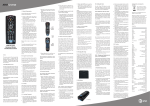
Fig 2 is the sketch map of NRC-502, which has been
divided into five sections to control four different
video/audio devices.
Ø Power Section
evices.
Includes power buttons of various d-
Ø TV Section designed to control TVs of various brands.
Ø CBL/SAT Section designed to control CBL or SAT (alTernative).
GUIDE
ACTIVE
LIST
EXIT
DASH
ENTER
BACK
MENU
INFO
PREV
CH +
GUIDE
CH -
Ø DVD/VCD Section£ºdesigned to control DVD or VCD
(alternative).
VOL +
Customized
Button (F1-F4)
VOL -
Ø AMP Section£ºdesigned to control AMP of various
brands.
REC
GUIDE
DVD/VCD Section
POWER Section
TV Section
STOP
PAUSE
PLAY
F.REW
F.RWD
REW
RWD
Customized
Button (F1-F4)
A M P Section
BREMAX Technology Co., Ltd. (Hangzhou) is a hi-tech
company specializing in exploitation of URCs. We are
proud of our powerful R&D capacity and enjoy several
technological patents. For more information, please visit
our company's website at www.bremax.com.
Fig 1
CBL/SAT Section
NRC-502 is one of the most sophisticated, yet easy to use,
URCs available today! This remote is designed with 4
devices sections applicable for 4 different kinds of
video/audio devices including TV, CBL/SAT, DVD and
amplifier. In addition, this remote has powerful learning
ability. Please read this user manual carefully and visit our
company website at www.bremax.com to download
corresponding RC codes before use.
TV Section
Congratulation on your purchase of BREMAX Universal
Remote Control (URC). BREMAX URCs are new concept
products in accordance with the pursuit of modern and easy
life, which are researched and developed independently by
BREMAX Technology Co., LTD (Hangzhou, China). The
URCs unite various kinds of ordinary RCs as an organic
whole after being simplified meticulously. By preprogramming or downloading needed RC codes on the
internet, the users can operate many kinds of video/audio
devices easily at the same time. So BREMAX URCs can
upgrade timely and will be never out of date!
VOL +
MUTE
B.M
CBL/SAT Section
INPUT1
INPUT2
INPUT3
MUTE
VOL +
Customized
Button (F1-F2)
VOL -
Enjoy your BREMAX Remote!
USB Port
Fig 3
About NRC-502
DVD/VCD Section
l
Basic Information
Here below are some glossaries of BREMAX URC.
;
Section
NRC-5 series URC is designed to control
various devices at a time. We collect those most frequently
used buttons from each ordinary RC to form a
corresponding section. Each of the sections is divided by
clear section lines.
Normal Button are buttons with printings. Usually,
these are most frequently used buttons in ordinary RCs,
such as the numerical keys on TV RC or Play, Stop buttons
on DVD RC.
Customized Button are buttons without printings.
Usually, these buttons can be assigned to any functional
button according to your personal habit such as F1, F2 etc.
.1.
Before Using
Read following carefully before using URC for the first time:
AMP Section
l
Components
Ensure that you have received the following items:
Fig 2
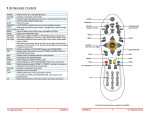
l Button Functions
Fig 3 is the description of button functions of NRC-502.
.2.
l
Universal Remote Control
1
USB Cable
1
User Manual
1
Maintenance Card
1
Brief Operation Manual
1
Battery Installment
Follow the steps described in Fig 4 for the installment of
the batteries.
.3.
-
+
+
Enter your codes here for easy reference later.
TV CODE
CBL/SAT CODE
DVD CODE
AMP CODE
+
As indicated in Fig 9, connect Bremax URC with one online
PC via USB cable provided. Connect the smaller plug of
the cable to URC and the bigger one to the USB port on
your computer.
-
Fig 4
Inter net
Getting Your Codes
NRC-502 is an easy-to-program and easy-to-use remote
control. You have many ways to get your codes for the
particular device and brand. Firstly, you can setup the remote
using the code for your brand of device, from the code tables
(on separate sheet), or download needed RC codes on the
internet. Moreover, NRC-502 has powerful learning ability.
You can learn RC codes from your original remote control
directly, or learn RC codes via USB connection with PC, to
control your devices. Specifically, there are two learning
modes: Direct Learning Mode and Online Learning Mode
(Based on PC).
Fig 6
Direct Learning Mode
USB
Here below is an example of how to learn Power button of an
ordinary TV RC.
2. Press the TV button on Power section of BREMAX
URC that you want to learn, the red indicator blinks and then
stay on.(Fig7,Finger 2)
1
2. Press and hold the S button
(over 5 seconds) until the red
indicator blinks 3 times and
stays on. Then release the S
button.
3. Enter the 4 digit code from
the code tables (on the separate
sheet).If your brand has more
than one code listed, begin with
the first code. When a valid code
is entered, the red indicator
blinks 3 times and turns off. For
an invalid code, the red indicator
flashes.
Brand
PHILIPS
.4.
5~20 CM
1
TV RC
3
NRC-502
Fig 8
4. Press and hold the Power button on your original
remote until the red indicator blinks 3 times quickly and stays
on. If there is a learning problem, the indicator blinks 3 times
slowly and stays on. If this happens, repeat Step 2 to 4.
2
PHILIPS
0001
5. Repeat Step 2 to 4 for other buttons you want to learn.
2. Find your model and click Download. For example, if
your model is NRC-502 internet powered URC, please find
NRC-502 Learning Software first and then click Download.
3. Double click NRC-502 Learning Software.exe. Follow
the on-screen instructions to complete the installation.
Step 2 Complete Learning Operation
Be patient during the operation because the code for a
single button has to be recorded at a time. Please do it one by
one. Here below is an example of how to learn an ordinary TV
RC:
1. Learn single button: For example, the steps of learning
Power button from TV RC to TV button on URC are shown as
follows: (Fig 10)
TV Button
6. Press and release the S button when all desired remote commands are learnt. Code Learning is now complete.
3
Power Button
Power section
Learned to
Note: URC will quit the learning mode within 8 seconds
if no signal from the original remote is received under
Direct Learning Mode. If this happens, please try again.
Online Learning Mode (Based on PC)
4. With your TV on, press CH +
button. If the device responds,
no further programming is
required. If some buttons can not
operate your device, try one of
the other codes for your brand.
5. Repeat steps 1 to 4 to setup
the RC codes of other devices
(CBL/SAT, DVD/VCD, AMP).
Fig 7
0001,0013,0030,0041,
0061,0069,0074,0088,
0129,0144,0154
Operation
1. Visit our company website at www.bremax.com. Find
Service & Support and select Download.
2
3. Place TV RC and BREMAX URC head-to-head (within
5-20cm) as shown in Fig 8.
Code
Fig 9
Follow the steps below to learn the RC codes from ordinary
remote control after finishing the steps of preparation.
Step 1 Install Learning software
S button
Direct Code Entry
Here below is an example of how to setup the TV section of
URC using the code tables.
1. Manually turn on your TV set
to be controlled and search for
the code number for your TV
brand from code tables (on
separate sheet).
USB
1. Press and hold the S button (over 2 seconds) until the
red indicator turns on. Then release the button.(Fig 7,Finger 1)
Prepare a computer and connect it to the Internet. The minimum recommended system configuration is:
Inter Pentium III processor or higher
USB1.1 (Universal Serial Bus) or higher
4
Fig 5
20M free hard disk space
NRC-502
TV RC
Fig 10
Windows98SE/Me/2000/XP operating system or higher
1.1 Double click learning software icon
Monitor resolution of 1024 768 or higher
1.2 Click on Start to learn button on the webpage right below.
.5.
.6.
and run the software.
1.3 Click on TV button on the power section of URC on the
webpage.
1.4 Place TV RC and URC head-to-head (within 5-20cm)
as shown in Fig 8.
1.5 Press the power button on your original TV RC. If the
dialogue box of RC codes have been received comes out,
click on OK to finish learning. At this time, TV button on URC
picture will turn red. If the dialogue box above does not come
out or the dialogue box of Fail to learn shows, it means that
the operation is failed. Please repeat the operations above till
the dialogue box of RC codes have been received comes out.
2. Learn other buttons
2.1 Repeat steps of 1.4 and 1.5 above. For example, if
you want to learn Mute button on TV RC, click on Mute button
on the TV section of URC on the webpage firstly and follow the
steps of 1.4 and 1.5 as shown in Fig 11.
Other Operations:
You can choose other operations such as Delete or Clear
during the process of learning. For any details, please see the
steps description as reference at the text box on the webpage
or click on Help button to know related information.
Note
1. Do not remove the USB cable or disconnect the links
between URC and USB port of computer during the operation.
choose Changhong in Brand; then input C1863 or K1B in
Device or RC Type. By clicking Search button, information of
accordant RC will be listed (PS: It's normal that one RC can
control several types of devices of the same brand). Choose
one of them to pitch on and click Next for the setting of other
devices. The settings for STB DVD/VCD AMP are the same
as above.
5. After finishing all settings , please click Download and
then click OK to complete the URC setting.
2. Finish Step 1.4 and 1.5 within 6 seconds after clicking
on the Start to learn button. If not, please try again.
6. Close the Browser and remove USB cable. Now you can use BREMAX URC to control those devices which have
finished settings.
3. In case of any disconnection between URC and the
computer during the operation, please connect the cable again
and run the Learning Software.
Note
TV section
DVD/VCD section
Learned to
Learned to
DVD RC
NRC-502
Fig 12
Download
1. There are two kinds of modes to download RC codes:
Classic mode and Customized Mode. Classic mode aims to
simplify furthest the process of downloading and enable users
to download needed codes easily. Customized Mode is totally
free for customized setup operation to DIY your personal
remote. For users who use our product at the first time, it is
recommended to enter Classic mode.
2. There is detailed online user manual for BREMAX URC.
If necessary, please visit http://www.bremax.com/services/
manual.htm to download User's manual of NRC-5XX Series
R-emote Control PDF.
3. If you can not find the needed model of RCs on our
website, please contact our customer service center. Or you
can use BREMAX URC to learn the codes of your RC directly.
NRC-502
TV RC
Fig 11
2.2 Repeat step 2.1 till finish learning all the buttons. Then
the whole learning process of TV RC is finished.
3. Learn other remote controls
If needed to learn other RCs like DVD RC, repeat the whole steps above again. (Fig 12)
4. Finish learning
When finish all the steps, click on the Stop learning button. When a dialogue box of Confirm this learning operation
comes out, click on Yes and then Exit to close the webpage.
After that, pull off USB cable provided to finish learning
operation.Then you can use your BREMAX URC to control
your devices.
If you want to continue the learning operation, click on No
when a dialogue box of Confirm this learning operation
comes out. Please repeat Step 1, Step2 and Step 3 above if
you want to learn other buttons.
.7.
Follow the steps below to download the RC codes after finishing all the steps of preparation:
1. Visit product website at:
Method I: visit our company website at
www.bremax.com. Follow the steps and click Service &
Support --- Update --- Download RC Code
Or
Method II: visit product website at www.webmote.com/english/ directly.
2. While displaying RC connection is successful, please
click Enter. Otherwise, follow the steps displayed on screen
until the instruction above comes out, and then click Enter.
3. After finishing Step 2, the screen will display two option
modes: Classic Mode and Customized Mode. For the user
who uses it for the first time, the Classic Mode is strongly
recommended.
4. Follow the steps and choose the device type or the RC
type as you wish. For example, if you want to choose
Changhong TV C1863 with its RC K1B, please enter the
webpage of Download TV RC code first and click Type to
.8.
FAQ s
Problems
Solutions
Red indicator
1. URC did not accept the code.
blinks after you 2. Try to program the code again or try a different code.
program a product code.
It displays No RC 1. Check if the connection between URC and the computer via
USB cable is correct.
is found! Please
check USB con- 2. Make sure that the battery installment is correct.
nection! When 3. Remove USB extension cable or USB hub. Use USB cable
running software
directly for connection.
4. Replace the batteries with new ones.
During learning, 1. During learning, be sure to place your original RC and URC
it displays Failehead-to-head and keep their distance within 5-20cm.
d to learn.
2. Make sure that the original RC can be used properly to
control the device.
3. Ensure that the batteries in the original RC work normally.
.9.
During learning, 1. Check if the connection between URC and the computer via
RC picture on
USB cable is correct.
the interface will
2. Remove USB extension cable or USB hub. Use USB
disappear during
cable directly for connection.
the process of
learning.
BREMAX URC 1. Make sure the devices are on standby mode.
can not control
2. Make certain that the distance between URC and desired
home devices.
device is within 8 meters and try to aim it at the device.
product to be exchanged for malfunction within one month
and be free from defect in materials and workmanship for a
period of one year from the date of original purchase (as
evidenced by the relevant purchase receipt).
Within one year from the date of purchase, you can contact
franchiser of BREMAX for claiming if the product has some
problem in quality.
3. Ensure that there is no obstacle between URC and desired
device.
l
4. Restart learning for those buttons failed to operate properly.
For any help please contact our service center via:
5. Replace the batteries with new ones.
Hot line: 4008 878585 086 0571
086 0571 88872187
Service Center
88872183
Cautions On Use
Service Time: 8:00£21:00 Monday to Friday
10:00£18:00 Saturday and Sunday
1. Please operate in the right sections to control
corresponding devices. For example, press buttons on
DVD section to control DVD.
Website: http://www.bremax.com
2.
FAX:
0571
88216187
Make sure that the distance between URC and desired
device is within 8 meters and angle within 30 degrees.
Ensure that there is no obstacle between them.
Statement
3. Do not expose the URC to the humid environment, to the
place with too high or too low temperature.
All the items and attached figures above are
only used for the description of usage of this
product. Any law responsibility will not be
undertaken by BREMAX Technology Co.,
Ltd. (Hangzhou).
4. Do not use USB cable not provided by BREMAX.
5. Do not disassemble the URC during daily maintenance
without prior endorsement by BREMAX. Do not press by
force or drop it. Do not use organic detergents like acetone
to wipe dirt off.
Specification
Interface
1.5m USB cable
Power
Requirements
3 AAA Batteries
Power life
Over 3 months under standard usage conditions
Distance
Approximately 8 meters (26 feet)
Dimension
212
Mass
105g (not including batteries)
Usage
Environment
Temperature: -25 to +55
Relative humidity: 0% to 93%
55
20 mm
NOTE: Some parameters above may have some slight changes
according to specific models of NRC series internet powered
URCs.
Customer Service
l Warranty
BREMAX Technology Co., Ltd. (Hangzhou) warrants this
.10.
.11.
Download
For specific operational steps as how to download RC codes from www.bremax.com , please see How to Download in
page 9 of the Internet Powered Universal Remote User
Manual.
Internet powered Universal Remote
Getting Your Codes
Here below is an example of how to setup the TV
section of URC using the code tables.
Brand
PHILIPS
Code
0001,0013,0030,0041,
0061,0069,0074,0088,
0129,0144,0154
1
2. Press and hold the S button
(over 5 seconds) until the red
indicator blinks 3 times and
stays on. Then release the S
button.
3. Enter the 4 digit code from
the code tables (on the
separate sheet).If your brand
has more than one code listed,
begin with the first code. When
a valid code is entered, the red
indicator blinks 3 times and
turns off. For an invalid code,
the red indicator flashes.
2
PHILIPS
0001
3
4. With your TV on, press CH +
button. If the device responds,
no further programming is
required. If some buttons can
not operate your device, try one
of the other codes for your
brand.
5. Repeat steps 1 to 4 to setup
the RC codes of other devices
(CBL/SAT, DVD/VCD, AMP).
4
Enter your codes here for easy reference later.
TV CODE
DVD CODE
Code
Brand
Code
Brand
Code
0002,0139
ELECTROHOME
0001,0090,0140,0154
ELITE VIDEO
EMERSON
0068
0001,0003,0004,0005,0019,0020,
0021,0027,0032,0033,0052,0053,
0055,0056,0066,0071,0090,0092,
0093,0102,0103,0109,0110,0120,
0124,0125,0141,0142,0155,0157,
0167
0001,0090
0087,0093,0116
0068,0125
0053,0071,0103,0125,0142,0157
0142,0157
0038
0001,0005,0006,0018,0026,0061,
0063,0090,0106,0123,0140,0151,
0154,0143
0001
0001,0017,0045,0058,0071,0090
0125,0157
0134
0050,0070
0001,0090
0157
0001,0065,0078,0090,0094,0100,
0102,0112,0126,0128,0129,0145,
0148
0157
0144,0088
0012
0144
0139
0001,0006,0017,0018,0025,0061,
0063,0074,0090,0097,0106,0109,
0123,0140,0143
0001,0090
0023,0036,0059,0068,0072,0095,
0112,0129,0138
0001,0090,0139
0142
0001,0090
0012
MOTOROLA
MTC
MULTITECH
MULTIVISION
NAD
NEC
0108,0154
0001,0002,0017,0025,0090,0097
0157
0007
0001,0028,0090,0097
0001,0017,0024,0090,0107,0129,
0154
0010,0038
0142
0001,0076,0090
0050,0156
0076
0134
0142
0142,0157
0015,0028,0136
0024,0108
0020,0027
0006,0015,0073,0083,0113,0132,
0136,0144,0154
0001,0017,0074,0090,0129,0144,
0154
0001,0013,0030,0041,0061,0069,
0074,0088,0129,0144,0154
0013,0051,0069,0088,0144,0164
SUPREME
SVA
SYLVANIA
0139
0050
0001,0027,0053,0071,0074,0090,
0103,0129,0131,0144
0003,0053,0071,0103,0157
0108
0086,0127,0154
0006
0001,0006,0090
0001,0012,0017,0025,0074,0076,
0090,0097,0106,0123,0125,0142,
0157
0106,0123
0001,0048
0086
0001,0090
0016,0024,0025,0084,0089,0093,
0097,0101,0117,0119,0129,0153
0061,0143
0112
0001,0017,0090
0038,0145
0012
0001,0003,0017,0024,0061,0074,
0090,0098,0106,0123,0125,0143,
0144
0071,0082,0115,0118
TV
Direct Code Entry
1. Manually turn on your TV
set to be controlled and search
for the code number for your TV
brand from code tables (on
separate sheet).
Brand
ELECTROBAND
CBL/SAT CODE
AMP CODE
Direct Learning Mode
please see Direct Learning Mode in page 5 of the Internet
Powered Universal Remote User Manual.
Online Learning Mode (Based on PC)
For specific operational steps as how to learn RC codes via
PC, please see Online Learning Mode in page 5 of the
Internet Powered Universal Remote User Manual.
Brand
Code
ENVISION
FISHER
FUJITSU
FUNAL
FUTURETEC
GATEWAY
GE
ABEX
ADMIRAL
ADVENT
ADVENTURA
AIKO
AIWA
ALLERON
AMARK
AMTRON
AKAI
0028
ANAM NATIONAL
0019,0142,0154,0157,0165
AOC
APEX
ARCHER
AUDIOVOX
AXION
BELCOR
0001,0017,0090,0002,0045
BELL&HOWELL
0093,0106,0123
BENQ
BRADFORD
BROKSONIC
BROKWOOD
CANDLE
CELEBRITY
CENTURION
CETRONIC
CHANGHONG
CITIZEN
0127,0159
CLAIRTONE
0002
KLOSS
NOVABEAM
CLASSIC
CLP CLASSIC
COLOR VOICE
COLORTYME
CONCERTO
CONTEC
CORNEA
CRAIG
CROSLEY
CROWN
0014,0137,0142
KONKA
CURTIS MATHES
0001,0018,0025,0089,0090,0093,
0097,0106,0118,0123
CTX
CXC
DAEWOO
0108
DAYTRON
DIMENSIA
DUKANE
DUMONT
DYNASTY
0051,0108
0047,0105
0012
0076
0029,0049,0071,0104
0125
0108
0157
0025,0139
0014,0031,0050,0137
0108
0157
GIBRALTER
GOLDSTAR
GRUNDY
GUESTVISION
HAIER
HALLMARK
HARVARD
HITACHI
0067
0001
0157
0016,0066,0120
0001
0001,0012,0074,0090
0139
0090
0142
0014,0137
0001,0025,0074,0076,0090,0097,
0142,0157
0001,0003,0012
0107
0001,0090,0107
0001,0090
0002,0142,0157
0111
0142,0157
0144
0142,0157
0142,0157
0001,0017,0044,0054,0064,0076,
0082,0090,0091,0092,0107,0115,
0118,0142
0001,0090
0106,0123
0094,0145
IMA
INFINITY
JANEIL
JBL
JCB
JC PENNEY
JENSEN
JVC
KAWASHO
KEC
KENWOOD
KTV
LG
LODGENET
LOEWE
LOGIK
LUCE
LUXMAN
LXI
MAGNAVOX
MAJESTIC
MARANTZ
MEGATRON
MEI
MEMOREX
MGA
MIDLAND
MINUTZ
MITSUBISHI
0001
MONIVISION
0142
MONTGOMERY
WARD
0035,0039,0057,0122,0152,0157,
0168
0002,0113,0142,0157
0001,0017,0045,0058,0071,0090,
0111
0106,0123,0150
0135,0144
0106,0123
0022
0001,0090
0001,0018,0063,0071,0090,0093,
0097,0106,0123,0144
0001,0051,0074,0088,0090,0129,
0144
0106,0123
0001,0090,0144
0001,0090,0094
0002
0001,0027,0087,0090,0093,0106,
0120,0123,0125
0001,0017,0090,0125,0129,0140
0006,0018,0063,0123
0143
0001,0017,0090,0125,0129,0130,
0140
0037
0123,0106
NET TV
NIKEI
NIKKO
NORCENT
NTC
ONCOMMAND
ONKING
ONWA
OPTIMUS
OPTONICA
ORION
PANASONIC
PHILCO
PHILIPS
PHILIPSMAGNAVOX
PILOT
PIONEER
PORTLAND
PRECISION
PRICE CLUB
PRINCETON
GRAPHICS
PRISM
PROSCAN
PROTON
PULSAR
QUASAR
RADIO SHACK
RCA
PEALISTIC
RHAPSODY
SAMPO
SAMSUNG
SAMSUX
SANSUI
SANYO
SCOTCH
SCOTT
SEARS
SHARP
SHOGUN
SIGNATURE
SIMPSON
SONIC
SONY
SOUNDESIGN
SPECTRAVISION
SQUAREVIEW
SSS
STARLITE
SUPRA
SUPREMACY
0001
0001,0028,0090,0102,0114,0145
0001,0017,0076,0090
0046
0025
0096,0108
0006
0018,0063,0106,0123
0001,0048,0090,0149,0160,
0001
0006,0015,0083,0113,0132,0136,
0144,0154
0001,0024,0071,0075,0090,0093,
0106,0123,0124,0142,0151,0157
0001,0006,0008,0017,0018,0026,
0042,0063,0075,0079,0085,0090,
0099,0102,0106,0115,0123,0133,
0140,0151,0154,0161,
0001,0024,0071,0075,0090,0093,
0106,0123,0124,0142,0157
0002
0001,0010,0038,0090
0001,0009,0017,0018,0025,0040,
0043,0060,0089,0090,0097
0090
0027,0120
0001,0062,0080,0087,0093,0116
0001,0090
0001,0003,0020,0090,0125,0142,
0157
0001,0016,0018,0025,0063,0090,
0093,0097,0103,0106,0116,0123,
0125,0144
0001,0024,0034,0051,0052,0090,
0108,0147,0158,0162
0001
0106,0123,0155
0074
0002
0081,0121,0139
0001,0074,0090,0125,0142,0157
0166
0103
0001,0142,0157
0157
0001 0146
0012
SYMPHONIC
TANDY
TATUNG
TECHNICS
TECHWOOD
TEKNIKA
TELERENT
TERA
TEVION
TMK
TOSHIBA
UNIVERSAL
VICTOR
VIDTECH
VIEWSONIC
VIKING
WARDS
WHITE WESTINGHOUSE
YAMAHA
ZENITH
0001,0017,0090
0001,0011,0027,0051,0052,0071,
0072,0076,0077,0088,0089,0090,
0092,0094,0111,0120,0128,0155,
0163
AUDIO
Brand
Code
AIWA
APEX
BOSE
CITIZEN
CRITERION
DELPHI
DENON
FISHER
GOLDSTAR
3079,3088
3019
3082
3026
3040
3042
3033,3089,3096
3003
3022
3002,3048
3062,3067,3097
3025,3047,3049,3087,3093
3003,3023
3041
3038
3056,3073,3094
3039
3012,3077,3085,3091
3043,3057,3074,3083,3095
3005,3013,3068,3075,3081,3098,
3100
3003,3098
3029,3034,3037,3054,3101
3016,3017,3021,3024,3029,3037,
3053,3054,3095
3018,3029,3037,3054,3055,3071,
3080,3090
3086
3006
3000
3008
3044
3061,3072
3021,3024, 3052 ,3064
HARMAN KARDON
JVC
KENWOOD
MAGNAVOX
MARANTZ
MITSUBISHI
NAD
NORCENT
ONKYO
OPTIMUS
PANASONIC
PHILIPS
PIONEER
RADIO SHACK
RCA
REALISTIC
SABA
SAMSUNG
SANYO
SCOTT
SHARP
SHERWOOD
Brand
Code
SONY
3004,3011,3014,3031,3045,3046,
3059,3060,3092,3099
3015,3028,3032,3036,3065
3005,3013,3068,3075,3098,3100
3040
3009
3042
3027,3035,3050,3051,3063,3069,
3076,3078,3084
3001,3003,3007,3010,3020,3022,
3030,3057,3058,3066,3070
TEAC
TECHNICS
TEVION
VENTURER
XM RADIO
YAMAHA
ZENITH
SAT
Brand
Code
CHANNEL
MASTER
2073,2078
CHAPPARAL
CHEYENNE
DIRECTV
2091,2097
2097
2064,2065,2067,2069,2077,2082,
2086,2090,2094,2102,2107,2108,
2110,2115,2116,2119
2079
2050,2074,2104
2106
2099
2069,2076,2089,2096,2103,2107,
2110,2119
2058
2049,2055,2056,2062,2063,2075,
2083,2095,2109,2113,2118
2082,2086,2094,2102,2108
2102
DISH NETWORK
DRAKE
DX ANTENNA
FUJITSU
GE
GEMINI
GENERAL
INSTRUMENT
HITACHI
HUGHES
NETWORK
KENWOOD
MACOM
MAGNAVOX
MITSUBISHI
MOTOROLA
NORSTAT
PACE
PANASONIC
PANSAT
PHILIPS
PIONEER
PRIMESTAR
PROSCAN
RCA
REALISTIC
SAMSUNG
SHARP
SIERRA
SKY NETWORK
SONY
STAR SIGHT
STAR TRAK
STARCHOICE
STS
SUPER GUIDE
TOSHIBA
ULTIMATE V
UNIDEN
VIDEO CIPHER
WEB TV
ZENITH
2080
2093
2064,2087
2082,2086,2094,2102,2108
2083
2100
2059,2070
2065,2066,2068
2051
2064,2082,2086,2088,2094,2102,
2108
2053
2075,2095
2069,2076,2096,2103,2110,2119
2069,2076,2084,2089,2096,2103,
2107,2110,2119
2072,2114
2052,2067,2112,2115
2053
2097
2059,2070
2057,2077,2090,2116
2117
2081
2062,2075,2095
2092,2098
2085
2054,2060,2082,2086,2094,2101,
2102,2105,2108
2090,2119
2111,2117
2050
2057
2050,2058,2061,2070,2071,2074,
2104
DVD
Brand
Code
ADVENT
AIWA
AKAI
AMES
APEX
1056
1002
1009
1072
1003,1013,1017,1022,1034,1053,
1055,1058,1062,1068,1069,1078
1088
1025
1025
1045
1062
1085
1000
1069
1010
1069,1072
1043
1026
A-TREND
AUDIOVOX
AXION
B&K
BLAUPUNKT
BOSE
BROKSONIC
CHANGHONG
CINEVISION
CLASSIC
CRITERION
CURTIS
INTERNATIONAL
CYBERHOME
CYTRON
DAEWOO
DENON
DIGITREX
DUAL
DVD 2000
ELTA
EMERSON
FISHER
FUNAI
GE
GOLDSTAR
GO-VIDEO
GRADIENTE
GREENHILL
HAAZ
HARMAN KARDON
HITACHI
HITEKER
INITIAL
INTEGRA
JBL
JVC
KENWOOD
KLH
KONKA
KOSS
LASONIC
LG
LITEON
MAGNAVOX
MARANTZ
MEMOREX
MICROSOFT
MINTEK
MITSUBISHI
MUSTEK
NAD
NAKAMICHI
NESA
NORCENT
ONKYO
OPTIMUS
ORION
ORITRON
PACIFIC
PANASONIC
PHILIPS
PHILIPSMAGNAVOX
1088
1023
1063,1073
1059,1071
1013
1033
1079
1004,1012
1010,1024,1044
1020
1024,1044
1050,1062
1010
1014,1021,1029
1011
1062
1074,1084
1031
1001,1029,1051
1013
1062
1081
1031
1019,1041,1076
1052,1059
1062
1060,1070,1080,1090
1011
1074
1010
1037
1007,1039,1040,1066,1095
1010,1039,1040,1091,1095
1023
1050
1062
1079
1072
1010,1092
1082
1062
1016,1027,1036,1037,1047
1081,1086
1001
1000
1011
1023
1018,1028,1032,1059,1075
1007,1039,1040,1066,1091,1095
1007,1039,1040,1066,1091
Brand
Code
Brand
Code
PIOONER
POLAROID
POLK AUDIO
PROLINE
PROSCAN
RADIO SHACK
RCA
REOC
ROTEL
SABA
SAMPO
SAMSUNG
SANSUI
SANYO
SEARS
SEG
SHINCO
SHINSONIC
SONY
SYLVANIA
SYMPHONIC
TEAC
TECHNICS
TECHWOOD
TEVION
1001,1035,1089,1094
1008
1039,1040,1095
1011
1050
1006,1015,1054,1093
1015,1050,1054,1062,1093
1074
1019
1006
1030
1005,1014,1029
1000
1020
1000
1042
1062
1062
1048,1049,1057,1067,1077
1024,1044
1024,1044
1001
1059
1092
1023,1033,1038,1043,1064,1074,
1084
1001
1000,1039,1046,1065,1087
1054
1083
STAR SIGHT
SPRUCER
STAR TRAK
STARGATE
TELEVIEW
TIME WARNER
TOCOM
UNIVERSAL
VIDEO TECH
ZENITH
2031
2039
2028
2018
2018
2027
2042
2021
2041
2024,2044
2032
THETA DIGITAL
TOSHIBA
UNITED
WHARFEDALE
WHITE
WESTINGHOUSE
1044
X-BOX
YAMAHA
ZENITH
1050
1007,1059,1061,1066
1010
CBL
Brand
Code
ABC
ADELPHIA
ALLEGRO
AMERICAST
AT&T
BELL SOUTH
2026
2047
2021,2024
2032
2043
2032
2046,2048
2043
2018
2020
COLOR VOICE
COMCAST
COMTRONICS
DIGITAL MUSIC
EXPRESS
EASTERN
EVERQUEST
GE
GENERAL
INSTRUMENT
HAMLIN
JERROLD
MOTOROLA
OAK
PANASONIC
PHILIPSMAGNAVOX
PIONEER
RADIO SHACK
RCA
REGENCY
SAMSUNG
SCIENTIFIC
ATLANTA
SIGNAL
SL MARX
STAR SIGHT
2029
2018
2038
2020,2037,2043
2040
2037
2037
2036
2035,2039
2022,2023
2019,2027,2033
2022,2023,2024
2031,2039
2029
2018,2019
2025,2026,2027,2030,2034,2047
2018
2018
2031
ZENITH
NETWORK
DIRECTV
Brand
Code
DIRECTV
GE
HITACHI
HNS
2120,2121
2003
2008
2017
2006,2016
HUGHES NETWORK
SYSTEMS
LG
MITSUBISHI
Panasonic
PHILIPS
PROSCAN
RCA
SAMSUNG
SONY
TOSHIBA
UNIDEN
2017
2006,2016
2001,2004
2000,2009,2016
2002,2003
2002,2003
2010,2011,2012,2014
2015
2007,2013,2016
2005