1
Contents
Contents
1.00
Control Panel Installation
1.01
Introduction to the Control Panel
Accessories and Low AC Low Voltage Cable Alarm Cable
Voltage Cables Entry
Knockout
The control panel has been designed for both installer and user friendliness. The factory default settings have
been carefully selected to suit most installation needs. However most functions are fully programmable for
flexibility when installing the system. All changes made are stored within a Non Volatile Memory (NVM) and are
retained even when there is complete loss of power.
Please read these instructions carefully before attempting to install this control panel. Ensure the user instructions are given to the user after installation.
1.02
220-240V
AC Mains
Cable Entry
Mains
Terminal Block
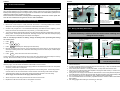
2. Remove the cover and put in a safe place with the screws. If connecting K6600LCD or SL6600
Sleepwatch remote keypad follow instructions as described within the keypad.
4. The control panel day LED will flash and also the mains LED will illuminate red indicating running from
battery power. The tamper LED will illuminate, indicating a tamper fault. Hold down the tamper spring
and fix under the on-broad keypad the tamper will extinguish.
Note: If LCD display indicates low battery, change the battery before proceeding with testing
the control panel.
5. Press:
PROG
6. Enter:
1
7. Press:
0
2
5
3
RESET
ST5500 BACK PLATE
1.04
ST5500 Transformer Wiring
Wiring and Safety Instructions
WARNING: ELECTRICITY CAN KILL
Ensure electricity is switched off at the mains before installing and
fitting the mains supply
Mains Power
Transformer
AC Plug Pack
Cable Entry
220-240V AC Mains
Cable Entry
Accessories and Low
Voltage Cables
4
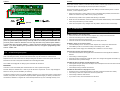
Walk test (PA & Tamper give the same tone)
8. Remove and replace each zone link, the corresponding zone will be shown on the LCD display and
also beep indicating which zone is activated. After testing all the zones and tamper, release tamper
switch spring.
9. Press:
Red or Brown to L (Live)
Green/Yellow to Green E (Earth)
Blue or Black to N (neutral)
Internal
Speaker
Accessories and Low
Voltage Cables Entry
1. Release keypad cover and unscrew the two screws from the front cover.
Mains
Terminal
Block
Battery
Backup
Cables
twice, disconnect and remove the battery.
These simple tests will demonstrate that the control panel (and remote keypad if fitted) are working
correctly. Disconnect the battery from the control panel in preparation for wiring.
1.03
Internal
Speaker
Cable
Screw
Mounting
Hole
Pre-testing the Control Panel before Installing
3. Connect a fully charged 12V 1.2 Ah sealed lead acid battery, black lead wire to the negative (-) of the
battery terminal and the red lead wire to the positive (+) of the battery terminal.
220-240VAC
Mains Supply
Cable Connection
Battery Backup
Compartment
Zone
Links
Front Cover
Tamper Spring
AC Plug Pack
Wiring Terminal
ST5500
Mounting the Control Panel
The main control panel unit should be positioned out of reach of children in a secure place close to a mains
electricity supply. The unit should not be fitted to a flammable or uneven surface.
1. Remove the PCB by disconnecting the AC supply cable from the transformer and also from the speaker
connector, put the PCB in a safe place.
2. Using the rear panel as a template, mark the positions of the mounting holes. The mounting surface
must be solid. Do not fit to a flammable or uneven surface. Drill mounting holes and fit wall plugs.
3. Thread the mains supply AC power cable through the smaller aperture in the rear casing.
At this stage, do not connect the AC supply cable to the panel.
4. Attach rear panel to wall using at least three 30mm No.8 wood screws.
5. Replace the PCB and reconnect the AC and speaker connectors.
2
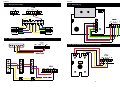
ST5500 Low Voltage
16.5V AC Plug Pack Wiring
1. The control panel must be wired according to Current National Wiring Regulations if fitted with an
internal transformer.
2. A readily accessible device for disconnecting from the mains (e.g. 3 amp un-switched fused spur)
must be provided as part of the installation.
3. If the control panel is wired to a 13 amp wall socket, a 3 amp 250V fuse must be used
4. Use mains 2 core cable and earth cable capable of carrying the rated current (i.e. at least 1mm²). The
control panel must be wired to earth.
5. Wiring of the mains supply to the transformer terminal block in the control panel should pass through
the smaller aperture in the rear casing of the panel, NEVER connect the mains supply directly to the PCB.
6. The unit requires wiring to a suitable earth, refer to National Wiring Regulations.
7. It is recommended that the unit is wired by a qualified electrician. Check for hidden cables and/or pipes
before drilling.
8. Use safety goggles when drilling or hammering in cable clips.
3