1
Note:
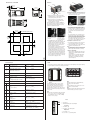
In the drawings below for each input notice that the Slot A connector labeling is identified.
Note:
When using a 2 wire RTD, jumper S1 and T1 together
Inputs
All inputs shown below represent input 1 (the only input) and are to be connected to slot A of the PID
Control.
Process
Volts
-
RTD
2 or 3 Wire
S1
+ R1
S2
S3
S1
T1
Power Supply Note:
Switched dc and Process outputs use a common power supply with a maximum current output of 40mA.
As an example, supplied current (mA) from output 1 and 2 can be 20/20, 30/10, 40/0, 10/30, etc...
Outputs
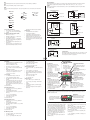
Please note all outputs are connected exclusively to slot A. Output availability is based on the part number
of your PID Control.
-
Switched DC
Solid-State Relay
Form A
Thermocouple
S1
common
L1 and/or L2
dc W1 and/or W2
+ R1
dc +
Y1 and/or Y2
K1 and/or K2
S1
PM _ (C) _ C C - A A A A B _ _
PM _ (C) _ K K - A A A A B _ _
R1
Process
Amperes
Mechanical Relay
Form C
Universal Process
F1
negative
+ T1
-
L1
normally open
S1
Process Volts and Amperes
• 4 to 20 mA @ 100 Ω input impedance
• 0 to 10VÎ (dc) @ 20 kΩ input impedance
• Scalable
Resistance Temperature Detector (RTD)
• Platinum, 100 Ω @ 0°C
• Calibration to DIN curve (0.00385 Ω/Ω/°C)
• 20 Ω total lead resistance
• RTD excitation current of 0.09 mA typical.
Each ohm of lead resistance may affect the
reading by 0.03°C.
• For 3-wire RTDs, the S1 lead must be connected to R1.
• For best accuracy use a 3-wire RTD to compensate for lead-length resistance. All three
lead wires must have the same resistance.
G1
volts +
4
Thermocouple
• 2 KΩ maximum source resistance
• >20 MΩ input impedance
• 3 microampere open-sensor detection
• Thermocouples are polarity sensitive. The
negative lead must be connected to S1.
• To reduce errors, the extension wire for thermocouples must be of the same alloy as the
thermocouple.
K1
common
J1
normally closed
H1
current +
PM _ (C) _ E _ - A A A A B _ _
PM _ (C) _ F _ - A A A A B _ _
NO-ARC Relay
Form A
Open Collector
Power
Supply
L2
common
X1
dc W1
K2
Load
PM _ (C) _ _ H - A A A A B _ _
PM _ (C) _ C _ - A A A A B _ _
Mechanical Relay
Form A
L2
K2
Switched DC
• Supplied current up to a maximum of 40 mA.
See Power Supply note above.
• Short circuit limited to <50 mA
• 22 to 32VÎ (dc) open circuit voltage
• Use dc- and dc+ to drive external solid-state
relay.
• DIN-A-MITE compatible
- single-pole: up to 4 in parallel or 4 in series
- 2-pole: up to 2 in parallel or 2 in series
- 3-pole: up to 2 in series
Open Collector
• 100 mA maximum output current sink
• 30VÎ (dc) maximum supply voltage
• Any switched dc output can use the common
terminal.
• Use an external power supply to control a dc
load, with the load positive to the positive of
the power supply, the load negative to the
open collector and common to the power supply negative.
See Quencharc note.
Mechanical Relay Form C
• 5 A at 240VÅ (ac) or 30VÎ (dc) maximum
resistive load
• 20 mA at 24V minimum load
• 125 VA pilot duty at 120/240VÅ (ac), 25 VA at
24VÅ (ac)
• 100,000 cycles at rated load
• Output does not supply power.
• For use with ac or dc
See Quencharc note.
Mechanical Relay Form A
• 5 A at 240VÅ (ac) or 30VÎ (dc) maximum
resistive load
• 20 mV at 24V minimum load
• 125 VA pilot duty @ 120/240VÅ (ac), 25 VA at
24VÅ (ac)
• 100,000 cycles at rated load
• Output does not supply power.
• For use with ac or dc
See Quencharc note.
NO-ARC Relay Form A
• 15 A at 85 to 264VÅ (ac) resistive load only
• 1/16 DIN models only
• 2,000,000 cycle rating for NO-ARC circuit
•
•
•
•
100 mA minimum load
2 mA maximum off state leakage
Do not use on dc loads.
Output does not supply power.
Solid-State Relay Form A
• 0.5 A at 20 to 264VÅ (ac) maximum resistive
load
• 20 VA 120/240VÅ (ac) pilot duty
• Opto-isolated, without contact suppression
• Maximum off state leakage of 105 microamperes
• Output does not supply power
• Do not use on dc loads.
• See Quencharc note.
Universal Process
• 4 to 20 mA into 800 Ω maximum load
• 0 to 10VÎ (dc) into voltage 1 kΩ minimum
load
• Scalable
• Output supplies power (See Power Supply
note above).
• Cannot use voltage and current outputs at
same time
9 10
11 12
Quencharc Note:
Switching pilot duty inductive loads (relay coils, solenoids, etc.) with
the mechanical relay, solid state relay or open collector output options requires use of an R.C. suppressor.
PM _ (C) _ _ J - A A A A B _ _
Keys & Displays
16th DIN PID Controller
Zone Display:
When [2onE] (found in the
Factory Page) is set to on, indicates the controller zone.
[1] to [9] = zones 1 to 9
[E] = zone 14
[A] = zone 10
[F] = zone 15
[b] = zone 11
[h] = zone 16
[C] = zone 12
[d] = zone 13
Upper Display:
In the Operations Menu,
displays the process
value, otherwise displays
the value of the parameter in the lower display.
®
Infinity Key: ˆ
Clears and Silences alarms, press
to back up one level, or press and
hold for two seconds to return to
the Operations Menu.
A
Output Activity:
Number lights indicate activity of
outputs 1 and 2.
Percent Units Indicator:
Lights when the controller is
displaying values as a percentage
or when the open-loop set point
is displayed.
Lower Display:
Indicates the set point or output
power value during operation,
or the parameter whose value
appears in the upper display.
A/M Key:
This key will toggle the control
mode between the current value of
the C.M prompt (Off, MAn, AUto)
and Manual when the A/M button
is pushed and held for 3 seconds.
Temperature Units Indicator
Lights:
Indicates whether the temperature is displayed in Fahrenheit
or Celsius.
Communications Activity:
Flashes when another device
is communicating with this
controller.
M
Up and Down Keys: ¿ ¯
In the Operations Menu, adjusts the
set point in the lower display. In other
pages, changes the upper display to
a higher or lower value, or changes a
parameter selection.
Advance Key: ‰
Advances through
parameter
prompts.
32nd DIN PID Controller
With a few exceptions, all of the key functions described for the 16th DIN PID Controller apply to the 32nd
DIN PID Controller as well.
Left Display:
In the Operations Menu, displays
the process value, otherwise displays the value of the parameter
in the left display.
1 2
®
%
Right Display:
Indicates the set point or output
power value during operation,
or the parameter whose value
appears in the right display.
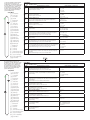
Responding to a Displayed Message (16th or 32nd DIN)
An active message will cause the display to toggle
between the normal settings and the active message in the upper or left display and [Attn] in the
lower or right display. Your response will depend
on the message and the controller settings. Some
messages, such as Tuning, indicate that a process
is underway. If a message is generated in the
right or lower display that can be cleared (such
as [AL;h1]), simply push the infinity ˆ key to
execute the action ([CLr]).
[AL;L1] Alarm Low 1 (sensor input below low
alarm set point)
[AL;h1] Alarm High 1 (sensor input above high
alarm set point)
[AL;E1] Alarm Error 1 (alarm state cannot be
determined due to lack of sensor input)
[Er;i1] Error Input 1 (sensor is not providing a
valid signal to the control)
[tUn1] Tuning (controller is autotuning the
control loop)
[`rP1] Ramping (controller is ramping to a
new set point)