1
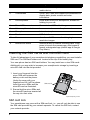
Voice call options
Icon
Description
Access the keypad while a call is in progress.
Speakerphone.
Mute a call.
Place the call on hold.
Add another call.
Saving a dialed number to contacts
You can save a number you have dialed to your contacts for future use.
.You will then
1. Select the number from the Call log tab, and tap on the contact
be asked if you want to add the number to your contacts.
2. Tap OK.
3. Tap Create new contact and select how to complete the action. See "Adding a
contact" on page 19.
Conference calls
If you have one call on hold and another on line, you can
combine both calls to create a conference call.
After the first call is established, tap
to start the conference call.
and tap Add call
23