1
HUNT ENGINEERING
Chestnut Court, Burton Row,
Brent Knoll, Somerset, TA9 4BP, UK
Tel: (+44) (0)1278 760188,
Fax: (+44) (0)1278 760199,
Email: [email protected]
www.hunteng.co.uk
www.hunt-dsp.com
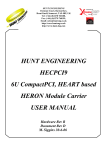
HUNT ENGINEERING
API for Windows
Installation and User Manual
Document Rev A
API software Rev 1.99
P.Warnes / J.Thie 15-07-05
COPYRIGHT
This documentation and the product it is supplied with are Copyright HUNT
ENGINEERING 1999-2002. All rights reserved. HUNT ENGINEERING maintains a
policy of continual product development and hence reserves the right to change product
specification without prior warning.
WARRANTIES LIABILITY and INDEMNITIES
HUNT ENGINEERING warrants the hardware to be free from defects in the material
and workmanship for 12 months from the date of purchase. Product returned under the
terms of the warranty must be returned carriage paid to the main offices of HUNT
ENGINEERING situated at BRENT KNOLL Somerset UK, the product will be repaired
or replaced at the discretion of HUNT ENGINEERING.
If HUNT ENGINEERING decides that there is any evidence of
electrical or mechanical abuse to the hardware, then the customer shall have no
recourse to HUNT ENGINEERING or its agents. In such circumstances HUNT
ENGINEERING may at its discretion offer to repair the hardware and charge for
that repair.
Exclusions -
Limitations of Liability - HUNT
ENGINEERING makes no warranty as to the fitness of
the product for any particular purpose. In no event shall HUNT
ENGINEERING’S liability related to the product exceed the purchase fee actually
paid by you for the product. Neither HUNT ENGINEERING nor its suppliers
shall in any event be liable for any indirect, consequential or financial damages
caused by the delivery, use or performance of this product.
Because some states do not allow the exclusion or limitation of incidental or consequential
damages or limitation on how long an implied warranty lasts, the above limitations may not
apply to you.
TECHNICAL SUPPORT
Technical support for HUNT ENGINEERING products should first be obtained from the
comprehensive Support section http://www.hunteng.co.uk/support/support.htm on the
HUNT ENGINEERING web site. This includes FAQs, latest product, software and
documentation updates etc. Or contact your local supplier - if you are unsure of details
please refer to http://www.hunteng.co.uk for the list of current re-sellers.
HUNT ENGINEERING technical support can be contacted by emailing
[email protected], calling the direct support telephone number +44 (0)1278
760775, or by calling the general number +44 (0)1278 760188 and choosing the technical
support option.
2
HUNT ENGINEERING API WINDOWS Installation & User MANUAL
Revision History
API ver 1.0
Pre release version, internal release only
API ver 1.1
First release version.
API ver 1.2
First release to be put on HUNT ENGINEERING CD. Added VxDs for Win 95. Several
Bug fixes, including asynchronous I/O fixes for Pll C Winserver. Installation completely
changed, and troubleshooting options added.
API ver 1.3
VxWorks Support added.
HEPC6 support added.
Installation made to use uncompressed files.
API ver 1.4
HERON support added.
Board specific information moved to appendices
API ver 1.5
HERON VxWorks support added.
LINUX support added.
API Doc rev B
Complete re-organisation of manual for easier navigation.
API ver 1.6
Support for Serial Bus added.
API ver 1.7
Support for RTOS-32 added. User manual re-structured
API ver 1.8
Support for HEPC9 added.
API ver 1.9
Support for Windows 2000 and XP added (WDM drivers).
API ver 1.95
Confidence Checks program update. CCS drivers manual install added.
API ver 1.99
Support for HERON-BASE2 added.
3
HUNT ENGINEERING API WINDOWS Installation & User MANUAL
TABLE OF CONTENTS
REVISION HISTORY .................................................................................................................................. 3
HERON CARRIERS: INSTALLATION & CONFIDENCE TEST......................... 7
INSTALLATION ......................................................................................................................................... 7
Windows XP Installation ................................................................................................................... 7
Windows 2000 Installation ................................................................................................................ 7
Windows NT Installation ................................................................................................................... 8
Windows 95/98/ME Installation ........................................................................................................ 8
DOS Installation ................................................................................................................................ 9
WINDOWS CONFIDENCE CHECK PROGRAM ............................................................................................. 9
File Menu........................................................................................................................................... 9
Options ............................................................................................................................................ 11
Tools ................................................................................................................................................ 13
Group Tools..................................................................................................................................... 13
Registry............................................................................................................................................ 14
Code Composer ............................................................................................................................... 14
FPGA............................................................................................................................................... 15
HEART............................................................................................................................................. 16
Help ................................................................................................................................................. 17
CODE COMPOSER STUDIO CONFIGURATION .......................................................................................... 17
Automatic Configuration at install .................................................................................................. 17
Automatic Configuration on Demand.............................................................................................. 17
Automatic Configuration of Multiple Boards .................................................................................. 17
Manual Configuration ..................................................................................................................... 17
Manual Configuration of Multiple Boards ...................................................................................... 20
Manual Configuration: Naming Boards.......................................................................................... 20
TROUBLESHOOTING............................................................................................................................... 21
General (for all Windows versions) ................................................................................................. 21
Windows XP..................................................................................................................................... 21
Windows 2000.................................................................................................................................. 24
Windows NT..................................................................................................................................... 28
Windows 95/98/ME.......................................................................................................................... 29
UNINSTALL ............................................................................................................................................ 30
HERON-BASE2: INSTALLATION & CONFIDENCE TEST............................... 31
INSTALLATION ....................................................................................................................................... 31
Windows XP Installation ................................................................................................................. 31
Windows 2000 Installation .............................................................................................................. 31
Windows NT Installation ................................................................................................................. 32
Windows 95/98/ME Installation ...................................................................................................... 32
DOS Installation .............................................................................................................................. 32
THE WINDOWS CONFIDENCE CHECK PROGRAM .................................................................................... 32
TROUBLESHOOTING............................................................................................................................... 33
General (for all Windows versions) ................................................................................................. 33
Windows XP..................................................................................................................................... 33
Windows 2000.................................................................................................................................. 34
UNINSTALL ............................................................................................................................................ 36
‘C4X BOARDS: INSTALLATION & CONFIDENCE TEST ................................ 37
INSTALLATION ....................................................................................................................................... 37
Board Number ................................................................................................................................. 37
HEPC2E: INSTALLATION & CONFIDENCE CHECK ................................................................................. 38
Windows NT Installation ................................................................................................................. 38
Windows 2000 Installation .............................................................................................................. 38
Windows 95/98/ME Installation ...................................................................................................... 38
4
HUNT ENGINEERING API WINDOWS Installation & User MANUAL
DOS Installation .............................................................................................................................. 39
The Windows Confidence Check Program ...................................................................................... 40
Troubleshooting............................................................................................................................... 40
Uninstall .......................................................................................................................................... 45
HEPC3/HEPC4/HECPCI1: INSTALLATION & CONFIDENCE CHECK ..................................................... 46
Windows XP Installation ................................................................................................................. 46
Windows 2000 Installation .............................................................................................................. 46
Windows NT Installation ................................................................................................................. 47
Windows 95/98/ME Installation ...................................................................................................... 47
DOS Installation .............................................................................................................................. 47
The Windows Confidence Check Program ...................................................................................... 48
Troubleshooting............................................................................................................................... 48
Uninstall .......................................................................................................................................... 59
WRITING PROGRAMS THAT USE THE API ...................................................... 60
WHEN TO USE THE API.......................................................................................................................... 60
BASICS .................................................................................................................................................. 60
INCLUDE FILE ........................................................................................................................................ 60
COMPILE PARAMETERS .......................................................................................................................... 60
LIBRARIES ............................................................................................................................................. 61
IMPLEMENTATION ISSUES................................................................................... 62
GENERAL .............................................................................................................................................. 62
NAMING CONVENTION .......................................................................................................................... 62
IMPLEMENTATION ................................................................................................................................. 62
HEAPI.H.......................................................................................................................................... 62
Windows 95/98/ME.......................................................................................................................... 62
Windows NT/2000/XP...................................................................................................................... 63
MSDOS ............................................................................................................................................ 63
IMPLEMENTATION OF ASYNCHRONOUS I/O ........................................................................................... 63
MSDOS ............................................................................................................................................ 63
Windows 95...................................................................................................................................... 64
UNDERLYING MODELS FOR WINDOWS NT KERNEL MODE DRIVERS ..................................................... 65
Polled Mode..................................................................................................................................... 65
Interrupts ......................................................................................................................................... 65
Cancellable I/O................................................................................................................................ 66
Master Mode.................................................................................................................................... 66
THE C6X HOST API EXAMPLE PROGRAMS ..................................................... 67
THE C4X HOST API EXAMPLE PROGRAMS ..................................................... 68
TECHNICAL SUPPORT............................................................................................ 69
APPENDIX 1 -- ‘C4X BOARD SPECIFIC INFORMATION................................. 70
BOARD NUMBER ................................................................................................................................... 70
HEPC2-M............................................................................................................................................. 71
Board Type and Device Number...................................................................................................... 71
Manually Installing Device Drivers under Windows NT................................................................. 71
Manually Installing Device Drivers under Windows 95.................................................................. 71
HEPC2E ............................................................................................................................................... 73
Board Type and Device Number...................................................................................................... 73
Manually Installing Device Drivers under Windows NT................................................................. 73
Manually Installing Device Drivers under Windows 95.................................................................. 73
HEPC3 REV B OR C.............................................................................................................................. 75
Board Type and Device Number...................................................................................................... 75
Manually Installing Device Drivers under Windows NT................................................................. 75
Manually Installing Device Drivers under Windows 95.................................................................. 75
HEPC4 REV A OR B.............................................................................................................................. 77
5
HUNT ENGINEERING API WINDOWS Installation & User MANUAL
Board Type and device number ....................................................................................................... 77
Manually Installing Device Drivers under Windows NT................................................................. 77
Manually Installing Device Drivers under Windows 95.................................................................. 77
HECPCI1 REV A................................................................................................................................... 79
Board Type and device number ....................................................................................................... 79
Manually Installing Device Drivers under Windows NT................................................................. 79
Manually Installing Device Drivers under Windows 95.................................................................. 79
HEV40-4 WITH XYCOM 486 SERIES VME/PC CARDS.......................................................................... 81
Board Type and Device Number...................................................................................................... 81
HEV40-4 WITH XYCOM PENTIUM SERIES VME/PC CARDS ................................................................. 81
Board Type and device number ....................................................................................................... 81
PC-on-VME Access ......................................................................................................................... 81
APPENDIX 2 -- HEPC6 BOARD SPECIFIC INFORMATION............................. 83
HEPC6 REV A....................................................................................................................................... 83
Board Type and Device Number...................................................................................................... 83
Manually Installing Device Drivers under Windows NT................................................................. 83
Manually Installing Device Drivers under Windows 95.................................................................. 84
APPENDIX 3 -- ‘C6X DEVELOPMENT TOOLS ................................................... 85
TOOLS FOR MS WINDOWS 95/98/ME ................................................................................................... 85
HUNT ENGINEERING Server/Loader............................................................................................ 85
GO DSP Code Composer ................................................................................................................ 85
HUNT ENGINEERING API ............................................................................................................ 85
TOOLS FOR MS WINDOWS 95/98/ME USING A "DOS BOX" .................................................................. 85
TOOLS FOR MS WINDOWS NT .............................................................................................................. 86
HUNT ENGINEERING Server/Loader............................................................................................ 86
GO DSP Code Composer ................................................................................................................ 86
HUNT ENGINEERING API ............................................................................................................ 86
TOOLS FOR MS WINDOWS NT USING THE "DOS BOX" ......................................................................... 86
APPENDIX 4 -- ‘C4X DEVELOPMENT TOOLS ................................................... 87
3L ‘C4x Parallel C .......................................................................................................................... 87
HUNT ENGINEERING Server/Loader............................................................................................ 87
GO DSP Code Composer ................................................................................................................ 87
HUNT ENGINEERING API ............................................................................................................ 87
3L ‘C4x Parallel C .......................................................................................................................... 87
HUNT ENGINEERING Server/Loader............................................................................................ 88
GO DSP Code Composer ................................................................................................................ 88
HUNT ENGINEERING API ............................................................................................................ 88
TOOLS FOR MS WINDOWS 95................................................................................................................ 88
3L ‘C4x Parallel C .......................................................................................................................... 88
HUNT ENGINEERING Server/Loader............................................................................................ 89
GO DSP Code Composer ................................................................................................................ 89
HUNT ENGINEERING API ............................................................................................................ 89
TOOLS FOR MS WINDOWS 95 USING A "DOS BOX" .............................................................................. 89
TOOLS FOR MS WINDOWS NT .............................................................................................................. 89
3L ‘C4x Parallel C .......................................................................................................................... 89
HUNT ENGINEERING Server/Loader............................................................................................ 90
GO DSP Code Composer ................................................................................................................ 90
HUNT ENGINEERING API ............................................................................................................ 90
TOOLS FOR MS WINDOWS NT USING THE "DOS BOX" ......................................................................... 90
6
HUNT ENGINEERING API WINDOWS Installation & User MANUAL
HERON Carriers: Installation & Confidence Test
Installation
The HUNT ENGINEERING CD install program will install and confidence check the
API for Windows 95/98/ME, NT, W2K and XP installations. If, for any reason, you
experience problems with installation or confidence checking use this section for a step by
step installation check.
Windows XP Installation
The API supports Windows XP, installing WDM drivers. API versions before 1.9 would
have installed legacy NT 4.0 drivers. It is important to first un-install any previous API
versions you may have installed. To install:
1. Log in as Administrator onto your Windows XP machine.
2. Windows XP may tell you it has found new hardware. Click ‘cancel’ and do not install
the API using Windows’ hardware wizard for now.
3. Insert the HUNT ENGINEERING CD.
4. A new window should now appear. Select ‘Install Drivers & Tools’. If the window
doesn’t appear, use Windows Explorer and browse to your CD drive. Then double-click
on ‘DSP_CD’.
5. Next, select ‘Install or Upgrade’.
6. The ‘InstallShield’ setup program will now start. Follow the directions given by setup.
If the setup program finds the hardware and the driver installation is successful, then setup
will not need to reboot the PC. This would be the typical case.
In case the board is not inserted yet or there’s some other such problem, setup will reboot
once. After a reboot, the find new hardware wizard will be activated again. But this can be
very slow. In fact, setup may continue before new hardware is detected. Please make sure
not to continue setup while the found new hardware wizard hasn’t done its job yet. If the
new hardware wizard cannot find a driver, point to \software\api on your CD drive.
After the drivers were installed successfully (which may be after a reboot), the setup
program will confidence check the installation.
If you upgrade from an earlier API version, first un-install the old API installation. Then
reboot the machine. Then follow the instructions above.
Windows 2000 Installation
The API supports Windows 2000, installing WDM drivers. API versions before 1.9 would
have installed legacy NT 4.0 drivers. It is important to first un-install any previous API
versions you may have installed. To install:
1. Log in as Administrator onto your Windows 2000 machine.
2. Windows 2000 may tell you it has found new hardware. Click ‘cancel’ and do not install
the API using Windows’ hardware wizard for now.
7
HUNT ENGINEERING API WINDOWS Installation & User MANUAL
3. Insert the HUNT ENGINEERING CD.
4. A new window should now appear. Select ‘Install Drivers & Tools’. If the window
doesn’t appear, use Windows Explorer and browse to your CD drive. Then double-click
on ‘DSP_CD’.
5. Next, select ‘Install or Upgrade’.
6. The ‘InstallShield’ setup program will now start. Follow the directions given by setup.
If the setup program finds the hardware and the driver installation is successful, then setup
will not need to reboot the PC. This would be the typical case.
In case the board is not inserted yet or there’s some other such problem, setup will reboot
once. After a reboot, the find new hardware wizard will be activated again. But this can be
very slow. In fact, setup may continue before new hardware is detected. Please make sure
not to continue setup while the found new hardware wizard hasn’t done its job yet. If the
new hardware wizard cannot find a driver, point to \software\api on your CD drive.
After the drivers were installed successfully (which may be after a reboot), the setup
program will confidence check the installation.
If you upgrade from an earlier API version, first un-install the old API installation. Then
reboot the machine. Then follow the instructions above.
Windows NT Installation
The API supports Windows NT V4.0. It has been tested with Service Pack 3 and 4, and
without a Service pack; but it should work on all varations. To install:
1. Log in as Administrator onto your NT machine.
2. Insert the HUNT ENGINEERING CD.
3. A new window should now appear. Select ‘Install Drivers & Tools’. If the window
doesn’t appear, use Windows Explorer and browse to your CD drive. Then double-click
on ‘DSP_CD’.
4. Next, select ‘Install or Upgrade’.
5. The ‘InstallShield’ setup program will now start. Follow the directions given by setup.
The setup program will try to reboot the PC once. After the reboot, the setup program will
confidence check the installation.
If you upgrade from an earlier API version, first un-install the old API installation. Then
reboot the machine. Then follow the instructions above.
Windows 95/98/ME Installation
1 Windows may tell you it has found new hardware. Click ‘cancel’ and do not install the
API using Windows’ hardware wizard for now.
2 Insert the HUNT ENGINEERING CD.
3 A new window should now appear. Select ‘Install Drivers & Tools’. If the window
doesn’t appear, use Windows Explorer and browse to your CD drive. Then double-click
on ‘DSP_CD’.
4 Next, select ‘Install or Upgrade’.
8
HUNT ENGINEERING API WINDOWS Installation & User MANUAL
5 The ‘InstallShield’ setup program will now start. Follow the directions given by setup.
The setup program will try to reboot the PC once. After the reboot, the setup program will
confidence check the installation.
If you upgrade from an earlier API version, first un-install the old API installation. Then
reboot the machine. Then follow the instructions above.
DOS Installation
There is no DOS support for HERON Carriers. The current HERON carriers are all
accessed via high memory (highest quartile in a 4Gb address space) and cannot be accessed
with MS DOS. You would need a DOS extender to reach that range of addresses.
We have some experimental DOS extender support using DOS4GW and the Watcom
compiler. This is not on the HUNT CD, but we can provide it via our technical support.
Windows Confidence Check Program
The setup program will automatically have done a number of confidence checks. You can
do the confidence checks manually also. The Windows Confidence check program is installed automatically on any Windows version. It is started up as follows:
Start Æ Programs Æ HUNT ENGINEERING Æ Confidence checks
As the program starts up, it is initialised to access the board defined by the HEAPIJTAG or
HEAPIHSB environment variable. The setup program has set this variable. (If no SDK is
installed, only HEAPIHSB is defined. The confchk program will use this variable. If the
SDK is also installed, HEAPIJTAG is also defined. The confchk program will then use this
variable.) If you have only 1 board installed, Confidence Check will start initialised to access
that 1 board. What follows is an explanation of the different menu items of the program.
File Menu
Interrupt Test
On HERON boards, the Interrupt Test has four possible results: “Interrupts work fine”,
“Interrupts disabled”, “Interrupt test failed”, or “interrupt test failed, due to a driver
problem”. The first two results indicate that the API works properly. When you receive an
“Interrupt test failed” message, please refer to the Troubleshooting section on how to solve
such problems. The fourth message indicates that the API was not installed properly, or
that the board isn’t installed, or that the board wasn’t addressed properly (e.g. you try to
access board number 1, while there’s only a board 0).
Reads Test
This test verifies if the API can read data sent by the processor in slot 1 of a board. The
program on the processor sends a stream of known data, and the API test program will
both try to read the data and verify that the data equals the expected known data.
Writes Test
This test verifies if the API can write data to the processor in slot 1 of a board. Sometimes
this test will succeed even if the reads test fails. This is because there are situations where
the read test fails, but writes appears to succeed, simply because it’s impossible for writes to
detect certain errors. Therefore, writes can only be considered to succeed if and only if the
reads test also succeeds.
9
HUNT ENGINEERING API WINDOWS Installation & User MANUAL
FPGA Test
This test verifies if the API can read from and write to an FPGA in slot 1 of the board. The
confchk program will first boot the FPGA with a bitstream. The bitstream will differ
depending on the actual FPGA or HERONIO module you have. The confchk program will
use the HSB bus to ask the module to identify itself. The information gathered is then used
to select the correct bitstream. The bitstreams are always taken from the CD, from the
example1 directory of a particular module (eg cd:\fpga\fpga3v1\example1 for an FPGA3
module). This happens only once: once you run the FPGA test, a local copy of the
bitstream is kept in the c:\heapi directory.
HEART Test
With this test, the confchk program will program HEART to create a loop. Data is sent out
over a FIFO, and read back from the same FIFO. Four tests are done. A bit test, where all
32 bits are tested indidually. An alternating bit test, where buffers with pattern 0x55555555,
0xAAAAAAAA, 0x55555555, etc are used. A byte test, where all values in byte 0, 1, 2 and 3
of a 32-bit word are tested. And finally a buffer with random patterns is tested.
EM2 Self Test
With this test, the confchk program will program HEART to create a loop: a loop via an
EM2 assuming a cable that connects 2 channels. Via Options Æ EM2 cable you can specify
the ‘out’ channel and the ‘in’ channel. Due to the way the EM2 cables are made, you cannot
send to and receive from the same channel. Data is sent out over channel (FIFO) X, and
read back from channel (FIFO) Y (where X is not equal to Y, and X, Y=’A.’..’F’). Four tests
are done. A bit test, where all 32 bits are tested indidually. An alternating bit test, where
buffers with pattern 0x55555555, 0xAAAAAAAA, 0x55555555, etc are used. A byte test,
where all values in byte 0, 1, 2 and 3 of a 32-bit word are tested. And finally a buffer with
random patterns is tested.
EM1 Self Test
With this test, the confchk program will program HEART to create a loop: a loop via the
EM1 assuming a cable that connects FIFO out with FIFO in of the same channel (self-test).
Data is sent out over FIFO 0, and read back from the same FIFO. Four tests are done. A
bit test, where all 32 bits are tested indidually. An alternating bit test, where buffers with
pattern 0x55555555, 0xAAAAAAAA, 0x55555555, etc are used. A byte test, where all
values in byte 0, 1, 2 and 3 of a 32-bit word are tested. And finally a buffer with random
patterns is tested.
SL Test
This test tries to use the Server/Loader library to run a simple Server/Loader test. It parses
a default network file, resets, loads and runs a test Server/Loader program on 1 DSP, and
then tries to ‘serve’ the test Server/Loader program that is running on the DSP. The
Sever/Loader program does some printf’s, freads, fwrites and some other rather standard
stdio calls a program might typically want to do.
Idrom Test
This test will work only for C4x boards that have a C4x TIM module inserted THAT HAS
AN IDROM. This test will fail on HEQUAD modules, as they have no IDROM. The
output of this test is a dump of the IDROM contents.
Detect Slots
This menu entry will list what confchk thinks is in the carrier board’s slots. It can’t know
precisely what module is there. It can only find out the following: (1) if there’s a module
10
HUNT ENGINEERING API WINDOWS Installation & User MANUAL
fitted in a slot, (2) if the module in a slot is a processor module, (3) if the module has a serial
bus (HSB), (4) if the module has JTAG support, (5) if it’s a 16 or 32-bit module.
Register
Register with Hunt Engineering. This menu entry will attempt to start your email program,
and prepare a message. It will ask Hunt Engineering to add your email address to ‘tlist’. This
is an email list that we keep to update users of technical information. For example, when a
new host API or HERON-API is released, a message will be sent to verybody on the list.
Options
Board Type
If you have more than 1 different HUNT ENGINEERING board in your system, use this
menu item to change the board that you want to test
Board Number
If you have more that 1 identical HUNT ENGINEERING board in your system, use this
menu item to change the board number of the board that you want to test.
Fifo
Select here the FIFO or Comport you want to use. The HEPC8 has only 1 FIFO, FIFO A.
So if you choose any other FIFO, all tests will fail. The HEPC9 has 6 FIFOs, (A to F).
Slot
Select here the slot number you want to do a test on (1 to 4). If there were no module in the
slot, or not the appropriate module, such a test would fail. On the HEPC8, as there’s only 1
FIFO connection between the PCI interface and a slot (slot 1). Your choice must always be
slot 1. Else the confidence tests will always fail. With an HEPC9 your choices are 1 to 4.
R/W Settings
With this menu item you can change the parameters of the Reads and Writes test. Both the
Reads and Writes test use blocks of data that are transferred between the DSP processor
and the host PC. First a block of size “Start” is transferred. Then a block of size
“Start”+”Increment”. Then “Start”+2*”Increment”. And so on, until “End” is reached.
The blocks are send sub-divided in smaller blocks of size “Block Size”. Therefore, “Start”,
“Increment” and “End” must all be multiples of “Block Size”
Show JTAG regs
When doing a JTAG reset (Tools Æ JTAG Reset) there is an option of showing the JTAG
registers. This can be helpful verifying that JTAG interface works properly. To switch on
this option, enable “Show JTAG registers upon reset”. It is disabled by default.
Timing
When doing the Confidence Checks (in the File menu), the program uses a timeout to
decide when it’s about time the DSP should have read or written data. Use this menu item
to change the timeout settings.
C4x Select
Select what C4x processor type you wish to use in a test. You can choose between a C40
(which has 6 comports) or a C44 (which has 4 comports). You can also tell confchk that
you wish to use AutoSelect. Then confchk will first query the module (in slot 1) whether it
is a C40 or a C44. AutoSelect will not work on a HEQUAD module. In such cases, deselect
AutoSelect and tick the C44 button.
11
HUNT ENGINEERING API WINDOWS Installation & User MANUAL
HERON Select
Select here what HERON type you have. At the time of writing, there’s the HERON1 and
the HERON4. But more may be added, such as an HERON2. More typically, however, it is
usual to use the AutoSelect feature. This will ask confchk to use the serial bus (HSB) to
query the module. The module will then supply information what type it is. Older modules
may not support HSB, and in such cases this option may be useful.
Use dma
The standard DSP test programs are very simple programs. They use direct I/O access with
the FIFO’s and fit fully in internal DSP memory. This is on purpose. The confidence tests
are solely to test whether the drivers are installed properly and work as expected. But once
this stage is past, it may be useful to try a DSP/BIOS program. In addition, what can be
tested is: whether a DSP program running using cache and external memory can be booted
and will work; whether the HERON-API works with the host FIFO; and what kind of I/O
speeds can be achieved using a DSP/BIOS program.
Show Errors
This menu item serves to help when you encounter data errors when doing the Reads test.
By default, the Reads only tells you it succeeded or it failed. But with this menu item, in the
case of data errors, you can configure Reads to show what data was erroneous where.
JTAG wait
Some PC’s are too fast. The JTAG accesses are simple accesses without the possibility to
check whether JTAG data is valid. The only option if accesses are too fast is to insert a
small wait loop before the access. Specify a wait period in the JTAG wait’s edit box. The
value will be used in the ‘Tools Æ JTAG Reset’ menu item.
Select Driver
The default driver to use is the Multi-Board driver. This is based on the ‘SEPK2’ package
from Texas Instruments. This driver works with Code Composer Studio 2.0 and higher, and
support debugging multiple boards.
Other drivers are listed so that if there are any problems with the Multi-Board driver, there’s
another CCS driver you can fall back on. The Single Board driver will not work with Code
Composer Studio 2.2 and higher, though. You also need to define some environment
variables when using the Single Board driver. AutoConfig will try to do all the work for you,
but you do have to make some choices. Select a Virtual Port, the choices are 0xA to 0xF.
Ports 0xE and 0xF are typically free, and 0xA to 0xD are typically used by Code Composer
Studio. Port 0xF is the default choice. Three drivers are used. The first one is ‘pod510.dll’,
which is the HUNT ENGINEERING driver that actually accesses the hardware. Secondly,
there is ‘tixds6000.dvr’ which is the Texas Instruments CCS driver. Third is ‘xdsfast2.dll’,
this interfaces between the other two.
For Code Composer Studio 1.0 and higher, use the bottom entry.
EM2 Cable
Here you can select what 2 channels you use for the File Æ EM2 Self Test. A cable is used
to connect one channel to another in order to create a loop back to itself. Data going out
from one channel is input to another channel of the same EM2 module. The EM2 Cable
window allows you to specify what 2 channels you use.
12
HUNT ENGINEERING API WINDOWS Installation & User MANUAL
Tools
Board Reset
This option does a reset on the board under test.
JTAG Reset
This option does a JTAG reset on the board under test. With the Options Æ Show JTAG
regs you can dump the contents of the JTAG registers after reset; which may be useful
when verifying the JTAG access works properly.
JTAG Config
With this option you can select whether the current (default) board should be used as
‘slave’, ‘master’ or ‘stand-alone’. With a JTAG cable (available from HUNT ENGINEERING) you can debug a system of 2 HEPC9 (compatible) boards as one. One board is then
designated to be the ‘master’, the other board the ‘slave’. The two boards don’t necessarily
need to be in one PC. The ‘master’ board typically will be the current PC, the ‘slave’ board
could be in the same PC, be embedded, or be in some other PC. But note that the AutoConfigure Plugin cannot recognize a board if it’s not in the current PC, so that in such cases
you must do some additional work in CCS Setup to configure Code Composer Studio.
To set the current (default) board to ‘slave’, select JTAG Config Æ Slave Board Æ Set to
hep9a x. Where ‘x’ is the board number of the current (default) board. To set the current
(default) board to ‘master’, select JTAG Config Æ Master Board Æ Set to hep9a x. Where
‘x’ is the board number of the current (default) board. To set the current (default) board to
‘stand-alone’, select JTAG Config Æ Stand Alone. To verify what the current ‘master’ and
‘slave’ settings are, select JTAG Config Æ Show Current.
Master and slave settings are done with registry entries ‘hejtagmaster’ and ‘hejtagslave’. The
Host API and CCS drivers will recognize these registry entries and handle accordingly.
Default Board
The entry allows you to select a current (default) board. At program startup, confchk will
try to automatically detect installed boards (PCI). When selecting Default Board, you can
choose from any board that was automatically detected. Some boards cannot be detected,
like ISA boards, and with Default Board Æ Other Board you can specify any board,
including boards that have not been automatically detected. With Default Board Æ Refresh
you ask confchk to again try to automatically detect boards. Note that if a (PCI) board is
not detected but is definitely inserted, powering down the PC and re-inserting the board
usually helps.
Group Tools
Group Board Reset
This option does a reset on a group of boards. You can select what boards are in the group
using the Group Tools Æ Boards in Group menu entry. By default, confchk puts all
automatically detected boards in the group.
Group JTAG Reset
This option does a JTAG reset on a group of boards. You can select what boards are in the
group using the Group Tools Æ Boards in Group menu entry. By default, confchk puts all
automatically detected boards in the group.
13
HUNT ENGINEERING API WINDOWS Installation & User MANUAL
Boards in Group
Select here what boards should be part of the Board Group. You can only choose from
boards that have been automatically detected. Menu entries such as Group Tools Æ Reset,
Group Tools Æ JTAG Reset and Code Composer Æ AutoConfigure Group use a Board
Group as selected / defined here.
Registry
This menu is a dynamic menu. It finds all the device drivers installed, and lets you change
the driver options (such as Use Master Mode, Use Interrupts, etc). It will show all drivers,
even those where the accompanying board isn’t inserted (anymore). So be careful.
Refresh
Since the Registry menu is dynamic, you may sometimes want to refresh the menu, e.g. after
you deleted drivers using the Registry Editor. Refresh will search again for all installed
drivers.
HEPC9 x
This will denote an entry for a HEPC9 driver (x=0, 1, 2, …)
HEPC8 x
This will denote an entry for a HEPC8 driver (x=0, 1, 2, …)
Code Composer
AutoConfigure Single
This option will try to configure Code Composer Studio. Instead of starting Code
Composer Studio Setup, and adding boards and processors manually, this option will try to
do this work for you. It will work with Code Composer Studio version 1.2 and higher. If
you have both version 1.2 and 2.0 installed, it will try to setup both versions.
AutoConfigure Group
This option will try to configure Code Composer Studio for a group of boards. Instead of
starting Code Composer Studio Setup, and adding boards and processors manually, this
option will try to do this work for you. A Board Group as defined with Group Tools Æ
Boards in Group is used for this. The board group may be any combination of HEPC9 and
HEPC8 (or other HERON PCI boards).
Reset Plug-in
This menu item allows you to register and un-register the Reset plug-in. This is implemented only to comply with TI plug-in compliance. You should usually not register or un-register Hunt Engineering plug-ins. This is normally done by Hunt Engineering SDK install.
Project Plug-in
This menu item allows you to register and un-register the Create New HERON-API project
plug-in. This is implemented only to comply with TI plug-in compliance. You should usually not register or un-register Hunt Engineering plug-ins. This is normally done by Hunt
Engineering SDK install.
Server/Loader Plug-in
This menu item allows you to register and un-register the Server/Loader plug-in. This is
implemented only to comply with TI plug-in compliance. You should usually not register or
un-register Hunt Engineering plug-ins. This is done by Hunt Engineering SDK install.
14
HUNT ENGINEERING API WINDOWS Installation & User MANUAL
FPGA
Program FPGA
This option will open a window that allows you to enter bitstream filenames and FPGA
programming options.
-
Unconditional Mode (Disable Prompting). This box is usually ticked. If not, the
‘hrn_fpga’ program that is used to do the actual bistream programming, will ask you
again the slot number, board number and bitstream file name.
-
Verbose Mode. If you want the ‘hrn_fpga’ program to display verbose information
while programming the FPGA, click this box.
-
Reset the board after FPGA load. On some boards (eg HEPC9), after programming
the FPGA, the bitstream will only start to run after a system reset. This option tells
confchk to do a reset automatically after programming a bit-stream – if ticked.
-
Never use Compressed Format to send bitstream. HUNT ENGINEERING
supports a compressed bitstream format called ‘Hunt engineering Compressed
Bitstream’ (HCB). Some (typically the latest, newer) HERON-IO and HERON-FPGA
modules support this format in native mode (ie data from the bistream can be sent to
the module in HCB format), others not (typically older or legacy modules). If for any
reason the FPGA programming using HCB format fails, this option allows you to
program the FPGA using non-compressed data from the bitstream.
-
Configure HEART after programming the FPGA. Use the following network
file. Select a network file that you want to run after all FPGAs have been programmed.
Typically you specify HEART connections between FPGAs in this network file. Use
the Browse button to select an existing network file, and/or use Edit to create a new
(template) network file or view a current one. You can run HeartConf in verbose mode
by ticking the Verbose (HeartConf) check box.
-
Program Direct. You can choose between two programming styles: Program Direct or
Use Configuration Description File. With the Program Direct style, you program each
FPGA individually. With the Configuration Description File, you list in an ASCII file all
the FPGA’s you want to program.
There are 8 entries where you can define bitstreams. Each entry has 4 fields that you must
select. They are board type (Board), board number (No.), slot number (Slot) and bitstream.
-
Board. Select board type. Rotate through supported boards by clicking on the button.
At the moment of writing, supported boards are the HEPC9 (‘hep9a’) and HEPC8
(‘hep8a’). Note that with the ‘Detect’ button and ‘Detect Group’ button below you can
let ‘confchk’ fill in this field for you.
-
No. Type here the board number (ie red switch value) of the board where the FPGA
module is located. Note that with the ‘Detect’ button and ‘Detect Group’ button below
you can let ‘confchk’ fill in this field for you.
-
Slot. Type here the slot number of the board where the FPGA module is located. Note
that with the ‘Detect’ button and ‘Detect Group’ button below you can let ‘confchk’ fill
in this field for you.
-
RBT or HCB File. Fill in here the bitstream’s file name for the FPGA you want to
program. You may select either the ‘standard’ un-compressed format (*.rbt) or a
compressed format (*.hcb).
15
HUNT ENGINEERING API WINDOWS Installation & User MANUAL
-
Browse button. Use this to browse to the RBT or HCB file of your choice.
-
Program FPGA. Press this button to ask ‘confchk’ to program the FPGA with the bitstream that you selected in the RBT File field. The ‘hrn_fpga’ program will be used to
actually do the FPGA programming.
The ‘Detect’, ‘Detect Group’, ‘Clear All’ and ‘Create Configuration File from the above 8
entries’ all work with all 8 entries.
-
Detect. Detect all FPGA modules on the current (default) board. Any FPGA modules
detected will create an entry, filling in the ‘Board’, ‘No.’ and ‘Slot’ fields. If a previous
entry is found with the same ‘Board’, ‘No.’ and ‘Slot’ fields, the bitstream defined for
that entry will be re-used.
-
Detect Group. Detect all FPGA modules on all boards in the Board Group (as defined
in Group Tools Æ Boards in Group. Any FPGA modules detected will create an entry,
filling in the ‘Board’, ‘No.’ and ‘Slot’ fields. If a previous entry is found with the same
‘Board’, ‘No.’ and ‘Slot’ fields, the bitstream defined for that entry will be re-used.
-
Clear All. Clear all fields of all 8 entries.
-
Create Configuration Description File from the above 8 entries. In case you wish
to create 1 file, with all the FPGA’s listed that you want to program, press this button.
The file is just an ASCII file that you can edit in any ASCII compatible editor (on
Windows, for example ‘NotePad’, or on LINUX for example ‘vi’). A Configuration
Description File is useful if you have more than 8 FPGA modules you need to program.
This button helps you start / set-up such a file.
-
Use Configuration Description File. You can choose between two programming
styles: Program Direct or Use Configuration Description File. With the Program Direct
style, you program each FPGA individually. With the Configuration Description File,
you list in an ASCII file all the FPGA’s you want to program.
-
Browse. Use this to browse and select an existing Configuration Description File.
-
Edit. Use this to edit an existing, or create a new, Configuration Description File.
-
Program FPGA. This will use ‘hrn_fpga’ to program each FPGA entry in the selected
Configuration Description File.
HEART
Configure HEART
This option will start a window that allows you to select and execute up to 4 different configurations. A HEART configuration is an ASCII file where you list all FIFO links between
the different modules on a HEART board, such as the HEPC9. A HEART configuration
file is essentially a Server/Loader network file, except that any processors will not be
booted (by the ‘heartconf’ utility that is used to actually do the HEART configuration).
-
Configure. This button will activate ‘heartconf’ and ask it to configure HEART using
the network file you selected.
-
Browse. Browse and select a network file.
-
Edit. Allows you to edit the network file that you selected. If no network file is selected,
it will ask you whether you want to create a new network file. A new network file will be
created with some example contents (template).
16
HUNT ENGINEERING API WINDOWS Installation & User MANUAL
-
Verbose. Select this box if you want ‘heartconf’ to display verbose information.
Help
About
Displays some useful information what confchk version this is.
Version
Shows the version number of the currently installed API & Tools, and of the different
constituent parts.
Help
Starts a help screen where can can read the above once more, but perhaps differently.
Code Composer Studio Configuration
Automatic Configuration at install
The setup program will have tried to automatically configure Code Composer Studio. That
is, if Code Composer Studio was installed before the HUNT ENGINEERING API.
Automatic Configuration on Demand
At any time you can re-configure Code Composer Studio. With the Confidence Checks
program, use Code Composer Æ AutoConfigure Single, and the program will try to
configure Code Composer Studio assuming the default board. (You can change the default
board selected via the Tools Æ Default Board menu item.) Typically you want to reconfigure Code Composer Studio if the number of DSP modules has changed, or the board
number has changed, or the board type has changed.
Automatic Configuration of Multiple Boards
With the new CCS drivers introduced in API 1.9.3, you can now debug more than 1 board
at once. This is done via the PDM (Parallel Debug Manager), where the DSP’s on the
different board are accessible via the PDM’s File menu. (Code Composer Studio does not
support multiple instances, ie you cannot start a separate session of CCS per board.)
To debug multiple boards, you need to configure Code Composer Studio and tell it about
all boards that you want to debug. You can configure automatically using the Confidence
Checks Tools Æ AutoConfigure Group menu item. ‘Group’ refers to a group of boards.
You can select boards in the group via the GroupTools Æ Boards in Group menu-item.
Manual Configuration
If you wish to configure Code Composer Studio manually, start CC Setup. Use the HUNT
ENGINEERING API driver in the middle pane, or, if not present, use TI’s ‘tixds6000.dvr’
driver. (This has different names with different Code Composer Studio versions, but in the
right hand pane of CC Setup you can see what the underlying driver is.)
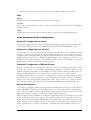
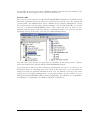
Drag the driver from the middle to the left pane. This will create a new instance for a board
(to be accessed via the selected driver). The board instance must be directed to access the
board via the HUNT ENGINEERING driver (‘hepod510.dll’). To do this, select to use the
driver with an ‘extra configuration file’, then specify the ‘hepod510.cfg’ configuration file
(this is located in the ‘c:\ti\drivers’ directory – assuming that you installed CCS into ‘c:\ti’).
17
HUNT ENGINEERING API WINDOWS Installation & User MANUAL
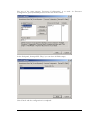
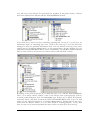
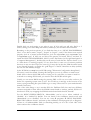
When done, click the ‘Next’ button to move to the next panel. The ‘I/O Port’ value in this
window is used by the HUNT drivers to identify the type and number of the board you use:
If the board is an HEPC9 with the board switch set to 0: I/O port is 0x0.
If the board is an HEPC9 with the board switch set to 1: I/O port is 0x1. And so on
If the board is an HEPC8 with the board switch set to 0: I/O port is 0x10.
If the board is an HEPC8 with the board switch set to 1: I/O port is 0x11. And so on
In the picture above, a HEPC9 with board switch 0 is shown configured.
18
HUNT ENGINEERING API WINDOWS Installation & User MANUAL
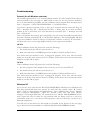
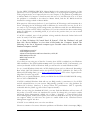
The rest of the setup process, ‘Processor Configuration’, is as usual. At ‘Processor
Configuration’, specify the DSP processors that are on the board.
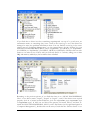
In the final panel, ‘Startup GEL File(s)’ you can leave all fields empty.
Click ‘Finish’ and the configuration is completed.
19
HUNT ENGINEERING API WINDOWS Installation & User MANUAL
Manual Configuration of Multiple Boards
To configure multiple boards manually, simply repeat the Manual Configuration process for
each board that you want to debug. Code Composer Studio will identify each DSP by a
concatenation of board name and DSP name, so it is not necessary to use different CPU
names for each board.
Manual Configuration: Naming Boards
The name you use for a manually configured board is significant (‘Board Name’ on the
‘Board Name & Data File’ tab, see picture on page 15). When doing AutoConfigure or
AutoConfigure Group from the Confidence Checks, the board name is always ‘hep9a x’
where x is the board switch number or ‘hep8a x’ where x is the board switch number.
For CCS it doesn’t matter what the name of the boards is, but you do want to have some
naming that indicates what board it is, to yourself. However, for the plugins the board name
is significant. The plugins can’t see what a board ‘is’, they can only ‘see’ a board’s name. The
plugins will only understand descriptions ‘hep9a x’, ‘hepc9 x’, ‘hep8a x’ and ‘hepc8 x’, where
x is a number indicating the red board switch value. If you use any other name, the plugins
will not understand what board you use. The plugins will ask you, though, in the case a
board name isn’t understood.
When using AutoConfigure or AutoConfigure Group this isn’t an issue, as automatically the
correct board name is used.
20
HUNT ENGINEERING API WINDOWS Installation & User MANUAL
Troubleshooting
General (for all Windows versions)
The install program will try to do some confidence checks. If it fails, install will exit and you
cannot proceed to the next stage (ie, SDK install, in case you use any processor modules).
To try to fix installation problems, use the confidence check program from the Start menu:
Start -> Programs -> HUNT ENGINEERING -> Confidence checks.
If you have a processor module in slot 1, there are 3 tests that must be successful. They are
File -> Interrupt Test, File -> Reads Test and File -> Writes Test. If you have an FPGA
module in slot 1, then there are 2 tests that must be successful: File -> Interrupt Test and
File -> FPGA test.
Once you find that these test(s) pass successfully, you can restart the install program (either
from the CD front-end, DSP_CD, or via Windows Explorer). The install program will then
re-try the confidence checks (it will not re-install the software or drivers). If successful, it
will then move on to a next stage (SDK install if you have processor modules).
HEPC9
If the confidence checks fail, please first verify the following:
1. The board switch (the red one) must be set to 0.
2. Make sure that there is a HERON processor module or FPGA module in slot 1.
Also ensure that the module in slot 1 is plugged in properly. To be sure, take the carrier
board out of the PC; then remove the slot 1 module, and re-insert. Now re-insert the carrier
board in your PC and try again.
HEPC8
If the confidence checks fail, please first verify the following:
1. The boot jumpers of the module in slot 1 must be set to boot from FIFO 0.
2. The board switch (the red one) must be set to 0.
3. Make sure that there is a HERON processor module or FPGA module in slot 1.
Also ensure that the module in slot 1 is plugged in properly. To be sure, take the carrier
board out of the PC; then remove the slot 1 module, and re-insert. Now re-insert the carrier
board in your PC and try again.
Windows XP
Just to be sure, first verify that the HUNT ENGINEERING API drivers for Windows NT
have been copied and have been started. To verify that they started: “start” Æ “control
panel”, click on “Performance and Maintenance”, then “Administrative Tools”. Doubleclick “Computer Management”. Open the “System Tools” tree, and select “Device
manager”. On the right hand side, you should now see a “HUNT ENGINEERING Class”
entry. Open this entry. If there are any problems with the driver you’ll see a red cross,
exclamation mark, or so, over the icon that represents a driver. If all is fine, you’ll just see a
diamond-shaped icon.
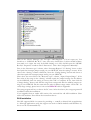
You will only see the drivers for the boards you installed. In the picture on the next page,
top, 3 drivers have been installed for 3 different HUNT ENGINEERING boards.
21
HUNT ENGINEERING API WINDOWS Installation & User MANUAL
If you find that a driver icon has something superimposed on top of it (a red cross, an
exclamation mark, or something else), have a look in the event log to see if the driver has
managed to write any problem information there. You can find the event log in the event
viewer, part of “Computer Management” we just opened above. In the “System” log you
find HUNT ENGINEERING driver entries “hep9awdm” (for HEPC9), or “hep8awdm”
(for HEPC8) or “hep3bwdm” (for HEPC3, HEPC4 or HECPCI1). Double click on such
entries to see what it says. If all is well you will only find 2 to 5 entries, telling you at what
IRQ and memory address(es) the board has been installed.
Returning to the previous picture, if you find that there is no “HUNT ENGINEERING
Class” or no driver entries “hepc9”, “hepc8” or “hepc3”, verify if the drivers were copied
properly (look in c:\winnt\system32\drivers, look for hep9awdm.sys, hep8awdm.sys
or hep3bwdm.sys). If there are no driver files present, un-install, reboot, and then reinstall the HUNT ENGINEERING API. If you do find entries (in the right-hand panel in
“Computer Management”), double-click on the entry. Check that the “Device Status” is set
22
HUNT ENGINEERING API WINDOWS Installation & User MANUAL
to “This device is working properly”. If not, then there is some sort of resource problem
that may or may not show up in the event log. It may also be that the HERON carrier
board is not inserted properly, or maybe the “gold fingers” of the PCI interface are dirty
(unlikely the case for new boards, though).
In the PC BIOS you may have an ECSD setting ("Electronic Configuration Setup Data”).
If it exists, it must be cleared. Clearing this field gives you one (1) chance to install a new
board. After 1 reboot this ECSD reverts to being set. So, each time you want to install or
re-install or re-arrange PCI boards, you need to clear this ECSD switch again.
Usually you can access BIOS settings by pressing DEL or F2 very soon after a reboot, far
before the operating system starts to run. You would see a message at the bottom of the
screen, saying something like ‘press DEL to go to setup’. Please refer to your motherboard’s
manual if necessary.
One of the first things to try is another PCI slot. Different PCI slots may have different
resources assigned to them. Move the HERON carrier board to another, unused, PCI slot.
If that doesn’t work, try swapping the HERON carrier board with other PCI boards.
For the HEPC9, if the above doesn’t work, try if disabling master mode works. You can use
“start Æ programs Æ HUNT ENGINEERING Æ Confidence checks” and start up the
confidence check program. Go to ‘Registry’. Then go to the HEPC9 0. If there is a ‘Use
MasterMode’ field (or something similar), set it to ‘No’. Click ‘OK’. If the program tells you
to reboot, do so. For the HEPC8, ‘MasterMode’ must always be set to ‘disabled’.
With previous API versions (before 1.9), we found that ACPI settings could sometimes be a
factor. Changing the ACPI settings made a difference for some users, but not for all. It is
too early to say if changing ACPI settings will make any difference with the new WDM
drivers that are part of the current API (1.9 and above). If you have tried all the above and
nothing made any difference, try disabling ACPI, if you can re-install Windows XP.
If ‘ACPI’ is disabled, most of the problem solving methods discussed further below may
work. To verify if ‘ACPI’ is enabled:
Use ‘Computer Management’, as shown before. Click ‘Device Manager’ to view what is
listed under the ‘Computer’ branch. The following is the list of supported computer
types. Possible values for the HAL under Standard computers include:
ACPI Multiprocessor PC
ACPI Uniprocessor PC
Advanced Configuration and Power Interface (ACPI) PC
MPS Multiprocessor PC
MPS Uniprocessor PC
Standard PC
If you find you are using any of the first 3 entries, then ‘ACPI’ is enabled on your Windows
XP installation. The API installation may work if you disable ‘ACPI’. Unfortunately, you
cannot just disable ‘ACPI’ in Windows XP; you will need to re-install Windows XP…
To (re-) install Windows XP with ‘ACPI’ disabled, please refer to Microsoft Knowledge
Base article Q299340. Related articles are Q197055, Q314088, Q232824. (To find to the
Microsoft Knowledge Base, go to http://www.microsoft.com, then select ‘support/knowledge Base’ from the top menu.
Before you (re-)install Windows, check your BIOS for the PNP OS INSTALLED setting.
Set it to NO or DISABLED.
23
HUNT ENGINEERING API WINDOWS Installation & User MANUAL
If ACPI is enabled, Windows XP will use one IRQ (usually 9, sometimes 11) for all PCI and
all onboard devices in your system. IRQ sharing generally is not a big problem for modern
PCI devices. However, it always affects the performance. This is especially noticeable with
the JTAG (eg, with Code Composer Studio).
When you are using the Standard-PC HAL, you may find that Windows will not turn off
the power of your PC when you shutdown the system. To change this, you need to enable
Advanced Power Management (APM). Go to Start ->Control Panel, click Performance and
Maintenance, then Power Options, then click the APM tab at the top. If your system can
support APM, you will have the option to enable APM at the ‘Advanced Power
Management support’ tick box.
If ‘ACPI’ is not enabled, move on to the text below.
The most common of resource allocation problems on Windows 2000 is interrupts (IRQs).
It is very easy to run out of available interrupts in a PC configuration so the interrupt availability may also be a problem for one of the other board types.
With Windows XP booted you can use ‘Computer Management’ (“start” Æ “control
panel”, click on “Performance and Maintenance”, then “Administrative Tools”. Doubleclick “Computer Management”. Open ‘Device Manager’, then select ‘View -> Resources by
type’, then select the ‘Interrupt request (IRQs)’ entry) to look at IRQs that are already used.
If you have any ISA cards in your system, if there’s no driver installed for that board, then
Windows XP doesn’t know about the card. The ISA card’s IRQ and/or address may overlap the HERON carrier’s IRQ and/or address range. Remove unused ISA cards, and then
try to run the confidence checks again. If the ISA card’s driver is installed, it may also be
that the hardware IRQ setting on that ISA board is different from the IRQ used by the ISA
card’s driver.
Some PCI BIOS have options of whether to allocate IRQs to the PCI slots. These options
are different for different BIOS makes and versions. First it is important to check that the
motherboard BIOS has interrupts enabled for the slot the board is in (beware the slot number is not always obvious). Some BIOS require you to allocate a fixed IRQ number, in
which case you must check that it is an available IRQ that you choose.
In the BIOS there is frequently also an option ‘PnP OS’. For a non-ACPI system this must
have been set to ‘no’. For ACPI enabled PC’s, this must have been set to ‘yes’.
If all this fails, you have to consider the possibility that there’s a clash with another board.
Remove boards that are not immediately needed, such as sound cards, network cards, etc. If
this doesn’t work, remove the associated drivers as well. If you still have no progress, try to
un-install the API, reboot, and re-install the API.
If even this doesn’t work, try a different PC and/or a different operating system, if you have
any available. If you have more than 1 HERON module, swap this with the module in slot
1 (make sure the boot jumpers are set to boot from FIFO 0).
Windows 2000
Just to be sure, first verify that the HUNT ENGINEERING API drivers for Windows NT
have been copied and have been started. To verify that they started: “start” Æ “settings”Æ
“control panel” Æ “Administrative Tools”. Double-click “Computer Management”. Open
the “System Tools” tree, and select “Device manager”. On the right hand side, you should
now see a “HUNT ENGINEERING Class” entry. Open this entry. If there are any
24
HUNT ENGINEERING API WINDOWS Installation & User MANUAL
problems with the driver you’ll see a red cross, exclamation mark, or so, over the icon that
represents a driver. If all is fine, you’ll just see a diamond-shaped icon.
You will only see the drivers for the boards you installed. In the above picture, 3 drivers
have been installed for 3 different HUNT ENGINEERING boards.
If you find that a driver icon has something superimposed on top of it (a red cross, an
exclamation mark, or something else), have a look in the event log to see if the driver has
managed to write any problem information there. You can find the event log in the event
viewer, part of “Computer Manegement” we just opened above. In the “System” log you
find HUNT ENGINEERING driver entries “hep9awdm” (for HEPC9), or “hep8awdm”
(for HEPC8) or “hep3bwdm” (for HEPC3, HEPC4 or HECPCI1). Double click on such
entries to see what it says. If all is well you will only find 2 to 5 entries, telling you at what
IRQ and memory address(es) the board has been installed.
Returning to the previous picture, if you find that there is no “HUNT ENGINEERING
Class” or no driver entries “hepc9”, “hepc8” or “hepc3”, verify if the drivers were copied
properly (look in c:\winnt\system32\drivers, look for hep9awdm.sys, hep8awdm.sys
25
HUNT ENGINEERING API WINDOWS Installation & User MANUAL
or hep3bwdm.sys). If there are no driver files present, un-install, reboot, and then reinstall the HUNT ENGINEERING API. If you do find entries (in the right-hand panel in
“Computer Management”), double-click on the entry. Check that the “Device Status” is set
to “This device is working properly”. If not, then there is some sort of resource problem
that may or may not show up in the event log. It may also be that the HERON carrier
board is not inserted properly, or maybe the “gold fingers” of the PCI interface are dirty
(unlikely the case for new boards, though).
In the PC BIOS you may have an ECSD setting ("Electronic Configuration Setup Data”).
If it exists, it must be cleared. Clearing this field gives you one (1) chance to install a new
board. After 1 reboot this ECSD reverts to being set. So, each time you want to install or
re-install or re-arrange PCI boards, you need to clear this ECSD switch again.
Usually you can access BIOS settings by pressing DEL or F2 very soon after a reboot, far
before the operating system starts to run. You would see a message at the bottom of the
screen, saying something like ‘press DEL to go to setup’. Please refer to your motherboard’s
manual if necessary.
One of the other things to try is another PCI slot. Different PCI slots may have different
resources assigned to them. Move the HERON carrier board to another, unused, PCI slot.
If that doesn’t work, try swapping the HERON carrier board with other PCI boards.
For the HEPC9, if the above doesn’t work, try if disabling master mode works. You can use
“start Æ programs Æ HUNT ENGINEERING Æ Confidence checks” and start up the
confidence check program. Go to ‘Registry’. Then go to the HEPC9 0. If there is a ‘Use
MasterMode’ field (or something similar), set it to ‘No’. Click ‘OK’. If the program tells you
to reboot, do so. For the HEPC8, ‘MasterMode’ must always be set to ‘disabled’.
With previous API versions (before 1.9), we found that ACPI settings could sometimes be a
factor. Changing the ACPI settings made a difference for some users, but not for all. It is
too early to say if changing ACPI settings make any difference with the new WDM drivers
that are part of the current API (1.9 and above). If you have tried all the above and nothing
made any difference, try disabling ACPI, if you are in the position that you can re-install
Windows 2000.
If ‘ACPI’ is enabled, most of the problem solving methods discussed further below will
work. To verify if ‘ACPI’ is enabled:
Go to “Start Æ Settings Æ Control Panel Æ System”. Click the ‘Hardware’ tab, and
then click ‘Device Manager’ to view what is listed under the ‘Computer’ branch. The
following is the list of supported computer types. Possible values for the HAL under
Standard computers include:
ACPI Multiprocessor PC
ACPI Uniprocessor PC
Advanced Configuration and Power Interface (ACPI) PC
MPS Multiprocessor PC
MPS Uniprocessor PC
Standard PC
If you find you are using any of the first 3 entries, then ‘ACPI’ is enabled on your Windows
2000 installation. The API installation may work if you disable ‘ACPI’. Unfortunately, you
cannot just disable ‘ACPI’ in Windows 2000; you will need to re-install Windows 2000…
To (re-) install Windows 2000 with ‘ACPI’ disabled, please refer to Microsoft Knowledge
26
HUNT ENGINEERING API WINDOWS Installation & User MANUAL
Base article Q237556. Related articles are Q197055, Q216573, Q232824. (To find to the
Microsoft Knowledge Base, go to http://www.microsoft.com, then select ‘support/knowledge Base’ from the top menu.
Before you (re-)install Windows, check your BIOS for the PNP OS INSTALLED setting.
Set it to NO or DISABLED.
If ACPI is enabled, Windows 2000 will use one IRQ (usually 9, sometimes 11) for all PCI
and all onboard devices in your system. IRQ sharing generally is not a big problem for
modern PCI devices. However, it always affects the performance. This is especially
noticeable with the JTAG (eg, with Code Composer Studio).
When you are using the Standard-PC HAL, you may find that Windows will not turn off
the power of your PC when you shutdown the system. To change this, you need to enable
Advanced Power Management (APM). Go to Start -> Settings -> Control Panel, click
Power Management, then Power Options, then click the APM tab at the top. If your system
can support APM, you will have the option to enable APM at the ‘Advanced Power
Management support’ tick box.
If ‘ACPI’ is not enabled, move on to the text below.
The most common of resource allocation problems on Windows 2000 is interrupts (IRQs).
It is very easy to run out of available interrupts in a PC configuration so the interrupt availability may also be a problem for one of the other board types.
With Windows 2000 booted you can use the “Start Æ Programs Æ Accessories Æ System
Tools Æ System Information” (open the tree at ‘Hardware Resources’ then select the
‘IRQs’ entry) to look at the IRQs that are already used.
If you have any ISA cards in your system, if there’s no driver installed for that board, then
Windows 2000 doesn’t know about the card. The ISA card’s IRQ and/or address may overlap the HERON carrier’s IRQ and/or address range. Remove unused ISA cards, and then
try to run the confidence checks again. If the ISA card’s driver is installed, it may also be
that the hardware IRQ setting on that ISA board is different from the IRQ used by the ISA
card’s driver.
Some PCI BIOS have options of whether to allocate IRQs to the PCI slots. These options
are different for different BIOS makes and versions. First it is important to check that the
motherboard BIOS has interrupts enabled for the slot the board is in (beware the slot number is not always obvious). Some BIOS require you to allocate a fixed IRQ number, in
which case you must check that it is an available IRQ that you choose.
In the BIOS there is frequently also an option ‘PnP OS’. For a non-ACPI system this must
have been set to ‘no’. For ACPI enabled PC’s, this must have been set to ‘yes’.
If all this fails, you have to consider the possibility that there’s a clash with another board.
Remove boards that are not immediately needed, such as sound cards, network cards, etc. If
this doesn’t work, remove the associated drivers as well. If you still have no progress, try to
un-install the API, reboot, and re-install the API.
If even this doesn’t work, try a different PC and/or a different operating system, if you have
any available. If you have more than 1 HERON module, swap this with the module in slot
1 (make sure the boot jumpers are set to boot from FIFO 0).
27
HUNT ENGINEERING API WINDOWS Installation & User MANUAL
Windows NT
Just to be sure, first verify that the HUNT ENGINEERING API drivers for Windows NT
have been copied and have been started. To verify that they started: “start” Æ “settings”Æ
“control panel” Æ “devices”. Look for an entry like hep8akdd or hep9akdd. If there are
no such entries there at all, verify if the drivers have been copied (into c:\winnt\system32\
drivers, look for hep8akdd.sys or hep9akdd.sys). If there are no driver files present,
un-install, reboot, and then re-install the HUNT ENGINEERING API. If you do find
entries (in the Devices panel), see what ‘Status’ and ‘Startup’ are set to. If ‘Startup’ is not set
to ‘Automatic’, click the ‘StartUp’ button and select ‘Automatic’, then click ‘OK’. Next, start
the HUNT ENGINEERING device by clicking the ‘Start’ button. If ‘Status’ is set to
‘Started’, then the driver is working. If not, then there is some sort resource problem. It may
also be that the HERON carrier board is not inserted properly.
In the PC BIOS you may have an ECSD setting ("Electronic Configuration Setup Data”).
If it exists, it must be cleared. Clearing this field you one (1) chance to install a new board.
After 1 reboot this ECSD reverts to being set. So, each time you want to install or re-install
or re-arrange PCI boards, you need to clear this ECSD switch again.
Usually you can access BIOS settings by pressing DEL or F2 very soon after a reboot, far
before the operating system starts to run. You would see a message at the bottom of the
screen, saying something like ‘press DEL to go to setup’. Please refer to your motherboard’s
manual if necessary.
One of the first things to try is another PCI slot. Different PCI slots may have different
resources assigned to them. Move the HERON carrier board to another, unused, PCI slot.
If that doesn’t work, try swapping the HERON carrier board with other PCI boards.
For the HEPC9, if the above doesn’t work, try if disabling master mode works. You can use
“start Æ programs Æ HUNT ENGINEERING Æ Confidence checks” and start up the
confidence check program. Go to ‘Registry’. Then go to the HEPC9 0. If there is a ‘Use
MasterMode’ field (or something similar), set it to ‘No’. Click ‘OK’. If the program tells you
to reboot, do so. For the HEPC8, ‘MasterMode’ must always be set to ‘disabled’.
The most common of resource allocation problems on Windows NT is interrupts (IRQs). It
is very easy to run out of available interrupts in a PC configuration so the interrupt availability may also be a problem for one of the other board types.
With Windows NT booted you can use the “start” Æ “programs” Æ “Administrative
tools” Æ “Windows NT Diagnostics” to look at the IRQs that are already used.
If you have any ISA cards in your system, if there’s no driver installed for that board, then
Windows NT doesn’t know about the card. The ISA card’s IRQ and/or address may overlap the HERON carrier’s IRQ and/or address range. Remove unused ISA cards, and then
try to run the confidence checks again. If the ISA card’s driver is installed, it may also be
that the hardware IRQ setting on that ISA board is different from the IRQ used by the ISA
card’s driver.
Some PCI BIOS have options of whether to allocate IRQs to the PCI slots. These options
are different for different BIOS makes and versions. First it is important to check that the
motherboard BIOS has interrupts enabled for the slot the board is in (beware the slot number is not always obvious). Some BIOS require you to allocate a fixed IRQ number, in
which case you must check that it is an available IRQ that you choose.
In the BIOS there is frequently also an option ‘PnP OS’. Make sure this has been set to ‘no’.
28
HUNT ENGINEERING API WINDOWS Installation & User MANUAL
If all this fails, you have to consider the possibility that there’s a clash with another board.
Remove boards that are not immediately needed, such as sound cards, network cards, etc. If
this doesn’t work, remove the associated drivers as well. If you still have no progress, try to
un-install the API, reboot, and re-install the API.
If even this doesn’t work, try a different PC and/or a different operating system, if you have
any available. If you have more than 1 HERON module, swap this with the module in slot
1 (make sure the boot jumpers are set to boot from FIFO 0).
Windows 95/98/ME
To check the installation of the HUNT ENGINEERING API related VxD use the “Start
Æ Settings Æ Control Panel Æ System Æ Device Manager” to see the entry for “HuntEngClass”. Clicking on the ‘+’ will show all HuntEngClass VxDs that are loaded. Double
clicking on one allows you to see if there are any problems, which are usually also shown by
a yellow mark over the board picture next to the entry. If the statement “This device is
working properly” is shown in the general window then the VxD is probably working.
However, do not assume that it is really OK, as there may be devices in the machine that do
not have VxDs loaded so Windows does not know about them. (It has also been seen that
some devices with VxDs use some resources that they do not declare to Windows!)
To find a free IRQ (or I/O address range) in Windows you can use the “Start Æ Settings
Æ Control Panel Æ System Æ Device Manager” and double click on “computer”. The
various pages then show what resources Windows thinks are being used. Again you must be
aware that there might be some hardware in the system that Windows does not know about
for some reason, such as there being no VxD installed.
In the PC BIOS you may have an ECSD setting ("Electronic Configuration Setup Data”).
If it exists, it must be cleared. Clearing this field you one (1) chance to install a new board.
After 1 reboot this ECSD reverts to being set. So, each time you want to install or re-install
or re-arrange PCI boards, you need to clear this ECSD switch again.
Usually you can access BIOS settings by pressing DEL or F2 very soon after a reboot, far
before the operating system starts to run. You would see a message at the bottom of the
screen, saying something like ‘press DEL to go to setup’. Please refer to your motherboard’s
manual if necessary.
One of the first things to try is another PCI slot. Different PCI slots may have different
resources assigned to them. Move the HERON carrier board to another, unused, PCI slot.
If that doesn’t work, try swapping the HERON carrier board with other PCI boards.
For the HEPC9, if the above doesn’t work, try if disabling master mode works. You can use
“start Æ programs Æ HUNT ENGINEERING Æ Confidence checks” and start up the
confidence check program. Go to ‘Registry’. Then go to the HEPC9 0. If there is a ‘Use
MasterMode’ field (or something similar), set it to ‘No’. Click ‘OK’. If the program tells you
to reboot, do so. For the HEPC8, ‘MasterMode’ must always be set to ‘disabled’.
If you have any ISA cards in your system, if there’s no driver installed for that board, then
Windows doesn’t know about the card. The ISA card’s IRQ and/or address may overlap
the HERON carrier’s IRQ and/or address range. Remove unused ISA cards, and then try
to run the confidence checks again. If the ISA card’s driver is installed, it may also be that
the hardware IRQ setting on that ISA board is different from the IRQ used by the ISA
card’s driver.
Some PCI BIOS have options of whether to allocate IRQs to the PCI slots. These options
29
HUNT ENGINEERING API WINDOWS Installation & User MANUAL
are different for different BIOS makes and versions. First it is important to check that the
motherboard BIOS has interrupts enabled for the slot the board is in (beware the slot number is not always obvious). Some BIOS require you to allocate a fixed IRQ number, in
which case you must check that it is an available IRQ that you choose.
In the BIOS there is frequently also an option ‘PnP OS’. If it’s ‘yes’ try setting it to ‘no’ or
‘auto’. If it’s ‘no’, try setting it to ‘yes’ or ‘auto’.
If all this fails, you have to consider the possibility that there’s a clash with another board.
Remove boards that are not immediately needed, such as sound cards, network cards, etc. If
this doesn’t work, remove the associated drivers as well. If you still have no progress, try to
un-install the API, reboot, and re-install the API.
If even this doesn’t work, try a different PC and/or a different operating system, if you have
any available. If you have more than 1 HERON module, swap this with the module in slot
1 (make sure the boot jumpers are set to boot from FIFO 0).
Uninstall
1. Insert the HUNT ENGINEERING CD.
2. A new window should now appear. Select ‘Install Drivers & Tools’. If the window
doesn’t appear, use Windows Explorer and browse to your CD drive. Then double-click
on ‘DSP_CD’.
3. Next, select ‘UnInstall’. Follow the instructions.
Alternatively, you can uninstall via Windows. Go to “Start Æ Settings Æ Control Panel”,
then double click on “Add/Remove Programs”. Select “HUNT ENGINEERING API”
and click the “Add/Remove…” button. Follow the instructions.
If you want to re-install the API, first reboot!
30
HUNT ENGINEERING API WINDOWS Installation & User MANUAL
HERON-BASE2: Installation & Confidence Test
Installation
The HUNT ENGINEERING CD install program will install and confidence check the
API for Windows 2000 and XP installations. If, for any reason, you experience problems
with installation or confidence checking use this section for a step by step installation check.
Windows XP Installation
The API supports Windows XP, installing WDM drivers. It is important to first un-install
any previous API versions you may have installed. To install:
1. Log in as Administrator onto your Windows XP machine.
2. Connect the HERON-BASE2 board to the USB cable.
3. Windows XP may tell you it has found new hardware. Click ‘cancel’ and do not install
the API using Windows’ hardware wizard for now.
4. Insert the HUNT ENGINEERING CD.
5. A new window should now appear. Select ‘Install Drivers & Tools’. If the window
doesn’t appear, use Windows Explorer and browse to your CD drive. Then double-click
on ‘DSP_CD’.
6. Next, select ‘Install or Upgrade’.
7. The ‘InstallShield’ setup program will now start. Follow the directions given by setup.
If the setup program finds the hardware and the driver installation is successful, then setup
will not need to reboot the PC. This would be the typical case.
In case the board is not connected yet or there’s some other problem, setup will reboot
once. After a reboot, the find new hardware wizard will be activated again. But this can be
very slow. In fact, setup may continue before new hardware is detected. Please make sure
not to continue setup while the found new hardware wizard hasn’t done its job yet. If the
new hardware wizard cannot find a driver, point to \software\api on your CD drive.
After the drivers were installed successfully (which may be after a reboot), the setup
program will confidence check the installation.
The install program will install two drivers for the HERON-BASE2. It is possible that you
see a Found New Hardware window appear while you install the software. Click the Cancel
button in the Found New Hardware window if that happens.
If you upgrade from an earlier API version, first un-install the old API installation. Then
reboot the machine. Then follow the instructions above.
Windows 2000 Installation
The API supports Windows 2000, installing WDM drivers. It is important to first un-install
any previous API versions you may have installed. To install:
1. Log in as Administrator onto your Windows 2000 machine.
31
HUNT ENGINEERING API WINDOWS Installation & User MANUAL
2. Connect the HERON-BASE2 board to the USB cable.
3. Windows 2000 may tell you it has found new hardware. Click ‘cancel’ and do not install
the API using Windows’ hardware wizard for now.
4. Insert the HUNT ENGINEERING CD.
5. A new window should now appear. Select ‘Install Drivers & Tools’. If the window
doesn’t appear, use Windows Explorer and browse to your CD drive. Then double-click
on ‘DSP_CD’.
6. Next, select ‘Install or Upgrade’.
7. The ‘InstallShield’ setup program will now start. Follow the directions given by setup.
If the setup program finds the hardware and the driver installation is successful, then setup
will not need to reboot the PC. This would be the typical case.
In case the board is not connected yet or there’s some other problem, setup will reboot
once. After a reboot, the find new hardware wizard will be activated again. But this can be
very slow. In fact, setup may continue before new hardware is detected. Please make sure
not to continue setup while the found new hardware wizard hasn’t done its job yet. If the
new hardware wizard cannot find a driver, point to \software\api on your CD drive.
After the drivers were installed successfully (which may be after a reboot), the setup
program will confidence check the installation.
The install program will install two drivers for the HERON-BASE2. The first driver is
installed automatically; the Hardware Wizard will install the second driver. During
installation, the install program will halt and ask you to press a button when the Hardware
Wizard has completed. In some cases the Hardware Wizard may run so fast that you hardly
see the window at all, but in other cases it may take quite a while until the Hardware Wizard
starts to run. The Hardware Wizard should run automatically, you shouldn’t have to point
to a directory. If for any reason the Hardware Wizard does ask for a directory, point to the
\software\api directory on the HUNT ENGINEERING CD.
If you upgrade from an earlier API version, first un-install the old API installation. Then
reboot the machine. Then follow the instructions above.
Windows NT Installation
There is no Windows NT support for the HERON-BASE2, as there is no standard
Windows USB support available on Windows NT.
Windows 95/98/ME Installation
There is no Windows 95/98/ME support for the HERON-BASE2.
DOS Installation
There is no DOS support for the HERON-BASE2.
The Windows Confidence Check Program
The setup program will automatically have done a number of confidence checks. You can
do the confidence checks manually also. The Windows Confidence check program is instal32
HUNT ENGINEERING API WINDOWS Installation & User MANUAL
led automatically on any Windows version. It is started up as follows:
Start Æ Programs Æ HUNT ENGINEERING Æ Confidence checks
As the program starts up, it is initialised to access the board defined by the HEAPIJTAG
environment variable. The setup program has set this variable. If you have only 1 board
installed, Confidence Check will always start initialised to access that 1 board.
Please refer to the HERON Carriers installation section for a full description of the
Confidence Check Program. The program works the same, regardless of Windows version
and board type.
Troubleshooting
General (for all Windows versions)
If the confidence checks fail, you can try the following:
1. Disconnect the USB cable, wait 5 seconds or so, then reconnect.
2. Disconnect the USB cable, power down the HERON-BASE2, wait a little, power the
board back on, and reconnect the USB cable.
3. If you have multiple USB connectors on your PC, try another connector.
4. Make sure that you have a module inserted in at least 1 HERON-BASE2 slot.
5. If you use multiple HERON-BASE2 boards, make sure all have a different red switch
setting.
If you find that the bandwidth performance is lower than you expected (say less than 4
Mb/s), make sure that you use a proper USB 2.0 port. If the HERON-BASE2 is connected
to a USB 1.1 port, the bandwidth will be much lower.
Windows XP
Just to be sure, verify that the HUNT ENGINEERING API drivers for Windows XP have
been copied and have been started. To verify that they started: “start” Æ “control panel”,
click on “Performance and Maintenance”, then “Administrative Tools”. Double-click
“Computer Management”. Open the “System Tools” tree, and select “Device manager”.
On the right hand side, you should now see a “HUNT ENGINEERING Class” entry.
33
HUNT ENGINEERING API WINDOWS Installation & User MANUAL
Open this entry. If there are any problems with the driver you’ll see a red cross, exclamation
mark, or so, over the icon that represents a driver. If all is fine, you’ll just see a diamondshaped icon.
You will only see the drivers for the boards you installed. In the picture on the previous
page, 2 drivers have been installed for 2 different HUNT ENGINEERING boards.
If you find that a driver icon has something superimposed on top of it (a red cross, an
exclamation mark, or something else), have a look in the event log to see if the driver has
managed to write any problem information there. You can find the event log in the event
viewer, part of “Computer Management” we just opened above. In the “System” log you
find HUNT ENGINEERING driver entries “heb2awdm” (for HERON-BASE2). Double
click on such entries to see what it says. If all is well you will only find 3 entries.
Returning to the previous picture, if you find that there is no “HUNT ENGINEERING
Class” or no driver entries “heb2a”, verify if the drivers were copied properly (look in
c:\winnt\system32\drivers, look for heb2awdm.sys. If there are no driver files present,
un-install, reboot, and then re-install the HUNT ENGINEERING API. If you do find
entries (in the right-hand panel in “Computer Management”), double-click on the entry.
Check that the “Device Status” is set to “This device is working properly”. If not, then
there is some sort of resource problem that may or may not show up in the event log.
Windows 2000
Just to be sure, first verify that the HUNT ENGINEERING API drivers for Windows 2K
have been copied and have been started. To verify that they started: “start” Æ “settings”Æ
“control panel” Æ “Administrative Tools”. Double-click “Computer Management”. Open
the “System Tools” tree, and select “Device manager”. On the right hand side, you should
now see a “HUNT ENGINEERING Class” entry. Open this entry. If there are any
problems with the driver you’ll see a red cross, exclamation mark, or so, over the icon that
represents a driver. If all is fine, you’ll just see a diamond-shaped icon.
34
HUNT ENGINEERING API WINDOWS Installation & User MANUAL
You will only see the drivers for the boards you installed. In the picture below, 2 drivers
have been installed for 2 different HUNT ENGINEERING boards.
If you find that a driver icon has something superimposed on top of it (a red cross, an
exclamation mark, or something else), have a look in the event log to see if the driver has
managed to write any problem information there. You can find the event log in the event
viewer, part of “Computer Management” we just opened above. In the “System” log you
find HUNT ENGINEERING driver entries “heb2awdm” (for HERON-BASE2. Double
click on such entries to see what it says. If all is well you will only find 3 entries.
Returning to the previous picture, if you find that there is no “HUNT ENGINEERING
Class” or no driver entries “heb2a”, verify if the drivers were copied properly (look in
c:\winnt\system32\drivers, look for heb2awdm.sys. If there are no driver files present,
un-install, reboot, and then re-install the HUNT ENGINEERING API. If you do find
entries (in the right-hand panel in “Computer Management”), double-click on the entry.
Check that the “Device Status” is set to “This device is working properly”. If not, then
there is some sort of resource problem that may or may not show up in the event log.
35
HUNT ENGINEERING API WINDOWS Installation & User MANUAL
Uninstall
1. Insert the HUNT ENGINEERING CD.
2. A new window should now appear. Select ‘Install Drivers & Tools’. If the window
doesn’t appear, use Windows Explorer and browse to your CD drive. Then double-click
on ‘DSP_CD’.
3. Next, select ‘UnInstall’. Follow the instructions.
Alternatively, you can uninstall via Windows. Go to “Start Æ Settings Æ Control Panel”,
then double click on “Add/Remove Programs”. Select “HUNT ENGINEERING API”
and click the “Add/Remove…” button. Follow the instructions.
If you want to re-install the API, first reboot!
36
HUNT ENGINEERING API WINDOWS Installation & User MANUAL
‘C4x boards: Installation & Confidence Test
Installation
The HUNT ENGINEERING CD install program will install and confidence check the
API for Windows 95/98, NT and DOS installations. If, for any reason, you experience
problems with installation or confidence checking use this section for a step by step
installation check.
When an API device is opened, the device to be opened is identified by the combination
of a board type, a board number (because systems can have more than one board of that
type) and a device number on that board (because a board can have multiple devices
associated with it, e.g. ComportA, ComportB, JTAG).
Board Number
In general, boards are numbered starting from 0, but the ordering can be different for
different bus types.
PCI
(HEPC3/HEPC4/HECPCI1) The order of boards on the PCI Bus is dependent on
the PC Motherboard BIOS and Operating System. PCI slots are geographically
addressed, that is, the position on the motherboard determines the slot number that
is allocated by the system. The system may find the board furthest away from the
CPU or the one closest to the CPU as the “first” board. NO assumptions can be
made based on slot number - only that board 1 is the “next” one after board 0. The
“reset test” program supplied as part of the API is provided to allow the user to
identify a particular board by watching its reset LED. On the CD in the
\software\api\heapi\utils directory there is a DOS version of this
program apireset.exe and a Win32 version called apireset32.exe. Run the
correct one from a DOS prompt.
Once the board number is discovered, it will stay the same for that particular PC
Motherboard, BIOS and Operating System combination. If the number of boards
of the same type fitted to the system is changed, the board numbering will have to
be re-established.
ISA
There are 3 different circumstances for ISA cards:
Direct I/O on MSDOS, Windows 95 or VxWorks. In this case the Board Number
is associated with the Base Address the Board has been configured to use.
Windows 95 VxD - The first board (Board 0) is the first one identified in the Device
Manager - whatever base address you have set it to.
Windows NT, Kernel Mode Drivers, Board 0 is the first Board identified in the
Registry. (N.B The current revision of the API does not support more than one
Board on Windows NT.)
VME The current release of the API can only support one VME system (which can be
many cards, but only one of them can be accessed by the host). Hence the board
number is always 0.
N.B. If you have more than one board in your system (or you wish to change the default
settings for a board), install them one after the other. Use the board specific chapters as a
guideline hwo to install the individual boards.
37
HUNT ENGINEERING API WINDOWS Installation & User MANUAL
HEPC2E: Installation & Confidence Check
Windows NT Installation
The API supports Windows NT V4.0. It has been tested with Service Pack 3 and 4, and
without a Service pack; but it should work on all varations. To install:
1. Log in as Administrator onto your NT machine.
2. Insert the HUNT ENGINEERING CD.
3. A new window should now appear. Select ‘Install Drivers & Tools’. If the window
doesn’t appear, use Windows Explorer and browse to your CD drive. Then double-click
on ‘DSP_CD’.
4. Next, select ‘Install or Upgrade’.
5. The ‘InstallShield’ setup program will now start. Follow the directions given by setup.
The setup program will try to reboot the PC once. After the reboot, the setup program will
confidence check the installation.
If you upgrade from an earlier API version, first un-install the old API installation. Then
reboot the machine. Then follow the instructions above.
Windows 2000 Installation
The API supports Windows 2000, installing the NT V4.0 drivers as legacy drivers; to install:
1. Log in as Administrator onto your Windows 2000 machine.
2. Insert the HUNT ENGINEERING CD.
3. A new window should now appear. Select ‘Install Drivers & Tools’. If the window
doesn’t appear, use Windows Explorer and browse to your CD drive. Then double-click
on ‘DSP_CD’.
4. Next, select ‘Install or Upgrade’.
5. The ‘InstallShield’ setup program will now start. Follow the directions given by setup.
The setup program will try to reboot the PC once. After the reboot, the setup program will
confidence check the installation.
If you upgrade from an earlier API version, first un-install the old API installation. Then
reboot the machine. Then follow the instructions above.
Windows 95/98/ME Installation
1. Insert the HUNT ENGINEERING CD.
2. A new window should now appear. Select ‘Install Drivers & Tools’. If the window
doesn’t appear, use Windows Explorer and browse to your CD drive. Then double-click
on ‘DSP_CD’.
3. Next, select ‘Install or Upgrade’.
4. The ‘InstallShield’ setup program will now start. Follow the directions given by setup.
After installing the software and installing the driver (*.vxd), setup will ask you to configure
the driver. After clicking “yes”, the “System Properties” window appears:
38
HUNT ENGINEERING API WINDOWS Installation & User MANUAL
Click on the “Device Manager” tab, and open “HuntEngClass” (if it isn’t open yet). You
should see a “HEPC2E Rev B/C” entry. The entry should have a yellow-circled exclamation mark on it. Open the entry by double clicking on it. This should open the “HEP2E
Rev B/C Properties” window. Select “Resources”. Click “Set Configuration Manually”.
First, in the “Resource type” column, select “Interrupt Request”. If “Setting” shows a value
that equals the interrupt jumper setting on your HEPC2E, then the setting is correct. If the
value in the “Setting” column is different, select the “Change Setting” button and choose a
value that equals the interrupt jumper setting on your HEPC2E.
Then select the next field in the “Resource type” column, “Input/Output Range”. If the
first value of the range in the “Setting” column equals the jumper settings for the address
on the HEPC2E, then the setting is correct; click ‘OK’ to complete. If not, then click the
“Change Setting” button, and find the range that corresponds with the address jumper setting on your HEPC2E. Do the same with the other 2 address range entries. Click ‘OK’. To
verify range settings, please have a look at the HEPC2E table in Appendix .
The setup program will try to reboot the PC once. After the reboot, the setup program will
confidence check the installation.
If you upgrade from an earlier API version, first un-install the old API installation. Then
reboot the machine. Then follow the instructions above.
DOS Installation
The API supports DOS 6.x systems by providing a .lib file to directly link an application
to. Although applications using this support can work in DOS windows and Windows 95,
this is not the recommended way.
39
HUNT ENGINEERING API WINDOWS Installation & User MANUAL
There is no installation program for DOS support, to use an application that is already
linked to the DOS API you do not need to install anything.
If you wish to link an application with the DOS API all you need to do is copy the files
heddrv.lib and heapi.h from the \software\api directory on the HUNT
ENGINEERING CD into your development directory.
The Windows Confidence Check Program
The setup program will automatically have done a number of confidence checks. You can
do the confidence checks manually also. The Windows Confidence check program is installed automatically on any Windows version. It is started up as follows:
Start Æ Programs Æ HUNT ENGINEERING Æ Confidence checks
As the program starts up, it is initialised to access the board defined by the HEAPIJTAG
environment variable. The setup program has set this variable. If you have only 1 board
installed, Confidence Check will always start initialised to access that 1 board.
Please refer to the HERON Carriers installation section for a full description of the
Confidence Check Program. The program works the same, regardless of Windows version
and board type. But note that with the HEPC2E the “File Æ Interrupt Test” entry won’t
work, as this feature is not supported by the (HEPC2E) hardware. Also, entries under menu
item “Registry” will now include:
HEPC2E x
This will denote an entry for a HEPC2E driver (x=0, 1, 2, …)
Troubleshooting
General (for all Windows versions)
If the confidence checks fail, please first verify the following:
1. The interrupt jumper must be set to the same value you configured the driver with.
2. The address jumpers must be set to the same value you configured the driver with.
3. The TIM-40 module in slot 1 must not be a HEQUAD module. This module has no
IDROM and the confidence checks will fail. This is no indication of a problem.
Make sure that the board is plugged in properly. Also ensure that the TIM-40 module in
slot 1 is plugged in properly. To be sure, take the TIM-40 carrier board out of the PC;
remove the slot 1 module, then re-attach, and re-insert the carrier board. After re-insert,
verify that the TIM-40 module is still attached to the carrier board properly. It is quite
common for a non-bolted TIM-40 module to loosen while the carrier board is being
inserted. Now restart the PC and try again.
Windows NT
Just to be sure, first verify that the HUNT ENGINEERING API drivers for Windows NT
have been copied and have been started. To verify that they started: “Start Æ Settings Æ
Control Panel Æ Devices”. Look for an entry like hep2ekdd. If there are no such entries
there at all, verify if the drivers have been copied (into c:\winnt\system32\ drivers, look for
hep2ekdd.sys). If there are no driver files present, un-install, reboot, and then re-install
the HUNT ENGINEERING API. If you do find entries (in the Devices panel), see what
‘Status’ and ‘Startup’ are set to. If ‘Startup’ is not set to ‘Automatic’, click the ‘StartUp’
button and select ‘Automatic’, then click ‘OK’. Next, start the HUNT ENGINEERING
device by clicking the ‘Start’ button. If ‘Status’ is set to ‘Started’, then the driver is working.
40
HUNT ENGINEERING API WINDOWS Installation & User MANUAL
If not, then there is some sort resource problem. (Or the board isn’t inserted properly.)
In the PC BIOS you may have an ECSD setting ("Electronic Configuration Setup Data”).
If it exists, it must be cleared. Clearing this field you one (1) chance to install a new board.
After 1 reboot this ECSD reverts to being set. So, each time you want to install or re-install
or re-arrange PCI boards, you need to clear this ECSD switch again.
Usually you can access BIOS settings by pressing DEL or F2 very soon after a reboot, far
before the operating system starts to run. You would see a message at the bottom of the
screen, saying something like ‘press DEL to go to setup’. Please refer to your motherboard’s
manual if necessary.
The most common of resource allocation problems on Windows NT is interrupts (IRQs). It
is very easy to run out of available interrupts in a PC configuration so the interrupt availability may also be a problem for one of the other board types.
With Windows NT booted you can use the “Start Æ Programs Æ Administrative Tools Æ
Windows NT Diagnostics” to look at the IRQs that are already used.
If you have any ISA cards in your system, if there’s no driver installed for that board, then
Windows NT doesn’t know about the card. The ISA card’s IRQ and/or address may overlap the HEPC2E’s IRQ and/or address range. Remove unused ISA cards, and then try to
run the confidence checks again. If the other ISA card’s driver is installed, it may still be
that the hardware settings on that ISA board clash with the HEPC2E. Use the other ISA
card’s manual to find out its IRQ and address range settings. If you find an overlap, change
the IRQ and/or address setting on the HEPC2E so that the overlap disappears. Be sure to
also update the HEPC2E driver with changed the IRQ or address. To do this you must run
the confidence check program supplied as part of the HUNT ENGINEERING API
(“Start Æ Programs Æ HUNT ENGINEERING Æ Confidence checks”. Go to the Registry Æ HEPC2E entry. You should see a window that allows you to select ‘Base Address’,
‘IRQ’ and ‘DoJtag’. Set the ‘Base Address’ and ‘IRQ’ fields as required. Click ‘OK’. Reboot
the machine and try the confidence checks.
The HEPC2E requires a large range of I/O addresses when configured with JTAG device
enabled - this can prevent the driver from loading if there is an I/O address clash. It is easy
to test if this is the problem, as you can configure the Windows NT driver to disable JTAG
access to see if the driver then loads. To do this you must run the confidence check
program supplied as part of the HUNT ENGINEERING API (“Start Æ Programs Æ
HUNT ENGINEERING Æ Confidence checks”. Go to the Registry Æ HEPC2E entry.
You should see a window that allows you to select ‘Base Address’, ‘IRQ’ and ‘DoJtag’. Set
the ‘DoJtag’ field to ‘No’. Click ‘OK’. Reboot the machine and try the confidence checks.
Note that if this does make the driver load, it has not removed the problem of the address
clash, merely identified what it is. You must still find a way to avoid the address clash or
else your system may not function correctly.
Some PCI BIOS have options of whether to reserve IRQs for legacy ISA slots. These
options are different for different BIOS makes and versions. Some BIOSes allocate all
IRQ’s to PCI slots and none to ISA. Change the BIOS setting so that at least 1 IRQ is
allocated or reserved for ISA use. Or, if you have more than 1 ISA board, ensure that you
have an equivalent number of IRQ’s reserved for ISA use. If the BIOS allows you to
reserve a particular IRQ value for ISA use, make sure the value corresponds with the interrupt jumper setting on the HEPC2E.
Usually you can access BIOS settings by pressing DEL or F2 very soon after a reboot, far
41
HUNT ENGINEERING API WINDOWS Installation & User MANUAL
before the operating system starts to run. You would see a message at the bottom of the
screen, saying something like ‘press DEL to go to setup’. Please refer to your motherboard’s
manual if necessary.
In the BIOS there is frequently also an option ‘PnP OS’. Make sure this has been set to ‘no’.
If all this fails, you have to consider the possibility that there’s a clash with any other board.
Remove boards that are not immediately needed, such as sound cards, network cards, etc. If
this doesn’t work, remove the associated drivers as well. If you still have no progress, try to
un-install the API, reboot, and re-install the API. If even this doesn’t work, try a different
PC and/or a different operating system, if you have any available.
Windows 2000
Just to be sure, first verify that the HUNT ENGINEERING API drivers for Windows NT
have been copied and have been started. To verify that they started: “start” Æ “settings”Æ
“control panel” Æ “Administrative Tools”. Double-click “Computer Management”. Open
the “System Tools” tree, and select “Device manager”. Then go to the “View” menu, and
make sure that “Show hidden devices” is enabled. Now go the right-hand side pane, and
open “Non-Plug and Play Drivers”. Look for an entry like hep2ekdd. If there are no such
entries there at all, verify if the drivers have been copied (into c:\winnt\system32\drivers,
look for hep2ekdd.sys). If there are no driver files present, un-install, reboot, and then
re-install the HUNT ENGINEERING API. If you do find entries (in the right panel in
“Computer Management”), double-click on the entry. Check that the “Device Status” is set
to “This device is working properly”. If not, then there is some sort of resource problem. It
may also be that the HEPC2E is not inserted properly.
In the PC BIOS you may have an ECSD setting ("Electronic Configuration Setup Data”).
If it exists, it must be cleared. Clearing this field you one (1) chance to install a new board.
After 1 reboot this ECSD reverts to being set. So, each time you want to install or re-install
or re-arrange PCI boards, you need to clear this ECSD switch again.
Usually you can access BIOS settings by pressing DEL or F2 very soon after a reboot, far
before the operating system starts to run. You would see a message at the bottom of the
screen, saying something like ‘press DEL to go to setup’. Please refer to your motherboard’s
manual if necessary.
With Windows 2000, see if ‘ACPI’ is enabled. We have seen installations that would only
work after ‘ACPI’ was disabled. (But we have also seen installations that happily worked
with ‘ACPI’ enabled.) To verify if ‘ACPI’ is enabled:
Go to “Start Æ Settings Æ Control Panel Æ System”. Click the ‘Hardware’ tab, and
then click ‘Device Manager’ to view what is listed under the ‘Computer’ branch. The
following is the list of supported computer types. Possible values for the HAL under
Standard computers include:
ACPI Multiprocessor PC
ACPI Uniprocessor PC
Advanced Configuration and Power Interface (ACPI) PC
MPS Multiprocessor PC
MPS Uniprocessor PC
Standard PC
If you find you are using any of the first 3 entries, then ‘ACPI’ is enabled on your Windows
2000 installation. You could try if the API works with ACPI disabled. Unfortunately, you
42
HUNT ENGINEERING API WINDOWS Installation & User MANUAL
cannot just disable ‘ACPI’ in Windows 2000; you will need to re-install Windows 2000…
To (re-) install Windows 2000 with ‘ACPI’ disabled, please refer to Microsoft Knowledge
Base article Q237556. Related articles are Q197055, Q216573, Q232824. (To find to the
Microsoft Knowledge Base, go to http://www.microsoft.com, then select ‘support/knowledge Base’ from the top menu.
The most common of resource allocation problems on Windows 2000 is interrupts (IRQs).
It is very easy to run out of available interrupts in a PC configuration so the interrupt availability may also be a problem for one of the other board types.
With Windows 2000 booted you can use the “Start Æ Programs Æ Accessories Æ System
Tools Æ System Information” (open the tree at ‘Hardware Resources’ then select the
‘IRQs’ entry) to look at the IRQs that are already used.
If you have any ISA cards in your system, if there’s no driver installed for that board, then
Windows NT doesn’t know about the card. The ISA card’s IRQ and/or address may overlap the HEPC2E’s IRQ and/or address range. Remove unused ISA cards, and then try to
run the confidence checks again. If the other ISA card’s driver is installed, it may still be
that the hardware settings on that ISA board clash with the HEPC2E. Use the other ISA
card’s manual to find out its IRQ and address range settings. If you find an overlap, change
the IRQ and/or address setting on the HEPC2E so that the overlap disappears. Be sure to
also update the HEPC2E driver with changed the IRQ or address. To do this you must run
the confidence check program supplied as part of the HUNT ENGINEERING API
(“Start Æ Programs Æ HUNT ENGINEERING Æ Confidence checks”. Go to the Registry Æ HEPC2E entry. You should see a window that allows you to select ‘Base Address’,
‘IRQ’ and ‘DoJtag’. Set the ‘Base Address’ and ‘IRQ’ fields as required. Click ‘OK’. Reboot
the machine and try the confidence checks.
The HEPC2E requires a large range of I/O addresses when configured with JTAG device
enabled - this can prevent the driver from loading if there is an I/O address clash. It is easy
to test if this is the problem, as you can configure the Windows NT driver to disable JTAG
access to see if the driver then loads. To do this you must run the confidence check
program supplied as part of the HUNT ENGINEERING API (“Start Æ Programs Æ
HUNT ENGINEERING Æ Confidence checks”. Go to the Registry Æ HEPC2E entry.
You should see a window that allows you to select ‘Base Address’, ‘IRQ’ and ‘DoJtag’. Set
the ‘DoJtag’ field to ‘No’. Click ‘OK’. Reboot the machine and try the confidence checks.
Note that if this does make the driver load, it has not removed the problem of the address
clash, merely identified what it is. You must still find a way to avoid the address clash or
else your system may not function correctly.
Some PCI BIOS have options of whether to reserve IRQs for legacy ISA slots. These
options are different for different BIOS makes and versions. Some BIOSes allocate all
IRQ’s to PCI slots and none to ISA. Change the BIOS setting so that at least 1 IRQ is
allocated or reserved for ISA use. Or, if you have more than 1 ISA board, ensure that you
have an equivalent number of IRQ’s reserved for ISA use. If the BIOS allows you to
reserve a particular IRQ value for ISA use, make sure the value corresponds with the interrupt jumper setting on the HEPC2E.
Usually you can access BIOS settings by pressing DEL or F2 very soon after a reboot, far
before the operating system starts to run. You would see a message at the bottom of the
screen, saying something like ‘press DEL to go to setup’. Please refer to your motherboard’s
manual if necessary.
43
HUNT ENGINEERING API WINDOWS Installation & User MANUAL
In the BIOS there is frequently also an option ‘PnP OS’. Make sure this has been set to ‘no’.
If all this fails, you have to consider the possibility that there’s a clash with any other board.
Remove boards that are not immediately needed, such as sound cards, network cards, etc. If
this doesn’t work, remove the associated drivers as well. If you still have no progress, try to
un-install the API, reboot, and re-install the API. If even this doesn’t work, try a different
PC and/or a different operating system, if you have any available.
Windows 95/98/ME
To check the installation of the HUNT ENGINEERING API related VxD use the “Start
Æ Settings Æ Control Panel Æ System Æ Device Manager” to see the entry for “HuntEngClass”. Clicking on the ‘+’ will show all HuntEngClass VxDs that are loaded. Double
clicking on one allows you to see if there are any problems, which are usually also shown by
a yellow mark over the board picture next to the entry. If the statement “This device is
working properly” is shown in the general window then the VxD is probably working.
However, do not assume that it is really OK, as there may be devices in the machine that do
not have VxDs loaded so Windows does not know about them. (It has also been seen that
some devices with VxDs use some resources that they do not declare to Windows!)
In the PC BIOS you may have an ECSD setting ("Electronic Configuration Setup Data”).
If it exists, it must be cleared. Clearing this field you one (1) chance to install a new board.
After 1 reboot this ECSD reverts to being set. So, each time you want to install or re-install
or re-arrange PCI boards, you need to clear this ECSD switch again.
Usually you can access BIOS settings by pressing DEL or F2 very soon after a reboot, far
before the operating system starts to run. You would see a message at the bottom of the
screen, saying something like ‘press DEL to go to setup’. Please refer to your motherboard’s
manual if necessary.
To find a free IRQ (or I/O address range) in Windows you can use the “Start Æ Settings
Æ Control Panel Æ System Æ Device Manager” and double click on “computer”. The
various pages then show what resources Windows thinks are being used. Again you must be
aware that there might be some hardware in the system that Windows does not know about
for some reason, such as there being no VxD installed.
Similarly the VxDs will try and configure I/O address ranges for the JTAG device. The
installation for the HEPC2E will allow you to select whether you wish to attempt to install
the JTAG device. This allows you to test if it is one of the JTAG address ranges conflicting
by choosing not to install the JTAG device. If the VxD is correctly loaded then this proves
the problem is a JTAG address conflict.
If you have any ISA cards in your system, if there’s no driver installed for that board, then
Windows NT doesn’t know about the card. The ISA card’s IRQ and/or address may overlap the HEPC2E’s IRQ and/or address range. Remove unused ISA cards, and then try to
run the confidence checks again. If the other ISA card’s driver is installed, it may still be
that the hardware settings on that ISA board clash with the HEPC2E. Use the other ISA
card’s manual to find out its IRQ and address range settings. If you find an overlap, change
the IRQ and/or address setting on the HEPC2E so that the overlap disappears. Be sure to
also update the HEPC2E driver with changed the IRQ or address.
Some PCI BIOS have options of whether to reserve IRQs for legacy ISA slots. These
options are different for different BIOS makes and versions. Some BIOSes allocate all
IRQ’s to PCI slots and none to ISA. Change the BIOS setting so that at least 1 IRQ is
allocated or reserved for ISA use. Or, if you have more than 1 ISA board, ensure that you
44
HUNT ENGINEERING API WINDOWS Installation & User MANUAL
have an equivalent number of IRQ’s reserved for ISA use. If the BIOS allows you to
reserve a particular IRQ value for ISA use, make sure the value corresponds with the interrupt jumper setting on the HEPC2E.
Usually you can access BIOS settings by pressing DEL or F2 very soon after a reboot, far
before the operating system starts to run. You would see a message at the bottom of the
screen, saying something like ‘press DEL to go to setup’. Please refer to your motherboard’s
manual if necessary.
In the BIOS there is frequently also an option ‘PnP OS’. Make sure this has been set to ‘no’.
If all this fails, you have to consider the possibility that there’s a clash with any other board.
Remove boards that are not immediately needed, such as sound cards, network cards, etc. If
this doesn’t work, remove the associated drivers as well. If you still have no progress, try to
un-install the API, reboot, and re-install the API. If even this doesn’t work, try a different
PC and/or a different operating system, if you have any available.
Uninstall
1. Insert the HUNT ENGINEERING CD.
2. A new window should now appear. Select ‘Install Drivers & Tools’. If the window
doesn’t appear, use Windows Explorer and browse to your CD drive. Then double-click
on ‘DSP_CD’.
3. Next, select ‘UnInstall’. Follow the instructions.
Alternatively, you can uninstall via Windows. Go to “Start Æ Settings Æ Control Panel”,
then double click on “Add/Remove Programs”. Select “HUNT ENGINEERING API”
and click the “Add/Remove…” button. Follow the instructions.
If you want to re-install the API, first reboot!
45
HUNT ENGINEERING API WINDOWS Installation & User MANUAL
HEPC3/HEPC4/HECPCI1: Installation & Confidence Check
Windows XP Installation
The API supports Windows XP, installing WDM drivers. API versions before 1.9 would
have installed legacy NT 4.0 drivers. It is important to first un-install any previous API
versions you may have installed. To install:
1. Log in as Administrator onto your Windows XP machine.
2. Windows XP may tell you it has found new hardware. Click ‘cancel’ and do not install
the API using Windows’ hardware wizard for now.
3. Insert the HUNT ENGINEERING CD.
4. A new window should now appear. Select ‘Install Drivers & Tools’. If the window
doesn’t appear, use Windows Explorer and browse to your CD drive. Then double-click
on ‘DSP_CD’.
5. Next, select ‘Install or Upgrade’.
6. The ‘InstallShield’ setup program will now start. Follow the directions given by setup.
If the setup program finds the hardware and the driver installation is successful, then setup
will not need to reboot the PC. This would be the typical case.
In case the board is not inserted yet or there’s some other such problem, setup will reboot
once. After a reboot, the find new hardware wizard will be activated again. But this can be
very slow. In fact, setup may continue before new hardware is detected. Please make sure
not to continue setup while the found new hardware wizard hasn’t done its job yet. If the
new hardware wizard cannot find a driver, point to \software\api on your CD drive.
After the drivers were installed successfully (which may be after a reboot), the setup
program will confidence check the installation.
If you upgrade from an earlier API version, first un-install the old API installation. Then
reboot the machine. Then follow the instructions above.
Windows 2000 Installation
The API supports Windows 2000, installing WDM drivers. API versions before 1.9 would
have installed legacy NT 4.0 drivers. It is important to first un-install any previous API
versions you may have installed. To install:
1. Log in as Administrator onto your Windows 2000 machine.
2. Windows 2000 may tell you it has found new hardware. Click ‘cancel’ and do not install
the API using Windows’ hardware wizard for now.
3. Insert the HUNT ENGINEERING CD.
4. A new window should now appear. Select ‘Install Drivers & Tools’. If the window
doesn’t appear, use Windows Explorer and browse to your CD drive. Then double-click
on ‘DSP_CD’.
5. Next, select ‘Install or Upgrade’.
6. The ‘InstallShield’ setup program will now start. Follow the directions given by setup.
46
HUNT ENGINEERING API WINDOWS Installation & User MANUAL
If the setup program finds the hardware and the driver installation is successful, then setup
will not need to reboot the PC. This would be the typical case.
In case the board is not inserted yet or there’s some other such problem, setup will reboot
once. After a reboot, the find new hardware wizard will be activated again. But this can be
very slow. In fact, setup may continue before new hardware is detected. Please make sure
not to continue setup while the found new hardware wizard hasn’t done its job yet. If the
new hardware wizard cannot find a driver, point to \software\api on your CD drive.
After the drivers were installed successfully (which may be after a reboot), the setup
program will confidence check the installation.
If you upgrade from an earlier API version, first un-install the old API installation. Then
reboot the machine. Then follow the instructions above.
Windows NT Installation
The API supports Windows NT V4.0. It has been tested with Service Pack 3 and 4, and
without a Service pack; but it should work on all varations. To install:
1. Log in as Administrator onto your NT machine.
2. Insert the HUNT ENGINEERING CD.
3. A new window should now appear. Select ‘Install Drivers & Tools’. If the window
doesn’t appear, use Windows Explorer and browse to your CD drive. Then double-click
on ‘DSP_CD’.
4. Next, select ‘Install or Upgrade’.
5. The ‘InstallShield’ setup program will now start. Follow the directions given by setup.
The setup program will try to reboot the PC once. After the reboot, the setup program will
confidence check the installation.
If you upgrade from an earlier API version, first un-install the old API installation. Then
reboot the machine. Then follow the instructions above.
Windows 95/98/ME Installation
1. Insert the HUNT ENGINEERING CD.
2. A new window should now appear. Select ‘Install Drivers & Tools’. If the window
doesn’t appear, use Windows Explorer and browse to your CD drive. Then double-click
on ‘DSP_CD’.
3. Next, select ‘Install or Upgrade’.
4. The ‘InstallShield’ setup program will now start. Follow the directions given by setup.
The setup program will try to reboot the PC once. After the reboot, the setup program will
confidence check the installation.
If you upgrade from an earlier API version, first un-install the old API installation. Then
reboot the machine. Then follow the instructions above.
DOS Installation
The API supports DOS 6.x systems by providing a .lib file to directly link an application
47
HUNT ENGINEERING API WINDOWS Installation & User MANUAL
to. Although applications using this support can work in DOS windows and Windows 95,
this is not the recommended way.
There is no installation program for DOS support, to use an application that is already
linked to the DOS API you do not need to install anything.
If you wish to link an application with the DOS API all you need to do is copy the files
heddrv.lib and heapi.h from the \software\api directory on the HUNT
ENGINEERING CD into your development directory.
The Windows Confidence Check Program
The setup program will automatically have done a number of confidence checks. You can
do the confidence checks manually also. The Windows Confidence check program is installed automatically on any Windows version. It is started up as follows:
Start Æ Programs Æ HUNT ENGINEERING Æ Confidence checks
As the program starts up, it is initialised to access the board defined by the HEAPIJTAG
environment variable. The setup program has set this variable. If you have only 1 board
installed, Confidence Check will always start initialised to access that 1 board.
Please refer to the HERON Carriers installation section for a full description of the
Confidence Check Program. The program works the same, regardless of Windows version
and board type. But note that with the HEPC3/HEPC4/HECPCI1 the “File Æ Interrupt
Test” entry won’t work, as this feature is not supported by the (HEPC3/HEPC4/
HECPCI1) hardware. Also, entries under menu item “Registry” will now include:
HEPC3 x
This will denote an entry for a HEPC3/HEPC4/HECPCI1 driver (x=0, 1, 2, …)
Troubleshooting
General (for all Windows versions)
If the confidence checks fail, please first verify the following:
1. Make sure that there is a TIM-40 processor module in slot 1.
2. The TIM-40 module in slot 1 must not be a HEQUAD module. This module has no
IDROM and the confidence checks will fail. This is no indication of a problem.
Also ensure that the TIM-40 module in slot 1 is plugged in properly. To be sure, take the
TIM-40 carrier board out of the PC; then remove the slot 1 module, re-attach the module,
and re-insert the board. After re-insert, verify that the TIM-40 module is still attached to the
carrier board properly. It is quite common for a non-bolted TIM-40 module to loosen
whilst the carrier board is being inserted. Now restart the PC and try again.
Windows XP
Just to be sure, first verify that the HUNT ENGINEERING API drivers for Windows XP
have been copied and have been started. To verify that they started: “start” Æ “control
panel”, click on “Performance and Maintenance”, then “Administrative Tools”. Doubleclick “Computer Management”. Open the “System Tools” tree, and select “Device
manager”. On the right hand side, you should now see a “HUNT ENGINEERING Class”
entry. Open this entry. If there are any problems with the driver you’ll see a red cross,
48
HUNT ENGINEERING API WINDOWS Installation & User MANUAL
exclamation mark, or so, over the icon that represents a driver. If all is fine, you’ll just see a
diamond-shaped icon.
You will only see the drivers for the boards you installed. In the picture on the next page,
top, 3 drivers have been installed for 3 different HUNT ENGINEERING boards.
If you find that a driver icon has something superimposed on top of it (a red cross, an
exclamation mark, or something else), have a look in the event log to see if the driver has
managed to write any problem information there. You can find the event log in the event
viewer, part of “Computer Management” we just opened above. In the “System” log you
find HUNT ENGINEERING driver entries “hep9awdm” (for HEPC9), or “hep8awdm”
(for HEPC8) or “hep3bwdm” (for HEPC3, HEPC4 or HECPCI1). Double click on such
entries to see what it says. If all is well you will only find 2 to 5 entries, telling you at what
IRQ and memory address(es) the board has been installed.
Returning to the previous picture, if you find that there is no “HUNT ENGINEERING
49
HUNT ENGINEERING API WINDOWS Installation & User MANUAL
Class” or no driver entries “hepc9”, “hepc8” or “hepc3”, verify if the drivers were copied
properly (look in c:\winnt\system32\drivers, look for hep9awdm.sys, hep8awdm.sys
or hep3bwdm.sys). If there are no driver files present, un-install, reboot, and then reinstall the HUNT ENGINEERING API. If you do find entries (in the right-hand panel in
“Computer Management”), double-click on the entry. Check that the “Device Status” is set
to “This device is working properly”. If not, then there is some sort of resource problem
that may or may not show up in the event log. It may also be that the TIM-40 carrier board
is not inserted properly, or maybe the “gold fingers” of the PCI interface are dirty (unlikely
the case for new boards, though).
In the PC BIOS you may have an ECSD setting ("Electronic Configuration Setup Data”).
If it exists, it must be cleared. Clearing this field gives you one (1) chance to install a new
board. After 1 reboot this ECSD reverts to being set. So, each time you want to install or
re-install or re-arrange PCI boards, you need to clear this ECSD switch again.
Usually you can access BIOS settings by pressing DEL or F2 very soon after a reboot, far
before the operating system starts to run. You would see a message at the bottom of the
screen, saying something like ‘press DEL to go to setup’. Please refer to your motherboard’s
manual if necessary.
One of the first things to try is another PCI slot. Different PCI slots may have different
resources assigned to them. Move the TIM-40 carrier board to another, unused, PCI slot. If
that doesn’t work, try swapping the TIM-40 carrier board with other PCI boards.
For the HEPC3/HEPC4/HECPCI1, ‘MasterMode’ can be set to either ‘enabled’ or
‘disabled’. It is ‘enabled’ by default. You can check if the confidence checks work with
‘MasterMode’ set to ‘disabled’. You can use “start Æ programs Æ HUNT ENGINEERING Æ Confidence checks” and start up the confidence check program. Go to ‘Registry’.
If there is a ‘UseMasterMode’ field (or something similar), set it to ‘No’. Click ‘OK’. Now
reboot and run the confidence checks.
For the HEPC3/HEPC4/HECPCI1, Master Mode is only supported on Comport A. One
quick way to see if a problem is due to Master Mode, is to try a program using Comport B.
If the program works on Comport B, but not on Comport A, the problem is probably due
to Master Mode. If Comport A functions with this set to N, and fails with it set to Y then
the problem is confirmed to be related to Master Mode, and the PC BIOS should be
checked for settings related to Master Mode.
With previous API versions (before 1.9), we found that ACPI settings could sometimes be a
factor. Changing the ACPI settings made a difference for some users, but not for all. It is
too early to say if changing ACPI settings will make any difference with the new WDM
drivers that are part of the current API (1.9 and above). If you have tried all the above and
nothing made any difference, try disabling ACPI, if you can re-install Windows XP.
If ‘ACPI’ is disabled, most of the problem solving methods discussed further below may
work. To verify if ‘ACPI’ is enabled:
Use ‘Computer Management’, as shown before. Click ‘Device Manager’ to view what is
listed under the ‘Computer’ branch. The following is the list of supported computer
types. Possible values for the HAL under Standard computers include:
ACPI Multiprocessor PC
ACPI Uniprocessor PC
Advanced Configuration and Power Interface (ACPI) PC
MPS Multiprocessor PC
50
HUNT ENGINEERING API WINDOWS Installation & User MANUAL
MPS Uniprocessor PC
Standard PC
If you find you are using any of the first 3 entries, then ‘ACPI’ is enabled on your Windows
XP installation. The API installation may work if you disable ‘ACPI’. Unfortunately, you
cannot just disable ‘ACPI’ in Windows XP; you will need to re-install Windows XP…
To (re-) install Windows XP with ‘ACPI’ disabled, please refer to Microsoft Knowledge
Base article Q299340. Related articles are Q197055, Q314088, Q232824. (To find to the
Microsoft Knowledge Base, go to http://www.microsoft.com, then select ‘support/knowledge Base’ from the top menu. Before you (re-)install Windows, check your BIOS for the
PNP OS INSTALLED setting. Set it to NO or DISABLED.
If ACPI is enabled, Windows XP will use one IRQ (usually 9, sometimes 11) for all PCI and
all onboard devices in your system. IRQ sharing generally is not a big problem for modern
PCI devices. However, it always affects the performance. This is especially noticeable with
the JTAG (eg, with Code Composer Studio).
When you are using the Standard-PC HAL, you may find that Windows will not turn off
the power of your PC when you shutdown the system. To change this, you need to enable
Advanced Power Management (APM). Go to Start ->Control Panel, click Performance and
Maintenance, then Power Options, then click the APM tab at the top. If your system can
support APM, you will have the option to enable APM at the ‘Advanced Power
Management support’ tick box.
If ‘ACPI’ is not enabled, move on to the text below.
The most common of resource allocation problems on Windows XP is interrupts (IRQs). It
is very easy to run out of available interrupts in a PC configuration so the interrupt availability may also be a problem for one of the other board types.
With Windows XP booted you can use ‘Computer Management’ (“start” Æ “control
panel”, click on “Performance and Maintenance”, then “Administrative Tools”. Doubleclick “Computer Management”. Open ‘Device Manager’, then select ‘View -> Resources by
type’, then select the ‘Interrupt request (IRQs)’ entry) to look at IRQs that are already used.
If you have any ISA cards in your system, if there’s no driver installed for that board, then
Windows XP doesn’t know about the card. The ISA card’s IRQ or address may overlap the
TIM-40 carrier’s IRQ or address range. Remove unused ISA cards, and then try to run the
confidence checks again. If the ISA card driver is installed, it may also be that the hardware
IRQ setting on that ISA board is different from the IRQ used by the ISA card’s driver.
Some PCI BIOS have options of whether to allocate IRQs to the PCI slots. These options
are different for different BIOS makes and versions. First it is important to check that the
motherboard BIOS has interrupts enabled for the slot the board is in (beware the slot number is not always obvious). Some BIOS require you to allocate a fixed IRQ number, in
which case you must check that it is an available IRQ that you choose.
In the BIOS there is frequently also an option ‘PnP OS’. For a non-ACPI system this must
have been set to ‘no’. For ACPI enabled PC’s, this must have been set to ‘yes’.
If all this fails, you have to consider the possibility that there’s a clash with another board.
Remove boards that are not immediately needed, such as sound cards, network cards, etc. If
this doesn’t work, remove the associated drivers as well. If you still have no progress, try to
un-install the API, reboot, and re-install the API.
If even this doesn’t work, try a different PC and/or a different operating system, if you have
51
HUNT ENGINEERING API WINDOWS Installation & User MANUAL
any available. If you have more than 1 HERON module, swap this with the module in slot
1 (make sure the boot jumpers are set to boot from FIFO 0).
Windows 2000
Just to be sure, first verify that the HUNT ENGINEERING API drivers for Windows NT
have been copied and have been started. To verify that they started: “start” Æ “settings”Æ
“control panel” Æ “Administrative Tools”. Double-click “Computer Management”. Open
the “System Tools” tree, and select “Device manager”. On the right hand side, you should
now see a “HUNT ENGINEERING Class” entry. Open this entry. If there are any
problems with the driver you’ll see a red cross, exclamation mark, or so, over the icon that
represents a driver. If all is fine, you’ll just see a diamond-shaped icon.
You will only see the drivers for the boards you installed. In the above picture, 3 drivers
have been installed for 3 different HUNT ENGINEERING boards.
If you find that a driver icon has something superimposed on top of it (a red cross, an
exclamation mark, or something else), have a look in the event log to see if the driver has
managed to write any problem information there. You can find the event log in the event
viewer, part of “Computer Management” we just opened above. In the “System” log you
find HUNT ENGINEERING driver entries “hep9awdm” (for HEPC9), or “hep8awdm”
(for HEPC8) or “hep3bwdm” (for HEPC3, HEPC4 or HECPCI1).
52
HUNT ENGINEERING API WINDOWS Installation & User MANUAL
Double click on such entries to see what it says. If all is well you will only find 2 to 5
entries, telling you at what IRQ and memory address(es) the board has been installed.
Returning to the previous picture, if you find that there is no “HUNT ENGINEERING
Class” or no driver entries “hepc9”, “hepc8” or “hepc3”, verify if the drivers were copied
properly (look in c:\winnt\system32\drivers, look for hep9awdm.sys, hep8awdm.sys
or hep3bwdm.sys). If there are no driver files present, un-install, reboot, and then reinstall the HUNT ENGINEERING API. If you do find entries (in the right-hand panel in
“Computer Management”), double-click on the entry. Check that the “Device Status” is set
to “This device is working properly”. If not, then there is some sort of resource problem
that may or may not show up in the event log. It may also be that the TIM-40 carrier board
is not inserted properly, or maybe the “gold fingers” of the PCI interface are dirty (unlikely
the case for new boards, though).
In the PC BIOS you may have an ECSD setting ("Electronic Configuration Setup Data”).
If it exists, it must be cleared. Clearing this field gives you one (1) chance to install a new
board. After 1 reboot this ECSD reverts to being set. So, each time you want to install or
re-install or re-arrange PCI boards, you need to clear this ECSD switch again.
Usually you can access BIOS settings by pressing DEL or F2 very soon after a reboot, far
before the operating system starts to run. You would see a message at the bottom of the
screen, saying something like ‘press DEL to go to setup’. Please refer to your motherboard’s
manual if necessary.
One of the other things to try is another PCI slot. Different PCI slots may have different
resources assigned to them. Move the TIM-40 carrier board to another, unused, PCI slot. If
that doesn’t work, try swapping the TIM-40 carrier board with other PCI boards.
For the HEPC3/HEPC4/HECPCI1, ‘MasterMode’ can be set to either ‘enabled’ or
‘disabled’. It is ‘enabled’ by default. You can check if the confidence checks work with
‘MasterMode’ set to ‘disabled’. You can use “start Æ programs Æ HUNT ENGINEERING Æ Confidence checks” and start up the confidence check program. Go to ‘Registry’.
If there is a ‘UseMasterMode’ field (or something similar), set it to ‘No’. Click ‘OK’. Now
reboot and run the confidence checks.
53
HUNT ENGINEERING API WINDOWS Installation & User MANUAL
For the HEPC3/HEPC4/HECPCI1, Master Mode is only supported on Comport A. One
quick way to see if a problem is due to Master Mode, is to try a program using Comport B.
If the program works on Comport B, but not on Comport A, the problem is probably due
to Master Mode. If Comport A functions with this set to N, and fails with it set to Y then
the problem is confirmed to be related to Master Mode, and the PC BIOS should be
checked for settings related to Master Mode.
With previous API versions (before 1.9), we found that ACPI settings could sometimes be a
factor. Changing the ACPI settings made a difference for some users, but not for all. It is
too early to say if changing ACPI settings make any difference with the new WDM drivers
that are part of the current API (1.9 and above). If you have tried all the above and nothing
made any difference, try disabling ACPI, if you are in the position that you can re-install
Windows 2000.
If ‘ACPI’ is enabled, most of the problem solving methods discussed further below will
work. To verify if ‘ACPI’ is enabled:
Go to “Start Æ Settings Æ Control Panel Æ System”. Click the ‘Hardware’ tab, and
then click ‘Device Manager’ to view what is listed under the ‘Computer’ branch. The
following is the list of supported computer types. Possible values for the HAL under
Standard computers include:
ACPI Multiprocessor PC
ACPI Uniprocessor PC
Advanced Configuration and Power Interface (ACPI) PC
MPS Multiprocessor PC
MPS Uniprocessor PC
Standard PC
If you find you are using any of the first 3 entries, then ‘ACPI’ is enabled on your Windows
2000 installation. The API installation may work if you disable ‘ACPI’. Unfortunately, you
cannot just disable ‘ACPI’ in Windows 2000; you will need to re-install Windows 2000…
To (re-) install Windows 2000 with ‘ACPI’ disabled, please refer to Microsoft Knowledge
Base article Q237556. Related articles are Q197055, Q216573, Q232824. (To find to the
Microsoft Knowledge Base, go to http://www.microsoft.com, then select ‘support/knowledge Base’ from the top menu.
Before you (re-)install Windows, check your BIOS for the PNP OS INSTALLED setting.
Set it to NO or DISABLED.
If ACPI is enabled, Windows 2000 will use one IRQ (usually 9, sometimes 11) for all PCI
and all onboard devices in your system. IRQ sharing generally is not a big problem for
modern PCI devices. However, it always affects the performance. This is especially
noticeable with the JTAG (eg, with Code Composer Studio).
When you are using the Standard-PC HAL, you may find that Windows will not turn off
the power of your PC when you shutdown the system. To change this, you need to enable
Advanced Power Management (APM). Go to Start -> Settings -> Control Panel, click
Power Management, then Power Options, then click the APM tab at the top. If your system
can support APM, you will have the option to enable APM at the ‘Advanced Power
Management support’ tick box.
If ‘ACPI’ is not enabled, move on to the text below.
The most common of resource allocation problems on Windows 2000 is interrupts (IRQs).
54
HUNT ENGINEERING API WINDOWS Installation & User MANUAL
It is very easy to run out of available interrupts in a PC configuration so the interrupt availability may also be a problem for one of the other board types.
With Windows 2000 booted you can use the “Start Æ Programs Æ Accessories Æ System
Tools Æ System Information” (open the tree at ‘Hardware Resources’ then select the
‘IRQs’ entry) to look at the IRQs that are already used.
If you have any ISA cards in your system, if there’s no driver installed for that board, then
Windows 2000 doesn’t know about the card. The ISA card’s IRQ and/or address may overlap the TIM-40 carrier’s IRQ and/or address range. Remove unused ISA cards, and then try
to run the confidence checks again. If the ISA card’s driver is installed, it may also be that
the hardware IRQ setting on that ISA board is different from the IRQ used by the ISA
card’s driver.
Some PCI BIOS have options of whether to allocate IRQs to the PCI slots. These options
are different for different BIOS makes and versions. First it is important to check that the
motherboard BIOS has interrupts enabled for the slot the board is in (beware the slot number is not always obvious). Some BIOS require you to allocate a fixed IRQ number, in
which case you must check that it is an available IRQ that you choose.
In the BIOS there is frequently also an option ‘PnP OS’. For a non-ACPI system this must
have been set to ‘no’. For ACPI enabled PC’s, this must have been set to ‘yes’.
If all this fails, you have to consider the possibility that there’s a clash with another board.
Remove boards that are not immediately needed, such as sound cards, network cards, etc. If
this doesn’t work, remove the associated drivers as well. If you still have no progress, try to
un-install the API, reboot, and re-install the API.
If even this doesn’t work, try a different PC and/or a different operating system, if you have
any available. If you have more than 1 HERON module, swap this with the module in slot
1 (make sure the boot jumpers are set to boot from FIFO 0).
Windows NT
Just to be sure, first verify that the HUNT ENGINEERING API drivers for Windows NT
have been copied and have been started. To verify that they started: “start” Æ “settings”Æ
“control panel” Æ “devices”. Look for an entry like hep3bkd. If there are no such entries
there at all, verify if the drivers have been copied (into c:\winnt\system32\ drivers, look for
hep3bkdd.sys). If there are no driver files present, un-install, reboot, and then re-install
the HUNT ENGINEERING API. If you do find entries (in the Devices panel), see what
‘Status’ and ‘Startup’ are set to. If ‘Startup’ is not set to ‘Automatic’, click the ‘StartUp’
button and select ‘Automatic’, then click ‘OK’. Next, start the HUNT ENGINEERING
device by clicking the ‘Start’ button. If ‘Status’ is set to ‘Started’, then the driver is working.
If not, then there is some sort resource problem. (Or the board is not inserted properly.)
In the PC BIOS you may have an ECSD setting ("Electronic Configuration Setup Data”).
If it exists, it must be cleared. Clearing this field you one (1) chance to install a new board.
After 1 reboot this ECSD reverts to being set. So, each time you want to install or re-install
or re-arrange PCI boards, you need to clear this ECSD switch again.
Usually you can access BIOS settings by pressing DEL or F2 very soon after a reboot, far
before the operating system starts to run. You would see a message at the bottom of the
screen, saying something like ‘press DEL to go to setup’. Please refer to your motherboard’s
manual if necessary.
Different PCI slots may have different resources assigned to them. One thing to try is to
55
HUNT ENGINEERING API WINDOWS Installation & User MANUAL
move the carrier board to other, unused, PCI slots. If that doesn’t work, you can try
swapping the carrier board with other PCI boards.
If a PCI driver appears to be loaded correctly, but one of the programs described in the
example programs section fails, then it could be related to Master Mode being incorrectly
set-up.
For the HEPC3/HEPC4/HECPCI1, ‘MasterMode’ can be set to either ‘enabled’ or
‘disabled’. It is ‘enabled’ by default. You can check if the confidence checks work with
‘MasterMode’ set to ‘disabled’. You can use “start Æ programs Æ HUNT ENGINEERING Æ Confidence checks” and start up the confidence check program. Go to ‘Registry’.
If there is a ‘UseMasterMode’ field (or something similar), set it to ‘No’. Click ‘OK’. Now
reboot and run the confidence checks.
For the HEPC3/HEPC4/HECPCI1, Master Mode is only supported on Comport A. One
quick way to see if a problem is due to Master Mode, is to try a program using Comport B.
If the program works on Comport B, but not on Comport A, the problem is probably due
to Master Mode. If Comport A functions with this set to N, and fails with it set to Y then
the problem is confirmed to be related to Master Mode, and the PC BIOS should be
checked for settings related to Master Mode.
The most common of resource allocation problems on Windows NT is interrupts (IRQs). It
is very easy to run out of available interrupts in a PC configuration so the interrupt availability may also be a problem for one of the other board types.
With Windows NT booted you can use the “start” Æ “programs” Æ “Administrative
tools” Æ “Windows NT Diagnostics” to look at the IRQs that are already used.
If you have any ISA cards in your system, if there’s no driver installed for that board, then
Windows NT doesn’t know about the card. The ISA card’s IRQ and/or address may overlap the TIM-40 carrier’s IRQ and/or address range. Remove unused ISA cards, and then try
to run the confidence checks again. If the ISA card’s driver is installed, it may also be that
the hardware IRQ setting on that ISA board is different from the IRQ used by the ISA
card’s driver.
Some PCI BIOS have options of whether to allocate IRQs to the PCI slots. These options
are different for different BIOS makes and versions. First it is important to check that the
motherboard BIOS has interrupts enabled for the slot the board is in (beware the slot number is not always obvious). Some BIOS require you to allocate a fixed IRQ number, in
which case you must check that it is an available IRQ that you choose.
In the BIOS there is frequently also an option ‘PnP OS’. Make sure this has been set to ‘no’.
With PCI devices they might support Master Mode transfers, which can also require careful
setting of the PCI BIOS parameters.
If all this fails, you have to consider the possibility that there’s a clash with another board.
Remove boards that are not immediately needed, such as sound cards, network cards, etc. If
this doesn’t work, remove the associated drivers as well. If you still have no progress, try to
un-install the API, reboot, and re-install the API.
If even this doesn’t work, try a different PC and/or a different operating system, if you have
any available. If you have more than 1 TIM-40 module, swap this with the module in slot 1.
Windows 95/98/ME
To check the installation of the HUNT ENGINEERING API related VxD use the “Start
56
HUNT ENGINEERING API WINDOWS Installation & User MANUAL
Æ Settings Æ Control Panel Æ System Æ Device Manager” to see the entry for “HuntEngClass”. Clicking on the ‘+’ will show all HuntEngClass VxDs that are loaded. Double
clicking on one allows you to see if there are any problems, which are usually also shown by
a yellow mark over the board picture next to the entry. If the statement “This device is
working properly” is shown in the general window then the VxD is probably working.
However, do not assume that it is really OK, as there may be devices in the machine that do
not have VxDs loaded so Windows does not know about them. (It has also been seen that
some devices with VxDs use some resources that they do not declare to Windows!)
In the PC BIOS you may have an ECSD setting ("Electronic Configuration Setup Data”).
If it exists, it must be cleared. Clearing this field you one (1) chance to install a new board.
After 1 reboot this ECSD reverts to being set. So, each time you want to install or re-install
or re-arrange PCI boards, you need to clear this ECSD switch again.
Usually you can access BIOS settings by pressing DEL or F2 very soon after a reboot, far
before the operating system starts to run. You would see a message at the bottom of the
screen, saying something like ‘press DEL to go to setup’. Please refer to your motherboard’s
manual if necessary.
Different PCI slots may have different resources assigned to them. One thing to try is to
move the TIM-40 carrier board to other, unused, PCI slots. If that doesn’t work, you can
try swapping the TIM-40 carrier board with other PCI boards.
For the HEPC3/HEPC4/HECPCI1, ‘MasterMode’ can be set to either ‘enabled’ or
‘disabled’. It is ‘enabled’ by default. You can check if the confidence checks work with
‘MasterMode’ set to ‘disabled’. You can use “Start Æ Programs Æ HUNT ENGINEERING Æ Confidence checks” and start up the confidence check program. Go to ‘Registry’.
If there is a ‘UseMasterMode’ field (or something similar), set it to ‘No’. Click ‘OK’. If the
program tells you to reboot, do so.
On the HEPC3/HEPC4/HECPCI1, Master Mode is only supported on Comport A. One
quick way to see if a problem is due to Master Mode, is to try a program using Comport B.
If the program works on Comport B but not on Comport A the problem is probably due to
Master Mode.
If Comport A functions with this set to No, and fails with it set to Yes then the problem is
confirmed to be related to Master Mode, and the PC BIOS should be checked for settings
related to Master Mode.
To find a free IRQ (or I/O address range) in Windows you can use the “Start Æ Settings
Æ Control Panel Æ System Æ Device Manager” and double click on “computer”. The
various pages then show what resources Windows thinks are being used. Again you must be
aware that there might be some hardware in the system that Windows does not know about
for some reason, such as there being no VxD installed.
If you have any ISA cards in your system, if there’s no driver installed for that board, then
Windows doesn’t know about the card. The ISA card’s IRQ and/or address may overlap
with the TIM-40 carrier’s IRQ and/or address range. Remove unused ISA cards, and then
try to run the confidence checks again. If the ISA card’s driver is installed, it may also be
that the hardware IRQ setting on that ISA board is different from the IRQ used by the ISA
card’s driver.
Some PCI BIOS have options of whether to allocate IRQs to the PCI slots. These options
are different for different BIOS makes and versions. First it is important to check that the
motherboard BIOS has interrupts enabled for the slot the board is in (beware the slot num57
HUNT ENGINEERING API WINDOWS Installation & User MANUAL
ber is not always obvious). Some BIOS require you to allocate a fixed IRQ number, in
which case you must check that it is an available IRQ that you choose.
In the BIOS there is frequently also an option ‘PnP OS’. If it’s ‘yes’ try setting it to ‘no’ or
‘auto’. If it’s ‘no’, try setting it to ‘yes’ or ‘auto’.
If all this fails, you have to consider the possibility that there’s a clash with another board.
Remove boards that are not immediately needed, such as sound cards, network cards, etc. If
this doesn’t work, remove the associated drivers as well. If you still have no progress, try to
un-install the API, reboot, and re-install the API.
If even this doesn’t work, try a different PC and/or a different operating system, if you have
any available. If you have more than 1 TIM-40 module, swap this with the module in slot 1.
hep3diag
The hep3diag program is run from a simple DOS prompt (i.e. not from a Windows NT
DOS window) and it does the following:
-
checks to see if the PC motherboard supports PCI devices
-
checks to see if the PC motherboard has detected the PCI device
-
prints out the configuration that the PC has programmed into the configuration
registers of the HEPC3 / HEPC4 / HECPCI1.
To run hep3diag type:
hep3diag “Command” “board number”
The “command” is an optional switch that can be v for verbose, or p for probe all PCI
devices.
The board number can be used to printout the data for a particular board in a multi-board
installation. Note the first board is board 0, and this board number is not relevant with the
p switch as it prints data about all PCI devices in the PC.
This program is located in the \software\api\heapi\utils directory, and can either
be run from that location or copied to your hard drive.
The output should be similar to that below:
HEPC3 is Reset
Dumping Configuration Registers
===============================
0 - Device ID = 0x809c, Vendor ID = 0x10e8
0x4 - Status = 0, Command = 0x107
0x8 - Class Code = 0, Rev Id = 0
0xc - BIST = 0, Header Type = 0, Latency Timer = 0x20, Cache Line Size = 0
0x10 - IO Base for Operations Register
= 0xfe80
0x14 - IO Base for Pass Thru 0 (Comport B Data)
= 0xfd80
0x18 - IO Base for Pass Thru 1 (Comport A Control) = 0xfd00
0x1c - IO Base for Pass Thru 2 (Comport B Control) = 0xfcc0
0x20 - IO Base for Pass Thru 3 (JTAG)
= 0xf800
0x24 - IO Base for Unavailable Region
= 0
0x28 - Reserved Area (should be 00000000x)
= 0
0x2c - Reserved Area (should be 00000000x)
= 0
0x30 - Expansion ROM base address
= 0xffbdf800
0x34 - Reserved Area (should be 00000000x)
= 0
0x38 - Reserved Area (should be 00000000x)
= 0
0x3c - MAX_LAT = 0, MIN_GNT = 0xff, Int Pin = 0x1, Int Line (IRQ) = 10
58
HUNT ENGINEERING API WINDOWS Installation & User MANUAL
Points to watch for are:
1. It does not identify a board at all - in which case it will report Device not found
2. There are not distinct regions for the IO Base address registers or they overlap - this is
typically a problem with the PCI BIOS on the PC - usually on old systems
3. There should be an IRQ identified that is not used anywhere else on the system
Note that some of these parameters are configured by the PC’s PCI BIOS. The Plug & Play
software on Windows 95/98/ME or the Windows NT I/O manager software may reconfigure these to a different address/value. They will, however, be correct for the MSDOS
versions of the confidence test and example programs.
Uninstall
1. Insert the HUNT ENGINEERING CD.
2. A new window should now appear. Select ‘Install Drivers & Tools’. If the window
doesn’t appear, use Windows Explorer and browse to your CD drive. Then double-click
on ‘DSP_CD’.
3. Next, select ‘UnInstall’. Follow the instructions.
Alternatively, you can uninstall via Windows. Go to “Start Æ Settings Æ Control Panel”,
then double click on “Add/Remove Programs”. Select “HUNT ENGINEERING API”
and click the “Add/Remove…” button. Follow the instructions.
If you want to re-install the API, first reboot!
59
HUNT ENGINEERING API WINDOWS Installation & User MANUAL
Writing Programs that use the API
When to use the API
The HUNT ENGINEERING API offers a platform independent, target independent way
of accessing a HUNT ENGINEERING board. You can write your own programs that use
the API to boot DSP programs onto a board. However, the Server/Loader may provide all
functionality you need, and you may not have to develop API applications.
The Server/Loader is a HUNT ENGINEERING tool that can boot a network of DSP
processors. The Server/Loader uses a ‘network’ file that describes what processors must be
booted with what file. A ‘network’ file is a simple and short ASCII file. ASCII files can be
created with, for example, ‘edit’ on MS-DOS, or ‘notepad’ on Windows. In cases where you
want the Server/Loader to only boot the network, and process messages from your DSP
application yourself, you can use the Server/Loader library. Please refer to the
Server/Loader manual for more information.
Basics
The basic principle of the interface to the API is that you gain access to a device that is
correctly identified by its “board type” “board number” and “device type” using the
HeOpen() function. This function is the only function that needs to know which device
you are accessing, so you should provide a simple way to alter the details it uses so that a
different device can easily be selected if the system requires it.
This function will not allow you access to a device that is already in use, or does not exist. If
it succeeds then it provides you with a unique “handle” which you use to identify the device
in all future uses. Once you have ownership of an open device you can perform reset, write
and read type accesses to that device.
The read and write functions use “buffers” of memory that the data is passed through, and
there are some memory management issues (Allocation and locking) that are aided by some
API functions.
The read and write operations are asynchronous; that is, you start them with a function call
which will complete even if the transfer has not completed. The API then provides you
with some status functions to allow you to track the progress of the transfer. This allows,
but does not force your host-based application to overlap the transfer of data with the
processing or storage of data.
Include file
All API applications must ‘#include <heapi.h>’ in all source files that call API functions.
This include file is located in the root of the API installation directory. The install program
will have created an environment variable ‘HEAPI_DIR’ that points to your installation
directory. Therefore, to make sure that the compiler knows where to find ‘heapi.h’, please
add this path to Visual C/C++’s or Borland C/C++’s include field.
Compile parameters
The HUNT ENGINEERING API library is a multi-threaded library. Therefore, the
compiler has to be notified to use multi-threading support. For example, in Visual C/C++
there’s a field in ‘Settings’ where you can select a multi-threaded run-time library.
60
HUNT ENGINEERING API WINDOWS Installation & User MANUAL
Libraries
The HUNT ENGINEERING API library is a dynamic link library (DLL). There’s one for
use with Microsoft Visual C/C++ (‘hendrv.dll’ / ‘hendrv.lib’) and Borland C/C++
(‘hebdrv.dll’ / ‘hebdrv.lib’). To use the libraries, the dll must be in the Windows system
directory (this will have been done by the installation program). You must link your
program with the LIB file (‘hendrv.lib’ for Microsoft C/C++, ‘hebdrv.lib’ for Borland).
61
HUNT ENGINEERING API WINDOWS Installation & User MANUAL
Implementation Issues
General
The HUNT ENGINEERING API is currently supported on Microsoft PC based
Operating systems using the standard Microsoft 32 bit compilers, and the Borland 32 bit
compiler. For legacy systems (C4x) there’s also support for the 16-bit Microsoft compiler.
Naming Convention
In summary the following is a map of the component names:
heapi.h
heddrv.lib
hendrv.dll, hendrv.lib
hebdrv.dll, hebdrv.lib
xxxxxkdd.sys
xxxxxwdm.sys
xxxxxvxd.vxd
The main API include file
MSDOS library
Win32 Dynamic Link Library (DLL) (Microsoft)
Win32 Dynamic Link Library (DLL) (Borland)
Windows NT Kernel mode device driver for xxxxx
Windows 2000/XP Kernel mode device driver
Windows 95 Virtual Device Driver for xxxxx
Implementation
HEAPI.H
This file is central to using the API, it must be included (#include "heapi.h") in ANY
program module using any part of the API. It defines not only the Library routine calls but
also the platform independent data types. These can (should) be used even when the library
is not required as they make it simple to support multiple platforms in a manner compatible
with the API.
The include file is designed to be the only part of an application that needs conditional
compilation to provide platform independence. It should not be modified otherwise the
behaviour of the rest of the API components is unpredictable.
Windows 95/98/ME
Here we are looking at WIN32 applications - i.e. 32 bit programs.
Applications should be linked with hendrv.dll, either by calling the DLL directly or by
linking the application against hendrv.lib. Due to incompatibilities between Microsoft
and Borland .lib file format it was necessary to supply a modified version of
hendrv.lib (hebdrv.lib). For this release of the API there is also a separate DLL (hebdrv.dll), any references to hendrv in the following text should be substituted by
hebdrv if you are using the Borland tools.
There may be a Windows 95 VxD supplied for the board being used. A VxD is the
Windows 95 equivalent of a Device Driver and it will be used by hendrv.dll to provide
support for the board to the application. The application program must not access the VxD
directly. This DLL is the same one as used on Windows XP, 2000 and NT, and detects if
Windows 95 or Windows NT or Windows 2000 / XP is being used.
62
HUNT ENGINEERING API WINDOWS Installation & User MANUAL
Windows NT/2000/XP
The are two categories of support on Windows NT, native WIN32 applications and DOS
programs. Windows NT is available on a number of hardware platforms - Intel, MIPS,
PowerPC and Alpha AXP. Only the Intel version of Windows NT is currently supported.
Windows NT/WIN32
Applications must be linked with hendrv.dll, either by calling the DLL directly or by
linking the application against hendrv.lib.
There is a Windows NT/2000/XP Kernel Mode Driver supplied for each of the HUNT
ENGINEERING board types supported by this release of the API. The Kernel Mode
Driver is used by hendrv.dll to provide support for the board to the application. The
application program must not access the driver directly.
MSDOS
In this case we are talking about standard MSDOS (6.x), not a DOS box on Windows 95 or
Windows NT. It may be that those platforms will allow the DOS program to execute but
this is not the recommended way of using the API on those platforms.
Support for MSDOS is in the form of a library - heddrv.lib which is linked with the
MSDOS program. Only legacy boards are supported (ie C4x systems).
Typically this library provides the lowest level of support for any particular board:
-
no support for interrupts
-
no support for DMA., polled mode I/O only
The MSDOS Poll Loop
Without interrupts the MSDOS library needs to “poll” the ready bit of the interface to
determine if it can continue with its read/write operation.
The “poll” loop will retry an I/O operation a number of times until it reaches a retry limit
(currently 256) it will then store its current state of progress and return
HE_IoInProgress. Subsequent calls to HeTestIo() or HeWaitForIo() will restart
the I/O and in the case of HeTestIo() will either run until completion or the retry limit,
store the current status and again return HE_IoInProgress.
Implementation of Asynchronous I/O
Some Operating System platforms naturally implement asynchronous behaviour - e.g.
Windows NT Kernel Mode drivers. For the other platforms it is the API’s responsibility to
overlay asynchronous behaviour on top of the normal model. There are currently two
solutions to this:
MSDOS
On MSDOS the API does not use interrupts, this means that it has to enter a “poll” loop
waiting for I/O to be available when it is unable to complete a read/write operation. In
order to provide asynchronous behaviour the following strategy is used:
63
HUNT ENGINEERING API WINDOWS Installation & User MANUAL
HeRead (or write) will poll the “ready” flags of the module carrier and transfer data. If after
a number of retries the device is unable to transfer data then the routine will save the
current I/O context and return HE_IoInProgress. At this time the “poll” operation is
suspended.
Subsequent calls to HeTestIo() will restart the I/O operation and will either return
HE_OK if it is able to complete the I/O or HE_IoInProgress if it also reaches the retry
limit again. Every subsequent call to HeTestIo() will repeat this.
A call to HeWaitForIo() will restart the I/O every time it reaches the retry limit and will
ONLY return when the I/O is complete or there is an error.
This technique allows the application developer to “wait for ever” for I/O to complete or
have the opportunity of carrying out other tasks and retrying the operation later.
Note: If the retry limit is never reached (because the device is able to keep up with the I/O
requests) then the HeWrite() or HeRead() operation will continue to do I/O, i.e. this is
not true asynchronous behaviour, only application execution and “blocked” I/O are
overlapped. This technique satisfies most requirements for asynchronous behaviour.
Windows 95
On Windows 95, if there is no VxD installed correctly, or if the API is instructed not to use
a VxD, the API will perform direct I/O to the board. In this case the API does not use
interrupts, so it is necessary to use a “poll” loop waiting for I/O to be available.
Although the Windows 95 implementation of asynchronous behaviour is more general,
Windows 95 also allows I/O and application execution to be overlapped, whether the I/O
is blocked or not.
This implementation is on two levels:
Threads
Each Read or Write operation is carried out in a separate thread. The data for the thread is
stored in the structure associated with the HE_IOSTATUS handle and there is a 1:1
correspondence between the number of threads and the number of HE_IOSTATUS
handles. The thread is not started until the first read or write is initiated but remains until
program termination or until HeClose() is called for that device.
When a device is closed any outstanding threads will be terminated. If there is I/O in
progress it will be stopped. In order to maintain performance, the stop flag is only checked
when in the "wait" loop for the interface. If data is always available or being received then
the test will not be made. The HeClose() routine will wait for a time (currently 1 minute)
before timing out and will generate a HE_ThreadTerminationError status code for the
close routine. If this happens no attempt will be made to terminate any other threads
gracefully but they will be deleted by the Operating System on program exit.
A device should not be closed with active outstanding I/O unless there is an error
condition (e.g. the processor on the target board has stopped responding). In this case the
thread will be in the "wait" loop and will detect the terminate command.
Retry Limit
The threads will only retry for a limited number of attempts and then stall. Once stalled in
this way they consume little CPU overhead.
64
HUNT ENGINEERING API WINDOWS Installation & User MANUAL
As interrupts are not available the threads will only restart if caused to do so by the
application. This can happen in one of two ways.
1) A call to HeTestIo() will detect the corresponding thread is stalled and restart it - if
the I/O is still unable to make progress it will stall again. The actual sequence of events
is
•
Test for I/O completion
•
if complete return HE_OK
•
if not complete restart the I/O and return HE_IoInProgress
2) A call to HeWaitForIo() will keep restarting the thread every 100ms until the I/O is
complete.
Note: If for some reason the C40 is not sending/receiving data then HeWaitForIo() will
continue to re-awaken the polling loop - there is no way to avoid a CPU overhead under
these conditions.
Underlying Models for Windows NT Kernel Mode drivers
A few general comments can be made about the Windows NT kernel mode drivers
supplied for the use of HUNT ENGINEERING module carriers with the HUNT
ENGINEERING API.
Polled Mode
Most boards will use "polled" mode at some time. This is usually done as follows:
Write:
a) Is there any space in the FIFO - if yes go to (C)
b) decrease retry counter (currently set at 100) go to (A)
c) Any space in the FIFO, if not go to (F)
d) How much space is in the FIFO, this depends on the Flags we have available (varies
in/out and by comport), transfer that much in one go, or the amount left to transfer. If
more to do go to (A)
e) Finished I/O, signal IoCompletion, exit
f) Enable a suitable interrupt
g) On receipt of the interrupt go to (A)
A similar process takes place on read.
This means that the drivers generally always return HE_IoInProgress and it is necessary
to wait for IoCompletion. This is the required programming model under the API
Interrupts
The design of the NT drivers means that interrupts are ALWAYS required. It is essential
that the module carrier is configured correctly with interrupts enabled.
If the data is arriving (leaving) fast enough then interrupts will never be used. Clearly in this
circumstance there is a CPU overhead during the transfer, the effect of this becomes more
65
HUNT ENGINEERING API WINDOWS Installation & User MANUAL
noticeable with larger transfers. Also the slower the device the greater the impact, for
example it takes longer to perform an I/O operation on an ISA bus than on a PCI bus.
Cancellable I/O
Whenever a process is unexpectedly terminated (e.g. when a user presses Control-C or a
program that exits without calling HeClose()), the NT I/O Manager will attempt to
cancel any outstanding I/Os by sending a cancellation request message to the driver.
If a driver has enabled an interrupt and is waiting for that interrupt in order to continue, the
driver will accept a cancel request immediately. However, the situation when the drivers are
able to continue transferring without enabling interrupts is handled in one of the following
two ways:Drivers written for “fast devices” will ignore the cancellation request assuming that the I/O
will complete quickly. However, if the application is transferring a large block of data, this
may be a false assumption, which will cause the termination to take a long time to complete.
In this case the Windows I/O manager may complain about the time that is taken.
Drivers written for “slow devices” recognise that the time to terminate even a small transfer
may be unacceptable, so the driver checks for the termination message before each transfer.
This is inefficient in terms of the transfer but as it is for a slow device the time taken to
check for the message each time has little effect on performance.
Master Mode
The HEPC9 support Master Mode. Via an option in the ‘confchk’ program this can be
enabled or disabled. The install program by default tries to enable Master Mode. Sometimes
a PC won’t work well with the HEPC9 Master Mode. The install program will have disabled
Master Mode in that case. Master Mode transfers can be considerably faster than nonMaster Mode transfers, so Master Mode is something you usually want to have enabled.
Another advantage of Master Mode is that the CPU is not needed for the actual transfers.
Thus it is available for other work, reducing the workload of the PC.
On the legacy board HEPC3/HEPC4/HECPCI1 we have used the AMCC S5933 PCI
controller chip. This chip will carry out PCI Master Mode transfers between its internal
FIFOs and the Host Computer’s memory over the PCI bus.
Once the transfer has been set-up this has no impact on the Host CPU providing a more
responsive system (see comments on Polled mode above). The Master Mode can only
transfer to a Physical address. This means that the driver needs to ensure that the buffer
being used is locked in physical memory.
In Windows there is a maximum size of 64KBytes of a user buffer that can be locked into
Physical memory at one time. This forces the driver to break a Master Mode transfer of a
large user buffer into a number of 64KByte transfers. This may have the unfortunate side
effect that a system that does not use Master Mode may achieve higher transfer rates, but
will load the processor more, as the processor has to do all of the transfers to and from the
device itself.
For ‘C4x boards (HEPC3/HEPC4/HECPCI1) the use of Master Mode is not much slower
but allows the processor to perform other tasks. For small transfers (<64Kbytes) the Master
Mode transfers will not be any slower.
66
HUNT ENGINEERING API WINDOWS Installation & User MANUAL
The C6x Host API Example Programs
The HUNT ENGINEERING CD has a number of examples that show how you could use
the API. The examples are located on the CD in: \software\examples\host_api_examples\
c6x. There will be PDF files in the example directories that explain how the examples work.
Each example directory has a number of sub-directories; each sub-directory dedicated to a
certain operating system. In sub-directory ‘win32’ you will find a PDF file that explains how
to compile and build the example for Windows, using the Microsoft Visual C/C++ or
Borland C++ Builder compiler.
67
HUNT ENGINEERING API WINDOWS Installation & User MANUAL
The C4x Host API Example Programs
The HUNT ENGINEERING CD has a number of examples that show how you could use
the API. The examples are located on the CD in: \software\examples\host_api_examples\
c4x. There will be PDF files in the example directories that explain how the examples work.
Each example directory has a number of sub-directories; each sub-directory dedicated to a
certain operating system. In sub-directory ‘win32’ you will find a PDF file that explains how
to compile and build the example for Windows, using the Microsoft Visual C/C++ or
Borland C++ Builder compiler.
68
HUNT ENGINEERING API WINDOWS Installation & User MANUAL
Technical Support
Technical support for HUNT ENGINEERING products should first be obtained from the
comprehensive Support section http://www.hunteng.co.uk/support/support.htm on the
HUNT ENGINEERING web site. This includes FAQs, latest product, software and
documentation updates etc. Or contact your local supplier - if you are unsure of details
please refer to http://www.hunteng.co.uk for the list of current re-sellers.
HUNT ENGINEERING technical support can be contacted by emailing
[email protected], calling the direct support telephone number +44 (0)1278
760775, or by calling the general number +44 (0)1278 760188 and choosing the technical
support option.
69
HUNT ENGINEERING API WINDOWS Installation & User MANUAL
Appendix 1 -- ‘C4x Board Specific Information
When an API device is opened, the device to be opened is identified by the combination
of a board type, a board number (because systems can have more than one board of that
type) and a device number on that board (because a board can have multiple devices
associated with it, e.g. ComportA, ComportB, JTAG).
Board Number
In general, boards are numbered starting from 0, but the ordering can be different for
different bus types.
PCI
(HEPC3/HEPC4/HECPCI1) The order of boards on the PCI Bus is dependent on
the PC Motherboard BIOS and Operating System. PCI slots are geographically
addressed, that is, the position on the motherboard determines the slot number that
is allocated by the system. The system may find the board furthest away from the
CPU or the one closest to the CPU as the “first” board. NO assumptions can be
made based on slot number - only that board 1 is the “next” one after board 0. The
“reset test” program supplied as part of the API is provided to allow the user to
identify a particular board by watching its reset LED. On the CD in the
\software\api\heapi\utils directory there is a DOS version of this
program apireset.exe and a Win32 version called apireset32.exe. Run the
correct one from a DOS prompt.
Once the board number is discovered, it will stay the same for that particular PC
Motherboard, BIOS and Operating System combination. If the number of boards
of the same type fitted to the system is changed, the board numbering will have to
be re-established.
ISA
There are 3 different circumstances for ISA cards:
Direct I/O on MSDOS, Windows 95 or VxWorks. In this case the Board Number
is associated with the Base Address the Board has been configured to use.
Windows 95 VxD - The first board (Board 0) is the first one identified in the Device
Manager - whatever base address you have set it to.
Windows NT, Kernel Mode Drivers, Board 0 is the first Board identified in the
Registry. (N.B The current revision of the API does not support more than one
Board on Windows NT.)
VME The current release of the API can only support one VME system (which can be
many cards, but only one of them can be accessed by the host). Hence the board
number is always 0.
70
HUNT ENGINEERING API WINDOWS Installation & User MANUAL
HEPC2-M
Board Type and Device Number
Board Name
“hep2d”
Devices
ComportA, Jtag
I/O Address Order
0x150=Board 0, 0x200=Board 1, 0x300=Board 2
JTAG Address Order
0x240=Board 0, 0x280=Board 1, 0x320=Board 2,
0x340=Board 3
Manually Installing Device Drivers under Windows NT
ntapi_setup hep2dkdd registry
The ntapi_setup program prompts you to select the following:
BaseIoAddress, which can be set to 0x150, 0x200 and 0x300. Only these three options
are supported by the address jumpers on the HEPC2-M. The choice given to
ntapi_setup must be the same as the IO address jumper settings on the board.
Use JTAG, which can be set to “Y” for yes or “N” for no. The yes option is the usual one,
but the no option can be used to perform some troubleshooting of the Kernel Device
Driver loading. See the troubleshooting section for instructions.
BaseJtagAddress, which can be set to 0x240, 0x280, 0x320 or 0x340. The choice given to
ntapi_setup must be equal to the JTAG address jumper setting on the board.
Beware, there are several blocks of I/O address space that are used for the XDS510
compatible JTAG software as follows.
Range 1 (Jtag)
Range 2 (Jtag)
Range 3 (Jtag)
240
0x240-0x25f
0x640-0x64f
0xa40-0xa4f
280
0x280-0x29f
0x680-0x68f
0xa80-0xa8f
320
0x320-0x33f
0x720-0x72f
0xb20-0xb2f
340
0x340-0x35f
0x740-0x74f
0xb40-0xb4f
Jumper
Irq, which can be set to be 12 or 15. The choice given to ntapi_setup must be the same
as the INT jumper setting on the board.
Manually Installing Device Drivers under Windows 95
The HEPC2-M cannot be auto-detected by Windows 95, so you should:
1. Without the board inserted in the machine use the “start” Æ “settings” Æ “Control
Panel” Æ “system” Æ “device manager” and double click on “computer”. The various
pages then show what resources Windows 95 thinks are being used. You must be aware
that there might be some hardware in the system that Windows 95 does not know
about for some reason such as there being no VxD installed, so some resources may be
used even if they appear to be free here.
2. Set the board jumpers to use some free resources in your PC.
71
HUNT ENGINEERING API WINDOWS Installation & User MANUAL
3. Power down the PC, fit the HEPC2-M and reboot.
4. After the machine has booted run the setup program in the \software\api directory
on the HUNT ENGINEERING CD, to install the DLLs.
Under Windows 95 the HEPC2-M never uses VxDs and hence does not require any
interrupts.
The address setting of the Comport devices are selected by the board number parameter
as follows:
Jumper
Range1 (Base I/O)
Board number
160
0x160-0x179
0
200
0x200-0x219
1
300
0x300-0x319
2
The address setting of the JTAG devices are selected by the board number parameter as
follows:Jumper
Range 1 (Jtag)
Range 2 (Jtag)
Range 3 (Jtag)
Board Number
240
0x240-0x25f
0x640-0x64f
0xa40-0xa4f
0
280
0x280-0x29f
0x680-0x68f
0xa80-0xa8f
1
320
0x320-0x33f
0x720-0x72f
0xb20-0xb2f
2
340
0x340-0x35f
0x740-0x74f
0xb40-0xb4f
3
72
HUNT ENGINEERING API WINDOWS Installation & User MANUAL
HEPC2E
Board Type and Device Number
Board Name
hep2e
Devices
ComportA, ComportB, Jtag
I/O Address Order
0x200=Board 0, 0x160=Board 1, 0x300=Board 2
JTAG Address Order
As Above since JTAG is a fixed offset from I/O Base
N.B: The reason that 0x200 is Board 0, is because 0x200 is the default address setting.
Manually Installing Device Drivers under Windows NT
ntapi_setup hep2ekdd registry
The ntapi_setup program prompts you to select the following
BaseIoAddress, which can be set to 0x200, 0x160 and 0x300. Only these 3 options are
supported by the address jumpers on the HEPC2E. The choice given to
ntapi_setup.exe must be the same as the IO address jumper settings on the board.
Beware, there are several blocks of I/O address space that are used for the XDS510
compatible JTAG software as follows:
Jumper
Range1 (Base I/O)
Range 2 (Jtag)
Range 3 (Jtag)
Range 4 (Jtag)
200
0x200-0x219
0x 240-0x 25f
0x 640-0x 64f
0x a40-0x a4f
160
0x160-0x179
0x 1a0-0x 1bf
0x 5a0-0x 5af
0x 9a0-0x 9af
300
0x300-0x319
0x 340-0x 35f
0x 740-0x 74f
0x b40-0x b4f
Use JTAG, which can be set to “Y” for yes or “N” for no. The yes option is the usual one,
but the no option can be used to perform some troubleshooting of the Kernel Device
Driver loading. See the troubleshooting section for instructions.
Irq, which can be set to be 10, 11, 12 or 15. The choice given to ntapi_setup.exe
must be the same as the current INTS jumper setting on the board.
Manually Installing Device Drivers under Windows 95
The HEPC2E cannot be auto-detected by Windows 95, so you should:
1. Without the board inserted in the machine use the “start” Æ “settings” Æ “Control
Panel” Æ “system” Æ “device manager” and double click on “computer”. The various
pages then show what resources Windows 95 thinks are being used. You must be aware
that there might be some hardware in the system that Windows 95 does not know
about for some reason such as there being no VxD installed, so some resources may be
used even if they appear to be free here.
2. Set the board jumpers to use some free resources in your PC.
3. Power down the PC, fit the HEPC2E and reboot.
4. After the machine has booted run the setup program in the \software\api directory
73
HUNT ENGINEERING API WINDOWS Installation & User MANUAL
on the HUNT ENGINEERING CD.
5. Use the “start” Æ “settings” Æ”Add New Hardware” menu to select “don’t search”
and “other devices” then “HUNT ENGINEERING” then “HEPC2E Rev B/C”.
Notice that there is an option here of “HEPC2E Rev B/C, without JTAG” which can
be used to diagnose problems with address clashes in the machine (See troubleshhoting
section for instructions). Choose “Have Disk” and point to \software\api of the CD.
6. Reboot the machine as instructed and then use the “start” Æ “settings” Æ “Control
Panel” Æ “system” Æ “device manager” then click on “HuntEngClass” and double
click on “HEPC2E Rev B/C”. Set up the resources menu to reflect your hardware
settings:
The Base address of the HEPC2E, which can be set to 0x200, 0x160 and 0x300. The
choices given to this program MUST be the same as the current IO address jumper
settings on the board. Beware, there are several blocks of I/O address space that are
used for the XDS510 compatible JTAG software as follows
Jumper Range1 (Base I/O)
Range 2 (Jtag)
Range 3 (Jtag)
Range 4 (Jtag)
200
0x200-0x219
0x 240-0x 25f
0x 640-0x 64f
0x a40-0x a4f
160
0x160-0x179
0x 1a0-0x 1bf
0x 5a0-0x 5af
0x 9a0-0x 9af
300
0x300-0x319
0x 340-0x 35f
0x 740-0x 74f
0x b40-0x b4f
Interrupt Request, which can be set to be 10, 11, 12 or 15. The choice given to this
program MUST be the same as the current INTS jumper setting on the board.
The Options menu offers:UseVxd, which can be set to yes or no. This is useful for tracking down interrupt
problems as the VxD will ALWAYS use interrupts and the direct access provided by the
DLL will NEVER use interrupts. See the troubleshhoting section for instructions.
DoJtag, which can be set to yes or no. The yes option is the usual one, the no option can
be used to perform troubleshooting of the VxD loading. See the troubleshhoting section
for instructions.
74
HUNT ENGINEERING API WINDOWS Installation & User MANUAL
HEPC3 rev B or C
Board Type and Device Number
Board Name
hep3b
Devices
ComportA, ComportB, Jtag
I/O Address Order
As Per PCI Bus
JTAG Address Order
As Per PCI Bus
Manually Installing Device Drivers under Windows NT
ntapi_setup hep3bkdd registry
ntapi_setup hep4akdd registry
ntapi_setup hcpc1kdd registry
Please note that all three of these choices will install the hep3bkdd.sys driver. The PCI
interfaces of the HEPC3B, HEPC4A and HECPCI1 boards are identical, and thus the
same Kernel Mode Driver can be used
The ntapi_setup program prompts you to select the following
DoMasterMode, which can be set to be “Y” for yes, or “N” for no. This selects whether
the Kernel Device Driver will attempt to use PCI Master Mode on Comport A. The yes
option is the usual one, but the no option can be used to perform some troubleshooting of
the Kernel Device Driver loading. See the troubleshhoting section for instructions.
After running ntapi_setup, you will be asked to reboot the system. This is a good point
to power down the machine and insert the HUNT ENGINEERING module carrier.
(Although it’s perfectly OK if the board was inserted earlier on.)
If you wish to un-install a Kernel Mode Driver, simply run:
ntapi_setup driver remove
where driver is hep2dkdd, hep2ekdd, hep3bkdd, hep4akdd, hcpc1kdd or
hep6akdd. This will remove the entry in the Registry for that driver. You need to reboot
for any changes to take effect. Note that the actual Kernel Mode Drivers are still present
(e.g. in your system’s \winnt\systems32\drivers directory). To remove all drivers at
once, you can use the setup.exe program on the CD, the same as used for installing the
drivers. This time, select the un-install option. Note that you still have to run
ntapi_setup.exe for each driver, as shown above.
Manually Installing Device Drivers under Windows 95
The HEPC3 can be auto-detected by Windows 95, so you should:1. Power down the PC, fit the HEPC3 / HEPC4 / HECPCI1 and reboot.
2. As the machine boots it should say that it has detected new hardware and ask where the
drivers are. Direct the Windows 95 software to \software\api directory on the
HUNT ENGINEERING CD. If the installation complains about not being able to
find the file hep3bui.dll, check that the path shown in blue is \software\api of the
CD, and choose OK. The file should be found OK the second time.
75
HUNT ENGINEERING API WINDOWS Installation & User MANUAL
3. After the machine has booted, run the \software\api\setup program from the
HUNT ENGINEERING CD, and choose to install the DLLs that are required.
(Choose to install the Microsoft or Borland versions, you may install both if required).
When the drivers are installed, you can use the “start” Æ “settings” Æ “Control Panel” Æ
“system” Æ “device manager” Æ “HuntEngClass” to see the entry for “HEPC3 Rev
B/C”. Clicking on that allows you to select “options” where you can choose:DoMasterMode, which can be set yes, or no. This selects whether the Kernel Device
Driver will attempt to use PCI Master Mode on Comport A. The yes option is the usual
one, but the no option can be used to perform some troubleshooting of the Vxd loading.
See the troubleshhoting section for instructions.
DoJtag, which can be set to yes or no. This option is not really of any use in the case of
the HEPC3 as the Plug and Play will already have allocated addresses to the JTAG
device.
UseVxd, which can be set to yes or no. This is useful for tracking down interrupt
problems ad the Vxd will ALWAYS use interrupts and the direct access provided by the
DLL will NEVER use interrupts. See the troubleshhoting section for instructions.
When the drivers are installed, you can use the “start” Æ “settings” Æ “Control Panel”
Æ “system” Æ “device manager” Æ “HuntEngClass” to see the entry for “HEPC3 Rev
B/C”. Clicking on that allows you to select “options” where you can choose:DoMasterMode, which can be set to yes, or no. This selects whether the Kernel Device
Driver will attempt to use PCI Master Mode on Comport A. The yes option is the usual
one, but the no option can be used to perform some troubleshooting of the Kernel
Device Driver loading. See the troubleshhoting section for instructions.
DoJtag, which can be set to yes or no. This option is not really of any use in the case of
the HEPC3 as the Plug and Play will already have allocated addresses to the JTAG
device.
UseVxd, which can be set to yes or no. This is useful for tracking down interrupt
problems ad the Vxd will ALWAYS use interrupts and the direct access provided by the
DLL will NEVER use interrupts. See the troubleshhoting section for instructions.
76
HUNT ENGINEERING API WINDOWS Installation & User MANUAL
HEPC4 rev A or B
Board Type and device number
Board Name
hep4a
Devices
ComportA, ComportB, Jtag
I/O Address Order
As Per PCI Bus
JTAG Address Order
As Per PCI Bus
Manually Installing Device Drivers under Windows NT
ntapi_setup hep3bkdd registry
ntapi_setup hep4akdd registry
ntapi_setup hcpc1kdd registry
Please note that all three of these choices will install the hep3bkdd.sys driver. The PCI
interfaces of the HEPC3B, HEPC4A and HECPCI1 boards are identical, and thus the
same Kernel Mode Driver can be used
The ntapi_setup program prompts you to select the following
DoMasterMode, which can be set to be “Y” for yes, or “N” for no. This selects whether
the Kernel Device Driver will attempt to use PCI Master Mode on Comport A. The yes
option is the usual one, but the no option can be used to perform some troubleshooting of
the Kernel Device Driver loading. See the troubleshhoting section for instructions.
After running ntapi_setup, you will be asked to reboot the system. This is a good point
to power down the machine and insert the HUNT ENGINEERING module carrier.
(Although it’s perfectly OK if the board was inserted earlier on.)
If you wish to un-install a Kernel Mode Driver, simply run:
ntapi_setup driver remove
where driver is hep2dkdd, hep2ekdd, hep3bkdd, hep4akdd, hcpc1kdd or
hep6akdd. This will remove the entry in the Registry for that driver. You need to reboot
for any changes to take effect. Note that the actual Kernel Mode Drivers are still present
(e.g. in your system’s \winnt\systems32\drivers directory). To remove all drivers at
once, you can use the setup.exe program on the CD, the same as used for installing the
drivers. This time, select the un-install option. Note that you still have to run
ntapi_setup.exe for each driver, as shown above.
Manually Installing Device Drivers under Windows 95
The HEPC4 can be auto-detected by Windows 95, so you should:1. Power down the PC, fit the HEPC3 / HEPC4 / HECPCI1 and reboot.
2. As the machine boots it should say that it has detected new hardware and ask where the
drivers are. Direct the Windows 95 software to \software\api directory on the
HUNT ENGINEERING CD. If the installation complains about not being able to
find the file hep3bui.dll, check that the path shown in blue is \software\api of
the CD, and choose OK. The file should be found OK the second time.
77
HUNT ENGINEERING API WINDOWS Installation & User MANUAL
3. After the machine has booted, run the \software\api\setup program from the
HUNT ENGINEERING CD, and choose to install the DLLs that are required.
(Choose to install the Microsoft or Borland versions, you may install both if required).
When the drivers are installed, you can use the “start” Æ “settings” Æ “Control Panel” Æ
“system” Æ “device manager” Æ “HuntEngClass” to see the entry for “HEPC3 Rev
B/C”. Clicking on that allows you to select “options” where you can choose:DoMasterMode, which can be set yes, or no. This selects whether the Kernel Device
Driver will attempt to use PCI Master Mode on Comport A. The yes option is the usual
one, but the no option can be used to perform some troubleshooting of the Vxd loading.
See the troubleshhoting section for instructions.
DoJtag, which can be set to yes or no. This option is not really of any use in the case of
the HEPC3 as the Plug and Play will already have allocated addresses to the JTAG
device.
UseVxd, which can be set to yes or no. This is useful for tracking down interrupt
problems ad the Vxd will ALWAYS use interrupts and the direct access provided by the
DLL will NEVER use interrupts. See the troubleshhoting section for instructions.
When the drivers are installed, you can use the “start” Æ “settings” Æ “Control Panel”
Æ “system” Æ “device manager” Æ “HuntEngClass” to see the entry for “HEPC3 Rev
B/C”. Clicking on that allows you to select “options” where you can choose:DoMasterMode, which can be set to yes, or no. This selects whether the Kernel Device
Driver will attempt to use PCI Master Mode on Comport A. The yes option is the usual
one, but the no option can be used to perform some troubleshooting of the Kernel
Device Driver loading. See the troubleshhoting section for instructions.
DoJtag, which can be set to yes or no. This option is not really of any use in the case of
the HEPC3 as the Plug and Play will already have allocated addresses to the JTAG
device.
UseVxd, which can be set to yes or no. This is useful for tracking down interrupt
problems ad the Vxd will ALWAYS use interrupts and the direct access provided by the
DLL will NEVER use interrupts. See the troubleshhoting section for instructions.
78
HUNT ENGINEERING API WINDOWS Installation & User MANUAL
HECPCI1 rev A
Board Type and device number
Board Name
hcpc1
Devices
ComportA, ComportB, Jtag
I/O Address Order
As Per PCI Bus
JTAG Address Order
As Per PCI Bus
Manually Installing Device Drivers under Windows NT
ntapi_setup hep3bkdd registry
ntapi_setup hep4akdd registry
ntapi_setup hcpc1kdd registry
Please note that all three of these choices will install the hep3bkdd.sys driver. The PCI
interfaces of the HEPC3B, HEPC4A and HECPCI1 boards are identical, and thus the
same Kernel Mode Driver can be used
The ntapi_setup program prompts you to select the following
DoMasterMode, which can be set to be “Y” for yes, or “N” for no. This selects whether
the Kernel Device Driver will attempt to use PCI Master Mode on Comport A. The yes
option is the usual one, but the no option can be used to perform some troubleshooting of
the Kernel Device Driver loading. See the troubleshhoting section for instructions.
After running ntapi_setup, you will be asked to reboot the system. This is a good point
to power down the machine and insert the HUNT ENGINEERING module carrier.
(Although it’s perfectly OK if the board was inserted earlier on.)
If you wish to un-install a Kernel Mode Driver, simply run:
ntapi_setup driver remove
where driver is hep2dkdd, hep2ekdd, hep3bkdd, hep4akdd, hcpc1kdd or
hep6akdd. This will remove the entry in the Registry for that driver. You need to reboot
for any changes to take effect. Note that the actual Kernel Mode Drivers are still present
(e.g. in your system’s \winnt\systems32\drivers directory). To remove all drivers at
once, you can use the setup.exe program on the CD, the same as used for installing the
drivers. This time, select the un-install option. Note that you still have to run
ntapi_setup.exe for each driver, as shown above.
Manually Installing Device Drivers under Windows 95
The HEPCI1 can be auto-detected by Windows 95, so you should:1. Power down the PC, fit the HEPC3 / HEPC4 / HECPCI1 and reboot.
2. As the machine boots it should say that it has detected new hardware and ask where the
drivers are. Direct the Windows 95 software to \software\api directory on the
HUNT ENGINEERING CD. If the installation complains about not being able to
find the file hep3bui.dll, check that the path shown in blue is \software\api of
the CD, and choose OK. The file should be found OK the second time.
79
HUNT ENGINEERING API WINDOWS Installation & User MANUAL
3. After the machine has booted, run the \software\api\setup program from the
HUNT ENGINEERING CD, and choose to install the DLLs that are required.
(Choose to install the Microsoft or Borland versions, you may install both if required).
When the drivers are installed, you can use the “start” Æ “settings” Æ “Control Panel” Æ
“system” Æ “device manager” Æ “HuntEngClass” to see the entry for “HEPC3 Rev
B/C”. Clicking on that allows you to select “options” where you can choose:DoMasterMode, which can be set yes, or no. This selects whether the Kernel Device
Driver will attempt to use PCI Master Mode on Comport A. The yes option is the usual
one, but the no option can be used to perform some troubleshooting of the Vxd loading.
See the troubleshhoting section for instructions.
DoJtag, which can be set to yes or no. This option is not really of any use in the case of
the HEPC3 as the Plug and Play will already have allocated addresses to the JTAG
device.
UseVxd, which can be set to yes or no. This is useful for tracking down interrupt
problems ad the Vxd will ALWAYS use interrupts and the direct access provided by the
DLL will NEVER use interrupts. See the Troubleshooting section for instructions.
When the drivers are installed, you can use the “start” Æ “settings” Æ “Control Panel”
Æ “system” Æ “device manager” Æ “HuntEngClass” to see the entry for “HEPC3 Rev
B/C”. Clicking on that allows you to select “options” where you can choose:DoMasterMode, which can be set to yes, or no. This selects whether the Kernel Device
Driver will attempt to use PCI Master Mode on Comport A. The yes option is the usual
one, but the no option can be used to perform some troubleshooting of the Kernel
Device Driver loading. See the troubleshhoting section for instructions.
DoJtag, which can be set to yes or no. This option is not really of any use in the case of
the HEPC3 as the Plug and Play will already have allocated addresses to the JTAG
device.
UseVxd, which can be set to yes or no. This is useful for tracking down interrupt
problems ad the Vxd will ALWAYS use interrupts and the direct access provided by the
DLL will NEVER use interrupts. See the troubleshhoting section for instructions.
80
HUNT ENGINEERING API WINDOWS Installation & User MANUAL
HEV40-4 with Xycom 486 Series VME/PC Cards
Board Type and Device Number
Board Name
xahev
Devices
ComportA, Jtag
I/O Address Order
Only 1 device supported, at Memory window 0xE000 or where
the Environmental variable HEV_OPTIONS points to.
JTAG Address Order
As for I/O Address
HEV40-4 with Xycom Pentium Series VME/PC Cards
Board Type and device number
Board Name
xbhev
Devices
ComportA, Jtag
I/O Address Order
Only 1 device supported, at Memory window 0xE000 or where
the environmental variable HEV_OPTIONS points to
JTAG Address Order
As for I/O Address
PC-on-VME Access
Using one of the Xycom PC-on-VME cards, or one from another manufacturer that
handles the VME interface in a similar way, it is possible to use the API to access the
HEV40-4.
PC operating systems do not have any standard support for VME busses, so the PC-onVME cards have to implement their own method of allowing access to the VME address
space.
HUNT ENGINEERING have tested the API with two types of PC-on-VME cards from
Xycom as follows:
486 series
These boards provide some registers that allow you to map a 64Kbyte page of the VME
address space into the memory map of the PC. HUNT ENGINEERING provides a utility
“xahevset.exe” which allows you to configure a memory window to access the HEV404. For information on how to use this software see the readme file in the
\software\boards\hev404\xycom directory of the HUNT ENGINEERING CD.
Pentium series
These boards interface to the VME bus using a PCI to VME bridge chip (Universe) that
provides a window onto the VME bus using PCI accesses. HUNT ENGINEERING
provide a utility xbhevset.exe which allows you to configure a memory window to
access the HEV40-4. For information on how to use this software see the readme file in the
\software\boards\hev404\xycom directory of the HUNT ENGINEERING CD.
The HEV40-4 cannot be auto-detected by Windows 95, so you should:81
HUNT ENGINEERING API WINDOWS Installation & User MANUAL
1. Set the board jumpers to use some free resources in your VME rack.
2. Power down the VME rack, fit the HEV40-4 and reboot.
3. After the machine has booted run the setup program in the \software\api directory
on the HUNT ENGINEERING CD to install the DLLs which access the board
directly.
4. Install the address mapping utility from the \software\boards\hev404\xycom
directory of the HUNT ENGINEERING CD.
82
HUNT ENGINEERING API WINDOWS Installation & User MANUAL
Appendix 2 -- HEPC6 Board Specific Information
For specific details of the HEPC6 please refer to the HEPC6 user manual.
When an API device is opened, the device to be opened is identified by the combination
of a board type, a board number (because systems can have more than one board of that
type) and a device number on that board (because a board can have multiple devices
associated with it, e.g. ComportA, ComportB, JTAG).
HEPC6 rev A
Board Type and Device Number
Board Name
hep6a
Devices
ComportA, Jtag
I/O Address Order
0x200=Board 0, 0x160=Board 1, 0x300=Board 2
JTAG Address Order
0x240=Board 0, 0x280=Board 1, 0x320=Board 2,
0x340=Board 3
N.B. The reason that 0x200 is Board 0, is because 0x200 is the default address setting.
Manually Installing Device Drivers under Windows NT
ntapi_setup hep6akdd registry
The ntapi_setup program prompts you to select the following:
BaseIoAddress, which can be set to 0x200, 0x160 and 0x300. Only these 3 options are
supported by the address jumpers on the HEPC6A. The choice given to
ntapi_setup.exe must be the same as the IO address jumper settings on the board.
Beware, there are several blocks of I/O address space that are used for the XDS510
compatible JTAG software as follows
Jumper
Range1 (Base I/O)
Range 2 (Jtag)
Range 3 (Jtag)
Range 4 (Jtag)
200
0x200-0x219
0x240-0x25f
0x640-0x64f
0xa40-0xa4f
160
0x160-0x179
0x1a0-0x1bf
0x5a0-0x5af
0x9a0-0x9af
300
0x300-0x319
0x340-0x35f
0x740-0x74f
0xb40-0xb4f
Use JTAG, which can be set to “Y” for yes or “N” for no. The yes option is the usual one,
but the no option can be used to perform some troubleshooting of the Kernel Device
Driver loading. See the Troubleshooting section for instructions.
Irq, which can be set to be 10, 11, 12 or 15. The choice given to ntapi_setup.exe
must be the same as the INTS jumper setting on the board.
83
HUNT ENGINEERING API WINDOWS Installation & User MANUAL
Manually Installing Device Drivers under Windows 95
The HEPC6A cannot be auto-detected by Windows 95, so you should:1. Without the board inserted in the machine use the “start” Æ “settings” Æ “Control
Panel” Æ “system” Æ “device manager” and double click on “computer”. The various
pages then show what resources Windows 95 thinks are being used. You must be aware
that there might be some hardware in the system that Windows 95 does not know
about for some reason such as there being no VxD installed, so some resources may be
used even if they appear to be free here.
2. Set the board jumpers to use some free resources in your PC.
3. Power down the PC, fit the HEPC6A and reboot.
4. After the machine has booted run the setup program in the \software\api directory
on the HUNT ENGINEERING CD.
5. Use the “start” Æ “settings” Æ”Add New Hardware” menu to select “don’t search”
and “other devices” then “HUNT ENGINEERING” then “HEPC6A Rev A”. Notice
that there is an option here of “HEPC6A Rev A, without JTAG” which can be used to
diagnose problems with address clashes in the machine (See the troubleshooting section
for instructions). Choose “Have Disk” and point to \software\api of the CD.
6. Reboot the machine as instructed and then use the “start” Æ “settings” Æ “Control
Panel” Æ “system” Æ “device manager” then click on “HuntEngClass” and double
click on “HEPC6A Rev A”. Set up the “resources” menu to reflect your hardware
settings as follows :The Base address of the HEPC6A, which can be set to 0x200, 0x160 and 0x300. The
choices given to this program MUST be the same as the current IO address jumper
settings on the board. Beware, there are several blocks of I/O address space that are
used for the XDS510 compatible JTAG software as follows
Jumper
Range1 (Base I/O)
Range 2 (Jtag)
Range 3 (Jtag)
Range 4 (Jtag)
200
0x200-0x219
0x 240-0x 25f
0x 640-0x 64f
0x a40-0x a4f
160
0x160-0x179
0x 1a0-0x 1bf
0x 5a0-0x 5af
0x 9a0-0x 9af
300
0x300-0x319
0x 340-0x 35f
0x 740-0x 74f
0x b40-0x b4f
Interrupt Request, which can be set to be 10, 11, 12 or 15. The choice give to this program
MUST be the same as the current INTS jumper setting on the board.
The Options menu offers:UseVxd, which can be set to yes or no. This is useful for tracking down interrupt
problems as the VxD will ALWAYS use interrupts and the direct access provided by the
DLL will NEVER use interrupts. See the troubleshooting section for instructions.
DoJtag, which can be set to yes or no. The yes option is the usual one, the no option can
be used to perform some troubleshooting of the VxD loading. See the troubleshooting
section for instructions.
84
HUNT ENGINEERING API WINDOWS Installation & User MANUAL
Appendix 3 -- ‘C6x Development tools
There are three main development tools that are supported by HUNT ENGINEERING
which are described in the following sections. With a very few exceptions, these tools use
the API, which provides two important benefits:
They can co-exist and rely upon the API to assist in preventing interference.
New module carriers are automatically supported without any additional work
required from the tools provider
In addition to those DSP development tools the API can itself be used as a development
tool for your system, as it provides an easy way to interface programs on your Host
computer with programs on your DSPs.
Tools for MS Windows 95/98/ME
This section is considering Win32 programs when running under Windows 95
HUNT ENGINEERING Server/Loader
There is a Win32 console mode version of the HUNT ENGINEERING Server/Loader,
which uses the Win32 API. Also the Win32 library version of the Server/Loader (which
uses the Win32 API) can be linked against a Win32 application. In either case this uses the
Win32 API, which must be installed as described in the installation sections.
GO DSP Code Composer
HUNT ENGINEERING have ported GO DSP’s Code Composer NT to the Win32 API,
and this is the recommended version of Code Composer for Win95. This uses the Win32
API, which must be installed as described in the installation sections.
HUNT ENGINEERING API
For systems running under Windows 95, the API provides a stub library file that links with
your application to provide that application with the entire standard API interface. When
your Win 32 application actually runs, the Operating system automatically loads a Dynamic
Link Library (DLL) that tries to call a VxD driver for the board you have specified in the
HeOpen() call.
If later in the life of your system you choose to change the host board type, you simply
change the “board type” identifier given to the HeOpen() function.
You then need to re-run the setup program to install the VxD for that board type if you did
not do so originally.
If you choose a newly released host board you simply install the new API version and the
DLL is updated and the VxD installed for you ready for the application to use.
Tools for MS Windows 95/98/ME using a "DOS box"
Under Windows 95, the "DOS box" can operate in the same way as described under the
MSDOS section of this manual. However, care must be taken when using tools or
applications that access the Motherboard directly as conflict can occur between a program
using direct access and any other program accessing the Module carrier.
85
HUNT ENGINEERING API WINDOWS Installation & User MANUAL
Note: The Windows 95 “DOS” box is used for both DOS programs and Win32 Console
mode applications. If you are using both DOS applications and Win32 console mode
applications then you should ensure there is no confusion as to which type is used.
Tools for MS Windows NT
This section is considering Win32 programs when running under Windows NT.
HUNT ENGINEERING Server/Loader
There is a Win32 console mode version of the HUNT ENGINEERING Server/Loader,
which uses the Win32 API. Also the Win32 library version of the Server/Loader (which
uses the Win32 API) can be linked against a Win32 application. In either case this uses the
Win32 API, which must be installed as described in the installation sections.
GO DSP Code Composer
HUNT ENGINEERING have ported GO DSP’s Code Composer WIN32 drivers to the
Win32 API, and this is the means of supporting Code Composer for Windows NT/Win
95/98/ME. This uses the Win32 API, which must be installed as described in the
installation sections.
HUNT ENGINEERING API
For systems running under Windows NT, the API provides a stub library file that links with
your application to provide that application with all of the standard API interface. When
your Win 32 application actually runs, the Operating system automatically loads a Dynamic
Link Library (DLL) that calls a Kernel Mode Device Driver (Kdd) for the board you have
specified in the HeOpen() call.
If later in the life of your system you choose to change the host board type you simply
change the “board type” identifier given to the HeOpen() function.
You then need to re-run the setup program to install the Kdd for that board type if you
didn’t do so originally, and the ntapi_setup program to configure that Kdd.
If you choose a newly released host board you simply install the new API version and the
DLL is updated and the Kdd installed for you ready for the application to use.
Tools for MS Windows NT using the "DOS box"
Under Windows NT, the "DOS box" is used for both DOS programs and Win32 Console
mode applications.
Win32 console mode applications should be built using the Win32 API.
DOS applications linked against the MSDOS version of the API will NOT work under
Windows NT (though they do on Windows 95).
86
HUNT ENGINEERING API WINDOWS Installation & User MANUAL
Appendix 4 -- ‘C4x Development Tools
There are three main development tools that are supported by HUNT ENGINEERING
which are described in the following sections. With a very few exceptions, these tools use
the API, which provides two important benefits:
They can co-exist and rely upon the API to assist in preventing interference.
New module carriers are automatically supported without any additional work
required from the tools provider
In addition to those DSP development tools the API can itself be used as a development
tool for your system, as it provides an easy way to interface programs on your Host
computer with programs on your DSPs.
3L ‘C4x Parallel C
The ‘C4x Parallel C compiler from 3L is based upon the TI C compiler for 'C4x, but
provides a system that uses a kernel and loader program to support multiple communicating
sequential processes on single or multi-processor systems.
The server provides access to the resources of the host machine via STDIO libraries.
HUNT ENGINEERING Server/Loader
The HUNT ENGINEERING Server/Loader provides a means to load single sequential
programs onto each processor in a system. The code can be generated using the TI C
compiler/assembler
Access to the Host machine resources via a STDIO library is provided to the 'C4x that is
connected directly to the host via a comport.
GO DSP Code Composer
The ‘C4x Code Composer product from GO DSP (a TI company) is an integrated
development and debug environment for multiple 'C4x systems.
It requires the JTAG interface of the 'C4x, but as it can be used in conjunction with the TI
C compiler/assembler, the HUNT ENGINEERING server/loader or 3L Parallel C, it
could also require one or more of the host ports.
HUNT ENGINEERING API
In addition to providing the advantages of platform and target board independence to the
DSP development tools supplied by HUNT ENGINEERING for your system, the API
itself can be used as a development tool for those systems that require programs on the host
computer to communicate with or transfer data to or from the DSP system. All programs
of this type should use the API as the interface so that those systems will not be affected by
any changes in the host interface board.
3L ‘C4x Parallel C
3L have ported the command line DOS version of their TIS server directly to HUNT
87
HUNT ENGINEERING API WINDOWS Installation & User MANUAL
ENGINEERING Module carriers and hence it does not require the HUNT
ENGINEERING API.
Refer to the relevant 3L technical note for instructions on its installation and use with the
relevant Module carrier.
WARNING: As MSDOS is single tasking, this Direct I/O will not conflict with other tools
using the API. If you are using some form of multi-tasking MSDOS then you will need to
observe the same precautions as when using Parallel C with direct I/O in a Windows DOS
box.
HUNT ENGINEERING Server/Loader
HUNT ENGINEERING have ported their Server/Loader to use the API; for some
boards it also supports direct access to the module carrier. Use of the API is always the
recommended way to use the HUNT ENGINEERING Server/Loader.
GO DSP Code Composer
Code Composer is not supported under DOS, please contact your supplier as there may be
alternative debugging options available for your module carrier.
HUNT ENGINEERING API
For systems running under DOS, the API provides a library file that links with your
application to provide that application with all of the standard API interface. If later in the
life of your system you choose to change the host board type, you simply change the “board
type” identifier given to the HeOpen() function.
If the board you choose was supported by the same version of the API, there is nothing
else to do, if you choose a newly released host board, you simply re-link your application
against the new library.
Tools for MS Windows 95
This section is considering Win32 programs when running under Windows 95.
3L ‘C4x Parallel C
3L have ported the Win32 version of their TIS server to the HUNT ENGINEERING
API, however if you do not have the API installed then it can be configured to use some
module carriers directly. If you have the API then DO NOT use the direct support, as
conflicts can occur between different tools/applications if the board is accessed without
using the API.
This uses the Win32 API, which must be installed as described in the installation sections.
Refer to the relevant 3L technical note for instructions on its installation and use with your
Module carrier, but don’t be concerned about the fact that the 3L options menu says “API
V1.1” it works best with this version (1.3).
88
HUNT ENGINEERING API WINDOWS Installation & User MANUAL
HUNT ENGINEERING Server/Loader
There is a Win32 console mode version of the HUNT ENGINEERING Server/Loader,
which uses the Win32 API.
Also the Win32 library version of the Server/Loader (which uses the Win32 API) can be
linked against a Win32 application.
In either case this uses the Win32 API, which must be installed as described in the
installation sections.
GO DSP Code Composer
HUNT ENGINEERING have ported GO DSP’s Code Composer NT to the Win32 API,
and this is the recommended version of Code Composer for Win95.
This uses the Win32 API, which must be installed as described in the installation sections.
HUNT ENGINEERING API
For systems running under Windows 95, the API provides a stub library file that links with
your application to provide that application with all of the standard API interface. When
your Win 32 application actually runs the Operating system automatically loads a Dynamic
Link Library (DLL) that tries to call a VxD driver for the board you have specified in the
HeOpen() call.
If, later in the life of your system you choose to change the host board type, you simply
change the “board type” identifier given to the HeOpen() function.
You then need to re-run the setup program to install the VxD for that board type if you did
not do so originally.
If you choose a newly released host board you simply install the new API version and the
DLL is updated and the VxD installed for you ready for the application to use.
Tools for MS Windows 95 using a "DOS box"
Under Windows 95, the "DOS box" can operate in the same way as described under the
MSDOS section of this manual. However, care must be taken when using tools or
applications that access the Module carrier directly as conflict can occur between a program
using direct access and any other program accessing the Module carrier.
Note: The Windows 95 “DOS” box is used for both DOS programs and Win32 Console
mode applications. If you are using both DOS applications and Win32 console mode
applications then you should ensure there is no confusion as to which type is used.
Tools for MS Windows NT
This section is considering Win32 programs when running under Windows NT.
3L ‘C4x Parallel C
3L have ported the Win32 version of their TIS server to the HUNT ENGINEERING
API.
89
HUNT ENGINEERING API WINDOWS Installation & User MANUAL
This uses the Win32 API, which must be installed as described in the installation sections.
Refer to the relevant 3L technical note for instructions on its installation and use with your
Module carrier. but do not be concerned about the fact that the 3L options menu says “API
V1.1” it works best with this version (1.3).
HUNT ENGINEERING Server/Loader
There is a Win32 console mode version of the HUNT ENGINEERING Server/Loader,
which uses the Win32 API.
Also the Win32 library version of the Server/Loader (which uses the Win32 API) can be
linked against a Win32 application.
In either case this uses the Win32 API, which must be installed as described in the
installation sections.
GO DSP Code Composer
HUNT ENGINEERING have ported GO DSP’s Code Composer NT to theWin32 API,
and this is the means of supporting Code Composer for Windows NT.
This uses the Win32 API, which must be installed as described in the installation sections.
HUNT ENGINEERING API
For systems running under Windows NT, the API provides a stub library file that links with
your application to provide that application with all of the standard API interface. When
your Win 32 application actually runs, the Operating system automatically loads a Dynamic
Link Library (DLL) that calls a Kernel Mode Device Driver (Kdd) for the board you have
specified in the HeOpen() call.
If later in the life of your system you choose to change the host board type you simply
change the “board type” identifier given to the HeOpen() function.
You then need to re-run the setup program to install the Kdd for that board type if you
didn’t do so originally, and the ntapi_setup program to configure that Kdd.
If you choose a newly released host board you simply install the new API version and the
DLL is updated and the Kdd installed for you ready for the application to use.
Tools for MS Windows NT using the "DOS box"
Under Windows NT, the "DOS box" is used for both DOS programs and Win32 Console
mode applications.
Win32 console mode applications should be built using the Win32 API.
DOS applications linked against the MSDOS version of the API will NOT work under
Windows NT (though they do on Windows 95).
90
HUNT ENGINEERING API WINDOWS Installation & User MANUAL