1
www.chinabestproducts.com
(Fig. 12 A)
5.1.2
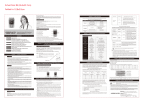
Control Panel of Inverters over 2KVA
1. Input Indicator
:input indication of power supply of Mains(MAINS)
2. Bypass Indicator
:output indication of power supply of mains(BYPASS)
3. Output Indicator
:output indication of power supply of converter(INVERTER)
4. Indicator of Battery Electricity Quantity :if this light is on, it means electricity in the battery is being
used up (BATTERY)
5. Overloading Indicator :it shows if the user’s using electricity quantity is over rated capacity of the
inverter(OVERLOAD)
6. Fault Indicator
: to indicate troubles of inverter(FAULT)
7.LCD Display
: display figure signals, such as voltage, frequency, power, status of inverter
etc.
(1).AC:LOSS(OK)
BAT:OK(LOW)
NO OUTPUT(BYPASS OUTPUT,INVERTER OUTPUT)
(2).INPUT VOLTAGE
(5).OUTPUT FREQUENCY
(3).OUTPUT VOLTAGE
(6).BATTRY VOLTAGE
(4).INPUT FREQUENCY
(7).OUTPUT POWER
:press this button to display each working parameters of the
8.Selection Button of LCD Display
inverter circularly
:the inverter will be powered on or off if this button is pressed for
9.SwitchButton of Inverter
four seconds continuously
Remark: all indicators that relate with Mains only work when Mains are input in the inverter
Operation of Invertor
1
2
3
4
5
6
!
OUTPUT
VOLTAGE
220V ac
#2
7 (picture B)
5.2
8
9
Operational Procedure
Operations of this series are very easy and convenient, the system will run normally if you operate as
www.chinabestproducts.com
9