1
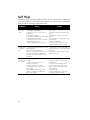
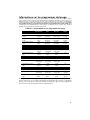
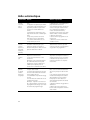
Problem
Detergent
dispenser
cover will not
shut
Cause
1. Improper operation of detergent
cover
2. Previous cycle has not been finished or cycle was interrupted
Unable to
1. Previous cycle has not finished
select
desired cycle
Action
1. Refer to “Adding Detergent and
Rinse Aid” section of the manual
for instructions on opening and
closing the dispenser
2. Refer to the “Operating the
Dishwasher” section of the manual
1. Refer to the “Operating the
Dishwasher” section of the manual
Customer Service
Your Thermador® dishwasher requires no special care other than that described in
the Care and Maintenance section of this manual. If you are having a problem with
your dishwasher, before calling for service please refer to the Self Help section of the
manual. If service is necessary, contact your dealer or installer or an authorized service center. Do not attempt to repair the appliance yourself. Any work performed by
unauthorized personnel may void the warranty.
If you are having a problem with your Thermador dishwasher and are not pleased
with the service you have received, please take the following steps until the problem
is corrected to your satisfaction:
1
Call us at 1-800-735-4328
2
Contact Customer Service from our web site:
www.thermador.com (USA) or www.thermador.ca (Canada)
3
Contact your installer or the Thermador Authorized Service Contractor in
your area.
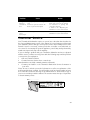
Please be sure to include your model information as well as an explanation of the
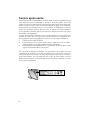
problem and the date it started. You will find the model and serial number information on the label located on the edge of the dishwasher door. Please make a copy of
your invoice and keep it with this manual. The customer must show proof of purchase
to obtain warranty service.
20