1
-
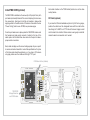
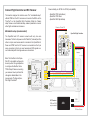
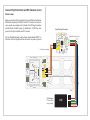
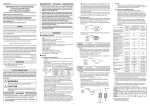
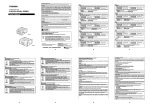
Add a dab of solder on the “OSD Enable” pads to turn on the video
overlay feature.
U
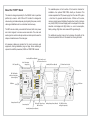
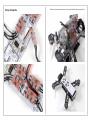
The TBS CORE is installed on three rows (5+2+12 pins) of 2mm pitch
Bluecorrect
LED, BEC
RF Shield (optional)
pin headers (included). Break-off the
strip length and remove
(+5V) power OK
the unused pins. Use tape to hold the pin headers in place while
OSD
Menu Button (hidden)
If you have the RF shield available and plan to fly UHF or long range,
applying solder to the bottom side of the board. Also solder the
two
position the shield over the designated area with the small button
“Power Config” pads to use +VCORE, see previouse page.
LiPo
LiPo
hole facing the “+VBEC” and “VTX” side of the board. Apply a small
dot of solder to the middle of the four sides. Leaving only a small dot
Once the pin headers are in place, place the TBS CORE module onto +
makes it easier to remove later on if needed.
the headers and apply ample amount of solder to the top of theVTX
+VCORE
solder pads. Let the solder flow down and onto the pinsor to make a
12V
+VBOARD
LiPo
proper solder connection.
5V
OSD
No TBS CORE:
+
LEDs
+ ESC3 ESC4
+ -
CAM
U
LEDs
+
-
-
+ -
-
-+
U
FC/RX Pwr
1 2 3 4
ESC Signals
AV+-
+
+ -
-
+ -
-
+ -
+
-
AV+-
Battery l
U
VIN2
+
CAM
+ -
+
-
+ -
+ ESC3 -
LEDs
-
+ +
+ -
LEDs
+ ESC3 -
ESC4
LEDs
+
ESC4
+ -
U
+ -U + -
-
ESC4
+
+ -
-+
U
-
+- +
1 2 3 4
ESC Signals
-
AV+-
U
FC/RX Pwr
1 2 3 4
ESC Signals
AV+-
U
-
ESC3
FC/RX
Pwr
-
AV+-
+ -
AV+-
CAM
+ -
+ -
+VBEC
+VBEC OK
Aud Vid +V Gnd
U
CAM
U
U
-
CAM
-+
Aud Vid +V Gnd
+VBEC OK
-
Aud Vid +V Gnd
+
+VBEC OK
FC/RX Pwr
+ -
1 2 3 4
ESC Signals
U
U
+
+ -
-
+ -
+
AV+-
+ U
LiPo
-
U
+ ESC1 -
+
+VBATT
-
+ ESC1 -
LiPo
QAV250 Main Board
+VBEC
RSSI
+ ESC2 -
AV+-
U
+ ESC2 + -
+
+
+
+VBATT
+
U
+
Gnd +V Vid Aud
LiPo
QAV250 Main Board
+VBATT
-
-
+ ESC1 -
+VBOARD
or
+VCORE
+
+VBEC
+ ESC2 -
+
+VBATT
CAM
+VBATT OK
Power Config
OR
+VBATT
or
+VBEC
+
+VBATT
RSSI
QAV250 Main Board
+VBEC
Solder all bridges
RSSI
VTX
+
VIN2
+
+VBATT
CAM
CAM
LEDs
-
+VBATT OK
Power Config
Curr.
Vin
GND
V+
GND
Video
+
CAM
+
+VCORE
or
+VBOARD
+
- +
VTX
Gnd +V Vid Aud
RSSI
No TBS CORE:
+VBATT OK
-
VTX
CAM
12V
+VBOARD
5V
or
+VCORE
OR
Gnd +V Vid Aud
+VBATT
or
+VBEC
Solder all bridges
AudL
AudR
Power Config
+VBOARD
or
+VCORE
VTX
-
Solder all bridges
5V
5V from BEC and VTX
3S battery voltage (12V)
Enable
+
+VBATT
or
+VBEC
-
LEDs
+
No TBS CORE:
CAM
No TBS CORE:
VTX
VTX
TBS CORE
+VCORE
Voltage Selection
or
+VBOARD
and OSD Enable
+VCORE
or
12V
+VBOARD
OSD
LEDs
+
CAM and VTX capable of
3S battery voltage (12V)
TBS CORE
VTX
V+
GND
+ -
Video
AudL
AudR
U
Board - Without (no) TBS CORE
+
VTX
U
-
Green LED,
battery power OK
OK - blue LED
(hidden)
+VBEC
LEDs
OSD Menu Button
(hidden)
TBS CORE
is
+VBEC
+ -
U
ESC4
Aud Vid +V Gnd
+VBATT
-
+
RSSI
+VBATT
+VBATT OK
LiPo
QAV250 Main Board
+VBEC
+ ESC1 -
CAM
Curr.
Vin
GND
AudL
AudR
V+
GND
Video
U
CORE voltage source and OSD module
+
-
Gnd +V Vid Aud
+ -
Power Config
CAM
12V
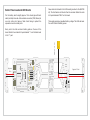
Next, solder a bridge over the correct voltage jumper for+VBOARD
your
specifor 5V
RSSItwo
ic camera and video transmitter - look at the specifications.
+VCORE Only
of the three pads should be soldered, e.g. if you have a 12V camera
only apply solder over the middle and the right “12V” pad.
U
VTX
+VBATT
or
+VBEC
-
LEDs
+
+ -
VTX
U
+
Enable
Solder all bridges
+ ESC2 -
V+
GND
Video
AudL
AudR
-
+ -
+ ESC1 -
U
TBS CORE
VTX
+ -
+VBEC OK
+VBEC
LEDs
+ -
+ -
+ ESC3 -
+ ESC2 -
U
50 Main Board
LEDs
+
Install TBS CORE (optional)
Status LEDs
Speed C