1
ECE 477
Digital Systems Senior Design
Château de Nemo
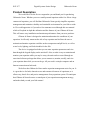
Product Illustration
Chateau de Nemo can be operated through the keypad system mounted on the
aquarium or through the software package included with your purchase. This section
describes the control system mounted on your aquarium. For instructions on how to use
the software, please refer to the Product Operating Instructions.
Warning!
Please return device
to manufacturer for
proper disposal
LCD Panel
LEDs:
Indicates power on,
and in-use status
respectively.
Direction Arrows:
Allows navigation
between displays and
setting menus, and
modifies aquarium
parameters
Welcome to
Chateau De Nemo V1.0
Time: 12:39:40
ENTER To Continue …
1
2
- Button:
Used to enter current settings
menu.
+
Enter:
Used to enter modify
settings menu or
continue navigation
though other menus..
+ Button:
Used to enter desired
settings menu.
Fig 1.1: Château de Nemo Controls
The Château de Nemo control box has a total of seven push buttons, a LCD Panel that
displays information regarding the aquarium, and several status indicator lights. Below is
the function and purpose of each:
• LED 1 – Indicate system power.
• LED 2 – Indicate system in-use. Activated when settings are being modified
through Internet or keypad.
• Left/Right Buttons – Select between fields (hours and minutes) during system
setup or modify routines.
• Up/Down Buttons – Used to increase or decrease values with regard to
temperature, pH, feed times, and lighting schedules.
• - Button – Used to enter Current Settings menu.
• + Button – Used to enter Desired Settings menu.
• Enter Button – Used to enter Modify Settings menu.