1
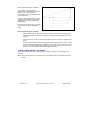
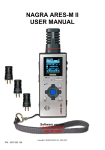
NAGRA ARES-ML
USER MANUAL
Software version
V3.24 Build 0218
April 28, 2009
Copyright © NAGRAVISION S.A. 2005-2009
P/N CD : 7070 104 000
1 0
1 GUARANTEE ..................................................................................................................................... 4
2 DELIVERED WITH ............................................................................................................................. 5
3 PANEL DESCRIPTION ...................................................................................................................... 6
3.1 Front panel key functions........................................................................................................ 6
3.2 Left side key functions............................................................................................................. 7
3.3 Right side .................................................................................................................................. 7
3.4 Top face..................................................................................................................................... 8
3.5 Bottom face............................................................................................................................... 8
4 INSTALLING BATTERIES ................................................................................................................. 8
5 FIRST POWER ON............................................................................................................................. 8
6 RECORD WINDOW DESCRIPTION .................................................................................................. 9
6.1 Display name ............................................................................................................................ 9
6.2 Input name ................................................................................................................................ 9
6.3 Record level .............................................................................................................................. 9
6.4 Filter status ............................................................................................................................... 9
6.5 AGC status ................................................................................................................................ 9
6.6 Output volume .......................................................................................................................... 9
6.7 VOR status ................................................................................................................................ 9
6.8 Modulometer ........................................................................................................................... 10
6.9 Play / Record file name .......................................................................................................... 10
6.10 Play / Record time ................................................................................................................ 10
6.11 Play progress & free disk space bar (3 colour) ................................................................. 10
6.12 Total file / Free record time.................................................................................................. 10
6.13 File counters ......................................................................................................................... 10
6.14 Run status ............................................................................................................................. 10
6.15 Audio parameters ................................................................................................................. 10
6.16 USB status ............................................................................................................................ 10
6.17 Keyboard status ................................................................................................................... 10
6.18 Battery status........................................................................................................................ 10
7 USING THE ARES-ML ..................................................................................................................... 11
7.1 Recording audio in the field .................................................................................................. 11
7.1.1 The Automatic Gain Control (A.G.C) ............................................................................ 12
7.2 Playback of a previous recording ......................................................................................... 12
7.2.1 Adjusting playback levels ............................................................................................. 12
7.3 Storing settings in a template ............................................................................................... 12
7.4 Deleting an audio recording rapidly ..................................................................................... 13
8 MENUS ............................................................................................................................................. 13
8.1 Menu Tree................................................................................................................................ 14
8.2 Set input device ...................................................................................................................... 14
8.3 Set compress template .......................................................................................................... 14
8.4 Setting the input matrix ......................................................................................................... 14
9 SETUP MENU .................................................................................................................................. 15
9.1 Display language .................................................................................................................... 17
9.2 Auto power.............................................................................................................................. 17
9.3 Screen save............................................................................................................................. 17
9.4 Template selection ................................................................................................................. 17
9.4.1 Template name ............................................................................................................... 17
9.4.2 Recording file compression type setting “CORE” ..................................................... 17
9.4.3 Sampling Rate setting “SR”.......................................................................................... 18
9.4.4 Bit Rate & Mono / Stereo selection “BR”..................................................................... 18
9.4.5 File extension name setting “EXT” .............................................................................. 18
9.5 Input device manager............................................................................................................. 18
9.5.1 Input device manager, NAME........................................................................................ 18
9.5.2 Input device type manager............................................................................................ 19
9.5.3 Input gain manager ........................................................................................................ 19
9.5.4 Input boost manager...................................................................................................... 19
9.5.5 Input power manager..................................................................................................... 19
Page 2 of 44
Copyright © NAGRAVISION S.A. 2005-2009
April 28, 2009
9.5.6 Input filter manager........................................................................................................ 19
9.6 Speaker mode ......................................................................................................................... 20
9.7 Set AGC target level ............................................................................................................... 20
9.8 Set STOP key during record.................................................................................................. 20
9.9 Set OK key during record ...................................................................................................... 20
9.10 Set record name prefix......................................................................................................... 20
9.11 Date & Time........................................................................................................................... 20
9.12 Clear record counter ............................................................................................................ 20
9.13 Restore factory settings ...................................................................................................... 20
9.14 Format disk ........................................................................................................................... 20
9.15 Check Disk space ................................................................................................................. 21
9.16 Check Software version....................................................................................................... 21
9.17 Check Machine ID................................................................................................................. 21
10 ARES-ML GAIN AND LEVEL STRUCTURE. ................................................................................ 22
11 LINE INPUTS ON THE ARES-ML.................................................................................................. 23
12 MICROPHONES AND SETTINGS. ................................................................................................ 23
13 LOW CUT FILTER OR NOT ON THE ARES-ML .......................................................................... 24
14 AUDIO COMPRESSION (WHY AND WHEN TO USE IT). ............................................................ 24
15 MP2 OR MP3 IMPORT / PLAYBACK............................................................................................ 25
16 USB ................................................................................................................................................ 26
17 SOFTWARE UPDATE.................................................................................................................... 27
18 FILE TYPES ................................................................................................................................... 28
19 ALARMS......................................................................................................................................... 31
19.1 Low battery ........................................................................................................................... 31
19.2 Low memory ......................................................................................................................... 31
20 DEFAULT SETTINGS .................................................................................................................... 32
21 MESSAGES.................................................................................................................................... 33
22 LANGUAGE TABLE ...................................................................................................................... 34
23 SPECIFICATIONS.......................................................................................................................... 42
24 DECLARATION OF CONFORMITY............................................................................................... 43
Page 3 of 44
Copyright © NAGRAVISION S.A. 2005-2009
April 28, 2009
1 GUARANTEE
Nagra / Kudelski certifies that this instrument was thoroughly inspected and tested prior to leaving our
factory.
We guarantee the products of our own manufacture against any defect arising from faulty
manufacture for a period of two years from the date of delivery.
This guarantee covers the repair of confirmed defects or, if necessary, the replacement of the faulty
parts, excluding all other indemnities.
All freight costs, as well as customs duty and other possible charges, are at the customer's expense.
Our guarantee remains valid in the event of emergency repairs or modification being made by the
user. However we reserve the right to invoice the customer for any damage caused by an unqualified
person or a false manoeuvre by the operator.
We decline any responsibility for any and all damages resulting, directly or indirectly, from the use of
our products.
Other products sold by KUDELSKI S.A. are covered by the guarantee clauses of their respective
manufacturers.
We decline any responsibility for damages resulting from the use of these products.
We reserve the right to modify the product, and / or the specifications without notice.
Page 4 of 44
Copyright © NAGRAVISION S.A. 2005-2009
April 28, 2009
2 DELIVERED
WITH
The package
includes:
1 ARES-ML
2 Wrist-strap
NM-WSI 2070 114
000
3 CD including
manuals
7070 104 000
4 Carrying case
NM-CCI
2070 212 000
5 Mic cable
CM-MICM
2070 122 000
6 End cap
NM-CAP
2070 131 000
7 USB cable
CM-USB
2070 116 000
Note:
Software updates and user manual reprints are available from www.nagraaudio.com (Pro,
Support section)
Page 5 of 44
Copyright © NAGRAVISION S.A. 2005-2009
April 28, 2009
3 PANEL DESCRIPTION
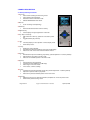
3.1 Front panel key functions
1 OK / II key:
x
Pause / Next recording function during record.
x
Pause function during playback.
x
Executes functions in the menu mode.
x
Selects PRE-RECORD from STOP.
2 REC led:
x
Turns red during record (flashing).
3 Delete key:
x
Removes the selected index from the memory.
4 Brightness key:
x
Put the display into high brightness for 5 seconds.
5 Play / Stop / Power key:
x
Main Power ON / OFF key. (Press for 3 seconds to power
off)
x
Toggles between play and stop.
6 C key:
x
Cancels (escape) a menu operation or exits a display mode.
x
Enters setup menus.
7 Left key:
x
Rewind key during playback.
x
Decreases the input level sensitivity (Input gain) (0.5dB steps).
x
Move to the “Left” in the menu mode or exit some menus.
8 Down key:
x
Decreases the input level sensitivity (Input Gain), (Coarse adjustment – locked by default).
x
Skip forward to next index in the play mode.
x
Moves to next available position in the menu mode.
9 Right key:
x
Fast forward key during playback.
x
Increases the input sensitivity (0.5 dB steps)
x
Move “Right” in the menu mode.
x
In the menus, confirms a setting.
10 Up key:
x
Increases the input level sensitivity (Input gain) (Coarse adjustment – locked by default).
x
Skip back to previous index in play mode.
x
Moves to the previous available position in the menu mode.
11 Menu key:
x
Display the sub-menu for fast input selections, templates etc. in the stop menu mode.
x
Enter marker positions during record.
Page 6 of 44
Copyright © NAGRAVISION S.A. 2005-2009
April 28, 2009
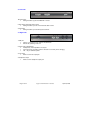
3.2 Left side
1
2
3
1Record switch:
x
Sliding the switch up puts the ARES-ML in record.
2 AGC switch (Automatic Gain Control):
x
Sliding the switch up turns on the Automatic Gain Control
3 Hold switch:
x
Sliding the switch up locks the keyboard controls.
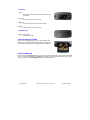
3.3 Right side
1
2
2
3
4
1 USB port:
x
Used for connecting to a PC / MAC for file download.
x
External DC powering of the unit.
2 Output volume adjustments:
x
Headphones, internal speaker & line output.
x
In the sub-menus, permits to select a character or a number (name changing)
x
VOL + key for software update.
3 Line output:
x
Stereo 3.5 mm line output jack.
4 Headphone output:
x
Stereo 3.5 mm headphone output jack.
Page 7 of 44
Copyright © NAGRAVISION S.A. 2005-2009
April 28, 2009
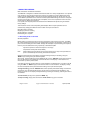
3.4 Top face
1 Cover:
x
Removable protective cover hiding mike & line input
connectors.
1
2
4
3
2 Line input:
x
3.5 mm stereo jack for line inputs.
3 Mike input:
x
3.5 mm stereo jack for external mike inputs.
4 Int Mic:
x
Built-in Electret mono microphone.
3.5 Bottom face
1 Battery compartment:
x
Slide down to open.
1
4 INSTALLING BATTERIES
Insert 2 “AA” batteries taking care of the correct polarity and
close the cover. Rechargeable batteries (NiCd or Ni-mH) can
also be used but they can not be charged inside the ARES-ML.
+
-
5 FIRST POWER ON
Push and hold the “Play & Stop” key (5) for 3 seconds, the machine turns on and shows the ARES-M
icon for 1.5 seconds followed by the “STOP” window display. To skip the ARES-M icon screen, press
any key. To jump to the “PRE-RECORD” window, press the “OK” key.
Page 8 of 44
Copyright © NAGRAVISION S.A. 2005-2009
April 28, 2009
6 RECORD WINDOW DESCRIPTION
Filter status USB status
Keyboard status
Battery status
Display name
AGC status
Input name
VOR status
Record level
Output volume
Modulometer
Run status
Play / Record file name
Audio parameters
File counters
Total file /
Free record time
Play / Record time
Play progress bar & free disk space
6.1 Display name
Area that indicates the name and function of the selected display
6.2 Input name
Indicates the input status (internal / external microphone or line input.)
6.3 Record level
The record level can be adjusted with the keys 7 & 9 in steps of 0.5 dB from +144 dB to +84 dB (60
dB range).
6.4 Filter status
Indicates if the low cut filter is ON or OFF. OFF is indicated by blue characters on a black
background, ON is indicated by black characters on a blue background.
6.5 AGC status
Indicates if the Automatic Gain Control is turned ON or OFF (Left side button 2). OFF is indicated by
blue characters on a black background, ON is indicated by black characters on a blue background.
6.6 Output volume
The output volume level for headphones, line output or internal speaker (play mode) can be adjusted
with the buttons (Right side 2, VOL +, -) from – 40.0 dB to + 1.0 dB in 0.5 dB steps.
6.7 VOR status
This function is disabled on the Ares-ML.
Page 9 of 44
Copyright © NAGRAVISION S.A. 2005-2009
April 28, 2009
6.8 Modulometer
Full scale from -40 dB to 0 dB with peak hold indicator for left and right channels.
6.9 Play / Record file name
The name of the current file during record or playback.
6.10 Play / Record time
Display in hours, minutes & seconds since the playback or recording was started.
6.11 Play progress & free disk space bar (3 colour)
During playback the entire bar corresponds to the selected file. The “filled-in” part indicates the
playback progression. In stop or record mode, it indicates the remaining record space available in the
memory.
6.12 Total file / Free record time
In playback the counter shows the duration of the current file and in record it shows the remaining
capacity left in the memory.
6.13 File counters
The upper counter indicates the total number of recorded files. The lower counter indicates the
number of the file ready to be played back.
6.14 Run status
Stop
Monitoring (EE) mode (pre-record buffer)
Record
Play
Forward
Rewind
Pause
6.15 Audio parameters
This area shows (left to right), the current file type, the sampling frequency, the bit rate and the Mono
/ Stereo selection.
6.16 USB status
This icon appears when the machine is connected via USB to a PC / MAC.
6.17 Keyboard status
The key icon appears when the keyboard is locked by means of the hold key (3) on the left side.
6.18 Battery status
5 stripes inside the icon indicate full capacity.
Page 10 of 44
Copyright © NAGRAVISION S.A. 2005-2009
April 28, 2009
7 USING THE ARES-ML
Basic Introduction and General Information.
The ARES-ML is designed as a flexible hand-held recorder for a variety of applications. It can perform
many functions, which are all covered in this manual. The operating concept is designed around a
system of preset TEMPLATES in which all the required operating modes are stored. The user can
choose different parameters of the machine and these personalised settings are stored in a template
for future quick access. There are two sets of templates, one for the compression mode to be used
and the other for different input devices.
If no specific user Template profiles are stored then the ARES-ML will operate using the “default”
factory settings.
This introduction covers various important global subjects. More complex operations can be
understood by studying the different menus in detail. The topics covered are:
Recording audio in the field
Replaying a previous recording
Storing settings in a template
Downloading to a computer
7.1 Recording audio in the field
General preparation:
Before making a recording the input source and compression mode need to be chosen. The ARESML makes recordings according to the pre-selected settings stored in the templates. If nothing is set
prior to the first recording then the “default” settings will be adopted. If specific settings are required,
then they must be selected first using a previously customized template.
-
Input device (Internal / external microphone / Line input)
Compression format (linear PCM, MPEG)
Note:
When selecting the input device, the input gain and the use (or not) of the input filter and
power is automatically set according to the devices template.
Select the input device and compression mode (and working directory if necessary) using the
“MENU” key according to the pre-saved templates.
When ready, press the “OK” key and the ARES-ML will go to the “PRE-REC” mode where the audio
input can be heard on the headphones and the levels seen on the display. In this mode the Prerecord buffer (1 second) is also active.
If the AGC is turned off, the input gain can now be adjusted in 0.5 dB steps from +144 dB to +84 dB
using the “LEFT” or “RIGHT” keys, and the value is shown in a sub-window on the display. Initially,
the value corresponds to the preset value stored along in the input device template.
To begin recording, press the “RECORD” slide switch upwards (with default settings: Towards the
microphone). The red LED will flash and the record symbol on the display will start flashing. The
levels can be seen on the display and adjusted during recording as necessary, assuming the AGC is
not activated.
To enter markers, during record, press the “MENU” key.
To stop recording, simply press and hold the “PLAY / STOP” key (5) for 3 seconds.
Page 11 of 44
Copyright © NAGRAVISION S.A. 2005-2009
April 28, 2009
Note:
If the recording is started directly from the “STOP” mode, the Pre-record buffer will be off. If
during record the “RECORD” switch is pushed upwards again, a new file will be started
(seamless recording).
Each new recording will be given a file name made up of 8 digits. This file will be stored in the
working directory.
See “File naming and working directory” for details.
7.1.1 The Automatic Gain Control (A.G.C)
The AGC is not an audio limiter. It operates in the digital domain and allows the operator to make
recordings without under / over modulating when the audio levels are unpredictable.
It makes recording in the field easier and guarantees that a respectable level will be recorded.
Automatic adjustment systems are rarely “better” than the manual modes, but can be considered
“safer” in certain circumstances. The operating target level or average level to be recorded can be set
to either –6 dB or –12 dB in the “SCREWDRIVER” menu. It is also strongly recommended to switch
on the low cut filter when using the AGC for recordings in noisy environments (example: Street
noise).
7.2 Playback of a previous recording
The ARES-ML can play back files irrespective of the current compression mode selected. To
playback the last recorded file, press “PLAY” and the machine starts playback immediately. To stop
the playback, press the “PLAY” key again. To pause the playback, use the “OK” key.
If the recording was made with markers, during the playback, briefly press the “RIGHT” or “LEFT”
keys to jump to the next or previous marker position respectively.
To playback another file from the same working directory, use the “UP” or “DOWN” keys to scroll
through the recorded files available. Once “PLAY” is pressed, the new file will be played immediately.
During a playback of a file, the full 3 colour “PLAY PROGRESS BAR” corresponds to the total length
of the file.
When a new file has been selected for playback the “TOTAL TIME” counter will indicate its full length
and the “PLAY TIME” counter starts incrementing once the playback begins.
During playback, to “REWIND” press and hold the “LEFT” key, to go “FORWARD” press and hold the
“RIGHT” key.
7.2.1 Adjusting playback levels
The output volume level for the headphones and line output can be adjusted by the “+ VOL -” buttons
on the right side of the machine in steps of 0.5 dB from -40 dB up to +1 dB. This value is also shown
on the display (see Record window description) and stored in the memory of the machine.
7.3 Storing settings in a template
Templates are used to store the settings for the ARES-ML. These templates contain input device,
levels, filter selection, Electret powering, type of compression, mono or stereo etc.
Input device manager: 10 templates are available and each can store the name and characteristics
of different input devices such as different microphone capsules, line inputs and the gain settings,
powering and filters can be selected for each device.
Compression template: 10 templates are available and each can be given a dedicated name and
can store the desired compression mode, sampling frequency, bit rate and the file extension desired.
To go to the programming position, jump to the paragraphs entitled “MANAGER” & “SETUP MENU”.
Page 12 of 44
Copyright © NAGRAVISION S.A. 2005-2009
April 28, 2009
Once completed, the desired template can be selected by pressing the “MENU” key. Choose the
corresponding template by its name in the “Set compress template” or “Set input device”.
7.4 Deleting an audio recording rapidly
Any audio file can be selected from the “STOP” mode by pressing the “UP” or “DOWN” keys. Once
the corresponding file is shown on the display, press the “DELETE” key and confirm to delete the file.
8 MENUS
All the settings and parameters of the ARES-ML are made
through a selection of Menu’s. There are two sets of menus. One
is used for the selection of the pre-set choices and the other is
used for storing the different settings of the machine.
Press the centre “MENU” key (11) and a sub-menu appears giving access to the input device
selection, the compression template to be used and the input matrix.
The “UP” or “DOWN” keys (10) or (8) will highlight the different choices and the “OK” key (1) or
“RIGHT” key (9) confirms the selection.
Page 13 of 44
Copyright © NAGRAVISION S.A. 2005-2009
April 28, 2009
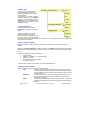
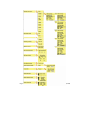
8.1 Menu Tree
The “Tree” shows all the different
menus available. All BLUE text is
preset in the “Setup” menus and can
be personalized.
In general to set or confirm a selection,
press the “OK” key (1) or the “RIGHT”
key (9). To move to the right, use the
“RIGHT” key (9). To move to the left or
escape from the menu selection, press
the “LEFT” key (7).
8.2 Set input device
Choice between the INTERNAL or
EXTERNAL microphones or the LINE
INPUT.
Pressing the “OK” key (1), allows
selection between the line input,
internal or external microphone. Press
“C” twice to return to the main window.
Each input name can be personalized in the “Setup” menu. To change the input device, highlight the
new input and press “OK”.
8.3 Set compress template
Allows the selection of different operating templates, containing all the recording compression
settings.
Select the “Compress template” by using the “UP” (10) or “DOWN” (8) keys followed by pressing the
“OK” key (19). The preset template can then be chosen from the list. Once selected, press the “OK”
key (1).
Each template stores the following parameters:
x
Template name
x
MPEG 1 L II, MPEG 1 L III or PCM selection
x
Sampling frequency
x
Bit rate & Mono / Stereo selection
x
File extension name
This information is shown on the display in the audio parameters area.
8.4 Setting the input matrix
Permits to route the inputs to specific recording channels.
Auto:
If a stereo recording format is selected, the left input goes to the left
recording channel, the right input goes to the right recording channel. If
a mono recording format is selected, only the left input goes to the left
recording channel.
Double Ch:
The left input is forced to the left recording channel, the right input is
forced to the right channel and does not depend on the recording
format (Mono or Stereo).
Mono L:
Only the left input is directed to both recording channels. In the case of
a stereo recording with a single left input, both output channels will be
identical.
Page 14 of 44
Copyright © NAGRAVISION S.A. 2005-2009
April 28, 2009
9 SETUP MENU
The “SETUP” menu gives access to
several sub-menus. The most important
are the Template creation and the Input
device manager as they can be recalled
by the blue “MENU” key to select the
type of compression as well as the input
device.
To access to “SETUP” from the main
display, press “C”. The microphone icon
appears. Press and hold the “RIGHT” or
“LEFT” key until the screwdriver icon
appears. By using the “LEFT” or “RIGHT”
keys, select the screwdriver icon and
press “OK”.
Page 15 of 44
Copyright © NAGRAVISION S.A. 2005-2009
April 28, 2009
Page 16 of 44
Copyright © NAGRAVISION S.A. 2005-2009
April 28, 2009
Note:
While surfing through the different menu windows, in some cases not only the “OK” key or
“RIGHT” key can be used to advance one step but also the “UP” and “DOWN” keys. To go
one step back or to escape from a particular screen press “C” or the “LEFT” key.
When
display.
appears, select the microphone icon and press “OK” to return to the main
9.1 Display language
Several languages are available: Chinese, English, French, German, Spanish, Polish, Dutch.
9.2 Auto power
This menu allows 1 possible setting (2 minutes) to power down the machine when no keys were
pressed for a period (except when in record or play modes). To turn the auto power down off, select
“Disable”.
9.3 Screen save
To save battery power, the screen can be turned off automatically after 1 minute. To turn the screen
save off, select “Disable”.
Note:
If activated, the display will automatically turn off when no key is pressed after 1 minute.
Push any key to turn the display on again.
9.4 Template selection
Before the templates can be selected from the blue menu key, they first need to be stored. Maximum
10 templates for the input device as well as 10 templates for the compression can be entered.
Templates are used to store different user profiles or “machine set-ups” for quick access.
9.4.1 Template name
Note:
Remember that all text in blue colour (sample text) can be modified by the user.
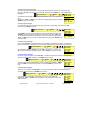
To enter a new name or to change the name of a template, select the desired name “HI QUALITY”
and press “OK”.
Manager compress template
OK
HI QUALITY
The window “Template manage” will appear. The first character can now be
changed by using the “+” and “-” volume buttons. Press the “RIGHT” key to jump to
the next character. Maximum 6 characters can be entered. To validate the new
name press the “DOWN” key to go to the next step.
OK
Template manage
NAME: HI QUA
CORE: WAV-PCM16
SR:
48000 Hz
BR:
1536kbps ST
EXT: WAV
9.4.2 Recording file compression type setting “CORE”
Once the corresponding template is selected, press “OK” followed by the “DOWN” key to highlight
“CORE”.
Manager compress template
OK
HI QUALITY
OK
Several possibilities exist: “RAW-MPEG1L2”, “BWF-MPEG1L2”,”RAW-MPEG1L3”,
“WAV-PCM16”, “BWF-PCM16”. Select one of the possibilities using the “LEFT” or
“RIGHT” key and press the “DOWN” key to go to the next step.
Page 17 of 44
Copyright © NAGRAVISION S.A. 2005-2009
Template manage
NAME: HI QUA
CORE: WAV-PCM16
SR:
48000 Hz
BR:
1536kbps ST
EXT:
WAV
April 28, 2009
9.4.3 Sampling Rate setting “SR”
Once the corresponding template is selected, press “OK” followed by “DOWN” twice to highlight “SR”.
Manager compress template
OK
HI QUALITY
Template manage
OK
Several selections are available (see the table at the end of the manual). Select one
of the possibilities using the “LEFT” or “RIGHT” keys and press the “DOWN” to go to
the next step.
NAME: HI QUA
CORE: WAV-PCM16
SR:
48000 Hz
BR:
1536kbps ST
EXT: WAV
9.4.4 Bit Rate & Mono / Stereo selection “BR”
Once the corresponding template is selected, press “OK” followed by “DOWN” three times to highlight
“BR”.
Manager compress template
OK
HI QUALITY
Template manage
OK
Several selections are available (see the table at the end of the manual). Select one
of the possibilities using the “LEFT” or “RIGHT” keys and press the “DOWN” to go to
the next step.
NAME: HI QUA
CORE: WAV-PCM16
SR:
48000 Hz
BR:
1536kbps ST
EXT: WAV
9.4.5 File extension name setting “EXT”
Once the corresponding template is selected, press “OK” followed by “DOWN” four times to highlight
“EXT”.
Manager compress template
OK
HI QUALITY
Template manage
OK
NAME: HI QUA
CORE: WAV-PCM16
SR:
48000 Hz
BR:
1536kbps ST
EXT: WAV
By using the “+” or “-” volume keys, the first character can be changed.
Press the “RIGHT” key to proceed to the next character position. To confirm the
new extension name, press “OK”. Maximum 3 characters can be entered.
9.5 Input device manager
This allows a specific name to be given to an input selection as well as the presets for the input gain,
power and input filter selection for that particular device name.
9.5.1 Input device manager, NAME
To enter a new name or to change the name of an input device, first select the desired name
“NAGRA” and press “OK”.
Manager input device
OK
NAGRA
The “Input device manage” window will appear. The first character can now be
changed by using the “+” or “-” volume buttons. Press the “RIGHT” key to jump to
the next character. Maximum 6 characters can be entered. To validate the new
name press “DOWN” to go to the next step.
Page 18 of 44
Copyright © NAGRAVISION S.A. 2005-2009
OK
InDev manage
NAME: NAGRA
TYPE:
GAIN:
BST:
PWR:
FLT:
EXT-MIC
+0dB
+19dB
ON
100-20kHz
April 28, 2009
9.5.2 Input device type manager
This sub-menu gives the selection of the input that will be used for recording. To change the input
type, go to “Manager input device” and press “OK” followed by the “DOWN” key. Then “TYPE” will be
highlighted.
NAGRA
InDev manage
Manager input device
OK
OK
NAME: NAGRA
Five selections are possible: Internal mike, External mike, Line, Line Lo and Line Hi
input.
By using the “LEFT” or “RIGHT” keys, select the corresponding input type and press
“DOWN” to go to the next step.
TYPE:
GAIN:
BST:
PWR:
FLT:
EXT-MIC
+0dB
+19dB
ON
100-20kHz
9.5.3 Input gain manager
To change the input gain of an input device type, select the corresponding name and press “OK”
followed by the “DOWN” key twice.
Manager input device
OK
NAGRA
OK
InDev manage
NAME: NAGRA
The “INT-MIC” gain can be pre-adjusted from 0 dB to 28 dB in steps of 2 dB. The
“EXT-MIC” can be adjusted from 0 dB to 24 dB in steps of 3 dB. The “LINE” input
can be adjusted from 0 dB to 24 dB in steps of 3 dB. To modify the value, use the
“LEFT” or “RIGHT” keys. Once the corresponding value is set, press “DOWN” to go
to the next step.
TYPE:
GAIN:
BST:
PWR:
FLT:
EXT-MIC
+0dB
+19dB
ON
100-20kHz
9.5.4 Input boost manager
Only for the “EXT-MIC” an additional boost can be added to the previous gain setting. To change the
input boost, select the corresponding name and press “OK” followed by the “DOWN” key three times.
Manager input device
OK
NAGRA
OK
InDev manage
NAME: NAGRA
By pressing the “LEFT” or “RIGHT” keys, the “BST” can be set to +19 dB or +34
dB. Once the corresponding setting is made, press “DOWN” to go to the next step.
9.5.5 Input power manager
TYPE:
GAIN:
BST:
PWR:
FLT:
EXT-MIC
+0dB
+19dB
ON
100-20kHz
Power can only be turned on for the “EXT- MIC”. To select the input power, select the corresponding
name and press the “OK” followed by the “DOWN” key four times.
Manager input device
OK
NAGRA
OK
InDev manage
NAME: NAGRA
The power available for Electret mikes is 3V dc. By pressing the “LEFT” or “RIGHT”
keys, the “PWR” can be turned ON or OFF, then press “DOWN” to go to the next
step.
TYPE:
GAIN:
BST:
PWR:
FLT:
EXT-MIC
+0dB
+19dB
ON
100-20kHz
9.5.6 Input filter manager
A filter can be selected for the “EXT-MIC”. To select the input filter, select the corresponding name
and press “OK” followed by the “DOWN” key five times.
Manager input device
OK
NAGRA
OK
InDev manage
NAME: NAGRA
Two possibilities are available: Flat (20-20kHz) or Low cut (100-20kHz). By
pressing the “LEFT” or “RIGHT” keys, the “FLT” can be turned ON or OFF. Press
“OK” to validate.
Page 19 of 44
Copyright © NAGRAVISION S.A. 2005-2009
TYPE:
GAIN:
BST:
PWR:
FLT:
EXT-MIC
+0dB
+19dB
ON
100-20kHz
April 28, 2009
9.6 Speaker mode
The ARES-ML has a built-in speaker for audio monitoring. The speaker can be turned “Off” or set to
“Auto”. In the “Auto” mode the speaker is active during playback or editing only. During record or
monitoring (EE) mode, the speaker is turned off.
9.7 Set AGC target level
This sub-menu allows the mean maximum target record level to be selected. 2 levels are available.
9.8 Set STOP key during record
Timer on selected: to stop a recording the stop key must be pressed and hold for approximately 3
seconds.
Timer off selected: if during a record the stop key is pressed, the recording stops immediately.
9.9 Set OK key during record
Pause record selected: if the OK key is pressed during record, the record is paused. To continue the
record (same index), press the OK key once again.
Next record selected: Permits to use the OK key as a second record key. From stop mode, press
once the OK key and the ARES-ML is in PRE-REC mode, pressing a second time the OK key put the
machine in record mode, pressing a next time starts a new seamless recording index.
9.10 Set record name prefix
Set record name prefix
This sub-menu allows 4 characters to be
entered. Once being in the “Input record prefix” menu use the “+” or “-” volume
keys to select the corresponding character. Press the “RIGHT” key for the next
character position. Once all characters entered, press “OK”.
OK
Input record prefix
U
S
E
R
Example of a file name: USER0001.
Date setting
9.11 Date & Time
YEAR
The “DATE & TIME” sub-menu permits to set the correct time start and date for
each recording. Use the “UP” or “DOWN” keys to set “YEAR”. Use the “RIGHT” or
“LEFT” keys to go to the next step. Once the settings made, press “OK”.
MONTH DAY
2005
10
HOUR
31
MIN
09
45
9.12 Clear record counter
Every recording has an index number incrementing automatically. Resetting the counter, by pressing
“OK” when “Clear to zero” is shown, resets it to 1. The next recording will have the full name
XXXX0001.
Note: If there are still files in memory and the USER name has not been changed, the next recording
with the same name prefix and index will overwrite the old one.
9.13 Restore factory settings
This sub-menu is used to restore the factory “default” settings, including the template settings,
names, input devices etc. After restore, the machine is set for a Nagra mike input with the low cut
filter on, recording in PCM standard WAV, 48 kHz stereo.
9.14 Format disk
If all information on the internal memory needs to be erased, the fastest way is to format it. Once
formatted, the three xxx.dat files in the “SYSINI” folder will be re-entered in the root, just before power
off. “No File” will be shown on the display.
Page 20 of 44
Copyright © NAGRAVISION S.A. 2005-2009
April 28, 2009
Note: The xxx.dat files are storing all the entered templates, language selection, record name prefix
etc.
9.15 Check Disk space
Indicates in Mbytes, the remaining space left in the memory.
9.16 Check Software version
This sub-menu shows the type of the machine and the software version
installed.
9.17 Check Machine ID
Shows the unique identification number of the machine.
Page 21 of 44
Copyright © NAGRAVISION S.A. 2005-2009
!
!
!
USED: 210 MB
FREE: 1898 MB
Infomedia
ARES-M II
ver X.X
BUILD: XXXX
MACHINE ID
720F - 003B
4158 - 81FE
*04*
April 28, 2009
10 ARES-ML GAIN AND LEVEL STRUCTURE.
The input of the ARES-ML has 3 principal stages: The analogue microphone pre-amplifier “front end”,
the PGA (Programmable Gain Amplifier) and the DGA (Digital Gain Adjustment).
Different adjustments are available at all three stages. Only one, the “recording level” is readily
accessible from the front panel by the user (using the left/right keys).
The microphone pre-amplifier stage has two selectable sensitivity settings which correspond to a
typical dynamic microphone (34 dB) and the NAGRA microphone (19 dB); this selection is made in
the “Screwdriver” menu in the “Input device manager”.
Dynamic microphone sensitivity is low and needs more gain than a condenser or Electret
microphone. So, if a dynamic microphone is used, 34 dB gain is needed, and if a condenser
microphone such as the NAGRA one, or any other external condenser microphone (such as the
SONY ECM MS907 Stereo microphone) then 19dB gain should be selected. The correct selection of
this gain will avoid the saturation of the PGA and DGA stages.
In the Codec section of the machine the first stage is equipped with a PGA adjustable gain setting
allowing the modulometer to be calibrated to give an accurate indication of SPL (Sound Pressure
Level). This setting is available in 3 dB steps and is also found in the Screwdriver menu and allows a
range of 24 dB variation. This value is factory set to 9 dB for the NAGRA microphone and 6 dB for an
external dynamic microphone such as a Sennheiser MD21.
Finally, the MAIN RECORD LEVEL is the actual level that should be used to adjust the recording
level during operation of the machine and is accessible using the Left and Right keys without any
need for going into the menus. This task is achieved by the DGA, and the range of adjustment allows
0dB Full Scale to be displayed on the modulometer for 84 dB to 144 dB SPL. The normal range of
acceptable input levels ranges from 84 dB to 110dB SPL. The range from 110dB to 144 dB SPL will
not allow 0 dB to be indicated on the modulometer without risk of saturation of the codec.
84 dB is the usual setting for an interview in a quiet environment. 110 dB allows the recording of
somebody shouting at a distance of about 40 cm from the microphone.
The zone from 110 to 144 allows the user to make a fade out or to record with headroom (by
recording below the 0dB point on the modulometer).
Page 22 of 44
Copyright © NAGRAVISION S.A. 2005-2009
April 28, 2009
11 LINE INPUTS ON THE ARES-ML
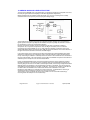
The line inputs of the ARES-ML are asymmetrical and present an input impedance of about 60 k.
They allow the entire dynamic range of the machine to be used, typically 95 dB ASA weighted when
measured on the USB output, or 92 dB ASA weighted on the analogue outputs.
Two sensitivities are available: Line H (for High level inputs) and Line L (for low level inputs). The Line
H position allows 0 dB to be recorded throughout the input voltage range of 300 mV to 4.9V and the
Line L from 19 mV to 310 mV.
The adjustment zone (using the level adjustment keys) ranges from +20 dB to –12 dB in the Line H
mode and –3 dB to –35 dB in Line L (referenced to 1V).
As an example, one can say that if the modulometer indicates –10dBfs and that the level adjustment
is set to –12 dB, then the input level is 12db – 10 dB= -22 dB with respect to 1 V or in other words
794 mV.
The following
drawing
clarifies the
above.
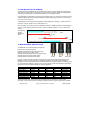
12 MICROPHONES AND SETTINGS.
The ARES-ML can use the following microphones:
Internal built-in mono microphone
External standard stereo clip-on mic (Red band)
External mono clip-on mic (Blue band)
External high quality stereo clip-on mic (Green band)
External dynamic microphone (with cable)
External electret microphone (with cable)
Stereo
Mono
Stereo HQ
For each of these microphone types an “Input device” should be pre-programmed allowing quick
selection in the field. In the input device manager (Screwdriver set-up menu) various different
parameters can be set and these vary for the different types of microphone. Below is a table showing
our “recommended” settings for various mics. You may choose to alter these settings to get different
performance but the indicated settings are optimal suggestions.
Microphone
Clip-on (Red)
Clip-on (Blue)
Clip-on (Green)
Generic Dynamic
MD-21 (Sennheiser)
RE-6 (Electrovoice)
ECM-MS907(Sony)
Type
Ext-Mic
Ext-Mic
Ext-Mic
Ext-Mic
Ext-Mic
Ext-Mic
Ext-Mic
Gain (dB)
+9
+9
+9
+6
+6
+12
0
BST (dB)
+19
+19
+19
+34
+34
+34
+34
PWR
ON
ON
ON
OFF
OFF
OFF
OFF
FLT
100-20 kHz
100-20 kHz
100-20 kHz
20-20 kHz
20-20 kHz
20-20 kHz
20-20 kHz
This built-in internal microphone should be considered only for “Dictaphone” quality speech
recordings. It should only be used in emergency situations where no other microphone is available.
Page 23 of 44
Copyright © NAGRAVISION S.A. 2005-2009
April 28, 2009
The standard Stereo microphone (Red band) contains two cardioïd capsules.
The high quality stereo microphone (Green band) has two cardioïd capsules inside, mounted on
special shock resistant neoprene mountings. The capsules are individually selected and matched in
both noise and gain characteristics, according to a strict selection and measurement protocol. This
microphone offers a good stereo image, and is very versatile.
The mono capsule (Blue band) is an omni-directional capsule, which offers two principal differences
to the stereo capsule. Firstly, being an omni capsule it captures much more of the ambience and is
ideal for on-the-move journalism, especially because most interviews are mono. Secondly, in an
interview situation it is not necessary to “point” the microphone at the person speaking. The omnidirection characteristics allow all those being recorded to be captured equally, hence making the
journalist job less intimidating. In addition it offers longer recording times to the ARES-ML as the
recorded files can be mono.
The use of the foam windshield is strongly recommended with the clip-on NAGRA microphones.
13 LOW CUT FILTER OR NOT ON THE ARES-ML
The ARES-ML is equipped with a analogue low cut filter integrated within the microphone preamplifier. This filter can be turned ON of OFF as desired.
Frequency response curve of the External microphone pre-amplifier (flat and Low cut) :
The frequency of the cut is at 200Hz
with a gradient of 40 dB / octave.
This filter can be activated for each
microphone type, as defined in the USER
list (DYN, NAGRA,COND……)
It is specially useful for recordings made
using directional microphones outside in
windy conditions, such as the stereo
NAGRA microphone. In fact, cardioïd
(speed capsules) such as the NAGRA
microphone are susceptible to vortexes
induced by wind moving round the
microphone capsule, contrary to omnidirectional (pressure) capsules, which
are not.
Audio Precision
02/07/05 11:27:26
+5
+0
-5
-10
d
B
r
-15
-20
-25
-30
-35
-40
10
20
50
100
200
500
1k
2k
5k
10k
20k
50k
Hz
Sweep
Trace
Color
Line Style
Thick
Data
Axis
1
2
1
1
Cyan
Green
Solid
Solid
1
1
Anlr.Am pl
Anlr.Am pl
Left
Left
Com m ent
default.at1
Note however that the NAGRA microphone is equipped with a fine silk screen directly behind the grill
/ basket carefully positioned to compensate for these vortexes and “pop” effects. It is also
recommended to use the external foam windshield whenever one works outside when unexpected
wind noise may be encountered.
14 AUDIO COMPRESSION (WHY AND WHEN TO USE IT).
The ARES-ML is able to record using different Audio qualities PCM Linear, MPEG 1 Layer II (MP2)
and MPEG layer III (MP3) that have their own particular advantages, which are explained below.
What to use?
Firstly, the less compression used, the better the quality will be. However at higher bit rates (384
kbits/s) you can easily record music and it will probably not notice any difference.
Page 24 of 44
Copyright © NAGRAVISION S.A. 2005-2009
April 28, 2009
A few guidelines should be considered:
For journalism / interview work it is
unnecessary to use PCM linear. Generally
MPEG 1 Layer II is used and the
compression / bit rate is generally defined
by the broadcaster.
For music / effects PCM linear is the best
quality although MPEG at a high bit rate is
probably good enough and gives faster
download time.
For ultra long recordings use a very low bit
rate, where quality will be “Dictaphone”
quality.
Some important things to remember:
-
Some computers will not play MPEG 1 Layer II compressed files without an appropriate
audio editing software. Typically some versions of the Windows Media player fall into this
category.
-
Audio CD’s will only accept 44.1 kHz linear PCM if they are to be played on a standard CD
player.
-
Download speed from the machine to the computer is at a fixed bit rate and the full memory
(in whatever format) will take about 13 minutes to empty. This could correspond to almost 3
hours of PCM linear or equally 68h of MPEG (as an example). Looking at it from the other
direction, 1 hour of recording in PCM will take approx 5 minutes.
15 MP2 OR MP3 IMPORT / PLAYBACK
MP2 or MP3 audio files can be imported via USB. To playback, select the corresponding file and
press play.
Note: The name of each file to be imported must not be modified except if the same filename exist
already.
Page 25 of 44
Copyright © NAGRAVISION S.A. 2005-2009
April 28, 2009
16 USB
The miniature USB port serves two purposes: File download or external DC powering.
As the internal memory of the ARES-ML cannot be removed, audio can be extracted either through
the line output in normal playback mode or alternatively via the USB port to the PC / MAC.
Connect the USB cable to the computer and to the ARES-ML. The ARES-ML will immediately switch
on as it is automatically powered through the USB connection.
When the USB is connected, a sub-window appears giving the possibility to select “USB POWER” or
“USB TRANSFER”. Make a selection and press the “OK” key.
The USB power position is for simply powering the ARES-ML through the USB port for normal
operation without internal batteries.
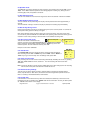
If the USB transfer is selected, the machine will immediately appear as
a removable disk in the explorer of the PC/MAC. And the following
display will be shown on the ARES-ML:
On a PC, the Windows Explorer will display the following:
PC
As an example of 3 recordings, it shows 4 folders and 3 audio files:
SYSINI
- Is the folder that contains the files with all the stored settings.
USER000X.DIR
- Are the folders containing the audio envelops and editing information.
USER000X.WAV
- Audio files
Note: Do not erase the “SYSINI” folder because the next time the machine will be turned on it
“wakes up” with the default factory settings. If several ARES-ML machines need to be set up
with the same parameters, this folder can be copied from the first machine and then copied
into all the other machines.
An identical situation of 3 recordings is shown on the next picture.
MAC
Beware that xxx.wav files are recognized by Mac as PCM files. MPEG files need to be recorded with
the extension xxx.mp2 or xxx.mp3.
Page 26 of 44
Copyright © NAGRAVISION S.A. 2005-2009
April 28, 2009
17 SOFTWARE UPDATE
Important: As a safety precaution, before updating the Ares-ML, be sure that all audio files are saved
on your Mac or PC, this is to prevent any loss of audio files.
To install new firmware in the Ares-ML, a computer, the machine and a USB cable are needed. New
software, called “APP.COE” can be downloaded from the web at www.nagraaudio.com
Important: Be sure that you have downloaded the APP.COE software corresponding to your ARESML and not the one for ARES-M / ARES-M II or others.
Before updating, verify that the batteries inside the machine are in good condition.
Before connecting the machine via the USB cable to the PC or MAC, the machine must first be
switched on using a key combination: Press and hold the “VOL +” key (2) while pressing the poweron key (5).
The display will show the following text:
1.
2.
System update
1. Check battery power
2. Plug in USB cable
3. Copy "APP.COE"
4. Remove USB cable
5. Wait for shutdown
6. Turn on the device
4.
5.
6.
Must be checked before “System update”
Connect the USB cable between the machine and the
PC, run explorer and search for the removable disk
called “UPDATE”:
PC
MAC
3. Copy the new “APP.COE” to the Ares-ML
Before disconnecting the cable, dismount the USB mass storage device from the desktop.
The ARES-ML will automatically shut down.
Switch on the ARES-ML and verify the firmware version.
Note for Windows 2000 & XP users:
If the Explorer window doesn’t show the file “APP.COE”,
check the following:
In Explorer, select “Tools”, followed
by “Folder Options”.
In the “Folder Options” window,
select “View”.
In the “View” section, verify that
“Show hidden files and folders” is
checked.
In the “View” section, verify that “Hide protected operating system files (Recommended)” is not
checked.
Note for Mac X.4 (or higher) users:
Page 27 of 44
If the file APP.COE appears locked (padlock icon as shown
on the above MAC picture) the file must be unlocked before
it can be replaced by the new software. Use the Mac
program “Buddy 8” or a program “File Buddy 9” or similar to
unlock.
Copyright © NAGRAVISION S.A. 2005-2009
April 28, 2009
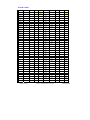
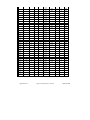
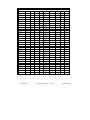
18 FILE TYPES
Recording
Sampling
type
Frequency
Hz
WAVPCM16
48000
Bitrate
Mono
Rec. T
Recording
Sampling
Stereo
On 1 GB
type
frequency
kb/s
M/S
__h__m
Hz
768
M
2h53
BWFMP1L2
32000
Bitrate
Mono
Rec. T
Stereo
On 1 GB
kb/s
M/S
__h__m
56
M
39h40
34h43
WAVPCM16
48000
1536
S
1h26
BWFMP1L2
32000
64
M
WAVPCM16
44100
705
M
3h08
BWFMP1L2
32000
64
S
34h43
WAVPCM16
44100
1411
S
1h34
BWFMP1L2
32000
80
M
27h46
WAVPCM16
32000
512
M
4h20
BWFMP1L2
32000
96
M
23h08
WAVPCM16
32000
1024
S
2h10
BWFMP1L2
32000
96
S
23h08
WAVPCM16
24000
384
M
5h47
BWFMP1L2
32000
112
M
19h50
WAVPCM16
24000
768
S
2h53
BWFMP1L2
32000
112
S
19h50
WAVPCM16
22050
352
M
6h17
BWFMP1L2
32000
128
M
17h21
WAVPCM16
22050
705
S
3h08
BWFMP1L2
32000
128
S
17h21
WAVPCM16
16000
256
M
8h40
BWFMP1L2
32000
160
M
13h53
WAVPCM16
16000
512
S
4h20
BWFMP1L2
32000
160
S
13h53
BWFMP1L2
32000
192
M
11h34
BWFMP1L2
32000
192
S
11h34
BWFMP1L2
32000
224
S
9h55
BWFMP1L2
32000
256
S
8h40
BWFMP1L2
32000
320
S
6h56
BWFMP1L2
32000
384
S
5h47
BWFPCM16
48000
768
M
2h53
BWFPCM16
48000
1536
S
1h26
3h08
Page 28 of 44
BWFPCM16
44100
705
M
BWFPCM16
44100
1411
S
1h34
BWFPCM16
32000
512
M
4h20
BWFPCM16
32000
1024
S
2h10
BWFPCM16
24000
384
M
5h47
BWFPCM16
24000
768
S
2h53
6h17
BWFPCM16
22050
352
M
BWFPCM16
22050
705
S
3h08
BWFPCM16
16000
256
M
8h40
BWFPCM16
16000
512
S
4h20
RAWMP1L2
48000
32
M
69h26
RAWMP1L2
48000
48
M
46h16
RAWMP1L2
48000
56
M
39h40
RAWMP1L2
48000
64
M
34h43
RAWMP1L2
48000
64
S
34h43
Copyright © NAGRAVISION S.A. 2005-2009
April 28, 2009
RAWMP1L2
RAWMP1L2
48000
80
M
27h46
48000
96
M
23h08
RAWMP1L2
48000
96
S
23h08
RAWMP1L2
48000
112
M
19h50
RAWMP1L2
48000
112
S
19h50
RAWMP1L2
48000
128
M
17h21
RAWMP1L2
48000
128
S
17h21
13h53
RAWMP1L2
48000
160
M
RAWMP1L2
48000
160
S
13h53
RAWMP1L2
48000
192
M
11h34
RAWMP1L2
48000
192
S
11h34
RAWMP1L2
48000
224
S
9h55
RAWMP1L2
48000
256
S
8h40
RAWMP1L2
6h56
48000
320
S
BWFMP1L2
48000
32
M
69h26
RAWMP1L2
48000
384
S
5h47
BWFMP1L2
48000
48
M
46h16
RAWMP1L2
32000
32
M
69h26
BWFMP1L2
48000
56
M
39h40
RAWMP1L2
32000
48
M
46h16
BWFMP1L2
48000
64
M
34h43
RAWMP1L2
32000
56
M
39h40
BWFMP1L2
48000
64
S
34h43
RAWMP1L2
32000
64
M
34h43
BWFMP1L2
48000
80
M
27h46
RAWMP1L2
32000
64
S
34h43
BWFMP1L2
48000
96
M
23h08
RAWMP1L2
32000
80
M
27h46
BWFMP1L2
48000
96
S
23h08
RAWMP1L2
32000
96
M
23h08
BWFMP1L2
48000
112
M
19h50
RAWMP1L2
32000
96
S
23h08
BWFMP1L2
48000
112
S
19h50
RAWMP1L2
32000
112
M
19h50
BWFMP1L2
48000
128
M
17h21
RAWMP1L2
32000
112
S
19h50
BWFMP1L2
48000
128
S
17h21
RAWMP1L2
32000
128
M
17h21
BWFMP1L2
48000
160
M
13h53
RAWMP1L2
32000
128
S
17h21
BWFMP1L2
48000
160
S
13h53
RAWMP1L2
32000
160
M
13h53
BWFMP1L2
48000
192
M
11h34
RAWMP1L2
32000
160
S
13h53
BWFMP1L2
48000
192
S
11h34
RAWMP1L2
32000
192
M
11h34
BWFMP1L2
48000
224
S
9h55
RAWMP1L2
32000
192
S
11h34
BWFMP1L2
48000
256
S
8h40
RAWMP1L2
32000
224
S
9h55
BWFMP1L2
48000
320
S
6h56
RAWMP1L2
32000
256
S
8h40
BWFMP1L2
48000
384
S
5h47
RAWMP1L2
32000
320
S
6h56
BWFMP1L2
32000
32
M
69h26
RAWMP1L2
32000
384
S
5h47
BWFMP1L2
32000
48
M
46h16
Page 29 of 44
Copyright © NAGRAVISION S.A. 2005-2009
April 28, 2009
Recording
Sampling
type
frequency
Hz
Bitrate
kb/s
Mono
Rec. T
Recording
Sampling
Stereo
On 2 GB
type
frequency
M/S
__h__m
Bitrate
Hz
kb/s
Mono
Rec. T
Stereo
On 2 GB
M/S
__h__m
RAW-MP1L3
48000
32
M
69h26
RAWMP1L3
44100
112
S
19h50
RAW-MP1L3
48000
40
M
55h32
RAWMP1L3
44100
128
M
17h21
RAW-MP1L3
48000
48
M
46h16
RAWMP1L3
44100
128
S
17h21
13h53
RAW-MP1L3
48000
56
M
39h40
RAWMP1L3
44100
160
M
RAW-MP1L3
48000
64
M
34h43
RAWMP1L3
44100
160
S
13h53
RAW-MP1L3
48000
64
S
34h43
RAWMP1L3
44100
192
M
11h34
RAW-MP1L3
48000
80
M
27h46
RAWMP1L3
44100
192
S
11h34
RAW-MP1L3
48000
96
M
23h08
RAWMP1L3
44100
224
S
9h55
RAW-MP1L3
48000
96
S
23h08
RAWMP1L3
44100
256
S
8h40
RAW-MP1L3
48000
112
M
19h50
RAWMP1L3
44100
320
S
6h56
RAW-MP1L3
48000
112
S
19h50
RAWMP1L3
32000
32
M
69h26
RAW-MP1L3
48000
128
M
17h21
RAWMP1L3
32000
40
M
55h32
RAW-MP1L3
48000
128
S
17h21
RAWMP1L3
32000
48
M
46h16
RAW-MP1L3
48000
160
M
13h53
RAWMP1L3
32000
56
M
39h40
RAW-MP1L3
48000
160
S
13h53
RAWMP1L3
32000
64
M
34h43
RAW-MP1L3
48000
192
M
11h34
RAWMP1L3
32000
64
S
34h43
RAW-MP1L3
48000
192
S
11h34
RAWMP1L3
32000
80
M
27h46
RAW-MP1L3
48000
224
S
9h55
RAWMP1L3
32000
96
M
23h08
RAW-MP1L3
48000
256
S
8h40
RAWMP1L3
32000
96
S
23h08
19h50
RAW-MP1L3
48000
320
S
6h56
RAWMP1L3
32000
112
M
RAW-MP1L3
44100
32
M
69h26
RAWMP1L3
32000
112
S
19h50
RAW-MP1L3
44100
40
M
55h32
RAWMP1L3
32000
128
M
17h21
RAW-MP1L3
44100
48
M
46h16
RAWMP1L3
32000
128
S
17h21
RAW-MP1L3
44100
56
M
39h40
RAWMP1L3
32000
160
M
13h53
RAW-MP1L3
44100
64
M
34h43
RAWMP1L3
32000
160
S
13h53
RAW-MP1L3
44100
64
S
34h43
RAWMP1L3
32000
192
M
11h34
RAW-MP1L3
44100
80
M
27h46
RAWMP1L3
32000
192
S
11h34
RAW-MP1L3
44100
96
M
23h08
RAWMP1L3
32000
224
S
9h55
RAW-MP1L3
44100
96
S
23h08
RAWMP1L3
32000
256
S
8h40
19h50
RAWMP1L3
32000
320
S
6h56
RAW-MP1L3
44100
Page 30 of 44
112
M
Copyright © NAGRAVISION S.A. 2005-2009
April 28, 2009
RAW-MP1L2
44100
32
M
69h26
RAW-MP1L2
44100
48
M
46h16
BWFMP1L2
BWFMP1L2
44100
32
M
32
44100
48
M
48
56
RAW-MP1L2
44100
56
M
39h40
BWFMP1L2
44100
56
M
RAW-MP1L2
44100
64
M
34h43
BWFMP1L2
44100
64
M
64
RAW-MP1L2
44100
64
S
34h43
BWFMP1L2
44100
64
S
64
RAW-MP1L2
44100
80
M
27h46
BWFMP1L2
44100
80
M
80
RAW-MP1L2
44100
96
M
23h08
BWFMP1L2
44100
96
M
96
RAW-MP1L2
44100
96
S
23h08
BWFMP1L2
44100
96
S
96
112
RAW-MP1L2
44100
112
M
19h50
BWFMP1L2
44100
112
M
RAW-MP1L2
44100
112
S
19h50
BWFMP1L2
44100
112
S
112
RAW-MP1L2
44100
128
M
17h21
BWFMP1L2
44100
128
M
128
RAW-MP1L2
44100
128
S
17h21
BWFMP1L2
44100
128
S
128
RAW-MP1L2
44100
160
M
13h53
BWFMP1L2
44100
160
M
160
RAW-MP1L2
44100
160
S
13h53
BWFMP1L2
44100
160
S
160
RAW-MP1L2
44100
192
M
11h34
BWFMP1L2
44100
192
M
192
RAW-MP1L2
44100
192
S
11h34
BWFMP1L2
44100
192
S
192
RAW-MP1L2
44100
224
S
9h55
BWFMP1L2
44100
224
S
224
RAW-MP1L2
44100
256
S
8h40
BWFMP1L2
44100
256
S
256
44100
320
S
320
44100
384
S
384
RAW-MP1L2
44100
320
S
6h56
BWFMP1L2
RAW-MP1L2
44100
384
S
5h47
BWFMP1L2
19 ALARMS
19.1 Low battery
If the machine is in stop or play mode, a warning message “ Low power, please change batteries”
appears for a few seconds. The Ares-ML will continue to work for a few minutes. The battery icon will
be shown empty.
If the machine is in the record mode, the led will light up twice per second instead of once every
second. The battery icon will be shown empty.
19.2 Low memory
Once the free memory drops below 1 minute of recording, the led will light up twice per second
instead of once every second. The remaining time on the display will show a figure below 1 minute.
Page 31 of 44
Copyright © NAGRAVISION S.A. 2005-2009
April 28, 2009
20 DEFAULT SETTINGS
Screwdriver
Select display language
English
Set auto power down
Disabled
Set screen save
Disabled
Manager compress
Manager input device
Name
Core
SR
BR
EXT
HI QUALITY
WAV-PCM16
48000 Hz
1536 kbps ST
WAV
MUSIC
BWF-MP1L2
48000 Hz
256 kbps ST
BWF
Name
Type
Gain
BST
PWR
FLT
DYN
EXT-MIC
+ 6 dB
+34 dB
OFF
20-20 kHz
NAGRA
EXT-MIC
+ 9 dB
+ 19 dB
ON
100-20 kHz
INT
INT-MIC
+ 10 dB
OFF
OFF
OFF
LINEH
LINE
+ 24 dB
OFF
OFF
OFF
LINEL
LINE
+ 0 dB
OFF
OFF
OFF
Set speaker mode
Auto
Set record name prefix
USER
Menu
Display
Page 32 of 44
Set input device
DYN
Set compress template
HI QUALITY
Set AGC target
- 12 dB
RECLV
+ 108.0 dB
VOL
- 9.0 dB
Copyright © NAGRAVISION S.A. 2005-2009
April 28, 2009
Appears (including a timer) when the “STOP”
“Power off”
Page 33 of 44
Appears (including a timer) when the “STOP” key is
pressed during a record.
“Stop record”
Copyright © NAGRAVISION S.A. 2005-2009
key is pressed to switch off the machine
Appears for a few seconds if the memory is formatted.
If this happens during record, the record stops and the
file will be closed before power off.
Appears for a few seconds, just before switching off
automatically due to low battery voltage.
“Disk is formatted!”
“Battery low power, will power off!”
Features during record are blocked
“Hold” key is engaged
“Key is locked, can’t power up!”
“If you want to change module, first stop
recording!”
Symptom
Message
21 MESSAGES
April 28, 2009
Stop recording or use USB power. Replace
batteries
Stop recording first and press the “C” key.
Move the “Hold” switch to the other position
Solution
Acepta
Anula
Borra
Acepta borrar archivo?
No cambia preajustes en grabación
Pare la grabación si quiere cambiar el módulo!
Lee
Borra
Renombra
Confirm
Cancel
DELE
Confirm file delete ?
Don't change settings in record!
If you want to change module, first stop
recording!
Play
Erase
Rename
Copyright © NAGRAVISION S.A. 2005-2009
Lecture
Effacer
Renommer
En cours
Entrée
Format fichier
Niveau AGC
Mémoire tampon
-14 dBFS
Annul.
500 ms
1000 ms
1.5 sec
2 sec
3 sec
German DE
Play
Löschen
Rename
OK
Stop
Ja
Wirklich löschen?
Einstellungen bei Aufnahme nicht verändern!
Um Einstellungen zu ändern Aufnahme
beenden!
Datei
Eingang
Dateiformat
AGC Pegel
Pre-Rec Buffer
-14 dBFS
Abbruch
500 ms
1000 ms
1.5 sek
2 sek
3 sek
15 sek
20 sek
Abbruch
-5 dBFS
-8 dBFS
-11.5 dBFS
Pause REC
Neue Datei
Abbruch
5 sek
10 sek
April 28, 2009
Arrêt de l'enregistrement avant modification
Actual
Dispositivo entrada
Formato plantilla
Nivel límite AGC
Memoria pregrabación
Current
Set input device
Set compress template
Set AGC target level
Set pre-rec buff
Page 34 of 44
Oui
Non
Eff.
Confirmer effacer ?
Modification des paramètres impossible !
-14 dBFS
Anula
500 ms
1000 ms
1.5 sec
2 sec
3 sec
-14 dBFS
Cancel
500 ms
1000 ms
1.5 sec
2 sec
3 sec
15 sec
20 sec
Annul.
-5 dBFS
-8 dBFS
-11.5 dBFS
15 sec
20 sec
Anula
-5 dBFS
-8 dBFS
-11.5 dBFS
15 sec
20 sec
Cancel
-5 dBFS
-8 dBFS
-11.5 dBFS
Pause ENR
Nouveau
Annul.
5 sec
10 sec
French FRE
Pausa REC
Nuevo
Anula
5 sec
10 sec
Spanish SPA
Pause REC
Split track
Cancel
5 sec
10 sec
English ENG
22 LANGUAGE TABLE
Lee
Borra
Renombra
Vuelve
Borra
Renombra
Vuelve
Entra
Lee
Borra
Vuelve
Vuelve
Crea dir
Anula
Vuelve
Error al borrar
English
Français
Deutsch
Polski
Español
ਛᢥ
Nederlands
Anula
15 sec
30 sec
45 sec
1 min
2 min
Inhábil
Anula
15 sec
30 sec
45 sec
1 min
2 min
Inhábil
Anula
Play
Erase
Rename
Return
Erase
Rename
Return
Entry
Play
Erase
Return
Return
Make dir
Cancel
Return
Erasing failed
English
Français
Deutsch
Polski
Español
ਛᢥ
Nederlands
Cancel
15 sec
30 sec
45 sec
1 min
2 min
Disable
Cancel
15 sec
30 sec
45 sec
1 min
2 min
Disable
Cancel
Page 35 of 44
Vuelve
Return
Copyright © NAGRAVISION S.A. 2005-2009
45 sec
1 min
2 min
Non
Annul.
2 min
Non
Annul.
15 sec
30 sec
Nederlands
Annul.
15 sec
30 sec
45 sec
1 min
English
Français
Deutsch
Polski
Español
ਛᢥ
Retour
Renommer
Créer
Annul.
Retour
Efface. Échoué
Renommer
Retour
Entrée
Lecture
Effacer
Lecture
Effacer
Renommer
Retour
Effacer
Retour
April 28, 2009
45 sek
1 min
2 min
Aus
Abbruch
2 min
Aus
Abbruch
15 sek
30 sek
Nederlands
Abbruch
15 sek
30 sek
45 sek
1 min
English
Français
Deutsch
Polski
Español
ਛᢥ
Zurück
Zurück
New Dir
Abbruch
Zurück
Löschen fehlgeschlagen
Rename
Zurück
Enter
Play
Löschen
Play
Löschen
Rename
Zurück
Löschen
Zurück
Bloquear
Anula
Selección idioma
Ajuste apagado automático
Ajuste salvapantalla
Gestión plantillas
Gestión útiles entrada
Modo escucha
Contador grabación a cero
Bloqueo ganancia útiles
Prefijo nombres archivos
Fecha y hora
Restaurar ajustes fábrica
Formatear disco
Comprobar espacio disco
Versión programa
ID máquina
Contador a cero!
Disco formateado!
Error formateado!
Nuevo nombre
Gestión plantillas
Gestión entradas
Prefijo grabación
Alimentación USB
Volcado USB
Carga USB
Teclado bloqueado, pf, desbloquee!
Format
Cancel
Entry
Cancel
Manual
Lock
Cancel
Select display language
Set auto power down
Set screen save
Manager compress template
Manager input device
Set speaker mode
Clear record counter
Lock input device gain
Set record name prefix
Set date and time
Restore factory settings
Format disk
Check disk space
Check software ver
Check machine ID
File counter is cleared!
Disk is formatted!
Formatting failed!
New name
Template manage
Input device manage
Input record prefix
USB Power
USB Transfer
USB Charge
Key is locked, please unlock first!
Entrée du préfixe
Alim. USB
Transfert USB
Charge USB
Déverrouiller clavier !
Disque formaté !
Erreur formatage !
Nouveau
Gestion mémoires
Gestion des entrées
Date & heure
Paramètres usine
Formatage
Espace disque
Version logicielle
Identifiant ARES
Le compteur est à 0 !
Gestion entrées
Haut-parleur
Raz compteur
Verrouillage gain
Entrée préfixe
Oui
Annul.
Langues
Extinction automatique
Economiseur d'écran
Formats fichiers
Format
Annul.
Entrée
Annul.
Non
Auto
Annul.
Oui
Annul.
Non
Copyright © NAGRAVISION S.A. 2005-2009
Formato
Anula
Entra
Anula
Manual
Auto
Cancel
Reset counter
Cancel
Page 36 of 44
Apagado
Auto
Anula
Puesta a cero
Anula
Off
April 28, 2009
Präfix eingeben
USB Power
USB Transfer
USB Akku Laden
Bitte erst entriegeln!
Speicher gelöscht!
Löschfehler!
Neuer Name
Format verwalten
Eingänge verwalten
Datum und Uhrzeit
Werkseinstellung
Speicher löschen
Freier Speicher
Softwareversion
Geräte ID
Counter reset!
Eingangsquellen
Lautsprechermodus
Reset Counter
Lock Gain
Präfix Dateinamen
Lock
Abbruch
Sprache
Auto Power Down
Screen Saver
Dateiformate
Löschen
Abbruch
Reset
Abbruch
Unlock
Auto
Abbruch
Reset
Abbruch
Aus
Guardar antes de salir?
Sin espacio para guardar archivo audio
Salto de posición
Err. salto de pos.
Pérdida datos
Confirme, pf
Error corte edición
Batería baja, pf cambielas
Vacío
Puesta a punto origen!
Fecha actual
Contador ficheros a cero!
Actualización sistema
1 Estado batería
2 Conecte cable USB
3 Copie "APP.COE"
4 Retire el cable USB
5 Espere para apagar
6 Encienda la unidad
Modo de registro
Directo
Regreso
Deshaga lista
Elegir velocidad
Matriz entrada
Auto
2 Canales
Mono izdo
Confirma operación?
Crear marca en posición actual
Modo boton OK en REC
Pausa
Nuevo archivo
Don't you save before quit?
Not enough disk space to save audio file!
Jump position
Jump pos. error
Data will be lost!
Please confirm?
Cut operation failed!
Low power, please change battery!
No File
Resume factory setting!
Date setting
File counter to be reset!
System update
1 Check battery power
2 Plug in USB cable
3 Copy "APP.COE"
4 Remove USB cable
5 Wait for shutdown
6 Turn on the device
Set record mode
Normal
Tape mode
Undo list
Set search speed
Set input matrix
Auto
Double Ch
Mono L
Confirm operation?
Create marker at current position!
OK key in record
Pause record
Next record
Clavier verrouillé !
Confirmer ?
Créer un marqueur ici !
Touche OK en ENR.
Pause
Nouveau fichier
Vitesse <<, >>
Matrice d'entrée
Auto
Stéréo
Mono G
4 Enlever câble USB
5 Extinction
6 Allumer l'appareil
Mode de sortie
Direct
Retour
Liste des annulations
Le compteur sera raz !
Mise à jour du soft
1 Vérifier piles
2 Brancher câble USB
3 Copier "APP.COE"
Confirmer ?
Le montage a échoué !
Changer la batterie !
Vide
Paramètres par défaut !
Entrée date
Sauver avant de quitter ?
Espace disque insuffisant !
Saut position
Erreur position
Tout sera effacé !
Stopper l'enr.
Batterie vide, extinction !
Disque plein !
Sauve
Non !
Copyright © NAGRAVISION S.A. 2005-2009
Para grabación
Bateria baja, se apagará
imposible iniciar grabación, disco lleno
Guarda
No
Stop record
Battery low power, will power off!
Can't start record, because disk is full!
Save
Don't
Page 37 of 44
Teclado bloqueado, no arranca!
Key is locked, can't power up!
Kann nicht einschalten, bitte entriegeln!
April 28, 2009
Vorgang bestätig.?
Marker gesetzt!
OK während Aufnahme
Pause REC
Next REC
Setze Such Speed
Setze Inp Matrix
Auto
Zweikanal
Mono L
4.USB-Kabel entfernen
5.Endabschaltung
6.Einschalten
Aufnahme Modos setzen
Normal
Band Modus
Undo Liste
Counter Reset?
Software Update
1.Batterie prüfen
2.USB-Kabel verbinden
3."APP.COE" kopieren
Bestätigen?
Schnitt nicht möglicht!
Batterie ist bald leer, bitte erneuern!
Keine Datei
Werkseinstellungen!
Datum setzen
Änderungen speichern?
Nicht genügend Speicherplatz!
Springe zu
Position Error
Datenverlust!
Stop Record
Batterie leer, schalte ab!
Speicher ist voll, keine Aufnahme möglich!
Save
Don't
Cofnij
-5 dBFS
-8 dBFS
-11.5 dBFS
-14 dBFS
Cofnij
500 ms
1000 ms
1.5 sek
2 sek
3 sek
Cofnij
Bieca
Wybór wejcia
Wybór kompresji
Ustaw poziom AGC
Ustaw bufor nagrania
Akcept.
Cofnij
USU
Czy usun plik?
Nie zmienia ustawie nagrania!
Cancel
-5 dBFS
-8 dBFS
-11.5 dBFS
-14 dBFS
Cancel
500 ms
1000 ms
1.5 sec
2 sec
3 sec
Cancel
Current
Set input device
Set compress template
Set AGC target level
Set pre-rec buff
Confirm
Cancel
DELE
Confirm file delete ?
Don't change settings in record!
Délai STOP en ENR.
STOP während Aufnahme
Timer An
Timer Aus
Save neue datei
Display Helligkeit
Speicher bald voll, < 1 min!
April 28, 2009
Annuleer
WIS
Bevestig wissen
Instellingen niet veranderen tijdens opname!
Huidig
Ingangsbron
Compressie
AGC doelniveau
Opnamebuffer
Bevestig
500 ms
1000 ms
1.5 sec
2 sec
3 sec
Annuleer
Annuleer
-5 dBFS
-8 dBFS
-11.5 dBFS
-14 dBFS
Annuleer
Annuleer
5 sec
10 sec
15 sec
20 sec
Pauze OPNAME
Splits
Dutch NL
Oui
Non
Sauver comme nouveau f.
Luminosité
Temps restant, moins d'1 mn!
Copyright © NAGRAVISION S.A. 2005-2009
Cofnij
5 sek
10 sek
15 sek
20 sek
Cancel
5 sec
10 sec
15 sec
20 sec
Page 38 of 44
Pauza REC
Dziel lad
Pause REC
Split track
Polish PL
Si
No
Salvar como nuevo a.
Luminosidad pantalla
Memoria baja, < 1min!
Timer on
Timer off
Save as a new file
Set display brightness
Low memory, < 1 min!
English ENG
Retardo STOP en REC
STOP key in record
Kasuj
Zmie
Powrót
Kasuj
Zmie
Powrót
Wejcie
Odtwórz
Kasuj
Powrót
Cofnij
Powrót
B d kasowania
English
Français
Deutsch
Polski
Español
ਛᢥ
Nederlands
Cofnij
15 sek
30 sek
45 sek
1 min
2 min
Wy cz
Cofnij
15 sek
30 sek
45 sek
1 min
Erase
Rename
Return
Erase
Rename
Return
Entry
Play
Erase
Return
Cancel
Return
Erasing failed
English
Français
Deutsch
Polski
Español
ਛᢥ
Nederlands
Cancel
15 sec
30 sec
45 sec
1 min
2 min
Disable
Cancel
15 sec
30 sec
45 sec
1 min
15 sec
30 sec
45 sec
1 min
30 sec
45 sec
1 min
2 min
Uit
Annuleer
Nederlands
Annuleer
15 sec
Polski
Español
ਛᢥ
Annuleer
Terug
Wissen mislukt
English
Français
Deutsch
Terug
Ingave
Weergave
Wis
Terug
Wis
Herbenoem
Terug
Wis
Herbenoem
Weergave
Wis
Herbenoem
Terug
Weergave
Voor aanpassing instellingen, opname
beëindigen!
Copyright © NAGRAVISION S.A. 2005-2009
Odtwórz
Kasuj
Zmie
Powrót
Odtwórz
Play
Erase
Rename
Return
Play
Page 39 of 44
Aby zmieni tryb zatrzymaj nagranie!
If you want to change module,first stop
recording!
April 28, 2009
Formatteer
Annuleer
Format
Cofnij
Wej.
Cofnij
R czny
Blokuj
Cofnij
Wybór j zyka
Ustaw autowy czenie
Ustaw wy . wywietlacza
Ustaw szablon kompresji
Ustaw urzdz. wejcia
Ustaw tryb g onika
Zeruj licznik nagra
Blokada wzmocnienia wej.
Ustaw prefiks nazwy nagr.
Ustaw dat i czas
Przywró ustawienia fabr.
Formatuj dysk
Sprawd pojemno dysku
Sprawd wersj oprog.
Sprawd ID urzdzenia
Licznik wyzerowany!
Dysk sformatowany
B d formatowania!
Nazwa
Szablony
Ustaw urzdz. wej.
Prefiks nagrania
Zasilanie USB
Entry
Cancel
Manual
Lock
Cancel
Select display language
Set auto power down
Set screen save
Manager compress template
Manager input device
Set speaker mode
Clear record counter
Lock input device gain
Set record name prefix
Set date and time
Restore factory settings
Format disk
Check disk space
Check software ver
Check machine ID
File counter is cleared!
Disk is formatted!
Formatting failed!
New name
Template manage
Input device manage
Input record prefix
USB Power
Page 40 of 44
Herstel teller
Annuleer
Zeruj licznik
Cofnij
Reset counter
Cancel
x
Format
Cancel
Copyright © NAGRAVISION S.A. 2005-2009
Nieuwe naam
Beheer sjablonen
Beheer ingangsbronnen
Opnamenaam
USB-voeding
Softwareversie
Identificatie toestel
Teller is hersteld!
Schijf is geformatteerd!
Formatteren mislukt!
Zet teller op 0
Vergrendel ingangsgevoeligheid
Kies opnamenaam
Datum en tijd
Herstel fabrieksinstellingen
Formatteer schijf
Controleer schijfruimte
Automatisch uitschakelen
Schermbeveiliging
Beheer compressie
Beheer ingangsbron
Kies luidsprekermodus
Ingave
Annuleer
Handmatig
Blokkeer
Annuleer
Taalkeuze
Uit
Annuleer
Uit
Automatisch
Annuleer
Disable
Cancel
Off
Auto
Cancel
2 min
2 min
Wy cz
Cofnij
Wy cz
Auto
Cofnij
2 min
April 28, 2009
adow. USB
Odblokuj klawiatur !
Blokada zasilania!
Stop nagrania
S aba bateria!
Dysk zape niony!
Zapis
Nie
Utracisz dane!
Potwierdzasz?
Zmie bateri !
Brak
Ustawienia fabryczne
Ustaw dat
Zeruj licznik plików!
Aktualizacja systemu
1 Sprawd bateri
2 W cz kabel USB
3 Kopiuj "APP.COE"
4 Usu kabel USB
5 Oczekuj wy czenia
6 W cz urzdzenie
Tryb nagrania
Zwyk y
Tamy
Cofni cia
Matryca wej
Auto
Dwa kan.
Mono L
Czy potwierdzasz?
Wstaw znacznik!
OK dla nagrania
Pauza
Nowe nagranie
STOP dla nagrania
Ustaw jasno wyw
USB Charge
Key is locked, please unlock first!
Key is locked, can't power up!
Stop record
Battery low power, will power off!
Can't start record, because disk is full!
Save
Don't
Data will be lost!
Please confirm?
Low power, please change battery!
No File
Resume factory setting!
Date setting
File counter to be reset!
System update
1 Check battery power
2 Plug in USB cable
3 Copy "APP.COE"
4 Remove USB cable
5 Wait for shutdown
6 Turn on the device
Set record mode
Normal
Tape mode
Undo list
Set input matrix
Auto
Double Ch
Mono L
Confirm operation?
Create marker at current position!
OK key in record
Pause record
Next record
STOP key in record
Set display brightness
Page 41 of 44
Transm. USB
USB Transfer
Copyright © NAGRAVISION S.A. 2005-2009
Pause opname
Volgende opname
STOP toets tijdens rec.
Scherm intensiteit +/-
Stereo
Mono L.
Bevestig bewerking ?
Plaats hier een marker !
OK toets tijdens rec.
6 Zet het toestel aan
Opnamemodus
Normaal
Bandopnemermodus
Lijst ongedaan maken
Ingangsmatrix
Automatisch
1 Controleer batterijen
2 Verbind de USB kabel
3 Kopieer "APP.COE"
4 Verwijder de USB-kabel
5 Wacht op uitschakeling
Lage spanning, verwissel batterijen aub!
Geen bestand
Keer terug naar fabrieksinstellingen!
Datum & tijd
Teller weer op nul zetten!
Vernieuw software
Ik kan niet opnemen, schijf is vol!
Sla op
Neen
Gegevens zullen verloren gaan!
Bevestig aub!
USB-laden
Vergrendeld, eerst ontgrendelen!
Vergrendeld, inschakelen onmogelijk!
Stop opname
Batterij bijna leeg, ik schakel uit!
USB-overdracht
April 28, 2009
23 SPECIFICATIONS
GENERAL
Data Storage medium
Recording Method
Compression type
A/D & D/A, PCM, MPEG conversion
File Format
Sampling Rate
Compress Bit-Rates
Mono/Stereo
Recording Capacity
Dynamic Range Adjustment
Filters
Automatic Gain Control
Built-in 2GB memory FAT 32
Digital (PCM) or Digital compression
ISO MPEG 1 Layer II / III
24 bit Philips UDA1380
16 Bit Wave Format (xxx.WAV) or MPEG Raw
(xxx.MP2, xxx.MP3)
From 8 to 48 kHz
32 to 384 kb/s
Switchable
2 hour 52 minutes Stereo 48 kHz PCM
69 hours 26 minutes Mono 48 kHz,64 kb/s
50 dB for 0 dB record
“Flat”, “LFA”
“ON”, “OFF” (Target level adjustable)
INPUTS
Built-in Mike
Mike Inputs
Electret
3.5 mm stereo jack connector
Mike Powering
Mike Input Sensitivity
Line Input
Line Input Sensitivity, Low & High Range
3V Electret
Minimum 1.5 mV for full scale
3.5 mm stereo jack connector
19 mV to 4.9 V for 0 dB recording
OUTPUTS
Headphone
Line Output
Line Output Level
THD at 1 kHz
Frequency Response
Total Dynamic Range Line Output
Total Dynamic Range On Recorded File
Built-in Speaker
USB
3.5 mm stereo jack connector
3.5 mm stereo jack connector
Maximum 0.9 V
0.1 %
30 Hz – 20 kHz (-3 dB in EE mode)
Up to 80 dB
Up to 90 dB
0.1 W
V2.0
POWER SUPPLY
Internal Batteries
Consumption
2 x “AA” cells
3 V, maximum 100 mA (approx. 10 hours)
PHYSICAL
Dimensions
Weight
125 x 53 x 23 mm (5 x 2 x 1 in) w/o plug-on mike
150g, (0.33 lb) incl. batteries, w/o plug-on mike
Page 42 of 44
Copyright © NAGRAVISION S.A. 2005-2008
April 28, 2009
24 DECLARATION OF CONFORMITY
DECLARATION DE CONFORMITE
DECLARATION OF CONFORMITY
FABRICANT:
MANUFACTURER:
Infomedia & Phihong pour NAGRAVISION
Infomedia & Phihong for NAGRAVISION
APPAREIL :
MODEL:
ARES-ML & alimentation PSC03R-050
ARES-ML & power supply PSC03R-050
NORMES APPLICABLES :
APPLICABLE NORMS:
Champ électromagnétique rayonné
Radiated electromagnetic field
EN 55022 Cl. B
EN 55022 Cl. B
Immunité aux champs électromagnétiques
Immunity to electromagnetic fields
EN 61000-4-3
EN 61000-4-3
Immunité aux décharges électrostatiques
Immunity to electrostatic discharges
EN 61000-4-2
EN 61000-4-2
Immunité aux aux transitoires électriques
rapides en salves sur câbles d’entrées/sorties
(500V)
Immunity to burst on input/output signal line
(500V)
EN 61000-4-4 level 1
Cheseaux
Cheseaux
EN 61000-4-4 level 1
Troisième trimestre 2008
Third quarter 2008
Signature
Gestion des déchets d’équipements électriques et éléctroniques
Regulation on waste electrical and electronic equipment
En fin de vie de l’appareil, amener à un centre de récupération des déchets.
This product contains elements that could harm the environment. Please dispose of it
through an appropriate recycling centre.
Page 43 of 44
Copyright © NAGRAVISION S.A. 2005-2008
April 28, 2009
NAGRAVISION SA KUDELSKI GROUP
Route de Genève 22
CH-1033 Cheseaux
Switzerland
Phone +41 (0)21 732-0101
Fax +41 (0)21 732-0100
E-mail: [email protected]
All rights reserved-© April, 2009
Page 44 of 44
Copyright © NAGRAVISION S.A. 2005-2008
April 28, 2009