1
Using the VM-114H4C
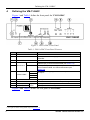
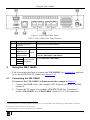
Figure 2: VM-114H4C Rear Panel
Table 2: VM-114H4C Rear Panel Features
#
11
12
13
14
15
Feature
RS-232 9-pin D-sub (F)
Connector
12V DC Power Connector
IN1 (HDMI) Input
HDMI Connector
Inputs
IN2 (CAT5) Input
RJ-45 Connector
OUT 1
OUT 2
TP RJ-45 Output
Connectors
OUT 3
Function
Connect to a PC or remote controller
Connect to the +12V DC power adapter, center pin positive
Connect to an HDMI source
Connect to a TP source (for example, PT-571 HDMI Line
Transmitter, VM-114H2C or VM-114H4C)
Connect to the TP acceptors (for example, PT-572+ HDMI Line
Receiver, VM-114H or VM-114H4C)
OUT 4
5
Using the VM-114H4C
This section describes how to connect the VM-114H4C (see Section 5.1) and how
to use the EDID SELECT button (see Section 5.2).
5.1
Connecting the VM-114H4C
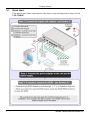
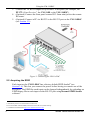
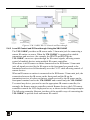
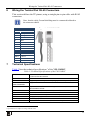
To connect 1 the VM-114H4C as illustrated in the example in Figure 3:
1. Connect the HDMI source (for example, a DVD player) to the IN 1 (HDMI)
connector.
2. Connect the TP source (for example, a PT-571 HDMI Line Transmitter 2,
another VM-114H2C or a VM-1114H4C) to the IN 2 (CAT5) connector.
1 Switch off the power on each device before connecting it to your VM-114H4C. After connecting your VM-114H4C, switch on its
power and then switch on the power on each device
2 Another example is the PT-573 Twisted Pair Line Transmitter
7