1
GB
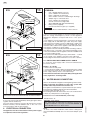
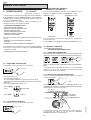
• Uniform colour and perfected evenness in the degree of
doneness.
• Fast maturing process - time saving and use of fresh cut.
• Significant less cooking shrinkage, 5-8 % (depend on food
quality and selected core temperature).
• Remarkable gain of portions for selling.
• Dramatic energy-saving due to the intelligent EFS - LTC
program.
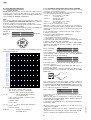
4.4.7
DELETING A RECIPE OR PROGRAM FROM THE
MEMORY
1) Press button I to switch on the oven.
2) Press button P .
3) Select the recipe or the program to be deleted.
4) Press button P and select the CLEAR RECIPE option.
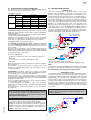
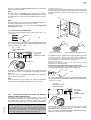
CLEANING SYSTEM
This system executes an automatic oven chamber cleaning
procedure using suitable detergents according to the level of soil
detected; the program has four different cleaning cycles.
CLEAN 4 X-Strong (super intensive)
For heavy grime resulting from very high fat foods (e.g. roasted
chicken, sausages) also with dry residues (baked-on food).
F00...---> F19... (recipes)
These are the 20 pre-stored recipes of the main international
dishes.
For further information see the relative recipe book.
Proceed as follows to use preset programs:
Note 1:
Before cleaning the compartment with the CLEANING SYSTEM
remove the grease filter (if present).
The CLEANING SYSTEM cycle will commence when the temperature automatically reaches 70°C in the oven chamber.
Before carrying out a CLEANING SYSTEM cycle make sure the
containers (located under the control panel) are supplied with
cleaning products of the required type: refer first to section 7.
CARE AND MAINTENANCE.
P : C LEA R
RE C I P E
RECIPE NAME
01
selected option
P : CO NF I RM
CO O K I NG P O T A T O E S
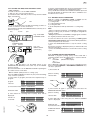
_******* factory-set oven password
(8 characters formed of 8 empty spaces)
2) Press P (oven unlocked) and select CHANGE PASSWORD
with the arrow button “v” (down).
3) Press P, the item New PASSWORD appears, enter the password
(alphanumeric 8 characters or less) like entering the name of a
recipe (see par. 4.4.4 STORING RECIPES or PROGRAMMES).
4) Press P, the item CONFIRM PASSWORD requests confirmation
of the password entered by typing it again, then press P. After a
short beep signalling successful operation, or a long beep if failed,
the oven goes to the initial switching on status and is thus
unlocked.
To lock it again, just switch it off.
To change a password repeat the previous operations from point 2).
To quit the menu, if the PASSWORD is not known, switch the oven
off and then on again.
Warning:
In case of complete emptying of the detergent and/or rinse aid
containers or emptying of their supply tubes, the CLEANING
SYSTEM cycle must be started after firstly doing the CLEAN 1
cycle, then the same or other cycles. This operation allows the
pipes to be refilled with the appropriate liquids and the cleaning
cycles to be done correctly.
If the CLEANING SYSTEM is not used for long periods, it is
necessary to do a cleaning cycle (CLEAN 1) with water instead
of detergent and rinse aid before and afterwards, to flush the
respective supply pumps.
Note 2:
When setting a cooking cycle, press the P button twice and select
the menu item FIND BY NUMBER OR FIND BY NAME, or press
P, holding it down for a few seconds to exit setting and proceed
as follows.
5. INFORMATION AND ERROR CODES
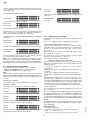
1) Press button P, program A0 flashes
selected
selected option
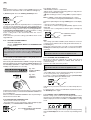
4.4.8 PASSWORD
The PASSWORD function must be enabled by changing
several parameters; for that purpose request the assistance
of our After-Sales Service.
The PASSWORD allows the following functions to be locked in
order to limit oven use (one or more by request):
- Disables the temporary modification of automatic programmes,
including the special PreHeat, Low Temperature cycles and
Recipes.
- Manual cooking cycles are made unusable.
- Prevents final modification, saving or cancellation of the automatic
programmes.
Once the PASSWORD is enabled, the oven is locked (after
switching on) against the use of the above functions; a password
must be entered to unlock it.
To enter a password:
1) press button twice P and select the item PASSWORD, press
P again, and the display shows:
CLEAN 3 Strong (intensive)
If the oven chamber is very dirty due to cooking of high fat foods
(e.g. roasted chicken, sausages).
Low
CO O K I NG P O T A T O E S
6) Press button P again and hold it down for a few seconds to exit
the programs.
CLEAN 2 Medium (normal)
If the oven chamber is only moderately soiled and after cooking
fatty foods.
AO
01
5) Press button P to remove the recipe or program from the
memory.
CLEAN 1 Soft (light)
For fresh soil deriving from low fat cooking (e.g. after a STEAM
cooking cycle)
program
RECIPE NAME
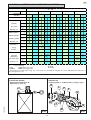
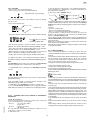
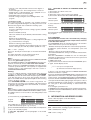
These codes may appear on the time display.
Temperature
INFORMATION codes
P: MENU
5938 034 01
Codes indicating a value, function, or state.
the wording A0 Low Temperature appears on the DISPLAY.
2) Select the desired program or go to step 3).
3) Press the START/STOP button to start the A0 Low Temperature
cycle (or the selected program).
Cln - CLEANING SYSTEM program switched on.
Clnt - Semiautomatic cleaning program switched on.
cont - Unlimited time setting.
To exit, edit, skip phase, see the paragraphs of the normal
programs.
cool - Oven cooling on.
51