1
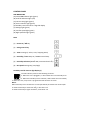
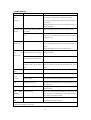
CONTROL PANEL
LED INDICATORS
(A) Power ON indicator light (green)
(B) Tank full indicator light (red)
(C) Louvres swing light (green)
(D) Timer indicator light (green)
(E) Humidity Level and Timer 2 digit led display
(F) Settings light (green)
(G) Low fan speed light (green)
(H) High speed fan light (green)
KEYS
(1) Power On / Off Key
(2) Swing control key
(3) Timer settings (1-24 hrs, start/ stopping timer)
(4) Humidity / Timer Step UP / DOWN Control Keys
(5) Humidity Selection (40-80% RH, incremental with 5%)
(6) Fan Speed settings Key (Low/High)
Humidity Level & Timer 2 digit display (E)
The led indicator performs the following functions:
1. When the unit is plugged in, it will indicate the room humidity level
2. When the humidity level is selected, it will indicate the set humidity
3. When the start / stop timer is programmed will show the set timer
Notes:
When humidity level is outside the normal operational parameters will show LO/HI
If ambient humidity is lower than 35%, it will show “LO”
If ambient humidity is higher than 95%, it will show “HI”
6