1
Projector
ED-X31EP/ED-X33EP
User's Manual (detailed)
Technical
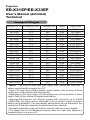
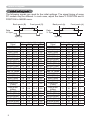
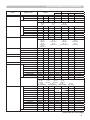
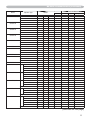
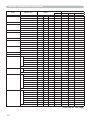
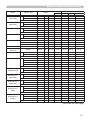
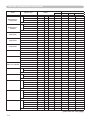
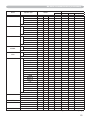
Example of PC signal
Resolution (H x V) H. frequency (kHz) V. frequency (Hz)
720 x 400
640 x 480
640 x 480
640 x 480
640 x 480
800 x 600
800 x 600
800 x 600
800 x 600
800 x 600
832 x 624
1024 x 768
1024 x 768
1024 x 768
1024 x 768
1152 x 864
1280 x 960
1280 x 1024
1280 x 1024
1280 x 1024
1600 x 1200
1280 x 768
1400 x 1050
37.9
31.5
37.9
37.5
43.3
35.2
37.9
48.1
46.9
53.7
49.7
48.4
56.5
60.0
68.7
67.5
60.0
64.0
80.0
91.1
75.0
47.7
65.2
85.0
59.9
72.8
75.0
85.0
56.3
60.3
72.2
75.0
85.1
74.5
60.0
70.1
75.0
85.0
75.0
60.0
60.0
75.0
85.0
60.0
60.0
60.0
Rating
Signal mode
VESA
VESA
VESA
VESA
VESA
VESA
VESA
VESA
VESA
VESA
TEXT
VGA (60Hz)
VGA (72Hz)
VGA (75Hz)
VGA (85Hz)
SVGA (56Hz)
SVGA (60Hz)
SVGA (72Hz)
SVGA (75Hz)
SVGA (85Hz)
Mac 16” mode
XGA (60Hz)
XGA (70Hz)
XGA (75Hz)
XGA (85Hz)
1152 x 864 (75Hz)
1280 x 960 (60Hz)
SXGA (60Hz)
SXGA (75Hz)
SXGA (85Hz)
UXGA (60Hz)
W-XGA (60Hz)
SXGA+ (60Hz)
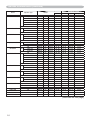
VESA
VESA
VESA
VESA
VESA
VESA
VESA
VESA
VESA
VESA
VESA
VESA
NOTE • Be sure to check jack type, signal level, timing and resolution
before connecting this projector to a PC.
• Some PCs may have multiple display screen modes. Use of some of these
modes will not be possible with this projector.
• Depending on the input signal, full-size display may not be possible in some
cases. Refer to the number of display pixels above.
• Although the projector can display signals with resolution up to UXGA
(1600x1200), the signal will be converted to the projector’s panel resolution
before being displayed. The best display performance will be achieved if the
resolutions of the input signal and projector panel are identical.
• Automatic adjustment may not function correctly with some input signals.
• The image may not be displayed correctly when the input sync signal is a
composite sync or a sync on G.
1