1
.'i
NOW
Chapter 4
System Architecture
In the previous chapter we discussed the various hardware components of the Remote
Microscope.
This chapter gives an overview of the software system architecture.
Chapters 5, 6, and 7 will describe in more detail the exact implementation of each
software component. The purpose of this chapter is to familiarize the reader with the
client and server applications, as well as the underlying client/server communication
protocol.
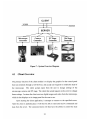
The software architecture consists of two main components: a server and client.
The server and client communicate via TCP/IP socket interfaces, using a simple but welldefined message protocol that can send or receive messages from server to client and vice
versa. A third component is the hardware control. The hardware controllers are modules
that contain specific methods that communicate with the hardware to set certain settings
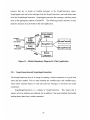
and to get the hardware status. Figure 7 shows how the software components interact in
our remote microscope system.
21