1
The Quick Instruction of Cinegears Espresso
Digital Wireless Finger Wheel Controller
V1.0
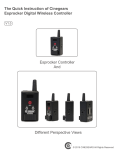
Espress controller
And
Full size Focus Knob
© 2015 CINEGEARS All Rights Reserved
Espresso
Turn On/Off Espresso Controller
Hold the (REC) button for three seconds to turn the espresso controller on/off.
Synchronize Espresso Controller and Motor
Hold the button on the motor for three seconds then hold all three buttons on the
espresso controller for three seconds.
Automatic Lens Calibration
Hold the (REC) and (A) button for three seconds.
Manuel Lens Calibration
Hold the (REC) and (B) button for three seconds. Press the (A) button to rotate the
lens clockwise, then press the (A) button again to stop the rotation and press the
(REC) button to set the start point. Press the (B) button to rotate counter clockwise
and press the (B) button again to stop the rotation, then press the (REC) button
to choose the end point.
Setting up Two Preset points
Rotate the finger wheel on your espresso controller to a lens focus distance point,
then press and hold the (A) button for three seconds to record that point. Then
move on to the next lens focus distance point, press and hold the (B) button for
three seconds to record your second lens focus distance point.
Setting up Preset
Hold the (A) and (B) button for three seconds to get the accessibility to the espresso
function manual. F01 is the motor rotating speed option. F03 is the manual lens
calibration option. F05 is the recalibrating focus controller option.
7 Recalibrating Focus Controller
After you get to your espresso function manual, go to the F05 function. Rotate your
espresso finger wheel to the beginning point then press the (REC) button. Rotate
your espresso finger wheel again to a distance that you want then press the (REC)
button again. This sets up your full camera lens traveling distance with your espresso
finger wheel rotating distance that you have just set.
© 2015 CINEGEARS All Rights Reserved
Espresso and Accessories
Espresso Wireless Finger Wheel Controller
With our latest Wireless Espresso Finger Wheel Controller, you can deliver a signal
from up to 100 meters wirelessly. For jib, Steadicam, or MoVI shots, the Wireless
Espresso Controller allows focus pullers to stand farther away from camera without
compromising precision. Set up to two focus presets with a single press of a button,
same as the integrated record button. Instead of using a follow focus with limited
lens control and mobility, the Cinegears Wireless Espresso Controller let you control
focus, iris, or zoom wirelessly – all from one device.
Side Finger Bracket
The CINEGEARS Espresso Wireless Controller Finger Bracket is an ALL NEW
accessory for the Espresso Controller. It mounts easily to side, either horizontally
or vertically. You can use a magic arm or mount it directly to your rig. Now you can
control the action with nothing but your finger tip
Back Velcro
The Espresso Back Velcro is a piece of magic sticker that allows the Espresso
Controller attach to the Rinon Handle or different camera gears.
Espresso Indicator Plate (optional)
The Espresso Indicator Plate is made by the CNC aluminum machine which brings
the best quality to itself. It uses as a measurement tool for the Espresso’s finger
wheel rotation
Full-size Focus Knob (optional)
The hard anodized Full-size Foucs Knob is a piece of pulastic with a high quality.
It can be attached under the Espresso Controller and easily make the Espresso
Controller as a full-sized controller. It can be customized with different camera lens
by making marks on it and helps you controll your camera lens better.
© 2015 CINEGEARS All Rights Reserved
Specifications
Espresso Controller
- Small, Light, Durable finger wheel
- Full sized wheel
- LED screen to show focus depth
- Set up to two focus presets
- Remote REC trigger
- 100 Meter Wireless control Range
- Mountable Side bracket
- Adjustable finger wheel
- USB charger 8 Hour internal battery
- Compact design
Introduction
It is a smallest wireless solution for solo camera operation. The unit sports
an REC trigger, a small LED screen, a focus wheel, and the ability to store up to
two focus presets.
With our latest Wireless Espresso Controller, you can deliver a reliable signal
from up to 100 meters away. It also comes with the detachable larger follow focus
wheel. It allows users to control lens focus and camera REC start/stop from
finger tip, making it perfect for jib, Steadicam, or MoVI shots.
The build in Panasonic rechargeable batter provides up to 8 working hours power.
15 digital speed mood for smooth transition from 2 focus preset.
You won’t find anything more compact or functional.
Pick up this ultra durable unit from the store.
© 2015 CINEGEARS All Rights Reserved
CINEGEARS Espresso Digital Wireless Finger Wheel
Controller KIT User Manual
V1.0
© 2015 CINEGEARS All Rights Reserved
Espresso Full Instruction
1. Turn On/Off Espresso Controller
Hold the (REC) button for three seconds to turn the espresso controller on/off.
Hold the (REC) button on your espresso controller for three seconds to turn
it on. When your espresso controller is on, hold the (REC) button for three
seconds to turn it off. The number that shows up on your espresso controller
when you turn it on is the espresso controller’s battery percentage.
2. Synchronize Espresso Controller and Motor
Hold the button on the motor for three seconds then hold all three buttons on
the espresso controller for three seconds.
Hold the button on your motor that flashes blue for three seconds, when the
button’s light turns green, press and hold all three buttons, (REC), (A) and (B) on
your espresso controller for three seconds. In this way, it synchronizes both the
espresso controller and motor together.
3. Automatic Lens Calibration
Hold the (REC) and (A) button for three seconds.
After your espresso controller and motor are synchronized, press and hold
(REC) and (A) button on your espresso controller at the same time for three
seconds, this activates the automatic lens calibration. This option is for the
camera lens that has the hard stops. For the camera lens that does not have
the hard stops, read the following manual lens calibration below.
4. Manual Lens Calibration
Hold the (REC) and (B) button for three seconds. Press the (A) button to rotate
the lens clockwise, then press the (A) button again to stop the rotation and press
the (REC) button to set the start point. Press the (B) button to rotate counter
clockwise and press the (B) button again to stop the rotation, then press the
(REC) button to choose the end point.
After your espresso controller and motor are synchronized, press and hold
the (REC) and (B) button on your espresso controller at the same time for three
seconds until S-1 flashes. Then press and hold the (A) button for three seconds
until the gear rotates. When your camera lens reaches the minimum focus
distance, press on the (A) button again which makes the gear stop rotating.
Then press the (REC) button to set your camera minimum focus distance
point. After you set the minimum focus distance point, S-2 should be flashing.
Then press and hold the (B) button for three seconds, the gear will rotate to the
opposite direction. When it reaches your camera’s maximum focus distance point,
you have to press the (B) button again to stop the rotation of the gear. Then
press the (REC) button to set the camera’s maximum focus distance. Remember,
you can always press on the (A) button or the (B) button for the micro adjustments
when it passes the camera’s focus distance.
© 2015 CINEGEARS All Rights Reserved
Setting up Two Preset points
Rotate the finger wheel on your espresso controller to a lens focus distance
point, then press and hold the (A) button for three seconds to record that point.
Then move on to the next lens focus distance point, press and hold the (B)
button for three seconds to record your second lens focus distance point.
Setting up Preset
Hold the (A) and (B) button for three seconds to get the accessibility to the
espresso function manual. F01 is the motor rotating speed option. F03 is the
manual lens calibration option. F05 is the recalibrating focus controller option.
When you press and hold the (A) and (B) button on your espresso controller for
three seconds, this gives you the accessibility to your espresso controller’s
function manual. To enter each function you can just simply press the (REC)
button. The F01 function is the speed control which makes the gear rotate on a
different range of speed. Press on the (A) or (B) button to change the number,
the larger the number goes, the faster the gear rotates. After you choose a speed
number, press the (REC) button again to let your espresso controller to record
that number.
7 Recalibrating Focus Controller
After you get to your espresso function manual, go to the F05 function. Rotate
your espresso finger wheel to the beginning point then press the (REC) button.
Rotate your espresso finger wheel again to a distance that you want then press
the (REC) button again.
First, go to your espresso function manual by pressing and holding the (A) and
(B) button for three seconds at the same time. Then, go to the F05 function by
pressing the (B) button for four times and press the (REC) button to enter that
function. Rotate your espresso finger wheel to the beginning point and press
the (REC) button to record that rotation angle. Then, rotate your espresso finger
wheel again to your designated rotation angle, and press the (REC) button again
to record your second rotation angle. This sets up your full camera lens traveling
distance to the espresso finger wheel rotation angle you have set. In other words,
the rotating distance of your camera lens will lengthen while the distance of the
espresso controller finger wheel will shorten.
© 2015 CINEGEARS All Rights Reserved
Disclaimers
Congratulations on purchasing your new CINEGEARS product. Please read this manual carefully
before using the product. By using this product, you hereby agree to this disclaimer and signify that
you have read it in full. You agree that you are responsible for your own conduct and any content
created while using CINEGEARS products, and for any consequence thereof. You agree to use
this product only for purposes that are proper and in accordance with local regulations, terms and
any applicable polices and guidelines.
By reading this disclaimer, you also agree:
1, Any part of this disclaimer is subject to change without prior notice. Refer to
WWW.CINGEARS.COM for the latest version.
2, CINEGEARS reserves the right of final interpretation of this disclaimer.
CINEGEARS and the Follow Focus Kit are registered trademarks of Llittlecent International
Trading Corp. as names of product, brand, etc., appearing in this manual are trademarks or
registered trademarks of their respective owner companies. This product and manual are
copyrighted by CINEGEAS with all rights reserved. No part of this product or manual shall be
reproduced in any form without the prior written consent or authorization of CINEGEARS.
CINEGEARS
Cinegears is an industry leading company that designs and manufactures digital wireless follow
focus systems, lens control systems, camera motion control systems and accessories for film and
broadcast industry. As a big believer in the power of creativity and ideas, we designed the wireless
motor drive that integrated a built in wireless transmitter, and the wireless finger wheel controller.
The Cinegears wireless lens control system has international CE certification on all its equipment.
CINEGEARS lens control system can achieve the finest minutia of focus pulling, with extreme
accuracy and control. It provides smooth focus control for shooting 4k footage at an affordable price.
We have been doing this for three years and our equipment has been used on hundreds of movies.
Filmmakers of all experience levels will benefit greatly from a simple, professional, and well rounded
follow focus system. The Single Axis, and Multi Axis models provide greater ease, with less crew,
and less wires. You can achieve professional film quality scenes on a shoestring budget. Camera
operators, assistant camera operators, and jib operators can use the wireless follow focus to attain
that perfect shot.
ONLINE SUPPORT
Please CINEGEARS.COM to check the latest version
http://cinegears.com/?page_id=1084
© 2015 CINEGEARS All Rights Reserved