1
Quick Start
User's manual
INTRODUCTION
General
Information
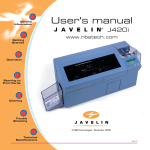
Thank you for choosing the Javelin J320i plastic card printer.
These printers produce cards ideal for personalised identification, access control,
visitor, membership, promotion and luggage card, badges and tags.
Getting
Started
This manual guides you to an efficient start up and operation of your
new card printer.
J320i PRINTER MODELS
Operation
Starting to
Print Cards
Here is a quick review of the Javelin card printer series numbering and lettering
system to help you.
The Javelin J320i plastic card printer employs dye sublimation and resin thermal
transfer technologies. Model numbers include identifiers that specify options are
shown using the following lettering conventions:
J320i
(X) (X) - nnnnnn
Part Number
Cleaning
M : Magnetic
Encoding
E : Smart Card
Trouble
Shooting
i:
}
Optional
Intelligent printer.
Use only TrueColours colour
ribbons from Javelin Dealers
TM
This information can be found on the printer serial number panel and is also shown
on the test card.
Technical
Specifications
i
GENERAL INFORMATION
Rev. 1.1